


This is engineering guidance, not legal advice. Confirm specifics with qualified counsel.
Why this matters
If you are deciding whether to build a telemedicine platform or buy one, reliability is the feature you cannot see in a demo and cannot skip in production. Demos run on office Wi-Fi; real consults run on a grandparent's DSL line, a parking-lot cellular signal, and a hospital network that blocks half the internet. The engineering that keeps a call alive across those conditions is invisible when it works and catastrophic when it is missing — a frozen consult during a medication review or a tele-stroke assessment is a safety event, not an annoyance. This article is written for the founder, product manager, or clinical IT lead who needs to ask a vendor or an engineer the right questions: What happens when the patient walks out of Wi-Fi range? How fast does the call come back? What does the patient see while it recovers? If the answer is a shrug, you have found the gap.
Reliability is a HIPAA requirement, not just good UX
Most teams treat call reliability as a quality-of-experience problem — keep patients happy, reduce support tickets. That is true, but it undersells the stakes. The HIPAA Security Rule defines its goal as protecting the confidentiality, integrity, and availability of electronic protected health information (45 CFR §164.306(a)(1)). Protected Health Information, or PHI, is any health data tied to an identifiable person — and a live consult is PHI in motion. "Availability" means the data and the systems that carry it are accessible when authorized people need them. A platform that drops calls under normal network stress is, in a real sense, failing an availability obligation, not just a UX one.
The rule reinforces this with the contingency-plan standard (45 CFR §164.308(a)(7)), which requires procedures for responding to events that damage systems containing ePHI, and an emergency-mode operation plan so critical processes keep running. The proposed 2026 HIPAA Security Rule update (HHS NPRM, RIN 0945-AA22, published January 2025 and still proposed as of June 2026) would tighten several of these availability and contingency expectations and make more of them mandatory rather than "addressable." Treat reliability engineering as part of your compliance posture: when an auditor asks how your system maintains availability of ePHI during a network failure, "ICE restart with an audio-only and phone fallback" is a real answer.
Here is the reframing to carry through the rest of this article: a reconnection feature is an availability control. That is why it earns engineering budget.
Why a network fails in the middle of a consult
Networks do not fail in one way, and the recovery you build depends on which failure you are facing. Four patterns cover almost everything you will see in telemedicine.
The first is the NAT timeout. Network Address Translation, or NAT, is the trick your home router uses to share one public internet address across many devices; it keeps a temporary mapping of which internal device owns which connection. Those mappings expire after a period of silence. On a quiet consult — the clinician reading a chart, nobody speaking — the mapping can lapse and the media path silently dies even though both sides still have working internet.
The second is the network handover: the patient physically moves and their device swaps networks. They walk from the waiting-room Wi-Fi to the parking lot and the phone jumps to cellular, or they leave the house and move from home Wi-Fi to 5G. The device gets a brand-new IP address, and every existing media path, which was pinned to the old address, is instantly invalid.
The third is congestion and packet loss: the network still works but cannot carry the full stream. A sibling starts a 4K download, the cell tower gets crowded, the DSL line degrades in the rain. Here the call should not drop at all — it should shed quality. We cover this in the degradation section.
The fourth is the hard drop: the device loses all connectivity — a tunnel, an elevator, a dead Wi-Fi access point, a laptop lid closing to sleep. There is nothing to recover to until connectivity returns, so the job is to wait gracefully and rejoin cleanly rather than tear everything down.
A reliable platform handles all four. The mistake is building for only the demo case — a clean network that never changes — and discovering the other three in production support tickets.
The connection state machine: knowing you are in trouble
Before you can recover a call, your code has to notice it is failing. WebRTC — the browser technology that carries the live video, short for Web Real-Time Communication — exposes the health of a connection through two related signals on the RTCPeerConnection object: iceConnectionState and the broader connectionState. Watching these is how your application knows what is happening on the wire.
The states that matter for reliability are a small set. connected and completed mean media is flowing — all is well. disconnected means the connection was interrupted but may recover on its own; a brief blip, a NAT mapping that might refresh, a momentary loss. failed means the connection is broken and will not recover without action — this is your cue to intervene. closed means the connection is gone for good.
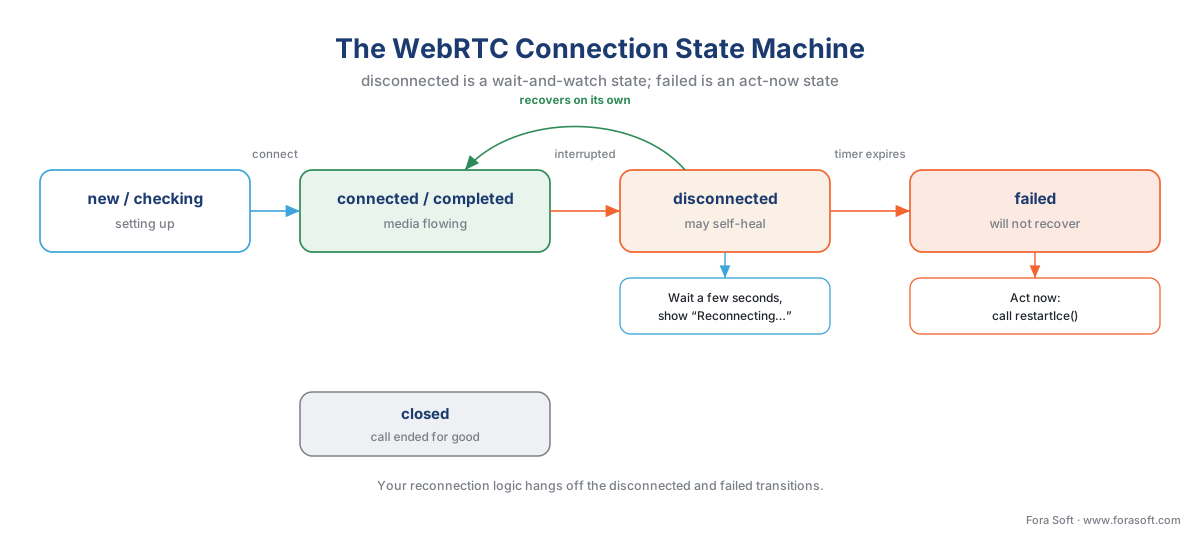 Figure 1. The connection state machine.
 disconnected is a "wait and watch" state; failed is a "do something now" state. Your reconnection logic hangs off these transitions.
The practical pattern is a two-speed response. When the state goes to disconnected, do not panic — start a short timer (a few seconds) and show the patient a quiet "Reconnecting…" indicator. Many disconnected events clear themselves before the timer fires. If the state reaches failed, or if the disconnected timer expires without recovery, trigger an active repair. The reason for the two speeds is that recovery is not free — it costs signaling traffic and a moment of disruption — so you spend it only when waiting has not worked. Some teams deliberately start the repair on disconnected instead of waiting for failed, trading a little extra signaling for a faster comeback; in clinical use, where a frozen call is alarming, leaning toward faster recovery is usually right.
// Two-speed recovery: watch, then act.
let recoveryTimer = null;

pc.addEventListener("connectionstatechange", () => {
  if (pc.connectionState === "disconnected") {
    showPatientNotice("Reconnecting…");
    recoveryTimer = setTimeout(() => attemptRepair(pc), 3000);
  }
  if (pc.connectionState === "connected") {
    clearTimeout(recoveryTimer);
    hidePatientNotice();
  }
  if (pc.connectionState === "failed") {
    clearTimeout(recoveryTimer);
    attemptRepair(pc); // act immediately
  }
});
One rule that saves you from a class of bugs: do not log the raw connection details, IP addresses, or any session metadata that can be tied to a patient into an unprotected log store. Reconnection events are tempting to log verbosely, but those logs can become PHI. Keep them inside the compliance boundary, access-controlled and audit-logged, the same as any other patient data.
ICE restart: the core recovery move
When a media path dies, the fix is almost never to throw away the whole call and start over. It is to find a new path and slide the call onto it. That move is called an ICE restart, and it is the single most important reliability mechanism in clinical WebRTC.
A short definition first. ICE — Interactive Connectivity Establishment — is the procedure WebRTC uses at the start of a call to discover every possible route between the two devices (direct, through a home router, or relayed through a server) and pick one that works. An ICE restart simply runs that discovery again, mid-call, to find a fresh route after the old one broke. It is defined in the IETF standard RFC 8445 and exposed in the browser as a single method, RTCPeerConnection.restartIce(), available in every major browser since April 2021.
Two properties make ICE restart the right tool. First, existing media keeps flowing during the restart — the browser holds the old path open until the new one is ready, then switches, so the patient experiences a short freeze rather than a dropped call. Second, it is cheap: an ICE restart replaces only the network credentials and candidate routes. The encryption keys (the DTLS-SRTP keys that secure the media) and the negotiated codecs are preserved, so there is no full security handshake and no renegotiation of what the call contains. That is why it recovers in a second or two instead of the several seconds a full rebuild takes.
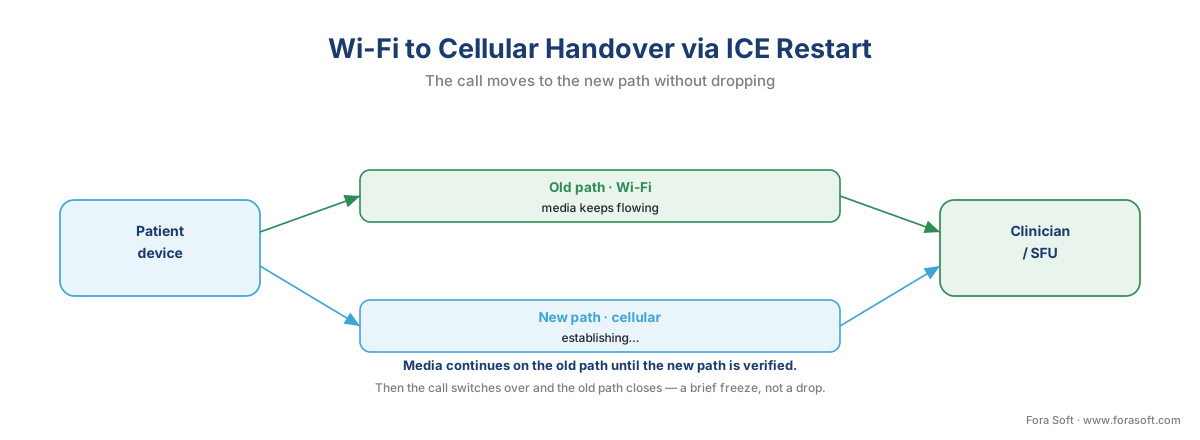 Figure 2. A Wi-Fi-to-cellular handover handled by ICE restart. The old path carries media until the new path is verified, then the call moves over and the old path closes. The patient sees a brief freeze, not a dropped consult.
The code is short. The hard part is wiring it to the right trigger and making sure the other side cooperates.
function attemptRepair(pc) {
  // restartIce() asks both ends to gather fresh network routes.
  // The next offer your signaling sends will carry the restart.
  pc.restartIce();
  // Your existing negotiationneeded handler then sends a new offer
  // over the signaling channel, completing the restart.
}
Calling restartIce() does not by itself talk to the other device — it flags the connection so the next offer (sent over your own signaling channel) carries fresh ICE credentials. So an ICE restart still depends on your signaling path being alive. If the signaling channel is also down — for example, your WebSocket dropped at the same time — you must reconnect signaling first, then restart ICE. We return to signaling reliability below.
The media-server caveat that trips teams up. In a one-to-one call the two browsers restart between themselves. But most clinical platforms route media through a server — an SFU, or Selective Forwarding Unit, the media server that fans one participant's stream out to others and is required once you have three participants or need recording. For ICE restart to work through an SFU, the SFU itself must support it. Some open-source and VoIP-oriented media servers handle ICE restart well; others, especially SIP-focused ones, do not. If you are buying a video API or choosing an SFU, "does the server support ICE restart for mid-call recovery?" is a procurement question, not a footnote. We cover the protocol internals of ICE, STUN, and TURN in the Video Streaming section rather than re-deriving them here; see NAT, STUN, TURN, and ICE explained.
The escalation ladder: from ICE restart to full rebuild
ICE restart fixes most path failures, but not all. When it does not, you escalate — each step slower and more disruptive than the last, so you only climb as far as you must.
The first rung is the ICE restart itself: a second or two, media preserved, the patient barely notices. If that fails — say the device has no working network at all yet — the second rung is to rebuild the RTCPeerConnection: tear down the dead connection object and create a fresh one. This is slower (a new security handshake, a new negotiation) and the patient sees a longer gap, but it recovers from states an ICE restart cannot. The third rung is a full client re-join: the patient's app reconnects its signaling, rejoins the consult room, and re-establishes media from scratch — effectively the join flow again, but automatic and with the clinical session state restored so nobody has to re-enter anything. The last rung, when the device simply has no connectivity, is to wait and resume: hold the session open server-side, show an honest "Waiting to reconnect…" message, and rejoin the moment connectivity returns.
| Recovery step | Typical recovery time | Media continuity | When to use |
|---|---|---|---|
ICE restart (restartIce()) |
~1–2 s | Preserved during switch | Path changed or died; signaling still alive |
Rebuild RTCPeerConnection |
~3–6 s | Brief blackout | ICE restart failed; connection object stuck |
| Full client re-join | ~5–10 s | Blackout, state restored | Signaling dropped; app needs to rejoin room |
| Wait and resume | Until network returns | Paused | Hard drop — no connectivity to recover to |
Table 1. The recovery ladder. Always start at the cheapest rung that can fix the failure; escalate only when it does not.
The arithmetic behind the ladder is worth saying out loud, because it justifies the engineering. Suppose your platform runs 1,000 consults a day and, without recovery logic, 4% of them hit a network event that drops the call — that is 40 ruined consults a day, 40 clinicians waiting and 40 patients re-booking. Now suppose ICE restart silently recovers 80% of those: 40 × 0.80 = 32 calls saved, leaving 8. Add the rebuild and re-join rungs and you recover most of the rest. The difference between "drops the call" and "freezes for two seconds" is the difference between a support ticket and a non-event, multiplied by every consult you will ever run.
Graceful degradation: bend before you break
A dropped path is one failure mode. The more common one is subtler: the network still works but cannot carry the full stream. Here the goal is not to recover a dead call but to keep a live one from dying — to degrade gracefully, shedding quality in a planned order instead of stalling or disconnecting.
The principle clinicians and patients both feel is simple: audio matters more than video. A consult can continue with frozen or blurry video as long as the doctor and patient can hear each other clearly; it cannot continue if the audio breaks up. So every degradation decision protects audio first and spends video quality to do it.
 Figure 3. The degradation ladder. As available bandwidth falls, the call sheds video quality first, then video layers, then video itself — always protecting audio. Below WebRTC's floor, it falls back to a phone line rather than failing.
The ladder has clear rungs, driven by the platform's continuous estimate of available bandwidth. WebRTC measures this for you through congestion-control feedback (the mechanisms are known by the acronyms TWCC and REMB; the Video Streaming section covers how they work — see WebRTC bandwidth estimation). As the estimate drops:
First, reduce video resolution and frame rate. The encoder sends a smaller, smoother picture. You can bias this with the degradationPreference setting — maintain-framerate keeps motion smooth at lower resolution (good for a moving patient), maintain-resolution keeps detail at a lower frame rate (good for a skin lesion or a wound). Choosing per clinical context is a real product decision, covered further in the clinical "good enough" quality bar.
Second, on a media server, drop the extra video layers. Modern clinical video sends multiple quality versions of each stream at once (simulcast) or a single layered stream (SVC, Scalable Video Coding); when a receiver's network weakens, the SFU simply forwards a lower layer to that one participant without touching anyone else's quality. Cross-link to simulcast and SVC for the internals.
Third, pause video entirely and keep audio. When even a small video stream threatens the audio, stop sending video and tell the patient plainly ("Your video is paused to keep the audio clear"). The consult continues. Good audio engineering — echo cancellation, noise suppression, a jitter buffer that smooths out arrival timing — is what makes audio-only survivable on a bad line; that work lives in the Audio for Video section.
Fourth, when WebRTC cannot hold even audio, fall back to a phone line. This is the bottom of the ladder, and it deserves its own section.
The phone fallback: when the internet is not enough
Some patients, on some networks, cannot sustain any internet call — rural cellular dead zones, congested public Wi-Fi, an old device. A clinical platform that gives up on them is leaving care on the table. The last resort is the oldest network there is: the telephone.
There are two ways to reach it. The simpler is audio-only over the existing connection — already the third rung of the degradation ladder. The stronger fallback is a true PSTN dial-in: the platform bridges the consult to the public switched telephone network (the regular phone system) through a telephony gateway, so the patient can join by dialing a number from any phone, no app and no data connection required. Architecturally, a media-server gateway translates between the WebRTC call and a standard phone call, and the clinician stays in the same web consult.
This is not only an engineering nicety; it is reimbursable care. Under current US Medicare policy, telehealth flexibilities — including delivery over audio-only communication for non-behavioral services — are extended through December 31, 2027, and audio-only delivery for behavioral and mental-health services is permanent (HHS/HRSA telehealth policy, last updated February 2026; CY2026 Medicare Physician Fee Schedule). In plain terms: a phone-based consult is not a degraded second-class event your platform should hide — for many visit types it is a billable, policy-supported mode of care. Reimbursement and licensing rules are jurisdictional and change yearly, so confirm the current year's rules and your states; we cover the landscape in reimbursement rules that shape the product. Design the fallback as a first-class path, not an apology.
Signaling reliability: the channel you forget
Everything above assumes one thing that is easy to forget: your signaling channel is alive. Signaling is the separate connection — usually a WebSocket — that your app uses to set up and coordinate the call: exchanging the offers and answers, carrying the ICE-restart messages, and tracking who is in the room. The media and the signaling are two different connections, and they can fail independently.
This causes a nasty failure: the same network blip that kills the media path often kills the WebSocket too. If your recovery logic calls restartIce() but the signaling channel is down, the restart offer has nowhere to go and the repair silently fails. So the correct order of operations is: reconnect signaling first, then restart ICE. Build your signaling client to reconnect automatically with exponential backoff — retry quickly at first, then back off to avoid hammering a struggling server — and to re-authenticate and rejoin the consult room on reconnect. Make the rejoin idempotent: rejoining a room the patient is already "in" should be harmless, because during a flaky reconnection your client may try more than once.
A clean session-resumption design pays off here. Keep the clinical session state — who is in the consult, what is on screen, the in-call chat — on the server, not only in the patient's browser. Then a reconnect restores the room exactly as it was, and a patient whose phone slept for thirty seconds rejoins to find the consult intact rather than gone.
A common-mistakes callout
Connection reliability is full of traps that look fine in a demo and fail in production. The ones we see most:
Tearing down the whole call on every blip. Teams catch disconnected, destroy the RTCPeerConnection, and rebuild from scratch — throwing away the preserved encryption keys and turning a two-second ICE-restart recovery into a six-second blackout. Reach for restartIce() first; rebuild only when it fails.
Treating disconnected as failed. disconnected often self-heals. Acting instantly on every disconnected event causes needless disruption. Use the two-speed timer.
Forgetting the SFU. Wiring perfect ICE restart on the client while the media server does not support it. The client tries, the server cannot follow, and recovery fails in exactly the multi-party clinical sessions that matter most. Verify server support before you ship.
No audio-only or phone fallback. Building only the happy path and offering the patient on a dead network nothing but an error. The bottom of the ladder is where you keep the hardest-to-reach patients in care.
Leaking PHI into reconnection logs. Verbose reconnection logging that records identifiers, IP addresses, or session content in an unprotected store. Those logs are PHI; keep them inside the compliance boundary.
Where Fora Soft fits in
Reliability is the requirement; the capability is hard-won. Fora Soft has built real-time video on WebRTC since the technology was new, across video conferencing, e-learning, streaming, and telemedicine, where a frozen call is a clinical event rather than a glitch. We treat reconnection, network handover, and graceful degradation as first-class engineering — wiring ICE restart to the right states, verifying media-server support, building the degradation ladder down to a phone fallback, and keeping every reconnection log inside the HIPAA boundary. When availability of patient data is both a product promise and a Security Rule obligation, the difference between a demo and a clinical product is precisely this layer.
What to read next
- WebRTC for telemedicine: why it is the default, and its clinical gotchas
- Latency, quality, and the clinical "good enough" bar
- The telemedicine waiting room: queueing, triage, and provider readiness
Call to action
- Talk to a telemedicine engineer — book a 30-minute scoping call to talk through your webrtc reconnection plan.
- See our case studies — 250+ shipped projects across video streaming, WebRTC, OTT, telemedicine, e-learning, surveillance, and AR/VR.
- Download the Telemedicine Connection-Reliability Checklist — Twenty checks across detection, ICE-restart recovery, graceful degradation, the phone fallback, session resumption, and hostile-network testing — run before launch.
References
- 45 CFR §164.306 — HIPAA Security Rule, general requirements (confidentiality, integrity, and availability of ePHI). eCFR / HHS. Current as of 2026-06-14. Tier 1. https://www.ecfr.gov/current/title-45/subtitle-A/subchapter-C/part-164/subpart-C/section-164.306
- 45 CFR §164.308(a)(7) — HIPAA Security Rule, contingency plan and emergency-mode operation. eCFR / HHS. Current as of 2026-06-14. Tier 1. https://www.ecfr.gov/current/title-45/subtitle-A/subchapter-C/part-164/subpart-C/section-164.308
- HIPAA Security Rule NPRM (90 FR 898, RIN 0945-AA22) — proposed strengthening of availability and contingency requirements. HHS, published 2025-01-06; still proposed as of 2026-06-14. Tier 1. https://www.federalregister.gov/documents/2025/01/06/2024-30983/hipaa-security-rule-to-strengthen-the-cybersecurity-of-electronic-protected-health-information
- RFC 8445 — Interactive Connectivity Establishment (ICE), incl. ICE restart. IETF, 2018. Tier 1. https://www.rfc-editor.org/rfc/rfc8445
- RFC 8656 — Traversal Using Relays around NAT (TURN), incl. TCP/TLS transports for restrictive networks. IETF, 2020. Tier 1. https://www.rfc-editor.org/rfc/rfc8656
- WebRTC: Real-Time Communication in Browsers — W3C Recommendation (
restartIce, connection states). W3C, 2025 edition, checked 2026-06-14. Tier 1. https://www.w3.org/TR/webrtc/ - RTCPeerConnection.restartIce() — MDN Web Docs ("existing media transmissions continue uninterrupted"; Baseline since April 2021). Mozilla, last modified 2024-03-25, checked 2026-06-14. Tier 6 (orientation). https://developer.mozilla.org/en-US/docs/Web/API/RTCPeerConnection/restartIce
- RTCPeerConnection: iceConnectionState / connectionState — MDN Web Docs (state semantics: disconnected vs failed). Mozilla, checked 2026-06-14. Tier 6 (orientation). https://developer.mozilla.org/en-US/docs/Web/API/RTCPeerConnection/iceConnectionState
- Telehealth policy updates — Telehealth.HHS.gov (Medicare flexibilities and audio-only delivery through 2027; behavioral audio-only permanent). HHS/HRSA, last updated 2026-02-05, checked 2026-06-14. Tier 2. https://telehealth.hhs.gov/providers/telehealth-policy/telehealth-policy-updates
- CY2026 Medicare Physician Fee Schedule Final Rule. CMS, Federal Register, 2025-11-05. Tier 1. https://www.federalregister.gov/documents/2025/11/05/2025-19787/medicare-and-medicaid-programs-cy-2026-payment-policies-under-the-physician-fee-schedule-and-other
- ICE restart in WebRTC: recovering connectivity after network changes — BlogGeek.me. Tsahi Levent-Levi, checked 2026-06-14. Tier 6 (orientation). https://bloggeek.me/webrtcglossary/ice-restart/
