


This is engineering guidance, not legal advice. Confirm specifics with qualified counsel.
Why this matters
The minutes before a video consult decide whether it happens at all. A patient who cannot find the link, cannot turn on their camera, or sits staring at a blank "waiting" screen with no idea whether anyone is coming will hang up — and that abandoned visit costs the same as a no-show. The waiting room is where a telemedicine product earns or loses the visit, where the support queue fills up or stays empty, and where the first privacy mistakes happen. This article is written for the founder, product manager, or clinical-operations lead who has to decide what the waiting room must do, what it must never do, and how much of it to build versus buy — before the first patient ever joins.
The waiting room is a subsystem, not a screen
In a physical clinic, the waiting room does a lot of invisible work. The front desk confirms who you are, checks your insurance, hands you a clipboard, watches the queue, and tells the nurse you have arrived. None of that is "a room with chairs" — the chairs are the least important part.
The telehealth waiting room inherits all of that work and adds one more job: making sure the technology will actually work before the clinician's time is spent. As the anatomy of a telemedicine platform lays out, the waiting room sits between scheduling and the live video call, and it is the first component that touches the patient in real time. Treat it as four jobs running at once.
 Figure 1. The four jobs of the waiting room. Each runs in the minutes before the call; all four must succeed for the consult to start on time.
The first job is queueing: knowing who is waiting, in what order, and for how long, and showing the patient an honest answer. The second is triage: routing each patient to the right clinician, and gathering the intake information the clinician needs before they join. The third is provider readiness: telling the clinician who is next, surfacing the intake, and handling the patient who never shows. The fourth is the pre-call tech check: confirming the camera, microphone, speaker, and network will work, so the clinician does not spend the first three minutes of a paid visit as unpaid IT support. The rest of this article takes them one at a time, starting with the rule that constrains all four.
Privacy first: the HIPAA virtual waiting room
Lead with the requirement, then the capability. The waiting room is the easiest place in a telemedicine product to leak Protected Health Information, so its privacy rules come before its features.
Two terms first, in plain language. HIPAA is the U.S. health-privacy law (the Health Insurance Portability and Accountability Act). Protected Health Information (PHI) is any health data tied to an identifiable person — and in a waiting room that includes far more than the video. A patient's name in a queue list, their reason for visit, the fact that they have a 2 p.m. appointment with a psychiatrist: each of those, attached to a person, is PHI.
For a while, the rules here were relaxed. During the COVID-19 public health emergency, the Office for Civil Rights (OCR) — the part of the U.S. Department of Health and Human Services that enforces HIPAA — used "enforcement discretion" to let providers use ordinary consumer video tools for telehealth. That relief is over. OCR published a notice in the Federal Register on April 13, 2023 ending the telehealth enforcement discretion, with a 90-day transition period that expired at 11:59 p.m. on August 9, 2023 [1]. Every telehealth waiting room built or operated today must meet the full HIPAA Privacy, Security, and Breach Notification Rules. There is no consumer-tool exception anymore.
Three consequences shape the design.
No patient may see another patient. A physical waiting room lets strangers see each other, and HIPAA tolerates that as an incidental disclosure — a minor, unavoidable exposure that happens alongside permitted care, as long as you apply reasonable safeguards and share only the minimum necessary (45 CFR §164.502(a)(1)(iii) and §164.530(c)) [3]. A virtual waiting room has no such excuse: showing patient A the name, face, or presence of patient B is an avoidable disclosure, not an incidental one. So the queue is private by construction. Each patient sees only their own status. Names, reasons for visit, and "5 people ahead of you" counts that reveal others never appear on a patient's screen.
The queue server is handling PHI. The service that stores who is waiting, why, and for whom is processing PHI, even before any video flows. If any third party runs that service for you, it is a business associate and must sign a Business Associate Agreement (BAA) — the contract in which a vendor promises to protect patient data and accepts legal liability for it. HHS guidance is explicit that a cloud or service provider handling electronic PHI is a business associate "even if the [provider] cannot view the ePHI because it is encrypted and the [provider] does not have the decryption key" [5]. Encryption does not remove the BAA requirement; it sits alongside it. The full treatment is in HIPAA in plain English for product teams.
Every admission is an access event worth logging. When a patient checks in, when staff view their intake, when a provider admits them to the call — each is an access to PHI. The HIPAA Security Rule's technical safeguards require access controls and audit controls on systems that hold electronic PHI (45 CFR §164.312(a) and (b)) [4]. The waiting room is the first place those logs begin, well before the audit logging of the call itself.
 Figure 2. The privacy boundary. Each patient sees only their own lane; the queue and intake service sits inside the HIPAA boundary and is a business associate; nothing about one patient is visible to another.
Queueing: how the line actually works
A queue is a line with rules. The simplest rule is first-come, first-served: patients are ordered by when they checked in, and the one who has waited longest is next. That is the right default for a single-purpose clinic — an urgent-care visit, a medication refill — and most patients understand it intuitively.
Clinical reality complicates it in three ways. First, appointments outrank walk-ins: a patient with a 2:00 slot should not wait behind someone who checked in early for a 2:30. Second, acuity can jump the line: a triage answer that suggests chest pain or a mental-health crisis should reorder the queue, or pull the patient out of it entirely and into an emergency path. Third, the right provider matters more than the next provider: a patient who needs a Spanish-speaking clinician, or one licensed in their state, cannot simply take whoever is free. Queueing and triage are therefore inseparable — the line order depends on the triage answers.
Underneath the patient's "please wait" screen, each patient is a small state machine — a token that moves through a fixed set of states. Modeling it explicitly is what keeps the waiting room honest about who is where.
 Figure 3. The patient state machine. Every patient occupies exactly one state; the waiting room is the system that moves them between states and times the transitions.
The states are: invited (appointment booked, link sent), checked-in (patient opened the link and confirmed identity), in queue (waiting, position known), ready (passed the tech check, provider available), in consult (admitted to the call), and the exits — no-show (never checked in by a cutoff), abandoned (checked in, then left before being seen), and rescheduled. Timing each transition is where the operational insight lives: the gap between checked-in and in consult is the patient's real wait time, and the rate of abandoned tells you when the wait got too long.
Show the patient an honest position and an honest estimate. "You are next" when three people are ahead destroys trust faster than an accurate "about 12 minutes". A defensible estimate is simple arithmetic: average consult length times the number of patients ahead, divided by the number of available providers. With an 11-minute average consult, 3 patients ahead, and 1 provider free: 11 × 3 ÷ 1 = 33 minutes. With 2 providers free: 11 × 3 ÷ 2 ≈ 17 minutes. Round up, never down, and update it as the line moves.
Triage and intake: routing to the right clinician
Triage in a waiting room means two things: gathering what the clinician needs to know, and routing the patient to the clinician who should see them. Done well, the clinician joins already knowing why the patient is there.
The U.S. government's own telehealth guidance defines tele-triage as using technology "to supplement or replace elements of the patient interaction" by "screening patients remotely to determine the patient's condition and the care needed" [6]. In product terms that is a short intake form, sometimes a chatbot, that the patient completes while waiting. Its outputs feed two systems: the clinician's pre-visit summary, and the routing logic that picks the queue and the provider.
There is a bright regulatory line to respect here, and it is the same line drawn for AI symptom intake and routing: triage may support a decision, but it must not make a diagnosis. A tool that screens and routes is decision support. A tool that tells the patient what disease they have is moving toward being a regulated medical device under the U.S. Food and Drug Administration's Software-as-a-Medical-Device framework. Keep waiting-room triage firmly on the support side: it sorts and surfaces; the clinician diagnoses.
Routing also enforces the rules from earlier articles without the patient seeing it. The state captured at check-in — which state the patient is physically in — feeds the same license-matching logic described in reimbursement and the rules that shape the product, so a patient is only ever placed in a queue for a clinician licensed to treat them where they are. Identity and consent, covered in who is in the room, are also captured here, before the call, not during it.
The pre-call tech check: the 30-second test that saves the visit
Here is the single highest-leverage feature in the whole subsystem. A short device-and-network test, run while the patient waits, catches the problems that otherwise surface in the first minutes of the consult — when fixing them wastes the clinician's paid time and frustrates a patient who is already unwell.
The browser gives you everything you need. The web standard for capturing camera and microphone, getUserMedia, both requests permission and reveals what is wrong when it fails. A companion call, enumerateDevices, lists the available cameras, microphones, and speakers so the patient can pick the right one and see a live preview and a microphone level meter before the call [8]. The mechanics of the underlying connection are covered in WebRTC for telemedicine; here the point is to run the check early and turn each failure into a plain-language fix.
The errors are predictable, and each maps to a specific message a non-technical patient can act on.
| Browser error | What actually happened | Plain-language fix to show the patient |
|---|---|---|
NotAllowedError |
The patient (or the browser) blocked camera/mic permission | "Tap the camera icon in your address bar and choose Allow, then retry" |
NotFoundError |
No camera or microphone is connected | "We can't find a camera. Check it's plugged in, or switch to a phone" |
NotReadableError |
Another app (Zoom, FaceTime) is holding the device | "Close other video apps, then retry — your camera is busy" |
OverconstrainedError |
The requested resolution isn't supported | Fall back to a lower resolution automatically; no patient action |
SecurityError / no secure context |
The page isn't served over HTTPS | A build error, not a patient error — camera capture requires HTTPS [7] |
Table 1. The common pre-call device errors and the patient-facing fix for each. Storing the raw error and showing the plain-language version is what turns a support ticket into a self-service recovery.
That last row is a standing rule, not an edge case: browsers only allow camera and microphone capture in a secure context, meaning the page must be served over HTTPS [7]. A waiting room served over plain HTTP will fail for every patient. This is a build-time guarantee, never a patient-facing message.
The network half of the test matters as much as the devices. A quick check should confirm that the relay servers a call may need — the TURN servers that forward media when a direct connection is blocked by a firewall — are reachable, and that round-trip time and packet loss are within a usable range (roughly under 150 ms and under 2–3% loss for clean audio). The full reliability story, including reconnection and fallback, is in connection reliability and the cross-section NAT, STUN, TURN, and ICE explainer. Run this 30-second loopback while the patient waits and the connection is verified before the clinician's time is on the clock.
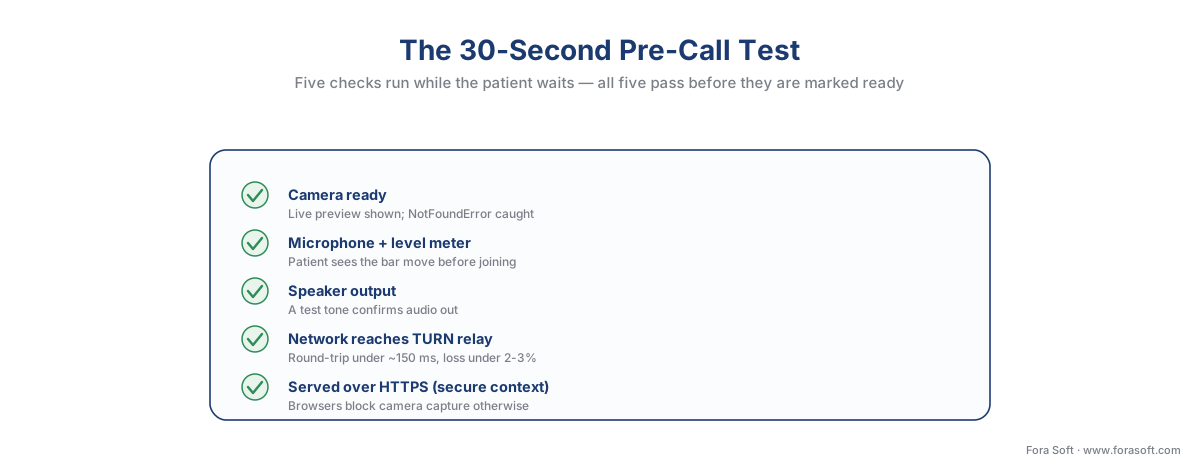 Figure 4. The 30-second pre-call test. Five checks run while the patient waits; all five must pass before the patient is marked "ready" for the provider.
Provider readiness: the other side of the room
The waiting room has two doors. Patients enter through one; clinicians work the other. A waiting room that only thinks about the patient leaves the clinician blind.
The provider's view is a live, prioritized list: who is checked in, who has passed the tech check and is "ready", who is still working through intake, and — critically — the pre-visit summary from triage so the clinician walks in informed. When a provider finishes one visit, the next "ready" patient should be one click away. Idle clinician time between visits is the most expensive waste in a telemedicine operation, and a good provider queue is what compresses it.
Provider readiness also owns the no-show cutoff. The system, not the clinician, should watch the clock: if a patient has not checked in by a defined grace period after the appointment time, the visit moves to no-show, the slot is released, and the next patient can be pulled forward. Automating this keeps the provider's attention on care, not on waiting and wondering.
The no-show math, shown out loud
A waiting room that reduces no-shows pays for itself, so it is worth doing the arithmetic. No-show rates vary by specialty and modality; a 2025 systematic review of telehealth versus in-person attendance found no single universal figure, and behavioral health in particular can run higher [9][10]. Rather than lean on a contested number, work the model with your own.
Take a clinic running 1,000 visits a month at a 15% no-show rate. That is 1,000 × 0.15 = 150 missed visits a month. Suppose each missed visit represents $100 of lost contribution. The monthly cost of no-shows is 150 × $100 = $15,000.
Now add automated reminders. Reminder vendors commonly report meaningful reductions — text reminders see very high open rates, and clinics citing a roughly one-third drop in no-shows are common in vendor data, though these are vendor-reported and worth treating as optimistic [11]. Model a conservative 30% reduction: 150 × 0.30 = 45 visits recovered a month, worth 45 × $100 = $4,500 a month, or $54,000 a year. A reminder system and a frictionless check-in that costs less than that pays back inside the first year. The exact numbers are yours to fill in — the point is that the waiting room is a revenue system, not just a UX nicety.
A common mistake to avoid
The most damaging waiting-room mistake is showing one patient information about another. It happens quietly: a shared "X people ahead of you" that names them, a provider's queue screenshot pasted into a support ticket, a group "lobby" view copied from a consumer conferencing tool that lists every attendee. Each is an avoidable disclosure of PHI, not an incidental one, and after August 9, 2023 there is no enforcement-discretion cushion under it [1]. The fix is structural: design the patient view to contain only that patient's own data, keep the cross-patient view strictly on the staff side behind access controls, and never let a waiting-room screen with multiple patients' names leave the system. Two close seconds: shipping a waiting room over plain HTTP (camera capture silently fails for everyone), and letting the clinician, rather than the system, police the no-show clock.
Where Fora Soft fits in
Fora Soft has built real-time video products since 2005, including telemedicine platforms where the waiting room is the make-or-break first impression. We treat it the way this article does — as a compliance surface and an operational system, not a screen — wiring the queue, triage routing, provider-readiness view, and the pre-call device-and-network test into a HIPAA boundary with a private-by-construction patient view and audit logging from the first check-in. The requirement comes first: no patient ever sees another, the queue service sits under a signed BAA, and every admission is logged. Then the capability: shorter waits, fewer abandoned calls, and clinicians who start each visit already knowing why the patient is there.
What to read next
- The anatomy of a telemedicine platform, end to end
- Who is in the room: roles, identity, and consent
- Connection reliability: reconnection, network changes, and graceful degradation
Download the Telehealth Waiting Room & Pre-Call Readiness Checklist (PDF)
Call to action
- Talk to a telemedicine engineer — book a 30-minute scoping call to talk through your telehealth waiting room plan.
- See our case studies — 250+ shipped projects across video streaming, WebRTC, OTT, telemedicine, e-learning, surveillance, and AR/VR.
- Download the Telehealth Waiting Room & Pre-Call Readiness Checklist — One page: the privacy rules, the queue state machine, the tele-triage routing checks, the five pre-call device-and-network tests, and the no-show cutoff — to run against your own waiting-room design before launch.
References
- Notice of Expiration of Certain Notifications of Enforcement Discretion (COVID-19), 88 FR 22146 — Federal Register, HHS Office for Civil Rights, published 2023-04-13. Telehealth enforcement discretion ended with a 90-day transition expiring 11:59 p.m. ET, 2023-08-09; full HIPAA Rules apply to telehealth thereafter. Tier 1. https://www.federalregister.gov/documents/2023/04/13/2023-07824/notice-of-expiration-of-certain-notifications-of-enforcement-discretion-issued-in-response-to-the
- HIPAA Privacy Rule — minimum necessary standard, 45 CFR §164.502(b) and §164.514(d) — eCFR / HHS, current as of 2026-06-14. A waiting room may use or disclose only the minimum PHI necessary. Tier 1. https://www.ecfr.gov/current/title-45/subtitle-A/subchapter-C/part-164/subpart-E/section-164.502
- HIPAA Privacy Rule — incidental disclosures and reasonable safeguards, 45 CFR §164.502(a)(1)(iii) and §164.530(c) — eCFR / HHS, current as of 2026-06-14. Incidental disclosures are permitted only with reasonable safeguards and minimum-necessary limits; avoidable cross-patient exposure is not incidental. Tier 1. https://www.ecfr.gov/current/title-45/subtitle-A/subchapter-C/part-164/subpart-E/section-164.530
- HIPAA Security Rule — technical safeguards (access control, audit controls), 45 CFR §164.312(a)–(b) — eCFR / HHS, current as of 2026-06-14. Systems holding ePHI, including the waiting-room queue, require access control and audit controls. Tier 1. https://www.ecfr.gov/current/title-45/subtitle-A/subchapter-C/part-164/subpart-C/section-164.312
- Guidance on HIPAA & Cloud Computing — HHS Office for Civil Rights, checked 2026-06-14. A service provider that creates, receives, or maintains ePHI is a business associate even if it cannot view encrypted ePHI; a BAA is required alongside encryption. Tier 1. https://www.hhs.gov/hipaa/for-professionals/special-topics/health-information-technology/cloud-computing/index.html
- Tele-triage — Telehealth for emergency departments (best-practice guide) — telehealth.hhs.gov (HHS/HRSA), checked 2026-06-14. Defines tele-triage as remotely screening patients to determine condition and care needed. Tier 2. https://telehealth.hhs.gov/providers/best-practice-guides/telehealth-for-emergency-departments/tele-triage
- MediaDevices: getUserMedia() method (secure context, NotAllowedError, NotFoundError) — MDN Web Docs, checked 2026-06-14. Camera/microphone capture requires a secure (HTTPS) context; documents the permission and device errors. Tier 6 (orientation). https://developer.mozilla.org/en-US/docs/Web/API/MediaDevices/getUserMedia
- Getting started with media devices (enumerateDevices, device selection, preview) — WebRTC.org, checked 2026-06-14. Enumerating and selecting cameras/microphones with a live preview before a call. Tier 3. https://webrtc.org/getting-started/media-devices
- Systematic review and meta-analysis of no-show / non-attendance rates among telehealth and in-person models of care — BMC Health Services Research, 2025. No single universal no-show figure; modality effects vary by setting. Tier 5. https://link.springer.com/article/10.1186/s12913-025-12826-2
- Telehealth Yields Higher No-Show Rates for Behavioral Health Patients — TechTarget (Virtual Healthcare), checked 2026-06-14. Behavioral-health telehealth no-show rates can exceed in-person in some study populations. Tier 5. https://www.techtarget.com/virtualhealthcare/news/366596569/Telehealth-Yields-Higher-No-Show-Rates-for-Behavioral-Health-Patients
- Reducing No-Shows in Telemedicine with Automated Text Reminders — Curogram, checked 2026-06-14. Vendor-reported reminder open rates and no-show reductions; treat as optimistic vendor data. Tier 6. https://curogram.com/blog/reducing-no-shows-in-telemedicine-with-automated-text-reminders
Per the source hierarchy, the privacy and security stance follows the HIPAA rule text and HHS guidance (refs 1–5) over vendor framings of "virtual lobby" features. No-show figures from refs 9–11 are presented as ranges and labelled vendor-reported where applicable, never as a single authoritative rate.
