


Why this matters
If your team is choosing between H.264, H.265, and AV1, picking a cloud encoder, or deciding whether to add an ASIC card to your stack, every decision turns on encoder benchmarks — and the public benchmark numbers you find on vendor pages were almost always run on the encoder's home turf. A credible comparison takes one day of engineering work, costs a few dollars of compute, and routinely changes the answer. We have seen pipelines locked into a 2× more expensive encoder for two years because nobody ever computed BD-rate against the open-source alternative on their own catalogue.
This article is for product managers, founders, video operations leads, and engineers who need to read a benchmark deck — "our encoder beats x265 by 28%" — and know exactly what question to ask next. We start from the three dimensions every encoder lives in, explain why the bitrate axis must be normalised by quality, show the BD-rate math with numbers plugged in, and finish with a worked FFmpeg example you can copy into your terminal today. The companion Encoder Benchmarking Checklist at the end of the article is the one-page version you can hand to a procurement team.
The three dimensions every encoder lives in
An encoder converts raw pixels into a bitstream, and the operator gets to push three knobs in opposite directions: how good it looks (quality), how big the file is (bitrate), and how long the encode takes (speed). These three are bound together like an iron triangle. Push quality up and you either spend more bits, or you take more time, or both. Squeeze the file smaller and you either lose quality, or you spend more compute looking for clever ways to keep it. Speed everything up and you give back some bits, some quality, or both.
This three-way trade-off is the reason every encoder ships with a preset. In x264 and x265, the preset is a word — ultrafast, superfast, veryfast, faster, fast, medium, slow, slower, veryslow, placebo. In SVT-AV1 it is a number from 0 to 13. In libaom-AV1 it is --cpu-used from 0 to 8. They all do the same thing: pick a position on the speed-quality axis. A placebo preset spends 100× more CPU than ultrafast to find a few extra percent of compression. An --cpu-used 0 libaom encode at 1080p takes more than 140 hours to produce what --cpu-used 8 produces in 90 minutes, at 97.6% of the VMAF score. 1
The benchmark mistake we see most often is comparing two encoders at one preset each, on one clip, at one bitrate, and reporting a winner. That comparison has three uncontrolled variables (preset, clip, target). Every vendor benchmark deck that looks suspiciously clean has hidden at least one of them. The good news is that the fix is straightforward and the rest of this article is the recipe.
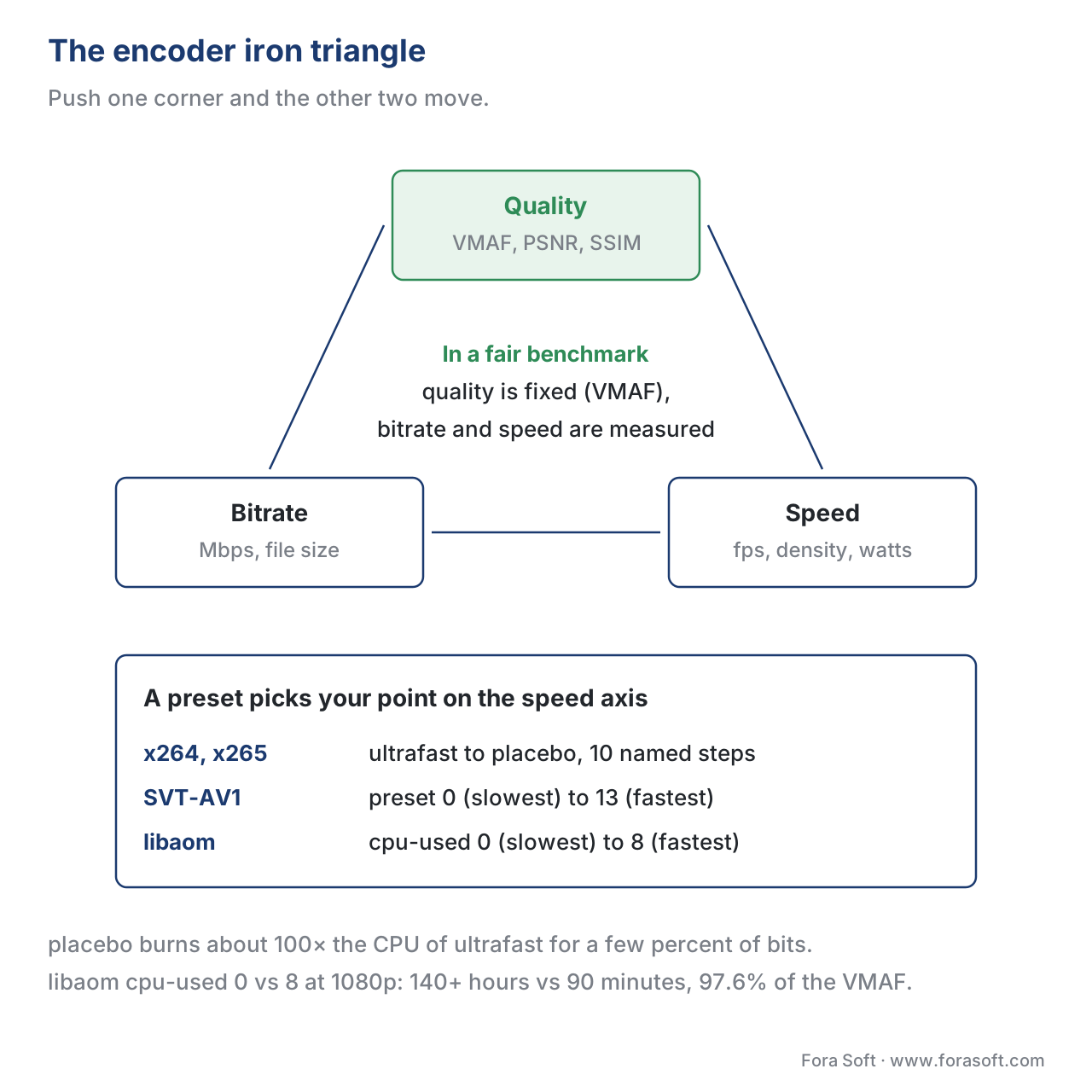 Figure 1. The three knobs every encoder operator pushes against each other. A credible benchmark fixes one axis (perceptual quality, measured by VMAF) and reports the other two (bitrate spent and time spent).
Why "same VMAF, different bitrate" is the only honest comparison
Imagine I tell you that "encoder A made a 4.0 MB file and encoder B made a 3.6 MB file" of the same 30-second clip. Which won? You cannot answer, because you do not know what either one looks like. Maybe encoder B's file is blurry and full of blocking artefacts, and encoder A's file is broadcast-grade. Maybe both are fine and B is the legitimate winner. The numbers on their own carry no information about who you would actually want to ship.
Now suppose I add a quality score. "Encoder A: 4.0 MB at VMAF 93. Encoder B: 3.6 MB at VMAF 89." Now you can answer. Encoder A is the winner, because VMAF 93 is broadcast-grade (the brightness, sharpness, and motion all look right to a real human on a real TV) and VMAF 89 has visible compression artefacts that most viewers will see and some will complain about. Encoder B saved 10% of the bits and gave up four VMAF points, which on the perceptual scale is the gap between "looks like the source" and "looks compressed". That is not a win; that is a loss disguised as a saving.
VMAF is a perceptual quality score from 0 to 100, developed by Netflix together with USC and the University of Texas at Austin, and trained against tens of thousands of human ratings of compressed videos. 2 It is the closest thing the video industry has to a single number for "how good does this look", and it correlates well with what real viewers say in a controlled subjective test. 3 A VMAF of 93 is the canonical broadcast-quality target Netflix uses for top-rung encodes; 95 is near-indistinguishable from the source on a 1080p TV; below 80 the average viewer starts noticing artefacts; below 70 the picture is visibly broken. 4
Once we agree to fix VMAF, the comparison sharpens into one of two equivalent forms:
- Same quality, different bitrate. Both encoders are tuned so each produces a file at, say, VMAF 95. We compare bits.
- Same bitrate, different quality. Both encoders are tuned to produce a file at, say, 4 Mbps. We compare VMAF.
Either form is honest. The first form is what BD-rate measures and what the rest of this article focuses on, because it answers the bandwidth-bill question your CFO actually cares about. The second form is sometimes easier to run inside a live streaming pipeline where you cannot retune the rate control on the fly.
The dishonest comparisons — same preset, same encoder defaults, "look how much smaller my file is" — all collapse the moment you compute VMAF on both outputs. Anyone running a serious encoder evaluation in 2026 starts with this rule and never breaks it.
The benchmarking recipe in eight steps
A credible same-VMAF benchmark fits on a single page and is identical in shape whether you are comparing two open-source encoders on your laptop or evaluating eight ASIC vendors for a national broadcaster. Here is the recipe.
- Pick a representative corpus. Six to twelve clips spanning the content you actually encode. A talking head, a sports clip, an animated cartoon, a dark drama scene, a high-detail nature shot. Each clip 10–30 seconds, uncompressed YUV 4:2:0 if possible, at the highest resolution and frame rate you ship.
- Pick the encoders and presets. Two to six encoders, each at one or two presets (e.g. SVT-AV1 preset 4 and preset 8). Lock the preset list; do not let it drift.
- Pick four to six rate points per encoder per clip. A typical CRF (Constant Rate Factor) sweep is 4 points covering a useful bitrate range — say CRF 18, 24, 30, 36 for x265. Some teams prefer fixed-bitrate sweeps; both work.
- Encode. Run every encoder × preset × clip × rate-point combination. Log the encode wall-clock time and the output bitrate.
- Measure VMAF on each output. Use libvmaf in FFmpeg, with the official model and the reference (source) clip.
- Plot the rate-distortion curve. For each encoder and clip, plot bitrate on the x-axis (log scale) and VMAF on the y-axis. You should see four points that trace a smooth concave curve from low quality / low bitrate to high quality / high bitrate.
- Compute BD-rate between the encoder pairs you care about, using the standard Bjøntegaard formula (we walk through it below). This gives you a single number per pair per clip: "encoder A spends X% more or fewer bits than encoder B at the same VMAF, on this clip".
- Aggregate. Average BD-rate across clips for an overall number, but also report the per-clip range. Talking-head BD-rate can differ from sports BD-rate by 15 percentage points.
That is the entire methodology. Every reputable benchmark — Netflix's internal evaluations, the AOMedia Common Test Conditions, Moscow State University's annual codec comparison, Jan Ozer's published tests — uses some variant of this eight-step recipe. 5 6 The differences live in the corpus and the encoder list, not the shape.
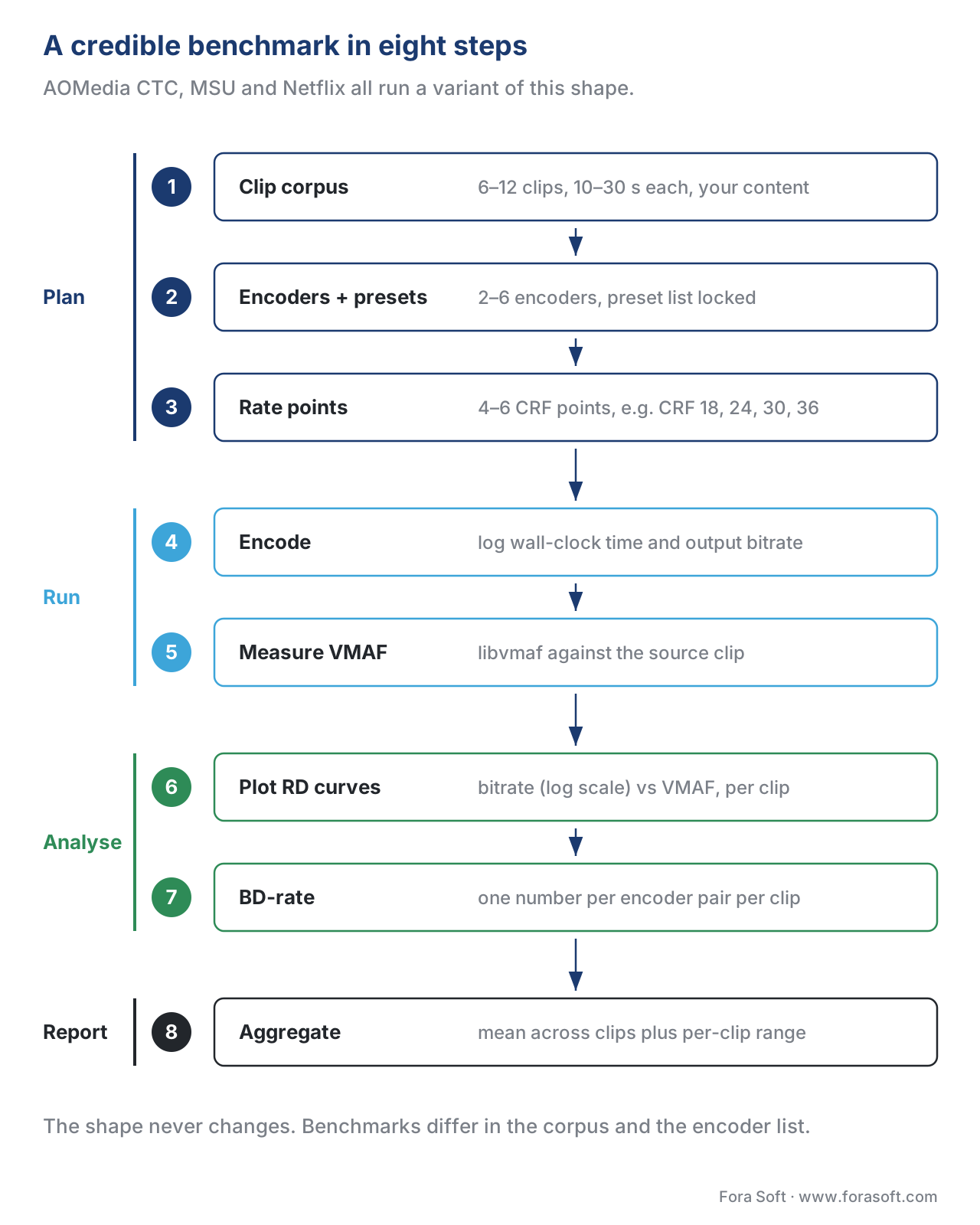 Figure 2. The eight-step pipeline of a credible encoder benchmark. Every reputable methodology in the industry — AOMedia CTC, MSU, Netflix internal — is a variation of this shape.
The rate-distortion curve, in plain language
If you encode the same clip four times at four different CRF settings — say CRF 18, 24, 30, 36 for x265 — you will get four files. The CRF 18 file will be biggest and best-looking; the CRF 36 file will be smallest and most compressed. If you plot the four points on a chart with bitrate on the x-axis (log scale) and VMAF on the y-axis, you get four dots that trace a smooth curve. That curve is the encoder's rate-distortion curve, also called its R-D curve or rate-quality curve, and it is the single most important plot in video benchmarking.
The curve is concave: it climbs steeply at low bitrates (every extra megabit buys you a lot of quality) and flattens at high bitrates (every extra megabit buys you almost no extra quality). The shape encodes the encoder's compression efficiency. A better encoder sits above and to the left of a worse one across the full bitrate range — for any quality level you point at, the better encoder needs fewer bits.
When you compare two encoders, you draw both their curves on the same chart, and you read off the answer visually:
- At VMAF 90, encoder A needs 2.5 Mbps; encoder B needs 3.6 Mbps. Encoder A is 31% cheaper at that quality.
- At 3.0 Mbps, encoder A scores VMAF 92; encoder B scores VMAF 87. Encoder A is 5 VMAF points better at that bitrate.
Both readings describe the same fact: encoder A's curve is above and to the left of encoder B's. BD-rate is just the formal name for the average of those readings across the full quality range.
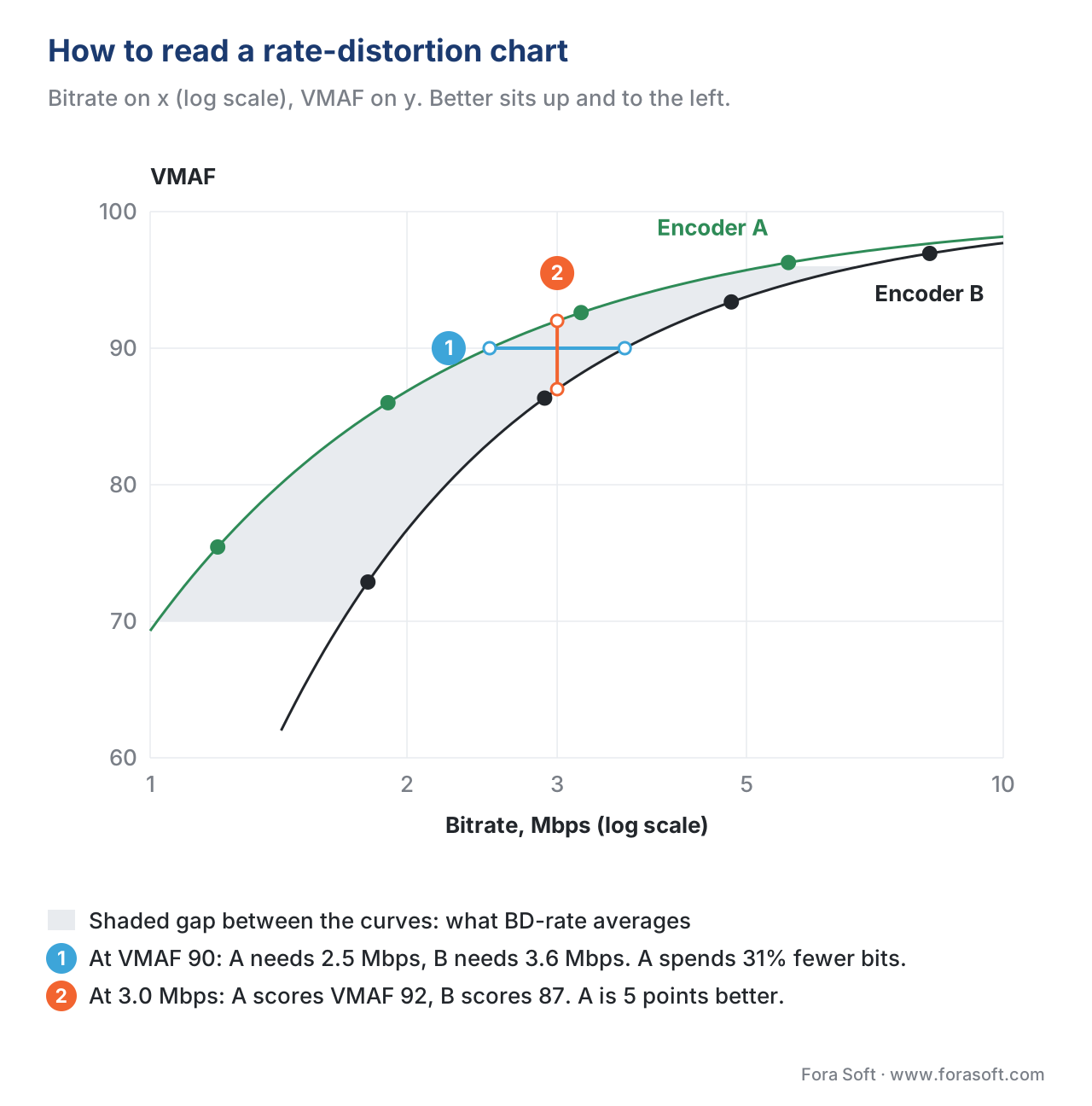 Figure 3. The rate-distortion curve is the single most important plot in encoder benchmarking. The horizontal gap at a fixed VMAF (bits spent) and the vertical gap at a fixed bitrate (quality reached) are two views of the same underlying gap. BD-rate averages the horizontal gap across the quality range.
BD-rate — the math, with numbers
BD-rate stands for Bjøntegaard Delta rate. Gisle Bjøntegaard proposed it in 2001 at a meeting of the ITU-T Video Coding Experts Group, and it is now the standard summary number used in every codec standardisation body, every academic paper, and every serious vendor benchmark. 7 8 The result is a single percentage that says: "across the quality range we tested, encoder A needs X% more (or fewer) bits than encoder B to reach the same quality".
The algorithm in plain English is four steps:
- Take both encoders' four (or more) rate-quality points on the same clip.
- For each encoder, fit a smooth curve through its points. Bjøntegaard used a cubic polynomial in the log-bitrate domain. (Modern implementations use a piecewise cubic spline because it is more robust at the edges, but the idea is identical.)
- Compute the area under each curve, over the quality range where both curves overlap.
- BD-rate is the ratio of the two areas, minus one, expressed as a percent.
Let us work through it with simple numbers. Say we have x265 and SVT-AV1 on the same 10-second clip, each at four CRFs:
x265:     CRF 18 -> 8.0 Mbps at VMAF 98
          CRF 24 -> 4.0 Mbps at VMAF 95
          CRF 30 -> 2.0 Mbps at VMAF 90
          CRF 36 -> 1.0 Mbps at VMAF 82

SVT-AV1:  CRF 18 -> 5.5 Mbps at VMAF 98
          CRF 24 -> 2.7 Mbps at VMAF 95
          CRF 30 -> 1.4 Mbps at VMAF 90
          CRF 36 -> 0.7 Mbps at VMAF 82
At every quality point, SVT-AV1 needs roughly 31% fewer bits than x265 (5.5 vs 8.0, 2.7 vs 4.0, 1.4 vs 2.0, 0.7 vs 1.0). If we average those four ratios:
saving_at_VMAF_98 = (8.0 - 5.5) / 8.0 = 0.313
saving_at_VMAF_95 = (4.0 - 2.7) / 4.0 = 0.325
saving_at_VMAF_90 = (2.0 - 1.4) / 2.0 = 0.300
saving_at_VMAF_82 = (1.0 - 0.7) / 1.0 = 0.300

mean_saving = (0.313 + 0.325 + 0.300 + 0.300) / 4
            = 1.238 / 4
            = 0.3095
            ≈ 31%
So in this toy example, SVT-AV1 has a −31% BD-rate vs x265 on this clip, meaning SVT-AV1 needs about 31% fewer bits than x265 to reach the same VMAF. The minus sign matters: negative BD-rate is good (the encoder being compared spends fewer bits), positive BD-rate is bad (it spends more).
The real Bjøntegaard formula does the integration over the whole curve, not just the four sample points, but the four-point average above is within a percentage point or two of the integrated answer for most well-behaved curves. If you ever want to compute BD-rate yourself, the open-source bd_rate Python script and the streaminglearningcenter walkthrough are the two most-cited references. 9
Two warnings worth memorising. First, BD-rate is a per-clip number. Averaging across clips is fine for a headline figure, but always report the per-clip range alongside it — sports footage and animated cartoons often produce BD-rate numbers 10–15 percentage points apart for the same encoder pair. 10 Second, the BD-rate sign convention in the literature is inconsistent. Most papers report "negative is better" (the encoder under test uses fewer bits), but some vendors flip the sign for marketing reasons. Always check.
VMAF as the y-axis — not just the mean
Computing VMAF for an encoded clip gives you a score per frame. A 10-second clip at 30 fps gives you 300 VMAF scores. The naive thing is to take the arithmetic mean and call it "the VMAF of the clip". The careful thing — and the thing that separates a useful benchmark from a misleading one — is to report at least three numbers.
- Harmonic mean VMAF. The harmonic mean weighs low values more heavily than high values, which means a few badly-encoded frames will pull the harmonic mean down where they barely register in the arithmetic mean. Jan Ozer's published research recommends targeting a harmonic mean of 95 or higher on the top rung of an adaptive bitrate ladder. 11
- Low-percentile VMAF. Most often the 1st percentile (the VMAF score that 99% of frames exceed) or the 5th percentile. This catches transient quality drops on hard frames — a scene cut, an explosion, a sudden camera pan — that the mean smooths over. Twitter's engineering team published the now-standard rationale in 2020. 12
- Standard deviation of VMAF. A high standard deviation means the encoder is delivering wildly variable quality across the clip, which viewers notice as "flicker". Two encoders at the same mean VMAF but different standard deviations look very different on a real TV.
The reason this matters in a benchmark is that two encoders can hit the same arithmetic-mean VMAF on the same clip while one of them has six terrible frames at VMAF 60 and the other has none. The mean does not distinguish them. The harmonic mean and the 1st percentile do. A 2026 industry consensus, traceable to Jan Ozer's per-title research, is that the top rung of an adaptive bitrate ladder should meet two thresholds simultaneously: harmonic-mean VMAF ≥ 95 and 99th-percentile VMAF (i.e. the floor that 99% of frames exceed) ≥ 89. 11 Adopt the same two-threshold rule in your benchmark and your numbers will mean what you think they mean.
The third axis — speed, density, energy
We have spent most of the article on the quality and bitrate axes because they are the ones the dishonest benchmarks hide. The speed axis is the one that lands the bill — encoder runtime determines server cost, ASIC count, and electricity. There are three speed metrics worth reporting.
The first is encoded frames per second, the simplest. On a fixed hardware reference (e.g. one 16-core AMD EPYC server), how many frames does the encoder process per second? For a 30 fps source, an encoder running at 30 fps is real-time, 60 fps is twice real-time, 3 fps is ten times slower than real-time. As of 2026, software AV1 encoders typically operate in two regimes: SVT-AV1 preset 8 hits roughly 25 fps for 1080p on a 16-core CPU (suitable for live streaming) and SVT-AV1 preset 4 hits roughly 10 fps (suitable for premium VOD where the encoding cost amortises across millions of views); libaom is 3–5× slower than SVT-AV1 at matched quality, which is why almost nobody runs it in production despite its slight quality edge. 13 14 x264 medium hits roughly 120 fps; x265 medium roughly 30 fps; these are the reference points you anchor every new encoder against.
The second is density — how many concurrent live streams fit per rack unit. This is the metric the cloud operators and large broadcasters live by. NETINT's Quadra Video Server packs ten Quadra ASIC VPUs into a single 1RU chassis and reports a 4× density advantage and 50% lower power vs comparable GPU-based servers. 15 Density is where ASICs win and software loses; the trade-off is that ASICs ship a fixed feature set frozen at silicon tape-out.
The third is watts per stream or joules per encoded frame — energy efficiency, which has become a procurement criterion in its own right as data-centre power becomes the binding constraint. The Akamai / Linode benchmark from 2025 reports VPUs delivering 4.7× higher energy efficiency than GPUs on the most demanding workloads. 16 If your CFO is signing the power bill, this is increasingly the number that closes the deal.
A good benchmark reports the speed numbers alongside the BD-rate, never instead of it. The cleanest format is a four-column table: encoder, preset, BD-rate vs reference (e.g. vs x264 medium), encoded fps on the reference hardware. Sales decks that quote BD-rate without fps are hiding the cost; decks that quote fps without BD-rate are hiding the quality.
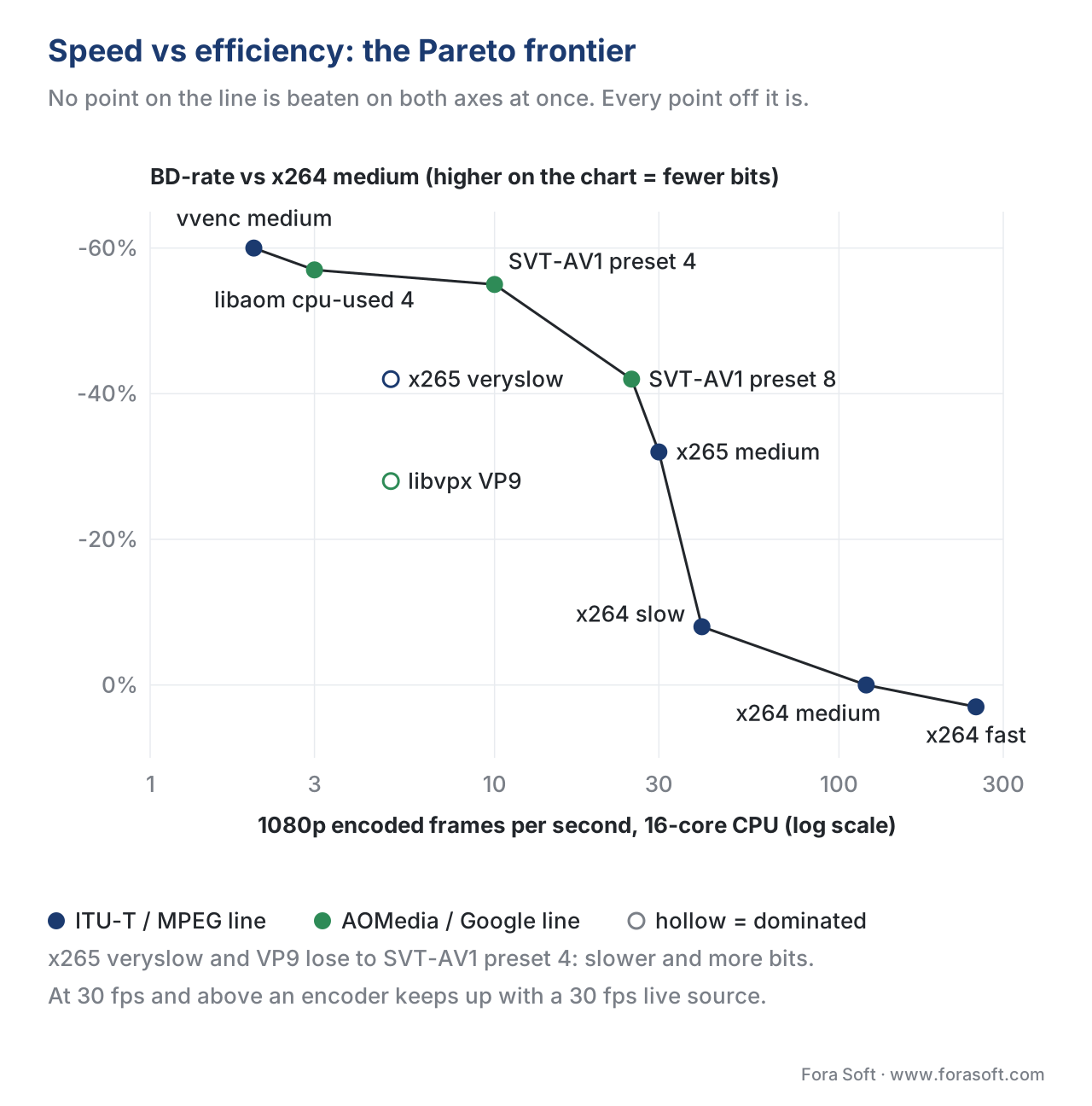 Figure 4. Encoders plotted on the two axes that actually matter for a procurement decision: how fast they go and how few bits they spend at the same VMAF. The Pareto frontier connects the points where no other encoder is both faster and more efficient. Anything below the frontier is a strictly worse choice than something on it.
Choosing a test corpus that does not lie
A benchmark on one clip is anecdotal. A benchmark on the wrong clips is misleading. The corpus is where most vendor benchmarks cheat — pick clips the home encoder happens to be good at, skip the ones it struggles with, average the rest. The fix is to use a public, standard corpus that everyone in the industry recognises and that you cannot tune your encoder to.
Three corpora cover most of the cases.
Xiph.org's "Derf's collection" is the historical reference. 18 It contains dozens of short clips at SD and HD resolutions, including the famous Foreman, Park Joy, Old Town Cross, and Crowd Run sequences that have appeared in academic papers for twenty years. The Derf clips are excellent for replicating published results, mediocre for representing modern OTT content (most are from the early 2000s).
The Ultra Video Group (UVG) dataset from Tampere University is the modern 4K reference. 19 Sixteen 4K test sequences at 50 or 120 fps, in 8-bit and 10-bit 4:2:0 YUV, characterised by spatial and temporal complexity. UVG is what every serious 2026 4K benchmark uses; if your vendor is not testing on UVG, ask why.
The AOMedia Common Test Conditions corpus is what the AV1 and AV2 standardisation work uses, and is the closest thing to a global industry benchmark for next-generation codec evaluation. 5 The AOMedia CTC v5 (2025) defines four test configurations — All Intra, Random Access, Low Delay, Adaptive Streaming — and prescribes which clips, which presets (typically --cpu-used 0, single-pass), and which metrics to report (VMAF, PSNR, runtime). When a vendor says "we follow the AOMedia CTC", they have committed to the discipline; when they say "we use our own internal test set", scepticism is warranted.
A practical hybrid for an in-house benchmark is six clips: two from Derf (legacy compatibility), two from UVG (modern 4K), and two from your own catalogue (your actual content). The mix lets you compare your numbers to public benchmarks while still measuring on the footage that matters to your bottom line.
Common mistakes — the eight ways benchmarks lie
Pitfall callout. Most published benchmark results land in one of these eight traps. If you cannot rule out all eight on the next vendor deck you see, ask for the raw data.
- One clip. Single-clip benchmarks are anecdotes. Always six or more.
- One preset. Comparing fast preset A to slow preset B inflates the slow encoder. Always match presets on the speed axis.
- No quality control. Reporting bitrate without VMAF (or PSNR + a perceptual cross-check) is meaningless.
- Arithmetic-mean VMAF only. Always report harmonic mean and low-percentile, otherwise transient artefacts hide.
- Default encoder settings. Most encoders ship with conservative defaults. A real benchmark uses tuned configs from the vendor or the published reference settings (e.g.
--tune=0 --lookahead=120for SVT-AV1 VOD). 17- Wrong VMAF model. The default model
vmaf_v0.6.1targets a 1080p TV viewed at 3H. For phones, usevmaf_v0.6.1neg'sphone_modelflag or the dedicated 4K model. Mismatching the model can shift VMAF by 3–5 points.- Bitrate-control mode mismatch. CRF, CBR, capped-CRF, ABR are different rate controls. CRF vs CBR is not a like-for-like comparison.
- Cherry-picked aggregation. Reporting the median BD-rate hides the worst case; reporting only the mean hides the variance. Always report mean and per-clip range.
A worked example you can run today
Here is the minimal end-to-end command sequence to compute a same-VMAF comparison between x265 and SVT-AV1 on a single clip, using FFmpeg with libvmaf. Substitute your own corpus and the rest scales naturally.
# 1. Decode the source clip to raw YUV to take the source decoder out of the loop.
ffmpeg -y -i source.mp4 -pix_fmt yuv420p source.y4m

# 2. Encode at four CRFs with x265 (medium preset).
for crf in 18 24 30 36; do
  ffmpeg -y -i source.y4m -c:v libx265 -preset medium -crf $crf -an x265_crf${crf}.mp4
done

# 3. Encode at four CRFs with SVT-AV1 (preset 6, the 2026 VOD baseline).
for crf in 18 24 30 36; do
  ffmpeg -y -i source.y4m -c:v libsvtav1 -preset 6 -crf $crf -an svtav1_crf${crf}.mp4
done

# 4. Compute VMAF for every output against the source.
for f in x265_crf*.mp4 svtav1_crf*.mp4; do
  ffmpeg -hide_banner -i "$f" -i source.y4m \
    -lavfi "[0:v]scale=1920:1080:flags=bicubic[main];[main][1:v]libvmaf=log_path=${f}.vmaf.json:log_fmt=json" \
    -f null - 2>/dev/null
done

# 5. Compute BD-rate using the open-source bjontegaard Python package.
pip install bjontegaard
python3 - <<'PY'
import json, bjontegaard as bd
def points(prefix):
    rates, vmaf = [], []
    for crf in (18, 24, 30, 36):
        path = f"{prefix}_crf{crf}.mp4"
        size_mb = (subprocess.check_output(["stat","-c","%s",path]).decode().strip())
        # Convert bytes to kbps, given a 10 s clip:
        rates.append(int(size_mb) * 8 / 1000 / 10)
        vmaf.append(json.load(open(f"{path}.vmaf.json"))["pooled_metrics"]["vmaf"]["harmonic_mean"])
    return rates, vmaf
r1, q1 = points("x265")
r2, q2 = points("svtav1")
print("BD-rate SVT-AV1 vs x265:", bd.bd_rate(r1, q1, r2, q2, method="akima"), "%")
PY
A clip-level benchmark like this takes about an hour of wall-clock on a modern laptop and gives you the headline number you would otherwise pay a consultant to produce. Scale the loop to six clips and you have a credible single-resolution benchmark; add a 4K resolution sweep and you cover most operational needs.
Comparison table — the 2026 same-VMAF landscape
The numbers below are the typical figures you will see reported across credible 2026 benchmarks on the AOMedia CTC corpus. They are not gospel — your own catalogue will move every number by a few percentage points — but they are the right order-of-magnitude reference to walk into a vendor meeting with. 5 14 13 20
| Encoder | Typical preset | BD-rate vs x264 medium (lower = better) | 1080p fps on 16-core CPU | When to use |
|---|---|---|---|---|
| x264 medium | medium | 0% (reference) | ~120 | Universal compatibility, legacy devices |
| x265 medium | medium | −30 to −35% | ~30 | Smart TVs and OTT today |
| x265 veryslow | veryslow | −40 to −45% | ~5 | Premium VOD where CPU is amortised |
| libvpx-vp9 | best, cpu-used 2 | −25 to −30% | ~5 | YouTube-style web delivery |
| SVT-AV1 preset 8 | preset 8 | −40 to −45% | ~25 | Live AV1, real-time streaming |
| SVT-AV1 preset 4 | preset 4 | −55 to −60% | ~10 | Premium AV1 VOD, 2026 mainstream |
| libaom cpu-used 4 | --cpu-used 4 | −55 to −60% | ~3 | Reference AV1 quality, slow |
| vvenc medium (H.266) | medium | −55 to −65% | ~2 | Future-facing VOD, sparse player support |
The table format is the one we recommend reporting in. Every cell answers the same question — "what does this encoder cost (BD-rate vs reference) and how fast does it run" — and the cells are comparable across rows because the column headings are fixed.
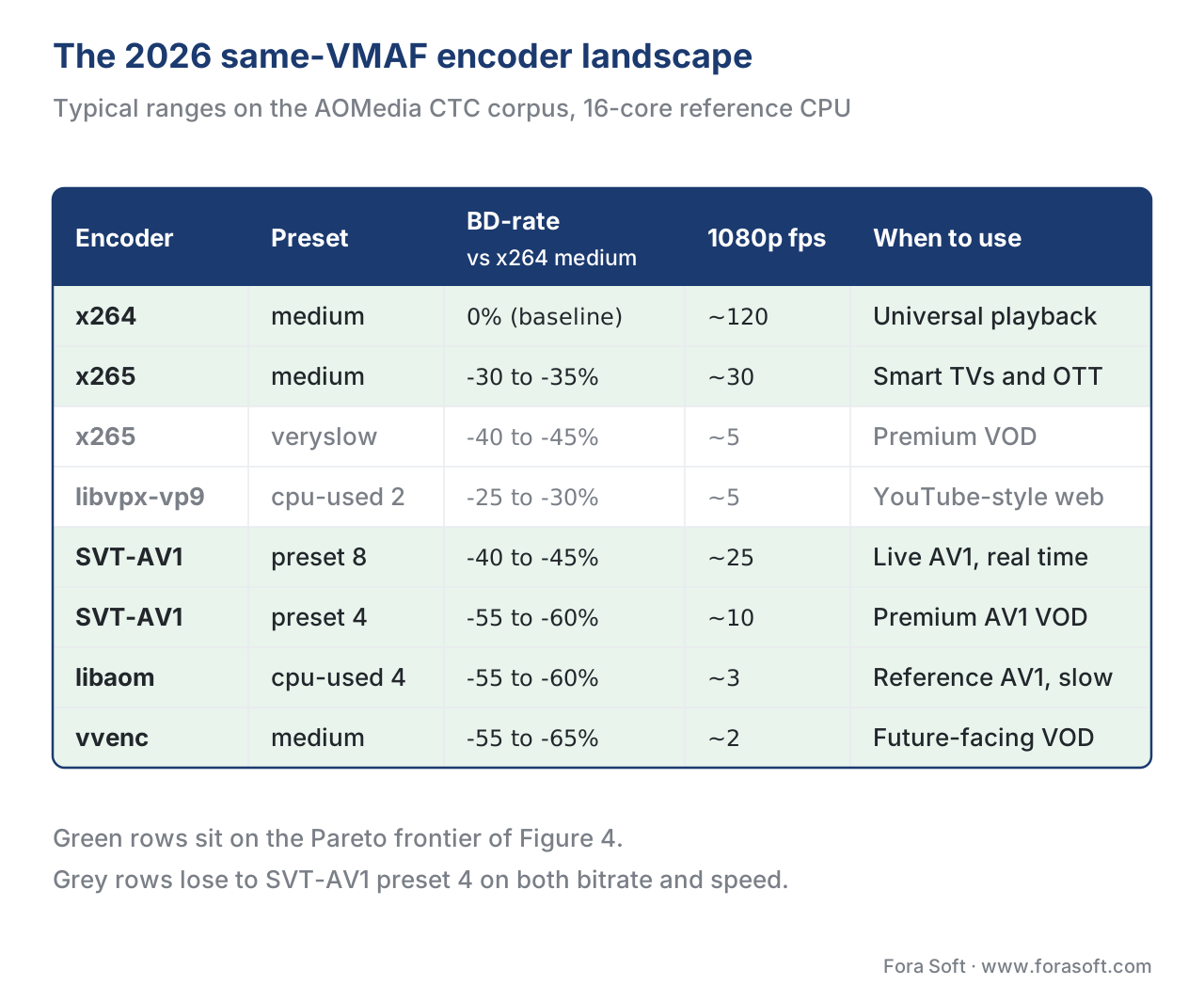 Figure 5. The 2026 same-VMAF encoder landscape at a glance. Numbers are typical ranges from credible benchmarks (AOMedia CTC corpus, vendor and academic publications, 16-core reference hardware); your own catalogue will shift each number by a few percentage points.
Where Fora Soft fits in
We have built and operated encoding pipelines for video conferencing, OTT, e-learning, telemedicine, and surveillance customers since 2005. Across 239+ shipped projects, the recurring pattern is the same: a team picks an encoder in year one based on a vendor benchmark, never re-runs it, and pays a 25–50% bandwidth premium for the rest of the product's life. Every Fora Soft pipeline ships with a same-VMAF benchmark suite that runs against the customer's own catalogue on a quarterly cadence; the cost is a few hundred dollars of cloud compute per run, and we have closed seven-figure annual CDN bills with the resulting evidence. We are also happy to run the same benchmark for a team that has built its own pipeline and just wants an independent reading.

The book
Video Encoding: A Complete Guide to Video Compression — From Pixels and Color to H.264, HEVC, AV1, Quality Metrics, and AI
Volume 1 gives you the whole toolkit behind a same-VMAF benchmark: how presets trade compute for bits inside x264, x265 and SVT-AV1, how PSNR, SSIM and VMAF are computed and where each one misleads, and how BD-rate turns two rate-distortion curves into one number you can defend in a procurement meeting. Read it before you sign an encoder or ASIC contract, and you will know which vendor slide is hiding the preset, the clip or the speed. Written by Nikolay Sapunov, CEO at Fora Soft.
Is your current encoder the cheapest one at the quality your viewers actually see?
Send us three to five clips from your catalogue and the encoders you are weighing — we will run a same-VMAF benchmark on them and hand back BD-rate, 1080p fps and cost per encoded hour for each one, so the decision rests on your content instead of a vendor deck. 250+ video products shipped since 2005.
See our case studies
Case study
Worldcast Live
HD concert streaming at 1.5 Gb/s with 0.4–0.5 s latency to 10,000 simultaneous viewers — at that scale every point of BD-rate is paid for in egress, so the encoder was chosen on bits at equal quality, not on a demo.
Case study
Speed Space
Remote production recording at 1080p / 8 Mbps for crews working with Netflix, EA and HBO, with codec, fps and bitrate set per session — a product where the quality bar is fixed and the bitrate has to be earned.
Case study
Mindbox
An RTSP to FFmpeg to HLS video pipeline across 50+ deployments — where streams per server, the density axis of a benchmark, decides the hardware bill as much as bitrate does.
What to read next
Quality
Objective Quality Metrics: PSNR, SSIM, MS-SSIM, VMAF
What the y-axis of every benchmark actually measures, and where it misleads.
Tooling
Encoder Implementations: x264, x265, SVT-AV1, libaom, vvenc
The encoders on the Pareto chart, and what their presets change inside.
Tooling
Hardware Acceleration: NVENC, QuickSync, VPU and ASIC
Density and watts per stream: the speed axis once you leave the CPU.
Codec internals
Rate Control: CBR, VBR, CRF, ABR, Capped CRF
The CRF sweep behind every rate point on an RD curve.
-
Jan Ozer, "Choosing a Preset for SVT-AV1 and libaom-AV1", Streaming Learning Center, 2023. https://streaminglearningcenter.com/encoding/choosing-a-preset-for-svt-av1-and-libaom-av1.html ↩
-
Zhi Li et al., "Toward A Practical Perceptual Video Quality Metric", Netflix Technology Blog, 2016. https://netflixtechblog.com/toward-a-practical-perceptual-video-quality-metric-653f208b9652 ↩
-
Netflix, "VMAF: Perceptual video quality assessment based on multi-method fusion", GitHub, 2024. https://github.com/Netflix/vmaf ↩
-
Jan Ozer, "Identifying the Top Rung of a Bitrate Ladder", OTTVerse, 2021. https://ottverse.com/top-rung-of-encoding-bitrate-ladder-abr-video-streaming/ ↩
-
AOMedia, "AOM Common Test Conditions v5.0", CWG-D103, 2024. https://aomedia.org/docs/CWG-D103o_AV2_CTC_v5.pdf ↩↩↩
-
Moscow State University Video Group, "MSU Video Codecs Comparison 2025", 2025. https://compression.ru/video/codec_comparison/2025/ ↩
-
Adam Wieckowski et al., "Bjøntegaard Delta (BD): A Tutorial Overview of the Metric, Evolution, Challenges, and Recommendations", arXiv 2401.04039, 2024. https://arxiv.org/abs/2401.04039 ↩
-
Krishna Rao Vijayanagar, "BD-Rate & BD-PSNR: Calculation and Interpretation", OTTVerse, 2022. https://ottverse.com/what-is-bd-rate-bd-psnr-calculation-interpretation/ ↩
-
Jan Ozer, "Compute Your Own Bjontegaard Functions (BD-Rate)", Streaming Learning Center, 2023. https://streaminglearningcenter.com/encoding/compute-bd-rate-functions.html ↩
-
Yuriy Reznik, "Revisiting Bjontegaard Delta Bitrate (BD-BR) Computation for Codec Compression Efficiency Comparison", Mile-High Video, 2022. https://www.reznik.org/papers/MHV22_BD_BR-CameraReady.pdf ↩
-
Jan Ozer, "Crafting the Ideal Encoding Ladder in Two Simple Steps", Streaming Learning Center, 2023. https://streaminglearningcenter.com/encoding/crafting-the-ideal-encoding-ladder-in-two-simple-steps.html ↩↩
-
Brandon Eilers and Lukasz Czerwinski, "Introducing VMAF percentiles for video quality measurements", Twitter Engineering, 2020. https://blog.x.com/engineering/en_us/topics/infrastructure/2020/introducing-vmaf-percentiles-for-video-quality-measurements ↩
-
Jan Ozer, "SVT-AV1 vs. LibAOM", Streaming Learning Center, 2024. https://streaminglearningcenter.com/encoding/svt-av1-vs-libaom.html ↩↩
-
Ewout ter Hoeven, "AV1 is ready for prime time: SVT-AV1 beats x265 and libvpx in quality, bitrate and speed", Medium, 2024. https://medium.com/@ewoutterhoeven/av1-is-ready-for-prime-time-svt-av1-beats-x265-and-libvpx-in-quality-bitrate-and-speed-31c1960703db ↩↩
-
NETINT Technologies, "NETINT Quadra vs. NVIDIA T4 — Benchmarking Hardware Encoding Performance", 2024. https://netint.com/benchmarking-hardware_encoding-performance/ ↩
-
Akamai / Linode, "Benchmarking VPUs and GPUs for Media Workloads", 2025. https://www.akamai.com/blog/developers/benchmarking-vpus-and-gpus-for-media-workloads ↩
-
32blog, "FFmpeg v8 + SVT-AV1: Optimal Encoding Settings for Production", 2025. https://32blog.com/en/ffmpeg/ffmpeg-v8-svtav1-optimal-settings ↩
-
Xiph.org, "Video Test Media [derf's collection]". https://media.xiph.org/video/derf/ ↩
-
Mercat, A., Viitanen, M., Vanne, J., "UVG dataset: 50/120fps 4K sequences for video codec analysis and development", ACM MMSys, 2020. https://dl.acm.org/doi/abs/10.1145/3339825.3394937 ↩
-
Deep Render, "Investigating a Traditional Codec: SVT-AV1", 2024. https://deeprender.ai/blog/investigating-traditional-codec-svt-av1 ↩
