


Why this matters
If you build, ship, sell, or operate anything that touches video, every file in your pipeline sits in one of four quadrants of the compression landscape, and the cost difference between picking the right one and the wrong one is at least an order of magnitude. A studio that masters in H.264 saves a few terabytes today and loses every editing pass tomorrow when artefacts compound. A streaming startup that delivers in ProRes saves nothing on quality and pays a small company's annual budget extra to its content delivery network every month. The decisions involved touch product managers, founders, marketing leads, and operations people more often than they realise, because every "what format should we use" question is really a quadrant question in disguise. By the end of this article you will know the four quadrants by name, the codecs that occupy each one, and the single decision rule that places any new file in the right one without guessing.
The two axes of the landscape
Compression is described by a single matrix with two questions on it. The first question is whether the compressed file gives back exactly the same pixels when it is decompressed, or only approximately the same pixels. The second question is whether the file's job is to be edited and stored safely for the long run, or to be shipped to a viewer who will watch it once and forget it.
The first axis is called the fidelity axis. A lossless codec is one where the decompressed file is mathematically identical to the original, bit for bit, with nothing lost. A lossy codec is one where the decompressed file is smaller because the encoder threw away some of the original information that the viewer is not expected to notice. The trade-off is straightforward: lossless preserves everything but compresses weakly (typical ratio 2:1 to 4:1), lossy compresses aggressively (typical ratio 50:1 to 1,000:1) at the cost of permanently discarding information.
A useful analogy: lossless compression is like a vacuum-pack bag that squashes a sweater so it fits in a smaller drawer; when you pull it out, the sweater is exactly the sweater you put in. Lossy compression is like a summary of a meeting that captures every decision but skips the small talk; the summary is much shorter, but you cannot reconstruct the original conversation from it.
The second axis is called the purpose axis. A production file is one that will be edited, colour-graded, re-encoded, re-mixed, or archived. It might be opened and re-saved a dozen times before its job is done. A delivery file is the version a viewer downloads or streams. It is encoded once, decoded billions of times, and never re-edited.
Putting the two axes on the same chart gives a four-quadrant matrix. Production-lossless is for archives, restoration labs, and master copies you keep forever. Production-lossy (also called "visually lossless" or "mezzanine") is for editing and internal hand-off between studios, where you need fast scrubbing and clean re-encoding but can spare a tiny amount of detail that a colourist will not see. Delivery-lossy is what every viewer in the world receives — Netflix, YouTube, Zoom, your CCTV app — all live here. Delivery-lossless is a tiny corner reserved for things like medical imaging, forensic evidence, and some scientific instruments, and almost nobody else lives there.
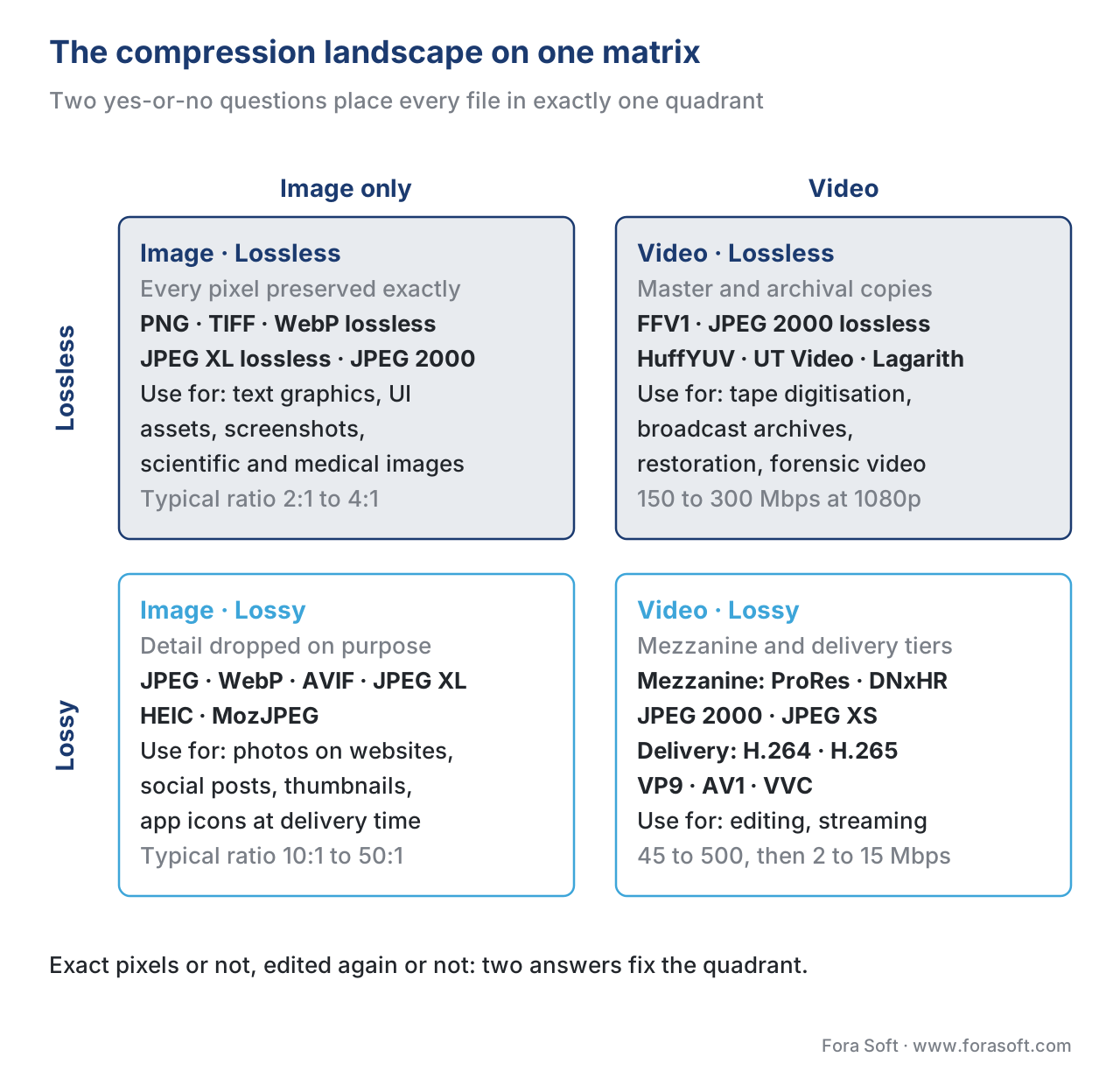 Figure 1. The compression landscape on a single matrix. Every file in your pipeline sits in exactly one of these quadrants; the codec families that live there are not interchangeable.
Image compression versus video compression
Before we tour each quadrant, you need one more distinction, because the codecs in each quadrant differ based on whether they compress a still picture or a moving picture.
A still image is one frame: a grid of pixels with no time axis. The compressor's only job is to exploit the fact that pixels close to each other in space usually look similar — the sky in the top half of a photograph is almost the same shade of blue, pixel after pixel. This is called spatial redundancy. JPEG, PNG, WebP, AVIF, and JPEG XL are all image codecs. They compress within a single frame, period. (For a deeper dive into spatial redundancy specifically, see spatial pixel redundancy.)
A moving video is a sequence of frames played back twenty-four or more times per second. A video codec can do everything an image codec can — it can compress each frame using spatial redundancy — but it also gets a second tool an image codec does not have. Adjacent frames in a video usually look almost identical to each other. Frame number 1,234 of a movie is almost the same picture as frame number 1,235 of the same movie; the only differences are the small bits that moved. The compressor exploits this by storing one full frame and then storing only the differences between that frame and the next several frames. This is called temporal redundancy, and it is the single reason video compression is so much more aggressive than image compression. 1 (See temporal pixel correlation for the deeper mechanics.)
Apply a still-image codec to every frame of a video — treat the video as a flipbook of JPEGs — and you get something called Motion JPEG, or MJPEG. MJPEG is technically a video codec, but it ignores temporal redundancy and pays for it with a bitrate three to five times larger than a modern video codec at the same visual quality. 2 MJPEG is mostly used today in cheap security cameras and as a fallback in scientific cameras, and its main virtue is that every frame is independent, which makes editing trivial. Every other mainstream video codec — H.264, H.265, AV1, VP9 — uses temporal compression and beats MJPEG by a comfortable margin.
The practical headline is short. If the file is a single picture, you pick an image codec. If the file is a video and you do not plan to edit it frame by frame, you almost always pick a video codec that uses temporal compression. The exception is the production-lossless quadrant in the matrix above, where some workflows still prefer all-intra video codecs — codecs that compress each frame independently — so that editing software can jump to any frame instantly. We will name those codecs by their proper terms in the next section.
Quadrant one — production lossless
Lossless production codecs are the safe-deposit box of the video industry. Their job is to preserve a master copy of a piece of footage so that every future generation of edits, transcodes, and archive copies can be regenerated without quality loss. Compression is modest — typically 1.5:1 to 4:1 — because the codec is forbidden from throwing away any information.
The headline codecs in this corner are FFV1, JPEG 2000 lossless mode, HuffYUV, UT Video, and Lagarith for video, plus PNG, TIFF, lossless WebP, and JPEG XL lossless mode for still images. FFV1 is by far the most important one. It is a lossless intra-frame video codec, open-source, royalty-free, standardised by the Internet Engineering Task Force as RFC 9043 (FFV1 versions 0, 1, and 3). 3 In December 2023 the United States Library of Congress upgraded FFV1 inside the Matroska (.mkv) container from "Acceptable" to its highest ranking, a "Preferred Format" for video preservation. 4 Most national broadcast archives, the Library of Congress, and Public Broadcasting in the US use FFV1 in Matroska for long-term archival of film transfers and analog tape digitisations. The compression ratio for FFV1 on typical broadcast content is between 2:1 and 3:1, which is enough to make archival storage costs sustainable without losing a single original sample.
When you would actually use a lossless codec: digitisation of analog tape archives, scientific imaging where pixel values are measurements rather than impressions, forensic video, medical imaging governed by DICOM, restoration projects where the master must outlive every editing system, and any case where the file represents truth rather than an aesthetic.
When you would not use a lossless codec: ordinary editing of digital camera footage, where a visually lossless production codec is fast enough and small enough, and any case where the storage cost of 200+ Mbps is hard to justify. A common mistake we see is teams reaching for FFV1 because the word "lossless" feels safe, then paying ten times the storage bill they would have paid for a visually lossless mezzanine and getting no measurable benefit at the end of their pipeline.
Quadrant two — production lossy (the "mezzanine" or "intermediate" tier)
Most professional video work happens here. A mezzanine codec — sometimes called an intermediate codec — is a lossy codec that is designed to be visually lossless and all-intra. "Visually lossless" means a viewer cannot reliably distinguish the compressed file from the original on a typical professional monitor. "All-intra" means every frame is encoded independently with no reference to any other frame, the same way an image codec works. The all-intra structure is what makes the file fast to scrub through, fast to re-encode after edits, and free of generational quality loss when re-saved many times. 5
The three names you need to know in this quadrant are Apple ProRes, Avid DNxHD/DNxHR, and increasingly JPEG XS. ProRes 422 ships at roughly 147 megabits per second at 1080p 29.97 fps; ProRes 422 HQ at roughly 220 Mbps; ProRes 422 LT at about 102 Mbps; ProRes 422 Proxy at about 45 Mbps. 6 The higher-bitrate ProRes variants (4444 and 4444 XQ) carry an alpha channel and bring data rates above 500 Mbps at 1080p, used for visual effects work. Avid DNxHR is the equivalent family from Avid, with HQX 10-bit and HQ tiers giving comparable quality to ProRes 422 HQ. 7 Netflix explicitly accepts both ProRes 422 HQ and DNxHR HQX as delivery formats from its post-production partners. 8
JPEG 2000 in lossy mode is the dominant codec for digital cinema distribution (the Digital Cinema Package, or DCP, that every commercial movie theatre receives). It is also the codec used inside the Society of Motion Picture and Television Engineers' Interoperable Master Format (IMF), the standard interchange package that studios like Netflix and Amazon use to receive a single master file plus metadata describing every regional version. 9
JPEG XS is the newcomer of the group, standardised as ISO/IEC 21122. It is a low-latency, low-complexity, visually lossless codec specifically built for live video over an IP network. It targets compression ratios between 2:1 and 10:1 with end-to-end latency below one millisecond, which makes it suitable for broadcast contribution feeds and remote production over SMPTE ST 2110 networks. 10 Amazon's AWS Elemental Live introduced JPEG XS for cloud contribution in 2023, and JPEG XS has become a standard option in any new SMPTE ST 2110 facility.
A common mistake in this quadrant is treating ProRes and DNxHR as interchangeable with delivery codecs. They look similar on paper — they all spit out an MP4-or-MOV file — but a ProRes 422 HQ stream is roughly forty to fifty times heavier than the H.264 file you would deliver from it. Sending a ProRes master file to a viewer's phone instead of a delivery encode would burn through their monthly data plan inside a single sports highlight.
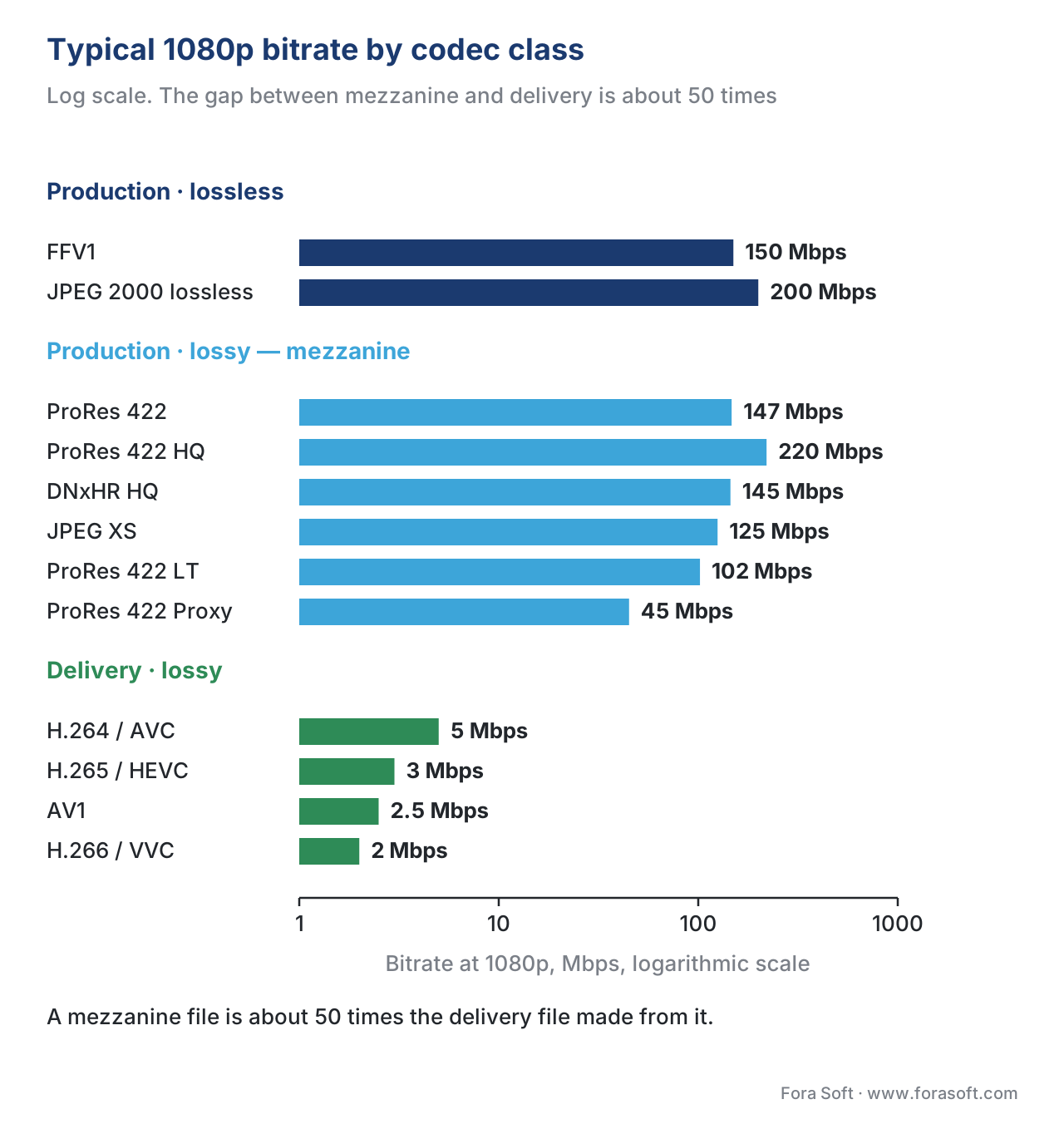 Figure 2. Typical 1080p bitrates by codec class. The gap between mezzanine and delivery is roughly 50× — the entire reason the two tiers exist as separate categories.
Quadrant three — delivery lossy (the world a viewer sees)
Every piece of video you have ever watched on a phone, a laptop, or a TV came out of this quadrant. Delivery codecs are highly tuned, deeply patented (mostly), and rewarded for one thing above all others: squeezing the highest perceived picture quality into the lowest possible bitrate.
The current generations of delivery codecs are H.264 / AVC (released 2003, still the workhorse of the open internet), H.265 / HEVC (2013, big quality gains but a patent nightmare), VP9 (Google, 2013, used heavily by YouTube), AV1 (AOMedia, 2018, now mainstream), and H.266 / VVC (2020, technically excellent but slow to deploy). Each generation delivers roughly 30 to 50 per cent better compression at the same quality as the one before, although the rate of improvement is slowing. 11 (For the full timeline see codec history H.120 to AV2.)
A modern delivery codec compresses a typical 1080p stream down to between 2 and 8 megabits per second — a ratio of roughly 200:1 to 750:1 compared to uncompressed video. Netflix's 1080p H.264 streams ship at 4 to 6 Mbps; its 4K HDR AV1 streams ship at 8 to 15 Mbps. 12 In December 2025 Netflix reported that AV1 now powers about 30 per cent of all Netflix streaming, and that AV1 sessions use about a third less bandwidth than the equivalent H.264 sessions and trigger 45 per cent fewer buffering interruptions. 13 In July 2025 Netflix shipped AV1 with Film Grain Synthesis (FGS) in production, reporting that grain content streams at roughly 66 per cent lower bitrate than the non-FGS reference at clearly better quality. 14
The image-codec equivalents in this quadrant are JPEG (1992, the workhorse), WebP (Google, 2010), AVIF (AOMedia, 2019, the AV1-derived image format), and JPEG XL (ISO/IEC 18181, finalised in 2021). Lossy WebP files are typically 25 to 34 per cent smaller than JPEGs at the same quality. 15 AVIF compresses even more aggressively but decode times are higher; JPEG XL trades some compression for fast decode and lossless re-encoding from existing JPEG files.
Delivery codecs are where most of the codec industry's engineering effort lives, and the choices a delivery codec makes touch costs that scale linearly with audience size. Moving a streaming service from H.264 to AV1 typically saves 30 to 50 per cent on egress bandwidth bills at the same quality — a real, recurring saving that pays back the migration work inside one to two quarters at any meaningful scale.
A common mistake in this quadrant is transcoding between two lossy codecs without thinking about generation loss. Every time a lossy file is decoded and re-encoded — H.264 → H.265, or H.264 → H.264 at a different bitrate — some additional quality is lost. Two or three generations of transcode are usually invisible; ten generations stack into noticeable artefacts. This is the technical reason production pipelines insist on a lossless or visually lossless master that everything else is generated from in a single hop, instead of chaining one delivery codec into another.
Quadrant four — delivery lossless (the tiny corner)
The fourth quadrant exists, but very few people live in it. Delivery-lossless means streaming a file that must be reconstructed bit-for-bit on the viewer's screen. The bitrates involved are too high for ordinary consumer pipes — a 1080p lossless stream needs roughly 200 megabits per second — so the use cases that justify it are narrow.
The real residents of this corner are: telemedicine and DICOM-compliant medical-imaging viewers, where regulators require pixel-perfect reproduction of an image used for diagnosis; legal and forensic applications, where an evidence chain depends on hash-identical playback; scientific instruments, where pixel values are measurements; and broadcast contribution links between two studios at the same site, where bandwidth is effectively free and the cost of any quality loss is not. Fora Soft's telemedicine projects, for instance, often need a lossless DICOM viewer path alongside a normal lossy preview path; the two coexist because they serve completely different jobs.
For everybody else — every consumer streaming service, every video conference, every CCTV stream, every social video — delivery-lossless is overkill that does not exist on the menu. Lossy delivery codecs reach picture quality scores indistinguishable from lossless on a phone or a TV at less than one per cent of the bitrate, so the engineering and economic answer is unanimous.
Putting the four quadrants in a single comparison table
| Quadrant | What it is for | Typical compression ratio | Typical 1080p bitrate | Representative codecs |
|---|---|---|---|---|
| Production-lossless | Archives, restoration, scientific, forensic | 2:1 to 4:1 | 150–300 Mbps | FFV1, JPEG 2000 lossless, PNG, TIFF, HuffYUV |
| Production-lossy (mezzanine) | Editing, colour grading, studio interchange, broadcast contribution | 5:1 to 20:1 | 45–500 Mbps | ProRes 422/HQ/4444, DNxHR, JPEG 2000 (DCP/IMF), JPEG XS |
| Delivery-lossy | Streaming, broadcast, conferencing, social | 200:1 to 1,000:1 | 2–15 Mbps | H.264, H.265, VP9, AV1, VVC (video) · JPEG, WebP, AVIF, JPEG XL (image) |
| Delivery-lossless | Medical, forensic, scientific, intra-studio contribution | 2:1 to 4:1 | 150–300 Mbps | FFV1, JPEG 2000 lossless, JPEG XS (visually lossless), uncompressed SDI/SMPTE 2110-20 |
The numbers above are typical for 1080p at modern frame rates; both production and delivery bitrates climb roughly linearly with pixel count, so a 4K production stream sits closer to one gigabit per second.
A decision rule that fits on one line
The whole landscape collapses into a single sentence you can apply to any new file.
If the file is the source of truth that everything else is generated from, pick a lossless codec; otherwise pick a lossy codec. If the file will be edited again before a viewer sees it, pick a production tier; otherwise pick a delivery tier.
Two yes-or-no questions, four answers, the quadrant is determined. The rule is sharp enough to settle most arguments and dull enough not to need a senior engineer in the room. The detail of which specific codec to pick inside a quadrant is the subject of separate articles — there is a whole codec-comparison article (codec comparison matrix) and a dedicated how to choose a codec in 2026 decision tree for the delivery quadrant.
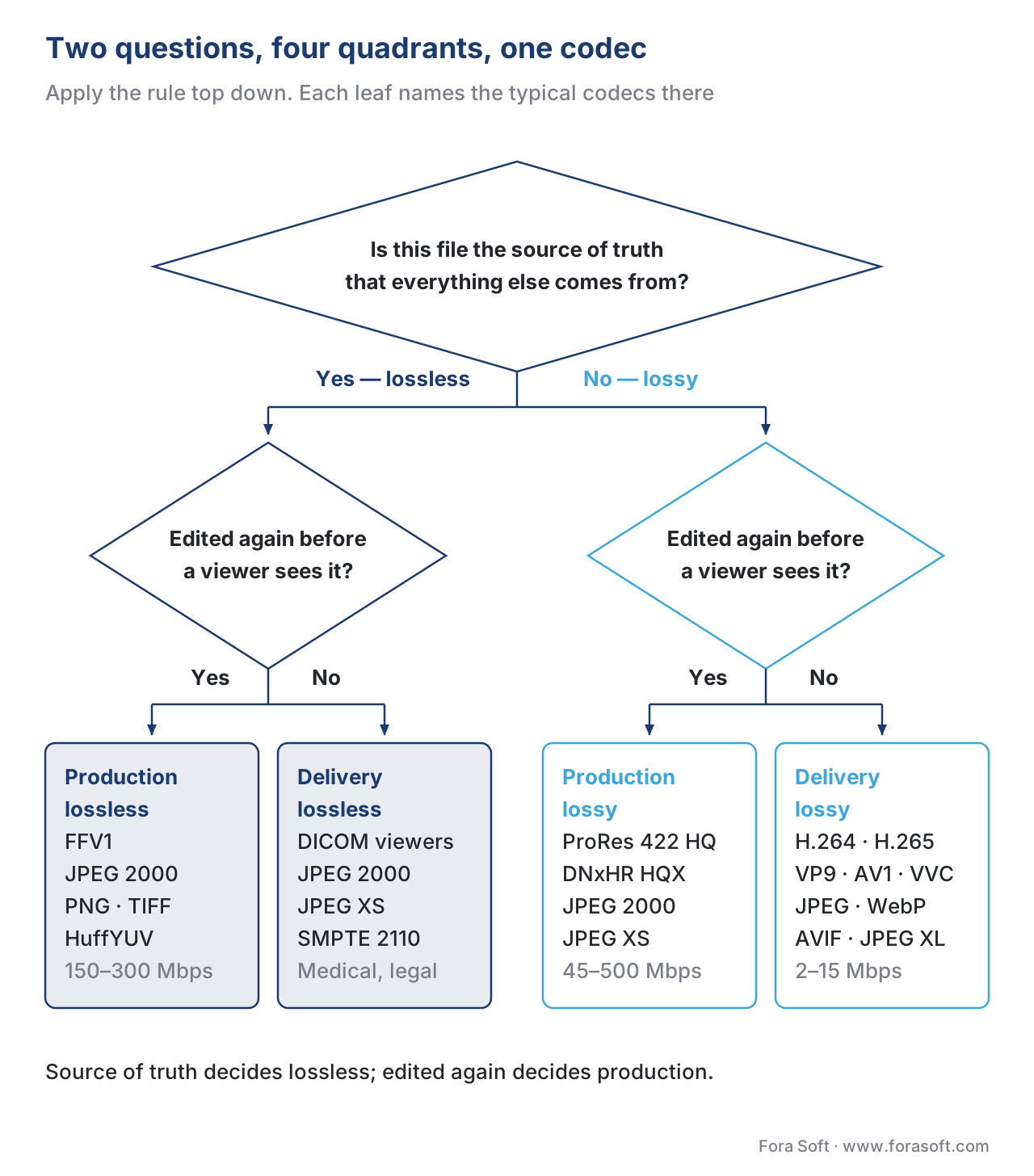 Figure 3. Two yes-or-no questions place any file in exactly one quadrant. The codecs at each leaf are the typical occupants — not the only ones, but the ones you will reach for first.
The pipeline that ties the four quadrants together
In a normal production-to-delivery pipeline, a single piece of footage moves through three of the four quadrants in a specific order, and a real shop never skips a step or compresses the same content twice in different lossy codecs.
The camera records into a production-lossy intermediate (ProRes, DNxHR, or a manufacturer-specific equivalent). The editing system reads from that intermediate, applies cuts, colour, audio mix, and visual effects, and exports a production-lossless or near-lossless master that is the gold copy. The master is archived in the production-lossless quadrant (FFV1 or JPEG 2000 lossless in a Matroska or MXF wrapper). A transcoder reads the master once and produces every delivery-lossy variant a viewer might receive: a low-bitrate H.264 fallback, a 1080p H.265 mid-tier, a 4K AV1 top tier, an audio-only stream, plus separate language tracks. The viewer's player streams the right delivery variant in real time depending on bandwidth.
This single-master-into-many-deliveries shape is the entire reason the production and delivery tiers are separated in the first place. If you change codecs partway through the pipeline by transcoding lossy-to-lossy — for instance, taking an H.264 file from a contributor and re-encoding it to AV1 for delivery — you stack generation loss into the picture and waste bandwidth on artefacts the original camera never recorded. The cure is always to go back to the master and re-encode from there.
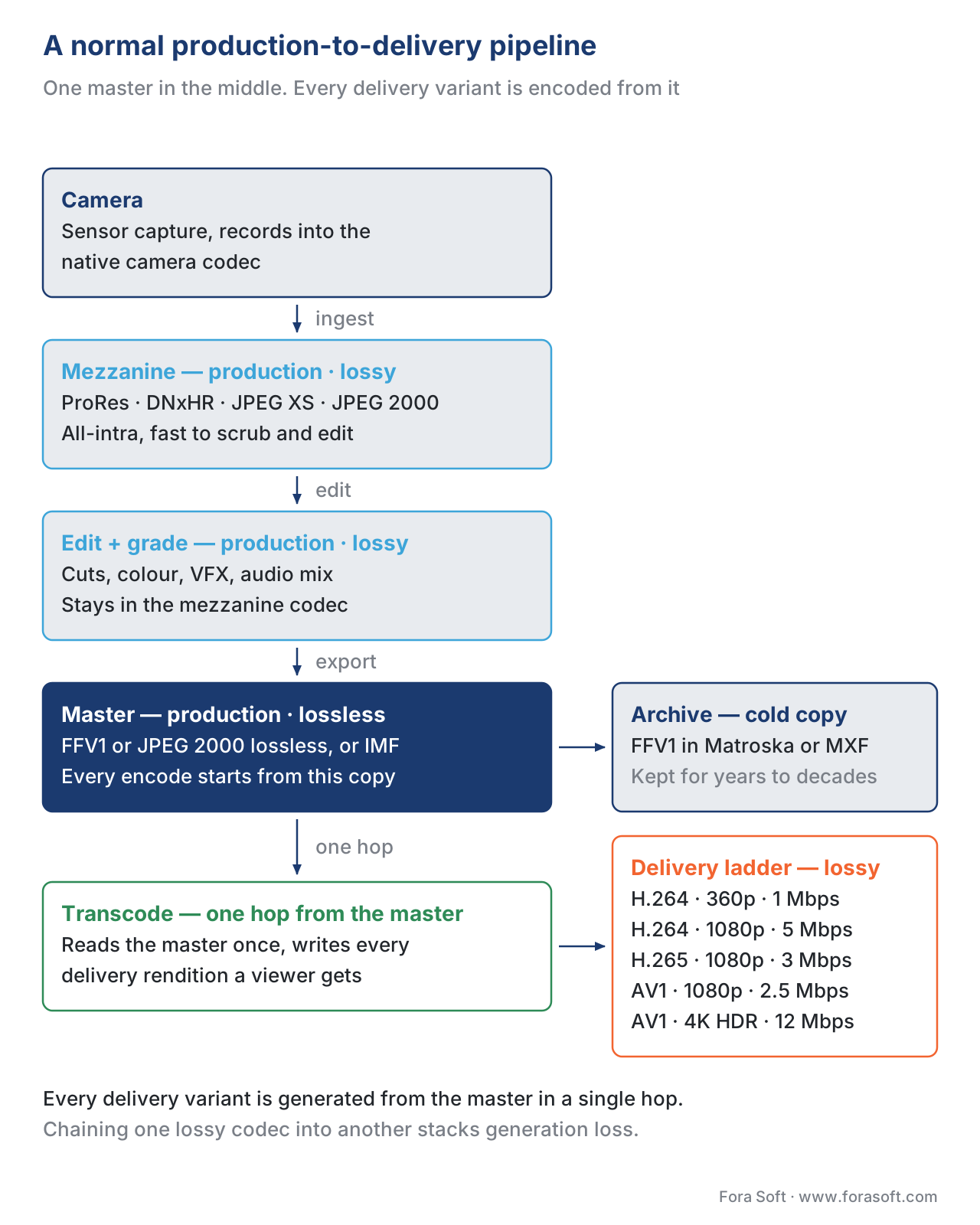 Figure 4. A normal production-to-delivery pipeline visits three of the four quadrants in order. The master in the middle is what every future re-encode is generated from.
Where Fora Soft fits in
Fora Soft has been shipping video products since 2005 — video streaming platforms, WebRTC conferencing, OTT and Internet TV apps, video surveillance systems, e-learning and telemedicine products, AR/VR experiences — and the four-quadrant landscape above is the map we use to scope every new project. A streaming startup typically lives in the delivery-lossy quadrant, with a small production-lossy footprint for thumbnail generation and trailer assembly. An OTT platform that takes feeds from studios needs to handle both production-lossy (ProRes / DNxHR / JPEG 2000) ingest and delivery-lossy egress. A surveillance product is delivery-lossy at every step but sometimes needs a forensic export path that switches to a lossless wrapper for evidence. A telemedicine product almost always needs a DICOM-compliant lossless viewer path alongside a normal lossy preview. We do not believe in one-size-fits-all video stacks; the matrix above is the reason.
The book
Video Encoding: A Complete Guide to Video Compression
This article draws the map; the book walks every road on it. It takes the quadrants one at a time — what a lossless codec actually guarantees and what it costs you in storage, why a ProRes 422 HQ file runs roughly 50 times the H.264 file cut from it, and how each delivery generation from MPEG-2 to AV2 earned its 30–50% — with the measurements behind every number. If you are deciding what your master, your mezzanine and your renditions should be, this is the long version of that decision. Written by Nikolay Sapunov, CEO at Fora Soft.
Which quadrant is each file in your pipeline actually in?
Tell us what your files are for — archived, edited again, or watched once — and we will map your pipeline onto the four quadrants: which codec belongs at each step, where you are paying mezzanine storage for files nobody will ever re-edit, and where a lossy-to-lossy hop is quietly stacking generation loss into what your viewers see. 250+ video products shipped since 2005.
See our case studies
Case study
Speed.Space
Remote production used on Netflix, EA and HBO shoots, recording locally at 1080p / 8 Mbps with per-shoot control of resolution, fps, codec and bitrate — the production tier of the matrix, set before a frame is captured.
Case study
Worldcast Live
Concert streaming at 1.5 Gb/s with 0.4–0.5 s latency to 10,000 simultaneous viewers — the delivery-lossy quadrant at the scale where every bit is budgeted against the picture a viewer actually sees.
Case study
Mindbox
AI video management in 50+ deployments, pulling RTSP from cameras of every vintage through FFmpeg into HLS, with forensic search across recorded footage — delivery-lossy at every step, with an evidence path that has to hold up later.
What to read next
Fundamentals
Why We Compress Video: The Math of Bitrate
The number underneath the whole map: what 1080p costs uncompressed, and why all four quadrants exist to bring it down.
Compression
Temporal Pixel Correlation: Redundancy Between Frames
The tool an image codec does not have — and the reason MJPEG pays three to five times the bitrate for the same picture.
Codecs
Comparison Table: MPEG-2, H.264, H.265, VP9, AV1, VVC
Once the quadrant is settled, this picks the codec inside it, with the licensing, device support and encode cost attached.
Decisions
How to Choose a Codec for Your Service in 2026
The delivery quadrant taken all the way down to one codec for one service, as a decision tree you can walk with your own numbers.
-
Standard Codecs: Image Compression to Advanced Video Coding (IET Telecommunications Series), Chapter 3.3 "Temporal redundancy reduction", https://flylib.com/books/en/2.537.1.17/1/ — explains why interframe coding beats frame-by-frame image compression for video. Accessed 2026-05-16. ↩
-
Wikipedia, "Motion JPEG", https://en.wikipedia.org/wiki/Motion_JPEG — MJPEG compresses each frame as an independent JPEG; without temporal compression, equivalent visual quality costs roughly 3–5× the bitrate of a modern interframe codec. Accessed 2026-05-16. ↩
-
IETF RFC 9043, "FFV1 Video Coding Format Versions 0, 1, and 3", https://datatracker.ietf.org/doc/rfc9043/ — the standards-track specification for FFV1. Accessed 2026-05-16. ↩
-
Library of Congress, "Embracing FFV1 in Matroska Container as a 'Preferred Format' in the RFS", December 2023, https://blogs.loc.gov/thesignal/2023/12/embracing-ffv1-matroska-container-preferred/ — the Library of Congress upgrade of FFV1 in
.mkvfrom Acceptable to Preferred for video preservation. Accessed 2026-05-16. ↩ -
Adobe Community, "The difference between Intraframe (like ProRes) and Long GOP (like H.264) codecs", https://community.adobe.com/questions-729/the-difference-between-intraframe-like-prores-and-long-gop-like-h-264-codecs-1406869 — explains why all-intra codecs are preferred for editing and colour grading workflows. Accessed 2026-05-16. ↩
-
Apple Support, "About Apple ProRes", https://support.apple.com/en-us/102207 and Apple ProRes White Paper (April 2022), https://www.apple.com/final-cut-pro/docs/Apple_ProRes.pdf — official target data rates for ProRes 422, 422 HQ, 422 LT, and 422 Proxy at 1080p / 29.97 fps. Accessed 2026-05-16. ↩
-
Lowepost, "The difference between DNxHR and ProRes codecs", https://lowepost.com/courses/blog/the-difference-between-dnxhr-and-prores-codecs-r4/ — DNxHR HQX 10-bit and ProRes 422 HQ are the standard visually-lossless mezzanine tiers in editing rooms. Accessed 2026-05-16. ↩
-
Netflix Partner Help Center, "ProRes & DNxHD Files", https://partnerhelp.netflixstudios.com/hc/en-us/articles/4798826541843-ProRes-DNxHD-Files — Netflix accepts ProRes 422 HQ and DNxHR HQX as post-production delivery formats. Accessed 2026-05-16. ↩
-
SMPTE ST 2067 family (Interoperable Master Format) and TV Tech, "Choosing JPEG 2000: The growing choice for master file format", https://www.tvtechnology.com/miscellaneous/choosing-jpeg-2000-the-growing-choice-for-master-file-format — JPEG 2000 in the IMF is the standard master-interchange codec used by Netflix, Amazon, and other major distributors. Accessed 2026-05-16. ↩
-
ISO/IEC 21122 (JPEG XS) overview at https://en.wikipedia.org/wiki/JPEG_XS and JPEG XS white paper, https://ds.jpeg.org/whitepapers/jpeg-xs-whitepaper.pdf — visually lossless, low-latency codec for SMPTE ST 2110 video-over-IP transport. Accessed 2026-05-16. ↩
-
Fora Soft Learn, "A short history of video codecs: from H.120 (1984) to AV2 (2025)", /learn/video-encoding/articles/codec-history-h120-to-av2 — generation-by-generation efficiency gains across H.264, H.265, VP9, AV1, and VVC. ↩
-
Netflix Help Center, "Internet connection speed recommendations", https://help.netflix.com/en/node/306 — published bitrate ladders for Netflix's H.264, H.265, and AV1 streams. Accessed 2026-05-16. ↩
-
Netflix Technology Blog, "AV1 — Now Powering 30% of Netflix Streaming", December 2025, https://netflixtechblog.com/av1-now-powering-30-of-netflix-streaming-02f592242d80 — official Netflix figure for AV1 share of streaming volume and per-session bandwidth saving. Accessed 2026-05-16. ↩
-
Netflix Technology Blog, "AV1 — Now Powering 30% of Netflix Streaming" (sections on Film Grain Synthesis), December 2025 — FGS deployed in July 2025; reported bitrate saving on grain content. Accessed 2026-05-16. ↩
-
Google for Developers, "WebP Compression Study", https://developers.google.com/speed/webp/docs/webp_study — lossy WebP files are 25–34% smaller than JPEG at equivalent quality; lossless WebP is ~26% smaller than PNG. Accessed 2026-05-16. ↩
