


Why this matters
Every product decision you make in video — picking a codec, setting a keyframe interval, choosing an encoder preset, sizing a bitrate ladder, picking a CDN, designing a low-latency player — sits on top of a single physical fact: most of a video's information lives in changes between frames, not in the frames themselves. If you understand temporal redundancy you can read an engineering ticket and know whether the cost is in motion estimation, in keyframe placement, or somewhere else. You can argue about whether AV1's 7-reference frame budget is worth the encoder CPU, or why a security camera's bitrate collapses to almost nothing when the parking lot is empty, in concrete terms rather than vibes. The reader this article is built for is the founder, product manager, marketing lead, or operations person with zero prior knowledge of compression — by the end you should be able to explain to a colleague why a talking-head video costs less than a soccer match and where the bits actually go.
Why one frame looks like the next
Before any codec runs, a video is full of repetition you can see for yourself. Pause a film at any quiet moment and step one frame forward. The wall behind the actor is the same. The lamp is the same. The chair is the same. Even the actor's face is mostly the same — a single eye blinked, a lip moved a few pixels, the rest is identical pixel-for-pixel to the frame before it. A codec that records both frames in full has stored the entire wall, lamp, chair, and 99% of the face twice. That waste is what the codec is built to remove.
The technical name for the similarity between consecutive frames is temporal redundancy, and the operation that removes it is called inter-frame compression or temporal compression. "Inter" is Latin for "between"; the codec is looking between frames now, not inside a single one. The opposite operation — removing repetition inside one frame — is called intra-frame or spatial compression, and is the subject of its own article on spatial pixel redundancy. Modern codecs use both, and they are complementary: spatial compression squeezes one frame as small as it can go on its own; temporal compression then notices that most of that frame did not need to be sent at all because the previous frame already carried it.
A useful analogy. Imagine you are mailing a friend a daily photograph of your bookshelf. On day one, you mail the whole photo. On day two, instead of mailing the whole photo again, you mail a sticky note that says "exactly like yesterday, except the red book moved two shelves down". On day three you mail another sticky note. The total cost of the second and third days, combined, is a tiny fraction of the first day. That is what inter-frame compression does. The full photo is the keyframe; the sticky notes are predicted frames.
How much does that buy you? In a typical natural video around 90% of frames are not keyframes in a default H.264 or HEVC configuration — they are predicted from neighbours. 1 Motion-compensated inter-frame coding gives a bit-rate reduction of roughly 3× or more on top of pure spatial compression. 2 On a static security-camera feed it can be 20× or more, because the predicted frames are almost empty. This single trick is the reason a Blu-ray fits a film instead of needing twenty discs.
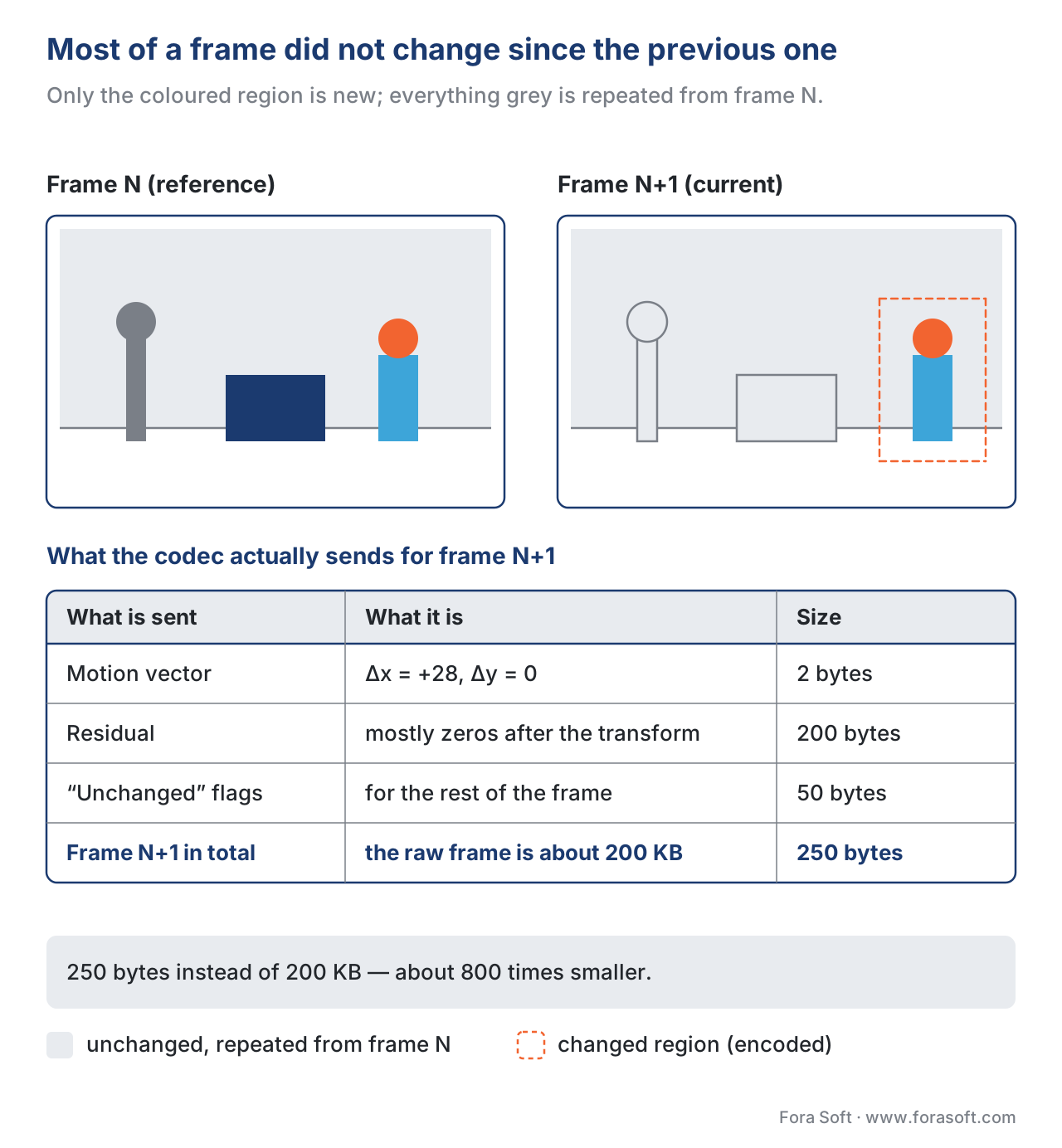 Figure 1. Consecutive frames are mostly the same image. The codec only needs to describe the small region that actually changed, plus the motion of objects from one frame to the next.
How the codec actually exploits the similarity
A modern inter-frame encoder removes temporal redundancy in three stages. Stage one is block partitioning, the same as for intra coding — the frame is sliced into small squares so each square can be handled separately. Stage two is motion estimation: for every block in the current frame, the encoder searches a recently decoded reference frame for the block that looks most like it, and writes down where the match was found (a short vector) plus the small pixel-by-pixel error left over. Stage three is transform and quantisation of that residual, exactly the same operation that runs at the end of spatial coding.
Each of these stages has its own dedicated article — inter-frame coding and motion estimation, block-based prediction, transform coding, and quantization. The job of this article is to make stage two concrete enough that you understand what the encoder is doing every time you watch a progress bar tick across in FFmpeg.
Stage 1 — Block partitioning (same as intra)
Every modern codec cuts the frame into a grid of square blocks before doing anything else. H.264 calls them macroblocks at 16×16 pixels (split as small as 4×4 for fine work). H.265 / HEVC introduced the Coding Tree Unit (CTU), up to 64×64 pixels. AV1 uses superblocks of up to 128×128 pixels, and H.266 / VVC keeps the 128×128 CTU. 3 Bigger blocks help when a large region of the frame moves together — for example a panning shot of a stadium where the whole crowd shifts left by the same amount. Smaller blocks help around the edges of moving objects, where one half of the block belongs to a moving person and the other half belongs to a stationary wall.
Stage 2 — Motion estimation (the workhorse)
For each block of the current frame, the encoder asks one question: somewhere in the previous frame, is there a block that looks almost exactly like this one? If yes, it is far cheaper to describe the location of that match than to describe the block itself from scratch. The encoder hands the decoder two small numbers — how far to move horizontally and how far to move vertically — and a short residual. Those two numbers together are called a motion vector. The technique of describing a block by referring to a similar block somewhere else is called motion compensation.
How does the encoder find the match? It does a block search: it places the current block at many candidate positions in the reference frame and measures how similar each candidate is, usually with a metric called the Sum of Absolute Differences (SAD) — add up the absolute pixel differences between the two blocks. 4 The position with the smallest SAD wins. A brute-force "exhaustive" search would test every pixel position within a search radius, which is far too slow at HD or 4K resolution. So real encoders use clever search patterns that test only a few dozen positions per block. Three patterns dominate:
- Diamond search — start at the centre, test the four neighbours one pixel away (up, down, left, right). Move to whichever neighbour was best, repeat. Stop when no neighbour beats the current centre. Fast and good enough for slow content.
- Hexagonal search — same idea but the test pattern is a six-point hexagon at radius two. Default in x264 and x265 fast presets; the radius is clamped to 4–16 pixels in x264. 5
- Uneven Multi-Hexagon (UMH) — a multi-stage pattern that searches a wider area in a non-uniform way; default for x265 at higher quality presets, with default search ranges of 16, 32, and 48 pixels across the three levels of hierarchical motion estimation. 6 Slower than hex, finds better matches on high-motion HD footage.
These search patterns are why the encoder's preset knob makes such a large difference. ultrafast skips most of the search; placebo runs an almost-exhaustive search around a wide radius. The same source at the same bitrate looks measurably better at slow than at ultrafast because motion estimation has done more work to find the right match block instead of just a match block.
A small detail with a big impact: the matching block does not have to align with a whole-pixel grid. Modern codecs allow motion vectors at sub-pixel precision — H.264 and HEVC at ¼-pixel for luma (the brightness channel) and ⅛-pixel for chroma (colour). AV1 pushes to ⅛-pixel for luma. 7 The codec interpolates a synthetic "between" position from the reference pixels around it. This matters because real-world motion is almost never an integer number of pixels — a face that moves 1.3 pixels to the left fits a fractional vector far better than the nearest integer.
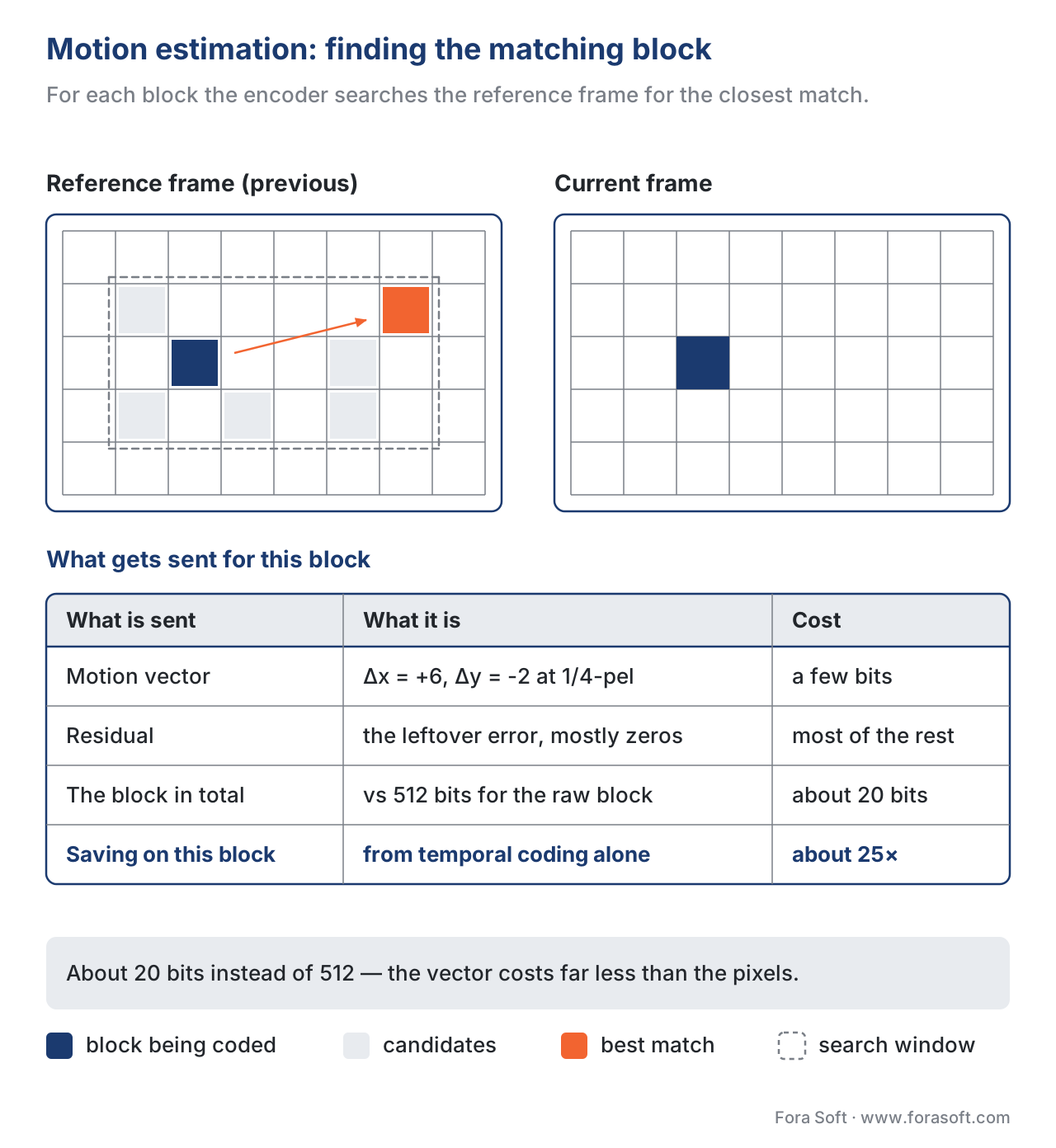 Figure 2. Motion estimation. For every block of the current frame, the encoder searches the reference frame for the closest match and sends the location of the match (motion vector) plus a small residual. The residual is what motion estimation could not predict.
Stage 3 — Transform and quantisation of the residual (same as intra)
Whatever pixel-by-pixel error is left over after the prediction is called the residual. If the prediction was good — a static wall, a smooth pan, a face that barely moved — the residual is mostly zeros. If the prediction was bad — a sharp object appearing for the first time, a scene cut, water splashing — the residual still carries most of the original block's energy. Either way, the codec hands the residual to the same DCT-and-quantisation chain that runs at the end of intra coding, written up in transform coding and quantization.
Quantisation is the only stage of the whole pipeline where information is actually discarded. Everything before it — block split, prediction, transform — is reversible. The aggressiveness of quantisation, controlled by a single dial called the QP, is why a higher CRF produces a smaller file: it rounds more residual coefficients to zero.
I, P, and B frames — the cast of characters
Once you have inter-frame prediction working, you have to decide for each frame: do I encode this from scratch, or do I lean on a neighbour? Modern codecs use three types of frame, and the mix between them is the GOP structure ("Group of Pictures").
- I-frame (Intra-coded) — encoded entirely on its own using only spatial compression. Heavy in bits, but a decoder can start from any I-frame without needing earlier frames. Used as keyframes for seeking and recovery. Typical share of the video's bitrate budget: 30–50% even though I-frames are 1–2% of all frames in a long GOP. 8
- P-frame (Predicted) — encoded as motion vectors plus residual, referring backward to one previous I or P frame. Typical bit cost: 10–25% of an I-frame at the same quality. 9
- B-frame (Bi-directional) — can refer both backward to past frames and forward to future frames. Typical bit cost: 25–50% of a P-frame at the same quality. B-frames give the highest compression ratio because they get two reference frames to predict from.
A short example. A common H.264 streaming configuration runs IBBPBBPBBPBBPBB — one I-frame, then a repeating pattern of two B-frames between every P-frame. Twelve of those fifteen frames are predicted; only the first carries a full picture. If the I-frame weighs 1.0 MB, the P-frames each weigh 0.15 MB, and the B-frames each weigh 0.05 MB, the whole GOP weighs roughly 1.0 + 4×0.15 + 10×0.05 = 2.1 MB. The same content encoded with all I-frames would weigh 15 × 1.0 = 15 MB. The compression ratio earned purely by temporal coding is about 7×.
That ratio is the headline number you should remember. Spatial compression typically gets a 1080p video from 600 Mbps raw down to roughly 30 Mbps as all-I-frames; temporal compression then takes that 30 Mbps down to 5–8 Mbps for the same picture quality. The temporal layer earns roughly three quarters of the total compression you see on screen.
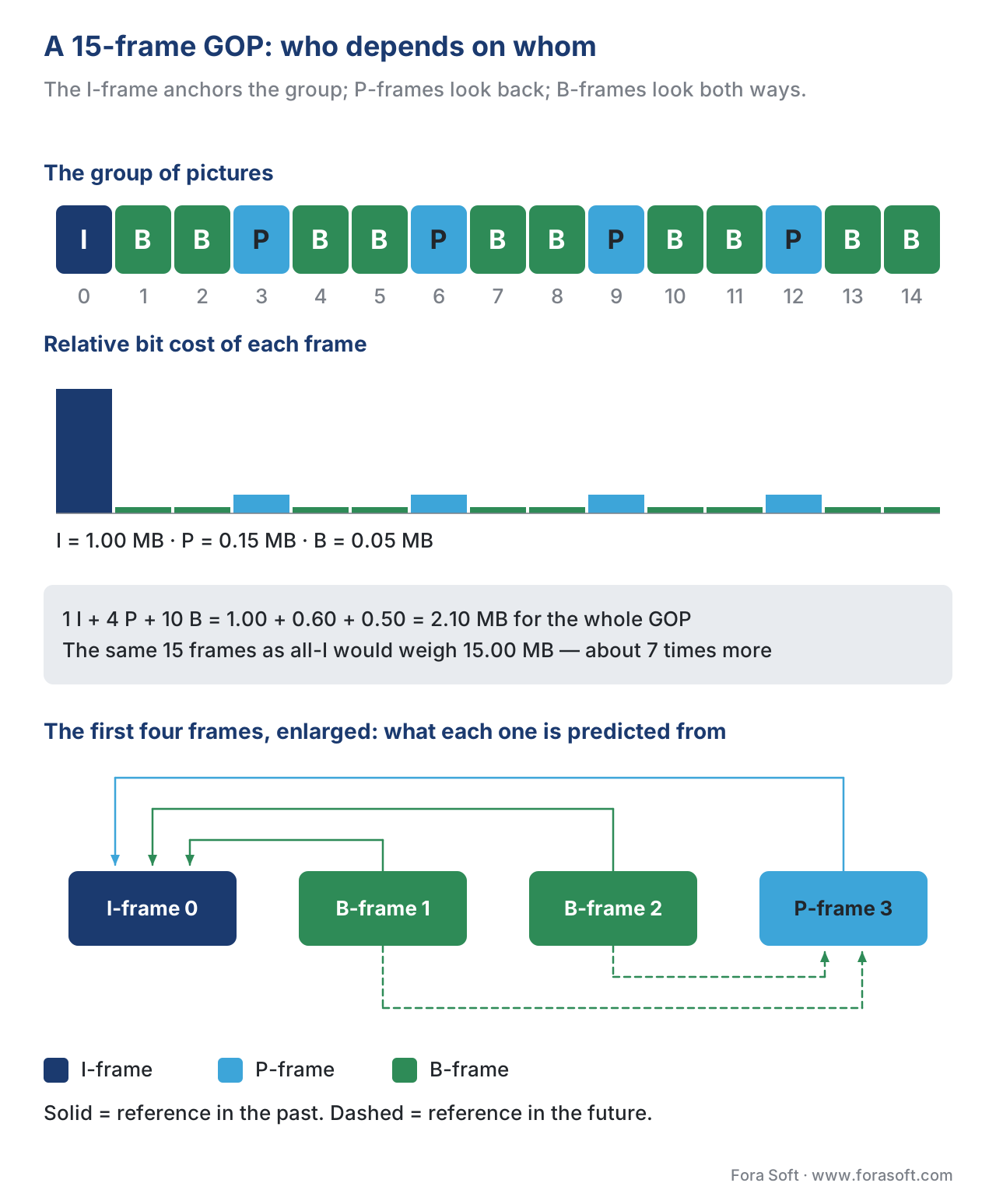 Figure 3. A typical 15-frame GOP. The I-frame at position 0 anchors the group; P-frames depend on the previous P/I; B-frames depend on both directions. Bar heights show how the bit cost falls off sharply for predicted frames.
Hierarchical B-frames — the GOP gets a tree
The simple linear pattern above leaves money on the table. HEVC and every codec after it use hierarchical B-frames (sometimes "B-pyramid"), where some B-frames are themselves used as references for other B-frames. The references form a tree, not a chain. HEVC's Random Access configuration uses 5 temporal layers in this hierarchy. 10 The compression gain is roughly 15–20% on top of a flat GOP at the same average quality, because the encoder can spend more bits on the few B-frames near the root (which influence many descendants) and fewer bits on the leaves.
For a hierarchical B-pyramid to work, the GOP size should be a power of two — 16 or 32 frames is typical. A side effect is that the encoder must reorder frames: a B-frame at display position 4 may depend on the I-frame at position 0 and the P-frame at position 16, so position 16 has to be encoded before position 4 even though it is shown later. This reorder is invisible to the player, but it is the reason H.265 encoders introduce more latency than H.264 encoders by default.
Where the bits go on a typical I-frame, P-frame, and B-frame
The split between intra coding (within a frame) and inter coding (between frames) varies by content. The numbers below are typical for a 1080p 24-fps movie scene encoded with x265 at CRF 22 — roughly the quality streaming services target:
| Source of saving | Approximate share of compression earned |
|---|---|
| Spatial prediction (intra) inside I-frames | 25–35% |
| Motion compensation across frames (the part this article is about) | 50–70% |
| Transform energy compaction + quantisation | 10–20% |
| Entropy coding (CABAC, arithmetic) | 5–10% |
The exact shares change for different content. A talking-head interview is easier on temporal coding — the head moves slowly and the background is static — so temporal coding earns closer to 80% of the budget. A soccer match is harder — players run, the camera pans, the crowd flickers — so temporal coding earns closer to 50% and intra has to cover the rest. Netflix's per-title encoding machinery exists precisely to measure this split and tune the encoder ladder for each title's mix of spatial and temporal complexity; the published result was around 20% bandwidth savings on average, and up to 30% with per-scene tuning. 11
How each codec generation has improved temporal prediction
Every codec generation has added new motion tools. The headline improvements:
- H.264 / AVC (2003) — up to 16 reference frames, ¼-pixel sub-pixel precision, 16×16 down to 4×4 motion partition sizes. 12
- H.265 / HEVC (2013) — same 16 reference frames, same ¼-pixel precision, but motion partitions up to 64×64. Introduced AMVP (Advanced Motion Vector Prediction) and Merge mode, which let one block inherit its motion vector from a neighbour with no extra bits. Hierarchical B-pyramid in the reference configuration. 13
- AV1 (2018) — up to 7 reference frames, ⅛-pixel sub-pixel precision, superblocks up to 128×128. Adds OBMC (Overlapped Block Motion Compensation, blends predictions from neighbouring blocks to soften block-boundary seams), warped motion (per-block affine transform — rotate and stretch a reference block, not just translate it), global motion (a single affine transform applied to the whole frame, ideal for camera pans and zooms), and richer compound prediction that mixes two references together. 14
- H.266 / VVC (2020) — up to ⅛-pixel luma, 128×128 CTUs, and a four- or six-parameter affine motion model with sub-block precision so a single block can describe rotation, zoom, and shear, not just translation. Adds SbTMVP (sub-block temporal motion vector prediction), BDOF (Bi-Directional Optical Flow), and DMVR (Decoder-side Motion Vector Refinement). 15
Each step up the codec ladder buys roughly 30–50% lower bitrate at equal quality, and a meaningful chunk of that improvement is in the motion layer specifically, not the transform or entropy layers. A camera panning across a stadium is the canonical case where AV1's global-motion tool earns its keep — H.264 has to send thousands of nearly-identical motion vectors for blocks that all move together; AV1 sends one affine transform for the whole frame.
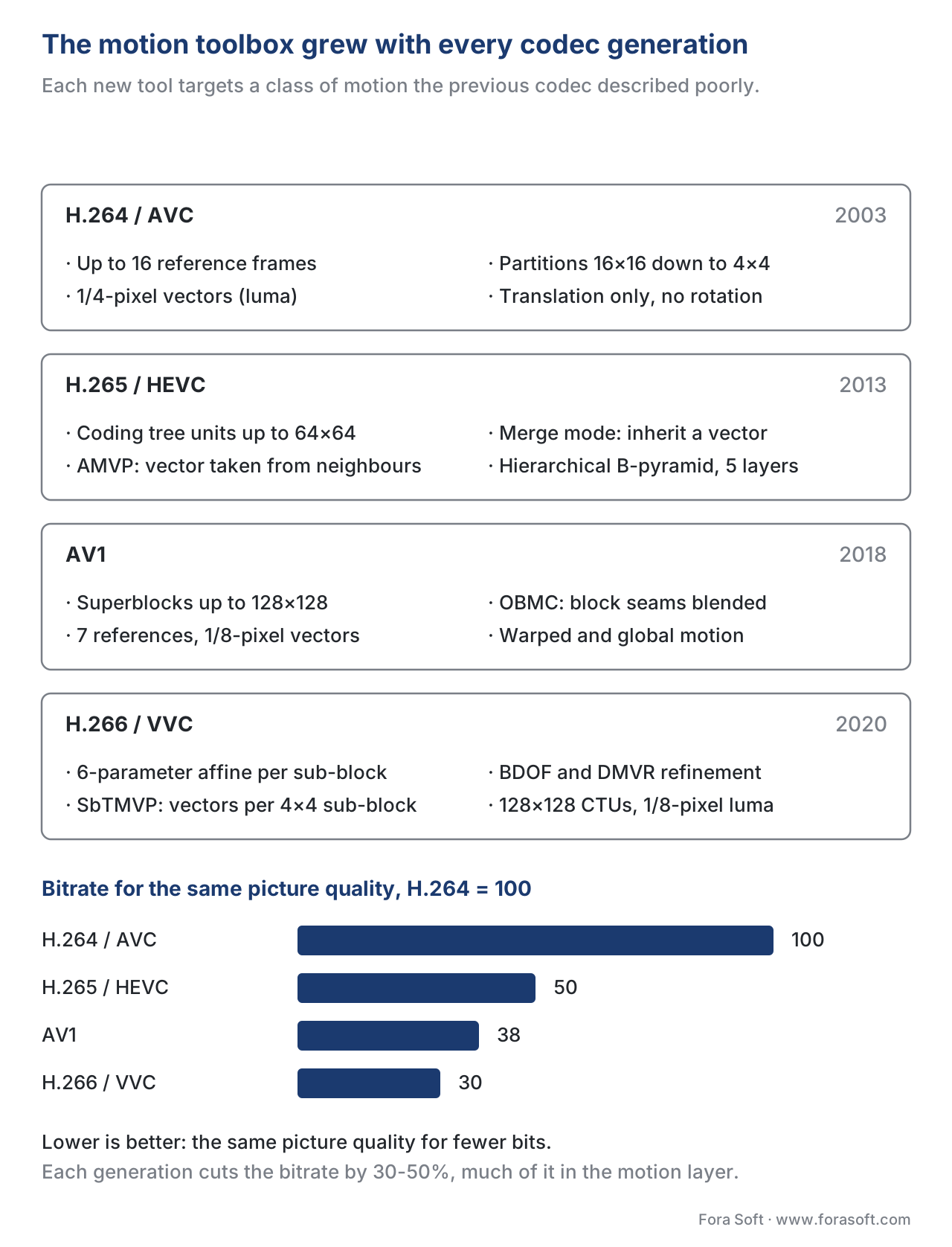 Figure 4. The motion-estimation toolbox has grown with every codec generation. Each new tool targets a class of motion the previous codec described poorly.
A common mistake: shrinking the GOP for live streaming
The most expensive mistake we see teams make on real projects is over-shortening the GOP to make low-latency streaming work. A short GOP — say one I-frame every second — does help joining, scrubbing, and recovery, but it costs a lot of bandwidth: the I-frames keep arriving, and each one is the heaviest frame in the stream. A common live-streaming default of one I-frame every two seconds (-g 48 on a 24-fps stream) is a reasonable balance. Cutting that to one every half second can easily add 20–35% to your total bitrate at the same quality, with negligible improvement in player join-time once a CMAF or LL-HLS pipeline is in place. The right answer is almost always "leave the GOP alone, fix latency in the segmenter and the player", not "shorten the GOP". For the detailed protocol-level reasoning see low-latency HLS vs WebRTC vs CMAF-LL.
Where Fora Soft fits in
We have been shipping video products since 2005 — video conferencing, OTT, e-learning, surveillance, telemedicine, AR/VR — so motion-estimation tuning is one of the levers we reach for most often when a client's bitrate or latency target is off. On surveillance projects the temporal-redundancy savings are huge by default because the scene is static for most of the day, and the right answer is usually a long GOP with B-frames switched off for snappy random access; on a live e-learning stream the GOP needs to land alongside the segmenter so that motion estimation does its job without making joining a lecture slow. We do not sell encoder licenses or hardware — we wire codecs into the rest of the product, where the trade-offs become visible.
The book
Video Encoding: A Complete Guide to Video Compression
This article stops at the idea of a motion vector; the book follows it into the encoder. It takes the search apart — diamond, hexagon and UMH patterns and what each costs in CPU, sub-pixel interpolation, how AMVP and merge mode make a vector almost free, why a hierarchical B-pyramid earns another 15–20%, and how GOP length trades bitrate against join time on a live stream. Every number in this article has its measurement and its source in there. Written by Nikolay Sapunov, CEO at Fora Soft.
Is your bitrate paying for motion the encoder could have predicted?
Tell us what your streams carry — a fixed camera on an empty corridor, a match with the camera panning, a lecture nobody wants to wait four seconds to join — and we will look at the temporal side of your encoder configuration: keyframe interval against your join-time target, how many B-frames the pipeline can afford, the preset you are paying CPU for, and whether a shorter GOP is really buying you the latency you think it is. 250+ video products shipped since 2005.
See our case studies
Case study
Mindbox
AI video management in 50+ deployments, pulling RTSP from cameras of every vintage through FFmpeg into HLS. A camera on an empty corridor is the extreme case of temporal redundancy — predicted frames are almost empty, so the keyframe interval, not the bitrate, decides what the archive costs.
Case study
Worldcast Live
Concert streaming at 1.5 Gb/s with 0.4–0.5 s latency to 10,000 simultaneous viewers. A moving crowd under moving lights is the case where motion estimation has to work hardest, and where shortening the GOP to chase latency costs the most bitrate.
Case study
Speed.Space
Remote production used on Netflix, EA and HBO shoots, recording locally at 1080p / 8 Mbps with per-shoot control of resolution, fps, codec and bitrate — the settings that decide how much work motion estimation has to do before the transform ever sees a residual.
What to read next
Architecture
Inter-Frame Coding and Motion Estimation
The same search at full depth: diamond, hexagon and UMH patterns, sub-pixel interpolation, and what each preset actually buys.
Architecture
GOP Structure: I, P, B-Frames, Open vs Closed GOP
The 15-frame group above taken apart: open and closed GOPs, the B-pyramid, and why frames leave the encoder out of order.
Architecture
Rate Control: CBR, VBR, CRF, ABR, Capped CRF
Where the bits saved by prediction actually go, and which dial to turn when a live stream has to hold a bitrate ceiling.
Codecs
AV1: The New Internet Standard And Where It Stands In 2026
Warped motion, global motion and seven reference frames in practice — what they cost in encoder CPU and what they give back.
-
FastPix. "Understanding Video Inter-Frame Compression Techniques." Accessed 2026-05-16. https://www.fastpix.io/blog/understanding-video-inter-frame-compression ↩
-
ScienceDirect Topics. "Temporal Compression — Overview." Accessed 2026-05-16. https://www.sciencedirect.com/topics/computer-science/temporal-compression — "Block based motion compensation and motion estimation techniques used in video compression systems are capable of the largest reduction in the raw signal bit rate. Typical implementations generally out-perform pure spatial encodings by a factor of three or more." ↩
-
Wikipedia. "Inter frame." Accessed 2026-05-16. https://en.wikipedia.org/wiki/Inter_frame ↩
-
Slideshare / Lumenci. "Motion Estimation Overview" and "How Video Codecs Work." Accessed 2026-05-16. https://lumenci.com/blogs/how-video-codecs-works/ ↩
-
x264 documentation,
--merangeparameter. Accessed 2026-05-16. https://ffmpeg.party/guides/x264/ ↩ -
x265 Documentation, "Command Line Options." Accessed 2026-05-16. https://x265.readthedocs.io/en/master/cli.html ↩
-
AV1 Technical Overview, Chen et al., arXiv:2008.06091. Accessed 2026-05-16. https://arxiv.org/abs/2008.06091 ↩
-
arXiv 2406.16544 — "Hierarchical B-frame Video Coding for Long Group of Pictures." Accessed 2026-05-16. https://arxiv.org/html/2406.16544v1 ↩
-
Netflix Technology Blog. "Per-Title Encode Optimization." Accessed 2026-05-16. https://netflixtechblog.com/per-title-encode-optimization-7e99442b62a2 ↩
-
ITU-T Recommendation H.264 (10/2021), Advanced video coding for generic audiovisual services. https://www.itu.int/rec/T-REC-H.264 ↩
-
HEVC Inter-Picture Prediction chapter. https://harrycharan.gitlab.io/pdfs/2014_hevc_alg.pdf ↩
-
Chen, Y. et al. "An Overview of Core Coding Tools in the AV1 Video Codec." Accessed 2026-05-16. https://www.jmvalin.ca/papers/AV1_tools.pdf ↩
-
OTTVerse. "Affine Motion Compensated Prediction in VVC." Accessed 2026-05-16. https://ottverse.com/affine-motion-estimation-compensation-in-vvc/ ↩
