


Why This Matters
If your product distributes paid video, your studios and rights holders will ask one question before the contract closes: which DRMs do you support, and to what security level? Get the answer wrong and you cannot legally stream Netflix-grade content, cannot sell to Hollywood, and cannot ship 4K Ultra HD on the platforms where 4K actually pays. Get it right and the cost of a multi-DRM stack — license-server fees, packaging time, and integration work — fades into the noise of your content delivery network bill. This article is for product managers, founders, and engineering leads who need to evaluate a multi-DRM vendor or build a packaging pipeline that future-proofs them for the next codec generation. It is not a sales pitch for any single provider. The recommendations are concrete, the numbers are 2026-current, and the diagrams make the moving parts visible without requiring a six-month proof of concept.
What "DRM" Actually Means in Streaming
Before we name the three systems, let's nail down the term. A DRM is a controlled key-distribution and policy-enforcement system: it decides who is allowed to decrypt a piece of video, on which device, at which quality, for how long. The encrypted video file itself is not what changes between Widevine and FairPlay — that file is a standard MP4 with a small encryption box at the front. What changes is the protocol the player uses to ask the license server for the decryption key, the cryptographic identity the player has to prove, and the secure pathway the decrypted pixels travel down to the screen.
The job sits between two more familiar pieces. Upstream is your packager: it takes the encoded renditions (H.264, H.265, AV1) from your transcoder and emits HLS and DASH segments with an encryption layer applied. Downstream is the player and the platform: the operating system or browser hosts a content decryption module (CDM) that talks to a license server, gets a key, and decrypts each segment as it arrives. The DRM is the contract between those two ends. (For the upstream encoding context, see our containers article and our cloud transcoding article. For codec context, see the codec comparison matrix.)
The reason there are three of them — and not one — is that the major platform owners want control of the secure pathway on their own hardware. Google ships Widevine inside Chrome and Android. Apple ships FairPlay inside iOS, macOS, tvOS, and Safari. Microsoft ships PlayReady inside Windows, Xbox, and most smart TVs. Each ecosystem refuses to host another vendor's CDM at the hardware-root-of-trust level, so a service that wants to reach every screen has to encrypt its content in a way that all three vendors agree on, and then deliver three different licenses to three different CDMs at playback time. That shared encryption layer is CENC, and it is the most important standard in this article.
 Figure 1. A multi-DRM packaging pipeline in 2026. One source becomes one set of CENC-encrypted CMAF segments; three license servers issue three different licenses; three platform CDMs decrypt locally and feed the secure video path.
Common Encryption (CENC): The Standard Under the Standards
Common encryption is defined by the ISO/IEC 23001-7 standard, currently in its 2023 third edition. The standard's job is narrow but consequential: define how to encrypt the sample payloads inside an ISO base media file format (ISOBMFF) container so that any DRM system can attach its own license-acquisition metadata without changing the encryption itself. One encrypted file, many license paths.
The standard defines four protection schemes, addressed by a four-character code stored in the file's schi (scheme information) box. The first two use AES in counter mode (CTR), the second two use AES in cipher-block-chaining mode (CBC). The four-character codes are cenc, cens, cbc1, and cbcs. The two you will actually meet in production are cenc and cbcs.
| Scheme | Cipher mode | Pattern | Typical use |
|---|---|---|---|
cenc |
AES-128 CTR | Full sample, no pattern | DASH on Widevine and PlayReady, pre-2018 |
cens |
AES-128 CTR | Sub-sample pattern | Bandwidth-saving variant of cenc, rarely used |
cbc1 |
AES-128 CBC | Full sample, no pattern | Original CBC mode, deprecated in practice |
cbcs |
AES-128 CBC | 1:9 sub-sample pattern | HLS on FairPlay, and the new common scheme |
The cbcs mode is the one that matters in 2026. It encrypts one block of every ten and leaves the other nine in the clear, which is mathematically enough to make the bitstream unplayable without the key but cheap enough that hardware decoders on phones do not stall trying to decrypt every byte. Apple required cbcs from day one for FairPlay; Google added cbcs support to Widevine in 2018; Microsoft added cbcs support to PlayReady the same year. From 2018 onwards, a single cbcs-encrypted CMAF file plays on Widevine, PlayReady, and FairPlay alike. Before that change, you packaged each title twice — cenc for DASH, cbcs for HLS — and you wrote a separate copy to your origin for each. That doubled your storage cost and your packaging time. Today you ship one set of segments, two manifests, and three licenses, and you sleep better at night.
The piece of metadata that makes multi-DRM possible is the protection system specific header (pssh) box. A pssh box carries a 16-byte system identifier (system ID) that tells the player "this blob is for Widevine" or "this blob is for PlayReady", plus a vendor-specific payload that the corresponding CDM knows how to parse. A multi-DRM file contains one pssh for Widevine (system ID EDEF8BA9-79D6-4ACE-A3C8-27DCD51D21ED), one for PlayReady (9A04F079-9840-4286-AB92-E65BE0885F95), and one for FairPlay (94CE86FB-07FF-4F43-ADB8-93D2FA968CA2); the player iterates them, picks the one its CDM understands, and ignores the rest. Web players use the World Wide Web Consortium's encrypted media extensions (EME) application programming interface to negotiate this; native iOS players use AVFoundation's FairPlay calls; native Windows players use the PlayReady runtime.
The Three DRMs: A Practical Tour
Widevine — Google's Workhorse
Widevine is the most-deployed DRM in the world by device count. Google ships it inside every Android device that ships with Google Mobile Services, inside Chrome and Chromium-based browsers on every desktop platform, and inside the Cast and Android TV ecosystems. Together, that footprint covers Android (about three billion devices in 2026), Chrome on desktop (about two billion users), most smart TVs that are not Apple or LG, and Chromecast.
Widevine has three security levels, named L1, L2, and L3. The difference is where the decryption happens and where the decrypted frames live.
L1 is the strictest level. Both the cryptography (key handling, decryption) and the video processing (decoding, scaling, blending to the framebuffer) happen inside a trusted execution environment (TEE) — a hardware-isolated region of the device's main processor that the operating system cannot read. On Android, the TEE is usually ARM TrustZone. Studios require L1 for high-definition (1080p) and 4K streaming because the decrypted frames never leave hardware. Without L1, Netflix caps you at 540p on Android.
L2 is a middle level: the cryptography is in the TEE, but the decoded video may leave it. L2 exists mostly as a historical artefact. Few devices ship at L2 today.
L3 is the lowest level. Both the cryptography and the video processing happen in software, outside any TEE. L3 is what you get on a desktop Chrome running on a normal x86 PC, on an Android emulator, or on an old Android phone whose TEE driver is missing. L3 is also where the well-known security weaknesses live: researchers have demonstrated practical key-extraction attacks against the Widevine L3 white-box implementation since 2019, and "Widevine dump" tools that pull keys from L3 sessions circulate freely. Major studios react by capping L3 at standard definition (480p), which is why your desktop Chrome cannot stream Netflix in HD without the Microsoft Edge browser (which uses PlayReady on Windows).
The license server speaks a Google-defined protocol over HTTPS; the request body is a serialised Protocol Buffer that the player constructs from the pssh box and the user's identity token. License responses include key IDs, the keys themselves, and a usage policy: how long the license is valid for, whether output to High-bandwidth Digital Content Protection (HDCP) is required, and whether the license can be persisted offline. Widevine does not charge per-license fees to the service operator; the cost goes to your DRM-as-a-service vendor (more on that below).
FairPlay Streaming — Apple's Required Lock
FairPlay Streaming (FPS) is Apple's DRM. It ships inside iOS, iPadOS, macOS, tvOS, watchOS, and Safari, and it is the only DRM Apple will let you use to encrypt video that plays on Apple devices. There is no Widevine on iOS, no PlayReady on iOS, no third-party CDM on iOS — if you want to ship encrypted video to an iPhone, you ship FairPlay.
FairPlay's encryption side is simple by design: AES-128 in CBC mode with subsample encryption, addressed by the cbcs scheme code we covered above. Apple uses HLS as its native packaging format; the encrypted segments carry a #EXT-X-KEY tag with METHOD=SAMPLE-AES (the older flavour) or, in CMAF-HLS, a #EXT-X-SESSION-KEY tag pointing at a key delivery URL with KEYFORMAT="com.apple.streamingkeydelivery".
The license-acquisition flow involves Apple's key servers as an intermediate authority. Your app sends a content-key context (SPC) blob to your key server; your key server forwards it to Apple's key server, which validates the request, returns a content-key response (CKC); your key server forwards the CKC back to the app, which hands it to the system CDM, which decrypts the segments. The Apple key server is the trust root — you cannot run FairPlay without an Apple-issued application secret key and certificate, which you obtain by signing the FairPlay Streaming Deployment Package agreement on the Apple Developer portal.
Codec support tracks Apple's own roadmap. H.264, H.265 (HEVC), and AV1 are all supported in FairPlay-protected streams on Apple platforms that ship the codec — AV1 hardware decode arrived with the A17 Pro chip and is universal across iPhone 16 and later. Dolby Vision and HDR10 are supported as packaging metadata on top of any encrypted codec. The piece you must not miss: as of 2026, AVPlayer on iOS will refuse to play AV1 content unless the device has hardware AV1 support, even if the operating system has a software decoder available. Plan for the bifurcated reality where AV1 ships only to newer phones and H.264 or H.265 fallback rails ship everywhere else.
The 2026 reality check on FairPlay is that the SDK has hardened steadily over a decade. The most-discussed weakness today is not the SDK itself but the SPC/CKC bridge — if your key server hands the CKC back to an attacker who can replay the request, the attacker gets a key. Bind your SPC requests to short-lived session tokens, validate the device's application_id, and never log the CKC.
PlayReady — Microsoft's Set-Top and TV Workhorse
PlayReady is the third major DRM and the one most often misunderstood. Microsoft ships PlayReady inside Windows, Xbox, Microsoft Edge, and — more importantly — inside almost every smart TV and set-top box manufactured in the last decade. Samsung, Sony, LG (alongside its own), Vizio, Roku, Amazon Fire TV, Comcast Xfinity, Sky Q: the lineup is dominated by PlayReady because Microsoft licenses the technology to TV manufacturers on terms that make it the path of least resistance for a connected-TV operating system that needs studio-grade content protection.
PlayReady has two security levels in active use, SL2000 and SL3000. SL2000 is the software-DRM level: the cryptographic operations run in software with obfuscation but no hardware isolation, and the level is sufficient for standard-definition and high-definition content with most studios. SL3000 is the hardware-DRM level introduced in 2015 alongside PlayReady 3.0: the cryptographic operations run inside the device's TEE, and the level is required by most studios for 4K Ultra HD and HDR delivery.
The most consequential 2025 story for PlayReady was a leak of SL2000 and SL3000 certificates published on GitHub under the handle "Widevineleak". Microsoft filed takedown requests for the SL3000 series (the higher-value 4K-enabling certificates) and Amazon Prime Video began suspending accounts that used the leaked certificates to download protected content. Microsoft did not request takedown of the SL2000 certificates, which observers read as a quiet admission that the SL2000 attack surface is already widely known. The practical impact on a 2026 service operator is small: PlayReady remains the only viable DRM for content that must play on smart TVs and Xbox, and the leak does not change the encryption math — it changes the calculus of which devices a studio considers "secure" for premium content.
The license-acquisition flow is straightforward by 2026 standards: the player sends an XML license-acquisition message over HTTPS to your license server, the server validates the request against your business rules (subscription active, geographic region allowed, simultaneous-stream count under the limit), and returns an XML license response signed with the server's PlayReady certificate. Microsoft requires you to use its servers (or a Microsoft-certified vendor's servers) — the cryptographic chain of trust runs back to Microsoft's root certificate.
CMAF, the Single-Packaging Win
Common Media Application Format (CMAF) is a 2017 packaging standard from MPEG and the joint effort of Apple and Microsoft that solved the original sin of streaming video: that HLS and DASH used incompatible segment formats. Before CMAF, you packaged your encoded H.264 master twice — once as a series of MPEG-TS segments for HLS, once as a series of fragmented MP4 segments for DASH — and you stored both at the origin. The duplicated storage and the duplicated packaging job cost real money.
CMAF defines a single fragmented MP4 (fMP4) segment format that both HLS and DASH manifests can reference. With CMAF, you write one set of segments to the origin and emit two thin manifests — an .m3u8 for HLS and an .mpd for DASH — that point at the same segments. Add cbcs encryption and the same set of segments is decryptable by Widevine, PlayReady, and FairPlay alike. The combined result is the modern multi-DRM workflow: one encode, one packaging pass, one encrypted set on the origin, two manifests, three licenses at playback time.
The major packagers ship CMAF + cbcs as the 2026 default. AWS Elemental MediaPackage emits CMAF by default for new channels. Bitmovin's encoder defaults to CMAF for live and per-title encoding workflows. Open-source tooling — Shaka Packager and Bento4 — both support CMAF + cbcs with multi-DRM key metadata in a single command line. Apple's own Advanced HTTP Live Streaming documentation switched from MPEG-TS examples to fragmented-MP4 examples in 2020 and now treats CMAF as the recommended path.
# Shaka Packager — single packaging pass, multi-DRM (Widevine + PlayReady + FairPlay)
# One encode in, one CMAF set out, two manifests, three license endpoints.
packager \
  in=h264_1080p.mp4,stream=video,output=video_1080p.cmfv \
  in=h264_720p.mp4,stream=video,output=video_720p.cmfv \
  in=audio_aac.mp4,stream=audio,output=audio.cmfa \
  --protection_scheme cbcs \
  --enable_raw_key_encryption \
  --keys label=video:key_id=$KID:key=$KEY \
  --pssh "$WIDEVINE_PSSH,$PLAYREADY_PSSH,$FAIRPLAY_PSSH" \
  --hls_master_playlist_output master.m3u8 \
  --mpd_output stream.mpd
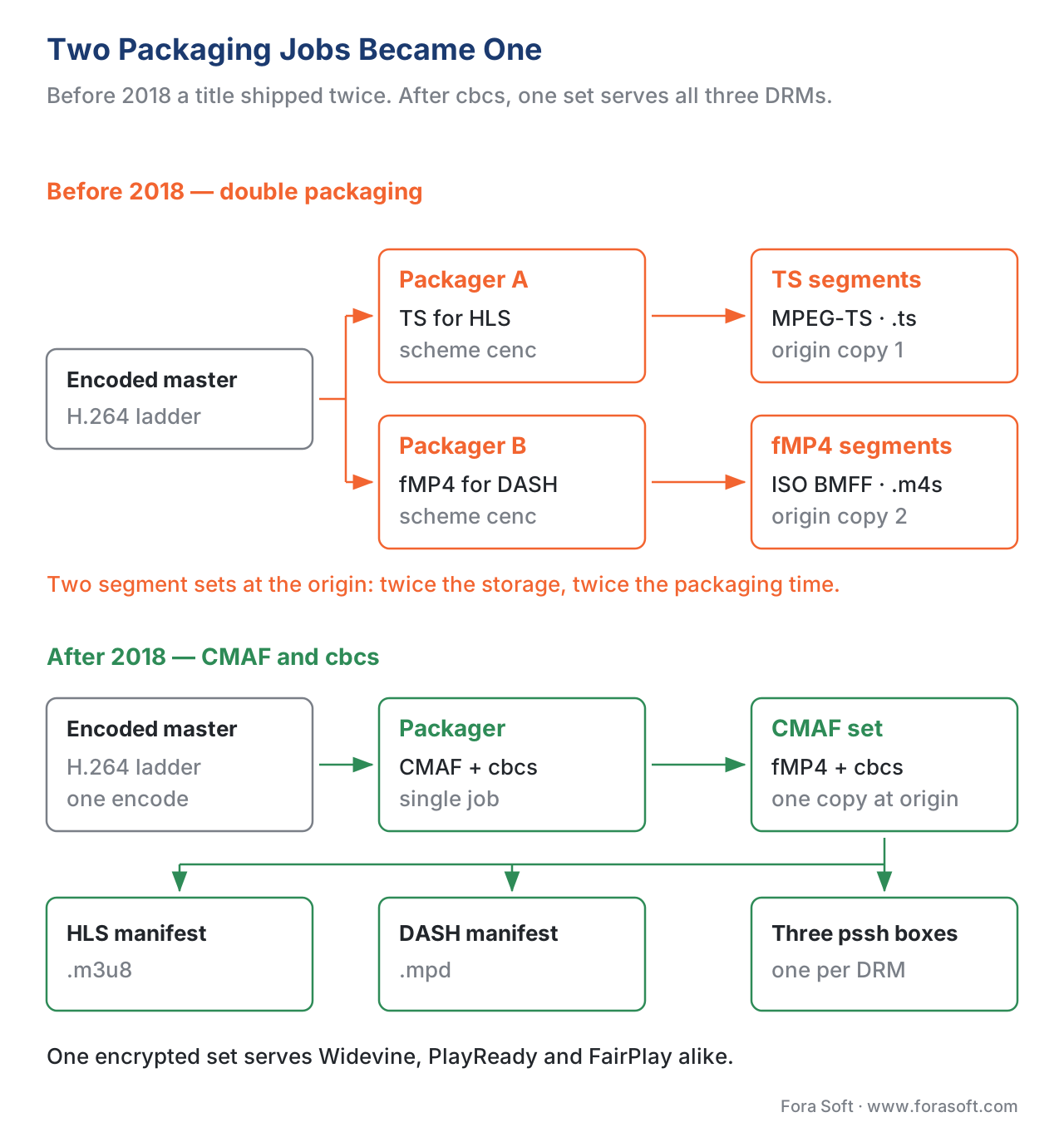 Figure 2. Before CMAF and
 cbcs, every title shipped twice — once as TS for HLS, once as fMP4 for DASH. After CMAF and cbcs, the same encrypted fMP4 segments serve every player and every DRM, cutting origin storage roughly in half.
The CDM, EME, and the Browser Path
The browser path to decryption goes through the World Wide Web Consortium's Encrypted Media Extensions (EME) — the JavaScript application programming interface that lets a web player talk to the operating system's content decryption module. EME is a 2017 W3C Recommendation; every modern browser implements it, and every modern HTML5 video player (Shaka Player, dash.js, hls.js with EME, Video.js with the eme plugin, Bitmovin Player, JW Player) drives DRM through it.
The EME contract is small. The player creates a MediaKeys object bound to a key system identifier — com.widevine.alpha for Widevine, com.microsoft.playready for PlayReady (or com.microsoft.playready.recommendation for SL3000-aware sessions), com.apple.fps.1_0 for FairPlay on Safari. The video element fires an encrypted event when the player feeds it an encrypted segment; the event carries the initialisation data, which is the pssh blob from the file. The player passes the blob to generateRequest, the browser passes it to the platform CDM, the CDM produces a message event with a vendor-encoded license request payload, the player ships the payload to the license server, gets a response back, and feeds it to update. After update completes, the video plays.
The brittle part of EME is the key system identifier table. The same DRM has different identifiers on different browsers, the SL2000-vs-SL3000 distinction on PlayReady is expressed as a separate identifier, and Safari's FairPlay implementation took years to align with the other browsers' API surface. A 2026 web player needs a key-system probe step: ask the browser which systems it supports via navigator.requestMediaKeySystemAccess, fall back through a prioritised list, and refuse to play if none of the supported systems matches the protected content.
License Servers and the DRM-as-a-Service Market
Running your own multi-DRM license server is technically possible. Google publishes the Widevine license server protocol, Microsoft publishes the PlayReady server tools, and Apple distributes a FairPlay key server reference implementation under its developer agreement. In practice almost nobody does this — the operational burden of staying current with three vendor specifications, three certificate rotations, and three audit cycles is bigger than the cost of buying the service from a vendor that already does it for a thousand other customers.
The DRM-as-a-service market in 2026 is dominated by a handful of specialists: EZDRM, BuyDRM (with its KeyOS multikey product), DRMtoday from Castlabs, Axinom, VdoCipher, and DoveRunner. Pricing converges on two models: a monthly platform fee in the $100 to $2,000 range plus a per-license fee in the $0.001 to $0.05 range, or a flat per-license fee with no platform minimum. EZDRM publishes a starting rate of $199.99 per month; BuyDRM starts at $99 per month; Axinom and DRMtoday quote individually based on volume; enterprise contracts at the Netflix-or-Disney scale negotiate flat-rate annuals in the $10,000 to $50,000 per year range.
The decision between vendors is rarely about price at the entry tier — the difference between $99 and $199 a month is noise compared to the cost of an integration that doesn't work. The decisions that matter are: which content delivery network and player they integrate with by default, whether they offer key-rotation features for live channels (every two hours, every event boundary, on demand), whether they expose offline-license issuance for download-and-go mobile apps, whether their license server runs in your data centre region (latency matters when your viewer's first license request gates first frame), and whether they offer studio-recognized integrity attestation for the Hollywood-tier studios you need to negotiate with.
The single most common cost surprise is license-request volume on live channels with key rotation. A standard 24-hour live channel that rotates keys every two hours produces 12 key rotations per viewer per day. A live event with 100,000 concurrent viewers and an hourly rotation produces 100,000 license requests per hour. At $0.005 per license, that is $12,000 per day of license fees on top of your encoding and content delivery network bill. Some platforms cap your monthly bill against expected usage; others let you bleed. Read the contract.
The Decision Tree: Which DRM, When?
A pragmatic 2026 service operator does not pick "the best DRM" — there is no such thing — but matches DRM coverage to device reach and to studio requirements. The decision tree below is what we use with clients at Fora Soft.
If your service is consumer free-with-ads or freemium, and your content is not licensed from a major studio, you can ship Widevine plus FairPlay and call it done. Widevine covers Android, Chrome, and most smart TVs. FairPlay covers iPhone, iPad, Apple TV, and Safari. Together, that is roughly 95% of consumer device reach in most Western markets. The 5% you miss is older smart TVs and set-top boxes that ship PlayReady only — for an ad-funded service, that gap is acceptable.
If your service distributes paid premium video (subscription video on demand, transactional video on demand, electronic sell-through) and you need to clear deals with major studios, you ship all three: Widevine, FairPlay, and PlayReady. The studios will require it. PlayReady is the entry ticket for connected-TV partners — Samsung, LG, Roku — and you cannot fake it.
If your service ships 4K Ultra HD, you ship hardware DRM only. That means Widevine L1 on Android, FairPlay on Apple (which is hardware-backed by definition), and PlayReady SL3000 on Windows and TV. Software-DRM levels (Widevine L3, PlayReady SL2000) cap at 1080p or 540p depending on the studio. Provision your manifests to enforce this — your player should refuse to surface 4K renditions on devices that report a software-only DRM session.
If your service runs live events with key rotation, your DRM-as-a-service vendor's license-request handling becomes the dominant cost line. Negotiate per-license fees against your forecast viewer count, not against your historical video-on-demand bill. A 100,000-viewer live event with hourly key rotation generates more license requests in a single hour than a year of your video-on-demand catalogue.
If your service ships an iOS or Android mobile app with offline download — a common pattern in education and long-haul travel apps — you need persistent licenses with an explicit offline-policy clause. Widevine and PlayReady both support persistent offline licenses with configurable expiration; FairPlay supports them through the FairPlay Streaming Offline feature, which requires a separate FairPlay key server configuration. Test the expiration paths under airplane mode early — they are the failure mode most often missed in QA.
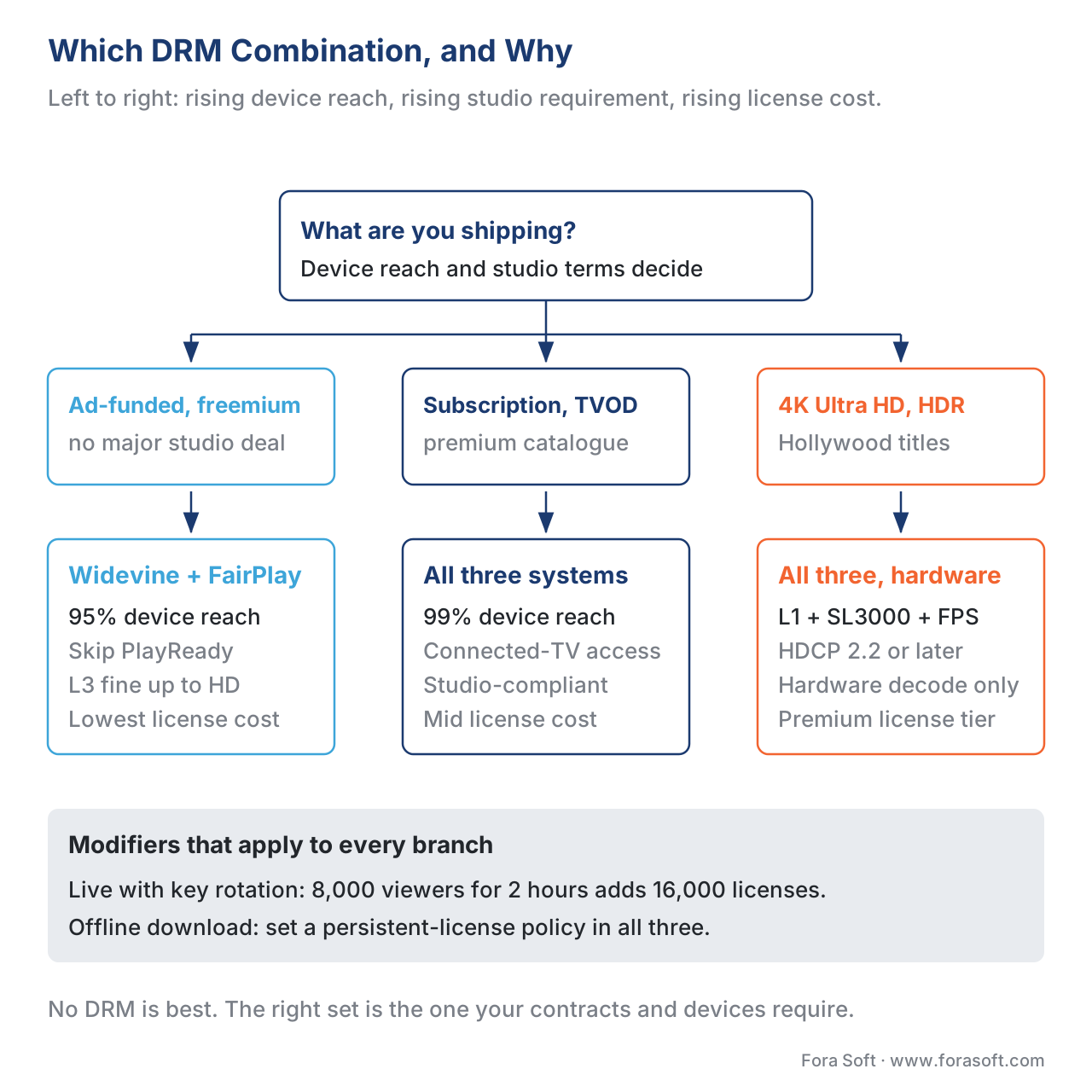 Figure 3. A pragmatic decision tree for picking your DRM combination. Most consumer services land at Widevine plus FairPlay; premium services add PlayReady for connected-TV reach; 4K Ultra HD services require all three at hardware security levels.
A Common Mistake: Treating DRM as a Security Guarantee
Engineers new to DRM often treat the technology as a guarantee that their content cannot be pirated. It is not. DRM is a guarantee that casual piracy is harder than paying for the content, and that the platform owner can shut down the most-leaked decryption pathways quickly. It is not a guarantee against a determined, well-resourced attacker.
Widevine L3 has been broken since 2019 and reliable extraction tools circulate publicly. PlayReady SL2000 certificates leaked in 2024 and SL3000 certificates leaked in early 2025. FairPlay has held up better in the public eye but Apple's own reference implementation has been reverse-engineered repeatedly. The 4K master copies of every major streaming title appear on piracy sites within hours of release. None of this means DRM is pointless — it means the conversation about DRM has to be honest about what it buys you.
What DRM actually buys you is two things. First, it satisfies the contractual obligation your content licensing agreement places on you — "you will use industry-standard digital rights management compliant with the Movie Picture Association of America secure delivery specification" — and that contractual obligation is what stops the studio from suing you for breach. Second, it makes the cost-versus-benefit of pirating your content unfavourable for the marginal user: the people who would have paid for your service but who would have switched to a free pirate copy if it took thirty seconds to acquire one. DRM does nothing about the pirate sites that already have your content. It does plenty about the casual user who would have asked a friend to AirDrop them the file.
The marketing framing that DRM "prevents piracy" hurts the conversation. The honest framing is that DRM raises the cost of piracy enough that the studios will sign the licensing agreement, and the studios are the gate between you and a viable premium video product.
Pricing Math: Putting Numbers Together
Numbers without a worked example are noise. Take a service that ships subscription video on demand with 50,000 monthly active users, an average of 20 video starts per user per month, a 24-hour video-on-demand catalogue, and a 2-hour live event once a week with 8,000 average concurrent viewers. We will price the DRM line on three model contracts: a per-license model at $0.005 per license, a per-active-user model at $0.10 per monthly active user, and a flat-rate enterprise model.
inputs
   monthly_active_users  = 50,000
   starts_per_user_month = 20
   monthly_starts        = 50,000 × 20 = 1,000,000
   live_events_per_month = 4
   live_concurrent_avg   = 8,000
   live_rotation_hourly  = 1
   live_event_hours      = 2

per-license model
   vod_licenses          = 1,000,000  (one per start)
   live_licenses         = 4 × 8,000 × 2 = 64,000  (rotation generates one per viewer per hour)
   monthly_licenses      = 1,064,000
   monthly_cost          = 1,064,000 × $0.005 = $5,320

per-MAU model
   monthly_cost          = 50,000 × $0.10 = $5,000

flat-rate enterprise
   monthly_cost          = $4,000  (negotiated against forecast)
At this scale, all three models land in the $4,000 to $5,500 per month range — the choice is about predictability, not about absolute cost. A service that has predictable viewing patterns prefers the flat rate; a service that has spiky live demand prefers per-license (because slow months get cheap); a service that monetises per user prefers per-MAU (because the cost scales with the revenue it tracks). The line item most often missed is the live-event rotation: at hourly rotation, 8,000 concurrent viewers for two hours adds 16,000 license requests per event, four times the per-start cost of the equivalent video-on-demand audience.
If your operating margin is thin, push your DRM vendor for a hybrid contract: flat rate up to a forecast volume, per-license overage above. Most vendors will accept it for a 12-month commit.
Free download: DRM Multi-Stack Readiness Checklist (2026)One-page printable A4 checklist covering the coverage matrix, CMAF + cbcs packaging, license server contract terms, the security-level matrix for HD and 4K, and a pre-launch verification list for a 2026 multi-DRM rollout.Where Fora Soft Fits In
Fora Soft has shipped DRM-protected video in OTT and Internet TV products, in e-learning platforms with offline download, and in telemedicine services with regulator-mandated playback restrictions. The pattern we see across verticals is the same: the engineering team underestimates the live-event license-request volume, the product team underestimates the iOS-only offline policy gotchas, and the studio-facing legal team underestimates how much PlayReady SL3000 hardware coverage matters when negotiating with a connected-TV partner. We integrate Widevine, FairPlay, and PlayReady through Shaka Packager and the major DRM-as-a-service vendors, and we have built custom license-server middleware for clients with non-standard token issuance requirements. We do not resell DRM-as-a-service — we pick the vendor that matches your studio mix and your latency budget.

The book
Video Encoding: A Complete Guide to Video Compression — From Pixels and Color to H.264, HEVC, AV1, Quality Metrics, and AI
Encryption starts where the encode stops: cbcs protects one block in ten of a bitstream that something upstream had to build, and the 4K rung studios gate behind Widevine L1 and PlayReady SL3000 is a rung you have to be able to produce first. The book spends 1,522 pages on that upstream half — how H.264, HEVC and AV1 assemble the samples a packager wraps, what a CMAF fragment holds before a pssh box is bolted to the front, and how to prove with VMAF that the rung you are paying hardware-DRM rates to protect is worth protecting. It is volume one of the seven-volume Fora Soft Video Engineering Handbook, which carries the thread on into delivery, players and the economics of DRM. Written by Nikolay Sapunov, CEO at Fora Soft.
Not sure which DRMs your content deals will actually require?
Send us your device mix, the rights terms on your catalogue and your live schedule, and we will tell you which of Widevine, FairPlay and PlayReady you need, which security levels your 4K rungs have to report, what key rotation will add to the license bill per live event, and which DRM-as-a-service contract shape fits your traffic — 250+ video products shipped since 2005.
See our case studies
Case study
Drundoo
Bulgarian internet TV carrying 60 live channels alongside a movies and series catalogue on one subscription — the branch where a studio-grade VOD library and live channels with key rotation land on the same license bill.
Case study
Vodeo
A rental storefront for Janson Media with no subscription at all: viewers buy tickets and rent a single title, so every rental window is a license policy with an expiry date — and on iOS that means FairPlay and nothing else.
Case study
Bellicon Smart TV
530+ workout videos shipped to Apple TV, Android TV and the browser from one catalogue — three platform CDMs, three license paths, one encrypted set behind them.
What to read next
Containers
Containers: MP4, fMP4, MKV, WebM, MOV, MPEG-TS
The fMP4 box structure the schi and pssh boxes actually live in.
Pipeline
Transcoding Pipeline in Depth: Decode, Filter, Encode, Mux
The mux stage where packaging and encryption get bolted onto the encode.
Cloud
Cloud Transcoding: AWS Elemental, Bitmovin, Coconut, NETINT
Who runs the encode that feeds your packager, and what it bills per output minute.
HDR
The Complete Guide to HDR: HDR10, HDR10+, Dolby Vision, and HLG
What you ship on the 4K rung that studios gate behind hardware DRM.
References
- International Organization for Standardization. ISO/IEC 23001-7:2023 — Information technology — MPEG systems technologies — Part 7: Common encryption in ISO base media file format files. Third edition, 2023. https://www.iso.org/standard/84637.html
- World Wide Web Consortium. Encrypted Media Extensions. W3C Recommendation, 18 September 2017. https://www.w3.org/TR/encrypted-media/
- World Wide Web Consortium. "cenc" Initialization Data Format. W3C Working Group Note, 18 July 2024. https://www.w3.org/TR/2024/NOTE-eme-initdata-cenc-20240718/
- Apple Inc. FairPlay Streaming Overview. Apple Developer documentation, 2025. https://developer.apple.com/streaming/fps/
- Google. Widevine DRM Architecture Overview. Widevine documentation, 2025. https://www.widevine.com/solutions/widevine-drm
- Microsoft. PlayReady Security Levels. Microsoft Learn, 2025. https://learn.microsoft.com/en-us/playready/overview/security-level
- Patat, Gwendal, Mohamed Sabt, and Pierre-Alain Fouque. Exploring Widevine for Fun and Profit. arXiv:2204.09298, 2022. https://arxiv.org/pdf/2204.09298
- Roudot, Maxime, et al. A Practical Replay Attack Against the Widevine DRM. USENIX Security Symposium, 2025. https://www.usenix.org/system/files/usenixsecurity25-roudot.pdf
- Shaka Project. Shaka Packager Documentation — DRM Encryption. 2025. https://shaka-project.github.io/shaka-packager/html/documentation.html
- Bento4. Encryption and DRM — Bento4 Developer Documentation. 2025. https://www.bento4.com/developers/dash/encryption_and_drm/
- TorrentFreak. PlayReady DRM Leak Triggers Microsoft Takedown and Amazon Account Suspensions. February 2025. https://torrentfreak.com/playready-drm-leak-triggers-microsoft-takedown-and-amazon-account-suspensions/
- BuyDRM. Making Sense of CMAF and Common Encryption. The DRM Blog, 2024. https://go.buydrm.com/thedrmblog/cmaf-common-encryption
- Castlabs. Digital Rights Management (DRM): The Complete Guide. 2025. https://castlabs.com/drm-guide/
- EZDRM. Product & Service Pricing Summary. 2026. https://www.ezdrm.com/service-pricing
- Unified Streaming. Using DRM with Key Rotation. Unified Streaming Documentation, 2025. https://docs.unified-streaming.com/documentation/drm/key-rotation.html
- DASH Industry Forum. Content Protection — Implementation Guidelines. DASH-IF, 2024. https://dashif.org/guidelines/
