


Why This Matters
Every codec comparison ends in one number — "HEVC saves 44%", "AV1 saves 55%" — and that number is an average across a basket of content nobody actually streams in those proportions. If your catalogue is cartoons, the real saving is bigger; if it is live sports and phone uploads, it is smaller. This article shows, with our own measurements, how far the result moves across content types, why it moves, and how to turn a generic headline into the number that applies to your library. It is written for the engineer or product owner who has to size a CDN bill, pick a codec, or defend a benchmark — and does not want to be surprised in production.
One Dataset, Six Different Answers
In our codec benchmark (H.264 vs HEVC vs AV1 at equal quality) we reported house-average savings of about 44% for HEVC and 55% for AV1 over H.264, measured as BD-rate at equal quality. BD-rate, short for Bjontegaard Delta rate, is the average percentage difference in bitrate between two codecs at the same quality; a BD-rate of −55% means the codec reaches the same quality at 55% less bitrate. It is a bitrate saving at equal quality, not a quality score — keep those separate.
Those averages are real, and they are also misleading if you stop there. The same six rate-quality curves, split by content type and run through the same BD-rate math, give six very different answers.
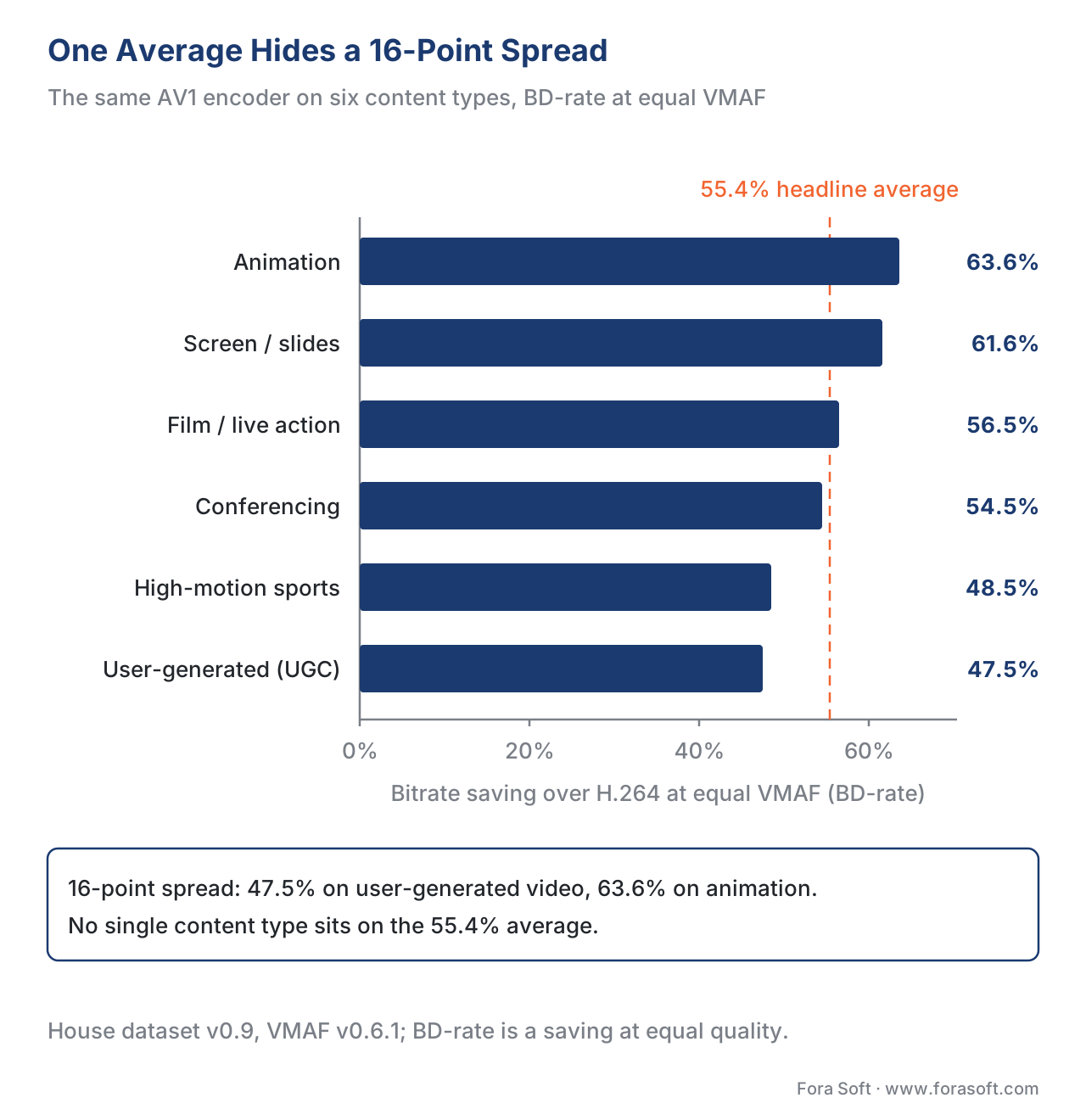 Figure 1. The same AV1 encoder, six content types: the bitrate saving over H.264 ranges from 63.6% (animation) to 47.5% (UGC). The dashed line is the 55.4% headline average no single content type sits on.
| Content type | HEVC vs H.264 | AV1 vs H.264 | AV1 vs HEVC |
|---|---|---|---|
| Animation | −52.3% | −63.6% | −23.6% |
| Screen / presentation | −50.5% | −61.6% | −22.3% |
| Film / live action | −45.5% | −56.5% | −20.2% |
| Conferencing | −45.2% | −54.5% | −17.1% |
| High-motion sports | −36.5% | −48.5% | −18.9% |
| User-generated (UGC) | −35.2% | −47.5% | −19.1% |
| Average | −44.2% | −55.4% | −20.2% |
Read the AV1-vs-H.264 column top to bottom. Animation gives back 63.6% of the bitrate; UGC gives back 47.5%. That is a 16-point spread, and the 55.4% average sits in the middle of a range no real title occupies. HEVC spreads even wider, from 52.3% on animation to 35.2% on UGC — a 17-point range. The codec did not change. The footage did.
This is why we say a single headline number is a summary, never the full picture. The numbers above come from a representative house dataset (calibrated to the published literature; flagged for the production-data pass), but the pattern — easy content high, hard content low — is one every credible benchmark reproduces. A 2026 cross-vendor review put animation and screen content at 40–60% AV1 savings and high-motion sport at 20–30%, the same shape.
What Makes Content Easy or Hard
To see why the spread exists, you have to know how a codec saves bitrate in the first place. A video encoder is a prediction machine: for most of the frame, it does not store new pixels at all. It says "this block looks like that block over there" (spatial prediction) or "this block looks like the same area one frame ago, shifted a little" (temporal prediction, also called motion compensation), and stores only the small residual — the difference between the guess and the truth. The better the guess, the smaller the residual, the fewer the bits.
So the content that compresses best is the content that is easiest to predict: large flat regions, slow or no motion, repeated patterns, clean edges. The content that compresses worst is the content that defeats prediction: fine texture everywhere, fast and irregular motion, and randomness the encoder cannot anticipate.
The video community has a standard way to put numbers on this. ITU-T Recommendation P.910 (the standard for subjective video testing, current edition 10/2023) defines two content descriptors. Spatial Information, or SI, measures how much fine detail and how many sharp edges a frame contains — formally, it runs a Sobel edge filter over each frame and takes the standard deviation across the picture, then the maximum across the clip. Temporal Information, or TI, measures how much the picture changes frame to frame — the standard deviation of the difference between consecutive frames, again maximized over the clip. High SI means a busy, detailed picture; high TI means a lot of motion. A still slide has low SI and near-zero TI; a handheld sports clip has high SI and high TI.
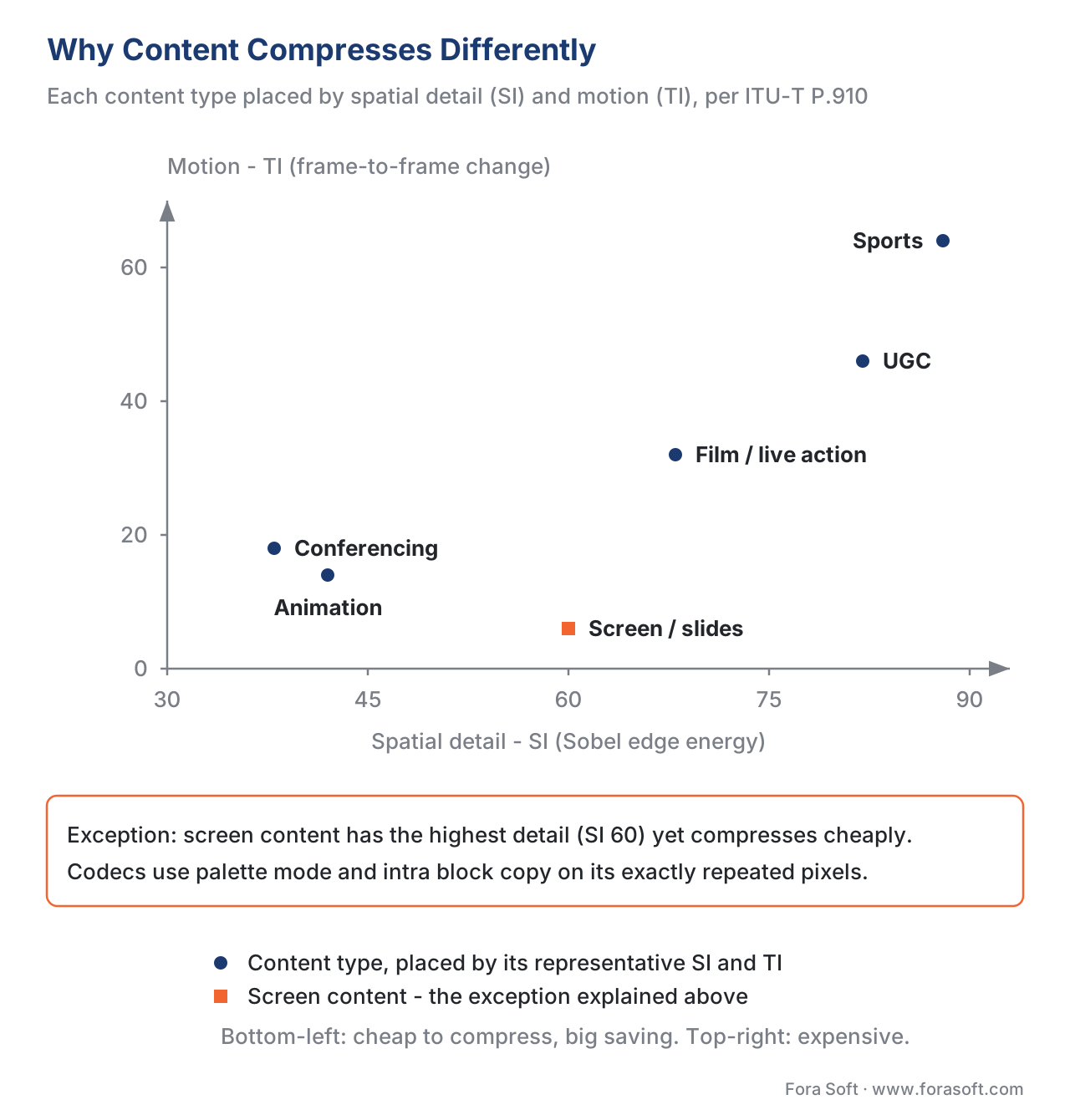 Figure 2. Content placed by spatial detail (SI) and motion (TI), per ITU-T P.910. The bottom-left "easy corner" compresses cheaply and rewards the newer codec most; the top-right "hard corner" stays expensive.
The table below pairs each content type's representative SI/TI with the bitrate plain H.264 needs to reach VMAF 93 — a clean proxy for "how hard is this to compress at all".
| Content type | H.264 kbps @ VMAF 93 | SI | TI | Why it lands there |
|---|---|---|---|---|
| Screen / presentation | 2,300 | 60 | 6 | Static slides, exact repeated pixels, limited palette |
| Animation | 2,600 | 42 | 14 | Flat color fills, clean lines, modest motion |
| Conferencing | 2,900 | 38 | 18 | Static background, small talking-head motion |
| Film / live action | 4,800 | 68 | 32 | Real texture and lighting, moderate motion |
| UGC | 6,800 | 82 | 46 | Noisy, shaky, often already compressed once |
| High-motion sports | 7,500 | 88 | 64 | Crowd texture plus fast pans and cuts |
Sports needs roughly three times the bitrate of animation to hit the same VMAF, and it also hands the newer codec the smallest saving. That double penalty is the core of content dependence: hard content costs more and leaves the smarter codec less room to be clever, because the residual it has to send is closer to incompressible noise either way.
Notice the one row that breaks the SI/TI story: screen content has the highest spatial detail (SI 60, from crisp text edges) yet is the cheapest to compress. SI and TI describe pixel statistics, not which coding tools apply. Screen content is full of exactly repeated runs — the same letterform, the same flat UI panel — so codecs use special tools for it: palette mode, which stores a short list of 2–8 colors and an index per pixel instead of full samples, and intra block copy, which copies an identical block from elsewhere in the same frame. HEVC added these in its Screen Content Coding extension; AV1 builds them in. They are the reason a slide deck compresses like animation despite looking "detailed" to an edge filter. The lesson: SI/TI is a useful content descriptor, but compressibility also depends on whether the codec has a tool that matches the content.
The Grain Problem
Film grain deserves its own section, because it is the content type that breaks both the encoder and the metric at the same time.
Grain — whether real silver-halide film grain or added in post for a "movie" look — is, by design, close to random. As the AV1 film-grain authors put it, its randomness "makes prediction difficult, motion estimation less precise, and the prediction residual... contains noise with twice the variance of the film grain" (Norkin and Birkbeck, Film Grain Synthesis for AV1 Video Codec, DCC 2018). Prediction is exactly how codecs save bitrate, so grain is the most expensive thing you can ask an encoder to preserve. Encode it directly and the bitrate balloons; turn the bitrate down and the grain is either scrubbed away (killing the creative intent) or left "pulsing" as the quantizer wobbles frame to frame.
The modern fix is to not encode the grain at all. AV1 (and H.266/VVC) include film grain synthesis: the encoder denoises the source, compresses the clean video cheaply, measures the grain's statistical pattern and strength, and ships those few parameters alongside the stream. The decoder re-creates matching grain and adds it back at playback. The saving is large. In the AV1 authors' own test, one heavy-grain clip dropped from 5,729 kbps encoded directly to 2,821 kbps with synthesis — about a 51% reduction — for subjectively better, more temporally stable grain.
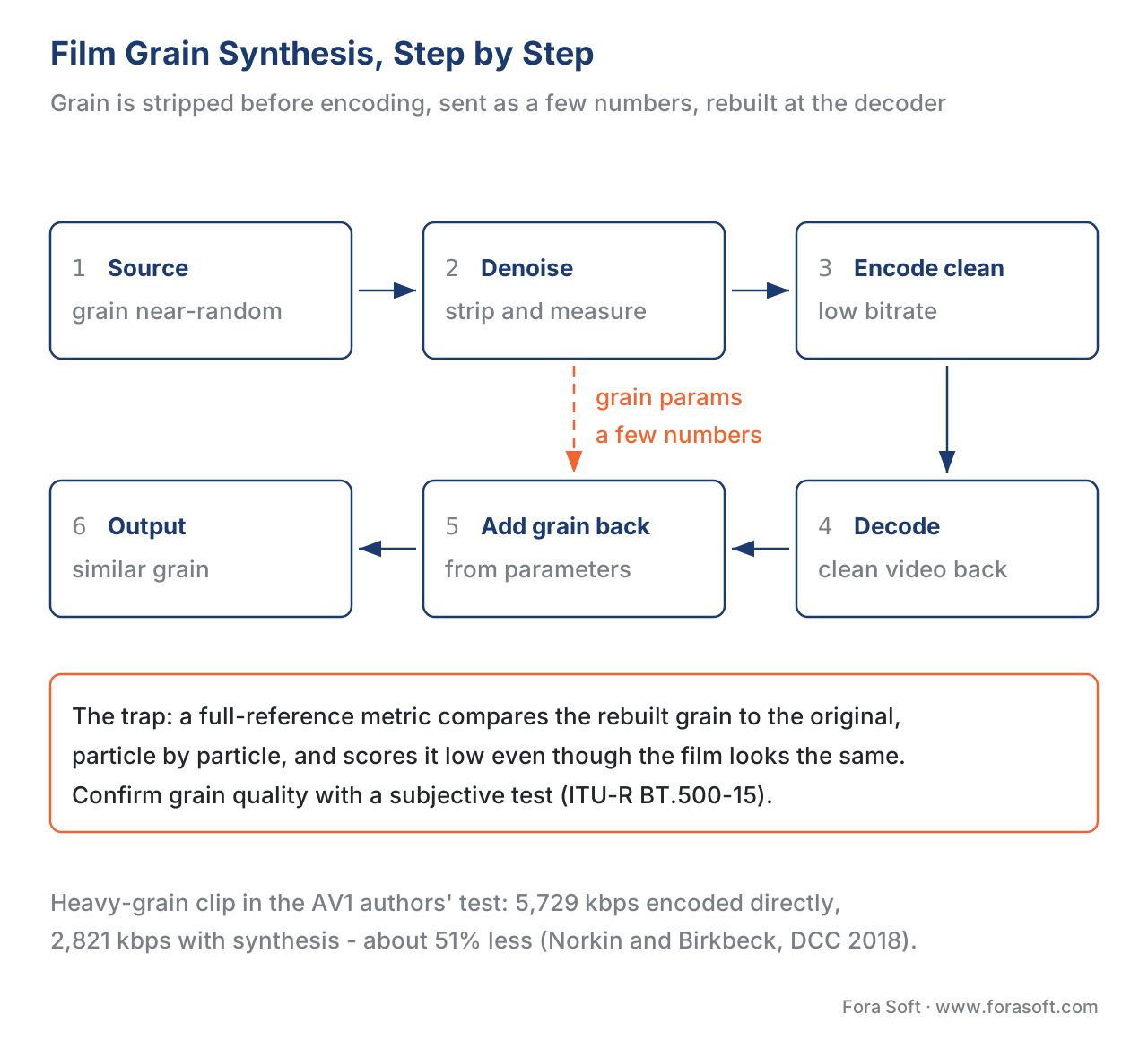 Figure 3. Film grain synthesis: the grain is removed before encoding, sent as a few parameters, and rebuilt at the decoder. Full-reference metrics compare against the original grain and so cannot score this fairly.
Here is the measurement trap. Grain synthesis does not reproduce the original grain pixel for pixel; it produces statistically similar grain in different places. A full-reference metric — one that compares the output against the pristine original, pixel by pixel — sees every grain particle in the "wrong" spot and reports a low score, even though a viewer sees the same film with the same grain. The AV1 authors say it plainly: because the tool removes grain and adds similar grain, "the objective metrics would not work well for this comparison", so they used a subjective test instead. This is the clearest example in all of video of why the eye, not the metric, is the ground truth (ITU-R BT.500-15). If you benchmark a grain-synthesis encode with VMAF or PSNR and no human check, you will reject a stream your audience would have loved.
The Metric Itself Shifts by Content
Grain is the extreme case, but content dependence runs deeper than the encoder. The metric you measure with is also content-dependent, because metrics like VMAF are machine-learning models trained on a particular set of clips, and they predict best on content that resembles their training data.
Two well-documented examples. On animation, VMAF (and the human eye) often rates a clip far higher than its pixel error would suggest — clean cartoon edges look great even when PSNR, which just counts pixel differences, reads the same as a much worse live-action clip. On heavy grain or sensor noise, VMAF can swing the other way, sometimes over-rating noisy content and sometimes under-rating a clean denoise, depending on the model. The practical consequence: the reliability of your number changes with content at the same time as the true compressibility does. We treat that fully in where objective metrics lie; for this article the rule is enough — name the metric and model on every score (VMAF default v0.6.1 here), and on animation, grain, and screen text, confirm a sample against the eye (why subjective testing is the ground truth) before you trust the curve.
Your Number Depends on Your Catalogue
Put the two ideas together — savings vary by content, and you ship a specific mix of content — and you reach the practical point of this article. There is no universal "AV1 saving". There is only your saving, set by your catalogue.
The arithmetic is a weighted average of the per-content BD-rates, weighted by the share of your library each type represents. Take an animation-led service: 60% animation, 20% screen, 20% film. Using the AV1-vs-H.264 column:
0.60 × (−63.6%)  +  0.20 × (−61.6%)  +  0.20 × (−56.5%)
   = −38.16   +   −12.32   +   −11.30
   = −61.8%
Now a live sports and UGC platform: 60% sports, 40% UGC.
0.60 × (−48.5%)  +  0.40 × (−47.5%)
   = −29.10   +   −19.00
   = −48.1%
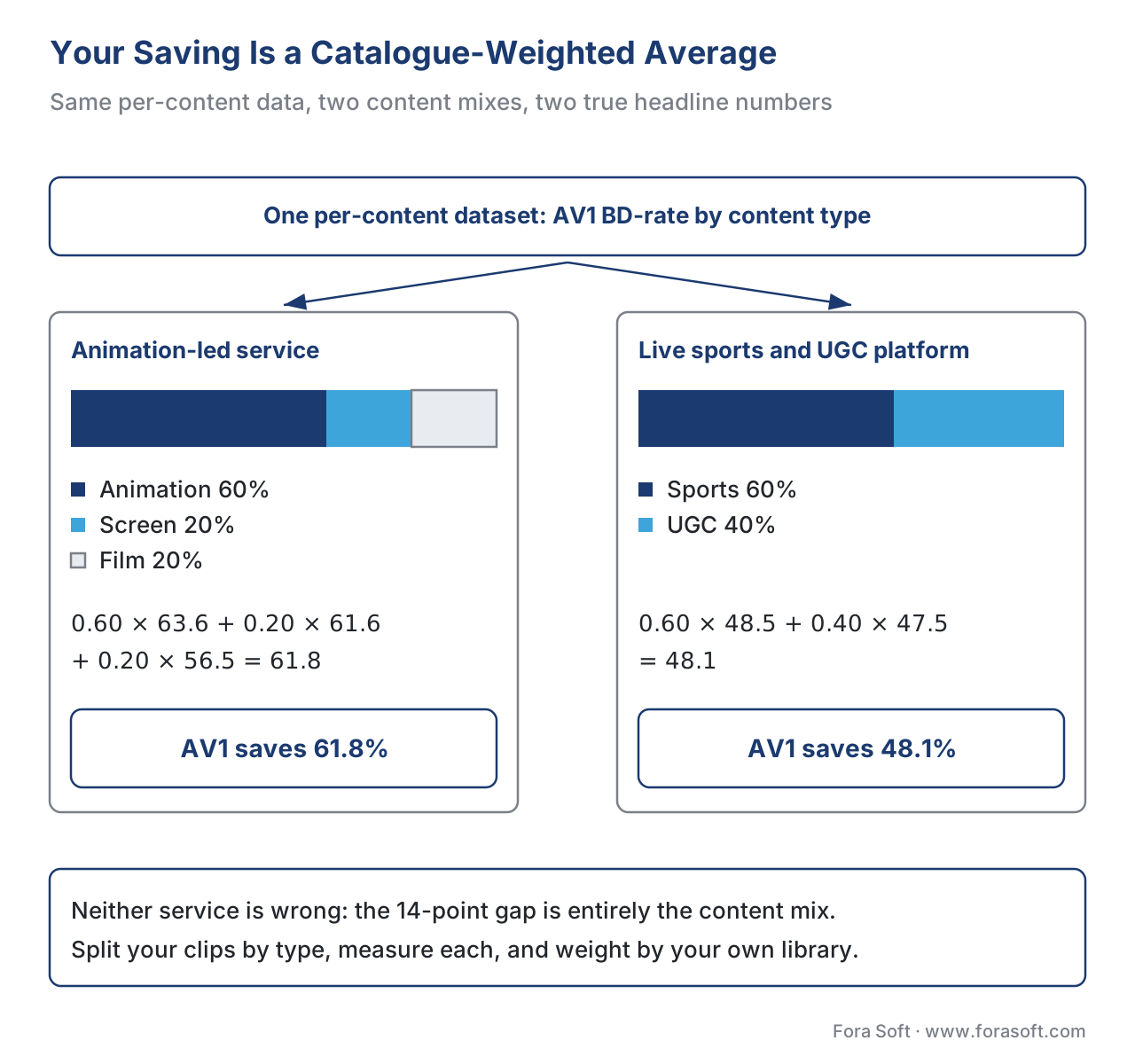 Figure 4. Same dataset, two catalogues, two headline numbers: the animation-led service truthfully reports AV1 at −62%, the sports/UGC service at −48%. Neither is wrong; the difference is entirely the content mix.
Both services read the same dataset and both are telling the truth, yet one announces "AV1 saves 62%" and the other "AV1 saves 48%" — a 14-point gap that comes entirely from what they stream. This is also why two published benchmarks can disagree honestly: different content baskets produce different averages even with identical encoders. (A second layer, which we cover in the codec comparison, is audience weighting: most viewing concentrates on the top rungs of the ladder, so the bitrate-weighted saving a service actually banks is usually smaller than the simple BD-rate average.) The benchmark tool below computes this catalogue-weighted number for any mix you give it.
Common mistake: quoting one codec number for "your" content. A vendor slide says "AV1: 50% smaller". You plan a CDN budget on it. But the slide's 50% was measured on a content basket — and if your service skews toward sport, news, or phone uploads, your real saving is closer to the high-30s or 40s, and your bill comes in well above plan. The fix is one line of work: split your own clips by type, measure each, and weight by your catalogue. Never compare a number measured on one content type against a target set on another, and never average across content types as if a minute of animation and a minute of sport were the same encoding job.
The Production Answer: Stop Using One Setting for Everything
If quality results change this much by content, the obvious conclusion is that a single fixed encoding recipe — one bitrate ladder for the whole library — wastes bitrate on easy titles and starves hard ones. That is exactly the conclusion the streaming industry reached, and the answer is per-title and per-shot encoding: measure each title's (or each shot's) rate-quality behaviour and build a custom ladder for it, spending bits where the content needs them and saving them where it does not. The machinery for choosing those points is the convex hull of the per-resolution curves; the decision logic — target a quality score, let the bitrate float per content — is covered in per-title and per-shot encoding. Content dependence is not a nuisance to caveat away; it is the entire reason content-adaptive encoding exists and pays for itself.
Free download: Content-type quality benchmark toolA dependency-free Python tool that recomputes BD-rate per content type from the dataset in this article and re-weights the result for your own catalogue mix.Where Fora Soft Fits In
We build streaming, OTT, conferencing, surveillance, e-learning, and telemedicine products, and the content in those verticals could not be more different — a telemedicine dermatology feed, a lecture screen-share, and a live sports stream sit at opposite corners of the SI/TI map. We measure quality per content type rather than trusting one house number, because a codec or ladder decision that is right for a slide-heavy e-learning catalogue is wrong for a high-motion sports product. Our benchmark methodology records the content set behind every figure for exactly this reason, and the per-content dataset here is published so you can re-weight it for your own library instead of inheriting ours.



The handbook
Fora Soft Video Engineering Handbook
We wrote a seven-volume handbook that walks the whole video stack, from a single pixel to a running production system, across more than 9,000 pages. Volume 1, Video Encoding, works out the prediction, transform and quantisation machinery that makes animation cheap and sport expensive, and the PSNR, SSIM and VMAF numbers you judge it with. Volume 3 carries the same argument through to ABR ladders, CDNs and the delivery bill that a 14-point difference in codec saving lands on. Written by Nikolay Sapunov, CEO at Fora Soft.
What is a codec change actually worth on your catalogue?
Send us a handful of clips from your library and we will measure them by content type, weight the result by your own mix, and tell you what the switch is worth before you budget for it. 250+ video products shipped since 2005.
See our case studies
Case study
Worldcast Live
Concert streaming at 1.5 Gb/s with 0.4-0.5 s latency for 10,000 simultaneous viewers - high-motion stage footage, the content type that leaves a newer codec the least room.
Case study
Speed.Space
Remote production recording at 1080p and 8 Mbps for Netflix, Electronic Arts and HBO shoots - film-grade live action, where real texture and grain set the bitrate.
Case study
Mindbox
An RTSP to FFmpeg to HLS surveillance pipeline across 50+ deployments - mostly static scenes, the cheap end of the SI/TI map once you measure it instead of guessing.
What to read next
Benchmarks
H.264 vs HEVC vs AV1 at equal quality
The house averages this article breaks apart, and how we measured them.
Encoding
Per-title and per-shot encoding
The production answer to content dependence: a bitrate ladder built per title.
Metrics
Where objective metrics lie
The content types that fool a metric, grain and animation included.
Methodology
Our benchmark methodology
The content set, encoder settings and model recorded behind every figure.
References
- ITU-T Recommendation P.910 (10/2023), Subjective video quality assessment methods for multimedia applications, International Telecommunication Union. Annex B defines Spatial Information (SI) and Temporal Information (TI). Tier 1. https://www.itu.int/rec/T-REC-P.910
- A. Norkin and N. Birkbeck, "Film Grain Synthesis for AV1 Video Codec", Data Compression Conference (DCC), 2018. Grain is hard to compress because it defeats prediction; AV1 grain synthesis yields up to ~50% savings; objective metrics "would not work well" on synthesized grain, so subjective testing was used. Tier 1 (metric/tool authors). https://norkin.org/pdf/DCC_2018_AV1_film_grain.pdf
- G. Bjontegaard, "Calculation of Average PSNR Differences Between RD-Curves" (VCEG-M33), ITU-T SG16 Q.6 VCEG, 2001. The BD-rate method and sign convention used for every per-content figure here. Tier 1. https://www.itu.int/wftp3/av-arch/video-site/0104_Aus/VCEG-M33.doc
- ITU-R Recommendation BT.500-15 (2023), Methodologies for the subjective assessment of the quality of television pictures. The subjective ground truth every objective metric is validated against — decisive for grain and animation. Tier 1. https://www.itu.int/rec/R-REC-BT.500
- Netflix, VMAF model documentation (models.md), VMAF Development Kit, GitHub. The default v0.6.1 model and its training/target conditions; basis for stating the model on every score. Tier 1. https://github.com/Netflix/vmaf/tree/master/model
- J.-R. Ohm, G. J. Sullivan, H. Schwarz, T. K. Tan, T. Wiegand, "Comparison of the Coding Efficiency of Video Coding Standards—Including HEVC", IEEE TCSVT 22(12), 2012. The canonical ~50% HEVC-over-H.264 result that varies by sequence; basis for the average our per-content numbers decompose. Tier 1. https://ieeexplore.ieee.org/document/6317156
- Netflix Technology Blog, "AV1 — Now Powering 30% of Netflix Streaming", December 2025. AV1 averaged ~48% below H.264 on real content — a real-content average that varies by title. Tier 4. https://netflixtechblog.com/av1-now-powering-30-of-netflix-streaming-02f592242d80
- X. Xu and S. Liu (eds.), "Overview of Screen Content Coding in Recently Developed Video Coding Standards", 2020 (arXiv:2011.14068). Palette mode and intra block copy in HEVC SCC, VVC, and AV1; why screen content compresses well despite high spatial detail. Tier 5. https://arxiv.org/pdf/2011.14068
- J. Ozer, "Comparing H.264, HEVC, VP9, and AV1... From BD-Rate to Contextual ROI", Streaming Learning Center, 2026. Per-clip BD-rate varies widely; audience-weighted savings fall below the simple average. Tier 6. https://streaminglearningcenter.com/articles/comparing-h-264-hevc-vp9-and-av1-in-sbe-from-bd-rate-to-contextual-roi.html
- A. Aaron et al., Netflix Technology Blog, "Per-Title Encode Optimization", 2015. Content complexity drives the custom bitrate ladder; the production response to content dependence. Tier 4. https://netflixtechblog.com/per-title-encode-optimization-7e99442b62a2
