


Why this matters
Picking a codec is the famous decision; picking an encoder and a preset is the one that actually sets your bandwidth bill and your compute bill. This article is for the streaming engineer, encoding lead, or technical product owner who has chosen AV1 or HEVC on paper and now has to decide which AV1 encoder, at which speed, for a live channel versus a VOD archive. We measure the quality-versus-speed trade-off the way it should be measured — at equal quality, on the content our products actually ship, with the encoding time shown next to the saving — because "we use AV1" tells you nothing until you say which encoder and preset produced the file. The goal is a number you can plan a pipeline around and a method you can rerun on your own footage.
The codec is the ceiling; the encoder is what you reach
It is worth separating three things people blur together, because the whole article turns on the distinction. A codec (short for coder-decoder) is the standard — H.264, HEVC, AV1 — that defines what a compressed bitstream is allowed to look like and how a decoder must read it. An encoder is a specific program that produces such a bitstream: x264 produces H.264, x265 produces HEVC, SVT-AV1 produces AV1, and the dedicated silicon in your GPU (NVIDIA's NVENC, Intel's Quick Sync, AMD's AMF) produces any of them in hardware. A preset is the speed setting you run that encoder at — how hard it is allowed to work on each frame.
The codec fixes the ceiling. AV1's standard simply allows more efficient ways to describe a frame than H.264's does, and no encoder can beat its own codec's ceiling. But two encoders for the same codec can land far apart, because reaching the ceiling means searching an enormous space of coding choices, and how much of that space an encoder explores is a function of time. The headline codec savings in our codec comparison — HEVC about 44% smaller than H.264, AV1 about 55% — were measured with mature software encoders given real effort. Run the same codec in a fixed-function hardware block tuned for speed and you give some of that saving back. This article is about that give-back: the gap between what a codec can do and what a particular encoder does do at a particular speed.
This is the measurement side, not the mechanics side. This article measures how the encoders perform and what they cost in time; it does not explain how x264, x265, or SVT-AV1 work internally, or what NVENC's fixed-function block does on the die. For the implementation internals — partitioning, motion search, rate-distortion optimization, the hardware pipeline — see the Video Encoding section's encoder implementations, hardware acceleration (NVENC, VPU, ASIC), and the encoder benchmark. We link to the cause side and stay on the measurement side.
Two numbers, not one: efficiency and speed
A codec comparison needs one number — the bitrate saving at equal quality. An encoder comparison needs two, because an encoder that saves bandwidth but cannot keep up with your throughput is useless, and so is one that runs fast but wastes bandwidth. So every configuration in this article is scored on two axes at once.
The first axis is efficiency, expressed as BD-rate against a single shared anchor. BD-rate (Bjøntegaard Delta rate) is the average percentage difference in bitrate between two encodes at matched quality, across a range of quality (Bjøntegaard, VCEG-M33, 2001). We use x264 at its medium preset as the anchor — the universal baseline that runs everywhere — and report every other configuration as a saving against it. A BD-rate of −40% means that configuration reaches the same VMAF as x264 medium at 40% less bitrate; +5% means it needs 5% more. The sign convention is the one constant source of confusion, so to repeat: negative is a saving, and BD-rate is a saving, not a quality score. Quality here is VMAF on the default v0.6.1 model (a 1080p living-room television), mean-pooled, with each encode decoded back to the source resolution before scoring — the same specification as the rest of Block 7's methodology. The full reading of VMAF — model, pooling, confidence interval — is VMAF explained.
The second axis is speed, expressed as encoding throughput in frames per second at 1080p on one stated reference machine. Frames per second is the honest unit because it scales to the only question that matters in production — can this encoder keep up with my content volume, and what does the compute cost? A figure of 30 fps means a 30-frames-per-second clip encodes in real time; 3 fps means it takes ten times as long as the clip runs; 480 fps means it is done almost before it started. Speed is only comparable on identical hardware, so every fps number here comes from the same machine, recorded in the dataset's provenance.
Holding both axes to the same anchor and the same machine is what makes the comparison fair. The single most common way an encoder comparison lies is mixing the axes — quoting a slow software encoder's efficiency against a fast hardware encoder's speed, as if you could have both at once. You cannot, and the plane below is the honest picture of the choice.
The preset is a quality-speed dial
Before comparing encoders, understand the dial inside each one. Every modern software encoder exposes a preset — a named bundle of settings that trades encoding speed for compression efficiency. In x264 and x265 the presets run, from fastest to slowest, ultrafast, superfast, veryfast, faster, fast, medium, slow, slower, veryslow, and placebo, with medium as the default (x265 documentation, accessed 2026). The preset does not change the quality target you ask for; it changes how hard the encoder works to hit it. A slower preset is allowed to test more ways to encode each block and keep the best one.
Concretely, walking x265 from fast to slow turns up the expensive tools: the number of reference frames the encoder may look back to rises from 1 to 5, the motion search widens from a small diamond pattern to a star, sub-pixel refinement deepens, rate-distortion analysis goes from a cheap approximation to a full evaluation, and rectangular and asymmetric block partitions switch on (x265 documentation, accessed 2026). Each of these finds a few more bits to save, and each costs time. SVT-AV1, the production AV1 encoder, uses a numeric dial instead of names — presets from about 0 (slowest, most efficient) to 13 (fastest) — but the idea is identical. As a rough speed map, SVT-AV1 preset 8 lands near x265 medium and preset 6 near x265 slow (SVT-AV1 project guidance; community benchmarks, 2026).
Here is where measurement honesty changes the decision. If you compare presets at equal bitrate, slower presets look pointless: one careful analysis found x265's slow preset delivering only about 0.87% higher VMAF than medium while more than doubling the encoding time, and ultrafast still reaching 98% of veryslow's score (Ozer, OTTVerse, 2021). Read that way, who would pay double for under a point of VMAF? But equal bitrate is the wrong frame for streaming. Measure the same two presets at equal quality — the BD-rate question — and the slow preset cuts the top-rung bitrate by about 23% and the whole ladder by about 26% (Ozer, OTTVerse, 2021). The effort did not buy you a higher score at the same size; it bought you the same score at a smaller size, which is exactly the bandwidth you pay for. The preset's value is invisible at equal bitrate and obvious at equal quality — the central lesson of measuring at matched quality that runs through this whole section.
The headline: the quality-speed plane
Put every configuration on one plot — efficiency up the side, speed along the bottom — and the choice stops being a list of encoders and becomes a frontier.
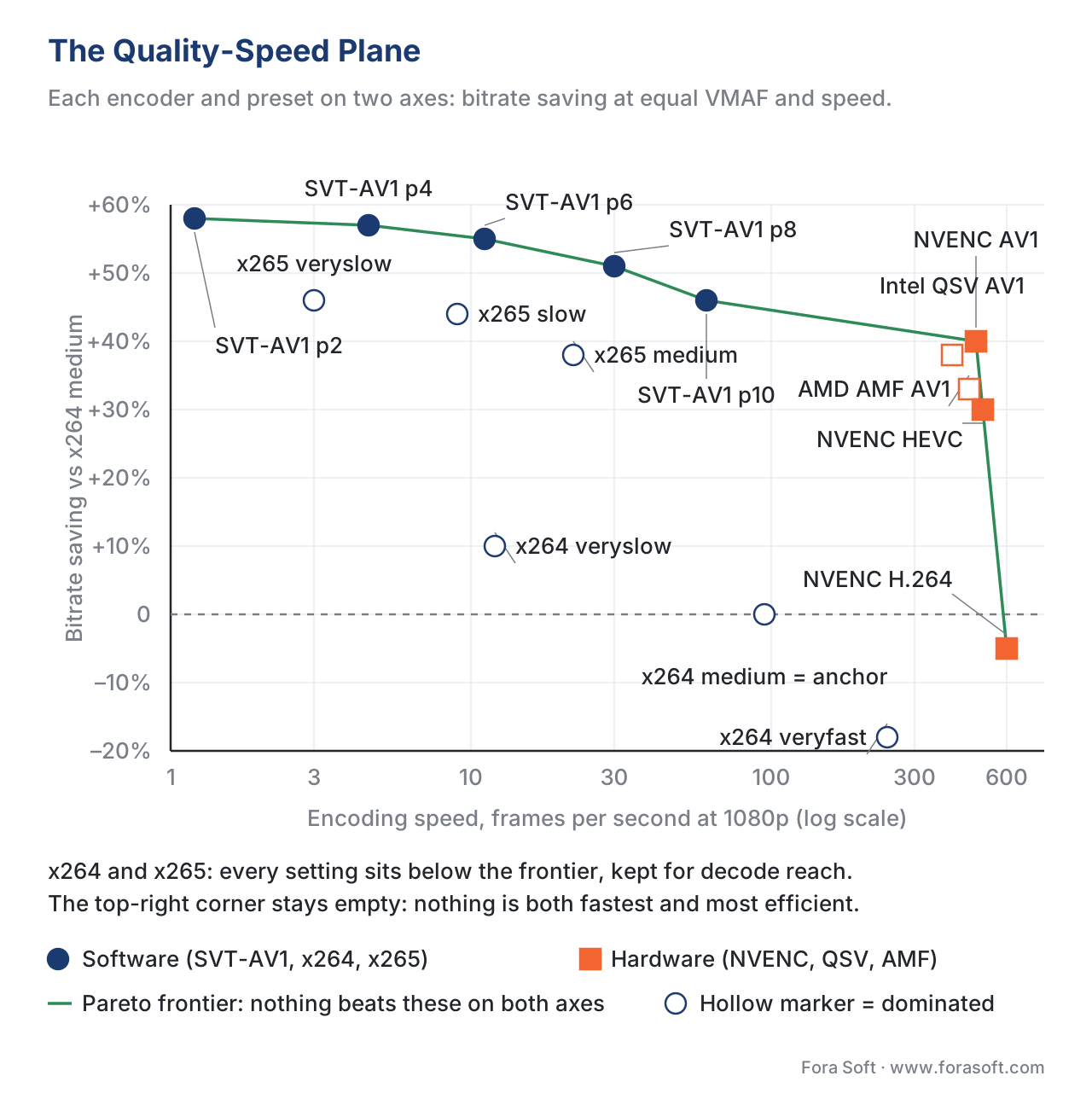 Figure 1. The quality-speed plane. Each point is one encoder at one preset: horizontal is encoding speed (fps at 1080p, log scale), vertical is bitrate saving versus x264 medium (higher is more efficient). The connected line is the Pareto frontier — the configurations no other configuration beats on both axes at once. Software AV1 (SVT-AV1) owns the efficient end; the GPU encoders own the fast end; everything else sits below the line.
The measured numbers behind the plot, sorted from fastest to slowest:
| Encoder | Preset | Family | BD-rate vs x264 medium | Speed (fps, 1080p) | On the frontier? |
|---|---|---|---|---|---|
| NVENC H.264 | p7, high quality | hardware | +5.0% | 600 | yes (fastest) |
| NVENC HEVC | p7, high quality | hardware | −30.0% | 500 | yes |
| NVENC AV1 | p7, high quality | hardware | −40.0% | 480 | yes |
| AMD AMF AV1 | quality | hardware | −33.0% | 450 | — |
| Intel QSV AV1 | TU1 | hardware | −38.0% | 400 | — |
| x264 | veryfast | software | +18.0% | 240 | — |
| x264 | medium (anchor) | software | 0.0% | 95 | — |
| SVT-AV1 | preset 10 | software | −46.0% | 60 | yes |
| SVT-AV1 | preset 8 | software | −51.0% | 30 | yes |
| x265 | medium | software | −38.0% | 22 | — |
| x264 | veryslow | software | −10.0% | 12 | — |
| SVT-AV1 | preset 6 | software | −55.0% | 11 | yes |
| x265 | slow | software | −44.0% | 9 | — |
| SVT-AV1 | preset 4 | software | −57.0% | 4.5 | yes |
| x265 | veryslow | software | −46.0% | 3 | — |
| SVT-AV1 | preset 2 | software | −58.0% | 1.2 | yes |
Table 1. Illustrative house results, anchored on x264 medium (VMAF default model, log-domain BD-rate over the overlapping range, single reference machine). The frontier is the set of configurations that nothing else beats on both speed and efficiency. The downloadable dataset and tool reproduce every figure in this table.
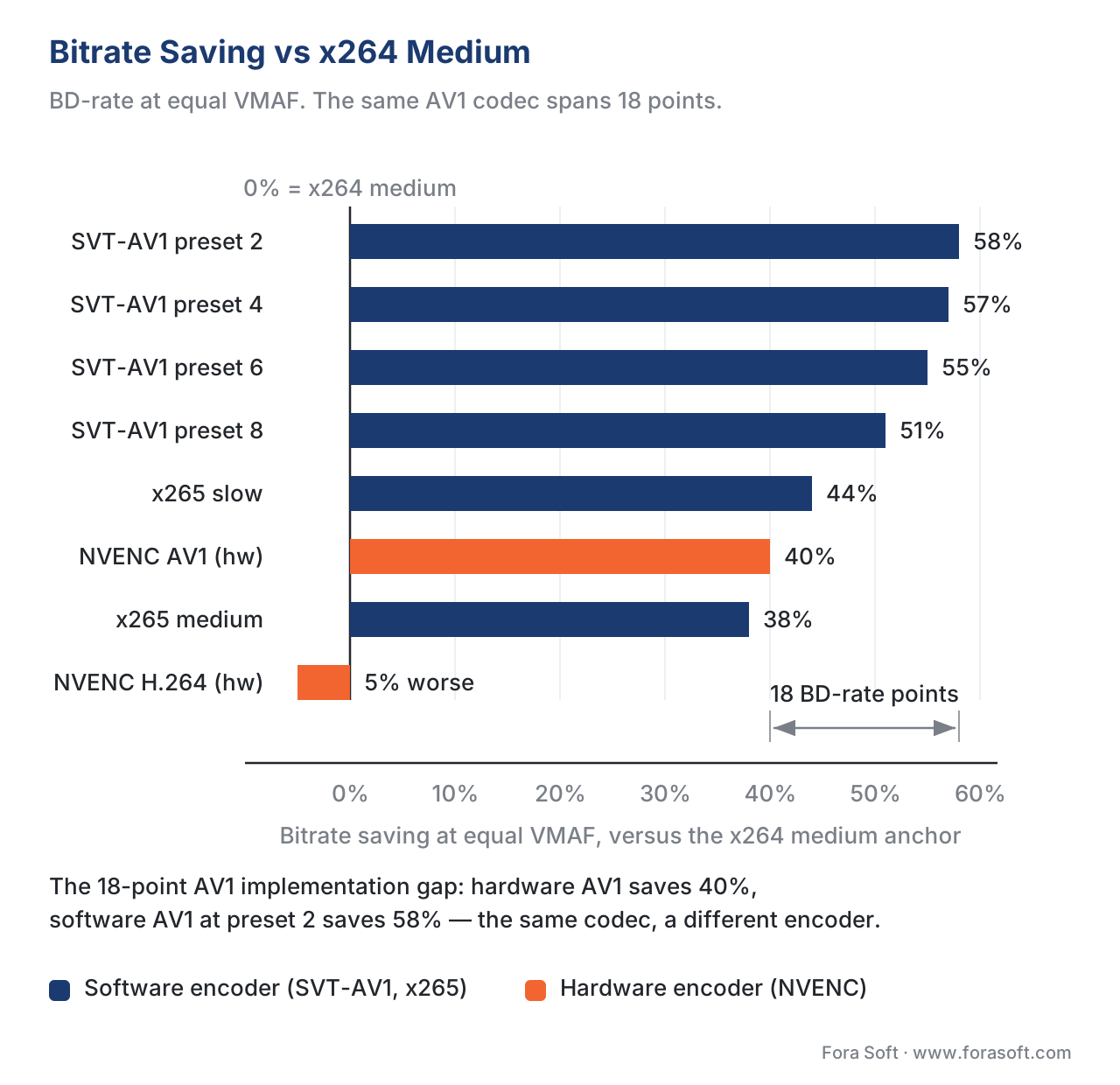 Figure 2. The efficiency axis alone, as bitrate saving versus x264 medium. Software AV1 at a slow preset saves the most (about 58%); hardware AV1 saves about 40%; hardware H.264 barely beats the anchor. The same AV1 codec spans an 18-point range from SVT-AV1 preset 2 to NVENC AV1 — the implementation gap.
Reading the frontier: x264 and x265 are dominated
The blunt result is the one worth sitting with: every x264 and every x265 configuration sits below the frontier. Each one is dominated — there is always another configuration that is both faster and more efficient. x265 slow (−44% at 9 fps) is beaten by SVT-AV1 preset 6 (−55% at 11 fps), which is more efficient and faster. x265 medium (−38% at 22 fps) is beaten by SVT-AV1 preset 8 (−51% at 30 fps). x264 medium, the anchor, is beaten on speed by every hardware encoder and on efficiency by everything else.
This does not mean x264 and x265 are obsolete, and the reason is the one axis the plot does not show: decode support. A frontier of efficiency and speed ignores whether the viewer's device can play the file at all. H.264 decodes on essentially everything ever built; HEVC on most modern hardware; AV1 on a large and fast-growing but not universal base. So x264 stays in the ladder as the compatibility floor — the rung you serve to the old smart TV and the corporate laptop — and HEVC fills the middle where AV1 decode is still missing. They earn their place on reach, not on quality-per-bit-per-second. The device-support and adoption picture is the Video Encoding section's state of AV1 in 2026; this article supplies the measured cost of choosing them anyway.
Read the frontier from right to left and it is a clean menu. At the far right, where you need raw throughput above all, NVENC H.264 is the fastest thing on the board but barely beats the anchor on efficiency. Step left to the GPU AV1 and HEVC encoders for a large efficiency gain at almost the same speed. Step left again into SVT-AV1's preset ladder, trading speed for efficiency one preset at a time, until you reach preset 2 — the most efficient configuration measured, and the slowest. Nothing on that frontier is wrong; the right point depends entirely on how much time you can spend per frame.
Software versus hardware: the real trade
The deepest split on the plane is between software and hardware, and it comes from how each one is built. A software encoder is a program running on a general-purpose CPU; it can spend as long as you allow searching for the cheapest way to encode a block, which is why its slow presets reach the efficiency frontier. A hardware encoder is a fixed-function block etched into the GPU — dedicated silicon that runs a deliberately bounded search at enormous speed and very low latency, encoding hundreds of frames per second while barely touching the CPU. The trade is structural: the hardware block cannot try every tool a slow software preset tries, so at equal quality it spends more bitrate.
NVIDIA's own measurements put numbers on it. On the Ada Lovelace generation, the AV1 hardware encoder reaches about 40% bitrate savings over the same chip's H.264 encoder at 1080p60, at a throughput around 500 fps — roughly nine times faster than the x264 software encoder it was compared against (NVIDIA, 2023). That is a genuinely strong result, and it matches our −40% for NVENC AV1. But notice what it is measured against: the hardware H.264 encoder, and a fast software baseline. Against SVT-AV1 given real time, the same NVENC AV1 trails by about 15 points — −40% versus −55% at preset 6 — because the software encoder explores choices the fixed block cannot. Both facts are true at once: hardware AV1 crushes software H.264, and software AV1 beats hardware AV1.
The hardware-AV1 field has three players, and they are close. Our measurements put NVIDIA's NVENC AV1 marginally ahead on efficiency, Intel's Quick Sync AV1 (on Arc-class GPUs) just behind, and AMD's AMF AV1 a step further back — a spread of a few BD-rate points, consistent with independent testing that has generally rated the Intel and NVIDIA AV1 blocks at the front and AMD's behind (community testing, 2023–2025). The differences between hardware vendors are small compared with the gap between any of them and a slow software preset. If your constraint is throughput — live channels, real-time transcoding, encoding farms measured in streams-per-watt — that gap is the price of admission, and a 40% saving at 480 fps is an excellent deal. Hardware AV1 is also the natural choice for live and user-generated content, where there is no time for a slow preset and no pristine reference to measure against.
The number worth carrying away is the implementation gap: the same AV1 codec ranges from −40% (NVENC, tuned for speed) to −58% (SVT-AV1 preset 2, tuned for efficiency) on our content — 18 BD-rate points decided entirely by which encoder and preset produced the file, not by the codec. Anyone who says "we encode in AV1" has told you almost nothing about the bitrate until they say with what.
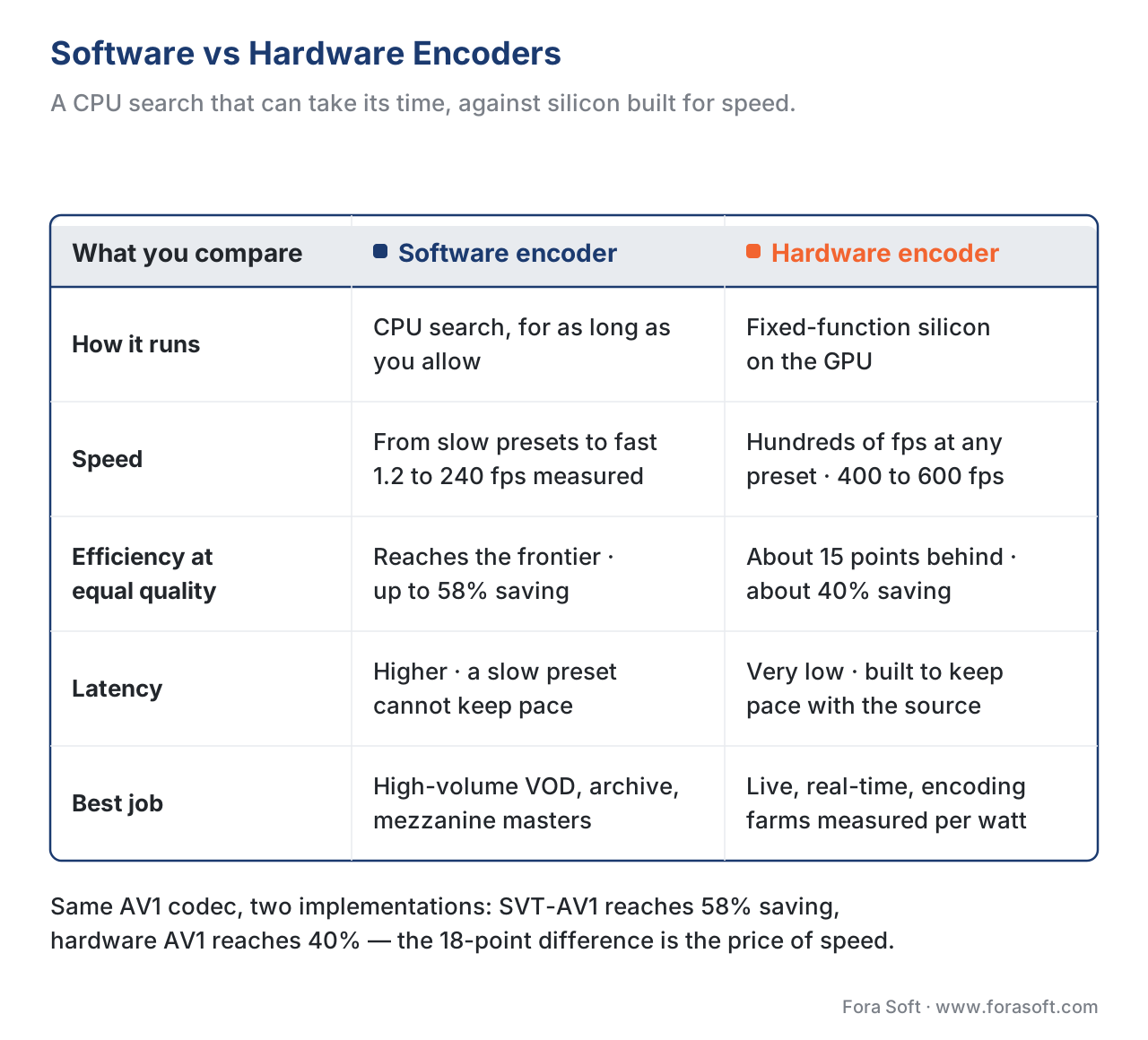 Figure 5. The structural trade in one view. A software encoder spends time to reach the efficiency frontier; a hardware block trades a fixed efficiency cost for enormous speed and low latency. Each is the right tool for a different job.
The encoding-time cost, shown
Efficiency is paid for in compute, and the bill is steep enough to change decisions, so it is worth doing the arithmetic out loud. Take a single ten-minute clip at 1080p30 — 600 seconds × 30 frames per second = 18,000 frames — and read the wall-clock encode time straight off the speeds in Table 1 by dividing the frame count by the throughput:
NVENC AV1   (480 fps):  18,000 / 480  =     37.5 s   (~0.6 min)
x264 medium  (95 fps):  18,000 /  95  =    189 s     (~3.2 min)
SVT-AV1 p6   (11 fps):  18,000 /  11  =  1,636 s     (~27 min)
SVT-AV1 p4  (4.5 fps):  18,000 / 4.5  =  4,000 s     (~67 min)
x265 veryslow (3 fps):  18,000 /   3  =  6,000 s     (~100 min)
The hardware AV1 encoder finishes the ten-minute clip in well under a minute; SVT-AV1 at preset 4 takes over an hour for the same clip, to bank an extra 17 BD-rate points (−57% versus NVENC's −40%). That is a ratio of about 107× in compute for roughly a quarter more bitrate saving. Whether that trade is worth it is not a quality question; it is an economics question, and it flips with scale and viewership.
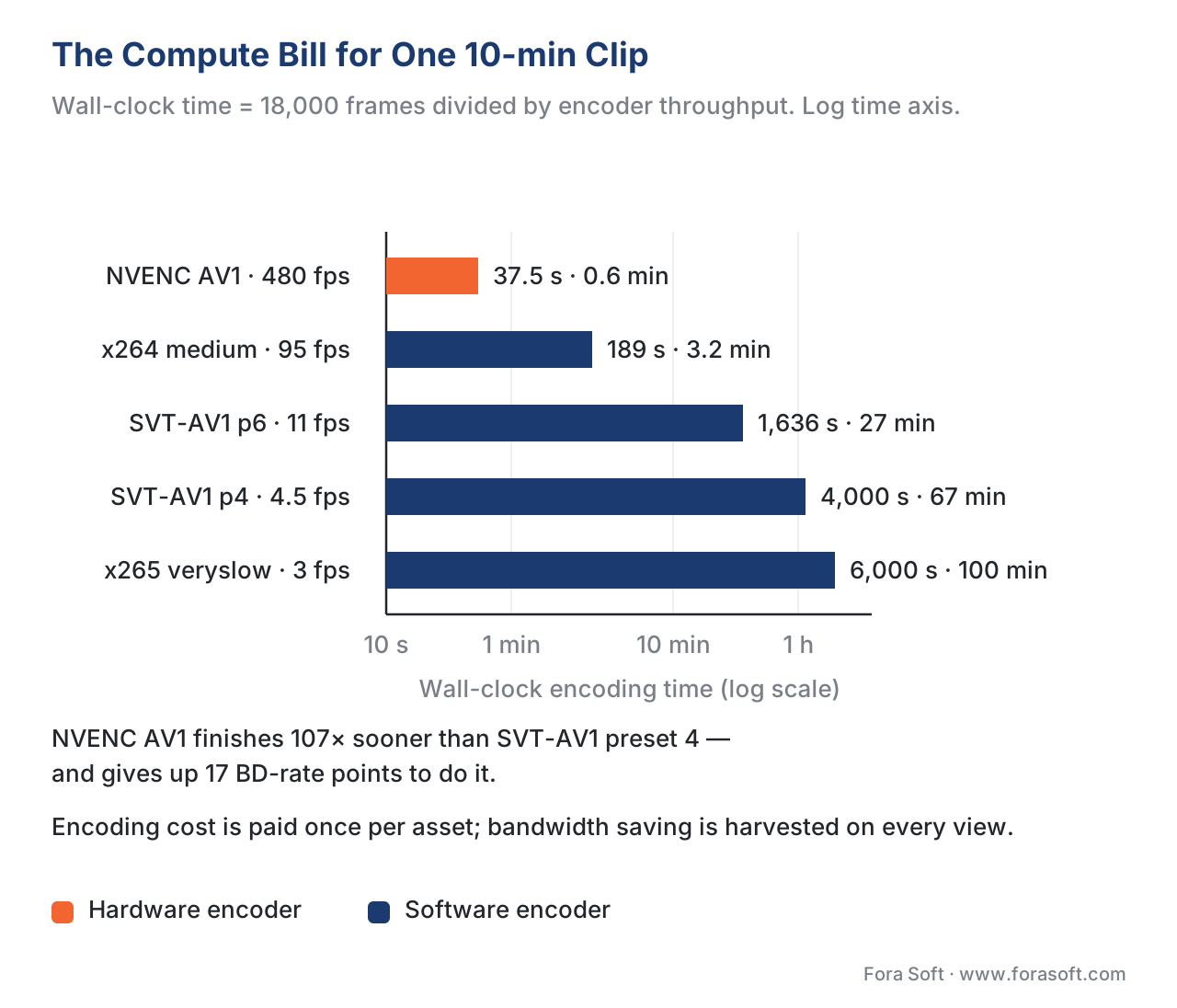 Figure 3. The compute bill for one ten-minute 1080p30 clip, by configuration (log time axis). The hardware encoder finishes in seconds; the slowest software preset takes an hour and a half. Encoding cost is paid once per asset; bandwidth saving is harvested on every view.
The decisive fact is that encoding cost is paid once, and bandwidth saving is harvested forever. A title streamed a million times pays its slow-preset encode bill once and banks the 17-point saving on every view — an easy win for SVT-AV1 at a slow preset. A clip watched a few hundred times never recovers the compute, and the fast hardware path is the right call. For a large catalog the slow-preset bill becomes real money: a thousand hours of content at preset 4's 4.5 fps is on the order of nine months of single-stream encoding (parallelized across a farm in practice), against a couple of days on hardware AV1. The break-even turns on views per asset and the ratio of your compute cost to your bandwidth cost — the same logic that sets a quality target and budget, and that drives the per-title and per-shot decision to spend more compute where it pays.
Which encoder for which job
The plane collapses into a short decision rule once you know two things about the job: how much time you have per frame, and which devices must play the result.
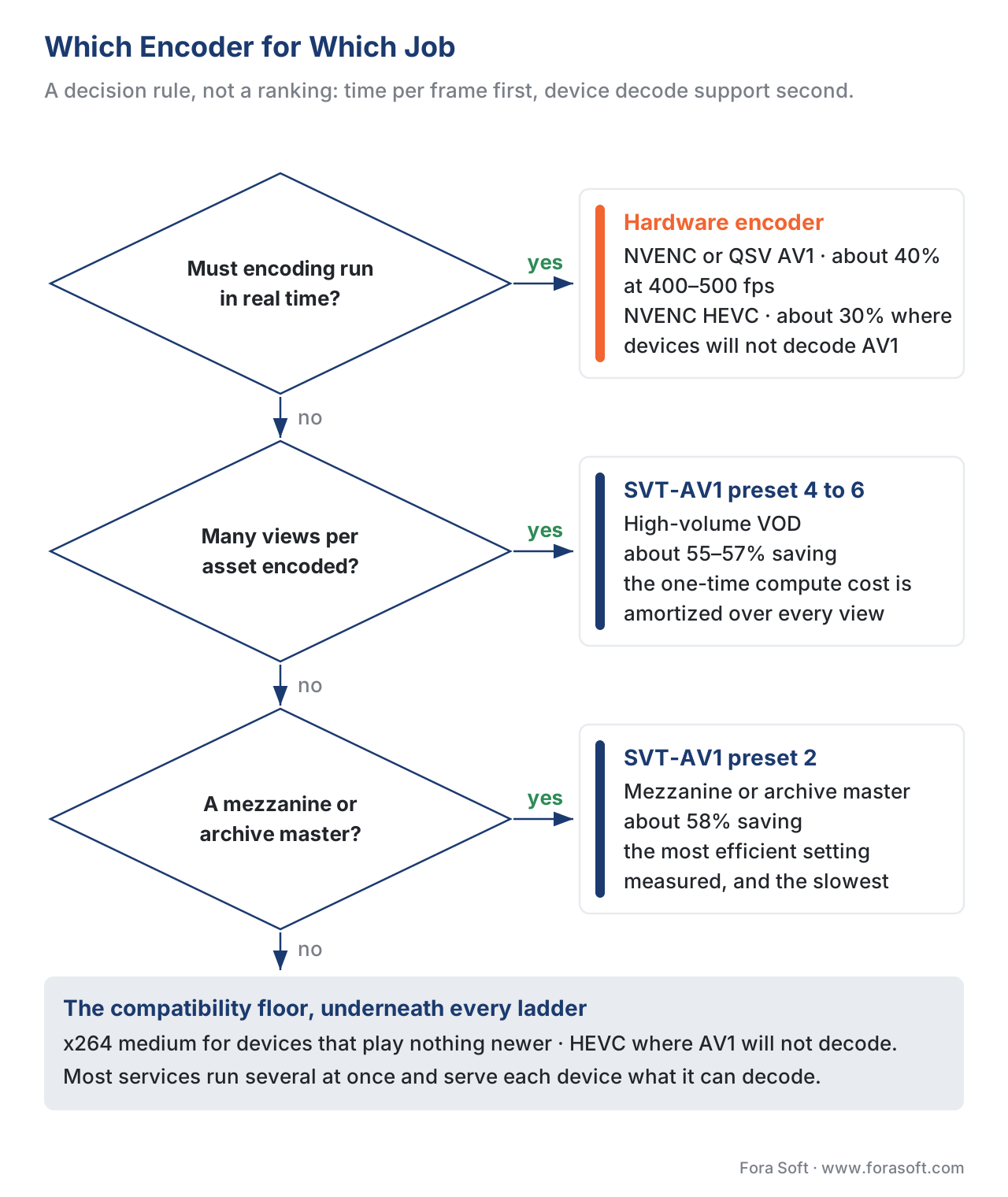 Figure 4. A decision rule, not a ranking. The right encoder depends on whether encoding must run in real time, how heavily the asset is viewed, and what the target devices can decode. Each leaf names a configuration from Table 1.
For live and real-time work — broadcast, conferencing, cloud gaming, anything where the encode must keep pace with the source — hardware is the answer, and hardware AV1 (NVENC, Quick Sync) where the devices decode it. The 40% saving at hundreds of frames per second is exactly the trade live needs, and the low latency is not optional. For high-volume VOD — a catalog streamed far more than it is encoded — software AV1 at a slow preset (SVT-AV1 preset 4–6) is the efficiency play; the one-time compute is amortized across millions of views. For archival or mezzanine masters where bitrate matters more than time, the slowest practical SVT-AV1 preset earns its hours. And underneath all of it, x264 stays in the ladder as the compatibility floor, with HEVC filling the gap on devices that decode it but not AV1. Most production services run several of these at once and serve each device the best stream it can play — the codec-side picture in the Video Encoding section's encoder implementations article.
| Job | Constraint | Encoder choice | Why |
|---|---|---|---|
| Live / real-time | Must keep pace, low latency | Hardware AV1 (NVENC / QSV) | ~40% saving at 400–500 fps |
| High-volume VOD | Bandwidth dominates, views ≫ encodes | SVT-AV1 preset 4–6 | ~55–57% saving, compute amortized |
| Archive / mezzanine | Bitrate over time | SVT-AV1 preset 2 | most efficient measured (~58%) |
| Compatibility rung | Must play everywhere | x264 medium | universal decode |
| AV1-gap devices | Decode HEVC but not AV1 | x265 slow / hardware HEVC | ~44% (sw) or ~30% (hw) |
Table 2. The decision rule as a table. The encoder is chosen by the job's constraint, not by a single "best" — every row is the right answer for its row.
A common mistake: the unfair preset, and gaming the metric
The classic bad encoder comparison is not faked; it is unfair in a way the reader cannot see, and it usually takes one of three forms. The first is mismatched effort: comparing a slow, high-effort preset of the favored encoder against a fast preset of the rival, then reporting the efficiency gap as if the codec or the implementation caused it. The fix is the discipline behind this whole block — hold the comparison apples-to-apples, or, as we do here, place both on a quality-speed plane where the effort difference is visible as a position on the speed axis rather than hidden.
The second is comparing speed across machines. Frames per second is meaningful only on identical hardware; a software encoder on a 64-core server and the same encoder on a laptop are different data points. Every fps figure here comes from one machine, recorded in the provenance, and yours should too.
The third is subtle and specific to measurement: tuning the encoder for the metric you then report. x265 offers --tune psnr and --tune ssim, which switch off the encoder's perceptual optimizations precisely so the PSNR or SSIM number comes out higher — and the documentation says plainly that by default x265 "tunes for highest perceived visual quality," and you should only switch to a metric tune if you intend to benchmark against that metric (x265 documentation, accessed 2026). Benchmark an encoder while it is tuned to flatter your scoring metric and you measure the tuning, not the quality a viewer would see. We score on VMAF with the encoders in their default perceptual tuning, and we name this trap because it is everywhere. Every objective metric is a proxy validated against human opinion; optimizing the encoder for the proxy rather than the viewer is the oldest way to win a benchmark and lose the audience. When the metric and a careful viewing disagree, the viewing wins.
Where Fora Soft fits in
Fora Soft has built video streaming, OTT, conferencing, e-learning, telemedicine, and surveillance software since 2005, and the encoder choice behind each one sets both its bandwidth bill and its compute bill. A conferencing product encoding live needs the hardware path; an OTT catalog streamed millions of times wants the slow software preset; a surveillance system recording a hundred channels has a throughput-per-watt constraint that decides the encoder for it. We measure the trade the way this article describes — at equal quality, on the content categories our products handle, with the encoding time shown next to the saving — because a pipeline decision defended with "we use AV1" collapses the moment someone asks which encoder, at which preset, on what hardware. The benchmark here is our own, published with its dataset so it can be checked and cited.



The handbook
Fora Soft Video Engineering Handbook
We wrote a seven-volume handbook that walks the whole video stack, from a single pixel to a running production system, across more than 9,000 pages - enough to design and build one yourself. Volume 1, Video Encoding, is the one that sits directly under this article: it works through the partitioning, motion search and rate-distortion decisions a slow preset is buying you, what the fixed-function block on a GPU does instead, and the PSNR, SSIM and VMAF machinery every BD-rate figure here rests on. Volume 3 turns the saving into money - ABR ladders, CDNs and the delivery bill that decides whether an hour of compute per clip is worth it - and Volume 6 covers the learned encoding work now creeping into the same decisions. Written by Nikolay Sapunov, CEO at Fora Soft.
Which encoder and preset is your pipeline actually running?
Send us a handful of assets and the encoder settings you ship today, and we will put them on this plane - BD-rate against your own x264 anchor, fps on one stated machine, encode time next to the saving - so you can see which rungs are paying for themselves and which are paying for nothing. 250+ video products shipped since 2005.
See our case studies
Case study
Worldcast Live
Concert streaming at 1.5 Gb/s with 0.4-0.5 s latency for 10,000 simultaneous viewers - the live end of the plane, where the encode must keep pace with the source and hardware is the only answer.
Case study
Speed.Space
Remote production recording at 1080p and 8 Mbps for Netflix, Electronic Arts and HBO shoots - a written delivery spec, which is what forces you to compare encoders at equal quality rather than equal bitrate.
Case study
Mindbox
An RTSP to FFmpeg to HLS pipeline across 50+ deployments - a hundred channels at once, where throughput per watt picks the encoder long before efficiency does.
What to read next
Benchmarks
H.264 vs HEVC vs AV1 on real content
The codec ceiling these encoders reach for: 44% and 55% measured on our own footage.
Method
Our benchmark methodology
The anchor, the VMAF model and the reference machine behind every number on this page.
Metrics
BD-rate explained
What a saving at equal quality actually is, and why the sign convention trips people up.
Practice
Setting a quality target
Pick the target first; the preset that reaches it cheapest is then a measurement, not a taste.
References
- G. Bjøntegaard. "Calculation of Average PSNR Differences Between RD-Curves." ITU-T SG16 Q.6 VCEG, document VCEG-M33, Austin, TX, April 2001. Tier 1 (metric author's defining document). The BD-rate method and sign convention — the average bitrate difference at equal quality — used for every efficiency figure in this article. https://www.itu.int/wftp3/av-arch/video-site/0104_Aus/VCEG-M33.doc
- Netflix. "VMAF Models" (models.md), VMAF Development Kit documentation. Accessed 2026-06-25. Tier 1 (metric author documentation). The default v0.6.1 model targets a 1080p living-room television; the model is part of the measurement. Basis for the metric specification used to score every encode. https://github.com/Netflix/vmaf/tree/master/model
- Recommendation ITU-R BT.500-15 (2023). "Methodologies for the subjective assessment of the quality of television pictures." International Telecommunication Union, 2023. Tier 1 (official standard). The subjective ground truth every objective metric is validated against; when a metric and a careful viewing disagree, the viewing wins. Basis for the measurement-honest framing and the metric-tuning caveat. https://www.itu.int/rec/R-REC-BT.500
- Recommendation ITU-T P.1401 (07/2020). "Methods, metrics and procedures for statistical evaluation, qualification and comparison of objective quality prediction models." ITU, 2020. Tier 1 (official standard). The procedure for comparing objective scores honestly, including the rule that a difference smaller than the uncertainty is not a difference. Basis for not over-reading small BD-rate gaps. https://www.itu.int/rec/T-REC-P.1401
- MulticoreWare. "Preset Options" and "Command Line Options," x265 documentation. Accessed 2026-06-25. Tier 3 (first-party tooling). The ten x265 presets ultrafast–placebo with medium as default, the exact parameters each preset toggles (references, motion search, RD analysis, partitions), and the
--tune psnr/--tune ssimbehavior that disables perceptual optimization for benchmarking. Basis for the preset-dial section and the metric-tuning pitfall. https://x265.readthedocs.io/en/stable/presets.html - Alliance for Open Media / SVT-AV1 project. "SVT-AV1 encoder user guide and release notes (4.0.0)." Accessed 2026-06-25. Tier 3 (first-party tooling). SVT-AV1's numeric preset dial (~0 slowest to 13 fastest), the 4.0.0 release (2026-01-23), and the rough speed mapping to x265 presets. Basis for the SVT-AV1 preset behavior and version pinning. https://gitlab.com/AOMediaCodec/SVT-AV1/-/blob/master/Docs/CommonQuestions.md
- P. Muthana, S. Mishra, A. Patait. "Improving Video Quality and Performance with AV1 and NVIDIA Ada Lovelace Architecture." NVIDIA Technical Blog, January 2023. Tier 4 (hardware vendor engineering). NVENC AV1 on Ada reaches ~40% bitrate savings over NVENC H.264 at 1080p60 and ~1.5–2 dB higher PSNR at equal bitrate, at ~500 fps (~9× the x264 baseline tested); presets p1–p7 with quality/latency tunings. Basis for the NVENC AV1 efficiency and speed figures. https://developer.nvidia.com/blog/improving-video-quality-and-performance-with-av1-and-nvidia-ada-lovelace-architecture/
- J. Ozer. "Choosing an x265 Preset — An ROI Analysis." OTTVerse / Streaming Learning Center, October 2021. Tier 6 (expert practitioner). At equal bitrate, x265 slow gives ~0.87% higher VMAF than medium while more than doubling encode time, and ultrafast reaches ~98% of veryslow's score; reframed at equal quality, slow cuts the top rung ~23% and the ladder ~26%. Basis for the equal-bitrate-versus-equal-quality reframing. https://ottverse.com/choosing-an-x265-preset-an-roi-analysis/
- FFmpeg. "Hardware acceleration introduction; libvmaf, psnr, ssim filters; H.264/HEVC/AV1 encoding guides." FFmpeg documentation, accessed 2026-06-25. Tier 3 (first-party tooling). The command-line interface to x264, x265, SVT-AV1, and the NVENC/QSV/AMF hardware encoders, and the full-reference scaling that quality measurement requires. Basis for the encoder invocation and resolution-handling notes. https://ffmpeg.org/ffmpeg-filters.html
- Tom's Hardware; PCWorld; G. Rosato. "Hardware AV1 encoder comparisons — Intel Arc QSV vs NVIDIA NVENC vs AMD AMF." 2023–2025. Tier 6 (expert practitioner / press testing). Independent comparisons generally placing the Intel and NVIDIA AV1 hardware blocks at the front and AMD's behind, with small spreads between vendors. Basis for the hardware-vendor ordering. https://www.tomshardware.com/news/intel-arc-av1-encoder-dominates-nvenc
- C. Herglotz, H. Och, A. Meyer, et al. "The Bjøntegaard Bible — Why Your Way of Comparing Video Codecs May Be Wrong." IEEE, 2023; arXiv:2304.12852. Tier 5 (peer-reviewed). Shape-preserving interpolation over cubic overshoot, log-domain integration, and overlap-only computation — the BD-rate practice the bundled tool implements. https://arxiv.org/pdf/2304.12852
