
Challenge the Globe × Fora Soft

Social iOS app where people dare each other with photo and video challenges for points

Published: Nov 24, 2026
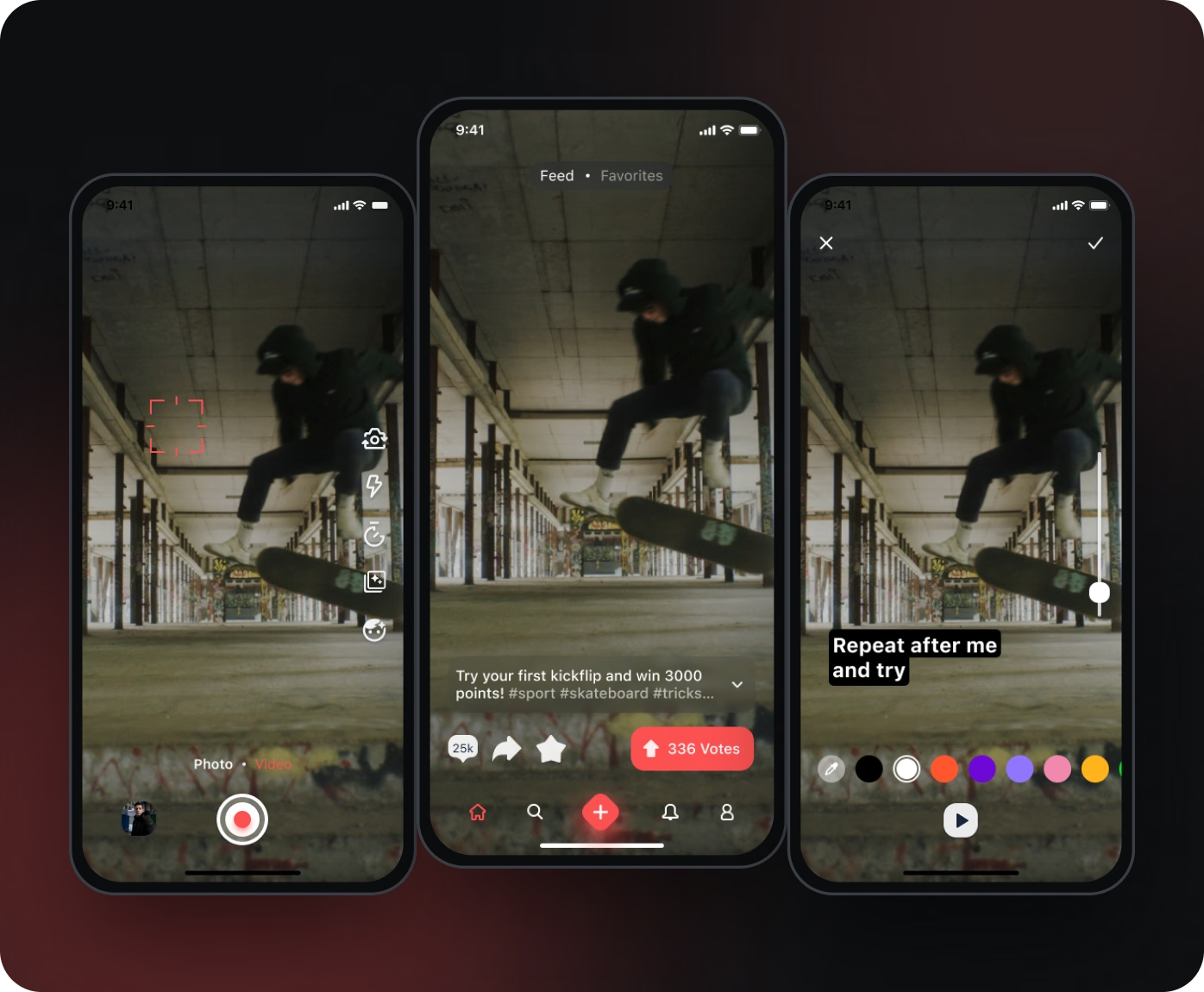
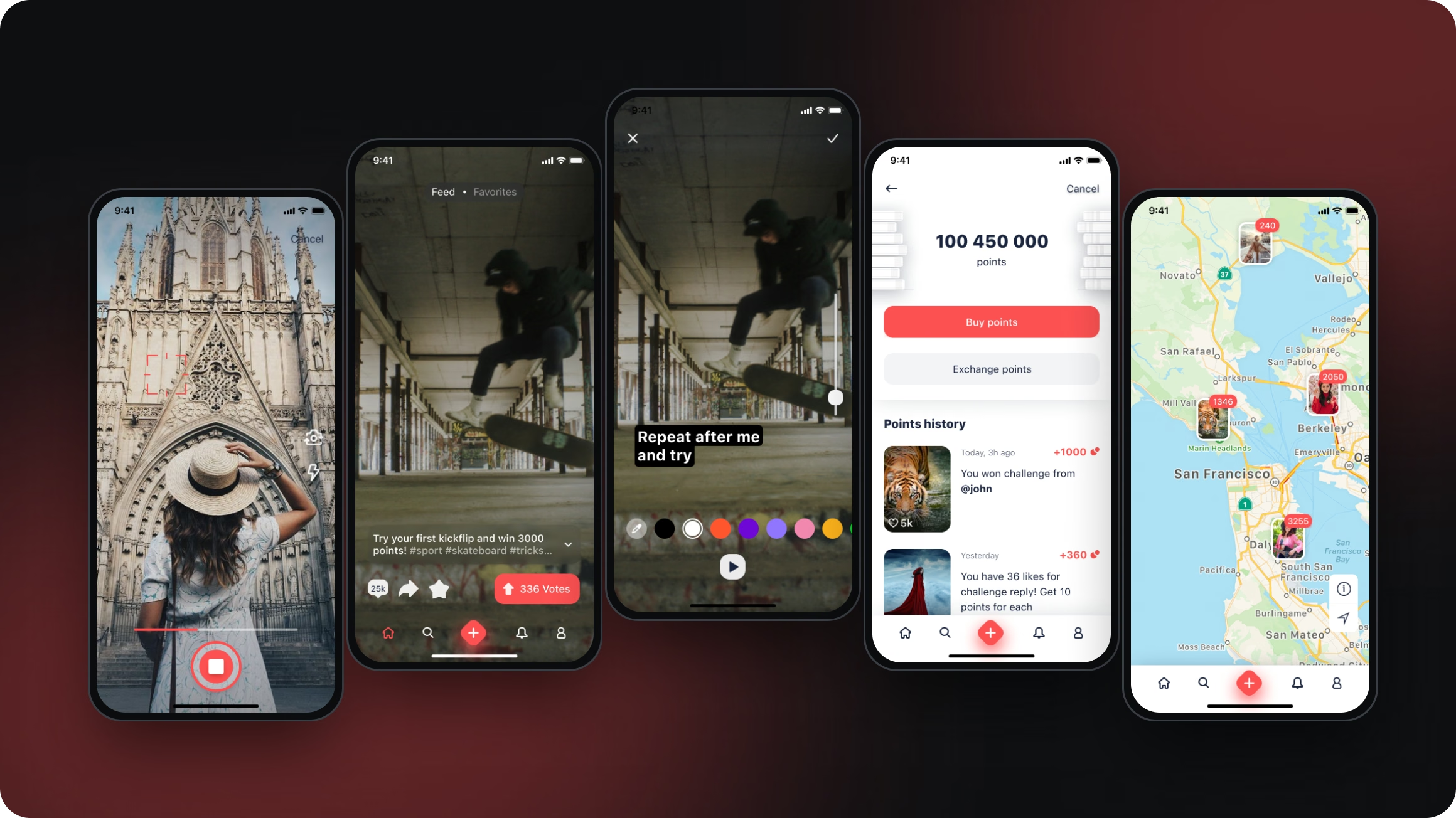
Challenge the Globe camera with an AR effect, the feed and the editor
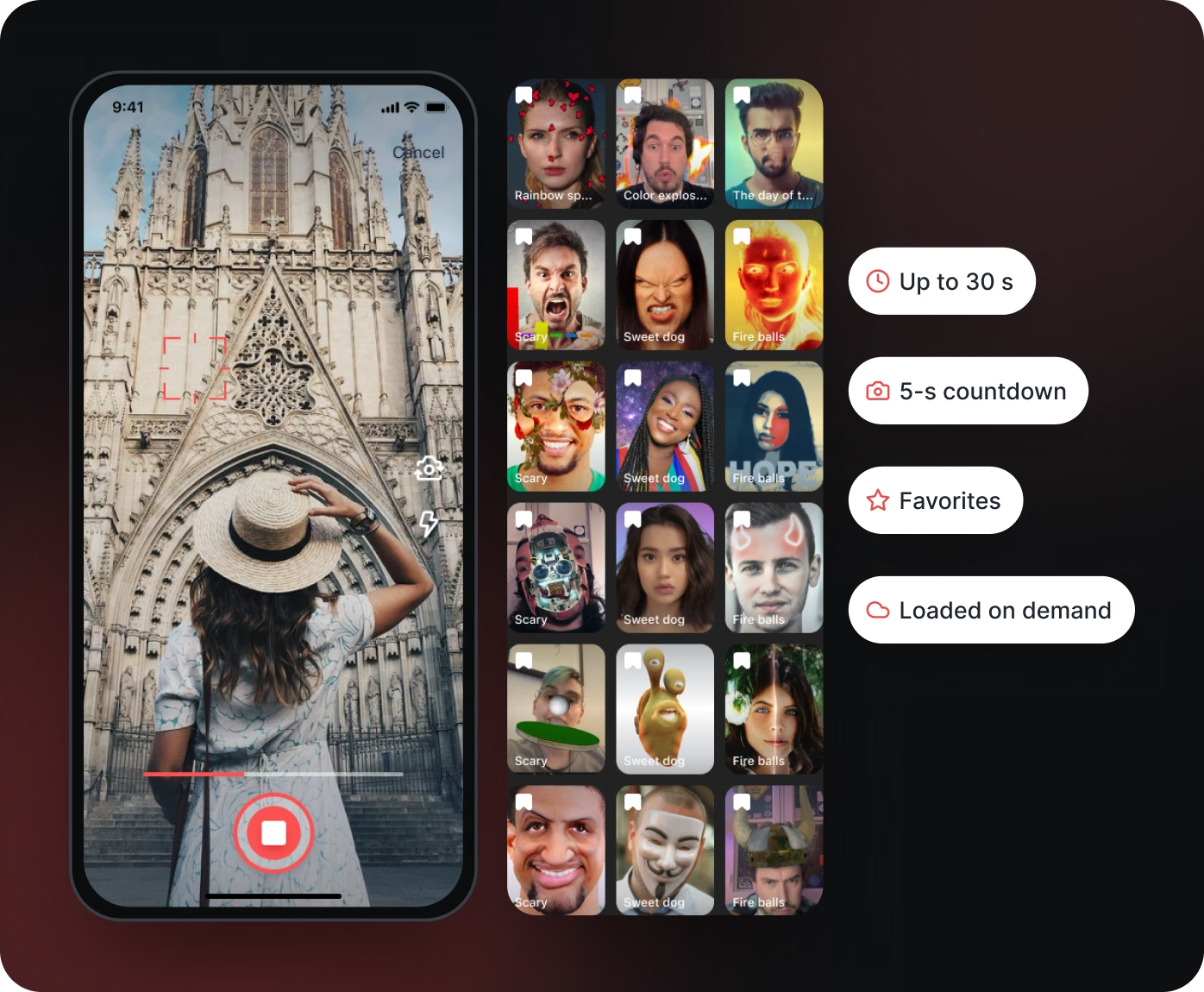
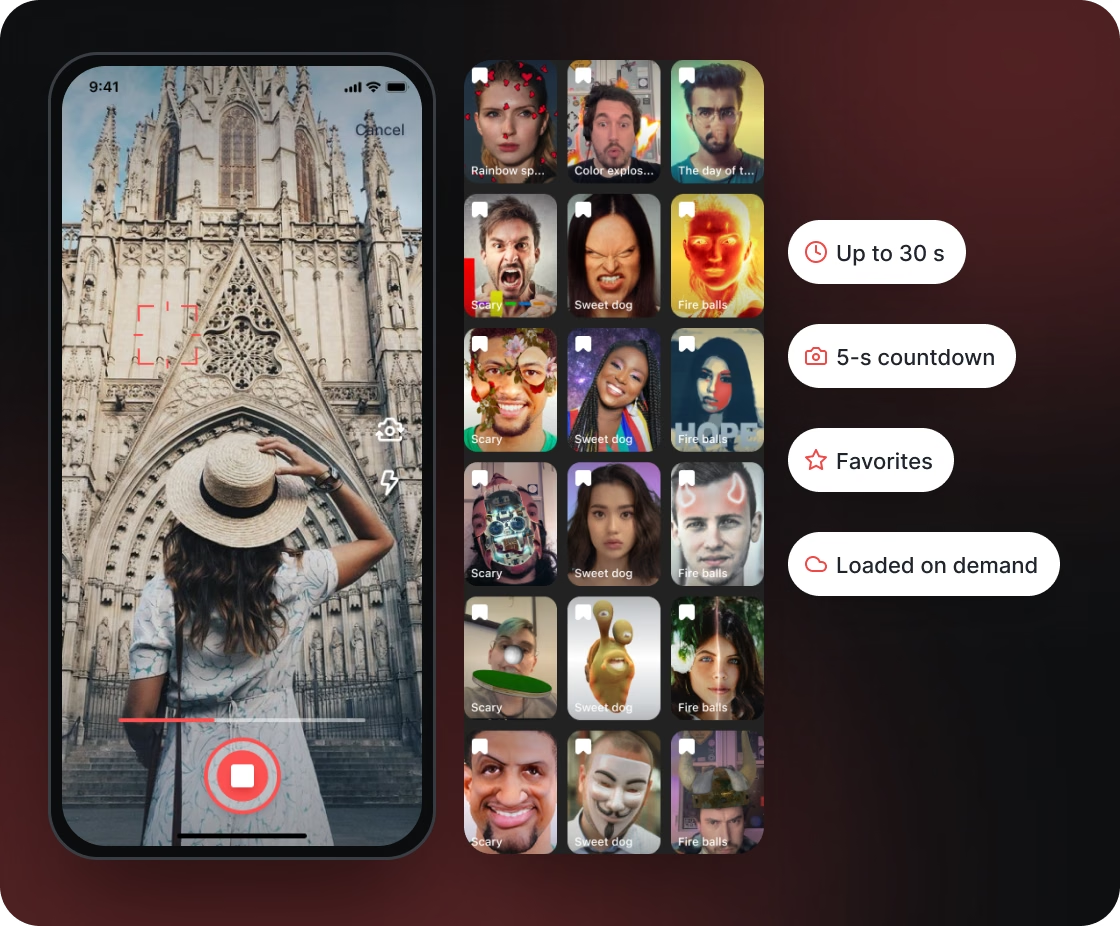
Camera with live AR effects, a countdown and favorites
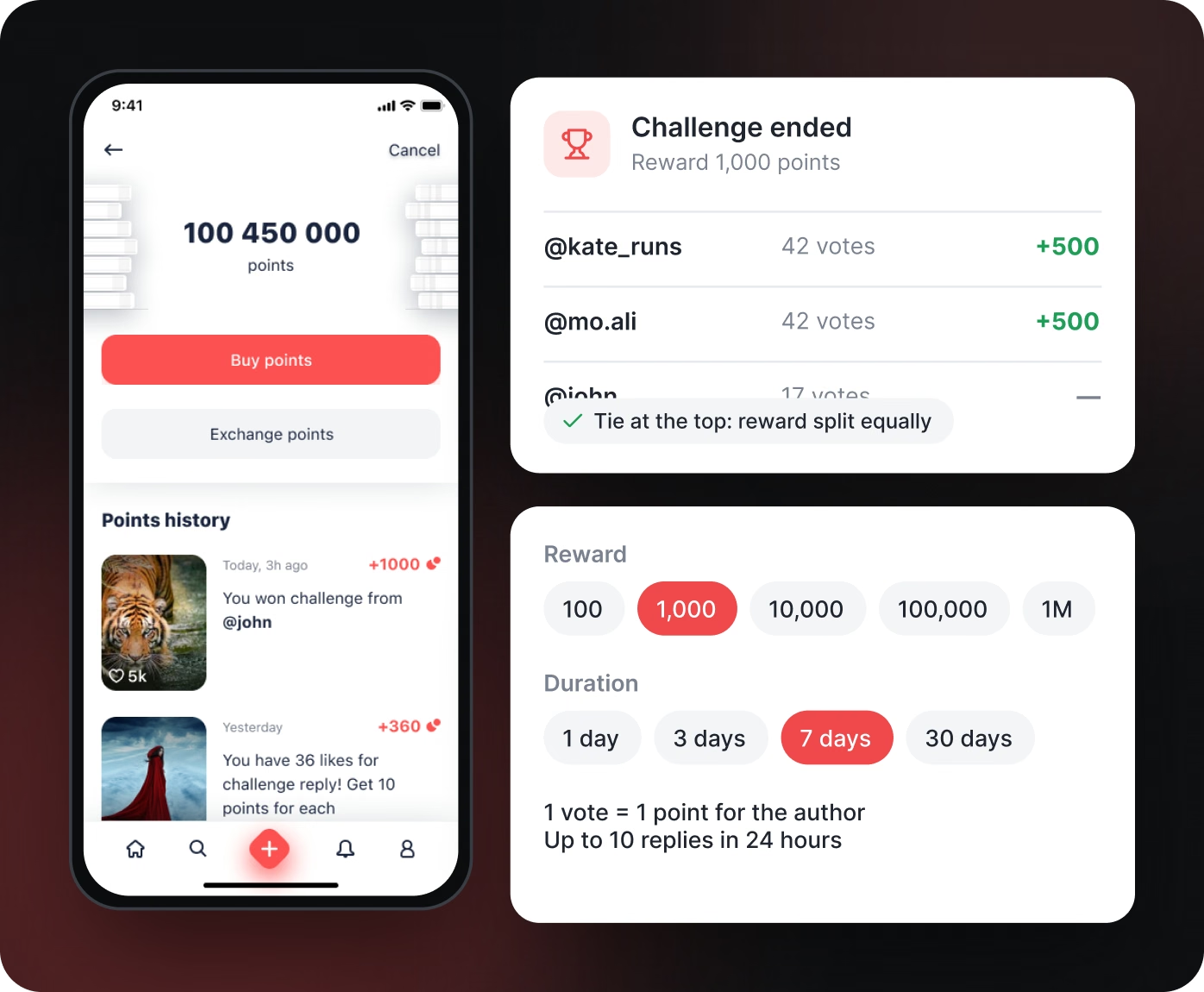
Wallet with points history, challenge results and reward settings
Challenge the Globe is an iOS app where people dare each other. A user posts a challenge as a photo or a short video with a title and a description, puts up a reward in points and picks how long the challenge runs. Other users answer with their own photo or video and vote, and when time runs out the most voted reply wins the reward. We built the whole product for a client in Saudi Arabia: the iOS app, the server, the admin panel and the landing site.
The app works in English and Arabic, and its economy runs on points: a new user gets 10,000 points, can buy more through in-app purchases and can exchange them for physical prizes.
Challenge the Globe: feed, camera, editor and wallet
The system works like this: the phone records, edits and renders the video and uploads a finished clip, and the server runs the game around it, from points to deadlines and winners.
How Challenge the Globe works: the iOS app, the server and the admin panel
The hardest part of the platform is the camera. Live AR effects, pause-and-resume recording, drawings and text that appear only during part of the clip and a sound taken from another challenge all have to end up in one short video that the phone renders by itself before uploading.
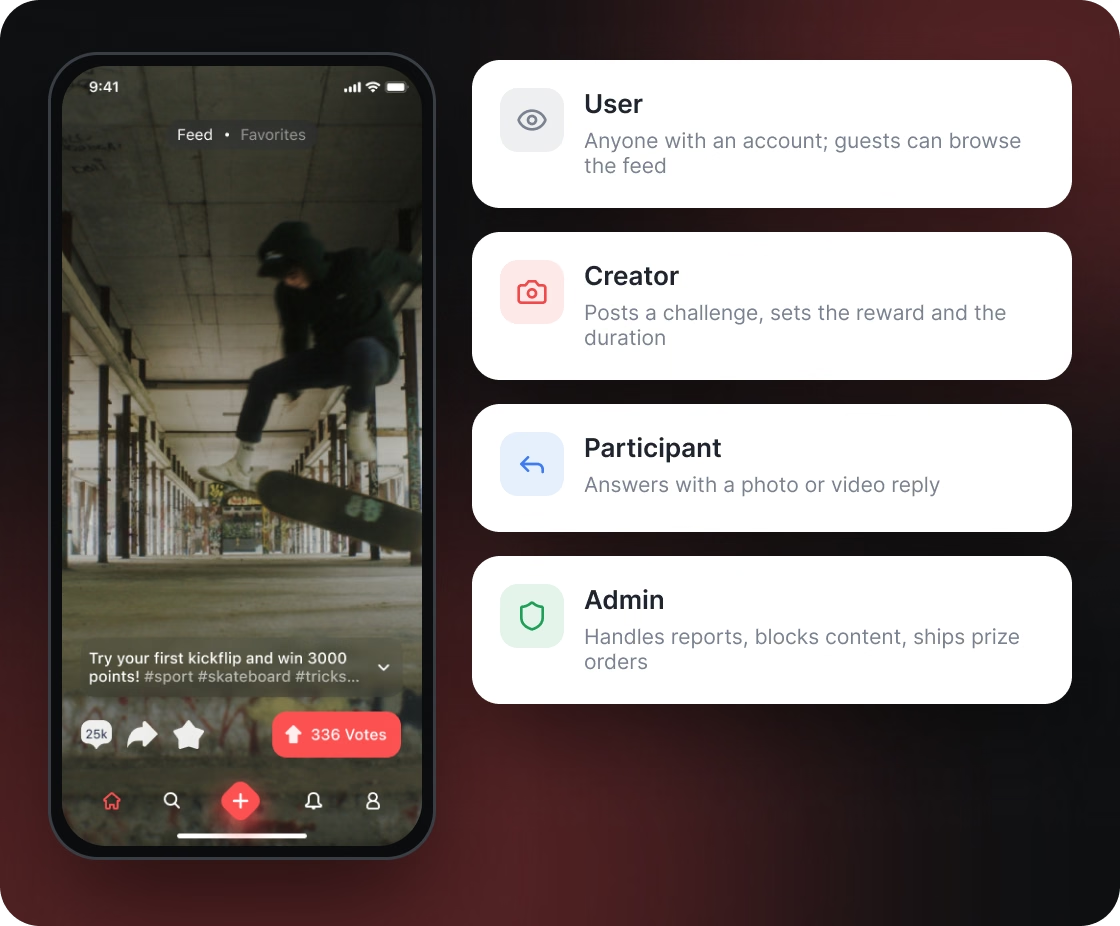
Who uses the app: user, creator, participant and admin

Who uses the platform

  • A user is anyone with an account. People can also browse the feed without signing in.
  • The user who posts a challenge is its creator. The creator sets the reward and the duration.
  • A user who answers a challenge with a photo or video is a participant, and the answer is a reply.
  • An admin works in the web admin panel: handles reports, blocks users and content, and marks prize orders as shipped.

The reward is the number of points the creator puts up for a challenge. A prize is a physical item a user can order for points.
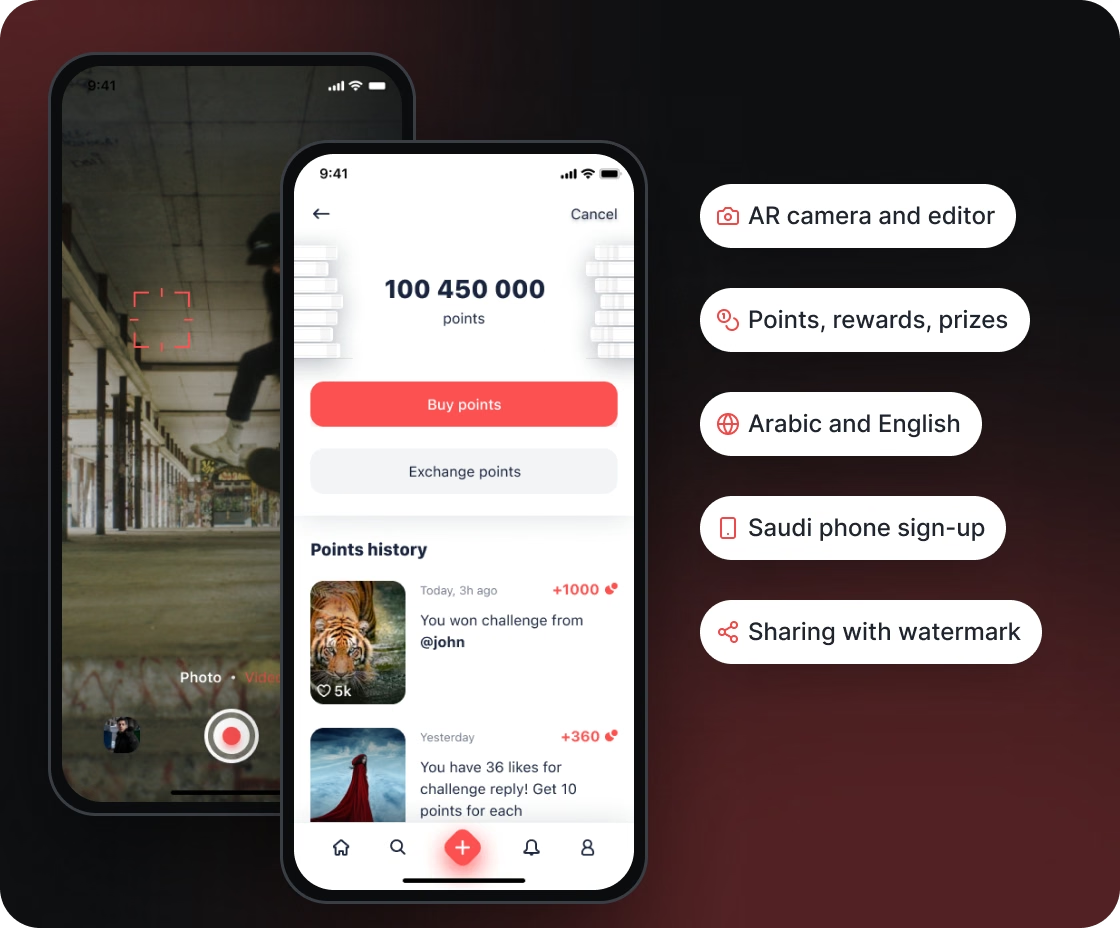
Highlights

  • A camera with live AR effects, segmented recording and a story-style editor, rendered on the phone's GPU.
  • A points economy with rewards, automatic winners, refunds, App Store purchases credited only once, and physical prizes.
  • Arabic and English with right-to-left layouts, including push notifications shown in the language chosen in the app.
  • Phone sign-up with codes delivered reliably to Saudi numbers.
  • Sharing to Snapchat, Instagram Stories, WhatsApp and Twitter with a watermark and short links to a public page of the challenge.
Feed and wallet with the app's highlights: AR camera, points, Arabic and English, Saudi sign-up, sharing
Camera with live AR effects loaded on demand

Camera with live AR effects

The camera lets a user record a challenge with masks and effects in real time, the feature the app is built around.

  • We wrote our own capture pipeline instead of the system recorder, so the AR effect is recorded into the video and pause and resume still work. Each camera frame is processed by the DeepAR engine off screen and matched back to its moment in the recording by timestamp, so the saved video matches what the user saw while recording.
  • Recording can be paused and resumed. Each piece is kept as a separate fragment, the last fragment can be deleted, and the fragments are joined into one clip of up to 30 seconds.
  • The camera has a 5-second countdown, front and back cameras, a flash, pinch zoom and a photo mode that also goes through DeepAR.
  • AR effects are not built into the app. The server keeps the catalogue with categories such as Selfie, Trending and Animals; the app downloads effects on demand, caches them on the phone and lets the user search them and save favorites. New effects can be added on the server without an app update.

Story-style editor rendered on the phone

The editor turns a raw recording into a finished clip without leaving the app.
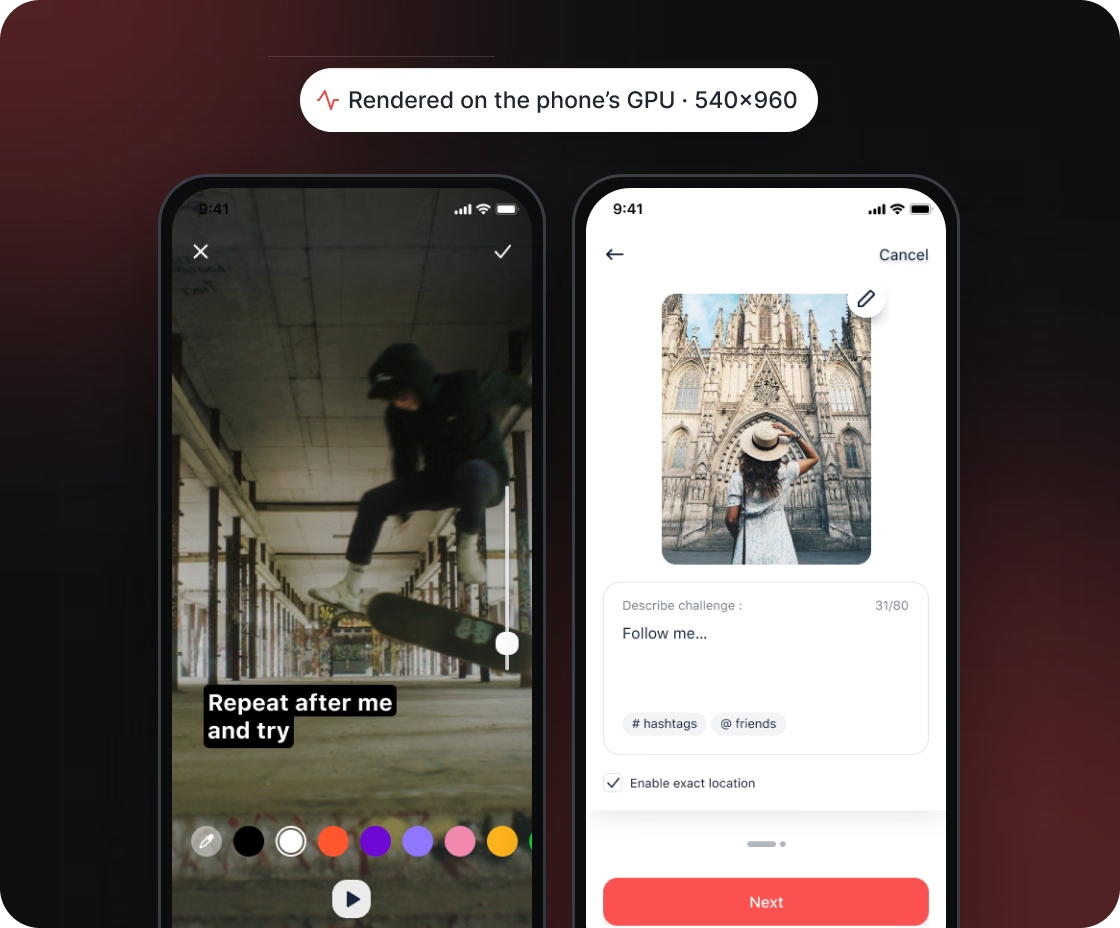
  • A user can trim the video, draw with a pen of any size, add text and move, scale and rotate it with gestures, pick a color with an eyedropper and drag an element away to delete it.
  • Each drawing or text can be set to appear only for part of the clip.
  • To render the final video, the app reads the clip frame by frame, places the overlays that are visible at that moment on top of each frame with Core Image on the GPU (Metal), and writes an H.264 file at 540x960 that can start playing before it fully downloads.
  • The set of overlays is saved as a separate file next to the video. A participant can apply the creator's overlay to their own reply, so replies keep the look of the original challenge.
Story-style editor with drawings and text, rendered on the phone's GPU
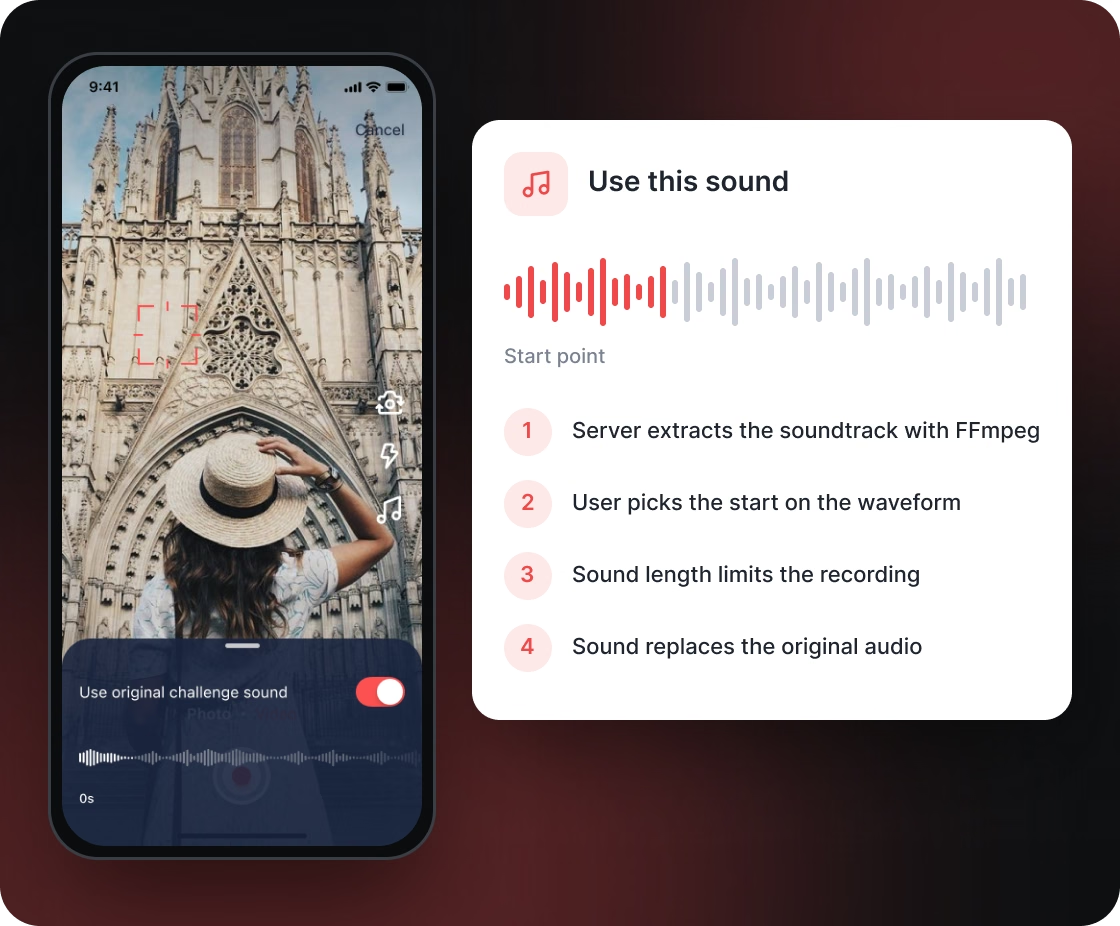
Use this sound: picking the start of a reused soundtrack on a waveform

Reusable sounds

A participant can answer a challenge with the same soundtrack, as on TikTok.

  • When a video is uploaded, the server extracts its soundtrack with FFmpeg and saves it as a sound other users can reuse.
  • In the app, "Use this sound" opens the camera with that sound. The user picks the starting point on a waveform, and the length of the sound limits the length of the recording.
  • The chosen sound replaces the original audio of the clip.

Points, rewards and winners

The points economy gives users a reason to post, reply and come back, and the server keeps each user's balance and its history.
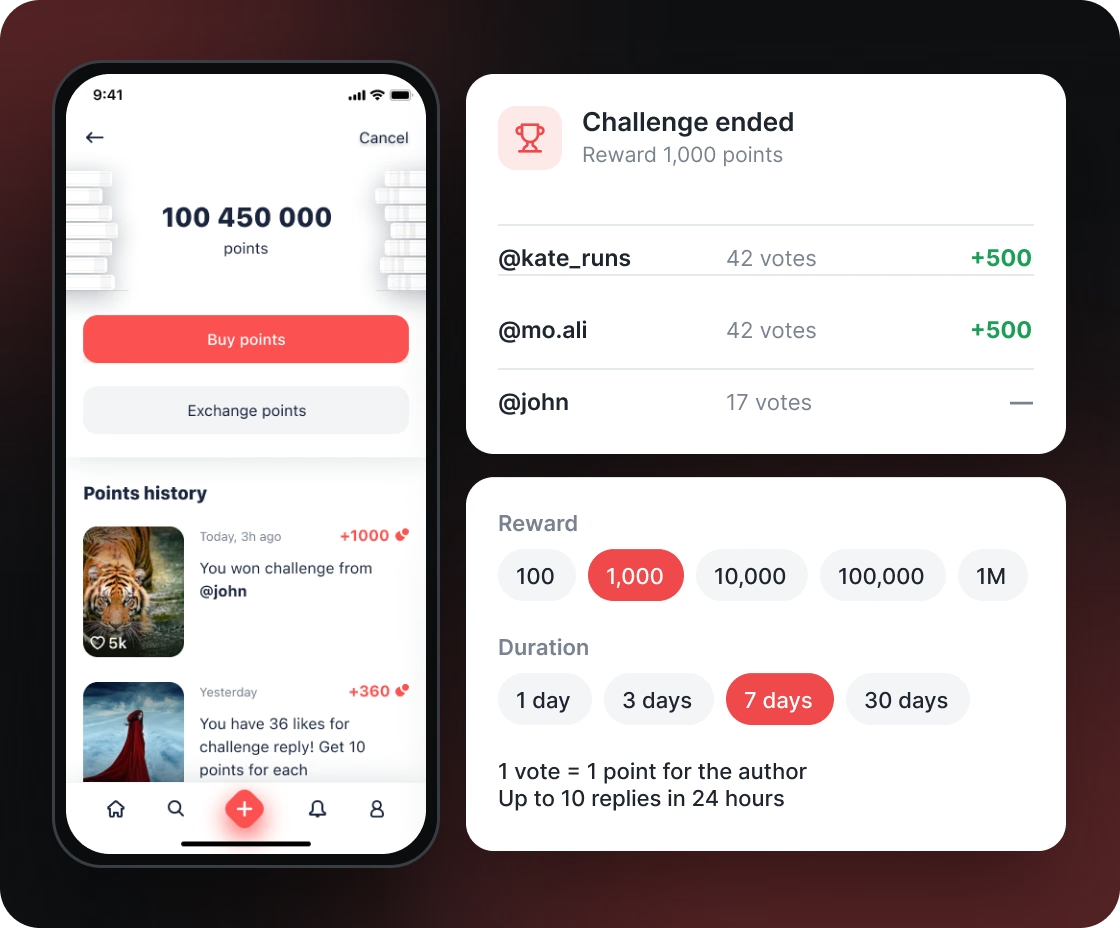
  • A creator chooses a reward of 100, 1,000, 10,000, 100,000 or 1,000,000 points and a duration of 1, 3, 7 or 30 days. The reward is deducted when the challenge is posted.
  • Each user can vote once for a challenge or a reply. The server rejects votes for a user's own content and for challenges that have ended. Each vote gives the author 1 point.
  • A user can post up to 10 replies in 24 hours, and the app tells them about the limit.
  • When the time is up, the server ends the challenge on its own. The reply with the most votes wins the reward. If several replies share the top result, they split it equally: with a 1,000-point reward and two replies tied at the top, each gets 500 points. The creator also gets 100 points for every reply the challenge received.
  • If a challenge got no replies, or the best reply has no votes, the reward goes back to the creator. The same happens when a creator deletes a challenge before it ends.
  • Changes to balances, votes and challenge results are written in database transactions that retry on conflicts, so a result is saved completely or not at all.
Challenge results with a tied reward, and reward and duration settings
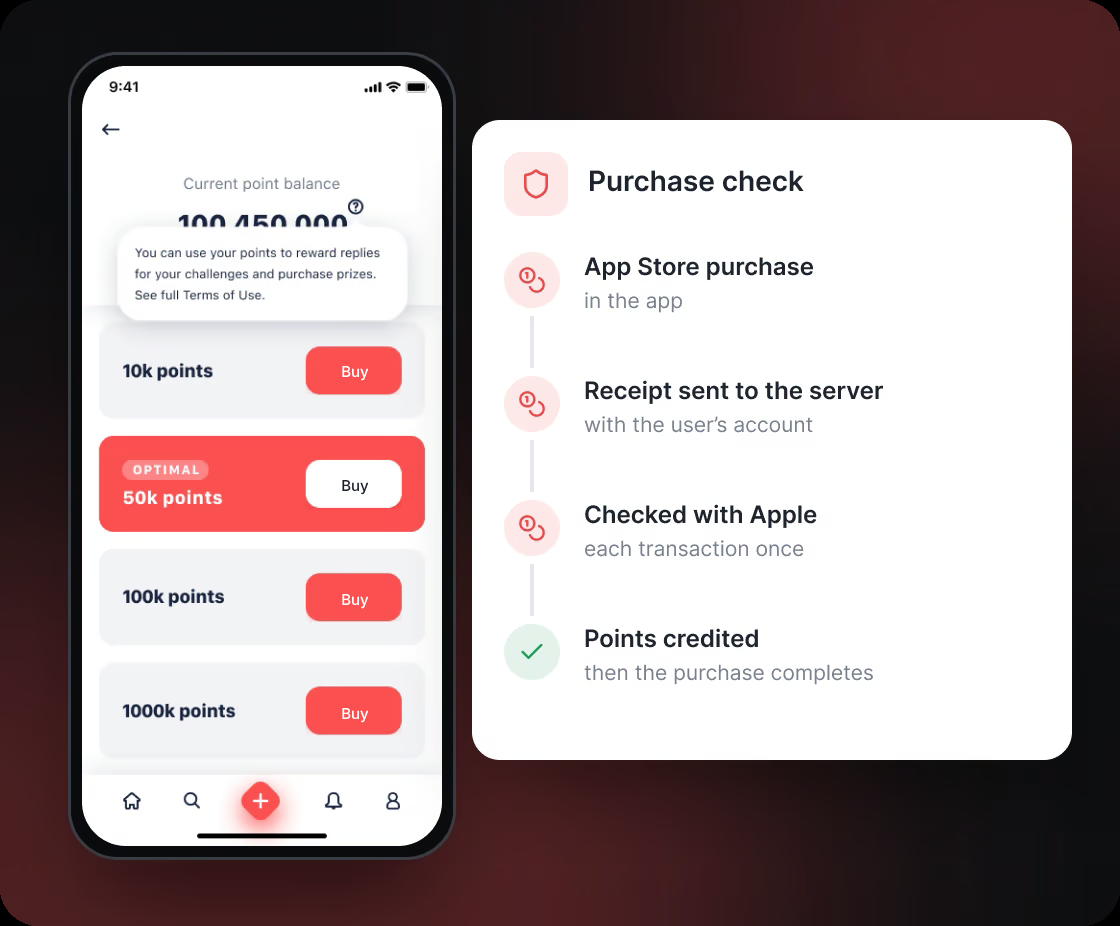
Points pack purchase with a server-side receipt check

In-app purchases and prizes

The app earns money by selling points and gives them real value through prizes.

  • A user who runs short of points while posting a challenge can buy a pack of 1,000, 10,000, 100,000 or 1,000,000 points through the App Store.
  • The app sends each purchase receipt to the server, which sends it to Apple and credits the points. Each Apple transaction is credited only once, and the app completes the purchase only after the server answers, so a purchase is not closed before the points are recorded.
  • The wallet shows the balance and the history of points movements: purchases, rewards put up, bonuses for replies, votes, winnings, prize orders and refunds.
  • A user can exchange points for a physical prize by entering a name and shipping address. Admins see the orders in the admin panel and mark them as shipped.

Phone sign-up that works in Saudi Arabia

The app is aimed at Saudi Arabia, where sign-up codes are hard to deliver: SMS providers send to Saudi numbers only from a sender ID registered for the country.
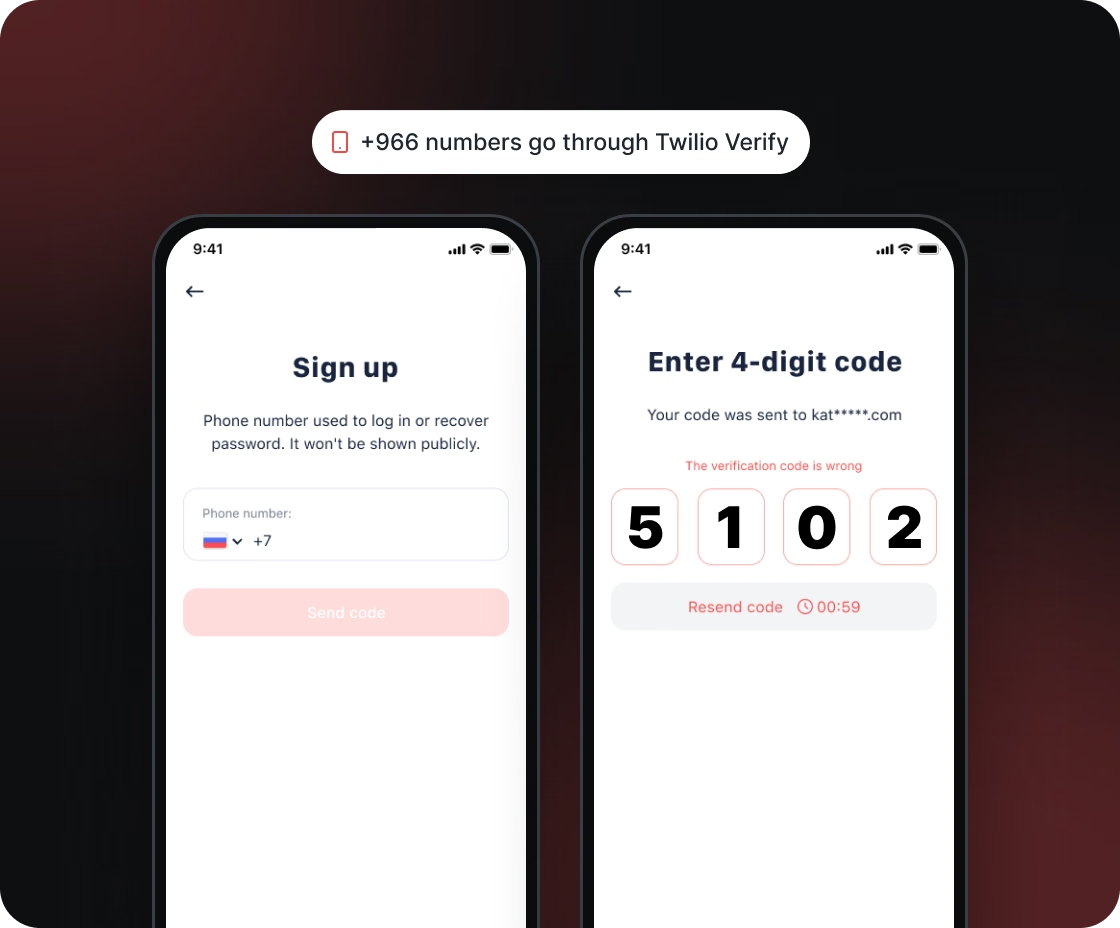
  • Numbers with the Saudi +966 code go through Twilio Verify, which handles delivery to Saudi numbers on Twilio's side and checks the codes, so the app does not need a sender ID of its own. Other numbers get a 4-digit code from our own service.
  • For those other numbers, the SMS provider can be switched between AWS SNS and Twilio with a single setting.
  • Our own codes and emails go through a separate mailer service that caps how many SMS and emails go out per minute. When the cap is hit, the team gets a Telegram alert and the message is kept in a queue of failed messages.
  • Users can also sign up with an email and password or with Sign in with Apple, and recover a deleted account within 30 days.
Phone sign-up with a 4-digit code, with +966 numbers going through Twilio Verify
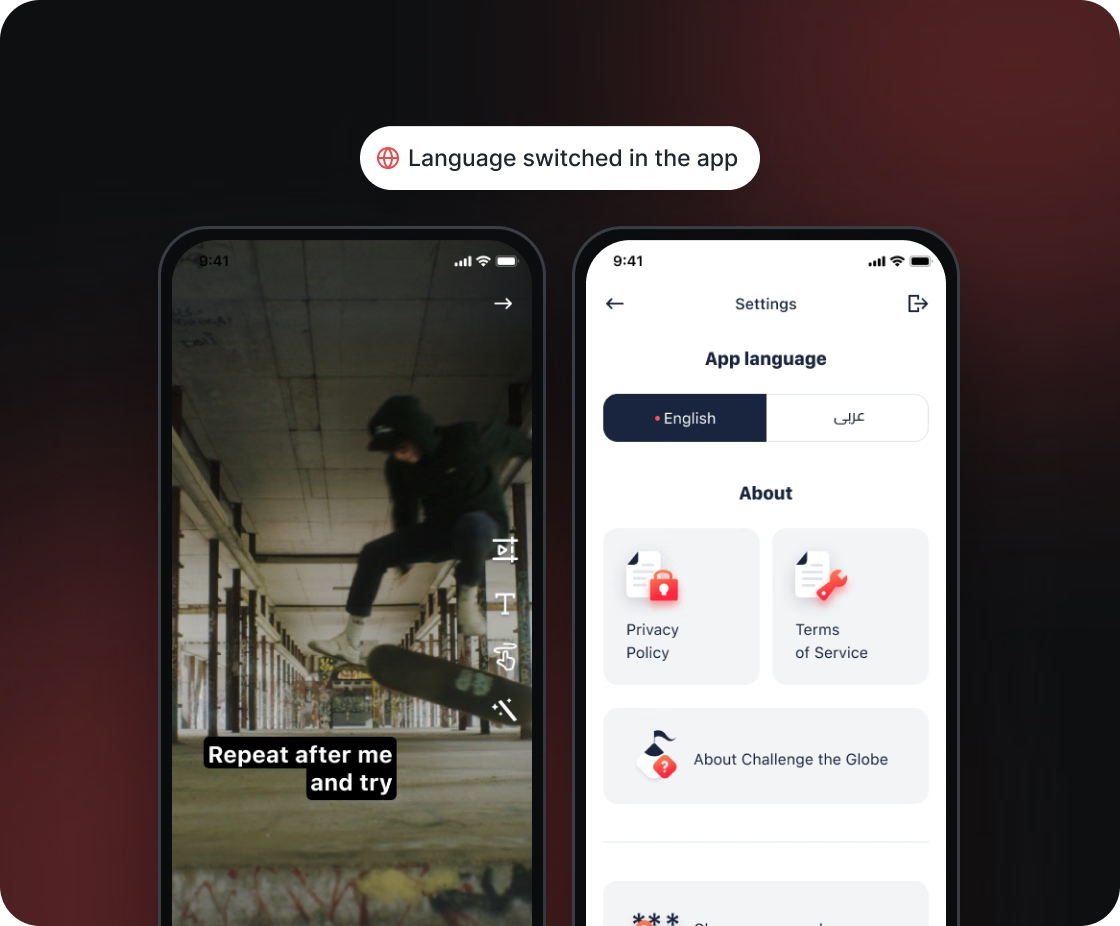
App language switched between English and Arabic in the settings

Arabic and English with right-to-left layouts

The app is fully translated into Arabic and English, and the language can be switched in the settings without changing the phone's language.

  • Screens flip for right-to-left reading in Arabic, and the app detects whether text typed by a user is written right to left.
  • Push notification text is built on the phone. The server sends a message type and its values (for example, who voted and how many points), and a notification extension builds the text in the language chosen in the app, with the right text direction for mixed Arabic and English names.

Feed, playback and discovery

The feed shows unseen content first and keeps playback fast.
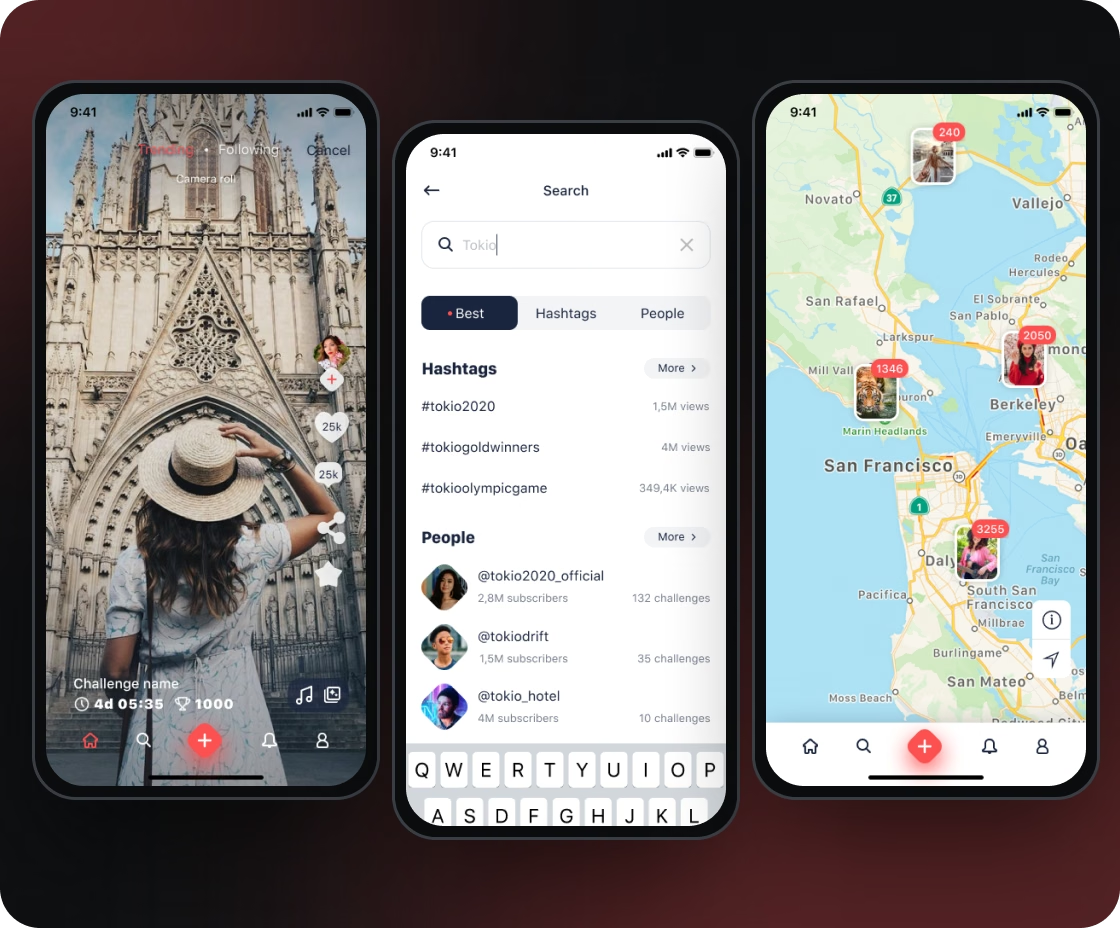
  • The server orders the feed in four tiers: unseen active challenges, unseen ended ones, then seen active and seen ended ones. Challenges and replies are mixed together and shuffled in small batches.
  • The app caches videos on disk (up to 200 MB) and loads the next videos in the feed while the current one plays.
  • Hashtags are taken from titles and descriptions, and trending hashtags are ranked by recent views first, then by views overall.
  • A map shows challenges by location. The server groups nearby challenges into clusters, so the map stays readable when zoomed out, and fills in the city and country from coordinates. A filter shows only challenges from people the user follows.
  • Users can follow each other, comment with hashtags and @mentions, save challenges to favorites and search for people and hashtags.
Feed, hashtag and people search, and a map of challenges
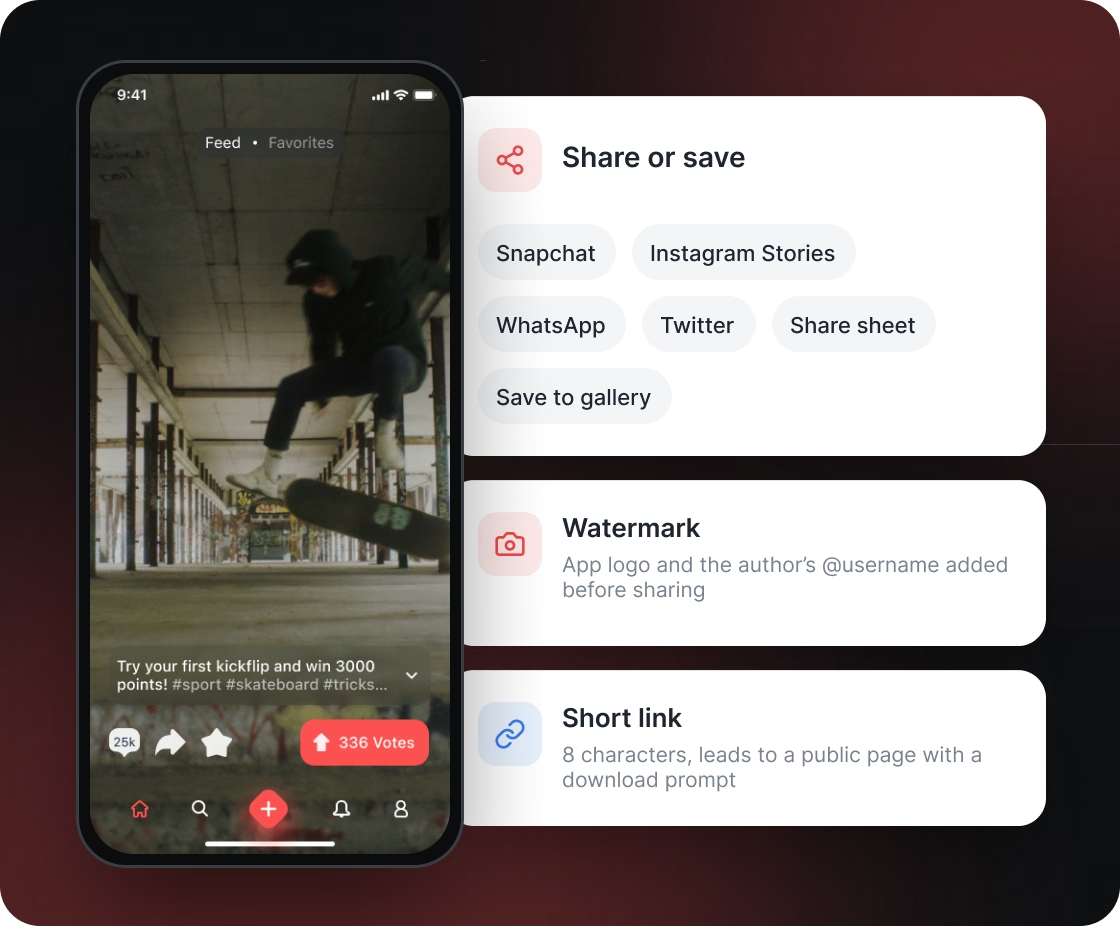
Sharing to Snapchat, Instagram Stories and WhatsApp with a watermark and a short link

Sharing and links

Sharing brings new users to the app, so each shared clip carries the brand and a way back.

  • A challenge can be shared to Snapchat (through Snap Kit), Instagram Stories, WhatsApp, Twitter or the system share sheet, or saved to the gallery.
  • Before sharing or saving, the app adds the app logo and the author's @username to the video or photo.
  • Each challenge and profile gets an 8-character short link that leads to a public page on the landing site with a download prompt. Full challenge and profile links open directly in the app when it is installed.

Notifications

Users learn about votes, comments, follows, mentions, wins and refunds as they happen.
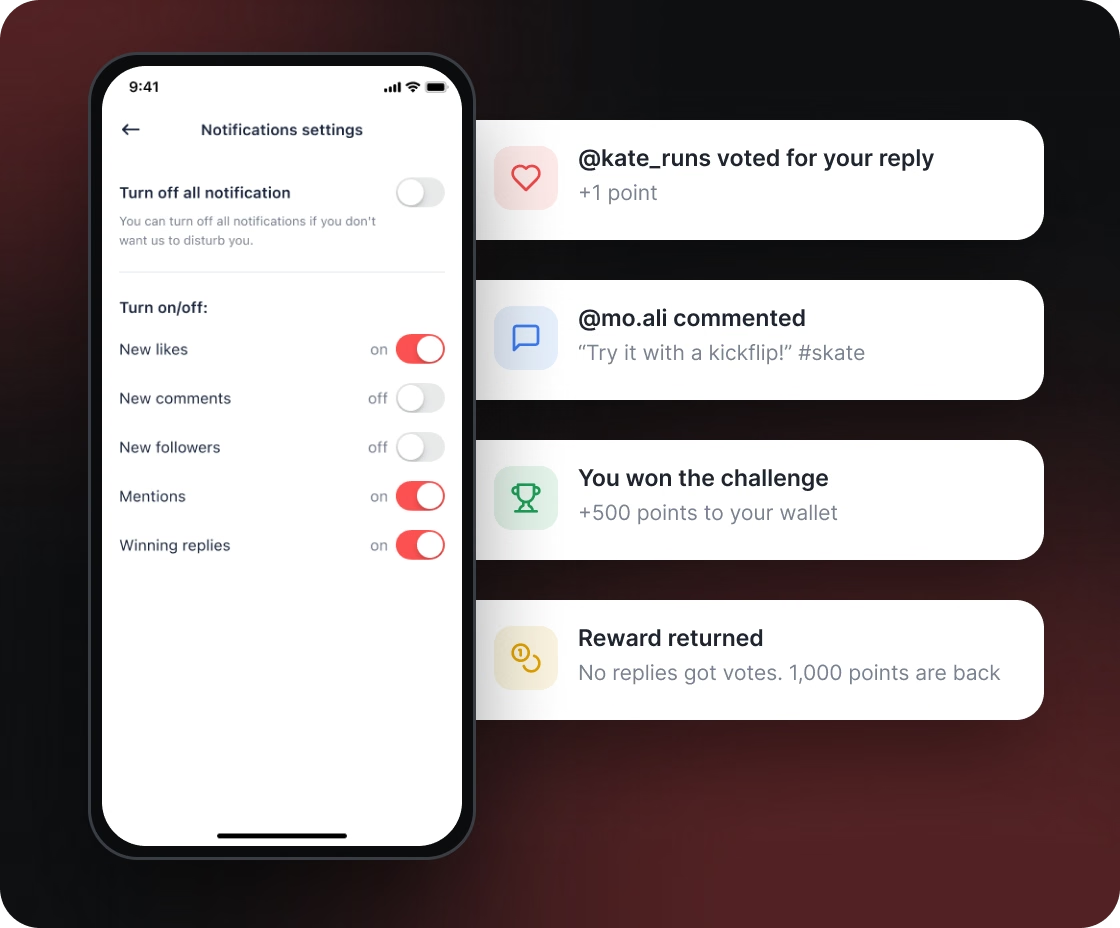
  • Notifications arrive in real time through a socket server when the app is open and as push notifications with an unread badge when it is closed.
  • Each type of notification can be turned off in the settings.
Notification settings and real-time notifications about votes, comments and wins
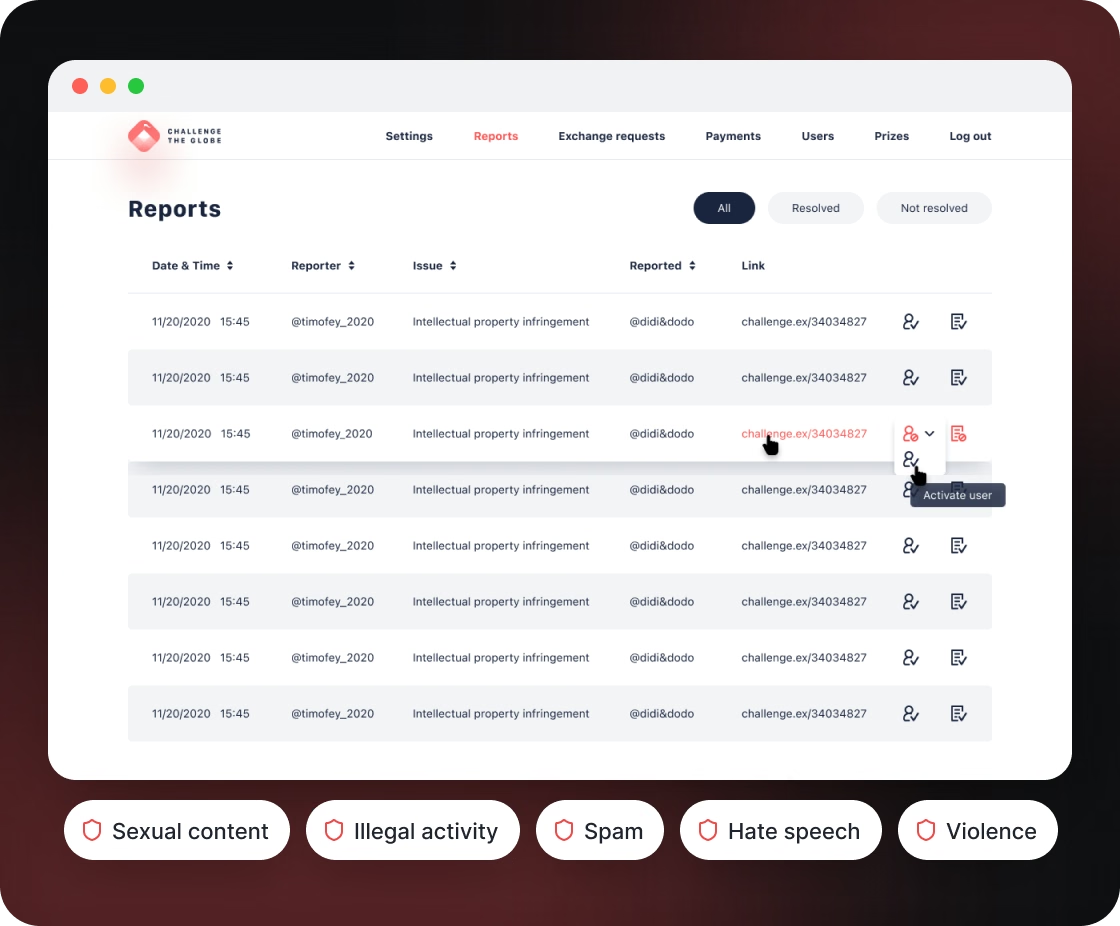
Admin panel with user reports and report reasons

Moderation and admin panel

The admin panel keeps the community under control without developer help.

  • Users can report a challenge or another user for sexual content, illegal activity, spam, hate speech or violence.
  • An admin reviews each report and blocks the user, blocks the content or dismisses the report. Blocked users and content disappear from feeds.
  • Admins also search and block users, manage prize orders and edit the FAQ, terms and privacy policy shown on the landing site.

Infrastructure and delivery

The backend runs as separate services in Docker, each with one job: the main API, real-time notifications, and outgoing SMS and email.
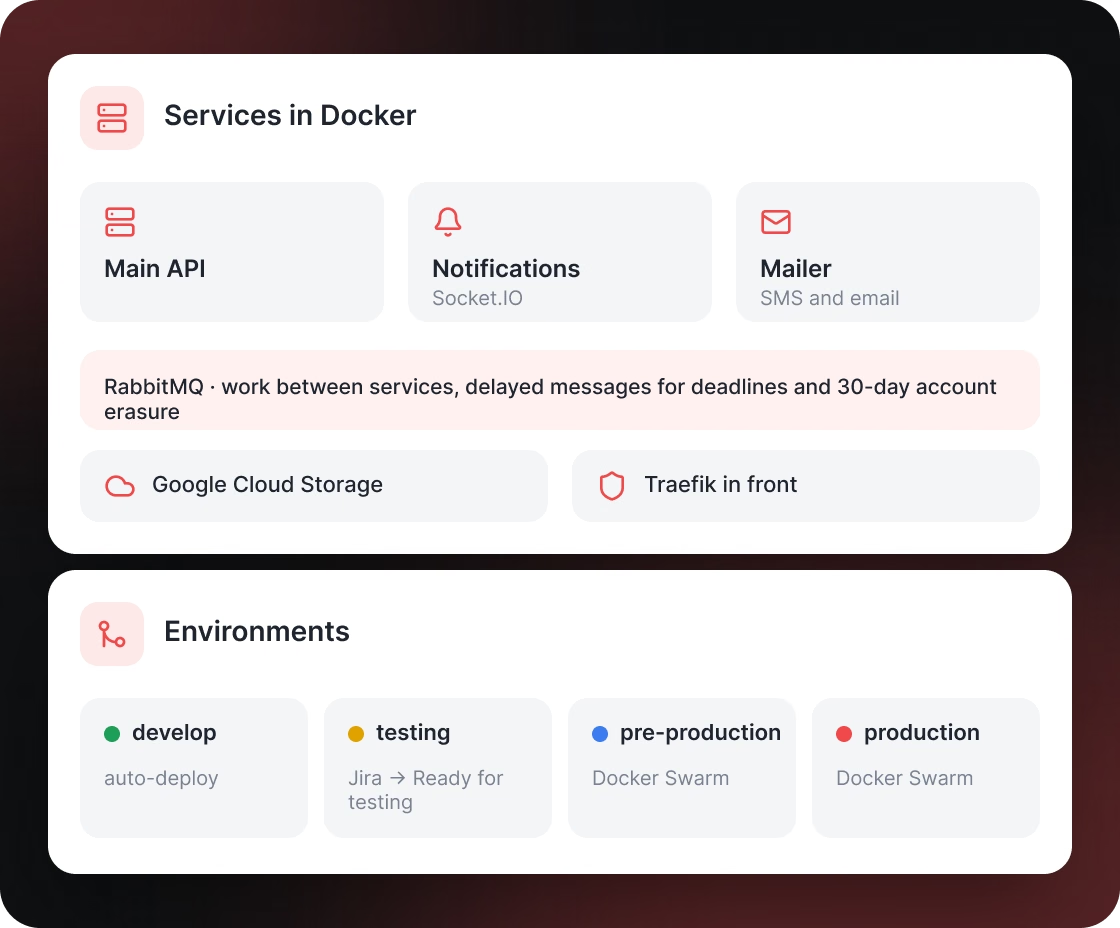

  • The services pass work to each other through RabbitMQ, and the admin panel and the landing site run alongside them. Ending challenges and erasing deleted accounts after 30 days are scheduled as delayed messages in RabbitMQ. Media is stored in Google Cloud Storage.
  • The required app version is set on the server, and the app shows a forced-update screen when it is out of date.
  • The services run behind Traefik, with separate develop, testing, pre-production and production environments. Pushing to the develop branch updates the develop server automatically; pre-production and production are built into images and rolled out to a Docker Swarm cluster.
  • When a build goes to testing, GitLab CI moves the related Jira tasks to "Ready for testing".
  • Server events such as sign-ups, new challenges, votes and wins are sent to Google Analytics 4. The app reports to Firebase Analytics, AppsFlyer and App Center.
Services in Docker, RabbitMQ and four environments

Technical Implementation

📱 Platforms
iOS app, web admin panel and landing site
🍏 iOS
Swift, The Composable Architecture, RxSwift, AVFoundation, Core Image on Metal, DeepAR SDK, StoreKit, Snap Kit
⚙️ Backend
Node.js, Express, MongoDB, Redis, RabbitMQ, Socket.IO, FFmpeg
🌐 Web
Next.js, React
🔔 Messaging
Twilio, AWS (SNS, SES), Apple Push Notification service
☁️ Infrastructure and analytics
Google Cloud Storage, Docker, Docker Swarm, Traefik, GitLab CI, Firebase Analytics, AppsFlyer, App Center, Google Analytics 4
Challenge the Globe: AR camera, points and rewards, Arabic and English