%2520(1).avif)
Key takeaways
• Most Lovable apps in production carry critical bugs. Independent audits in 2026 report ~10% with exploitable Supabase RLS gaps and ~63% with high-or-critical security findings. The default settings ship insecure.
• The bugs cluster in five places. Missing row-level security, hardcoded API keys in the client bundle, infinite-loop useEffects, unverified Stripe webhooks, and broken object-level authorization. The same five show up in 8 out of 10 audits we run.
• You don’t always need a full rebuild. Three migration paths exist: harden in place, port to Next.js + Supabase, or rebuild from scratch. The right pick depends on payments, multi-tenancy, regulated data, and how far past prototype you are.
• Realistic 2026 costs are wider than vendors admit. A focused security audit runs roughly $3k–$10k. Hardening a bugged Lovable app is typically $15k–$45k. A full Next.js + Supabase rebuild lands at $40k–$120k for a non-trivial product. Agent-engineered shops sit at the lower end.
• Hire developers the moment money, identity, or compliance enters the picture. Stripe, multi-tenant data, HIPAA/GDPR, real-time, public APIs: each one is a hard trigger. Below that bar, keep iterating in Lovable.
Why your Lovable app keeps breaking in 2026
You shipped fast. The demo went well. Then a paying customer hit a bug, the credit card flow silently failed, and a security researcher emailed you about an exposed table. You’re not alone. Lovable made it possible to build and launch in a weekend, and made it equally easy to ship code with no row-level security, no webhook verification, and the Stripe secret in the client bundle.
Three structural reasons explain why these apps break. First, the underlying LLMs were trained on outdated patterns: old async code, pre-RLS Supabase examples, and deprecated React idioms. Second, Lovable’s agent rewrites whole files instead of making targeted edits, so one fix cascades into five new regressions. Third, there is no integration-test or production-observability loop while the agent is generating. You discover the bug when a user hits it. The result is the “every fix breaks something else” treadmill founders complain about on Reddit and the Lovable forum.
Why Fora Soft wrote this playbook
Fora Soft has shipped 250+ video, AI, and real-time products since 2005. Lately our inbound pipeline is dominated by a new shape of project: a non-technical founder built an MVP on Lovable, Bolt, or v0, hit production reality, and needs senior engineers to clean it up without throwing away the velocity advantage that got them here in the first place. We have a published service line for this exact case: Lovable app bug fixing and vibe-code cleanup, part of our wider AI integration practice.
Three references shape the recommendations below. V.A.L.T. is a video evidence platform serving 770+ US police, child-advocacy, and medical organizations, where we hardened the same class of server-side authorization, access controls, and audit logging that Lovable apps usually lack. BrainCert went from prototype to $3M revenue and 100k+ customers on a real-time stack we co-engineered. Scholarly scaled from a Lovable-class MVP to 15,000+ users and 2,000 concurrent students on Go, React, LiveKit, and Kubernetes, and AWS named it the most innovative EdTech startup in Asia Pacific. We bring spec-driven agent engineering into every cleanup so we ship faster than a traditional dev shop.
Lovable app stuck in a bug-fix loop?
Bring us the repo. We’ll do a 1-week audit, name the top 10 issues with severity, and quote a hardening plan or rebuild on a 30-min call.
The 60-second answer: harden, port, or rebuild
There are three honest options when a Lovable app starts hurting. Harden in place means keeping the Lovable codebase and bringing in senior engineers to add RLS, server-side validation, webhook verification, monitoring, and tests. Best for prototypes still finding product-market fit. Port to Next.js + Supabase keeps the data and the rough UX but moves the runtime to a code-first stack you can extend without an LLM’s permission. Best for SaaS that’s hit the “Lovable can’t do this anymore” ceiling. Full rebuild throws away the codebase but keeps the product knowledge. Best for funded teams who need a multi-tenant, compliant, scaling product.
Pick the option that matches the bar your product needs to clear. The rest of this article gives you the bug catalog, the cost ranges, and the decision rules to choose well.
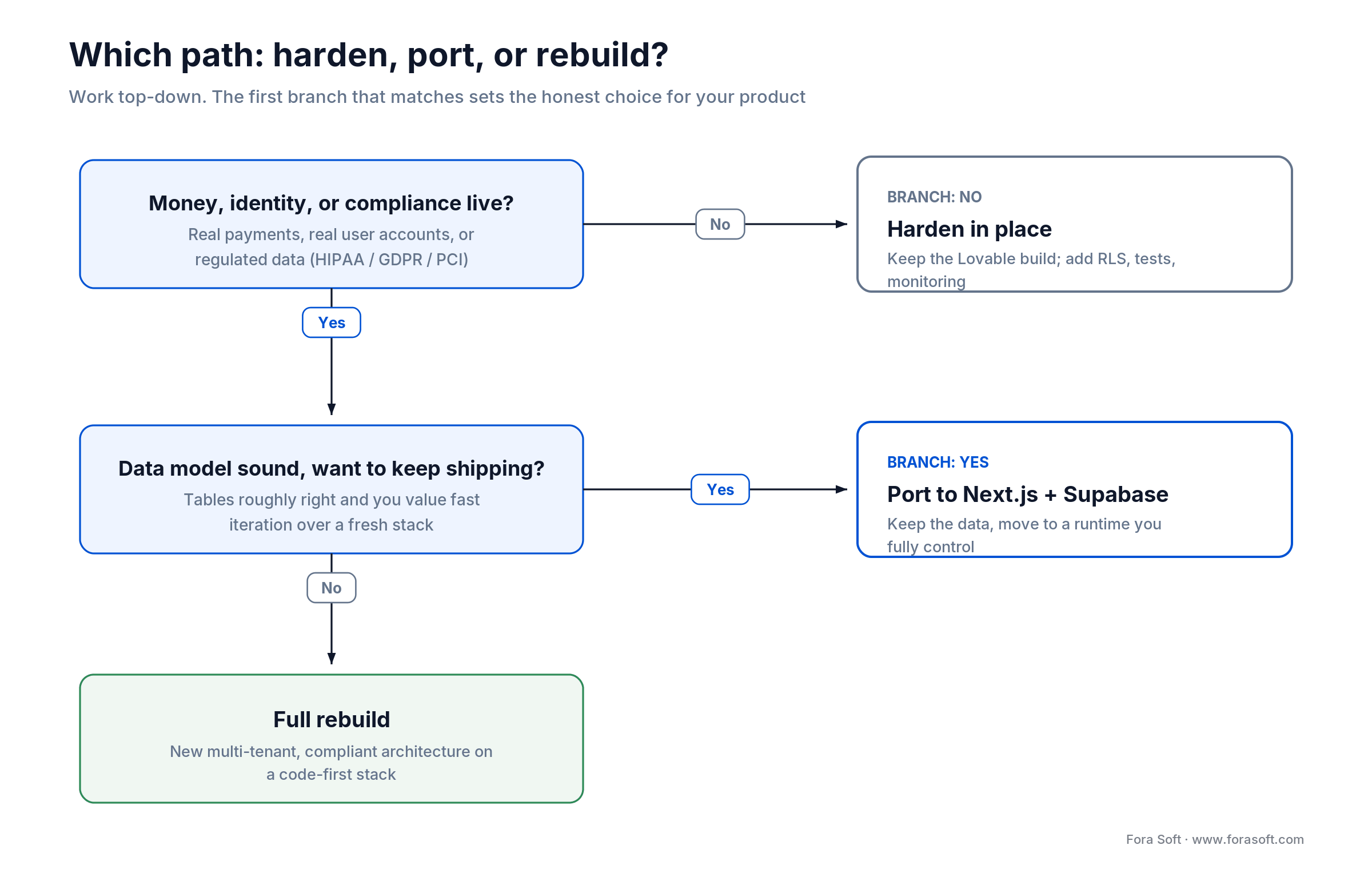
Figure 1. Start at the top. The first trigger that matches (money, then a sound data model, then neither) points to harden, port, or rebuild.
The five bug archetypes you will hit
Across the audits we’ve done in 2026, the same five issues account for the bulk of the pain. Each has a typical Lovable shape and a known-good fix.
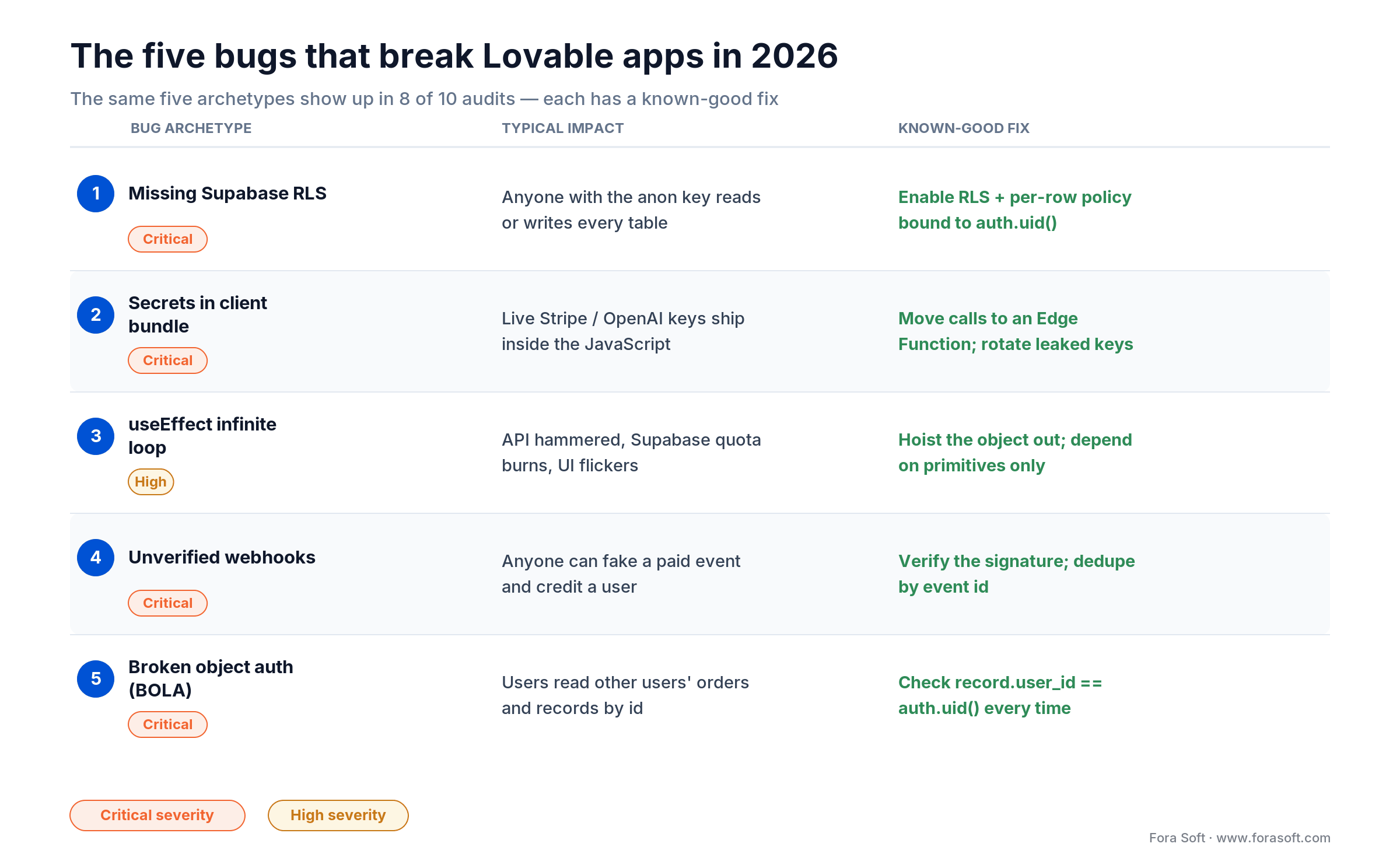
Figure 2. The five bug archetypes that turn up in most Lovable audits, with the impact each one has and the known-good fix.
1. Missing or wrong Supabase Row-Level Security
Lovable creates tables but leaves RLS off, so the anon key can read or write anything. CVE-2025-48757 hit ~170 apps because of this exact pattern. Enable RLS on every table holding user data and write policies that bind rows to the authenticated user.
ALTER TABLE posts ENABLE ROW LEVEL SECURITY;

CREATE POLICY "Users see their own posts"
  ON posts FOR SELECT USING (auth.uid() = user_id);

CREATE POLICY "Users insert as themselves"
  ON posts FOR INSERT WITH CHECK (auth.uid() = user_id);
2. Hardcoded secrets in the client bundle
Stripe live keys, OpenAI tokens, and Supabase service-role keys keep showing up in the compiled JavaScript. Search the repo for `sk_live`, `OPENAI_API_KEY`, and `SERVICE_ROLE`. If any match, rotate them today and move the calls behind a Supabase Edge Function or a Next.js API route.
3. useEffect infinite loops
Lovable likes to put a freshly-constructed object in the dependency array, which triggers the effect on every render. The page hammers your API, your Supabase quota burns, and the UI flickers. Hoist the literal out of the effect or pass primitives instead.
// BROKEN: filter is a brand-new object on every render
const filter = { status: 'active', userId };
useEffect(() => {
  fetch('/api/items', { method: 'POST', body: JSON.stringify(filter) }).then(...);
}, [filter]); // new object identity each render => effect re-runs forever

// FIXED: depend on primitives, not a fresh object
useEffect(() => {
  fetch(`/api/items?status=active&userId=${userId}`).then(...);
}, [userId]); // runs only when userId actually changes
4. Unverified Stripe (or any) webhooks
A Lovable-generated webhook handler typically trusts the body. That means anyone with the URL can fake a `payment_intent.succeeded` event and credit a user. Verify the signature on every webhook, deduplicate by event id, and log every decision.
5. Broken object-level authorization
The April 2026 incident left public projects’ source code, Supabase credentials, and AI chat histories readable for more than two months (February to April 2026) because the API confirmed who you were but never that the project was yours. The pattern repeats in user code: `/api/orders/{id}` returns the order to anyone authenticated. Always check `record.user_id === auth.uid()` before returning a resource.
Reach for an audit immediately when: you have any payment flow live, any user-generated data shared between accounts, or any third-party integration where the wrong webhook can move money.
A 4-hour triage checklist before you hire anyone
If you have a technical co-founder or a junior dev on the team, run this checklist first. It costs nothing and surfaces 80% of what an external auditor will find.
1. Export to GitHub and run the build. `npm run build` should pass with zero errors and minimal warnings. TypeScript strict mode on, please.
2. Static analysis sweep. ESLint with `eslint-plugin-security`, Semgrep with the `p/security-audit` ruleset. Both are free; both find real issues in five minutes.
3. Supabase RLS audit. Open the dashboard, list every table, confirm RLS is enabled and a policy exists. For each user-data table, try a SELECT as the anon role and confirm you get nothing.
4. Auth flow review. Where are tokens stored? Is there a refresh path? Log in, wait an hour, refresh. Do you get logged out? You should.
5. Secrets sweep. `grep -r "sk_live\|sk_test\|SERVICE_ROLE_KEY\|OPENAI_API_KEY" .` and look at the bundled JavaScript in browser DevTools.
6. Webhook verification. For every webhook handler, confirm the signature check and the idempotency key.
7. Load test. Run k6 with 50 concurrent virtual users for 5 minutes. Watch for race conditions, duplicates, and 5xxs in your error logs.
When to hire developers vs keep iterating
| Trigger | Keep iterating in Lovable | Hire developers now |
|---|---|---|
| Stripe / payments | No real revenue yet | Any production charge |
| Multi-tenant data | Single-user demo | Two or more customers share a table |
| Regulated data (HIPAA, GDPR, PCI) | Synthetic / public data | Any real PHI or PII |
| Real-time features | Polling is fine | WebRTC, sockets, sub-second updates |
| Scale | Under 100 daily active users | Past ~1k DAU or growing fast |
| Public API | No third-party integrations | Customer or partner integrations |
| Bug-fix loop | First time hitting it | 3rd cycle of credits burned on the same issue |
Realistic 2026 costs: audit, harden, port, rebuild
The numbers below are honest ranges from real engagements in early 2026. They assume a single small-to-medium product (5–15 features, 1–3 integrations). Region matters; the agent-engineered shops sit at the lower end of every band because we ship fewer hours per outcome.
| Engagement | Typical scope | Range (USD) | Calendar time |
|---|---|---|---|
| Security & bug audit | Senior dev, 1 week, written report | $3k–$10k | 5–7 days |
| Harden in place | RLS, secrets, webhooks, tests, monitoring | $15k–$45k | 3–6 weeks |
| Port to Next.js + Supabase | Keep data, rebuild runtime, add tests | $25k–$70k | 6–10 weeks |
| Full rebuild | New architecture, multi-tenant, compliant | $40k–$120k | 10–16 weeks |
| Ongoing maintenance | 1 senior part-time, monitoring + incidents | $3k–$8k / month | Continuous |
Why these are conservative. US-based shops will quote 1.5–2× the high end of each row. We use agent engineering plus a strong EU/LATAM-style cost base, so we sit at or below the bottom of these ranges on most projects. If anyone quotes you significantly less than $3k for a real audit, expect a checklist scan, not a real review.
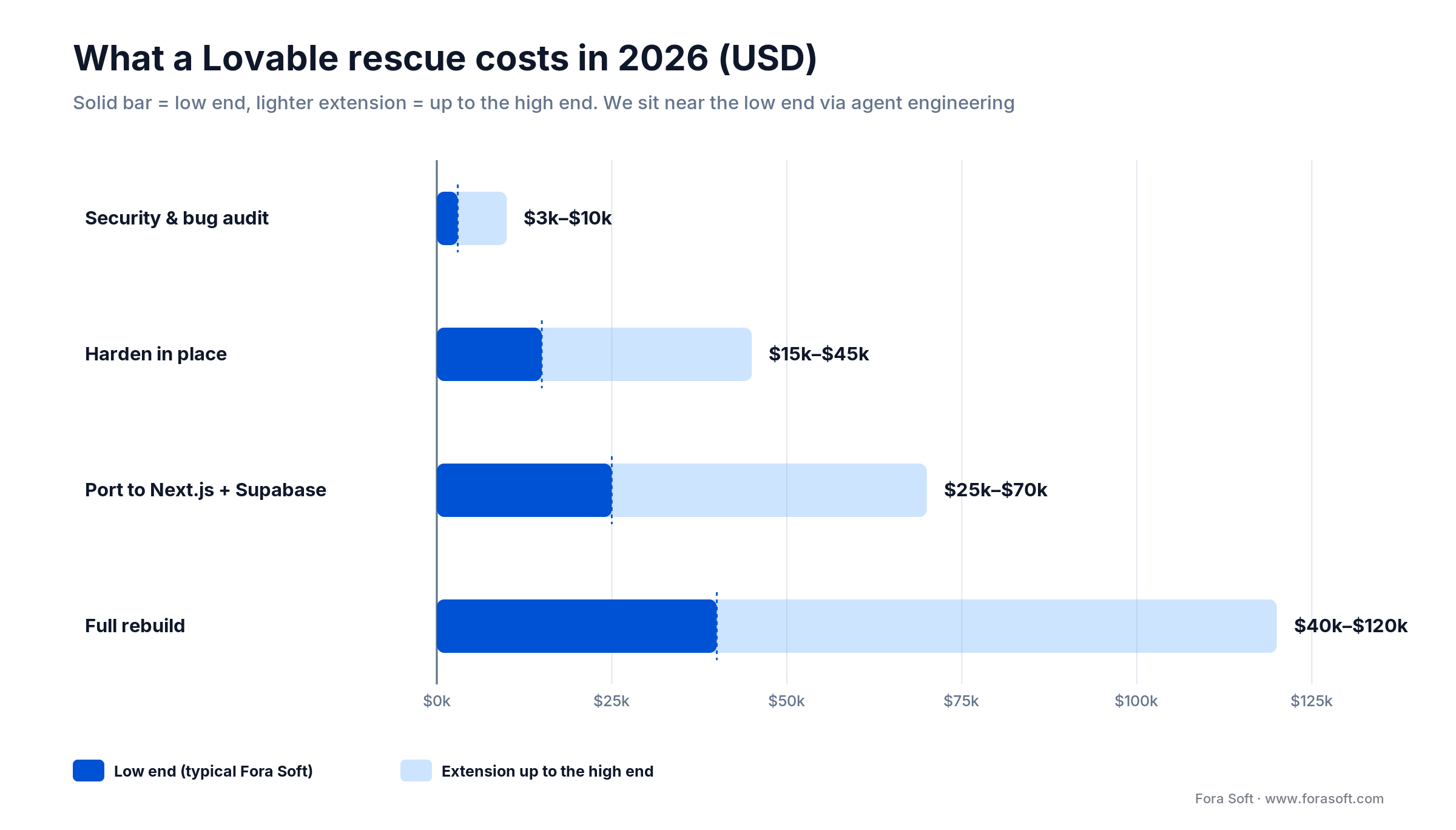
Figure 3. Typical 2026 cost bands for each rescue path. The solid bar is the low end, where agent engineering keeps us.
Reach for the audit-only engagement when: you’re unsure how bad it is, your team is non-technical, or you need a written report to show investors or customers asking about security.
Want a written audit and a fixed-price plan?
We’ll review the repo, the Supabase project, and the live build, then send you a ranked top-10 issue list and a quote on a 30-min call.
Three migration paths, side by side
| Path | Best for | Pros | Cons |
|---|---|---|---|
| Harden in Lovable | Internal tools, prototypes, MVPs still searching for fit | Cheapest, fastest to ship; keeps iteration speed. | Debt accumulates; future agent rewrites can break the fixes. |
| Port to Next.js + Supabase | Funded SaaS, payments, multi-tenant | Production architecture, full control, easy to extend. | Lose the Lovable AI-edit experience; needs an engineering team. |
| Full rebuild | Regulated industries, real-time, complex business logic | Clean slate, modern stack, scales properly. | Highest cost; calendar time matters. |
Hybrid is common in practice. We often harden the Lovable build for the next 60 days while we port the data and the critical flows to Next.js + Supabase in parallel, then cut over once the new stack is at parity. That keeps you in the market and out of an outage.
Mini case: Scholarly, from prototype to an AWS-recognized platform
Situation. An Australian e-learning startup with a working prototype, growing user base, and the same architecture they had at week two. The platform was creaking under concurrent live classes, and enrollment would wobble right when exam-season traffic peaked.
What we built. We re-architected the runtime on Go, React, LiveKit for live classroom streams, and Kubernetes for orchestration. We added integration tests around the enrollment and live-class flows, monitoring on the streaming pipeline, and proper RLS-equivalent access controls on the user/data layer. We did the work in tight sprints with the founder in the loop, using spec-driven agent engineering to compress the build.
Outcome. 15,000+ users, 2,000 concurrent students per session, and recognition from AWS as the most innovative EdTech startup in Asia Pacific. The pattern is the same one we run for any client moving past the Lovable ceiling: keep the product knowledge, replace the runtime, harden the integrations, instrument everything. Read the Scholarly project page or book a 30-min review if you’re hitting the same wall.
A decision framework — pick your path in five questions
1. Is real money flowing? Any production payment, subscription, or refund. If yes, hire engineers and harden the webhook/idempotency layer this month.
2. Is regulated data involved? PHI under HIPAA, EU resident data under GDPR, card data under PCI. If yes, you can’t self-attest your way out of it; you need an audit and probably a rebuild.
3. Are you multi-tenant? Two or more customers in the same tables. If yes, you need RLS done correctly with policies tested under attacker conditions, not just “turned on.”
4. Where are you on the bug-fix loop? First time hitting a regression? Iterate. Third time the same issue keeps coming back? Bring in real engineers; the codebase has structural debt no agent can resolve in chat.
5. What’s the cost of an outage? A demo going dark for an hour is annoying. A B2B SaaS going dark for a day costs you a customer. The bigger the cost, the higher the bar for “harden vs port vs rebuild.”
Five pitfalls we see Lovable founders hit
1. Hiring the cheapest freelancer the moment a bug appears. A junior dev with no Supabase or Next.js experience will introduce more bugs than they fix. Hire one senior or hire none.
2. Letting Lovable’s agent “fix” security issues. The same agent that wrote the bug is unlikely to verify the fix. Manual review or static analysis must validate every security-related change.
3. Believing the “security scan” widget. Lovable’s built-in scanner flags missing RLS but does not validate policy correctness. Treat it as smoke detection, not as proof of safety.
4. Skipping the integration test suite. If you can’t replay the buggy flow with a single command, you can’t prove the fix. Two days of test setup pays for itself within the first sprint.
5. Treating the rebuild as a side project. Code rescue without a clear scope and weekly milestones runs over by 2×. Pin the migration plan, fund the time, ship in 6–10 weeks.
What Lovable shipped in 2026, and what it didn’t
Lovable responded to the security backlash with several useful additions: 2FA across accounts, an enterprise audit log, workspace-level auth-policy controls, and a publish-time security scan that flags missing RLS. Chat Mode lets the agent answer questions and inspect logs without editing code, which is handy for triaging.
What the platform has not solved: integration testing for generated code, structured observability across runs, and the “every fix breaks something else” treadmill that comes from agent-driven file rewrites. Those are the parts that need real engineers in the loop, not a feature flag. The publish-time scan is smoke detection, not proof of safety. Treat it accordingly.
Reach for an external review when: you’re about to take outside money, sign an enterprise customer, or pass a procurement security questionnaire. The platform’s own scanner is not enough on its own.
The 2026 failure data, in plain numbers
Three datasets matter for the founder making this decision. First, the CVE-2025-48757 disclosure, a CVSS 9.3 flaw: about 170 of 1,645 scanned Lovable apps had exploitable RLS gaps, roughly 1 in 10 of the sample. Second, AuditMyVibe’s 2026 sample of 62 audited Lovable apps: 63% had high or critical findings, with an average of 10 issues per app. Third, GitClear’s 2025 quality report on AI-generated code more broadly: duplicated code blocks rose roughly 8-fold by 2024, refactoring fell from 25% of changed lines in 2021 to under 10%, and code churn (lines revised or removed within two weeks of being written) climbed alongside it.
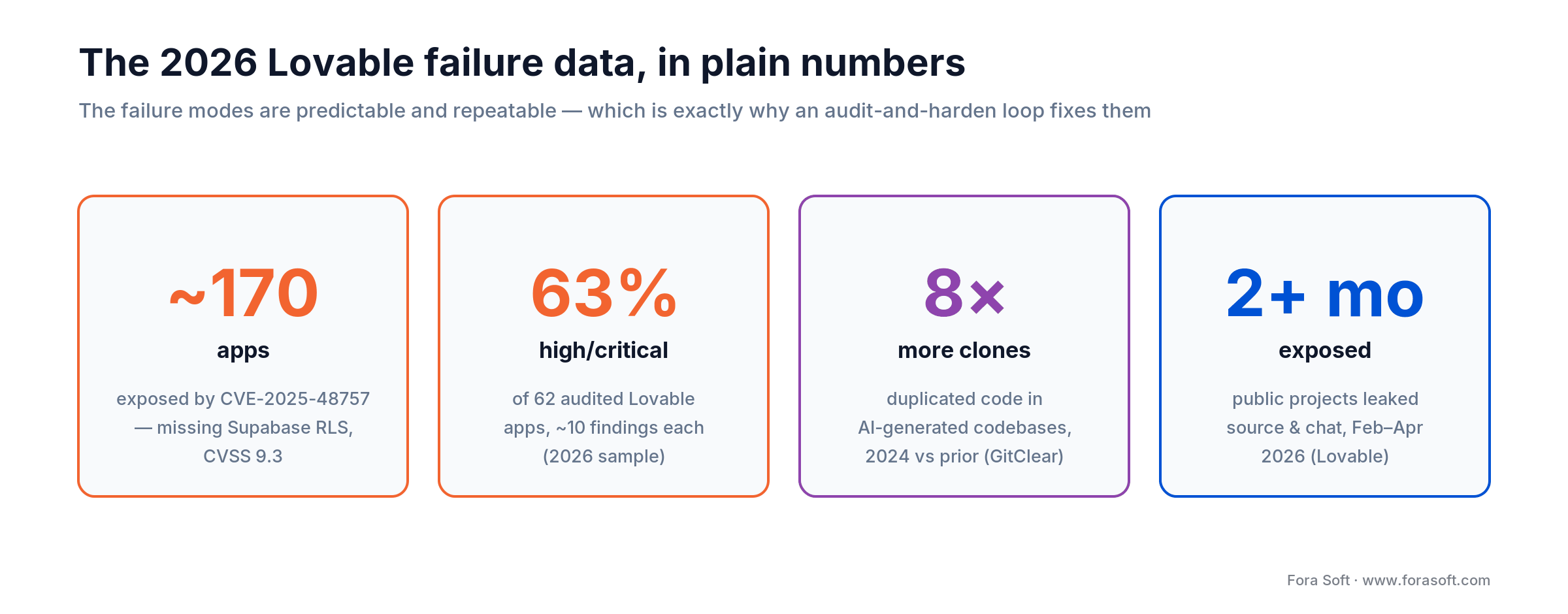
Figure 4. The public 2026 numbers behind the risk, drawn from the CVE-2025-48757 disclosure, independent audits, and GitClear.
The story those numbers tell: Lovable apps don’t fail randomly. They fail in predictable, repeatable ways, and the underlying AI-generated-code quality issues are well documented. That’s actually good news. Predictable failure modes are tractable; an audit + harden + monitoring loop fixes most of them in weeks, not quarters.
Reach for the data-driven argument when: a non-technical co-founder or board member doubts the urgency. “1 in 10 has critical security gaps” lands faster than handwaving about Reddit threads.
KPIs to measure after the cleanup
Quality KPIs. Critical/high security findings: target zero open. Test coverage on payment, auth, and webhooks: target above 80%. Production error rate per 1000 requests: target under 5.
Business KPIs. Customer-reported bugs per week: trend down. Time-to-fix for a customer-reported regression: target under 24 hours. Cost per shipped feature: trend down quarter over quarter.
Reliability KPIs. P95 server response time. Failed Stripe webhook rate. Monthly RLS-policy violation alerts: target zero. Uptime: hit the SLA your customers pay for, not just “up most of the time.”
When NOT to leave Lovable
Not every Lovable app deserves a rebuild. Internal tools, demos, prototypes still searching for product-market fit, and any product that doesn’t touch money, identity, or compliance should stay in Lovable until it earns a different stack. The mistake is treating the Lovable runtime as a product foundation when it’s closer to a clay model: great for shaping, not great for load-bearing.
If you’re unsure, take the audit. A written report and a senior engineer’s verdict of harden, port, or rebuild is cheap insurance against the wrong six-figure decision.
Need a senior engineer to look at your Lovable app this week?
We start audits within 5 business days. Bring repo access, the Supabase project URL, and the top three things keeping you up at night.
How Fora Soft engages on a Lovable rescue
Week 1 — audit. One senior engineer reviews the repo, the Supabase project, the live build, and the Stripe (or other payment) configuration. Output: ranked top-10 issue list with severity, exploit scenario, fix, and effort estimate.
Week 2 — agreed plan. Harden, port, or rebuild. Fixed-price scope on the agreed path with weekly milestones. We share a public Notion-style tracker and run weekly demos.
Weeks 3–N — build with the agent loop. Spec-driven agent engineering means we generate code with a strict spec, run integration tests on every change, and ship reviewed PRs. The same discipline we teach in our guide to agent evaluation, safety, and observability keeps the loop honest. The founder reviews demos weekly.
Final week — cutover and observability. We instrument with Sentry/Logflare/Better Stack-class monitoring, hand over runbooks, and offer a part-time support retainer for the first 90 days post-launch.
Companion reads if you want to go deeper: how to build apps with AI in 2026, how we use AI for QA and technical debt prevention, and AI in software architecture design.
Three pricing scenarios from real projects
Scenario A — pre-revenue B2C MVP. 6 features, no payments yet. Outcome: audit ($4k) + 3-week harden ($18k) = $22k total, 4 weeks calendar.
Scenario B — SaaS at $20k MRR. Stripe live, multi-tenant, RLS partly missing. Outcome: audit ($6k) + 7-week port to Next.js + Supabase ($45k) = $51k total, 8 weeks calendar.
Scenario C — healthcare-adjacent product. PHI in the database, partner integrations live. Outcome: audit ($8k) + 12-week rebuild on Next.js + Postgres with HIPAA-aligned controls ($90k) = $98k total, 13 weeks calendar.
FAQ
Are Lovable apps safe to use in production?
It depends on the use case and how the app was hardened after generation. Out of the box, audited samples in 2026 show ~10% with critical RLS gaps and ~63% with high-or-critical issues. Internal tools and small MVPs are usually fine. Anything touching payments, multi-tenant data, or regulated data needs a senior engineer to review before going live.
How much does a Lovable app audit cost in 2026?
A real, manual security and quality audit by a senior engineer runs roughly $3k–$10k depending on size and scope. Anything materially cheaper is likely a checklist scan and will miss the issues that matter. Our audits land at the lower end because we use agent-engineered tooling to triage faster.
Should you migrate to Next.js + Supabase or do a full rebuild?
If your data model is roughly right and you want to keep moving, port to Next.js + Supabase — you keep the data and gain a code-first runtime. If your business logic is broken, your tables are denormalized, or you need a different stack entirely (Go, Kotlin, real-time WebRTC), rebuild. The audit will tell you which is the better fit.
What’s the most common bug you find in Lovable codebases?
Missing or wrong row-level security on Supabase tables. It’s the same root cause behind CVE-2025-48757 and most of the headlines from 2025–2026. The second most common is hardcoded API keys in the client bundle.
Can Lovable’s own AI fix its own bugs?
Sometimes, for small surface-level fixes. Not reliably for security issues, race conditions, or anything multi-file. The agent that wrote the bug typically lacks the integration-test signal needed to verify the fix. Treat the agent as a junior pair, not as a lead engineer.
How long does a Lovable rescue take with Fora Soft?
Audit: 5–7 days. Harden: 3–6 weeks. Port: 6–10 weeks. Rebuild: 10–16 weeks. We compress those timelines compared to traditional shops because of agent engineering. Bring us the scope and we’ll quote on a call.
Will the same issues happen on Bolt.new, v0.dev, or Replit Agent?
Yes. The class of issues, whether missing security, hallucinated dependencies, or broken integrations, is shared across most AI app builders in 2026 because the underlying generation strategy is similar. The audit playbook in this article works on all of them.
Do you sign NDAs and work confidentially?
Yes. We sign mutual NDAs as a matter of course on every engagement. We can also work in your private GitHub or GitLab, on your VPN, with your IP. The compliance work we do for healthcare, evidence-management, and government clients carries over to commercial engagements too.
What to Read Next
Build with AI
How to Build Apps with AI in 2026
A non-developer’s honest playbook for shipping production-ready software with AI assistance.
Engineering practice
Spec-Driven Agentic Engineering
How we compress 6-month builds into 8–12 weeks without losing quality.
QA & tech debt
AI in Software Testing & Technical Debt Prevention
How to keep AI-generated code from becoming next quarter’s liability.
Architecture
AI in Software Architecture Design
How to design systems that survive AI-generated code on the inside.
Buyer’s guide
AI in the Software Development Process
A buyer’s guide for non-technical founders evaluating AI-first dev shops.
Ready to fix your Lovable app?
Lovable is a great way to ship fast. It’s a poor way to run a regulated, multi-tenant, paying-customer product without senior engineers in the loop. The gap is real, the bugs cluster in five known places, and the fix is well-trodden: audit first, harden if it’s an MVP, port if you’re a SaaS, rebuild if you’re regulated. The cost ranges in this article hold up across every recent engagement we’ve seen.
If you’re sitting on a Lovable codebase that’s starting to hurt, the cheapest move is the audit. Worst case, you get a written verdict and a calm action plan. Best case, the fixes are smaller than you feared. Either way, you’re no longer guessing, and that’s the most expensive position to be in.



The handbook · 7 volumes
Fora Soft Video Engineering Handbook
A Lovable app with RLS, webhooks and keys fixed is a base you can extend, and for the products we build the next layers are real-time video and AI. We wrote a seven-volume handbook covering that stack: encoding, delivery, sound and AI. Start with volume 7 on agents, serving and cost per stream-hour, then volume 3 for WebRTC and delivery. Written by Nikolay Sapunov, CEO at Fora Soft.
Browse the handbook on Amazon →7 volumes · 9,000+ pages · Kindle & paperback
Talk to a team that has shipped 250+ products and rescued plenty of Lovable apps
Senior engineers, agent-engineered velocity, and a published Lovable App Bug Fixing service line. Bring the repo. We’ll bring the verdict and the price.