

An outbound AI voice agent can dial ten thousand numbers before your first coffee. The hard part was never the dialing; it’s that a call placed with an AI-generated voice is a robocall in the eyes of the law, and getting consent, timing, and caller ID wrong turns a growth channel into a stack of $500-to-$1,500 statutory claims. We build real-time voice software, including an automated appointment agent that also runs outbound reminders and callbacks, so this guide is the build we’d hand our own team: the campaign stack, the TCPA and FCC rules that actually bind you, the real per-minute cost, and an honest build-vs-buy call.
Key takeaways
• Outbound AI calling software places calls; it doesn’t just answer them. That one difference flips the whole problem from “pick up fast” to “are we even allowed to call this person, right now, with this voice?”
• An AI voice is an “artificial” voice under the TCPA. The FCC said so in its February 2024 declaratory ruling (FCC 24-17). So an outbound AI call needs the called party’s prior express consent, and prior express written consent when it’s marketing.
• The penalties are per call. The TCPA carries $500 per violation, up to $1,500 for willful violations, with a private right of action. At campaign scale that adds up faster than any revenue the campaign brings in.
• The stack is five layers: a consent-scrubbed contact list, a dialer that paces and time-zone-gates, telephony with a trusted caller ID, the voice agent, and a warm handoff plus write-back to your CRM.
• Usage is cheap; the decision is build-vs-buy. Talk time runs roughly $0.04–$0.14 a minute depending on the path. Buy a platform under low volume; build when compliance, integrations, white-label margin, or volume justify owning the stack.
Why Fora Soft wrote this playbook
We build real-time and AI voice software, and we’ve shipped the exact machinery this article describes. Fora Soft has delivered 250+ projects since 2005, that’s more than twenty years, and our recent work sits right on the phone-plus-AI seam that outbound calling lives on.
Two builds inform every recommendation below. We built an AI voice appointment agent for a healthcare client that not only answers inbound calls but places outbound ones: it confirms upcoming visits, calls patients back with real open slots, and schedules reminders, verifying identity and writing every outcome back to the record. And we built a hospital phone interpreter on SIP, FreeSWITCH, Twilio, and an IVR menu, routing calls by queue, priority, and interpreter availability, which is the same call-control machinery an outbound dialer needs for pacing and warm transfers.
So when we talk about abandonment rates, branded caller ID, or a warm human handoff, it’s from shipping them under load, not from a spec sheet. If you want the short version of how we’d approach yours, our AI integration team does these builds; the rest of this page is how the decision should go.
Planning an outbound AI calling campaign?
Bring your use case, your list, and where those numbers came from. We’ll tell you honestly whether to buy a platform, wire up an API, or build, what it costs, and where the compliance lines are.
What outbound AI calling software actually is
Outbound AI calling software places phone calls on your behalf, holds a natural spoken conversation with whoever picks up, and completes a task: qualify a lead, book or confirm an appointment, remind, follow up, or route the live person to a human. It runs the same real-time loop an inbound agent does, hear speech, decide, speak back, act, but it starts by dialing out from a list rather than waiting for the phone to ring.
It is not an old-school auto-dialer that blasts a prerecorded message and hangs up. Those are the robocalls regulators built the rules around, and an AI voice agent is held to the same standard plus a real conversation. And it is not the same product as an AI receptionist, which answers the calls your customers place to you. A receptionist works from a base of implied welcome, the caller chose to ring you. An outbound agent has to earn the right to interrupt someone’s day, which is a different engineering and legal problem. We split those intents on purpose; the inbound pattern is covered in our AI receptionist build guide.
The useful mental model: outbound AI calling is a voice agent, plus a dialer, plus a contact list you have the right to call. Take away the list-and-consent discipline and you don’t have a product, you have a liability that happens to speak fluently.
Inbound vs outbound: why the rules flip
The single biggest difference between building an inbound agent and an outbound one isn’t technical, it’s who carries the burden of consent. When a customer calls you, they’ve opened the conversation, and your job is to answer well. When you call them, you have to prove, before the phone rings, that you were allowed to.
That flip touches the whole stack. Inbound cares about pickup speed and routing; outbound adds a contact list with a documented source, a consent flag on every record, a Do Not Call scrub, time-zone gating so nobody gets a 7 a.m. call, and pacing so you don’t abandon calls. The voice technology, speech-to-text, an LLM, text-to-speech, or a single speech-to-speech model, is nearly identical. Everything wrapped around it changes.
Keep that in mind as you read: most of what follows is the outbound wrapper, because that’s where the projects succeed or fail. The talking part is close to a solved problem; the “should this call happen at all” part is where the engineering earns its keep.
The jobs outbound calling actually does
Scope the agent around the jobs that justify the project, and notice that the safest, highest-value ones are rarely cold. Ranked by how cleanly they pay off:
1. Speed-to-lead callback. Someone fills in a form or requests a quote, and the agent calls back in seconds. This is the strongest case for automation, and the least legally fraught, because a person who just asked you to contact them has given you a reason to call. The classic sales finding is that reaching a web lead within about five minutes beats reaching them half an hour later by a wide margin (Oldroyd, Harvard Business Review, 2011). An agent that never sleeps closes that gap for every lead, not just the ones that land in business hours.
2. Reminders and confirmations. Appointment reminders, renewal nudges, delivery windows, payment confirmations. These go to existing customers who expect to hear from you, so the consent story is clean, and they quietly recover a lot of revenue that would otherwise leak through no-shows.
3. Qualify and route. Work a list of opted-in leads, ask the two or three questions that separate a real prospect from a tire-kicker, and warm-transfer the good ones to a human rep with context. The AI does the repetitive top of the funnel; people do the closing.
4. Reactivation and surveys. Win back lapsed customers, run a post-service check, collect a quick satisfaction score. Lower stakes, but only defensible when the relationship, and the consent, already exist. The pattern across all four: the value concentrates where you already have permission. That’s not a coincidence, and it’s the honest core of a good outbound program.
How an outbound campaign actually flows
An outbound call travels through more moving parts than an inbound one, and most of them exist to keep the call legal and answerable. A contact list (from your CRM, with consent flags and a Do Not Call scrub) feeds a dialer that decides who to call, when, and how fast. The dialer hands each call to your telephony layer, a SIP trunk with a caller ID your recipients will trust, which connects to the voice agent. When a live person needs a human, the agent does a warm transfer, and every outcome is written back to the CRM.
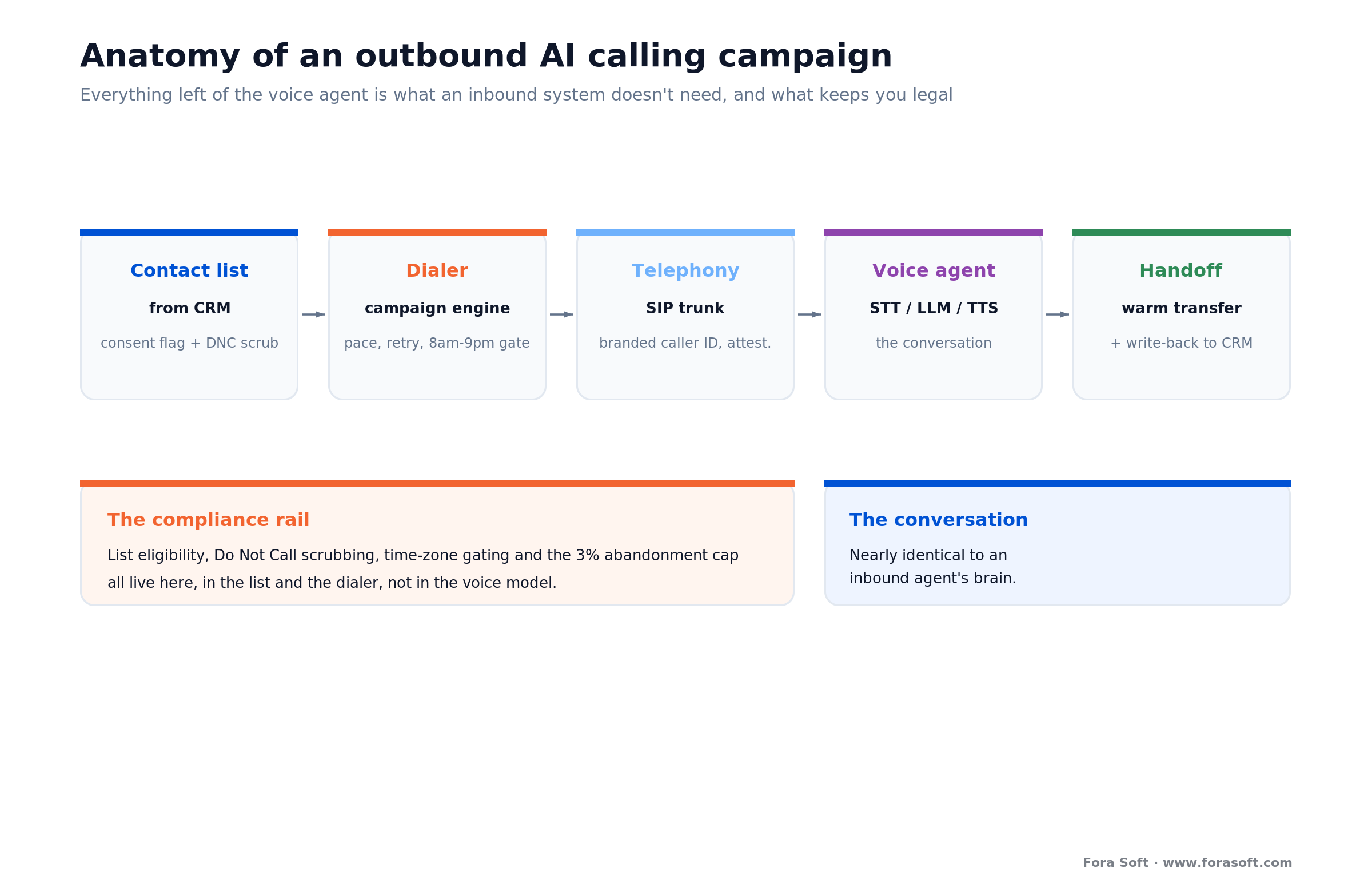
Figure 1. The anatomy of an outbound campaign. Everything to the left of the voice agent is the part inbound systems don’t need, and the part that keeps you out of court.
Two boxes do more than they look. The consent and DNC scrub at the list stage is not paperwork you bolt on later; it decides which records are even eligible to dial, and it has to run every time because a number can land on the registry the day after you loaded it. And the dialer is where compliance becomes code: time-zone gating, retry limits, and abandonment control all live here, not in the voice model.
The orchestration, wiring these together with retries, pacing, and barge-in, is usually built on a framework like Pipecat or LiveKit Agents, self-hosted on the cloud you already run. It’s the connective tissue, and it’s where most of the engineering actually goes.
Dialer modes and call pacing
A dialer can place calls three ways, and the mode you pick sets both your efficiency and your compliance exposure. In preview mode, the system shows the record and dials one at a time, safest, slowest. In progressive mode, it places exactly one call per available agent, no one gets called without someone ready to talk. In predictive mode, it dials ahead of availability, betting on how many calls will go unanswered, which is efficient and the mode most likely to abandon a call when its math is wrong.
With an AI agent, the “agent” is a software slot, so pacing becomes a question of how much concurrency you run and how tightly you control abandonment, not how many humans are on shift. That’s freeing, and it’s a trap: it’s trivially easy to point a predictive dialer at a hundred thousand numbers, which is exactly the behavior the rules exist to punish.
Watch the abandonment math: the FTC’s Telemarketing Sales Rule caps abandoned calls at 3% per campaign over any 30-day period, and a call counts as answered-then-abandoned if a live rep or agent isn’t connected within two seconds. Predictive pacing is where teams blow past that line without noticing. Build the 3% ceiling into the dialer as a hard limit, not a dashboard you check later.
TCPA and FCC: the rules that decide the project
Here’s the part every “9 best AI cold callers” listicle skips, and the part that decides whether your project is an asset or a lawsuit. This is a plain-English summary, not legal advice; every campaign needs its own counsel. But you can’t design the system without knowing the shape of the rules, so here they are, each with a date.
The governing law in the United States is the Telephone Consumer Protection Act (TCPA), enforced by the FCC, alongside the FTC’s Telemarketing Sales Rule (TSR). The single most important development for AI callers: in its February 2024 declaratory ruling (FCC 24-17), the FCC held that calls using AI technologies that generate human voices are “artificial” voices under the TCPA. In plain terms, an AI voice call is a robocall, whether the voice is synthetic or cloned, and it needs the called party’s prior express consent, prior express written consent when the call is telemarketing.
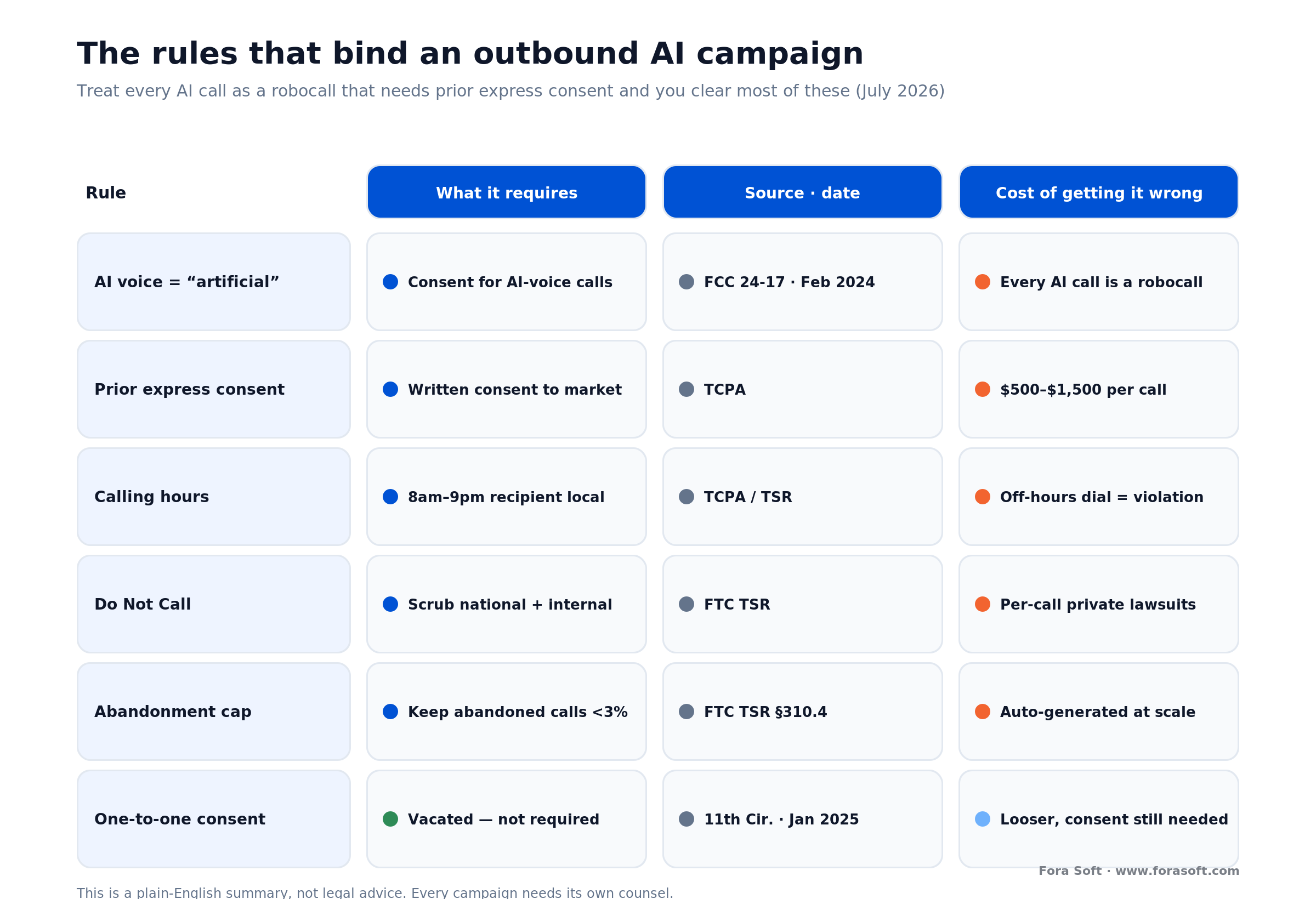
Figure 2. The rules that bind an outbound AI campaign, and what each one costs to get wrong. Treat every AI call as a robocall for consent purposes and you’ll clear most of them.
The stakes are per call. The TCPA carries statutory damages of $500 per violation, which a court may treble to $1,500 for willful or knowing violations, and it gives consumers a private right of action, so plaintiffs’ firms, not just regulators, come after you. A single misconfigured campaign that dials fifty thousand numbers without proper consent is not a $500 problem; it’s a math problem with a lot of zeros.
Three more rules round out the core. You may only call between 8 a.m. and 9 p.m. in the recipient’s local time, which is why time-zone gating is a feature, not a nice-to-have. You must scrub against the National Do Not Call Registry and honor your own internal opt-out list. And under the TSR, predictive dialers must keep abandoned calls under 3%. One recent shift worth knowing: the FCC’s stricter “one-to-one consent” rule was vacated by the Eleventh Circuit in January 2025 (Insurance Marketing Coalition v. FCC) and then repealed, so you don’t need separate consent per seller, but you still need valid prior express written consent. Looser than it was about to be, not loose.
The one rule to design around: treat every outbound AI call as a robocall that needs prior express written consent, and you satisfy the strictest common case. Cold-dialing consumer cell numbers you bought from a list is the red zone. Calling people who asked you to call, or your own existing customers, is where a compliant program lives. State laws, like Florida’s Telephone Solicitation Act, can be stricter than federal, so check the states you dial into.
Consent, DNC, and record-keeping in practice
Knowing the rules is one thing; building them into software is another. Prior express written consent has to be captured somewhere real, a checkbox on the form where the lead came in, with the disclosure language, a timestamp, and the source stored against the record. When a plaintiff’s lawyer asks how you got permission to call, “we bought a list” is the wrong answer and “here is the signed consent, dated, from this landing page” is the right one.
So the contact record, not the voice model, is the compliance artifact. Each one should carry a consent flag and its provenance, a last-scrubbed-against-DNC date, the recipient’s time zone, and an opt-out status the agent updates the instant someone says “stop calling me.” That opt-out has to propagate immediately, an agent that keeps dialing a number after the person asked it to stop is the cleanest possible willful violation.
Recording adds one more layer: many US states require all-party consent to record, so if you’re storing call audio for quality or training, the agent’s opening has to disclose it, and your logs need PII redaction. None of this is exotic; it’s the same care an inbound agent takes with recorded calls, applied to a list you assembled yourself. It’s just non-optional here.
Caller ID, STIR/SHAKEN, and answer rates
A perfectly compliant call that shows up as “Spam Likely” is a call nobody answers, and answer rate is the number your whole campaign economics rest on. US carriers authenticate calls with a framework called STIR/SHAKEN, which attaches a cryptographic attestation saying the caller is who they claim to be. Calls without full attestation get flagged, deprioritized, or labeled as spam, and a spam label roughly halves the chance anyone picks up.
So the deliverability work is real engineering, not marketing. Register your numbers, get the highest attestation level your carrier offers, and consider branded caller ID so your business name and logo show on the recipient’s screen. Keep the call volume per number sane, hammering thousands of calls through one number is the fastest way to get it flagged, and warm new numbers up gradually rather than blasting them on day one.
Answer rate is a product metric: a campaign that’s compliant but flagged as spam fails on the same line as one that’s illegal, nobody picks up. Budget for number registration, attestation, and rotation from day one, and monitor answer rate per number so you catch a flagged number before it drags the whole campaign down.
The voice stack: cascade vs speech-to-speech
Once a call connects, the conversation quality comes down to the same choice an inbound agent faces. You can run a cascade, three specialist models in a row: speech-to-text transcribes, an LLM decides and writes the reply, text-to-speech voices it. Or you can run a speech-to-speech model like the OpenAI Realtime API, one model that takes audio in and emits audio out, skipping the middle text hops.
Cascade wins on control and cost: swap any component, pin the exact LLM you trust, keep a clean transcript of every turn for logging and guardrails. Speech-to-speech wins on latency and natural turn-taking, fewer hops, better prosody. The number that decides “does this feel human” is round-trip latency: natural conversation leaves about a 200 ms gap between turns (Stivers et al., PNAS 2009), and past roughly 800 ms the person starts talking over the agent. We go deeper on the economics in our OpenAI Realtime API pricing breakdown.
| Layer | Common pick | Price (July 2026) | What decides it |
|---|---|---|---|
| Telephony (outbound) | Twilio number / SIP trunk | ~$0.014/min number; ~$0.005/min trunk | Attestation, branded caller ID, volume |
| STT | Deepgram Nova-3 (streaming) | $0.0077/min | Streaming latency; accents; redaction |
| LLM | GPT-class, small/fast tier | ~$0.002–$0.01/call | Time-to-first-token; tool-calling |
| TTS | Deepgram Aura / Cartesia / ElevenLabs | $0.030–$0.10 / 1k chars | First-byte latency vs voice quality |
| Speech-to-speech | OpenAI Realtime (replaces STT+LLM+TTS) | ~$0.05–$0.10/min | Lowest latency; less stage-level control |
Per Deepgram’s pricing (July 2026), streaming Nova-3 speech-to-text is $0.0077/min and Aura-2 text-to-speech is $0.030 per 1,000 characters; Twilio’s voice pricing puts an outbound call from a local US number near $0.014/min, dropping toward $0.005/min on a SIP trunk. One quiet detail that bites teams: the LLM must call tools reliably, not just talk well. An agent that logs the wrong disposition or books the wrong slot a few percent of the time corrupts your CRM silently. Test the actions, not just the conversation, and our AI call assistant buyer’s guide covers the API-level trade-offs.
Build, buy, or wire up an API
There are three real endpoints, and most teams should not build first. Buy a SaaS platform, wire up a managed voice API, or do a custom build. The right one falls out of your volume, how custom the flows are, and whether compliance or white-label margin forces you to own the stack.
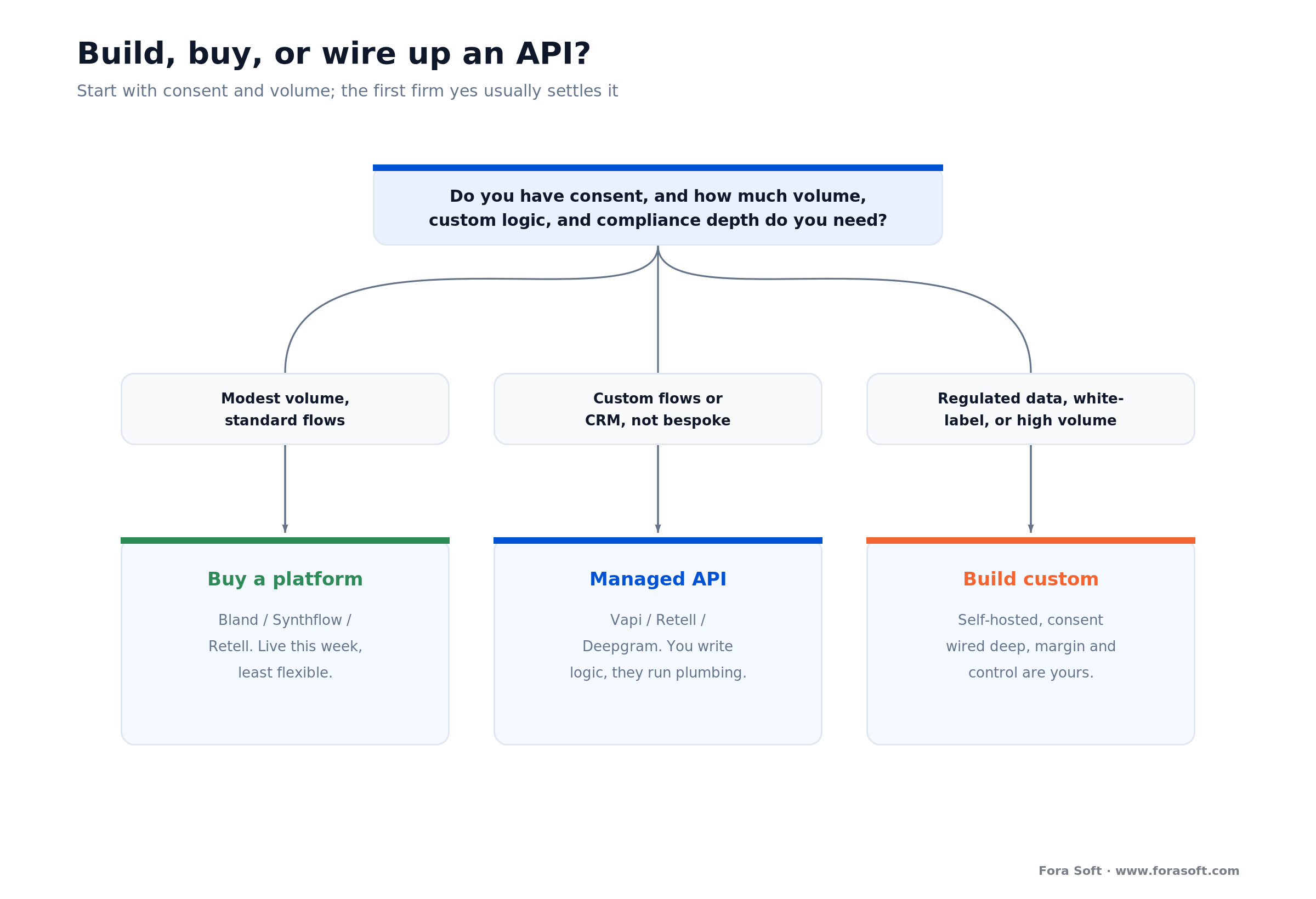
Figure 3. Follow the questions top to bottom. Most teams testing the water stop at the first yes and buy a platform.
Buy a SaaS platform when: your volume is modest and your flows are standard, callbacks, reminders, basic qualification. Platforms like Bland, Synthflow, or Retell get you live this week for a per-minute rate plus a monthly fee. Fastest and cheapest to start, least flexible, and you inherit their compliance posture rather than owning it.
Use a managed voice API when: you need custom flows or CRM integrations a platform can’t do, but not a bespoke stack. Vapi, Retell, or Deepgram’s Voice Agent API hand you telephony, speech-to-text, an LLM, and text-to-speech behind one billing line; you write the campaign logic and consent handling, they run the plumbing.
Build custom when: you have regulated data that must stay self-hosted, you’re white-labeling to many clients where per-minute margin compounds, you need consent and DNC logic wired deep into your own CRM, or your volume is high enough that owning the stack is simply cheaper. This is where we come in, and where the compliance-as-code work pays for itself. We compare the leading platforms in our Bland AI alternatives guide. For production builds, our AI call agent development team ships inbound and outbound agents on Twilio, Telnyx or SIP with CRM sync and warm transfer.
Outgrowing a platform, or worried about compliance?
If you’re white-labeling, pushing real volume, or wiring consent into a regulated CRM, owning the stack can pay for itself fast. We’ll model your break-even and map the compliance path with real numbers before you commit a dollar.
What outbound AI calling really costs
Talk time is cheap; the real question is build-vs-buy, not cents per minute. A self-hosted cascade runs about $0.04/min, a speech-to-speech agent about $0.09/min, a platform like Bland $0.11–$0.14/min, and a managed API $0.13–$0.30/min all-in. Compare that to a human sales development rep, who at a loaded salary and realistic dial rate costs well over $1 per connected minute of actual talk. Let’s show the arithmetic, because the gaps decide everything.
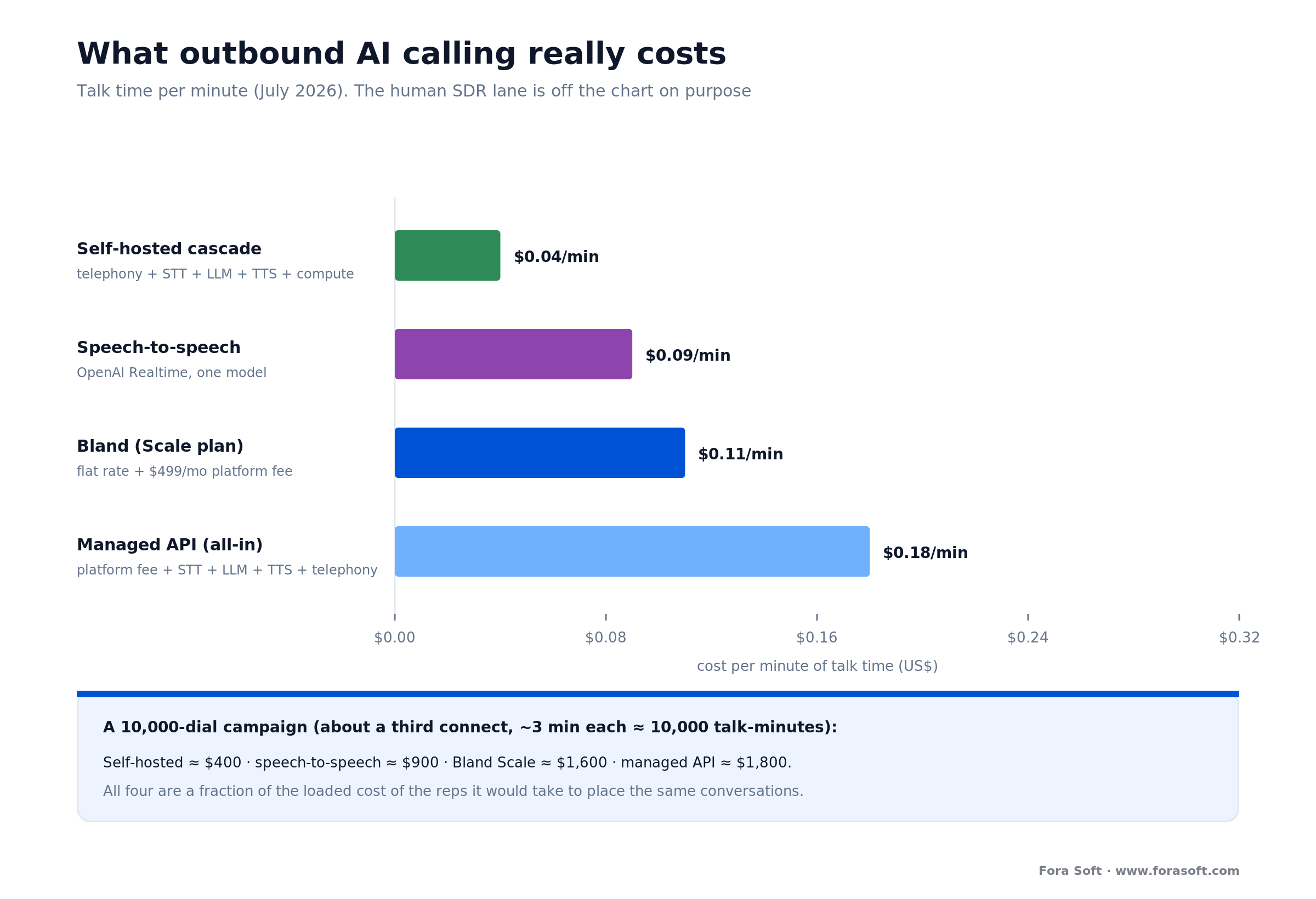
Figure 4. Per-minute and per-campaign. The human lane isn’t on the chart to shame reps; it’s to show where AI earns its place, the repetitive top of the funnel.
The self-hosted per-minute build-up. Add the layers for one minute of talk: outbound telephony ~$0.014 + Deepgram speech-to-text $0.0077 + a small LLM ~$0.003 + text-to-speech for the roughly half-minute the agent speaks ~$0.011 + amortized compute ~$0.005 = about $0.04/min. Move from a local number to a SIP trunk and the telephony line drops further. That’s the floor.
Now run a campaign. Say you dial 10,000 numbers, about a third connect, and each connected call averages 3 minutes, so roughly 10,000 talk-minutes. Self-hosted at $0.04: $400. Speech-to-speech at $0.09: $900. Bland’s Scale plan at $0.11/min plus its $499 monthly fee: about $1,600. A managed API at $0.18 all-in: $1,800. All four are within roughly a thousand dollars of each other, and all four are a fraction of the fully loaded cost of the reps it would take to place those same 3,300 conversations.
So where does building win? Not on that $400-vs-$1,800 gap alone, a custom build carries one-time engineering, and at 10,000 minutes the monthly saving takes a while to repay it. Building wins when the per-minute delta compounds, at hundreds of thousands of minutes a month, or across many white-labeled clients, and it wins the moment compliance or CRM-deep consent logic makes a third-party platform a poor fit. We keep development estimates conservative. The honest headline: usage is cheap, and the build is justified by volume, margin, control, and compliance, not by shaving cents off a small phone bill.
Mini-case: outbound reminders and callbacks that book
The situation. A healthcare client was losing revenue two ways: patients weren’t confirming upcoming visits, so no-shows piled up, and callback requests sat in a queue until a front-desk person had a free minute, which was rarely soon enough. Both problems were outbound, someone had to place the call, and there was never enough staff time to place them all.
The plan. We extended the AI voice agent we’d built for inbound booking to place outbound calls to existing patients, people with a clear relationship and a clean basis to be contacted. It calls to confirm upcoming appointments, and when a patient asks to reschedule, it verifies identity, offers real open slots with provider names, books the new time, and confirms it. For callback requests, it rings back promptly rather than hours later, and it hands anything unusual to a human with full context. Every call’s outcome is written back to the record.
The outcome. Confirmations and reschedules moved off the front desk onto an agent that works evenings and weekends, so appointments that used to quietly become no-shows now get confirmed or rebooked, and callback requests get answered while the intent is still warm. Staff time shifted to the in-person work only people can do. Want a similar assessment for your own outbound flows? Grab a 30-minute call and we’ll map it.
Integrations that make it useful
An outbound agent is only as good as the systems it reads from and writes to. Talking is table stakes; the value is in the data flow around the call. Four integrations carry most of it.
CRM, both directions. The list comes from the CRM with consent flags and history; the outcome, connected or not, disposition, what was said, what was booked, goes straight back. Without the write-back, you’re flying blind on which calls worked and re-dialing people you already reached.
Calendar and scheduling. For the booking and reminder jobs, live read/write to a calendar or scheduling system with conflict detection, so a confirmation call can turn into a rescheduled slot without a human touching it.
The dialer and DNC services. Campaign scheduling, retry logic, and pacing on one side; automated Do Not Call scrubbing and time-zone lookups on the other. This is the compliance machinery from earlier, wired in as a service the agent can’t bypass.
Human handoff. A warm transfer that carries context to a real rep, plus structured notes when no one’s available. Build this first, not last; it’s what turns a promising conversation into a closed deal instead of a dropped one.
A decision framework in five questions
Answer these five in order and the path picks itself. Stop at the first one that points you somewhere.
1. Do you have consent to call this list? If the honest answer is “we bought it,” stop, no software fixes that. Build your program on leads who asked to hear from you and customers you already have. Everything else follows from this.
2. What’s your volume? A few thousand calls a month of standard flows, buy a platform. Hundreds of thousands of minutes, or many clients, and a custom build’s economics turn.
3. How custom are the flows? If “call back, confirm, qualify” covers it, a platform works. If it’s “dial against our weird CRM, enforce our consent rules, and update three systems,” you need at least a managed API, maybe a build.
4. What data does it touch? Regulated data that must stay self-hosted pushes you toward a custom, controlled stack regardless of volume.
5. Is this your product or your plumbing? If you’re reselling outbound voice to your own customers, per-minute margin and control make owning the stack worth it early. Still unsure after five questions? That’s exactly the 30-minute conversation we have with clients, we’ll tell you which path, and why.
Five pitfalls that wreck these projects
1. Treating consent as a later problem. The most expensive mistake is dialing before you can prove permission. Retrofitting consent tracking into a live campaign means auditing every record you already called. Make the consent flag a hard gate on day one; no flag, no dial.
2. Ignoring the abandonment ceiling. Predictive pacing that drifts past the 3% abandoned-call limit is a violation you generate automatically, at scale, without noticing. Enforce the cap in code, not on a dashboard.
3. Forgetting deliverability. A compliant campaign that shows as “Spam Likely” earns nothing. Number registration, attestation, and rotation aren’t optional polish; they’re the difference between a 20% and a 40% answer rate.
4. Trusting tool-calls you never tested. An agent that writes the wrong disposition or books the wrong slot corrupts your CRM invisibly until someone notices the mess weeks later. Test the actions under load, not just the demo conversation.
5. No instant opt-out. When someone says “stop calling,” that has to propagate to every system before the next dial. A single repeat call after an opt-out is the cleanest willful violation a plaintiff could ask for.
KPIs: what to measure once it is live
Compliance KPIs. Track abandonment rate (hard target under 3%, per campaign, per 30 days), opt-out propagation time (should be near-instant), and the share of dialed records with documented consent (should be 100%). These are the numbers that keep the program out of court, so watch them first.
Quality KPIs. Answer rate per number (your spam-flag early warning), round-trip latency (under 800 ms, p95, not average), and task-success rate on the real job, did the callback actually book, did the reminder actually confirm. Interruption rate is a useful proxy for latency trouble.
Business KPIs. Connected-call rate, conversions per hundred dials, cost per booked outcome versus your old staffing cost, and warm-transfer success. This is where the program justifies itself, or tells you honestly that it shouldn’t exist.
When not to build outbound AI calling
Sometimes the right answer is don’t, and we’ll say so. If your plan is to cold-dial purchased consumer lists with an AI voice, the honest advice is to not run that campaign at all, no clever engineering makes an unconsented robocall to a stranger’s cell legal, and the per-call penalties will outrun any revenue. That’s not a build-vs-buy question; it’s a don’t-question.
If you do have consent and your volume is modest, a $100-to-$500-a-month platform will beat a custom build on time-to-live, cost, and maintenance. There’s no engineering return in rebuilding what Bland or Synthflow already ship. And if your calls are high-stakes or emotional, collections, sensitive health conversations, real complaints, a human belongs on the line, with AI at most handling the routine top of the funnel and the routing.
Build when consent is solid and volume, deep CRM integration, white-label margin, or self-hosted compliance make owning the stack worth it. Below that line, buying, or not calling, is the correct choice.
FAQ
Is AI cold calling legal in the US?
It’s tightly regulated, not banned. Because the FCC’s February 2024 ruling (FCC 24-17) treats AI-generated voices as “artificial” under the TCPA, an outbound AI call is a robocall and needs the called party’s prior express consent, prior express written consent for marketing. Cold-dialing consumers who never consented is the illegal case; calling opted-in leads and existing customers, within 8 a.m.–9 p.m. local time and after a Do Not Call scrub, is how a compliant program runs. This isn’t legal advice, get counsel for your specific campaign.
How much does outbound AI calling software cost?
Usage is cheap: a self-hosted stack runs about $0.04 per minute, a speech-to-speech agent about $0.09, platforms like Bland $0.11–$0.14 plus a monthly fee, and managed APIs $0.13–$0.30 all-in (July 2026 vendor pricing). Telephony is usually billed separately. The big cost is one-time engineering if you build custom, which is why teams under modest volume should buy first.
What are the penalties for a TCPA violation?
The TCPA carries statutory damages of $500 per violation, which a court may treble to $1,500 per violation for willful or knowing conduct, and consumers can sue directly. Penalties accrue per call, so a single misconfigured campaign across thousands of numbers can generate a very large claim. That per-call math is why abandonment control, consent tracking, and instant opt-out matter more than any feature.
What’s the difference between outbound AI calling and an AI receptionist?
An AI receptionist answers the calls your customers place to you; outbound AI calling places calls to a list. The voice technology is nearly the same, but outbound adds consent tracking, Do Not Call scrubbing, time-zone gating, dialer pacing, and caller-ID deliverability, none of which an inbound agent needs. If you want the inbound side, see our AI receptionist build guide; this page is strictly about calling out.
What’s the best AI cold calling software?
There’s no single best; it depends on volume and how custom your flows are. Under modest volume with standard callback and reminder flows, a platform like Bland, Synthflow, or Retell gets you live fast. Once you need custom CRM integration, deep consent logic, or white-label margin, a managed API or a custom build wins. We compare the leading platforms in our Bland AI alternatives guide.
Do I need consent to call my own existing customers?
Existing-customer relationships give you more room than cold outreach, but an AI voice is still an artificial voice under the TCPA, so marketing calls still need prior express written consent and all calls must honor opt-outs, calling hours, and internal Do Not Call lists. Purely informational calls (a delivery window, an appointment reminder) sit on firmer ground than promotional ones. Get your consent language and call types reviewed by counsel before you scale.
Why do my outbound calls show up as “Spam Likely”?
Usually a caller-ID authentication problem. US carriers use STIR/SHAKEN to attest that a caller is legitimate; numbers without full attestation, or ones pushing high volume, get flagged and labeled. Register your numbers, get the highest attestation your carrier offers, consider branded caller ID, keep per-number volume reasonable, and warm new numbers up gradually. A spam label roughly halves your answer rate, so treat it as a product metric.
How long does it take to build a custom outbound calling system?
A focused first version, dial an opted-in list, run one flow like callbacks, honor consent and opt-outs, warm-transfer to a human, is a matter of weeks, not months, especially on a managed API. Timelines grow with each custom CRM integration, the depth of consent and DNC logic, compliance scope, and languages. We keep estimates conservative; the honest number depends on how many systems the agent has to touch and how strict your compliance rules are.
What to read next
Inbound sibling
How to Build an AI Receptionist: Stack, Cost, Build vs Buy
The other half of the phone: answering calls instead of placing them.
Platform comparison
Bland AI Alternatives: The 2026 Voice-Agent Platforms Compared
If you’re buying rather than building, start here.
Cost deep-dive
OpenAI Realtime API Pricing: What Voice Agents Really Cost
The token-to-dollar math behind the speech-to-speech lane.
Buyer’s guide
AI Call Assistant: 2026 Buyer’s Guide to Voice APIs
The API-level trade-offs behind the stack choices in this article.
Ready to build outbound calling that respects the rules?
Outbound AI calling software is a voice agent wrapped in the parts that keep it legal and answerable: a consent-scrubbed list, a dialer that paces and gates by time zone, telephony with a caller ID people trust, and a warm handoff to a human. The talking is close to solved; the discipline around the call is where projects live or die. Usage is cheap, roughly $0.04 to $0.14 a minute, so the real decision is build-vs-buy. Under modest volume with clean consent, buy a platform. Reach for a managed API when you outgrow it, and build when volume, deep CRM integration, white-label margin, or self-hosted compliance make owning the stack the honest answer.
We’ve shipped the outbound reminder-and-callback agent and the SIP call routing this guide is built from. If you’re weighing your own outbound program, the fastest way to the right call, and to knowing whether you should make it at all, is 30 minutes with someone who’s built it.

The book · Volume 7 of 7
AI for Video: A Complete Guide to Intelligence in Video Products: From Real-Time Pipelines and Agents to Serving, Cost, Compliance, and Verticals
Outbound campaigns live or die on the voice stack choice, cascade or speech-to-speech, and the per-minute cost that follows it. Volume 7 of our Fora Soft Video Engineering Handbook treats agents as engineering: loop primitives, frameworks, memory and tools, plus serving on vLLM and TensorRT, cost per stream-hour and regulation. Teams use it to size latency and margin before they sign a platform contract. Written by Nikolay Sapunov, CEO at Fora Soft.
Read it on Amazon →Kindle & paperback · Fora Soft Video Engineering Handbook
Let’s scope your outbound calling, compliance included
Tell us your use case, your list and where it came from, and the systems it has to touch. We’ll map the stack, the cost, and the compliance path, and tell you straight whether to build, buy, or hold off.
Fora Soft builds real-time and AI voice software, 250+ projects since 2005. Explore our AI engineering learning hub or our voice cloning and consent guide to go deeper.

