

Every unanswered call is a customer dialing your competitor next. Industry surveys put the share of small-business calls that go unanswered north of 60%, and around 85% of people who hit voicemail never call back. An AI receptionist fixes that math, but only if you build it so it answers in well under a second, books the appointment, and knows when to hand a human the phone. We’ve shipped voice agents that do exactly this, including an automated appointment-booking receptionist for a healthcare client and a SIP phone system routing hospital calls, so this guide is the build we’d hand our own team: the stack, the latency budget, the real per-minute costs, and an honest build-vs-buy call.
Key takeaways
• An AI receptionist is a phone-native voice agent, not a chatbot. It answers a real call, understands speech, decides what to do, speaks back, and takes actions like booking, end to end, in real time.
• Latency is the whole game. Human conversation leaves a roughly 200 ms gap between turns (Stivers et al., PNAS 2009). Past about 800 ms of round-trip delay, callers start talking over the agent.
• The stack is four layers: telephony (SIP trunk), a media path, the voice brain (speech-to-text → LLM → text-to-speech, or one speech-to-speech model), and integrations (calendar, CRM, human handoff).
• Usage is cheap; the decision is build-vs-buy. A self-hosted stack runs near $0.035/min; managed APIs run $0.13–$0.31/min; a human service is roughly $3/min. Building pays off on volume, control, margin, or compliance.
• Most businesses should buy first. Under ~1,000 standard calls a month, a SaaS product wins. Build when you need custom integrations, your own model, white-label margin, or self-hosted HIPAA/PCI data.
Why Fora Soft wrote this playbook
We build real-time and AI voice software, and we’ve built the exact thing this article describes. Fora Soft has shipped 250+ projects since 2005 (that’s 21 years), and our recent work sits right on the phone-plus-AI seam that an AI receptionist lives on.
Three of those builds inform every recommendation below. We built an AI voice appointment-booking assistant for a healthcare client: a fully automated inbound flow that verifies the caller, checks whether they’re a new or returning patient, looks up records, offers real appointment slots with provider names, books it, confirms the details, and schedules reminders — no human in the loop for the happy path. We built a hospital phone interpreter on SIP, FreeSWITCH, Twilio, and an IVR voice menu, where a doctor picks up any landline, chooses a language, and is routed to a live interpreter in seconds by queue, priority, and availability. And we built an AI voice assistant on the OpenAI API and Azure Cognitive Services that runs the full speech-to-text → model → speech loop with multi-turn context.
So when we talk about SIP trunks, endpointing delay, or a warm human handoff, it’s from shipping them under load, not from a spec sheet. If you want the short version of how we’d approach yours, our AI integration team does these builds; the rest of this page is how the decision should go.
Scoping an AI receptionist and not sure build or buy?
Bring your call volume, use case, and integrations. We’ll tell you honestly whether to buy a product, wire up a managed API, or build — and what each would cost you.
What an AI receptionist actually is
An AI receptionist is a software agent that answers inbound phone calls in a natural voice, understands what the caller wants, and completes the task — booking, answering a question, taking a message, or routing to a person. It runs the loop in real time: hear speech, decide, speak back, act. That’s the difference from the two things people confuse it with.
It is not an IVR phone tree (“press 1 for sales”). An IVR matches key presses to fixed branches; an AI receptionist understands open-ended speech and holds a conversation. If your problem is a high-volume contact-center menu rather than a front desk, see our guide to AI IVR modernization. And it is not a general voice assistant like the ones you build for an app or a website. A general assistant answers questions in a session the user opened; a receptionist owns a live telephone call, with a caller who expects a human, a hard latency ceiling, and a business outcome on the line. We split those intents on purpose. For the app-side pattern, see our voice assistant development guide; this page is strictly about answering the phone. For the reverse—placing outbound calls rather than answering them—see our outbound AI calling software guide.
The useful mental model: a receptionist is a voice agent plus a phone line plus the keys to your calendar and records. Take any one away and it stops being a receptionist.
The four jobs a receptionist does
Scope the agent around the four jobs a good front desk actually does. Ranked by how often they justify the whole project:
1. Answer and triage. Pick up on the first ring, greet the caller, and figure out intent: new booking, existing customer, sales, support, or spam. This single job is why after-hours coverage sells. Roughly 45% of high-intent calls land outside business hours, and in healthcare a large share of after-hours calls go unanswered entirely.
2. Book, reschedule, cancel. The highest-value job. It needs live read/write access to a calendar or scheduling system, conflict handling, and confirmation. Our healthcare appointment agent lives here: verify identity, check patient status, offer real open slots, book, confirm.
3. Answer routine questions. Hours, location, pricing, “do you take my insurance,” order status. This is retrieval against your knowledge base or CRM, spoken back in one or two sentences. Easy to demo, easy to get subtly wrong, and wrong hours erode trust fast.
4. Route and hand off. Know the edge of its competence and transfer, warm and with context, to the right person or take a structured message. The handoff is not a fallback bolted on at the end; it’s a first-class job, and the one that keeps a bad call from becoming a lost customer.
How an inbound call actually flows
A call travels through four layers on the way in and back out: the phone network hands the call to your SIP trunk, a media server carries the audio and detects when the caller stops speaking, the voice agent turns speech into a decision and back into speech, and integrations let it actually do things. The reply then streams back down the same path to the caller’s ear.
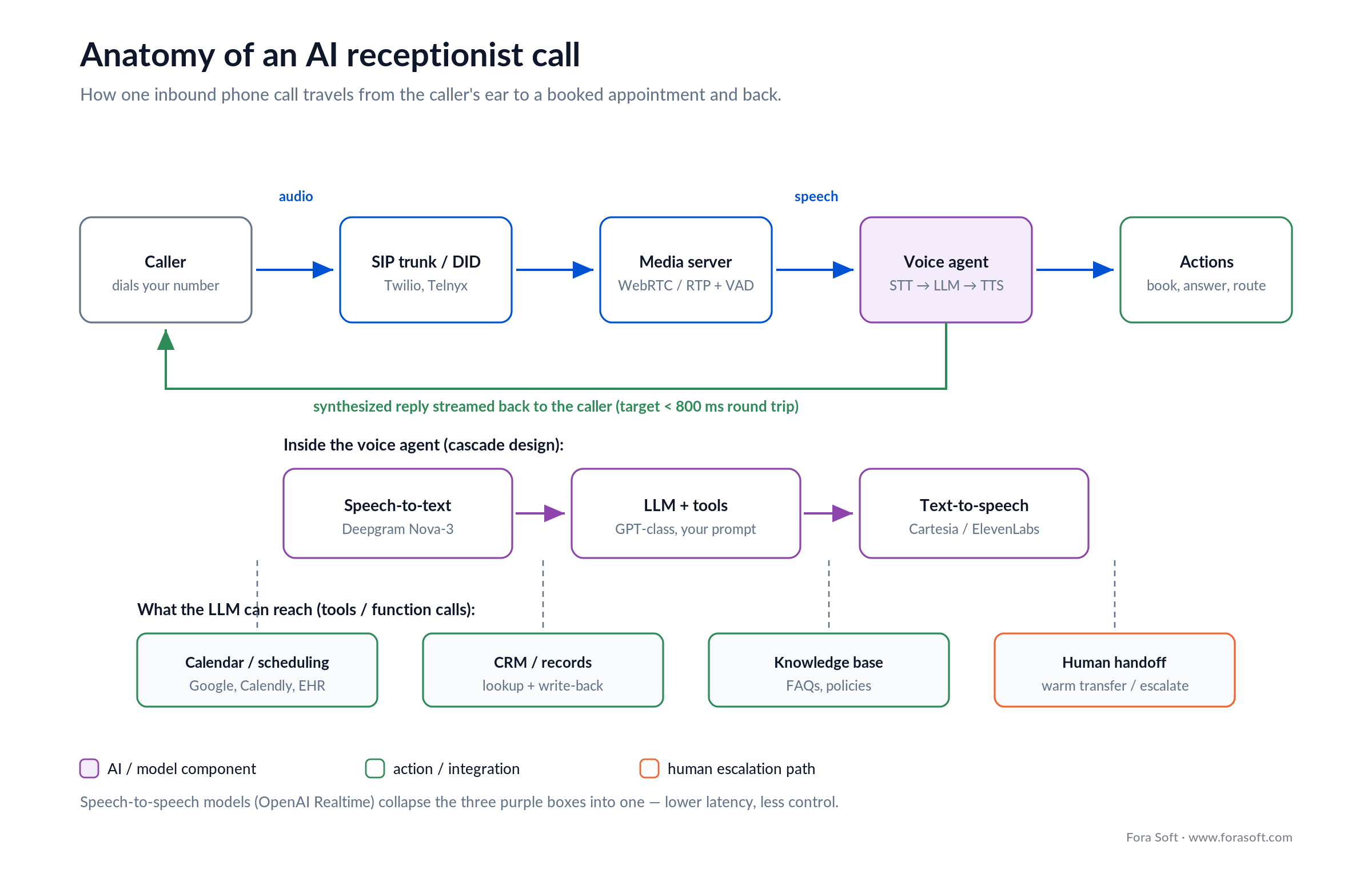
Figure 1. The anatomy of one call. The three purple boxes are where a speech-to-speech model would collapse into one.
Two things in that diagram do more work than they look. The voice activity detector (VAD) decides the caller has finished a sentence. Get it wrong and the agent either interrupts or sits there. And the tools the LLM can call (calendar, CRM, knowledge base, human handoff) are what turn a nice demo into something that books an appointment. An agent that can talk but can’t touch your calendar is a very expensive voicemail.
The orchestration, wiring these pieces together with barge-in, retries, and timeouts, is usually done with a framework like Pipecat or LiveKit Agents, self-hosted on the same cloud you already run. It’s the connective tissue, and it’s where most of the engineering actually goes.
Cascade vs speech-to-speech
There are two ways to build the brain, and the choice sets your latency, cost, and control. In a cascade, three specialist models run in a row: speech-to-text (STT) transcribes, an LLM decides and writes a reply, text-to-speech (TTS) voices it. In a speech-to-speech model like the OpenAI Realtime API, one model takes audio in and emits audio out, skipping the middle text hops.
Cascade wins on control and cost. You can swap Deepgram for another STT, pin the exact LLM you trust, choose a voice, and see the transcript of every turn for logging and guardrails. The price is more moving parts and a few extra hops of latency. Speech-to-speech wins on latency and simplicity: fewer hops, more natural prosody, less to wire up. The price is less control over each stage, a fuzzier audit trail, and a higher per-minute cost. We go deeper on the integration mechanics in our OpenAI Realtime API build guide.
Reach for speech-to-speech when: latency and natural turn-taking matter more than fine-grained control, and you’re fine paying a premium per minute — a busy scheduling line where every 100 ms shows. Reach for a cascade when you need auditable transcripts, a specific LLM, HIPAA-scoped components, or the lowest running cost.
The latency budget that decides quality
The single number that decides whether an AI receptionist feels human is round-trip latency — the gap from the caller finishing a sentence to hearing the reply begin. Aim for under about 800 ms, and treat 500 ms as the target you actually want. Here’s why those numbers, not vibes: in natural conversation across ten languages, the average gap between turns is roughly 200 ms (Stivers et al., PNAS 2009). People notice delay past ~300 ms, consciously feel it past ~500 ms, and past ~800 ms–1 s they start talking over the agent because they assume it didn’t hear them.

Figure 2. Where the milliseconds go. Endpointing — deciding the caller stopped — is usually the biggest and most tunable slice.
Notice what dominates: endpointing, the wait to be confident the caller actually stopped talking, not just paused for breath. Set it too eager and the agent interrupts; too patient and it feels slow. It’s the biggest lever you have, and tuning it per use case (a slow-speaking clinic vs a fast sales line) buys more perceived speed than swapping any single model.
This is the honest case for speech-to-speech: collapsing STT + LLM + TTS into one model removes two hops and typically lands the round trip around 500 ms. If you run a cascade, you claw the time back with streaming everywhere: stream partial transcripts, start the LLM before the caller fully stops, and start speaking the first words of the reply while the rest is still generating.
The telephony layer: SIP, numbers, media
Before any AI runs, a real phone call has to reach your code. That’s the telephony layer, and it’s the part software teams underestimate most. You need a phone number (a DID), a SIP trunk to carry calls between the phone network and your servers, and a media path to move the actual audio, usually over WebRTC or RTP into your media server.
Twilio and Telnyx are the usual providers. Per Twilio’s US voice pricing (checked July 2026), an inbound call to a local Twilio number runs about $0.0085/min, while routing through Elastic SIP Trunking drops it to roughly $0.004/min, worth it once you have your own media infrastructure. Telnyx is the common lower-cost alternative; we compare its architecture in our Telnyx WebRTC guide.
On our hospital phone interpreter we ran this layer on FreeSWITCH with Twilio and an IVR menu, distributing calls by queue, priority, and availability. That’s the same call-control machinery an AI receptionist needs for transfers and overflow. The AI is new, but SIP, DTMF, and warm transfers are decades-old telephony you don’t get to skip.
Reach for your own SIP trunk when: you’re past a few thousand minutes a month, need warm transfers to real staff, or must keep call audio inside a compliance boundary. Below that, let a managed platform own the telephony and skip the pain.
The voice stack: STT, LLM, and TTS
In a cascade you pick three components, and each has a fast/cheap option and a premium option. The right pick depends on whether latency, accuracy, cost, or compliance is your binding constraint. Prices below are from each vendor’s own page in July 2026.
| Layer | Common pick | Price (July 2026) | What decides it |
|---|---|---|---|
| STT | Deepgram Nova-3 (streaming) | $0.0077/min | Streaming latency + accents; PII redaction |
| LLM | GPT-class, small/fast tier | ~$0.002–$0.01/call | Time-to-first-token; tool-calling reliability |
| TTS | Cartesia / ElevenLabs / Deepgram Aura | $0.030–$0.10 / 1k chars | First-byte latency vs voice quality |
| Speech-to-speech | OpenAI Realtime (replaces all three) | ~$0.05–$0.10/min | Lowest latency; less stage-level control |
Per Deepgram’s pricing, streaming Nova-3 STT is $0.0077/min and Aura-2 TTS is $0.030 per 1,000 characters. On TTS, Deepgram’s Aura and Cartesia’s Sonic (around $0.05 per 1k characters, sub-100 ms first byte) trade cost for the very top of ElevenLabs’ voice quality (about $0.10 per 1k characters). For a receptionist, first-byte latency usually matters more than the last 5% of voice realism.
A quiet detail that bites teams: the LLM must call tools reliably, not just talk well. A model that books the wrong slot 3% of the time is worse than no agent, because someone shows up to a closed office. Test tool-calling accuracy, not just conversation quality. Our AI call assistant buyer’s guide walks through the API-level trade-offs.
Build, buy, or hire: three honest paths
There are four endpoints, not two, and most businesses should not build first. Buy a SaaS product, wire up a managed voice API, do a custom build, or hire a human answering service. The right one falls out of your call volume, integration needs, and compliance. If it comes out as a custom build, our AI call agent development team wires inbound and outbound calls to your CRM over Twilio, Telnyx or SIP, with sub-800 ms replies and a warm transfer to a human.

Figure 3. Follow the questions top to bottom. Most small businesses stop at the first yes and buy a product.
Buy a SaaS product when: your volume is under ~1,000 calls/month and your needs are standard — answering, FAQs, basic booking. RingCentral, Dialpad, or Smith.ai’s AI plan get you live this week for a flat monthly fee. Fastest, cheapest to start, least flexible.
Use a managed voice API when: you need custom flows or integrations a product can’t do, but not a bespoke stack. Vapi, Retell, or Deepgram’s Voice Agent API hand you telephony, STT, LLM, and TTS behind one billing line — you write the logic, they run the plumbing. For where those managed platforms stop scaling versus a custom build, see our Vapi vs Retell AI vs custom breakdown.
Build custom when: you have regulated data that must stay self-hosted (HIPAA, PCI), you’re white-labeling to many clients where per-minute margin compounds, you need deep integrations, or your volume is high enough that owning the stack is simply cheaper. This is where we come in.
Managed platform starting to cost more than it saves?
If you’re white-labeling or pushing real volume, owning the stack can pay for itself fast. We’ll model your break-even with real numbers before you commit a dollar.
What an AI receptionist really costs
Talk time is surprisingly cheap; the real cost question is build-vs-buy, not per-minute. A self-hosted cascade runs about $0.035/min, a speech-to-speech agent about $0.09/min, a managed API $0.13–$0.31/min, and a human answering service roughly $3/min. Let’s show the arithmetic, because the gaps decide everything.

Figure 4. Per-minute and per-1,000-calls. The human lane is off the chart on purpose.
The self-hosted per-minute build-up. Add the layers for one minute of talk: SIP inbound $0.0085 + Deepgram STT $0.0077 + a small LLM ~$0.003 + TTS for the ~half-minute the agent speaks ~$0.011 + amortized compute ~$0.005 = about $0.035/min. Swap the local number for a SIP trunk and it drops further. That’s the floor, and it’s remarkably low.
Now scale it. Take 1,000 calls a month at 3 minutes each — 3,000 talk-minutes. Self-hosted: 3,000 × $0.035 = $105/month. Speech-to-speech: 3,000 × $0.09 = $270/month. A managed API at $0.18: $540/month. A human service at Smith.ai’s ~$9.75/call: $9,750/month. The AI lanes are within a few hundred dollars of each other; the human lane is a different universe.
So where does building win? Not on that $105 vs $540 gap alone — a custom build carries one-time engineering, and at 3,000 minutes the ~$435/month you’d save takes a long time to repay it. Building wins when the per-minute delta compounds: at 50,000 minutes a month, or across dozens of white-labeled clients, saving $0.10–$0.15/min is thousands a month and the build pays back inside a year. It also wins the moment compliance forces self-hosting, where there’s no per-minute number that makes shipping PHI to a third party acceptable. We keep development estimates conservative. The honest headline is that usage is cheap, and the build is justified by volume, margin, and control, not by shaving cents off a small phone bill.
Mini-case: an AI receptionist for a clinic
The situation. A healthcare client was losing bookings to voicemail. Front-desk staff couldn’t keep up with inbound scheduling calls, after-hours callers got nothing, and every missed call was a patient who might book elsewhere. They needed the phone answered, correctly, without adding headcount, and it had to handle real patient data carefully.
The plan. We built a fully automated AI voice assistant for appointment booking and reminders. On an inbound call it verifies the caller’s identity, checks whether they’re a new or returning patient, and locates their record. It then presents available slots with provider names and times, answers questions about providers, books the appointment, and confirms the date, time, and visit type back to the caller. After booking, it delivers pre-visit instructions and schedules reminder notifications automatically. That is the whole loop, no human needed for the standard path, with escalation to staff for anything unusual.
The outcome. Routine scheduling moved off the front desk and onto an agent that never clocks out, so after-hours and overflow calls that used to hit voicemail now end in a booked, confirmed appointment. Staff time shifted from phone tag to the in-person and clinical work only people can do. Want a similar assessment for your own front desk? Grab a 30-minute call and we’ll map it.
Integrations that make it useful
An AI receptionist is only as valuable as the systems it can touch. Talking is table stakes; the value is in the actions. Four integrations carry most of it.
Calendar and scheduling. Live read/write to Google Calendar, Calendly, or an EHR’s scheduling system, with conflict detection so the agent never double-books. This is the difference between “we’ll pass along your request” and a confirmed slot.
CRM and records. Look up the caller, read their history, and write back what happened on the call. Our appointment agent’s identity-verification and record-lookup steps are exactly this — without them, the agent can’t tell a new patient from a returning one.
Knowledge base. Retrieval over your real policies, hours, and pricing so answers are current, not hallucinated. Keep it as the single source of truth; a receptionist that invents your hours is a liability.
Human handoff. A warm transfer that carries context to a real person, plus structured message-taking when no one’s available. Build this first, not last. It’s the safety net that makes it safe to let the agent take every call.
Security and compliance: HIPAA, PCI, consent
If your receptionist touches health data, card numbers, or recorded calls, compliance is a design input, not a later step, and it’s often the reason a build beats a buy. Three rules cover most of it.
HIPAA for healthcare. Every processor that touches call audio containing patient data needs a signed Business Associate Agreement (BAA). Some vendors sign one only on enterprise tiers — Deepgram, for example, signs BAAs for enterprise customers handling ePHI, and Twilio offers HIPAA-eligible configurations. If you can’t get BAAs across the whole path, self-hosting the model is the clean answer, which is a real reason healthcare clients build. For the healthcare-specific version of this build — the BAA chain, disclosure and TCPA rules, and build-vs-buy — see our HIPAA-compliant voice AI for healthcare guide.
PCI for payments. If the agent ever captures a card number, you inherit PCI-DSS scope. The usual move is to hand payment capture to a compliant processor and keep card data out of your transcripts and logs entirely.
Recording consent. Many US states require all-party consent to record a call, so the greeting has to disclose recording, and your logs need PII redaction (Deepgram offers it as an STT add-on). Two more non-negotiables: guardrails so the model can’t be talked into off-policy answers, and that human-handoff path from the last section.
A decision framework in five questions
Answer these five in order and the path picks itself. Stop at the first one that points you somewhere.
1. What’s your monthly call volume? Under ~1,000 standard calls, a SaaS product almost always wins. Tens of thousands of minutes, or many clients, and a custom build’s economics turn.
2. How custom is the job? If “answer, FAQ, basic booking” covers it, buy. If it’s “book against our weird EHR and update our CRM,” you need at least a managed API, maybe a build.
3. What data does it touch? Regulated data that must stay self-hosted (HIPAA, PCI) pushes you toward a custom, controlled stack regardless of volume.
4. Is this your product or your plumbing? If you’re reselling voice AI to your own customers (white-label), per-minute margin and control make owning the stack worth it early.
5. What’s your latency bar? If every 100 ms matters, budget for speech-to-speech and streaming everywhere. If callers tolerate a beat, a cheaper cascade is fine. Still unsure after five questions? That’s exactly the 30-minute conversation we have with clients — we’ll tell you which path, and why.
Five pitfalls that wreck these projects
1. Chasing voice quality while ignoring latency. A gorgeous voice that replies 1.5 seconds late feels worse than a plainer voice at 500 ms. Budget latency first; pick the voice second.
2. No human handoff. The agent will hit cases it can’t handle. Without a warm transfer or structured message, those become hang-ups and lost customers. Build the escape hatch first.
3. Trusting tool-calls you never tested. A model that books the wrong slot occasionally is worse than none, because the failure is invisible until a patient shows up to a closed door. Test actions, not just conversation.
4. Reading pricing off the base rate. Managed platforms advertise $0.05–$0.07/min, but that’s orchestration only; add STT, LLM, TTS, and telephony and the real number is $0.13–$0.31/min. Model the all-in cost before you sign.
5. Treating compliance as a phase-two problem. Retrofitting HIPAA or PCI into a shipped agent means re-architecting the audio path. If regulated data is in scope, it’s a day-one constraint.
KPIs: what to measure once it is live
Quality KPIs. Track round-trip latency (target under 800 ms, p95, not average), containment rate (calls resolved without a human), and task-success rate on the real job — did the booking actually land in the calendar correctly? Watch interruption rate as a proxy for latency problems.
Business KPIs. Measure the money: appointments booked per 100 calls, after-hours calls captured that used to hit voicemail, and cost per successful call versus your old staffing cost. This is where the project justifies itself.
Reliability KPIs. Uptime on the phone number, successful-handoff rate (transfers that reach a person with context), and escalation accuracy — how often the agent correctly knows it’s out of its depth. A receptionist that fails safe beats one that fails silently.
When not to build a custom AI receptionist
Sometimes the right answer is don’t build — and we’ll say so. If you handle a few hundred standard calls a month, a $50–$100/month SaaS product will beat a custom build on every axis that matters to you: time-to-live, cost, and maintenance. There’s no engineering ROI in rebuilding what RingCentral or Dialpad already ship.
If your calls are highly emotional or high-stakes, think crisis lines, complex complaints, or sensitive medical triage, a human belongs on the phone, with AI at most handling overflow and routing. And if your value really is a warm human voice (a boutique practice, a concierge service), a human answering service like Smith.ai or Ruby may be the honest fit even at $3/min, because the voice is the product.
Build when volume, custom integrations, white-label margin, or compliance make owning the stack worth it. Below that line, buying is not the lazy choice. It’s the correct one.
FAQ
How much does an AI receptionist cost?
Usage is cheap: a self-hosted stack runs about $0.035 per minute, a speech-to-speech agent about $0.09, and managed platforms $0.13–$0.31 all-in (July 2026 vendor pricing). SaaS products charge a flat monthly fee, often $50–$300. The big cost is one-time engineering if you build custom — which is why most businesses under ~1,000 calls a month should buy.
Is an AI receptionist better than a human receptionist?
For high-volume, repetitive jobs — answering, FAQs, booking, after-hours coverage — AI wins on cost and never sleeps. Humans win on empathy, judgment, and high-stakes or emotional calls. The best setups use both: AI handles routine and overflow, humans take escalations. It’s not either/or.
How long does it take to build a custom AI receptionist?
A focused first version — answer, book against one calendar, hand off to a human — is a matter of weeks, not months, especially on a managed API. Timelines grow with each custom integration (a specific EHR or CRM), compliance scope (HIPAA, PCI), and languages. We keep estimates conservative; the honest number depends on how many systems the agent has to touch.
What is a good AI receptionist for a small business?
If you’re small and your needs are standard, buy a product — RingCentral, Dialpad, or Smith.ai’s AI plan get you live quickly for a flat fee. Consider a managed API (Vapi, Retell) once you need custom booking flows or integrations, and a custom build once volume, white-label margin, or compliance justify it. Some verticals need more than a generic product — a restaurant, for instance, has to take orders into the POS and book tables, which we cover in our AI answering service for restaurants guide.
How fast does an AI receptionist need to respond?
Aim for under 800 ms of round-trip latency, and target 500 ms. Human conversation leaves about a 200 ms gap between turns (Stivers et al., PNAS 2009), and past roughly 800 ms–1 s callers start talking over the agent. Endpointing — deciding the caller finished — is usually the biggest slice to tune.
Can an AI receptionist book appointments and transfer calls?
Yes — that’s the point of building one well. With live calendar access it books, reschedules, and cancels; with call-control it does warm transfers that carry context to a person. We built exactly this for a healthcare client: verify the caller, look up the record, offer real slots, book, confirm, and remind, with escalation to staff for anything unusual.
Is an AI receptionist HIPAA compliant?
It can be, if you design for it. Every processor touching patient audio needs a signed BAA, some vendors sign only on enterprise tiers, and if you can’t get BAAs across the whole path you self-host the model. Add all-party recording consent in the greeting and PII redaction in logs. Compliance is a day-one design input, not a later add-on.
Can you white-label an AI receptionist for my own clients?
Yes, and it’s one of the strongest reasons to build custom rather than resell a SaaS product. When you’re billing many clients, the per-minute margin and full control over branding, flows, and data are worth owning the stack early — a managed API’s markup compounds against you at volume.
What to read next
Voice AI
Voice Assistant Development: A 2026 Product-Owner Guide
The app-side sibling to this page: building voice assistants that aren’t phone-native.
Speech-to-speech
Integrating OpenAI Realtime API with WebRTC, SIP, and WebSockets
The lowest-latency path to a voice agent, wired into real telephony.
Orchestration
LiveKit Voice AI 2026: Engineer’s Playbook
How to wire STT, LLM, and TTS together with barge-in and streaming.
Buyer’s guide
AI Call Assistant: 2026 Buyer’s Guide to Voice APIs
The API-level trade-offs behind the stack choices in this article.
Pricing
Bland AI Alternatives & Pricing
Bland vs Vapi, Retell and custom, priced per minute.
Ready to put your phones on autopilot?
An AI receptionist is four layers (telephony, media, the voice brain, and integrations) tuned to one hard number, sub-800 ms round-trip latency, and pointed at four jobs: answer, book, inform, route. The usage is cheap; the real decision is build-vs-buy. Under about a thousand standard calls a month, buy a product. Reach for a managed API when you outgrow it, and build when volume, white-label margin, deep integrations, or self-hosted compliance make owning the stack the honest answer.
We’ve shipped the appointment-booking agent, the SIP call routing, and the speech-to-speech loop this guide is built from. If you’re weighing your own front desk, the fastest way to the right call is 30 minutes with someone who’s built all four paths.

The book · Volume 7 of 7
AI for Video: A Complete Guide to Intelligence in Video Products: From Real-Time Pipelines and Agents to Serving, Cost, Compliance, and Verticals
An AI receptionist is a voice agent on a phone line, and this guide covers its stack and its bill. Volume 7 treats agents as engineering: the loop primitives, frameworks, memory and tools, plus serving infrastructure and cost per stream-hour. Read it before you choose between a cascade and speech-to-speech. Written by Nikolay Sapunov, CEO at Fora Soft.
Read it on Amazon →Kindle & paperback · Fora Soft Video Engineering Handbook
Let’s stop your phone going to voicemail
Tell us your call volume, use case, and the systems it has to touch. We’ll map the stack, the latency budget, and the real cost — and tell you straight whether to build or buy.
Fora Soft builds real-time and AI voice software — 250+ projects since 2005. Explore our AI engineering learning hub or our LiveKit AI voice agents playbook to go deeper.

