

Key takeaways
• People counting software turns a camera into a number, not a surveillance feed. It detects each person, tracks them across frames, and adds one to a tally when they cross a line or enter a zone. The output is footfall, live occupancy, and dwell — not a wall of video someone has to watch.
• The method decides the accuracy. A 2D model on an existing camera lands around 95–98% in good light; an overhead 3D stereo sensor reaches 98–99%+ and shrugs off shadows, sunlight, and crowds. Pick by the door, the ceiling, and the budget — not by a spec sheet.
• Counting never needs to know who. A good counter uses depth blobs or skeletons, never a face. That single design choice is what keeps it clear of BIPA, GDPR, and city facial-recognition bans — if you are only counting, you should not be collecting biometrics.
• Buy for a building; build when counting is your product. Off-the-shelf sensors and camera apps fit one store, museum, or office. A custom system wins when you sell the counter, run many sites on your own terms, or need the counts inside a platform you own.
• This is the counting engine, not the whole store dashboard. If you want shrinkage, self-checkout loss, and planogram compliance too, that is a broader retail build — see our retail video analytics playbook. Here we go deep on counting people well.
A shop owner wants one honest number: how many people walked in today, and how many of them bought something. A museum needs to know a gallery is at capacity before the fire marshal does. A landlord wants to prove that half the desks they are paying to heat sit empty. None of them wants footage of anyone’s face — they want a count they can trust. That gap, between “we have cameras” and “we have a reliable count,” is exactly what people counting software fills.
We’ve built real-time video and computer-vision systems since 2005, including live incident-detection pipelines and large-scale video surveillance platforms. So this is the engineering guide, not a product pitch: how camera-based people counting actually works, how accurate the methods really are, why privacy is a design decision rather than a feature, how the main tools compare, and when it’s smarter to buy a sensor than to build a system.
Scoping a people-counting system?
Tell us the setting — one store, a chain, a museum, or an office portfolio — and we’ll tell you honestly whether to buy sensors or build, with the accuracy and privacy tradeoffs behind the call.
Why Fora Soft wrote this guide
We’re a video and AI software company: 250+ projects since 2005, a team of 50+ in-house specialists. A large share of that work is the exact plumbing a people counter needs — capturing a live video stream, running computer-vision models on it in real time, tracking objects across frames, and turning what the model sees into a clean signal a business can act on. Counting people is one of the most common and most useful versions of that problem.
One example is Mindbox, where we built real-time incident detection on live video, and our broader work on anomaly detection in video surveillance. People counting is a gentler cousin of that work: instead of flagging a rare event, you tally an ordinary one accurately, thousands of times a day, without double-counting and without watching anyone.
We don’t sell a boxed people-counting product, so there’s nothing to push here. For a single store, an off-the-shelf sensor is usually the right answer, and we’ll say so. What we build is the custom version — the multi-site or product-embedded system — which means we’ve earned the right to be honest about when you don’t need one.
What people counting software actually is
People counting software is a computer-vision program that watches a camera feed, recognizes each human in it, tracks them as they move, and increments a count when they cross a virtual line or enter a defined zone. The camera is ordinary; the intelligence is the software. In practice it often runs on cameras a store or building already has, turning a plain lens into a people counting camera — which is why the category has spread from big retailers to small venues, museums, transit hubs, and offices.
The useful distinction is between the video and the number. A camera captures pixels. A people counter decides that a specific pattern of pixels moving across a doorway is one person going in, and it does that without needing to know who they are. Everything valuable about the product lives downstream of that count: conversion rate when you pair it with sales, live occupancy against a capacity limit, dwell time by zone for layout decisions, and staffing driven by real footfall instead of a guess.
It also helps to say what it is not. It is not facial recognition — a counter needs a tally, not an identity. It is not a full video management system, though it often plugs into one. And it is not the whole store-intelligence platform: shrinkage, self-checkout loss, and shelf compliance are a broader build we cover in our retail video analytics playbook. Here, the counter is the whole subject, because counting well is harder than it looks.
The short answer: buy for a site, build for a product
Buy an off-the-shelf sensor or camera app (an overhead 3D counter, or a software app that runs on your existing cameras) if you’re counting a handful of doors in one store, gallery, or office. You get accurate counts in days, the vendor owns the accuracy, and for a single site it’s almost always the right call.
Buy a managed analytics service if you want dashboards, benchmarking, and support across a modest number of sites and you have no engineering team. You’re buying an outcome and a monthly bill, not a codebase.
Build a custom system when people counting is part of a product you sell, when it has to run across many sites on your own hardware and rules, when data-residency or privacy policy keeps video out of a vendor cloud, or when per-sensor subscription fees at your scale have outgrown a one-time build. The rest of this guide is the evidence behind those three sentences.
How people counting works: detect, track, cross the line
Camera-based people counting is a short pipeline: find each person, track them across frames, count them when they cross a line or enter a zone, then aggregate the crossings into footfall, occupancy, and dwell. The step people forget is tracking — and it’s the one that separates a real count from a motion sensor that fires every time something moves.
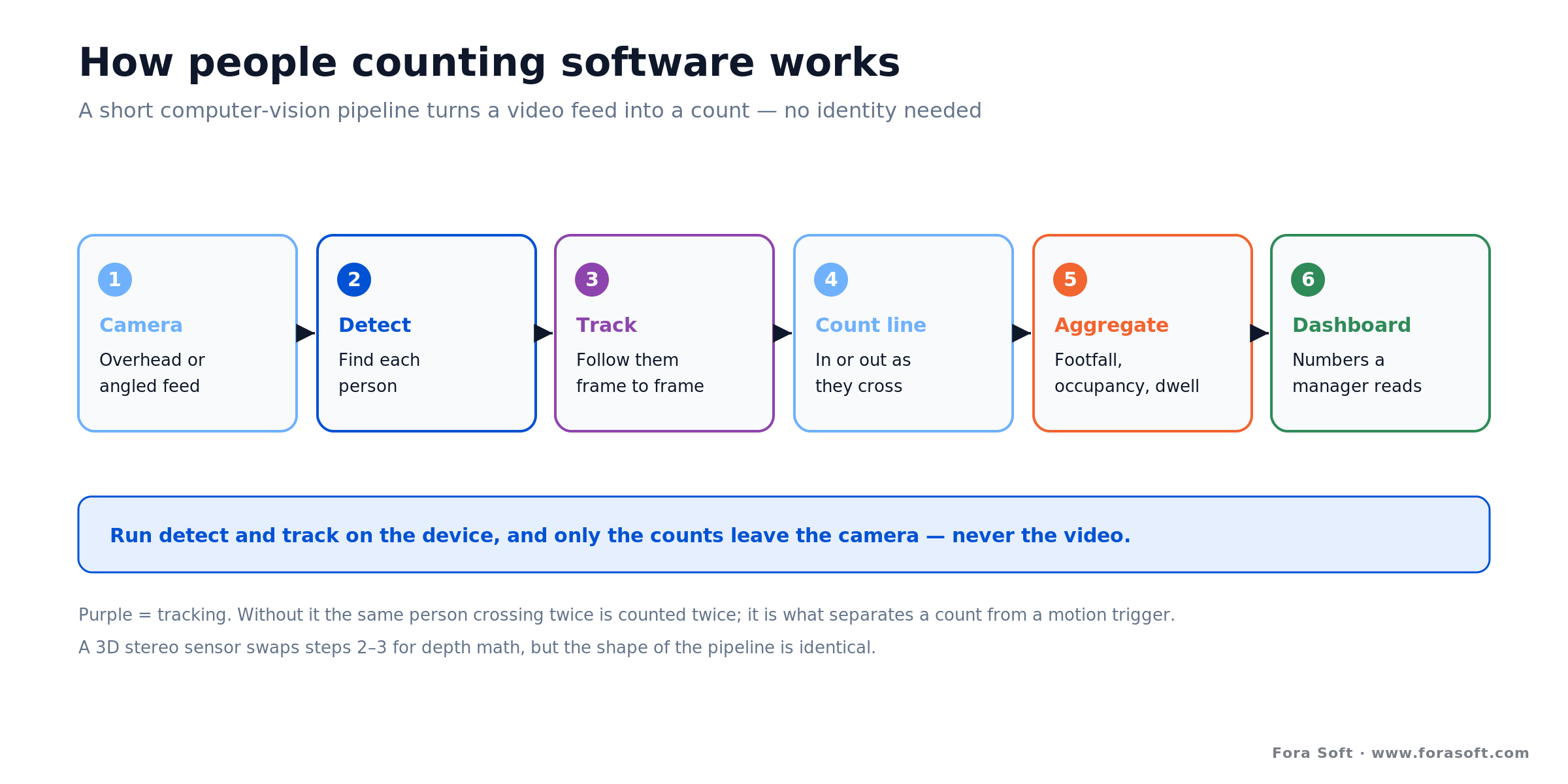
Figure 1. The people counting pipeline. Tracking is what stops one person from being counted twice; running detect and track on the device keeps the video in the building.
Detect. An object-detection model, typically a YOLO-family network, finds every person in each frame and draws a box around them. On an overhead 3D sensor this step reads a depth map instead of an image, detecting the shape of a head and shoulders from above rather than a full-body appearance.
Track. A tracker such as DeepSORT links a detection in one frame to the same person in the next, giving each individual a stable ID for as long as they’re in view. This is what lets the system count a person once, know which direction they moved, and measure how long they stayed — instead of counting the same shopper three times as they browse near the door.
Count and aggregate. You define a counting line across a doorway or a zone on the floor. When a tracked person crosses the line, the system records an entry or an exit by direction; when they sit inside a zone, it measures dwell. Those raw crossings roll up into the numbers a manager actually reads: footfall over time, live occupancy (entries minus exits), and dwell by area. Do detect and track on the device and only those numbers leave the camera — a point we’ll come back to under privacy.
2D camera vs 3D stereo vs ToF vs beam: pick the method
“People counting” hides several very different technologies, and they trade off accuracy, privacy, darkness performance, and cost. The right one depends far more on the physical door and the budget than on any single accuracy claim.
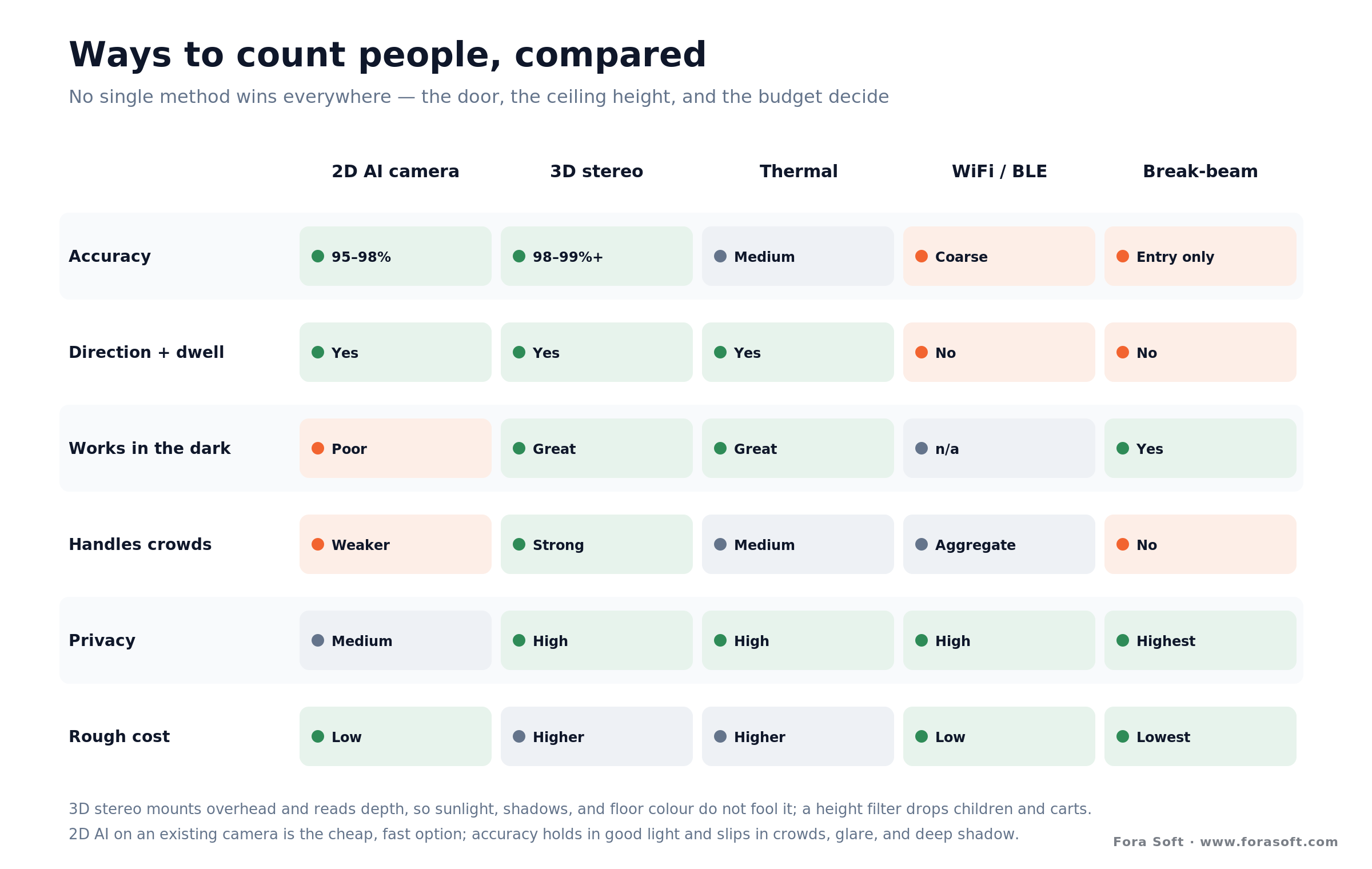
Figure 2. Ways to count people, compared. Overhead 3D wins on accuracy and hard conditions; 2D on an existing camera wins on cost and speed.
2D AI camera is the default and the cheapest path: a detection-and-tracking model running on a normal or edge-AI camera, usually angled at a doorway. In good light it lands around 95–98% accuracy, and because it can run on cameras you already own, it’s fast and inexpensive to start. Its weak spots are crowds, glare, deep shadow, and low light, where a flat image gives the model less to work with.
3D stereo sensors mount directly overhead and use two lenses to read depth, so the software works from the height and shape of a head rather than its appearance. That bird’s-eye depth math ignores floor colour, sunlight, and shadows, counts two people walking abreast as two, and uses a height filter (commonly around 1.1 m) to drop children and shopping carts. Vendors in this class cite 98–99%+ accuracy, and units like the Milesight VS125 claim 99.8% even in complete darkness. The trade is a dedicated sensor per door, higher cost, and a ceiling in the roughly 2.2–5.5 m range for a sensor like the Xovis PC2.
Thermal, WiFi/BLE, and break-beam round out the field. Thermal reads heat blobs, so it works in the dark and stays private, at lower resolution. WiFi and Bluetooth probe counting is anonymous and cheap but coarse, and it can’t give you direction or dwell. Break-beam counters at a doorway are the cheapest of all and dead simple, but they only tally entries, miss two people abreast, and know nothing about direction or where anyone went. Match the method to the room: overhead 3D where accuracy has to be high, 2D AI where an existing camera and a modest budget rule, and the simpler sensors where a rough anonymous count is all you need.
How accurate is people counting, really?
Accuracy depends almost entirely on the method and the mounting. Overhead 3D stereo sensors reliably report 98–99%+ because depth resolves the two problems that fool a flat camera — people standing close together and hard lighting. A well-placed 2D AI camera lands around 95–98% in good conditions and slips lower in crowds, glare, and low light. Treat any headline number as a ceiling from a favourable install, not a promise for your busiest doorway at 5 p.m.
The gap between a spec sheet and a real door is where deployments succeed or fail. A camera angled across an entrance has to contend with people walking abreast, strollers and carts, children, staff going back and forth, sunlight flooding a glass storefront, and shadows moving across the floor. Every one of those pushes a 2D model off its benchmark. A model measured on a clean dataset can lose ten to twenty points of accuracy on a mixed real-world camera fleet, which is why the honest question is not “how accurate is the algorithm?” but “how accurate is it at this door, mounted this way, in this light?”
Two practical rules follow. First, mounting beats model: an overhead view of a controlled doorway will out-count a fancier algorithm looking across a crowded, sunlit atrium every time. Second, validate against ground truth. Put a person with a clicker at the door for a few busy hours, or run a door-counter check, and compare. Retailers commonly hold people counters to a 95%+ bar against a manual count before they trust the conversion numbers built on top.
Reach for overhead 3D when: the count has to be trustworthy enough to bill against or report to a regulator — conversion rate, capacity compliance, or landlord-grade occupancy. The dedicated sensor and higher cost buy you accuracy that survives crowds and sunlight, which a doorway 2D camera can’t guarantee.
From footfall to live occupancy and dwell
A count at the door is the raw material; the value is in what you compute from it. Footfall is the running total of entries. Live occupancy is entries minus exits at any moment — which is why direction matters, and why a break-beam that only tallies entries can’t give you occupancy at all. Dwell is how long people stay, measured by tracking them inside a zone. These three numbers answer most of the questions that make someone buy a counter.
Occupancy monitoring became a mainstream need when capacity limits did, and it stayed useful afterward. A retailer uses live occupancy to trigger dynamic staffing before a queue forms. A museum or stadium uses it to hold a gallery or concourse under its safety limit. A building operator uses it to prove space usage — how many of the desks or meeting rooms they heat and clean are actually occupied — and to tune HVAC and cleaning to real presence instead of a fixed schedule. Foot traffic analytics on top of the same feed turns entries into conversion, dwell into layout decisions, and occupancy into an energy line item.
The engineering caveat is drift. Occupancy is a running sum, so a small directional error compounds over a day — miscount one exit an hour and by closing time your “live” occupancy is nonsense. Production systems fight this with a nightly reset (the building empties, so occupancy should return to zero), sanity bounds, and periodic re-baselining. Getting occupancy right is less about a clever model than about disciplined bookkeeping over long stretches, the same reliability mindset that edge versus cloud surveillance design turns on.
Need occupancy you can actually trust all day?
Directional accuracy and drift control are where most counters quietly fail. We’ll walk through the mounting, tracking, and re-baselining that keep a live occupancy number honest from open to close.
Privacy by design: count people, don’t identify them
The single most important fact about people counting is that it doesn’t need to know who anyone is. A count is a number. To produce it, the software only has to tell “a person” from “not a person” and follow them across a line — it never has to match a face against a name. That makes privacy a design decision you get to make, not a risk baked into the category.
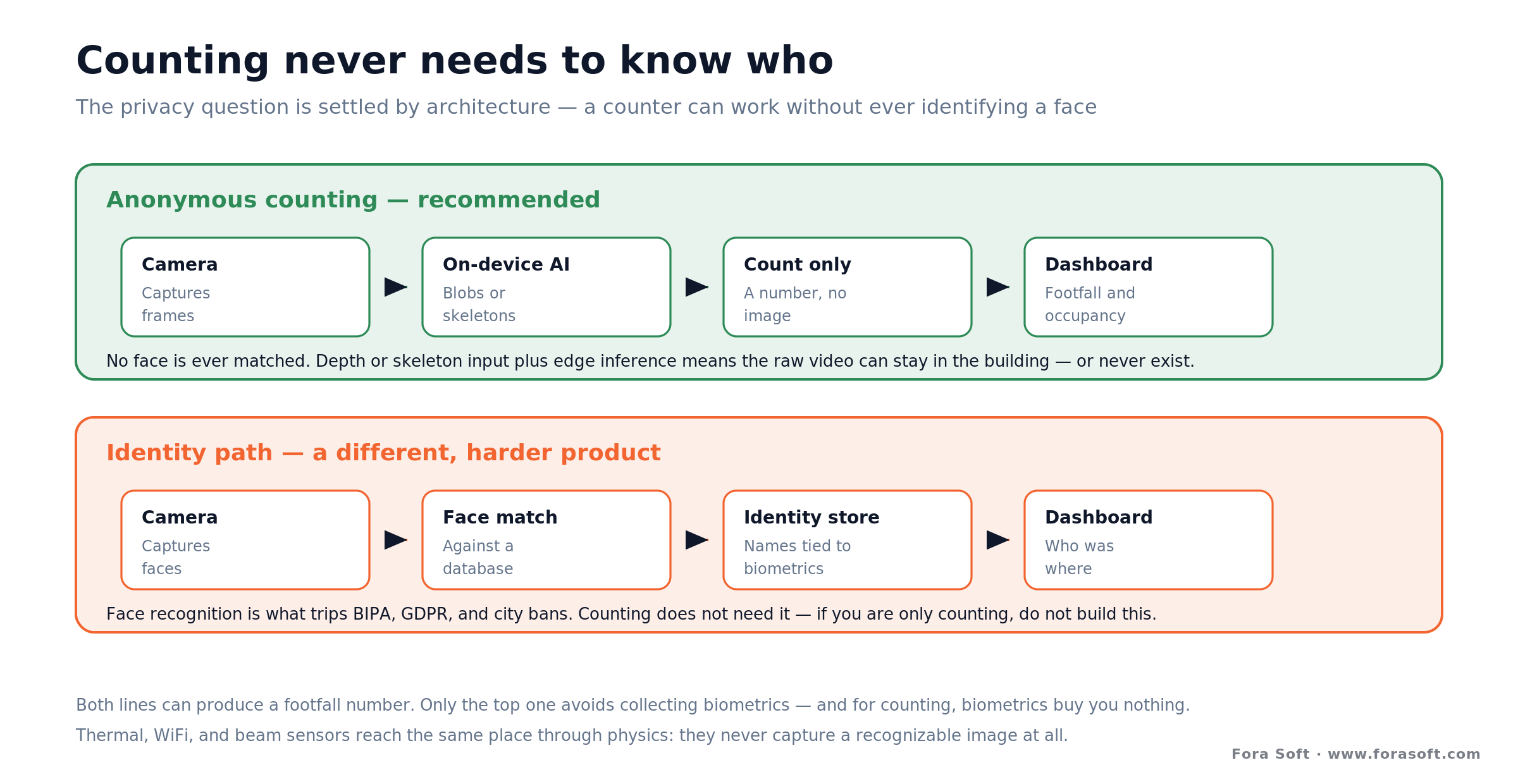
Figure 3. Counting never needs a face. Both paths can produce footfall; only the anonymous one avoids collecting biometrics — which, for counting, buy you nothing.
Use anonymous input. Overhead depth sensors see shapes, not faces. 2D counters can work from skeletons or keypoints rather than recognizable images. Thermal and WiFi sensors capture no image at all. In every case the model gets what it needs — is this a person, which way did they go — without ever building a face print.
Process at the edge, keep only counts. Run detection and tracking on a small on-board computer or an edge box, and the raw video never has to leave the site — only the counts and metadata travel. That removes most of the privacy and bandwidth objections at once and shrinks your compliance surface, because you can’t leak footage you never transmitted.
Contrast that with the tempting mistake: bolting face recognition onto a counter to “also” spot repeat visitors or known shoplifters. The moment you do, you’ve left the world of anonymous counting and built a biometric system, with all the legal weight that carries. If your goal is a count, resist it. Our guidance on retail video surveillance goes deeper on keeping any video that does move protected.
GDPR, BIPA, and where counting stays legal
Anonymous counting clears almost every privacy regime by design, because the laws that bite hardest target biometric identification — not headcounts. Illinois’ BIPA drives class actions over face and fingerprint data; several US cities (Portland, San Francisco, parts of Austin) restrict or ban facial recognition; and the EU AI Act plus GDPR treat biometric identification as high-risk. A counter that stores no image and matches no face mostly sidesteps all of it.
“Mostly” is doing honest work in that sentence, so here are the edges. Under GDPR, even video that briefly contains identifiable people can be personal data while it’s being processed, so the clean posture is on-device inference, no raw video off-site, short or zero retention, and clear signage that counting is taking place. If you ever add anonymized demographic estimation — age or gender brackets for marketing signal — keep it aggregate and never tied to an individual, because that’s the feature most likely to attract a regulator’s attention.
The design rules that clear review are short: no facial recognition by default, process at the edge, store counts rather than clips, retain any raw video only briefly and only where it’s genuinely needed, and post standard camera-notice signage with a privacy note. None of this is legal advice — confirm obligations for your jurisdiction and setting — but a counter built this way gives your privacy counsel very little to worry about.
The tools compared: Camlytics, Axis, Hikvision, Xovis, custom
There’s no single best people counting software for every site — the market splits by how you want to deploy: software that runs on cameras you already have, an app that lives on the camera itself, a dedicated overhead sensor, or a custom build. The table reflects each vendor’s public positioning captured on 2026-07-16; several price on a quote or reseller basis, so verify current figures before you commit.
| Option | Type | Pricing (2026-07-16) | Where it wins | Where it breaks |
|---|---|---|---|---|
| Camlytics | Software + API on your IP cameras | Free tier + paid plans (quote) | Reuses existing cameras; developer API | 2D accuracy limits; you host it |
| AXIS People Counter | On-camera app (ACAP) | Runs on Axis cameras (bundled) | Server-free; ignores strollers/carts | Locked to Axis hardware |
| Hikvision analytics | Counting built into AI cameras | In camera/NVR (varies) | Cheap per-camera; wide availability | Procurement/policy scrutiny; 2D limits |
| Xovis / DILAX / Milesight | Overhead 3D stereo/ToF sensor | Reseller / quote per sensor | 98–99%+; crowds, sunlight, darkness | Sensor per door; higher upfront cost |
| Custom build | Your cameras + models + dashboard | One-time build + hosting | Own the data, accuracy, and roadmap | Upfront cost; you carry maintenance |
Our read: a single store or office counting a couple of doors should buy — an overhead 3D sensor where accuracy has to be high, or a camera app like AXIS People Counter or Camlytics where existing cameras and cost matter more. A small chain that wants dashboards without engineers should buy a managed analytics service. Build enters the picture when you’re shipping counting as a product feature, need it across many sites on your own terms, or can’t send video to anyone else’s cloud.
Build vs buy: when a custom counter wins
Most buyers should buy. If you’re counting a few doors in one or a handful of sites with standard needs, an off-the-shelf sensor or a managed service will beat a custom project on both cost and time, and we’ll tell you so on the call. Building starts to pay when counting stops being something you consume and becomes something you own or sell. At that point our AI video recognition software team builds the detector, tracker and line-crossing logic on YOLO, ByteTrack and NVIDIA Jetson, at the edge or in the cloud. Four honest rules:
Reach for an off-the-shelf sensor when: you’re counting one site, standard mounting works, and you want accurate numbers this week. You trade control for speed, and for a single building that’s the right trade almost every time.
Reach for a managed analytics service when: you run a modest number of sites, want dashboards and benchmarking delivered as an outcome, and have no engineering team. You’re buying results and support, and you accept a per-site fee and a vendor cloud to get them.
Reach for a custom build when: people counting is a feature of a product you sell, you need it across many sites on your own hardware and rules, data-residency or privacy policy keeps video off a vendor cloud, or per-sensor subscription fees at your scale have passed what a one-time build plus hosting would cost.
Reach for the counts inside your own platform when: you’re shipping a retail, smart-building, or venue product and counting has to live natively in it. Licensing a third-party sensor your customers also have to buy is the weaker path when the count is core to what you sell.
The build case is strongest for product companies, not end users. If you’re a retail-tech vendor, a proptech platform, or a venue-management product, owning the counting layer on top of ordinary computer-vision plumbing keeps your differentiation and your margins. That’s the same logic that argues for owning the pipeline rather than renting it door by door.
What people counting costs across 50 sites
The economics turn on one shape: a subscription grows with every site and every year, while a build is mostly a one-time cost. We’ll give ranges and the crossover logic, not a single number, because scope genuinely drives the figure — how many doors, which method, what it integrates with — and quoting a precise price sight-unseen would be dishonest.
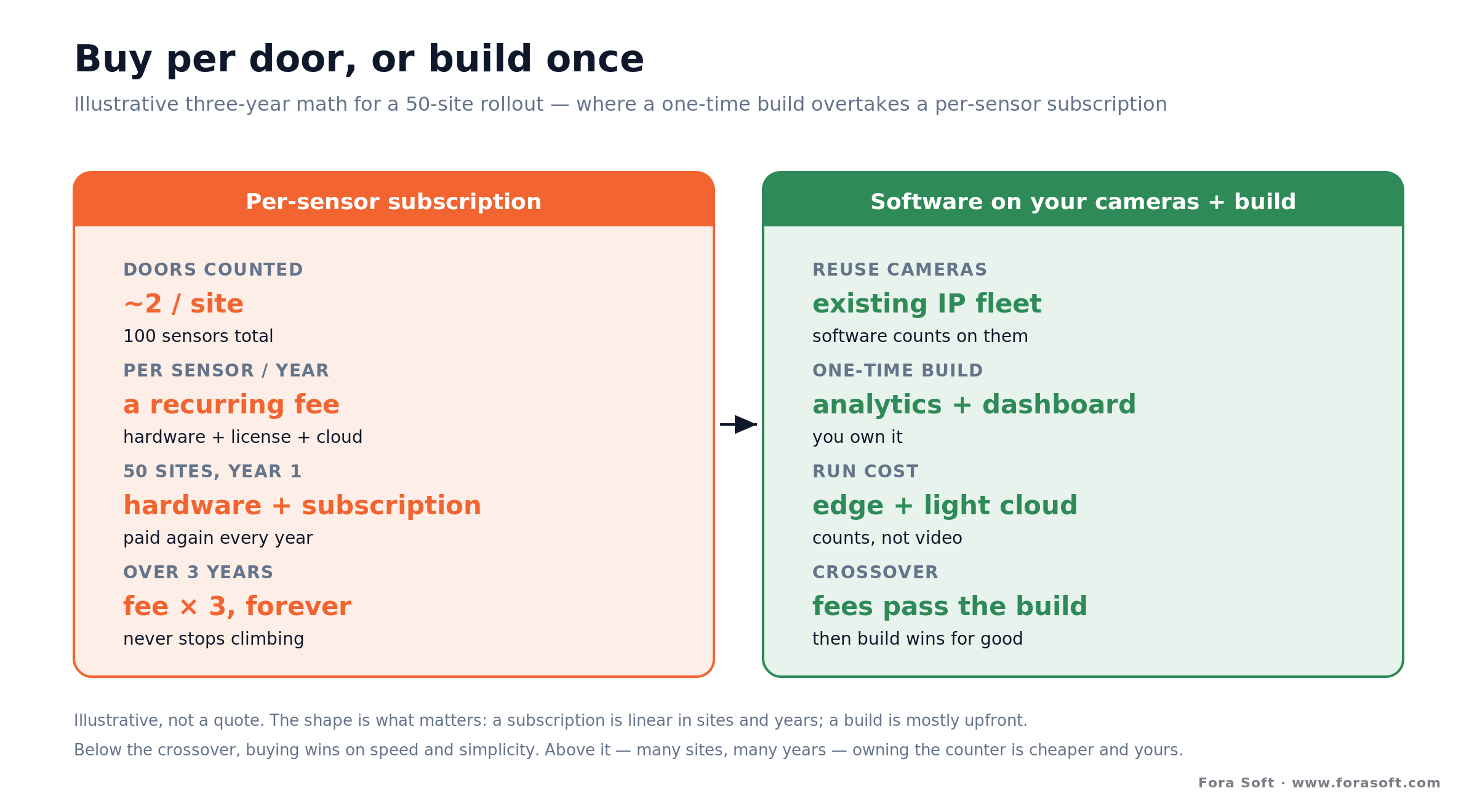
Figure 4. Buy per door, or build once. Illustrative math for 50 sites — a subscription is linear in sites and years; a build is front-loaded, then cheaper.
The buy side. Suppose 50 sites with about two counted doors each — 100 sensors. A hardware sensor plus its license and cloud is a recurring per-sensor cost you pay in year one and again every year after. A usable 2D edge-AI counter can be had for a low price per door in 2026 (the market has fallen far enough that a serviceable AI counter runs well under a few hundred dollars per unit), while overhead 3D sensors cost more per door but deliver the accuracy. Either way, at 100 doors the annual line is real and it repeats.
The build side. A custom counter is a one-time build — detection and tracking tuned to your doors, a counting and occupancy engine, a dashboard, and integrations — that runs on cameras you already own or on modest edge boxes. It’s a mid-five to low-six-figure build in our experience, because the hard components (real-time capture, on-device inference, tracking) are proven pieces we assemble rather than invent. The run cost stays modest because you’re moving counts, not video.
The crossover. Below some number of sites and years, buying wins on speed and simplicity, full stop. Above it — many doors, several years — the repeating per-sensor fee passes what a one-time build plus hosting would have cost, and after that the build is both cheaper and yours. Model the money over two to three years, conservatively, before you decide; the sticker price per sensor matters far less than the total across your whole footprint.
Reach for a build when: recurring per-sensor fees across your sites are heading past a one-time build plus hosting over two or three years, or video legally can’t sit in a vendor’s cloud. Below that line, buying wins — don’t build a counter you could rent.
Want the buy-vs-build math for your footprint?
Send us your site count, doors per site, and accuracy bar. We’ll model per-sensor subscription against a one-time build side by side — with realistic ranges and no sales theater.
POS, BMS, and dashboards that make counts useful
A count on its own is a curiosity; a count wired into the systems that run the site is a decision tool. The integrations decide whether people counting changes anything, and they’re usually where the real project effort lands.
Point of sale is the big one for retail. Footfall gives you the denominator, POS gives you the numerator, and together they produce conversion rate — the metric most retailers actually buy a counter for. Without the sales tie-in you’re counting people with no idea whether they bought anything. Most modern POS platforms expose a REST or webhook API for the transaction stream.
Building management and workforce systems are the equivalents elsewhere. In an office or venue, live occupancy feeds the building management system so HVAC, lighting, and cleaning follow real presence instead of a timer. In retail and hospitality, queue depth and footfall feed staff-scheduling tools so you add a cashier before the line forms, not after the complaint.
Dashboards and alerts are the last mile. Managers want a simple view — today versus last week, this store versus the chain, live occupancy against the limit — plus a threshold alert when a gallery nears capacity or a queue crosses a line. The rule we’ve learned the hard way: fewer, well-targeted alerts beat a firehose. An alert channel that pings all day gets muted, and a muted alert is a silent failure.
Mini-case: real-time detection on live video
The situation. A people counter is, underneath, a real-time detection-and-tracking system on a video feed — the same engineering we built for Mindbox, where the job was to watch live video, recognize what mattered the instant it happened, and turn it into a signal a system could act on. Counting swaps “flag a rare incident” for “tally an ordinary crossing accurately, all day,” but the plumbing is identical.
The engineering. The disciplines that make real-time detection trustworthy are exactly the ones counting needs. Inference runs close to the source so latency stays low and video doesn’t sprawl across the network. Tracking gives each person a stable identity so the same body isn’t counted twice as it lingers near a door. And the counts are reconciled over time — directional balance, nightly reset — so a running occupancy number stays honest for hours, not minutes.
The lesson. Two decades of shipping real-time video systems taught us that the detector is the easy half. The hard half is everything around it: mounting cameras where the count is actually reliable, keeping the tracker stable through crowds and occlusion, moving as little sensitive data as possible, and reconciling the numbers so they hold up over a full day. That’s the lens we’d bring to a counting build — and it’s a good 30-minute conversation to have before you commit to buy or build.
A people-counting decision framework in five questions
1. One site, or many? A single building almost always buys a sensor. Many sites, or a product you sell, points toward a managed service or a custom build — you can’t resell someone else’s door sensor as your own feature.
2. How accurate does the number have to be? If you’ll bill against it or report it to a regulator, overhead 3D is worth the cost. If it’s for a rough trend and you already have cameras, a 2D app is plenty. Let the required accuracy pick the method.
3. What’s the door like? Bright glass storefront, crowds walking abreast, or a low ceiling all push you toward overhead depth. A quiet, well-lit single-file entrance is friendly to a cheap 2D counter. The hardest door should decide the sensor.
4. Where can the video go? If policy or law keeps footage on-site, rule out cloud-video products and design edge-first, or build. If a vendor cloud is acceptable, more off-the-shelf options open up.
5. Buy price, or total cost? Add up per-sensor fees across every door over two or three years and compare to a one-time build plus hosting. The crossover, not the sticker price, is what should drive the decision at scale.
Anatomy of a production people-counting system
If you do build, here’s the shape of what you’re building. A production counter is six layers, and most of the engineering effort lands on the last three — not the model everyone thinks about first.
1. Sensing. The camera or 3D sensor per door, chosen from the method tradeoffs in Figure 2, and mounted where the count is reliable. 2. Capture. Reliable frame acquisition — reconnects, dropped frames, multiple streams — the unglamorous layer that decides whether the counter stays up during business hours.
3. Inference and tracking. Person detection plus a tracker that holds stable IDs through crowds and brief occlusion, running on-device for privacy and latency. 4. Counting and reconciliation. Line and zone logic, directional counts, dwell, and the bookkeeping that keeps occupancy honest over a full day — nightly reset, sanity bounds, re-baselining.
5. Integration. The POS, building-management, or workforce ties that turn counts into conversion, energy, and staffing decisions. 6. Management. The dashboard, alerts, retention rules, access control, and audit trail that let an operator run the fleet and satisfy compliance. Build the last three as carefully as the model, and you’ll have a counter people actually trust. For the surveillance-side plumbing, our video surveillance learning track is a good companion.
When NOT to deploy or build people counting
Don’t build if you’re counting one site. An off-the-shelf sensor gives you accurate numbers this week; paying us to rebuild what a good overhead sensor or a camera app already does well would be a bad trade, and we’d say that on the first call. The same goes for a small operation whose needs a managed service already covers — buy the outcome and spend your budget elsewhere.
Don’t reach for a camera where you only need a rough, anonymous number. If all you want is “roughly how busy is this zone,” a WiFi or beam sensor may be cheaper, simpler, and easier to clear with privacy stakeholders than any camera. Use the least sensing that answers your question — a camera you don’t need is cost and scrutiny you didn’t have to take on.
And don’t bolt on identity you don’t need. If the goal is a count, resist adding facial recognition to “also” track individuals — it converts a low-risk anonymous system into a biometric one with real legal weight, for a feature counting never required. If you genuinely need whole-store intelligence — shrinkage, self-checkout loss, planogram compliance — that’s a different, larger build; start from our retail video analytics playbook instead of overloading a counter.
FAQ
What is people counting software?
It’s computer-vision software that watches a camera feed, detects each person, tracks them across frames, and counts them when they cross a line or enter a zone. The output is footfall, live occupancy, and dwell — not a video wall. The camera is ordinary; the intelligence is the software, which often runs on cameras a site already has.
How accurate is people counting software?
Overhead 3D stereo sensors reliably report 98–99%+ accuracy because depth handles crowds and hard light; a well-placed 2D AI camera lands around 95–98% in good conditions and slips in crowds, glare, and low light. Real-world accuracy depends on mounting as much as the model, so validate against a manual count — retailers commonly hold counters to a 95%+ bar before trusting the numbers.
Is a 3D stereo counter better than a 2D camera?
For accuracy in hard conditions, yes. Overhead 3D reads depth, so it ignores shadows, sunlight, and floor colour, counts people walking abreast correctly, and uses a height filter to drop children and carts. A 2D AI camera is cheaper and can run on existing cameras, but it’s weaker in crowds and glare. Choose 3D where the count must be trustworthy, 2D where cost and speed win.
Does people counting use facial recognition?
No, and it shouldn’t. Counting needs a tally, not an identity, so a good counter uses depth blobs or skeletons and never matches a face. Keeping it anonymous is what clears BIPA, GDPR, and city facial-recognition bans. Adding face recognition turns a low-risk counter into a biometric system with real legal weight, for a feature counting never required.
Can people counting software run on my existing CCTV cameras?
Often yes. Software like Camlytics and on-camera apps run 2D counting on standard IP cameras — CCTV people counting software in the literal sense — so you can start without new hardware. The catch is mounting and view: a camera angled across a busy, sunlit doorway will be less accurate than a purpose-mounted overhead sensor. For high-accuracy needs, plan a dedicated 3D sensor at the key doors and reuse CCTV for the easier ones.
How much does people counting software cost?
It ranges from a low per-door price for a 2D edge-AI counter (well under a few hundred dollars per unit in 2026) to a higher per-sensor cost for overhead 3D, usually quote-based, plus license and cloud fees. A custom build is a mid-five to low-six-figure one-time cost plus hosting. The build pays off when per-sensor subscription fees across many sites, over a few years, outgrow it.
What’s the difference between footfall, occupancy, and dwell?
Footfall is the running count of entries. Occupancy is entries minus exits at any moment, so it needs directional counting — a beam that only tallies entries can’t give it. Dwell is how long people stay, measured by tracking them in a zone. Occupancy is a running sum, so production systems reset it nightly and re-baseline to stop small errors from compounding over a day.
Is people counting the same as retail video analytics?
No — counting is one capability inside the broader retail-analytics stack. People counting gives footfall, occupancy, and dwell across any venue. Retail video analytics adds shrinkage, self-checkout loss, planogram compliance, and on-shelf availability on top, aimed specifically at store operations. If you want the full store dashboard, start from our retail video analytics playbook; if you just need a reliable count, this guide is the right scope.
What to read next
Retail
Retail Video Analytics Playbook
The whole store dashboard — shrinkage, self-checkout loss, planogram — where counting is one capability.
Surveillance
Video Surveillance in Retail
How camera systems fit store operations, and how to keep the footage that does move protected.
Computer vision
Anomaly Detection in Video Surveillance
The detection-and-tracking engineering that underpins a counter, applied to rarer events.
Architecture
Edge AI vs Cloud AI for Surveillance
Why edge-first inference keeps counts private and cheap, the choice under any counter.
Ready to turn a camera into a number you trust?
People counting software earns its place by producing one honest number — footfall, live occupancy, or dwell — without watching anyone. The method sets the accuracy: overhead 3D where the count has to be trustworthy, a 2D app on existing cameras where cost and speed rule. The engineering that matters most isn’t the detector; it’s mounting for a reliable count, tracking that doesn’t double-count, staying anonymous by design, and reconciling occupancy so it holds up all day.
Buy a sensor for one site; buy a managed service for a few sites you want handled; build when counting is your product, has to span many sites on your own terms, or can’t send video anywhere else. If you want a straight answer on which side of that line you’re on, we’re happy to run the numbers with you. Explore our video surveillance development services to see where we’d start.

The book · Volume 6 of 7
AI for Video: A Complete Guide to Intelligence in Video Products: From Models and Inference to Computer Vision, Speech, Search, and Generative Video
A people counter is detection plus tracking plus a line, and Volume 6 explains each part in depth. It covers object detection, tracking, segmentation and pose, where models run from edge to cloud, and the AI feature lifecycle, so you can judge vendor accuracy claims and decide what to build. Written by Nikolay Sapunov, CEO at Fora Soft.
Read it on Amazon →Kindle & paperback · Fora Soft Video Engineering Handbook
Let’s build a counter people can trust
Whether you need help choosing a sensor or building people counting into your own platform, we’ll give you an honest read in 30 minutes — buy or build, with the accuracy and privacy tradeoffs to back it.

