

Key takeaways
• Remote visual assistance turns a truck roll into a video call. An expert sees what the technician or customer sees through a phone camera, draws guidance on the live image, and resolves the issue without dispatching anyone.
• The money is in the visits you avoid. A dispatched truck runs $150–$500 and, fully loaded, can approach $1,000; a remote session costs an expert’s minutes plus a few dollars of platform. Deflect even a third of visits and the yearly saving is seven figures at scale.
• Buy first, build when the tool stops fitting. SightCall, TechSee, Zoho Lens, TeamViewer, and Blitzz cover the common cases. You build when volume, AR depth, or integration into your service system make the SaaS bill and the workflow gaps hurt.
• The hard engineering is a world-locked AR annotation. A marker that stays glued to the screen drifts off the part the second the phone moves. Anchoring it to a real 3D point over a live call is the part vendors gloss over and builds underestimate.
• First-time fix rate is the number that pays for it. Top field-service teams fix on the first visit about 86% of the time; the laggards manage 53%. Remote visual assistance moves that number by sending the right person, with the right part, or no one at all.
Why Fora Soft wrote this guide
The call usually starts like this: “Our technicians drive out for things they could have talked a customer through in five minutes. Every roll costs us a few hundred dollars and half a day. Can we just see the problem over video first?” The answer is yes — but the slick demo hides the two things that decide whether the project ships: making an on-screen annotation actually stick to the part in the real world, and wiring the tool into the service system so a dispatcher isn’t retyping notes between tabs.
Fora Soft has built real-time video and AI products for 20+ years, across 250+ projects. Two sit right under this topic. ProVideoMeeting is a WebRTC platform where people join from a browser or a phone with no install, verify identity by photo and SMS, and act against a tamper-evident audit trail — the same primitives a support session needs. V.A.L.T., our video management platform, runs across 770+ organizations and 50,000+ users, and taught us how regulated buyers think about recording, retention, and access.
This is the guide we’d hand a VP of service, a support-operations lead, or a product owner who has to make a real build-vs-buy call this quarter. It covers what these tools do, the vendors worth shortlisting with their 2026 prices, the cost math on your own volume, the AR engineering that separates a toy from a product, and the honest cases where you shouldn’t use video at all.
Scoping a remote visual assistance build this quarter?
Bring your dispatch volume, your AR requirements, and your service system. A senior engineer will tell you in 30 minutes whether to buy, build, or blend — and what the build really costs.
What remote visual assistance software does
Remote visual assistance (RVA) lets a remote expert see a physical thing through someone else’s camera — a broken appliance, a wiring panel, a machine on a factory floor — and guide the fix in real time. The person on site points their phone; the expert watches the live video, draws an arrow on the exact screw, and talks them through it. No drive, no scheduling, often no second visit.
The feature that makes it more than a video call is on-screen annotation. The expert marks up what the camera sees: circle the fault, point at the connector, drop a step-by-step overlay. The good tools make that marker behave like it’s attached to the real object, so when the phone moves, the arrow stays on the part. That is the difference between guidance a technician trusts and a wobbling doodle they ignore.
One neighbor is easy to confuse with this and isn’t the same product. Remote video inspection also uses a guided video call, but its job is to document a claim or a property and capture evidence that survives a fraud review — an adjuster steering a claimant. RVA’s job is to resolve a problem: a service expert guiding a technician or a customer to a working outcome. Same video plumbing, different buyer, different endpoint. We’ll keep the line clear throughout.
Why field service is adopting it in 2026
Because the cost of a wasted visit finally got attention and the tooling grew up. A dispatched truck is one of the most expensive routine events in service: industry estimates put it at $150–$500, and the Technology & Services Industry Association reckons the fully-loaded number — labor, fuel, maintenance, overhead — can approach $1,000. Every visit you didn’t need is that money back.
The other pressure is first-time fix rate. Reported benchmarks put top performers near 86% and laggards around 53%, and the gap is mostly about information: the wrong technician, the wrong part, or a problem that a photo would have diagnosed. A quick video look before or instead of a dispatch closes that gap — you either fix it live or you send the right person prepared. Teams that put remote expert access in front of technicians report resolving a large share of issues without a callback.
And the technology stopped being the hard part for the common case. Browser WebRTC video works on a mid-range phone over cellular. ARKit and ARCore ship world-tracking that a decade ago needed a research lab. The question moved from “can we see the problem” to “do we buy this or build it into our own product.”
Where remote visual assistance pays off
The pattern that makes RVA worth it: a problem that is frequent, mostly visual to diagnose, and expensive to attend in person. Four settings fit cleanly.
Field service triage and fix. Before rolling a truck, an expert looks at the fault over video and either talks the on-site tech through it or confirms exactly which part and skill the job needs. For appliances, HVAC, telecom, and industrial equipment, this is where the truck-roll savings live.
Customer self-service. A support agent guides the customer’s own phone — resetting a router, clearing a jam, reading a model number — and resolves the ticket on the first contact instead of booking a visit. This is the contact-center flavor of RVA, and it’s where visual AI is starting to deflect the simplest cases before a human joins.
Manufacturing and maintenance. A specialist supports line operators or maintenance crews across sites, hands-free through smart glasses, without flying an engineer in. This overlaps with the multi-site video patterns we’ve built before.
Training and onboarding. A senior tech rides along on a junior’s calls remotely, annotating in real time. It scales scarce expertise across a whole field force, which is why the same platforms sell into workforce enablement.
Reach for remote visual assistance when: the problem is high-frequency, mostly diagnosable by eye, and expensive to attend — appliance and equipment repair, telecom installs, customer troubleshooting, multi-site maintenance. Keep it in person when the job needs hands, tools, or a measurement a camera can’t make.
Live-guided, self-guided, and AR-annotated
There are three ways these tools work, and picking the wrong one means either drowning experts in calls that didn’t need to be live or shipping guidance nobody follows. The split is about who needs steering and how precise the guidance must be.
Live-guided video is the default: a real-time call where the expert sees the camera feed and talks the person through it. It wins when the situation is unfamiliar to whoever holds the phone and a judgment call happens on the spot. It costs a slice of expert time, so it doesn’t scale to infinity.
AR-annotated layers world-locked markers on top of the live video — arrows, circles, and text that stay pinned to the real object as the camera moves. This is what makes precise guidance possible (“this screw, not that one”) and what most buyers actually mean by “AR remote assistance.” It’s also the part that’s genuinely hard to build well.
Self-guided with visual AI drops the live human for the simplest cases: the customer follows prompts, and computer vision recognizes the device or the fault and suggests the next step. It scales to huge ticket volumes and deflects the easy calls, but it’s only as good as the model and the flow, and it falls back to a human the moment reality gets messy.
Reach for self-guided visual AI when: volume is high and the top few fault types are repetitive and well understood. Escalate to a live expert — with AR annotation — the instant the case is unfamiliar, high-value, or safety-sensitive.
Anatomy of a remote visual assistance platform
Strip an RVA tool down and it is six layers. Miss one and the demo works but the product doesn’t survive a real service day.
1. Invite and join. An SMS or email link that opens straight into a browser session. Every install requirement costs you completed sessions — a customer with a broken machine will not download an app to get help.
2. Real-time media. WebRTC for the live video and audio, with STUN and TURN servers so the call connects through carrier NAT. This layer decides whether the session holds up on one bar of LTE in a basement.
3. AR annotation. The on-screen markup that stays locked to the real object. This is the value and the hard part, and the next section is entirely about it.
4. Capture and freeze. Freeze a frame so the expert can annotate a sharp still, and grab full-resolution snapshots for the record. The live video track is downscaled to survive the network, so a crisp still needs a separate capture path, not a screenshot of the video element.
5. Workflow and integration. Session notes, outcomes, and recordings that land in your field-service or CRM system, tied to the ticket — not a folder of loose clips someone renames by hand.
6. Storage, consent, and access. Explicit recording consent, encrypted retention with a clock, and role-based access with an audit log. Recording a customer’s home or a factory floor is regulated material, a lesson V.A.L.T. drilled into us over years of evidentiary video.
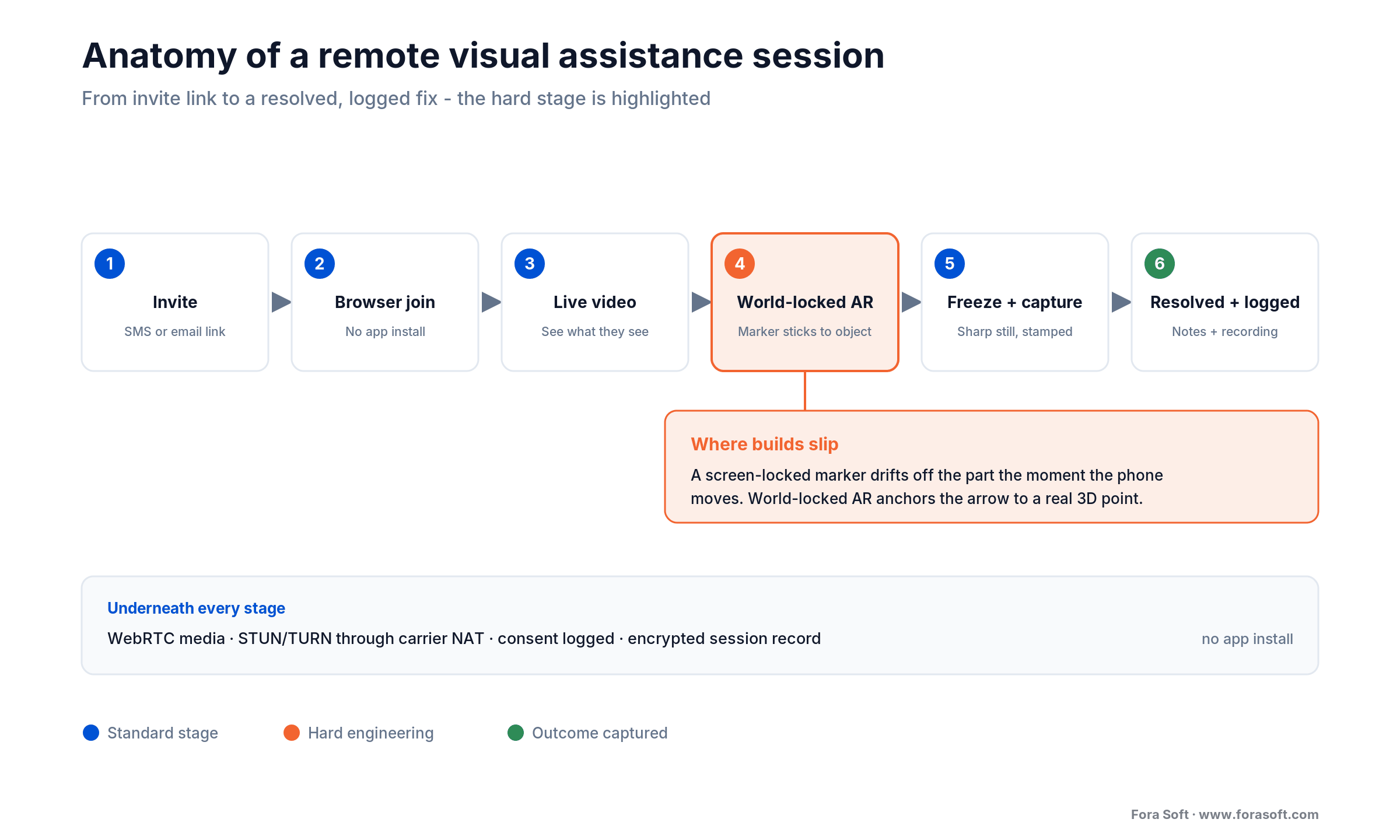
Figure 1. The anatomy of a remote visual assistance session, from the invite link to a resolved, logged fix. The world-locked AR stage is where builds slip.
The hard part: world-locked AR over a live call
Here’s the catch no vendor page dwells on. There are two ways to draw an arrow on a video, and only one of them is worth anything. A screen-locked marker stays where the expert tapped on the screen — easy to build, and useless the moment the technician tilts the phone, because the arrow now points at empty air. A world-locked marker anchors to a real 3D point in the scene, so it stays on the actual screw as the camera moves around it. That second one is what makes the guidance trustworthy, and it’s real engineering.
Under the hood, ARKit on iOS and ARCore on Android build a live map of feature points in the scene and expose an anchor: a pose in world space that the framework keeps updating as it understands the room better. Google’s ARCore anchors documentation spells out the model, and Persistent Cloud Anchors can even be resolved from one day to 365 days later, so a marker can survive across sessions and devices. The expert’s arrow is attached to one of those anchors, not to a screen coordinate.
The subtlety is that the expert usually isn’t on the phone doing the tracking — they’re remote, drawing on a video feed. So the annotation has to travel: the expert taps a 2D point on their screen, you back-project it into the on-device 3D scene, create an anchor there, and sync it back so it renders locked to the object on the technician’s phone. Freeze-frame helps — pause the video, let the expert annotate a sharp still, then re-project the marker onto the tracked scene when it resumes. Get this pipeline right and it feels like magic; get it wrong and the arrow floats, which is exactly why teams that treat AR as a screen overlay rebuild it after the first field trial.
TURN is the other quiet budget line. Field users sit behind carrier-grade NAT, so the media often can’t go peer-to-peer and relays through a TURN server — and you pay for every gigabyte. We go deeper in our WebRTC architecture guide, and the video streaming course covers the media side. For the AR overlay work specifically, that’s our AR/VR practice.
Not sure your AR annotations will stay locked?
We’ve shipped world-tracked overlays over live WebRTC. Send us your use case and we’ll pressure-test the AR plan before you write code.
The tools compared
Short answer: for enterprise field service with deep AR, shortlist SightCall or TechSee; for a contact center that wants visual AI to deflect tickets, TechSee; for an entry-level budget with real AR features, Zoho Lens; for an existing device-management estate, TeamViewer; for straightforward no-app video support, Blitzz. None is the whole platform if your workflow is unusual. Prices below are from each vendor’s own pages or listings, captured 2026-07-16.
| Tool | Best fit | Public price (2026-07-16) | Watch out for |
|---|---|---|---|
| SightCall | Enterprise field service, deep AR, ESG reporting | Quote-based | Enterprise procurement; no public price |
| TechSee | Contact centers wanting visual AI + deflection | Quote-based | AI value depends on your fault-type data |
| Zoho Lens | Budget SMB, AR measure/comments, free tier | Free plan; paid from about $8/technician/mo | AR features gated to Professional tier |
| TeamViewer | Existing remote-access estate; industrial AR (Frontline) | Assist AR / Frontline quote-based | AR tiers priced apart from base remote access |
| Blitzz | No-app live video support, quick rollout | From ~$35/user/mo ($420/yr), 5-license minimum | Lighter on deep world-locked AR |
| Custom build | High volume, deep integration, IP ownership | Your engineering + run cost | You own uptime, TURN, AR, and compliance |
Vendor ROI claims (“40% higher first-call resolution,” “faster repairs”) are self-reported marketing and are left out of this table on purpose. Prices verified on vendor pages and listings 2026-07-16 and will drift — check before you budget. Help Lightning and Salesforce Visual Remote Assistant are also worth a look for merged-reality guidance and Service Cloud shops respectively.
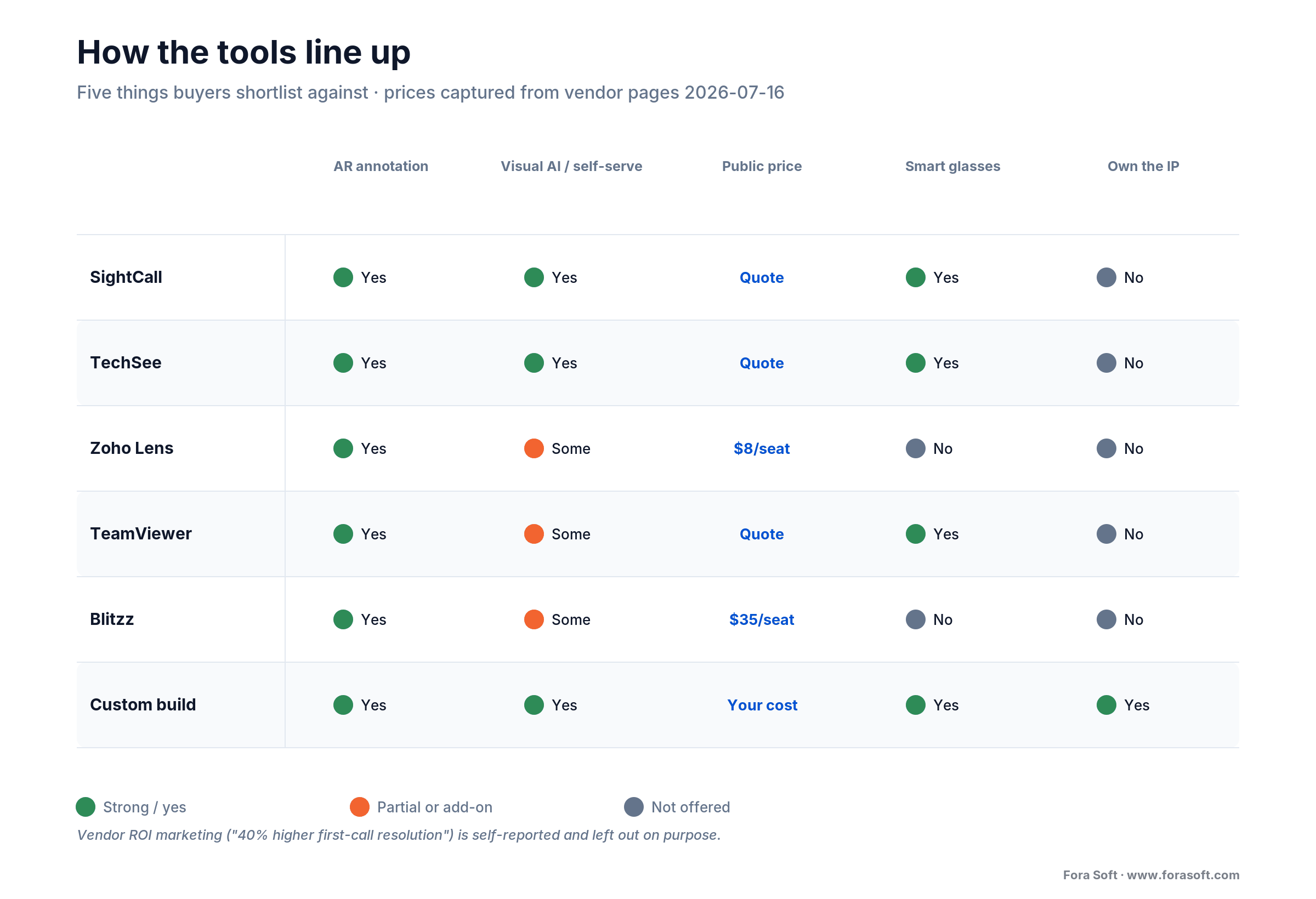
Figure 2. How the main tools line up on the five things buyers actually shortlist against. Complements the table above, not a repeat of it.
Reach for a SaaS tool when: your workflow is standard, volume is a few thousand sessions a month or less, and you don’t need the tool welded into a custom service system. The subscription beats an engineering team until scale or integration says otherwise.
Build vs buy: where the line sits
Buy until the SaaS stops fitting, then build the part that doesn’t. The trigger is rarely the video call itself — it’s everything around it: per-seat pricing that balloons across a big field force, AR precision the vendor can’t match, or a service system the tool won’t integrate with the way you need.
Stay on SaaS when your volume is modest, your process matches the vendor’s, and their AR and compliance posture is enough. At that scale a subscription is cheaper than one senior engineer’s salary, and maintenance and uptime come for free.
Go hybrid when the video and AR are fine but the workflow isn’t. Keep the vendor’s call and annotation engine, build a thin custom layer for routing, session records, and the integration into your field-service system. Most teams live here longer than they expect.
Build when a big field force makes per-seat fees dwarf a platform team, when you need AR precision or offline behavior the vendors don’t sell, when you want to own the IP and the data, or when the assistance has to feel like a native part of your own product. Building means you own the TURN bill, the AR tracking, the uptime, and the compliance. Go in clear-eyed.
Reach for a custom build when: per-seat SaaS fees across your field force exceed a platform team’s cost, you need AR precision or offline capture the vendors don’t offer, or the assistance flow has to be a native part of your own product.
Cost math: truck roll vs remote session, and a build
Let’s do the arithmetic out loud, conservatively. A dispatched visit runs $150–$500 once you load travel and time, and the fully-loaded figure can approach $1,000. We’ll use $200 — the low end — to keep the case honest.
A remote session replaces that with two costs: the expert’s time and a slice of platform. Say a session takes 12 minutes of an expert whose loaded cost is $50/hour — that’s $10 — plus a few dollars of platform and infrastructure, call it $8. So about $18 per remote session versus $200 for a truck roll. But the honest part is that not every session removes a visit; some still need a technician. So use a deflection rate: assume a conservative 30% of would-be visits get resolved remotely.
Scale it. At 20,000 field visits a year, deflecting 30% means 6,000 avoided truck rolls. At $200 each that’s $1.2M of dispatch cost that turns into 6,000 remote sessions at $18, about $108K. The gap is roughly $1.09M a year — and that ignores the softer wins: the 14,000 visits that still happen arrive with the right part and the right skill, which is how RVA lifts first-time fix rate as a side effect.
Now the build side. A full WebRTC-plus-AR platform from scratch is a heavy, multi-quarter program — commonly six or seven figures over a year or more. An SDK-based build (Twilio, Vonage, Agora, or LiveKit for media, ARKit and ARCore for tracking) is far cheaper, often $60K–$300K, and then you carry a run cost for TURN relay, media servers, and storage. A focused RVA MVP — browser join, live guidance, world-locked AR annotation, freeze capture, one service-system integration — is much narrower than a full conferencing product. With our Agent Engineering approach, we scope that kind of MVP conservatively in the low six figures and 10–14 weeks, because the boilerplate — auth, storage lifecycle, session export — is exactly what agents draft well and senior engineers review fast. The math tips to build when your annual SaaS bill starts to rhyme with that number.
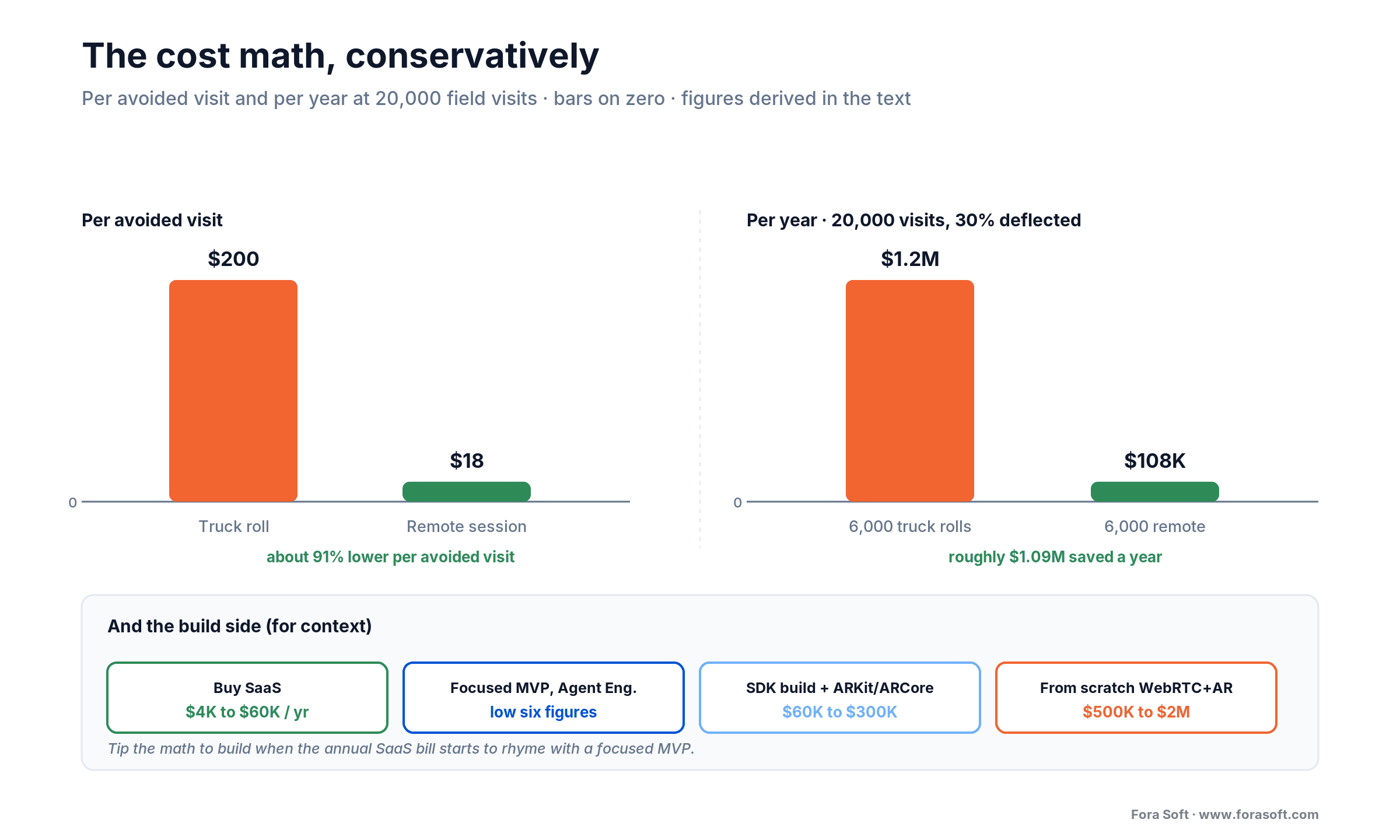
Figure 3. Per-visit and annual cost, truck roll versus remote session, with the build-cost band for context. Bars anchored at zero; figures are conservative and derived in the text.
Want the cost math run on your real volume?
Give us your dispatch count and a realistic deflection rate. We’ll model buy vs build against your numbers and send back an honest break-even, not a sales deck.
First-time fix, deflection, and the KPIs that pay for it
RVA earns its keep on three numbers, and finance cares about all of them. Track these from day one so you can prove the program.
Deflection and first-time fix. Truck-roll deflection rate (share of would-be visits resolved remotely) is the headline saving. First-time fix rate is the quality twin: RVA lifts it both by fixing live and by sending the right person prepared. If your first-time fix is stuck near the industry laggard mark, this is the lever.
Adoption. Invite-to-join rate, session completion, and app-free join percentage. If invite-to-join sits under 70%, your onboarding or your join flow is leaking — fix that before touching anything else, because a session that never starts saves nothing.
Quality and experience. Average handle time on remote sessions, repeat-contact rate (did the fix hold), and customer satisfaction versus a dispatched visit. A deflection rate that looks great but drives repeat contacts up is a false economy — you moved the cost, you didn’t remove it.
Smart glasses vs the phone camera
Most RVA runs on a phone, and for good reason: everyone has one, it needs no procurement, and the browser handles the call. Smart glasses (RealWear and similar) earn their place in one situation — when the person on site needs both hands on the work while the expert watches and annotates. Think a maintenance tech deep in a machine, or an operator following a checklist hands-free.
The trade-offs are real. Glasses add hardware cost, deployment, and charging logistics, and the camera is where the head points, not where the eyes look, which takes training. For customer-facing support they’re a non-starter — you can’t ship a headset to every homeowner. For a fixed industrial workforce doing repetitive hands-busy tasks, they pay off. Most vendors on the shortlist support both; start on phones and add glasses only where hands-free clearly earns it.
Reach for smart glasses when: the on-site worker needs both hands on the task, the workforce is fixed and trainable, and the tasks repeat. Stay on phones for anything customer-facing or occasional — the browser and a normal camera win on reach.
Security, consent, and recording
A remote session records a person, their home or workplace, and often their face and voice. That’s personal data and sometimes a view of a secure facility. Handle it like the regulated material it is.
Consent and recording. Get explicit, logged consent to record before the camera rolls. Several U.S. states require all-party consent; a consent banner and a stored timestamp are cheap insurance against a later dispute.
Encryption, access, and retention. Encrypt media in transit and at rest, gate it behind role-based access, keep an audit log, and set a retention clock per record type. Keeping session video “just in case” turns a data-minimization principle into a breach liability, and GDPR and U.S. state privacy laws both punish indefinite retention.
Certifications. Enterprise buyers will ask for SOC 2, and health-adjacent support may pull in HIPAA. On several SaaS tools these sit in higher tiers, so price them in early — “we’ll add SOC 2 later” is a procurement blocker, not a footnote.
Mini-case: what ProVideoMeeting taught us
Situation. ProVideoMeeting isn’t a support product — it’s a WebRTC video platform with in-call document signing. But the port to remote visual assistance is short, because it already solves the same base problems. People join from a browser or a plain phone call with no install. Identity is verified by photo snapshot and SMS. Every action writes to a tamper-evident audit trail. Video quality adapts to whatever connection the person has.
What transferred. Three lessons carried straight over. First, no-install browser join is the single biggest lever on completion rate; every download prompt loses people, and a customer with a broken machine has no patience for an app store. Second, adaptive media and a phone or SIP dial-in fallback keep the session alive when the video won’t hold — on a field call over rural cellular, that fallback is the difference between a resolved ticket and a reschedule. Third, consent and audit belong in the first sprint, not bolted on, because recording someone’s home or plant is regulated from minute one.
The honest caveat. A conferencing core gets you most of the way, but not all of it: world-locked AR annotation and full-resolution freeze capture are net-new work on top, and that’s exactly the part we flagged as where builds slip. If you want the short version of the port plan — what’s reusable and what’s new — grab a 30-minute call and we’ll walk your team through it.
A decision framework in five questions
Five questions get most teams to the right call in an afternoon.
1. What’s your volume? A few thousand sessions a month or fewer, buy. A large field force where per-seat fees stack into real money, and the SaaS bill starts funding a platform team — model the break-even.
2. How precise does the AR need to be? If “point at the general area” is enough, most vendors do it. If you need markers pinned to specific components with the phone moving, you need genuine world-locked AR — which narrows the list or argues for a build.
3. How deep is the integration? If the tool has to live inside your field-service or CRM system and feel native, a thin custom layer or a full build beats fighting a vendor’s workflow.
4. Do you need visual AI? If you want to deflect the easy cases automatically, you’re shopping for a computer-vision layer — and its value depends on how much clean fault-type data you can feed it.
5. Who owns uptime and compliance? Buy and it’s the vendor’s problem. Build and it’s yours — TURN, AR tracking, retention, SOC 2, all of it. If nobody can own that, the answer is buy, and that’s a good answer.
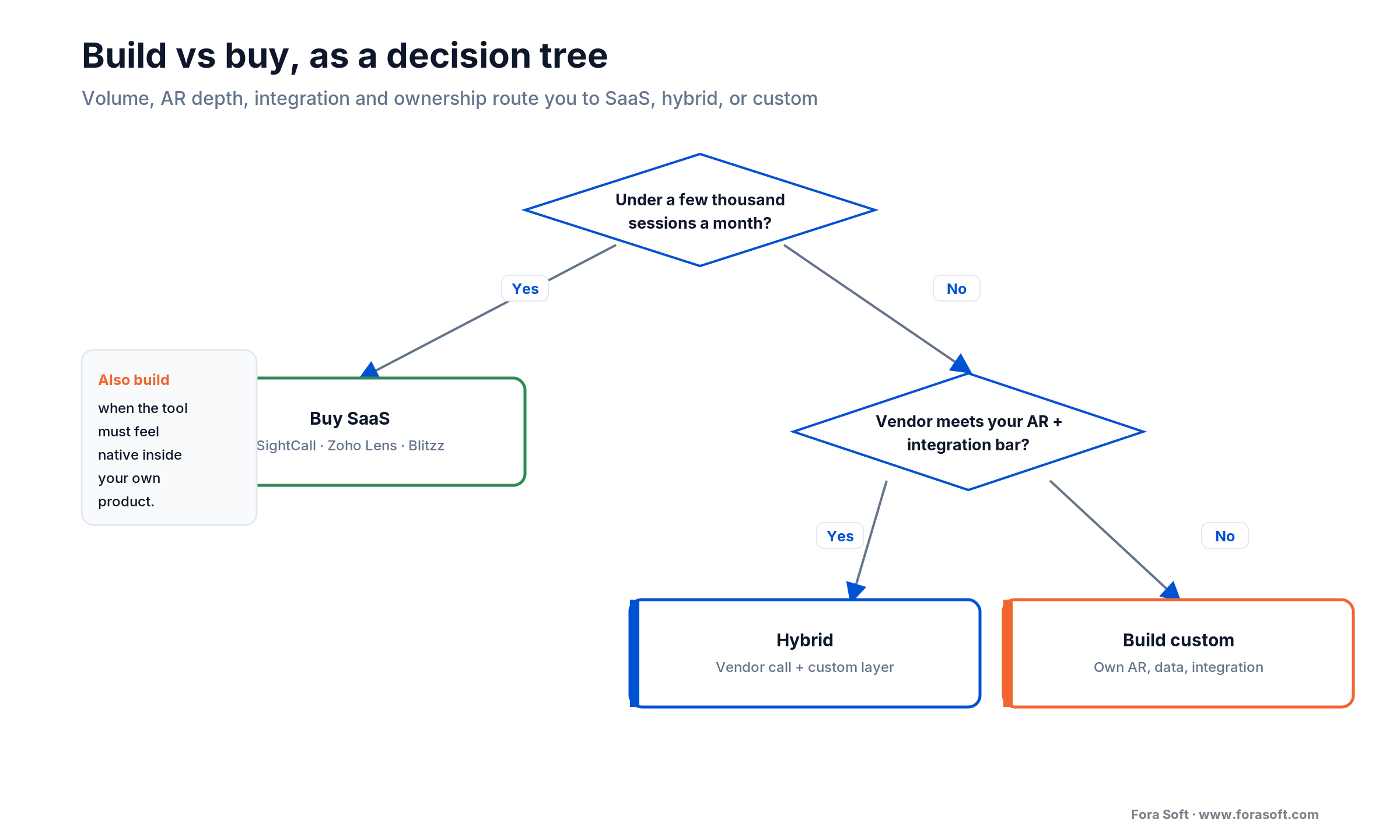
Figure 4. The build-vs-buy decision as a tree: volume, AR depth, integration, and ownership route you to SaaS, hybrid, or a custom build.
Five pitfalls that sink these projects
1. Treating AR as a screen overlay. A marker glued to screen coordinates drifts off the part the instant the phone moves. Build world-locked anchoring from day one, or you’ll rebuild it after the first field trial.
2. Requiring an app install. Every install step drops completion. If a customer has to visit an app store to get help, a chunk of them simply won’t. Browser-first, always.
3. Underestimating TURN and bandwidth. Field users sit behind carrier NAT, so most sessions relay through TURN and you pay for the gigabytes. Model this before launch, not after the first invoice.
4. Measuring deflection without quality. A deflection rate that spikes repeat contacts didn’t save money — it moved it. Track first-time fix and repeat-contact rate alongside deflection, or you’ll optimize the wrong number.
5. Bolting on consent and audit late. Recording consent, encrypted retention, and an access log belong in the first sprint. Retrofitting compliance into a live system costs multiples of building it in.
When NOT to use remote visual assistance
RVA is the wrong tool more often than the vendors admit. Skip it when:
The job needs hands or tools. A part has to be replaced, a reading taken behind a wall, a torque applied. A camera can guide, but it can’t turn a wrench. Video is for diagnosis and guidance, not physical work only a technician can do.
Safety or liability is high. Guiding an untrained person near live electrical, gas, or heavy machinery can be worse than sending a professional. Some faults should never be talked through with a customer, full stop.
Your users can’t support it. Poor connectivity, low device quality, or a population that won’t manage a video call will tank completion. Know your audience before you mandate the channel.
Volume is tiny. A handful of sessions a month doesn’t justify even a SaaS seat, let alone a build. A plain video call and a shared folder is a fine place to start; adopt software when the volume earns it.
Ready to see what your build actually looks like?
A senior engineer will map your assistance flow, the reusable pieces, and the net-new work — AR, capture, integration — in one call. Zero obligation.
FAQ
What is remote visual assistance?
Remote visual assistance is software that lets a remote expert see a problem through someone else’s phone or smart-glasses camera and guide the fix in real time, usually with on-screen AR annotations. It’s used in field service and customer support to resolve issues without dispatching a technician.
How does remote visual assistance work?
The expert sends a link, the person on site opens it in their phone browser (no app), and a WebRTC video call starts. The expert sees the live camera feed, draws AR annotations that stay locked to the real object, freezes frames to mark up sharp stills, and talks the person through the resolution. Notes and recordings save to the service ticket.
How much does remote visual assistance software cost?
SaaS ranges from a free tier and about $8 per technician per month (Zoho Lens) to roughly $35 per user per month (Blitzz, five-license minimum), with enterprise AR platforms like SightCall and TechSee quote-based (prices as of 2026-07-16). A custom build is low-to-mid six figures for a focused MVP, more for a from-scratch WebRTC-plus-AR platform.
What is the difference between remote visual assistance and remote video inspection?
Both use a guided video call, but the goal differs. Remote visual assistance resolves a problem — a service expert guides a technician or customer to a working fix. Remote video inspection documents a claim or asset and captures fraud-resistant evidence — an adjuster steers a claimant. Same video plumbing, different buyer and different outcome.
What’s the best remote visual assistance software?
There’s no single best — it depends on fit. SightCall and TechSee lead enterprise field service and AR; TechSee adds visual AI for contact-center deflection; Zoho Lens is the budget entry with real AR features; TeamViewer suits an existing remote-access estate; Blitzz is quick no-app video support. Build custom when volume, AR precision, or integration outgrow all of them.
Do people need to install an app?
The good tools don’t require one — they open a WebRTC session straight in the phone’s browser from an SMS or email link. App-free join is the single biggest driver of completion rate, so treat any required install as a red flag for a customer-facing support flow. Smart-glasses workflows are the exception and use a dedicated device.
How does the AR annotation stay on the object when the camera moves?
ARKit (iOS) and ARCore (Android) build a live 3D map of feature points and expose an anchor — a pose in world space the framework keeps updating. The annotation attaches to that anchor rather than to a screen coordinate, so it stays on the real part as the phone moves. ARCore’s Persistent Cloud Anchors can even be resolved from one day up to 365 days later.
Does remote visual assistance actually reduce truck rolls?
Yes, when the fault mix suits it. A dispatched visit runs $150–$500 (up to about $1,000 fully loaded); a remote session costs an expert’s minutes plus a few dollars. Deflecting even 30% of would-be visits at 20,000 visits a year saves on the order of $1M. The visits that still happen also arrive better-prepared, which lifts first-time fix rate.
What to read next
Architecture
WebRTC Architecture Guide for Business
The real-time media stack behind live support — STUN, TURN, and scale.
Adjacent
Remote Video Inspection Software
The inspection cousin: guided video for claims and evidence, not fixes.
Engineering
Real-Time Video Processing with AI
How live frames become detections, overlays, and structured output.
Case study
V.A.L.T. Video Management Platform
Recording, retention, and access at 770+ organizations.
Ready to scope a remote visual assistance build?
The case for remote visual assistance is settled: the cost of a wasted truck roll is too high to ignore, first-time fix rate is a board-level number, and the AR frameworks finally make precise guidance possible on an ordinary phone. What’s left is execution — picking the modality, meeting the AR bar, and deciding where the SaaS ends and your build begins.
Buy while a vendor fits. Build when volume, AR precision, or integration says it’s time. When you do, get the world-locked annotation and the freeze-capture path right, because that’s where the demo-to-production gap lives. If you want a second opinion before you commit budget, we’re happy to be the honest voice in your inbox.



The handbook · 7 volumes
Fora Soft Video Engineering Handbook
A remote assist session is a video call that has to work from a basement on one bar of signal, with AR drawn on top. We wrote seven volumes covering the video stack end to end, from encoding to AI. Start with Volume 3 on WebRTC and real-time delivery, then Volume 6 on computer vision and tracking, and Volume 1 for encoding on weak uplinks. Written by Nikolay Sapunov, CEO at Fora Soft.
Browse the handbook on Amazon →7 volumes · 9,000+ pages · Kindle & paperback
Let’s pressure-test your plan
Bring your dispatch volume, your AR requirements, and your service or CRM system. A senior engineer will tell you whether to buy, build, or blend — and what it really costs. 30 minutes, no sales deck.

