


Key takeaways
• A voice chat API is a hosted SDK that handles audio capture, encoding, low-latency transport and mixing so you add real-time talk to a game or social app without building the media stack yourself. The main options in October 2026 are Agora, LiveKit, Vivox, Photon Voice and GetStream, the free Discord Social SDK and EOS Voice, plus rolling your own on WebRTC.
• The pricing model matters more than the per-unit rate. Per-minute vendors (Agora at $0.99/1,000 min, GetStream at $0.30/1,000 participant-min, LiveKit) charge for talk time; per-CCU vendors (Vivox, free to 5,000 peak users; Photon, flat per concurrent user) charge for concurrency and let heavy talkers run free. At game engagement, that difference is the whole bill.
• Interactive voice has a hard latency budget. ITU-T G.114 calls one-way mouth-to-ear delay under 150 ms transparent; past 400 ms conversation breaks. A well-tuned path spends ~120 ms of that before you add a single feature.
• Moderation is a buying trigger, not an add-on. In one published study, players exposed to toxic voice chat were up to 50% more likely to rage-quit within 15 minutes. If your app has strangers talking, plan for real-time voice moderation from day one.
• Build your own only when you have a reason the SDKs can’t serve: a custom codec, true proximity audio, on-prem or data-residency rules, or volume where per-minute pricing against a premium vendor stops making sense. We say when below, with the math.
Updated October 2026: every vendor price re-checked on October 15 (Vivox now cited from Unity’s live pricing page), plus the free Discord Social SDK, LiveKit agent-minute pricing and a new game chat SDK comparison.
Why Fora Soft wrote this comparison
Search “voice chat API” and the first page is a browser extension, AI realtime-voice docs and vendor glossaries that define the term and then sell you their box. Nobody prices the real choice a product team faces: which SDK fits a game versus a social app, how the pricing models actually behave when you grow, and when you should stop renting and build. That gap is expensive. Pick the wrong pricing model and a successful launch can turn a $1,000 monthly bill into a $50,000 one without adding a single user you didn’t want.
We’re Fora Soft, a 50-person team building video, real-time and AI software since 2005, with 250+ shipped projects. We don’t sell a voice chat product, so we’ve no dog in this fight. What we do is wire these APIs into production apps and, when the SDK can’t do the job, build the audio stack from WebRTC up with our WebRTC development team — including a Swiss music app that hit sub-30 ms latency and its Discord-style gaming spinoff (both below).
So this guide does what the glossaries won’t. Every vendor price below was re-checked against the vendor’s own pricing page on October 15, 2026, with the date attached. Every latency claim names its source. And the “build it yourself” option gets the same honest treatment as the managed ones, including the cases where it’s a mistake. If you’re comparing the broader real-time media stack behind video too, our WebRTC vs Agora architecture piece is the companion to this one.
Voice chat APIs at a glance
The best voice chat API in 2026 depends on what you’re building. Vivox and Photon Voice are built for games and price by concurrent users, which is a gift if your players talk for hours. Agora is the broad, battle-tested per-minute workhorse for both voice and video. LiveKit gives you an open-source core you can self-host and a managed cloud on top. GetStream shines for social audio rooms. And when you need a custom codec, true proximity audio, or on-prem control, a WebRTC build beats all of them. If you’re already inside a game engine, start with what it bundles — Unity ships Vivox, and Epic’s Online Services Voice is free with EOS.
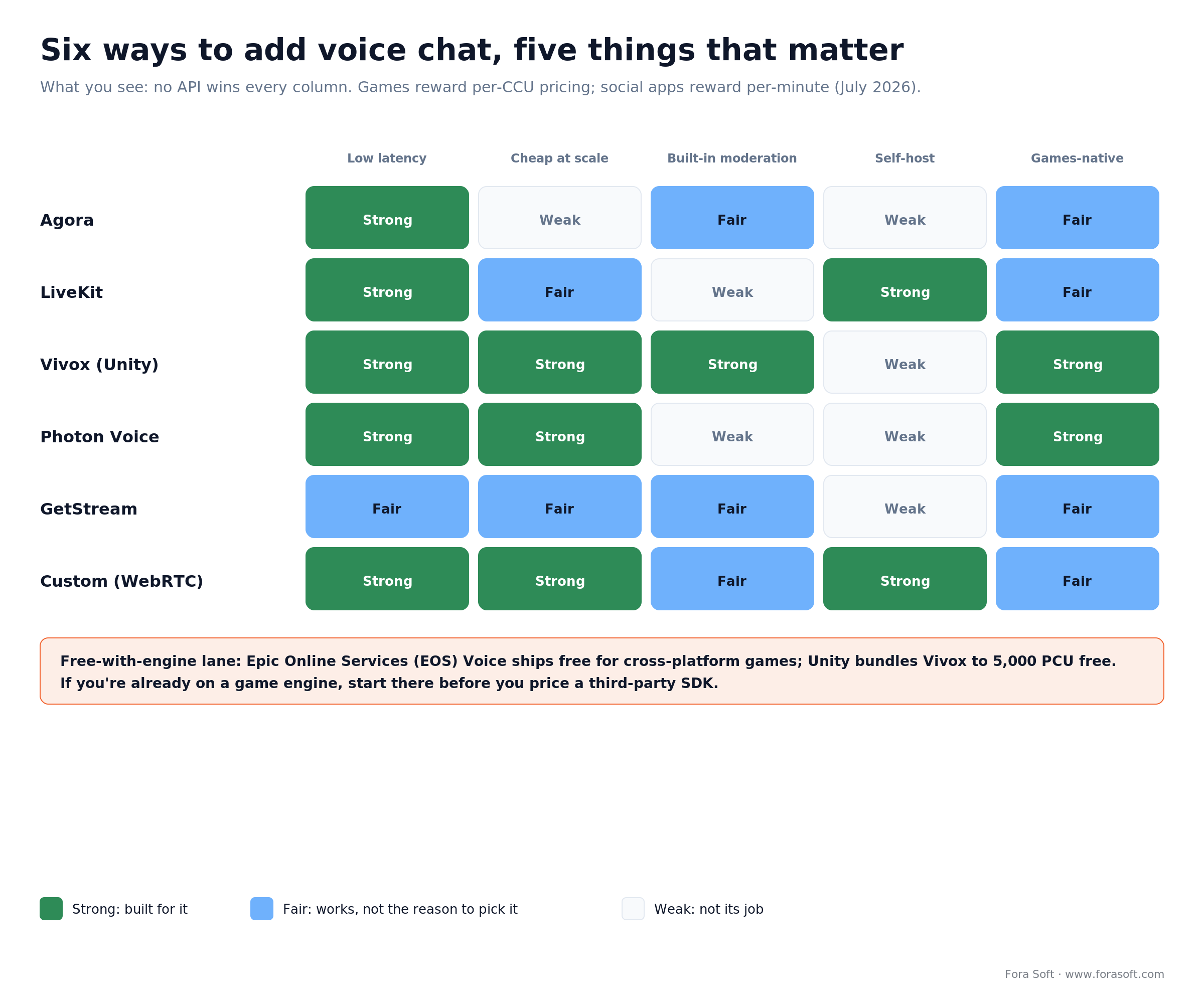
Figure 1. Six ways to add voice, five things that matter. No option wins every column, which is why “best voice chat API” is the wrong question — “best for my app” is the right one.
What actually matters in a voice chat API
Five things decide whether an SDK fits, and none of them is the marketing headline. Latency first: interactive voice lives or dies on time-to-ear, and we spend a whole section on the budget below. The pricing model second, because per-minute and per-concurrent-user billing behave in opposite directions as you scale. Moderation third: the moment strangers talk to strangers, safety stops being optional. Deployment fourth — can it ever run on your own infrastructure, which matters for data rules and for cost at the top end. And platform fit fifth: a voice SDK with a first-class Unity or Unreal package saves weeks of in-game voice chat wiring over one you bolt on.
One thing that barely matters: raw audio quality between the major vendors. They all run Opus, the same codec that powers WebRTC, and at a sane bitrate they all sound fine. Where they differ is everything around the codec: how they route packets, how they mix, what they charge, and what they hand you for moderation and spatial audio. So weigh those, not the demo.
1. Agora: pay-per-minute scale
Agora is the default per-minute pick, and for good reason: it’s been powering real-time audio and video at scale for years, its SDKs cover every platform you care about, and voice is the cheapest thing it sells. If your app mixes voice with video, or you want one vendor for both, Agora is the safe first call.
Pricing (docs.agora.io, checked October 15, 2026; page updated August 11, 2026). Audio is $0.99 per 1,000 minutes, with a default free package of 10,000 standard minutes a month that stops applying once you buy a package. Subscriptions cut the effective rate at volume: 50,000 minutes for $45.99, 150,000 for $133.99, 400,000 for $339.99, 800,000 for $659.99, up to 1.5 million for $1,217.99, then $0.99 per 1,000 above that. Advanced audio processing (echo cancellation, noise suppression) and media encryption are included on every tier.
Where it wins: maturity, one SDK for voice and video, and a rate that’s trivial at low volume. Where it breaks: the per-minute model. A minute is a minute whether a user whispers once or talks for an hour, so a high-engagement game racks up minutes fast — the math section shows just how fast. Our LiveKit vs Agora cost analysis runs that comparison in depth for video-heavy workloads. Already on Agora and the bill is the problem? Our Agora development team handles both sides: a deeper integration, or a staged migration off the per-minute meter.
Reach for Agora when: you want one mature vendor for both voice and video, your usage is 1:1 or small-group rather than always-on, and per-minute billing at your volume clears your budget.
2. LiveKit: open source plus WebRTC control
LiveKit is the pick when you want the option to own your stack later. The media server is open source (Apache-2.0) and self-hostable, so you can start on their cloud and move in-house without a rewrite, or run both. It’s become a default transport layer for real-time AI voice too — LiveKit’s site lists OpenAI, Nvidia and Salesforce among production users (October 2026).
Pricing (livekit.com, October 15, 2026). Cloud is tiered: Build at $0/month (5,000 WebRTC participant-minutes and 100 concurrent connections included), Ship at $50/month (150,000 minutes, then $0.0005/min, 1,000 concurrent), and Scale at $500/month (1.5 million minutes, then $0.0004/min, 5,000 concurrent). Media transport is quoted at under 250 ms globally with 99.99% uptime. Voice AI agents are metered separately: 1,000 agent session minutes on Build, 5,000 on Ship and 50,000 on Scale, then $0.01 per minute. Self-host and you pay only your own servers.
Where it wins: the open-source escape hatch, genuine WebRTC control, and a strong story for AI voice agents. Where it breaks: it’s still per-participant-minute on cloud, moderation is bring-your-own, and self-hosting trades the bill for DevOps you now own. It’s an engineer’s tool, not a turnkey game SDK. If you want that control without hiring for it, our LiveKit development team builds voice rooms on LiveKit Cloud or on self-hosted clusters.
Reach for LiveKit when: you want WebRTC control and a credible path to self-hosting, you’re building voice AI as much as human-to-human chat, and you have an engineering owner who’ll use that control.
3. Vivox: built for games (Unity)
Vivox is the voice chat behind a lot of the games you’ve played, and it’s now part of Unity Gaming Services. It does voice and text, ships a first-class Unity package (with support for other engines), and its pricing is quietly one of the best deals in this whole comparison for anything game-shaped.
Pricing (Unity Gaming Services pricing, October 15, 2026). Billing is by Peak Concurrent Users (PCU), and the first 5,000 PCU each month are free. Above that you pay per block of 5,000 PCU: $2,000 a block from 5,001 to 50,000 PCU, $1,500 from 50,001 to 100,000, $1,250 from 100,001 to 200,000, and $1,000 beyond that. It resets monthly. So a game with fewer than 5,000 players talking at any one moment pays nothing for voice, no matter how long they talk. Text moderation (Vivox Safe Text) is free up to 5,000 monthly actives, then $0.05 per user.
Where it wins: that free tier, the concurrency-based model that rewards long sessions, engine-native integration, and a real safety story via Unity’s Safe Voice moderation. Where it breaks: there’s no self-host, no hard usage cap (the 5,001st concurrent user quietly triggers a $2,000 bucket), and non-gaming (“Industry”) use is priced separately. Re-check Unity’s pricing page before you model; the tiers above are the ones it lists in October 2026.
Reach for Vivox when: you’re shipping a game (especially on Unity), your players talk in long sessions, and staying under ~5,000 peak concurrent means voice costs you nothing for a good while.
Not sure whether to price by the minute or the user?
Tell us your app type, expected concurrency and session length; we’ll map it against every option here and tell you which pricing model wins for your numbers, in one call.
4. Photon Voice: CCU pricing for games
Photon, from Exit Games, is the other games-first name, and Photon Voice slots alongside its multiplayer engine. Like Vivox it prices by concurrent users, but with published cloud tiers instead of buckets, which makes budgeting easy to reason about before you launch.
Pricing (photonengine.com, October 15, 2026). Free for 20 concurrent users (development only). Public Cloud gaming tiers: 100 CCU for a one-time $95 (twelve months, ~40k monthly actives), 500 CCU at $95/month (~200k MAU), 1,000 CCU at $185/month (~400k MAU), 2,000 CCU at $370/month (~800k MAU). Above that, Premium Cloud is $0.29 per CCU (minimum ~$580/month) and auto-scales to 50,000 CCU with DDoS protection. Photon’s own rule of thumb: 1 concurrent user maps to about 20 daily actives, and each daily active to about 20 monthly — so roughly 400 monthly actives per CCU. Plans include traffic (Premium gives 3 GB per peak CCU a month); extra traffic is $0.05–$0.10 per GB depending on region, which a voice-heavy game should budget for.
Where it wins: flat, predictable cost that ignores talk time, tight fit with the Photon multiplayer stack, and generous headroom before you hit real money. Where it breaks: no self-host, moderation isn’t built in, and it’s squarely a gaming product — a social or enterprise app is a poor fit.
Reach for Photon Voice when: you’re building a multiplayer game (bonus if you already run Photon), you want flat concurrency pricing you can forecast, and heavy voice usage per player would wreck a per-minute budget.
5. GetStream: audio rooms for social
GetStream (Stream) is the pick when your product is social rather than a game: Clubhouse-style audio rooms, live-shopping voice, community spaces. Its audio room API scales a single room to thousands of listeners, and it comes with the chat and moderation products a social app usually needs anyway.
Pricing (getstream.io, October 15, 2026). Audio-only is $0.30 per 1,000 participant-minutes on pay-as-you-go, and every account gets $100 of free usage a month (roughly 333,000 audio participant-minutes). A participant-minute is one user for one minute, so seven people talking for ten minutes is 70. Add-ons are metered on top: noise cancellation at $0.30 and audio recording at $1.50 per 1,000 minutes, transcription at $8 per 1,000 call minutes; a Moderation API comes with every plan and has its own usage pricing.
Where it wins: the cheapest per-minute rate here, audio rooms that scale to big passive audiences, and a bundled chat and moderation suite for social products. Where it breaks: it’s still per-minute, so an always-on game gets expensive; there’s no self-host; and it’s not built around a game engine. Our roundup of AI tools to elevate audio apps covers the layers you’d add on top.
Reach for GetStream when: you’re building social audio rooms or live shopping, you want chat and moderation from the same vendor, and your usage is bursty enough that per-minute pricing stays cheap.
6. EOS, Discord Social SDK and the free lane
Before you pay anyone, check what your platform gives you. Epic Online Services (EOS) Voice is free, cross-platform, and works whether or not you use Unreal — for many games it covers party and team chat at zero cost. Tencent RTC (TRTC) offers a voice chat API that’s strong if you’re shipping into Asian markets. And the open-source Simple Voice Chat mod is why Minecraft dominates the search results, though it’s a server plugin, not a general SDK.
The newest free option is the Discord Social SDK: lobby voice and text chat built on Discord’s voice stack, with Discord account linking optional, Unity and Unreal plugins, and builds for Windows, macOS, Linux, iOS, Android, Xbox and PlayStation. Version 1.10 shipped on September 1, 2026 (Discord release notes), with Krisp noise suppression, echo cancellation and push-to-talk in the box. It costs nothing, but you build on Discord’s terms and roadmap, and server-side control of the media isn’t on offer.
The honest take: free-with-engine options are the right starting point for a game, but they’re narrower than the paid SDKs on moderation, analytics and cross-platform social features. Start free, and move to a paid SDK or a custom build when you hit a wall you can name.
7. Custom / WebRTC: build your own
Every option above is someone else’s box. The eighth option is a stack you own, built on WebRTC and Opus, the same open technologies the SDKs use under the hood. For group voice you put a Selective Forwarding Unit (SFU) in the middle — mediasoup, Janus, Pion, or LiveKit’s open-source server — which forwards each speaker’s stream to the others without the cost of mixing everything on the server. Peer-to-peer works up to about four people; past that, you want an SFU.
You build this when the managed tiers can’t sell you what you need: a custom low-latency codec, true server-authoritative proximity audio, on-prem deployment for data rules, or the freedom from per-minute metering that only owning the pipes gives you. There’s no license fee — you pay for servers, bandwidth and engineering instead. A production-grade custom voice stack is on the order of $30k–$80k to build depending on scope, and then you own scaling and moderation yourself. That’s a real commitment, which is exactly why the decision framework below spends so long on whether you should.
Comparison matrix
All prices re-checked on vendor pricing pages on October 15, 2026 (Vivox’s on Unity Gaming Services pricing). “Model” is the axis that decides your bill, so read that column first.
| API | Pricing model | Headline rate | Moderation | Self-host | Best for |
|---|---|---|---|---|---|
| Agora | Per minute | $0.99 / 1,000 min (10k free) | Add-on | No | Voice + video, one vendor |
| LiveKit | Per minute + OSS | $0.0004–0.0005 / min; self-host free | Bring your own | Yes (Apache-2.0) | WebRTC control, AI voice |
| Vivox | Per peak user (PCU) | Free ≤5,000 PCU; $2,000/5k to 50k PCU | Safe Voice / Safe Text (add-on) | No | Unity games, long sessions |
| Photon Voice | Per concurrent user (CCU) | $95–$370/mo tiers; $0.29/CCU premium | No | No | Multiplayer games |
| GetStream | Per participant-minute | $0.30 / 1,000 min ($100 free/mo) | AI add-on | No | Social audio rooms |
| EOS Voice | Free | $0 with EOS | No | No | Party/team chat, any engine |
| Discord Social SDK | Free | $0 | Not listed | No | Voice + text lobbies, PC/console/mobile |
| Custom (WebRTC) | Your infra | $30k–$80k build, servers to run | You build / integrate | Fully | Custom codec, proximity, on-prem |
Game chat SDKs: text, voice and moderation together
A game chat SDK bundles text messaging, and often voice, with the social plumbing a multiplayer game needs: channels, direct messages, party chat, mute and report. If you want voice and text from one vendor, the October 2026 shortlist is Vivox and the free Discord Social SDK. If text is the main job, look at Stream Chat or Photon Chat and pair it with a voice SDK. And if you need to self-host, the open-source Nakama game server ships chat rooms, groups and DMs.
| SDK | Voice | Text chat | Self-host | Best for |
|---|---|---|---|---|
| Vivox | Yes | Yes, with Safe Text | No | Unity games that want one vendor |
| Discord Social SDK | Yes (lobbies, calls) | Yes | No | Free voice + text, PC/console/mobile |
| Stream Chat | Via Stream Video | Yes (Unity, Unreal SDKs) | No | Social features plus a moderation API |
| Photon Chat + Voice | Yes (Photon Voice) | Yes (Photon Chat) | No | Games already on Photon multiplayer |
| Nakama (Heroic Labs) | No, pair with a voice SDK | Yes (rooms, groups, DMs) | Yes (open source) | Self-hosted game backend with chat |
Looking for an open-source chat API? For text in games, Nakama is the usual answer; for voice, LiveKit’s Apache-2.0 server is the open-source core most teams start from. Whichever you pick, moderate both channels. In August 2026 Ubisoft reported that Rainbow Six Siege cut critical toxic voice chat by 50% after a year of Modulate ToxMod enforcement (EE Journal), so text-only filtering leaves the bigger risk open.
Per-minute vs per-CCU: the model decides the bill
Here’s the point the listicles miss. Take a hit game with ~5,000 peak concurrent voice users — by Photon’s own 400-monthly-actives-per-CCU rule of thumb, that’s on the order of 2 million monthly actives — whose players spend real time in voice, call it ~54 million participant-minutes a month. Peak concurrency is what actually drives cost, so we anchor on it. At list prices, October 2026, the same game costs wildly different amounts depending only on how the vendor counts.
Per-CCU vendors barely notice. Vivox is free at exactly 5,000 peak users; Photon’s Premium Cloud is 5,000 × $0.29 ≈ $1,450/month, flat, whether players whisper or talk all night. Per-minute vendors climb hard: GetStream at $0.30/1,000 is ~$16,200/month, LiveKit’s Scale tier lands near $21,000, and Agora at $0.99/1,000 is ~$53,000/month. A custom stack costs mostly infrastructure — a few thousand a month in servers and bandwidth — on top of the build.
Total cost of ownership at high concurrency is the vendor bill plus everything around it: moderation (often a second vendor), recording and transcription add-ons, egress traffic on CCU plans, and the engineering time to integrate and keep the SDK current. When the vendor line for the same 5,000-PCU game ranges from $0 (Vivox) to about $53,000 a month (Agora list), those extras decide which option is cheapest in total more often than the base rate does.
Two honest caveats. First, these are list prices: at this volume every per-minute vendor will negotiate enterprise rates, so treat the bars as the shape of the problem, not a quote. Second, flip the scenario — a social app where people dip in for a few minutes — and per-minute wins easily, because you’re not paying for concurrency you don’t have. The lesson isn’t “CCU good, minutes bad.” It’s match the billing model to how your users actually behave, and re-run the numbers every time engagement changes.
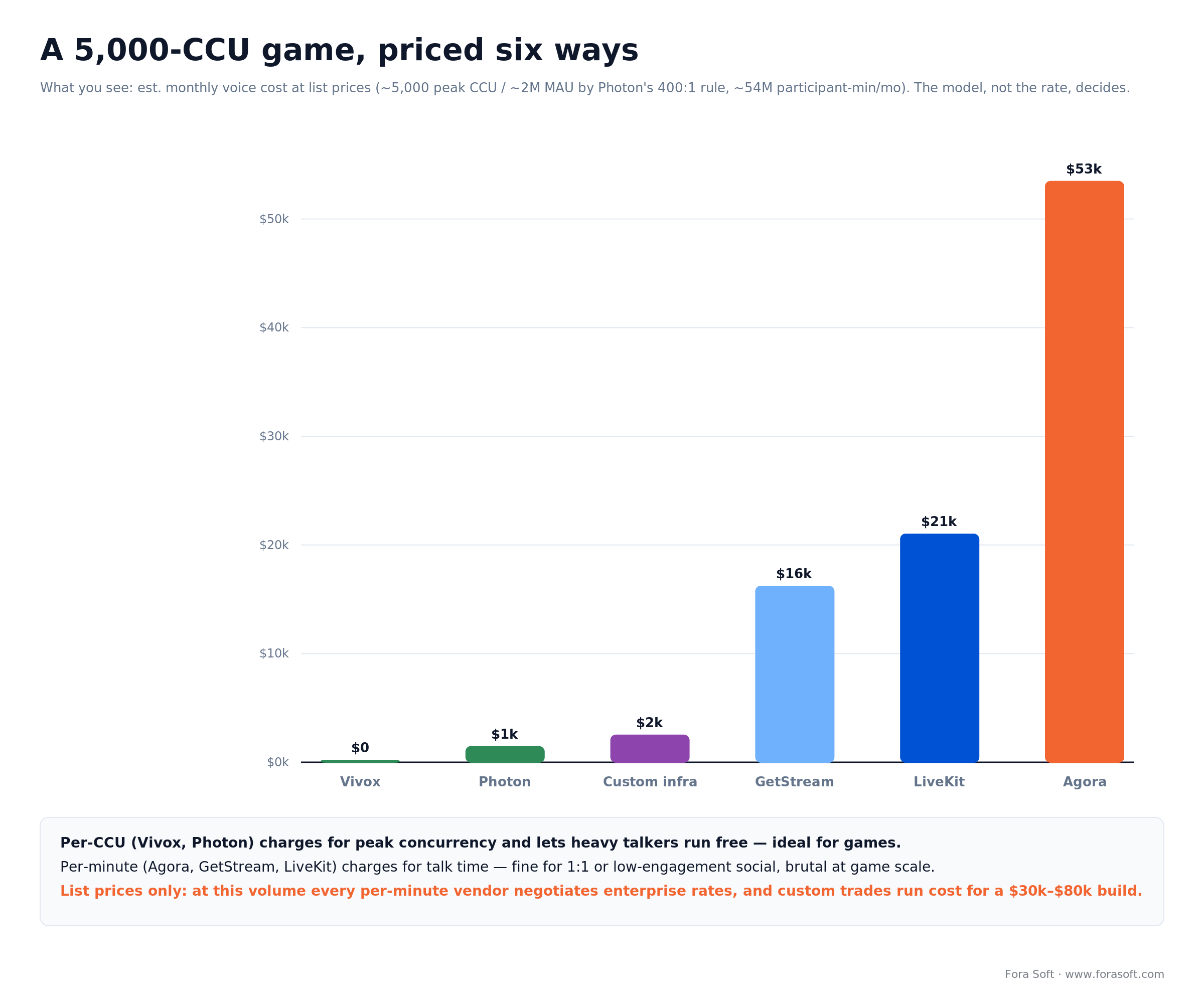
Figure 2. The same game priced six ways. The 30× spread comes almost entirely from the pricing model, not the per-unit rate.
Want your real voice bill modeled before you commit?
Bring your MAU, peak concurrency and average session length; we’ll price every option in this article for your workload and hand you the spreadsheet either way.
Latency: the sub-150 ms interactive budget
How fast does voice chat need to be? The reference point is ITU-T Recommendation G.114: one-way mouth-to-ear delay under 150 ms is “essentially transparent” — nobody notices. Between 150 and 400 ms the conversation still works but degrades, with people talking over each other more and more. Past 400 ms it’s broken. Some users tolerate up to ~275 ms, but 150 ms is the number to design against.
The trap is that a well-tuned path already spends most of that budget before you add anything. Reserve ~20 ms to capture and encode, ~40 ms for network (half the round trip), ~40 ms for the jitter buffer that smooths out packet timing, and ~20 ms to decode and play out. That’s ~120 ms one-way on a good day, and the jitter buffer is the honest villain — too small and lossy networks click and drop, too large and you blow the ceiling. Managed SDKs tune it for you; a custom stack lets you tune it per use case. We go deeper on the whole chain in our note on the sub-100 ms real-time latency budget.
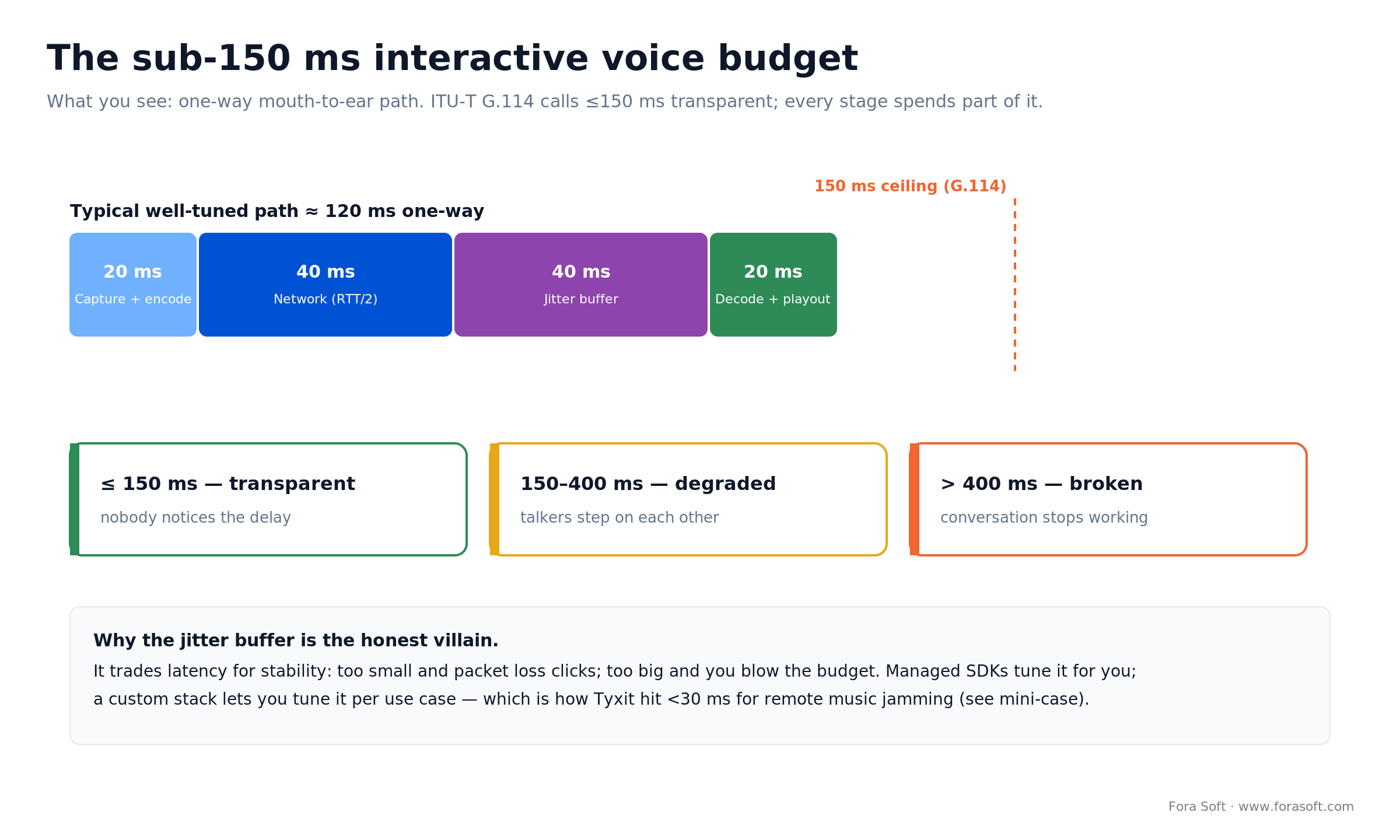
Figure 3. Where the 150 ms goes. Test latency at your real concurrency, not on an idle endpoint — the number your users feel at peak is the only one that counts.
Proximity voice chat: how spatial audio works
Proximity voice chat — hearing nearby players louder and distant ones fade — is one of the most requested features in games, and one of the trickiest to get right. The mechanic is simple: each listener hears each speaker at a volume set by the distance between their in-game positions. The engineering is where it gets interesting.
The rule that saves you: the server owns the gain math, not the client. Clients report positions, the game server treats those as authoritative, and a solver computes a per-listener volume for every speaker using a distance-attenuation curve — full volume within a small radius, rolling off to silence past a cutoff. Beyond that cutoff you don’t send the stream at all, which saves bandwidth. Do the volume math server-side and a cheater can’t patch their client to hear everyone across the map. Off-the-shelf SDKs mostly leave proximity to you; it’s a common reason teams move to a WebRTC build where they control the SFU and the mixing.
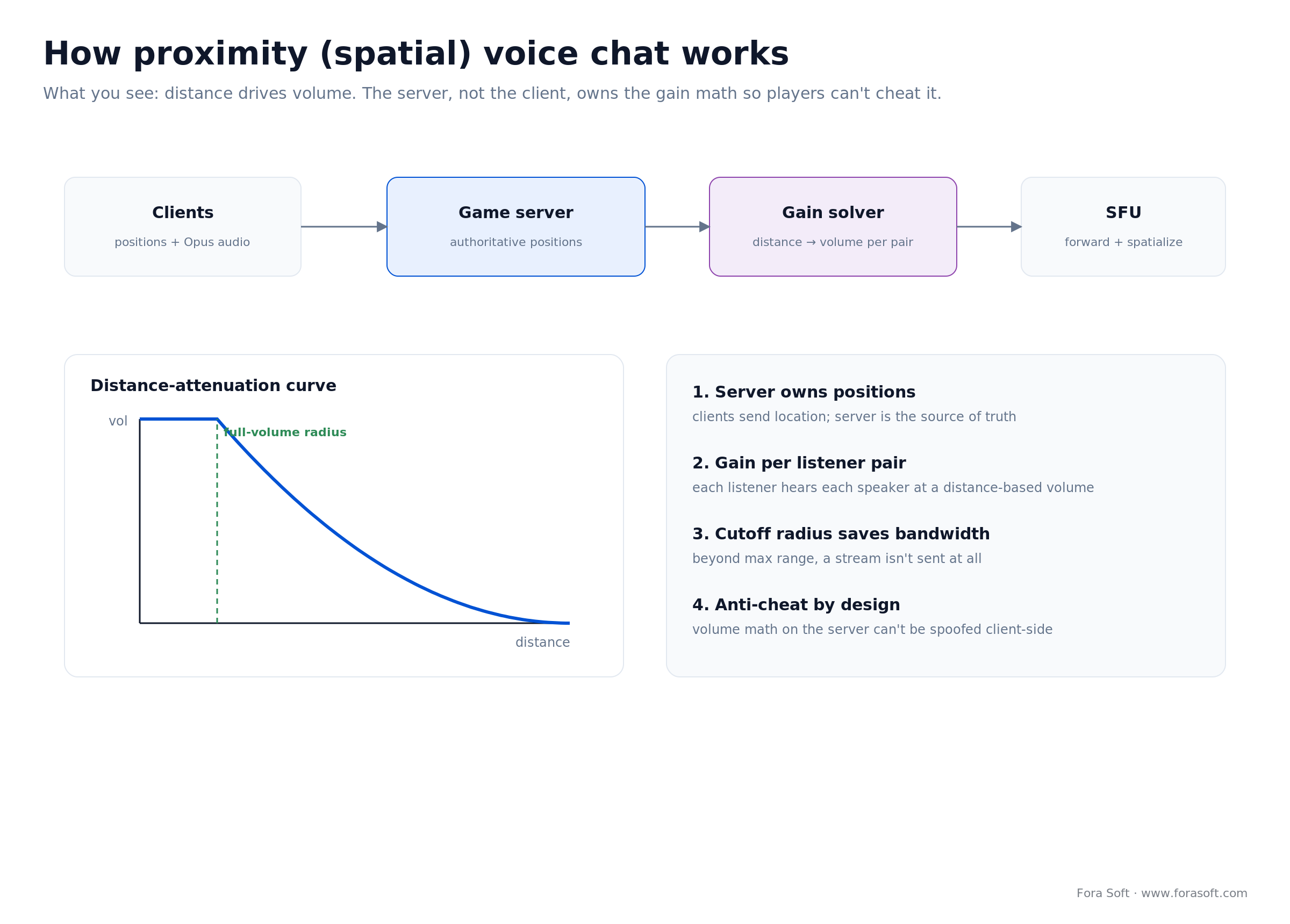
Figure 4. Distance drives volume, and the server owns the math so it can’t be spoofed. The cutoff radius doubles as a bandwidth control.
Voice moderation: the safety layer buyers forget
The feature teams underestimate most is safety. The moment strangers talk to strangers, toxicity follows, and it’s not just unpleasant — it costs you players. In a published analysis of AI voice moderation in Grand Theft Auto Online, players exposed to abusive voice chat in the previous five minutes showed up to 50% higher anger scores, and high anger was linked to up to a 50% higher chance of logging off within fifteen minutes. Over 2025, moderation cut that title’s weekly violator rate from 3.2% to 0.49% at over 98% precision (Modulate case data). The newest public number is from Rainbow Six Siege: after ToxMod went live in September 2025, per-session toxicity fell from about 37% to 8% within two weeks of enforcement, Ubisoft and Modulate reported in August 2026.
Modern voice moderation listens for tone, intensity and escalation, not just banned words, and flags likely violations for review in real time. Some SDKs bundle it — Unity’s Safe Voice sits alongside Vivox, GetStream offers AI moderation — while others leave you to integrate a specialist. If you build your own stack, moderation becomes your responsibility to wire in, which is exactly what we did on BlaBlaPlay below, with a custom model that screens voice notes before they reach the feed. Decide your moderation approach when you pick the API, not after your first incident.
Our solution: a voice stack you own
We kept Fora Soft out of the numbered list on purpose — we’re not a voice chat vendor. What we build is the eighth option: a stack you own, assembled from the right parts for your app. A WebRTC transport layer with an SFU sized to your group patterns, Opus tuned for your latency target, server-authoritative proximity if your game needs it, and moderation wired in as a first-class stage rather than an afterthought.
The pattern that works: start on a managed SDK, instrument everything, then replace the piece that hurts. Your first version ships on Agora, Vivox or LiveKit in weeks. Usage data then tells you exactly which cost or capability is the bottleneck — per-minute billing at scale, a missing custom codec, a data-residency rule — and that’s the piece you take in-house. Teams that skip the managed phase build the wrong thing; teams that never leave it hand margin to their vendor forever. A production voice layer of this class is real-time communication work we scope in the $30k–$80k range depending on features, and the full app around it is our video and voice chat app development practice.
Mini-cases: Tyxit and BlaBlaPlay
Tyxit is our clearest proof of when custom wins. The Swiss startup lets musicians jam together remotely “as if they’re in the same room,” which means latency low enough that no off-the-shelf SDK could deliver it. We helped build a stack on WebRTC with a proprietary codec that hit under 30 ms — well inside the transparent zone — and in 2022 professional musicians used it to play synchronously between the stages of the Montreux Jazz Festival and Jazz à Vienne, live in front of an audience. Tyxit then spun out SONIX, a gaming voice chat positioned as a low-latency Discord alternative, which reached 30,000+ downloads and a partnership with esports org Karmine Corp. When the voice quality is the product, you own the pipes. See the Tyxit project for the full build.
BlaBlaPlay is the social side, and the moderation story from above made real. It’s an anonymous voice social network we launched in 2023 where users post voice messages to a public feed, reply, and move into private chat — all without revealing identity. Because strangers talk to strangers, moderation had to come first: we trained a custom neural network that screens voice notes for offensive content and flags them for admin review, with Whisper transcription and on-device processing so it stays fast. The full story is in our BlaBlaPlay case study.
Two apps, two answers. Tyxit needed a custom codec, so it built. BlaBlaPlay needed a fast path to market with strong moderation, so it started managed and owned only the safety model. That’s the whole decision in two projects — and the framework below turns it into five questions.
Decision framework: five questions
1. Are you already on Unity or Unreal? If yes, start with what’s engine-native: Vivox on Unity, EOS Voice with Unreal or any engine. Free tiers cover you a long way, and the integration is done for you.
2. Do players talk a lot, at high concurrency? Long sessions and lots of simultaneous talkers reward per-CCU pricing (Vivox, Photon), where heavy usage is effectively free. If that’s your game, per-minute vendors will punish exactly the engagement you’re trying to grow.
3. Do you need data control, a custom codec, or true proximity audio? Any one of these pushes you toward LiveKit’s open-source core or a full custom build, because the managed tiers won’t sell you server-side control over the media.
4. Is it social with bursty usage? Audio rooms, live shopping, communities where people dip in and out favor per-minute vendors (GetStream, Agora), where you only pay for the minutes actually spoken.
5. Who owns it when it breaks? No engineering owner means stay fully managed, full stop. An owner but a small team is the sweet spot for an agency-built stack with a support contract — the shape most of our voice engagements take. It’s a 30-minute call to scope.
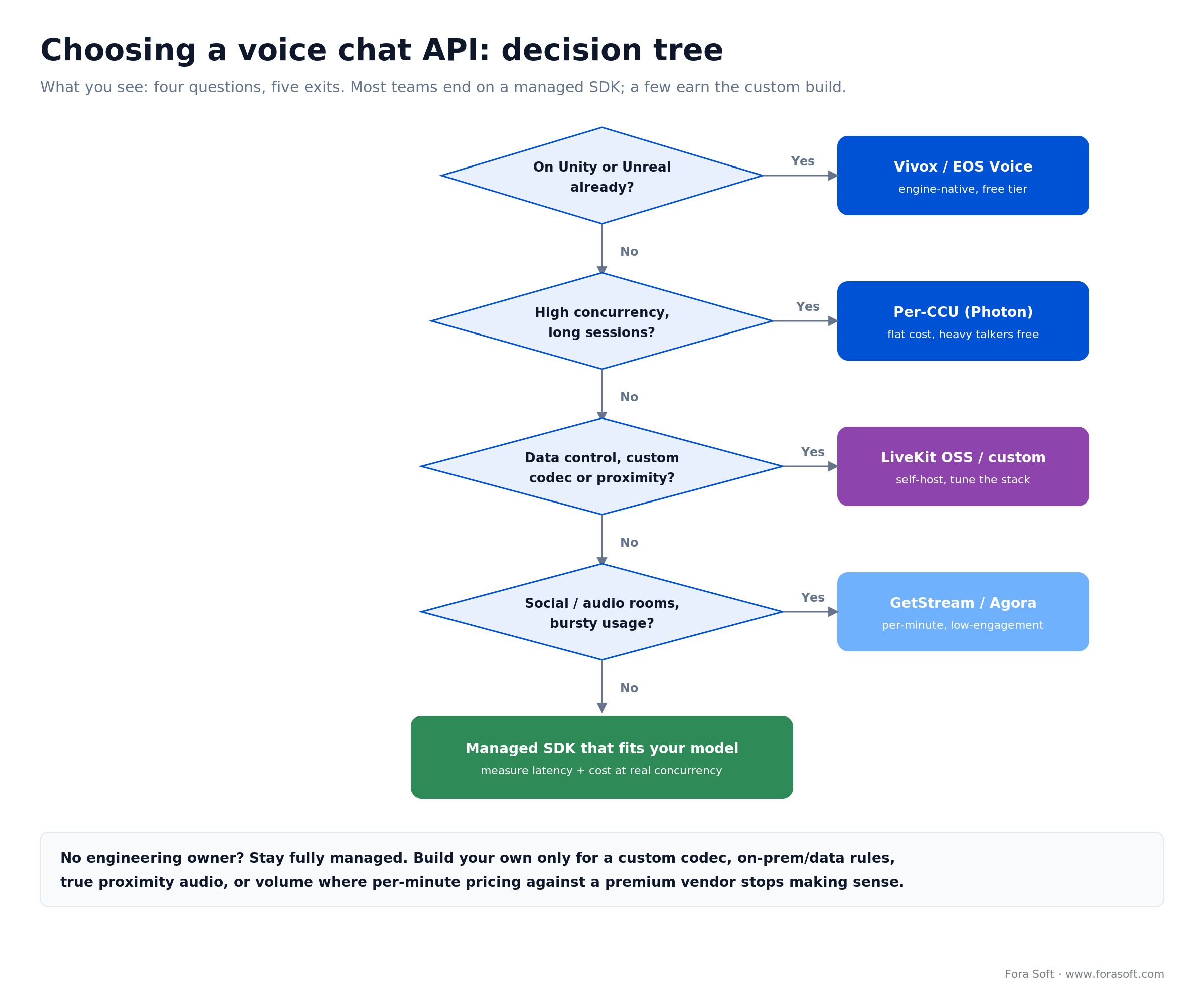
Figure 5. Four branch-points map most teams to a managed SDK; the fifth question — who owns it when it breaks — decides the ones still on the fence.
Which lane fits your app?
Thirty minutes with our engineers: we run these five questions against your product, shortlist the APIs that fit, and tell you honestly whether a custom build is worth it.
When NOT to build your own
A guide that always says “build it” is a sales pitch. So here’s the other side. Don’t build if a managed SDK already fits your model. If you’re a game under 5,000 peak users, Vivox is free and you’d be spending $30k to replace $0. If you’re bursty social, GetStream’s per-minute rate is cheap and battle-tested. Owning the stack only pays when the SDK genuinely can’t serve you.
Don’t build without an engineering owner. A self-hosted voice stack with nobody responsible for it becomes the most expensive, most fragile infrastructure you run. That’s not hypothetical — it’s the rescue project we’re called into more than once a year.
And don’t build before you’ve shipped on a managed SDK. The fastest way to build the wrong pipeline is to build it before real usage tells you what actually hurts. Ship managed, measure, then take in-house only the piece the data points at.
Five pitfalls when integrating voice chat
1. Comparing rates instead of pricing models. $0.99 versus $0.30 per thousand minutes tells you nothing until you know whether your app is billed by the minute or the concurrent user. The model, not the rate, is a 30× swing.
2. Trusting headline latency. Vendors quote best-case numbers on idle endpoints. Measure time-to-ear yourself at your real concurrency, because the figure your users feel at peak is the only one that matters.
3. Treating moderation as a later problem. If strangers talk to strangers, toxicity arrives on day one and costs you players. Decide your moderation approach when you pick the API, not after your first incident.
4. Doing proximity audio on the client. If the client decides who it can hear, cheaters will patch it to hear everyone. Keep the gain math server-authoritative from the start.
5. Forgetting the network reality. Mobile players roam between cell and Wi-Fi, and your jitter buffer and reconnection logic decide whether that’s a hiccup or a dropped call. Budget for the messy network, not the demo on office Wi-Fi.
FAQ
What is a voice chat API?
A voice chat API is a hosted SDK that handles the hard parts of real-time audio — capturing the microphone, encoding with a codec like Opus, moving packets across a low-latency network, and mixing or forwarding streams — so you can add live talk to a game or social app with a few calls instead of building the media stack yourself. Leading options in October 2026 include Agora, LiveKit, Vivox, Photon Voice, GetStream and the free Discord Social SDK.
What is the best voice chat API for games?
For games, the per-concurrent-user pricing of Vivox (free to 5,000 peak users, and Unity-native) or Photon Voice (flat CCU tiers) usually beats per-minute vendors, because players talk in long sessions. If you’re on Unreal or want zero cost, Epic Online Services Voice is free. Reach for a per-minute API like Agora only if your voice usage is light or you want one vendor for both voice and video.
How much does a voice chat API cost?
At October 2026 list prices: Agora is $0.99 per 1,000 audio minutes (10,000 free monthly), GetStream $0.30 per 1,000 participant-minutes ($100 free monthly), LiveKit $0.0004–$0.0005 per participant-minute on cloud (free self-host). Vivox is free to 5,000 peak concurrent users, then $2,000 per additional 5,000 up to 50,000; Photon runs $95–$370/month by CCU tier. The real cost depends on your pricing model far more than the rate — see the cost section.
What latency does voice chat need?
ITU-T G.114 puts the target at under 150 ms one-way mouth-to-ear for transparent, natural conversation. Between 150 and 400 ms it degrades and people talk over each other; past 400 ms it’s effectively broken. A well-tuned path already uses about 120 ms across capture, network, jitter buffer and playout, so there’s little slack — test at your real concurrency, not on an idle connection.
How do I add proximity (spatial) voice chat?
Have clients report positions, treat them as authoritative on the game server, and compute a per-listener volume for each speaker from a distance-attenuation curve — full volume within a small radius, rolling off to a cutoff beyond which the stream isn’t sent. Do the gain math server-side so it can’t be spoofed. Most managed SDKs leave proximity to you, which is a common reason teams move to a WebRTC build with their own SFU.
Should I build my own voice chat or use an API?
Use an API unless you have a reason it can’t serve: a custom low-latency codec, true server-authoritative proximity audio, on-prem or data-residency rules, or volume where per-minute pricing against a premium vendor stops making sense. A custom WebRTC stack runs roughly $30k–$80k to build plus your own infrastructure and moderation, so it pays only when the managed tiers genuinely fall short.
Do voice chat APIs include moderation?
Some do as add-ons — Unity’s Safe Voice pairs with Vivox, and GetStream offers AI moderation — while Agora, LiveKit and Photon expect you to integrate a specialist or build your own. Given that abusive voice chat measurably drives players to quit, treat moderation as part of the buying decision, not a later bolt-on.
Is Vivox free?
Yes, up to 5,000 peak concurrent users a month. Above that, Unity charges $2,000 per extra block of 5,000 PCU up to 50,000, with lower per-block rates beyond that (Unity Gaming Services pricing, October 2026).
What is the best chat SDK for games with text and voice?
Vivox and the free Discord Social SDK cover voice and text in one package. Stream Chat (Unity and Unreal SDKs) and Photon Chat cover text and pair with a voice SDK, and Nakama is the open-source, self-hosted option for chat plus a game backend.
How do I integrate an in-game voice chat SDK?
Pick the SDK by pricing model, install its Unity or Unreal package, and issue short-lived access tokens from your game server. Then map parties and teams to voice channels, add push-to-talk plus mute and report, and load-test latency at real concurrency before launch.
How do I build in-app voice chat for a marketplace app?
Use a per-minute API such as Agora, GetStream or LiveKit for 1:1 buyer–seller calls, route calls in-app so phone numbers stay private, and record only with consent. Marketplace usage is bursty, so per-minute billing stays cheap; build custom only for data-residency or deep workflow needs.
What to Read Next
Architecture
WebRTC vs Agora Trade-offs
The media-stack decision behind voice and video, one layer down from this guide.
Cost
LiveKit vs Agora Cost Analysis
The same pricing-model logic, run in depth for video-heavy real-time workloads.
Case study
BlaBlaPlay: Voice + AI Moderation
How we built anonymous voice social with custom AI moderation baked in.
Audio AI
7 AI Tools to Elevate Audio Apps
The noise suppression, transcription and voice layers you add on top of chat.
Services
Real-Time Communication at Fora Soft
How we build voice and video into production apps, with real budgets.
Ready to pick the right voice stack?
The short version: match the API to your app, and the pricing model to your users. Games with long sessions want per-CCU pricing (Vivox, free to 5,000 peak; Photon, flat) or a free engine-native option (EOS). Bursty social apps want per-minute (GetStream, Agora). Anyone needing WebRTC control, self-hosting or AI voice looks at LiveKit. And when you need a custom codec, real proximity audio, or on-prem, that’s when you build. Whatever you pick, design against the 150 ms latency ceiling, test at real concurrency, and plan moderation from day one.
When voice stops being a checkbox and becomes the thing your product is known for — or the monthly bill crosses the line where owning the stack pays — that’s the moment to build. We’ve made that call for real-time apps across 250+ projects since 2005, from a sub-30 ms music platform to an anonymous voice social network, and we’ll tell you honestly which side of the line you’re on.
The book · Volume 5 of 7
Audio for Video: A Complete Guide to Sound in Video Products: From Jitter Buffers and Lip Sync to Atmos, Quality Metrics, and Neural Codecs
Picking a voice SDK settles the bill; what players actually hear depends on how audio survives a bad connection. Our audio volume on networked sound covers jitter buffers and NetEq, packet-loss concealment, FEC and RED, spatial audio for proximity chat and quality metrics like POLQA and ViSQOL, the toolkit for keeping a squad call clear under the sub-150 ms budget. Written by Nikolay Sapunov, CEO at Fora Soft.
Read it on Amazon →Kindle & paperback · Fora Soft Video Engineering Handbook
Ready to build voice chat that scales?
Thirty minutes with our team: we’ll pressure-test your use case, pick the API or build that fits, and price it honestly — including when staying managed is the smarter play.

