


Updated October 2026: LiveKit's new Krisp VIVA and ai-coustics voice-isolation results (WER 117.6% → 11.8% / 7.1%), Krisp VIVA 2.0, and the 2026 RNNoise WASM packages, including a GTCRN worklet; Twilio's Krisp placement corrected to client-side.
WebRTC Noise Suppression: The Short Answer
WebRTC noise suppression is the stage that removes background sound — fans, traffic, keyboards, and with newer models other people's voices — from microphone audio before it is compressed by the Opus codec and sent to the other side of a call. Every browser already runs a built-in suppressor that you switch on with getUserMedia({ audio: { noiseSuppression: true } }). When it is not good enough you have two other places to put a model: in the browser on raw audio before the encoder (RNNoise compiled to WebAssembly inside an AudioWorklet, or a managed SDK such as Krisp), or on the server for phone-in callers and AI agents (Krisp, ai-coustics or NVIDIA Maxine). Two rules hold everywhere: suppression must run on raw samples, never inside a WebRTC Encoded Transform, and exactly one noise suppressor may sit in the path, so switch the built-in one off when you add your own.
| Where it runs | Typical engine (2026) | Cost | Choose it when |
|---|---|---|---|
| Built-in, at capture | Browser suppressor via noiseSuppression: true |
Free | Ordinary rooms, steady noise; always try it first |
| Custom, in the browser before Opus | RNNoise WASM, GTCRN, DeepFilterNet; Krisp web SDK | Free (open models) or licensed (Krisp) | Browser users complain about noise the built-in one misses |
| Server: SFU, agent or SIP gateway | Krisp VIVA, ai-coustics Quail, NVIDIA Maxine | Per stream, on your servers or your vendor's bill | Phone-in callers, AI voice agents, central control |
Why This Matters
If your product runs live calls in the browser — video conferencing, telemedicine, an AI voice agent, a sales-coaching tool — background noise is the fastest way to make it feel cheap, and noise suppression is the fix. But in WebRTC the hard part is not which model to pick; it is where to put it, because the same model produces clean audio in one slot and broken, robotic audio in another. This article is for the product manager, founder, or engineering lead who has to decide how clean audio gets built into a WebRTC product and who has to talk to engineers about it without being bluffed by a demo. By the end you will understand the WebRTC audio path well enough to know why noise suppression belongs before the encoder, how RNNoise and Krisp AI actually attach to a live call, why running two suppressors at once makes things worse, and how to choose between building it yourself and buying a managed engine. If you want the deep comparison of how the models differ on speed, quality, and licensing, that lives in our companion article on real-time noise suppression models; this one is about plumbing them into WebRTC.
The WebRTC Audio Path, And The Three Homes For A Suppressor
To place a suppressor correctly you first need a mental map of where sound travels in a WebRTC call. The path is always the same. Your microphone captures sound. The browser cleans it a little. The audio is then compressed by a codec — almost always Opus, the codec WebRTC requires every browser to support (IETF, RFC 7874). The compressed audio crosses the network, often through a server called an SFU — a Selective Forwarding Unit, the relay that copies each person's stream to everyone else. At the far end the audio is decompressed and played to the listener's ear.
"Compressed" is the word that matters most here, so let us anchor it. Compressing audio means throwing away detail to make the data small enough to send — like saving a photo as a small JPEG instead of the full-size original. Once audio is compressed by Opus, the individual sound samples are gone; what remains is a dense package of bytes that a decoder can turn back into approximate sound. Hold that thought, because it decides everything below.
A noise suppressor can be inserted in exactly three places along that path. The first is the built-in suppressor the browser already runs at capture, before anything else. The second is a custom model you insert yourself, after capture but before the Opus encoder compresses the sound. The third is on the server — inside the SFU, inside an AI agent that receives the call, or at the phone-line gateway for calls that come in over the traditional telephone network. Each home has different costs, and most of this article is about choosing among them.
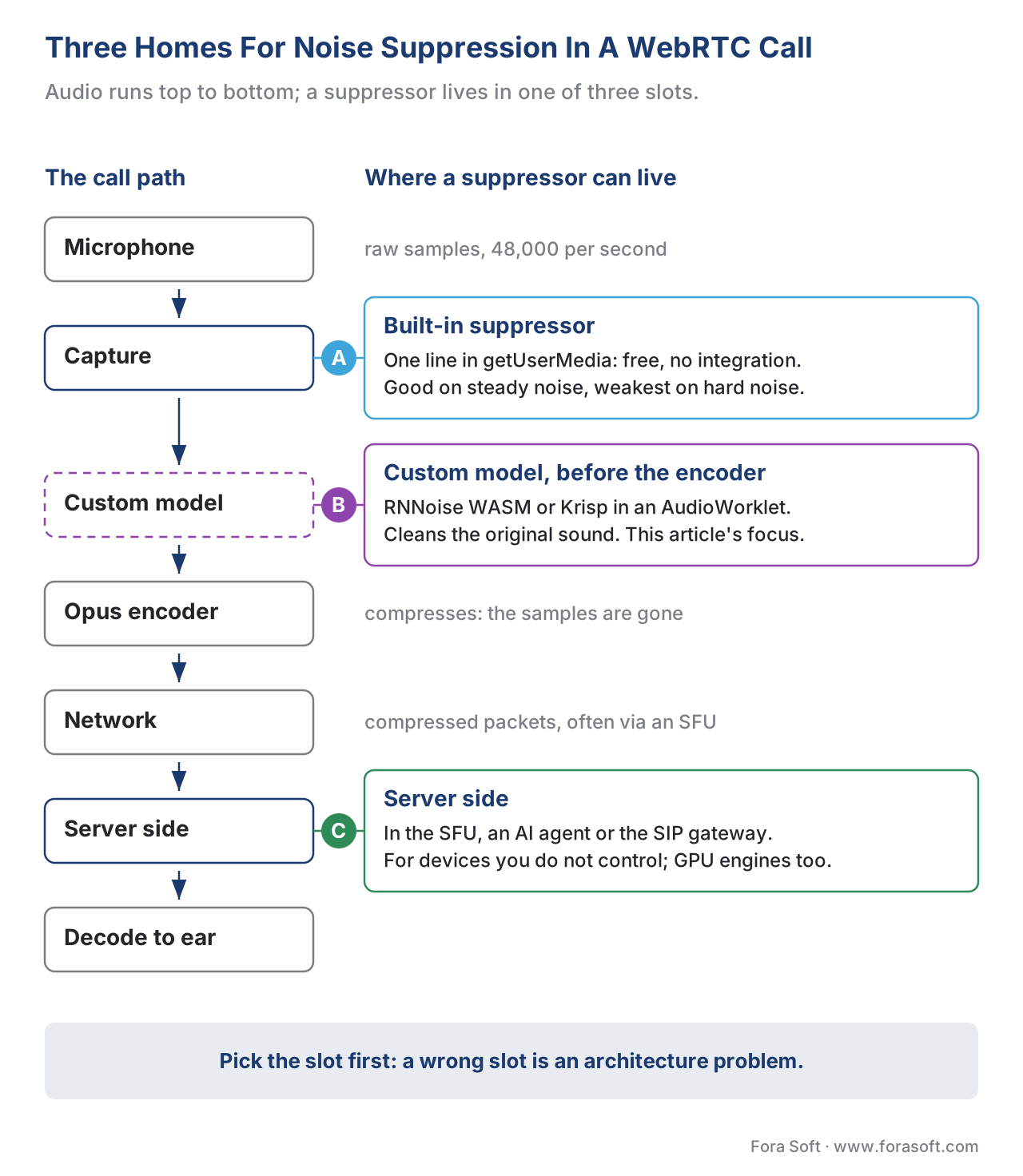 Figure 1. A WebRTC call has exactly three places to suppress noise: the built-in browser suppressor (A), a custom model before the encoder (B), or a model on the server (C).
Start With What You Already Have: The Built-In Suppressor
Before you integrate anything, check whether the suppressor you already get for free is enough. Every WebRTC browser ships an audio-cleanup stage at capture that includes noise suppression, echo cancellation, and automatic gain control. You switch the noise part on with a single option when you ask for the microphone.
// Ask for the mic with the browser's built-in noise suppression and echo cancellation on.
navigator.mediaDevices.getUserMedia({
  audio: { noiseSuppression: true, echoCancellation: true },
  video: false
});
This noiseSuppression option is part of the W3C Media Capture and Streams standard — the specification that defines how a web page gets a microphone (W3C, Media Capture and Streams). When you set it to true, the browser applies its own built-in suppressor. It is free, it adds no integration work, and the audio never leaves the device.
The catch is quality. The built-in suppressor is tuned for ordinary two-way conversation in a moderate room. It handles a steady fan or hum well, but it is weaker than a modern dedicated model on hard cases — overlapping background voices, sudden clatter, a busy café. For many products the built-in baseline is genuinely enough, and the correct engineering decision is to ship it and move on. You reach past it only when users complain about noise it misses, or when you need the same behaviour across every browser instead of each browser's own version. (For the rule of trying the built-in baseline first and the quality differences between models, see the models article.)
Why Noise Suppression Cannot Live In An Encoded Transform
When teams decide to add a custom suppressor, the first wrong turn is reaching for the wrong API. WebRTC exposes a feature called Encoded Transform that lets you run your own code on the media as it flows through a call, and it sounds like the perfect hook. It is the wrong one for audio cleanup, and understanding why teaches you the core rule.
The WebRTC Encoded Transform standard runs your code on encoded frames — the audio after the Opus codec has already compressed it, sitting between the encoder and the part that packages it for the network (W3C, WebRTC Encoded Transform). Remember the JPEG analogy: by the time audio reaches this stage, the individual sound samples have been thrown away and replaced with compressed bytes. A noise suppressor works by examining the actual sound — which frequencies are voice, which are noise — and turning the noise down. It cannot do that to a package of compressed bytes any more than you can erase a person from a photo by editing the file's compression data. Encoded Transform is built for things that operate on the compressed package as a whole, such as end-to-end encryption. It is the wrong layer for noise suppression.
The right layer is raw audio — the uncompressed stream of sound samples, before the encoder touches them. The browser gives you two ways to reach raw audio. The older, widely supported way is the Web Audio API's AudioWorklet, a small audio-processing unit that the browser runs in a dedicated audio thread (W3C, Web Audio API). The newer way is a MediaStreamTrackProcessor, which exposes each chunk of microphone audio as a raw AudioData object you can read and modify (W3C, MediaStreamTrack Insertable Media Processing). Both put your code in the right place: after capture, on raw samples, before the Opus encoder. That is insertion point B from Figure 1, and it is where every custom suppressor belongs.
 Figure 2. Noise suppression needs raw samples, so it belongs in an AudioWorklet before the encoder — never in an Encoded Transform, which only sees compressed bytes.
Wiring RNNoise Into The Browser: The AudioWorklet Pattern
The cleanest example of building a custom suppressor into a WebRTC call is RNNoise running in an AudioWorklet, and it is not theoretical — it is exactly how the open-source Jitsi Meet conferencing platform ships noise suppression. Walking through their approach shows every moving part.
RNNoise is a tiny open-source noise suppressor written in the C programming language. To run it in a browser, you compile it to WebAssembly — usually shortened to WASM — a format that lets non-browser code like C run at near-native speed inside a web page (Jitsi, 2022). The compiled module is small: the rnnoise.wasm file in Jitsi's @jitsi/rnnoise-wasm 0.2.1 package is about 110 KB (npm, accessed October 2026), small enough to load instantly. Upstream RNNoise was last released as version 0.2 in April 2024, with a retrained model and SSE4.1/AVX2 optimisations for native builds (Phoronix, 2024).
The reason it goes in an AudioWorklet rather than older audio code is responsiveness. The browser's earlier audio-processing hook ran on the main thread — the same thread that draws the page and handles clicks — so any hiccup in the interface could distort the audio. An AudioWorklet runs on a separate, dedicated audio thread, so the sound is processed without interference from the rest of the page (W3C, Web Audio API). Jitsi moved from the old main-thread approach to an AudioWorklet precisely because, once you are modifying the audio rather than just measuring it, any delay or stutter becomes audible (Jitsi, 2022).
There is one piece of arithmetic every team hits here, and it is worth showing because it explains a real chunk of integration work. An AudioWorklet hands your code audio in fixed blocks of 128 samples at a time — a size you cannot change (W3C, Web Audio API). RNNoise, however, wants to process 480 samples per call (Jitsi, 2022). At WebRTC's standard 48,000 samples per second, those two numbers translate to time like this:
128 samples ÷ 48,000 samples/sec = 0.00267 sec ≈ 2.67 ms  (what the worklet delivers)
480 samples ÷ 48,000 samples/sec = 0.01000 sec = 10.0 ms   (what RNNoise wants)
The block the browser delivers (2.67 ms) is smaller than the block the model needs (10 ms), so you cannot simply hand each block straight to RNNoise. The fix is a holding area called a circular buffer: you accumulate the small 128-sample blocks until you have 480, send that to RNNoise to clean, then pass the cleaned audio onward — keeping any leftover samples for the next round (Jitsi, 2022). Once the worklet is producing clean audio, you swap the cleaned audio in for the original microphone track, and from there the call proceeds normally: Opus encodes the clean audio, and everyone hears the difference.
// Sketch: route the mic through a noise-suppression AudioWorklet, then send the cleaned track.
const ctx = new AudioContext({ sampleRate: 48000 });
await ctx.audioWorklet.addModule('rnnoise-worklet.js'); // your compiled WASM + worklet
const mic = await navigator.mediaDevices.getUserMedia({
  audio: { noiseSuppression: false, echoCancellation: true } // built-in NS OFF — see below
});
const source = ctx.createMediaStreamSource(mic);
const denoiser = new AudioWorkletNode(ctx, 'rnnoise-processor');
const sink = ctx.createMediaStreamDestination();
source.connect(denoiser).connect(sink);
const cleanTrack = sink.stream.getAudioTracks()[0]; // send this track over the peer connection
RNNoise WASM Packages You Can Use In 2026
You rarely compile RNNoise yourself today. Three maintained npm packages cover the common cases, and the choice is mostly how much of the AudioWorklet plumbing you want to write (npm registry, accessed 2026-10-18):
| Package | Latest version | What you get | What you still write |
|---|---|---|---|
@jitsi/rnnoise-wasm |
0.2.1 (February 2025) | RNNoise compiled with Emscripten, the build behind Jitsi Meet; ~110 KB .wasm |
The worklet, the 128→480-sample buffer, track swap |
@shiguredo/rnnoise-wasm |
2025.1.5 (May 2025), Apache-2.0 | A WebAssembly build of RNNoise with a small JavaScript wrapper | The worklet and buffering |
@sapphi-red/web-noise-suppressor |
0.4.1 (September 2026), MIT | Ready AudioWorklet nodes: RNNoise, Speex preprocess, a noise gate and GTCRN | Only the graph wiring shown above |
All three need AudioWorklet support and 48 kHz audio for RNNoise, and none of them changes the two rules that follow: switch the built-in suppressor off, and keep the node before the encoder.
A Common Mistake: Running Two Suppressors At Once
Look closely at the code above and you will see noiseSuppression: false. That is not a typo — it is the single most important line, and getting it wrong is the most frequent mistake in this whole topic.
The trap is double suppression. If you leave the browser's built-in suppressor on and run your own model, the audio passes through two suppressors in a row. This is worse than either one alone for two reasons. The first is wasted compute: you are paying processor cost twice to do the same job, which drains laptop batteries and stutters on phones. The second is damaged audio: a modern suppressor is trained on raw, untouched sound, and feeding it audio that another suppressor has already altered confuses it and can produce strange, processed-sounding results. LiveKit, which licenses noise-cancellation models into its platform, states the rule plainly in its own documentation — do not enable a noise-cancellation model on top of audio that another model has already processed, because the models are trained on raw audio and may misbehave otherwise (LiveKit, 2026).
The fix is simple discipline: exactly one noise suppressor in the path. When you ship a custom model, set noiseSuppression: false so the browser's built-in one steps aside. When you rely on the built-in one, do not also add a custom model. Echo cancellation and automatic gain control are separate jobs and can usually stay on — the rule is one noise suppressor, not one audio process total. (Echo cancellation, a neighbouring but distinct problem, has its own deep dive in our echo cancellation in WebRTC article.)
 Figure 3. Leaving the built-in suppressor on while running a custom model double-processes the audio — wasted compute and distorted voice. Switch the built-in one off.
DeepFilterNet In The Browser: The Weight Problem
RNNoise is light enough to run in any browser. DeepFilterNet — the open-source model that delivers noticeably higher quality through a heavier two-stage design — is a harder fit, and the reason is size and tooling.
The usual way to run DeepFilterNet in a browser is through a machine-learning runtime called ONNX Runtime Web, and that runtime is heavy: the core ort-wasm-simd-threaded.wasm file in onnxruntime-web 1.30.0 (September 2026) is about 14 MB uncompressed before you add the model, against about 110 KB for RNNoise's WASM (npm, accessed October 2026). It has also historically had trouble running inside an AudioWorklet, the very place real-time audio needs to live. Teams have worked around this with hand-built WebAssembly versions that are far smaller, and there are working DeepFilterNet integrations for WebRTC clients, but it remains more engineering effort than RNNoise for a browser deployment. The practical pattern in 2026: reach for RNNoise WASM when you want a free model fully in the browser, and consider DeepFilterNet when its higher quality justifies the extra weight — or run it on the server instead, where its size stops mattering. For how the two models compare on raw quality and latency, see the models article.
A newer middle ground is GTCRN, a speech-enhancement network presented at ICASSP 2024 with 23.7 thousand parameters and 39.6 million multiply-accumulate operations per second (Rong et al., 2024) — small enough that @sapphi-red/web-noise-suppressor 0.4.1 ships it as a ready AudioWorklet node next to RNNoise. Treat it as a candidate to test against RNNoise on your own recordings, scored with a listening test such as ITU-T P.835, rather than as a guaranteed upgrade.
Client-Side Or Server-Side: Choose By Who You Control
The custom-model paths above all run in the user's browser — the client side. The third home, the server, is the right choice in a set of situations worth naming clearly, because the decision turns on a single question: do you control the device the audio comes from?
Running on the client, in the browser, has real advantages. The audio is cleaned before the lossy Opus encoder touches it, which is the best possible moment — you are denoising the original sound, not a compressed copy. The processing cost spreads across every user's own device, so it scales for free as you add participants, and the server stays cheap. This is the default for browser-to-browser conferencing.
Running on the server becomes necessary when you do not control the source device. The clearest case is the traditional phone network: when someone dials into your product from an ordinary phone over what engineers call SIP — the protocol that bridges internet calls to phone lines — there is no browser on their end to run a model, so the only place to clean that audio is your server. The same logic applies to AI voice agents: a bot that joins a call to transcribe or respond receives audio from many sources, and cleaning it centrally, on the way in, is simplest — and cleaner audio directly lifts the accuracy of any live captions or transcription built on top. Server-side also gives you one place to control quality and update models, at the cost of processor time you now pay for on every stream. Heavy GPU-based engines such as NVIDIA Maxine live here: the Maxine Audio Effects SDK and its background-noise-removal (BNR) microservice clean audio on server graphics cards before it moves to transcription or playback (NVIDIA, 2026).
| Question | Client-side (browser) | Server-side (SFU / agent / SIP) |
|---|---|---|
| Where it runs | Each user's own device | Your servers |
| Relative to Opus encoder | Before encoding (cleans the original) | After decoding (cleans a compressed copy) |
| Who pays the compute | The user's device | You, per stream |
| Scales with users | Yes, automatically | No — your cost grows |
| Works for phone-in (SIP) callers | No (no browser on their end) | Yes |
| Best fit | Browser-to-browser conferencing | AI voice agents, phone bridges, central control |
The honest summary: clean on the client when every participant is in a browser you control, and clean on the server when audio arrives from devices or networks you do not. Many production systems do both — client-side for browser users, server-side for phone-in callers.
Krisp AI: The Managed Path Into WebRTC
So far the custom models have been ones you wire in and operate yourself. Krisp AI is the alternative: a managed, commercial engine you license and embed, where the vendor owns the model and the platform coverage. Because "Krisp" is the name most teams hear first, it is worth being precise about what it is and how it attaches to a WebRTC call.
Krisp is a Voice AI company founded in 2017 and based in Berkeley, California. Its noise cancellation runs on more than 200 million devices and is built into Discord, RingCentral, Zoho Voice, Twilio, Daily, Dyte and LiveKit (Krisp, 2026). Krisp ships as a software development kit — an SDK, a pre-built code library a developer drops into an app — for Windows, macOS, Linux, iOS, Android and the web via JavaScript and WebAssembly, in two families: RTC models for human-to-human calls (inbound and outbound noise cancellation, background voice cancellation, accent conversion) and VIVA models for AI voice agents, which run on server CPUs in front of speech recognition. VIVA 2.0, announced on 6 May 2026, added Voice Isolation v3, Turn Prediction v3 and an audio-only Interrupt Prediction model at no extra charge to existing VIVA pricing (Business Wire, 2026). Krisp does not publish SDK prices; access goes through a request form and a sales call (ai-coustics, 2025).
How it attaches to WebRTC depends on the slot. In the browser, Krisp installs as an audio processor on the microphone track before the audio is sent — the same insertion point B as RNNoise, just managed for you. LiveKit, for example, exposes Krisp through a one-line track processor in its web SDK:
// LiveKit's managed Krisp filter: attach it to the local microphone track before publishing.
const { KrispNoiseFilter } = await import('@livekit/krisp-noise-filter');
const krisp = KrispNoiseFilter();
await localAudioTrack.setProcessor(krisp);   // cleans outbound audio in the browser
await krisp.setEnabled(true);
Other platforms use the same client-side slot. Twilio's Voice JS SDK (Audio Processor APIs, version 2.9.0 and later) lets you register a Krisp processor that runs between the microphone and the audio encoder, so the audio is cleaned on the device rather than on a server (Twilio, 2024). Stream's video SDK ships the same Krisp technology as @stream-io/audio-filters-web for Chrome, Firefox, Edge and Safari 17.4.1 or later (Stream, 2026). On the server, LiveKit runs Krisp on inbound audio for AI agents and switches it on at the phone gateway with a single krisp_enabled: true flag on the inbound SIP trunk, or krisp_enabled = True in CreateSIPParticipant for outbound calls; only the standard noise-cancellation model is available on SIP (LiveKit, 2026).
Two constraints from LiveKit's documentation are worth knowing before you plan around it. Krisp-based enhanced noise cancellation requires LiveKit Cloud: background noise suppression is included, voice-isolation models cost extra, and self-hosted LiveKit servers can use only ai-coustics, with their own licence key. In the browser the filter does not run everywhere — Safari below 17.4 is unsupported — so call isKrispNoiseFilterSupported() before you attach it and fall back to the built-in suppressor (LiveKit, 2026). The web package, @livekit/krisp-noise-filter, was at version 0.4.5 in September 2026 (npm).
Krisp's most useful capability for conferencing is background voice cancellation, or BVC. Ordinary noise cancellation removes non-speech sound — fans, traffic, keyboards — while keeping every voice. BVC goes further and removes other people's voices, keeping only the main speaker; in LiveKit's frontend SDKs it is available on the web only, while plain noise cancellation also covers Swift, Android, Flutter and React Native. For AI voice agents the equivalent is Krisp's VIVA voice isolation, and it matters because a colleague talking nearby otherwise gets transcribed as if they were the speaker. The improvement is measurable: in LiveKit's published sample transcribed with Deepgram Nova-3, raw noisy audio produced a word-error rate of 117.6 percent (the transcript had more errors than words), Krisp VIVA cut it to 11.8 percent, and ai-coustics Voice Focus 2.1 reached 7.1 percent with its small model and 14.3 percent with its large one (LiveKit, accessed October 2026). One sample is not a benchmark, but the lesson holds: these models work, and there is now more than one serious vendor. ai-coustics publishes 30 ms of end-to-end latency for its Quail models and self-serve plans from $150 a month (ai-coustics, 2025). If you are choosing an engine for a voice agent rather than wiring one into a call, the vendor-by-vendor picture is in our comparison of noise cancellation models and SDKs for voice agents.
Build Or Buy In WebRTC: Open Model In A Worklet Or A Managed SDK
Stripped to its essentials, the decision for a WebRTC product is a three-way fork, and it is different from the generic model comparison because it is about operations, not just quality.
| Option | What you ship | Cost | Quality on hard noise | Cross-platform | Best for |
|---|---|---|---|---|---|
| RNNoise WASM | A model you compile and wire into an AudioWorklet | Free (BSD licence) | Good on steady noise, weaker on hard cases | You build each platform | Browser-first, tight budget, ordinary noise |
| DeepFilterNet | A heavier open model, browser or server | Free (MIT / Apache) | Higher, at more weight and latency | You build each platform | Quality-sensitive, can absorb the weight |
| Krisp AI (or ai-coustics) | A licensed managed SDK + processor | Paid (Krisp on request; ai-coustics from $150/mo) | Production-grade; BVC and voice isolation remove other voices | Krisp: web, iOS, Android, desktop; ai-coustics: server and agents only | Cross-platform, zero ops, voice agents, SIP |
Read it as operations, not a leaderboard. RNNoise WASM is free and fully yours, but you compile it, wire the AudioWorklet, manage the buffering, and accept its quality ceiling on hard noise. Krisp (and now ai-coustics) costs money but hands you production quality across every platform, the background-voice-cancellation model, and zero maintenance — the vendor updates the model, not you. The brand-by-brand comparison of Krisp against NVIDIA Maxine and Dolby for a build-versus-buy decision is its own topic, covered in our Krisp vs Maxine vs Dolby article; the rule here is narrower — if you ship in the browser only and your noise is ordinary, RNNoise WASM is the cheapest correct answer, and the moment you need every platform, phone-in support, or other-voice removal, a managed engine earns its price.
 Figure 4. The WebRTC fork: compile and wire an open model yourself (RNNoise/DeepFilterNet), or license a managed engine (Krisp/ai-coustics) and buy the operations away.
WebRTC Noise Suppression FAQ
Does WebRTC have built-in noise suppression?
Yes. Every WebRTC browser runs a built-in noise suppressor at capture, enabled with the noiseSuppression: true audio constraint in getUserMedia from the W3C Media Capture and Streams standard. It is free and handles steady noise well, but it is weaker than dedicated neural models on background voices and sudden clatter.
How do I add RNNoise to a WebRTC call?
Load an RNNoise WebAssembly build (for example @jitsi/rnnoise-wasm 0.2.1 or the ready worklet node in @sapphi-red/web-noise-suppressor 0.4.1) into an AudioWorklet, buffer the 128-sample blocks into 480-sample frames, and send the worklet's output track over the peer connection instead of the raw microphone track. Request the microphone with noiseSuppression: false so the browser's own suppressor does not run as well.
Can noise suppression run in a WebRTC Encoded Transform?
No. An Encoded Transform runs between the encoder and the packetizer on Opus-compressed frames, and a suppressor needs raw samples. Put it in an AudioWorklet or a MediaStreamTrackProcessor before the encoder; keep Encoded Transform for jobs such as end-to-end encryption.
Should I turn off the browser's noise suppression when I use Krisp or RNNoise?
Yes. Run exactly one noise suppressor: set noiseSuppression: false when a custom model or Krisp is in the path, because these models are trained on raw audio and can misbehave on input another suppressor has already processed (LiveKit, 2026). Echo cancellation and gain control can stay on.
Where should noise suppression run for AI voice agents and phone callers?
On the server. A phone caller arriving over SIP has no browser to run a model, and an agent receives audio from many sources, so clean the audio on the way in, before speech recognition — for example with Krisp VIVA, ai-coustics or LiveKit's krisp_enabled SIP flag.
Is there free noise suppression for WebRTC?
Yes: the browser's built-in suppressor, RNNoise (BSD licence) compiled to WebAssembly, and DeepFilterNet (MIT / Apache 2.0) are all free to use, and the MIT-licensed @sapphi-red/web-noise-suppressor wraps several of them as ready AudioWorklet nodes. The cost is engineering time: you wire the AudioWorklet, the buffering and each platform yourself, while a licensed SDK such as Krisp covers web, iOS, Android and desktop for you.
Does noise suppression improve speech-to-text on mobile?
Usually, when it removes other voices as well as noise: in LiveKit's published sample, word-error rate fell from 117.6 percent on raw audio to 11.8 percent with Krisp VIVA voice isolation (LiveKit, 2026). Run it once, before the recognizer — on the device for app users, or on the server for audio you receive from phones.
Free download: WebRTC Noise Suppression Integration Cheat SheetOne-page reference: the three insertion points, the getUserMedia baseline, the raw-vs-encoded rule, the double-suppression trap and the noiseSuppression: false fix, the 128-vs-480-sample buffering arithmetic, client-vs-server selection, and the RNNoise WASM, DeepFilterNet, Krisp AI and ai-coustics build-vs-buy table.Where Fora Soft Fits In
We build the WebRTC products that depend on clean live audio — video conferencing platforms, telemedicine consults where a doctor must catch every word, e-learning classrooms, and AI meeting tools. In that work the integration choice matters more than the model name. For a browser-first conferencing feature on a tight budget, the right answer is often the built-in baseline first, then RNNoise in an AudioWorklet where users hit its limits — wired before the encoder, with the built-in suppressor switched off to avoid double processing. For products that take phone-in callers or run AI voice agents, server-side suppression on inbound audio is the only option that covers devices we do not control, and a managed engine with background-voice cancellation is usually worth its price there. The pattern we apply is to settle three questions in order — where in the pipeline, client or server, build or buy — before anyone touches a model, because a suppressor in the wrong slot is not a quality problem you can tune away, it is an architecture problem you have to rebuild. Our WebRTC development team wires the suppressor into the right slot of the browser and SFU pipeline — and when that choice changes the topology itself, such as which server cleans phone-in audio or which streams an agent subscribes to, it becomes custom WebRTC development at the architecture level — and for phone-in callers our AI call agent development work puts server-side suppression in front of the speech recognizer.

The book
AI for Video: A Complete Guide to Intelligence in Video Products
This article places one audio model in one WebRTC call; volume 7 of the Fora Soft Video Engineering Handbook works through the whole real-time AI call: the hooks where a model can enter the WebRTC pipeline, what runs on the device versus in the SFU or an agent, how each stage spends the 150 ms mouth-to-ear budget, and what it costs per stream-hour. Volume 6 covers the speech models that clean audio feeds — ASR, TTS and diarization. Written by Nikolay Sapunov, CEO at Fora Soft.
Adding noise suppression to your WebRTC calls?
Tell us who joins your calls — browsers, native apps, phone-in callers or AI agents — and we will pick the slot with you: the built-in baseline, RNNoise in an AudioWorklet before the encoder, server-side cleaning in the SFU or gateway, or a Krisp licence, with double suppression ruled out before launch. 250+ video products shipped since 2005.
See our case studies
Case study
Tyxit
Remote jamming for musicians over WebRTC with under 30 ms of audio latency — a pipeline where any audio stage before the encoder has to earn its milliseconds.
Case study
CirrusMed
HIPAA-compliant browser telemedicine with 20+ physicians across 48+ U.S. states, where the doctor has to hear every word and patient audio stays on trusted paths.
Case study
TransLinguist
WebRTC interpretation platform with AI speech-to-speech in 16+ languages and captions in 22 — every AI stage downstream is only as good as the call audio.
What to read next
Models
RNNoise, DeepFilterNet and Krisp compared
How each model cleans a frame, what it adds to latency, and what it costs to license or host.
Audio
Echo cancellation in WebRTC
The neighbouring job in the capture chain: classical AEC, AI hybrids, and why it stays on when noise suppression moves.
Latency
The sub-100 ms latency budget, engineered
How to split a real-time budget across capture, buffering, network and playback before a suppressor spends it.
WebRTC
WebRTC + AI: Insertable Streams and WebGPU
The browser hooks for AI on live media and how the major video SDKs expose them.
References
- IETF. RFC 7874 — WebRTC Audio Codec and Processing Requirements, May 2016, accessed 2026-06-02.
https://www.rfc-editor.org/rfc/rfc7874. Primary standards source for the mandatory WebRTC audio codecs (Opus and G.711) and the audio processing context. Establishes that audio in a WebRTC call is compressed with Opus before transmission — the fact that determines why noise suppression must run on raw audio before the encoder. - W3C. Media Capture and Streams (Recommendation), accessed 2026-06-02.
https://www.w3.org/TR/mediacapture-streams/. Primary standards source forgetUserMediaand thenoiseSuppressionandechoCancellationconstrainable audio properties — the built-in baseline suppressor and the switch used to disable it when a custom model is in the path. - W3C. Web Audio API (Recommendation, 17 June 2021), accessed 2026-06-02.
https://www.w3.org/TR/webaudio/. Primary standards source for AudioWorklet and AudioWorkletProcessor, the off-main-thread audio-processing mechanism that hosts a custom suppressor, and for the fixed 128-sample render quantum that drives the buffering arithmetic. - W3C. MediaStreamTrack Insertable Media Processing using Streams (Working Draft), accessed 2026-06-02.
https://www.w3.org/TR/mediacapture-transform/. Primary standards source for MediaStreamTrackProcessor, which exposes raw microphone audio asAudioDatachunks — the second raw-audio insertion point for a custom suppressor. Per §4.3.2 the spec controls the definition of the raw-audio path over any vendor paraphrase. - W3C. WebRTC Encoded Transform (Working Draft, 25 June 2026), accessed 2026-10-18.
https://www.w3.org/TR/webrtc-encoded-transform/. Primary standards source establishing that RTCRtpScriptTransform operates on encoded frames (RTCEncodedAudioFrame) between the encoder and packetizer — the technical basis for why noise suppression cannot run there (the samples are already compressed). - W3C. WebRTC: Real-Time Communication in Browsers (Recommendation, 13 March 2025), accessed 2026-06-02.
https://www.w3.org/TR/webrtc/. Primary standards source for the RTCPeerConnection model and the live-call platform the cleaned audio is sent over. - ITU-T. Recommendation G.114 — One-way transmission time, accessed 2026-06-02.
https://www.itu.int/rec/T-REC-G.114. Primary standards source for the mouth-to-ear delay budget (≤150 ms one-way for natural interactive voice) that every suppressor's added latency, including the AudioWorklet buffering delay, must fit inside. - ITU-T. Recommendation P.835 — Subjective test methodology for evaluating speech communication systems that include noise suppression algorithm, approved 13 November 2003, accessed 2026-06-02.
https://www.itu.int/rec/T-REC-P.835. Primary standards source for the three-axis (SIG / BAK / OVRL) human evaluation of noise suppressors — the honest way to judge whether a chosen integration actually improved quality rather than just removed noise. - Jitsi (Gavrilescu, A.). Enhanced noise suppression in Jitsi Meet, 28 July 2022, accessed 2026-06-02.
https://jitsi.org/blog/enhanced-noise-suppression-in-jitsi-meet/. First-party deployer source for the canonical RNNoise-in-AudioWorklet integration: RNNoise compiled to WASM via Emscripten, the move from main-thread ScriptProcessorNode to an off-thread AudioWorklet, the 128-sample render quantum versus RNNoise's 480-sample frame, and the circular-buffer fix. - LiveKit. Enhanced noise cancellation (documentation), accessed 2026-10-18.
https://docs.livekit.io/transport/media/enhanced-noise-cancellation/. Vendor source for managed Krisp and ai-coustics integration into WebRTC: the frontendsetProcessortrack-processor pattern and platform coverage (NC on Web, Swift, Android, Flutter, React Native; BVC on Web only; Safari below 17.4 unsupported), the do-not-double-process guidance, the LiveKit Cloud requirement and extra cost of voice-isolation models, the SIPkrisp_enabledflag, and the published word-error-rate sample (original 117.6%, Krisp VIVA 11.8%, ai-coustics Voice Focus 2.1 S 7.1%, L 14.3%, Deepgram Nova-3). - Twilio. Introducing Audio Processor APIs (engineering blog), 11 March 2024, accessed 2026-10-18.
https://www.twilio.com/en-us/blog/introducing-audio-processor-apis. Vendor source for the Krisp integration into the Twilio Voice JS SDK 2.9.0+: anAudioProcessorregistered withdevice.audio.addProcessor(), running between the microphone and the audio encoder on the device. - Krisp. Krisp for developers, accessed 2026-10-18.
https://krisp.ai/developers/. First-party source for platform coverage (Windows, Mac, Linux, Web JS/WASM, iOS, Android), the RTC model family (inbound and outbound NC, BVC, accent conversion), the VIVA family for voice agents, 200M+ devices and the customer list. - Business Wire. Krisp Launches VIVA 2.0, Introducing Voice Infrastructure for Voice AI Agents, 6 May 2026, accessed 2026-10-18.
https://www.businesswire.com/(syndicated athttps://www.01net.it/krisp-launches-viva-2-0-introducing-voice-infrastructure-for-voice-ai-agents/). Company announcement of Voice Isolation v3, Turn Prediction v3 and Interrupt Prediction v1, server-CPU deployment before STT, bundled into existing VIVA pricing. - ai-coustics (Seipel, F.). Krisp vs ai-coustics, 10 November 2025, accessed 2026-10-18.
https://ai-coustics.com/blog/krisp-vs-ai-coustics. Vendor source for Quail model sizes and 30 ms latency, self-serve pricing from $150/month, and the note that Krisp SDK pricing is not published. A competitor's post: used only for its own product facts. - Stream. Noise Cancellation (JavaScript video SDK documentation), accessed 2026-10-18.
https://getstream.io/video/docs/javascript/guides/noise-cancellation/. Vendor source for@stream-io/audio-filters-web, built on Krisp, and its browser support (Chrome, Firefox, Edge, Safari 17.4.1+). - NVIDIA. Maxine Audio Effects SDK and BNR microservice (NVIDIA AI for Media, build.nvidia.com), accessed 2026-10-18.
https://developer.nvidia.com/ai-for-media. Vendor source for GPU-accelerated server-side background noise removal and room-echo removal — the heavy-engine example of the server-side insertion point, including its use ahead of ASR. - Phoronix. RNNoise 0.2 Released With AVX2 Optimizations For Neural Network Noise Suppression, 15 April 2024, accessed 2026-10-18.
https://www.phoronix.com/news/RNNoise-0.2-Released. Release report for upstream RNNoise 0.2: retrained models on public datasets, SSE4.1/AVX2 optimisations, runtime CPU detection. - Rong, X. et al. GTCRN: A Speech Enhancement Model Requiring Ultralow Computational Resources, IEEE ICASSP 2024, accessed 2026-10-18.
https://sigport.org/node/7390. Primary source for GTCRN's 23.7 K parameters and 39.6 MMACs per second. - npm registry.
@jitsi/rnnoise-wasm0.2.1,@shiguredo/rnnoise-wasm2025.1.5,@sapphi-red/web-noise-suppressor0.4.1,@livekit/krisp-noise-filter0.4.5,onnxruntime-web1.30.0 — versions, publish dates and file sizes, accessed 2026-10-18.https://www.npmjs.com/.
