


Why This Matters
Voice dictation stopped being an accessibility afterthought and became a mainstream productivity tool: "whisper flow" alone draws roughly 9,900 searches a month and "whisper app" another 8,900, which tells you how many people now want to talk instead of type. If you are a product manager, founder, or engineering lead, you will face the build-or-buy version of this question soon — either to add dictation to your own product or to understand why a tool like Wispr Flow works and a plain transcript does not. This article is written for the non-technical decision-maker who needs to follow the architecture without a speech-processing background, and it is accurate enough that a senior engineer reading over your shoulder will not wince. The goal is that you finish able to explain, in your own words, the five stages of a dictation pipeline, the privacy trade-off between on-device and cloud, and the one design decision — the polishing layer — that separates a product people love from a raw transcriber they abandon.
What People Mean By "Whisper App" — And The Name Confusion To Clear First
Two different things hide behind the phrase "Whisper app", and untangling them saves a lot of confusion.
The first is Whisper itself: an open speech-recognition model that OpenAI released in September 2022 and gave away under a permissive licence (Radford et al., 2022). Whisper is not an app you download to dictate email; it is the engine — a piece of software that takes recorded speech and returns text. Thousands of products embed it.
The second is the category of dictation apps built on top of Whisper or models like it — the best known being Wispr Flow (often misheard and mistyped as "Whisper Flow"). These are the consumer products: you press a hotkey, speak, and polished text lands in whatever app you are using (Wispr Flow, 2026). Others in the same category include Superwhisper, MacWhisper, and the built-in dictation in your operating system.
So when someone searches "whisper app", they usually want one of two answers: how does the Whisper model work? or how do I build/choose a dictation app like Wispr Flow? This article answers both, because you cannot evaluate the app without understanding the engine inside it. Think of Whisper as a car engine and Wispr Flow as the finished car: the engine matters, but the steering, seats, and dashboard — the parts you actually touch — are what make the car worth owning.
The Engine: How The Whisper Model Turns Sound Into Words
Before the app, the engine. A speech-recognition model — the software that turns spoken audio into written words, called ASR for automatic speech recognition — is the heart of every dictation tool. Whisper is the most widely used open one, so we use it as the worked example.
Whisper does its job in a shape borrowed from translation software, called an encoder-decoder transformer. Do not let the term scare you; the idea is two halves doing two jobs. The first half, the encoder, listens: it takes the sound and turns it into a compact mathematical summary of "what was said, acoustically". The second half, the decoder, writes: it reads that summary and produces text, one word-piece at a time, the way a person transcribing a recording types one word after the next (Radford et al., 2022; Wikipedia, 2026).
The sound does not go in as raw audio, though. First it is standardised. Whisper resamples every recording to 16,000 samples per second — 16 kHz, where one kHz is one thousand samples a second — and converts it into a picture called a log-Mel spectrogram: a heat-map of which pitches were loud at which moments, built from 25-millisecond windows that slide forward 10 milliseconds at a time (Radford et al., 2022). A millisecond is one-thousandth of a second. That spectrogram is what the encoder actually reads. The analogy: instead of handing the model a sound file, you hand it sheet music — a visual score of the speech — which a machine finds far easier to read.
One design choice from the engine echoes all the way up into the app, so flag it now: Whisper processes audio in fixed 30-second chunks (Radford et al., 2022). The model was trained to look at half-a-minute windows, not a live, never-ending stream. That single fact is the reason "make it feel instant" is the hardest part of building a dictation app, and we return to it twice below.
The reason Whisper became the default is its training: 680,000 hours of audio scraped from the web, including 117,000 hours across 96 non-English languages (Radford et al., 2022). That mountain of varied, messy, real-world audio is why it copes with accents, background noise, and jargon better than older systems — and why a dictation app built on it can advertise support for a hundred languages without training anything itself. Whisper is also the same family of engine used for streaming ASR in production and, with extra timing work, for the word-level timestamps and speaker labels that meeting transcripts need.
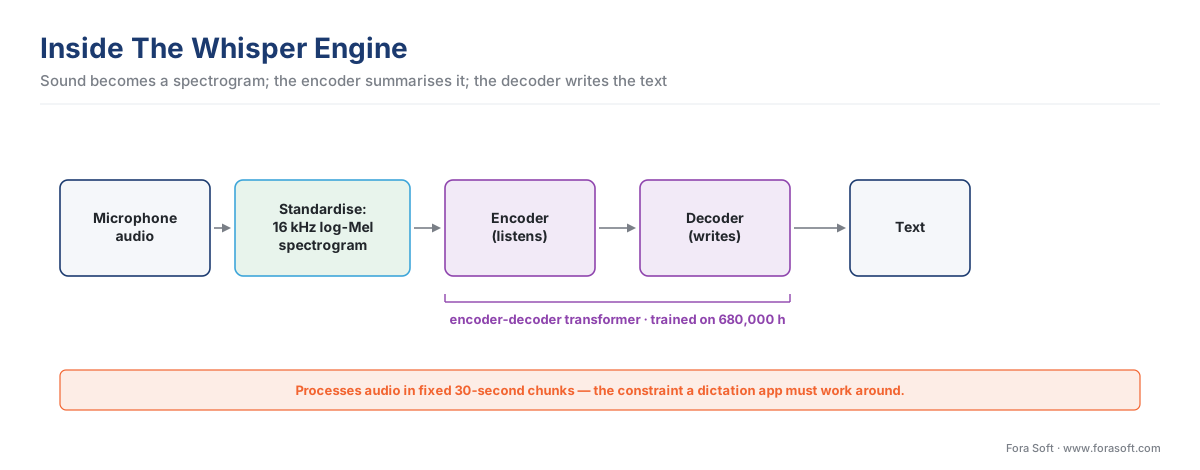 Figure 1. Inside the engine: sound becomes a spectrogram, the encoder summarises it, the decoder writes the text. The 30-second chunk size is the constraint everything above must work around.
The Five Stages Of A Dictation App
The model is one stage of five. A finished dictation app is a short pipeline, and naming each stage is the fastest way to understand any product in this category — or to scope your own.
Stage one — capture. The app listens to your microphone the moment you trigger it, usually with a global hotkey so it works in any application. Audio arrives as a continuous stream of samples; the app buffers it in small slices, often 20 to 100 milliseconds each, ready for the next stage.
Stage two — know when to start and stop. This is voice activity detection, abbreviated VAD: a small, fast component whose only job is to tell speech apart from silence and background noise. It is how the app notices you began talking and, crucially, notices you finished — the trigger that says "now transcribe". Lightweight VAD models such as Silero run on the user's own device in well under a millisecond per slice, which is why this stage is almost always local even in a cloud app (RealtimeSTT, 2026). Get the silence threshold wrong and the app either cuts you off mid-thought or sits waiting while you have clearly stopped.
Stage three — transcribe. The captured speech goes to the ASR engine — Whisper or a faster reimplementation of it — and comes back as raw text. "Raw" is the operative word: it is exactly what you said, fillers and false starts included. "So, um, I think we should, like, maybe push the launch, yeah, push it to Friday."
Stage four — clean up. Here is the stage that defines the modern dictation app, and the one your phone's built-in dictation skips. A language model — the kind of model behind a chatbot — reads the raw transcript and rewrites it into something you would have typed: it removes filler words, fixes punctuation and capitalisation, repairs false starts, and can match the tone of the app you are in (Wispr Flow, 2026; Zapier, 2026). The example above becomes: "I think we should push the launch to Friday." This is why users say these apps "don't transcribe, they write".
Stage five — deliver. The polished text is inserted at your cursor in whatever app is focused — email, document, chat, code editor — usually by simulating a paste or typing the characters in. From your point of view the text simply appears where you were already working.
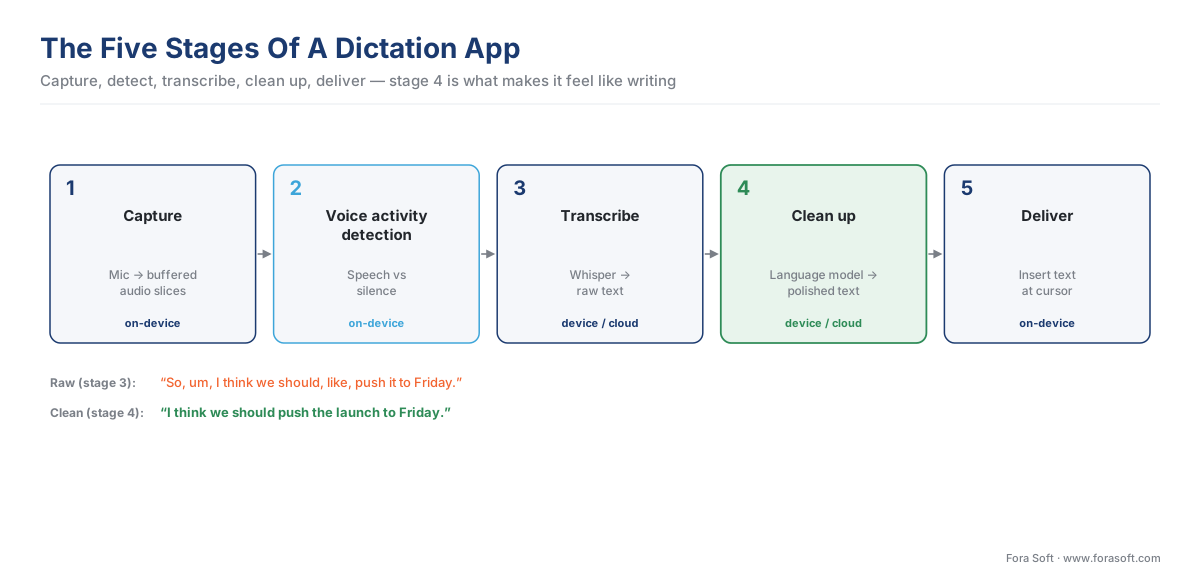 Figure 2. The five stages every dictation app runs. Stage four — the language-model clean-up — is what separates a modern app from a raw transcriber.
The Architecture Decision: Everything On The Device, Or Everything In The Cloud
Once you understand the five stages, the central build decision becomes clear: where does each stage run? In 2026 the market splits cleanly into two answers, and the split is mostly about privacy.
The on-device build runs the heavy stages — transcription and clean-up — on the user's own computer or phone, so the audio never leaves the machine. Superwhisper is the clearest example: it processes speech entirely on-device, with audio never reaching a server unless the user deliberately wires in a cloud model with their own key (Superwhisper, 2026). The benefit is absolute privacy, which matters for legal, medical, and financial work where a recording of a confidential conversation must not travel over the internet. The cost is that the model is limited by the user's hardware. Whisper's largest model, large-v3, can run on an 8 GB laptop through an optimised build called whisper.cpp, but smaller, faster models are common on phones, and faster machines transcribe faster (whisper.cpp, 2026).
The cloud build sends your audio to a server, runs the big models there, and sends the text back. Wispr Flow takes this route: all transcription happens in the cloud, and there is no offline mode (Wispr Flow Help Center, 2026; getvoibe, 2026). The benefit is that every user gets the same powerful models regardless of their hardware, plus a clean clean-up layer and a hundred-plus languages. The cost is that your audio travels to someone else's server. Wispr Flow addresses this with a "zero data retention" privacy mode that instructs its servers not to store the audio or text, and it advertises HIPAA-ready handling — but the audio still leaves the device to be processed (Wispr Flow, 2026).
There is also a sensible hybrid: run VAD and a small, fast model locally for instant feedback, and send the audio to a stronger cloud model for the final, accurate version. The user sees rough text immediately and watches it sharpen a beat later.
| Criterion | On-device (e.g. Superwhisper) | Cloud (e.g. Wispr Flow) |
|---|---|---|
| Where audio goes | Never leaves the machine | Travels to a server |
| Privacy ceiling | Highest — fits legal/medical/financial | Depends on the vendor's retention policy |
| Model quality | Limited by the user's hardware | Same strong models for everyone |
| Works offline | Yes | No |
| Clean-up layer | Possible, but heavier on-device | Easy — runs server-side |
| Best when | Audio must stay private | You want top quality on any device |
Table 1. The on-device vs cloud trade-off. The deciding question is almost always whether the audio is allowed to leave the user's machine.
The Number That Decides Whether It Feels Instant
A dictation app lives or dies on one feeling: that the text appears almost as fast as you can speak. The metric behind that feeling is latency — the gap between finishing a sentence and seeing the polished text. And the engine's 30-second chunk habit, flagged earlier, is what makes this hard.
If you simply fed Whisper your speech and waited for a 30-second window to fill, the user would stare at nothing for half a minute. No app does that. Instead, real-time systems chop the audio into small chunks and transcribe them as they arrive, which is how an open project called Whisper-Streaming reaches about 3.3 seconds of latency on long, continuous speech instead of 30 (Macháček et al., 2023). For short dictation bursts — a sentence or two — a well-built app feels near-instant because VAD detects the pause, sends just that utterance, and gets text back in well under a second on a fast path.
Let us walk a simple latency budget out loud, because seeing the arithmetic makes the point. Suppose you dictate one sentence and want the result to feel quick — under one second from the moment you stop:
total budget (feels quick)         = 1000 ms
   end-of-turn detection (VAD)     −  120 ms   (notice you stopped)
   network round trip (cloud)      −  150 ms   (only in a cloud build)
   transcription (short utterance) −  400 ms   (the ASR model)
   clean-up (language model)       −  250 ms   (strip fillers, punctuate)
   ─────────────────────────────────────────
   deliver to cursor               =   80 ms   (paste the text)
The two stages people forget — the VAD waiting to be sure you stopped, and the language-model clean-up — together eat 370 of the 1000 milliseconds. The transcription model is less than half the budget. This is the recurring lesson of real-time voice engineering: the model is never the whole story, and the work around the model decides whether the product feels alive. The same budgeting discipline governs speech-to-speech systems and streaming ASR in production.
 Figure 3. A one-second dictation budget. The transcription model is under half; VAD and clean-up together take more than a third.
Building One Yourself: The Off-The-Shelf Pieces
You would not write any of these stages from scratch in 2026. Each has a mature, free building block, and knowing their names lets you scope a build realistically.
For transcription, the production choice on a server with an NVIDIA graphics card is faster-whisper — a reimplementation of Whisper that returns the same accuracy roughly four times faster on a GPU and twice as fast on a CPU, by using a heavily optimised inference engine and lower-precision number formats (Local AI Master, 2026; PromptQuorum, 2026). On a Mac, the equivalent is whisper.cpp, a lean build that runs Whisper efficiently on Apple hardware (whisper.cpp, 2026). Both run the same Whisper models; they differ only in how fast they execute them on which hardware.
For voice activity detection, Silero VAD is the common pick — small, accurate, and fast enough to run on the user's device alongside everything else (RealtimeSTT, 2026).
For gluing it together, open libraries already wire capture, VAD, and Whisper into a few lines of code. RealtimeSTT packages low-latency speech-to-text with built-in VAD and wake-word support; whisper_streaming turns Whisper into a streaming transcriber; and OpenWhispr is a complete open-source dictation app you can read end to end — built with the Electron desktop framework, a local whisper.cpp engine, and an option to bring your own cloud key (RealtimeSTT, 2026; Macháček et al., 2023; OpenWhispr, 2026). Reading one of these is the fastest way to see all five stages in real code.
For clean-up, you call a language model — your own, or a hosted one — with a short instruction: "Remove filler words, fix punctuation and capitalisation, keep the meaning." This stage is a few lines of code and a well-chosen prompt, but it is the stage that makes the product feel finished.
| Stage | Off-the-shelf building block (2026) | Where it runs |
|---|---|---|
| Capture | OS microphone APIs / Electron | On-device |
| Voice activity detection | Silero VAD | On-device |
| Transcribe | faster-whisper (NVIDIA), whisper.cpp (Mac) | Device or server |
| Clean up | A language model + a short prompt | Device or server |
| Deliver | OS paste / accessibility APIs | On-device |
Table 2. The whole pipeline is assembled from free, mature parts. The engineering is in tuning and glue, not in inventing any single stage.
The Mistake That Sinks First Builds
Common pitfall — tuning on your own clean voice. The most frequent reason a dictation prototype that "worked on my laptop" fails with real users is voice activity detection tuned in the wrong room. Teams set the silence threshold while testing on their own clear speech in a quiet office, then ship to users with accents, background noise, café clatter, and the human habit of pausing mid-sentence to think. The app starts cutting people off at every pause, or it hangs waiting for silence that the noise never delivers. Always tune end-of-turn detection on real, messy recordings from your actual users before you trust a threshold — and budget engineering time for it as a feature, not a finishing touch. Cleaner input also helps: pairing dictation with real-time noise suppression gives the VAD a clearer signal to work with.
A second, quieter trap is trusting the transcript blindly. Whisper can hallucinate — invent words that were never spoken, especially during silence or noise. Independent studies have found fabricated text in a meaningful share of transcripts, and in a medical-adjacent study, 38% of the hallucinations introduced content that could be harmful, such as invented medications or events (Koenecke et al., 2024). For casual dictation this is a minor annoyance the clean-up layer often catches; for medical or legal use it is a reason to keep a human in the loop and never auto-commit a transcript to a record without review.
What Makes Wispr Flow Feel Different
With the architecture in hand, you can read Wispr Flow's feature list as engineering choices rather than marketing. Its headline claim — that you write "4x faster than your keyboard" — rests on the clean-up layer doing the editing you would otherwise do by hand (Wispr Flow, 2026). Its Command Mode lets you speak an instruction instead of text — "make that more concise", "turn this into a bulleted list", "translate to Polish" — which is simply the language-model stage pointed at an editing task instead of a cleaning one (Wispr Flow, 2026; getvoibe, 2026). Its presence on Mac, Windows, iPhone, and Android at once is possible because the heavy lifting is in the cloud, so each platform only needs the thin capture-and-deliver ends of the pipeline (TechCrunch, 2026).
The pricing follows the cost structure. Cloud transcription and clean-up cost money per minute of audio, so the free tier is capped — around 2,000 words a week — and the Pro tier runs about $15 a month, or $12 on an annual plan (Wispr Flow Help Center, 2026; getvoibe, 2026). An on-device competitor like Superwhisper can offer a free local tier forever and a one-time lifetime price, because once the model is on your machine there is no per-minute server bill (Superwhisper, 2026; speakmac, 2026). That single difference — who pays for the compute — explains most of the pricing gap across the whole category, and it is the same per-minute-versus-per-device maths covered in our cost model for AI in video products.
Where Fora Soft Fits In
Dictation and live transcription are recurring needs across the products we build. In video conferencing, the same five-stage pipeline becomes live captions and meeting notes; in telemedicine, it becomes a clinician's spoken-note intake where the privacy ceiling pushes the build on-device or to a tightly controlled server; in e-learning, it becomes searchable lecture transcripts. We have shipped video, WebRTC, conferencing, telemedicine, and e-learning software since 2005, and the engineering judgement that matters here — choosing the model, placing each stage on-device or in the cloud to meet a privacy requirement, and tuning VAD on real user audio — is the same judgement these projects demand. The right architecture depends entirely on whether the audio is allowed to leave the user's machine, which is a product decision before it is a technical one. Our speech-to-text development team builds that pipeline on Whisper, on-device or on-prem, and our Electron desktop apps with real-time audio and AI work covers the desktop dictation client around it.
What To Read Next
- Streaming ASR in production — Deepgram, Whisper, AssemblyAI
- WhisperX deep-dive — diarization and word-level timestamps
- Speech-to-speech — Realtime API, Gemini Live, SeamlessM4T
Call to action
- Talk to a video engineer — book a 30-minute scoping call to talk through your whisper flow plan.
- See our case studies — 250+ shipped projects across video streaming, WebRTC, OTT, telemedicine, e-learning, surveillance, and AR/VR.
- Download the Dictation App Architecture Checklist — One-page printable: the five stages of a dictation app, the on-device-vs-cloud decision table, the one-second latency budget, and the VAD-tuning and hallucination tests to run before shipping a Whisper-based dictation feature.
References
- Radford, A., Kim, J. W., Xu, T., Brockman, G., McLeavey, C., Sutskever, I. Robust Speech Recognition via Large-Scale Weak Supervision, OpenAI, December 2022, arXiv:2212.04356, accessed 2026-05-31.
https://arxiv.org/abs/2212.04356. Primary source for the Whisper architecture: encoder-decoder transformer; 16 kHz resampling; 80-channel log-Mel spectrogram with 25 ms windows and 10 ms stride; fixed 30-second processing chunks; special tokens for language ID, transcribe/translate, timestamps and voice-activity (<|nospeech|>); and the 680,000-hour training set including 117,000 hours across 96 non-English languages. This is the controlling document for every claim about how the Whisper model works. - OpenAI. Introducing Whisper, 21 September 2022, accessed 2026-05-31.
https://openai.com/index/whisper/. First-party announcement: Whisper released open-source under the MIT licence; robustness to accents, background noise and technical jargon; multitask capability (transcription plus X-to-English translation). - Wikipedia. Whisper (speech recognition system), accessed 2026-05-31.
https://en.wikipedia.org/wiki/Whisper_(speech_recognition_system). Orientation source corroborating the architecture details from reference 1, the release timeline (v2 Dec 2022, large-v3 Nov 2023), and the third-party hallucination findings. Used for navigation only; all spec facts traced to reference 1. - Koenecke, A., Choi, A. S. G., Mei, K. X., Schellmann, H., Sloane, M. Careless Whisper: Speech-to-Text Hallucination Harms, ACM FAccT 2024, arXiv:2402.08021, accessed 2026-05-31.
https://arxiv.org/abs/2402.08021. Peer-reviewed source for the hallucination risk: of 187 hallucinations found across 13,140 short segments, 38% contained content that could be harmful (invented medications, race references, or events). Basis for the "never auto-commit a medical/legal transcript" caution. - Macháček, D., Dabre, R., Bojar, O. Turning Whisper into Real-Time Transcription System (Whisper-Streaming), arXiv:2307.14743, 2023, accessed 2026-05-31.
https://arxiv.org/pdf/2307.14743andhttps://github.com/ufal/whisper_streaming. Source for the ~3.3-second latency on unsegmented long-form speech achieved by chunking audio and transcribing incrementally — the technique every real-time dictation app uses to escape Whisper's 30-second window. - Wispr Flow. Product site, pricing, and Help Center (Flow plans and what's included), accessed 2026-05-31.
https://wisprflow.ai/,https://wisprflow.ai/pricing,https://docs.wisprflow.ai/articles/9559327591-flow-plans-and-what-s-included. First-party source for: the hotkey-then-speak workflow that inserts polished text in any app; the multi-AI-layer clean-up that removes fillers and fixes formatting; Command Mode voice editing; 100+ language support; cloud-only processing with no offline mode; zero-data-retention privacy mode and HIPAA-ready handling; the free tier (~2,000 words/week) and ~$15/mo Pro pricing. - Superwhisper. Product positioning and on-device model behaviour, via SpeakMac and getvoibe comparison documentation, accessed 2026-05-31.
https://www.speakmac.app/blog/speakmac-vs-superwhisper-comparisonandhttps://www.getvoibe.com/resources/macwhisper-vs-superwhisper/. Source for the on-device build: speech processed entirely on the user's Mac with audio never leaving the device unless a cloud model is explicitly configured; free local tier, Pro subscription, and one-time lifetime pricing — the structural contrast with the cloud build. - faster-whisper / CTranslate2 documentation, via Local AI Master and PromptQuorum 2026 benchmarks, accessed 2026-05-31.
https://localaimaster.com/blog/faster-whisper-guideandhttps://www.promptquorum.com/power-local-llm/local-whisper-stt-comparison-2026. Source for faster-whisper delivering Whisper-equal accuracy ~4x faster on GPU and ~2x faster on CPU via the CTranslate2 inference engine with INT8/FP16 quantization; and the faster-whisper-on-NVIDIA vs whisper.cpp-on-Mac hardware split. - ggml-org. whisper.cpp, accessed 2026-05-31.
https://github.com/ggml-org/whisper.cpp. Source for the lean C/C++ Whisper build that runs large-v3 on an 8 GB laptop and runs efficiently on Apple hardware — the standard on-device transcription engine on Mac. - KoljaB. RealtimeSTT, accessed 2026-05-31.
https://github.com/KoljaB/RealtimeSTT. Source for the low-latency speech-to-text library with built-in Silero/WebRTC voice activity detection and wake-word activation; cited for the on-device, sub-millisecond VAD claim and as a ready-made glue library for the five-stage pipeline. - OpenWhispr. Open-source voice-to-text dictation app, accessed 2026-05-31.
https://github.com/OpenWhispr/openwhisprandhttps://openwhispr.com/. Source for a complete, readable reference implementation of a dictation app: Electron desktop shell, local whisper.cpp / NVIDIA Parakeet engines, sherpa-onnx, and bring-your-own-key cloud models — a full worked example of all five stages. - TechCrunch / getvoibe / Zapier. Wispr Flow Android launch and feature analysis, February–April 2026, accessed 2026-05-31.
https://techcrunch.com/2026/02/23/wispr-flow-launches-an-android-app-for-ai-powered-dictation/,https://www.getvoibe.com/resources/wispr-flow-pricing/,https://zapier.com/blog/wispr-flow/. Secondary press sources dating the four-platform availability (Mac, Windows, iOS, Android) and corroborating the clean-up-layer behaviour and pricing; capability claims traced to first-party reference 6.
