


This is engineering guidance, not legal advice. Confirm specifics with qualified counsel.
Why this matters
A consumer video app that drops a call costs someone a re-dial. A telehealth platform that drops a call can interrupt a psychiatric crisis assessment, a post-operative check, or a stroke evaluation where minutes matter. The person who has to keep that platform running — a founder, a hospital IT lead, a product manager standing up an operations function for the first time — needs to know which signals to watch, what counts as an emergency, and where the compliance line runs through their monitoring stack. This article is written for that reader: it turns "run it in production" into a concrete, compliance-aware operations practice, so that the worst day on your platform is a controlled, well-instrumented incident instead of a silent failure nobody noticed until a clinician called.
"Up" is now a clinical word
Start with the rule, because it reframes everything that follows. The HIPAA Security Rule — the federal regulation that governs how electronic patient data must be protected — opens with a general requirement at 45 CFR §164.306(a): a regulated organization must ensure the confidentiality, integrity, and availability of all the electronic protected health information it handles. Protected Health Information, or PHI, is any health data that can be tied to an identifiable person; in a video platform it includes the appointment itself, the recording, the chat, and even the fact that a named patient met a named psychiatrist on a given date.
Most teams read "confidentiality" and stop there. But availability sits in the same sentence, with the same weight. When your platform is down, patient data is unavailable to the clinician who needs it — and that is a Security Rule problem, not only an uptime problem. The rule reinforces this elsewhere: §164.308(a)(7) requires a contingency plan (data backup, disaster recovery, and an "emergency mode operation" plan to keep critical processes running during an emergency), and §164.312(a)(2)(ii) requires an emergency-access procedure so clinicians can still reach the data they need when systems are failing.
So when you set up production monitoring, you are not gold-plating. You are building the evidence that you can keep patient data confidential, intact, and available — the three properties the law names. Think of it like a hospital's backup generator: nobody calls it a luxury, because everyone understands that "the power is out" is a clinical event. On a telehealth platform, "the service is down" is the same kind of event.
Monitoring does two jobs at once
Here is the idea that organizes the whole article: in a telehealth platform, your logging and monitoring infrastructure is doing two different jobs at the same time, and they pull in opposite directions.
The first job is operations — keeping the service healthy. This is observability in the ordinary engineering sense: collecting signals (metrics, logs, traces) so you can answer "is it working, for whom, and if not, why?" These signals should contain as little patient data as possible.
The second job is compliance — proving who did what to patient data. HIPAA requires this directly. The Audit Controls standard at 45 CFR §164.312(b) requires you to "implement hardware, software, and/or procedural mechanisms that record and examine activity in information systems that contain or use" patient data. And the Information System Activity Review specification at §164.308(a)(1)(ii)(D) — a required, not optional, specification — requires you to "regularly review records of information system activity, such as audit logs, access reports, and security incident tracking reports." This second kind of log must capture patient-data access: who opened which patient's record, when, and what they did.
 Figure 1. The same instrumentation budget pays for two different obligations. Operational telemetry should hold as little patient data as possible; the HIPAA audit log must record patient-data access. Keep them as separate pipelines.
The tension is the whole game. Your operations dashboards should be scrubbed of patient data so they can be widely viewed and sent to ordinary monitoring tools. Your audit log is the opposite — it deliberately records patient-data access, lives inside your compliance boundary, and is retained for years. Treat them as two separate pipelines from the start. Mixing them — sending an audit-grade log full of patient identifiers to a third-party dashboard, or relying on a scrubbed ops log to satisfy the audit-control requirement — is how teams fail both jobs with one design.
What to watch: three layers of signal
Telehealth observability has three layers. Most outages and most complaints live in a different layer than teams expect, so instrument all three from day one.
Layer 1 — infrastructure and services. The ordinary backbone: are the servers, databases, signaling service, and APIs up; are they fast; are error rates normal? This is where standard tooling shines, and it is necessary but not sufficient. A platform can be "all green" at this layer while patients cannot complete a single visit — because the failure is one layer up.
Layer 2 — the real-time media layer (per consult). This is the layer telehealth teams most often miss. A WebRTC video call — WebRTC is the browser technology that carries the live audio and video — exposes a rich set of quality numbers through a browser function called getStats(), standardized by the W3C. For every call you can read packet loss (the share of audio/video packets that never arrived), jitter (how irregularly packets arrive), round-trip time (how long a packet takes to make the round trip, in milliseconds), and resolution and frame rate. These are the numbers that decide whether a clinician can actually see the wound or read the patient's affect.
The catch, well known to anyone who has run a real-time platform: each getStats() reading is a single snapshot. To understand quality you must sample these numbers throughout the call, send a compact per-consult quality summary to your backend, and aggregate across calls. A server-side dashboard that says "the SFU is healthy" can look perfect while a specific patient on a specific home network has a call so degraded it is clinically useless. The client knows best — so collect quality from the client, every consult.
Layer 3 — the clinical workflow funnel. The business-level question: are visits actually happening? Instrument the funnel — scheduled → checked in → entered the waiting room → connected to a clinician → visit completed → notes saved. A sudden drop between "entered the waiting room" and "connected" is a production incident even if every server is green and every media metric looks fine, because it means patients are sitting in a virtual waiting room that never connects them. This funnel is also your earliest, clearest signal that something is wrong for real users.
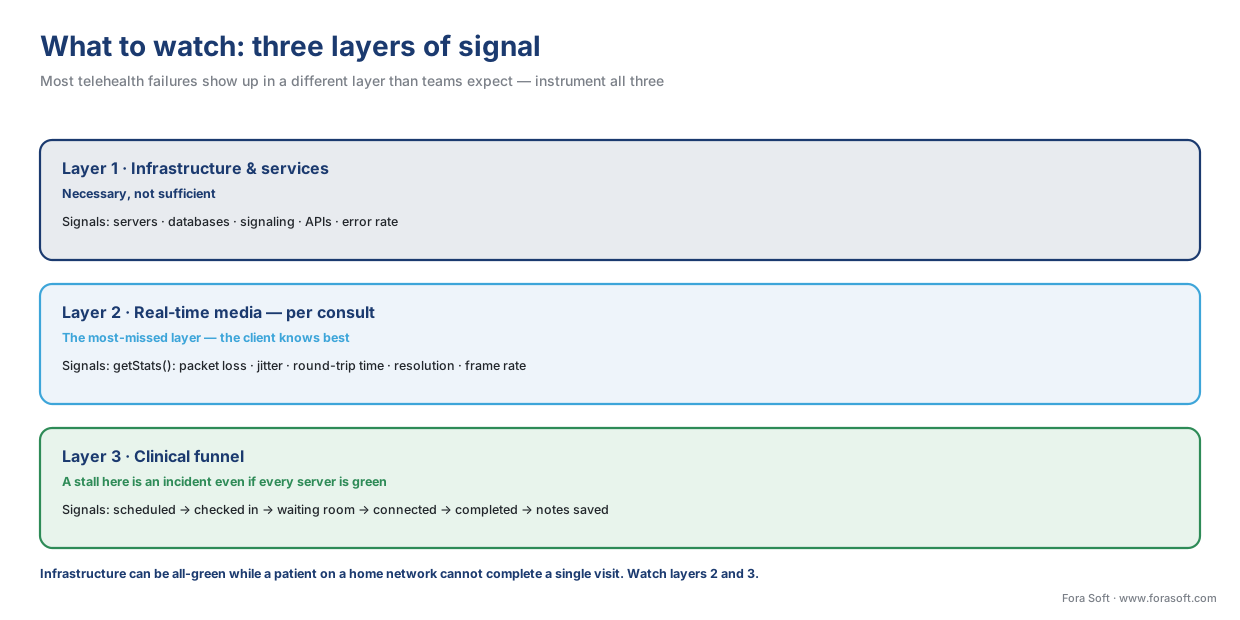 Figure 2. Three layers of signal. Infrastructure health is necessary but not sufficient; the per-consult media metrics and the clinical funnel are where telehealth failures actually show up.
The service targets clinical users actually expect
Clinical users do not care about your CPU graphs. They care about three things: can I start the visit, does it stay up, and is it good enough to practice medicine. To manage that, borrow three terms from site-reliability practice and define them in plain language.
A Service Level Indicator (SLI) is a single measured number that reflects the user's experience — for example, "the percentage of visits that connect within 10 seconds." A Service Level Objective (SLO) is the target you hold that number to — for example, "99.5% of visits connect within 10 seconds, measured over a rolling 30 days." An error budget is simply what is left over: 100% minus your SLO. If your availability SLO is 99.9%, your error budget is 0.1% — and that has a concrete size you should compute out loud.
Here is the arithmetic, because the numbers surprise people. A 30-day month is about 43,200 minutes. An error budget of 0.1% is:
43,200 minutes × 0.001 = 43.2 minutes per month
So a 99.9% availability target permits roughly 43 minutes of downtime per month. Tighten the target to 99.99% and the budget shrinks to about 4.3 minutes per month — which is hard and expensive to hit, and usually only justified when a platform carries time-critical care. The error budget is a planning tool: when you have spent it, you stop shipping risky changes and spend the next sprint on reliability instead.
For a telehealth platform, the SLOs that matter to clinical users are the ones tied to the visit, not the infrastructure. A reasonable starter set looks like this.
| Service level indicator | Why it matters clinically | Example starter objective |
|---|---|---|
| Visit connect success rate | A failed connect is a missed or delayed visit | ≥ 99.5% of visits connect |
| Time to connect (waiting room → clinician) | Long waits cause drop-off and frustration | p95 < 10 seconds |
| In-call drop rate | A drop mid-consult interrupts care | < 1% of visits drop unexpectedly |
| Media quality (packet loss) | Decides whether the clinician can assess | < 2% loss for ≥ 95% of call-minutes |
| Platform availability (booking + join) | Patients cannot start care if it is down | ≥ 99.9% monthly |
Two cautions. First, these are starting points to calibrate against your own clinical use, not industry guarantees — a dermatology store-and-forward product and a tele-stroke product have different bars; see our companion article on the clinical "good enough" quality bar. Second, do not confuse an SLO (your internal target) with an SLA (a Service Level Agreement — a contractual promise to a customer, often with penalties). Set and prove your SLOs internally for months before you put any number in a contract.
Alerting and on-call for a healthcare product
An alert should mean: a human needs to look at this now, because patients are affected. Two failure modes ruin alerting, and both are common.
The first is alerting on causes instead of symptoms. A page that says "CPU at 85%" wakes someone for a number that may not matter. A page that says "visit connect success rate fell below 98% in the last 5 minutes" wakes someone because patients cannot start visits right now. Alert on the patient-facing symptom — the SLI — and let the responder find the cause. The second failure mode is alert fatigue: when everything pages, nothing does, and the one alert that mattered is lost in the noise. Ruthlessly tune alerts so that a page is rare and always real.
Healthcare changes the on-call model in two specific ways. First, your hours are not your clinic's hours. Behavioral-health visits run evenings and weekends; urgent care and hospital-at-home run overnight; a multi-state platform spans time zones. A telehealth platform usually needs genuine 24/7 coverage long before a typical consumer app would, because there is rarely a window when no patient is mid-visit. Second, some paths must never silently fail. If your product serves behavioral health, the crisis-escalation path — the flow that connects a patient in danger to the 988 Suicide and Crisis Lifeline or to emergency services — is the single component whose failure is a true emergency. It needs its own dedicated monitoring and its own highest-severity alert, separate from everything else. (Our mental-health telemedicine playbook covers building that path; here the point is narrower: monitor it as if a life depends on it, because one might.)
Run a simple severity ladder so the response matches the stakes: a crisis-path failure or a total outage pages immediately, 24/7; a partial degradation (one region, elevated drop rate) pages during covered hours; a slow-burning trend (error budget burning faster than planned) becomes a ticket, not a 2 a.m. page. Write it down before launch, not during your first incident.
Common mistake: green dashboards, broken visits. The most frequent telehealth operations failure is trusting server-side health while patients fail at the edge. Every infrastructure metric is green, so no alert fires — but a specific cohort (old Android phones, one rural carrier, a misconfigured TURN relay) cannot connect. You only learn about it when a clinician complains. The fix is to alert on the clinical funnel and on client-reported media quality, not only on infrastructure. If "visits completed per hour" drops and nothing paged, your monitoring has a hole.
Observe everything, log no patient data
This is the part unique to healthcare, and the part teams get wrong. You want deep visibility into production, and you ship a lot of that visibility to third-party tools — error trackers, log aggregators, application-performance monitors, analytics. Each of those tools is a place patient data can leak, and each leak is a potential breach.
Hold two ideas apart. The HIPAA audit log is supposed to contain patient-data access: it records that user X opened patient Y's record at time Z. It is required by §164.312(b), it lives inside your compliance boundary, the activity-review specification (§164.308(a)(1)(ii)(D)) requires you to review it, and audit records are generally retained for six years under HIPAA's documentation-retention rule (§164.316(b)(2)). That log is correct because it captures access.
Your operational telemetry is the opposite. Error messages, request logs, traces, performance metrics, crash reports, product analytics — none of it should carry patient data, because all of it tends to flow to places outside your tightest boundary. The governing principle is HIPAA's minimum necessary standard (45 CFR §164.502(b)): use and expose the least patient data needed for the task. Monitoring almost never needs the patient's name or diagnosis to tell you the service is unhealthy.
Concretely, scrub at the source. Identify users in logs by an opaque internal ID, never by name, email, or medical record number. Keep patient identifiers and any clinical detail out of URLs, error strings, exception payloads, and analytics events — a crash report that includes ?patient=Jane+Doe&dx=... has just put patient data into your crash vendor. Mask or drop free-text fields before they reach a log. And apply the binary BAA test to every monitoring vendor: a Business Associate Agreement (BAA) is the signed contract that lets an outside company handle patient data on your behalf, and a vendor either has one covering your use or it does not. If a monitoring or analytics tool could receive patient data, it needs a signed BAA — full stop. The cleanest design avoids the question by ensuring the tool never sees patient data at all.
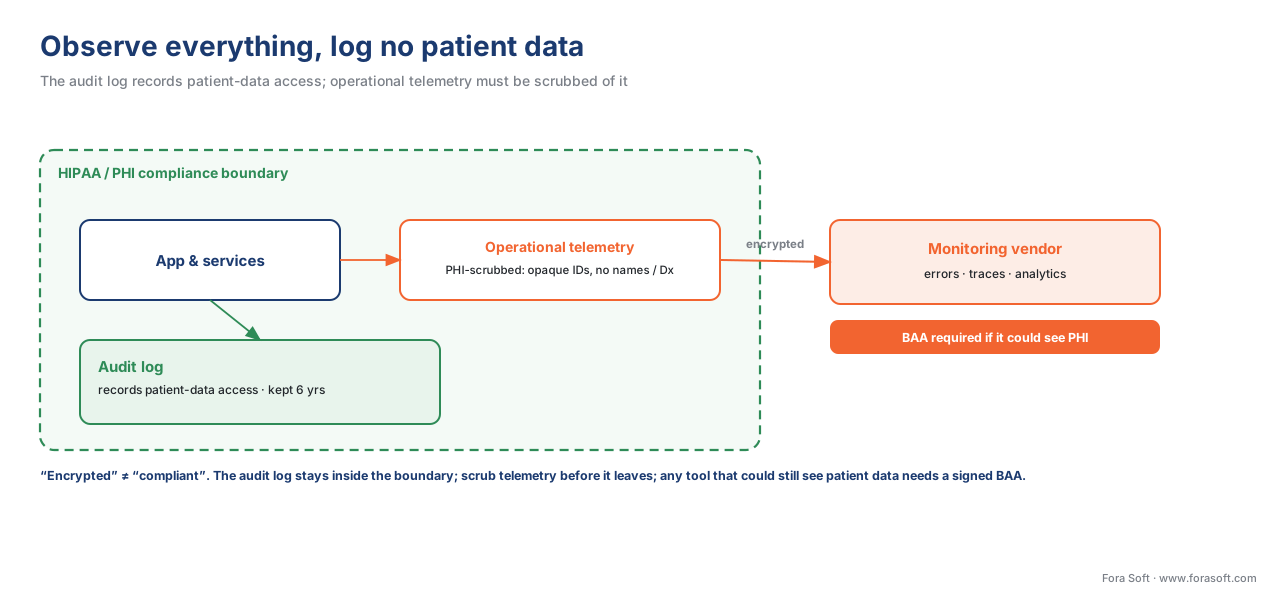 Figure 3. Two pipelines, one rule. The audit log records patient-data access and stays inside the boundary; operational telemetry is scrubbed of patient data — and any external tool that could still see it needs a signed BAA.
Remember the section's recurring warning: "encrypted" does not mean "compliant." A log shipped over an encrypted connection to a vendor without a BAA is still a violation if it carries patient data. Encryption protects the data in transit; the BAA is what makes the vendor a lawful handler of it. Keep the two ideas separate.
Monitoring is the front end of the breach clock
There is one more reason production monitoring is a compliance function and not just an engineering one: monitoring is how you discover breaches, and discovery starts a legal clock.
Under HIPAA's Breach Notification Rule, when unsecured patient data is breached, you must notify affected individuals "without unreasonable delay and in no case later than 60 calendar days after discovery of a breach" (45 CFR §164.404(b)). The subtle, expensive part is the definition of "discovery": a breach is treated as discovered on the first day it is known — or would have been known by exercising reasonable diligence — to anyone in your workforce (§164.404(a)(2)). In plain terms, you cannot escape the clock by not looking. If good monitoring would have caught it, the law may treat you as having discovered it then anyway.
So your detection capability and your legal exposure are the same thing viewed from two angles. Weak monitoring does not slow the breach clock; it just means you find out late, scramble, and may miss the deadline. Strong monitoring with reviewed audit logs (the §164.308(a)(1)(ii)(D) activity review again) lets you detect early, investigate fast, and notify within the window. The detection-to-notification flow belongs to your incident-response plan; this article's job is to make sure the front of that flow — the monitoring that trips the alarm — actually works. See our companion on incident response and breach notification for the rest of the chain.
 Figure 4. Monitoring is the front of the breach clock. Discovery — the day you knew or should have known — starts a hard 60-day notification deadline, so weak detection does not buy time, it costs it.
It is worth flagging where the rules are heading, because production teams will feel it first. The HIPAA Security Rule update proposed in early 2025 (the Notice of Proposed Rulemaking under RIN 0945-AA22, published in the Federal Register on January 6, 2025) would harden several of the practices above from "addressable" to mandatory. As of June 2026 it remains proposed, not final — but its direction is clear: it proposes removing the "addressable" flexibility so controls like audit logging become required; a technology asset inventory and a network map of where patient data flows, reviewed at least annually and on significant change; automated vulnerability scanning at least every six months; and penetration testing at least every twelve months. None of that is exotic for a well-run operations team — it is roughly the program this article describes, written into the rule. Build toward it now; confirm the final text with counsel when it lands.
Where Fora Soft fits in
Fora Soft has built real-time video products — video conferencing, streaming, e-learning, surveillance, and telemedicine — since 2005, and the compliance-aware operations practice described here is how we keep clinical video products healthy after launch. We instrument the per-consult media layer and the clinical funnel, not just infrastructure, so problems surface where patients actually are; we keep the audit log and the operational telemetry on separate pipelines so the platform is observable without putting patient data into third-party tools; and we treat the crisis path, where present, as the highest-severity component on the board. We name the requirement first — availability and audit controls are HIPAA obligations — and then build the monitoring that satisfies them.
What to read next
- Testing clinical video: QA for reliability and compliance
- Audit logging and access controls for clinical video
- Incident response and breach notification
Call to action
- Talk to a telemedicine engineer — book a 30-minute scoping call to talk through your telehealth platform monitoring plan.
- See our case studies — 250+ shipped projects across video streaming, WebRTC, OTT, telemedicine, e-learning, surveillance, and AR/VR.
- Download the Telehealth Observability & Operations Runbook — One page: the production playbook for a live telehealth platform — the three observability layers, the visit-level SLOs clinical users expect, the on-call severity ladder and the crisis-path rule, and how to log everything operationally….
References
- Office for Civil Rights, U.S. Department of Health and Human Services. 45 CFR §164.306(a) — Security standards: General rules (confidentiality, integrity, availability). Electronic Code of Federal Regulations. https://www.ecfr.gov/current/title-45/subtitle-A/subchapter-C/part-164/subpart-C/section-164.306 — Tier 1. Names availability of ePHI as a Security Rule requirement.
- Office for Civil Rights, HHS. 45 CFR §164.312(b) — Audit controls (Technical Safeguards). Electronic Code of Federal Regulations. https://www.ecfr.gov/current/title-45/subtitle-A/subchapter-C/part-164/subpart-C/section-164.312 — Tier 1. Requires mechanisms to record and examine activity in systems that contain or use ePHI.
- Office for Civil Rights, HHS. 45 CFR §164.308(a)(1)(ii)(D) — Information system activity review (Administrative Safeguards). Electronic Code of Federal Regulations. https://www.ecfr.gov/current/title-45/subtitle-A/subchapter-C/part-164/subpart-C/section-164.308 — Tier 1. Required specification to regularly review audit logs, access reports, and security incident tracking.
- Office for Civil Rights, HHS. 45 CFR §164.404 — Breach notification to individuals (60-day deadline; definition of discovery). Electronic Code of Federal Regulations. https://www.ecfr.gov/current/title-45/subtitle-A/subchapter-C/part-164/subpart-D/section-164.404 — Tier 1. Notification no later than 60 calendar days after discovery; discovery = first day known or reasonably should have been known.
- Office for Civil Rights, HHS. 45 CFR §164.502(b) — Minimum necessary standard. Electronic Code of Federal Regulations. https://www.ecfr.gov/current/title-45/subtitle-A/subchapter-C/part-164/subpart-E/section-164.502 — Tier 1. Use/disclose the minimum PHI necessary — the basis for keeping PHI out of operational telemetry.
- Office for Civil Rights, HHS. 45 CFR §164.308(a)(7) — Contingency plan; §164.312(a)(2)(ii) — Emergency access procedure. Electronic Code of Federal Regulations. https://www.ecfr.gov/current/title-45/subtitle-A/subchapter-C/part-164/subpart-C/section-164.308 — Tier 1. Backup, disaster recovery, emergency-mode operation, and emergency data access — the availability controls.
- Office of the Secretary, HHS. HIPAA Security Rule To Strengthen the Cybersecurity of Electronic Protected Health Information — NPRM, RIN 0945-AA22, 90 FR 898. Federal Register, January 6, 2025. https://www.federalregister.gov/documents/2025/01/06/2024-30983/hipaa-security-rule-to-strengthen-the-cybersecurity-of-electronic-protected-health-information — Tier 1. Proposed (not final as of June 2026): mandatory logging, asset inventory/network map, vulnerability scans ≤6 months, penetration tests ≤12 months.
- National Institute of Standards and Technology. SP 800-137 — Information Security Continuous Monitoring (ISCM) for Federal Information Systems and Organizations. https://nvlpubs.nist.gov/nistpubs/legacy/sp/nistspecialpublication800-137.pdf — Tier 1. Defines continuous monitoring as ongoing awareness of security, vulnerabilities, and threats to support risk decisions.
- National Institute of Standards and Technology. SP 800-92 — Guide to Computer Security Log Management. https://csrc.nist.gov/pubs/sp/800/92/final — Tier 1. Log generation, protection, retention, and review practices underpinning audit controls.
- W3C. Identifiers for WebRTC's Statistics API (
getStats()— RTCStats: inbound-rtp packetsLost, jitter, round-trip time, frames). World Wide Web Consortium. https://www.w3.org/TR/webrtc-stats/ — Tier 3. The standardized per-call quality metrics for client-side media monitoring. - Google. Site Reliability Engineering — Service Level Objectives; Implementing SLOs and Error Budgets. https://sre.google/sre-book/service-level-objectives/ — Tier 6. Definitions of SLI, SLO, and error budget used here in plain language.
- Centers for Medicare & Medicaid Services. Telehealth — Medicare payment flexibilities (extended through December 31, 2027; Consolidated Appropriations Act, 2026). https://www.cms.gov/medicare/coverage/telehealth — Tier 1. Reimbursement/availability context is jurisdictional and dated; re-verify at publication.
