


This is engineering guidance, not legal advice. Confirm specifics with qualified counsel.
Why this matters
Most telemedicine launches are not delayed by a missing feature; they are delayed by the discovery, late, that the product was only ever tested on a good office network and a new phone. This article is for the founder, product manager, or QA lead who owns the question "is this safe to put in front of real patients and a real auditor?" Getting QA right is what separates a demo that impresses investors from a product that survives a January flu surge, a patient on rural mobile data, and a regulator asking for proof your access controls work. The cost of skipping it is not abstract: a dropped acute consult can be a patient-safety incident, and an untested audit log can turn a small mistake into a federal breach report. QA is where the promises the rest of the build made get verified — or quietly fail.
The two halves of clinical-video QA
Start with the mental model, because it is the thing teams get wrong. A consumer-app QA plan asks one question: do the features work? A telemedicine QA plan asks two, and they are genuinely different disciplines.
The first half is reliability testing: does the live video hold up under the conditions real patients and clinicians create — weak networks, old devices, a phone that switches from Wi-Fi to cellular mid-visit, a Monday-morning surge of a thousand simultaneous consults? This is the half that decides whether the product is usable.
The second half is compliance and security testing: can you prove that the safeguards protecting patient data behave as the rules require — that access controls actually block the wrong person, that the audit log actually records who opened a record, that patient data never leaks into a place it should not be? This is the half that decides whether the product is legal, and it is the half consumer teams have no equivalent for.
 Figure 1. The two halves of clinical-video QA. Reliability decides whether the product is usable; compliance and security decide whether it is legal. Most teams build the left half and discover the right half exists during an audit.
A useful way to hold the difference: reliability testing protects the patient in the call; compliance testing protects the patient's data after the call. You need both, and they need different people, tools, and timing. The rest of this article walks each half, then the test plan that sequences them.
Reliability testing: the product on real-world conditions
Network-condition testing
The single most important test, and the one most often skipped, is running the video under bad network conditions on purpose. The reason teams skip it is simple: the office Wi-Fi is good, the demo works, everyone moves on. But the patients who need telehealth most — elderly, rural, low-income — are exactly the patients on the worst connections, so a product tested only on a strong network is tested on the wrong network.
Networks degrade in three measurable ways, and you test all three. Packet loss is the share of data packets that never arrive (a 2% loss rate means two of every hundred go missing). Latency is the one-way travel time of a packet, measured in milliseconds. Jitter is the variation in that travel time — packets arriving unevenly bunched instead of in a steady stream. For interactive video the bar is well established: the international telecommunications standard for one-way delay, ITU-T G.114, treats anything under 150 milliseconds as effectively transparent to the user, with 150–400 ms acceptable but noticeably degraded. Your test plan should confirm the call stays usable as you push latency toward that 150 ms line and inject realistic packet loss.
You do not need real bad networks to test bad networks — you simulate them. On Linux, the built-in traffic-control tool tc with its netem module can add precise delay, loss, and jitter to a connection, so you can recreate "rural 4G with 3% packet loss and 200 ms latency" on demand and repeatably. Specialized WebRTC testing platforms — testRTC, Loadero, and similar services — do the same thing in the browser at scale, running scripted calls across a grid of simulated network profiles and reporting the resulting jitter, loss, and video quality. (WebRTC, short for Web Real-Time Communication, is the browser standard nearly all telemedicine video is built on; the protocol itself is explained in our WebRTC explained article.)
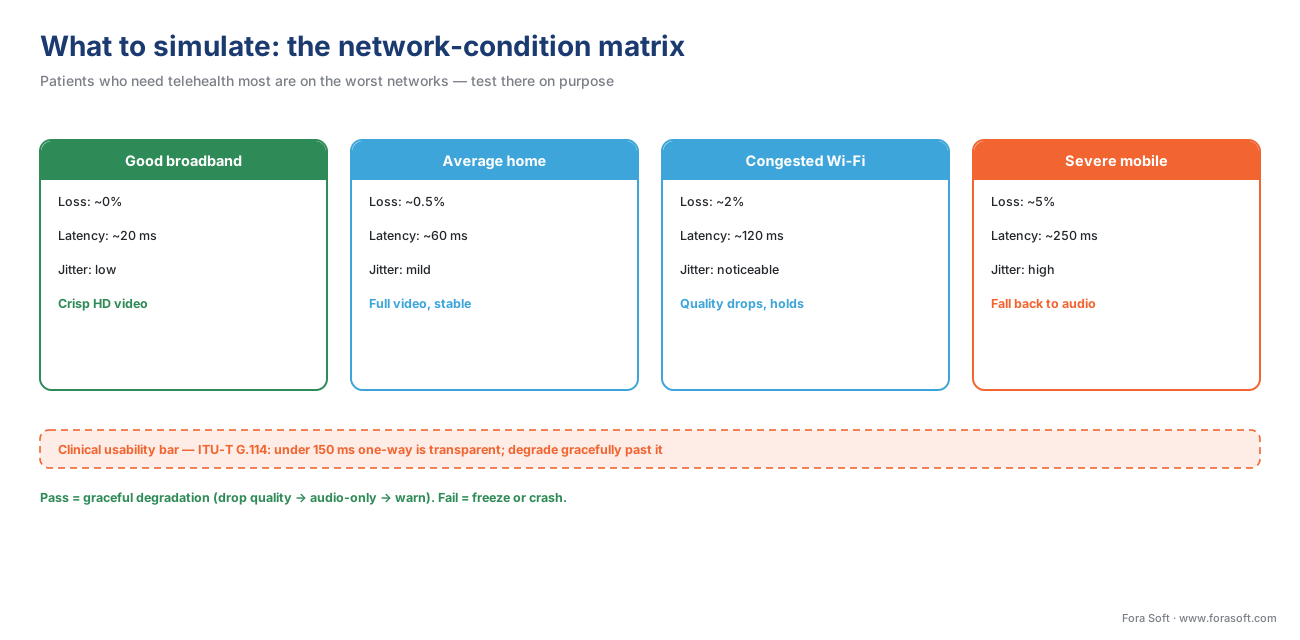 Figure 2. What to simulate. Define a small set of named network profiles from "good broadband" to "severe mobile," and confirm the call degrades gracefully — not catastrophically — as conditions worsen toward the clinical bar.
The goal is not a video that is perfect on a bad network — that is impossible. The goal is graceful degradation: as the connection worsens, the product should drop video quality, then fall back to audio-only, then warn the user — never freeze silently or crash. What "good enough" means clinically is its own question, covered in latency, quality, and the clinical good-enough bar.
The multi-device and browser matrix
Patients arrive on whatever device they own: a five-year-old Android phone, an iPad, a Windows laptop on an old browser, a low-end Chromebook from a clinic cart. Each combination of operating system, browser, and hardware can behave differently, especially around camera and microphone access. So a second pillar of reliability testing is the device-and-browser matrix: a deliberately chosen grid of the platforms your patient population actually uses, each one tested for the core call flow.
You cannot test every device — the combinations are effectively infinite — so you choose a representative matrix weighted toward your real users. A defensible starting matrix looks like this.
| Platform | Browser / app | Why it is on the list |
|---|---|---|
| iOS (recent + one old) | Safari, in-app webview | Large patient share; Safari WebRTC quirks |
| Android (mid-range + low-end) | Chrome, Samsung Internet | The widest hardware spread; oldest in-use phones |
| Windows | Chrome, Edge, Firefox | Clinician desktops; mixed browser estate |
| macOS | Safari, Chrome | Clinician laptops |
| Tablet / clinic cart | Chrome, kiosk webview | Shared clinical devices |
Cloud device-testing services (BrowserStack and similar) let a small QA team run the call flow across this grid without owning fifty physical devices. The output you want is not "it works" but a per-cell pass/fail with the specific failure noted — because a camera-permission bug on one old Android version is exactly the kind of defect that never appears in a demo and always appears in production.
Reconnection testing
Real visits are not held still. A patient walks from a room with Wi-Fi into one without, a phone backgrounds the app to take an incoming call, a laptop sleeps for a moment. Each of these breaks the connection, and the question QA must answer is: does the product reconnect cleanly, putting the patient back into the same consult, or does it dump them into an error screen and a re-login? Reconnection is a feature, and like any feature it has to be tested deliberately — by killing the network mid-call, switching from Wi-Fi to cellular, backgrounding the app, and confirming the session resumes.
This is not only a usability concern. Reconnection and graceful fallback are how a product delivers availability — keeping the service reachable when something fails — and availability is one of the three things the U.S. patient-privacy law's security standards explicitly exist to protect, alongside confidentiality and integrity (45 CFR §164.306(a)). A telehealth product that loses the call and cannot recover it is failing a reliability test and brushing against a compliance goal at the same time. The mechanics of doing this well are covered in connection reliability and reconnection.
Load and surge testing
Telemedicine demand is spiky. A flu season, a snowstorm that closes clinics, a public-health scare — any of these can multiply concurrent consults overnight. Load testing answers whether the platform holds up when many calls happen at once, and surge testing answers whether it survives a sudden spike far above the daily norm. You simulate hundreds or thousands of concurrent scripted calls (the same WebRTC testing platforms that do network simulation also do this) and watch for the failure point: where call setup starts timing out, where video quality collapses across the board, where the media servers run out of capacity.
Here, too, the reliability question and the compliance question meet. Availability is a security-rule goal, and the proposed 2026 update to the patient-privacy law would make organizations test the effectiveness of their security measures, including contingency and continuity capabilities, at least once every twelve months (HHS Security Rule NPRM, RIN 0945-AA22, published January 6, 2025 — proposed, not final as of June 2026). Surge testing is part of how you would meet that bar. The architecture that makes surge survivable is the subject of scaling clinical video for regions and surge.
Compliance and security testing: proving the safeguards work
Here is the half consumer teams do not have, and the half auditors care about most. Building a safeguard is not the same as proving it works, and the patient-privacy law is explicit that proof is required.
The legal hook: you are required to evaluate
The HIPAA Security Rule — the U.S. regulation governing electronic protected health information, meaning any health data tied to an identifiable person, usually shortened to ePHI — already requires every regulated organization to perform a periodic "technical and nontechnical evaluation" establishing how well its security policies and procedures actually meet the rule's requirements (45 CFR §164.308(a)(8)). In plain language: the law says you must regularly test your safeguards, not just install them.
The proposed 2026 overhaul of that rule sharpens this from a general duty into specific, scheduled tests. As of June 2026 it is a Notice of Proposed Rulemaking — proposed, not final — but it proposes to require vulnerability scanning at least every six months, penetration testing at least once every twelve months, a compliance audit at least once every twelve months, and review and testing of the effectiveness of security measures at least annually (HHS Security Rule NPRM, RIN 0945-AA22). Whatever the final text, the direction is unmistakable: scheduled security testing is becoming a baseline expectation, so build your QA plan as if that floor is already rising.
 Figure 3. The compliance-and-security test layer. Each test proves one safeguard around the patient-data boundary actually behaves as the rules require — the evidence an auditor asks for.
Access-control testing
The first compliance test asks a blunt question: can the wrong person see the wrong patient? Access control is the safeguard that ensures each user sees only the data their role permits — a patient sees only their own record, a clinician sees only their panel, an admin sees only what they administer. You test it by trying to break it: log in as patient A and attempt to reach patient B's consult or records; log in as a low-privilege user and attempt an admin action; manipulate an identifier in a request and see whether the server lets you through. The Security Rule requires these access controls (45 CFR §164.312(a)(1)); QA's job is to prove they hold under deliberate attack, not just in the happy path. The design of these controls is covered in audit logging and access controls for clinical video.
Audit-log testing
An audit log is the visitor sign-in sheet for patient data: a record of who accessed what, and when. The Security Rule requires audit controls that record and examine activity in systems containing ePHI (45 CFR §164.312(b)). The common failure is not the absence of a log but a log that quietly misses things — it records logins but not record views, or it records the action but not who did it. So audit-log testing means generating known access events and confirming the log captured each one completely and accurately, with the user, the action, the patient, and the timestamp. If the log cannot reconstruct who opened a given consult recording, it will fail at exactly the moment it matters: a breach investigation.
Encryption verification — and the "encrypted ≠ compliant" trap
Encryption is necessary but not sufficient, and QA has to check the necessary part precisely. Live WebRTC video is encrypted in transit by default using DTLS-SRTP (the standard that scrambles real-time audio and video as it crosses the network); stored data — recordings, records, backups — must be encrypted at rest. QA verifies both: that the media stream is actually encrypted on the wire (you can confirm the DTLS handshake and that no media flows unencrypted), and that anything written to storage is encrypted there. The details of these layers are in encryption in transit, at rest, and end-to-end.
The trap to keep separate in your head: encrypted is not the same as compliant. A perfectly encrypted call can still be a violation if the vendor carrying it never signed the contract that lets them handle patient data — a Business Associate Agreement, or BAA. QA verifies the encryption; the compliance lead verifies the BAA coverage. Testing one does not cover the other.
PHI-in-logs and leak testing
The most common real-world telemedicine compliance defect is mundane: patient data ends up somewhere it should not, usually a log file or an analytics tool. A developer adds a debug line that prints the request body — which contains a patient name — into an application log that is not treated as protected. An analytics or crash-reporting tool, added for good reasons and never given a BAA, silently captures a screen with patient data on it. So a dedicated leak test belongs in every clinical-video QA plan: run real flows, then grep the application logs, the error tracker, and every third-party tool's captured data for any patient identifier. Finding none is the pass condition. This single test catches the defect that produces a large share of telehealth breach reports.
Penetration testing and vulnerability scanning
The two security tests the 2026 proposal would schedule are also the two most specialized. Vulnerability scanning is an automated sweep that checks your systems against a catalog of known weaknesses — outdated software, misconfigurations, open ports — and is cheap enough to run continuously. Penetration testing is a skilled human (or a contracted firm) actively trying to break in, the way a real attacker would, to find the flaws a scanner misses. The U.S. standards body NIST publishes the canonical method for both in its Technical Guide to Information Security Testing and Assessment (NIST SP 800-115), which structures testing into planning, discovery, attack, and reporting phases. For a telemedicine product these are not annual box-ticking; they are how you find the access-control or leak defect before an attacker does. Threat modeling — deciding what to test against — is covered in threat modeling a telemedicine platform.
Accessibility testing: the section that must practice what it preaches
Accessibility is a compliance test too, and an increasingly enforced one. A U.S. healthcare product has obligations to patients with disabilities, and the technical standard regulators point to is the Web Content Accessibility Guidelines, WCAG 2.1 Level AA — a published checklist of around fifty success criteria covering contrast, keyboard navigation, screen-reader compatibility, and captioning. Under the 2024 Americans with Disabilities Act Title II web rule, state and local government entities must meet WCAG 2.1 AA by April 26, 2027 for larger entities and April 26, 2028 for smaller ones (compliance dates extended by the Department of Justice interim final rule, Federal Register, April 20, 2026).
For clinical video specifically, the criterion that bites is live captions — WCAG 2.1 Success Criterion 1.2.4, Captions (Live), is Level AA — meaning a real-time consult needs a path to captioning for a deaf or hard-of-hearing patient. Accessibility testing combines automated scanners (which catch contrast and markup issues) with manual testing using a real screen reader and keyboard-only navigation, because the most important barriers are the ones automation cannot see. The full treatment is in WCAG 2.1 AA for telemedicine video.
When testing becomes formal validation: the SaMD line
One more line changes the nature of QA entirely. If your product merely supports a clinician's decision, ordinary QA applies. But if a feature interprets clinical data to produce or suggest a diagnosis — not merely displaying it for a human to judge — that feature may be a regulated medical device under the U.S. Food and Drug Administration's Software-as-a-Medical-Device framework. Once you cross that line, "testing" becomes formal verification and validation: a documented, traceable process, typically following the medical-software lifecycle standard IEC 62304 and the FDA's software-validation expectations, where every requirement maps to evidence that it was met. This is a heavier, auditable discipline than feature QA, and the difference is the diagnosis-versus-support boundary drawn in where AI fits in a telemedicine product. Flag any feature drifting toward diagnosis early, because retrofitting V&V after a normal build is expensive.
A worked example: sizing the reliability matrix
Numbers make the scope concrete, and the math is simple enough to do out loud. Suppose your patient population justifies testing five device-and-browser combinations and four named network profiles (good broadband, average home, congested Wi-Fi, severe mobile), and your core flow has three critical paths to verify on each (join a call, survive a reconnection, fall back to audio-only).
Multiply it out. Five device combinations × four network profiles = twenty environment cells. Twenty cells × three critical paths = sixty reliability test cases to run and re-run on every release candidate. That is a real but manageable number — and it is why teams automate it: running sixty scripted WebRTC test cases across a cloud grid takes minutes, while running them by hand takes a person days. The lesson the arithmetic teaches is that clinical-video reliability is not something you "check" before launch; it is a suite you run continuously, because every release can regress any one of those sixty cells.
These are planning figures to show how the matrix grows, not a fixed prescription — your real matrix depends on your actual patient devices and networks, which you size from your own analytics.
The common mistake: testing only the happy path on a good network
The single most expensive QA error in telemedicine is to test the product the way you build it: on a fast office network, a new company phone, with the developer who wrote the feature clicking through the path it was designed for. Every one of those conditions is the opposite of production. Real patients are on bad networks and old devices, they do unexpected things, and the failures that matter — the dropped acute consult, the patient who can't grant camera permission, the patient data in a log — never show up in the happy path on good Wi-Fi.
A related trap is treating compliance testing as a one-time pre-launch audit rather than a continuous suite. Access controls and audit logs regress like any other code; a refactor three sprints after launch can quietly break the very log an auditor will ask for. The fix for both traps is the same: bake the bad-network, old-device, and compliance tests into the automated suite that runs on every release, so the conditions you most want to avoid in production are the conditions you test against by default.
Where Fora Soft fits in
Fora Soft has built real-time video software since 2005, including telemedicine platforms, and reliability under bad real-world conditions is the core of what a real-time-video specialist does — the network-condition, reconnection, and surge testing that trips up generalist teams is routine work for ours. Because this is healthcare, we treat the compliance-and-security half as a first-class part of QA, not an afterthought: access-control, audit-log, encryption, and leak testing belong in the test plan from the start, alongside the accessibility testing this section's subject demands. Our experience also spans video conferencing, streaming, e-learning, and surveillance, so the live-video failure modes that only appear under load are familiar territory rather than launch-week surprises.
What to read next
- Connection reliability and reconnection — the reconnection behavior your reliability suite must verify.
- Audit logging and access controls for clinical video — the safeguards your compliance tests prove.
- The HIPAA readiness checklist and audit prep — where your test evidence lands at launch.
Call to action
- Talk to a telemedicine engineer — book a 30-minute scoping call to talk through your telemedicine qa testing plan.
- See our case studies — 250+ shipped projects across video streaming, WebRTC, OTT, telemedicine, e-learning, surveillance, and AR/VR.
- Download the Clinical-Video QA & Compliance Test Plan — One page: the full reliability and compliance test plan a telehealth launch needs — network-condition, device/browser matrix, reconnection, load/surge, access-control, audit-log, encryption, PHI-leak, penetration, and accessibility….
References
- 45 CFR §164.308(a)(8) — Evaluation (HIPAA Security Rule, Administrative Safeguards). Requires a periodic technical and nontechnical evaluation establishing the extent to which security policies and procedures meet the Security Rule's requirements. Electronic Code of Federal Regulations. https://www.ecfr.gov/current/title-45/subtitle-A/subchapter-C/part-164/subpart-C/section-164.308 (Tier 1 — the standing legal duty to test your safeguards.)
- HIPAA Security Rule NPRM to Strengthen the Cybersecurity of Electronic Protected Health Information (RIN 0945-AA22), Fact Sheet. Proposes vulnerability scanning at least every 6 months, penetration testing at least every 12 months, a compliance audit at least every 12 months, and annual review/testing of security-measure effectiveness; issued Dec 27, 2024, published 90 FR 898 on Jan 6, 2025; proposed, not final as of 2026-06-15. HHS Office for Civil Rights. https://www.hhs.gov/hipaa/for-professionals/security/hipaa-security-rule-nprm/factsheet/index.html (Tier 1 — the rising, scheduled-testing floor.)
- 45 CFR §164.312 — Technical Safeguards (Access control §164.312(a)(1); Audit controls §164.312(b); Integrity; Transmission security §164.312(e)). The safeguards that access-control, audit-log, and encryption tests verify. Electronic Code of Federal Regulations. https://www.ecfr.gov/current/title-45/subtitle-A/subchapter-C/part-164/subpart-C/section-164.312 (Tier 1 — the technical safeguards under test.)
- 45 CFR §164.306(a) — Security standards: General rules. Establishes confidentiality, integrity, and availability of ePHI as the protection goals — the basis for treating reconnection and surge as availability tests. Electronic Code of Federal Regulations. https://www.ecfr.gov/current/title-45/subtitle-A/subchapter-C/part-164/subpart-C/section-164.306 (Tier 1 — availability as a security goal.)
- NIST SP 800-115 — Technical Guide to Information Security Testing and Assessment. The canonical method for vulnerability scanning and penetration testing, structured into planning, discovery, attack, and reporting. National Institute of Standards and Technology. https://csrc.nist.gov/pubs/sp/800/115/final (Tier 1 — the security-testing methodology.)
- ADA Title II web accessibility rule — compliance dates; WCAG 2.1 Level AA standard. DOJ Title II final rule (April 24, 2024) adopts WCAG 2.1 AA; the interim final rule (Federal Register, April 20, 2026, document 2026-07663) extends compliance to April 26, 2027 (entities ≥50,000) and April 26, 2028 (smaller entities / special districts). U.S. Department of Justice / Federal Register. https://www.federalregister.gov/documents/2026/04/20/2026-07663/extension-of-compliance-dates-for-nondiscrimination-on-the-basis-of-disability-accessibility-of-web (Tier 1 — the accessibility mandate and dates.)
- WCAG 2.1 — Web Content Accessibility Guidelines, Level AA (incl. SC 1.2.4 Captions (Live), AA). The technical conformance standard accessibility testing checks against. World Wide Web Consortium (W3C). https://www.w3.org/TR/WCAG21/ (Tier 1 — the accessibility standard, incl. live-caption criterion.)
- ITU-T Recommendation G.114 — One-way transmission time. Establishes the ≤150 ms one-way delay target for transparent interactivity (150–400 ms acceptable but degraded), the latency bar for clinical video tests. International Telecommunication Union. https://www.itu.int/rec/T-REC-G.114 (Tier 1 — the latency standard.)
- Software as a Medical Device (SaMD) — overview; General Principles of Software Validation. The diagnosis-versus-support line that turns ordinary QA into formal verification and validation. U.S. Food and Drug Administration, Digital Health Center of Excellence. https://www.fda.gov/medical-devices/digital-health-center-excellence/software-medical-device-samd (Tier 1 — the V&V threshold.)
- IEC 62304 — Medical device software — Software life cycle processes. The lifecycle and V-model verification/validation standard for software that crosses the medical-device line. International Electrotechnical Commission. https://www.iec.ch/ (Tier 3 — first-party software-lifecycle standard.)
- WebRTC (W3C Recommendation) and network-impairment testing with Linux
tc/netem. The real-time-video standard under test and the built-in tool for simulating packet loss, latency, and jitter. W3C / Linux man-pages. https://www.w3.org/TR/webrtc/ (Tier 3 — the protocol and a standard test technique.) - testRTC / Loadero — WebRTC load and network-condition testing platforms. Browser-based tools for running scripted calls across simulated network profiles at scale and reporting jitter, packet loss, and quality. https://testrtc.com/ (Tier 4 — vendor tools for at-scale reliability testing; capabilities to confirm against current docs.)
