

Key takeaways
• The best AI video editing tools in 2026 are job-specific, and building the layer often beats buying it sooner than you’d think. AI video editing is a $3.7B market growing 21% a year; if your platform has users uploading, streaming, or reviewing footage, an editing layer is table stakes in 2026, not a 2027 roadmap bet.
• The model is the commodity; the workflow is the moat. Veo 3.1, Runway Gen-4, Kling 3.0, and Pika are all one API call away. What makes an AI editing feature ship-ready is the orchestration, caching, moderation, and UX around the model, not the model itself.
• Auto-generating four shorts from a long video costs about $0.25 per source video to run. Transcription, scene detection, reframe and caption burn-in are all commodity; generative inserts are the only expensive add-on. Price a $19–$29/month tier and the unit economics work from day one.
• Compliance is the feature you can’t retrofit. EU AI Act Article 50 comes into force in August 2026, C2PA provenance is mandatory for Adobe/Microsoft/Meta partners, and state-level voice-cloning laws (Tennessee ELVIS Act, federal NO FAKES) make consent design a first-sprint concern, not a legal-review afterthought.
• Agent engineering cut our ship time by 2–3×. A custom AI editing suite that took 24 weeks in 2024 ships in 8–14 weeks in 2026. For most platforms, a tight custom build is now cheaper than a year of SaaS fees, and it’s your pipeline, not a vendor’s.
Why Fora Soft wrote this playbook
We’ve been building video and streaming products for 21 years — 250+ shipped projects, 100% Job Success on Upwork, Top Rated Plus. The practice that matters for this article is our streaming + AI stack: Worldcast Live (sub-second WebRTC to 10,000 concurrent viewers on HD concerts), Vodeo (iOS movie rental, 100K+ users), BrainCert (WebRTC virtual classroom, $3M revenue, multiple Brandon Hall Awards), and Tapereal (authentic-video social network with built-in monetization).
On the AI side, we ship production computer-vision and generative pipelines on MindBox (AI VMS, 99.5% face-recognition accuracy, ANPR at 500K+ vehicles/day) and V.A.L.T (video system adopted by US police). When a product team comes to us asking “how do we bolt AI editing onto our platform,” the answer is usually the intersection of those two practices, the streaming pipeline and the model-orchestration pipeline, and this playbook is the conversation we have.
The commercial point is straightforward: if you run a video platform — OTT, UGC, e-learning, surveillance, corporate comms — and you’re not planning to ship AI editing in 2026, your retention curve is going to look worse than your competitors’ in 2027. This post walks through the stack, the costs, the pitfalls, and the path.
The best AI video editing tools in 2026, by job
The best AI video editing tools in 2026 depend on the job, not a single winner. For auto-shorts, Opus Clip leads; for transcript-based editing, Descript; for generative shots, Veo 3.1 and Runway Gen-4.5; for dubbing, ElevenLabs and HeyGen; for avatars, Synthesia; for video search, Twelve Labs. The consumer editors most lists rank (CapCut, Adobe Premiere with Firefly, DaVinci Resolve, VEED, Filmora) are all strong. If you run a platform, though, the real question isn’t which app to open. It’s which of these to embed, which API to build on, and which pipeline to own.
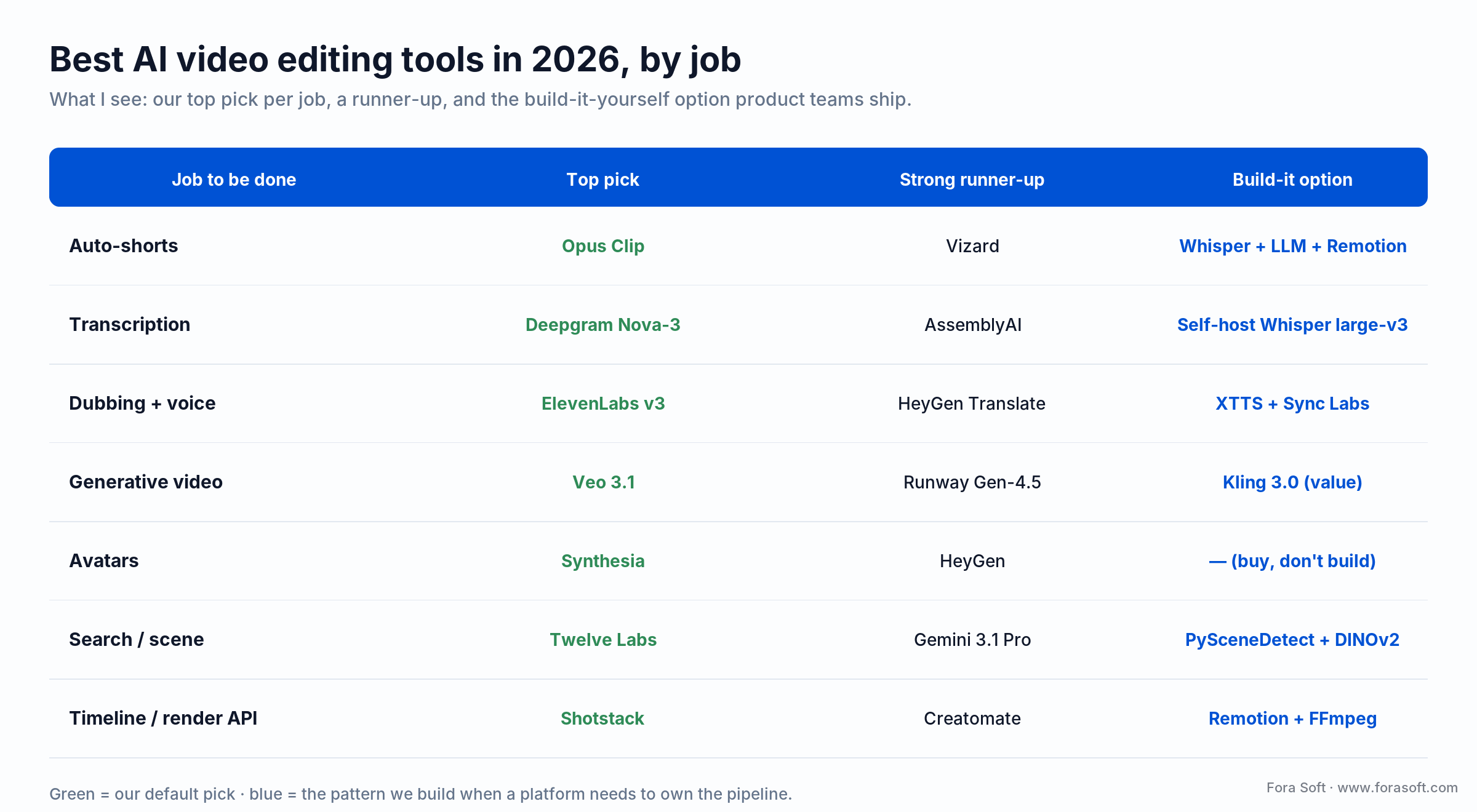
Figure 1. Best AI video editing tools in 2026, by job. Green is our default pick; blue is the pattern we build when a platform needs to own the pipeline.
Read it by column. The top pick is what we’d reach for first; the runner-up is the one we swap in when pricing or a data-residency rule rules the leader out; the build-it option is what a product team ships when it needs to own the margin and the data. Most platforms end up hybrid: buy the generative hero models, build the commodity transcription and composition stages. For the deeper stack behind these picks, see our guide to AI for video engineering.
Reach for a custom build when: you process 10,000+ videos a day, need SOC 2 / HIPAA / GDPR data locality, or your unit economics can’t absorb per-second API rates at scale. Otherwise buy the tool and ship this quarter.
Planning an AI editing feature for your platform?
30 minutes with a senior engineer — we’ll pressure-test the model choice, the orchestration, the unit economics, and the compliance exposure before you commit a dev sprint.
What an AI video editing layer actually is in 2026
Strip the marketing and “AI video editing” on a platform means a pipeline: ingest → transcribe → understand → retrieve / generate → compose → caption → encode → deliver. Each stage has 2–5 commodity options and one or two decisions that matter. The pieces that get paid for are:
- Auto short-form generation. Long video in, 3–10 vertical clips out. The feature Opus Clip built a unicorn on, with 16M+ creators as of mid-2026.
- Transcription & searchable captions. Whisper at $0.006/min, Deepgram Nova-3 at $0.0043/min pre-recorded, AssemblyAI with speaker diarization. Captions are also an SEO and accessibility win.
- Silence and filler-word removal. Descript-style “remove 3s+ pauses, remove ‘um’ and ‘uh’” — cuts podcast runtime 20–40%.
- Multi-language dubbing & voice cloning. ElevenLabs Professional Voice Clone, HeyGen Video Translate, Sync Labs lip-sync — turn a English webinar into seven languages overnight.
- Scene detection + smart B-roll. Detect talking-head segments, auto-insert stock B-roll or AI-generated shots at the semantic pause points. Twelve Labs Marengo / Pegasus is the leader on video understanding.
- Background removal & virtual sets. Runway ERASE, Unscreen, NVIDIA Broadcast — replaced green screens for most post-production workflows.
- Auto-reframe (16:9 → 9:16 / 1:1). Keep the speaker centered when you repurpose horizontal footage for Reels/Shorts.
- Thumbnail and chapter generation. LLM picks the click-worthy still + writes chapter markers from the transcript.
- Generative inserts. Prompt → 5-second Veo 3.1 or Runway Gen-4 clip spliced as a transition or explainer.
- Moderation & provenance. C2PA signing, NSFW/violence detection, deepfake flagging — becoming a compliance requirement, not a nice-to-have.
A platform that ships three or four of those well will out-retain a platform that ships ten poorly. The rest of this playbook is about which three.
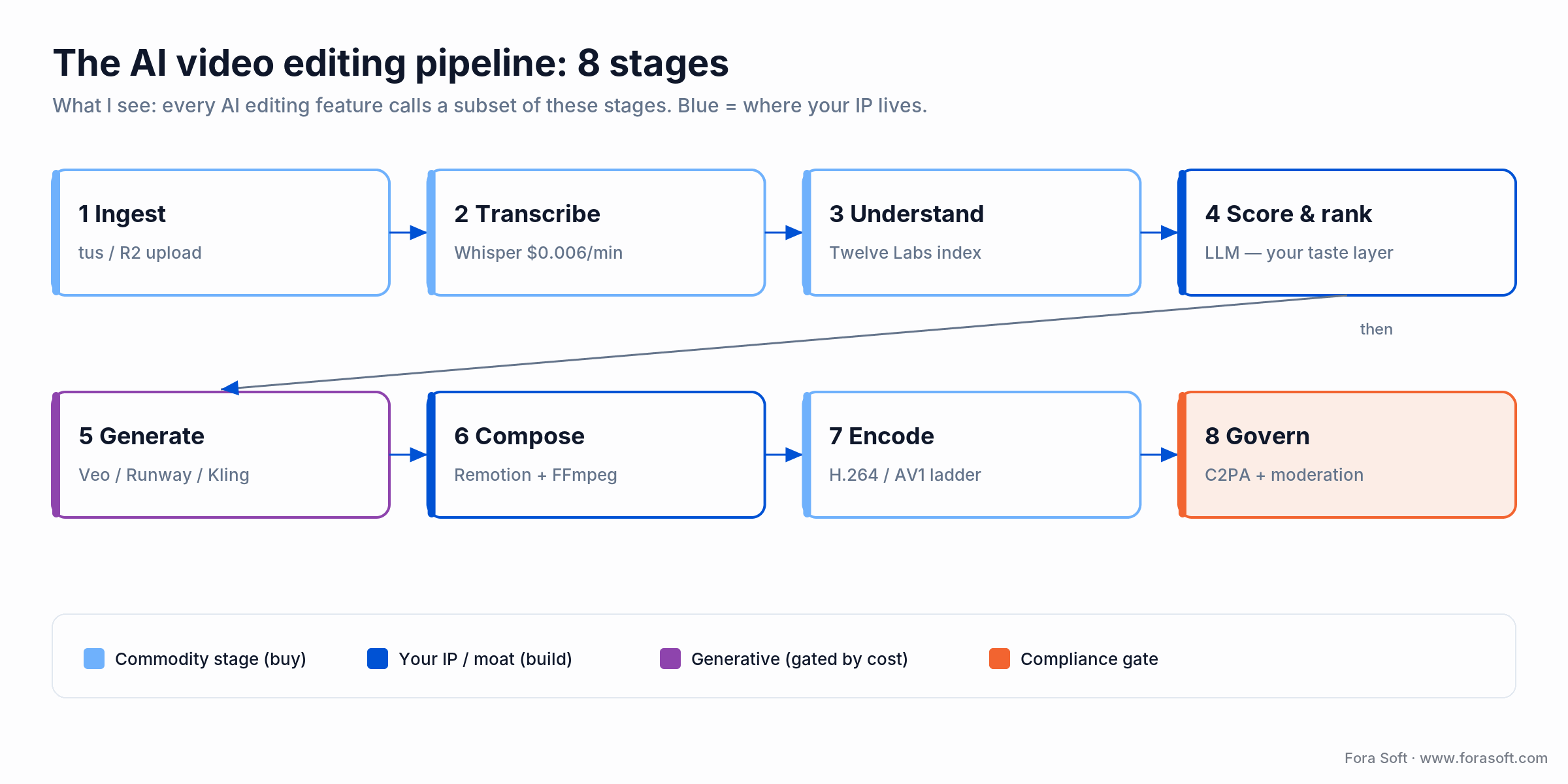
Figure 2. The eight-stage AI video editing pipeline. Blue stages are where your product’s IP lives; the rest is commodity you can buy.
The market: why AI editing is a 21% CAGR category
Meticulous Research puts the AI video generation and editing software market at roughly USD 3.67B in 2026, scaling to USD 24.89B by 2036 at a 21.4% CAGR. Grand View Research’s narrower AI video generator cut tracks $788M in 2025 to $3.44B by 2033 at 20.3% CAGR. The consumer layer (CapCut, Runway, Descript, Opus Clip) is large and crowded; the enterprise layer (Adobe Firefly Video, Twelve Labs, Synthesia, HeyGen) is smaller but where margin lives.
The growth isn’t driven by models getting dramatically better year-on-year. They are improving, but in increments. It’s driven by three concrete shifts. First, the short-form explosion on TikTok, Reels, Shorts, and LinkedIn has created a Cambrian demand for vertical repurposing. Second, remote work normalized async video — Loom, Vidyard, Zoom Clips, and corporate comms tools now have millions of hours uploaded weekly that nobody has time to watch at 1×. Third, API pricing has collapsed: Veo 3.1 runs $0.15/second in Fast mode, Runway Gen-4 Turbo costs ~$0.31 for a five-second clip (Gen-4.5 is ~$0.60), and Whisper transcription is effectively free at $0.006/min. A feature that required a $300K R&D investment in 2023 is a two-week sprint in 2026.
Pipeline stages: where each model actually runs
Before we name vendors, map the pipeline. Every AI editing feature ends up calling a subset of these eight stages — knowing which stages you need shapes the whole cost and vendor conversation downstream.
1. Ingest & decode. Resumable upload (tus, UpChunk), then ffprobe for metadata, HEVC/AV1 decode as needed. This stage is plumbing, not AI — but it’s where most platform reliability problems start.
2. Transcribe & diarize. Whisper / Deepgram / AssemblyAI produce word-accurate transcripts with speaker labels and confidence scores. Costs $0.003–$0.01 per minute. Feeds every downstream AI task — caption, search, clip scoring, dub.
3. Understand & index. Twelve Labs Marengo 3.0/Pegasus 1.5, Gemini 3.1 Pro video, or a custom CLIP/DINOv2 embedding pipeline creates searchable representations of scene, object, and mood. Costs $0.05–$0.30 per minute; the index pays back across every search/retrieve call afterwards.
4. Score & rank. An LLM (Claude Sonnet 5, Gemini 3.5 Flash, or GPT-5.6 Luna) reads the transcript and embeddings, then picks the most share-worthy windows. This is the “taste” layer, where your prompt templates become intellectual property.
5. Generate. Optional. Veo 3.1, Runway Gen-4, ElevenLabs, HeyGen produce net-new assets — video, voiceover, avatars. Expensive, gated behind tiers.
6. Compose. Remotion (React-to-MP4), Creatomate, or custom FFmpeg-filter graphs assemble the final timeline: crop, caption, B-roll, transitions, thumbnail. This is where auto-shorts actually happen.
7. Encode. H.264 for universal delivery, H.265 for cold storage, AV1 for bandwidth-sensitive premium tiers. Multi-bitrate ladders for adaptive streaming.
8. Govern & publish. C2PA signing, moderation gates (NSFW, violence, deepfake), consent records, audit log, then CDN push or platform publish via YouTube/TikTok/Meta APIs.
The model lineup: what ships in early 2026
Five categories of models show up in any serious AI editing stack. We’ll cover them in the order you’ll call them in a typical pipeline.
Transcription & diarization
OpenAI Whisper is still the default for offline batch, though open models like Qwen3-ASR and NVIDIA Canary now match or beat large-v3 on multilingual sets. For streaming and production workloads, Deepgram Nova-3 ($0.0043/min pre-recorded, ~$0.0077/min streaming) has the best latency/accuracy/price triangle we’ve benchmarked, and their new Flux model (~$0.0065/min) targets real-time voice agents. AssemblyAI is the best turnkey for diarization-heavy use cases (panel discussions, multi-speaker podcasts). For on-prem or ultra-low-latency, NVIDIA Parakeet TDT on a Hailo-8L or Jetson Orin Nano hits near-real-time for under $10/unit/day amortized.
Video understanding (search, scene, intent)
Twelve Labs Marengo 3.0 and Pegasus 1.5 — multimodal embeddings and generative summaries over video — lead for natural-language search (“find the moment she mentions churn”) and semantic chaptering. Google Gemini 3.1 Pro’s native video input has caught up for single-clip Q&A; it’s cheaper when you’re already on Vertex. For scene cuts specifically, PySceneDetect + a fine-tuned DINOv2 encoder beats black-box APIs for less than $0.01/min.
Generative video (text-to-video, image-to-video)
Google Veo 3.1 is the quality leader as of Q1 2026 and the first mainstream T2V model with integrated audio. Runway Gen-4.5 owns the creative-pro segment (Gen-4 Turbo is the cheaper draft tier) and is deeply integrated into Adobe Firefly. Kling 3.0 (Kuaishou) leads on cinematic motion at a lower price point. Luma Dream Machine 1.6 is competitive on price for prototyping. Pika 2.0 is strong at short-form lip-sync and viral formats. Meta Movie Gen still has no public API. OpenAI’s Sora 2 API is still live but flagged for sunset on 24 September 2026 (the Sora consumer app closed in April 2026), so anyone building on it should plan a migration to Veo 3.1 or Runway. We put these generation models side by side — real per-second pricing, native audio and when to self-host — in our text-to-video API comparison.
Voice: cloning, dubbing, TTS
ElevenLabs v3 (GA February 2026) is the quality benchmark for emotive cloned voices at ~$0.05–0.18/min of generated audio, but it’s a batch model, so use their Flash v2.5 for real-time agents, where Cartesia Sonic is also strong. Full dubbing through Dubbing Studio runs ~$0.33–0.50/min. For dubbing specifically, HeyGen Video Translate and Rask.ai bundle voice cloning + lip-sync into one API call. Sync Labs is best-in-class for lip-sync-only when you’re composing your own voice.
Composition: captions, thumbnails, B-roll
Captions.ai, Submagic, and Opus Clip are the consumer defaults; for platform builds you usually bake this yourself with Remotion (programmatic MP4 from React), FFmpeg, and a small caption-styling component. Thumbnails: prompt a VLM to pick the most “thumbnail-worthy” frame, then run it through a Firefly or DALL-E 3 retouching prompt. B-roll: Twelve Labs embedding search into Storyblocks / Pexels / Artgrid APIs, or generate fresh 5-second cutaways with Veo/Runway.
Reach for managed APIs (Veo, Runway, ElevenLabs) when: you’re under 1,000 videos/day, your latency budget is >10 seconds, and you want ship speed over margin. Managed is the right call for year one of almost every platform.
Reach for self-hosted (Whisper, SDXL, open weights) when: you’re processing 10,000+ videos/day, you need SOC 2 / HIPAA / GDPR data locality, or your unit economics can’t absorb a $0.15/second API rate at scale. Hetzner GPU rigs cost 2.5–3.3× less than AWS for equivalent H100 hours.
Reach for a hybrid mix when: transcription + scene detection go self-hosted (commodity, volume-sensitive), while generative video + premium voice stay on managed APIs — you get the margin on the hot path and the quality ceiling on the hero path. This is the pattern we ship most often.
Reach for on-device (WebGPU, Core ML) when: you’re shipping a consumer creator app and the edit happens on the phone — CapCut and Videoleap ship most trimming + caption work client-side and only call the cloud for generation.
AI video editing platforms compared: the 2026 matrix
Ten vendors we’ve integrated with or evaluated. Pricing signals are public list; your negotiated rate will differ. “Best for” means the use case where the tool is ranked #1 or #2 on customer reviews and our own benchmarks.
| Vendor | Model | Pricing signal | Best for | Watch out for |
|---|---|---|---|---|
| Runway | SaaS + Gen-4.5 / Gen-4 Turbo API | Standard $15/mo; Gen-4.5 API ~$0.60 / 5-sec clip | Hero generative shots, filmmaker workflows, Adobe bridge | Credits burn fast at scale; latency 30–120s |
| Descript | SaaS transcript-as-timeline editor | Free → $35/mo (600–1,800 min) | Podcasts, filler-word removal, text-based editing | Not an API-first tool; hard to embed in your platform |
| Opus Clip | SaaS auto-short-generator | Free → $29/mo (watermark-removed, 4K) | Creators who want shorts without thinking | No enterprise API; closed clip scoring model |
| Twelve Labs | API (Marengo + Pegasus) | Free 600 min; usage-based thereafter | Semantic search, chaptering, video understanding | Indexing latency; you’re building on top, not plugging in |
| Adobe Firefly Video | Creative Cloud + API | $9.99–$199.99/mo (Standard–Premium) | Commercially-safe training data; enterprise procurement | Credit accounting is opaque; Firefly video is behind Runway quality |
| Google Veo 3.1 | Vertex / AI Studio API | $0.15/sec (Fast), $0.40/sec (Standard) | Highest T2V quality + audio, API-first | Generation queue times variable; quota ceilings |
| Synthesia | SaaS AI avatars | $29–$89/mo (10–30 min), custom avatar ~$1K | Corporate training, enterprise comms, L&D | Avatar set is closed; API rate limits on growth tiers |
| ElevenLabs | API TTS + voice cloning | ~$0.05–0.18/min generated | Voiceover, dubbing, agent voices, audiobooks | Consent / NO-FAKES / ELVIS Act compliance on cloning |
| HeyGen | SaaS avatar + dubbing | Free → $89/mo, Enterprise custom | Video Translate, localized marketing, sales outreach | Uncanny valley on long-form; translation QA still human |
| Self-hosted (Whisper + Remotion + FFmpeg) | OSS on your Hetzner / AWS GPUs | ≈$0.002/min transcribe + your own margin | High-volume platforms, compliance-sensitive data | DevOps, GPU ops, model maintenance — now 2–3× cheaper with agent engineering |
Not sure which of those ten belong in your stack?
We’ve run these integrations in production — send us your use case and we’ll tell you the exact API-per-stage mix we’d ship for your volume and margin target.
Reference architecture: what we actually ship
Here’s the production pattern we deploy for platforms processing 500–50,000 videos/day. It’s intentionally boring — boring scales.
Ingest & storage. Browser/mobile upload → tus-js resumable uploader → S3 / Cloudflare R2 object store. Raw original stays forever on cold storage; proxies (720p, 1080p) are generated on the first read. CDN in front for delivery. This is the same pattern we shipped on Vodeo for 100K+ users.
Job orchestration. Uploads emit a Kafka event. A Temporal workflow fans out into 6–10 parallel jobs (transcribe, scene-detect, face-detect, OCR, visual-embed, safety-moderate) backed by Kubernetes horizontal-pod autoscaling. Most jobs finish in 0.3–1.5× real-time. Temporal gives you retry, compensation, and a human-readable timeline; Celery can’t.
Model layer. Self-hosted Whisper large-v3 on NVIDIA L4 / L40S pods via NVIDIA Triton (batched, $0.0015/min effective). Twelve Labs for indexing. Managed Veo 3.1, Runway Gen-4.5, ElevenLabs v3, HeyGen behind a single internal “model router” service that handles retries, prompt templates, and budget throttling.
Composition. Remotion renders the final MP4 from a React timeline that the AI agents produce as JSON. FFmpeg handles encode/transcode to H.264 for web, H.265 for bandwidth-sensitive apps, and AV1 for premium tiers. Vertical-crop, burn-in captions, and thumbnail composition all live here.
Search & retrieval. pgvector (small) or Milvus (large) stores the Twelve Labs and Whisper embeddings. The search UI does hybrid BM25+vector; answers come back in <200ms on collections under 10M clips.
Governance. Every generated asset is C2PA-signed on emit and logged to an audit store with user-ID, prompt, model, and cost. NSFW / violence / deepfake detection gates before publish. Consent records for voice clones live in the database with timestamped TOS acceptance.
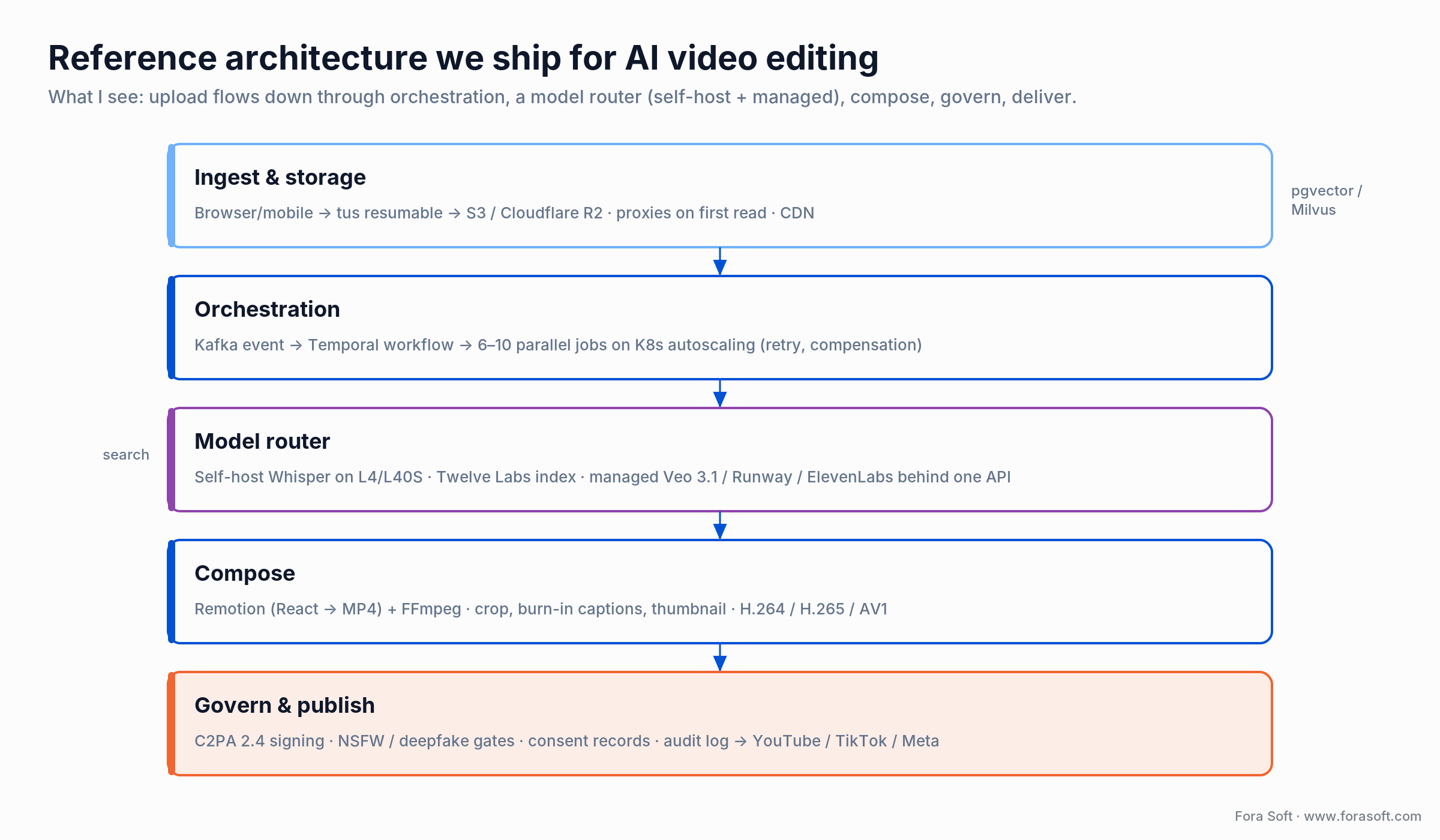
Figure 3. The reference architecture we ship for platforms handling 500–50,000 videos a day. Boring on purpose — boring scales.
Cost model: what AI video editing actually costs to run
The cost conversation usually collapses into three features: auto-shorts, dubbing, and generative inserts. Here’s the worked math for each, per video, at 2026 prices.
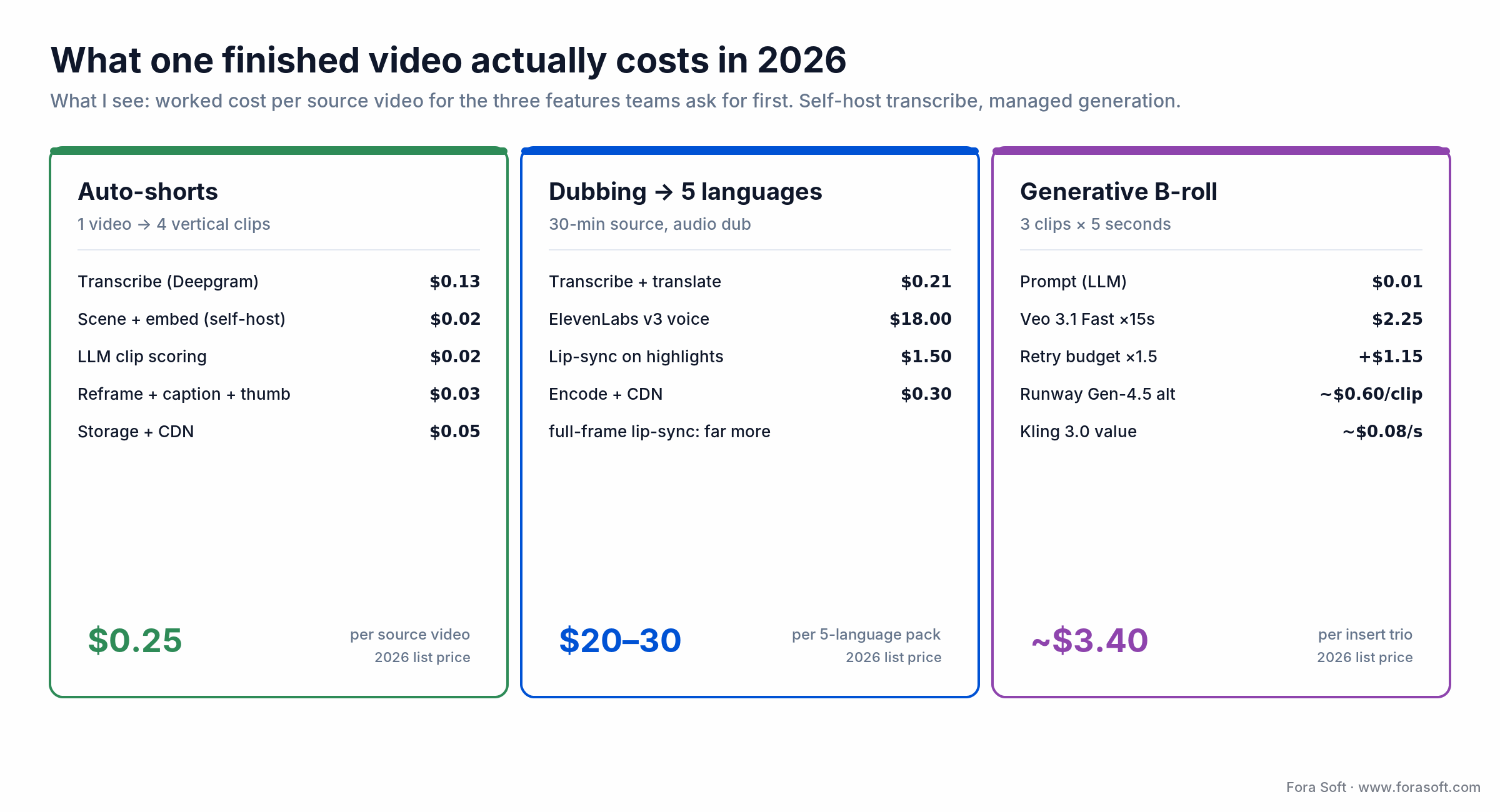
Figure 4. Worked cost per finished video at 2026 list prices. Self-host the commodity stages; keep generation behind a paywall.
Feature A — Auto-shorts (1 long video → 4 vertical shorts)
Assume a 30-minute source video. Transcription (Deepgram Nova-3 batch, $0.0043/min): $0.13. Scene detection + visual embedding (self-hosted PySceneDetect + DINOv2 on a batched L4): ~$0.02. LLM clip scoring (Claude Sonnet 5 or Gemini 3.5 Flash, ~5K tokens in + 2K out): ~$0.02. Vertical-reframe + caption burn-in + thumbnail (Remotion + FFmpeg on a CPU pod): ~$0.03. Storage + CDN egress for 4 output clips: ~$0.05. Total: $0.25 per source video. A creator running 30 videos a month costs you about $7.50 in COGS; a $19–$29/month AI tier clears that with room to spare before the generation upsell.
Feature B — Multi-language dubbing (English → 5 languages)
Same 30-minute source. Transcription (as above): $0.13. Translation (5 languages, ~4K tokens each, Claude Sonnet): ~$0.08. Voice cloning + synthesis (ElevenLabs v3, 30 min × 5 = 150 min × $0.12/min): $18.00. Lip-sync (Sync Labs, ~$0.02/sec amortized, 30min × 5 = 9,000 seconds): ~$180 if you lip-sync every frame — which is why most platforms only offer lip-sync on clips <3min. Encode + CDN: ~$0.30. Realistic total for lip-sync-on-highlights + full-dub audio: $20–$30/source/5-language pack. Price at $49/video or bundle into a $99/mo Creator tier.
Feature C — Generative B-roll inserts (3 clips of 5 seconds each)
Prompt generation (LLM, ~$0.01). Veo 3.1 Fast at $0.15/sec × 15 seconds (3 clips × 5s): $2.25 — but the first gen is rarely the keeper; budget 1.5× that, so ~$3.40 per final in-article insert trio. Runway Gen-4 Turbo at ~$0.31 per 5-sec clip runs about half that. Generative is the expensive stage; keep it behind paywalls or amortize across retries.
Platform-level infrastructure
For a 10K-video/day platform: Hetzner AX162-R or AX52 nodes (~€180/mo each) running Triton-batched Whisper give you roughly 100 hours of transcription/day per node at a 10× cost advantage vs. AWS G5. A Kafka + Temporal + Postgres backbone runs $400–$900/mo. Object storage on Cloudflare R2 is $0.015/GB-month with zero egress — the reason we default to R2 for video-heavy platforms. Bottom line: ~$2,500–$5,000/mo infra for a 10K-video/day AI editing platform, before managed APIs. Managed APIs become your largest variable cost above ~1,000 generative-video calls/day.
ROI: what operators actually measure
The AI editing story gets sold on “saves creators hours.” What actually moves KPIs is a shorter list:
1. Publishing velocity. Creators who use auto-shorts publish 3–5× more short-form pieces per long video. On our Tapereal work, the retention lift from daily-active posting was clear within six weeks.
2. Localization reach. Video Translate adds 40–80% incremental views per language for corporate and educational content. At $20–30/source in costs, payback is immediate for anything with >10K views.
3. Accessibility + SEO. Transcripts and captions drive 12–20% watch-time lift (accessibility research published by W3C and BBC) and directly power in-video search, chapter markers, and RAG-over-video use cases.
4. Creator LTV. Platforms that ship AI editing retain creators longer. Opus Clip reports 5–10 hours saved per creator per week; that’s the gap that makes your platform sticky vs. a competitor’s.
5. Pricing power. The AI tier is the upgrade path. Notion AI, GitHub Copilot, Canva Magic — all proved buyers will pay $10–$30/mo for a generative tier. Same math applies here.
Mini case: Worldcast Live — AI on top of sub-second streaming
Situation. Worldcast Live is an HD concert-streaming platform delivering sub-second WebRTC video to 10,000 concurrent viewers. The team wanted to give artists post-event VOD highlights without adding a human editor to the pipeline — the goal was “concert ends at 22:30, 10 highlight clips live on the artist’s social by 23:30.”
12-week plan. Weeks 1–3: capture pipeline extension — every stream now emits a lossless MP4 alongside the WebRTC fanout. Weeks 4–7: AI analysis stack — Whisper transcription, crowd-cheer audio peak detection, song-change detection via BPM and key-shift models, and a scoring model that ranks 30-second windows. Weeks 8–10: composition pipeline with Remotion + FFmpeg for vertical reframe and burn-in captions, plus a lightweight artist review UI. Weeks 11–12: publish integrations to YouTube Shorts, TikTok, and Instagram Reels, with C2PA signing and audit trail.
Outcome. End-of-show-to-publish went from 48 hours (manual editor) to <45 minutes. Artist social engagement on highlight clips ran 3.2× the baseline for traditional end-of-show recap posts. Want a similar assessment for your platform? Book a 30-min review and we’ll map the ship path for your ingest + model stack.
5 pitfalls that kill AI video editing projects
1. Treating the model as the product. The failure mode is building a thin UI over one model (Veo, Runway, whoever). The moment a better model ships, your users leave. The product is the workflow — the ingestion, the orchestration, the caching, the human-in-the-loop QA, the library, the publish integrations. Start there.
2. Unit economics that assume “free” inference. Teams demo the feature on a single video, feel the magic, and price at $9/mo. Then production hits and the Runway credits bill is $40/user/mo. Model the cost-per-video from the first prototype; build a kill-switch that caps generative calls per-user-per-day.
3. Compliance as an afterthought. Shipping a voice-cloning feature without a consent record, a C2PA signing step, and an EU AI Act disclosure widget in 2026 is how you get a cease-and-desist or a class action. Put the compliance plumbing in sprint one, not sprint eight.
4. Ignoring the long tail of codecs. H.264 is universal, H.265 cuts storage 40–50%, and AV1 saves another 20% but encodes 10–20× slower. Pick a codec policy on day one and stick to it. Our default: H.264 for delivery, H.265 for cold storage, AV1 for premium tiers with SVT-AV1 preset 8 to keep encode cost reasonable.
5. No evals, no ground truth. Captioning accuracy, scene-cut recall, clip-scoring precision — if you can’t measure them on a golden set, you can’t regress them when you swap models. Build a 200-clip eval set with human labels in the first month and rerun it every sprint. It’s the cheapest insurance policy on the project.
KPIs: how to tell if the AI editing layer is working
Quality KPIs. Caption Word Error Rate under 6% for English, under 10% for accented speech. Scene-cut F1 above 0.85 on your evaluation set. Clip-scoring top-5 precision above 0.7 — measured by “did the human keep at least one of the AI’s five suggestions?” Generative-video reject rate under 35% (higher means your prompt templates are weak, not that the model is bad).
Business KPIs. AI-tier conversion rate above 8% of MAU within 90 days of launch. Paid-user publish velocity up 3× vs. pre-launch baseline. Dubbing ARPU lift of 15–30% on platforms with international creators. AI-feature churn lower than base-product churn — if it’s the other way round, the feature is noise, not value.
Reliability KPIs. P50 short-generation latency under 90 seconds for a 30-minute source. P95 under 5 minutes. Model-router error rate under 1% end-to-end. Zero publish events without a C2PA signature on generative output (this is a compliance KPI, not a performance one — it either is 100% or you have a regulatory problem).
Building the eval set and the dashboards in-house?
We’ve shipped the full eval-suite + observability stack on several AI video products — 30 minutes and we’ll share the exact schema and tools we use.
Security, privacy, and compliance: the 2026 rulebook
EU AI Act Article 50 (August 2026). Synthetic audio, video, and image outputs must be machine-readable as AI-generated. A C2PA manifest plus a visible disclosure widget satisfy the baseline; systems already on the market get until 2 December 2026 to add the machine-readable marking (Digital Omnibus). Article 50 breaches carry fines up to €15M or 3% of global turnover. The €35M / 7% tier is reserved for the Article 5 prohibited practices.
C2PA / Content Credentials. Adobe, Microsoft, Intel, BBC, and most major platforms have adopted the C2PA 2.4 spec, and both Google Veo (SynthID) and OpenAI Sora (C2PA Content Credentials) now sign their outputs. Signing every generated asset on emit is a two-line integration; the value comes from the trust it buys you with press, ad-networks, and OEMs.
Voice cloning consent. Tennessee’s ELVIS Act (in force July 2024) already requires explicit consent for voice cloning, and the federal NO FAKES Act — reintroduced May 2026 and advanced out of the Senate Judiciary Committee on 18 June 2026, but not yet law — would extend that nationwide with civil penalties per unauthorized use. Store consent records with timestamp, IP, and signed TOS text. Don’t allow voice uploads without a hard gate.
GDPR / CCPA / LGPD. Faces, voices, and transcripts of identifiable speakers are personal data. Encryption at rest, clear retention policy, DPO notification for generative use, and a subject-access path for users who want their training-data contributions deleted.
Platform publish rules. YouTube requires synthetic-media disclosure for “realistic” altered content; TikTok requires an AI-Generated label with specific thresholds; Meta labels content flagged by its classifier. Your publish pipeline should pass the disclosure flag through with the asset.
Copyright & training data. Adobe Firefly leans on “commercially safe” licensed training data; Runway and Veo do not make the same guarantee. For enterprise customers, Firefly is the conservative choice; for consumer creators, Runway/Veo quality usually wins. Document your content-liability position in your TOS.
When NOT to build an AI video editing layer
Three scenarios where we’d advise waiting or buying instead of building. First, under 100 videos/day. You’re better off bolting Opus Clip or Descript via embed/SDK than running your own model router. The orchestration overhead doesn’t pay back below a few hundred-videos-a-day floor.
Second, when your differentiator is elsewhere. If you’re a B2B video-review SaaS where the moat is the review workflow (annotation, approvals, version control), spend your eng on that moat, not on reinventing CapCut. Integrate AI editing via white-label (Veed, Creatomate, JellyEdit all offer embed paths).
Third, when compliance gravity is too high. Highly regulated sectors (medical imaging, legal evidence, broadcast news editorial) may not be able to ship generative tools until your ISO 42001, SOC 2, or FCC process catches up. In those cases ship the non-generative AI (transcription, search, redaction) first, and queue generative for the next fiscal year.
A decision framework — pick your stack in five questions
Q1. What’s the daily volume? Under 500 videos/day: managed APIs, no self-hosting. 500–10,000: hybrid, self-host transcription + scene detection. Above 10,000: aggressive self-hosting, managed APIs only for hero generative.
Q2. What’s the latency budget? Real-time (<2s): voice-cloning in-call, live captioning — requires streaming ASR (Deepgram, NVIDIA Parakeet) and a tight SFU pipeline. Near-real-time (<60s): post-call summary, highlights during a webinar — batch ASR + fast LLM. Batch (<10 min): post-event, overnight dubs — almost any stack works.
Q3. What’s the compliance posture? EU customers: Firefly or Veo + C2PA day one. US enterprise: SOC 2 Type II, data-locality contracts, NO FAKES ready. Healthcare or legal: HIPAA BAA on every vendor, on-prem where you can.
Q4. What’s the content class? UGC short-form: Opus-Clip-style workflow is the north star. Enterprise training: Synthesia / HeyGen avatars + script pipeline; we compared 7 HeyGen alternatives, including when to build custom. Broadcast / filmmaker: Runway Gen-4 + Adobe. Surveillance / security: on-prem CV stack (our MindBox pattern).
Q5. What’s the team? Under 3 engineers: buy or embed. 3–8 engineers: hybrid with lean ops. 8+ engineers: custom is worth the margin. Agent engineering pulls the “worth it” threshold down by roughly 40% from where it was in 2024.
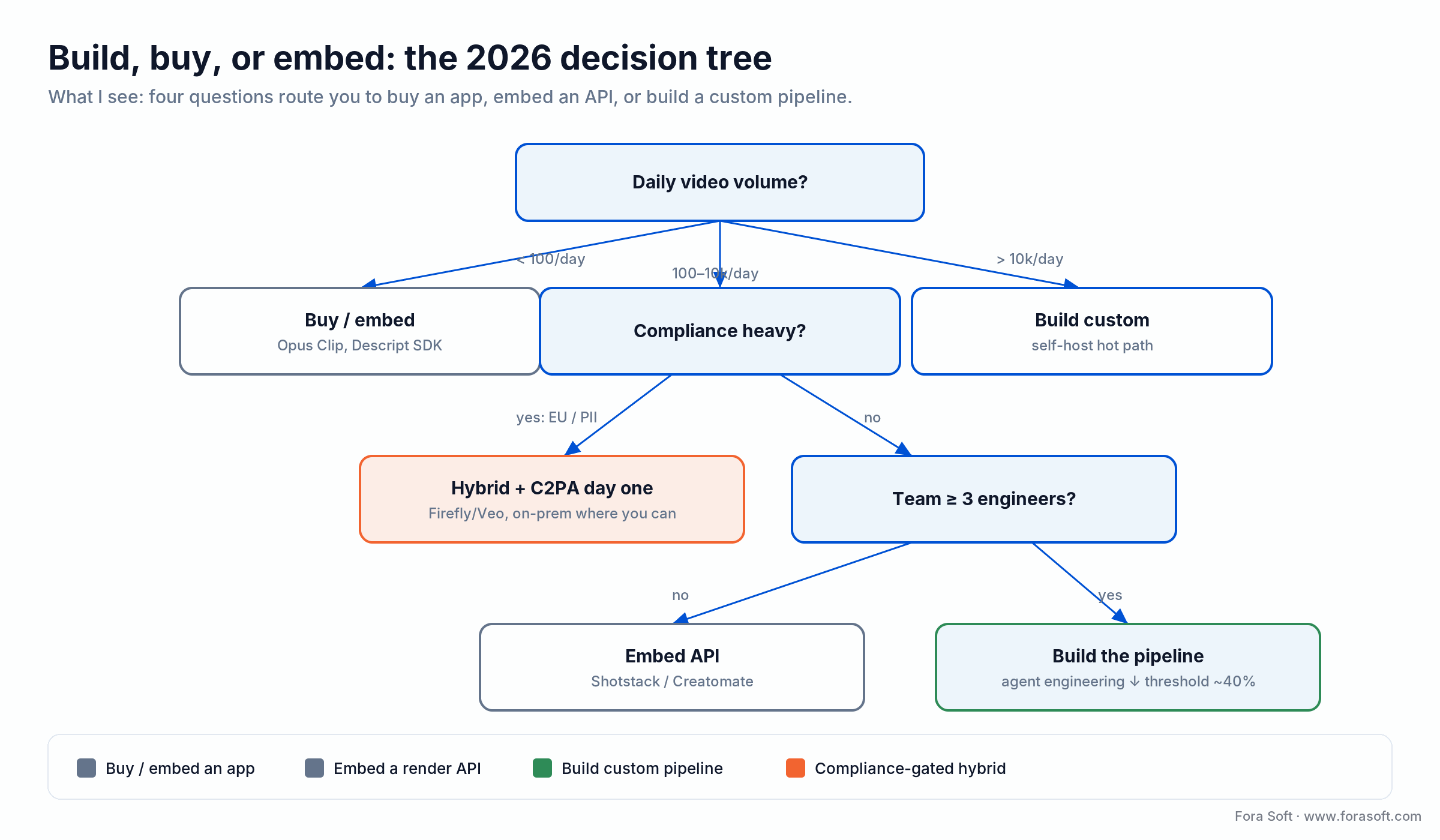
Figure 5. Build, buy, or embed: how we route the decision by daily volume, compliance exposure, and team size.
Integration playbook: the 12-week path
This is the plan we ship against for teams starting from an existing video platform — not greenfield. Greenfield is faster because you’re not threading around legacy.
| Weeks | Workstream | Deliverable |
|---|---|---|
| 1–2 | Discovery & eval suite | 200-clip golden set, KPI dashboard, model-shortlist decision |
| 3–4 | Ingest + transcription + storage | Every upload gets transcript and scene-cut metadata |
| 5–6 | Model router + orchestration | Temporal workflows, prompt registry, budget throttling |
| 7–8 | First hero feature (auto-shorts or dubbing) | End-to-end feature shipped to 5% beta users |
| 9–10 | Compliance + observability | C2PA signing, consent records, audit log, Grafana dashboards |
| 11–12 | GA launch + second feature | Paid tier live, second AI feature rolling into beta |
With agent engineering, we compress weeks 3–6 by 30–40% because scaffolding, tests, and Terraform get written by Claude Sonnet 5 / Opus 4.8 faster than by hand, with a senior engineer reviewing rather than authoring. That’s the single biggest change to the playbook between 2024 and 2026.
Where AI video editing is heading in 2026–2027
Longer-form generative. Current models comfortably generate 5–10-second clips; the bleeding edge is 30–60 seconds with narrative coherence. Veo 4, expected late 2026, is projected to hit two-minute consistent scenes, which collapses most explainer-video production into a prompt.
Real-time generative editing. We’re already seeing <1s latency on short generative clips via distillation and FPGA backends. By late 2026, expect “paint over the frame, it regenerates live” workflows in consumer apps — the video equivalent of what Photoshop Generative Fill did for images.
Agentic editing. Long-form video editing is becoming a multi-step agent task — “cut this webinar into a LinkedIn thread + a Shorts pack + a dubbed Spanish version + a sales follow-up” — orchestrated by a planning model calling the specialized APIs. Expect Loom, Descript, and Adobe to ship agent interfaces in 2026.
Native video LLMs. Gemini 3.1 Pro, GPT-5.6, and Claude Sonnet 5 already accept video as a native input modality. The downstream is that “ask a question about this video” becomes a single API call rather than a three-stage pipeline. RAG-over-video and semantic search collapse toward a unified model interface. A single API call is easy to demo and hard to ship: to build generative AI into your product you still own the latency budget, the cost per request, and what happens when the model returns nothing usable.
Provenance becomes product-level infrastructure. C2PA adoption by Apple, Nikon, Leica, Samsung, and most platforms means “is this real?” becomes a first-class UX question, not a backend detail. Platforms that ship transparent provenance will win trust budgets in 2027.
FAQ
What are the best AI video editing tools in 2026?
There is no single winner — the best AI video editing tools in 2026 are the best for a specific job: Opus Clip for auto-shorts, Descript for transcript-based editing, Veo 3.1 and Runway Gen-4.5 for generative video, ElevenLabs and HeyGen for dubbing, Synthesia for avatars, and Twelve Labs for video search. For a platform, the better question is which to embed versus which to build yourself.
Should we use Runway, Veo, or Kling for generative video in 2026?
Default to Veo 3.1 for best quality + integrated audio, Runway Gen-4 for filmmaker-grade control and Adobe integration, Kling 3.0 for lower-cost cinematic shots. Route behind a thin abstraction so you can swap as the leaderboard shifts — which it does quarterly.
Is Sora still an option?
Sora 2 is still available, but OpenAI has flagged the Sora 2 API for sunset on 24 September 2026 and already closed the Sora consumer app (April 2026). Plan a migration to Veo 3.1 or Runway Gen-4.5, and don’t start a new build on Sora today.
How much does it cost to run auto-shorts in production?
Around $0.20–$0.40 per source video for a 30-minute input producing 4 shorts, assuming self-hosted transcription and a managed LLM for scoring. Price a $9–$19/mo tier for 50 videos and you land on healthy 15–25% COGS.
What’s the fastest path to shipping dubbing?
HeyGen Video Translate or Rask.ai via API for the 80% case; ElevenLabs v3 + Sync Labs when you need studio-grade voices and control. Add a consent widget at upload and a C2PA signing step before publish, or you have an EU AI Act problem.
Do we need to self-host Whisper or is Deepgram enough?
Below ~300 hours/day of audio, Deepgram Nova-3 (or AssemblyAI) is the right buy — the operational cost of running batched Whisper at reliable SLA is higher than the API fees. Above that, self-hosted Whisper large-v3 on NVIDIA L4/L40S pods cuts cost 4–8×.
How do we handle EU AI Act Article 50 disclosure?
Two things: C2PA-sign every generative asset on emit (machine-readable), and add a visible “AI-generated” badge on any wholly-synthetic output in your player UI (human-readable). Keep a logged audit of generation events — model, prompt, user, timestamp — for enforcement requests.
How long does a custom AI editing feature take to ship in 2026?
8–14 weeks to beta for a team of 3–5 engineers using agent-assisted development, depending on the feature. Auto-shorts is the fastest (6–8 weeks). Multi-language dubbing with lip-sync is the longest (10–14 weeks). Greenfield is faster than retrofitting an existing platform by roughly 20%.
What’s the biggest mistake teams make on their first AI video feature?
Shipping a thin UI over one model without a workflow. Users churn the moment a prettier demo lands. The product is the orchestration, the library, and the human review surface — the model is a commodity.
What to read next
AI Strategy
Generative AI and Contextual Video Intelligence
From detection to understanding intent — how video AI moves past classification.
Architecture
How Video AI Agents Actually Work
The agent pattern behind smart video calls and editing automation.
Build Guide
2026 LiveKit Multimodal Agents Guide
Voice, vision, and production-grade multimodal agent architectures.
Streaming
Building a Video Call App with Agora SDK in 2026
Production patterns for real-time video and WebRTC stacks.
Services
AI Integration Services at Fora Soft
How we ship AI into existing platforms in 8–14 weeks.
Ready to ship AI video editing that actually moves your retention curve?
The short version: AI video editing is a $3.7B market growing 21% a year, the models are commodity, the workflow is the product, and a tight team of 3–5 engineers can ship a hero feature in 8–14 weeks with agent-assisted engineering. Managed APIs (Veo 3.1, Runway Gen-4, ElevenLabs, Deepgram) cover the first 1,000 videos/day cheaply; self-hosting transcription and scene detection is what pays off above that.
Compliance is not optional in 2026 — EU AI Act Article 50, C2PA, and voice-cloning laws are real, and the cost of retrofitting is higher than the cost of designing them in. Start with an eval suite, a model router, and a publishing pipeline you control. Auto-shorts is the fastest ROI feature; dubbing is the fastest international-revenue feature; generative B-roll is the prestige feature. Pick one, ship it, measure it, then ladder.
Want our opinion on your AI editing roadmap?
30 minutes with a senior Fora Soft engineer — we’ll map the stack, cost model, and 12-week ship plan for your platform before you commit a sprint.

