

AI-generated lesson plans are good enough to save real time and, in some 2025–2026 studies, match teacher-written plans for learning outcomes — but only after a teacher edits them. Raw output is structurally complete and standards-labelled, yet it clusters at low-order thinking, misreads classroom context, and occasionally states things that are wrong. This playbook shows what a generated plan actually looks like, which model-plus-prompt combination produces the strongest draft, how to align it to Common Core or NGSS, and the review workflow that makes it safe to teach.
Key takeaways
• Quality is real but conditional. A 2026 randomized study found human-AI co-designed plans beat both teacher-only and AI-only plans on quality and student outcomes.
• The prompt matters more than the model. In a 2025 evaluation, the framework you use (RACE won) drove accuracy and standards alignment; the model mostly drove readability.
• Every model under-shoots Bloom’s. Generated objectives cluster at “remember” and “understand.” You have to prompt for higher-order verbs, or add them yourself.
• Review is the whole job. Teachers who treat AI output as a first draft save ~5.9 hours/week (RAND 2025); teachers who print it verbatim quietly stop using it.
• Free is the norm, not the moat. Khanmigo is free for teachers; MagicSchool, Diffit and general chatbots all draft plans at no cost. The differentiator is verification, not access.
Why Fora Soft wrote this playbook
We build AI content-generation features for education platforms, so we see generated lesson plans from the inside: prompts, retrieval, evaluation, the lot. We shipped ALDA, a custom AI app for a large edtech client, and Scholarly, an AI learning platform used by 15,000+ students. Fora Soft has delivered 250+ projects since 2005, and our e-learning software development team builds the classroom and LMS platforms these generators plug into. What we learned building these: the model writing the plan is the easy part. The hard part is making the output trustworthy enough that a teacher can walk into a classroom with it.
This guide is about the plans themselves, not a ranked list of apps. If you want a tool-by-tool procurement guide, read our AI lesson plan generator buyer’s guide; for a straight comparison of the apps, see our best AI tools for lesson planning roundup. Here we answer the question teachers actually type into search: are AI-generated lesson plans any good, and how do I get one worth teaching?
Building lesson-plan generation into your edtech product?
We’ll map the prompt, retrieval and review layers your platform needs to ship trustworthy AI-generated lesson plans.
What an AI-generated lesson plan actually contains
An AI-generated lesson plan is the structured output a model returns when you give it a topic, grade band, standard and lesson length. It is not free-form prose. A purpose-built generator returns a predictable skeleton: learning objectives tied to a standard code, a hook or bell-ringer, a direct-instruction step, guided practice, independent practice, a formative check, and a differentiation note for students above or below grade level.
That skeleton is why the plans feel useful in seconds and why they mislead. The structure is always there; the substance in each slot varies wildly by model, subject and prompt. A generated plan for a fifth-grade fractions lesson will nail the format and give you a plausible warm-up. Whether the worked example is mathematically correct, whether the timing is realistic for your 43-minute period, and whether the “differentiation” is more than a sentence — that is what review has to catch.
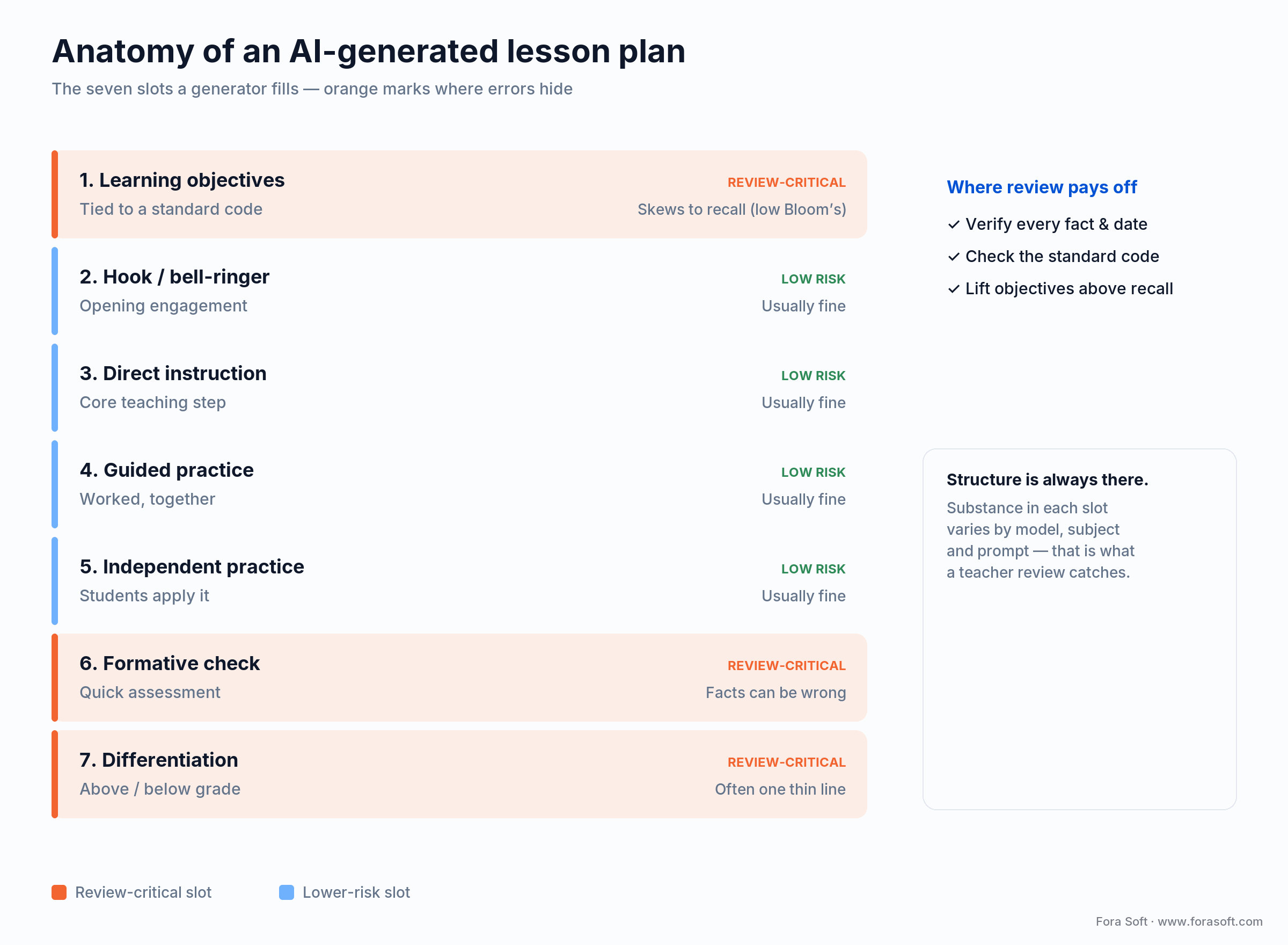
Figure 1. The seven slots a generator fills — and the three where errors hide.
The distinction that matters for search: a general chatbot (ChatGPT, Gemini, Claude) writes the same skeleton, but without a standards taxonomy, an audit trail, or student-data guardrails. A purpose-built generator adds those. For a solo teacher drafting Sunday-night plans, the chatbot is fine. For a district storing student data, the guardrails are the reason procurement exists at all.
Are AI-generated lesson plans any good? What the research says
Short answer: good enough to be a strong first draft, not good enough to teach unedited. The 2025–2026 evidence is more encouraging than the hype-skeptics admit and more sobering than the vendors claim.
On the encouraging side: a 2026 randomized experiment in secondary physical education, published in Frontiers in Computer Science, found that lesson plans co-designed by a teacher and an AI scored higher on alignment, creativity and real-world relevance — and produced better student outcomes — than plans from the teacher alone or the AI alone. Co-design, not automation, is where the gains live.
On the sobering side: reviewers consistently find the same failure modes. Generated plans can’t account for a specific class’s abilities, the cultural tone is sometimes off, and there are no real contingency branches for when a lesson stalls. A 2025 analysis in the CITE Journal put it bluntly for civic education: the plans are structurally complete but pedagogically shallow, and they reproduce whatever bias sits in the training data. The cross-study consensus is that AI drafts reinforce rigid formats and rarely accommodate learner diversity unless a teacher pushes them to.
Trust AI-generated plans when: you treat the output as a draft, verify the facts and standard codes, and add the context and higher-order thinking the model skips. Distrust it the moment anyone proposes teaching it verbatim.
Which AI model writes the best lesson plans
No model wins outright — and the model matters less than most people think. A 2025 evaluation (arXiv 2510.19866) generated 15 high-school physics plans across five frontier models and three prompt frameworks, then scored them on readability, hallucination, standards alignment and cognitive demand. The headline: model choice mostly governs how readable the plan is, while the prompt framework governs how accurate and standards-aligned it is.
On readability, the spread was large. DeepSeek V3.2 produced the most accessible plan at a Flesch-Kincaid grade level of 8.64; Claude Sonnet 4.5 wrote the densest at grade 19.89, roughly college-graduate reading level for a high-school lesson. Neither is “wrong”; they suit different audiences. For a plan students will read, a lower grade level helps. For a teacher-facing planning document, density is tolerable.
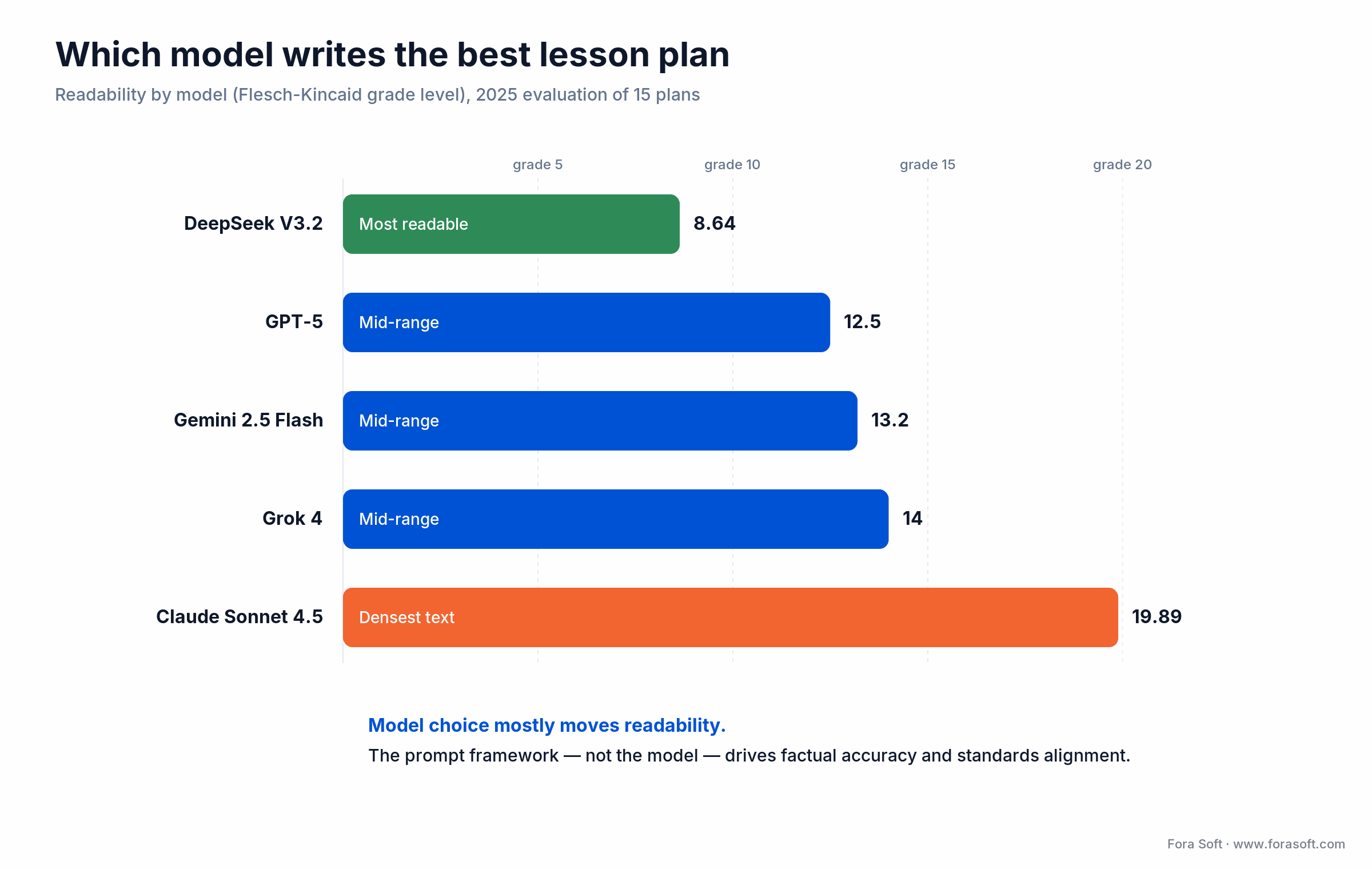
Figure 2. Model choice mostly moves readability; the prompt moves accuracy.
| Model (2026) | Readability (FKGL) | Where it wins | Where it breaks |
|---|---|---|---|
| DeepSeek V3.2 | 8.64 (most readable) | Student-facing text, ELL, lower grades | Fewer education guardrails; self-host for privacy |
| GPT-5 (ChatGPT) | Mid-range | All-round drafts, follow-up iteration | No standards audit trail on the raw API |
| Gemini 2.5 Flash | Mid-range | Google Classroom workflows, speed | Terser reasoning on complex objectives |
| Grok 4 | Mid-range | Current-events tie-ins | Less predictable tone for K-12 |
| Claude Sonnet 4.5 | 19.89 (densest) | Teacher-facing depth, rubric detail | Reading level too high for student handouts |
There is one weakness every model shared: the learning objectives clustered at the “remember” and “understand” tiers of Bloom’s taxonomy, with few higher-order verbs like “evaluate” or “design.” If you accept the default, your AI-generated lesson plans will quietly drift toward recall. You have to ask for analysis and creation explicitly.
Reach for a readable model plus a strong prompt when: the plan’s text reaches students directly. Pair a lower-FKGL model with an explicit checklist of higher-order objectives and you fix both the reading-level and the Bloom’s problem in one pass.
How to prompt for a plan worth teaching
Use a structured framework, not a one-line request. In the same 2025 study, the RACE framework — Role, Audience, Context, Execution — produced the lowest hallucination index and the highest incidental alignment with NGSS standards. TAG (Task, Audience, Goal) and COSTAR trailed it. The lesson is simple: the more structure you hand the model up front, the fewer facts it invents and the closer it lands to your standards.
The single biggest quality lever is an explicit checklist inside the prompt. The study’s best configuration paired a readable model with RACE and a checklist naming the exact concepts to cover, the standard codes to hit, and the higher-order objectives to include. That checklist is what drags objectives up Bloom’s taxonomy and pins alignment to a real code instead of a plausible-looking one.
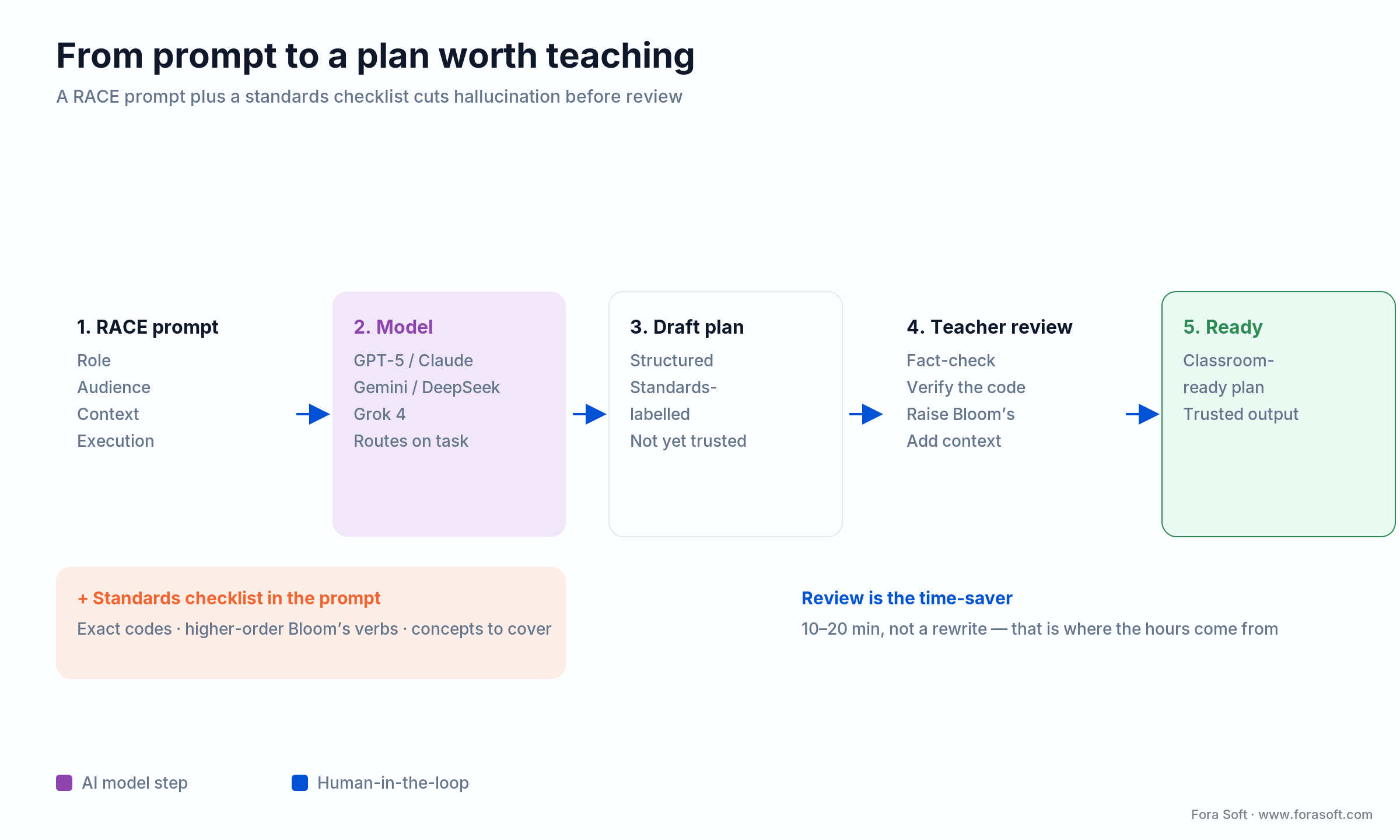
Figure 3. A RACE prompt plus an explicit checklist cuts hallucination before review even starts.
A worked RACE prompt for a real lesson looks like this: Role — “You are a fifth-grade science teacher.” Audience — “28 students, mixed reading levels, 6 English learners.” Context — “45-minute period, NGSS 5-PS1-3, we have hand lenses and no lab.” Execution — “Produce objectives at analyze and evaluate levels, a hook, guided and independent practice, a 3-question formative check, and a tiered task for the English learners. Cite the NGSS code on each objective.” That prompt returns a draft that needs minutes of edits, not a rewrite.
Add a checklist to the prompt when: the plan has to hit specific standards or higher-order thinking. Naming the codes and the Bloom’s verbs in the prompt is the difference between “standards-flavored” and “standards-aligned.”
AI-generated lesson plans by grade band
Generated quality is not uniform across ages. The review effort shifts with the grade band.
Elementary (K–5)
Models write clean elementary structure, but the reading level of student-facing text is the trap — a dense model will hand a second-grader college-level instructions. Prompt for the target grade’s reading level explicitly, and check that hands-on activities are actually feasible with what’s in the room. Visual-first output from a design tool is popular here.
Middle school (6–8)
This is the differentiation band — one class, three ability levels. Generated plans handle a single track well and tiered tracks poorly unless you ask for them. The best results come from prompting the model with the actual class composition and demanding parallel activities, not a footnote that says “differentiate as needed.”
High school (9–12)
Subject specialists here need factual accuracy above all. This is where hallucination bites — a wrong constant in a physics plan or a garbled date in history is worse than no plan. STEM plans benefit most from a fact-checking pass; humanities plans benefit most from a check on nuance and framing. Push hard for higher-order objectives; the default recall bias hurts most at this level.
Special education, ELL, IEP support
Generators are built around grade-level standards, not individual IEP goals, so this is the weakest band. The workaround is to prompt with the specific IEP goal or language-proficiency target as the objective, rather than a standard code. No mainstream tool solves IEP-aligned generation cleanly. It remains a genuine gap and, for platforms serving this population, a reason to build custom.
Need IEP-aware or multi-standard generation your tools can’t do?
We’ve built custom generation pipelines that align to goals, not just grade-level codes. Let’s scope yours.
The 5-step review workflow before you teach it
Review is not optional polish; it is the step that produces the time savings. Here is the pass we recommend, in order.
1. Fact-check the content. Read every claim, number, date and worked example. STEM and history are the highest-risk. If the model cites a source, confirm it exists. This is where hallucinations die.
2. Verify the standard code. Check that the cited Common Core or NGSS code is real, current, and actually matches the objective. Models will invent plausible codes or attach the wrong one.
3. Raise the cognitive demand. Scan the objectives. If they all say “identify” and “describe,” rewrite one or two to “compare,” “evaluate” or “design.” This is the single most common fix.
4. Add your classroom context. Adjust timing to your real period length, swap in materials you own, and add the contingency the model skipped: what happens when the fast group finishes early or the demo fails.
5. Localize the tone. Fix cultural references, examples and reading level for your actual students. This is where generated plans feel generic, and where a two-minute edit makes them feel yours.
Done well, this pass takes 10–20 minutes against the 45–60 minutes of writing a plan from scratch. That gap is where the 5.9 hours a week that weekly AI users report saving comes from (Gallup–Walton via RAND, 2025).
Standards alignment: can AI really hit Common Core and NGSS?
Yes for purpose-built tools, only incidentally for raw chatbots. MagicSchool, Diffit and Eduaide map objectives to Common Core and NGSS codes and cite them inline; a general chatbot aligns by coincidence unless you paste the standard text into the prompt. Even the aligned tools vary in rigor: some cite the exact code (CCSS.ELA-LITERACY.RI.5.2), some list it as metadata, some only gesture at it in the rationale.
Two things break alignment in practice. First, framework versions drift — a state revises its standards and the model’s training data lags, so it cites a retired code. Second, “aligned” is a marketing word, not an audit. For district use, ask the vendor to name the specific framework version they support, and spot-check generated codes against the current published standard. A plausible code is not a correct code.
Verify the code, not the claim: paste the generated standard code into your state’s current framework and confirm the wording matches the objective. This 30-second check catches the most damaging silent error in generated plans.
The compliance layer: FERPA, COPPA and state law
Generating plans is low-risk until student data enters the prompt. The moment a teacher pastes names, grades or IEP details, privacy law applies — and that is where districts gate adoption.
FERPA. Student education records need a signed Data Processing Agreement before they leave the district perimeter; the U.S. Department of Education’s Student Privacy office and the SDPC National DPA are the reference points. Ask any vendor whether student data is used to train their models; the answer must be no, in writing.
COPPA. For under-13 students, the FTC’s amended COPPA Rule (published 22 April 2025, full compliance 22 April 2026) tightens consent and data-minimization; schools can consent in loco parentis for classroom use. Khanmigo and MagicSchool are built for this; a raw consumer chatbot is not.
State law and the EU. California (SOPIPA), Illinois (SOPPA), New York (Ed Law 2-d), Texas (SB 820) and Colorado add their own duties. If you serve EU learners, the EU AI Act classifies education as high-risk (Annex III), with the compliance deadline now 2 December 2027 after the Digital Omnibus agreement of May 2026; the Article 50 transparency and AI-literacy duties are already in force.
The tools that generate the plans
You do not need a special app to generate a lesson plan — any frontier chatbot will. What purpose-built tools add is standards taxonomies, guardrails and workflow. Here is the short version; the full tool-by-tool review lives in our best AI tools for lesson planning roundup.
| Tool | Cost for teachers | Standards | Best output for | Watch for |
|---|---|---|---|---|
| MagicSchool | Free / Plus $8.33 mo | CCSS + 50 states | Standards-cited K-12 plans | Template feel; edit for voice |
| Khanmigo | Free for teachers | CCSS + state | Plans tied to Khan content | Depth limited to Khan library |
| Diffit | Free for teachers | CCSS, NGSS | Leveled texts + comprehension | Newer district track record |
| Eduaide | Free tier + paid | CCSS, NGSS, state | Differentiated tracks | Steeper setup; confirm FERPA |
| Brisk Teaching | Free core + Boost | CCSS, NGSS, ISTE | Google Docs-native drafts | Part of a 30-tool suite |
| ChatGPT / Gemini / Claude | Free tier + paid | Incidental only | Flexible, iterative drafts | No audit trail; no student data |
MagicSchool is the K-12 default — it crossed 5 million educator sign-ups in early 2026, runs in 13,000+ schools across 160 countries, and routes across OpenAI, Anthropic and Google models depending on the task. Khanmigo is free for teachers through its Microsoft partnership. For any of them, the output-quality rules above still apply: the tool picks the model and adds guardrails, but the review workflow is on you.
Cost and ROI of AI-generated lesson plans at scale
For a single teacher, generating plans is effectively free. At district scale, the license is the small line; teacher training and change management dominate. Here is how we model a rollout for clients piloting at 200- to 3,000-teacher scale.
| Cost line | 200-teacher pilot | 3,000-teacher district | Notes |
|---|---|---|---|
| License | $0–$18K/yr | $90K–$160K/yr | Free tools exist; enterprise adds admin controls |
| Teacher PD (4–6 hrs) | $8K–$12K | $75K–$120K | The lever for adoption; skip it and usage stalls |
| Integration / SIS | $0–$5K | $20K–$60K | Off-the-shelf connectors first |
| Change management | $3K–$6K | $30K–$60K | Champions, comms, surveys |
| Year-1 total | $11K–$41K | $215K–$400K | License is often under half the total |
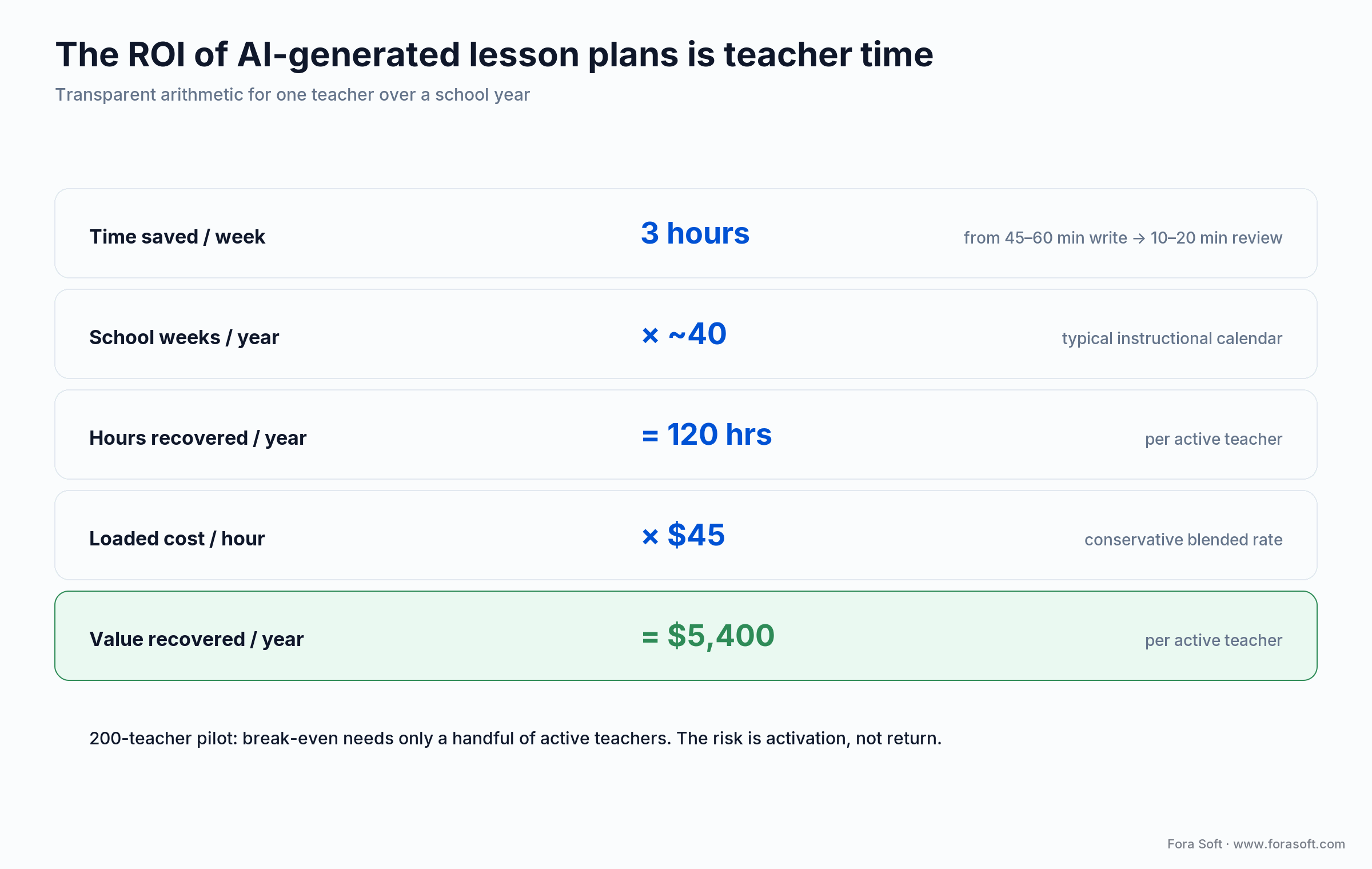
Figure 4. The ROI is teacher time, and it is transparent arithmetic.
The ROI math. A teacher who saves 3 hours a week on planning recovers about 120 hours across a school year. At a loaded cost near $45/hour, that is roughly $5,400 per teacher per year. For a 200-teacher pilot, break-even needs only a handful of teachers using the tool actively. The risk was never the return — it is activation. Many districts plateau at 15–20% active usage unless the PD budget is real.
If you are weighing a custom build instead, we use agent engineering to ship AI features faster than traditional service firms. Book a 30-min scoping call and we will give you a ranged estimate.
Mini case: building a generator that teachers trusted
The situation. An edtech client wanted AI-generated course and lesson content inside their learning product, but their team had been burned by generic output — drafts that looked complete and fell apart under a subject expert’s eye. Educators didn’t trust the button, so they didn’t press it.
Our approach. On Scholarly and later ALDA, we treated generation as a pipeline, not a prompt: retrieval grounded each plan in the platform’s own vetted curriculum, a structured RACE-style template pinned standards and higher-order objectives, and an evaluation step flagged low-Bloom’s objectives and unverified claims before an educator ever saw the draft. The reviewer’s job shrank from “rewrite” to “approve or nudge.”
The outcome. Scholarly now serves 15,000+ students, and the content team went from dreading the generator to building courses on top of it. The lesson generalizes: the quality of AI-generated lesson plans is an engineering problem of retrieval, prompt structure and evaluation, the same practices we document in our AI engineering guides. It is not a “which model” problem. Book a 30-min assessment if that sounds like your platform.
Build vs buy: when off-the-shelf output breaks
Most teachers and most districts should use an existing tool — it is fast, cheap and standards-aware. You build custom when the output a generic tool produces is structurally wrong for your context.
IEP and special education. Off-the-shelf plans align to state standards; IEP plans align to individual goals. If you serve this population heavily, you need a generator that accepts goals as input. That is a custom build.
Proprietary pedagogy. Montessori, Waldorf and competency-based models don’t fit the Common Core skeleton the tools default to. A custom pipeline can encode your methodology into the template.
Data sovereignty. Air-gapped or on-premise requirements rule out SaaS. A self-hosted open model (a DeepSeek- or Llama-class model) inside your perimeter can generate plans without data leaving the building.
We built ALDA and custom integrations for BrainCert because their contexts had exactly these constraints. Custom generation is faster and cheaper than it used to be, but it is not the default.
5 pitfalls that ruin AI-generated lesson plans
1. Teaching the draft verbatim. The fastest way to kill adoption. Generated plans are shells; the substance comes from your review. Print-and-teach fails within a month.
2. Trusting the standard code. Models invent or misattach codes. An unverified “CCSS-aligned” label is a liability in a district audit. Always check the code.
3. Accepting recall-level objectives. Every model defaults to “remember” and “understand.” If you never push for higher-order thinking, your curriculum flattens one generated plan at a time.
4. One-line prompting. “Write a lesson on photosynthesis” gets you a generic plan and more hallucinations. A structured prompt with a checklist gets you a usable draft. The effort moves up front, not away.
5. Pasting student data into consumer chatbots. Names, grades and IEP details in a public chatbot is a FERPA problem, not a convenience. Use a tool with a signed DPA, or strip the identifiers first.
KPIs: what to measure
Quality KPIs. Track revision time per plan (baseline 45–60 minutes from scratch; target 10–20 minutes editing a draft) and a short teacher-satisfaction survey (target ≥4.2/5). If revision time exceeds 30 minutes, the generator is not saving time on that subject.
Adoption KPIs. Track monthly active teachers (target ≥40% within 6 months) and weekly usage (≥2 plans per active teacher). Adoption below 25% means the tool is not solving a felt problem or the PD was thin.
Reliability KPIs. Track the hallucination rate you catch in review (aim to keep it under 5% in STEM), standard-code accuracy, and generation latency. Establish the baseline in the first two weeks and watch the trend, not the single number.
When NOT to use AI-generated lesson plans
Honesty sells better than hype, so here is the counter-case. Skip AI generation when the lesson depends on deep, current classroom context the model cannot know — a plan that hinges on yesterday’s discussion, a specific student’s breakthrough, or a sensitive local event. Skip it for high-stakes, tightly regulated content where a single hallucinated fact carries real consequences and you have no time to verify.
Skip it, too, when the review would take longer than writing from scratch — some niche or advanced topics fall here, where the model’s draft is confidently wrong in ways only an expert catches. And never use a consumer chatbot for anything involving identifiable student data without a DPA. The tool is a drafting accelerant, not an oracle; when the draft can’t be trusted faster than it can be written, write it.
A decision framework in 5 questions
Q1. Who reads the generated text — you or your students? Student-facing text needs a readable model (DeepSeek-class low FKGL) and a reading-level instruction in the prompt. Teacher-facing planning docs tolerate a denser model.
Q2. Does student data enter the prompt? If yes, you need a tool with a signed DPA (MagicSchool, Khanmigo), not a consumer chatbot. If no, any frontier model works.
Q3. How strict is your standards audit? District audit trail → a purpose-built tool that cites codes inline. Solo teacher → a chatbot with the standard pasted into the prompt is enough.
Q4. Do you need differentiation or IEP alignment? Tiered tracks → prompt with class composition and demand parallel activities. IEP goals → prompt with the goal as the objective, or build custom if it is your core population.
Q5. Is generic output structurally wrong for you? Proprietary pedagogy, multi-state standards, or air-gapped hosting → that is the build signal. Everything else → buy and review. If you are unsure, book a call and we will tell you which camp you are in.
Frequently asked questions
Are AI-generated lesson plans any good?
Structurally, yes — and a 2026 randomized study found teacher-plus-AI co-designed plans outperformed both teacher-only and AI-only plans. But raw output clusters at low-order thinking, misses classroom context, and can be factually wrong. It is a strong first draft, not a finished plan.
Which AI writes the best lesson plans?
No single winner. In a 2025 evaluation across GPT-5, Claude Sonnet 4.5, Gemini 2.5 Flash, DeepSeek V3.2 and Grok 4, the model mostly determined readability while the prompt framework determined accuracy and standards alignment. A readable model plus a structured prompt beats any model alone.
How do teachers get a classroom-ready plan from AI?
Prompt with a structured framework (RACE gave the lowest hallucination rate in a 2025 study), include an explicit checklist of standards and higher-order objectives, then run the five-step review: fact-check, verify the code, raise the cognitive demand, add context, localize the tone.
Can AI generate plans aligned to Common Core or NGSS?
Purpose-built tools (MagicSchool, Diffit, Eduaide) cite Common Core and NGSS codes inline. General chatbots align only incidentally unless you paste the standard into the prompt. Either way, verify the cited code against the current framework version — models sometimes invent plausible codes.
Are AI lesson plan generators free?
Often. Khanmigo is free for teachers through its Microsoft partnership; MagicSchool, Diffit, Eduaide and Brisk all have free tiers; and ChatGPT, Gemini and Claude will draft plans on their free tiers. Paid plans mainly add volume, admin controls and compliance features for districts.
Do AI-generated lesson plans actually save time?
Yes, when you edit rather than rewrite. Weekly AI users report saving about 5.9 hours a week (RAND 2025). The saving comes from turning a 45–60-minute write into a 10–20-minute review. Teach the draft verbatim and you save nothing, because the draft is usually a bit wrong.
Is it safe to put student data into an AI lesson planner?
Only with a signed Data Processing Agreement. FERPA governs student records, and the amended COPPA Rule (full compliance 22 April 2026) covers under-13 students. Purpose-built tools like MagicSchool and Khanmigo are built for this; a consumer chatbot is not. When in doubt, strip identifiers before prompting.
Should we build our own lesson-plan generator?
Build only when generic output is structurally wrong for you — IEP-goal alignment, proprietary pedagogy, multi-state standards, or air-gapped hosting. For everyone else, buy a tool and invest in the review workflow. Quality is an engineering problem (retrieval, prompt structure, evaluation), not a model-picking one.
What to read next
Go deeper on the tools, the buyer’s side, and the architecture behind trustworthy AI-generated education content.
Read Next • Buyer’s guide
AI Lesson Plan Generator: District Buyer’s Guide
Procurement, pricing and compliance for K-12 administrators choosing a tool.
Read Next • Tools
Best AI Tools for Lesson Planning, Compared
A tool-by-tool review of the apps that generate the plans.
Read Next • Playbook
AI Study Guide Maker: The 2026 Playbook
The student-facing sibling: generating revision materials, not teacher plans.
Read Next • Architecture
AI-Crafted Personalized Learning in 2026
The three-layer stack behind adaptive, learner-aware content generation.
Ready to ship lesson plans teachers trust?
The verdict on AI-generated lesson plans in 2026 is clear: the drafts are genuinely useful, the research backs co-design over automation, and the quality lever is the prompt framework plus a real review pass, not the model badge. Pick a readable model, prompt it with RACE and a standards checklist, then fact-check, verify codes, and lift the objectives above recall before you teach.
If you are putting generation inside a product rather than using it yourself, the same rules become architecture — retrieval, prompt structure and evaluation. We have built that pipeline on Scholarly and ALDA, and we can tell you in 30 minutes whether your platform should buy, integrate or build.



The handbook · 7 volumes
Fora Soft Video Engineering Handbook
Lesson plans are one generated artifact in an education product that also streams lectures and records classes. We wrote seven volumes on the video stack behind those products: encoding, delivery, audio and AI. Edtech teams can start with Volume 6 on the AI feature lifecycle, speech recognition and search across lecture video, then Volume 3 on delivery and Volume 4 on captions and accessibility. Written by Nikolay Sapunov, CEO at Fora Soft.
Browse the handbook on Amazon →7 volumes · 9,000+ pages · Kindle & paperback
Let’s make your AI-generated lesson plans trustworthy
Buying, integrating or building — we’ll map the prompt, retrieval and review layers your case needs.

