

Key takeaways
• App permissions are a retention decision. In the GoodFirms 2025 study, 86% of respondents said they would uninstall an app that asks for too many permissions. That number lands on your D7 curve, not on a privacy scorecard.
• Most people misquote that study, including the version of this article we just replaced. GoodFirms surveyed 330 businesses in 2025, not consumers, and its 64% / 56% / 45% figures rank how often people encounter location, camera and contacts requests, not how much they fear them.
• Two hard 2026 deadlines sit on your roadmap. Every new Play submission and update must target Android 16 (API 36) from 31 August 2026 — an extension to 1 November 2026 can be requested in Play Console — and the FTC’s amended COPPA Rule has been in full effect since 22 April 2026.
• The cheapest permission is the one you never request. System pickers for photos and contacts, the Play location button, and coarse location remove whole prompts from the funnel while shipping the same feature.
• Fora Soft is one of 162 research partners listed in that GoodFirms study. We have shipped 250+ projects since 2005, including HIPAA telehealth, classrooms with minors, on-premise surveillance and consumer iOS apps — every one of them a permission argument with Apple, Google, or a data protection officer.
App permissions are the approvals an operating system requires before an app can reach a protected resource — camera, microphone, location, contacts, photos, health data or notifications. On modern iOS and Android they are granted at runtime, one resource at a time, and can be revoked in system settings without uninstalling the app. This playbook covers both sides of that dialog: which permissions to grant as a user, and how to design the ask as a product team.
Why Fora Soft wrote this playbook
We rewrote this article because our own first version got the research wrong. It described the GoodFirms study “Why Do Apps Keep Asking For Permissions” as a survey of end users and labelled its permission-frequency numbers as fear rankings. Both claims were wrong. Of the secondary write-ups of that study we checked, most repeat at least one of the same two mistakes. So this version starts by fixing them, then does the part nobody else does: turning the data into decisions an engineering team can ship.
Fora Soft is a software development company founded in 2005 that has shipped 250+ video, real-time communication and AI products with a team of 50+ in-house specialists. We are also one of 162 companies listed as research partners on that study. More usefully, we have argued about permission scope with App Review, Play Console reviewers and hospital compliance officers on those projects. CirrusMED put unlimited video visits behind a HIPAA boundary across 48+ US states. Scholarly runs live classes for 15,000+ users, some of them minors. An Android MDM platform we built manages permissions remotely on up to 10,000 devices, which is the exact opposite problem and the daily work of our custom MDM development team.
What follows is the working version of that experience: what the data actually says, which permissions to design away entirely, the dated 2026 obligations on both stores, the arithmetic of a redesign, and the cases where none of this is worth your sprint.
Losing installs at the first permission prompt?
Send the funnel by email or WhatsApp and we will reply with what we see, or take the 30 minutes live. Either way you get the list of prompts costing you users and the ones you can delete outright.
What the GoodFirms study actually found
In its 2025 survey of 330 business decision-makers, GoodFirms found that 86% would uninstall an app that requests too many permissions, 73% are bothered when an app asks to collect data, 58% believe granting permissions can compromise their data, and only 24% grant permissions outright while 64% decide case by case.
The study is published as “Why Do Apps Keep Asking For Permissions” and was last updated on 7 January 2026. The respondents were company leaders: 63% CEOs, founders and directors, 34% digital marketing managers, 3% other senior executives, spread across 25+ countries with the US at 36%, India 21%, UAE 14%, UK 12% and Canada 9%.
That sample matters, and it is where the internet gets this study wrong. The questions are written in the second person — “does it bother you when your mobile app asks for data-collection permissions?” — so the answers describe how business decision-makers behave as phone users. They are not a consumer panel, and they are not a random population sample. Treat the numbers as a strong signal about a buyer-heavy, tech-literate audience, and say so when you quote them.
| What was asked | Result | What it changes in your build |
|---|---|---|
| Would you uninstall an app that requests “too many” permissions | 86% yes | Permission count is a retention input. Budget for it like you budget for load time |
| Does it bother you when an app asks for data-collection permissions | 73% yes | Every prompt is friction, including the ones you consider obviously reasonable |
| Can allowing permissions compromise your data | 58% yes, 30% maybe | The default assumption is risk. Your copy has to argue against it |
| Are all requested permissions necessary for the app to work | 46% say not all are | Half your audience is auditing you. Least privilege is a visible differentiator |
| Do you allow apps to use your data | 24% yes, 64% sometimes, 12% never | The decision is per-request, not per-app. Each prompt is judged on its own merits |
| Do apps ask permissions purely to harvest personal data | 31% yes, 44% no, 25% unsure | Nearly a third assume bad faith before you have said a word |
| Is data privacy solely the development company’s responsibility | 65% say no, users share it | In-app education is welcome, not patronising. Build the permission centre |
| Which permission requests do you encounter most often | Location 64%, camera 56%, contacts 45%, microphone 43%, storage 38%, call logs and device ID 12% | Frequency of exposure, not fear. These are the prompts users have learned to speed-read |
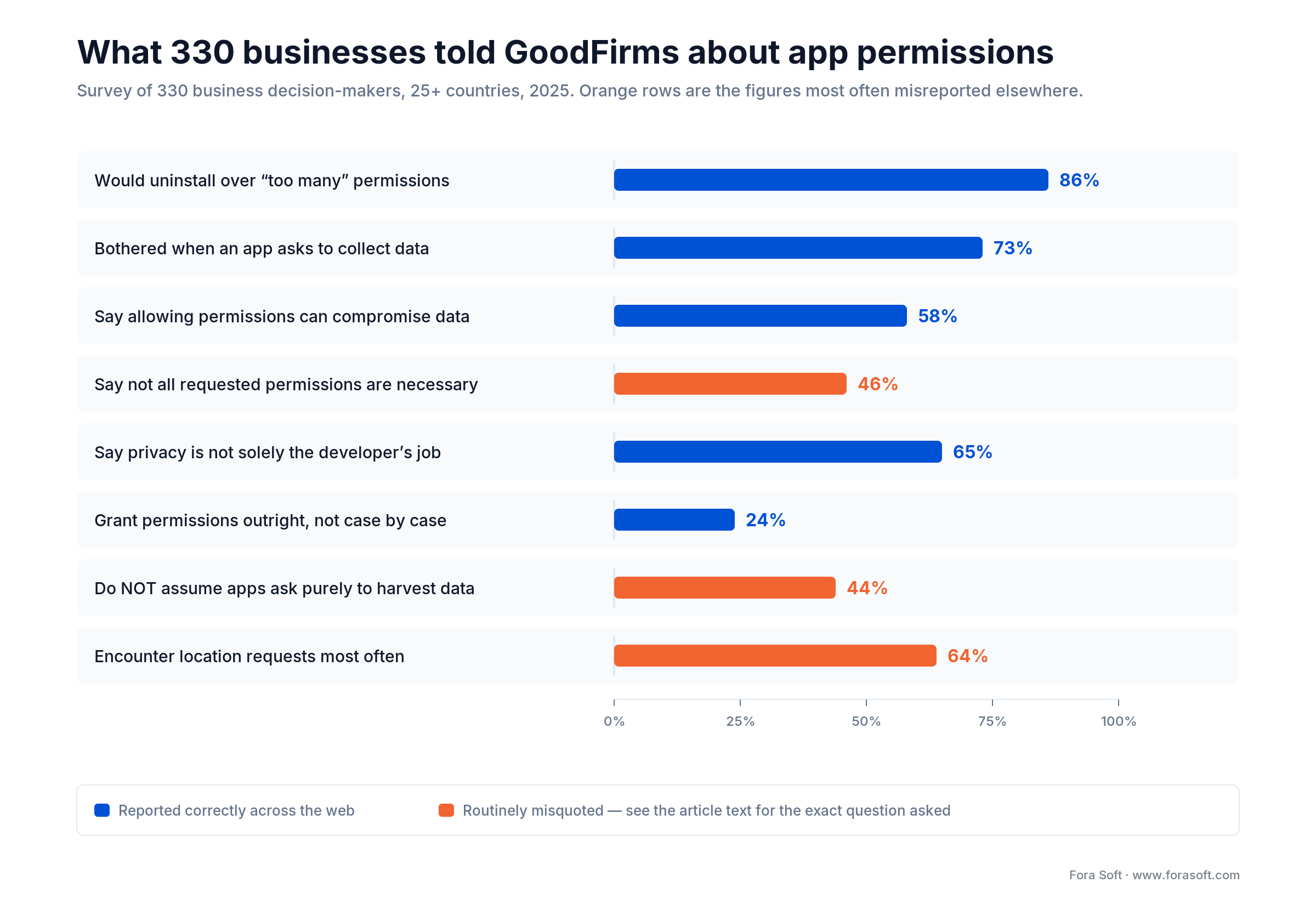
Figure 1. The eight headline results from the GoodFirms 2025 study, with the two figures the internet routinely misreports flagged in orange.
Two corrections are worth making loudly, because they change what you would do with the data. First, the 64% / 56% / 45% split for location, camera and contacts answers “which requests do you come across most often”. It is an exposure ranking, not a fear ranking. Second, the 44% who answered “no” to “are apps asking purely to access your personal data” are not saying permissions are essential; they are saying they do not assume the worst. The study’s own summary box also restates 46% as “all requested permissions are unnecessary”, which is not what the body says. Quote the body.
One number in the study is genuinely startling once you sit with it: only 24% grant permissions outright, while 64% grant them “sometimes”. Sometimes is the whole game. That two-thirds block is making a fresh judgement at every single prompt, which means the copy, the timing and the visible benefit of each individual request decide your grant rate — not your brand, and not your privacy policy.
Cite this study accurately when: you are quoting the 86%, 73% or 58% figures in a deck or a blog post — say “330 business decision-makers surveyed by GoodFirms in 2025”, never “users say”, and never label the 64% location figure as fear.
Why permissions decide retention, not just privacy
Retention. In the GoodFirms 2025 survey, 86% said they would uninstall an app over excessive permissions. Put that next to what we keep finding in audits — the first prompt firing on the launch screen, before the user has seen anything work — and the shape of the D1 cliff stops being mysterious. We have not measured how common that is across the stores, and we are not going to pretend otherwise; check your own funnel.
Store approval. Google reported three separate 2025 enforcement numbers: 1.75 million apps prevented from being published, more than 255,000 apps prevented from gaining excessive access to sensitive user data, and 80,000+ developer accounts banned. Google publishes those as three separate counts and does not say how they overlap, so read the 255,000 as its own enforcement lane rather than a slice of the 1.75 million. Apple rejects submissions where a third-party SDK ships without a privacy manifest. Neither of those is a privacy debate; both are release-date risk.
Regulatory exposure. GDPR carries two penalty tiers, €10M or 2% of global turnover and €20M or 4% for the heavier articles. Fines issued in 2025 came to roughly €1.2 billion, taking the cumulative total to about €7.1 billion as at January 2026 (DLA Piper’s annual survey). Norway’s Datatilsynet fined Grindr NOK 65 million, roughly €6.5 million, in December 2021 for passing user data to advertising partners without a valid legal basis. Grindr appealed three times and lost each one, with the Borgarting Court of Appeal upholding the fine on 21 October 2025. A permission-adjacent failure, not a breach.
Acquisition economics. App Tracking Transparency opt-in runs around 38% globally on Adjust’s 2026 benchmarks, up from 35% in Q1 2025, while AppsFlyer’s 2026 methodology lands nearer 29%. That nine-point spread between two serious vendors is itself the lesson: treat any published ATT figure as a methodology artefact and instrument your own. Either way, a majority of your iOS users sits outside device-level attribution. That is a planning input, not a complaint.
Support load. This one never makes the slide deck and always shows up in the ticket queue. Every permission you request without explanation generates “why does this app want my contacts” emails, one-star reviews that mention spying, and a slow bleed of goodwill your marketing team then pays to replace.
The permission categories and how to scope each
The highest-return move in permission design is deleting the request: both platforms ship system pickers that hand your app a file, photo or contact with no permission attached, because the user made the choice inside a trusted OS screen. Better copy comes second. Every prompt you delete this way is a prompt with a 100% grant rate.
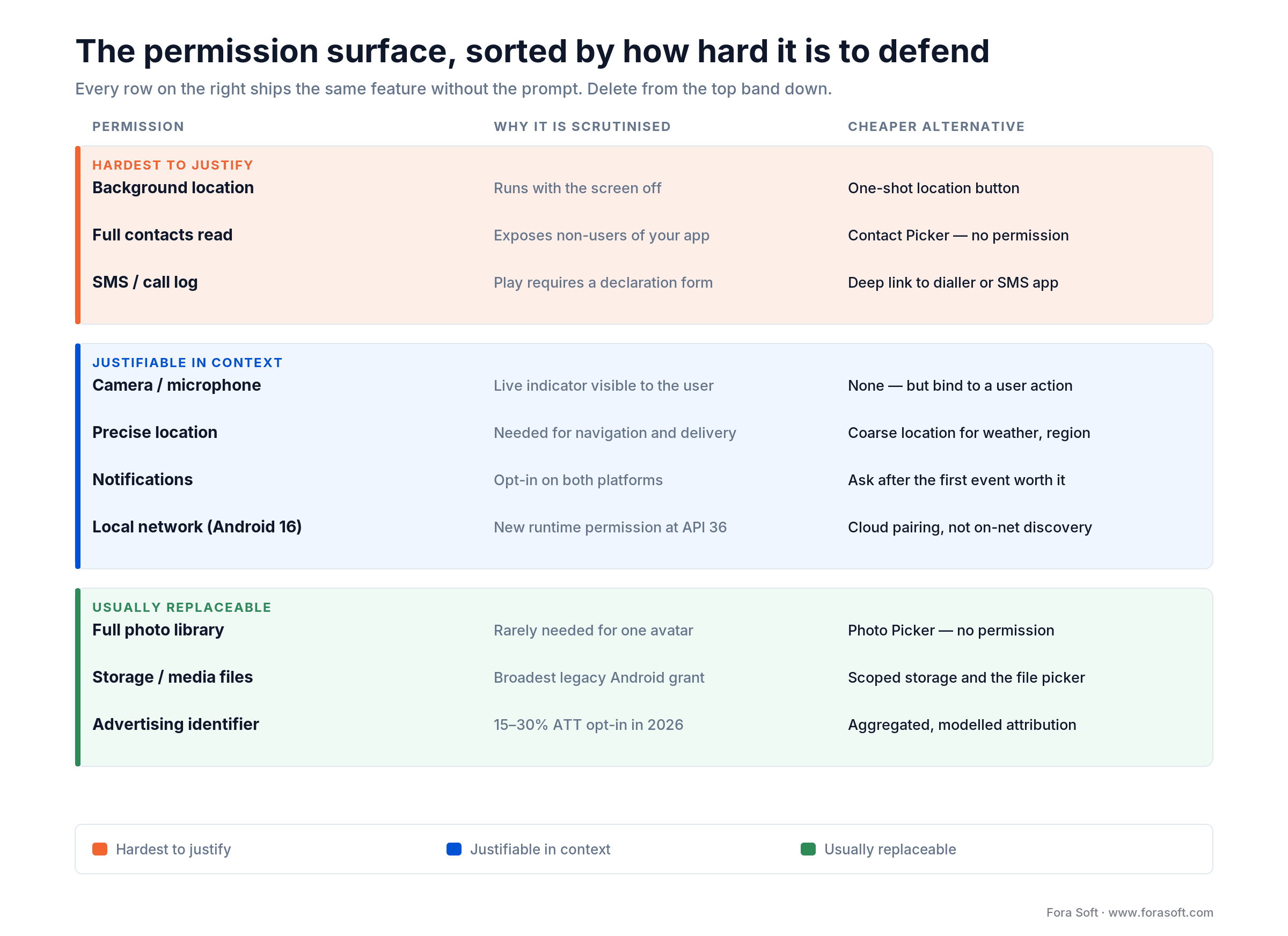
Figure 2. The permission surface sorted by how hard each request is to justify, with the cheaper alternative that ships the same feature.
Location
Three scopes exist, and teams reach for the widest by reflex. Coarse location on Android resolves to an area of about three square kilometres, against roughly 50 metres for fine location, per Android’s own location permissions documentation (2026). That is plenty for weather, regional content, currency and “shops near me” results, and nowhere near enough to follow anybody. “While using” precise location covers navigation and delivery. “Always” background location covers geofencing and little else, and it is the single most scrutinised ask on both stores. Google’s April 2026 policy makes the one-shot location button the required minimum scope for transactional precise location on apps targeting Android 17, declared as android:usesPermissionFlags="onlyForLocationButton" on the ACCESS_FINE_LOCATION element, alongside the USE_LOCATION_BUTTON permission that renders the button — both documented in Android’s location button guide. Google announced the policy on 15 April 2026 and it becomes mandatory on 28 October 2026 for apps targeting API 37 and above. A user tap replaces a persistent grant.
Camera and microphone
Request at the moment of capture, never at launch, and never hold them open outside an active session. Both platforms show a persistent recording indicator, so any gap between what your app is doing and what the indicator says will be noticed and reported. In video products we bind acquisition to session start and release on session end, and we test that the indicator goes dark when the call does.
Contacts
Almost no consumer app needs the whole address book. The contact picker returns exactly the person the user selected and requires no permission on either platform. Google’s April 2026 Contacts Permissions policy makes it mandatory for apps targeting Android 17 that lack a genuine need for broad access, with compliance due 28 October 2026. One trap: the new ACTION_PICK_CONTACTS picker is not backported, so you still need an ACTION_PICK fallback for older devices. If your invite flow reads all contacts to compute a social graph, that is a product decision with a compliance bill attached, and you should be able to defend it in writing.
Photos and media
Two different iOS mechanisms get conflated here. PHPickerViewController runs out of process and needs no permission and no prompt at all; limited photo-library authorization is a separate thing that does prompt, and only makes sense when you need programmatic access to a user-chosen subset. The Android Photo Picker behaves like the former. Full-library access is defensible for a backup or gallery product and hard to defend for anything that needs one avatar image.
Notifications
Opt-in on both platforms since Android 13. Asking during onboarding, before the user has any reason to want a message from you, converts badly and cannot be retried — a denial on iOS is effectively permanent unless the user goes to Settings. Wait for the first event worth notifying about, then ask in that context.
Health and fitness
HealthKit and Health Connect are per-data-type by design. Google’s updated Health and Fitness guidelines add granular handling for high-sensitivity types including menstrual cycle phases, alcohol consumption and symptoms. Requesting the full catalogue because it is simpler to code is the fastest route to a policy review.
Local network
This one is widely misreported, so read the dates carefully. In Android 16 local network protection is opt-in only — a developer testing flag you enable with adb shell am compat enable RESTRICT_LOCAL_NETWORK <package>. It becomes mandatory in Android 17, for apps targeting API 37 and above (Google’s local network permission doc), through the new ACCESS_LOCAL_NETWORK permission; apps below API 37 keep an implicit grant via INTERNET. So printer detection and on-premise device pairing are an Android 17 migration, not an August 2026 one. Casting is a separate case: Google’s Cast output switcher needs no local network permission at all.
Tracking identifiers
ATT on iOS, advertising ID on Android. iOS ATT is opt-in and mostly declined; Android’s advertising ID is opt-out — on by default, resettable and deletable, though few users change it. Both belong to your growth strategy rather than your product. For ATT, ask once, at a moment when the value exchange is legible, and design your measurement to survive a no.
Reach for a system picker instead of a permission when: the user is choosing one specific item — a photo, a contact, a document, a single location fix. If the feature works on user-selected input, the permission is optional engineering, and deleting it costs you nothing.
How to check and change app permissions on any device
Every modern OS gives you two routes to the same switches: by permission (“which apps can use my microphone?”) and by app (“what does this app hold?”). Revoking never requires uninstalling. Exact steps for all four platforms are below.
On Android
By permission — see every app holding one resource:
- Open Settings.
- Tap Security & privacy (on some skins: Privacy).
- Tap Privacy, then Permission manager.
- Pick a permission and you get every app grouped by its current state. The states depend on the permission: Location is the only one offering “Allow all the time”; Camera and Microphone offer while-using, ask-every-time and “Don’t allow”; Photos and videos offers allow-all, allow-limited or “Don’t allow”; Contacts, Files and the rest are a straight allow or “Don’t allow”.
- Tap any app to move it between those states.
By app — audit one app end to end:
- Open Settings, then Apps.
- Tap See all apps, then the app you care about.
- Tap Permissions for the full allowed/denied split.
- While you are there, switch on Pause app activity if unused. Android then auto-revokes permissions from anything you have not opened in a few months.
Two shortcuts worth taking on every Android phone. When the green dot appears top-right, swipe down and tap the indicator to see which app is using the camera or microphone right now — tap it a second time to jump straight into that app’s permissions. And downgrade any “Allow all the time” location grant to “Allow only while using the app” unless the app genuinely needs background geofencing.
On iPhone and iPad
By permission:
- Open Settings, then Privacy & Security.
- Tap a resource — Location Services, Contacts, Camera, Microphone, Photos, Local Network, Tracking.
- Every app that has asked is listed with its current setting; tap one to change it.
- Under Photos, prefer Limited Access over Full Access and pick the specific photos. Most apps work fine on it.
By app:
- Open Settings and scroll to Apps, then tap the app (on older iOS versions the app sits directly in the Settings root list).
- The toggles at the top of that screen are every permission the app currently holds.
- Tap Location for the Never / Ask Next Time Or When I Share / While Using the App / Always choice, plus the Precise Location switch — turning that off leaves the app with an approximate area instead of a street address.
One asymmetry to know about: on Android an app can re-ask and the system will re-show the dialog until a second denial locks it, while on iOS the system dialog never returns after the first “Don’t Allow”. If an iPhone app seems broken after you refused it once, the fix is in Settings, not in the app.
On Windows and macOS
Desktop holds the most dangerous grants and gets audited the least. Windows 11:
- Open Settings, then Privacy & security.
- Scroll to the App permissions list — Location, Camera, Microphone, Notifications, Account info, Contacts.
- Open any one to see which apps hold it, with a per-app toggle and a master switch at the top.
macOS:
- Open System Settings, then Privacy & Security.
- Work down the resource list — Camera, Microphone, Screen & System Audio Recording, Files and Folders, Accessibility, Full Disk Access.
- Audit Screen & System Audio Recording, Accessibility and Full Disk Access hardest. All three are quietly powerful, all three are usually granted once during setup and never revisited.
What each permission actually lets an app do
Permission names are written for developers, not for the person tapping Allow. Here is the plain-language version, with the answer to “is this one worth refusing?”
| Permission | What it really grants | Safe default |
|---|---|---|
| Location — precise | Your position to roughly 50 metres, every time the app asks while open | While using, for maps and delivery only |
| Location — background | Your position with the app closed and the screen off — a movement history | Deny unless it is a fitness tracker or geofencing alarm you set up |
| Contacts | Names, numbers and emails of people who never agreed to anything — often uploaded whole | Deny; use the app’s picker or paste addresses |
| Photos — full library | Every image and its embedded location and timestamp, not just what you upload | Limited / selected photos |
| Camera / microphone | Capture while the app is in use — and, if it declares a camera or microphone foreground service on Android or the audio background mode on iOS, while it is not visible. Both platforms light an indicator dot either way | Allow for calls and scanning; watch the dot when the app is backgrounded |
| Files / storage | On older Android, every document and media file on the device | Deny; the system file picker needs no permission |
| Local network | Discovery of the other devices on your Wi-Fi — a household fingerprint | Allow only for casting and smart-home setup |
| Tracking (iOS ATT) | Linking your activity here to your activity in other companies’ apps for ads | Ask App Not to Track; nothing breaks |
| Calendar | Who you meet, when and where — event titles and attendee lists included | Deny unless the app schedules on your behalf |
| SMS and call logs | Message contents and who you called, Android only, and Play requires a declaration form to ship it | Deny; only a default SMS or dialler app has a real case |
| Phone | Placing calls, plus device identifiers on older Android versions | Deny; a dialler deep link needs no permission |
| Health and activity | Step counts, workouts and, where granted, clinical records — the most regulated category on both platforms | Grant per data type, never as a bundle |
| Notifications | Permission to interrupt you — the most abused grant on both stores | Allow after the app has proved useful, not on day one |
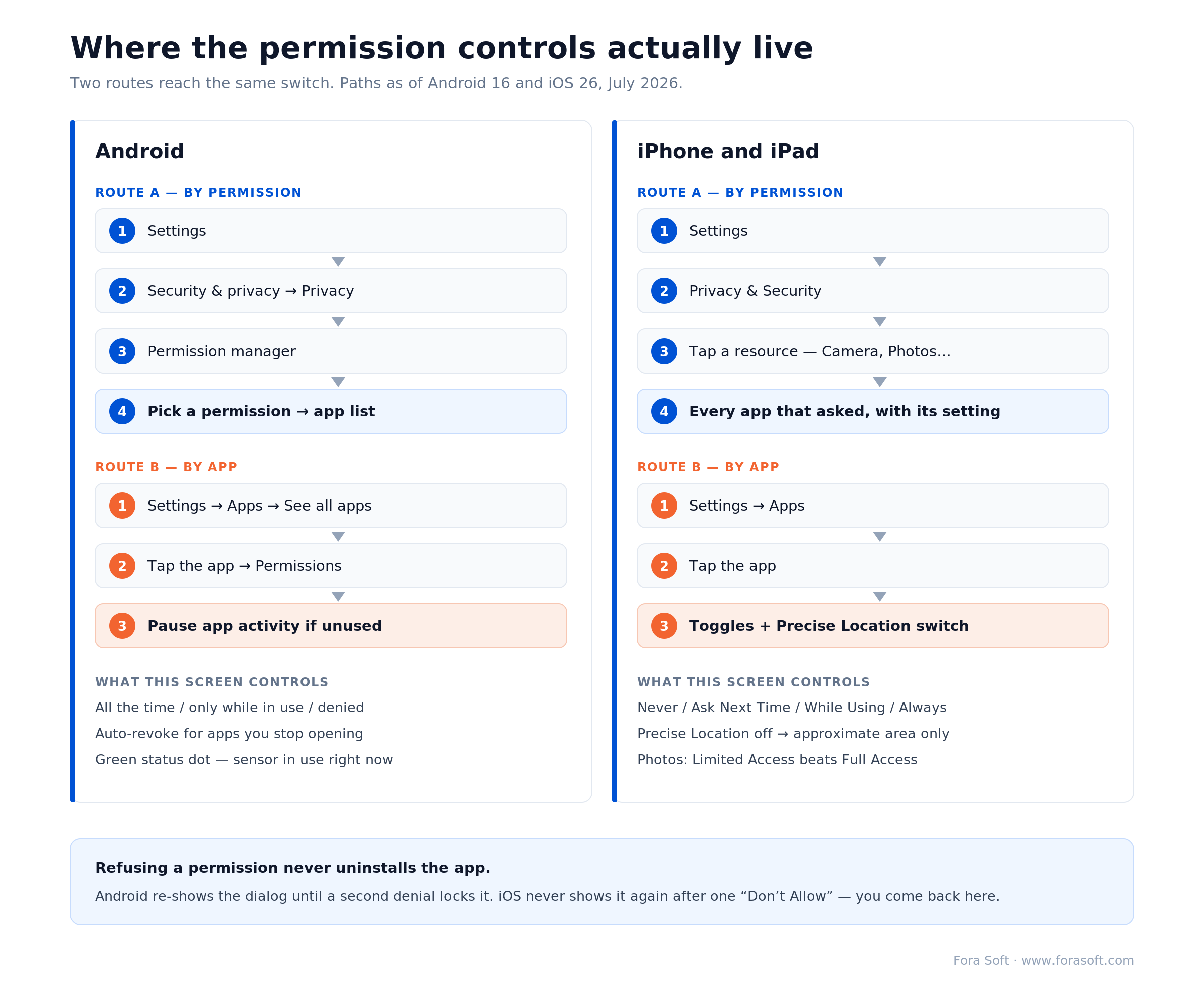
Figure 3. Both routes to the same switches — by permission and by app — on Android and iPhone, plus what each screen actually controls.
This section exists in a builder’s playbook on purpose. 65% of the GoodFirms 2025 respondents said privacy is not solely the developer’s responsibility, and they are right in one narrow sense: the platform controls are good now, and most people have never opened them. If you ship consumer software, linking users to these controls from your own settings screen is a trust signal that costs you one screen and buys you the argument that you have nothing to hide.
Platform policy deadlines you cannot miss in 2026
Four permission deadlines land in 2026: Play’s Android 16 (API 36) targeting requirement on 31 August (extension to 1 November on request), the Contacts picker policy announced 15 April and mandatory on 28 October, the amended COPPA Rule in full force since 22 April, and Apple’s privacy-manifest enforcement on third-party SDKs, which is continuous rather than dated. The table below is the version to paste into your roadmap.
| Obligation | Platform | Date | What breaks if you miss it |
|---|---|---|---|
| New apps and updates must target Android 16 (API 36) | Google Play | 31 Aug 2026 (extension to 1 Nov 2026) | You cannot publish updates. Existing installs keep working; your roadmap does not |
Local network access behind ACCESS_LOCAL_NETWORK |
Android 17 | Opt-in in Android 16; mandatory at API 37 | On-premise device discovery breaks: TCP times out, UDP returns EPERM |
| Contacts Permissions policy: Contact Picker unless broad access is justified | Google Play, apps targeting Android 17 | 28 Oct 2026 | Policy rejection. An Android 17 task, not an August 2026 one. The new picker is not backported below Android 17 |
| Location button required for transactional precise location | Google Play, apps targeting Android 17 | Mandatory 28 Oct 2026 (API 37+) | Updates that do not meet the standard may be rejected. Bites when you move to API 37, not at the August 2026 deadline |
| Privacy manifests for the app and every third-party SDK using Required Reason APIs | App Store | In force | Automatic rejection at submission, usually caused by a dependency you did not write |
| Data Safety form must match real SDK behaviour | Google Play | In force | Google cross-references your declaration against observed behaviour, including analytics SDKs |
| Amended COPPA Rule in full effect | FTC (US) | 22 Apr 2026 | Enforcement exposure for any app plausibly directed to under-13s |
| Declared Age Range API and PermissionKit (parental consent) available | iOS 26 | Shipped | Nothing breaks, but you are collecting birthdates you no longer need to collect |
The Apple privacy manifest requirement deserves a warning of its own, because it is the one that ambushes teams. Apple’s manifest rules apply to third-party SDKs as well as your own code, so a single unmaintained analytics library can block a release you planned six weeks ago. Audit your dependency tree before you plan the launch date, not after the rejection email.
On the Play side, the permissions declaration form asks you to explain each sensitive permission and show it in context. Reviewers cross-check your Data Safety answers against what the binary actually does, which is why the most common rejection we see is not an aggressive permission but an honest one that nobody remembered to declare. If you want the full submission checklist, we keep one in our guide to getting an app approved on both stores.
Run a dependency permission audit when: you are more than four weeks from a release, ship any third-party SDK you did not write, or have not opened your manifest and Data Safety form since the last major OS release. Budget half a day; it is cheaper than one rejected submission.
UX patterns that earn the Allow
Nielsen Norman Group splits permission requests into two kinds by timing. Context-related requests are triggered by something the user just did — they tapped the camera icon, so the camera prompt appears. System-initiated requests fire at a moment the app chose, usually launch. NN/g’s position is that the first kind “are less likely to cause surprise” because the user’s own action supplies the context, while the second kind “often require additional context”. Worth being precise about what is and is not measured here: NN/g attaches no grant-rate percentage to the timing split itself. The hard numbers in that literature are about wording, and they are large.
The source is Tan et al., CHI 2014, which NN/g cites in full and most permission blog posts skip. Across 15 mobile apps, Tan et al. found in 2014 that showing the developer’s purpose string rather than hiding it made users 12% more likely to grant — and that held even when the explanation was poor. In a purpose-built party-planning app the researchers then A/B-tested the reason itself: in the same 2014 study the best string (“Let Party Planner use your contacts to autocomplete email addresses”) produced an 81% lift in grants over the worst (“Party Planner would like to access your address book to show you the cheapest attractions by your contacts’ location and other purposes”). Both figures are 2014 and both are about copy. Treat timing as the cheap structural fix and copy as the measured one.
1. Write the string to NN/g’s formula. “[App] would like to access your [resource] so that you can [benefit/task].” Their own before/after is worth stealing: “Skyscanner would like to access your location for flight-search personalization” is rated OK; “Skyscanner would like to access your location, so that you can quickly select departure airports near you” is rated better. The difference is the second half. The benefit belongs to the user, phrased as something the user does, not something the app needs. “Camera access is required” fails on both counts and gets rejected by App Review on top of that.
2. Prime before the system prompt, but only when the ask is unusual. A pre-permission screen buys you unlimited words and a retry, since a declined primer is not a declined permission. Use it for background location, contacts and notifications. Skip it for a camera prompt that fires half a second after the user tapped a camera button — a primer there is an extra tap explaining something already obvious, and it reads as stalling.
3. Treat denial as a supported state. Decline camera, upload from the library instead. Decline location, type a city. Decline contacts, paste an email address. Every path that dead-ends on a denial is a bug report waiting to be filed, and on iOS the user cannot undo the decision inside your app after a single “Don’t Allow”, so a dead end is permanent unless you offer a Settings deep link.
4. Give the secondary option a real label. This one is our rule, not a citation: label the decline path plainly — “Not now” beats a greyed-out nothing — and never build a screen where refusing feels impossible. NN/g stops one step short of naming a label, but is direct about the failure mode: “Avoid using dark patterns. Give your users enough information to make their own choice. Respect their decision.” Their worked bad example is a WeChat dialog whose accept button is labelled Recommended with no direct way to decline. In the EU this is also a legal problem, since consent has to be freely given to be valid at all.
5. Ship a permission centre. One screen listing every permission your app holds, in plain language, with what it is used for and a link into system settings. It costs a day. It answers the support tickets, it demonstrates good faith to a reviewer, and it is the single feature that most obviously separates a team that thought about this from one that did not.
6. Never re-prompt into a wall. The two platforms differ here and the difference matters. iOS stops showing the system dialog after a single denial. Android 11 and later treats two denials as “don’t ask again” (Android 11 privacy behaviour changes), so one refusal is still recoverable. Past that point the dialog never appears, your analytics keep logging attempts, and the team concludes a prompt has a 0% grant rate when it simply never rendered. Check authorization status before every request and route hard denials to your own explanation screen with a Settings deep link.
Add a priming screen when: the request is background location, contacts, notifications, or anything a user would not predict from the button they just tapped. Skip it when the prompt is the direct consequence of an obvious action — extra taps there cost more than they earn.
What a permission redesign is actually worth
A permission audit, redesign and implementation runs two to four weeks on one platform, or closer to six across two platforms with a compliance review attached. What it returns depends entirely on how bad your current flow is, and anyone quoting a single conversion lift across all apps is selling something. So here is the arithmetic instead, with every input exposed, so you can substitute your own numbers.
Take an app with 100,000 installs a month and a $12 blended cost per install — $14,400,000 of acquisition spend a year. Suppose 30% of installs never reach the first key action, and permission prompts at launch account for a third of that drop-off. That is 10,000 users a month lost at the prompt, or 120,000 a year, worth $1,440,000 in acquisition spend that bought nothing.
Now assume a conservative recovery. If moving the asks to the point of use recovers a quarter of that group, you keep 2,500 users a month, which is 30,000 a year, worth $360,000 in acquisition spend you no longer have to repeat. Break-even is whatever two to four weeks of product plus engineering time costs at your blended rate — run that number against $360,000 yourself. We are not publishing a single price for this work, because the honest answer depends on how many prompts you have and how much of the app they are wired into, and a headline figure would be marketing rather than an estimate.
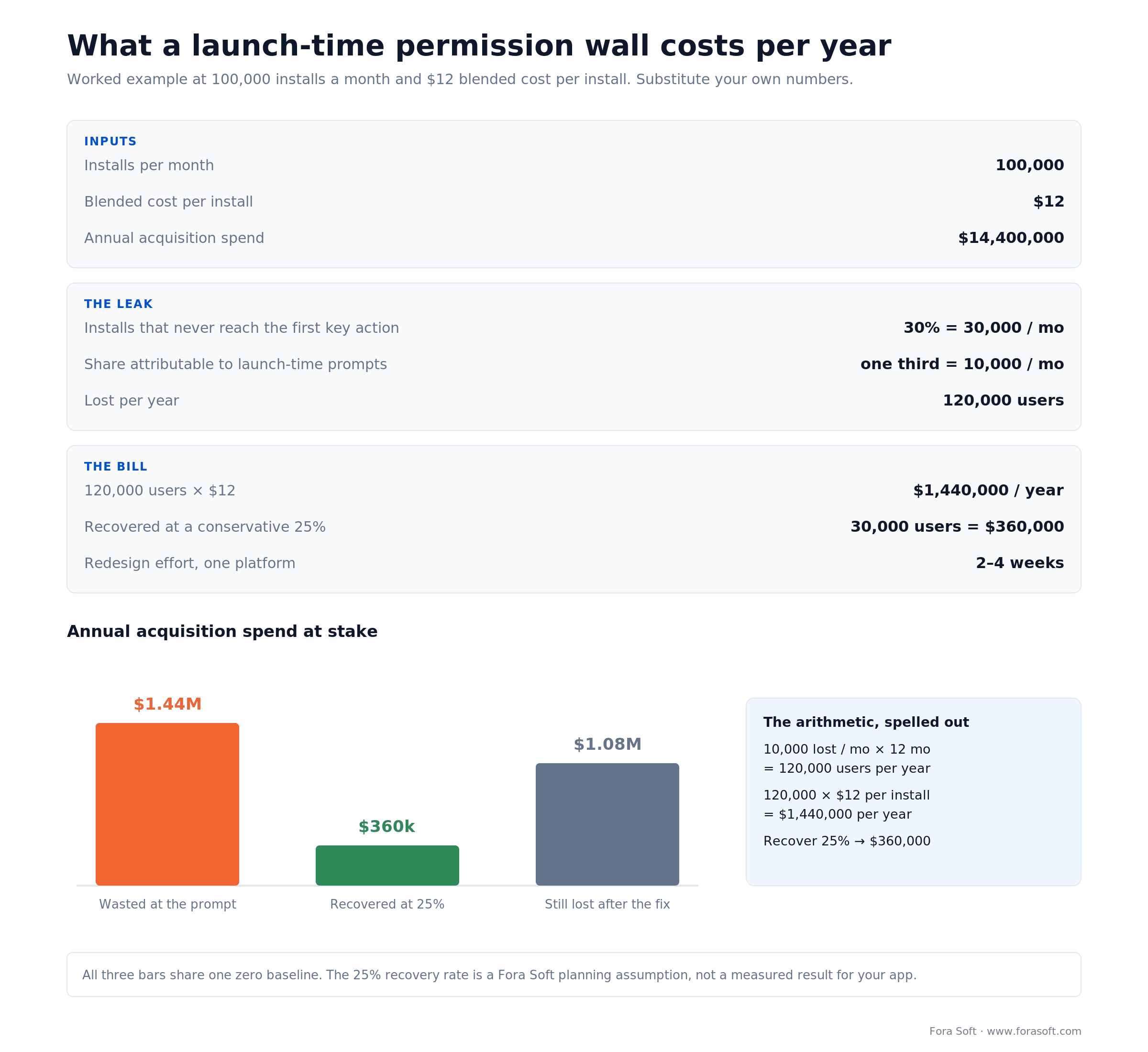
Figure 4. The arithmetic of a permission redesign at 100,000 installs a month, with every input shown so you can substitute your own.
Two caveats we would rather state than bury. The 25% recovery assumption is ours, drawn from what we see when a launch-time prompt wall is replaced with point-of-use asks; it is a planning figure, not a measured result across your app. And the second-order effect is usually bigger than the funnel number: an app that stops asking for background location also stops needing the Play declaration, the DPIA paragraph and the quarterly conversation about whether anyone still uses that data.
The one number we will commit to is the effort quoted above: two to four weeks on one platform, and two platforms with a compliance review attached runs closer to six. If you want the wider picture on what mobile work costs in 2026, we break it down in our mobile app development cost guide.
Rejected over a permission string again?
Email or WhatsApp us the rejection note and we will tell you whether it is your manifest, your declaration, or an SDK you forgot you shipped. Book the call if you would rather walk through it live.
Compliance: GDPR, COPPA, HIPAA, CCPA
Four regimes decide most permission questions: GDPR governs any EU user, the amended COPPA Rule covers under-13s from 22 April 2026, HIPAA applies the moment you touch protected health information, and CCPA/CPRA gives Californians deletion and opt-out rights. Each one bends the flow in a different direction.
GDPR
An OS permission is not consent. Consent under GDPR has to be specific, informed, freely given, unambiguous and withdrawable, and a system dialog satisfies at most two of those. You still need a lawful basis, a purpose you wrote down before you collected anything, and a way for someone to take it back. Two enforcement patterns matter in 2026: bundled consent, where the app is unusable unless you accept all tracking, and SDKs that fire before the consent screen. Regulators now test apps with network monitoring rather than reading the privacy policy, so what your binary does on launch is the thing being assessed.
COPPA
The FTC’s amended Rule has been in full effect since 22 April 2026 and changes four things that touch permission design directly. Biometric identifiers — voiceprints, face templates, fingerprints, iris patterns — are now personal information, which pulls face-recognition sign-in and voice features into scope. Disclosing a child’s data to a third party for targeted advertising needs its own separate parental consent, not a blanket one. You need a written security programme for children’s data, not just “reasonable security”. And you need a published retention policy, because indefinite retention is no longer defensible. The “directed to children” test also widened: user reviews mentioning kids and your own marketing materials now count as evidence, which catches products that never considered themselves children’s apps.
HIPAA
If your app touches protected health information, every subprocessor in the path needs a Business Associate Agreement — the video SDK, the transcription vendor, the crash reporter that just caught a stack trace containing a patient name. Permission flows need audit logging, and the camera and microphone indicators need to match reality, because a clinician on a recorded consultation is a compliance event with a timestamp. We built CirrusMED inside that boundary and cover the full stack in our telemedicine engineering course.
CCPA and CPRA
Californians can ask what you hold, have it deleted or corrected, and opt out of sale or sharing. The practical requirement is a “Do Not Sell or Share My Personal Information” control the user can actually find. Put it in the permission centre alongside everything else; a legal link buried in a footer satisfies nobody, including the regulator.
FERPA
Education products holding student records inherit their own consent and disclosure rules, and the school, not the student, is usually the party that consents. On Scholarly that shaped the camera flow before it shaped anything else, because a classroom recording with minors in frame is a different artefact from a webinar.
Get a lawyer involved rather than a checklist when: you process health data, target or plausibly attract under-13s, use biometrics, or operate in the EU with any third-party analytics SDK. Everything else in this article is engineering. These four are liability.
Wiring permissions cleanly on each platform
The implementation rule is the same on every platform: check authorization status before each access, prefer an API that needs no permission, and treat the purpose string as product copy rather than config. What differs is where the metadata lives.
iOS
Purpose strings live in Info.plist and are shown verbatim in the system dialog, so they are product copy that happens to live in a config file. Use PHPickerViewController for photos and CNContactPickerViewController for contacts: both return user-selected data with no permission at all. Ship PrivacyInfo.xcprivacy for your app and confirm every third-party SDK ships one too. On iOS 26, prefer the Declared Age Range API over collecting a birthdate: it returns an age band rather than a date, so you never store the date. PermissionKit is a different thing despite the name — it is a parental-consent framework that surfaces a child’s request as a question inside Messages, not an app-permission API, and it only matters if you ship communication features to minors.
Android
Request at runtime through ActivityResultContracts.RequestPermission, never assume a prior grant, and check status before each access. Use the system Photo Picker via ACTION_PICK_IMAGES and the Contact Picker instead of READ_CONTACTS. Declare foreground service types in the manifest. Local network access is a next-cycle task: opt-in only in Android 16, mandatory once you target API 37 on Android 17. Android’s own best-practice guide leads with the same advice: prefer an API that needs no permission.
The status check is the part teams skip, and there is a trap in it that most code samples on the internet get wrong:
val granted = ContextCompat.checkSelfPermission(ctx, Manifest.permission.CAMERA) ==
        PackageManager.PERMISSION_GRANTED
val rationale = ActivityCompat.shouldShowRequestPermissionRationale(
        activity, Manifest.permission.CAMERA)

when {
    granted        -> startCapture()
    rationale      -> showPrimer()        // refused once, still askable
    !hasAskedOnce  -> launcher.launch(Manifest.permission.CAMERA)
    else           -> openAppSettings()   // permanently denied: dialog is gone
}
Note the hasAskedOnce flag you have to persist yourself. shouldShowRequestPermissionRationale returns false in two different states — never asked, and permanently denied — and the platform gives you no way to tell them apart. Without your own stored flag, the last branch calls launch() on a dialog that will never render, which is pitfall five below. It is a small amount of code and almost nobody writes it.
React Native and Flutter
Both have mature permission packages, and both still need the native side configured: Info.plist strings, the Android manifest, the privacy manifest. Cross-platform teams get rejected more often than native ones for exactly this reason — the plugin handles the runtime request and nobody owns the platform metadata.
Web
The Permissions API covers camera, microphone, geolocation, notifications and storage, with the same rules: explain first, request second, degrade gracefully. One browser-specific trap — a permission granted on a page is scoped to the origin, so an embedded iframe from another origin needs its own allow attribute or the request fails with no visible error.
The threats behind the distrust
Asked in the GoodFirms 2025 survey to tick their top five security threats from granting app permissions, respondents chose data leakage (98%), malware (76%), insecure authentication (70%), insecure data storage (67%) and phishing (64%). Spyware followed at 58%. Because it was a pick-five question the totals add up past 500%, so read it as a ranking of what worries people rather than a probability of anything. What matters for design is that three of the top five are storage and authentication problems, not permission problems — users are telling you they do not trust what happens after the grant.
Data leakage
Encrypt at rest with Keychain and Keystore rather than rolling your own, use TLS 1.3 in transit, and audit what your logging captures. The most common leak we find in code review is not a database; it is a crash report or an analytics event carrying a field nobody meant to send. Data you never collected cannot leak, which is why minimisation is a security control and not just a legal one.
Malware and supply chain
Run Play Integrity and App Attest. Keep a software bill of materials for every dependency — EU regulators now expect one that documents each library’s data processing, and it is the fastest way to answer “which SDK is collecting that” when a reviewer asks. Every SDK you add inherits your permissions.
Phishing
Bind login, password reset and payment to verified deep links: App Links on Android, Universal Links on iOS. Both require you to host a file on your domain, both fail closed if you get it wrong, and an unverified custom scheme can be claimed by any other app on the device.
Background access
The highest-risk grant in your app is whatever runs when the screen is off. Reviewers on both stores ask why, and “for a better experience” is not an answer that survives. Either write down the specific feature and the specific data it needs, or delete the capability.
Permission patterns by industry
Permission design is not generic. The same camera prompt is a HIPAA artefact in telehealth, a FERPA question in a classroom, and a premises-consent question in surveillance. Here is the shape we ship in each.
Telemedicine
Camera and microphone acquired at call start and released at call end, with a primer that names the encryption boundary rather than gesturing at it. Photos scoped to the moment a patient uploads a document. Location almost never — the pharmacy lookup that seems to need it usually works from a postcode field. Notifications after the first completed appointment, framed around reminders the patient already wants. This is the shape we ship across telemedicine builds.
E-learning
Age gating before collection, and consent that flows through the institution rather than the child. The hard part is rarely the permission dialog; it is proving afterwards who consented to what, which means audit logs that outlive the school year. Our e-learning practice treats that record as a first-class feature rather than a compliance afterthought.
Video surveillance
The inverted case: cameras and microphones are always on by design, so the consent question moves off the device and onto the premises. Lawful basis comes from the site owner or employer policy, the UI carries permanent recording indicators, and audit logs answer who watched which stream and when. That is how our surveillance work is structured, including VALT, an interview-recording and video surveillance platform we have been the sole development team on for over ten years, which serves 770+ US organisations and 50,000+ users under HIPAA.
Consumer social and dating
The densest permission surface in consumer software: camera, photos, location, notifications, sometimes contacts, all wanted in the first session. On Mindwibe, an iOS dating product, the onboarding course runs before any of it, which means the first prompt arrives after the user has done something and not before. Sequencing is the whole design.
Live commerce and B2B SaaS
Camera at broadcast, contacts through the picker, location only where geofencing is a real feature. In B2B the permission conversation often happens in a security questionnaire months before a user sees a prompt, so the permission centre doubles as sales collateral.
Shipping into a regulated vertical?
HIPAA, FERPA, COPPA and GDPR each bend the permission flow in a different direction. Tell us your vertical and we will map the constraints before you write the code.
Build it in-house or bring in a specialist
Most teams should do this themselves. Permission design is not deep magic, the platform documentation is good, and your own product people know your funnel better than any outside team will in week one. Bring someone in when the problem has a shape your team has not seen before.
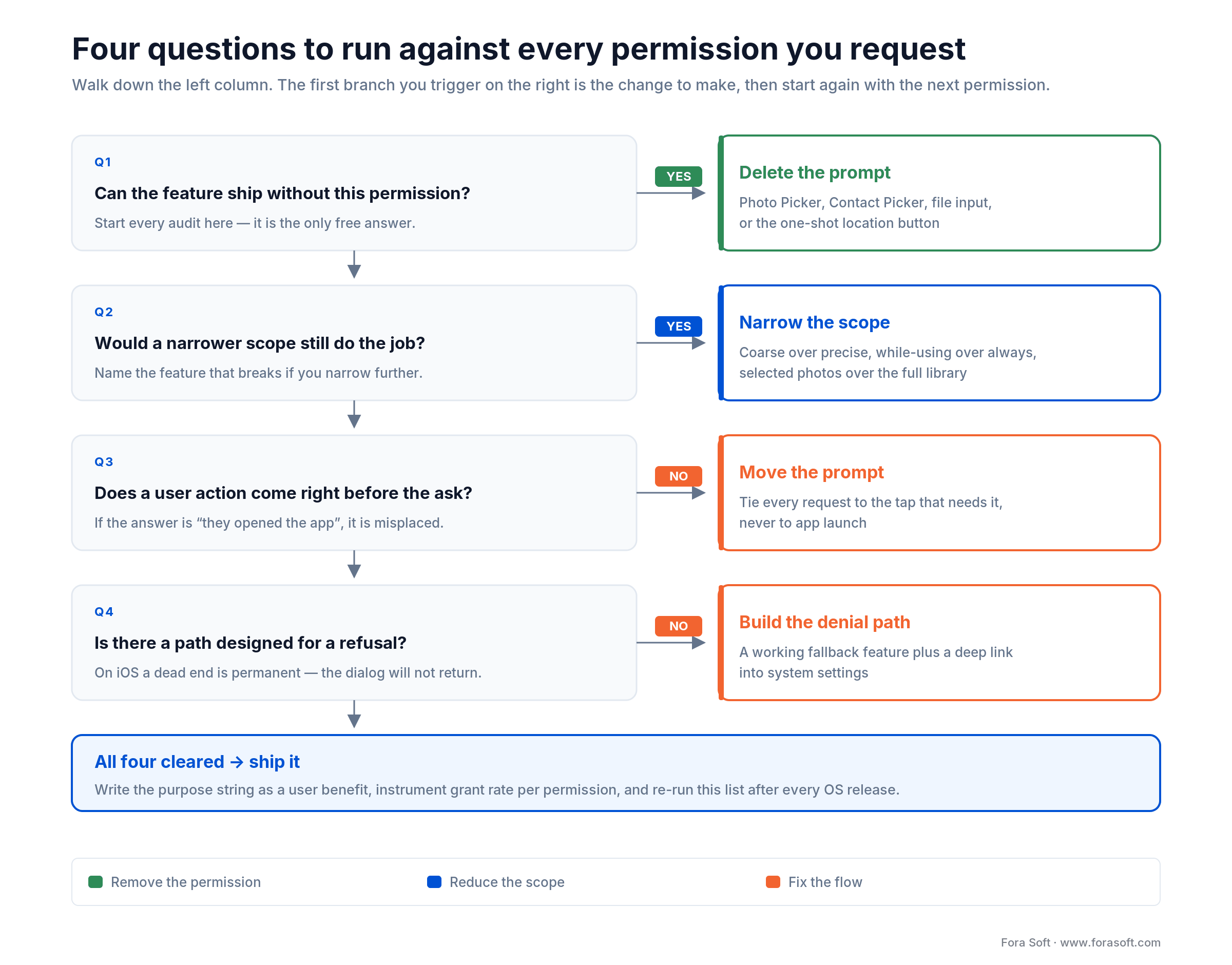
Figure 5. Four questions per permission, with the outcome each answer leads to. Run it once per permission in your manifest.
Do it in-house when you ship one platform, hold fewer than six permissions, face no sector regulation, and have a designer who will actually own the primer copy. That is a two-sprint internal project and an outside team adds coordination cost without adding much insight.
Bring in a specialist when App Review has rejected you twice for the same reason, you are entering a regulated sector for the first time, your D1 retention has a cliff nobody has explained, or you are migrating to Android 16 and discovering which of your dependencies still ships without a privacy manifest. The value is pattern recognition: we have seen the specific rejection you are staring at, usually more than once.
Scope discipline matters more than team choice. A permission audit that turns into an onboarding redesign that turns into a rebrand is how a two-week project becomes a quarter. Fix the permission surface, measure it, then decide whether the next thing is worth doing.
Hire outside help when: two or more of these are true — repeat store rejections, a regulated vertical, more than one platform, an unexplained D1 cliff, or an Android 16 migration with third-party SDKs you do not control. One of them is a Tuesday. Two is a project.
Design your permission flow in five questions
1. Can we ship this feature without the permission at all? Run it against every entry in your manifest before anything else. Pickers, intents, coarse location and one-shot location buttons cover more ground than most teams expect, and a deleted prompt beats a well-written one.
2. What is the narrowest scope that still works? Coarse over precise, while-using over always, selected photos over full library, one contact over the address book. Write down the feature that would break if you narrowed it further — if you cannot name one, narrow it.
3. What has the user done immediately before this prompt? If the answer is “opened the app”, the prompt is in the wrong place. Tie every request to an action that makes it predictable.
4. What does the user get, in their words? Write the purpose string as a sentence about what they can now do. If it reads like a system requirement, rewrite it. This string ships to App Review and to the user unchanged.
5. What happens on no? Every permission needs a designed denial path and a route back if the user changes their mind. On iOS especially, a dead end is permanent.
Answer those five per permission and you have a design document. If you would rather have someone run it with you against your live build, that is precisely what our 30-minute audit call is for.
Five permission mistakes we keep finding
1. The launch-time prompt wall. Four dialogs in the first ten seconds, before anything has happened. It is still the most common pattern we see in code review and the single biggest recoverable loss in the funnel.
2. Purpose strings written by whoever was closest to the build error. “Camera access required” and “This app uses location” are placeholders that shipped. They fail review and they read as evasive.
3. A manifest nobody has read in two years. Permissions accumulate from features that were cut and SDKs that were swapped. Read the whole file out loud with the team once a year and delete what you cannot defend.
4. Data Safety and privacy labels that describe the plan, not the binary. Google cross-checks declarations against observed behaviour, including collection by libraries you did not write. The mismatch is usually honest and it still costs you the release.
5. Re-prompting into a system dialog that will never appear again. After a denial the OS stops showing it. Your analytics keep counting attempts, your grant rate looks broken, and the user sees nothing at all. Check status, branch on rationale, deep-link to settings.
KPIs that prove your permission flow works
Measure permissions in three buckets: quality (are people granting), business (does the funnel move), and reliability (does the denial path work). Grant rate per permission is the one number to put on a dashboard this week.
Quality KPIs
Grant rate per permission, measured separately for first ask and re-ask — above 70% on a context-tied first ask is a reasonable target, and anything under 40% points at timing rather than copy. Store rejections on permission grounds: zero. Percentage of prompts preceded by a user action: 100%.
Business KPIs
Install to first key action, which is the metric a permission redesign moves most directly. D1 and D7 retention split by grant outcome, so you can see whether decliners churn or simply use a narrower product. Support tickets mentioning privacy or permissions per 10,000 installs, trending down.
Reliability KPIs
Crash-free sessions on permission-gated flows above 99.7%, since denial paths are the least-tested code in most apps. Audit-log completeness for sensitive triggers at 100%. Privacy escalations: zero. And one worth adding to the list — time from a user revoking a permission to your backend honouring it, which should be measured in seconds and is usually measured in nobody-ever-checked.
Mini case: the permission surface we chose not to build
Situation. CirrusMED is a direct primary care platform — patients subscribe to a doctor from $39 a month and get unlimited video visits instead of per-visit billing. The obvious build was native iOS and Android apps. Native meant camera, microphone, notifications, photo library and probably contacts, every one of them a HIPAA conversation, an App Review conversation, and a purpose string that had to satisfy both.
What we did. We built it browser-first on WebRTC. The browser already owns the camera and microphone permission, scoped to the origin and to the session, with a recording indicator the user recognises because it looks the same on every site they visit. Document sharing runs through a file input, which needs no storage permission at all. Notifications are email and SMS through Twilio rather than push, so there is no notification prompt in the flow. The permission surface collapsed from roughly five ongoing native grants to one browser prompt at the start of a call.
Outcome. The platform now operates across 48+ US states with 20+ physicians on the network, inside a single HIPAA-compliant system covering video, messaging, EMR, prescriptions and lab referrals. There is no app-store review cycle in the release path and no privacy manifest to maintain, because there is no binary. That is not the right answer for every product — you lose background push and native performance — but it is the answer more teams should price out before they default to native. Want us to run the same trade-off against your roadmap? Book a 30-minute call.
When permission work is the wrong investment
Skip this work entirely if you are pre-product-market-fit, if your app holds two low-risk permissions and no store trouble, or if your real problem is upstream of the prompt. Each case in detail below, because pretending otherwise would waste your quarter.
Managed device fleets. When an employer pushes your app through mobile device management, the consent conversation already happened in an employment contract and permissions arrive pre-granted by policy. On the Android MDM platform we built for Instacom, administrators toggle permissions, Wi-Fi, NFC and GPS remotely across up to 10,000 devices from one console. Priming copy on a device that a security manager provisioned is theatre. Spend the effort on the admin console instead, and on POPI or GDPR compliance for the fleet-wide data.
Apps with a genuinely trivial permission surface. If you hold one permission and it is the whole product — a camera app asking for the camera — there is nothing to redesign. Write a decent purpose string and move on.
Pre-product-market-fit prototypes. Fifty friendly testers will grant anything. Ship, learn, and put the permission pass on the list for the sprint before public launch. Doing it earlier optimises a funnel that does not exist yet.
For everything else — any consumer app, any regulated product, anything reaching the EU, California or under-13s — this is not optional work, and the platform policy deadlines above are not moving.
FAQ
What are app permissions?
App permissions are the approvals an operating system requires before an app can reach a protected resource such as the camera, microphone, location, contacts, photos, health data or notifications. On modern iOS and Android they are granted at runtime, per resource, and can be revoked at any time in system settings without uninstalling the app.
Which app permissions should I avoid granting?
Be most careful with background location, full contacts access, microphone, SMS and call logs, and full photo-library access. Each of them keeps working when the app is closed or exposes data about people who never installed anything. A safe default: grant location as “while using”, share selected photos rather than the whole library, and decline anything an app cannot explain in one sentence.
How do I check what permissions my apps have?
On Android: Settings, Security & privacy, Privacy, Permission manager — then pick a permission to see every app holding it. On iPhone: Settings, Privacy & Security, then choose a resource such as Location Services or Camera. Android also auto-revokes permissions from apps you have not opened in months, which is worth leaving on; iPhone has no equivalent, so review stale apps yourself.
When should an app ask for a permission?
At the moment the user takes an action that needs it, never at launch. Nielsen Norman Group calls these context-related requests and finds they surprise users far less than system-initiated prompts that fire at a time the app chose. For unusual asks such as background location or contacts, show your own explanation screen first, then trigger the system dialog.
How do I write a purpose string that passes App Review?
Follow the Nielsen Norman Group formula: “[App] would like to access your [resource] so that you can [benefit].” Name the specific feature and the user’s outcome. “We use your camera to scan QR codes for fast check-in” passes; “Camera access required” is a placeholder that gets rejected and, when it does ship, reads as evasive.
What changes for permissions in 2026?
Three things with dates. From 31 August 2026 all new Google Play apps and updates must target Android 16 (API 36), with an extension available to 1 November 2026. Play’s April 2026 policy update makes the Android Contact Picker and the one-shot location button mandatory for apps targeting Android 17, with compliance due late October 2026. And the FTC’s amended COPPA Rule has been in full effect since 22 April 2026.
Does an OS permission count as GDPR consent?
No. GDPR consent must be specific, informed, freely given, unambiguous and withdrawable, and a system dialog does not carry the purpose information or the withdrawal path. You still need a lawful basis, a documented purpose, and a way for the user to take consent back. Bundled consent, where the app is unusable unless all tracking is accepted, is a live enforcement target in 2026.
Why did Google reject my app over permissions?
Usually one of three reasons: a sensitive permission with no Permissions Declaration explaining its use, a Data Safety form that does not match what the binary actually does including third-party SDK behaviour, or broad access where a picker would do. Google reported preventing more than 255,000 apps from gaining excessive access to sensitive user data in 2025, so the checks are not cosmetic.
Where can I read the GoodFirms research this article corrects?
The full report is published at goodfirms.co. Read the body sections rather than the summary box: the two disagree on three figures, and the body is the accurate one. Fora Soft is listed there as one of 162 research partners.
What to Read Next
Store review
How to Get Your App Approved on Google Play and the App Store
The full submission checklist that sits downstream of your permission decisions.
Cost
Mobile App Development Cost in 2026: Real Estimates
What the compliance and privacy line items cost when you budget a 2026 build.
Verticals
Custom Mobile Apps for Industry: 2026 Use-Case Playbook
How permission constraints differ across healthcare, logistics and field service.
Process
Discovery Phase in Software Development: 2026 Playbook
Where scope, non-functional requirements and compliance regimes get fixed, before code.
Ready to fix your permission surface?
The GoodFirms 2025 survey of 330 business decision-makers says three useful things. 86% would uninstall an app over excessive permissions, so this is a retention problem. Only 24% grant outright while 64% decide case by case, so every individual prompt is a fresh negotiation. And 65% think privacy is a shared responsibility, which means the users you are designing for want to be given controls, not protected from them.
The work itself is unglamorous and finite: delete the permissions a picker can replace, narrow the scope of what is left, tie every remaining prompt to a user action, write the string as a benefit, design the denial path, and get your manifest and Data Safety form to describe the binary you actually ship. Two to four weeks on one platform. Then you are ahead of the August Android 16 deadline instead of behind it.


The handbook · 7 volumes
Fora Soft Video Engineering Handbook
Camera and microphone prompts are where most video products first earn or lose a user's trust. We wrote a seven-volume handbook on the full video stack, from encoding and delivery to sound and AI; start with Volume 3 for WebRTC calls and players, Volume 4 for real-time voice processing, and Volume 7 for rules such as the EU AI Act and biometrics. Written by Nikolay Sapunov, CEO at Fora Soft.
Browse the handbook on Amazon →7 volumes · 9,000+ pages · Kindle & paperback
Get a permission audit you can act on this sprint
Thirty minutes, your live build, our engineers. You leave with a prioritised list: prompts to delete, scopes to narrow, and the policy risks that could block your next release.

