

Key takeaways
• Co-browsing shares the page, not the screen. It streams the live DOM and user events over a WebSocket, so an agent sees and can act on the same web page in kilobytes, where screen sharing pushes megabits of pixels and exposes everything.
• Privacy is the product. The hard part isn’t the video of a cursor moving; it’s masking card numbers, passwords, and SSNs in the customer’s browser before anything leaves it, plus consent and an audit trail.
• Proxy vs embedded SDK is the real build fork. A rewriting proxy needs no site code and switches on fast but is fragile; an embedded SDK or snippet runs inside your app, binds masking to your own markup, and survives releases.
• Buy below a threshold, build when you own a product. Cobrowse.io lists $18/agent/mo for web and $36 for web plus mobile apps (their pricing page, July 2026); a per-agent bill grows with headcount, an owned SDK does not.
• A custom co-browsing MVP runs about $40–70k. Read this as a build checklist and a build-vs-buy decision tool, not a vendor brochure.
A customer is stuck on step three of your checkout, and your agent is reading directions down the phone: “the blue button, no, the other one.” Co-browsing software ends that call by putting the agent on the same page, literally, so they can point at the field and, if allowed, fill it in. The trick is doing that without shipping the customer’s card number to the agent’s screen or your logs. Get the sharing model right and support gets faster; get the masking wrong and you have a data-protection incident instead of a solved ticket.
We’re Fora Soft. Since 2005 we’ve built real-time and video products where an agent guides a user through a live screen, including ProVideoMeeting (WebRTC conferencing with in-call signing and identity checks) and the assisted-video flows behind our video banking work, where co-browse is a standard component. This is the briefing we hand a support, sales, or product team on day one: how co-browsing actually works, the privacy model that makes it safe, the vendors, and the numbers behind build vs buy.
Why Fora Soft wrote this co-browsing guide
Search “co-browsing software” and you get two kinds of page: a definition that stops at “it lets agents and customers browse together,” or a listicle ranking ten vendors, usually written by one of them. Neither tells a team what they actually need to decide: which sharing technology fits their app, how masking has to work to pass a privacy review, and whether to license a tool or build the capability into their own product.
We build the systems underneath this as a video chat app development team: calls, screen share and signed documents in one session. In ProVideoMeeting an agent walks a user through a document and signs it inside the call, with each signature tied to an identity check and a per-document record of who did what. Point that same discipline at a checkout, an insurance quote, or a bank application and you have co-browsing: guide the user, keep the private fields private, and leave a trail. The judgements below come from shipped work, vendor pages we read the week we wrote this, and the browser APIs’ own documentation, not a sales deck.
One honest limit up front: prices move. Every vendor number here is dated and taken from that vendor’s own page, and where a price is quote-only we say so rather than inventing one. Companion reads we keep current: our secure video communication apps playbook and WebRTC security in plain language.
Scoping co-browsing for your product or support team?
Tell us your stack, where the sensitive fields live, and whether you’re buying a tool or building a feature. We’ll map the sharing model and masking in 30 minutes.
What co-browsing software actually is
Co-browsing software lets a support or sales agent see a customer’s web page in real time and, with permission, interact with it alongside them, without the customer downloading anything. The customer stays in control of their own device; the agent gets a live, shared view of the same page and can highlight a field, scroll to the right section, or co-fill a form. People also call it collaborative browsing or cobrowsing (one word or two, the search terms split evenly, and they mean the same thing).
The word that matters is page. Co-browsing is scoped to a browser tab or an in-app screen, not the whole desktop, so the agent never sees the customer’s email, other tabs, or the messy contents of their screen. That scoping is a privacy feature and a selling point at once: a customer will share a checkout page who would never share their entire desktop.
Under the hood it’s a real-time sync of the page’s Document Object Model and the user’s events, relayed over a WebSocket. That single design choice, sending structured page data instead of a video of the screen, is what gives co-browsing its speed, its low bandwidth, and its ability to hide sensitive fields. The next few sections unpack why.
Co-browsing vs screen sharing vs video
Three different technologies get lumped together whenever someone says “can you see my screen?”, and mixing them up is how projects buy the wrong thing. They answer different questions.
Co-browsing (DOM sync). The customer’s browser serializes the page’s structure and their actions and streams those to the agent. Because it’s structured data, not pixels, it’s tiny on the wire, both sides can interact, and individual elements can be redacted before they ever leave the customer. It only covers the web page, which is exactly the point for support and sales.
Screen sharing (pixels). A tool like the Screen Capture API’s getDisplayMedia (the call WebRTC apps use to grab a screen) captures a live video of the screen or a window. It works for any application, including desktop software a browser can’t reach, but it ships megabits of video, runs one-way (the agent watches, they can’t click), and exposes everything on that screen. You cannot redact a specific field in a pixel stream; masking has to happen before capture or not at all.
Video calls. A camera-and-mic connection shares the two people, not the app. It builds rapport and carries a conversation, and it pairs well with co-browsing, but on its own it shows the agent nothing about the page the customer is looking at.
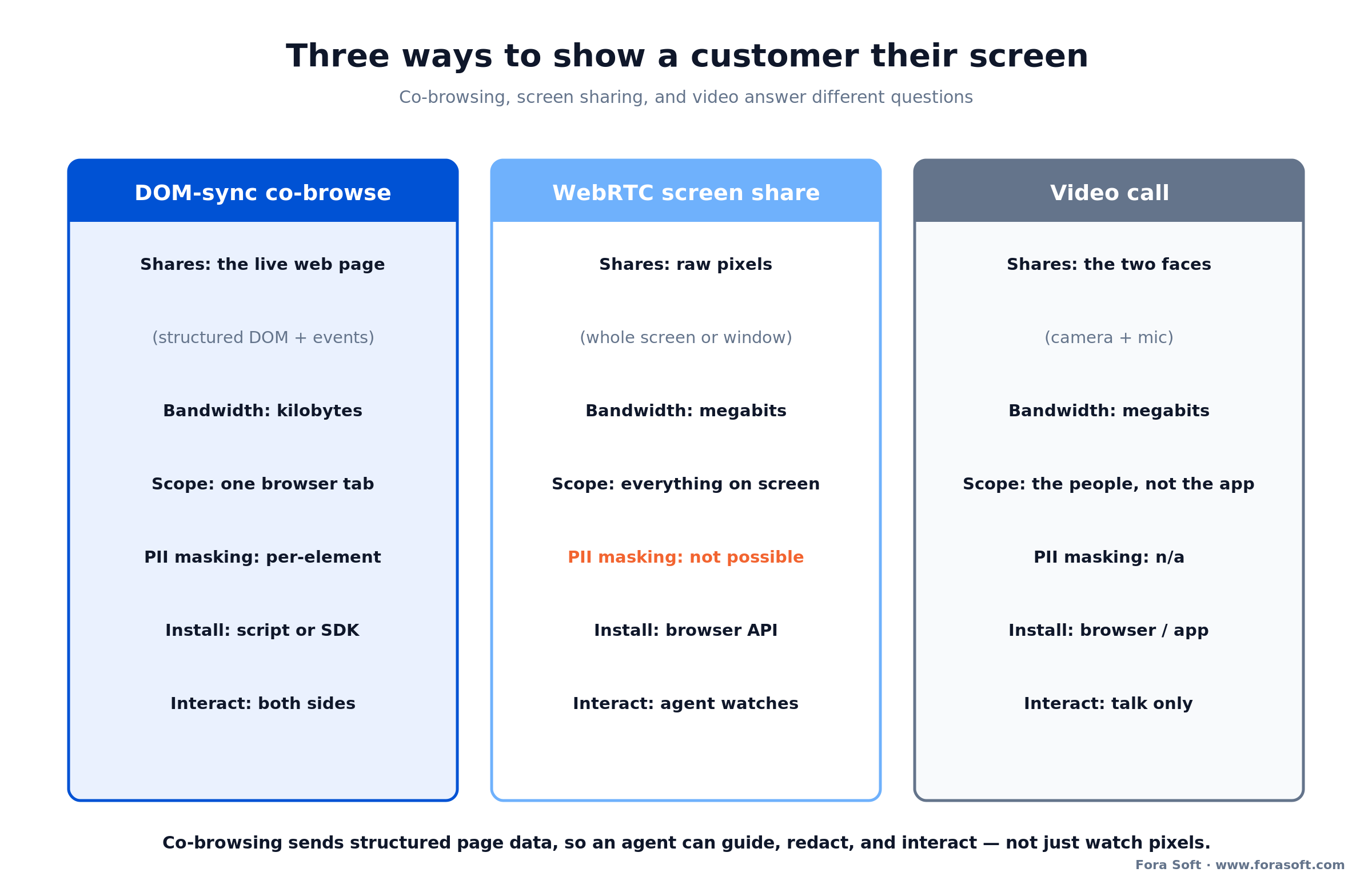
Figure 1. The three technologies compared. Co-browsing sends structured page data, so an agent can guide, redact, and interact rather than watch a video.
Reach for co-browsing when: the problem lives on a web page or in your app, the customer needs help with a form or a flow, and you can’t risk exposing the rest of their screen. Reach for screen sharing when the issue is a desktop app you don’t control.
How co-browsing works: DOM sync over WebSocket
Here’s the mechanism in plain terms. A small piece of JavaScript reads the page’s DOM, the tree of elements the browser renders, and serializes it. As the customer scrolls, types, or the page updates, the script captures those changes as a stream of diffs and events and sends them over a WebSocket to a relay server. The agent’s browser receives the same structure and rebuilds a faithful copy of the page. When the agent is allowed to act, their clicks and inputs travel back the same way.
Because the payload is structured text, not frames of video, a co-browsing session is measured in kilobytes per second where screen sharing is measured in megabits. That’s why co-browse feels instant on an ordinary connection and keeps working on a weak one: there’s simply far less to move. It’s the same reason a text-based protocol beats a video one whenever the content is a document rather than a movie, a trade-off our video streaming primer covers in depth.
The catch is fidelity. The agent’s copy has to match what the customer sees across fonts, styles, iframes, canvas elements, and single-page-app frameworks that rewrite the DOM constantly. Rendering that copy accurately, and keeping it in sync as a modern web app mutates, is the engineering that separates a co-browsing tool that “mostly works” from one an enterprise trusts. It’s a close cousin of the real-time problems in our WebRTC architecture guide.
Reach for DOM-sync co-browse over screen share when: the customer is on a modern web app, you want two-way interaction, and bandwidth or field-level privacy matters, DOM sync gives you all three that a pixel stream can’t.
Proxy-based vs embedded SDK: two ways to build
There are two architectures for getting that DOM stream out of the page, and the choice shapes reliability, security, and how much code you touch.
Proxy-based. A content-rewriting proxy serves a modified copy of your site with co-browsing JavaScript injected into it. Nothing changes on your own codebase, so it switches on fast and can even co-browse third-party pages. The cost is fragility: the proxy depends on the exact, shifting shape of the client-side DOM, so a site update, a single-page-app framework, or a strict content-security policy can break the session or, worse, slip past the rules that were supposed to hide sensitive fields.
Embedded SDK or snippet. You add a script tag (via CDN or a package) or a native SDK that runs inside your own application. It’s more work to install, but it’s sturdier across releases and, critically, it lets you bind masking rules to your own markup, so the field you marked secret stays secret even when the page changes. Cobrowse.io, for example, ships its web integration as a script tag or an NPM package and documents native SDKs alongside it.
The rule of thumb we use: if you control the app and privacy is a real requirement, embed. If you need to co-browse pages you don’t own, or you want a pilot live this week with zero engineering, a proxy earns its place, as long as you test masking against every page that shows sensitive data.
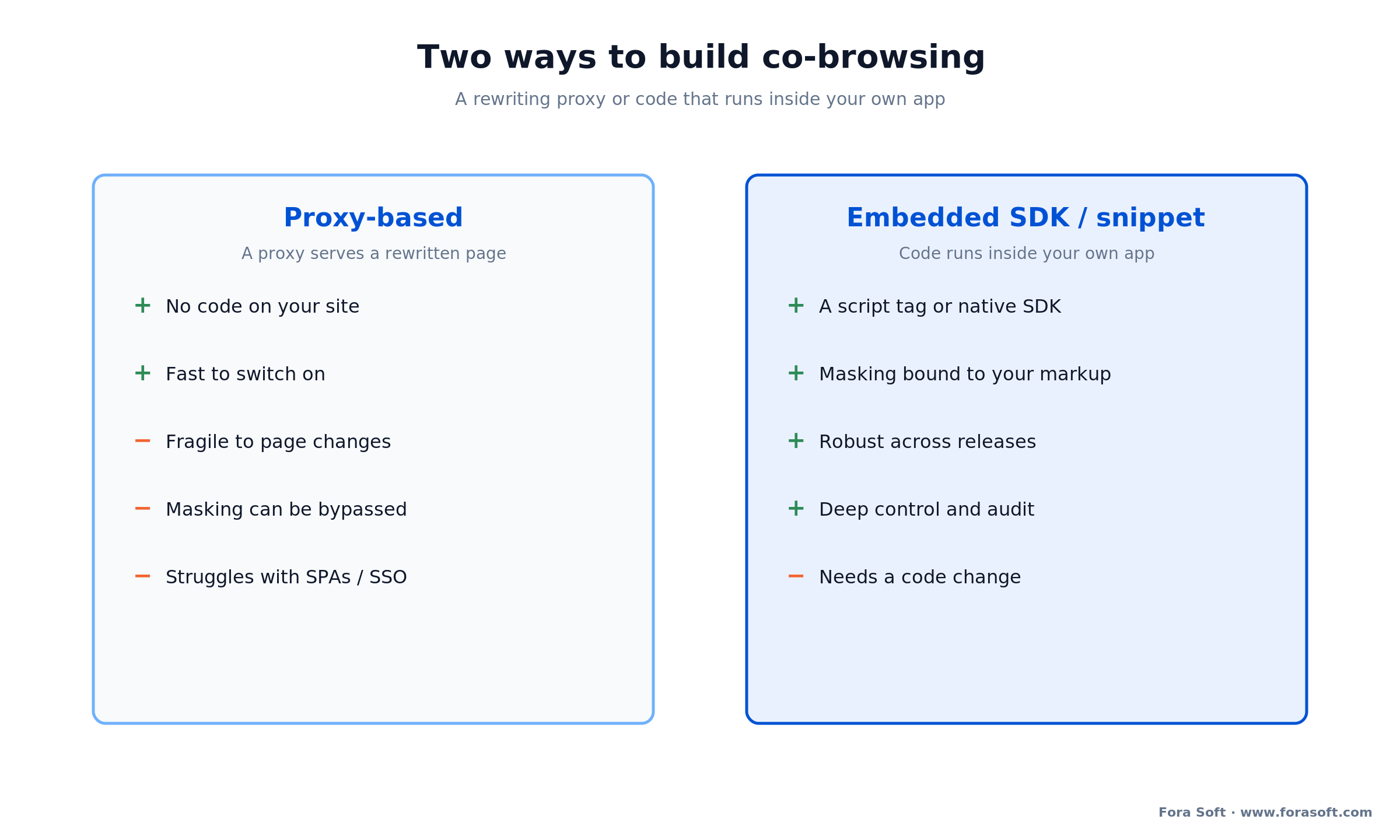
Figure 2. Proxy-based setup is fast but fragile; an embedded SDK is more work but binds masking to your own markup and survives releases.
Reach for an embedded SDK when: the pages that need co-browse are your own and carry payment, health, or identity data, binding masking to your markup is the only way to keep a framework update from quietly un-hiding a field.
Co-browsing inside native mobile apps
Native apps break the web model, because there’s no DOM to serialize. An iOS or Android app renders with the platform’s own view system, so co-browsing there means syncing the view hierarchy instead of an HTML document. That takes a native SDK embedded in the app; you can’t bolt it on with a proxy.
This matters because a growing share of support happens in-app, where the frustrated customer already is. Vendors that support it publish SDKs for iOS, Android, and the cross-platform frameworks, React Native and Flutter among them, and Cobrowse.io lists native support across those plus desktop. If your roadmap includes mobile, treat the native SDK as a first-class requirement in vendor selection or in your own build, not an afterthought, because retrofitting it later is expensive. Our video chat app development guide covers the same cross-platform trade-offs for real-time media.
Inside one co-browsing session
Follow a single session end to end and the privacy checkpoints become obvious. Each one is a decision you make on purpose, not a default you inherit.
It starts with consent. The customer opts in, by clicking a button in-app or reading a short code to the agent, and a clear indicator shows the session is live. The browser then serializes the page and begins streaming DOM diffs and events. Before any of that data leaves the customer’s device, the masking layer redacts the fields you marked sensitive, card number, CVV, password, SSN, so those values are never transmitted and never rendered on the agent side. The relay forwards the structured stream, the agent sees the page and either points to elements or, with a second permission, co-controls the form. When either party ends the session, an audit record captures who joined, what was shared, and when.
The order is the whole game. Masking has to happen in the customer’s browser, before transmission, not on the agent’s side after the fact, because anything that reaches a server or a log is already a disclosure. A tool that “blurs” a field on the agent’s screen but transmitted the real value has already failed the review.
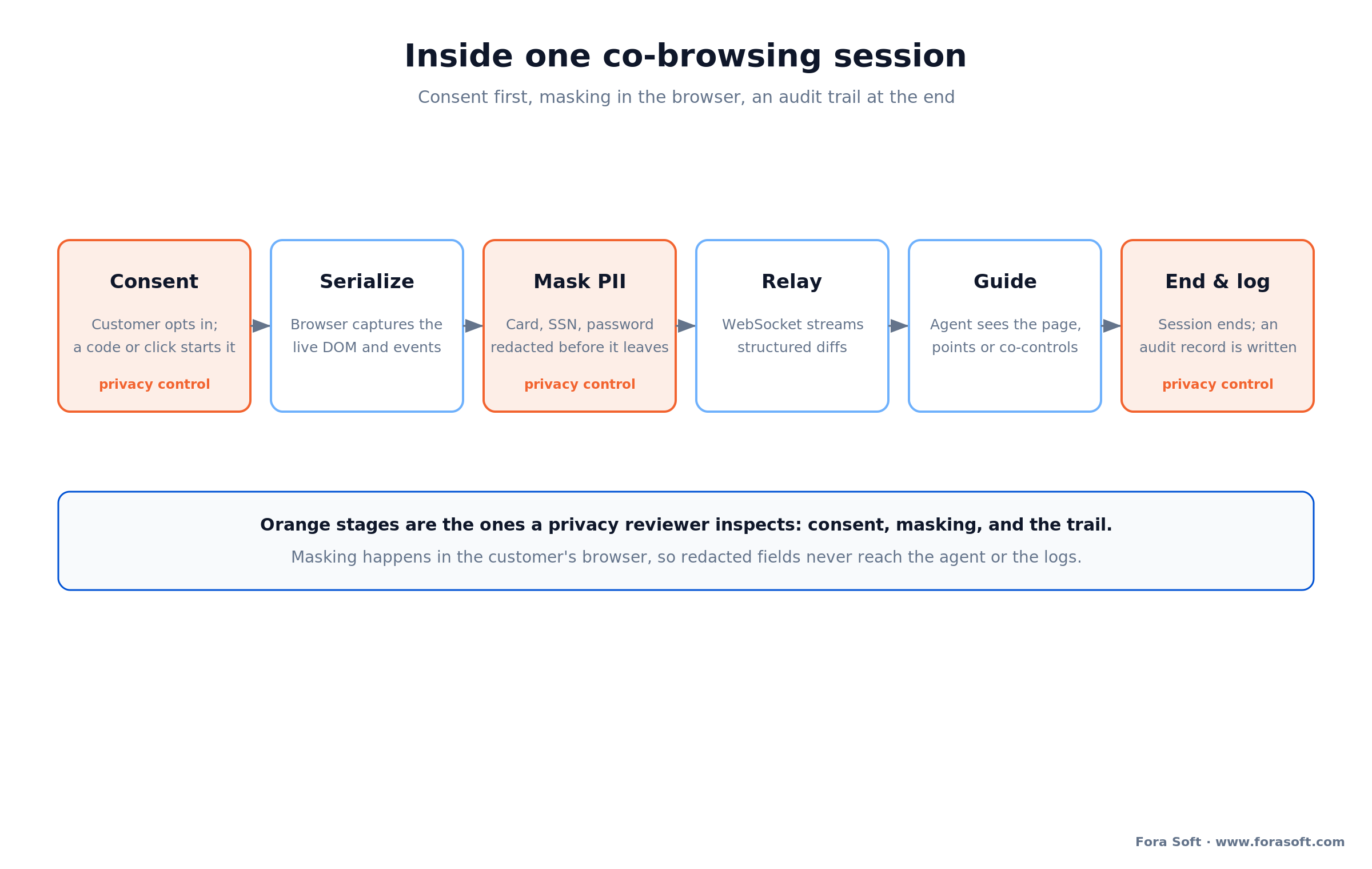
Figure 3. One session from consent to audit. The orange stages, consent, masking, and the trail, are the ones a privacy reviewer inspects.
Security and privacy: masking, consent, compliance
This is the section that separates a toy from a tool, and the one most listicles skip. Three controls decide whether co-browsing is safe to put in front of real customers.
Data masking, done at the source. You declare which elements are sensitive, by selector, attribute, or type, and the software removes them from the stream in the customer’s browser. Done well, a masked field never appears on the agent’s screen and never lands in a recording or log. Surfly, for instance, describes masking that strips elements entirely rather than covering them visually, so nothing sensitive is even present to leak; Cobrowse.io markets a “private by default” model where content is redacted unless you opt it in. Both point at the same principle: default to hidden, reveal deliberately.
Consent and scope. The customer must actively start the session and be able to end it at any moment, and the agent’s powers should be explicit: view-only by default, co-control only when granted. Scope stays on the agreed page. These aren’t nice-to-haves; under GDPR and similar regimes, watching a user’s session without clear consent is the kind of thing that turns a support tool into a complaint.
Compliance posture. Buyers in regulated industries will ask for SOC 2 Type II, ISO 27001, GDPR and CCPA alignment, and HIPAA for healthcare, plus an audit log. Cobrowse.io states it complies with ISO 27001, SOC 2, GDPR, CCPA, and HIPAA and offers self-hosting for teams that need data to stay in their own cloud (their site, July 2026). If you build custom, you own these certifications; if you buy, you demand the report. Our secure communication guide walks the same controls for video.
Reach for self-hosting when: a regulator or your own policy says session data can’t transit a vendor’s cloud, run the relay in your environment, or build the capability in-house, and keep the data path entirely yours.
Need masking that survives a privacy review?
Send us the pages that show payment, health, or identity data. We’ll design the redaction, consent, and audit model so nothing sensitive ever leaves the browser.
Use cases that pay for themselves
Co-browsing earns its keep wherever a customer is stuck on a screen and words alone aren’t enough. Four patterns carry most of the return.
1. Remote support. An agent guides a customer through a settings page, a checkout, or an error instead of reciting steps down the phone. This is the flagship use: it cuts handle time and lifts first-contact resolution, because the agent can see the actual problem rather than a customer’s description of it.
2. Sales and onboarding. A rep co-navigates a demo, helps a prospect complete a long application, or walks a new user through setup. Removing friction from a complex form is often the difference between a completed signup and an abandoned one.
3. Financial services. Co-browse is a standard part of assisted digital banking and insurance: an advisor walks a customer through an application or a quote while sensitive fields stay masked. It’s one of the components we build into video banking platforms, paired with video and identity checks.
4. Healthcare portals. Helping a patient complete intake or find a result in a portal, where masking and HIPAA alignment are non-negotiable and the alternative is often a missed appointment.
Reach for co-browsing on a flow when: you can see where customers get stuck or drop off, and the fix is guidance on a specific page, checkout, onboarding, and applications are the highest-return places to start.
The co-browsing software vendors, compared
The market splits into focused co-browsing tools, support suites that bundle it, and enterprise engagement platforms. A quick, honest map, with prices only where a vendor publishes them.
Cobrowse.io. A specialist with strong native mobile support and a private-by-default masking model. Named-agent pricing on its site (July 2026) is $18/agent/mo for web co-browse and $36/agent/mo for web plus mobile apps, billed annually, with a custom tier for large teams, self-hosting, and 24/7 incident response. It’s the cleanest reference point for what co-browsing costs off the shelf.
Surfly. A proxy-based platform known for masking that removes elements entirely and for co-browsing pages without code changes. Pricing is quote-based rather than published, so we don’t cite a number; its strength is fast setup across sites you may not own.
Fullview. Pairs co-browsing with session replay for support teams and offers a free tier plus paid plans (confirm current tiers on their pricing page). Good fit for support-led teams that want to see past sessions too.
Engagement suites (Glia, Unblu). These bundle co-browse with chat, voice, and video for banks and large enterprises. You get co-browsing as one feature of a broader, managed platform, live fast, priced per seat, and tied to that vendor’s roadmap, which is the classic trade against building your own.
| Option | Best for | Architecture | Masking control | Cost shape |
|---|---|---|---|---|
| Cobrowse.io | Web + native mobile, privacy-first | Embedded SDK / snippet | Private by default | $18–36/agent/mo; custom |
| Surfly | Fast setup, pages you don’t own | Proxy-based | Field masking, elements removed | Quote-based |
| Fullview | Support teams, + session replay | Embedded SDK | Configurable | Free tier + paid |
| Glia / Unblu | Banks, all-in-one CX | Bundled platform | Vendor-provided | Enterprise, quote-based |
| Custom build | Own product, deep control | Embedded SDK you own | Exactly what you design | Upfront build + ops |
Build vs buy: when to own the SDK
For most support teams, the answer is buy. A specialist tool gives you masking, native SDKs, and compliance reports out of the box, and paying per agent is fine when co-browse is a tool your team uses. Building your own to save a subscription rarely pencils out.
Building wins in a different situation: when co-browsing is a feature inside your own product rather than a tool your staff opens. If you sell a SaaS platform, a banking app, or a CX product and want to offer co-browse to your customers, a per-agent SaaS bill scales with their headcount, not yours, and quickly becomes the tail wagging the dog. Owning the capability, or licensing an embeddable SDK you control, keeps the economics and the experience in your hands.
Three other forces push toward build: data residency or self-hosting a regulator demands; masking so specific to your markup that a generic tool can’t express it; and a need to control the roadmap rather than wait for a vendor’s. Absent those, buy, and revisit when one of them appears.
Reach for a custom build when: co-browse is a feature you ship to your own customers, not a tool for your own agents, that’s the case where a per-seat subscription grows without bound and owning the SDK pays back.
What it costs to build co-browsing
Straight answer: a custom co-browsing MVP typically lands around $40–70k, and a production, cross-platform build runs $90–160k. The spread comes from how many platforms you cover, how deep the masking has to go, and whether you need self-hosting and SSO. These are the ranges we quote, compressed by our Agent Engineering practice and still reviewed by a senior engineer on every pull request. Treat any single number with suspicion; the honest output is a range against a spec.
Web MVP, $40–70k, 8–12 weeks. The JavaScript capture SDK, a WebSocket relay, an agent console, and element-level masking. Enough to run co-browse on your own web app with sensitive fields hidden.
Production cross-platform, $90–160k, 14–20 weeks. Add native iOS and Android SDKs, an audit trail, SSO, role-based agent permissions, and the fidelity work that keeps the mirrored page accurate across frameworks. This is the realistic shape for embedding co-browse in a product you sell.
Ongoing. Budget 15–20% of build cost per year for hosting the relay, maintenance, and keeping up with browser changes. For the wider build-side math on real-time products, our video conferencing app cost breakdown shows where the line items sit.
The build-vs-buy cost math
Put conservative numbers on it. Suppose you need co-browse for 50 agents on web and mobile. At Cobrowse.io’s published $36/agent/mo, that’s 50 × $36 × 12, about $21,600 a year, every year, rising as you add agents. Web-only at $18 halves it to roughly $10,800 a year. Those are clean, defensible SaaS costs for a support team, and well below the price of a custom build.
Now change the scenario. You’re a product company offering co-browse to your customers, and the seat count you’d pay for tracks their growth, not yours: 500 seats, then 5,000. A per-agent subscription is a linear cost that never stops climbing; a custom SDK is a one-time $90–160k plus flat ops. Somewhere in that range the two lines cross, and past the crossover, owning the capability is cheaper and gives you the margin and control a resold feature needs.
The takeaway isn’t “always build.” It’s that the decision turns on who the agents are. A tool for your own staff: buy. A feature for your customers at scale: model the crossover before you sign a per-seat contract that grows with someone else’s headcount.
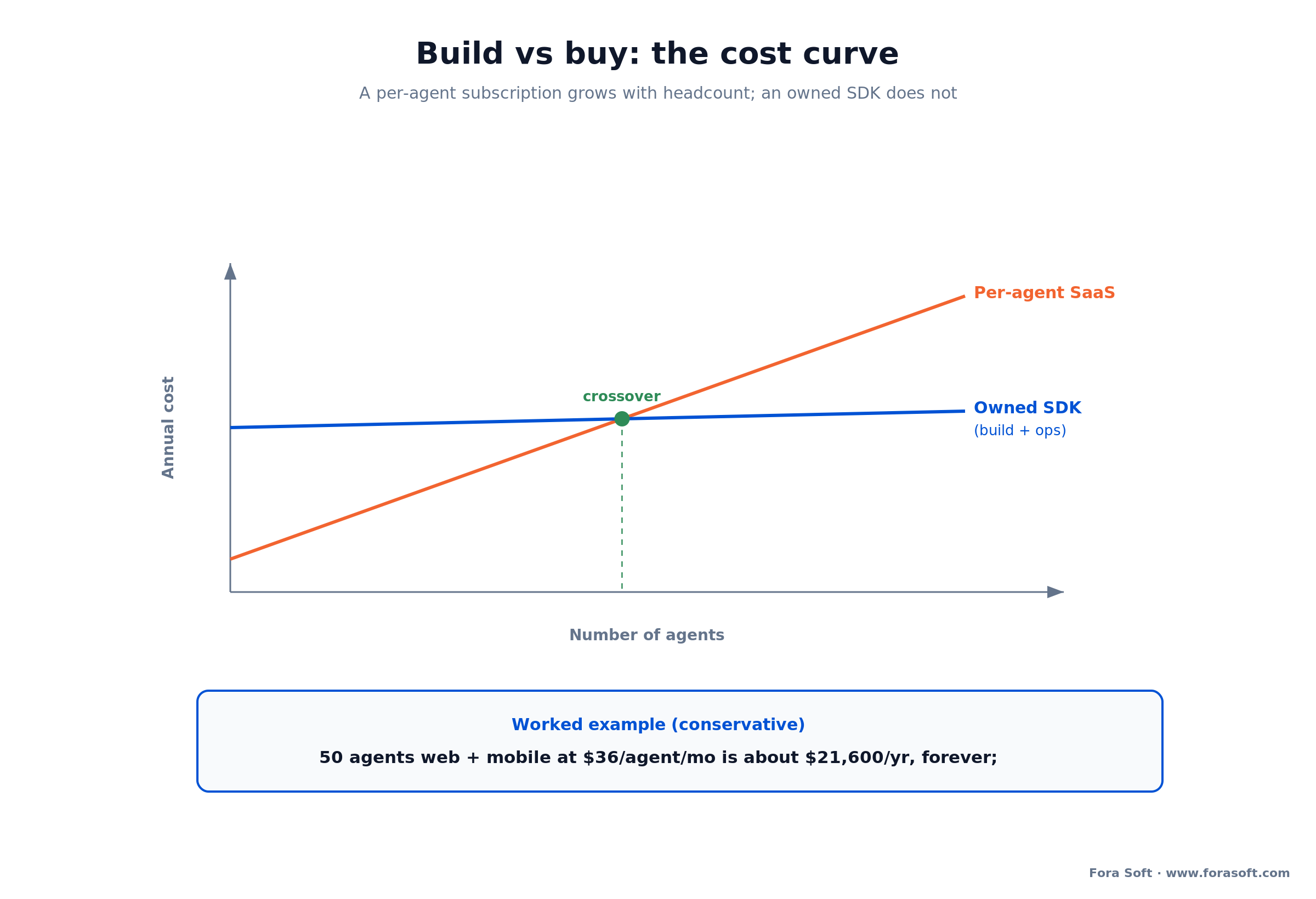
Figure 4. A per-agent subscription is a linear cost that climbs with headcount; an owned SDK is a fixed build plus flat ops. Past the crossover, build wins.
Want the crossover run against your numbers?
Send us your seat count, growth curve, and whether co-browse is for your team or your customers. We’ll model build vs buy and hand you the spreadsheet, whichever way it points.
Mini-case: co-browse inside an assisted-video product
The fastest way to understand a co-browsing build is to see how close a good assisted-video product already sits to one. ProVideoMeeting is a WebRTC conferencing platform we built where a host guides a participant through a live flow, shares a screen to explain it, and captures a signed document with an identity check attached, all with a per-document record of who did what.
That’s most of the co-browsing pattern already: a guided session, a shared view of the work, permissions on who can act, and an audit trail. The step from there to true DOM-sync co-browse is the capture layer, serializing the page and masking its fields, added to a base that already handles the real-time transport, consent, and record-keeping. It’s the same combination we build into video banking platforms as part of our video conferencing development work, where an advisor co-navigates an application while the customer’s account details stay masked.
The point isn’t that co-browse is trivial; the fidelity and masking are real work. It’s that a team who has shipped guided, recorded, permissioned real-time sessions in regulated settings starts the co-browsing build on second base, not at home plate. Want a similar assessment for your scope?
A decision framework in five questions
Answer these five with your product and security leads in the room. They decide build vs buy, and which architecture, faster than any feature matrix.
1. Who are the agents? Your own support staff points to buy. Your customers, if you’re shipping co-browse as a product feature, points to build, because the seat count and the economics are no longer yours to cap.
2. Do you control the pages? If co-browse runs on your own app, an embedded SDK is the safer, sturdier choice. If you need to co-browse third-party pages, a proxy is the only option that reaches them.
3. How sensitive is the data on screen? Payment, health, or identity fields raise masking from a setting to a requirement, and argue for binding it to your own markup rather than a generic proxy rule.
4. Do you need native mobile? If support happens in your iOS or Android app, you need a native SDK on day one. Confirm it’s first-class in any tool you consider, or scope it into the build.
5. Where must the data live? If a regulator or policy requires self-hosting, either pick a vendor that offers it or own the relay yourself. If you want a partner who has answered all five for regulated products, that’s the conversation we have every week.
When NOT to build custom co-browsing
Custom isn’t always right, and a partner who says otherwise is selling. Four situations argue for buying a tool, or for using screen share instead.
Co-browse is a tool for your own agents. If your support team just needs to help customers on your web app, a specialist tool at $18–36 an agent gives you masking and compliance today. Building to avoid a subscription you can easily afford is effort spent in the wrong place.
You need to see a desktop app, not a web page. If the problem is outside the browser, co-browsing can’t reach it, and screen sharing is the right tool despite its exposure. Match the technology to where the problem lives.
You can’t staff the maintenance. A custom capture SDK has to keep up with browser and framework changes. Without engineers to own that, a vendor who does it for you is the safer path.
Volume and sensitivity are both low. A handful of sessions a week on pages with no private data doesn’t justify a build. Start with a tool and graduate to custom when scale, embedding, or masking depth forces the move.
Five pitfalls in co-browsing projects
1. Masking on the agent side. Blurring a field on the agent’s screen after the value was transmitted is a disclosure that already happened. Redact in the customer’s browser, before anything leaves the device.
2. Assuming a proxy is set-and-forget. A rewriting proxy tracks a moving DOM. A site redesign or a framework upgrade can break the session or bypass masking, so re-test masking on every page after every release.
3. Treating consent as a checkbox. Watching a user without a clear opt-in and a visible indicator is a privacy complaint waiting to happen. Make starting explicit and ending one click away.
4. Forgetting native mobile until later. The DOM trick doesn’t exist in native apps. If support happens in-app, a native SDK is a day-one requirement, not a phase two you can bolt on cheaply.
5. Skimping on fidelity. If the agent’s mirrored page doesn’t match the customer’s across fonts, iframes, and dynamic content, they’ll guide the wrong element. The rendering accuracy is the product, not a detail.
FAQ
What is co-browsing software?
Co-browsing software lets a support or sales agent see a customer’s web page in real time and, with permission, interact with it, without the customer installing anything. It works by syncing the page’s DOM and events over a WebSocket, so the agent sees the same live page and can guide or co-fill a form while sensitive fields stay hidden.
What is the difference between co-browsing and screen sharing?
Co-browsing sends the structured web page (the DOM and events), so it’s low-bandwidth, two-way, scoped to one tab, and can redact individual fields. Screen sharing streams a video of the whole screen or window: it works for any application but ships megabits of pixels, is usually view-only, exposes everything on screen, and can’t mask a specific field.
Is co-browsing secure? What about sensitive data?
It can be, when masking is done right. Sensitive elements, card numbers, passwords, SSNs, are declared and removed from the stream in the customer’s browser, so they never reach the agent or the logs. Add explicit consent, view-only-by-default permissions, an audit trail, and compliance like SOC 2, ISO 27001, GDPR, and HIPAA where relevant.
How much does co-browsing software cost?
Off the shelf, Cobrowse.io lists $18/agent/mo for web and $36/agent/mo for web plus mobile apps, billed annually (their pricing page, July 2026); other vendors are quote-based. A custom build runs about $40–70k for a web MVP and $90–160k for a production cross-platform version, plus 15–20% a year for hosting and upkeep.
Does co-browsing require the customer to install anything?
No. On the web it runs through a script already on your page or through a proxy, so the customer just clicks to start or reads a short code to the agent. Inside a native mobile app, the co-browsing SDK is built into the app you already ship, so again there’s nothing extra for the customer to download.
Should we build co-browsing or buy a tool?
Buy when co-browse is a tool for your own agents; a specialist gives you masking, native SDKs, and compliance out of the box. Build when co-browse is a feature you ship to your own customers, when you need self-hosting, when masking must bind to your own markup, or when you want to own the roadmap. A per-agent subscription grows with headcount; an owned SDK does not.
What is the difference between proxy-based and SDK co-browsing?
A proxy-based tool serves a rewritten copy of your page with co-browsing JavaScript injected, so there’s no code to add, but it’s fragile to page changes and can bypass masking. An embedded SDK or snippet runs inside your own app: more work to install, but sturdier across releases and able to bind masking to your own markup.
Can co-browsing work inside a native mobile app?
Yes, but it needs a native SDK, not a proxy, because there’s no DOM in a native app. The SDK syncs the platform’s view hierarchy instead. Vendors that support it publish SDKs for iOS, Android, and cross-platform frameworks like React Native and Flutter; if mobile support matters, confirm it before choosing a tool.
What to read next
Vertical
Video Banking Platform Development
Where co-browse is one component of an assisted, compliant video branch.
Security
Secure Video Communication Apps
Encryption, consent, and compliance for real-time products, the layer under co-browse.
Security
WebRTC Security in Plain Language
How real-time media is encrypted, explained without the jargon.
Cost
Video Conferencing App Cost
What real-time features actually cost to build, line by line.
Architecture
WebRTC Architecture Guide
The real-time transport patterns behind guided, live sessions.
Ready to put an agent on the page?
Co-browsing is a solved problem on the transport side and an exacting one on privacy. Syncing a DOM over a WebSocket is well-understood; the work is masking sensitive fields in the browser before they leave, getting consent right, keeping the mirrored page faithful, and, if you go native, shipping a mobile SDK. That’s the difference between a demo and something a bank will run.
The build-vs-buy call comes down to one question: who are the agents? For your own support team, buy a specialist tool and be live this week. For a co-browse feature you ship to your own customers at scale, model the crossover, because a per-seat subscription that grows with someone else’s headcount is the expensive path. Either way, get the masking right first, and the rest is real-time engineering we do all the time.



The handbook · 7 volumes
Fora Soft Video Engineering Handbook
Co-browsing usually ships next to a voice or video call, and that call is where support sessions win or fail. We wrote a seven-volume handbook on the full media stack. Start with Volume 3 for WebRTC and real-time delivery, add Volume 4 for echo cancellation, noise suppression and clear agent audio, and Volume 7 for live AI assistance inside the call. Written by Nikolay Sapunov, CEO at Fora Soft.
Browse the handbook on Amazon →7 volumes · 9,000+ pages · Kindle & paperback
Build co-browsing that keeps the private fields private
30 minutes, real engineering opinions, no slides. Bring your stack and your compliance needs; leave with a sharing model, a masking design, and a fixed-range estimate.

