

Key takeaways
• Video banking is a compliance-shaped architecture, not a Zoom link. The platform inherits its GLBA, CIP, and SOC 2 posture on day one or fails a bank exam on month 60.
• The video is the easy part. Identity (video KYC plus liveness), e-signatures, call recording, and an immutable audit trail are what an examiner actually inspects.
• Managed vs custom is a real fork. Glia and Eltropy get a credit union live in weeks; custom WebRTC wins on control, branding, integration depth, and unit economics past a volume threshold.
• The money case is branch economics. A teller-handled transaction costs a bank about $4.50; the same one assisted over video or an ITM costs $0.50–$0.70, and one universal banker can cover three to five sites.
• A compliant custom MVP runs about $90–180k. Read this as a build checklist and a build-vs-buy decision tool, not a brochure.
A customer joins a video call to open an account, and forty seconds in your platform has to prove who they are, capture their consent, sign a disclosure, record the session, and write an audit entry an examiner can pull three years later. Get the video wrong and the call looks grainy. Get the identity, consent, and audit trail wrong and you have a Bank Secrecy Act finding, a GLBA safeguards gap, and a remediation project. That gap between “the demo worked” and “the exam passed” is where most video banking projects quietly fail.
We’re Fora Soft. Since 2005 we’ve built real-time video products with identity verification, in-call e-signatures, and audit trails baked in, including ProVideoMeeting (WebRTC conferencing with legally valid signing) and CirrusMED (a regulated telehealth platform that has never failed an audit). This is the briefing we hand a bank or credit union on day one of a video banking engagement: the architecture, the compliance layers, the vendor trade-offs, and the numbers.
Why Fora Soft wrote this video banking playbook
We build video and real-time products for a living, and the regulated ones teach the hardest lessons. ProVideoMeeting is a WebRTC conferencing product we shipped with an in-call signing system that obeys US e-signature law, plus SMS and photo identity checks tied to every signature and a per-document audit log. Swap the meeting context for a bank branch and you have most of a video banking platform already: secure video, verified identity, signed documents, and a record of who did what. That is the same video calling and conferencing development work we take on for banks and credit unions.
On the regulated side, CirrusMED has run HIPAA-grade telehealth video in production for years without a breach or a failed audit. Banking swaps HIPAA for GLBA, FFIEC, and the Bank Secrecy Act, but the discipline is identical: encryption in motion and at rest, strong identity, least-privilege access, and an immutable trail. The numbers and verdicts below come from shipped work, vendor pages we read the week we wrote this, and the regulators’ own text, not from a marketing deck.
Two honest limits up front. We build the software platform, not the ITM cash-handling hardware, so our hardware numbers cite vendors and analysts by name. And some rules here, remote online notarization especially, vary state by state, so treat the compliance sections as a map of what to check with counsel, not legal advice. Companion reads we keep current: our secure video communication apps playbook, the WebRTC architecture guide, and WebRTC security in plain language.
Scoping a video branch for your bank or credit union?
Tell us your regulators, your core system, and your feature list. We’ll map the compliance layers and quote a fixed range in 30 minutes.
What video banking actually is in 2026
Video banking is live, one-to-one video between a customer and a bank employee, delivered through a browser, a mobile app, or a lobby kiosk, that lets the customer do real banking: open an account, apply for a loan, get advice, verify identity, and sign documents. The key word is banking, not meeting. A generic video call shows two faces. A video banking session has to verify identity to a regulator’s standard, capture consent, produce signed records, and log everything. That extra weight is the whole product.
Under the hood it’s WebRTC, the same browser-native technology behind most modern video products, wrapped in identity, signing, recording, and audit services and wired into the bank’s core system. WebRTC matters here for a specific reason: it encrypts media by default with DTLS-SRTP, so “the video is encrypted” is a property of the transport, not a feature someone has to remember to switch on.
People use several names for overlapping things, so let’s pin them down before we go deeper. Video banking software is the platform. A virtual branch is the customer-facing experience it powers. An interactive teller machine (ITM) is a physical kiosk that runs a video banking session to a remote teller who can also dispense cash. All three share the same software spine; they differ in where the customer sits and whether cash is involved.
Video banking use cases that pay for themselves
Not every branch task belongs on video. The ones that do share a pattern: they need a human, they don’t need cash, and the customer would rather not drive to a branch for them. Five carry most of the return.
1. Remote account opening. The single highest-value flow. A prospect starts an application at 9pm, joins a video call, passes identity verification, e-signs the disclosures, and funds the account, with no branch visit. This is also the most compliance-heavy flow, because it triggers the Customer Identification Program rules discussed below.
2. Lending and mortgage. Loan officers walk a borrower through options, share the screen to explain terms, verify documents on camera, and collect signatures. Video shortens a multi-visit process into one recorded session with a clean paper trail.
3. Advisory and wealth. Higher-net-worth customers want a named advisor, not a queue. Scheduled video keeps that relationship without both people being in the same city, and recording plus notes give the compliance team a record of what was recommended.
4. Branch-hours extension via ITM. A kiosk in a vestibule connects to a remote teller pool that stays open past branch hours. This is how small networks extend service without staffing every lobby, and it’s why community banks and credit unions are the fastest-growing buyers.
5. Business and treasury support. Commercial customers get a face for onboarding, entitlement changes, and dispute handling, all of which carry documents and signatures that benefit from a recorded, signed video flow.
Reach for video banking when: the task needs a human and a signature but not a cash drawer, and the customer is more than a short drive from a branch, think account opening, lending, and advisory rather than cash deposits.
Video banking software vs interactive teller machines
People conflate these two, and the confusion costs real money at budgeting time. Video banking software is the app your customer opens on a phone or laptop. An interactive teller machine is a piece of hardware, closer to an ATM, that runs the same kind of video session to a remote teller and adds a cash recycler, a card reader, a scanner, and a signature pad.
The distinction drives the build. Software is a few months of engineering and scales by adding servers. ITMs are capital hardware: a new unit runs roughly $55,000 to $80,000 before the software and install, per vendor pricing from Hyosung Americas in 2024–2025. Analysts at Datos Insights counted around 40,000 ITMs deployed worldwide as of 2024, and industry figures put their coverage at about 92% of branch transaction types and 98% of transaction volume. Impressive, but that’s a hardware program, not an app.
Most banks build the software platform first and treat ITMs as one delivery channel that plugs into it later. The remote-teller logic, identity checks, and audit trail are shared; only the cash-handling hardware and the kiosk client are ITM-specific. Build the spine once, then decide whether a vestibule kiosk earns its $80,000.
Reach for ITM hardware when: customers still need cash in and out at extended hours across a physical footprint, and the per-site kiosk cost is cheaper than staffing that lobby, otherwise start with software and add kiosks selectively.
Reference architecture for a video banking platform
Here’s the shape we run for regulated video products, adapted for banking. It scales from a pilot of 50 concurrent calls to a few thousand without changing tiers, and every layer maps to a compliance control you’ll be asked about in an exam.
Client tier. A React web app, native iOS and Android, and an optional kiosk build for ITMs. Certificate pinning on mobile, biometric sign-in, and refresh tokens in the platform keychain, never in local storage where a rooted device can read them.
Signaling and queue. A TLS 1.3 WebSocket layer that handles call setup, plus the piece generic conferencing tools lack: a routing queue that puts the customer in front of the right banker by skill, language, and product, with wait-time estimates and callback. This is the difference between a meeting tool and a branch. The same routing queue is the backbone of a horizontal video call center software build outside banking.
Media plane. A Selective Forwarding Unit (SFU) such as LiveKit, Janus, or mediasoup routes the encrypted streams. It runs on dedicated hardware or a SOC 2 and FFIEC-aligned cloud. DTLS-SRTP is on by default; where the media server itself must not see the picture, we add end-to-end encryption with the WebRTC Insertable Streams API so the SFU forwards bytes it can’t read.
Trust services. Identity and video KYC, e-signature, consent capture, recording, and the audit log. These are the banking-specific services that sit beside the video, and they’re where most of the engineering budget actually goes.
Integration plane. Connections to the core banking system, the CRM, the document store, and a SIP or PSTN bridge for phone fallback. A video branch that can’t read a balance or write a note is a demo, not a product.

Figure 1. The layers of a video banking platform. The video plane is a small slice; identity, signing, recording, and audit are the bulk of the build.
Reach for Insertable Streams E2EE when: your threat model or your regulator says the media server operator, cloud provider, or vendor must never be able to see customer video, standard DTLS-SRTP encrypts each hop but the SFU still decrypts to route.
Inside one compliant video banking session
Follow a single account-opening call end to end and the compliance checkpoints become obvious. Each stage produces evidence an examiner can later ask for.
The customer joins and lands in the queue, not straight on a banker. Before the human connects, the platform runs identity: a document scan, a live selfie, and a liveness check that confirms a real person is present rather than a photo or a deepfake. The banker joins with the verification result already on screen. They talk, share the screen to explain terms, and when it’s time to sign, the customer consents to electronic records, signs, and the platform stamps the document with time, identity method, and IP.
Recording runs the whole time, with consent captured up front, and everything, joins, the verification result, the signed document hash, the export, lands in an append-only audit log. That log is the deliverable an examiner cares about most, so it’s written to storage that can’t be edited after the fact.

Figure 2. One account-opening session. The orange stages are the ones a regulator inspects: identity, consent, and the audit trail.
Security and compliance: GLBA, FFIEC, SOC 2
This is the section that separates a banking platform from a video app, and the one where generic guides go quiet. Four regimes shape the build in the US.
GLBA and the Safeguards Rule. The Gramm-Leach-Bliley Act (1999) requires financial institutions to protect customer information. The FTC sharpened its Safeguards Rule in 2023 from flexible guidance into named technical controls: encryption of customer data in transit and at rest, multi-factor authentication, access controls, audit logging, penetration testing, and a written incident-response plan, owned by a named qualified individual. A video banking platform has to satisfy every one of those on its own surface.
FFIEC guidance. The FFIEC Information Security booklet expects security-relevant activity to be logged to a central repository with tight access controls on the logs themselves, and its authentication guidance pushes layered controls and MFA for higher-risk actions like account opening and money movement. Your audit log design and your step-up authentication both trace back here.
BSA and CIP. The Bank Secrecy Act, through the Customer Identification Program rule at 31 CFR 1020.220, requires you to collect and verify identity at account opening. This is the rule that makes video KYC a hard requirement rather than a nice touch, covered in its own section next.
SOC 2 Type II. Not a law, but the trust bar every vendor in the chain will be asked to clear. Type II means an independent auditor confirmed your controls were designed and operated effectively over a 6-to-12-month window, not just on the day of the test. If you build custom, you carry this; if you buy, you demand the report.
The engineering translation is concrete: DTLS-SRTP for media, TLS 1.3 for signaling, AES-256-GCM for recordings at rest with keys in a KMS, MFA on both customer and banker sides, least-privilege access on every API (the recording-export endpoint is the classic breach vector), and an append-only audit log with multi-year retention. Miss one and you have a documented finding waiting for the next exam. Our deeper secure video architecture guide walks each layer.
Reach for a documented compliance posture review when: the build touches account opening, money movement, or recorded advice, a vendor who treats GLBA and CIP as a checkbox will hand you a system that fails an exam on month 60.
Worried the platform won’t survive an exam?
We’ll walk your architecture against GLBA, FFIEC, and CIP, name the gaps, and show you the audit-log design that keeps examiners satisfied.
Identity verification and video KYC
Video KYC is verifying a customer’s identity during a video session to a standard a regulator accepts for opening an account. It combines three signals a document upload alone can’t: identity (the ID matches a database and isn’t forged), presence (a live human, not a recording), and intent (they understand what they’re doing). Regulators tend to treat a well-run video KYC session as close to in-person because it captures all three in one recorded, auditable flow.
The technical core is liveness detection: an AI check that the face on camera is a live person matching the ID, resistant to a printed photo, a replayed video, or a deepfake. Document-only onboarding is increasingly soft against synthetic-identity and deepfake attacks, which is why KYC for remote opening leans on liveness plus a human reviewer who can spot the inconsistencies a model misses. On the AI side this is where most of the fraud risk concentrates, so it deserves real engineering rather than a bolted-on SDK.
You don’t have to build the liveness model yourself. Specialist providers (Jumio, Persona, iDenfy, and others) expose it as an API you call inside the session. The build decision is where verification sits in the flow, how the result binds to the recording and the signed documents, and how you store it so an examiner can replay the exact evidence for a given account. That binding is the part a bank actually pays for.
Reach for full video KYC with liveness when: the session opens an account or moves money remotely under CIP, for a routine advice call with an already-verified customer, a lighter re-authentication step is enough.
E-signatures, notarization, and document flows
A video branch that can’t produce a signed, enforceable document is a nice chat. In the US, electronic signatures are legally valid under the federal ESIGN Act (2000) and state UETA law, and the NCUA recognizes E-SIGN for federal credit unions. The mechanics that make a signature hold up are consent to do business electronically, clear attribution to the signer, and a tamper-evident record, all of which your platform captures inside the call.
Some documents need a notary. Remote online notarization (RON) had been enacted in more than 40 states by 2025, including Florida, Texas, and Virginia, and where it applies it requires a real-time audio-visual session, identity proofing, a tamper-evident electronic seal, and a retained recording of the notarization. RON rules vary by state, so the platform needs to know the customer’s and the notary’s jurisdiction and apply the stricter standard, which is a data and workflow problem more than a video one.
We’ve shipped this exact stack. ProVideoMeeting signs documents inside the call, ties each signature to an SMS or photo identity check, and keeps a per-document history of who signed what and how they proved it. That’s the pattern a bank needs: signing, identity binding, and an audit trail as one flow, not three disconnected tools stapled together after the fact.
Integrating with core banking, CRM, and co-browse
The video is a feature; the integrations are the product. A banker on a video call needs the customer’s context on screen and needs their actions to write back to the systems of record. Three connections carry the weight.
Core banking. Reading balances and account status, and writing new accounts and transactions, through the core provider’s API or a middleware layer. This is usually the longest pole in the build, because core systems are older and stricter than anything else in the stack, so we scope it first and never last.
CRM and case management. The banker sees who they’re talking to and logs the outcome. Every video interaction should land as a record so the next employee, and the compliance team, sees the full history.
Co-browsing and screen share. The banker guides the customer through an application on their own screen without taking control, which cuts drop-off on complex forms. This is a signature capability of the managed platforms and a solved problem to build — see our co-browsing software build-vs-buy guide for the detail — and it’s worth having on day one because it’s where confused customers otherwise abandon.
Build vs buy: Glia, Eltropy, or custom
There are four honest ways to put video banking in front of customers, and picking wrong is expensive in a different way each time. Buy a managed platform and you’re live in weeks but you rent the roadmap. Build custom and you own everything but you carry the compliance weight yourself.
Managed CX platforms. Glia bundles chat, voice, video, and co-browse for banks and credit unions and markets a domain model that automates a thousand-plus credit-union tasks. Eltropy acquired the video-banking firm POPi/o in June 2022 and now reports serving around 750 financial institutions, with two-way video, co-browsing, e-signing, remote notary, and video check deposit in one platform. Both get a credit union live fast. The trade is customization ceiling, per-seat economics, and dependence on their release schedule.
Meeting SDKs. Zoom’s Meeting SDK or Microsoft Teams can be embedded when a customer demands a brand-name engine. Credible, but you inherit branding limits and lock-in, and the banking trust services (KYC binding, audit) still have to be built around them.
Custom WebRTC. Build on LiveKit, Janus, or mediasoup and you own the video, the trust services, the branding, and the data. This is the path when compliance control, deep core-banking integration, unique UX, or unit economics at volume matter more than time to first call. It’s also the only path where the audit log and the identity binding are exactly what you designed rather than what a vendor exposed.
ITM overlay. Orthogonal to the other three: it’s a hardware channel that can run on top of any of them, adding cash handling at a kiosk for a five-figure per-unit cost.
| Option | Best for | Control & branding | Compliance & KYC | Integration depth | Cost shape |
|---|---|---|---|---|---|
| Custom WebRTC | Own IP, deep integration, scale | Full | Exactly what you design | Any core / CRM | Upfront build + ops |
| Glia | Fast CX rollout, banks + CUs | Themed, not owned | Vendor-provided; verify SOC 2 | Prebuilt connectors | Subscription / per-seat |
| Eltropy / POPi/o | Credit unions, all-in-one | Themed, not owned | Video KYC, e-sign, notary built in | CU core connectors | Subscription |
| Zoom / Teams SDK | Brand-name engine demand | Limited | Build trust services yourself | API-level | Per-minute + build |
| ITM hardware overlay | Cash at extended hours | Depends on software | Inherits platform posture | Runs on top of any | $55–80k / unit capital |

Figure 3. A four-question path from “buy managed” to “build custom.” Volume, control, and integration depth decide it, not brand preference.
Reach for a managed platform when: you’re a smaller institution that needs to be live this quarter, standard connectors fit your core, and owning the IP isn’t a strategic goal, buy first, and revisit custom when volume or a unique workflow forces it.
What it costs to build a video banking platform
Straight answer: a compliant custom video banking MVP typically lands around $90–180k, with a single-platform pilot starting near $60k. The spread comes from platform count, KYC depth, and how gnarly the core integration is. These are the ranges we quote, compressed by our Agent Engineering practice and still reviewed by a senior human on every pull request. Treat any single number with suspicion; the honest output is a range against a spec.
Single-platform MVP, $60–100k, 10–14 weeks. Web or mobile, secure video, basic identity, e-signing, and audit. Enough to run a pilot for account opening or advisory.
Cross-platform, $110–180k, 14–20 weeks. Web plus native iOS and Android with hardened clients, the realistic shape for a bank serving customers on every device.
Add-ons. End-to-end encryption via Insertable Streams adds roughly $25–50k. Deep core-banking integration is the wildcard and depends entirely on the core provider’s API. Full video KYC with a liveness vendor is mostly integration plus per-verification fees. Budget 15–20% of build cost per year for operations and compliance upkeep.
Buying instead trades that upfront number for a subscription, which is cheaper below a certain volume and more expensive above it. For a fuller treatment of the build-side math, our video conferencing app cost breakdown and the LiveKit vs Agora cost analysis show where the crossover sits.
The branch-vs-video cost math
The build cost is only half the case. The other half is what video banking saves against a staffed branch, and here the numbers are unusually clean. By widely cited industry benchmarks, a teller-handled branch transaction costs a bank about $4.50, while the same transaction assisted over video or an ITM costs $0.50–$0.70. Staffing follows the same curve: a staffed branch runs three to four employees, while the rule of thumb for a shared video and ITM pool is about two bankers per ten locations, with one universal banker covering three to five sites.
Put conservative numbers on it. Shift 5,000 routine transactions a month from a teller line to assisted video, and at a saving of about $3.90 each ($4.50 minus $0.60) that’s roughly $19,500 a month, or about $234,000 a year. That brackets the roughly $240,000 in annual labor savings Five Star Credit Union reported after deploying ITMs, and it leaves out the revenue side entirely, some institutions report close to 30% of deposits arriving outside normal branch hours once assisted channels are open.
Set that against a custom build of $90–180k and the picture is plain: in this scenario the platform pays for itself inside the first year on labor alone, and everything after is margin plus reach. That’s why credit unions and community banks, which carry the thinnest branch networks, are the fastest-growing buyers of the technology.
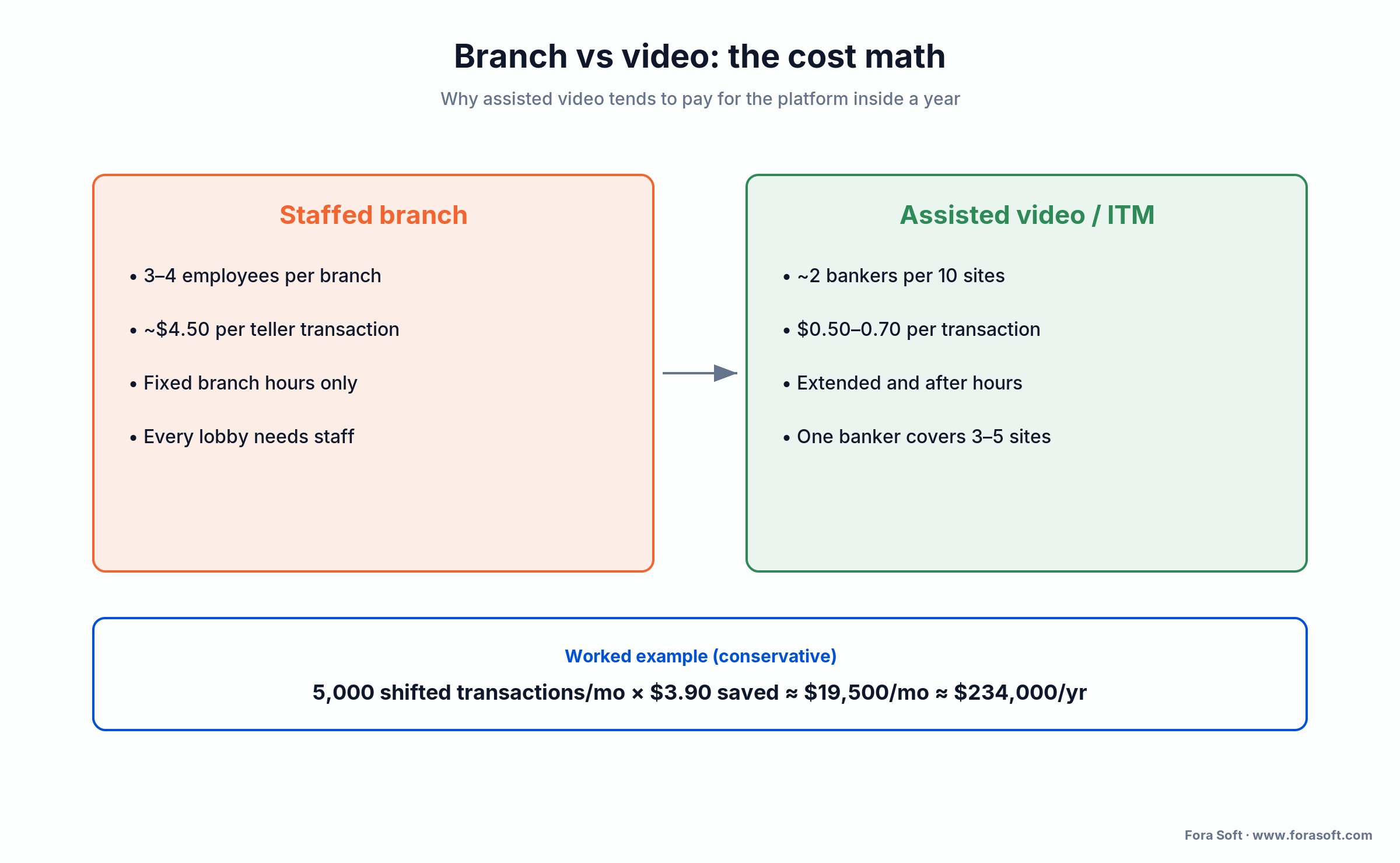
Figure 4. The staffed branch on the left, the assisted video model on the right. The per-transaction and staffing gaps are what fund the build.
Want the cost math run against your branch network?
Send us your branch count, transaction mix, and core provider. We’ll model build vs buy and hand you the spreadsheet, whichever way it points.
Mini-case: a virtual branch on a conferencing core
The fastest way to understand a video banking build is to see how close a well-built conferencing product already sits to one. ProVideoMeeting is a WebRTC conferencing platform we built on WebRTC and FreeSWITCH. The brief was business meetings, but the feature list reads like the spine of a virtual branch.
It signs documents inside the call with a system that obeys US e-signature law. It ties every signature to an SMS or photo identity check, so a signed document carries proof of who signed it. It keeps a per-document history of who signed what and how they verified. It offers browser, phone, and SIP dial-in so a customer with a weak connection can still join, and it adapts video quality to the line so the picture holds on a bad connection. Identity, signing, an audit trail, and resilient video, the four things a bank asks for, already shipped together.
The gap between that and a full video branch is the banking-specific layer: a routing queue, liveness-grade KYC for account opening, and the core-banking integration. That’s a scoped project on top of a proven base, not a research project. It’s the same discipline that keeps CirrusMED audit-clean in healthcare, pointed at GLBA instead of HIPAA. Want a similar assessment for your scope?
A decision framework in five questions
Before you pick a path, answer these five out loud with your compliance lead in the room. They decide build vs buy faster than any feature matrix.
1. Does the flow open accounts or move money? If yes, CIP and full video KYC are in scope, and your identity and audit design lead the project. If it’s advice-only, you can start lighter.
2. How deep is the core-banking integration? Read-only balance display is easy. Writing accounts and transactions back to the core is the longest pole and often the reason custom wins.
3. Do you need to own the brand and the data? If the experience must be unmistakably yours and the data must live where you say, managed platforms hit a ceiling and custom is the answer.
4. What’s your volume trajectory? Below a threshold, a subscription is cheaper than a build. Above it, per-seat pricing crosses over and owning the platform pays back.
5. Who signs the SOC 2 and owns the exam? Buy, and you inherit a vendor’s posture and demand their report. Build, and it’s yours, which is more control and more responsibility. If you want a partner who has answered all five for regulated products before, that’s the conversation we have every week.
When NOT to build custom video banking
Custom isn’t always right, and a partner who says otherwise is selling. Four situations argue for buying, or for not doing video banking at all yet.
You’re small with a standard core and no unusual workflow. If a managed platform’s connectors fit your core and the stock experience is close enough, buy it and be live this quarter. Owning IP you don’t need isn’t a win.
Your demand is cash, not conversation. If the branch traffic you want to offload is mostly cash in and out, that’s an ITM hardware decision or a case for keeping the branch, not a software build.
You can’t staff the compliance side. Custom means you own the SOC 2 and the exam. Without a security and compliance function to carry that, a vendor’s audited posture is the safer path.
The use case is advice-only and low volume. A handful of scheduled advisory calls a week doesn’t justify a platform. Start with a managed tool and graduate to custom when account opening, integration, or volume forces the move.
Five pitfalls in video banking projects
1. Treating compliance as a feature. GLBA, CIP, and FFIEC shape the architecture. Teams that plan to add them at the end fail an exam and rebuild. Design identity, audit, and retention first.
2. An open recording-export endpoint. The most common breach vector we’ve audited in video products is an export API without a real access check. Default-deny, verify role and ownership on every call.
3. Scoping the core-banking integration last. It’s the longest pole and the stiffest system. Leaving it to the end is how a project slips a quarter. Scope it first, prototype it early.
4. Skipping liveness on remote opening. Document-only checks fold against deepfakes and synthetic identities. If the flow opens accounts, liveness plus a human reviewer isn’t optional.
5. Building a meeting tool, not a branch. A video branch needs a routing queue, banker skills and languages, wait estimates, and callbacks. Skip the queue and you’ve shipped Zoom with a logo, and customers feel the difference.
What to measure after launch
Quality KPIs. Join-success rate at 99% or better, glass-to-glass latency p95 under 300 ms, audio MOS at or above 4.0, and identity-verification pass rate on first attempt. If customers can’t reliably connect and get verified, nothing else matters.
Business KPIs. Cost per transaction against the branch baseline, account-opening conversion on video, deflection of routine visits from the branch, and deposits captured outside branch hours. These are the numbers that justified the build; track them from day one.
Reliability and security KPIs. SOC 2 controls passing at 100%, audit-log completeness at 100% (every join, sign, and export recorded), failed-authentication detection under five minutes, and security-incident time-to-resolve under an hour. An examiner will ask for these; have them ready.
FAQ
What is video banking?
Video banking is live, one-to-one video between a customer and a bank employee that lets the customer do real banking, opening an account, applying for a loan, getting advice, verifying identity, and signing documents, from a browser, an app, or a lobby kiosk instead of a branch teller line.
Is video banking secure?
Video banking can be secure when it’s built right. WebRTC encrypts media by default with DTLS-SRTP, and a banking platform adds TLS 1.3 signaling, AES-256-GCM for recordings at rest, multi-factor authentication, least-privilege access, and an append-only audit log. For threat models where the media server must not see the video, end-to-end encryption via WebRTC Insertable Streams closes that gap.
How much does it cost to build a video banking platform?
A compliant custom MVP runs about $90–180k. A single-platform pilot is $60–100k over 10–14 weeks; cross-platform web plus iOS and Android is $110–180k over 14–20 weeks. End-to-end encryption adds $25–50k, and deep core-banking integration varies with the core provider. Budget 15–20% of build cost per year for operations.
How is video banking different from a Zoom call?
A Zoom call connects two faces. Video banking adds the banking-specific layer: regulator-grade identity verification, a routing queue to the right banker, in-call e-signatures, consent capture, recording, an immutable audit trail, and integration with the core banking system. That layer, not the video, is what a bank pays for and an examiner inspects.
What is the difference between video banking software and an ITM?
Video banking software is the app a customer opens on a phone or laptop. An interactive teller machine (ITM) is a physical kiosk, closer to an ATM, that runs a video session to a remote teller and adds cash handling, card reading, and scanning. Both share the same software spine; a new ITM unit costs roughly $55,000–$80,000 before software and install.
Do we need video KYC for video banking?
If a session opens an account or moves money remotely, yes. The Customer Identification Program rule under the Bank Secrecy Act requires you to verify identity at account opening, and video KYC with liveness detection is how you meet that standard remotely. For an advice-only call with an already-verified customer, a lighter re-authentication step is usually enough.
Should we build custom or buy Glia or Eltropy?
Buy a managed platform (Glia, or Eltropy with POPi/o) when you need to be live fast, standard connectors fit your core, and owning the IP isn’t strategic. Build custom when you need brand and data ownership, deep core integration, unique workflows, or better unit economics at volume. Many institutions buy first and move to custom when one of those forces the switch.
What compliance does video banking require in the US?
Four regimes: GLBA and the FTC Safeguards Rule (data protection, encryption, MFA, logging), FFIEC guidance (central logging, layered authentication), the Bank Secrecy Act’s Customer Identification Program (identity at account opening), and SOC 2 Type II as the vendor-trust bar. E-signatures rely on ESIGN and UETA, and remote online notarization rules vary by state.
What to read next
Security
Secure Video Communication Apps
Architecture, encryption, and compliance for regulated video, the layer under a video branch.
Architecture
WebRTC Architecture Guide
P2P, SFU, and MCU explained, and which one fits a banking build.
Cost
Video Conferencing App Cost
What real-time video actually costs to build, with the line items broken out.
How-to
Video Chat App Development
The build path for one-to-one and group video, from stack to ship.
Compliance
Secure Cloud Video Management
Recording, retention, and audit for stored video, the record-keeping side.
Ready to open your virtual branch?
Video banking is a solved problem on the video side and an exacting one on the banking side. The WebRTC stack is mature; the work is in the trust services around it, identity and video KYC, e-signatures, recording, and an audit trail that survives an exam, plus the queue and the core-banking integration that turn a meeting tool into a branch.
The choice comes down to speed versus control. Managed platforms like Glia and Eltropy put you live in weeks on their roadmap; custom on WebRTC gives you the brand, the data, the integration depth, and the unit economics past a volume threshold. Either way, the money case is strong: assisted transactions cost a fraction of teller-handled ones, one banker covers several sites, and a build that pays for itself inside a year is a normal outcome, not an optimistic one. Get the compliance layer right first, and the rest is engineering we do all the time.



The handbook · 7 volumes
Fora Soft Video Engineering Handbook
A compliant video banking session rests on real-time video, a recording you can defend, and identity checks regulators accept. Our seven-volume handbook covers that whole stack: begin with the volume on WebRTC and delivery, add the audio volume on recording and transcription, and keep the real-time AI volume close for biometrics and compliance. Written by Nikolay Sapunov, CEO at Fora Soft.
Browse the handbook on Amazon →7 volumes · 9,000+ pages · Kindle & paperback
Build a video branch that passes the exam
30 minutes, real engineering opinions, no slides. Bring your core provider and regulators; leave with a fixed-range estimate and a compliance map.

