

Key takeaways
• There is no single best text-to-video API, pick by audio, budget, and platform. Sora 2 and Veo 3.1 generate synced audio; Runway’s core models are silent. Veo Lite starts at $0.05/s, Sora 2 Pro is $0.30/s. Your stack (Google vs OpenAI) and your need for native sound decide more than raw quality does.
• Every hosted model is asynchronous. You POST a job, get an id, then poll or catch a webhook and download the file, there’s no “return the MP4 in the response” path. Budget for a queue, a worker, and object storage from day one, not as an afterthought.
• These APIs deprecate fast. OpenAI’s Videos API and Sora 2 models shut down 2026-09-24 (notice given 2026-03-24); Google already retired Veo 3 and Veo 2 on 2026-06-30; Runway sunset several models in July 2026. Treat model choice as a dependency you’ll re-pick, and keep an abstraction layer between your product and any one vendor.
• Provenance and moderation aren’t optional. Sora attaches C2PA Content Credentials; Veo embeds SynthID you can’t disable. Both moderate prompts and outputs, so design a retry and fallback path for rejections. Self-hosting means you own the disclosure obligation yourself.
• Hosted wins until you’re at real scale. At 1,000 short clips a month the cheap tiers land $240–800/mo, a rounding error against the MLOps of self-hosting Wan 2.2 on your own GPUs. Self-host pays off only when a rented GPU stays busy at sustained, high volume.
You want to add “type a prompt, get a video” to your product, so you open the docs for Sora, Veo, and Runway and hit the same three walls every time: the pricing is quoted in different units, none of them returns a video synchronously, and the model you benchmark this week may be deprecated by the next quarter. Choosing a text-to-video API in 2026 isn’t about which demo looks best on Twitter, it’s about which one you can wire into a product, pay for predictably, and not have pulled out from under you.
We’re Fora Soft, a video and AI software company, 250+ projects since 2005, a team of 50+ in-house specialists, and generative video is in-house work for us: real-time AI avatars, dubbing and lip-sync, and recognition pipelines. We don’t sell a video-generation model, so there’s nothing to push here: this is the engineering read on what each API actually costs, how you integrate it, where it fails, and when it’s smarter to self-host than to rent. Every price is dated to when we captured it from the vendor’s own page (2026-07-17); treat the numbers as a snapshot to compare shapes, not a quote.
Adding AI video generation to your product?
Tell us what you want to generate, your monthly volume, and whether you need synced audio, and we’ll tell you honestly which API fits, or whether an abstraction layer over two of them is the safer bet given how fast these models churn.
Why Fora Soft wrote this comparison
We’re a video and AI software company: 250+ projects since 2005, a team of 50+ in-house specialists, and a large share of that work is video, streaming, real-time communication, and increasingly the generative and recognition AI layered on top. When a client wants to generate or transform video with a model through our generative AI development services, we’re the ones wiring the API into a queue, handling the moderation rejections, and storing the output, so we’ve integrated these services rather than just watched their launch demos.
That’s the perspective this article is written from. Almost everything that ranks for “text to video API” today is a vendor’s own doc page, a marketplace catalog, or a Reddit thread, and a vendor never tells you when its model is the wrong choice. We sell neither a model nor a reason to over-build, so we can be blunt about where each option wins, where it breaks, and when you shouldn’t use a hosted API at all.
One honest caveat up front: this market moves faster than any other we cover. Models get renamed, repriced, and retired on weeks of notice. Every price, model name, and shutdown date here is dated to 2026-07-17 from the vendor’s own page. The shapes and tradeoffs will hold; the exact numbers may not, so re-check the source before you commit a budget.
What a text-to-video API actually is
A text-to-video API is an endpoint you send a written prompt (and optionally a reference image) to, and get back a short generated video clip, typically 5 to 10 seconds, at 720p or 1080p, sometimes with synced audio. Under the hood it’s a diffusion or transformer model running on a GPU cluster the vendor operates; you pay per second of output video and never touch the model weights. It’s the programmatic version of the consumer apps (Sora, Runway, Google’s Flow) built so your own product can request clips at runtime.
It helps to draw two boundaries early, because teams conflate them and pick the wrong tool. Generation creates a brand-new scene from a prompt, that’s this article. Editing or enhancement takes video you already have and changes it: upscaling, denoising, re-cutting. If your job is to improve existing footage, an AI video model isn’t the answer, the tools in our guide to AI-powered video editing and AI video enhancement are, and they price and integrate differently.
There’s a third neighbour worth separating: talking-avatar and presenter tools. If you want a digital person to speak a script to camera, that’s an avatar product (HeyGen-class), not a scene generator, different models, different pricing, covered in our HeyGen alternatives comparison. Text-to-video generates arbitrary scenes from a description: a product on a table, a drone shot over a city, an animated explainer. That’s the capability the rest of this guide compares.
Why there’s no single best text-to-video API
The honest answer to “which is best” is that they optimise for different things, and the right pick falls out of three questions, not a leaderboard. First, do you need synced audio in the same generation? Sora 2 and Veo 3.1 produce it natively; Runway’s core Gen-4 models are silent and you add sound separately. Second, what’s your price floor and ceiling? The cheap tiers cluster at $0.05–0.12 per second, but the premium native-audio tiers run 4–8× that. Third, which ecosystem are you already in? If your billing and auth live in Google Cloud or OpenAI, staying there removes a vendor relationship.
Quality matters, but it’s the least durable axis to choose on. The visual gap between the top models narrows every release, and whichever one leads on a benchmark today can be second next month. What’s stable is the shape of each offer: its pricing unit, its audio story, its clip-length ceiling, its provenance policy, and how likely it is to still exist when your contract renews. The next five sections take each option on those terms.
OpenAI Sora 2: great output, a September deadline
Sora 2 is OpenAI’s flagship video model, and it generates richly detailed clips with synced audio from text or an image. On the API it costs $0.10 per second for standard output (portrait 720×1280 or widescreen 1280×720), with Sora 2 Pro at $0.30 per second for higher quality, both captured from OpenAI’s Sora 2 model page on 2026-07-17. You call it through the async v1/videos endpoint (a batch path exists too), and rate limits scale by usage tier, from 25 requests per minute at Tier 1 to 375 at Tier 5. There’s no free tier.
Here’s the part that should shape any decision to build on it: OpenAI’s own model page now tags Sora 2 as “Legacy,” and the deprecations page lists the Videos API and all Sora 2 model aliases and snapshots for shutdown on 2026-09-24, with notice given 2026-03-24. The consumer Sora app was already discontinued earlier in 2026. So the model that arguably has the best out-of-the-box output is also the one with a hard expiry roughly two months out from this writing. That’s fine for a prototype or a short campaign; it’s a real risk as a long-term product dependency.
Watch out: don’t hard-wire Sora 2 as your only generation path if the feature ships past September 2026. OpenAI has signalled a successor will follow, but a shutdown date on the docs means you should build behind an abstraction that lets you swap models, and have Veo or Runway wired as a fallback before the date, not after.
On provenance, every Sora video carries C2PA Content Credentials, cryptographic metadata that marks it as AI-generated, and consumer output is visibly watermarked. If you need to disclose AI origin for compliance, that’s handled for you, which we come back to in the provenance section.
Google Veo 3.1: three tiers, undisableable SynthID
Veo 3.1 is Google’s current generation-track video model, available through the Gemini API in three tiers that trade quality for price. From Google’s Gemini API pricing page (with-audio default, captured 2026-07-17): Veo 3.1 Standard is $0.40/s at 720p and 1080p ($0.60/s for 4K); Veo 3.1 Fast is $0.10/s at 720p ($0.12/s at 1080p, $0.30/s at 4K); and Veo 3.1 Lite is $0.05/s at 720p ($0.08/s at 1080p, no 4K). The model IDs are veo-3.1-generate-preview, veo-3.1-fast-generate-preview, and veo-3.1-lite-generate-preview. That Lite tier is the cheapest native-audio generation of any hosted flagship here.
Each generation is capped at 8 seconds, but Veo exposes an extend operation, up to 7 seconds per step across as many as 20 steps, to reach roughly 148 seconds (about two and a half minutes) of continuous video, per Google’s Veo docs. That makes Veo the most practical option when you need something longer than a single beat without stitching clips together yourself. Google’s deprecation discipline is worth noting too: Veo 3 and Veo 2 were both shut down on 2026-06-30, so 3.1 is what you build on today, and a reminder that even the Google option turns over.
Reach for Veo 3.1 when: you want the cheapest native-audio generation (Lite at $0.05/s), you need clips longer than 8 seconds via extend, or your stack already lives in Google Cloud. Be deliberate about one thing: all Veo output is invisibly watermarked with SynthID, it persists through re-encoding, and you cannot disable it. That’s a feature for compliance and a constraint if your use case can’t carry a provenance mark.
The tiering is the real advantage. You can generate cheap Lite drafts while a user iterates on a prompt, then re-run the approved one on Standard for the final render, a pattern that keeps spend down without giving up quality where it counts. Few teams exploit this, and it’s one of the easiest ways to cut a Veo bill.
Runway Gen-4: one API, many models
Runway’s API bills in credits, 1 credit = $0.01, bought self-serve for an org, and its own models sit at different credit rates. From Runway’s developer pricing (2026-07-17): gen4.5 is 12 credits/s ($0.12/s, best quality), gen4_turbo is 5 credits/s ($0.05/s, fastest), and the act_two performance/character-transfer model is 5 credits/s. Runway’s core generation is silent by default, if you need audio, you add it with a separate model or step, which is the main functional difference from Sora and Veo.
Runway’s real distinction is that it’s becoming a single API in front of many models, including third-party ones. Through the same endpoint you can call hosted veo3.1 (40 credits/s with audio, 20 without), seedance2 (36–40 credits/s), aleph2 (28 credits/s), and gemini_omni_flash (10 credits/s), plus real-time avatar generation. That’s genuinely useful for a team that wants one integration and one bill across several models, but read the credit rates carefully, because calling Veo through Runway costs more than calling Veo directly.
Watch out: Runway deprecates models too. gen3a_turbo and gen4_aleph were sunset on 2026-07-30. If you pin a specific model string, put it in config, not scattered through your code, you’ll be changing it. And when you compare Runway’s hosted third-party models against the source vendor’s direct price, the convenience of one API usually carries a markup.
Where Runway earns its place is workflow breadth: text-to-video, image-to-video, character transfer, and real-time avatars behind one key, at a low $0.05/s entry point. If you’re building a creative tool where users mix several kinds of generation, that consolidation can be worth more than shaving a cent per second.
Not sure which model your feature needs?
Send us the clips you want to generate, your audio and length requirements, and your monthly volume, and we’ll map the shortlist to your real constraints, and flag when a two-model fallback beats betting the feature on one API.
MiniMax Hailuo and Kling: the value tier
Below the three Western flagships sits a value tier led by Chinese labs, MiniMax’s Hailuo and Kuaishou’s Kling, that competes hard on price and, increasingly, quality. MiniMax bills through a “video points” system rather than per second: its Standard package is $1,000 for 3,760 points (about $0.266 per point), and a MiniMax-Hailuo-2.3-Fast clip at 768p for 6 seconds costs roughly 0.7 points, or about $0.19, which works out near $0.03 per second, the cheapest hosted generation in this comparison (MiniMax platform pricing, captured 2026-07-17). Failed or moderation-blocked generations aren’t deducted, and rate limits run from 20 requests per minute on Standard to 50 on Business.
MiniMax’s own API docs are, tellingly, the current Google #1 for “text to video API”, the search intent is dominated by vendors, not independent guides, which is part of why we wrote this one. Kling sits in the same value band with strong motion quality. The trade-offs at this tier are consistent: no native audio, shorter clip ceilings (6–10 seconds), provenance you add yourself rather than get built-in, and vendor terms and data residency worth reading closely if your users or content are regulated.
Reach for the value tier when: cost per clip dominates your economics, you don’t need synced audio, and short clips are fine, think high-volume social variants or thumbnail-scale motion. Weigh it carefully when your content is regulated or your buyers care about data residency and provenance, because the built-in compliance features of Sora and Veo are exactly what this tier trades away for price.
Self-hosting Wan 2.2 and HunyuanVideo
If you need full control, over data, over model behaviour, over cost at scale — the open-source models are now good enough to build on. Alibaba’s Wan 2.2 ships under an Apache 2.0 license, uses a mixture-of-experts diffusion backbone, and one model handles text-to-video, image-to-video, and editing; it’s usable commercially without a per-second fee. Tencent’s HunyuanVideo is under a community license that permits commercial use up to 100M monthly active users (a separate license beyond that), reaches up to 1080p, and in its 1.5 release fits on a single consumer GPU. There are premium open tiers too, like LTX-2 for 4K with audio.
The economics are completely different, and that’s the point. You don’t pay per second; you pay for GPU time. An H100 rents for roughly $2–3/hour on-demand (a conservative general-market range), and your real cost is a function of how busy you keep it. That flips the hosted math on its head: an API is cheaper and simpler until your volume is high and steady enough that a rented or owned GPU stays saturated. Below that line you’re paying for idle hardware and an MLOps team to babysit it.
Self-hosting also moves obligations onto you. Provenance marking, moderation, license compliance, and uptime are all yours now — the hosted vendors were quietly handling several of those. For a team with sustained high volume, strict data-control requirements, or a product where the generation pipeline itself is the differentiator, that ownership is worth it. For everyone else, it’s a lot of undifferentiated infrastructure to run in-house.
Reach for self-hosting when: your volume is high and steady enough to keep a GPU saturated, your data or compliance rules can’t send prompts to a third party, you need output without a mandatory provenance mark, or the generation pipeline is your product. Short of one of those, a hosted API is cheaper and simpler, and the MLOps you’d take on is effort spent reinventing a solved layer.
The five options compared
Here are the five paths side by side. They all generate video from a prompt; the real differences are audio, price floor, clip length, provenance, and whether you host it. Prices are each vendor’s own list rate per second of 720p output, captured 2026-07-17.
| Option | Price floor (720p) | Native audio | Where it wins | Watch-out |
|---|---|---|---|---|
| Sora 2 (OpenAI) | $0.10/s ($0.30/s Pro) | Yes (C2PA) | Best-in-class output; OpenAI stack; synced audio | API sunsets 2026-09-24; tagged Legacy |
| Veo 3.1 (Google) | $0.05/s Lite – $0.40/s Standard | Yes (SynthID) | Cheapest audio tier; extend to ~148s; three tiers | SynthID watermark can’t be disabled |
| Runway Gen-4 | $0.05/s Turbo ($0.12/s Gen-4.5) | No (core silent) | Many models, one API; character transfer; avatars | Add audio separately; hosted models carry markup |
| MiniMax / Kling | ~$0.03/s (points-based) | No | Cheapest hosted; failed gens not charged | No audio; short clips; check data residency |
| Self-host (Wan 2.2) | GPU time (~$2–3/hr H100) | You add it | Full control; Apache-2.0; flat cost at scale | You own MLOps, provenance, moderation, uptime |

Figure 1. The same five options at a glance. Read down a column to shortlist on one axis; read across a row to see a single model’s trade-offs.
A useful way to read it: Sora 2 for output quality if you can live with the September deadline; Veo 3.1 for the cheapest native audio and the longest clips; Runway when you want many generation types behind one key; MiniMax or Kling when raw cost-per-clip rules; and self-hosted Wan 2.2 when control and sustained scale justify running the infrastructure. Which one you land on follows from integration and cost — the next two sections.
How to wire a text-to-video API into your product
The single most important architectural fact about every hosted model here is that they’re all asynchronous. You POST a generation request, get back a job or operation id, then either poll for status or receive a webhook when it’s done, and finally download the rendered file. There is no synchronous path that hands you the MP4 in the HTTP response — generation takes tens of seconds to minutes. If you design as if the call returns a video, you’ll rebuild it.
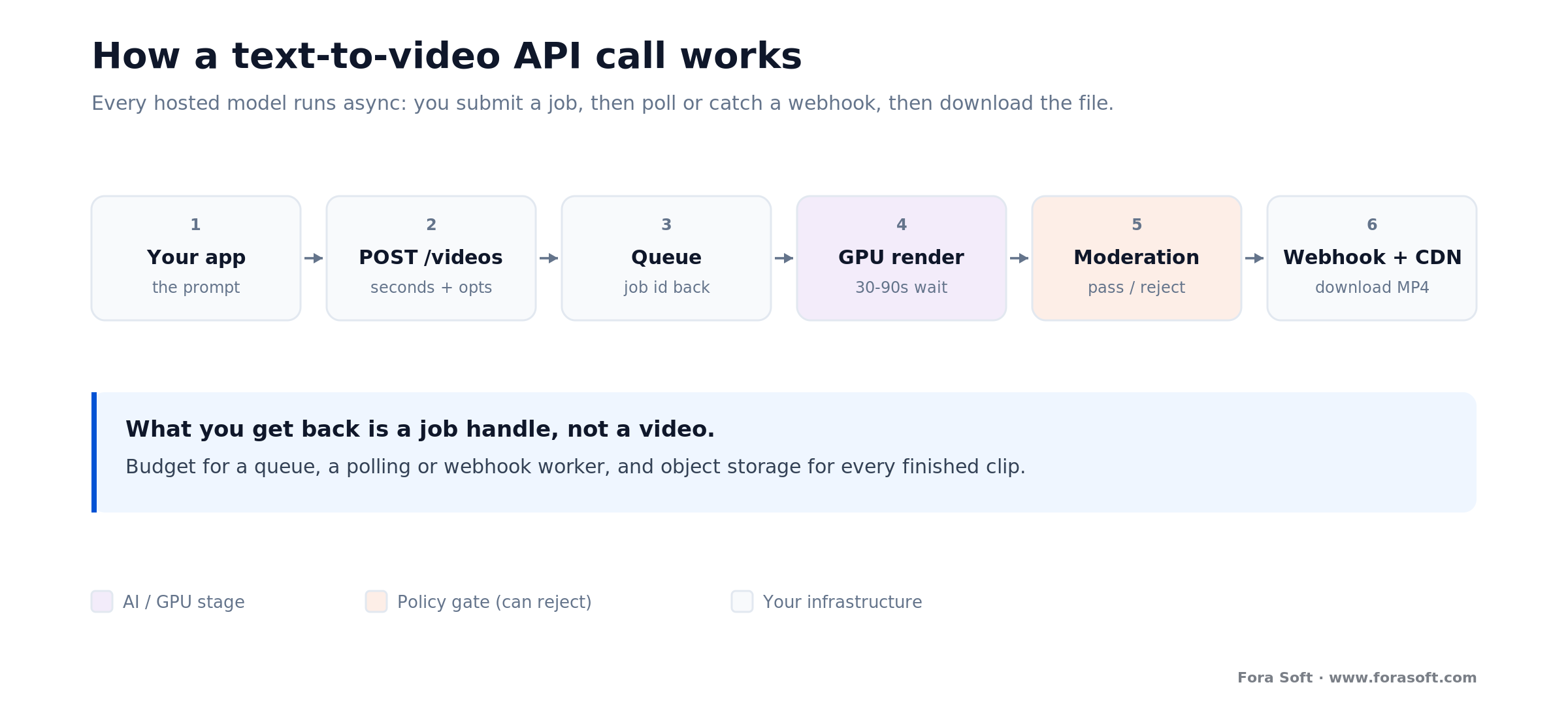
Figure 2. What a generation call really looks like. You get a job handle back, not a video — so budget for a queue, a polling or webhook worker, and object storage for every finished clip.
That shapes a small but real backend. You need a job queue so a burst of requests doesn’t overrun your rate limit; a worker that polls or listens for webhooks and updates job state; object storage (S3 or equivalent) plus a CDN to hold and serve finished clips; and a UI that shows “generating…” and resolves when the asset is ready. Add sensible retries with backoff, because moderation rejections and transient failures are normal, not exceptional. None of this is exotic — it’s the same job-and-worker pattern behind any long-running task — but it’s work that has to exist before the feature is reliable.
The other design decision to make on day one is a model abstraction. Given how fast these APIs deprecate, put a thin interface between your product and the vendor so that swapping Sora for Veo, or adding a fallback, is a config change and not a rewrite. Teams that skip this pay for it at the next deprecation. If you want the deeper engineering treatment of building on video models, our AI for video engineering track in Learn goes further, and our AI integration team does exactly this kind of wiring.
Watermarks, C2PA and moderation you can’t skip
Provenance is no longer a nice-to-have. Sora attaches C2PA Content Credentials — a cryptographic, industry-standard marker that a file is AI-generated — and Veo embeds SynthID, an invisible watermark that survives re-encoding and cannot be turned off. If you have to disclose AI origin under regulations like the EU AI Act’s transparency rules, the hosted flagships do that work for you. The flip side is that you can’t remove those marks, so if your use case genuinely needs unmarked output, hosted flagships are the wrong tool and you’re into self-hosting — where the disclosure obligation becomes yours to meet.
Moderation is the other thing you can’t skip. Every hosted API screens both your prompt and the generated output, and it will reject content it judges unsafe — sometimes including false positives on perfectly legitimate prompts. That means rejections are a normal runtime event, not an error to log and forget. Design a graceful fallback: surface a clear message, offer a re-prompt, and if a use case reliably trips a filter, route it to a different model or a self-hosted path where you own the policy.
Design for it when: your product lets end users type arbitrary prompts. Assume a percentage will be refused, build the retry and messaging path before launch, and log rejection reasons so you can see whether a filter is over-triggering on a real use case. The teams that treat moderation as an afterthought ship a feature that feels broken the first time a valid prompt bounces.
What 1,000 clips a month really costs
Let’s put real arithmetic on it. Say your feature generates 1,000 short marketing clips a month, 8 seconds each — that’s 8,000 seconds of output. At each vendor’s list price: Sora 2 at $0.10/s is $800/mo (Sora 2 Pro at $0.30/s is $2,400); Veo 3.1 Fast at $0.10/s is $800/mo, Veo 3.1 Lite at $0.05/s is $400/mo, and Veo 3.1 Standard at $0.40/s is $3,200; Runway Gen-4 Turbo at $0.05/s is $400/mo, Gen-4.5 at $0.12/s is $960; and MiniMax Hailuo-2.3-Fast lands near $240/mo at roughly $0.24 per clip. Same 8,000 seconds, a 13× spread from cheapest to most expensive.

Figure 3. Monthly API spend for 1,000 eight-second 720p clips, at each vendor’s list price captured 2026-07-17. Cheap tiers land $240–800/mo; native-audio premium tiers run 4–8× that.
Now the self-host comparison. Wan 2.2 on a single H100 has no per-second fee — you pay for the GPU, roughly $2–3/hour on-demand, or less if you reserve or own it. But an H100 renders a finite number of clips per hour, so its cost per clip depends entirely on how busy you keep it. Against a $240–800/mo API bill, a self-hosted GPU only wins when it stays saturated: sustained, high, steady volume. Below that, you’re renting idle hardware and staffing an MLOps function to save money you weren’t spending. We keep our own build estimates deliberately conservative, so our default advice at this volume is to stay on a hosted API.
Two cost levers most teams miss. First, use tiers: generate cheap drafts (Veo Lite, Runway Turbo) while a user iterates, and only spend on a premium model for the final approved render. Second, cache aggressively — identical prompts should never be regenerated. Between draft-tier iteration and a cache, a realistic bill often comes in well under the headline numbers above.
Modelling the build-vs-buy crossover?
Give us your projected clip volume, resolution, and audio needs, and we’ll run the hosted-vs-self-host math with you — and tell you plainly if staying on an API is the smarter spend, which for most teams it is.
What we learned shipping generative video
Generative video is in-house work for us, not a datasheet exercise. We’ve built real-time interactive AI avatars that speak and react over WebRTC, and AI dubbing and lip-sync pipelines that localise video at scale — both shipped, both live. Across that work and platforms like BrainCert, where AI features sit inside a video product used in production, the same lesson keeps repeating: the model call is the easy 20%.
The hard 80% is everything around it. Handling the async job lifecycle without leaving users staring at a spinner. Absorbing moderation rejections gracefully instead of surfacing a raw error. Keeping cost predictable when a model reprices or a cheaper tier appears. And — the one that bit hardest — not coupling the product to a single model, because the model you launch on will be deprecated before the product is mature. Every one of those is an engineering problem, not a prompt problem.
The transferable takeaway: treat the generation model as a swappable dependency behind your own interface, and put your effort into the pipeline, the fallback logic, and the cost controls. That’s what makes a generative-video feature reliable rather than a demo — and it’s the same conversation we’d start with you on a call.
Which text-to-video API to pick, in five questions
Before you shortlist a model or scope a build, answer these five. They decide most of the design and the spend.

Figure 4. The short version as a tree. Native audio, cost sensitivity, and your existing stack decide it for most product teams; sustained scale and data control push you to self-hosting.
1. Do you need synced audio in the generation? If yes, you’re on Sora 2 or Veo 3.1 — the others are silent or add sound as a separate step. If no, the value tier and Runway open up.
2. How long does the feature need to live? A one-off campaign or prototype can happily use Sora 2 today. A durable product feature should avoid a model with a published shutdown date, or wrap it so you can swap it out.
3. What’s your cost sensitivity and volume? Cost-dominated and audio-optional points at MiniMax/Kling or Runway Turbo. Quality-first with audio points at Veo Standard or Sora 2 Pro. Model the monthly bill at your real volume, not per clip.
4. Which cloud are you already in? If your billing, auth, and data live in Google Cloud, Veo removes a vendor. If you’re an OpenAI shop, Sora fits — with the deadline caveat. Fewer vendor relationships is a real, under-counted cost saving.
5. Do you need to own the pipeline? If data control, unmarked output, or cost at sustained scale forces it, self-host Wan 2.2 — and staff for the MLOps. If not, rent, and put your engineering into the product. If you want a second opinion on your answers, that’s exactly what our AI integration team does.
Five ways teams burn money on video APIs
1. Building on a deprecated-soon model with no abstraction. Wiring Sora 2 directly into a long-lived feature, then scrambling when the September shutdown lands. Wrap the model from day one so a swap is a config change.
2. Assuming the call is synchronous. Designing the feature as if the API returns a video, then rebuilding the whole flow around jobs, webhooks, and storage once reality hits. It’s always async — design for that first.
3. Generating every iteration on the premium tier. Running a user’s ten prompt tweaks on Veo Standard or Sora 2 Pro when a draft tier would do. Iterate cheap, render final expensive.
4. No cache. Re-generating identical prompts because there’s no dedupe. The same input should return the stored output, free.
5. Self-hosting too early. Standing up GPUs and an MLOps rota to “save on API fees” at a volume where the API costs a few hundred dollars a month. Self-host is an at-scale move, not a launch move.
What to measure once you ship
Once the feature is live, three buckets of metrics tell you whether it’s healthy. Cost: spend per generated clip and per active user, tracked against your tier mix, so a repricing or a shift toward premium renders shows up before the invoice does. Reliability: generation success rate, moderation rejection rate, and end-to-end latency from request to playable asset — the numbers that decide whether the feature feels solid.
The third bucket is value: how often generated clips are actually used, kept, or shared versus discarded. A high generation count with a low keep rate means you’re paying to produce output nobody wants — usually a prompt-quality or model-fit problem, not a volume one. Watching keep rate alongside cost per clip is the fastest way to tell whether the feature is earning its bill. For enhancing or cleaning up the clips users do keep, the AI video enhancement tools are a natural next step.
When not to use a hosted text-to-video API
A hosted text-to-video API is the wrong tool in a few clear cases. If your job is to edit or enhance existing footage rather than generate new scenes, you want editing and enhancement models, not a generator — different capability, different price. If you need unmarked output, the hosted flagships won’t give it to you: C2PA and SynthID are baked in, so you’re into self-hosting and owning the provenance obligation yourself.
Skip the hosted route, too, when compliance forbids sending prompts or content to a third-party model, or when your data residency rules can’t accommodate the vendor’s regions — both push you to self-hosting regardless of cost. And don’t reach for generation at all when a real filmed clip or a stock library would serve better; AI video is a fit for scale, iteration, and scenes you can’t easily shoot, not a reflex for every video slot.
Finally, don’t self-host to save money at low volume. At a few hundred to a couple of thousand dollars a month of API spend, a managed model costs less than the meetings you’d spend scoping a GPU deployment. The custom path is for when you’ve outgrown the hosted math — being honest about that is why a partner who says “just use Veo Lite” is worth more than one who quotes you a cluster.
FAQ
What is a text-to-video API?
A text-to-video API is an endpoint you send a written prompt (and optionally a reference image) to, and get back a short generated video clip — typically 5–10 seconds at 720p or 1080p, sometimes with synced audio. The model runs on the vendor’s GPU cluster and you pay per second of output. Every hosted one is asynchronous: you submit a job, poll or receive a webhook, then download the file.
Which text-to-video API is best in 2026?
There’s no single best — it depends on three things. Need synced audio? Sora 2 or Veo 3.1. Cost-dominated and audio-optional? MiniMax/Kling or Runway Turbo (~$0.03–0.05/s). Already in Google Cloud? Veo 3.1, which also has the cheapest audio tier ($0.05/s Lite) and the longest clips. Sora 2 has arguably the best output but its API is scheduled to shut down 2026-09-24, so avoid it as a long-term dependency.
Is there a Sora API, and how much does it cost?
Yes. OpenAI’s Videos API exposes Sora 2 at $0.10 per second and Sora 2 Pro at $0.30 per second (portrait 720×1280 or widescreen 1280×720, captured from OpenAI’s model page 2026-07-17). Important caveat: OpenAI has tagged Sora 2 “Legacy” and scheduled the Videos API and all Sora 2 models for shutdown on 2026-09-24. It’s fine for a pilot; wrap it behind an abstraction if you ship past that date.
How much does the Veo API cost?
On the Gemini API (with-audio default, captured 2026-07-17): Veo 3.1 Standard is $0.40/s at 720p/1080p and $0.60/s at 4K; Veo 3.1 Fast is $0.10/s at 720p; Veo 3.1 Lite is $0.05/s at 720p (no 4K). Each generation is 8 seconds, extendable to about 148 seconds. All Veo output carries a SynthID watermark you cannot disable. Veo 3 and Veo 2 were retired on 2026-06-30, so build on 3.1.
Do text-to-video APIs return the video synchronously?
No. Every hosted flagship is asynchronous: you POST a request, receive a job or operation id, then poll or catch a webhook and download the finished file. Generation takes tens of seconds to minutes, so there’s no path that returns the MP4 in the HTTP response. Plan for a queue, a worker, object storage, and a “generating…” UI state — and retries, since moderation rejections are normal.
Can you self-host a text-to-video model, and is it cheaper?
Yes — Wan 2.2 (Apache 2.0) and HunyuanVideo (commercial up to 100M MAU) are strong open models. But you pay for GPU time, not per second: an H100 rents for roughly $2–3/hour, so cost per clip depends on how busy you keep it. Self-hosting only beats a hosted API at sustained, high volume where the GPU stays saturated — and you take on provenance, moderation, and MLOps yourself. Below that, hosted is cheaper and simpler.
Are AI-generated videos watermarked?
The hosted flagships mark them. Sora attaches C2PA Content Credentials (cryptographic provenance metadata); Veo embeds SynthID, an invisible watermark that survives re-encoding and can’t be disabled. These help you meet AI-disclosure rules like the EU AI Act. If you need unmarked output, hosted flagships won’t provide it — you’d self-host and take on the disclosure obligation yourself.
What does it cost to generate 1,000 clips a month?
For 1,000 eight-second 720p clips (8,000 seconds): about $240/mo on MiniMax Hailuo Fast, $400/mo on Runway Turbo or Veo Lite, $800/mo on Sora 2 or Veo Fast, $960/mo on Runway Gen-4.5, and $2,400–3,200/mo on the premium Sora 2 Pro / Veo Standard tiers (list prices captured 2026-07-17). Iterating on a draft tier and caching identical prompts typically brings the real bill in well under the headline.
What to read next
AI avatars
7 Best HeyGen Alternatives in 2026
Talking-avatar tools — the neighbouring capability to scene generation, and when to build custom.
Video editing
AI-Powered Video Editing Solutions
The other side of the line: changing footage you already have, not generating new scenes.
Real-time AI
Interactive AI Avatar Development
How we build real-time digital humans with WebRTC — generative video in production.
Learn: AI
AI for Video Engineering
The engineering track behind building on video models — pipelines, cost, and integration.
Ready to add video generation to your product?
Choosing a text-to-video API comes down to a few clear calls. Decide on audio first — Sora 2 and Veo 3.1 generate it, Runway and the value tier don’t. Match the price tier to your volume: the cheap tiers land $240–800/mo for 1,000 clips, the premium ones 4–8× that. Build async from day one, because every hosted model is a job-and-webhook flow, not a synchronous call. And wrap whichever model you pick behind an abstraction, because these APIs deprecate fast — Sora 2’s own shutdown is 2026-09-24.
The default for most teams is simple: rent a hosted model, build a solid pipeline and fallback around it, and self-host only when sustained volume or data control make owning the GPUs pay off. If you want a straight answer on which model fits your feature — and how to build it so the next deprecation is a config change, not a fire drill — we’re happy to run it with you.

The book · Volume 6 of 7
AI for Video: A Complete Guide to Intelligence in Video Products: From Models and Inference to Computer Vision, Speech, Search, and Generative Video
Choosing between Sora, Veo, Runway and a self-hosted Wan model is the start; wiring generation into a product brings model lifecycle and deployment questions. Volume 6 covers the AI feature lifecycle, deployment topologies, model artifacts and generative video, plus search and RAG across a video archive, for teams adding generation to a real product. Written by Nikolay Sapunov, CEO at Fora Soft.
Read it on Amazon →Kindle & paperback · Fora Soft Video Engineering Handbook
Let’s get your video-generation feature right
Whether you need help picking a model, wiring the async pipeline, or deciding between hosted and self-hosted, we’ll give you an honest read in 30 minutes — with the cost, audio, and deprecation-risk tradeoffs behind the call.

