


Updated October 2026: a short answer to “what does AGC mean in mic settings”, when to turn it on or off in Zoom, Discord and the browser, and the current WebRTC AGC2 defaults (50 dB maximum boost, 6 dB/s slew, built-in input volume controller), plus an FAQ.
What is AGC? The short answer
AGC stands for automatic gain control. It is the feature that automatically turns a microphone signal up when you speak quietly or sit far away and turns it down when you speak loudly, so your voice reaches the listener at a steady level. In a microphone or sound settings menu, an “AGC” or “Automatic gain control” switch decides whether the app (or the mic itself) may do that for you; with it off, the level is whatever your input slider and your distance from the mic produce.
Should AGC be on or off? Keep AGC on for calls, meetings, voice chat and telehealth visits, where an even level matters most. Turn it off for music, singing, podcasting or a studio microphone with its own interface, because AGC will pump the level up and down between phrases. If your microphone volume slider keeps moving by itself during a call, an AGC is adjusting it.
| Where you see it | What it is called | Our default |
|---|---|---|
| Discord, voice settings | Automatic Gain Control | On for chat; off when streaming music or using an audio interface |
| Zoom, audio settings | Automatically adjust microphone volume | On for meetings; off with Original Sound for music |
| Web apps in the browser | autoGainControl constraint in getUserMedia | On for voice; the app can request false, and support varies by browser and device |
| Conference and USB microphones | AGC switch in the mic’s own software | Pick one AGC: in the mic or in the app, not both |
AGC is not the same as a compressor or a limiter. A limiter only stops peaks from clipping; a compressor narrows the gap between loud and quiet syllables; AGC slowly moves the overall level of a talker toward a target, and most AGCs keep a limiter at the end as a safety net. In radio receivers the same term, AGC, means the circuit that holds the output steady as the received signal strength changes; this article is about the voice and microphone kind.
This guide is written by Fora Soft’s real-time audio engineers: 250+ video and voice products shipped since 2005, and the authors of the seven-volume Fora Soft Video Engineering Handbook.
Why this matters
If you run a video conferencing product, a telemedicine platform, an online classroom, or a contact centre, the complaint you hear is rarely "the gain control is wrong" — it is "I can't hear the quiet person" or "that one caller is blowing out my headphones." Both are AGC problems. This article is for the product manager, founder, or operations lead who needs to understand level control well enough to read those complaints correctly, ask an engineer a sharp question, and set realistic expectations with a customer. A senior engineer will also find every claim traced to the relevant ITU-T Recommendation, the W3C constraint, or the WebRTC source. By the end you will be able to explain why one talker is too loud, why AGC sometimes makes background noise swell between sentences, and why turning AGC off can be the right call for a music or studio use case.
The problem: every talker arrives at a different volume
Start with what the listener experiences, because the whole solution follows from it. In any call with more than two people, the talkers never match. One person leans into a headset mic; another sits a metre back from a laptop. One bought a podcast microphone; another uses the cheap array built into a budget tablet. One operating system shipped with the microphone slider at 30 percent; another at 100. The result is that the same spoken sentence reaches the listener anywhere from barely audible to painfully loud, and the listener spends the meeting riding their own volume knob.
The job of automatic gain control is to erase that difference before it ever reaches the listener. It measures how loud each talker's voice is, decides how much to boost or cut, and applies that change so everyone lands near one consistent target. Done well, it is invisible: every voice simply sounds present and even. Done badly, it is the most fatiguing defect on the call.
The unit we use to talk about loudness here is the decibel relative to full scale, written dBFS. Full scale — 0 dBFS — is the loudest a digital signal can be before it clips; every real level is a negative number below it. A comfortable speaking voice in a captured signal sits somewhere around −18 to −12 dBFS; a whisper might be −40 dBFS; clipping distortion starts at 0 dBFS. Keep that scale in mind: AGC is the machinery that nudges a −35 dBFS quiet talker and a −6 dBFS loud talker toward the same target, say −18 dBFS, so the listener hears them as equals.
What "gain" actually means
The word at the centre of this topic is gain. Gain is simply a multiplier applied to the audio signal — a number greater than one makes it louder, a number less than one makes it quieter. Engineers usually express gain in decibels rather than as a raw multiplier, because decibels match how the ear perceives loudness and because they add instead of multiply, which is easier to reason about.
The conversion is worth doing out loud once, because it demystifies every number in this article:
gain in decibels = 20 × log10(output amplitude ÷ input amplitude)

A gain of +6 dB  →  multiply the signal amplitude by 2 (twice as tall a wave)
A gain of +12 dB →  multiply by 4
A gain of −6 dB  →  multiply by 0.5 (cut it in half)
So when an AGC module says it can apply "up to 30 dB of gain," it means it can make a faint talker more than thirty times taller in amplitude. That is a lot of lifting, and it is exactly why AGC has to be careful: boost a quiet voice by 30 dB and you also boost the room hum, the fan, and the keyboard by 30 dB. The whole art of AGC is boosting the voice without dragging everything else up with it.
The two levers: analog gain and digital gain
A capture system has two physically different places to change the level, and good AGC uses both. Understanding the split is the key to everything that follows.
The first lever is analog gain. Before your voice is ever turned into numbers, it passes through the microphone's preamplifier, and most operating systems expose a control for how much that preamp amplifies — the microphone "input volume" slider you have seen in your sound settings. AGC can ask the operating system to move that slider. The advantage is decisive: raising analog gain captures a quiet talker with more real detail, because the signal is amplified before it is digitised, so you are not stretching a coarse, already-quantised number. The cost is that the slider is slow, shared with the whole machine, and on some hardware moves in coarse steps.
The second lever is digital gain. Once the audio is captured as samples, software can multiply those samples directly. This is instant, precise, and fully under the application's control. Its limit is that it cannot add detail that was never captured: if the talker came in at −45 dBFS, multiplying by a large number lifts the voice and the noise floor together, and amplifies any quantisation coarseness baked in at capture time.
The sensible strategy, then, is to use analog gain to get the raw capture into a healthy range, and digital gain to fine-tune the last few decibels to the exact target. WebRTC's classic design did exactly this, in what its source calls the adaptive analog mode: a feedback loop that watches the captured level and nudges the operating-system microphone volume up or down — internally mapped to a 0–255 scale — while a digital stage trims the remainder. On a phone, where no analog microphone slider is exposed to the app, that lever is missing, so the system falls back to a virtual microphone: a software stand-in that imitates the analog slider entirely in the digital domain.
 Figure 1. The two levers AGC pulls. Analog gain is applied in hardware before the signal is digitised; digital gain is applied to the samples afterward. The first adds detail but is slow; the second is instant but cannot recover what the microphone never captured.
Two styles of control: peak-following and loudness-target
Beyond where to apply gain, there is the question of what to aim at. Two philosophies have competed for decades.
The first is peak-following. Here the controller watches the loudest momentary sample — the peak — and turns the gain down fast whenever a peak threatens to hit 0 dBFS and clip. This is what a limiter does, and a limiter is the safety net at the end of almost every AGC chain. Peak-following reacts quickly and never lets the signal clip, but if used alone it makes a voice sound squashed, because it clamps down hard on every loud syllable.
The second is loudness-target control. Here the controller measures the average loudness over a window of time — closer to how the ear judges loudness — and slowly steers the gain so that average lands on a target. This sounds natural because it does not react to every transient; it tracks the overall level of the voice. The cost is that a slow controller can be caught off guard by a sudden loud sound, which is why a fast peak limiter is always kept downstream as a backstop.
Real systems combine the two: a slow loudness-target stage does the musical work of evening out talkers, and a fast peak limiter sits at the very end so that even a cough or a slammed desk can never clip the output. The WebRTC module names these jobs directly — an adaptive digital gain controller that steers toward a target, a saturation protector that anticipates peaks, and a limiter that catches whatever slips through.
The control loop: measure, compare, adjust — slowly
Every AGC is a feedback loop, and the single most important design choice in that loop is how fast it reacts. Walk the loop once. The controller measures the current voice level. It compares that to the target. It computes the gain change needed to close the gap. Then — and this is the crucial part — it applies that change gradually, over tens or hundreds of milliseconds, rather than all at once.
Why gradually? Because human loudness varies naturally within a single sentence. We stress some words and throw away others; the end of a sentence trails off. If the AGC chased every one of those variations, it would amplify the trailing-off and clamp the stressed words, and the voice would lurch in volume — the artefact engineers call pumping or breathing. The fix is to make the loop slow on the way up and fast on the way down: rise gently toward a louder target so quiet passages are lifted smoothly, but cut quickly when something loud arrives so nothing clips. These two speeds are the attack (how fast gain comes down for loud sound) and release (how slowly it comes back up for quiet sound).
The international standard for level control in the telephone network, ITU-T Recommendation G.169 (Automatic level control devices, 06/1999), codifies exactly this caution. It does not prescribe an algorithm, but it does set hard limits on behaviour: the device's gain "should not increase at a rate of more than 10 dB/s," and the initial gain at the start of a call should default to unity (no change) and in any case "should not exceed +4 dB." The reasoning is the same one a meeting needs — a controller that grabs gain quickly destabilises the whole connection and makes everyone sound like they are talking through a tunnel that keeps changing size.
Why AGC must know when you are talking
Here is the subtlety that separates a good AGC from a bad one. The loop above says "measure the current voice level." But during the gaps between words and sentences, there is no voice — only room noise, a fan, distant traffic. If the controller naively measured those gaps and saw a quiet signal, it would conclude "this talker is too quiet" and crank the gain up, swelling the noise into a loud hiss. Then you start talking, the level jumps, and it slams the gain back down. The result is the breathing artefact again, this time driven entirely by silence.
So a competent AGC includes a voice activity detector, abbreviated VAD — a small classifier that decides, frame by frame, whether the current audio is speech or not. The AGC only updates its level estimate and adapts its gain when the VAD says speech is present; during silence it holds the gain steady. WebRTC's AGC does this with a statistical detector that tracks both a short-term and a long-term estimate of the signal's energy and looks at how far the short-term level deviates from the long-term "centre of gravity" — when the deviation is high, speech is likely present. In real-time calls the detector also has to discount any residual echo of the far end leaking into the microphone, so it does not mistake the other person's voice for yours and adapt to the wrong signal. We cover the detector in its own right in Voice Activity Detection (VAD) and Discontinuous Transmission (DTX).
The pitfall, stated plainly. When a customer says "the background noise gets loud whenever I stop talking, then drops when I start," that is an AGC-plus-VAD problem, not a noise problem. The gain is rising into the silence because the voice detector is missing the gaps, or because noise suppression is running too weakly ahead of the gain stage. The fix is upstream of the gain — better voice detection and stronger noise suppression — not a lower target. Test for it deliberately: have a tester sit in a noisy room and stay silent for ten seconds between sentences, and listen for the swell.
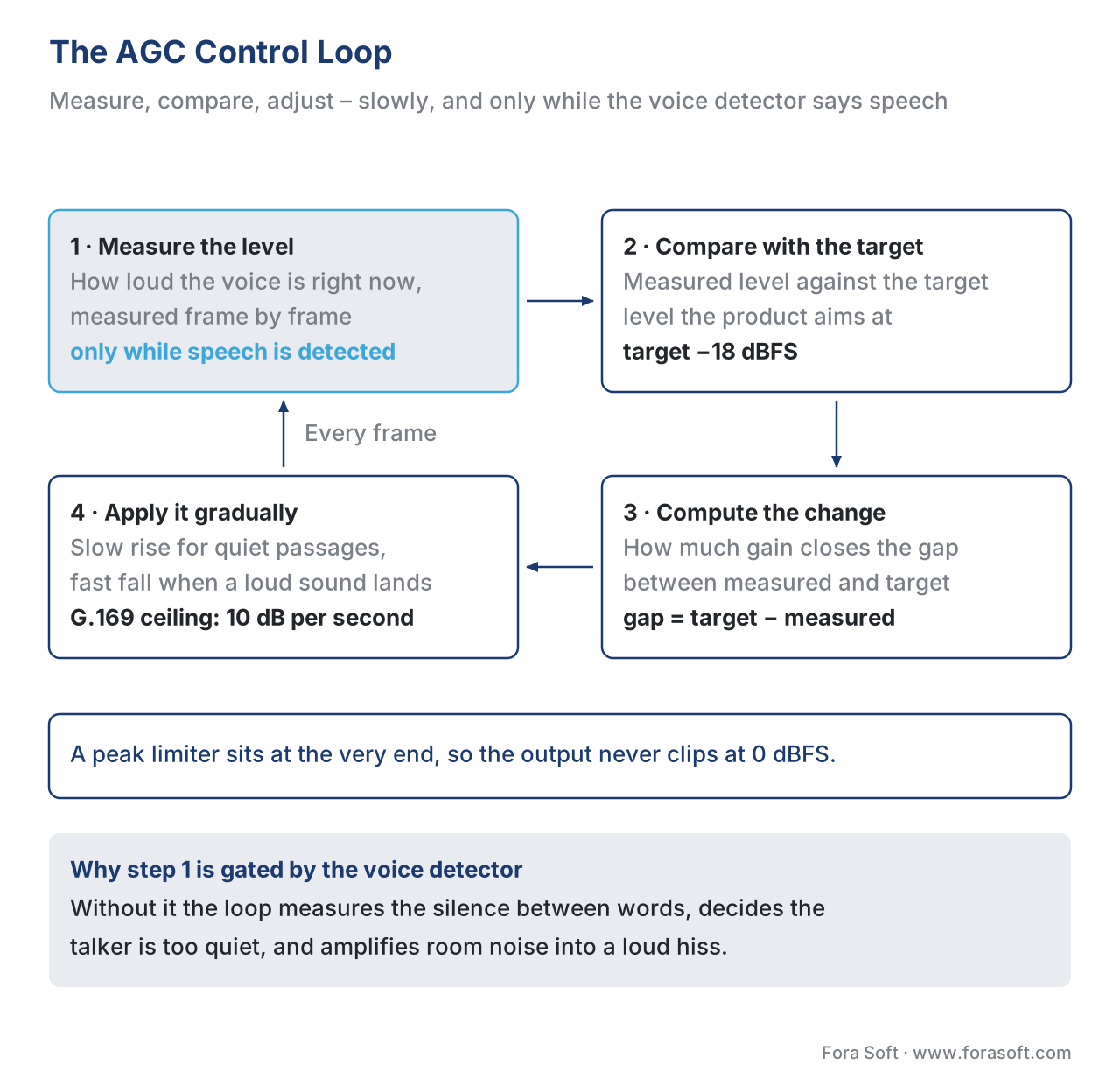 Figure 2. The AGC loop. It measures the voice level — but only while the voice detector confirms speech — compares against the target, and applies a gain change slowly. A peak limiter at the very end guarantees the output never clips.
A worked example: evening out two talkers
Numbers make the whole thing concrete. Suppose your target is −18 dBFS and two people join a call.
Talker A is close to a good microphone and arrives at −12 dBFS — six decibels louder than target. The AGC needs to cut:
gain change = target − measured = −18 − (−12) = −6 dB
So the controller settles at −6 dB of gain on Talker A, multiplying their amplitude by 0.5. It eases there over a few hundred milliseconds so the cut is inaudible.
Talker B sits back from a quiet tablet and arrives at −38 dBFS — twenty decibels below target. The AGC needs to boost:
gain change = target − measured = −18 − (−38) = +20 dB
Twenty decibels is a ten-fold amplitude boost. The controller cannot slam that in instantly. At 10 dB/s, the G.169 ceiling, the full ramp would take two seconds. WebRTC’s AGC2 is more cautious still: its default configuration (2026 source) changes gain by at most 6 dB per second, but it starts every call at +15 dB, so for Talker B it only has to climb the last 5 dB, which takes under a second. And here is the catch the example exposes: boosting Talker B by 20 dB also lifts the hum of their room by 20 dB. If their noise floor was −60 dBFS, it is now −40 dBFS — quiet, but audible. This is why a big boost always needs strong noise suppression in front of it, and why the controller caps how far it will push: the older AGC1 digital path tops out at roughly 30 to 35 dB of boost, while AGC2’s adaptive digital controller is capped at 50 dB by default and also holds its output noise below −50 dBFS, so it stops boosting once the room hum would become the loudest thing in the signal (WebRTC audio_processing.h, checked October 2026).
How WebRTC does it: AGC1, AGC2, and the move to digital
Most browser-based voice apps and many native ones run the open-source libwebrtc stack, and its gain control lives inside the Audio Processing Module (APM) — the same capture-side cleanup stage that holds echo cancellation and noise suppression, which we map end to end in The WebRTC Audio Pipeline End-to-End. There are two generations of the gain code, and the names show up in every engineer's bug report.
AGC1 is the classic module. It offers three modes. Fixed digital applies a constant gain with a limiter and no feedback — simple, used on embedded gear. Adaptive analog runs the feedback loop that adjusts the operating-system microphone slider (the 0–255 level) and trims the rest digitally — the PC and Mac path. Adaptive digital imitates that analog loop with a virtual microphone for phones, where no slider is exposed. AGC1's two core dials are the target level in dBFS and the compression gain in dB, the most the module is allowed to boost a quiet signal.
AGC2 is the newer module. As of October 2026 the WebRTC source describes it as three controllers plus a limiter: an input volume controller that recommends the operating-system microphone level (with clipping detection and a clipping predictor), an adaptive digital controller that runs after echo cancellation and noise suppression, a fixed digital gain, and the final limiter. A voice classifier and a speech level estimator gate the adaptation. The industry direction over the past several years has been to move the heavy lifting into AGC2’s digital path and treat the analog slider as a coarse helper: AGC2’s input volume controller only steps in when the speech level falls outside roughly −50 to −12 dBFS, or when the input clips, and leaves everything in between to the digital stage. The reason is practical: the analog slider is shared with the whole operating system, moves in coarse steps on some hardware, and surprises users, which is the source of a long-running complaint we turn to next.
Default (WebRTC audio_processing.h, October 2026) | AGC1 | AGC2 adaptive digital |
|---|---|---|
| Enabled by default in the APM config | No | No (the browser or app turns it on) |
| Target | Peak level 3 dB below full scale (target_level_dbfs = 3) | Speech level with 5 dB headroom |
| Maximum boost | Compression gain 9 dB (configurable to 90) | 50 dB |
| Starting gain | — | 15 dB |
| Fastest gain change | — | 6 dB per second |
| Noise ceiling | — | Output noise kept below −50 dBFS |
| Analog mic slider | Adaptive analog mode (0–255), lowers by 15 steps per clipping event | Separate input volume controller, same 0–255 scale |
AGC1 still ships in the tree under agc/legacy/, and its config carries a TODO pointing at the multi-year clean-up bug 7494. Treat it as legacy: new tuning work should start from AGC2.
The order in the chain matters. Gain control runs after echo cancellation and after noise suppression in the WebRTC capture chain. The reasoning is strict: if AGC boosted the signal before noise suppression, it would amplify the noise and make the suppressor's job harder; and if it ran before echo cancellation, it would change the level the canceller is trying to model. So the fixed order is high-pass filter, then echo cancellation (Acoustic Echo Cancellation (AEC): How It Really Works), then noise suppression (Noise Suppression: Classical NS, RNNoise, Krisp, NVIDIA RTX Voice), and gain control last — so it sets the level of an already-cleaned voice.
The controversy: "stop adjusting my microphone"
There is a well-known friction point worth naming, because your support inbox will see it. When the browser's adaptive-analog AGC moves the operating-system microphone slider, the user sees their own slider move. A musician, a podcaster, or anyone using a carefully set audio interface watches the browser yank their input level around mid-session, and it feels like the application is fighting them. This has been a standing complaint against Chrome's WebRTC implementation for years, with users asking for a way to stop the browser touching the hardware slider.
The lever for this is the autoGainControl constraint defined by the W3C Media Capture and Streams specification. When an application calls getUserMedia to open the microphone, it can request autoGainControl: false to ask the browser to leave gain alone. The spec is careful about what the source promises: if the device cannot do auto gain control at all it reports a single false; if it cannot be turned off it reports a single true; only if the script can actually control the feature does it report both true and false as options. In other words, whether you can disable AGC depends on the browser and the device, and a good application checks rather than assumes.
// Ask the browser NOT to touch the microphone level — for music, studio, or pro-audio capture.
const stream = await navigator.mediaDevices.getUserMedia({
  audio: { autoGainControl: false, echoCancellation: false, noiseSuppression: false }
});
The practical rule: for a meeting or a call, leave AGC on — even talker levels matter more than fidelity. For music, instrument capture, or a user with a professional interface, expose a toggle that sets autoGainControl: false, because on that hardware the user's own gain staging is better than any automatic loop.
AGC in Zoom, Discord, Teams and the browser: what the switch actually does
Most people meet AGC as a single checkbox. Here is what that checkbox controls in the apps your users already run, checked against each vendor’s own documentation in October 2026.
- Discord. The “Automatic Gain Control” switch sits in Voice & Video settings next to echo cancellation and noise suppression. Discord’s Social SDK exposes the same control to game developers as
SetAutomaticGainControl(bool)onVoiceSettings, which tells you it is a software AGC running inside Discord, not a change to your hardware. - Zoom. The desktop app labels it “Automatically adjust microphone volume”. In Zoom’s Video SDK the default is to let the operating system manage mic gain, the app opts in with
enableAutoAdjustMicVolume(true), and Zoom states that auto-adjust is incompatible with Original Sound: turning on Original Sound for music turns AGC off. - Microsoft Teams. There is no separate AGC switch. For music, Teams offers High fidelity music mode (Mic → More audio settings), and Microsoft’s guidance is to also turn off noise suppression and other audio effects.
- Web apps in the browser. The page asks for AGC through the W3C
autoGainControlconstraint. In Chrome the AGC can move the operating-system mic slider, which is why users of browser-based dialers report “my mic volume keeps dropping by itself”; the fix is an app-levelautoGainControl: falseoption, not a system setting. - Conference and USB microphones. Many have their own AGC in the device software. Run one AGC, not two: two loops chasing the same voice is the fastest route to pumping.
The quick diagnosis for a support ticket: if the complaint is “my mic slider moves on its own” or “my singing gets quieter on held notes”, an AGC is doing its job in the wrong context, and the answer is to turn it off for that use. If the complaint is “I can’t hear the quiet person”, AGC is probably off or capped too low.
Settings to expose, and settings to hide
If you build the product rather than use it, this is the decision that matters most: which dials belong in your product's UI and which belong only in an engineer's config file.
| Setting | Expose to users? | Why |
|---|---|---|
AGC on/off (the autoGainControl constraint) |
Yes, for pro-audio / music modes | Musicians and podcasters need their own gain staging; meetings do not |
| Microphone "input level" slider (analog gain) | Yes, but as a manual override | Users expect to control their own hardware; surprise changes feel like a bug |
| Target level (dBFS) | No | A wrong target makes every talker too loud or too quiet across the whole product |
| Compression / max boost (dB) | No | Too high amplifies noise; too low leaves quiet talkers inaudible — tune it per platform |
| Attack / release times | No | The loudness-pumping artefact lives here; only an audio engineer should touch them |
| Limiter on/off | No | The clip safety net should never be user-disableable on a call |
The pattern is clear. Expose the intent — "I am in a meeting" versus "I am playing music" — and hide the mechanism. Every dial in the bottom half of that table is a way to make the product sound worse if set wrong, and none of them is something a non-engineer can tune by ear in the moment.
Frequently asked questions
What does AGC stand for?
AGC stands for automatic gain control: a feature that automatically raises or lowers the level of an audio signal so it stays near a target volume. On a microphone it keeps a quiet talker and a loud talker at roughly the same level.
What is AGC in microphone settings?
It is the switch that lets the app or the microphone change your input level for you while you talk. With AGC on, your voice is lifted when you are quiet or far from the mic and turned down when you are loud.
Should I turn AGC on or off?
Leave AGC on for calls, meetings, voice chat and online classes. Turn it off for music, singing, podcasting or any setup where you have already set the gain on an audio interface.
Why does my microphone volume change by itself?
An automatic gain control is moving it: in Zoom it is “Automatically adjust microphone volume”, in Discord “Automatic Gain Control”, and in browser-based apps the WebRTC AGC, which in Chrome can move the system mic slider. Turn that AGC off in the app you are using.
What is the difference between AGC and a compressor?
A compressor reacts within a word to narrow the gap between loud and quiet sounds; AGC reacts over seconds to move the talker’s overall level toward a target. Many AGCs end with a limiter, which only stops peaks from clipping.
What is WebRTC AGC2?
AGC2 is the current gain control module in Google’s open-source WebRTC audio stack, used by Chrome and many voice apps. It combines an input volume controller, an adaptive digital controller capped at 50 dB of boost by default, and a limiter.
Does AGC make background noise louder?
It can, because boosting a quiet voice also boosts the room. A good AGC only adapts while a voice detector confirms speech and runs after noise suppression; if noise swells whenever you stop talking, that gating is failing.
Free download: Automatic gain control — field guideOne page with the two gain levers side by side, the four-step control loop, the decibel arithmetic and the G.169 rate limits, the table of which settings to expose and which to hide, and six things to remember — including the gain-chase artefact and theautoGainControl toggle.
Where Fora Soft fits in
We have built real-time audio into video conferencing, telemedicine, e-learning, and live-shopping products since 2005, and uneven talker levels are a complaint every one of those products has to answer. In telemedicine especially, a clinician on a good headset and a patient on a far-away laptop speaker are exactly the −12 dBFS-versus-−38 dBFS mismatch this article describes, and getting both voices to land at one comfortable level is the difference between a calm consultation and a strained one. Our work is mostly in choosing the right gain strategy per device class, configuring the WebRTC Audio Processing Module so the analog slider does not surprise users (the day-to-day work of our WebRTC development team), deciding when to expose an AGC-off toggle for music or instruction, and testing deliberately for the gain-chase and noise-swell artefacts before they reach a customer. We do not rewrite AGC2; we make it behave on the messy mix of devices your users actually own. That work usually sits inside a video conferencing app build or a custom audio processing project, where we tune AGC, noise suppression and echo cancellation together on the target device list.

The book
Audio for Video: A Complete Guide to Sound in Video Products: From PCM and Codecs to Loudness, Accessibility, and Real-Time Voice Processing
Gain control is the last stage of a capture chain, and this volume walks the whole chain in the order the signal meets it: the high-pass filter, echo cancellation, noise suppression, the voice activity detector that gates the level estimate, and then AGC1 and AGC2 with their target level, compression gain, saturation protector and limiter. It also supplies the vocabulary the numbers in this article rest on — dBFS, peak versus RMS versus LUFS, dynamic range and the noise floor a 20 dB boost lifts with the voice. 1,229 pages, written for the engineer who has to tune this on a real mix of headsets, laptops and phones. Written by Nikolay Sapunov, CEO at Fora Soft.
One caller too loud, another barely audible on your calls?
Tell us which devices your users actually join from, and we will work out the gain strategy per device class — where the analog slider should be left alone, what target and maximum boost to set, and whether your product needs an AGC-off toggle for music and studio capture. 250+ video products shipped since 2005.
See our case studies
Case study
TransLinguist
Interpretation platform covering 75+ languages with a marketplace of 30,000+ certified interpreters, which won the NHS national framework for language services across the UK — a call where a soft-spoken patient and a headset-mounted interpreter have to reach the listener at the same level, on every turn.
Case study
CirrusMed
Subscription telemedicine licensed in 48+ US states with 20+ physicians on the network — exactly the clinician-on-a-headset against patient-on-a-laptop mismatch this article describes, where the quiet side has to be lifted without lifting the room with it.
Case study
Speed.Space
Remote content production used on Netflix, Electronic Arts and HBO shoots, recording locally at 1080p and 8 Mbps with the crew controlling talent microphones remotely — the case for leaving the gain alone, because the operator's own staging beats any automatic loop.
What to read next
Voice detection
Voice activity detection (VAD) and discontinuous transmission (DTX)
The detector that gates step one of the loop, and what it costs to get wrong.
Pipeline
The WebRTC audio pipeline end-to-end
Where gain control sits in the capture chain, and what runs before it.
Echo
Acoustic echo cancellation (AEC): how it really works
The stage ahead of AGC, and why changing the level would break its model.
Fundamentals
Loudness, peak, RMS, LUFS — measuring how loud audio actually is
What a level reading means, and why peak-following and loudness-target differ.
References
- ITU-T Recommendation G.169, Automatic level control devices (06/1999; reaffirmed/republished 05/2011). The network standard for automatic level control: the gain "should not increase at a rate of more than 10 dB/s," initial gain defaults to unity and "should not exceed +4 dB," and the ITU deliberately does not specify the ALC algorithm or target levels. https://www.itu.int/rec/T-REC-G.169
- W3C, Media Capture and Streams, the
autoGainControlconstraint and its capability-reporting rules (a source reportsfalseif it cannot do AGC,trueif it cannot turn AGC off, and both values only if the script can control it). W3C Candidate Recommendation Draft, 9 October 2025; checked 2026-10-09. https://www.w3.org/TR/mediacapture-streams/ - WebRTC source,
modules/audio_processing/agc2/— the AGC2 module: adaptive digital gain controller, level estimator / voice classifier, saturation protector, and final limiter. Checked 2026-10-09. https://webrtc.googlesource.com/src/+/main/modules/audio_processing/agc2/ - WebRTC source,
modules/audio_processing/agc/legacy/gain_control.h— AGC1's three modes (fixed digital, adaptive analog, adaptive digital) and itstargetLevelDbfs/compressionGaindB/limiterEnableparameters. Checked 2026-10-09. https://webrtc.googlesource.com/src/+/main/modules/audio_processing/agc/legacy/gain_control.h - WebRTC issue tracker, AGC clean-up and refactoring (issue 7494) — the multi-year effort to consolidate the gain controllers and move the heavy lifting to AGC2's digital path. Checked 2026-10-09. https://issues.webrtc.org/issues/42220611
- Chromium issue tracker, "Disable allow WebRTC to adjust the input volume" by default (issue 398550914) — the standing user complaint that the adaptive-analog AGC moves the operating-system microphone slider. Checked 2026-10-09. https://issuetracker.google.com/issues/398550914
- Luo Shen / Alibaba Cloud Video Cloud (CloudImagine), Detailed explanation of the high sound quality and low latency behind WebRTC-AGC (2021). A first-party engineering walk-through of WebRTC AGC's fixed-digital, adaptive-analog, and adaptive-digital (virtual-mic) modes, the gain tables, the VAD-driven level estimate, the ~35 dB maximum boost, and the ~10 s convergence — used here for implementation detail; spec facts above defer to G.169 and the WebRTC source. https://segmentfault.com/a/1190000040072259/en
- MDN Web Docs, MediaTrackSettings: autoGainControl property — practical browser-support and usage reference for the AGC constraint (orientation only; the normative source is reference 2). Checked 2026-10-09. https://developer.mozilla.org/en-US/docs/Web/API/MediaTrackSettings/autoGainControl
- ITU-T Recommendation G.114, One-way transmission time (05/2003). Companion delay standard; relevant because a slow, stable AGC loop must not add perceptible delay to a real-time call. https://www.itu.int/rec/T-REC-G.114
- WebRTC source,
api/audio/audio_processing.h—GainController1andGainController2config defaults: AGC1target_level_dbfs = 3,compression_gain_db = 9, clipped level step 15; AGC2 adaptive digitalheadroom_db = 5,max_gain_db = 50,initial_gain_db = 15,max_gain_change_db_per_second = 6,max_output_noise_level_dbfs = −50. Checked 2026-10-09. https://webrtc.googlesource.com/src/+/main/api/audio/audio_processing.h - WebRTC source,
modules/audio_processing/agc2/input_volume_controller.h— AGC2’s input volume controller: recommends the capture volume, handles user volume changes, clipping detection and prediction; target speech range −50 to −12 dBFS. Checked 2026-10-09. https://webrtc.googlesource.com/src/+/main/modules/audio_processing/agc2/input_volume_controller.h - Zoom Video SDK, Sound options — the SDK lets the OS manage mic gain by default;
enableAutoAdjustMicVolumeopts in; auto-adjust is incompatible with original sound. Checked 2026-10-09. https://developers.zoom.us/docs/video-sdk/android/audio/sound-options/ - Discord Social SDK,
VoiceSettings—SetAutomaticGainControl,SetEchoCancellation,SetNoiseSuppression. Checked 2026-10-09. https://discord.com/developers/docs/social-sdk/classdiscordpp_1_1VoiceSettings-members.html - Microsoft Support, Use high fidelity music mode to play music in Microsoft Teams. Checked 2026-10-09. https://support.microsoft.com/en-us/teams/notifications-settings/use-high-fidelity-music-mode-to-play-music-in-microsoft-teams
