


This is engineering guidance, not legal advice. Confirm specifics with qualified counsel.
Why this matters
If you build or own a learning product, reporting is the last mile where all the tracking work either pays off or dies — a heatmap nobody reads changes no decision, and a completion number with no comparison proves nothing. The people who hold your budget do not care that you captured ten million xAPI statements; they care whether the safety course cut incidents and whether the onboarding course got new hires productive faster. This article is written so a non-technical product owner, L&D director, or training lead can design reports that survive a sceptical executive review, and so the engineers reading alongside can see which data standard each report depends on. It is the companion to Learning Analytics: The Metrics That Matter, which covers which numbers are worth trusting, and to Building the Learning-Analytics Pipeline, which builds the plumbing those numbers flow through. This one is about the final step: turning a stored number into a decision someone makes.
Reporting is not analytics — it is analytics aimed at a decision
First, a distinction that saves a lot of wasted dashboards. Analytics is the practice of finding patterns in learner data — where people drop off, which questions are too hard, how watch-time relates to passing. A report is narrower and more useful: it is the specific view of that data shaped for one audience and one decision they are about to make. Analytics is exploratory and lives with the data team; a report is a finished product delivered to a person who will do something with it.
The test of a report is not "is it accurate" — that is the floor. The test is "what decision does this change?" A learner report should change what the learner does next. An instructor report should change where the instructor spends the next hour. A business report should change whether a programme gets funded, cut, or scaled. If you cannot name the decision a report drives, you have built a dashboard, not a report — and a dashboard that drives no decision is the most common way analytics quietly dies inside an organisation.
So the design always starts from the same question, asked once per audience: who is reading this, and what will they decide? That question produces three very different reports.
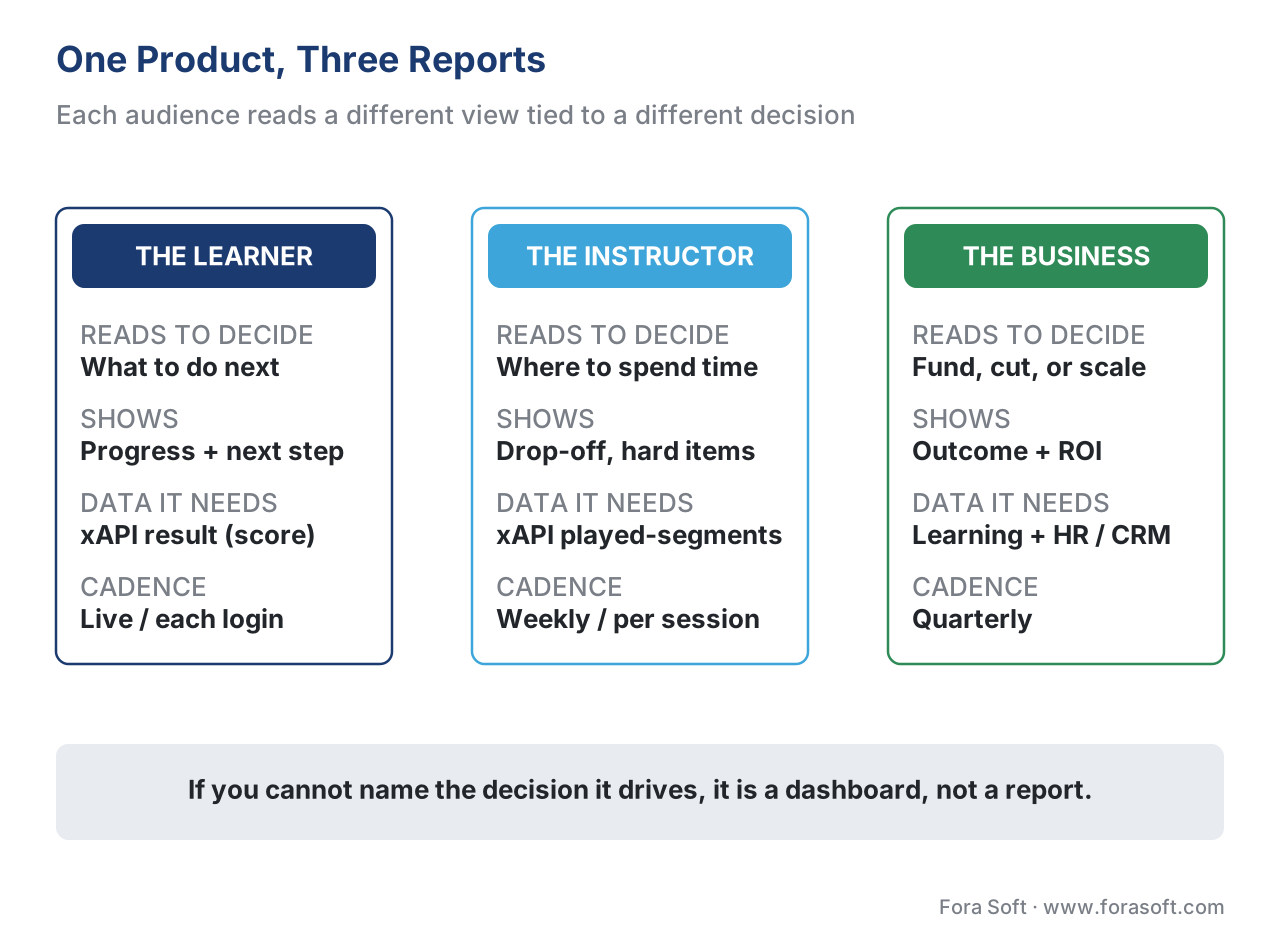 Figure 1. One product, three reports. Each audience reads a different view tied to a different decision, with a different natural cadence — confusing them is the root design mistake.
The learner report: progress, and the next right step
The learner is reading to answer two questions: how am I doing, and what do I do next? A good learner report is short, encouraging, and ends in an action. It shows progress through the course (modules done, modules left), a clear signal of what is mastered versus what needs another pass, and a single obvious next step — "resume Module 3 at 4:32" or "retake the quiz you scored 60% on."
The data behind this is modest and you almost certainly already have it. The standard that carries learning events, the Experience API — abbreviated xAPI — records each event as a short sentence of an actor, a verb, and an object: "Maria — completed — Module 3," with a result section that can hold a score and a completion flag [1]. The learner report is mostly a friendly rendering of those results for one actor. Where the learning is video, the xAPI Video Profile adds progress (how far through, 0 to 1) so the report can show "68% watched" accurately rather than guessing [3].
Two pitfalls sink learner reports. The first is showing the learner everything you track — raw event logs, every interaction, internal scores. The learner does not want telemetry; they want orientation and momentum. The second is confusing "watched" with "learned." A progress bar at 100% means the video played to the end; it does not mean the person can do anything new. Keep the watch-progress signal and the mastery signal separate and label them honestly, or you teach learners to game a bar instead of learning. We unpack that trap in Completion Rate: Defining, Measuring, and Improving It.
The instructor report: who is stuck, and where
The instructor — or the corporate trainer, or the cohort facilitator — is reading to answer a different question: where should I spend my limited attention? Their report is a triage tool. It surfaces the cohort's drop-off curve (the point in a video or module where many learners quit), item difficulty (which quiz questions everyone gets wrong, which usually means a confusing question or an unclear lesson, not a weak class), and a list of individuals who are falling behind and could use a nudge.
This is where the data has to be richer than a completion flag, and where the standard you chose at capture time decides what is even possible. The xAPI Video Profile's played-segments — the list of intervals each learner actually watched — is what lets you compute a real drop-off curve instead of a guess [3]. Its sibling standard from the body 1EdTech, Caliper Analytics, defines a MediaEvent for the same video interactions, common in higher-education systems [5]. The older SCORM standard, by contrast, records only a fixed data model — completion, score, time — and treats the course as a sealed box, so a SCORM-only course can tell an instructor that a learner finished but never where the class lost interest [7]. If your roadmap promises an instructor a drop-off heatmap, that promise was kept or broken back at capture, a point we make in Tracking Video with xAPI.
The instructor report's cadence is usually weekly or per-session — frequent enough to intervene while it still matters, not so frequent it becomes noise.
The business report: the hard one, and a ladder to climb
The business does not care about watch-time. A learning-and-development director facing a budget review needs to answer one question from a finance-minded executive: did this training do anything worth what it cost? Answering that means climbing a ladder, and understanding the ladder is the key idea of this whole article.
The classic framework is the Kirkpatrick Model, four levels of training evaluation that have anchored the field since the 1950s [8]. Level 1, Reaction — did learners like it? (the post-course "smile sheet"). Level 2, Learning — did their knowledge or skill actually increase? (the quiz score). Level 3, Behaviour — did they do their job differently afterward? (observed on the job, weeks later). Level 4, Results — did an organisational outcome move? (incidents, sales, support tickets, time-to-productivity). Jack Phillips later added a fifth rung, the Phillips ROI Model's Level 5, Return on Investment — expressed as money, comparing the programme's monetary benefit to its fully loaded cost [9].
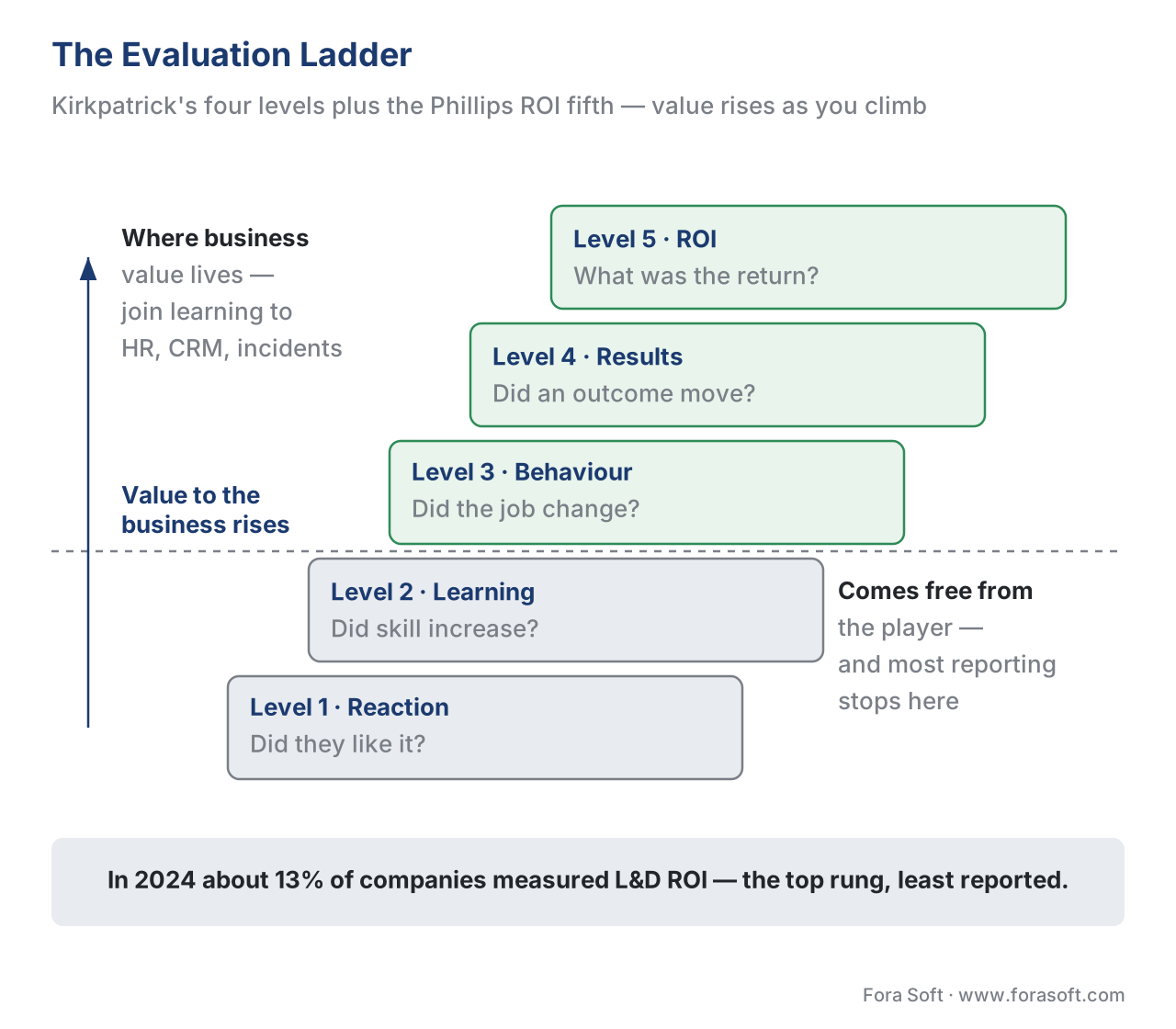 Figure 2. The evaluation ladder: Kirkpatrick's four levels plus the Phillips ROI fifth. Most reporting stops at Reaction and Learning; the evidence the business actually wants lives on the higher rungs.
Here is the uncomfortable truth the ladder exposes. Most learning systems report the bottom two rungs beautifully and the top three barely at all, because the bottom two come free from the player (a completion flag, a quiz score) and the top three require connecting learning data to business data the learning system does not own. The numbers bear this out: in 2024, surveys put the share of companies that evaluate the ROI of their L&D at roughly 13%, and a large majority of business leaders said they could not see the impact of learning initiatives [10]. The gap is not a measurement-tool problem; it is a reporting-design problem. The data to climb higher usually exists — it just lives in the HR system, the CRM, or the incident log, not the LMS.
Showing the ROI math out loud
Level 5 sounds intimidating; the arithmetic is not. The Phillips ROI formula is a percentage [9]:
ROI (%) = (Net programme benefit ÷ programme cost) × 100 where Net benefit = (monetary value of the result) − (programme cost)
Work a concrete, deliberately simple example. A company runs a video safety course for 500 warehouse staff. The fully loaded cost — content, platform share, and staff time in training — comes to $60,000. In the year after, recordable safety incidents fall by 20, and the finance team already values an average incident at $5,000 in claims, downtime, and admin.
Monetary value of the result = 20 incidents × $5,000 = $100,000 Net benefit = $100,000 − $60,000 = $40,000 ROI = ($40,000 ÷ $60,000) × 100 = 67%
A 67% return is a fundable number, and notice what made it credible: the report did not claim the training "improved safety culture." It tied a counted business result (20 fewer incidents) to a value finance already agreed on, minus a fully loaded cost. That is a business report. The honest caveat — that you must argue training caused the drop rather than merely preceded it (a good year, a new robot, a policy change) — is what separates a defensible report from a hopeful one; state the assumption rather than hide it. The cost side of this equation, incidentally, is exactly what The Learning-Platform Cost Model helps you estimate.
What a report can show is capped by what you captured
A recurring theme across this whole section, and the bridge to the build: no report can show what the data layer never recorded. The choice of tracking standard, made long before anyone asks for a report, sets the ceiling on every report you will ever produce. The table below maps each standard to the reports it can and cannot support — and, as every tooling table in this section must, it puts standards support at the centre rather than the footnote.
| Tracking standard | What it records | Learner report | Instructor drop-off | Business outcome | Best fit |
|---|---|---|---|---|---|
| SCORM 1.2 / 2004 | Fixed model: completion, score, time [7] | Yes | No (black box) | Completion evidence only | Compliance "who finished" reporting |
| xAPI 1.0.3 / 2.0 | Any actor-verb-object statement [1][2] | Yes | Yes (with Video Profile) | Yes (joined to business data) | Custom, video, cross-system reporting |
| xAPI Video Profile | progress, played-segments [3] | Yes (accurate progress) | Yes (true drop-off) | Feeds higher rungs | Video-heavy learning |
| Caliper Analytics 1.2 | MediaEvent, sensor envelope [5] | Yes | Yes | Yes | Higher-ed system reporting |
The lesson for anyone scoping a product: decide the highest rung you will ever need to report on, then choose the standard that can reach it. Promising the business a Level 4 outcome report on top of a SCORM-only course is a promise the data cannot keep. We compare the standards head to head in SCORM vs xAPI vs cmi5 vs LTI, and build the capture-to-warehouse pipeline that feeds business reporting in Building the Learning-Analytics Pipeline.
Designing a report people actually use
Granting that you have the data, a report still has to be built so a busy human acts on it in seconds. Four design rules separate a report that drives a decision from a screen that gets closed.
One report, one decision. Resist the urge to put everything on one screen. Each report answers one question for one audience. If a stakeholder needs two decisions, give them two reports, or two clearly separated sections — never one undifferentiated wall of charts.
Lead with the "so what," not the chart. The first thing on the report is the answer in words: "Module 3 loses 40% of learners at the 7-minute mark — recommend re-cutting that segment." The chart is the evidence underneath, not the headline. A number without an interpretation makes the reader do the analyst's job, and most readers will not.
Every number needs a comparison. "320 completions" means nothing. "320 of 500 enrolled (64%), down from 78% last quarter" means something and implies an action. A figure with no baseline, target, or trend is decoration. Pair the number with the comparison that makes it a signal.
Match the cadence to the decision. A learner's progress can update live; an instructor's triage report fits a weekly rhythm; a business outcome report is quarterly, because behaviour and results take weeks to appear and a daily ROI chart is noise. Sending a report more often than the underlying reality changes only trains people to ignore it.
 Figure 3. A report that drives a decision (right) leads with the answer in words, a compared number, and a next action. A vanity dashboard (left) shows everything and recommends nothing.
A common mistake that wastes the whole effort
The defining failure of learning reporting is the everything-dashboard: a single screen crammed with every metric the system can produce — average watch-time, total logins, a dozen gauges — shipped to every stakeholder identically. It feels generous and looks impressive in a demo. It is useless, because it answers no one's specific question and forces every reader to hunt for the two numbers that matter to them. The cure is the discipline above: start from the decision, show the one number that drives it with its comparison, write the "so what" in plain words, and cut everything else. A report's quality is measured by what you left off it.
Governance: who is allowed to see whom
Reporting is where learner data becomes most exposed, because a report's whole job is to show one person data about others — and that makes it a governance and legal question, not only a design one. The guiding principle is simple: each audience sees only the data their decision needs, at the least-identifying level that still answers the question.
Concretely, that means a learner sees only their own data. An instructor sees individual data for the learners they are responsible for, because helping a struggling student is a legitimate reason to see that student's record. The business, in almost all cases, should see aggregate data — cohort completion, department trends, programme ROI — and not individual employees' learning records, because no business decision about a programme requires naming individuals. A report that shows an executive each named employee's quiz scores is both a design smell and a privacy risk.
This maps onto real law. Under the United States' student-records law, FERPA (the Family Educational Rights and Privacy Act), a school may disclose a student's education records without consent only to a "school official" with a "legitimate educational interest" — defined as needing the record to perform their professional responsibility — and the regulation is explicit that interest in students who merely "fit a profile" is not a legitimate educational interest [11]. An instructor helping their own student qualifies; a curious administrator browsing all students does not. In the European Union, the General Data Protection Regulation (GDPR) reaches the same place by two principles: purpose limitation, data is used only for the specified purpose, and data minimisation, you process only what that purpose needs [12]. Designing reports by audience — individual for the instructor, aggregate for the business — is how you satisfy both laws by construction rather than by after-the-fact redaction.
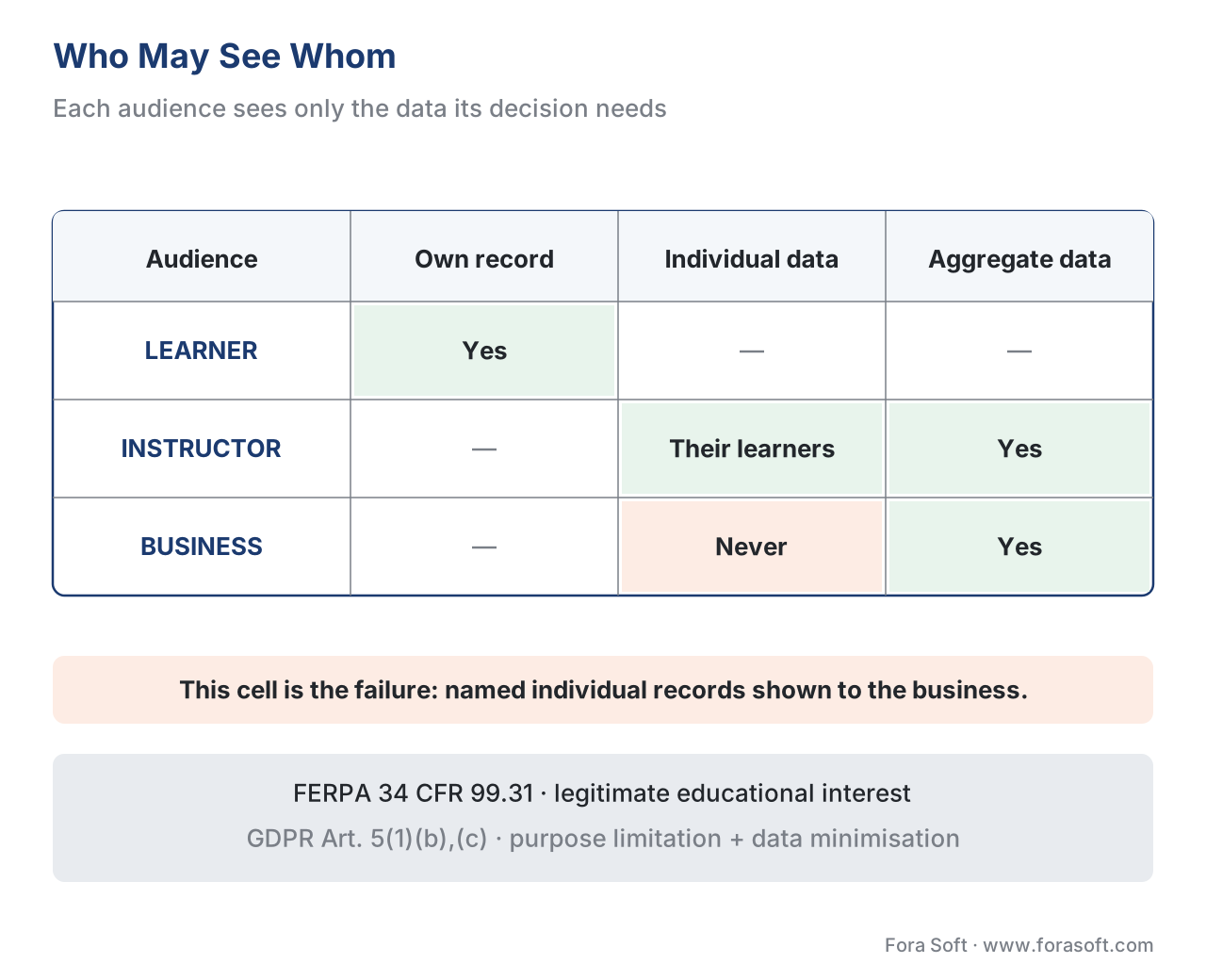 Figure 4. Report access by role. Individual records flow only to the learner and their responsible instructor; the business sees aggregates. Showing named individual learning records to the business (the red path) is the design and legal failure to avoid.
The deeper legal treatment — consent, lawful basis, retention, and cross-border transfer — is in Proctoring Data, Privacy, and the Legal Landscape. Treat report-access design as part of that same data-governance conversation, not a cosmetic layer on top.
The report itself must be perceivable
One last obligation that learning products forget: the report is a piece of content, and if your product serves a school, a government, or a large enterprise, that content must meet the same accessibility bar as the courses. The relevant standard is the Web Content Accessibility Guidelines — WCAG 2.1 — at Level AA, and the criterion that bites dashboards hardest is Success Criterion 1.4.1, Use of Color (Level A): colour must not be the only visual means of conveying information [13]. A drop-off chart that distinguishes cohorts by colour alone fails for the roughly 1 in 12 men with colour-vision deficiency. The fix is dual-encoding: pair colour with a label, a shape, or a pattern, so the meaning survives in greyscale. WCAG's own guidance notes that a difference in lightness counts as an additional cue only if the two tones reach a contrast ratio of at least 3:1 [13]. This section preaches accessibility throughout, so its own reports must practise it — the full standard is covered in the accessibility-and-scale block.
Free download: Stakeholder Reporting Design ChecklistA one-page checklist covering audience and decision, the evaluation ladder, report design, and the governance and accessibility rules to apply before you ship.Where Fora Soft fits in
Fora Soft has built video streaming, real-time WebRTC, and interactive-player software since 2005, and in learning products the reporting layer is where we most often see good engineering wasted: teams capture rich data, then ship one undifferentiated dashboard that no stakeholder acts on. The build-vs-buy line here is clear — an off-the-shelf system gives you free completion and compliance reports, which is genuinely enough if "who finished" is the only question you will ever be asked. You need custom reporting when the business demands outcome and ROI evidence, when three audiences need three genuinely different views, or when learning data must join HR or CRM data to prove impact. We help teams decide which reports justify the build, then wire the capture, role-based access, and audience-specific views so each report drives the decision it was built for. The same data-to-decision discipline underpins the analytics work we do across conferencing, telemedicine, OTT, and surveillance.



The handbook
Fora Soft Video Engineering Handbook
We wrote a seven-volume handbook that takes the whole video stack apart, from the pixel to production, across 9,000+ pages — enough that an engineer who works through it can instrument, measure, and cost a video product end to end, the same capture-to-decision discipline this article is about. Volume 3 covers how you monitor quality of experience and model the economics of delivery, and volume 1 covers the quality metrics that turn a raw signal into a number you can report — the measure-then-report loop applied to a live system. Volume 7 covers cost per stream-hour and the compliance and regulatory duties, the same governance thinking behind the FERPA and GDPR rules here. Written by Nikolay Sapunov, CEO at Fora Soft.
Reporting learning data that executives will act on?
Tell us what you track and which decisions the reports have to drive, and we will map the capture, the role-based access, and the audience-specific views before anyone builds a dashboard. 250+ video products shipped since 2005.
See our case studies
Case study
BrainCert
A WebRTC and HTML5 virtual-classroom LMS with SCORM and xAPI support and an advanced analytics dashboard, running 500M+ classroom minutes across 10 datacenters — the capture standard and the reporting layer this article ties together, at scale.
Case study
Scholarly
Sydney's selective and scholarship test-prep platform, 15,000+ active users, with ClickHouse behind an admin analytics panel over both live classes and video-on-demand — the learning-analytics pipeline a business report is built on.
Case study
Tabsera
A multilingual K-12 LMS with three separate roles — teachers, students with parental controls, and admins — plus teacher earnings and payouts, so each audience gets the view its decision needs, exactly the role-based reporting this article's governance section describes.
What to read next
Analytics
Learning Analytics: The Metrics That Matter
Which numbers are worth trusting before you ever put one in a report.
Metrics
Completion Rate: Defining, Measuring, and Improving It
Why a 100% progress bar and a learned skill are not the same number.
Standards
SCORM vs xAPI vs cmi5 vs LTI: Which Standard, When
The capture choice that sets the ceiling on every report you can run.
Tracking
Tracking Video With xAPI: The Video Profile
The played-segments data behind a real drop-off report.
References
- ADL Initiative. Experience API (xAPI) Specification v1.0.3 — Part 2: Statements (Data). https://github.com/adlnet/xAPI-Spec/blob/master/xAPI-Data.md — Tier 1 (primary standard). The actor-verb-object statement model and the result section (score, completion, duration) that learner and business reports render.
- IEEE. 9274.1.1-2023 — Standard for Learning Technology: JSON Data Model Format and RESTful Web Service for Learner Experience Data Tracking and Access. https://standards.ieee.org/ieee/9274.1.1/7321/ — Tier 1 (primary standard). The ratified IEEE form of xAPI (informally "xAPI 2.0"), published 2023-10-10; defines the Learning Record Store that reports query.
- ADL / xAPI Video Community Profile. xAPI Video Profile. https://github.com/adlnet/xapi-authored-profiles/tree/master/video — Tier 1 (primary profile). Result extensions
progressandplayed-segments— the data a true learner-progress and instructor drop-off report require. - ADL Initiative. Experience API (xAPI) Specification — Part 3: Communication. https://github.com/adlnet/xAPI-Spec/blob/master/xAPI-Communication.md — Tier 1 (primary standard). The query API a reporting layer uses to read statements from the LRS for a given actor, activity, or registration.
- 1EdTech (formerly IMS Global). Caliper Analytics 1.2 Specification. https://www.imsglobal.org/spec/caliper/v1p2 — Tier 1 (primary standard). The
MediaEventand Envelope model for video interactions; xAPI's sibling, common in higher-education reporting. - W3C. Web Content Accessibility Guidelines (WCAG) 2.1 — Recommendation. https://www.w3.org/TR/WCAG21/ — Tier 1 (primary standard). The Level AA conformance target for educational and public-sector content, including reports and dashboards.
- ADL Initiative. SCORM 2004 4th Edition — Run-Time Environment (RTE). https://adlnet.gov/projects/scorm/ — Tier 1 (primary standard). Fixed data model (completion status, success status, score, time); the course is a black box, so SCORM cannot feed an instructor drop-off report.
- Kirkpatrick Partners. The Kirkpatrick Model — the four levels of training evaluation (Reaction, Learning, Behavior, Results). https://www.kirkpatrickpartners.com/the-kirkpatrick-model/ — Tier 2 (model author / issuing body). The canonical four-level evaluation framework underlying business reporting.
- ROI Institute / Training Industry. The Phillips ROI Methodology — Level 5 (Return on Investment). https://trainingindustry.com/glossary/phillips-roi-methodology/ — Tier 2 (model author / institutional). Adds the fifth level; ROI (%) = (net programme benefit ÷ programme cost) × 100.
- eLearning Industry. Measuring the Business Impact of Learning (2024). https://elearningindustry.com/measuring-the-business-impact-of-learning-2024 — Tier 5 (industry survey). The ~13% ROI-evaluation and majority "cannot see impact" figures, cited as labelled industry survey data, not a standard.
- U.S. Department of Education. FERPA — 34 CFR § 99.31, the school-official exception and "legitimate educational interest." https://studentprivacy.ed.gov/faq/under-ferpa-may-educational-agency-or-institution-disclose-education-records-any-its-employees — Tier 1 (primary law / regulator guidance). Disclosure without consent only to a school official needing the record for a professional responsibility; "fitting a profile" is not a legitimate interest.
- Regulation (EU) 2016/679 (GDPR), Article 5(1)(b) purpose limitation and 5(1)(c) data minimisation. https://eur-lex.europa.eu/eli/reg/2016/679/oj — Tier 1 (primary law). Data is used only for its specified purpose and limited to what that purpose needs — the legal basis for audience-scoped reports.
- W3C. Understanding WCAG 2.1 Success Criterion 1.4.1: Use of Color (Level A). https://www.w3.org/WAI/WCAG21/Understanding/use-of-color.html — Tier 1 (primary standard). Colour must not be the only means of conveying information; a lightness difference counts as a cue only at a contrast ratio ≥ 3:1.
Where sources disagreed, the official specifications and laws were followed. Vendor articles often imply "the LMS reports everything"; this article follows SCORM 2004's fixed, black-box data model [7] to show that an instructor drop-off report needs xAPI's Video Profile [3] or Caliper [5]. The ROI-evaluation and business-impact percentages [10] are labelled industry-survey figures used for orientation, not standards claims.
