


Why this matters
If you are an L&D director, an EdTech founder, or a product manager scoping a learning product, the first trap is words. "E-learning," "online learning," "corporate training," "microlearning," and "video learning platform" get used as if they were the same thing, and "we just need video like Zoom" or "like Netflix" gets said in the same breath. They are not the same. Each one implies a different stack, a different cost, and a different definition of "done." This article gives you a clean mental model of what learning video is, how it differs from the two video systems you already know — streaming and conferencing — and why that difference is the thesis of everything else in this section. It is the vocabulary the rest of the course assumes.
The vocabulary problem
Before we compare technologies, let us untangle the words, because they cause real budgeting mistakes.
The broadest term is e-learning: any learning delivered through digital media. It does not have to be online — a training module on a USB stick is technically e-learning. Online learning narrows that to learning delivered over the internet, usually through a platform a learner logs into. Corporate training is e-learning aimed at a workforce: onboarding, compliance, and upskilling, where someone in the business needs evidence that the training happened. Microlearning describes the format, not the channel — short, single-objective units, usually a few minutes of video, designed to be finished in one sitting. Blended learning mixes in-person teaching with online material. A cohort-based course is a group of learners moving through scheduled sessions together, rather than each person starting whenever they like.
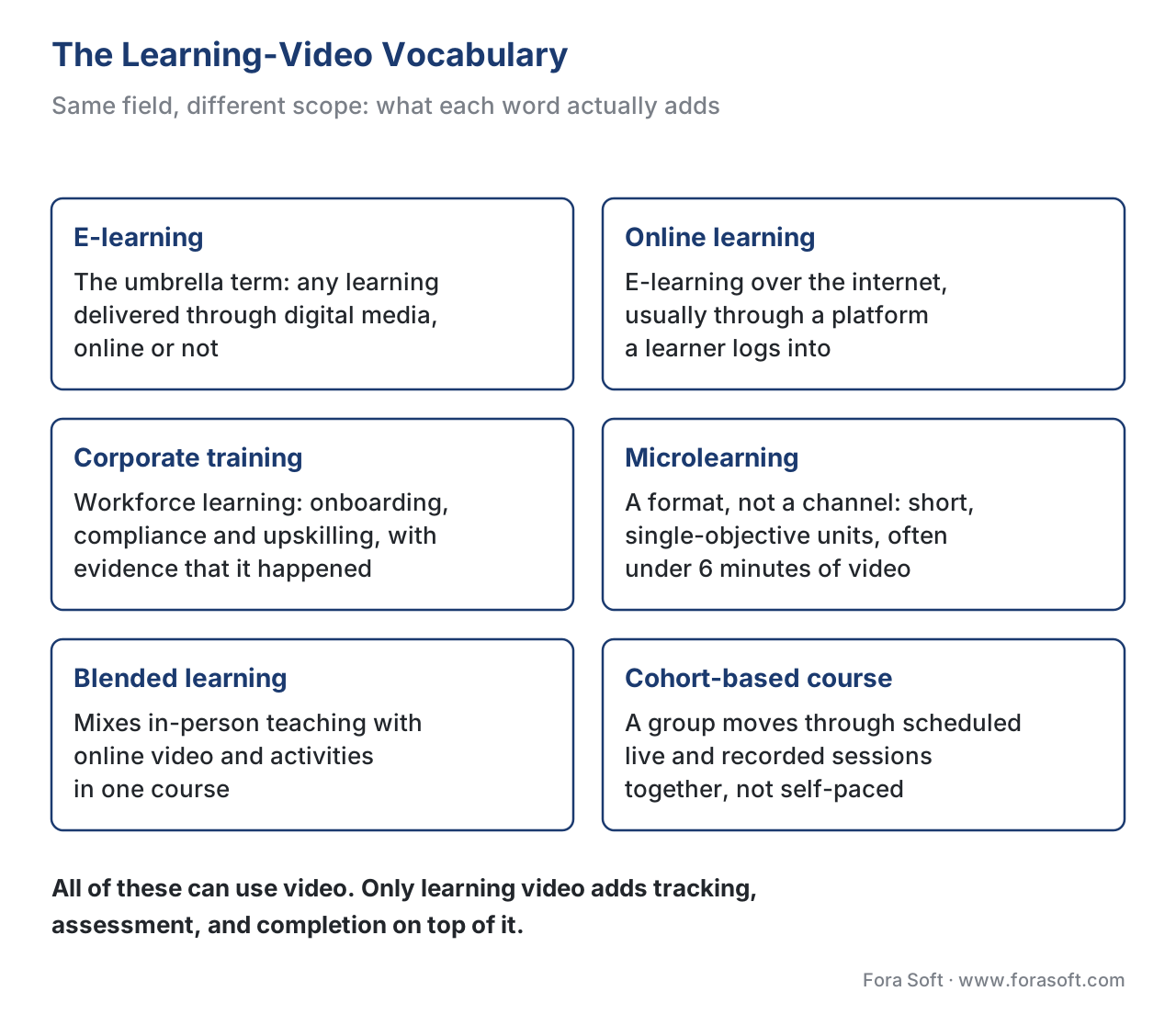 Figure 1. Same field, different scope. All of these can use video, but only learning video adds tracking, assessment, and completion on top of it.
Here is the point that connects all of them. Every one of these can use video. What turns "a video" into "learning video" is not the camera or the codec — it is the requirement to know whether the learning happened and to record it in a way other systems trust. A marketing explainer on your website is just video. The same clip inside a compliance course, where the system must log that Maria watched it, answered three questions, and passed, is learning video. The pixels are identical; the obligations are not.
Three families of video
The clearest way to understand learning video is to put it next to the two video systems most people already have a feel for: streaming and conferencing.
Streaming is one-to-many broadcast. One source — a film, a recorded lecture, a product launch — is delivered to many viewers who watch but do not talk back. Streaming optimizes for reach and smoothness, and it tolerates delay. The technology that breaks a video into small downloadable chunks for this, called HLS (HTTP Live Streaming) or its cousin DASH, typically runs 15 to 30 seconds behind real life; the low-latency variant, LL-HLS, cuts that to under 3 seconds [1]. That lag is fine, because nobody is waiting on an answer.
Conferencing is the opposite: many-to-many, live, and conversational. A Zoom call or a webinar optimizes for low latency so people can interrupt and respond naturally. The technology that makes this possible in a browser, called WebRTC (Web Real-Time Communication), reaches roughly 200 to 500 milliseconds glass-to-glass — that is, from one person's camera to another person's screen [1]. The trade-off is that ultra-low latency is harder to scale to huge audiences than chunked streaming.
Learning video is a third thing, and it is not simply "streaming plus quizzes." It optimizes for a learning outcome you can record and prove. It may be delivered like streaming (a recorded lesson) or like conferencing (a live virtual classroom), but in either case it adds a layer the other two do not have: it tracks what the learner did, assesses whether they understood, and reports the result to other systems. That layer is the entire reason this section of the course exists.
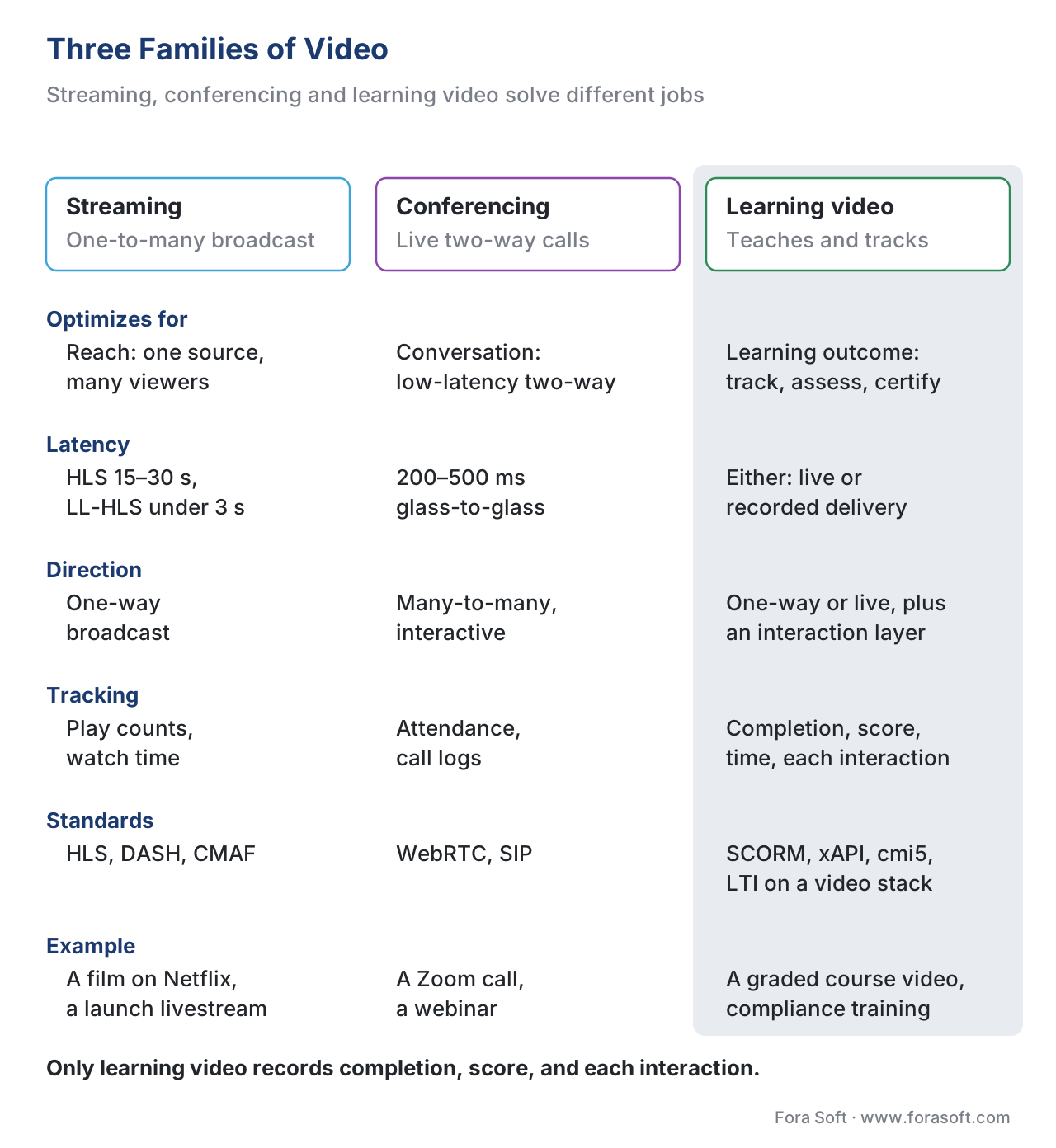 Figure 2. Three families of video, side by side. The learning-video column is the one that carries completion, score, and per-interaction tracking.
A quick reference of this comparison ships as a one-page PDF you can hand to a stakeholder: Download the Learning Video vs Streaming vs Conferencing one-pager.
The four jobs of a learning-video system
If streaming has one core job (deliver the video) and conferencing has one (carry the live conversation), learning video has four. Naming them now gives you the framework the rest of the section fills in.
The first job is deliver — get the video to the learner reliably, on any device and any network. This is the part that overlaps with ordinary streaming, and it is the part teams assume is the whole problem. It is not.
The second job is track — record what actually happened. Not "the video was served," but "this specific learner reached 100%, scored 80% on the embedded quiz, spent 14 minutes, and answered question 3 wrong." This is the job streaming and conferencing simply do not have.
The third job is assess — test understanding rather than attendance. Quizzes, branching scenarios, graded assignments, and the rules that decide what "mastery" means. Watching is not learning, and a serious product has to tell the difference.
The fourth job is integrate — connect the learning record to the systems that consume it: the learning management system (LMS, the platform that hosts courses and learners), the HR system, and reporting dashboards. A completion that never reaches the system of record is, for compliance purposes, a completion that did not happen.
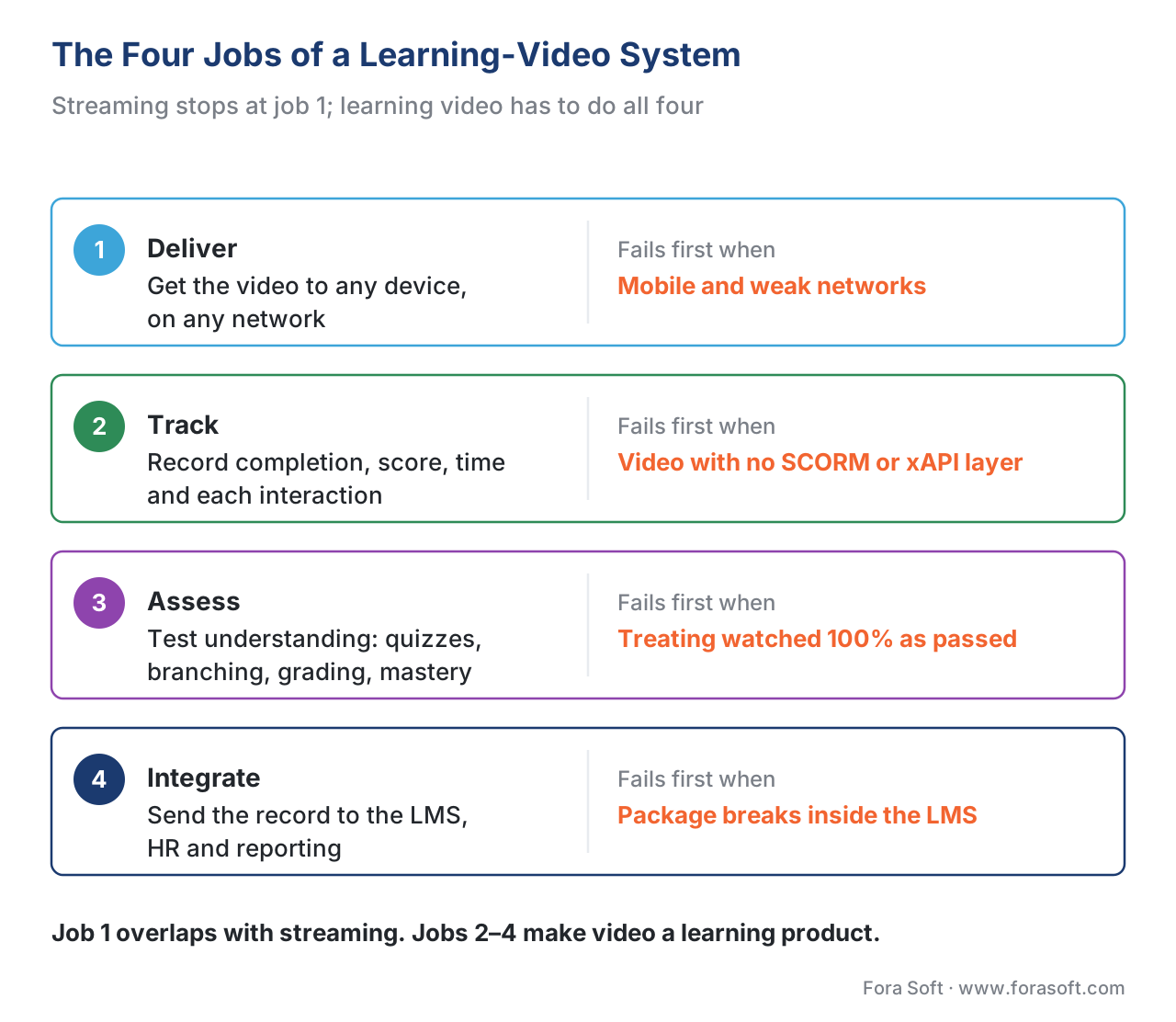 Figure 3. The four jobs of a learning-video system. Each box also shows where it tends to fail first.
Each job has a characteristic first failure. Delivery fails first on mobile and weak networks. Tracking fails first when teams stream video with no learning standard wrapped around it, so they can log "played" but not "completed module 3 with score 80." Assessment fails first when a team treats "watched 100%" as "passed." Integration fails first when a package that worked perfectly in the authoring tool refuses to report inside the customer's LMS. We will return to each failure in the articles that follow.
What "tracking" really means
Tracking is the heart of the difference, so it deserves a concrete picture. The reason learning video needs a standard — rather than just a database column — is interoperability. A course built by one team has to play and report inside an LMS built by another team, years later, without either side knowing the other's internals. Two standards do this job, and they do it differently.
The first, SCORM (Sharable Content Object Reference Model), is the long-established one. Think of SCORM as a shipping container for a course: any compliant learning system can load it without knowing what is inside. While the course runs inside the LMS, it talks to the LMS through a fixed set of data fields — completion status, score, time spent, and a limited set of interactions. The reference implementation, maintained by Advanced Distributed Learning (ADL), comes in two main versions still in use: SCORM 1.2 and SCORM 2004 (4th Edition), the latter adding sequencing rules and splitting "completed" from "passed" into separate fields [2][3]. SCORM's strength is that it is everywhere; its limit is that it tracks a fixed model, mostly inside an LMS launch.
The second, xAPI (the Experience API, and the standard formerly known by its project name "Tin Can API"), is the modern, flexible one. Instead of a fixed set of fields, xAPI records learning as short statements shaped like a sentence: actor, verb, object — "Maria completed Module 3," "Maria answered Question 7 incorrectly," "Maria paused the video at 2:14." Those statements are sent to a Learning Record Store (LRS) — the notebook those sentences are written into — which can sit inside or outside an LMS [4]. Because xAPI is just statements, it can record learning that happens anywhere, including the rich, second-by-second video interactions SCORM cannot express. For video specifically, a community add-on called the xAPI Video Profile standardizes the verbs and data for play, pause, seek, and completion [5].
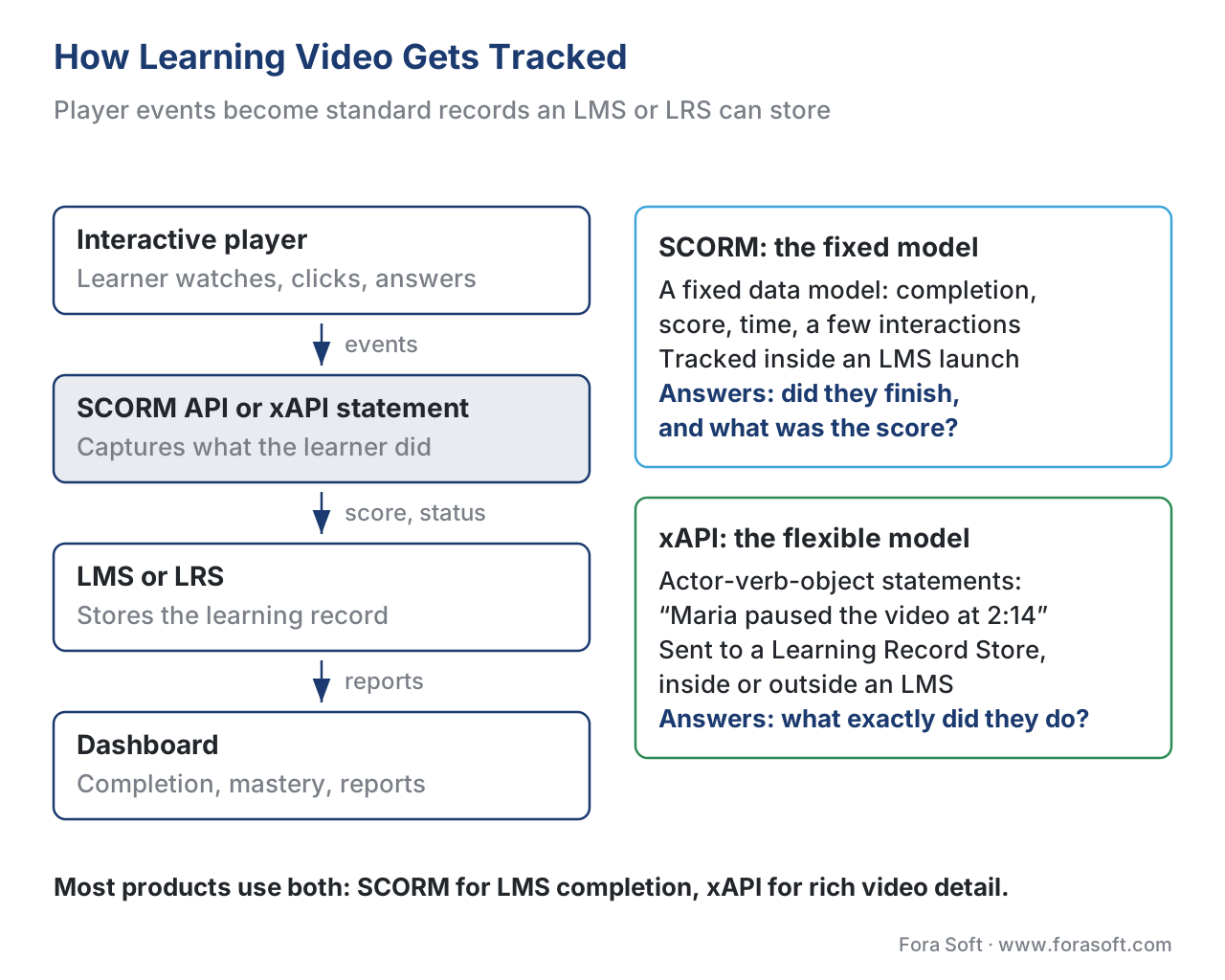 Figure 4. How learning video gets tracked: player events become standard statements that an LMS or LRS can store and report.
The plain-English version: SCORM answers "did they finish the course, and what was the score?" inside an LMS. xAPI answers "what exactly did they do, anywhere?" into an LRS. Most modern products use both, and Block 2 of this section explains exactly when to reach for which.
The pitfall that defines the field: "watched" is not "completed"
The single most common and most expensive mistake in learning video is treating playback as proof of learning. A raw video player knows one thing: how many seconds were rendered on screen. "Reached 100% of the timeline" tells you the bytes were delivered. It does not tell you the learner was in the room, was paying attention, or understood anything.
Worse, "complete" means different things in different layers, and teams blur them. In a plain player, "complete" means the playhead reached the end. In SCORM, "completed" is a status the course explicitly sets, and SCORM 2004 deliberately separates "completed" (did they finish?) from "passed" (did they meet the bar?) [3]. In xAPI, "completed" is a verb your content chooses to send, with its own rules. If your product reports "completed" the instant the video ends, you have built a system that certifies attendance and calls it learning — a real problem when the course is mandatory compliance training and an auditor asks for evidence.
The fix is to decide, deliberately and per course, what "complete" requires: reaching the end, plus answering the checkpoint questions, plus meeting a passing score. Then record that decision through SCORM or xAPI, not through a play-percentage. Learning metrics 101 and the analytics block build this out.
A small piece of arithmetic: why short segments matter
Here is one number that shapes a surprising amount of learning-video design. A widely cited study of edX courses by Guo, Kim, and Rubin (2014) found that median engagement with an instructional video peaks at around six minutes and then falls off sharply, regardless of how long the video actually is [6].
Walk the math out. Suppose you publish one 20-minute lecture. The research suggests average engaged watch time tops out near 6 minutes, so engagement is roughly:
6 min engaged ÷ 20 min total = 30% of the content actually watched
Now cut the same lecture into four 5-minute segments. Each segment sits under the six-minute attention ceiling, so a much larger share of each is watched, and completion is tracked per segment rather than as one all-or-nothing block. Same footage, very different learning and very different tracking signal. This is why "chunk it" is not a style preference in learning video — it changes both outcomes and the data you can act on. The pedagogy of video covers the research behind this in depth.
Free download: Learning Video vs Streaming vs Conferencing One-PagerA one-page comparison of the three families of video across goal, latency, tracking, and standards, plus a ‘which do you need?’ decision box you can hand to a stakeholder.Where Fora Soft fits in
Fora Soft has built video software since 2005 across streaming, WebRTC conferencing, OTT, surveillance, e-learning, and telemedicine — more than 239 shipped projects. That matters here because learning video sits exactly at the intersection of those skills: it borrows delivery from streaming, live interaction from conferencing, and adds the tracking-and-standards layer on top. The build-vs-buy question we help teams answer is usually not "can we play video" — almost anyone can — but "how much of the tracking, assessment, and LMS-integration layer should we build versus assemble from existing tools." That is the layer where learning-video products succeed or stall, and it is the focus of this whole section.



The handbook
Fora Soft Video Engineering Handbook
We wrote a seven-volume handbook that works through the whole video stack, from the pixel to production, so that an engineer who finishes it can design and build the delivery layer every learning-video product sits on. Volume 3 is the place to start: WebRTC for the live class, players and the cost of every delivered hour. Volume 2 explains the HLS and DASH side — why a recorded lesson runs 15–30 seconds behind and how LL-HLS cuts that — and Volume 1 covers the encoding both paths carry. Written by Nikolay Sapunov, CEO at Fora Soft.
Streaming, conferencing, or learning video: which one are you actually building?
Tell us who your learners are and what your customer’s LMS needs to see, and we will map the four jobs — deliver, track, assess, integrate — to what you can rent and what you should build, with a first estimate for each. 250+ video products shipped since 2005.
See our case studies
Case study
BrainCert
All four jobs in one product: a WebRTC virtual classroom plus the LMS around it, with SCORM and xAPI support, proctored exams and certificates — 500M+ real-time classroom minutes across 10 datacenters.
Case study
Scholarly
Both delivery families under one learning layer: live classes for up to 2,000 students at once on LiveKit and WebRTC, recorded lessons over DASH/HLS, plus quizzes, homework and an LMS for 15,000+ active users.
Case study
Tabsera
A multilingual K-12 LMS in English, French, Arabic and Turkish, where video sits next to gamified courses, quizzes and an interactive whiteboard — the assess job, not just playback.
What to read next
Foundations
The Anatomy of a Learning-Video Platform
Every layer behind the four jobs, from upload to the LMS report.
Standards
SCORM vs xAPI vs cmi5 vs LTI
Which tracking standard to reach for, and when you need two.
Analytics
Learning Metrics 101
Completion, progress, mastery and engagement — defined so they mean something.
Live classes
WebRTC for Live Learning
The conferencing family inside a classroom, and its firewall gotchas.
References
- nanocosmos, "WebRTC Latency: Comparing Low-Latency Streaming Protocols (2026 Update)" — WebRTC ~200–500 ms glass-to-glass; HLS 15–30 s; LL-HLS under 3 s. https://www.nanocosmos.net/blog/webrtc-latency/ (accessed 2026-06-19). Tier 4.
- Advanced Distributed Learning (ADL), "SCORM Overview" — SCORM as the interoperable model for packaging and tracking web-based learning; SCORM 1.2 and SCORM 2004 editions. https://adlnet.gov/projects/scorm/ (accessed 2026-06-19). Tier 1.
- Advanced Distributed Learning (ADL), "SCORM 2004 4th Edition — Run-Time Environment / Sequencing and Navigation" — fixed data model (completion_status, success_status, score, total_time); separation of "completed" and "passed." https://adlnet.gov/projects/scorm/ (accessed 2026-06-19). Tier 1.
- Advanced Distributed Learning (ADL), "xAPI Specification 1.0.3, Part 2: Experience API (Statements)" — actor-verb-object statements stored in a Learning Record Store. https://github.com/adlnet/xAPI-Spec/blob/master/xAPI-About.md (accessed 2026-06-19). Tier 1.
- ADL / xAPI community, "xAPI Video Profile" — standardized verbs and extensions for played, paused, seeked, and completed video events. https://github.com/adlnet/xAPI-Video-Profile (accessed 2026-06-19). Tier 1.
- Guo, P. J., Kim, J., & Rubin, R. (2014), "How video production affects student engagement: An empirical study of MOOC videos," Proceedings of the First ACM Conference on Learning @ Scale (L@S '14), 41–50 — engagement peaks at ~6 minutes. https://dl.acm.org/doi/10.1145/2556325.2566239 (accessed 2026-06-19). Tier 5.
- Mordor Intelligence, "E-learning Market Size, Growth & Share Report" — global e-learning ~USD 275.86 B (2026), ~USD 461.92 B (2031), 10.86% CAGR. https://www.mordorintelligence.com/industry-reports/global-elearning-market (accessed 2026-06-19). Tier 5.
- W3C, "Web Content Accessibility Guidelines (WCAG) 2.1, Success Criterion 1.2.2 Captions (Prerecorded)" — accessibility obligations that apply to learning video. https://www.w3.org/TR/WCAG21/#captions-prerecorded (accessed 2026-06-19). Tier 1.
Per the source hierarchy, where vendor blogs (tier 4–5) and the official specs disagreed on what SCORM and xAPI track, this article follows ADL's specifications: SCORM tracks a fixed data model inside an LMS launch, while xAPI records flexible statements to an LRS. Vendor "SCORM tracks everything" framing was overridden.
