


Why this matters
If you run learning and development, found an EdTech product, or manage a training platform, you have almost certainly heard "we just need video like Zoom." It is a reasonable instinct and an expensive mistake. A webinar tool optimizes for one live conversation that ends when the call ends. A video learning platform has to prove, months later and inside someone else's system, that a specific person learned a specific thing. This article shows you exactly which extra layers create that gap, why each one is hard, and where teams that skip them get hurt — so you can budget and talk to engineers with the right mental model.
The failure that defines the difference
Start with what happens when each system fails, because that tells you what each system is really for.
When a webinar drops a frame, stutters, or kicks someone out for ten seconds, the cost is irritation. The presenter repeats a sentence, the attendee rejoins, and the meeting continues. Nobody audits a webinar. There is rarely a permanent record that a particular person was present, paying attention, and understood — and usually nobody needs one.
When a learning video fails, the failure is different in kind. Imagine mandatory anti-harassment training that an employee watches to the end, but the platform never records the completion in the company's system of record. Six months later an auditor asks for proof that the workforce was trained. The video played perfectly. The learning event, as far as any system can prove, never happened. That is not irritation; it is a compliance gap, a missed certification, or a credit a student paid for and cannot claim.
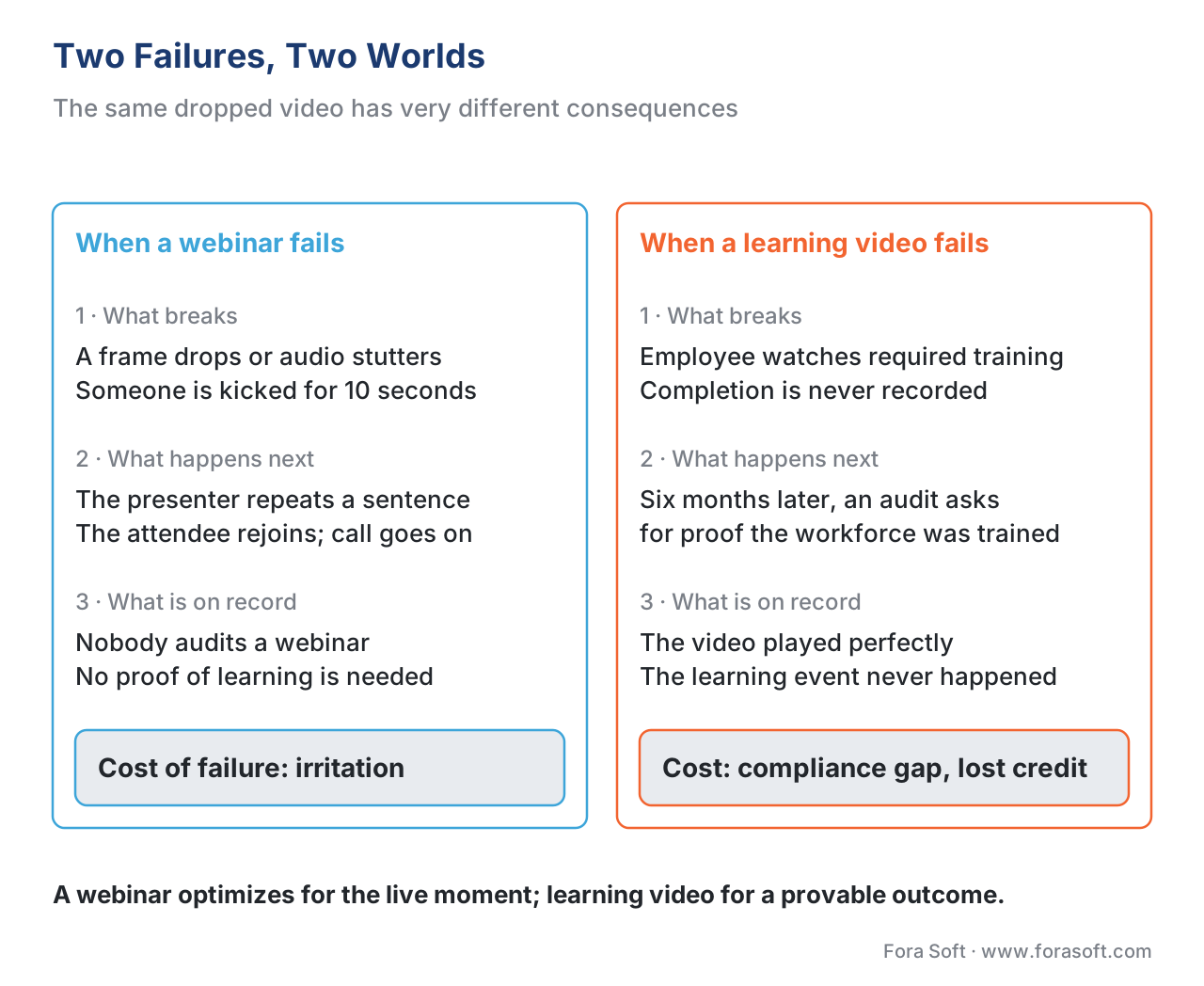 Figure 1. Same dropped video, very different consequences. The cost of failure is why learning video carries machinery a webinar never needs.
A webinar optimizes for the live moment. A learning video optimizes for a durable, provable outcome. Everything that follows is downstream of that one difference.
The webinar baseline: what you already get for "free"
To see what is extra, first name what a modern webinar or conferencing tool already does well. It captures and encodes camera and screen, carries them with low latency so people can talk over each other naturally — the browser technology that makes this work, called WebRTC (Web Real-Time Communication), runs roughly 200 to 500 milliseconds from one camera to another screen — and it usually offers chat, polls, a raised hand, and a recording file at the end [1]. We cover the protocol internals in the Video Streaming section's WebRTC explainer; for here, the point is simpler. That stack — capture, deliver, interact live, save a recording — is a genuinely hard engineering problem, and it is also a solved one. You can buy it.
A webinar's job ends when the call ends. The recording is a video file. Who showed up is an attendance list. Nothing in that stack knows what any individual understood, and nothing is obligated to report it anywhere. That is not a deficiency — it is simply the edge of what a conversation tool is built to do.
The five layers a webinar does not have
Learning video keeps everything the webinar stack does and adds five layers on top. Each is a separate body of work, and each is where a "just like Zoom" estimate goes wrong.
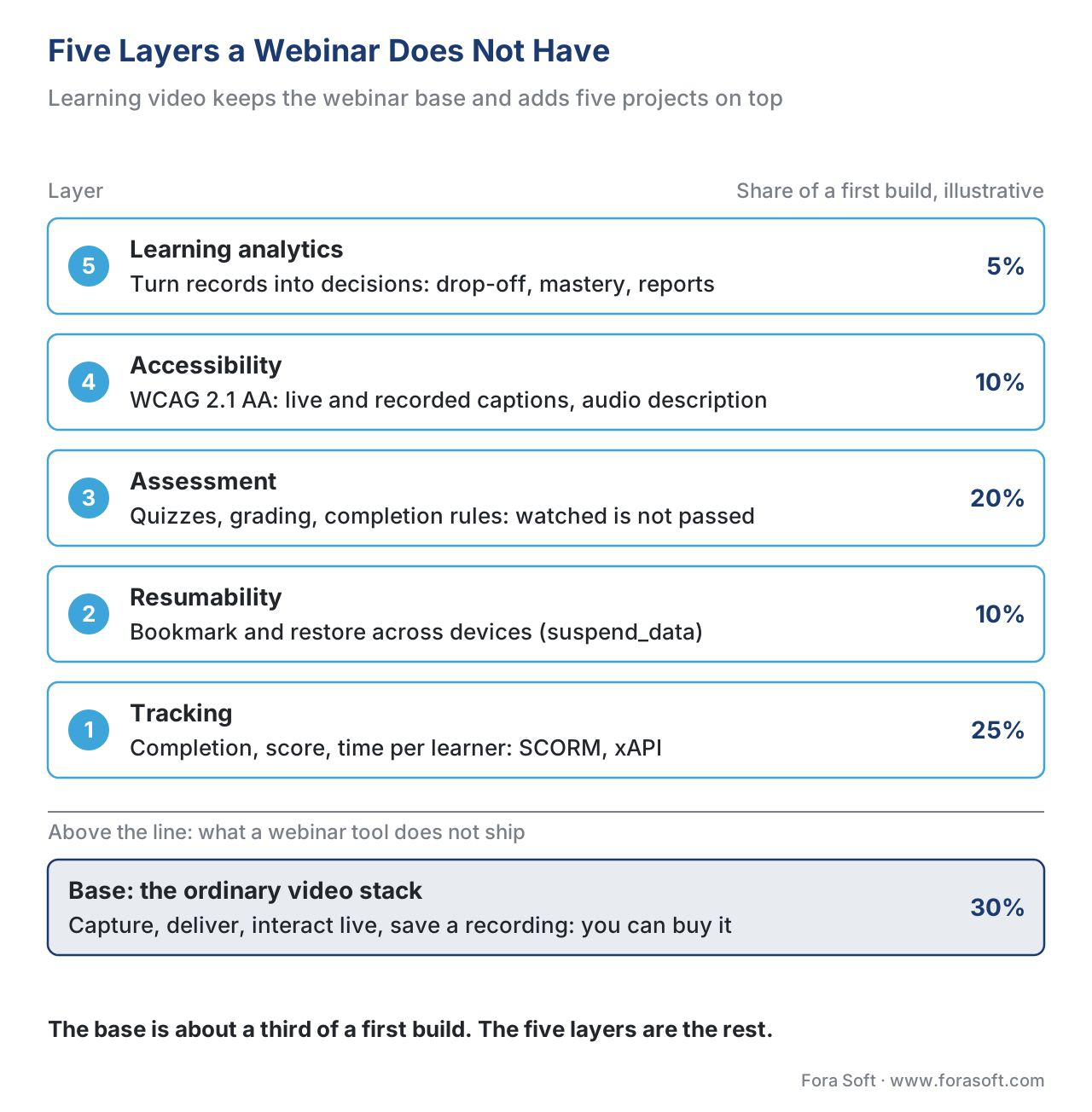 Figure 2. The webinar stack is the base. Learning video adds five layers on top, and each one is a project in its own right.
Layer 1 — Tracking: recording what happened, in a form other systems trust
A webinar counts attendance. A learning video has to record that this learner reached the end, scored 80% on the embedded check, spent 14 minutes, and missed question three — and it has to record it in a format another company's system can read years later. That interoperability requirement is why learning video needs a standard, not just a database column.
Two standards do this job. The older one, SCORM (the Sharable Content Object Reference Model, maintained by Advanced Distributed Learning, or ADL), is a shipping container for a course: any compliant learning management system — the platform that hosts courses and learners, called an LMS — can load it and read a fixed set of fields like completion, score, and time [2]. The modern one, xAPI (the Experience API, formerly nicknamed Tin Can API), records learning as short sentences — actor, verb, object, as in "Maria completed Module 3" — and sends them to a Learning Record Store (LRS), the notebook those sentences are written into [3]. For video specifically, a community add-on called the xAPI Video Profile standardizes the verbs for play, pause, seek, and complete, so second-by-second viewing becomes trackable data [4]. A webinar tool emits none of this. Building it, or wiring in a tool that does, is layer one. The SCORM explainer and tracking video with xAPI go deep on each.
Layer 2 — Resumability: surviving the closed laptop
A webinar is live, so "resume" is meaningless — if you leave, you miss it. A recorded lesson is the opposite: learners stop halfway, close the laptop, and come back on their phone two days later expecting to continue exactly where they left off, with their quiz answers and progress intact.
This sounds trivial and is not. The course has to write a bookmark on every meaningful event and restore it on return. In SCORM that bookmark lives in two fields — a location marker (cmi.core.lesson_location in SCORM 1.2, cmi.location in SCORM 2004) and a free-form progress blob called suspend_data — and the size limits bite: SCORM 1.2 caps suspend_data at 4,096 characters, while SCORM 2004 4th Edition raises it to 64,000 [2][5]. A team that stores rich per-interaction state without watching that ceiling ships a course that silently loses progress in some LMSs and not others — one of the most common and most maddening bugs in the field. A webinar never has to think about any of this.
Layer 3 — Assessment: telling "watched" from "learned"
A webinar's success metric is attendance. A learning video's success metric is understanding, and the two are not the same. A raw player knows exactly one thing: how many seconds were rendered on screen. "Reached 100%" proves the bytes were delivered, not that anyone learned anything.
So learning video adds quizzes, branching scenarios, graded assignments, and an explicit, per-course rule for what "complete" requires. The standards even encode the distinction: SCORM 2004 deliberately separates completion_status (did they finish?) from success_status (did they pass?) [2]. A serious product decides, per course, that "complete" means reaching the end plus answering the checkpoints plus meeting a passing score — then records that through SCORM or xAPI. Designing, building, and grading assessment is layer three; learning metrics 101 builds out the vocabulary.
Layer 4 — Accessibility: a legal floor, not a nice-to-have
For a webinar, captions are a courtesy. For learning video — especially anything sold to a school, university, government, or large enterprise — accessibility is frequently a contractual and legal requirement, measured against a named standard: the Web Content Accessibility Guidelines (WCAG) 2.1, Level AA. That standard sets specific, testable obligations for video: captions for prerecorded audio (Success Criterion 1.2.2, Level A), captions for live audio (1.2.4, Level AA), and audio description of important visual information (1.2.5, Level AA) [6][7]. Ship un-captioned mandatory training to a public-sector buyer and you have not shipped a smaller product — you have shipped a non-conformant one that can be rejected outright. The WCAG for educational video article covers the full criteria set.
Layer 5 — Learning analytics: turning records into decisions
Finally, a webinar gives you an attendance report. A learning platform is expected to turn the tracking data from layer one into insight: where do learners drop off, which questions everyone gets wrong, which module predicts who finishes the course. That means a pipeline — capture events, store them, model them, and report to learners, instructors, and the business. It is the difference between "200 people attended" and "the average learner abandons module four at the 3-minute mark, and fixing that one video lifts completion by nine points." Building that pipeline is layer five; the learning analytics article is the deep dive.
A side-by-side view
The contrast is easiest to read in one table. Note the bottom row: the standards a learning platform must speak are exactly what a webinar tool is free to ignore.
| Dimension | Webinar / conferencing | Learning video |
|---|---|---|
| Core job | Carry one live conversation | Produce and prove a learning outcome |
| Lifespan | Ends when the call ends | Persists, replays, and reports for months |
| Cost of failure | Irritation; rejoin and continue | Compliance gap, lost credit, failed audit |
| What it records | Attendance, chat, a recording file | Completion, score, time, each interaction |
| Resume | Not applicable (live) | Bookmark and restore across devices |
| Success metric | Did people show up? | Did people learn, and can you prove it? |
| Accessibility | Courtesy captions | WCAG 2.1 AA captions + audio description |
| Standards it must speak | WebRTC, SIP | SCORM, xAPI, cmi5, LTI on a video stack |
The arithmetic: why the "extra" is most of the work
Teams scope learning video by sizing the visible part — the player — and treat the rest as a thin wrapper. Walk the rough proportions out loud, using illustrative build-effort weights for a first version:
Video capture + delivery (the webinar-equivalent base):  ~30% of effort
Tracking layer (SCORM/xAPI + LMS integration):           ~25%
Assessment (quiz engine, grading, completion rules):     ~20%
Resumability + cross-device state:                        ~10%
Accessibility (captions, audio description, WCAG audit):  ~10%
Learning analytics pipeline + reporting:                  ~5%
                                                          -----
Total:                                                    100%
The base — the part that looks like a webinar — is roughly a third of a first build. The four learning-specific layers are the other two-thirds, and they are the part a "just like Zoom" estimate omits entirely. That is why the same feature list costs two to three times what stakeholders expect, and why the honest build-vs-buy conversation starts here. The learning-platform cost model turns these proportions into real numbers. (Weights are illustrative planning ratios, not measured benchmarks — your mix shifts with live-vs-recorded balance and integration depth.)
The common mistake: scoping the iceberg by its tip
The single most expensive error in this field is treating a learning-video product as "a video player plus a database." It is the iceberg mistake: the player is the tenth above the water, and the tracking, resumability, assessment, accessibility, and analytics machinery is the nine-tenths below. The symptom is always the same — a demo that looks finished in week six, then a long, surprising tail of work to make completions actually record in the customer's LMS, survive a closed laptop, pass a WCAG audit, and produce a report the business trusts. The fix is to scope all five layers from day one, decide build-vs-buy for each, and never let "it plays video" stand in for "it works as a learning product."
Free download: Learning-Video Readiness ChecklistA one-page build checklist of the five layers a webinar does not have: tracking, resumability, assessment, accessibility, and analytics.Where Fora Soft fits in
Fora Soft has built video software since 2005 across conferencing, streaming, OTT, surveillance, e-learning, and telemedicine — more than 239 shipped projects. That history matters here precisely because learning video sits on top of the webinar stack we already know cold: we have built the WebRTC base many times, so we can be candid about where it ends and the learning-specific layers begin. The build-vs-buy question we help teams answer is rarely "can we play video" — almost anyone can — but "which of the five layers above the player do we build, and which do we assemble from existing standards-compliant tools." That is where learning-video products succeed or stall.



The handbook
Fora Soft Video Engineering Handbook
We wrote a seven-volume handbook that works through the whole video stack, from the pixel to production, so that an engineer who finishes it can build the webinar-grade base this article starts from and know exactly where the learning layers attach. Volume 3 covers that base: WebRTC at 200–500 ms, players and the cost of every delivered hour. Volume 2 explains how recorded lessons reach the learner over HLS and DASH, and Volume 4 goes deep on captions and audio description — the accessibility layer a public-sector buyer will test against WCAG 2.1 AA. Written by Nikolay Sapunov, CEO at Fora Soft.
Which of the five layers is missing from your “just like Zoom” estimate?
Tell us about your courses, your buyers and the LMS your customers run, and we will size tracking, resumability, assessment, accessibility and analytics on top of the video base — with a build-or-buy call and a first estimate for each layer. 250+ video products shipped since 2005.
See our case studies
Case study
BrainCert
A virtual classroom with the learning layers built in: SCORM and xAPI tracking, proctored exams and certificates on top of WebRTC — 500M+ real-time classroom minutes across 10 datacenters.
Case study
Scholarly
Live classes for up to 2,000 students at once plus recorded lessons over DASH/HLS, with quizzes, homework and review — the assessment layer for 15,000+ active users.
Case study
Tabsera
A K-12 LMS in English, French, Arabic and Turkish where video sits next to gamified courses, quizzes and an interactive whiteboard — progress that lives beyond the call.
What to read next
Standards
SCORM Explained
Layer 1 and 2 in detail: what SCORM tracks, and why suspend_data stops at 4,096 characters.
Standards
Tracking Video With xAPI
The Video Profile verbs that turn play, pause and seek into learning data.
Accessibility
WCAG 2.1 AA for Educational Video
Layer 4: the captions and audio description a public-sector buyer will test.
Economics
The Learning-Platform Cost Model
The effort shares from this article turned into real build and run costs.
References
- nanocosmos, "WebRTC Latency: Comparing Low-Latency Streaming Protocols (2026 Update)" — WebRTC ~200–500 ms glass-to-glass. https://www.nanocosmos.net/blog/webrtc-latency/ (accessed 2026-06-19). Tier 4.
- Advanced Distributed Learning (ADL), "SCORM 2004 4th Edition — Run-Time Environment" — fixed data model (completion_status, success_status, score, total_time);
cmi.location; separation of completed and passed. https://adlnet.gov/projects/scorm/ (accessed 2026-06-19). Tier 1. - Advanced Distributed Learning (ADL), "xAPI Specification 1.0.3, Part 2: Experience API (Statements)" — actor-verb-object statements stored in a Learning Record Store; xAPI formerly Tin Can API. https://github.com/adlnet/xAPI-Spec/blob/master/xAPI-About.md (accessed 2026-06-19). Tier 1.
- ADL / xAPI community, "xAPI Video Profile" — standardized verbs and extensions for played, paused, seeked, and completed video events. https://github.com/adlnet/xAPI-Video-Profile (accessed 2026-06-19). Tier 1.
- Rustici Software, "SCORM Run-Time Reference" —
suspend_datalimits: 4,096 characters in SCORM 1.2; 64,000 in SCORM 2004;cmi.core.lesson_location/cmi.locationbookmarking andcmi.exit=suspend. https://scorm.com/scorm-explained/technical-scorm/run-time/run-time-reference/ (accessed 2026-06-19). Tier 4. - W3C, "Web Content Accessibility Guidelines (WCAG) 2.1, Success Criterion 1.2.2 Captions (Prerecorded) — Level A; 1.2.4 Captions (Live) — Level AA." https://www.w3.org/TR/WCAG21/ (accessed 2026-06-19). Tier 1.
- W3C WAI, "Understanding Success Criterion 1.2.5: Audio Description (Prerecorded) — Level AA." https://www.w3.org/WAI/WCAG21/Understanding/audio-description-prerecorded.html (accessed 2026-06-19). Tier 1.
- Mayer, R. E., & Pilegard, C. (2014), "Principles for Managing Essential Processing… the Segmenting Principle," The Cambridge Handbook of Multimedia Learning — learner-paced segments outperform continuous units; median effect size ~0.79 across 10 tests. https://www.cambridge.org/core/books/cambridge-handbook-of-multimedia-learning/ (accessed 2026-06-19). Tier 5.
- Guo, P. J., Kim, J., & Rubin, R. (2014), "How video production affects student engagement," ACM Learning @ Scale (L@S '14) — median engagement peaks at ~6 minutes. https://dl.acm.org/doi/10.1145/2556325.2566239 (accessed 2026-06-19). Tier 5.
Per the source hierarchy, where vendor blogs (tier 4) and the official specs disagreed on what SCORM tracks and stores, this article follows ADL's specification (a fixed data model with explicit suspend_data size limits, not "tracks everything"); the Rustici reference is cited only for the concrete byte limits it documents.
