


Why this matters
If you run an over-the-top (OTT) streaming service — video delivered over the open internet rather than cable or satellite — you cannot improve a viewing experience you cannot see. A media founder or product manager who ships a player without instrumentation is flying blind: every complaint is anecdotal, every "it buffers a lot" is unfalsifiable, and there is no number to put against an engineering fix. Worse, the cost of bad QoE is measurable and large — viewers abandon streams that start slowly or stall, and the link between rebuffering and lost watch time is one of the most replicated findings in streaming research. This article gives you the vocabulary and the mental model to specify QoE instrumentation, judge a vendor's analytics SDK, and know exactly which numbers your engineers should be putting on a dashboard.
The four numbers a player must report
Strip QoE down to its core and you get four numbers. They are the spine of every streaming analytics product, and a player that does not emit them accurately is not instrumented.
The first is startup time — also called time-to-first-frame: how long the viewer waits from pressing play to seeing the first frame of video. It is measured in milliseconds or seconds and it is the single strongest first impression your service makes. The second is rebuffering — how often and for how long the picture froze mid-playback because the player ran out of buffered video. The buffer is the few seconds of already-downloaded video the player keeps ahead of the viewer; when it empties, the screen freezes, and that frozen moment is a rebuffer (also called a stall). The third is the bitrate actually delivered — the average quality the viewer received, measured in kilobits or megabits per second, because a service can start fast and never stall yet still serve soft, low-quality video the whole time. The fourth is errors — the failures the viewer actually saw, from a video that never started to one that died halfway through.
A fifth number rides alongside these: dropped frames, the frames the device decoded but could not draw on time, which is how you catch a stream that plays without stalling yet looks juddery on an underpowered device. Together these five tell you, for any session, whether the experience was good.
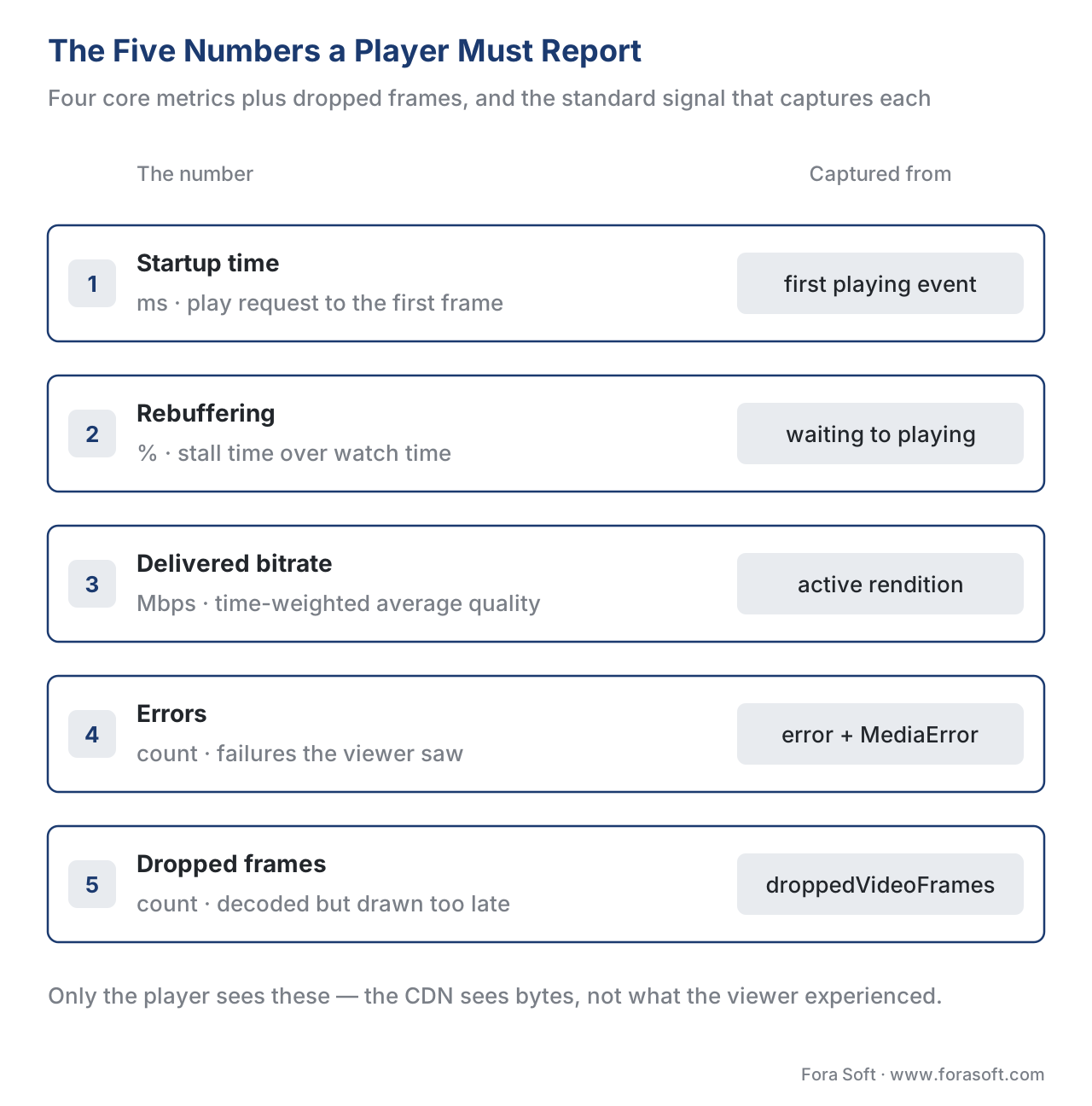 Figure 1. The numbers a player must report, and the standard signal each is captured from. Startup and rebuffering come from media-element events; bitrate from the active rendition; errors from the error event; dropped frames from the playback-quality API.
The precise, formal definitions of these metrics — the edge cases, the counting rules, the academic grounding — are the subject of video QoE metrics in our Video Streaming section, and we use them at platform scale in QoE: startup time and rebuffering. This article stays on the player side: how the player captures each number and ships it out.
Why instrumentation has to live in the player
It is tempting to think you could measure QoE from the server — count requests, watch the CDN logs, infer the rest. You cannot, and the reason is simple: the server sees bytes leaving a cache, but only the player knows what the viewer experienced. The CDN cannot tell that the buffer emptied at second 47 and the picture froze for two seconds; the player can, because the freeze is its own buffer running dry. The CDN cannot tell that the viewer pressed play and waited four seconds; the player can, because it started the clock. QoE is a client-side truth, and instrumentation is how that truth escapes the device.
Put a number on why it is worth the engineering. The most-cited streaming study — Dobrian and colleagues' analysis of Conviva data, presented at ACM SIGCOMM in 2011 — found that the rebuffering ratio (the share of session time spent frozen) was the metric most strongly correlated with how long people watched, and that even small increases in buffering cost meaningful viewing time. The widely-quoted version of the finding is that roughly a one-percentage-point increase in buffering can cost several minutes of viewing per session.
Walk the arithmetic. Suppose a one-percentage-point rise in your rebuffering ratio costs three minutes of watch time per session, and you serve one million sessions a month. That is 1,000,000 × 3 = 3,000,000 minutes, or about 50,000 hours of watching lost in a month from a single point of rebuffering. For an ad-funded service that sells those minutes, or a subscription service whose retention tracks engagement, that is a direct line to revenue. Instrumentation is what turns "it feels laggy" into "rebuffering rose 1.2 points on Android TV last Tuesday" — a problem an engineer can actually fix.
How the player measures each number
The good news for anyone scoping this work: the browser and every native platform already fire the events you need. Instrumentation is mostly listening to them correctly.
Startup time is a stopwatch. The player records a timestamp the instant the viewer requests playback, records another at the first rendered frame, and reports the difference. On the web the end of the stopwatch is the media element's first playing event (or the more precise frame signal where the platform offers one); the start is the user's click or the autoplay trigger. The one rule that trips teams up: if your player shows ads before content, decide deliberately whether startup time includes ad load, and measure content-startup separately so an ad server's slowness does not hide in your content number.
Rebuffering is bracketed by two events that the HTML standard defines precisely. When the player runs out of buffered data mid-playback, the media element fires a waiting event and playback halts; when enough data returns, it fires playing and resumes. The span between a waiting and the next playing is one stall. Sum those spans and divide by total watch time and you have the rebuffering ratio. The trick is to exclude the stalls the viewer caused on purpose — a waiting that follows a seek (the viewer jumped to a new spot) is not a quality failure and must not be counted as one.
A minimal stall timer shows the shape of it. This is illustrative, not production code:
// Measure rebuffering from the standard media-element events.
const video = document.querySelector('video');
let stallStart = null;
let rebufferMs = 0;
let seeking = false;

video.addEventListener('seeking', () => { seeking = true; });
video.addEventListener('seeked',  () => { seeking = false; });

video.addEventListener('waiting', () => {
  // A stall the viewer did not cause by seeking.
  if (!seeking && stallStart === null) stallStart = performance.now();
});

video.addEventListener('playing', () => {
  if (stallStart !== null) {
    rebufferMs += performance.now() - stallStart; // one stall measured
    stallStart = null;
  }
});
Delivered bitrate is tracked, not caught from one event. The player knows which rung of the encoding ladder — the set of quality levels it can choose from — is active at every moment, so it records each quality switch with a timestamp and computes a time-weighted average across the session. A session that spent 90 seconds at 5 Mbps and 10 seconds at 1 Mbps delivered (90 × 5 + 10 × 1) ÷ 100 = 4.6 Mbps on average, not the simple midpoint. The deep logic of why the player switched quality — the adaptive-bitrate algorithm — is covered in video player engineering; for instrumentation you only need to log every switch.
Errors come from the media element's error event and the MediaError object it carries, whose code says roughly what went wrong (aborted, network, decode, or unsupported source). The instrumentation job is to classify each error along two axes: did it stop the viewer seeing any video at all (a startup failure) or interrupt a stream already playing (a playback failure), and was it fatal (the session ended) or recoverable (the player retried and carried on)? Mux Data, a streaming-analytics vendor, draws exactly this line — its Video Startup Failure counts errors before the first frame, its Playback Failure counts fatal errors during playback — and the distinction matters because the two have different causes and different fixes.
Dropped frames come from a small browser API: calling getVideoPlaybackQuality() on the video element returns a VideoPlaybackQuality object whose droppedVideoFrames count is the number of frames the device discarded before decode or because they missed their display deadline. Polling that count occasionally is how you measure smoothness — the metric that catches a 4K stream juddering on a TV whose decoder cannot keep up, even though it never technically stalls.
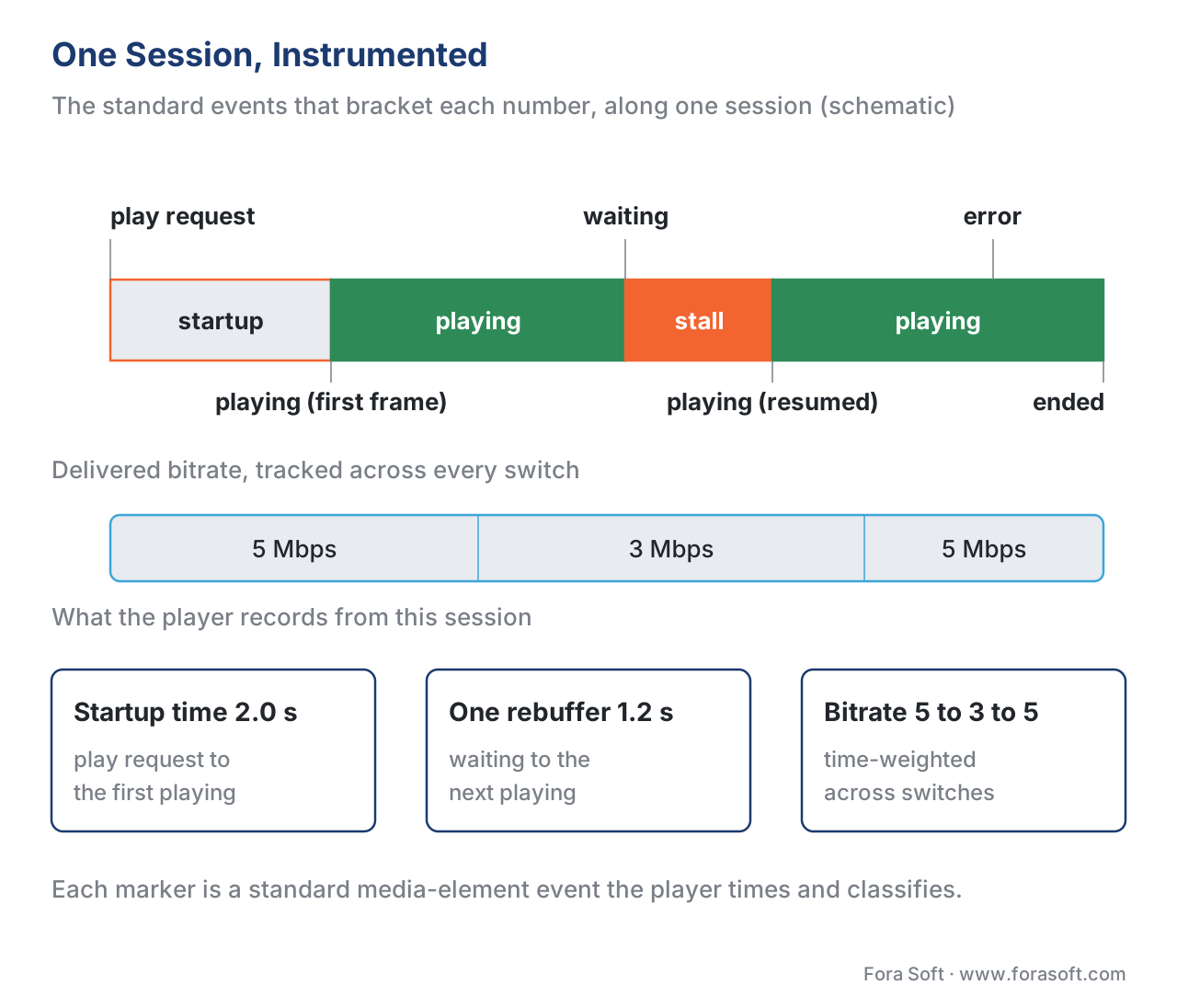 Figure 2. One session, instrumented. Startup time is the gap from play to first frame; each waiting→playing span is a rebuffer; bitrate is tracked across switches; the error event with its MediaError code is classified and logged.
From events to beacons: getting the data off the device
Measuring inside the player is half the job; the data has to leave the device to be useful. The unit that leaves is a beacon — a small message, usually JSON, that the player posts to a collection endpoint. The naive approach, a normal network request fired as the page closes, is exactly where teams lose their most important data: browsers routinely cancel in-flight requests during page unload, so the end-of-session beacon — the one carrying the final totals — never arrives.
The web platform solved this with a purpose-built tool. The Beacon API's navigator.sendBeacon() method queues a small POST that the browser promises to send even as the page goes away, without delaying the next navigation. The W3C specification caps the queued payload at 64 kibibytes, so beacons stay small by design. The reliable trigger is the visibilitychange event: when the page's visibility turns to hidden — which is the event guaranteed to fire when a mobile user backgrounds the app — the player flushes its final beacon.
// Flush the session's QoE summary when the page is hidden — survives backgrounding.
document.addEventListener('visibilitychange', () => {
  if (document.visibilityState === 'hidden') {
    const summary = JSON.stringify({
      sessionId, startupMs, rebufferMs, avgBitrateKbps, errorCount, droppedFrames
    });
    navigator.sendBeacon('/qoe/collect', summary); // queued, sent even on unload
  }
});
Two design choices keep instrumentation from becoming a cost or performance problem of its own. The first is batching: collect events in memory and send them in periodic bundles rather than one network call per event, because a player can otherwise emit hundreds of timing events a minute. The second is sampling: for a very large audience you may not need every session at full fidelity — capturing detailed traces from a representative sample, plus the headline metrics from everyone, gives you the picture without a beacon bill that scales with every viewer. On native mobile and TV platforms the equivalents of sendBeacon are background-upload queues that survive the app being suspended; the principle is identical.
Common mistake: losing the end-of-session beacon. The most common instrumentation bug we see is firing the final QoE summary with a regular request on the
unloadevent. Browsers cancel it, mobile backgrounding kills it, and the sessions that ended badly — exactly the ones you most need to see — are the ones that go missing, quietly biasing your dashboards toward the happy path. Always flush the closing beacon withsendBeacon(or the platform's background-upload queue) onvisibilitychange → hidden, never with a cancellable request on unload.
CMCD: the standard the player speaks to the CDN
Beacons send QoE to your analytics. There is a second, complementary channel that sends a slice of the same client truth to the people delivering your bytes: the content delivery network (CDN), the network of edge servers that caches and serves your video. The standard for it is Common Media Client Data (CMCD), published by the Consumer Technology Association as CTA-5004. With CMCD the player attaches a small set of fields to every segment request — as an HTTP header or a query-string parameter — so the CDN can correlate its own logs with what the client was experiencing.
The fields are terse two-letter keys: bl is buffer length (how many milliseconds of video are buffered), br the encoded bitrate of the requested segment, mtp the measured throughput, sid a session id, cid a content id, bs a buffer-starvation flag the player sets when it has just stalled. Because the CDN now sees, request by request, which clients were close to starving, it can spot delivery problems that pure server logs hide — a regional edge that is fine on average but routinely lets buffers run low. CMCD is supported in the major players: dash.js and hls.js on the web and ExoPlayer/Media3 on Android all implement it.
CMCD is also a live, dated detail worth tracking. Version 2 of the specification was published in February 2026 as CTA-5004-A; it adds event-mode reporting (the client can send a beacon-like report keyed to an event, not only ride along on a segment request), new keys, and a structured encoding of field values. As with any evolving spec, confirm the version your players and CDN support before relying on a v2-only key.
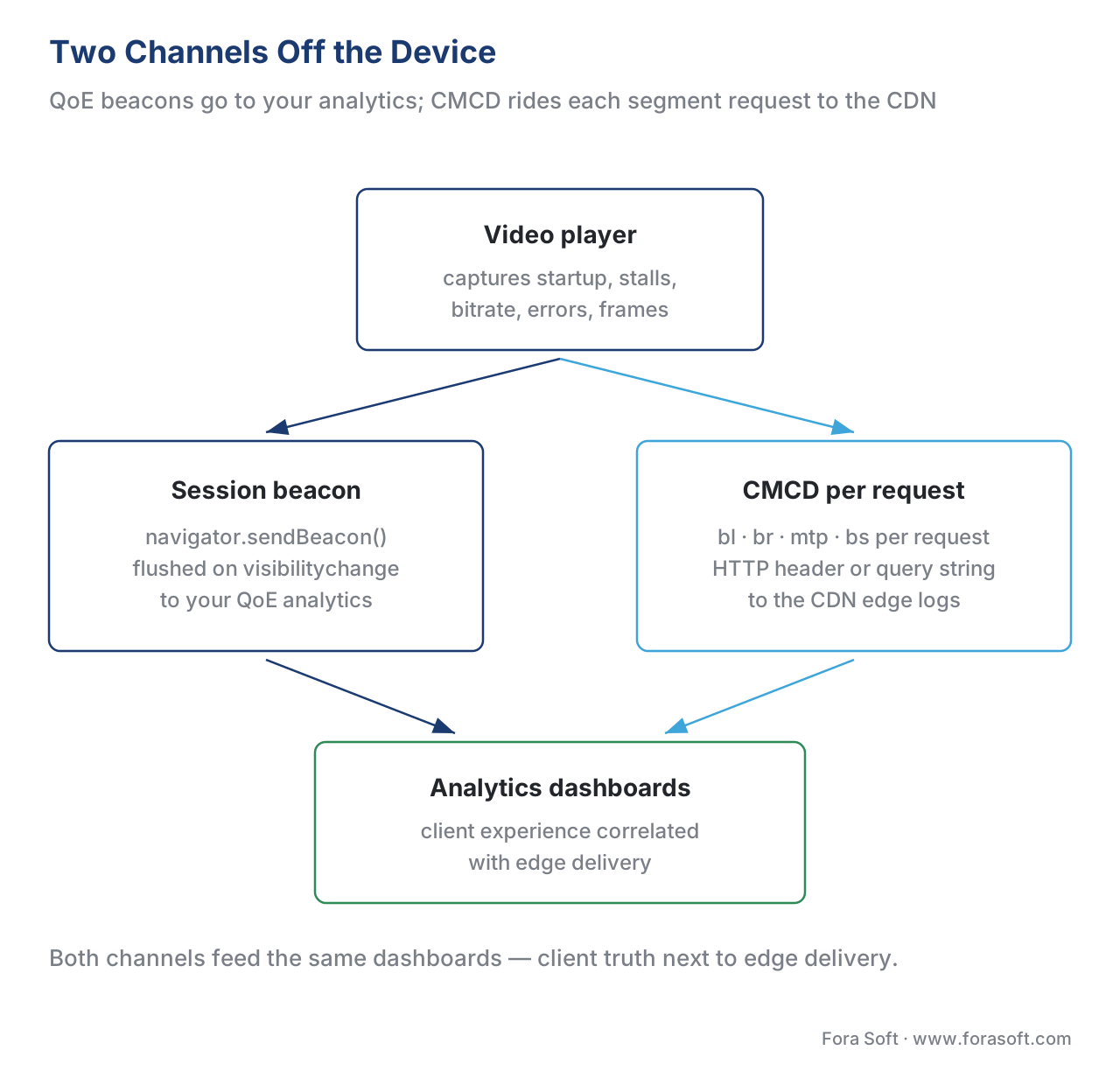 Figure 3. Two channels off the device. Session beacons (sendBeacon) carry the QoE summary to your analytics; CMCD fields ride each segment request to the CDN. Both feed the dashboards in the analytics block.
One definition of "rebuffering": CTA-2066
Here is a problem that bites every multi-vendor platform. Ask two analytics tools for your "rebuffering" number and you can get two different answers, because each computed it with slightly different rules — does a stall during a seek count, is the startup wait a rebuffer, where does one stall end and the next begin? When the definitions drift, the dashboards stop agreeing and nobody trusts the number.
The Consumer Technology Association's CTA-2066, Streaming Quality of Experience Events, Properties and Metrics, exists to fix exactly this. It standardizes the set of player events, properties, and QoE metrics — and, crucially, how each metric should be computed — so that "rebuffering" and "startup time" mean the same thing across players and analytics vendors. Instrumenting your player against a shared definition like CTA-2066 (or aligning to a vendor that does) is what lets you compare a number from your iOS app with the same number from your web player and your smart-TV app without an asterisk.
The table makes the capture responsibilities concrete.
| QoE metric | What the player captures | Standard signal / definition | Captured at the player? |
|---|---|---|---|
| Startup time | Play request → first frame timestamp | First playing / first-frame signal |
Yes — only the player knows |
| Rebuffering ratio | Σ(waiting→playing) ÷ watch time |
HTML media events; CTA-2066 rules | Yes — only the player knows |
| Delivered bitrate | Time-weighted active rendition | Encoding-ladder rung over time | Yes |
| Playback / startup errors | error event + MediaError code |
Fatal vs recoverable; pre/post first frame | Yes |
| Dropped frames | droppedVideoFrames count |
W3C Media Playback Quality API | Yes (web) / platform API |
| Edge-correlated delivery | bl, br, mtp, bs per request |
CMCD (CTA-5004) header/query | Yes — to the CDN |
Build versus buy: the QoE SDK decision
Almost no OTT service hand-writes all of this on every platform. The capture logic above is not hard in one player; making it consistent across web, iOS, Android, and four kinds of TV — and standing up the collection pipeline and the dashboards behind it — is the real work. That is why most teams adopt a QoE analytics SDK: Mux Data, Conviva, and Datazoom are the common choices, each shipping a per-platform collector that captures the metrics above and a back end that aggregates them. What you get from them is breadth (one consistent metric set across every client) and the dashboards; what you give up is some control and a per-session cost.
The decision is the same shape as the player build-vs-buy choice in the player on every screen: writing the capture is rarely the hard part, integration and consistency are. The analytics back end these SDKs feed — the dashboards, alerting, and the audience and engagement views — is the subject of the QoE measurement stack and the wider OTT analytics map. Whichever way you go, the instrumentation principles in this article are the contract the SDK has to meet: capture in the player, beacon reliably off the device, and align the definitions to a standard.
Free download: Player QoE Instrumentation ChecklistA one-page reference of the five QoE numbers to capture (startup, rebuffering, bitrate, errors, dropped frames), the media-element event model that captures each, the beacon and CMCD transport rules, and the standards and pitfalls — with the core rule that only the player can measure QoE honestly and the closing beacon must survive page unload.Where Fora Soft fits in
Fora Soft has built video streaming, OTT and Internet-TV, conferencing, e-learning, telemedicine, and surveillance software since 2005 — more than 625 shipped projects for 400-plus clients. QoE instrumentation across the full device matrix is exactly the kind of scale problem we are built for: a service that must prove a fast start and a low stall rate for hundreds of thousands of concurrent viewers, on screens from a low-end smart TV to the newest phone, needs the event capture, beacon transport, CMCD wiring, and metric standardization described here implemented identically on every client. We are vendor-neutral — we instrument against the standards and wire up Mux, Conviva, or Datazoom to the job rather than selling one tool — and we lead with the scale and cost requirement before the feature list.



The handbook
Fora Soft Video Engineering Handbook
We wrote a seven-volume handbook that takes the whole video stack apart, from the pixel to production, and an engineer who works through it can design and build the instrumented delivery chain this page describes. Volume 3 sits closest to it — players and recovery from stalls, ABR and the rung the bitrate number reports, CDN caching, and QoE monitoring end to end — while volume 2 covers the segment requests CMCD rides on, from HLS and DASH manifests down to the transport, and volume 1 explains the encoding ladder your delivered-bitrate figure is measured against. Written by Nikolay Sapunov, CEO at Fora Soft.
Can you put a number on how your player actually performs?
Send us the clients you ship on and the analytics you already have, and we will come back with the instrumentation plan — which events each platform fires, how the closing beacon survives backgrounding, what CMCD should carry to your CDN, and whether an SDK or your own collector is the cheaper answer at your session count — 250+ video products shipped since 2005.
See our case studies
Case study
WorldCast Live
Sub-second concert streaming, 0.4 to 0.5 s of latency at 1.5 Gb/s for 10,000 simultaneous viewers, with quality stepped down automatically on poor connections — a startup and stall budget that only per-session client numbers can hold you to.
Case study
Sprii
72,000+ live shopping events across web, iOS and Android, where viewers stay 20 minutes against 54 seconds on a static page — the engagement that rebuffering costs first, measured the same way on all three clients.
Case study
TradeCaster
46,000+ traders watching live desktops, on a platform that auto-scales through the load spike at market open — the moment when a dashboard fed by player beacons, not server logs, tells you whether viewers felt it.
What to read next
Metrics
QoE: Startup Time and Rebuffering
The two numbers this page captures, taken to platform scale: what good looks like, and what each point of rebuffering costs.
Tooling
The QoE Measurement Stack: Mux, Conviva and Telemetry
Where the beacons land: the SDKs and back ends that turn per-session events into dashboards and alerts.
Player
Video Player Engineering: The Core Concepts
Inside the thing you are instrumenting: buffer, ABR and the state machine that fires every event above.
Delivery
Delivery Observability: Who Is Buffering and Where
The other half of the CMCD channel: correlating client stalls with the edge, region and ISP that caused them.
References
- CTA-2066: Streaming Quality of Experience Events, Properties and Metrics — Consumer Technology Association (CTA / CTA-WAVE R4 WG20). Standardizes player events, properties, and QoE metrics and how each should be computed, to fix inconsistent reporting across players and analytics vendors. Public-review version. Tier 1. https://github.com/cta-wave/R4WG20-QoE-Metrics
- CTA-5004: Web Application Video Ecosystem — Common Media Client Data (CMCD) — Consumer Technology Association. Defines the client data (keys such as
bl,br,mtp,sid,cid,bs) the player sends to the CDN as an HTTP header or query parameter on each request. Version 2 (CTA-5004-A) published February 2026, adding event-mode reporting and new keys. Tier 1. https://cdn.cta.tech/cta/media/media/resources/standards/pdfs/cta-5004-final.pdf - HTML Standard (WHATWG), §4.8 Media elements — defines
readyState, thewaitingandplayingevents that bound a rebuffering stall, theerrorevent, and theMediaErrorcodes the instrumentation classifies. Tier 1. https://html.spec.whatwg.org/multipage/media.html - Media Playback Quality — W3C. Defines
HTMLVideoElement.getVideoPlaybackQuality()andVideoPlaybackQuality.droppedVideoFrames(frames dropped pre-decode or for missing the display deadline) — the smoothness signal. Tier 1. https://w3c.github.io/media-playback-quality/ - Beacon — W3C. Defines
navigator.sendBeacon(): an asynchronous POST the user agent sends even during page unload, queued payload capped at 64 KiB; reliable when triggered onvisibilitychange → hidden. Tier 1. https://www.w3.org/TR/beacon/ - Media Source Extensions™ (MSE) — W3C.
SourceBuffer.bufferedexposes the bufferedTimeRangesfrom which the player derives buffer length (the basis of CMCDbland of stall prediction). Tier 1. https://www.w3.org/TR/media-source-2/ - RFC 9317: Operational Considerations for Streaming Media — IETF (MOPS working group), 2022. Operational guidance for streaming delivery, including client-to-network signalling such as CMCD and the role of QoE measurement. Tier 1. https://datatracker.ietf.org/doc/rfc9317/
- Understand Mux Data metric definitions; Rebuffering, Playback Failure, Video Startup Failure — Mux. First-party definitions: rebuffer percentage = rebuffer time ÷ total watch time (5% ≈ 3 s per 60 s); Video Startup Failure (error before first frame) vs Playback Failure (fatal error during playback). Tier 4. https://www.mux.com/docs/guides/understand-metric-definitions
- F. Dobrian et al., "Understanding the Impact of Video Quality on User Engagement," ACM SIGCOMM 2011 — the foundational study (Conviva data) showing rebuffering ratio as the metric most correlated with engagement; small buffering increases cost meaningful viewing time. Tier 5. https://dl.acm.org/doi/10.1145/2018436.2018478
- Common Media Client Data — dash.js documentation — DASH Industry Forum. Reference implementation of CMCD: configurable keys (
br,bl,mtp,nor,nrr,su,bs,rtp,cid,pr,sf,sid,st,v), header vs query mode; v1 supported, v2 fields being added. Tier 3. https://dashif.org/dash.js/pages/usage/cmcd.html
Conflict resolution: where vendor "top streaming metrics" posts present QoE numbers with house definitions that quietly differ, this article follows the standards — CTA-2066 for what each metric means and how to compute it, CTA-5004 (CMCD) for client-to-CDN data, and the WHATWG/W3C specs for the events and APIs the player reads. The QoE metric definitions themselves and the analytics dashboards are deferred to the Video Streaming section and Block 9 per the section cross-linking rule rather than re-derived here.
