


Why this matters
If you run an over-the-top (OTT) streaming service — video delivered over the open internet rather than cable or satellite — the player is the one piece of your platform the viewer actually touches. Every dropped frame, every spinning loader, every "video unavailable" error is the player's fault in the viewer's mind, even when the real problem is the network or the encode. For a media founder or product manager deciding whether to build a player, license one, or wrap an open-source engine, the danger is treating the player as a solved commodity. It is not: the difference between a player that starts in under two seconds and recovers silently from a network dip, and one that stalls and forgets where the viewer was, is the difference between a service people keep and one they churn from. This article gives you the vocabulary and the mental model to make that call.
What a video player actually does
Start with the thing most people picture when they hear "video player": the <video> tag in a web page, or the equivalent media element built into a phone or TV. Hand it a single file — say, a .mp4 at one fixed quality — and it will download it from start to finish and play it. That is called progressive download, and it is how video worked in the early web. It has one fatal weakness for a real service: it serves the same quality to everyone. The viewer on hotel Wi-Fi gets the same large file as the viewer on fibre, so one of them buffers endlessly and the other gets needlessly soft video.
Modern streaming solves this by chopping each title into many small segments — typically two to six seconds of video each — and encoding the whole title several times over at different qualities, from a low bitrate for weak connections to a high bitrate for fast ones. That set of quality levels is called the encoding ladder, and we cover how it is built in the encoding ladder explained. A small text file called a manifest (an .m3u8 playlist for HLS, or an .mpd for DASH) lists every quality level and every segment. The player's job is to read that manifest and, second by second, decide which quality's next segment to download.
That decision, made continuously while the viewer watches, is the heart of the matter. The umbrella name for it is adaptive bitrate streaming, almost always shortened to ABR: the player adapts the bitrate (the quality, measured in kilobits or megabits per second) to whatever the network can currently deliver. Think of the encoding ladder as the seat classes on a plane — same flight, different price and comfort — and the player as a passenger who can change seats mid-flight, upgrading when there is room and downgrading the instant the budget tightens, so the viewer never has to get off.
So a real video player does at least five jobs, layered on top of the basic media element:
It parses the manifest to learn what qualities and segments exist. It runs the ABR logic to choose the next segment's quality. It fetches segments over the network and feeds them into the decoder. It manages a buffer — a reserve of downloaded-but-not-yet-watched video — so a momentary network drop does not freeze the picture. And it recovers from errors when a segment is missing, corrupt, or slow. The rest of this article walks through each of these, plus the often-overlooked plumbing — Media Source Extensions, decoding, and digital rights management — that ties them together.
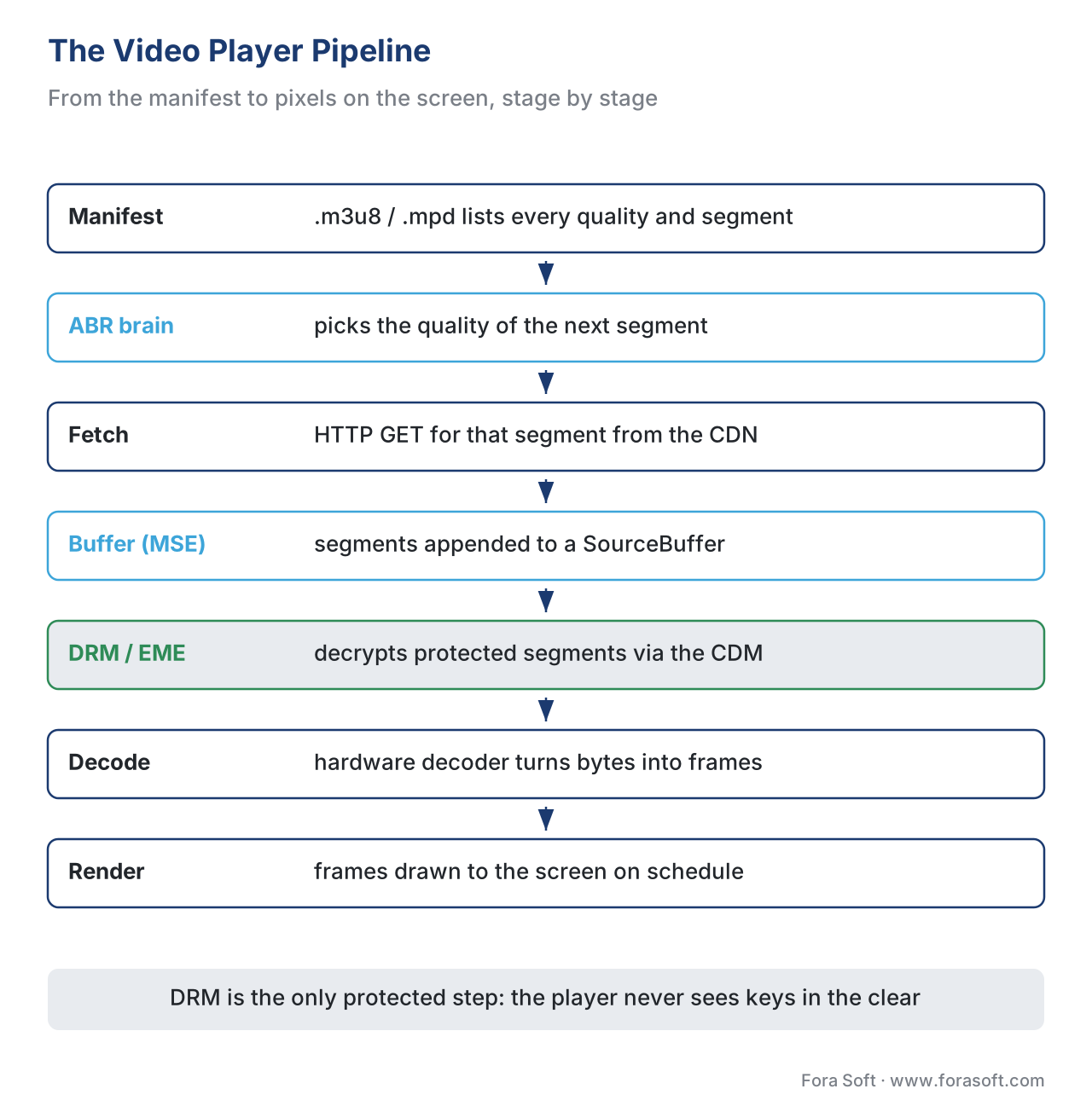 Figure 1. The player pipeline: the manifest tells the player what exists; the ABR brain picks a quality; segments are fetched, buffered, decoded, and rendered. DRM sits between buffer and decode.
The media pipeline: from bytes to pixels
To feed video into a browser's media element from JavaScript — rather than just pointing it at one file — the player uses a browser standard called Media Source Extensions (MSE). MSE is a W3C specification that adds two objects to the page: a MediaSource, which stands in for the video source, and one or more SourceBuffer objects, into which the player appends the segments it downloads. The original MSE became a W3C Recommendation on 17 November 2016, and the second edition (MSE version 2) is the current draft the browsers track. The W3C states plainly that MSE exists to let adaptive-streaming clients for DASH and HLS be built in JavaScript without a plugin. In short: MSE is the loading dock where the player stacks the segments it fetched, and the media element plays from that dock.
A minimal sketch shows the shape of it. This is illustrative, not production code:
// Attach a MediaSource to a normal <video> element.
const video = document.querySelector('video');
const mediaSource = new MediaSource();
video.src = URL.createObjectURL(mediaSource);

mediaSource.addEventListener('sourceopen', () => {
  // One SourceBuffer per track; the codec string must match the segments.
  const buffer = mediaSource.addSourceBuffer('video/mp4; codecs="avc1.640028"');

  // The ABR logic decides which segment URL to fetch next.
  fetch(nextSegmentUrl())
    .then((r) => r.arrayBuffer())
    .then((bytes) => buffer.appendBuffer(bytes)); // hand bytes to the player
});
Once segments are in the buffer, the browser's decoder turns the compressed bytes into raw frames, and the screen renders them on schedule. Decoding is where hardware acceleration matters: phones and TVs have dedicated chips that decode common formats such as H.264 and HEVC far more efficiently than software, which is why the codec your ladder uses is also a player decision — the deep treatment lives in codec strategy for OTT. The player must also check, before it picks a quality, whether the device can even decode that quality: there is no point selecting a 4K HEVC rendition for a device whose decoder tops out at 1080p H.264.
One more pipeline fact saves teams from a classic bug. The browser exposes the player's readiness through a property called readyState, defined in the HTML standard, with five levels from HAVE_NOTHING (no data) up through HAVE_ENOUGH_DATA (enough buffered to play to the end without stopping). When the buffer runs dry the element fires a waiting event and playback halts; when enough data returns it fires playing and resumes. Those two events are, quite literally, the start and end of a rebuffering stall — the thing your viewers hate most. A player that does not watch them cannot measure its own stalls.
Adaptive bitrate: the brain of the player
The ABR logic is the part that earns its keep. Every few seconds, just before it needs the next segment, the player asks one question: which quality should this next segment be? Pick too high and the download will not finish before the buffer empties, and the viewer stalls. Pick too low and you waste a good connection on soft video. The whole craft of ABR is making that trade-off well, thousands of times, without the viewer noticing any of it.
There are three broad families of approach, and it helps to know them by name even if you never implement one.
A throughput-based algorithm watches how fast recent segments downloaded and picks the highest quality whose bitrate fits comfortably under that measured speed, with a safety margin. It reacts quickly to a network that is genuinely getting faster or slower. Its weakness is that download speed is jittery, so a naive version flip-flops between qualities. Google's Shaka Player, an open-source MSE/EME player, uses a throughput-based heuristic at its core: its bandwidth estimator tracks recent download speed and selects the top variant that fits under a safety-adjusted estimate.
A buffer-based algorithm instead watches how much video is sitting in the buffer. A full buffer means the network is keeping up, so it is safe to upgrade; a draining buffer means trouble, so downgrade now. The best-known published example is BOLA (Buffer Occupancy based Lyapunov Algorithm), which the reference DASH player dash.js offers as one of its modes. Buffer-based logic is steadier than pure throughput but slower to grab a sudden bandwidth windfall.
A hybrid algorithm blends both — using throughput to react fast and buffer level to stay stable — and is what most production players actually ship in 2026. The precise mathematics of these algorithms, the control-theory framing, and how to tune them are the subject of adaptive bitrate streaming in our Video Streaming section; here the point is only to understand what the brain is trying to do and why no single rule is perfect.
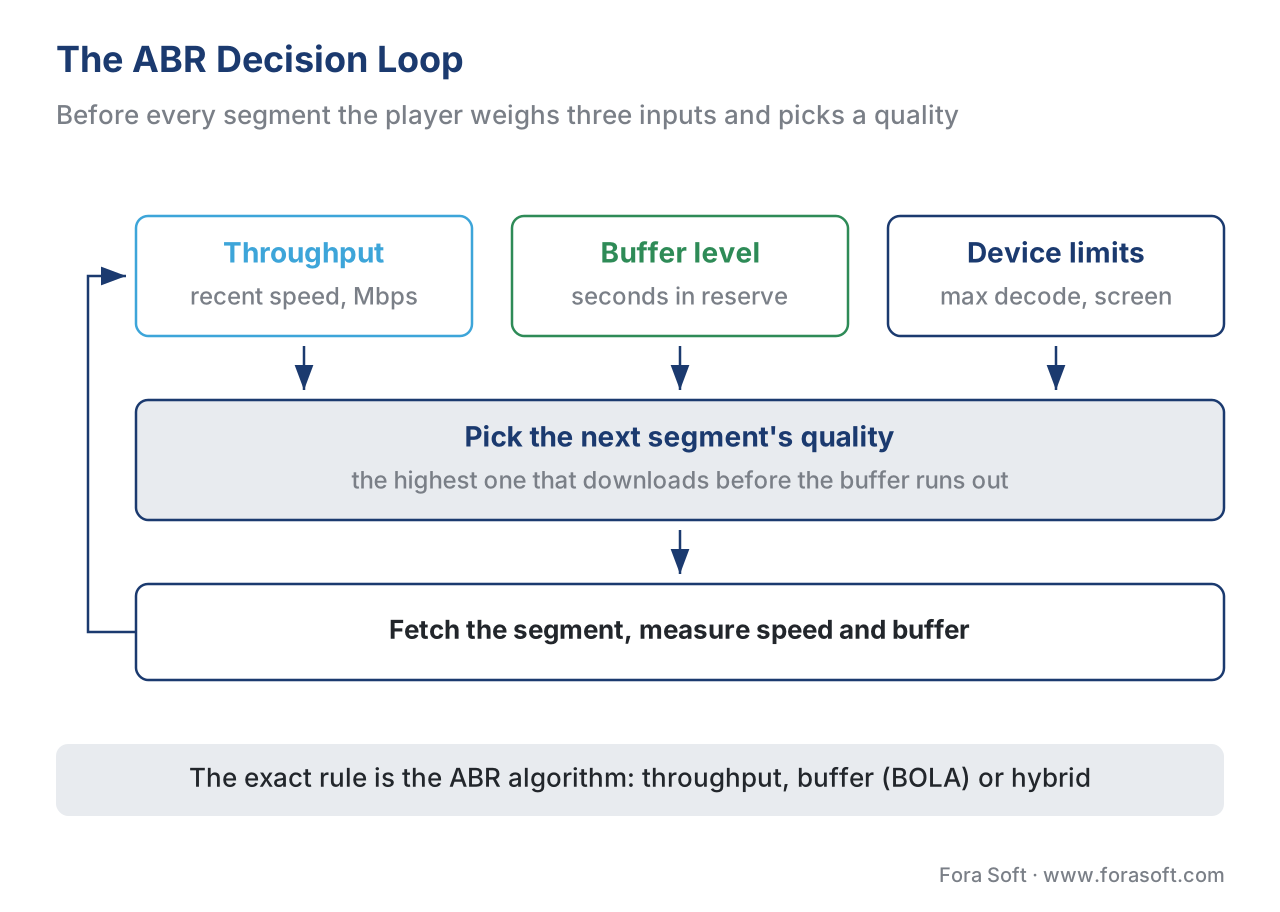 Figure 2. The ABR loop, simplified: measure throughput and buffer level, factor in device limits, pick the next segment's quality, repeat. The exact decision rule is the algorithm's job.
Two practical rules sit on top of whichever algorithm you choose. First, the player should start conservatively — a lower first segment so playback begins fast — then climb, because a quick start matters more to perceived quality than the first few seconds being pristine. Second, the player should not switch quality more often than the eye can tolerate; visible up-and-down churn looks worse than holding a slightly lower steady level. A player that ignores either rule will test badly even with a textbook-correct core algorithm.
Buffer management: the cushion that hides the network
The buffer is the few seconds of already-downloaded video the player keeps ahead of the play head. It is the single most important defence against stalling, because the internet delivers video in uneven bursts and the buffer smooths those bursts into steady playback. Picture it as a water tank between an irregular tap and a steady faucet: as long as the tank never empties, the faucet flows evenly even though the tap stutters.
Players express their target as a buffering goal — how many seconds of video to keep ahead. A typical video-on-demand player aims for something like 20 to 30 seconds of forward buffer; live streams keep less, because holding a large buffer means falling further behind the live edge. There is a real tension here: a bigger buffer is safer against stalls but makes the player slower to react to an ABR decision, because the change only becomes visible once the viewer reaches the newly downloaded part. Shaka Player exposes this directly through its bufferingGoal setting and notes that a smaller goal lets a new ABR decision take effect sooner. Tuning this number is one of the highest-leverage knobs in player engineering.
Let us put numbers on why the buffer matters. Suppose your segments are 4 seconds long and your player targets a 24-second forward buffer. That means the player tries to keep 24 ÷ 4 = 6 segments downloaded ahead of the viewer at all times. If the network drops out completely, the viewer keeps watching for up to 24 seconds before the picture freezes — plenty of time for a brief tunnel or a Wi-Fi handoff to pass unnoticed. Shrink the goal to 8 seconds and the same outage now freezes the screen after 8 seconds. The buffer is, quite literally, how many seconds of bad network your viewer will never see.
The buffer also has an upper bound the player must respect. The MSE SourceBuffer has finite memory, and appending without ever clearing it eventually throws a QuotaExceededError. A real player therefore evicts video the viewer has already watched, keeping a window around the current position rather than the entire title. Forgetting this is a common cause of long-session crashes on memory-constrained devices like older smart TVs.
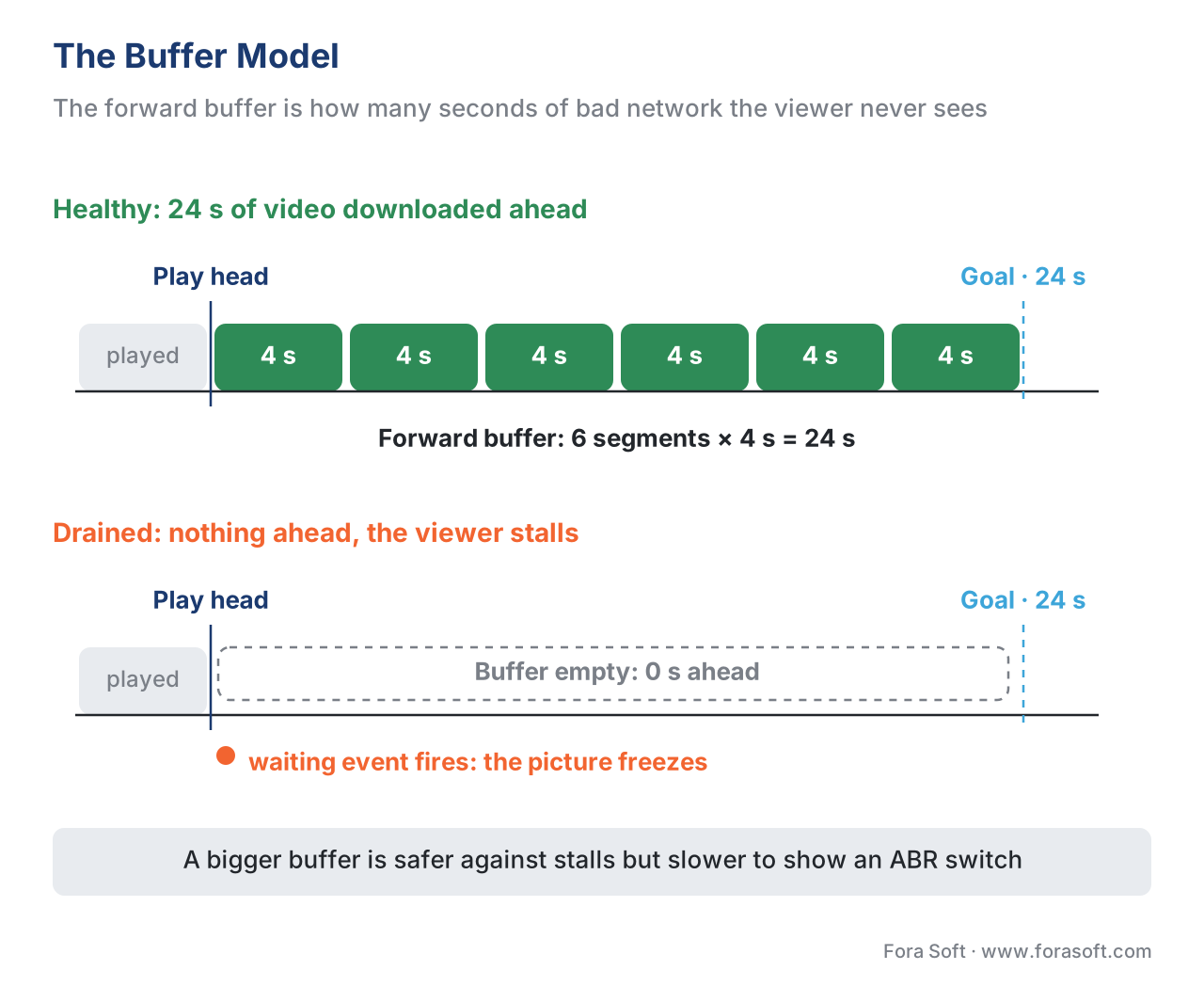 Figure 3. The buffer model: video already downloaded sits ahead of the play head up to the buffering goal. When it drains to zero, the player fires a waiting event and the viewer sees a stall.
Error recovery: what to do when a piece fails
On the open internet, segments will fail to arrive: a request times out, a CDN edge returns a 404, a byte range comes back corrupt, or a live encoder leaves a tiny gap in the timeline. The difference between an amateur player and a professional one is almost entirely in what happens next. A good player treats most failures as routine and recovers without the viewer ever knowing; a poor one shows an error and gives up.
A well-engineered recovery ladder has several rungs, tried in order. The mildest is a retry with backoff: ask the CDN for the same segment again, waiting a little longer between attempts, because most edge failures are transient and clear within a second or two. If a segment is genuinely unavailable at the chosen quality, the player can fall back to another rendition — fetch the same time range at a different quality, which may sit on a healthier part of the cache. If the encoder left a small hole in a live stream, the player can jump the gap — skip a fraction of a second of missing timeline rather than freeze on it forever; both Shaka Player and the Android player Media3 do this automatically. Only when none of that works should the player surface a fatal error, and even then a robust player tries a full reload from the manifest before declaring defeat.
The reason this matters commercially is that recovery failures cluster exactly where you can least afford them: live premieres and big spikes, when the CDN is hottest and transient errors are most common. We cover the delivery side of that spike in live event delivery and the premiere spike; the player side is the other half of surviving it.
Common mistake: treating every network error as fatal. The most frequent player bug we see is a recovery path that throws up an error screen on the first failed segment instead of retrying, falling back a rendition, or jumping a gap. On a flaky mobile connection this turns a recoverable two-second blip into a session-ending error — and the viewer blames your service, not their network. Always build the recovery ladder; never let a single 404 end the session.
A media element is not a video player
It is worth stating bluntly, because the confusion costs real money: the browser's <video> element, or a phone's built-in media view, is not an adaptive streaming player. It can play a single progressive file, and on some platforms it can play one streaming format natively — Apple's media stack plays HLS directly, which is why the native iOS and Safari path is genuinely simpler, a point we develop in iOS and Android playback. But the manifest-parsing, ABR, buffer-tuning, and recovery logic this article describes are not in the media element. They are added by a player engine layered on top.
The table makes the gap concrete.
| Capability | Plain media element | Adaptive player engine |
|---|---|---|
| Play one fixed-quality file | Yes | Yes |
| Parse an HLS/DASH manifest | No (except native HLS on Apple) | Yes |
| Switch quality with ABR | No | Yes |
| Tune the buffer / buffering goal | No (browser default only) | Yes |
| Recover from a failed segment | No | Yes |
| Drive DRM via EME for all three systems | No | Yes |
| Emit QoE metrics (startup, stalls, switches) | Minimal | Yes |
This is why, in practice, almost no serious OTT service writes a player from scratch. On the web they wrap an open-source engine — Shaka Player (Google), hls.js (HLS over MSE), or dash.js (the reference DASH player) — or license a commercial one. On mobile they use the platform players: AVPlayer on Apple devices and ExoPlayer, now shipped as Jetpack Media3, on Android. We compare the browser options in web playback: HTML5, MSE, EME, and the open-source players. The engineering work is rarely the core algorithm; it is the integration, the per-device testing, and the tuning.
Where DRM fits in the player
One more block sits inside the pipeline for any premium catalog: digital rights management (DRM) — the technology that keeps paid content from being copied. In the browser, the player talks to the device's built-in decryption module through another W3C standard called Encrypted Media Extensions (EME), which became a W3C Recommendation on 18 September 2017. EME is the player's hook into the three DRM systems — Google Widevine, Microsoft PlayReady, and Apple FairPlay — that between them cover every device. The player's job is narrow but essential: when it hits encrypted segments, it asks EME for a licence, EME asks the right DRM system, and the decrypted frames flow on to the decoder. The player never sees the keys in the clear.
The important architectural fact, which we explain fully in multi-DRM: one workflow, every device, is that with the cbcs scheme of Common Encryption (ISO/IEC 23001-7) you encrypt the segments once and issue licences for all three DRM systems from the same files — "encrypt once, licence many." The player on each platform simply requests the licence its native DRM understands. How EME drives that exchange inside the browser is the subject of Encrypted Media Extensions and the browser DRM stack. For the player engineer, the rule to remember is that DRM adds a licence round-trip before the first frame, so it directly affects startup time — which is one more thing the player must measure.
Measuring the player: you cannot improve what you cannot see
Everything above only becomes manageable if the player reports what it experiences. The four numbers that define a player's quality of experience (QoE) are startup time (how long from press-play to first frame), rebuffering (how often and how long the picture froze), average bitrate (the quality actually delivered), and errors (failures the viewer saw). The player is the only place these can be measured accurately, because only the player knows when its own buffer emptied or its own ABR switched. It emits these as small data messages — beacons — to an analytics back end such as Mux Data or Conviva.
We treat the player-side instrumentation in detail in player QoE instrumentation, and the definitions of the QoE metrics themselves in the Video Streaming section's video QoE metrics. The point to carry from this article is simply that measurement is not an afterthought bolted on later; it is a core responsibility of the player, designed in from the first build.
Free download: Video Player Engineering ChecklistThe buffer, ABR, recovery, DRM and QoE decisions to settle before you ship a player, on a single sheet.Where Fora Soft fits in
Fora Soft has built video streaming, OTT and Internet-TV, conferencing, e-learning, telemedicine, and surveillance software since 2005 — more than 625 shipped projects for 400-plus clients. Player engineering across the full device matrix is exactly the kind of scale problem we are built for: a service that must start fast and never stall for hundreds of thousands of concurrent viewers, on screens ranging from a low-end smart TV to the newest phone, needs the buffer tuning, ABR configuration, recovery ladder, and QoE instrumentation described here wired correctly on every platform. We are vendor-neutral — we tune Shaka, hls.js, dash.js, AVPlayer, and Media3 to the job rather than selling one engine — and we lead with the scale and cost requirement before the feature list.



The handbook
Fora Soft Video Engineering Handbook
We wrote a seven-volume handbook, 9,000+ pages, that takes the video stack from a single pixel to production, and someone who works through it can design and build the player this article describes. Start with volume 3: ABR algorithms and their tuning, buffer models, player engines on every screen and the EME and DRM path into the decoder. Volume 2 covers the HLS and DASH manifests and segments your player parses, and volume 1 the codecs and encoding ladder it has to decode. Written by Nikolay Sapunov, CEO at Fora Soft.
Does your player start fast, hold quality and recover from a bad segment on every screen?
Tell us which devices you ship to and where viewers stall, and we will map the buffer goals, ABR settings, recovery ladder and QoE beacons for Shaka, hls.js, dash.js, AVPlayer and Media3. 250+ video products shipped since 2005.
See our case studies
Case study
Vodeo
An iOS movie-rental app for Janson Media with 100K+ users, adaptive switching between 480p, 720p and 1080p, and playback sent to the TV over AirPlay and Chromecast — the ABR ladder a player climbs on every title.
Case study
Worldcast Live
A live concert platform streaming to 10,000 concurrent viewers at 0.4–0.5 s latency — where buffer goals shrink and every failed segment has to recover without the audience noticing.
Case study
Drundoo
A Bulgarian internet-TV platform with 60 live channels, catch-up and a VOD library — one service, live and on-demand playback, on the devices its viewers already own.
What to read next
Players
Player QoE Instrumentation: Startup, Stalls, Beacons
Wire the waiting and playing events into beacons you can act on.
Analytics
Video QoE: Startup Time and Rebuffering Explained
The two numbers that show whether your buffer tuning works.
DRM
Encrypted Media Extensions & the Browser DRM Stack
The EME path between the buffer and the decoder, in depth.
Players
Cross-Platform Video Player Strategy for OTT
One player design across web, mobile and TV engines.
References
- Media Source Extensions™ — W3C Recommendation, 17 November 2016 (MSE version 2 editor's draft current). Defines
MediaSourceandSourceBuffer; states MSE enables DASH/HLS adaptive clients in JavaScript. Tier 1. https://www.w3.org/TR/media-source-2/ - Encrypted Media Extensions — W3C Recommendation, 18 September 2017. The browser API through which a player drives Widevine, PlayReady, and FairPlay decryption. Tier 1. https://www.w3.org/TR/encrypted-media/
- HTML Standard (WHATWG), §4.8 Media elements — defines
readyState(HAVE_NOTHING … HAVE_ENOUGH_DATA),networkState, and thewaiting/playingevents that bound a rebuffering stall. Tier 1. https://html.spec.whatwg.org/multipage/media.html - HTTP Live Streaming — IETF RFC 8216 — the HLS
.m3u8playlist format the player parses. Tier 1. https://www.rfc-editor.org/rfc/rfc8216 - Dynamic Adaptive Streaming over HTTP (MPEG-DASH) — ISO/IEC 23009-1 — the DASH
.mpdmanifest format. Tier 1. https://www.iso.org/standard/83314.html - Common Encryption (CENC) — ISO/IEC 23001-7 — defines the
cenc(AES-CTR) andcbcs(AES-CBC) schemes;cbcsenables encrypt-once / licence-many across all three DRMs. Tier 1. https://www.iso.org/standard/68042.html - Shaka Player documentation and FAQ — Google. Throughput-based AbrManager;
streaming.bufferingGoaland the trade-off between buffer size and ABR responsiveness; automatic gap-jumping. Tier 3. https://github.com/shaka-project/shaka-player/blob/main/docs/tutorials/faq.md - dash.js (DASH Industry Forum reference player) — offers throughput, BOLA (buffer-based), and dynamic (hybrid) ABR rules. Tier 3. https://github.com/Dash-Industry-Forum/dash.js
- Jetpack Media3 / ExoPlayer documentation — Android Developers (Google). The application-level adaptive player for Android, Android TV, and Fire TV; built-in Widevine and buffer/load-control configuration. Tier 3. https://developer.android.com/media/media3/exoplayer
- AVFoundation / AVPlayer and HLS Authoring Specification — Apple. Native HLS playback and FairPlay on Apple platforms; LL-HLS additions. Tier 3. https://developer.apple.com/documentation/avfoundation/avplayer
Conflict resolution: where vendor "ABR explained" listicles imply a single best algorithm or that the <video> tag is itself an adaptive player, this article follows the W3C MSE/EME Recommendations and the HTML standard — the media element provides playback and readiness state; the adaptive logic is added by a player engine — and the first-party player docs (Shaka, dash.js, Media3, AVPlayer) for what each engine actually does. ABR-algorithm mechanics are deferred to the Video Streaming section per the section's cross-linking rule.
