


Why this matters
For most streaming services, the iPhone and the Android phone are the two screens that carry the majority of watch time, and they are also the two screens that decide whether your app ships at all — because Apple and Google review every app before it reaches a store. A media founder or product manager who treats "the mobile app" as one line item is in for a surprise: iOS and Android share almost no playback code, enforce different digital-rights rules, and impose store policies that can reshape your pricing and your encoding. This article explains both native stacks in plain language so you can scope a mobile build, judge a vendor's SDK, brief your engineers, and avoid the two mistakes — encrypting in the wrong scheme and ignoring an app-store rule — that quietly sink mobile launches. It is the mobile companion to the OTT client matrix, which maps every screen you must cover.
Two phones, two completely separate playback stacks
Start with the thing that catches every first-time team off guard: an iPhone and an Android phone do not share a video player. On the web you can ship one JavaScript player and cover most browsers, as we cover in web playback. On mobile there is no such shortcut. Each platform ships its own player engine, speaks its own preferred streaming format, and enforces its own copy-protection system. You build, test, and maintain two stacks in parallel.
A streaming "stack" here means the chain of parts that turns a file on a server into moving pictures on the glass: the player (the software that fetches and decodes the video), the streaming format (how the video is chopped into small pieces and described to the player), and the digital rights management system, called DRM — the lock that stops a paying viewer's device from copying premium content. On mobile, all three differ between Apple and Google. The rest of this article walks each stack, then the two things they share — offline download and the app-store rules.
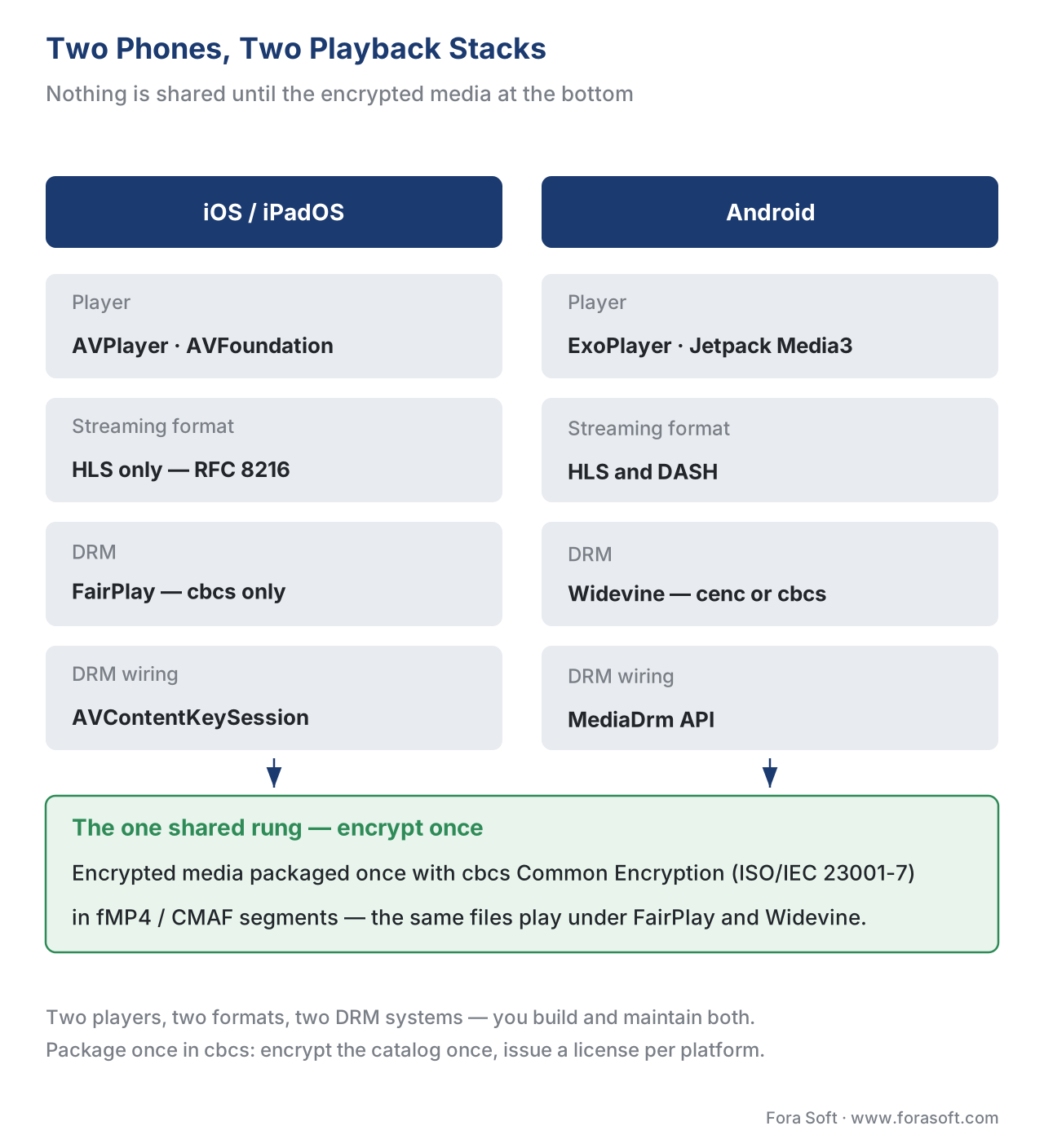 Figure 1. Two mobile stacks, almost nothing shared. The only common rung is the encrypted media itself when you package once with
 cbcs Common Encryption.
iOS: AVPlayer, HLS, and FairPlay
On Apple's phones and tablets, you almost never write a video player from scratch. The operating system includes one, called AVPlayer, part of Apple's media framework AVFoundation. Hand AVPlayer the address of a stream and it downloads the stream, reads its description, decodes the video using the phone's hardware, and adapts the quality up and down as the network changes. That continuous quality-switching is adaptive bitrate streaming, shortened to ABR, and getting it for free from the system is the main reason iOS playback is, in the happy path, the simpler of the two.
The catch is the format. AVPlayer plays exactly one adaptive streaming format natively: HTTP Live Streaming, or HLS, Apple's own format, standardized as IETF RFC 8216. It does not play the other major format, MPEG-DASH, on its own. If your packaging pipeline produces only DASH, your iOS app has nothing to play. So the first rule of iOS is: you must produce HLS. We cover producing both formats from one set of files in packaging with CMAF, HLS, and DASH.
The second piece is protection. Apple's DRM is FairPlay Streaming, often shortened to FairPlay or FPS. The modern way an app drives it is a class called AVContentKeySession: when AVPlayer reaches an encrypted segment, the app uses that session to request a license — the small data packet that contains the decryption key and the rules for using it — from your license server, hands the license back, and the system decrypts the video inside protected memory. Your app code shuttles messages; it never touches the raw key. The crucial detail, the one listicles get wrong, is that FairPlay requires a specific encryption scheme — cbcs — which we explain next and cover in full in the DRM section.
A minimal sketch of the FairPlay wiring, illustrative rather than production code:
// Attach a content-key session to drive FairPlay for an HLS asset.
let keySession = AVContentKeySession(keySystem: .fairPlayStreaming)
keySession.setDelegate(self, queue: DispatchQueue.main)
keySession.addContentKeyRecipient(asset)   // asset is an AVURLAsset for the .m3u8

// In the delegate, you receive a key request, build a license request
// (an SPC), send it to your license server, and return the response (a CKC).
// Never embed a real key in the app — the server issues it per session.
Android: ExoPlayer, Media3, and Widevine
Android also ships a basic media player, but real streaming apps do not use it. The standard is ExoPlayer, Google's open-source player engine. Since 2023 ExoPlayer has shipped inside Google's app-library family Jetpack Media3 (the package name androidx.media3); the old standalone library is deprecated and frozen, so new work targets Media3. As of March 2026 the current line is Media3 1.10. When this article says "ExoPlayer," it means the engine as delivered by Media3.
ExoPlayer is more flexible than AVPlayer on format: it plays HLS, MPEG-DASH, Microsoft Smooth Streaming, and plain progressive files. Many Android-first services standardize on DASH, but ExoPlayer playing HLS too means a single Android codebase can consume whatever your packaging produces. The trade-off for that flexibility is that you assemble and configure the player yourself rather than receiving a finished one from the system.
Android's DRM is Widevine, made by Google and built into the OS. ExoPlayer reaches it through Android's platform interface for content protection, the MediaDrm API. You tell the player which DRM system to use and where your license server lives, and ExoPlayer's default session manager handles the license exchange. Widevine, like FairPlay, runs on Common Encryption — and here is the convergence that saves real money.
Two facts about Widevine on Android decide what your app can do, and both come straight from Google's own documentation. First, the encryption scheme: the table below is from the Android Media3 DRM guide (last updated 2026-03-09).
| Widevine scheme | Min. Android version | API level | Formats supported |
|---|---|---|---|
cenc (AES-CTR) |
4.4 | 19 | DASH, HLS (fMP4 only) |
cbcs (AES-CBC) |
7.1 | 25 | DASH, HLS (fMP4 only) |
The cbcs scheme — the one FairPlay also needs — works on Android 7.1 (2016) and newer, which is effectively every active phone in 2026. That is what makes "package once" possible across both platforms.
Second, the security level. Widevine grades each device into a security level that controls the maximum quality a content owner will allow. L1 means the keys and the decoded video stay inside a hardware-isolated zone on the chip, called a Trusted Execution Environment (TEE); studios require L1 for 1080p and 4K. L3 means protection is software-only; content owners commonly cap L3 devices at 480p or 720p. A flagship phone is usually L1; a cheap or older device may be L3, and the same app will be allowed less quality there. This is a content-owner policy enforced through DRM, not a bug in your player — and it is why a title that streams in HD on one phone caps at standard definition on another.
Encrypt once, license many — the one rung the two stacks share
Here is the payoff. Common Encryption — the umbrella standard ISO/IEC 23001-7 — defines two encryption schemes: cenc (counter mode) and cbcs (cipher-block-chaining with sub-sampling). FairPlay only accepts cbcs; Widevine accepts both but supports cbcs. So if you package your video once, encrypted with cbcs, using fragmented-MP4 segments (the container the modern CMAF format uses, ISO/IEC 23000-19), the same encrypted files play under FairPlay on iOS and under Widevine on Android. You do not encrypt the catalog twice. You encrypt once and issue a different license per platform from your key server.
The common mistake this prevents is encrypting in cenc only. A team packages for Android, ships, then adds iOS and finds every video shows a black screen on iPhone — because FairPlay cannot read cenc. The fix is a re-encrypt of the whole catalog, which on a large library is days of compute and a delivery delay. Decide cbcs before you encrypt anything. How the single workflow is wired end to end is the subject of multi-DRM: one workflow, every device; the scheme details live in CENC, CTR, and CBCS explained.
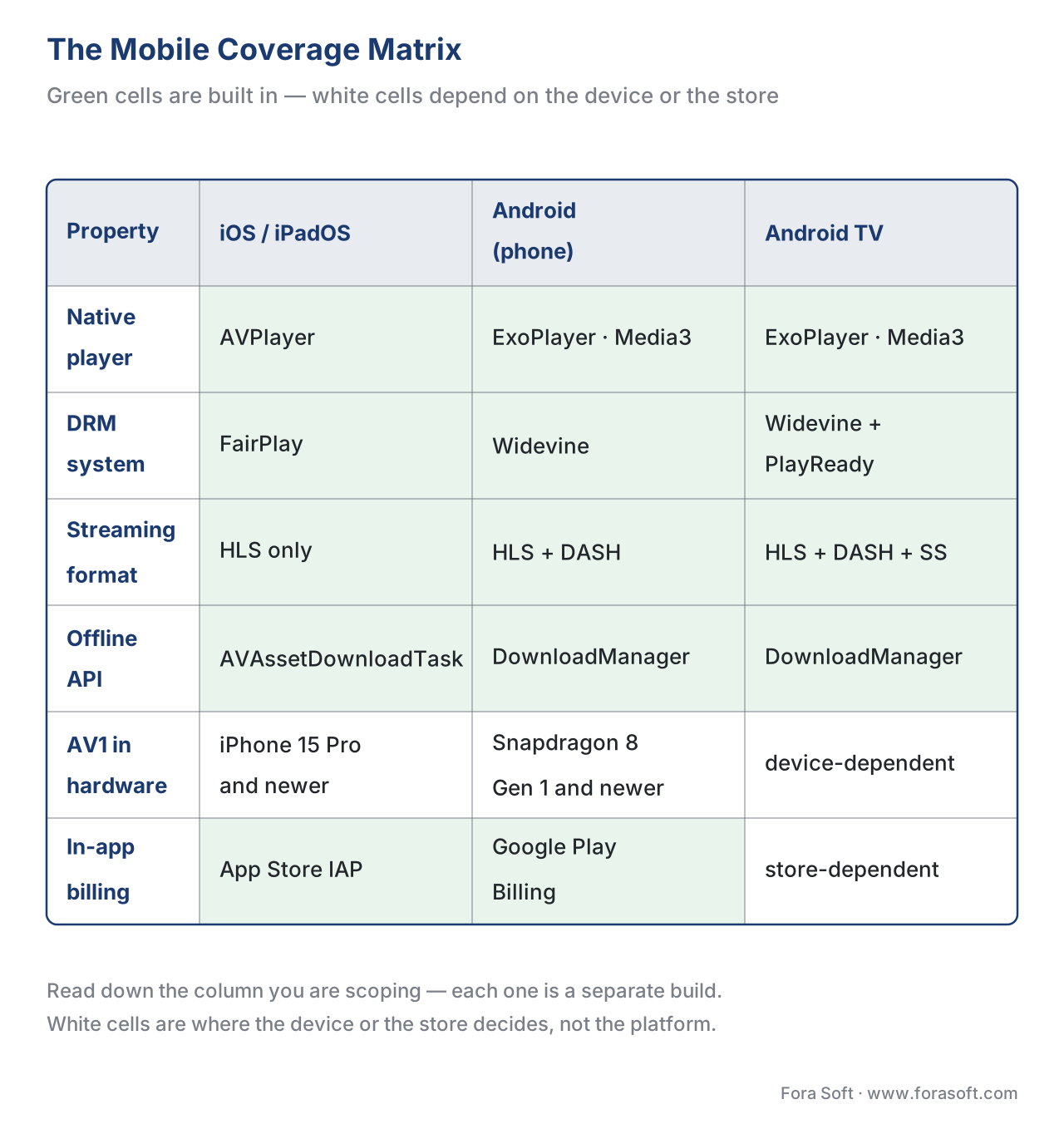 Figure 2. The mobile coverage matrix. Read down the column you are scoping; the green cells are what each platform supports natively.
A note on codecs: what the chip can decode
Picking a streaming format is not the same as picking a codec — the compression method that shrinks the video, such as H.264, HEVC, or AV1. A phone can only play a codec its hardware can decode, and the codec map differs by device age. H.264 plays everywhere. HEVC (also called H.265) has hardware decoding on well over 95% of phones shipped today. AV1, the newest and most efficient, decodes in hardware only on recent silicon: on Apple, the iPhone 15 Pro and every iPhone 16 and 17; on Android, chips such as Snapdragon 8 Gen 1 and newer, Google Tensor G2 and newer, and recent Samsung and MediaTek parts, with mid-tier support widening through 2026. The practical rule: never hand a device a rendition it cannot decode. The codec internals themselves belong to our Video Encoding section; here the only job is to match the encoding ladder to the decoders in the field, which we cover in codec strategy for OTT.
Offline download: a second, separate playback path
Letting a viewer download an episode for a flight is not the same code as streaming it, on either platform. Offline is a second playback path with its own download manager and its own stored license.
On iOS, you download HLS content with AVAssetDownloadURLSession and an AVAssetDownloadTask, which pulls the segments and stores them securely on the device. For protected content, you also fetch a persistent FairPlay key — an offline license that, unlike a streaming license, is written to disk so the video plays with no network. On Android, ExoPlayer's DownloadManager (driven by a DownloadService) fetches the media, and a helper called OfflineLicenseHelper downloads a Widevine offline license, returning a small keySetId you store and later hand back to the player to unlock the file.
The number that surprises product teams is storage. Work the arithmetic out loud. A 1080p stream at five megabits per second uses 5 ÷ 8 = 0.625 megabytes every second, which is 0.625 × 3600 ≈ 2,250 megabytes — about 2.25 GB — per hour. A 45-minute episode is therefore roughly 1.7 GB at that quality. Offer "download in HD" without a quality choice and a season fills a budget phone fast, so most apps let the viewer pick a download quality and default to a lower rung. Two more constraints come from the content owner, not the platform: the offline license carries an expiry (the download stops playing after, say, 30 days or 48 hours after first play), and some studios forbid offline entirely. Those rules are set in license policy, which we cover in license policy: rentals, offline, and output control, and the client-side behavior in offline download and playback.
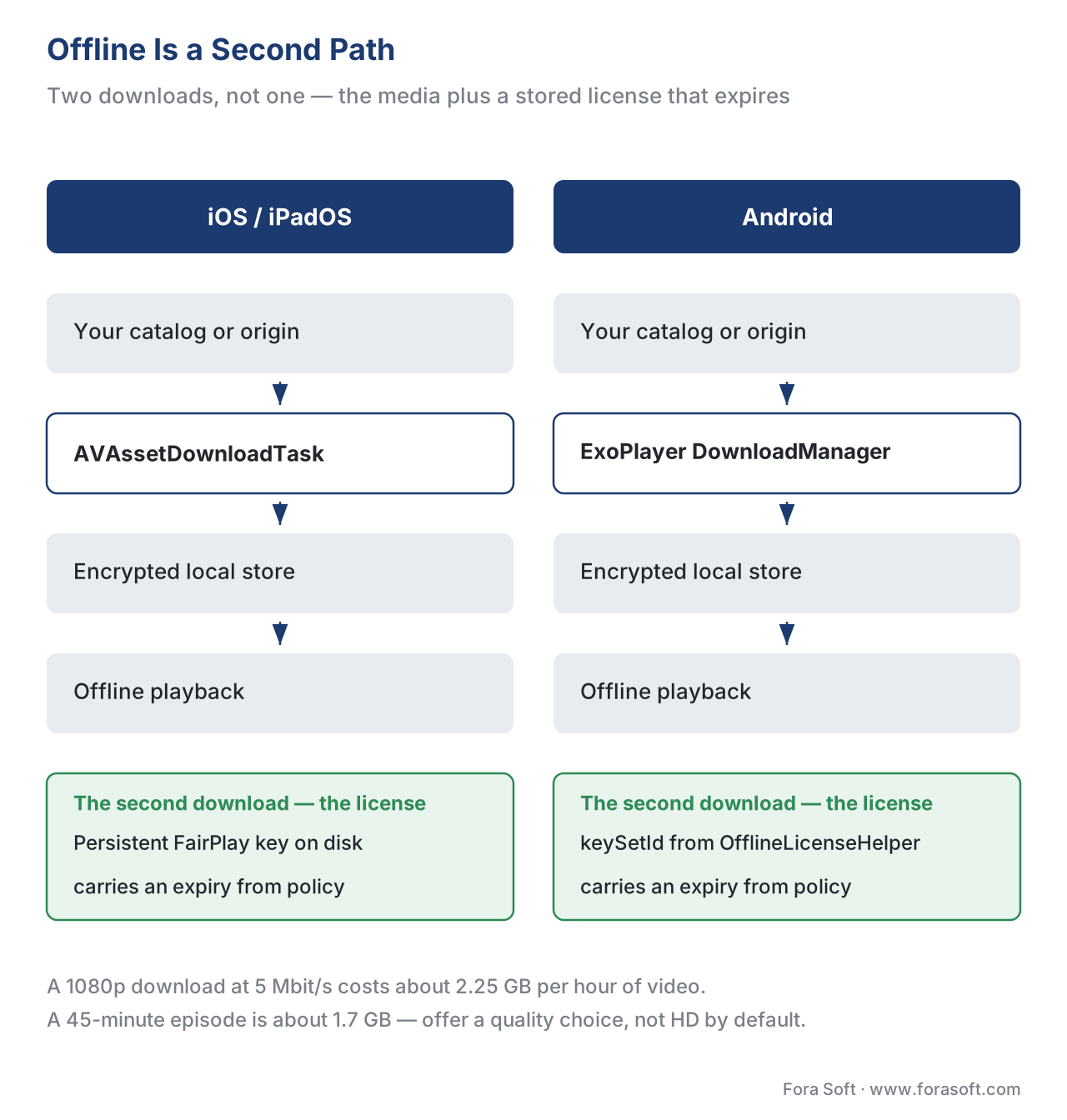 Figure 3. Offline is two downloads, not one: the media and a persistent license that carries an expiry.
The app-store rules that shape billing and playback
The rules that most often reshape a mobile plan are not in any video spec. They are Apple's and Google's store policies, and they touch both how you play and how you charge.
On playback, Apple's App Store Review Guideline 2.5.7 is explicit: video content longer than ten minutes delivered over a cellular network must use HLS and include a baseline stream of at least 192 kbps. In practice this restates "produce HLS for iOS" and "include a low rung in your ladder for weak networks." Ship long-form video without HLS and Apple rejects the build.
On money, the stakes are higher. Both stores require that digital subscriptions sold inside the app go through the store's own billing — Apple's In-App Purchase and Google Play Billing — and both take a commission. The standard rate is 30%, dropping to 15% for subscribers after their first year and for small developers under the stores' small-business programs. Do the arithmetic on a $9.99 monthly subscription at the standard 30%: the store keeps $9.99 × 0.30 = $3.00 and you receive $6.99. At 10,000 in-app subscribers that is $30,000 a month routed to the store before you pay for a single server. That single line is why monetization strategy and mobile engineering cannot be planned separately; the billing and entitlement side is subscription billing and entitlement.
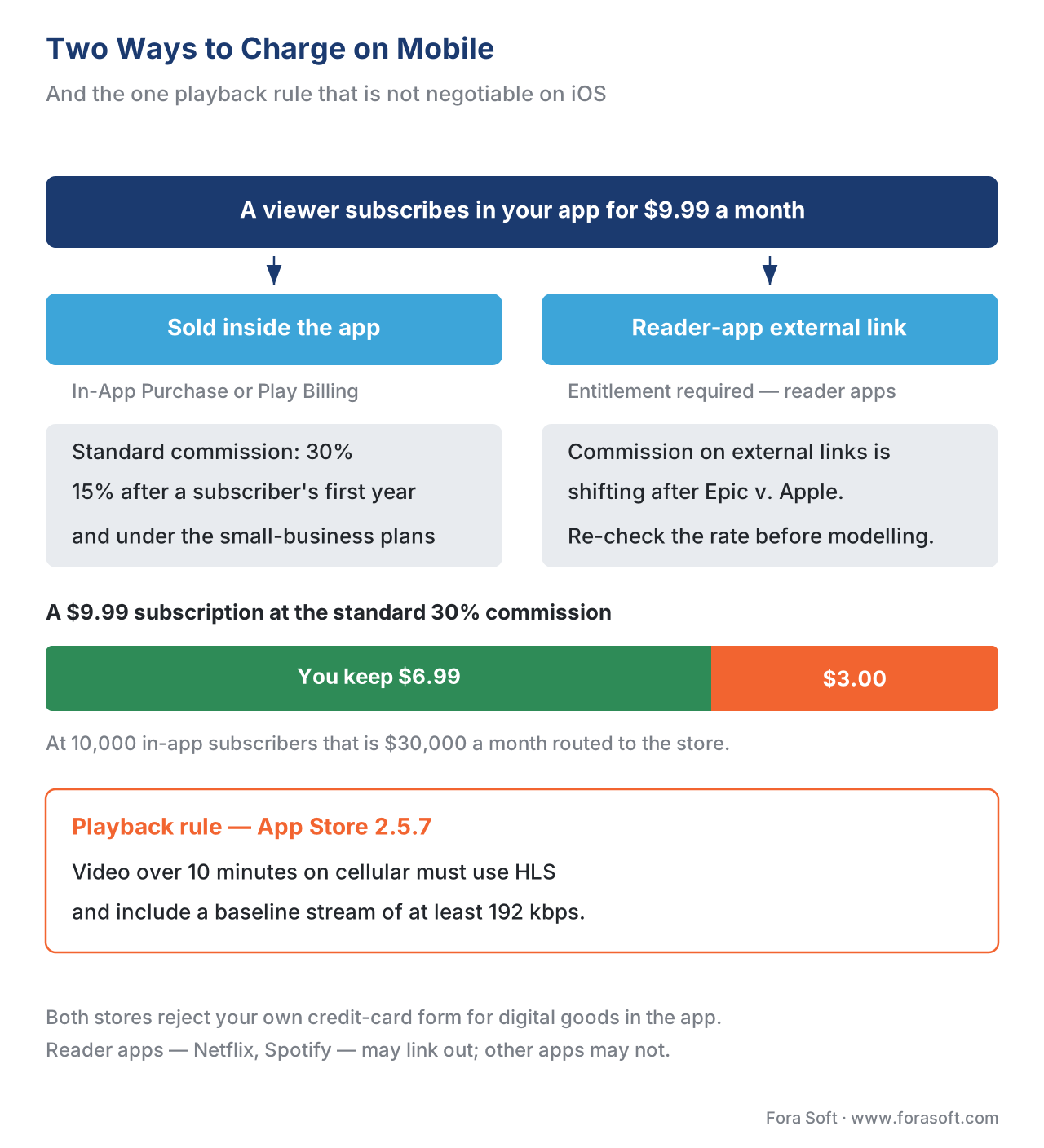 Figure 4. Two ways to charge on mobile, and the one playback rule that is not negotiable on iOS.
There is a well-trodden exception. A "reader" app — one whose main job is to play content the user bought or subscribed to elsewhere, the category Netflix and Spotify sit in — can apply for an entitlement to place a link to its own external sign-up page, where a subscription carries no store commission. The legal ground here is shifting: a 2025 U.S. court ruling in Epic Games v. Apple forced Apple to allow external payment links, and a December 2025 appeals decision partially reversed that, leaving Apple able to charge some "reasonable" fee on external purchases at a rate not yet fixed at the time of writing. Treat the exact commission on external links as a moving number and re-check it before you model revenue.
Common mistake — the four that sink mobile launches. First, encrypting in
cenconly, so every video is a black screen on iPhone; packagecbcs. Second, producing DASH only, so iOS has nothing to play; always produce HLS. Third, building your own credit-card form for subscriptions inside the app, which both stores reject; use In-App Purchase or qualify as a reader app. Fourth, assuming Widevine L1 everywhere and promising 4K on phones; most devices stream at L3 and cap below HD.
Native or cross-platform: the build-cost question
Because the two stacks share so little, teams ask whether a cross-platform framework can collapse them into one codebase. React Native and Flutter can, to a point: both run a single application codebase on iOS and Android, and both have video components that wrap the native players underneath — AVPlayer on iOS, ExoPlayer/Media3 on Android. You write one UI; the actual decoding and DRM still run on each platform's native engine. That saves real effort on screens and navigation. It saves less on the hard part, which is per-platform DRM wiring, offline behavior, and device testing — the work that does not disappear no matter which framework draws the buttons. The honest framing for a CTO: cross-platform shrinks the interface budget, not the playback-and-protection budget. The full trade-off is the player on every screen: a unified strategy, and the living-room siblings of these two platforms — tvOS and Fire TV — are Apple TV / tvOS and Fire TV.
Free download: iOS & Android Native Playback Spec SheetOne page with the native player, streaming format, DRM, offline API and app-store-billing facts for both platforms, plus the encrypt-oncecbcs rule that lets a single package serve FairPlay and Widevine.
Where Fora Soft fits in
Mobile is usually where an OTT service meets the most viewers and the most ways to fail, because the iOS and Android stacks must each be correct, protected, and store-compliant at the scale of a full catalog. Fora Soft has built video streaming, OTT/Internet TV, e-learning, telemedicine, and video-conferencing apps since 2005 — 625+ projects for 400+ clients across 20+ years — so the native-playback patterns here (AVPlayer with FairPlay, ExoPlayer/Media3 with Widevine, cbcs package-once, offline licenses, and the app-store-billing decisions that ride alongside them) are the day-to-day of our streaming work. We are vendor-neutral: we translate the platform rules into a build, rather than reselling a single SDK.



The handbook
Fora Soft Video Engineering Handbook
We wrote a seven-volume handbook that takes the whole video stack apart, from the pixel to production, across 9,000+ pages — so the person who reads it can design and build the two mobile apps this article scopes, not just name their parts. Volume 3 goes deepest into what those apps actually do: players and recovery after a stall, the multi-DRM workflow that issues a FairPlay license and a Widevine license from one cbcs package, and the delivery economics behind every rung you ship. Volume 1 covers the codecs your renditions are made of — H.264, HEVC and AV1, and what each chip can decode — and volume 2 the transport and packaging that produce the HLS and CMAF segments AVPlayer and ExoPlayer read. Written by Nikolay Sapunov, CEO at Fora Soft.
Scoping the iOS and Android builds for your streaming service?
Tell us what your catalog, your DRM and your pricing look like, and we will come back with what each native app has to carry, whether a cross-platform framework saves you anything on this one, and what the store commission does to your per-subscriber margin — 250+ video products shipped since 2005.
See our case studies
Case study
Sprii
Two native stacks kept in parallel — Swift on iOS, Kotlin on Android — streaming 72,000+ live events for 3,000+ brands, with €365M+ in cumulative sales behind them.
Case study
Franchise Record Pool
React Native apps on both stores selling a $19.99/month subscription over a 720,000-track licensed catalog: the cross-platform question and the store-billing question in one build.
Case study
Mindbox
RTSP camera feeds repackaged through FFmpeg into HLS so the iOS and Android apps get a format they can play natively — 50+ deployments since 2020.
What to read next
Clients
The OTT Client Matrix: Web, Mobile, Smart TV
Every screen you have to cover, and what each one costs to keep working.
DRM
Multi-DRM: One Workflow for Every Device
How one cbcs package issues FairPlay, Widevine and PlayReady licenses.
Playback
Offline Download and Playback
The download manager, the stored license and the expiry, worked through in full.
Monetization
Subscription Billing and Entitlement
What happens after the store takes its cut: who is entitled to watch, and how you know.
References
- HTTP Live Streaming — IETF RFC 8216. IETF, 2017. The HLS playlist format AVPlayer plays natively and ExoPlayer parses on Android. Tier 1. https://www.rfc-editor.org/rfc/rfc8216
- Common Encryption in ISO base media file format files — ISO/IEC 23001-7. ISO/IEC. Defines the
cenc(AES-CTR) andcbcs(AES-CBC) schemes;cbcsis the FairPlay-compatible scheme that enables encrypt-once across iOS and Android. Tier 1. https://www.iso.org/standard/68042.html - Common Media Application Format (CMAF) — ISO/IEC 23000-19. ISO/IEC. The fragmented-MP4 segment format that lets one encrypted package serve both HLS and DASH. Tier 1. https://www.iso.org/standard/79106.html
- Encrypted Media Extensions. W3C Recommendation, 18 September 2017. The browser counterpart to the native DRM APIs (
AVContentKeySession,MediaDrm) referenced for contrast. Tier 1. https://www.w3.org/TR/encrypted-media/ - App Store Review Guidelines (§2.5.7 cellular HLS; §3.1 payments). Apple, controlling app-store policy. 2.5.7 requires HLS plus a 192 kbps baseline for cellular video over ten minutes; 3.1 governs In-App Purchase and the reader-app entitlement. Tier 1 (issuing-body policy). https://developer.apple.com/app-store/review/guidelines/
- Digital rights management — Android Media3 / ExoPlayer guide. Google, last updated 2026-03-09. The MediaDrm-based DRM path, the Widevine
cenc/cbcsversion table, and offline key sets. Tier 3 (first-party). https://developer.android.com/media/media3/exoplayer/drm - Media3 1.10 release. Android Developers Blog / AndroidX Media3 release notes, March 2026. Confirms Media3 1.10 as the current ExoPlayer line and the deprecation of the standalone library. Tier 3 (first-party). https://developer.android.com/jetpack/androidx/releases/media3
- HTTP Live Streaming — Apple Developer (FairPlay Streaming & AVFoundation). Apple. AVPlayer/AVContentKeySession, FairPlay's
cbcsSAMPLE-AES requirement, andAVAssetDownloadURLSessionfor offline HLS. Tier 3 (first-party). https://developer.apple.com/streaming/fps/ - Widevine DRM security levels (L1/L2/L3). Google Widevine documentation, summarized via Bitmovin developer docs. The TEE-vs-software distinction that gates HD/4K. Tier 3 (vendor). https://developer.bitmovin.com/playback/docs/widevine-security-levels-in-web-video-playback
- Distributing reader apps with a link to your website. Apple Developer, External Link Account Entitlement. Defines the reader-app category and the zero-commission external-link path. Tier 1 (issuing-body policy). https://developer.apple.com/support/reader-apps/
- Apple AV1 hardware support and device coverage. Bitmovin / ScientiaMobile WURFL, 2025–2026. AV1 hardware decode on iPhone 15 Pro and iPhone 16/17, and the Android chip map. Tier 5 (industry). https://bitmovin.com/blog/apple-av1-support/
Where sources disagreed, the official spec or issuing-body policy was followed. Popular "FairPlay uses CENC" claims were overridden by ISO/IEC 23001-7, which shows FairPlay requires the cbcs scheme specifically. Vendor "L1 everywhere = 4K on every phone" marketing was overridden by the Widevine level definition, which ties HD/4K to a hardware TEE that many devices lack.
