


Why this matters
If you are a founder, product manager, or first-time streaming CTO, the three-DRM reality is where a reach problem and a cost problem collide, and misunderstanding it produces two predictable failures. The first is building against one DRM — usually Widevine because it is the easiest to test in Chrome — shipping, and discovering that every iPhone, iPad, and Mac in your audience gets a black screen, because Apple devices only honor FairPlay. The second is treating "DRM" as one feature you switch on, then being told by a studio at contract time that your software-level protection does not meet the hardware requirement for their 4K catalog, and rebuilding the playback path on every device under deadline. This article gives you the map: who the three vendors are, exactly which devices each covers, what the security levels mean for the resolution you are allowed to stream, and how the pieces combine so that one protected catalog plays everywhere. By the end you can look at your target device list and say precisely which DRM systems and which security levels your build has to support — before you write a line of player code or sign a content deal.
This article builds on why DRM exists and what it actually protects; if you have not yet drawn the line between what DRM stops and what it cannot, start there, then come back here for the device reality.
Three vendors, three walled gardens: the fact that explains everything
Begin with the single fact that the rest of the article hangs on: digital rights management is not one technology but three competing ones, each owned by a platform company and each built into that company's own devices. There is no neutral, universal DRM that every device agrees to run, and there never has been. The reason is commercial, not technical — each platform vendor wanted control over the protected path on its own hardware, and none of them was willing to depend on a competitor's system.
The result is three systems that do the same job in mutually incompatible ways:
- Google Widevine protects content on Android, Chrome, and the vast ecosystem of devices built on Google or Chromium technology — including most smart TVs and streaming sticks.
- Microsoft PlayReady protects content on Windows, the Xbox, and a very large share of the world's smart TVs and set-top boxes.
- Apple FairPlay protects content across Apple's ecosystem — Safari, iPhone, iPad, Mac, and Apple TV — and nowhere else.
The word "incompatible" is the load-bearing one. A Widevine license is meaningless to an Apple device; a FairPlay key cannot unlock content on an Android phone. Each system has its own license format, its own key-delivery handshake, and its own trusted module on the device. Think of three brands of lock fitted to three brands of door: the locks all keep the door shut, but a key cut for one brand will not turn in another, and the lock makers do not sell to each other's customers.
Here is the consequence that decides your architecture. Because Apple will not allow Widevine or PlayReady to decrypt video on an iPhone, and because Android phones do not ship FairPlay, a platform that wants to reach every screen has to support more than one DRM — in practice, all three. That requirement sounds expensive, and a naive reading of it ("encrypt the whole catalog three times, once per system") would indeed triple your storage and encoding bills. The modern reality is the opposite, and it rests on a shared standard that lets one set of encrypted files serve all three systems. We get to that at the end; first, meet the three systems one at a time, because you cannot reason about the map until you know the territories.
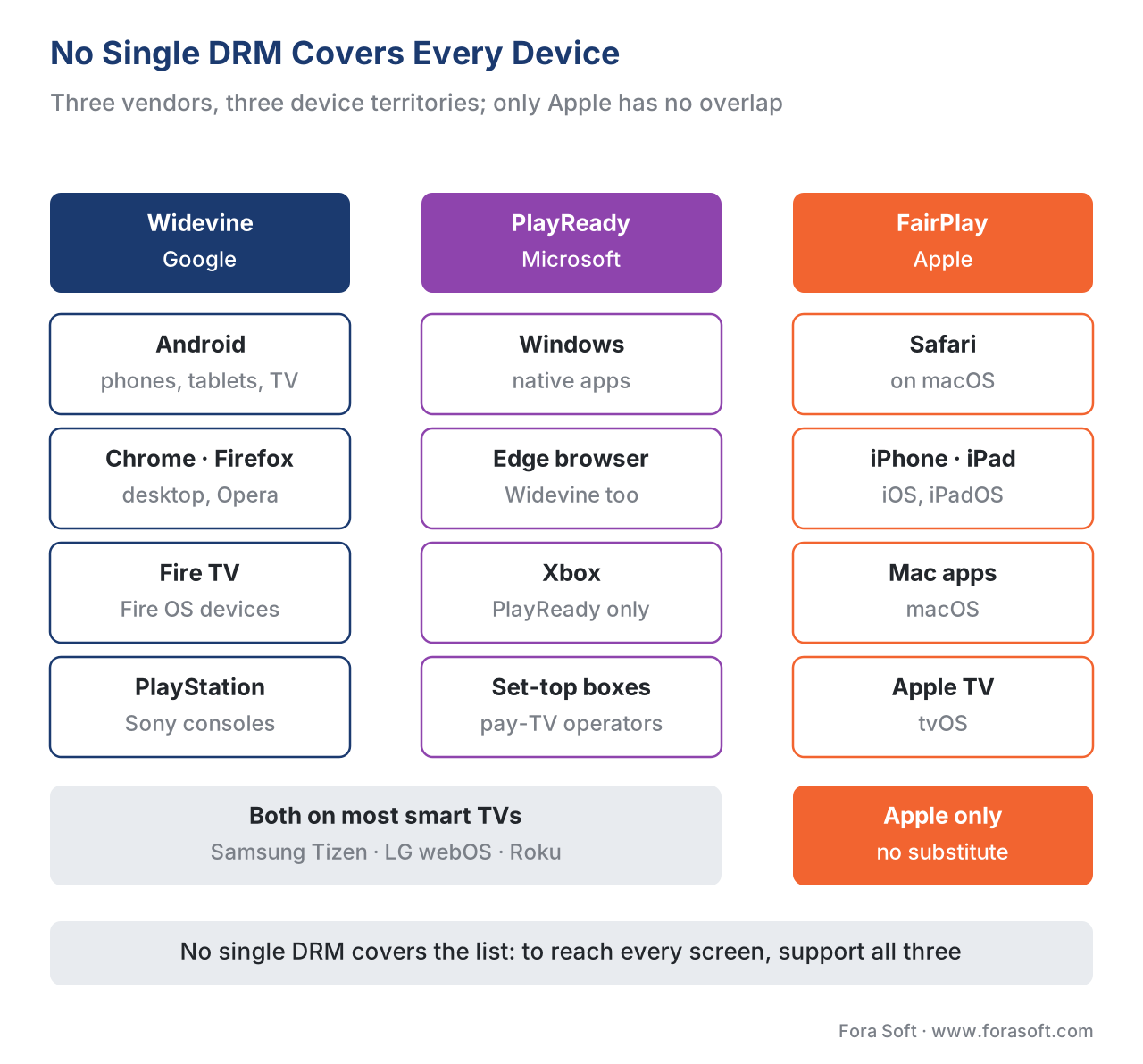 Figure 1. No single DRM reaches every device. Widevine and PlayReady overlap on many TVs and on Windows browsers; FairPlay stands alone on Apple hardware, where no competitor is allowed. To reach every screen, a platform supports all three.
Google Widevine: the broadest reach
Start with Widevine, because it touches more device types than either of the others. Widevine is Google's content-protection system, and it is built into a sprawling list of platforms. According to Google's own developer documentation, Widevine ships natively on Android phones, tablets, TVs, and automotive systems; on Chromecast; on ChromeOS; in the Chrome, Firefox, Edge, and Opera browsers; on Roku devices; on Amazon Fire TV and Fire OS devices; on Sony PlayStation; and on the great majority of smart TVs and Blu-ray players running Samsung's Tizen or LG's webOS. It is the DRM behind playback on Google Play, YouTube, Netflix, Disney+, Amazon Prime Video, Max, Hulu, Peacock, and Paramount+.
That reach is why Widevine is usually the first DRM a team integrates: a developer can test it directly in a Chrome tab on their own laptop. But the same fact hides the trap that catches beginners, so state it now and remember it: Widevine does not run on Apple's Safari, on iOS, or on Apple TV. (Google does offer a separate Widevine client library that an app developer can embed inside an iOS app, but the iPhone's built-in Safari browser and the system video player use FairPlay, not Widevine.) Building only against Widevine because it works in Chrome is the most common way to ship a player that fails silently on every Apple device.
Widevine's security levels: L1, L2, L3
Widevine does not offer the same strength everywhere. It defines three security levels that describe how much of the protection runs in tamper-resistant hardware versus in ordinary software. The level is not a setting you choose on the server; it is a property of the device, baked in at manufacturing, and it determines how much a content owner will trust that device.
- Widevine L1 is the highest level. On an L1 device, both the decryption and the handling of the keys happen inside a Trusted Execution Environment (TEE) — a separate, protected area of the chip that runs apart from the main operating system, so that even a compromised OS cannot read the keys or the decrypted frames. The decrypted video travels a secure path straight to the display. L1 is what enables HD and 4K playback of premium content. Most modern Android flagships and most current smart TVs are L1.
- Widevine L2 is a hybrid level — cryptographic operations run in the TEE, but video processing may happen outside it. In practice L2 barely exists in consumer devices, and you can mostly ignore it.
- Widevine L3 is software-only. There is no hardware TEE doing the work; the protection runs in obfuscated, hardened software that ultimately lives in normal memory. This is the level on every desktop browser — Chrome, Firefox, Edge — and on cheaper or older devices. Because the protection is weaker, studios cap what L3 may play, commonly at standard definition (around 480p, sometimes up to 720p).
The practical upshot is a rule you will meet again with the other two systems: the security level the device reports is what gates the resolution a studio will let you stream to it. A user on an L1 phone may get 4K; the same account in a desktop Chrome tab (L3) is held to 480p for the same title — not because the network cannot carry more, but because the content owner's license forbids sending premium-resolution bits to a software-only environment. We unpack the level-to-resolution mechanics in detail below, because all three vendors work this way.
On the web, Widevine reaches the browser through the Content Decryption Module (CDM) — the trusted component Google ships inside Chrome, Firefox, and Edge that performs the decryption. We come back to the CDM when we look at how a player selects a DRM at runtime; for now, just hold that the browser-side Widevine is L3 software, and that is why studio 4K does not play in a normal browser tab.
Microsoft PlayReady: the Windows, console, and TV workhorse
PlayReady is Microsoft's DRM, and although consumers rarely hear its name, it is one of the most widely deployed protection systems in the world. It is the native DRM on Windows and the Microsoft Edge browser, on the Xbox console, and — crucially — on an enormous share of the world's smart TVs, set-top boxes, and pay-TV devices. Operators and TV manufacturers have shipped PlayReady for years, which is why a great many living-room devices speak it.
PlayReady overlaps heavily with Widevine on smart TVs: many Tizen and webOS televisions ship both systems and expose them to web-based TV apps through the same browser API. The overlap is not redundant, though — it gives a platform a choice of which license to issue to a given TV, and it matters when one system's support on a device changes. The clearest current example is the shifting PlayReady situation on Samsung Tizen TVs, a dated, device-specific migration that platforms must track and test on real hardware; we devote a full article to it in the PlayReady-on-Samsung 2026 migration, because it is exactly the kind of vendor change that breaks playback if you are not watching for it.
PlayReady's security levels: SL150, SL2000, SL3000
PlayReady's security-level scheme is defined precisely in Microsoft's documentation, and it maps cleanly onto the software-versus-hardware split you just saw with Widevine.
- SL150 is the development-and-test level. Nothing is meaningfully protected; Microsoft explicitly says it is not for commercial content. Treat it as "off."
- SL2000 is the production software level. The keys and secrets are protected by software (or a mix of software and hardware) hardening. PlayReady calls SL2000 clients "Software-DRM" clients. This is the workhorse level for many apps and older devices, and it is roughly the PlayReady equivalent of Widevine L3 in terms of what studios will trust it to play.
- SL3000 is the hardware level, introduced with PlayReady 3.0 in 2015. The core of the PlayReady stack runs inside the processor's Trusted Execution Environment, with keys and decrypted samples protected by hardware. PlayReady calls SL3000 clients "Hardware-DRM" clients, and SL3000 is what unlocks HD, UHD, and HDR playback of high-value content — the PlayReady counterpart to Widevine L1.
What makes PlayReady's model especially clear is how the level gets enforced, and it is worth understanding because it demystifies the whole "the studio decides your resolution" idea. Every PlayReady client carries a certificate, issued at manufacturing time, that states its security level. When the device asks your license server for a key, it sends that certificate. Your license server reads the level and can issue a different license depending on what it sees — a richer license, allowing higher resolution, to an SL3000 device; a restricted one to an SL2000 device. Microsoft's documentation describes exactly this: a license server "will deliver different licenses for different clients," so "an SL3000 client will have access to a higher resolution than the SL2000 client." Each license also carries a MinimumSecurityLevel value, and a client refuses to use a license whose minimum it cannot meet. The resolution gate is not a vague policy — it is a number your license server sets, per request, based on a certificate the device presents.
Apple FairPlay: the price of admission to the Apple ecosystem
FairPlay Streaming is Apple's DRM, and it is the most constrained of the three in two ways that shape every cross-platform plan.
First, FairPlay is the only DRM that works on Apple devices, and Apple does not license it to run anywhere else. Safari, iPhone, iPad, Mac, and Apple TV protect video with FairPlay and nothing but FairPlay — you cannot run Widevine or PlayReady in the protected video path on Apple hardware. And you cannot run FairPlay on a Samsung TV or an Android phone. FairPlay is built into Apple's operating systems at the system level — iOS, iPadOS, macOS, tvOS, and watchOS — and reaches the web only through Safari's implementation of the browser DRM API. The practical meaning is blunt: if any meaningful slice of your audience is on Apple devices (and for most consumer services it is a large slice), FairPlay is not optional. It is the toll you pay to reach the Apple ecosystem at all.
Second, FairPlay is tied to a specific delivery format and a specific encryption scheme. Apple's protected delivery uses HTTP Live Streaming (HLS), the streaming protocol Apple defined (IETF RFC 8216), and FairPlay encrypts the media using the cbcs scheme of Common Encryption — AES in cipher-block-chaining mode with a pattern, defined in ISO/IEC 23001-7. This single fact is the most expensive thing to get wrong in all of multi-DRM, so it gets a callout of its own below. FairPlay does not offer a published ladder of named security levels the way Widevine and PlayReady do; on modern Apple hardware the protection is hardware-backed by architecture, using Apple's own secure silicon, and the resolution rules come from the content licensing rather than from a public level chart.
How FairPlay delivers a key: SPC and CKC
FairPlay's key handshake has its own vocabulary, and you will hear these acronyms in any iOS playback discussion, so anchor them now. The player first fetches an Apple-issued certificate. Using that certificate, the device generates a Server Playback Context (SPC) — an encrypted blob that proves the request comes from a genuine Apple device and states what it wants. Your license server (running Apple's Key Security Module logic) receives the SPC and returns a Content Key Context (CKC) — the encrypted package that carries the content key back to the device. The names differ from the other systems, but the shape is the same idea we drew in why DRM exists: the device proves it is trustworthy, and only then does the server hand over a key, wrapped so that nothing outside the protected module can read it. The general mechanics of license servers and key delivery across all three systems are covered in license servers and key delivery.
The one mistake that breaks Apple: cenc versus cbcs
Here is the single most common and most expensive error in multi-DRM, and it lives at the seam between FairPlay and the other two. Common Encryption (ISO/IEC 23001-7) — the standard that lets one encrypted file feed multiple DRM systems — defines two encryption schemes that are not interchangeable:
cencuses AES in counter mode (AES-CTR).cbcsuses AES in cipher-block-chaining mode with a pattern (AES-CBC).
FairPlay supports only cbcs. Historically, Widevine and PlayReady used cenc, so an early implementer would reasonably encrypt everything with cenc, watch it play on Android and Windows, and ship — only to find that every Apple device shows a black screen, because FairPlay cannot read cenc at all. The failure is invisible until someone tests on an actual iPhone, which is why it so often survives to production.
The fix, and the convergence the whole industry has moved to, is "cbcs everywhere." Modern Widevine and modern PlayReady both support cbcs (Google's own scheme-support table lists cbcs for current Android, Chromecast, smart TVs, desktop and mobile Chrome, Firefox, and Opera), so you can encrypt the catalog once with cbcs, package it as CMAF, and serve all three systems from the same files. The deep mechanics — why two schemes exist, what the pattern in cbcs actually does, and how the convergence happened — are the subject of CENC, CTR, and CBCS: common encryption explained. For this article, carry one rule: standardize on cbcs from day one, or you will rebuild your packaging the first time an iPhone fails to play.
Security levels and the resolution gate: the same logic, three vocabularies
You have now seen security levels twice — Widevine's L1/L3 and PlayReady's SL3000/SL2000 — and FairPlay's hardware-by-architecture model is the third version of the same idea. Pull them together, because this is the concept that most directly controls what your users actually see.
The core principle is identical across all three vendors: the more of the protection that runs in tamper-resistant hardware, the more the content owner trusts the device, and the higher the resolution they will permit. Hardware-backed protection (Widevine L1, PlayReady SL3000, FairPlay on modern Apple silicon) earns HD and 4K. Software-only protection (Widevine L3, PlayReady SL2000) is commonly capped at standard definition. The cap is not a technical limit of the software; it is a contractual rule the content owner enforces, because a software environment is easier to attack than a hardware one, and a leaked 4K master is far more valuable than a leaked 480p copy.
This is where the threat model from the previous article becomes a concrete product constraint. Map it out and the picture is clear:
| Protection level | Where decryption runs | Typical resolution a studio permits | Example devices |
|---|---|---|---|
| Hardware-backed (Widevine L1 / PlayReady SL3000 / FairPlay on Apple silicon) | Inside a hardware Trusted Execution Environment | Up to 4K / UHD / HDR | Modern Android flagships, most current smart TVs, iPhone/iPad/Apple TV, Xbox |
| Software-only (Widevine L3 / PlayReady SL2000) | In hardened software, ordinary memory | Commonly capped at SD (~480p), sometimes 720p | Desktop Chrome/Firefox/Edge, older or budget devices |
| Test only (PlayReady SL150) | Unprotected | None — not for commercial content | Development builds |
A short worked example makes the business impact concrete, because teams routinely underestimate how much of their audience is capped. Suppose a service has 1,000,000 monthly active devices, and the split is 60% mobile and TV apps on hardware-backed DRM, and 40% desktop-browser viewers on software-only L3/SL2000. If a premium title is licensed for 4K only on hardware-backed playback, then:
devices that can see 4K  = 1,000,000 × 60% = 600,000
devices capped at ~480p  = 1,000,000 × 40% = 400,000
Four hundred thousand of your viewers — the desktop-browser audience — are contractually held to 480p for that title no matter how fast their connection is. That is not a bug to fix; it is the rule the license imposes on software-level protection. Knowing it in advance changes product decisions: it is why premium services push users toward apps (hardware DRM) over the browser, and why "why is the web player only SD?" is answered at the contract, not in the code. The browser-side DRM stack and its limits are covered in Encrypted Media Extensions and the browser DRM stack.
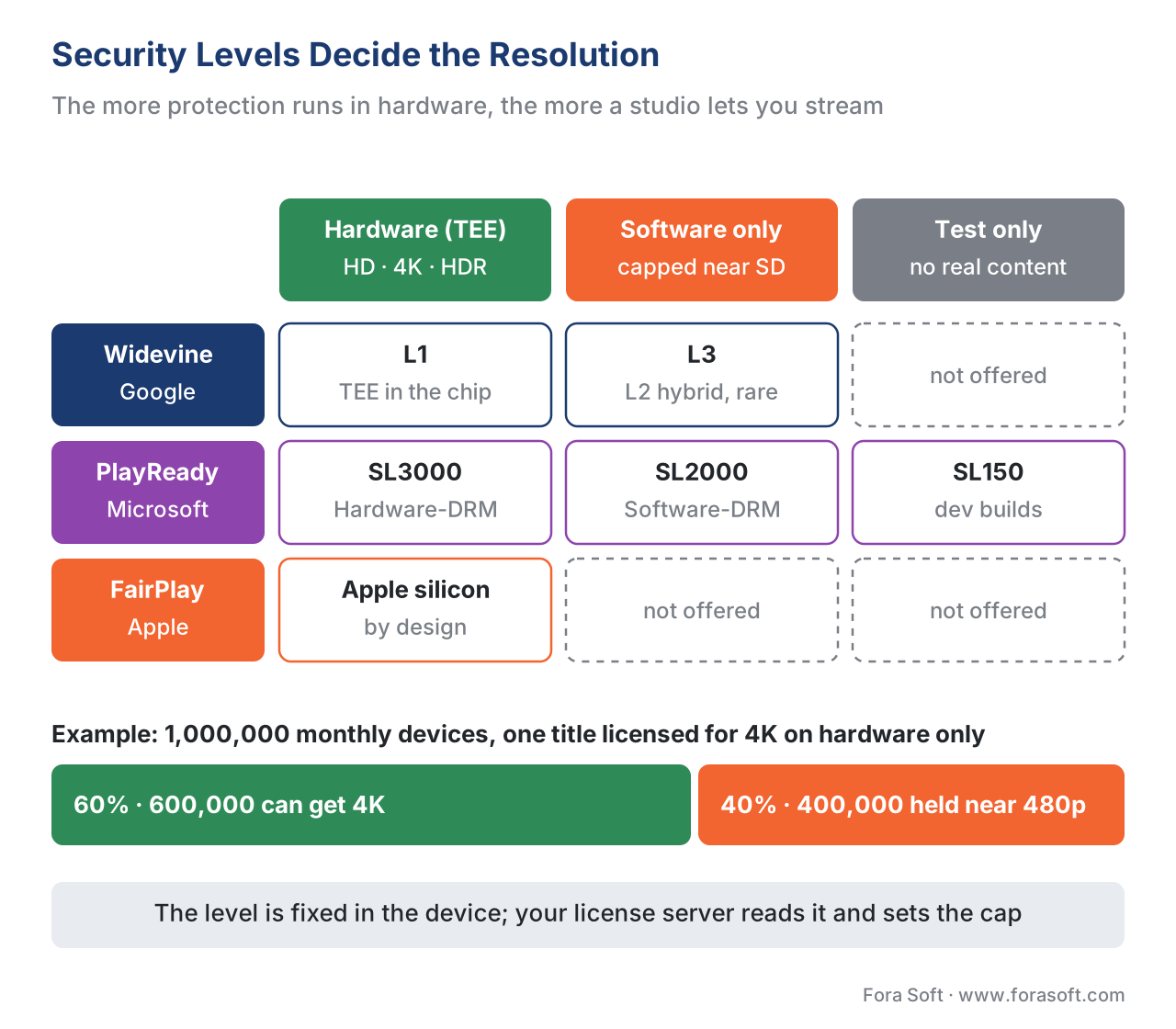 Figure 2. The same idea in three vocabularies. Software-only levels (Widevine L3, PlayReady SL2000) sit at the bottom and are capped near SD; hardware-backed levels (Widevine L1, PlayReady SL3000, FairPlay on Apple silicon) unlock HD and 4K. The level is a property of the device, and it gates the resolution the studio permits.
The device-to-DRM map: who covers what
Now assemble the territories into one map, because this table is the artifact you will actually use when scoping a build. The key column is the last one — which DRM you must implement to reach that device. Note the hard exclusions: Apple devices accept only FairPlay, and the Xbox accepts only PlayReady, so there is no single system that covers the whole list.
| Device / platform | Widevine | PlayReady | FairPlay | What you must support to reach it |
|---|---|---|---|---|
| Android phones & tablets | Yes | — | — | Widevine |
| Chrome / Firefox / Edge / Opera (desktop) | Yes | Edge also | — | Widevine (PlayReady on Edge) |
| Windows (native apps) | — | Yes | — | PlayReady |
| Safari (macOS) | — | — | Yes | FairPlay |
| iPhone / iPad / Apple TV | — | — | Yes | FairPlay |
| Samsung Tizen / LG webOS smart TVs | Yes | Yes | — | Widevine or PlayReady |
| Roku | Yes | Yes (PlayReady on many) | — | Widevine or PlayReady |
| Amazon Fire TV / Fire OS | Yes | — | — | Widevine |
| Xbox | — | Yes | — | PlayReady |
| Sony PlayStation | Yes | — | — | Widevine |
Read the table top to bottom and the conclusion is unavoidable. To cover Android and most browsers you need Widevine. To cover Windows, Xbox, and a big slice of TVs you need PlayReady. To cover anything with an Apple logo you need FairPlay — and there is no substitute, because Apple licenses FairPlay to no one for use elsewhere and allows nothing else on its own devices. A consumer service targeting "every screen" therefore lands on all three. The only services that escape with one or two are those with a deliberately narrow device target — an enterprise tool that is Windows-and-Edge only (PlayReady alone), or an Android-only app (Widevine alone). For everyone else, the map says multi-DRM.
How a player actually picks the right DRM
A reasonable question at this point: if there are three incompatible systems, does the application have to detect the device and run three different players? No — and the reason is a single browser standard that makes the player code largely DRM-agnostic. That standard is Encrypted Media Extensions (EME), a W3C specification that defines a common way for a web page to talk to whatever DRM the device happens to have, without the page needing to know the internal details of each system.
EME works through key systems, each identified by a string. The player asks the browser, in effect, "which of these do you support?" and the browser answers based on the device:
com.widevine.alpha— Google Widevinecom.microsoft.playready.recommendation— Microsoft PlayReadycom.apple.fps— Apple FairPlay Streaming
The trusted decryption component that EME drives is the Content Decryption Module (CDM) — Widevine's CDM in Chrome, PlayReady's in Edge, FairPlay's in Safari. The player's job is to offer its list of supported key systems and let the browser pick the one the device actually has. Here is the shape of that negotiation, simplified to the essential call:
// Ask the browser which DRM this device supports, in order of preference.
const config = [{
  initDataTypes: ["cenc"],
  videoCapabilities: [{ contentType: 'video/mp4; codecs="avc1.42E01E"' }]
}];

async function pickKeySystem() {
  // Try each system; the browser only resolves the one the device actually has.
  for (const keySystem of [
    "com.widevine.alpha",            // Android, Chrome, most TVs
    "com.microsoft.playready.recommendation", // Windows, Edge, Xbox, many TVs
    "com.apple.fps"                  // Safari, iPhone, iPad, Apple TV
  ]) {
    try {
      await navigator.requestMediaKeySystemAccess(keySystem, config);
      return keySystem; // first match wins — the device's native DRM
    } catch (e) { /* not supported here; try the next */ }
  }
  throw new Error("No supported DRM on this device");
}
In real builds you rarely write even this much yourself: open-source players such as Shaka Player, dash.js, and hls.js, and native frameworks like ExoPlayer (Android) and AVPlayer (Apple), handle the key-system negotiation for you. The point to carry is conceptual: you write one player against EME, you provide it license-server endpoints for each of the three systems, and the device selects its own DRM. The browser-by-browser detail of how EME and the CDM behave is the subject of Encrypted Media Extensions and the browser DRM stack, and the native-app side — AVPlayer with FairPlay on iOS, ExoPlayer with Widevine on Android — is in iOS and Android playback.
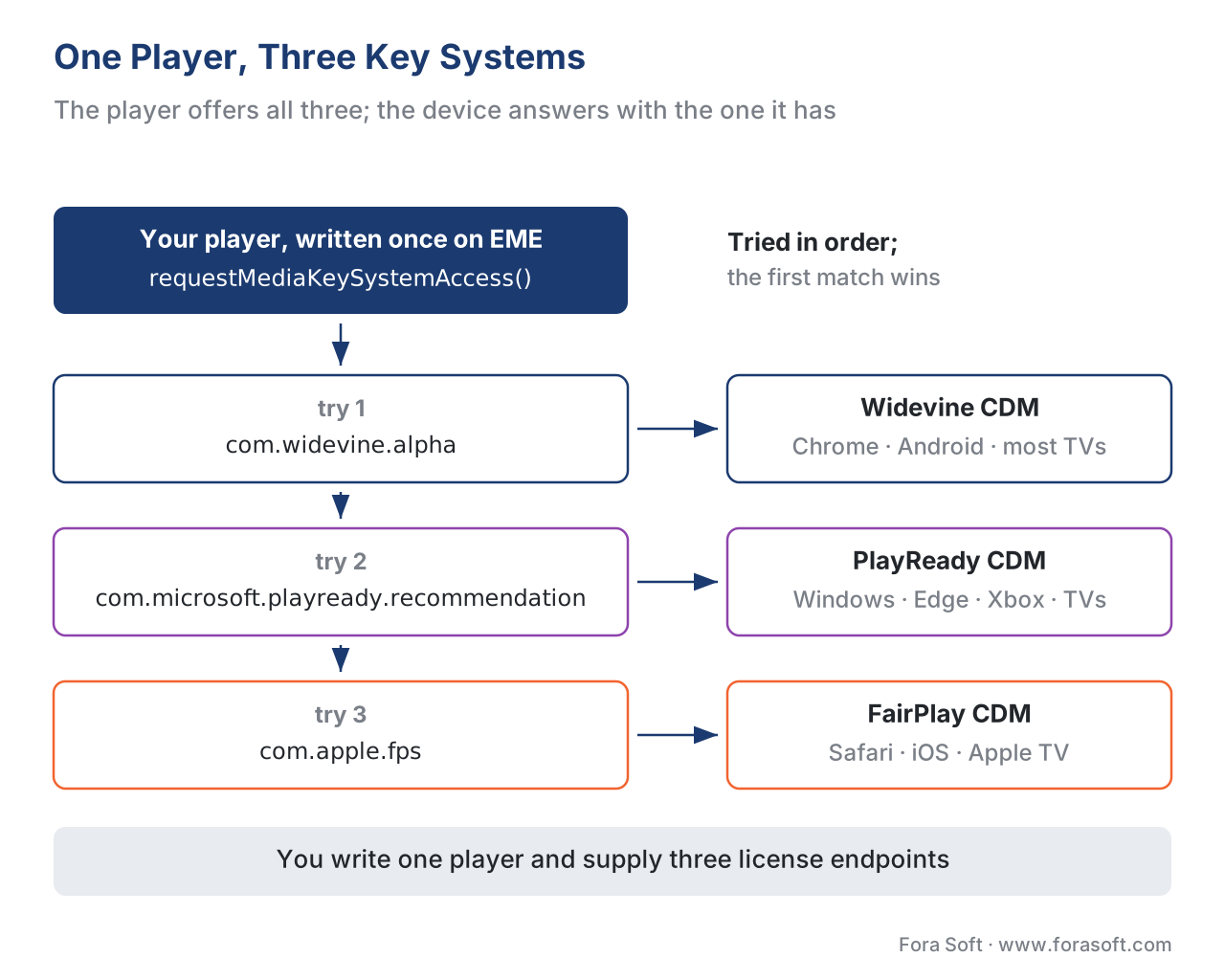 Figure 3. One player, three key systems, the device chooses. Through Encrypted Media Extensions the player offers Widevine, PlayReady, and FairPlay key-system strings; the device resolves the one its own Content Decryption Module supports. You write one player and supply three license endpoints.
Why the map forces multi-DRM — and why that is cheaper than it sounds
Put the pieces together and the architecture writes itself. You need all three systems to reach all devices. Each system needs its own license endpoint. And — the fact that rescues the budget — you do not need to encrypt your content three times, because Common Encryption with the cbcs scheme lets you encrypt the media once and issue Widevine, PlayReady, or FairPlay licenses from those same files depending on which device shows up. Encrypt once; license many. That pattern is multi-DRM, and it is the baseline modern design for any platform with a mixed audience.
The cost shape of multi-DRM is worth stating plainly, because the fear ("three DRMs must cost three times as much") is misplaced. Your storage and encoding costs do not triple — you store one cbcs-encrypted, CMAF-packaged copy, not three. What you add is integration work (wiring three license services and testing on real devices across the three ecosystems) and a per-license fee from a multi-DRM service, which is small relative to what it unlocks. We worked a representative version of that arithmetic in why DRM exists — on the order of $1,500 a month in license fees for a 100,000-subscriber service, a fraction of a percent of the revenue the protected catalog earns. The full build-vs-buy decision for the DRM layer, and how a single multi-DRM service issues all three license types from one workflow, is the next article: multi-DRM: one workflow, every device.
A common mistake: assuming one DRM, or one security level, is enough
The errors in this area cluster into three avoidable mistakes, and naming them is the fastest way to never make them.
The first is building against one DRM and discovering the gaps in production. Almost always this is "we tested in Chrome with Widevine and shipped," followed by black screens on every iPhone. The cure is to start from the device-to-DRM map, not from whatever was easiest to test: list your target devices first, read off the required systems, and you will see all three coming before you write code.
The second is cenc-only encryption that silently breaks FairPlay. A team encrypts with the older counter-mode scheme, it plays everywhere except Apple, and the failure hides until an iPhone test. The cure is to standardize on cbcs Common Encryption from the first packaging job, so one set of files serves all three systems.
The third is ignoring security levels and being surprised by the resolution cap. A team assumes "DRM is on, so we're fine," then cannot understand why studio 4K refuses to play in the desktop browser, or why a budget TV streams only SD. The cure is to treat the security level as a first-class fact about each device: hardware-backed levels (Widevine L1, PlayReady SL3000, FairPlay on Apple silicon) for HD and 4K; software levels (Widevine L3, PlayReady SL2000) capped near SD by the license. If a content owner requires hardware-backed playback for 4K, your software-only devices simply will not get 4K, and that is a planning fact, not a bug.
The thread through all three is the same discipline: start from the devices and the license terms, derive the DRM systems and security levels you must support, and build to that — never the reverse.
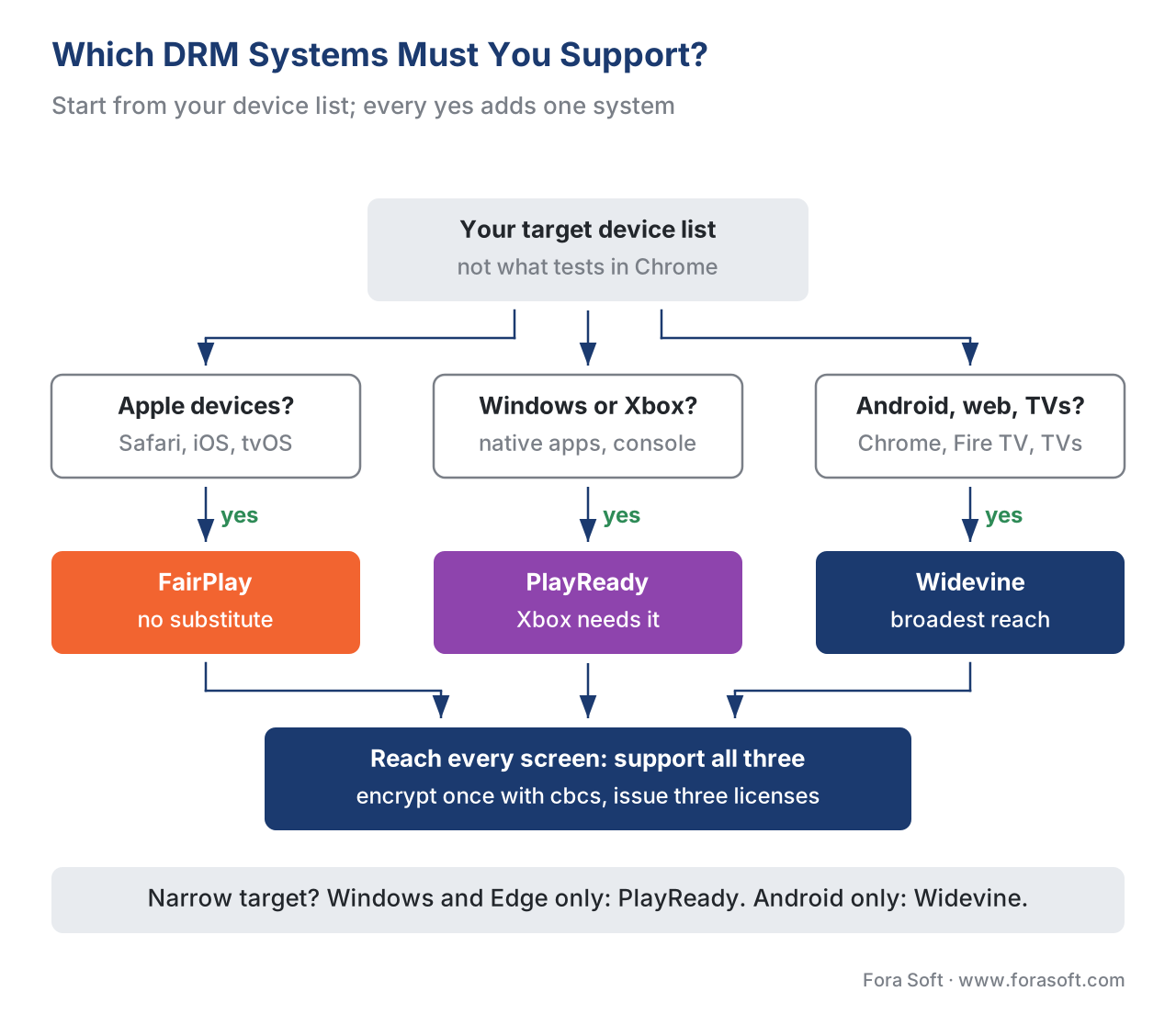 Figure 4. Which DRM systems must you support? Follow your target device set down the tree. Apple devices force FairPlay; Windows and Xbox force PlayReady; Android and browsers force Widevine. Any "reach every screen" answer lands on all three — multi-DRM.
Where Fora Soft fits in
The three-DRM map is where a streaming platform's device reach, its content deals, and its player code all have to agree, and a wrong assumption at the start shows up as a black screen on a whole class of devices or a catalog a studio will not license. Fora Soft has built video streaming, OTT/Internet TV, e-learning, and telemedicine software since 2005, across 625+ shipped projects for 400+ clients, and this exact problem — reaching every screen at the security level each content deal requires — runs through that work: mapping a client's target devices to the right combination of Widevine, PlayReady, and FairPlay, standardizing on cbcs Common Encryption so one package serves all three, wiring the three license endpoints into players on web, mobile, and TV, and matching each device's security level to the resolution its license permits. When a media company needs playback that works on the first try across the whole device matrix — not just in the browser the developer happened to test — that cross-ecosystem content-protection engineering is the capability we bring.



The handbook
Fora Soft Video Engineering Handbook
We wrote a seven-volume handbook that takes the video stack from a single pixel to production, and someone who works through it can design and build a protected platform that plays on every screen. Start with volume 3: players, DRM and the browser EME path, including how Widevine, PlayReady and FairPlay licenses reach each device. Volume 2 covers the HLS and DASH packaging that one cbcs-encrypted catalog is served through, and volume 1 the codecs your security level lets you stream in 4K. Written by Nikolay Sapunov, CEO at Fora Soft.
Which DRM systems and security levels does your device list actually need?
Send us the devices you must reach and the terms in your content deals, and we will map them to Widevine, PlayReady and FairPlay, set up cbcs packaging so one catalog serves all three, wire the license endpoints, and test playback on real iPhones, TVs and consoles. 250+ video products shipped since 2005.
See our case studies
Case study
Speed.Space
Remote production at 1080p and 8 Mbps, used on Netflix, Electronic Arts and HBO work — studio content where the content owner, not the engineer, sets the protection bar.
Case study
Worldcast Live
HD concerts to 10,000 concurrent viewers at 0.4–0.5 s latency on web and iOS — two client stacks, the browser and Apple, fed from one delivery pipeline.
Case study
Franchise Record Pool
720,000+ tracks licensed from Sony Music, Universal and other majors, served on web, desktop, iOS and Android — one rights-holder catalog across every device class.
What to read next
Encryption
CENC vs CBCS: Common Encryption for Streaming
Why cbcs is the one scheme all three DRMs read.
Browser DRM
Encrypted Media Extensions & the Browser DRM Stack
The key-system negotiation from figure 3, step by step.
Key delivery
DRM License Servers and Key Delivery
How a server reads the security level and sets the cap.
Device support
PlayReady on Samsung TVs: The 2026 Migration
The vendor change on Tizen that this article flags.
References
- Widevine DRM — Overview and Supported Platforms — Google. First-party documentation listing the platforms Widevine ships on (Android, Chromecast, ChromeOS, Chrome/Firefox/Edge/Opera, Roku, Fire TV, PlayStation, Tizen/webOS TVs) and the platforms it does not (Apple TV, desktop Safari, Xbox, Nintendo Switch); names the security levels and the streaming partners; and provides the per-platform encryption-scheme table showing
cbcssupport across modern Widevine. Tier 3 (first-party). https://developers.google.com/widevine/drm/overview (accessed 2026-06-16; page last updated 2024-10-09) - Security Level — PlayReady — Microsoft. First-party definition of SL150, SL2000, and SL3000: SL2000 is "Software-DRM," SL3000 is "Hardware-DRM" requiring a processor Trusted Execution Environment (PlayReady 3.0+), and a license server "will deliver different licenses for different clients" so "an SL3000 client will have access to a higher resolution than the SL2000 client," enforced via the certificate's level and the license's
MinimumSecurityLevel. Tier 3 (first-party). https://learn.microsoft.com/en-us/playready/overview/security-level (accessed 2026-06-16) - FairPlay Streaming Overview — Apple. First-party documentation of Apple's DRM: FairPlay protects playback on iOS, iPadOS, macOS, tvOS, and watchOS and reaches the web only through Safari (via EME); it uses HLS for delivery and the
cbcsscheme of Common Encryption (ISO/IEC 23001-7); the key handshake uses an Apple certificate, a Server Playback Context (SPC), and a Content Key Context (CKC). Tier 3 (first-party). https://developer.apple.com/streaming/fps/FairPlayStreamingOverview.pdf (accessed 2026-06-16) - ISO/IEC 23001-7 — Common Encryption in ISO base media file format files (CENC) — ISO/IEC. The standard that lets one encrypted file be decrypted by multiple DRM systems; defines the two non-interchangeable schemes,
cenc(AES-CTR) andcbcs(AES-CBC with pattern). The reason FairPlay (cbcs-only) and Widevine/PlayReady can share one package, and the source of thecenc-vs-cbcsdistinction. Tier 1 (official standard). https://www.iso.org/standard/84637.html (accessed 2026-06-16) - Encrypted Media Extensions (EME) — W3C Recommendation. Defines the browser DRM API and the key-system model that lets one player negotiate Widevine, PlayReady, or FairPlay without knowing each system's internals; defines the Content Decryption Module (CDM) as "the client component that provides the functionality, including decryption, for one or more Key Systems," and states content is "encrypted per container-specific common encryption specifications, enabling use across key systems." Tier 1 (official standard). https://www.w3.org/TR/encrypted-media/ (accessed 2026-06-16)
- RFC 8216 — HTTP Live Streaming (HLS) — IETF. Defines the HLS delivery protocol FairPlay uses and the SAMPLE-AES media-segment encryption that underlies the
cbcsscheme on Apple devices. Tier 1 (official standard). https://www.rfc-editor.org/rfc/rfc8216 (accessed 2026-06-16) - Widevine Security Levels in Web Video Playback — Bitmovin. Vendor engineering explanation of how L1 (hardware TEE, HD/4K) versus L3 (software, capped near SD) behaves in real browsers and devices, and how the level the device reports determines the resolution a studio permits. Tier 4 (vendor engineering). https://developer.bitmovin.com/playback/docs/widevine-security-levels-in-web-video-playback (accessed 2026-06-16)
- Multi-DRM for Developers: Widevine, FairPlay, and PlayReady — Mux. Vendor engineering overview confirming the EME key-system strings (
com.widevine.alpha,com.microsoft.playready,com.apple.fps), that Apple platforms allow only FairPlay, and that Widevine/PlayReady historically usedcencwhile FairPlay requirescbcs— the basis for the "cbcseverywhere" convergence. Tier 4 (vendor engineering). https://www.mux.com/articles/multi-drm-video-streaming-widevine-fairplay-playready (accessed 2026-06-16) - US TV operating-system usage share, 2026 — Parks Associates (reported via industry press). Roku OS ~28% and Samsung Tizen ~23% lead US TV-OS usage, with Amazon Fire TV, LG webOS, and Vizio SmartCast mid-tier — the device-population context for why a platform must satisfy the Widevine-and-PlayReady TV systems plus FairPlay for the Apple share. Tier 5 (analyst). https://www.mediaplaynews.com/ctvma-samsungs-tizen-tops-global-smart-tv-operating-system-market-share/ (accessed 2026-06-16)
- Analysis of DRM Ciphers for Samsung Tizen TVs — Bitmovin. Vendor engineering analysis showing Samsung Tizen TVs ship both Widevine and PlayReady and expose them through the browser EME API, with most current sets reporting hardware-backed (L1) Widevine — the device-overlap reality and the backdrop for the PlayReady-on-Samsung migration. Tier 4 (vendor engineering). https://bitmovin.com/blog/analysis-drm-ciphers-samsung-tizen-tvs/ (accessed 2026-06-16)
Source note (per §4.3.2): the behavior of each DRM system — supported platforms, security levels, encryption schemes, and key handshakes — traces to the three vendors' own first-party documentation (refs 1–3), which §4.3.1 names as the controlling sources for DRM systems. The cross-system foundations are tier-1 standards: Common Encryption and its two schemes (ISO/IEC 23001-7, ref 4), the browser key-system/CDM model (W3C EME, ref 5), and the HLS protocol FairPlay rides on (RFC 8216, ref 6). Security-level behavior in practice, the EME key-system strings, the device-overlap on TVs, and TV-OS population shares are vendor/analyst sources, labelled in-text and dated (refs 7–10). Where popular comparisons say "FairPlay uses CENC" or imply multi-DRM means three encodes, this article follows the spec (two distinct schemes; FairPlay needs cbcs; encrypt once, license many) and flags the discrepancy.
