


Why this matters
If you stream to televisions, Samsung's Tizen platform is one of the largest single audiences you will ever serve, and Microsoft PlayReady is the protection system those TVs were built around. A content owner's contract almost always says premium titles must be protected by an approved digital rights management (DRM) system — the software that encrypts video and hands out keys under rules, the subject of Why DRM Exists and What It Actually Protects — and for smart TVs that system is overwhelmingly PlayReady. When the rules of that system change, as they did in June 2026, you either follow them on a schedule you control or you discover them through a wave of "my TV stopped playing" support tickets and a failed studio audit. This article is for the founder, product manager, or streaming engineer who needs to plan that migration calmly, know exactly which pieces move, and avoid breaking playback on a decade of Samsung hardware.
The 30-second version of what changed
Start with the single fact that anchors everything else. On 11 June 2026 Microsoft released PlayReady version 4.8 to its partners, and described it as bringing a new client-certificate revocation list and broad security improvements. A revocation list, in plain language, is a blocklist: a file that names device keys known to be compromised, so a license server can refuse to hand a key to a cloned or cracked device. PlayReady 4.8 moves that blocklist to a new download address and changes how servers must fetch it.
The reason the blocklist suddenly matters is a leak. In mid-2025, a set of PlayReady device certificates — the secret credentials that let a TV prove it is a genuine, trustworthy player — was published online, including the high-security certificates that guard 4K. A DRM system's entire promise rests on those credentials staying secret. Once they are public, the only lever left is revocation: add the compromised credentials to the blocklist and make every license server check it. PlayReady 4.8 is that lever, hardened and made mandatory for the newest servers.
So the "2026 migration" is not a new TV feature and not a new app you ship. It is a security-driven update to the license server you run, plus the homework of knowing how a long tail of Samsung TVs will behave once that server starts enforcing the new rules.
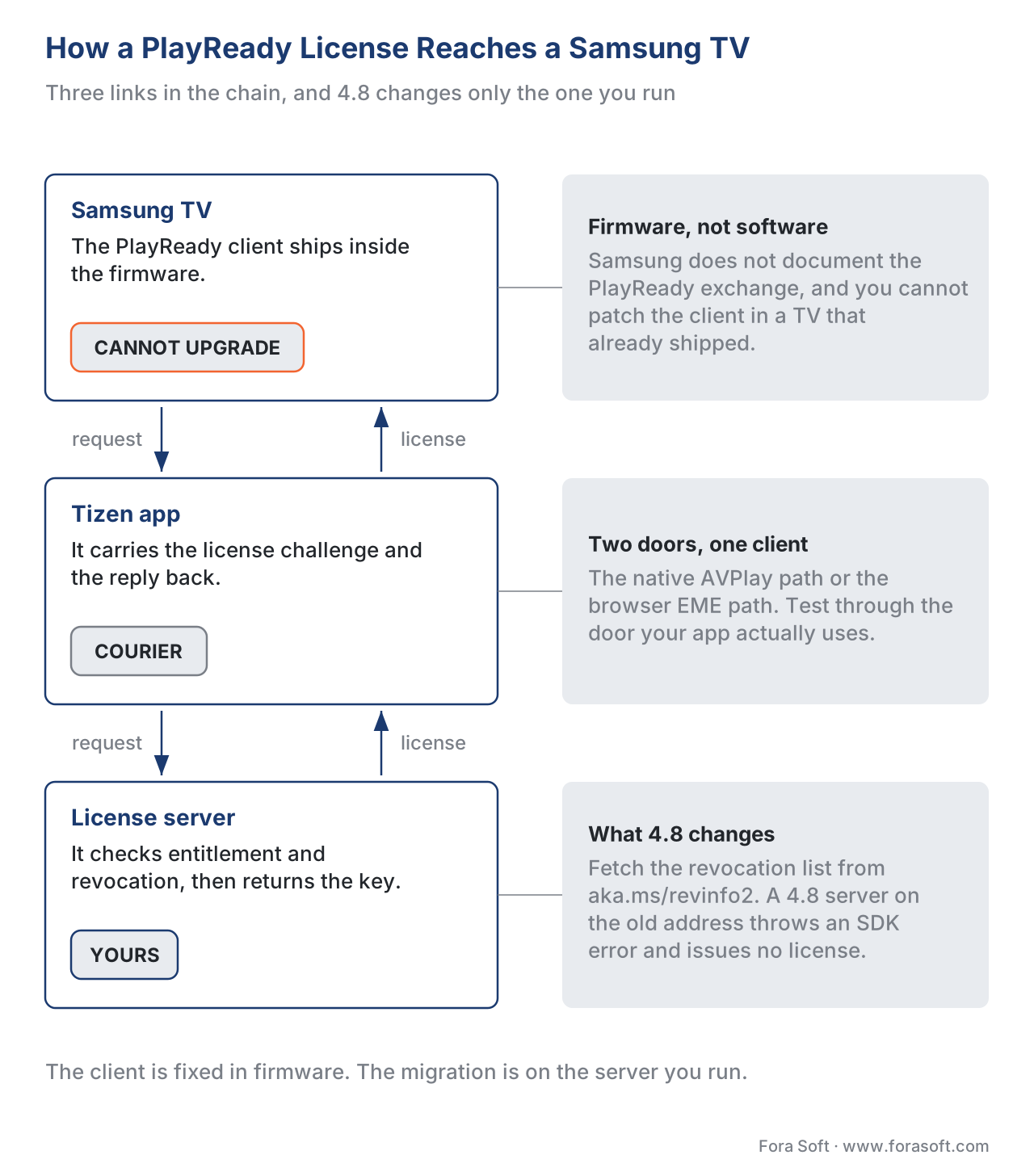 Figure 1. The TV carries a PlayReady client baked into its firmware. Your license server is the one piece you control — and in PlayReady 4.8 it must fetch the new revocation list before it issues a key.
First, the plain-language picture: how PlayReady reaches a Samsung TV
To see what moves and what does not, follow one play request from a Samsung TV end to end. It has four parts, and you own only one of them.
The device certificate and PlayReady client live inside the television. Every PlayReady device ships with a built-in client — the code that asks for keys and decrypts video — and a certificate that proves the device is genuine and states its security level. On a Samsung TV this is part of the firmware, fixed at the factory for that model year. Samsung's own developer documentation makes the boundary explicit: when asked how the TV talks to a PlayReady server, Samsung says it has no documentation on that exchange and that you must contact Microsoft, because the client protocol is Microsoft's, not Samsung's. The practical consequence is large — you cannot patch or upgrade the PlayReady client on a TV that is already in someone's living room.
The app is your code running on the TV. On Tizen it reaches PlayReady one of two ways. The native path uses Samsung's AVPlay media player, where you set the DRM with a single call. The web path uses the browser standard called Encrypted Media Extensions (EME) — covered in depth in Encrypted Media Extensions and the Browser DRM Stack — and selects PlayReady with a key-system string. Either way, the app is a courier; it does not hold keys.
The license server is the piece you run, on your own infrastructure or through a multi-DRM vendor. It receives the device's request, checks who the viewer is and what they are entitled to, checks the revocation list, composes a policy, and returns a license — a key wrapped in rules. This is the component the 2026 change touches.
The packager ran once, upstream, when you encrypted the video. It used Common Encryption, the ISO standard that lets one encrypted file feed every DRM, and chose an encryption scheme — a detail that turns out to decide whether a given Samsung model year can play your content at all. We return to it below; the mechanics are in CENC, CTR, and CBCS: Common Encryption Explained.
A useful analogy ties the four together. The TV is a lock with a serial number stamped in at the factory — the serial is the device certificate, and you cannot re-stamp it. Your license server is the locksmith who, before cutting a key, checks the serial against a list of stolen locks. PlayReady 4.8 hands the locksmith a fresh stolen-locks list and a new place to pick it up. The locks on the wall do not change; the locksmith's procedure does.
Why 2026: the leak that forced the update
The trigger deserves a clear retelling, because it explains why a normally quiet piece of infrastructure suddenly needs attention.
In mid-2025, an account on the code-sharing site GitHub published a collection of PlayReady device certificates, covering both the software security tier (called SL2000) and the hardware tier (called SL3000). The hardware tier is the one that guards the highest-value content: studios generally require hardware-grade protection before they will allow 4K and ultra-high-definition. With the SL3000 certificates exposed, an attacker could impersonate a trusted hardware device, request real keys, and decrypt premium streams for redistribution.
Microsoft responded the way a DRM owner must. It sent a legal takedown notice to GitHub on 17 July 2025 to remove the leaked SL3000 certificates, stating that the material let "bad actors pirate PlayReady protected content," and GitHub pulled the repository and its forks. Streaming services reacted too: Amazon Prime Video suspended subscriber accounts found using the leaked credentials, citing the clause in its terms that forbids circumventing content protection. Notably, the leaked SL2000 software certificates were not named in the takedown and stayed online — a reminder that revocation, not deletion, is the durable defense.
That is the through-line to PlayReady 4.8. You cannot un-leak a certificate. What you can do is publish a revocation list that names the compromised credentials and make every license server enforce it. The June 2026 release turns that response into shipping infrastructure.
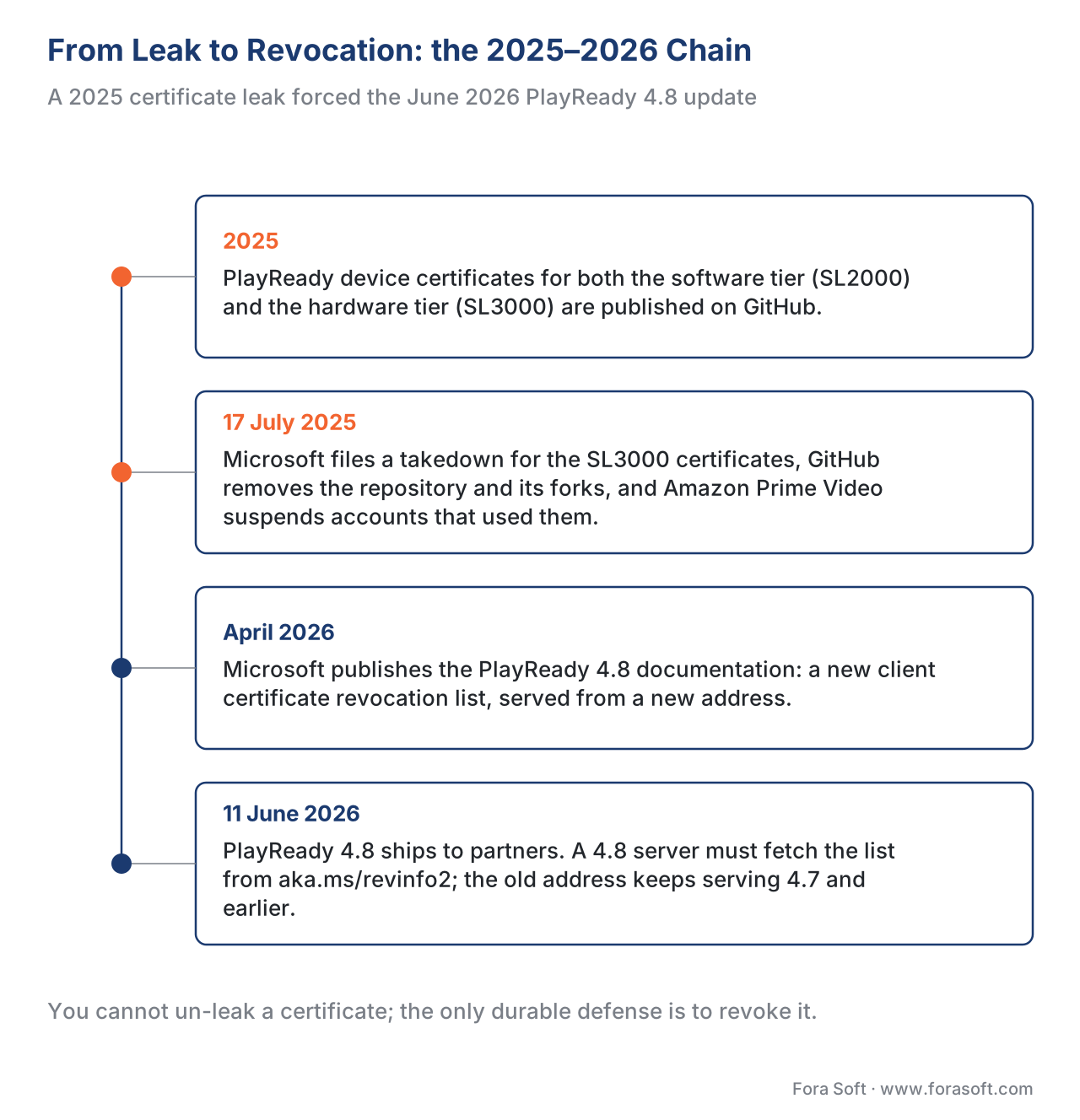 Figure 2. The chain of cause and effect: a 2025 leak of device certificates, a takedown and account bans, then the June 2026 release that makes the new revocation list mandatory for the newest servers.
What PlayReady 4.8 actually changes for you
Microsoft's release notes for version 4.8 are short, and three items in them decide your migration. None of them is a TV change; all three are server-side.
The revocation list moved, and fetching it correctly is now mandatory. Microsoft's documentation states that, starting with 4.8, PlayReady Server SDK clients use a new certificate revocation list downloaded from a new address (published as https://aka.ms/revinfo2). The old address still serves 4.7-and-earlier servers, but the new one is required for 4.8. The failure modes are asymmetric and worth memorizing. If a 4.8 server uses the wrong revocation address, the PlayReady Server SDK throws an error — no license is issued, and to the viewer that looks like a stuck spinner or a black screen. If a 4.7-or-earlier server uses the wrong address, it throws no error but, in Microsoft's words, results in "your server offering fewer protections" — meaning it may keep handing licenses to devices the latest list would block. One failure is loud; the other is silent and shows up only in a studio audit.
The .NET Framework is gone. Version 4.8 is the first PlayReady Server SDK release that does not include the legacy .NET Framework; the samples now run on .NET Core. If your license service is an old handler compiled against .NET Framework, upgrading to 4.8 is not a recompile — it is a runtime migration to .NET Core (or .NET 8 and later), which may pull in other library updates.
Testing got a built-in switch for revocation. The 4.8 Server SDK adds a "revoked query" argument to its configuration handler so you can simulate a device being revoked. That single feature is what lets you rehearse the scary part of this migration in a lab instead of in production.
| Area | PlayReady 4.7 and earlier | PlayReady 4.8 (June 2026) | What you must do |
|---|---|---|---|
| Revocation list URL | Old address | New address (aka.ms/revinfo2) |
Point 4.8 servers at the new URL |
| Wrong URL on a 4.8 server | n/a | Hard error — no license issued | Verify the URL before cutover |
| Wrong URL on a 4.7 server | "Fewer protections", silent | n/a | Patch the list / plan the upgrade |
| Server runtime | .NET Framework or .NET Core | .NET Core only | Migrate handlers off .NET Framework |
| Revocation testing | Manual | Built-in "revoked query" switch | Add a revocation test to your suite |
The table's middle rows are the ones that bite. A "supported?" reading of it is blunt: a 4.8 server with the old URL is not supported and fails closed; a 4.7 server with the old URL is running but not fully protecting, which is worse because nothing alerts you.
The Samsung reality: the PlayReady version is frozen at the model year
Here is the fact that makes Samsung different from a phone or a browser, and it is the heart of the migration. You cannot change the PlayReady version on a deployed Samsung TV. The client is part of the firmware, and which PlayReady generation a TV runs was decided by when the panel was manufactured. Your migration therefore has two halves: upgrade the server you control, and map the behavior of the TVs you do not.
The mapping is knowable, because Microsoft documents which device eras carry which PlayReady client, and that determines the encryption scheme each can play. Common Encryption defines two schemes a packager can choose: cenc, which uses counter-mode AES, and cbcs, which uses cipher-block-chaining AES. The distinction is not cosmetic — a TV that supports only cenc cannot play a cbcs stream, and cbcs is the scheme the rest of the industry, led by Apple FairPlay, has converged on. PlayReady only gained cbcs support in client version 4.0, and Microsoft's own notes place the eras like this: smart TVs from 2008–2011 are PlayReady 1.x, 2011–2017 are 2.x, and devices released after 2017 are 3.x — with cbcs arriving only on 4.0-and-later clients. Independent testing on real Samsung panels matches this: cipher-block-chaining support is limited on TVs older than about 2019 and only becomes the comfortable default on 2022-and-later models.
| Samsung TV era | PlayReady client | cenc (AES-CTR) |
cbcs (AES-CBC) |
Hardware 4K (SL3000) | Safe packaging choice |
|---|---|---|---|---|---|
| 2008–2011 | 1.x | Supported | Not supported | No | cenc only |
| 2011–2017 | 2.x | Supported | Not supported | No | cenc only |
| 2017–2019 | 3.x | Supported | Rare / not reliable | Some models | cenc, validate per model |
| 2019–2021 | 3.x–4.x | Supported | Improving | Common | dual or cenc |
| 2022–2026 | 4.x | Supported | Supported | Common | cbcs viable |
Read the two cipher columns together with the last one. They explain why a single cbcs-only catalogue — the tidy, modern, one-copy ideal — silently excludes a wide band of older Samsung TVs that are still very much in service. They also explain why the 2026 migration is a good moment to audit your packaging, not just your server: the revocation change and the cipher reality are separate issues that land on the same hardware.
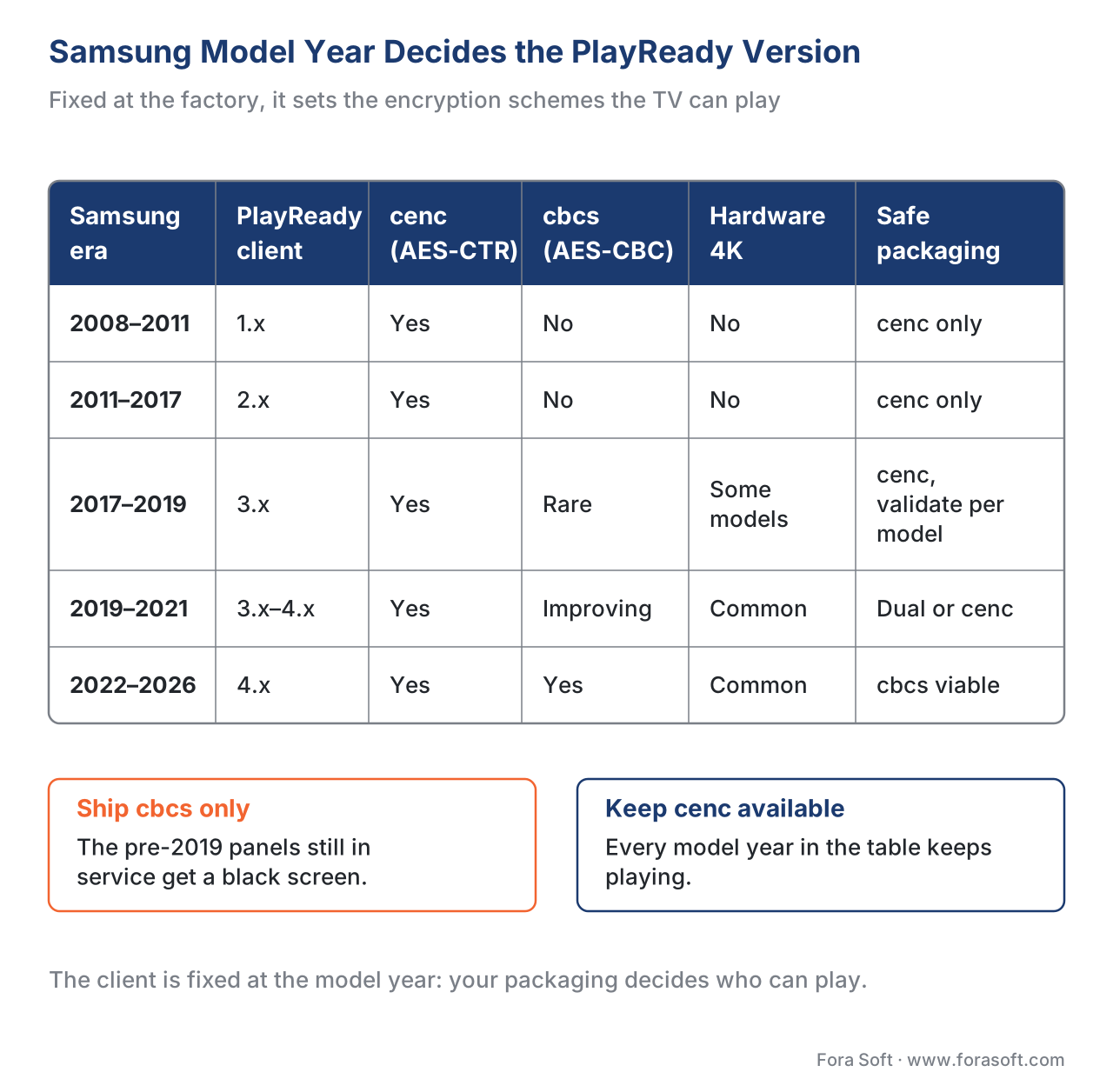 Figure 3. The PlayReady client is fixed at the model year. Older Samsung TVs play only the counter-mode
 cenc scheme; cipher-block-chaining cbcs is reliable only on roughly 2022-and-later panels.
A worked example: the cutover, step by step
Make it concrete with a platform you can picture. Say you run a subscription service with a catalogue that includes 4K titles, your license service runs the PlayReady 4.6 Server SDK on .NET Framework, and your Samsung audience spans model years 2017 through 2026. Walk the cutover and watch where each decision lands.
Inventory
  license server : PlayReady Server SDK 4.6, .NET Framework, old revocation URL
  audience       : Samsung Tizen TVs, model years 2017–2026
  catalogue      : HD everywhere + 4K on hardware-secure (SL3000) devices

Step 1  Upgrade the Server SDK to 4.8
        -> no extra Microsoft license fee, but .NET Framework is gone
        -> migrate the license handler to .NET Core / .NET 8+      [BREAKS IF SKIPPED: won't build]

Step 2  Point the 4.8 server at the new revocation URL (aka.ms/revinfo2)
        -> keep the old URL only for any 4.7-and-earlier servers you still run
        -> wrong URL on the 4.8 server = Server SDK error = black screen  [LOUD FAILURE]

Step 3  Refresh revocation handling and policy
        -> enforce the new list so leaked SL3000 certs are blocked
        -> keep issuing to genuine, non-revoked devices                  [SILENT GAP IF SKIPPED]

Step 4  Re-check the cipher map before you touch packaging
        2017–2019 cohort : cenc only on many models -> do NOT ship cbcs-only
        2022–2026 cohort : cbcs fine                                     [EXCLUDES OLD TVs IF IGNORED]

Step 5  Test on real devices across the model years (see next section)
The arithmetic that matters is not money here; it is coverage. Suppose your Samsung traffic splits 25% on 2017–2019 panels, 35% on 2019–2021, and 40% on 2022–2026. Ship a cbcs-only catalogue to "simplify" and you have just put a black screen in front of the quarter of your audience on the oldest cohort, and risked the next 35% depending on per-model behavior. Keep cenc available — or package both schemes — and that 60% keeps playing. The migration's success is measured in which of those bands still presses play afterward.
How to test it on real devices
Smart-TV DRM is the one place where "it works in the emulator" earns you nothing, because the behavior you care about — the firmware PlayReady client and its cipher and security-level support — exists only on the physical panel. Build the test matrix around the things that actually vary.
Test across model years, not just models. Samsung publishes per-year TV video specifications (2015 through 2026) and groups its panels into model groups; both are your map for which firmware generations to cover. The wider build picture for these platforms — the Tizen and webOS app models — is covered in Smart TV Apps: Tizen and webOS. If you cannot keep a shelf of TVs, Samsung's Remote Test Lab rents access to real devices over the network. Cover at least one panel from each cipher band in the table above.
Rehearse revocation in the lab. This is the migration's highest-stakes behavior, and PlayReady 4.8 gives you a safe way to practice it: the Server SDK's new "revoked query" switch simulates a revoked device so you can confirm your server fails closed for a blocked certificate and still issues licenses to genuine ones — without waiting for a real revocation event.
Validate the cipher per cohort. Confirm that each model-year band plays the scheme you actually shipped. A common, costly surprise is a TV that reports cbcs support through one playback path but not the other. Test through the path your app uses — native AVPlay or the browser EME path — not just whichever is convenient.
// Samsung Tizen, native AVPlay path: configure PlayReady, then prepare.
// Set DRM AFTER open() and BEFORE prepare() — order matters on Tizen.
var drm = {
  LicenseServer: 'https://license.example.com/playready',   // your license server
  CustomData:    'opaque-entitlement-token',                  // who-can-watch, not the key
  HttpHeader:    'X-Tenant: demo'
};
webapis.avplay.open(contentUrl);
webapis.avplay.setDrm('PLAYREADY', 'SetProperties', JSON.stringify(drm));
webapis.avplay.prepareAsync(onReady, onError);
// Samsung Tizen, browser EME path: ask for the PlayReady key system.
// '.recommendation' requests the hardware-backed (SL3000) path for 4K.
const config = [{
  initDataTypes: ['cenc'],
  videoCapabilities: [{ contentType: 'video/mp4; codecs="hvc1"' }]
}];
const access = await navigator.requestMediaKeySystemAccess(
  'com.microsoft.playready.recommendation', config);   // basic: 'com.microsoft.playready'
The two snippets are the two doors into the same PlayReady client. Pick the one your app uses, and test the migration through that door on real Samsung hardware.
Common mistakes
The failures we see on this migration cluster into a short list, and each maps to a decision above.
- Treating it as a TV update. Waiting for Samsung to "push PlayReady 4.8" to TVs. It will not arrive that way; the client is firmware-fixed, and the work is on your server.
- Forgetting the new revocation URL. A 4.8 server on the old address fails closed — a black screen — while a 4.7 server on the old address fails open, quietly under-protecting. Verify the URL on every server before cutover.
- Leaving the license service on .NET Framework. Version 4.8 dropped it; plan a .NET Core migration, not a recompile.
- Shipping
cbcs-only to "simplify". It excludes the large band of pre-2019 Samsung TVs that play onlycenc. Keepcencavailable or package both. - Encrypting the same content in both schemes with the same key. Microsoft warns explicitly against reusing one key-and-key-ID pair across counter mode and cipher-block-chaining; it both breaks playback and weakens security.
- Hard-coding the security level. A server that only trusts devices reporting exactly the old software level will reject the hardware tier; check for "at least" a level, not an exact match. Security-level policy is covered in License Policy: Rentals, Offline, Output Control, and Rights.
- Skipping the real-device pass. The emulator cannot reproduce a firmware PlayReady client. Test on panels across the model years.
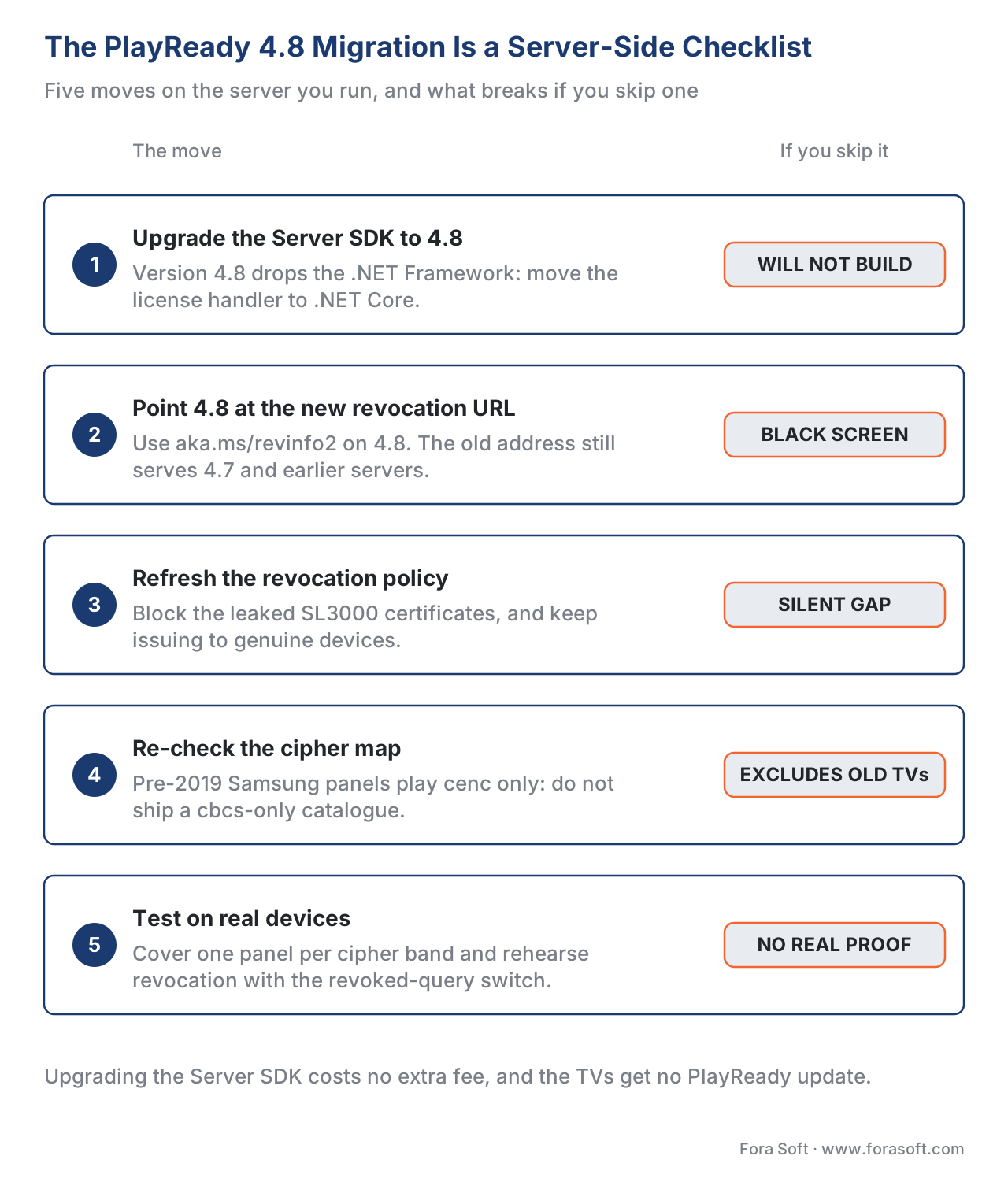 Figure 4. The migration is a server-side checklist, gated by two tests: does every 4.8 server use the new revocation URL, and does the catalogue's encryption scheme match the oldest Samsung cohort you serve?
Where Fora Soft fits in
The platforms that feel a migration like this hardest are the ones serving a studio catalogue to a broad television audience, where a single server change has to land cleanly across a decade of Samsung firmware without dropping the oldest cohort or failing a content-protection review. Fora Soft has built video streaming, OTT and Internet-TV, and other protected-video systems since 2005 — 625+ projects for 400+ clients across 20+ years — and the work that matters here is exactly the unglamorous part: upgrading the license service to the current PlayReady Server SDK and runtime, moving the revocation handling to the new endpoint, mapping the Samsung model-year cohorts to a cipher and security-level policy, and proving the result on real devices before cutover. We are vendor-neutral about which multi-DRM service issues the licenses; the engineering value is in a migration that viewers never notice.



The handbook
Fora Soft Video Engineering Handbook
We wrote a seven-volume handbook that takes the whole video stack apart, from the pixel to production, and an engineer who works through it can design and run the protected delivery chain this page describes. Volume 3 sits closest to it — DRM and key delivery, the license policy a server composes, players on every screen, and the economics of delivery — while volume 2 covers the packaging side your cipher choice lands on, from Common Encryption and CMAF to HLS and DASH, and volume 1 explains the encoding that produces the renditions you then protect. Written by Nikolay Sapunov, CEO at Fora Soft.
Is your license server ready for the 4.8 cutover?
Send us the Server SDK version you run, the runtime it sits on and the Samsung model years in your audience, and we will come back with the cutover plan — the revocation URL change, the .NET Core migration, the cipher and security-level policy per cohort, and the real-device matrix that proves it before you switch — 250+ video products shipped since 2005.
See our case studies
Case study
WorldCast Live
Concert streaming at 1.5 Gb/s and 0.4 to 0.5 s of latency for 10,000 simultaneous viewers, sold as pay-per-view tickets — the same entitlement question a license server answers before it hands out a key.
Case study
Sprii
72,000+ live shopping events delivered across web, iOS and Android, each client with its own player and platform rules — the device matrix that decides how far a single packaging choice actually reaches.
Case study
TradeCaster
46,000+ traders on $99 to $119 monthly subscriptions, auto-scaling through the load spike at market open — entitlement checked on every session, at the moment everyone presses play at once.
What to read next
DRM systems
Widevine, PlayReady and FairPlay: The Three DRM Systems
Where PlayReady sits on the device map, and which screens the other two systems cover for you.
Licensing
License Servers and Key Delivery
The component this migration upgrades: how a device challenge turns into a key wrapped in rules.
Encryption
CENC, CTR and CBCS: Common Encryption Explained
The cenc and cbcs choice behind the model-year map, and why one key must never serve both.
Smart TV
Smart TV App Development: Tizen and webOS
The app around the player: how a Tizen build ships, certifies and reaches the television screen.
References
- Microsoft — "What's New in PlayReady Version 4.8" (Microsoft Learn, ms.date 2026-04-14). First-party controlling source for the 2026 change: the new Certificate Revocation List downloaded from a new URL (
https://aka.ms/revinfo2); that a failure to use the correct list throws a PlayReady Server SDK error on 4.8 and "offers fewer protections" silently on 4.7-and-earlier; the full deprecation of the .NET Framework in the Server SDK; the newDRM_TEE_PROPERTY_REQUIRES_MINIMAL_REVOCATION_DATATEE property; the CfgHandler "revoked query" to simulate device revocation; and CMake build infrastructure for Linux in the Device Porting Kit. Tier 3 (first-party DRM vendor — canonical owner of PlayReady). https://learn.microsoft.com/en-us/playready/overview/what-is-new/what-is-new-4-8 — accessed 2026-06-17. - Microsoft — PlayReady Newsroom, "What's new in PlayReady version 4.8?" (2026-06-11). First-party dated announcement of the 4.8 release to worldwide partners, describing the new client revocation list and the CMake build infrastructure for Linux, macOS, and cross-platform targets. Tier 3 (first-party DRM vendor). https://www.microsoft.com/playready/newsroom/ — accessed 2026-06-17.
- Microsoft — "PlayReady Content Encryption Modes" (Microsoft Learn, updated 2025-06-19). First-party source for the
cenc/cbcssupport matrix by PlayReady client version (1.0–4.0), the rule thatcbcsarrives only at client 4.0 and is optional and signaled per request, the device-era mapping (smart TVs 2008–2011 = 1.x, 2011–2017 = 2.x, post-2017 = 3.x), and the explicit warning never to encrypt one piece of content in both CTR and CBC with the same {KID, Ck}. Tier 3 (first-party DRM vendor). https://learn.microsoft.com/en-us/playready/packaging/content-encryption-modes — accessed 2026-06-17. - Microsoft — "How to Migrate from Previous Versions of the PK and Server" (Microsoft Learn). First-party source for the server-side migration mechanics: run the latest Server SDK for compatibility across all clients, route by reported security level (SL2000 vs SL3000), the
<CLIENTVERSION>element in the SOAP challenge, and the "check for ≥ 2000, not == 2000" guidance that prevents rejecting hardware (SL3000) devices. Tier 3 (first-party DRM vendor). https://learn.microsoft.com/en-us/playready/advanced/how-to-migrate — accessed 2026-06-17. - ISO/IEC 23001-7 — Common Encryption (CENC). The official standard that defines the
cenc(AES-CTR) andcbcs(AES-CBC) protection schemes a packager chooses, and that lets one encrypted file feed multiple DRMs. The controlling source for why a Samsung model year that supports only one scheme cannot play the other. Tier 1 (official standard). https://www.iso.org/standard/84637.html — accessed 2026-06-17. - W3C — Encrypted Media Extensions (EME), Recommendation (2017-09-18). The official browser standard behind the Tizen web playback path; defines the Key System concept selected via the
com.microsoft.playready(and.recommendation) strings, and the case where a license request made through the HTML5 EME APIs carries a missing ALGID. Tier 1 (official standard). https://www.w3.org/TR/encrypted-media/ — accessed 2026-06-17. - ISO/IEC 23000-19 — Common Media Application Format (CMAF). The official container standard that, together with
cbcsCommon Encryption, makes one protected copy playable across devices; PlayReady added CMAF support in client 4.0, the same version that introducedcbcs. Cited for the "single copy across devices" goal that the older Samsung cohorts block. Tier 1 (official standard). https://www.iso.org/standard/85623.html — accessed 2026-06-17. - Samsung — "Multimedia DRM Q&A" and AVPlay API (Samsung Smart TV Developer docs). First-party source for Samsung Tizen DRM support (PlayReady, Widevine, Verimatrix), the native
webapis.avplay.setDrm('PLAYREADY', 'SetProperties', …)configuration withLicenseServer/CustomData/HttpHeader, the requirement to set DRM afteropen()and beforeprepare(), and Samsung's explicit statement that it does not document the PlayReady server exchange and that developers must contact Microsoft. Tier 3 (first-party device platform). https://developer.samsung.com/smarttv/develop/faq/multimedia-drm.html — accessed 2026-06-17. - Samsung — TV Video Specifications (2015–2026) and TV Model Groups (Samsung Smart TV Developer docs). First-party source for the per-year device specifications and model-group taxonomy used to build the real-device test matrix across Samsung firmware generations. Tier 3 (first-party device platform). https://developer.samsung.com/smarttv/develop/specifications/media-specifications.html — accessed 2026-06-17.
- TorrentFreak — "PlayReady DRM Leak Triggers Microsoft Takedown and Amazon Account Suspensions" (2025-07-30). Dated institutional reporting on the 2025 leak of SL2000 and SL3000 PlayReady certificates on GitHub, Microsoft's 17 July 2025 DMCA takedown of the SL3000 certificates, GitHub's removal of the repository and forks, that the SL2000 certificates were not named and remained online, and Amazon Prime Video's suspension of accounts using the leaked credentials. The security context that motivates the 4.8 revocation update. Tier 5 (institutional/news). https://torrentfreak.com/playready-drm-leak-triggers-microsoft-takedown-and-amazon-account-suspensions/ — accessed 2026-06-17.
- Bitmovin — "Analysis of DRM Ciphers for Samsung Tizen TVs" (updated 2026-04-10). Vendor engineering corroboration from real-device testing: cipher-block-chaining (
cbcs) support is limited on Samsung TVs older than ~2019, Widevine+CTR covers the widest swath, 2022-and-later panels trendcbcs-friendly, and cipher support can differ between the native and MSE/EME playback paths. Tier 4 (vendor engineering). https://bitmovin.com/blog/analysis-drm-ciphers-samsung-tizen-tvs/ — accessed 2026-06-17.
Per the section's source hierarchy: the encryption-scheme definitions (
cenc/cbcs) trace to tier-1 ISO/IEC 23001-7 (ref. 5); the browser playback path and key-system selection to tier-1 W3C EME (ref. 6); and the single-copy-across-devices goal to tier-1 ISO/IEC 23000-19 (ref. 7) — three tier-1 primaries. PlayReady behavior is owned by Microsoft's first-party docs (refs. 1–4), which are the canonical source for PlayReady and outrank any vendor blog. The Samsung device-side facts are first-party Samsung docs (refs. 8–9). The 2025 leak — the dated cause — is reported by TorrentFreak (ref. 10) and the real-device cipher behavior corroborated by Bitmovin (ref. 11). Two common errors are corrected against the primaries: "Samsung will push PlayReady 4.8 to TVs" (the client is firmware-fixed; the migration is server-side — refs. 1, 8) and "modern meanscbcs-only" (pre-2019 Samsung TVs play onlycenc— refs. 3, 11).
