


Why this matters
For a streaming service, the television is the screen that earns the longest watch sessions and carries the premium, studio-licensed catalogue — and two platforms, Samsung Tizen and LG webOS, own most of that glass outside of Roku and Android TV. A media founder or product manager who treats "the TV app" as one more port is in for two expensive surprises: the content owner's contract will demand a digital rights management system the TVs support, and the TVs in people's homes span ten model years that do not all behave the same. This article explains both platforms in plain language — the web-app model, the native video path, the DRM and encryption-scheme reality, and the certification gate — so you can scope a TV build, judge a vendor's SDK, and avoid the encryption mistake that quietly breaks playback on the older half of the fleet. It is the living-room companion to the OTT client matrix, which maps every screen you must cover, and a sibling to iOS and Android playback. For a shorter, build-oriented overview of all four TV platforms, see our smart TV app development guide on the blog; this article is the deep reference for the two web-based TV operating systems.
The living room is web apps — with native plumbing underneath
Start with the fact that makes TV development less scary than it looks: on both Samsung Tizen and LG webOS, your application is a web app. It is HTML for structure, CSS for layout, and JavaScript for behaviour, running inside a browser engine that the television ships with — a Chromium-derived engine on Tizen, a Blink-based web engine on webOS. If your team can build a web front-end, it can build the shell of a TV app. That is the good news, and it is why a single codebase can, with care, serve both platforms.
The catch is what sits beneath the web layer. A web page in a desktop browser plays video by handing a file to the <video> element and trusting the browser. A television is a constrained, purpose-built device, and premium streaming needs three things a plain web page does not give you: adaptive quality switching over a real network, hardware-accelerated 4K decoding, and studio-grade content protection. Each platform exposes those through its own native interfaces, reached from your JavaScript. So the shell is shared; the video and the protection are not. The rest of this article walks the two stacks, then the one thing that decides whether your content plays at all — the encryption scheme — and the tax that the device matrix imposes.
A "stack" here means the chain that turns a file on a server into moving pictures on the screen: the player (the code that fetches, decodes, and adapts the video), the streaming format (how the video is chopped into small pieces and described), and the digital rights management system, called DRM — the lock that stops a paying viewer's TV from copying premium content. On TVs, the player and DRM bindings differ between Samsung and LG even though the app language does not.
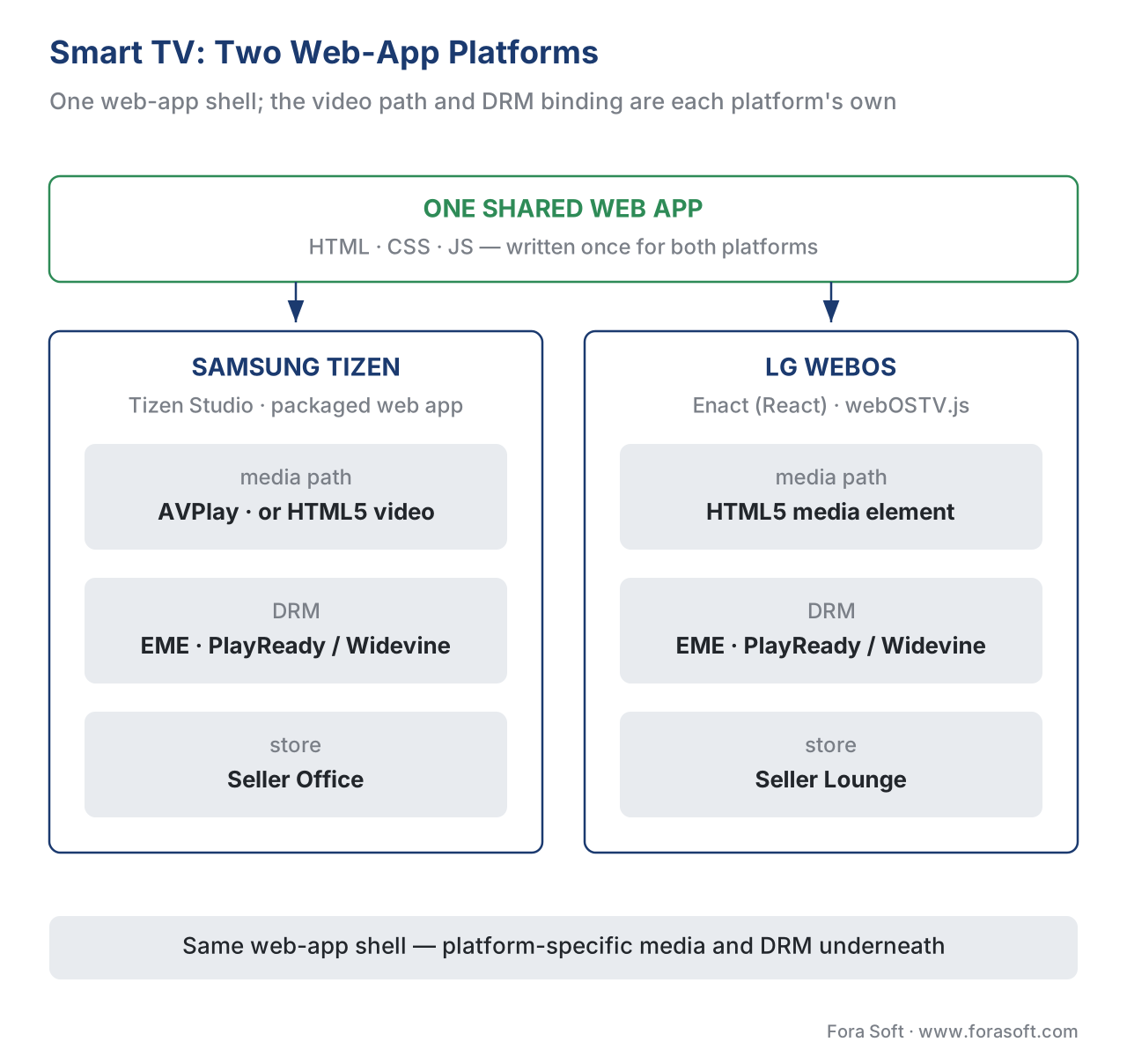 Figure 1. One web app, two TV operating systems. The shell is shared HTML/CSS/JS; the video path and the DRM binding are each platform's own.
Samsung Tizen: the web app, AVPlay, and Seller Office
Tizen is Samsung's own operating system, and it runs on every Samsung Smart TV released since 2015 — an installed base Samsung describes as over 200 million televisions across 190 countries. That reach is the reason Tizen is rarely optional for a serious OTT service.
Your Tizen app is a packaged web app. You build it in Tizen Studio, Samsung's development environment, and you write the interface in standard web technology; many teams use a TV-friendly UI framework on top. For anything beyond casual clips, Samsung's guidance is explicit: to play adaptive streaming, additional subtitle formats, and 4K UHD video, you use the AVPlay API — Samsung's native media player — rather than the plain HTML5 <video> element. AVPlay gives your JavaScript direct control of the hardware media pipeline: you set the source, configure DRM, choose audio and subtitle tracks, and drive play, pause, and seek. The HTML5 element is fine for a trailer; AVPlay is what a real catalogue runs on.
A minimal sketch of the AVPlay wiring, illustrative rather than production code:
// Tizen native playback via the AVPlay API (simplified).
webapis.avplay.open("https://cdn.example.com/title/master.m3u8");
webapis.avplay.setDisplayRect(0, 0, 1920, 1080);

// Point AVPlay at your PlayReady or Widevine license server.
var drmParam = {
  DeleteLicenseAfterUse: true,
  LicenseServer: "https://license.example.com/playready"
};
webapis.avplay.setDrm("PLAYREADY", "SetProperties", JSON.stringify(drmParam));
webapis.avplay.prepareAsync(onReady, onError);   // then avplay.play()
Getting an app onto Samsung TVs means passing certification. You package the app into Tizen's widget format — the bundle carries a config.xml (or tizen-manifest.xml) plus the signature files Tizen requires — and submit it through the Samsung TV Seller Office, Samsung's developer portal. There you select which model groups the version targets, and each version is certified separately against Samsung's launch checklist. That model-group step is your first direct encounter with fragmentation: you are not shipping to "Samsung TVs", you are shipping to specific generations, and you say which ones.
LG webOS: the web app, the media element, and Seller Lounge
webOS is LG's television operating system, powering more than 130 million LG TVs and, by most 2025 estimates, around 16% of smart TVs worldwide. It is the second web-based TV platform you will target, and it follows the same pattern as Tizen with different names on the parts.
A webOS app is again a web app — HTML, CSS, and JavaScript — and LG steers developers toward Enact, its own React-based UI framework tuned for the ten-foot, remote-driven living-room experience. You scaffold and deploy with the webOS TV SDK and its command-line tools (ares-generate to create a project, ares-setup-device to connect a real TV). For device features beyond the web sandbox — system services, inputs from the Magic Remote — webOS exposes the Luna Service API, reached through the webOSTV.js helper library. On the media side, webOS leans on the standard HTML5 media path enhanced for the TV, and its documentation is precise about formats, which matters more here than on any other platform.
Distribution mirrors Samsung's. You submit through LG Seller Lounge, the app passes LG's App Approval Process, and LG publishes an App Self Checklist you are expected to clear first. As on Tizen, you are certifying against specific webOS versions, not a single moving target.
The format reality: HLS, DASH, and a webOS quirk
Picking a streaming format is where the two platforms visibly diverge, and it has a direct bill attached. The two adaptive formats in play are HTTP Live Streaming (HLS), Apple's format standardised as IETF RFC 8216, and MPEG-DASH, the ISO format defined in ISO/IEC 23009-1. Adaptive means the stream is cut into short segments at several quality levels, and the player climbs up or down the ladder as the network changes — the mechanics live in our packaging article and, for the protocol internals, in Video Streaming's HLS vs DASH.
On Tizen, AVPlay handles both HLS and DASH, so a Samsung-only plan can use either. On webOS, LG's own specification states that the platform natively supports HLS, while MPEG-DASH is not officially supported (with only limited practical VOD compatibility). The practical rule: if you serve LG TVs, produce HLS. The cleanest way to satisfy both platforms without re-encoding twice is to package once into the Common Media Application Format (CMAF) — fragmented-MP4 segments defined in ISO/IEC 23000-19 — and expose them as both HLS and DASH from the same files.
webOS carries one quirk worth a line in your packaging spec: LG documents that the platform does not support different segment durations between the audio and video tracks of an HLS stream. If your packager emits, say, six-second video segments and four-second audio segments, playback can fail on LG TVs even though the same stream plays everywhere else. Align your segment durations and the problem disappears — but only if you knew to look.
DRM on the TV: PlayReady and Widevine, never FairPlay
Now the part a studio contract turns on. On phones the protection split is clean — FairPlay on iPhone, Widevine on Android. On televisions, Apple's FairPlay does not exist, because FairPlay is confined to Apple's own devices. The two DRM systems that matter in the living room are Microsoft PlayReady and Google Widevine, and both Tizen and webOS reach them the same way the browser does: through the web standard called Encrypted Media Extensions (EME), the W3C recommendation that lets a web app request decryption keys from a license server without ever touching the raw key. EME is covered in depth in Encrypted Media Extensions and the browser DRM stack; the three systems themselves are in Widevine, PlayReady, FairPlay.
Which system runs depends on the platform and the model year. Samsung Tizen TVs support both PlayReady and Widevine Modular; PlayReady has the deeper history on Samsung hardware. LG webOS supports both PlayReady and Widevine Modular as well, and LG has deprecated the legacy Widevine Classic from recent webOS versions — only the modern Widevine Modular, the EME-based one, remains. The safe default for the broadest TV coverage is a dual-DRM plan: PlayReady and Widevine, issued from the same encrypted files.
There is also a quality gate, exactly as on mobile. Each DRM grades a device by how securely it can handle keys and decoded video. PlayReady expresses this as a security level (the higher hardware-rooted levels are required by studios for 4K), and Widevine as L1 versus L3. A TV that cannot prove hardware-level protection will be held to standard definition by the content owner's policy — not by a bug in your app. The full policy mechanics are in license policy: rentals, offline, and output control, and output protection over the HDMI cable (HDCP) is a separate layer again.
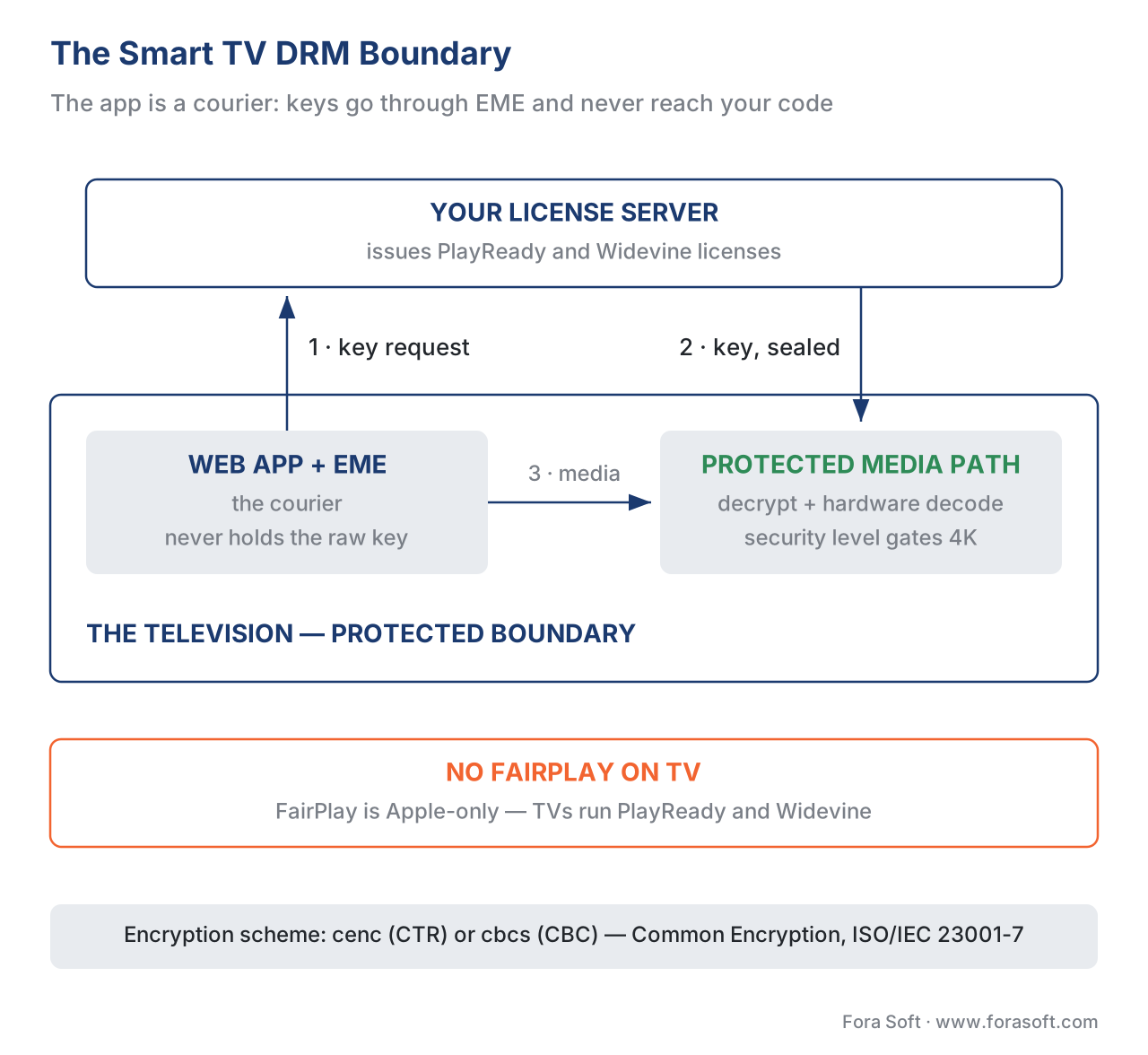 Figure 2. The TV DRM boundary. The app is a courier: EME requests a key from your license server, and the decryption happens inside the TV's protected media path.
The mistake that breaks the older half of the fleet: the encryption scheme
Here is the single most important — and most missed — fact in TV streaming, and it is grounded in the encryption standard itself. Common Encryption, the umbrella standard ISO/IEC 23001-7, defines two schemes for scrambling video: cenc, which uses AES in counter mode (AES-CTR), and cbcs, which uses AES in cipher-block-chaining mode with sub-sampling (AES-CBC). They are not interchangeable: a player that expects one cannot read the other.
On phones, the industry converged on cbcs, because Apple's FairPlay accepts only cbcs and the modern advice is "encrypt once with cbcs and serve every device". That advice is correct on mobile. It is wrong, by itself, for the television fleet. Independent device testing — Bitmovin's analysis of DRM ciphers on Samsung Tizen is the clearest public example — found that on Tizen TVs older than roughly 2019, cbcs (the CBC scheme) support is limited or absent, while Widevine with the cenc (CTR) scheme covers the large majority of Tizen TVs in the field. Newer model years (2022 and later) are moving in the cbcs-friendly direction, but the installed base in living rooms today still skews toward cenc.
The consequence is concrete. If you carry over a mobile packaging plan that encrypts the catalogue in cbcs only, your app can play perfectly on a 2024 TV in the test lab and show a black screen on the 2018 TV in a real customer's living room — because that older TV's DRM cannot decrypt the cbcs scheme. The fix is not a code change; it is a re-encrypt, which on a large library is days of compute and a delivery delay.
The way out is to decide your scheme strategy before you encrypt, with the TV fleet in mind. Two common patterns work: package a cenc (CTR) variant for the broad TV base alongside the cbcs variant your phones use, or — for the newest-only TV cohort — confirm cbcs coverage on your specific model groups first. Either way, the scheme decision is a TV-fleet decision, not a copy-paste from the phone plan. The scheme mechanics in full are in CENC, CTR, and CBCS: common encryption explained, and wiring one workflow to feed every device is multi-DRM: one workflow, every device.
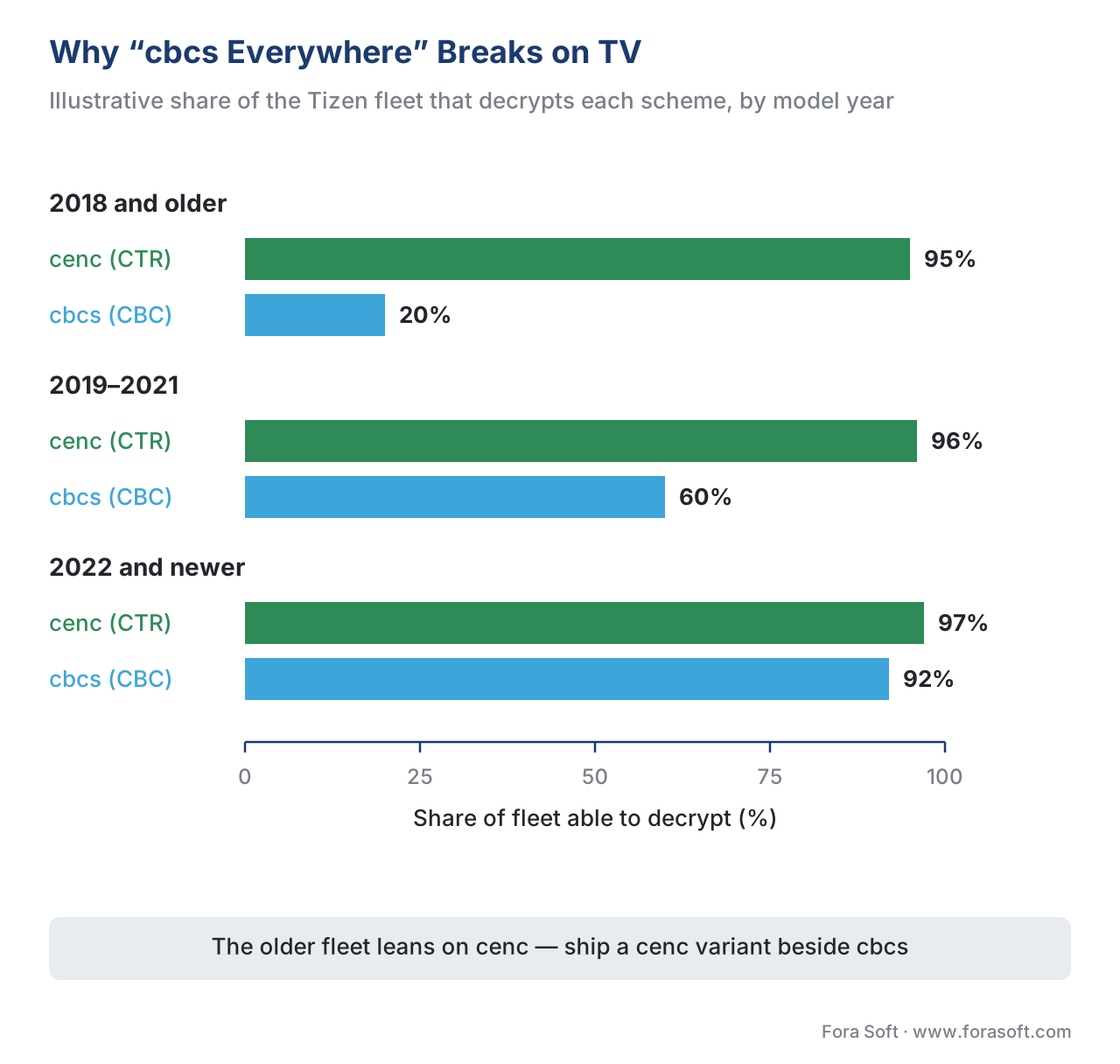 Figure 3. Why "cbcs everywhere" breaks on TV. The older fleet leans on the cenc (CTR) scheme; cbcs coverage grows only with the newest model years.
The 2026 PlayReady change on Samsung — a server problem, not a TV problem
One dated item belongs in any current TV plan. On 11 June 2026, Microsoft shipped PlayReady 4.8, whose headline change is a new device-certificate revocation list — the direct response to a 2025 leak of the device keys that protect 4K content. For a service streaming to Samsung Tizen TVs, almost all of the work lands on your license server, not on the televisions, because the PlayReady client is baked into each TV's firmware at the model year it shipped and cannot be upgraded in the field. Miss the new revocation address and a PlayReady 4.8 server can return an error that looks like a black screen to viewers; keep running an old server and it quietly stops enforcing the latest device blocks. This is the model case for "dated, vendor-specific changes get a date and a re-check flag", and we treat it in full in the PlayReady-on-Samsung 2026 migration.
The device-fragmentation tax: where TV budgets actually go
Add the pieces up and the real economics of TV come into focus. Writing the web app once is the cheap part. The recurring cost — the device-fragmentation tax — is everything that multiplies across model years and platforms.
Walk the multipliers out loud. A live OTT service might support TVs back to 2016, which on Samsung alone is roughly nine model years, each with a different version of the Chromium-based web engine, a different memory budget on the cheaper tiers, and different DRM-scheme behaviour. Do the same for webOS and you have a second column of nine. Your app's UI must stay responsive on the weakest, oldest device you promise to support, not the newest one you develop on — so the rule, from Samsung's and LG's own guidance, is to test on the oldest model year in your support matrix, not the latest. Certification is per platform and re-runs per version. The encryption scheme has to satisfy both the new cbcs cohort and the old cenc base. None of that work is visible in a demo; all of it is in the budget.
The lever that controls the tax is your support matrix — the explicit list of model years and OS versions you commit to. Narrow it and you cut testing, certification, and DRM-variant cost, but you also cut reach. Widen it and you reach the long tail of older TVs at a real and rising engineering cost. That trade — reach versus the fragmentation tax — is the central decision of a TV build, and it should be made deliberately, on paper, before the first sprint. The cross-platform strategy that keeps it from becoming eleven separate codebases is the player on every screen: a unified strategy.
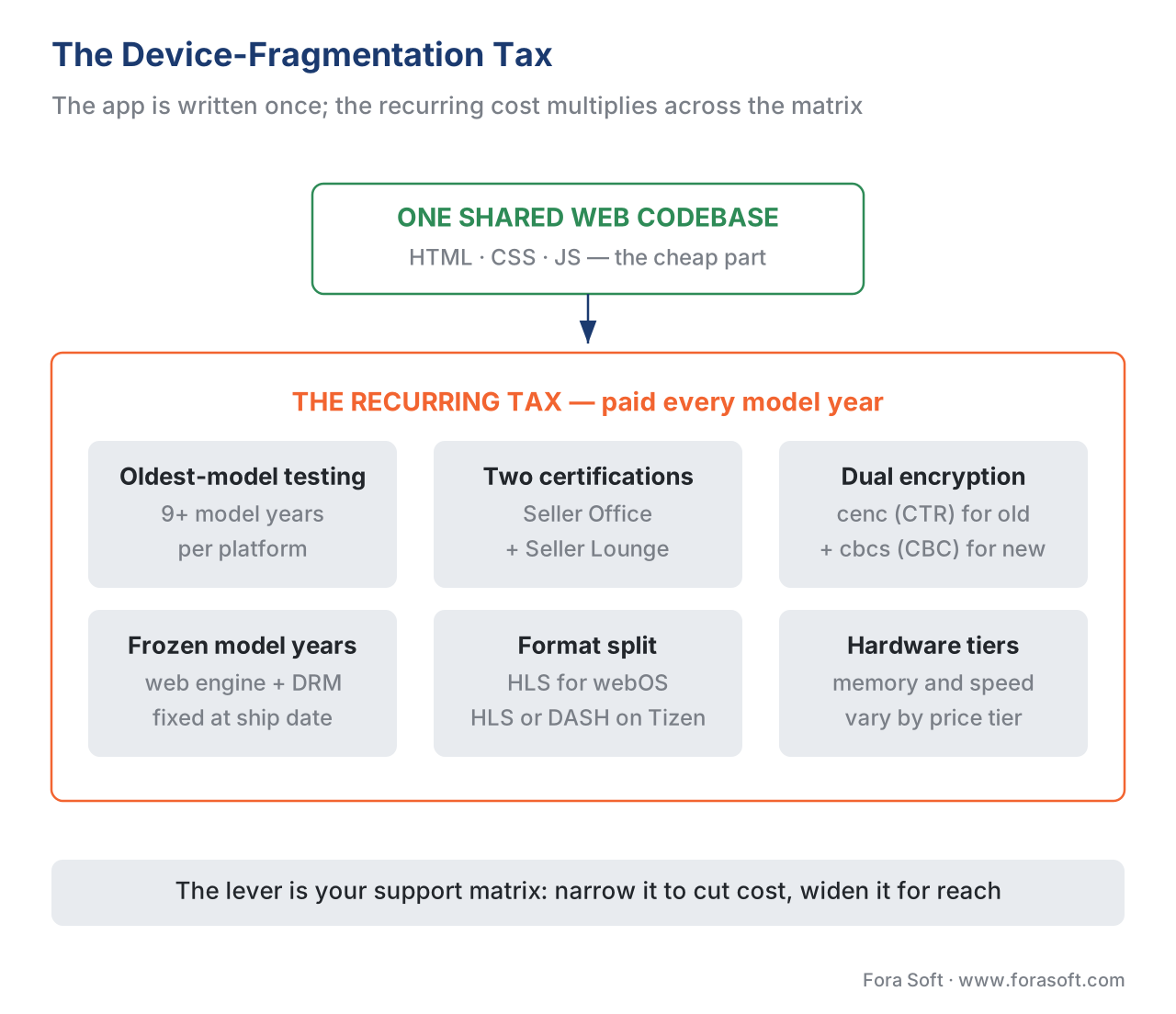 Figure 4. The fragmentation tax. One codebase, but the recurring cost multiplies across model years, DRM schemes, and two certification pipelines.
Free download: Smart TV (Tizen & webOS) Playback & Certification Spec SheetThe web-app model, the native media path (AVPlay on Tizen, HLS plus EME on webOS), the PlayReady and Widevine reality with the cenc and cbcs scheme split, the certification gate and the device-fragmentation rule for both platforms — on one page you can hand to your packaging and QA leads.Common mistake — the four that sink TV launches. First, encrypting in
cbcsonly and carrying it over from mobile, so the older TV fleet shows a black screen; plan acenc(CTR) variant for the broad base. Second, producing DASH only, so LG webOS has nothing to play; always produce HLS. Third, developing and testing only on a current-year TV, then discovering the app is unusable on a 2018 set; test on the oldest model you support. Fourth, assuming the FairPlay setup from iOS carries over — it does not; TVs use PlayReady and Widevine.
Where Fora Soft fits in
Television is where an OTT service meets its longest sessions and its most demanding content licences, and the scale problem is not one device — it is a decade of Samsung Tizen and LG webOS model years that each behave a little differently while a studio contract holds you to the same protection standard on all of them. Fora Soft has built video streaming, OTT/Internet TV, e-learning, and telemedicine applications since 2005 — 625+ projects for 400+ clients across 20+ years — so the smart-TV realities here (the web-app model, AVPlay on Tizen, the HLS-and-EME path on webOS, dual-DRM with the right cenc/cbcs scheme, and per-store certification) are the day-to-day of our streaming work. We are vendor-neutral: we translate each platform's rules into a build, rather than reselling a single SDK.



The handbook
Fora Soft Video Engineering Handbook
We wrote a seven-volume handbook, 9,000+ pages, that takes the video stack from a single pixel to production — encoding, delivery, audio and AI — and someone who works through it can design and build a platform end to end. For a television build, start with volume 3: players, DRM and license delivery, the layer where PlayReady, Widevine and the device security level decide what a 2018 TV can play. Volume 2 covers HLS, MPEG-DASH and CMAF packaging, where the webOS HLS rule and the cenc-or-cbcs choice are made, and volume 1 covers the encoding ladder those TVs decode. Written by Nikolay Sapunov, CEO at Fora Soft.
Which TV model years should your app support, and what will each one cost you?
Send us your catalogue, your studio DRM requirements and the TV install base you want to reach, and we will map the support matrix: which Tizen and webOS years need a cenc variant, where HLS alone covers you, and how much of the budget goes to per-model testing and two certification pipelines. 250+ video products shipped since 2005.
See our case studies
Case study
Bellicon Smart TV Apps
A fitness service carried onto the living-room screen as TV apps for Apple TV and Android TV, with 530+ on-demand workout videos filtered by muscle group, length and needs, custom workout plans, and a responsive web version for homes without a smart TV — one catalogue, several television platforms.
Case study
Drundoo
A Bulgarian internet-TV platform with 60 live channels on every plan, catch-up of pre-recorded shows, and a video-on-demand library of movies, series, sports and concerts — the live-plus-VOD catalogue that viewers expect to reach from the biggest screen in the house.
Case study
Vodeo
A movie-rental platform for Janson Media's catalogue of independent films, with adaptive quality switching between 480p, 720p and 1080p, ticket-based rentals instead of subscriptions, and playback sent to the TV over AirPlay and Chromecast — licensed content that has to reach the television protected.
What to read next
Clients
The OTT Client Matrix: Web, Mobile, Smart TV, Devices
Where Tizen and webOS sit among every screen an OTT service has to cover.
DRM
CENC vs CBCS: Common Encryption for Streaming
The cenc and cbcs schemes in full — the decision that decides whether older TVs play at all.
DRM
PlayReady on Samsung TVs: The 2026 Migration
The PlayReady 4.8 revocation change, and why the work lands on your license server.
Players
Cross-Platform Video Player Strategy for OTT
How to keep the TV build from turning into a separate codebase per platform.
References
- Common Encryption in ISO base media file format files — ISO/IEC 23001-7. ISO/IEC. Defines the
cenc(AES-CTR) andcbcs(AES-CBC) schemes that decide whether a given TV model year can decrypt your content. Tier 1. https://www.iso.org/standard/68042.html - Encrypted Media Extensions (EME). W3C Recommendation, 18 September 2017. The browser standard Tizen and webOS use to request keys for PlayReady and Widevine without exposing the raw key. Tier 1. https://www.w3.org/TR/encrypted-media/
- HTTP Live Streaming — IETF RFC 8216. IETF, 2017. The HLS format webOS supports natively and AVPlay plays on Tizen. Tier 1. https://www.rfc-editor.org/rfc/rfc8216
- Dynamic adaptive streaming over HTTP (MPEG-DASH) — ISO/IEC 23009-1. ISO/IEC. The DASH format AVPlay handles on Tizen and which webOS does not officially support. Tier 1. https://www.iso.org/standard/83314.html
- Common Media Application Format (CMAF) — ISO/IEC 23000-19. ISO/IEC. The fragmented-MP4 segment format that lets one package serve both HLS and DASH. Tier 1. https://www.iso.org/standard/79106.html
- Streaming Protocol and DRM — webOS TV Developer. LG Electronics. States native HLS support, no official MPEG-DASH, PlayReady and Widevine Modular DRM, and Widevine Classic deprecation. Tier 3 (first-party). https://webostv.developer.lge.com/develop/specifications/streaming-protocol-drm
- Playback Using AVPlay — Samsung Developer. Samsung. The native media API for adaptive streaming, 4K UHD, subtitle formats, and DRM configuration on Tizen TVs. Tier 3 (first-party). https://developer.samsung.com/smarttv/develop/guides/multimedia/media-playback/using-avplay.html
- Registering and distributing applications — Samsung TV Seller Office. Samsung. The Tizen widget package, model-group selection, and per-version certification flow. Tier 3 (first-party). https://developer.samsung.com/tv-seller-office/guides/applications/registering-application.html
- App Approval Process — webOS TV Developer. LG Electronics. The Seller Lounge submission and App Self Checklist gate for webOS TV apps. Tier 3 (first-party). https://webostv.developer.lge.com/distribute/app-approval-process
- PlayReady content encryption modes. Microsoft Learn. PlayReady support for the CENC (CTR) and CBCS (CBC) schemes, the basis of the scheme-coverage decision. Tier 3 (first-party). https://learn.microsoft.com/en-us/playready/packaging/content-encryption-modes
- Analysis of DRM Ciphers for Samsung Tizen TVs. Bitmovin (Stream Lab device testing), updated 2026. Finds
cbcs(CBC) support limited on pre-2019 Tizen TVs while Widevine +cenc(CTR) covers most of the fleet. Tier 5 (industry testing). https://bitmovin.com/blog/analysis-drm-ciphers-samsung-tizen-tvs/ - Smart TV operating-system installed base and share, 2025. Industry estimates (Tizen 200M+ TVs / 190 countries; webOS 130M+ / ~16% share). Orientation figures; re-baseline per review. Tier 5 (industry). https://electroiq.com/stats/smart-tv-statistics/
Where sources disagreed, the official spec was followed. The popular "encrypt once with cbcs and serve every device" advice — correct for mobile — was overridden for the TV fleet by ISO/IEC 23001-7 read together with public device testing, which shows the older Tizen/webOS base needs the cenc (CTR) scheme. The "smart TVs use the same DRM as phones" assumption was overridden by the platform docs: FairPlay is Apple-only and absent on TV, where PlayReady and Widevine rule.
