


Why this matters
If you are a founder, product manager, or first-time streaming CTO, license policy is where a content owner's legal terms become software that either plays the video or refuses to. You will rarely write a license server yourself — a multi-DRM vendor or cloud service provides it — but you decide the rules it issues, and those rules decide two business outcomes at once: whether you pass a studio security review (and keep the catalogue) and whether a paying customer on a three-year-old TV ever sees a picture. By the end you will be able to read a license policy out loud, explain the difference between the clock that starts a rental and the clock that ends it, say which devices a 4K-with-HDCP-2.2 rule will exclude, and scope an offline-download feature without leaving a permanent key on a stranger's disk. This is the direct sequel to License Servers and Key Delivery: there, the license server handed over the key; here, we read the rules that travelled with it.
The license says more than "yes"
Start with what actually arrives on the device. In License Servers and Key Delivery the player asked for a key and the server returned a license — but a license is never just a key. It is a key plus a policy: a structured list of permissions and restrictions that the device's trusted software is built to enforce before it shows a single frame. Microsoft says it plainly for PlayReady: the license response returns "the content key … and … the policies (rights and restrictions) under which the content can be played," and the client "must … play back content if all the mandatory policies are met, or halt playback if any of the mandatory policies are not met."
A useful picture: a license is a hotel keycard, not a house key. A house key opens the lock forever, for anyone holding it. A keycard opens your room, only this week, only on your floor, and the front desk can shorten it or kill it. A DRM license is the keycard — the key to decrypt is in there, but wrapped in conditions: until when, after first play for how long, on hardware this secure or better, and only out through a cable that promises not to record.
Hold on to one separation from the previous articles. In CENC, CTR, and CBCS we encrypted the catalogue once, the same bytes for everyone. The license layer is the opposite: it is per request, and the policy can differ for every viewer and every device, even for the same title. One person rents; another subscribes. One watches on a phone with a secure chip; another on a laptop browser without one. The encrypted file is identical; the license each device receives is not. That flexibility is the whole subject of this article.
 Figure 1. A license is a key plus a policy. The key unlocks the bytes; the policy fields decide for how long, offline or not, through which cable, and on how secure a device the bytes may be shown.
Where the rules come from: the studio contract
The policy fields do not start with your engineers. They start with a sentence in a content licence — "early-window titles in Ultra HD must be protected by hardware-backed DRM, HDCP 2.2 on the link, and session-based forensic watermarking" — and travel down a chain until they become a number in a license the device obeys.
The reference for those sentences is the MovieLabs Specification for Enhanced Content Protection (ECP), written by the major studios to give every platform a common target for protecting 4K, high-dynamic-range, and early-release content. First published in 2013 and revised through v1.2 (2018) and v1.3, it requires, among other things, a hardware root of trust to hold DRM and link-protection keys, HDCP 2.2 for content sent to a remote display, a secure media pipeline, and forensic watermarking for the highest-value content. Lower-value or older catalogue carries lighter terms.
The chain is worth seeing as four links, because each is owned by a different team and each is a place a build goes wrong:
- The contract clause — a content owner's lawyer writes the protection requirement into the deal.
- The license-server rule — your team (or your DRM vendor) encodes that clause as a policy template: "for this title tier, on this device class, issue these fields."
- The license — at playback the server stamps the actual values into the license it sends: an expiry, an offline flag, an HDCP requirement, a minimum security level.
- Device enforcement — the device's trusted component reads the fields and obeys them, or refuses to play.
Get link 2 right and the rest follows. The four levers below are the fields you are choosing in that template.
Lever one — time: subscriptions, rentals, and purchases
The most familiar policy is when the content may play. There are three business shapes, and each maps to specific license fields.
Subscription (SVOD). Access lasts as long as the subscription is paid. The license carries an absolute expiry — a fixed date-time after which the device must stop decrypting. Microsoft's worked example: a subscriber whose renewal day is the 15th starts watching on 2 November; the server issues a license that expires 16 November, and re-issues a fresh one each time the next month is paid. The expiry is short on purpose — days, not months — so a cancelled account stops working soon after the bill stops. (The business side of this is subscription billing and entitlement in Block 5; here we only stamp the dates.)
Rental (TVOD). This is the one people get wrong, because a rental has two clocks, not one. The first clock is the rental window: how long after purchase you may start watching — commonly 30 days. The second clock is the playback window: how long after you first press play you may finish — commonly 24 or 48 hours. The canonical model is "30 days to start, 48 hours to finish." The two clocks exist because customers buy a rental on Tuesday and watch it on Saturday, and the studio is willing to give them a month to begin but only a couple of days once they have.
Every DRM expresses the two clocks, with different names:
- Widevine uses
rental_duration_seconds(the window before the first playback starts) andplayback_duration_seconds(the window after playback begins), alongsidelicense_duration_secondsfor the license as a whole. These are fields in Widevine's license policy. - FairPlay issues two keys for an offline rental: a first key carrying the storage (rental) duration — for example 2,592,000 seconds, 30 days — and a second key, obtained when the viewer presses play, carrying the playback duration — for example 86,400 seconds, 24 hours — which supersedes the first.
- PlayReady combines a Begin Date policy, an absolute Expiration, and an Expiration After First Play policy that "indicates … the client must stop … decrypting content if the current number of seconds after the content was first played" exceeds the value.
Here is the math written out, because it is the heart of a rental. Say you sell a 48-hour rental with a 30-day start window and the customer buys it at 18:00 on 1 June and first presses play at 20:00 on 20 June:
rental window  = 30 days from purchase    → expires 18:00 on 1 July (last moment to START)
first play      = 20:00 on 20 June         → within the window, allowed
playback window = 48 hours from first play → expires 20:00 on 22 June (last moment to FINISH)
The earlier of "playback window end" and "rental window end" wins. If the customer had instead first pressed play at 17:00 on 1 July — one hour before the rental window closed — they would still get their full 48 hours, because the playback clock starts at first play, not at the rental deadline.
Purchase / electronic sell-through (EST). "Buy" means play indefinitely, so the license carries no expiry at all. But "indefinitely" is a trap for builders: people change phones and reinstall apps, and a device's DRM identity can change when it is re-provisioned. Microsoft's guidance is explicit — services "should be ready at any time to re-issue licenses for purchased content," because the original license is bound to a device that may no longer exist. Plan the re-download path on day one.
A practical safety rule sits under all three: any time-based policy is only as trustworthy as the device's clock. PlayReady requires a Trusted Clock (a Secure Clock or an Anti-Rollback Clock) before a client may honour an expiry, and recommends pairing every absolute expiry with a Begin Date so that winding the device clock backwards cannot revive a dead rental. If a device cannot be trusted to know the time, it cannot be trusted with a rental.
| Time model | What the viewer bought | Widevine field | PlayReady policy | FairPlay mechanism |
|---|---|---|---|---|
| Subscription | Access while paid | short license_duration_seconds, renewed |
Absolute Expiration + Begin Date | License with absolute expiry |
| Rental — start window | Time to begin watching | rental_duration_seconds |
Begin Date + Expiration | First key, storage duration |
| Rental — finish window | Time to finish once begun | playback_duration_seconds |
Expiration After First Play | Second key, playback duration |
| Purchase (EST) | Keep forever | no expiry; plan re-issue | no expiry; plan re-issue | persistent key, no expiry |
 Figure 2. A rental has two clocks. The rental window (here 30 days) limits when you may start; the playback window (here 48 hours) starts at first play and limits when you must finish. The earlier deadline wins.
Lever two — offline: the persistent license
Everything above assumed the device can reach your license server at playback. Offline playback — a downloaded movie on a plane — breaks that assumption, so it needs a different kind of license.
Recall from License Servers and Key Delivery that an ordinary online license is a temporary one in the browser standard, Encrypted Media Extensions (EME): it lives in memory and dies with the browser tab, leaving no secret behind. An offline license is the opposite. The W3C EME specification defines a persistent-license session type whose license and keys are "stored … such that they can be retrieved … even after closing" — written to disk, bound to the origin that created it, and usable with no network at all. That persistent license is the download mechanism.
The trade-off is exact and worth stating in one sentence: a persistent license is a deliberate secret written to a stranger's disk. That is the price of offline, and it changes how you set the other levers. Three consequences follow:
- You must turn it on explicitly. For Widevine, "both the device and content must be enabled with an offline policy"; the boolean
can_persistmust be set, and the trusted decryption module stores the license in secure persistent storage and hands back an identifier to reload it later. Offline is never the default — you opt a title into it. - Durations get shorter and renewal gets planned. Because the secret sits on disk for days, offline rental windows are kept tight, and licenses are designed to be renewed when the device next comes online. Widevine even carries a
renewal_recovery_duration_seconds— a grace window in which playback continues while a renewal is attempted but failing because of a backend problem — so a flaky network does not strand a paying viewer mid-film. - The client behaviour is its own topic. How the app downloads segments, manages storage, and deletes expired content is the subject of Offline download and playback in Block 6. This article owns only the license side: the persistent flag and the durations. The two must be designed together.
The common mistake here is treating an offline license like an online one — issuing a long, non-renewing persistent license "so downloads just work." That hands out a usable key with a long life on hardware you do not control. Keep offline durations short, require renewal, and never enable persistence for a title whose contract does not allow it.
Lever three — output control: protecting the last meter
Here is the threat the previous levers do not touch. Suppose the device is fully trusted, the rental is valid, and the key is safely inside secure hardware. The decrypted video still has to travel out of the box, down an HDMI cable, to a television — and a recorder spliced onto that cable could capture a clean digital copy. DRM protected the bytes inside the device; it does nothing about the last meter of cable.
That is a separate protection layer, and it is not DRM. It is High-bandwidth Digital Content Protection (HDCP) — a system, managed by Digital Content Protection LLC, that encrypts the link between a source (your set-top box, console, or streaming stick) and the display, and refuses to send a picture unless the device on the other end proves it is a real, licensed display and not a recorder. The analogy: DRM is the locked vault the film sits in; HDCP is the sealed, tamper-evident tube the film travels through from the vault to the screen, with a guard at each end checking the other is legitimate.
HDCP comes in versions, and the version maps to a resolution tier:
- HDCP 1.4 protects Full HD (1080p) over HDMI; it is old, widely supported, and has known weaknesses.
- HDCP 2.2 was built for 4K Ultra HD, with stronger cryptography and a "locality check" that times the round-trip between source and display to stop content being relayed over a network. This is the version MovieLabs ECP requires for 4K.
- HDCP 2.3 is the newest, extending to very high resolutions with refreshed cryptography.
The license is how the content owner demands a given level. Each DRM expresses the requirement:
- PlayReady sets an Output Control for Uncompressed Digital Video value — 100, 250, 270, or 300 (with allowed compressed-video levels of 400 and 500). At level 300 "the client MUST engage HDCP on the HDMI output." If the device cannot engage HDCP, it has exactly two compliant choices: play but block that output (show on the internal screen, kill the HDMI signal) or refuse to play at all. PlayReady also carries a separate HDCP Type Restriction and a Maximum Decode Resolution policy for finer control.
- Widevine carries an
OutputProtectionfield whosehdcpvalue is an enumerated minimum —HDCP_NONE,HDCP_V1,HDCP_V2,HDCP_V2_1,HDCP_V2_2,HDCP_V2_3, orHDCP_NO_DIGITAL_OUTPUT(forbid digital output entirely) — pluscgms_flags(COPY_NEVER,COPY_ONCE,COPY_FREE) for the analogue copy-control signal. - HLS, Apple's streaming format, exposes the requirement in the manifest itself. The
HDCP-LEVELattribute onEXT-X-STREAM-INF(IETF RFC 8216, §4.3.4.2) tells the player a stream "could fail to play unless the output is protected by" HDCP, and the spec instructs clients without output protection not to load such a stream. A precise, dated nuance worth knowing: RFC 8216 (2017) defined only the valuesTYPE-0andNONE; the valueTYPE-1was added later in the HLS specification's successor draft (rfc8216bis), signalling the stronger requirement that content must not be passed to older HDCP 1.x devices. If you read "TYPE-1 is in RFC 8216," that is a version error.
One cross-vendor fact closes the loop and trips up many teams: HDCP Type 1 is supported only from HDCP version 2.1 onward, so a requirement to engage HDCP Type 1 "won't be possible on devices that support only HDCP 2.0 or 1.4." Demand the strongest link protection and you silently exclude every older television in your audience.
That is the pitfall of this lever, and it is a business one, not a technical one. Require HDCP 2.2 on every stream and you protect your 4K catalogue — and you also generate a wave of "it won't play on my TV" support tickets from everyone on a 1080p set bought before 2015. The correct posture is to demand the strong link only for the content tier that contractually needs it, and to fall back gracefully (a lower resolution with lighter output rules) for everything else.
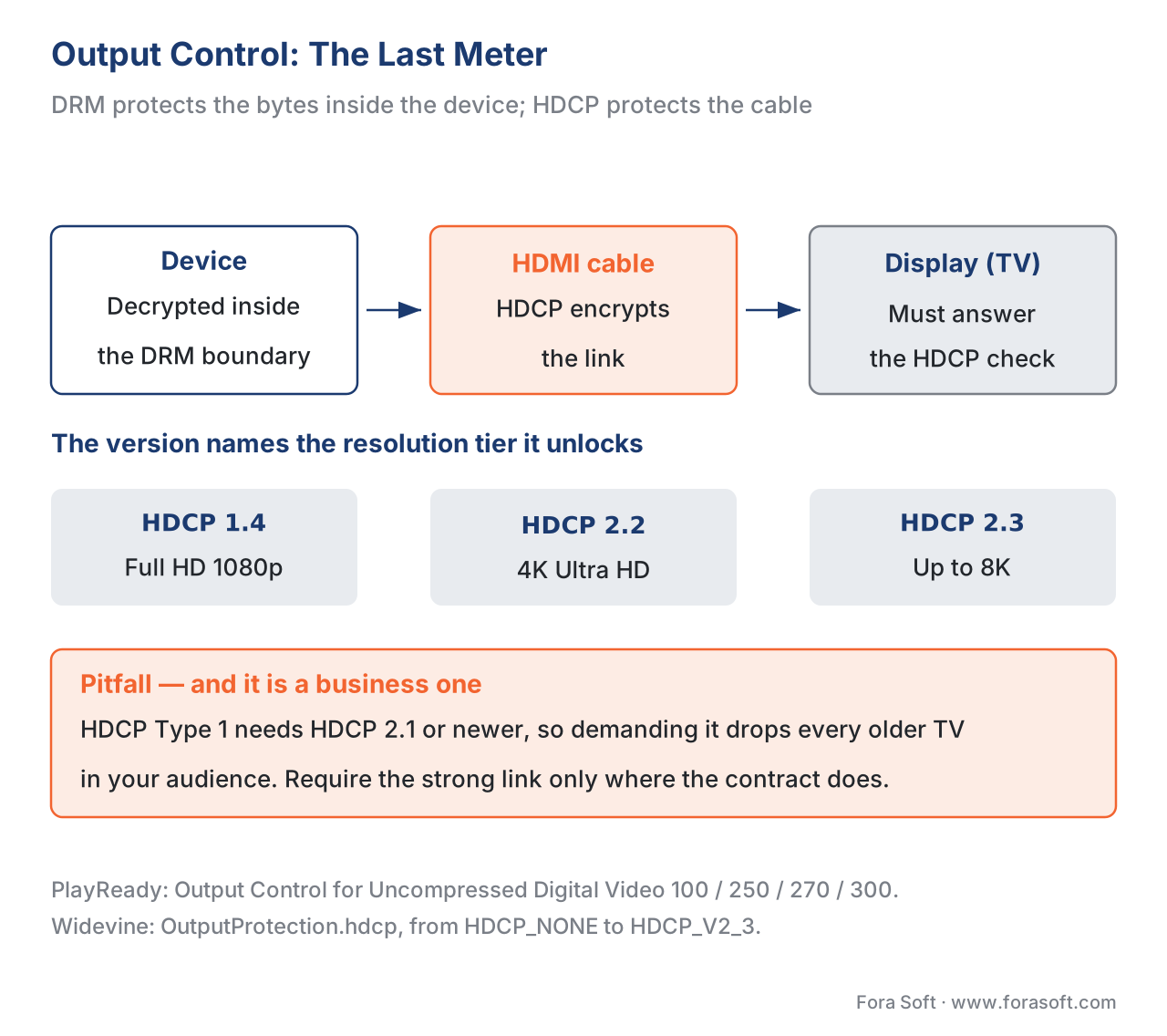 Figure 3. DRM protects the decrypted bytes inside the device; HDCP protects the cable to the screen. The license names the minimum HDCP version, which maps to a resolution tier — and demanding too high a version locks out older displays.
Lever four — security level: the resolution cap
The final lever decides how much content quality a device may receive based on how trustworthy its hardware is. This is the answer to a question content owners always ask: "if a cheap device's protection is weak, why give it our best picture?"
The mechanism is the device's security level, set in The Three DRM Systems. In Widevine terms, L1 means all decryption and key handling happen inside a hardware Trusted Execution Environment (TEE) the host system cannot see; L3 means the work happens in software, with no hardware isolation, which is far easier to attack. PlayReady carries the equivalent as a Minimum Security Level policy with values of 150, 2000, or 3000 — the license will only bind on a client at that level or higher.
The policy lever is to cap resolution by security level. The near-universal industry rule is that software-only devices (Widevine L3) are limited to standard definition — typically 480p — while anything above SD requires hardware-backed protection (L1). The important subtlety, and a point most articles get wrong: this cap is a license-server policy decision driven by the studio contract, not a hard technical limit of the DRM. The license server, seeing a low-security device, simply issues a license for the SD rendition (or a policy that forbids the HD ones). PlayReady makes the same idea explicit with its Maximum Decode Resolution policy. Pair this lever with the others and a single title produces very different licenses:
| Device | Security level | License policy issued | Result |
|---|---|---|---|
| Modern phone, secure chip | Widevine L1 / hardware | 4K allowed, require HDCP 2.2, watermark on | Ultra HD playback |
| Laptop browser, software DRM | Widevine L3 / software | cap at 480p, no HDCP requirement needed | SD playback |
| Old smart TV, HDCP 1.4 only | hardware but weak link | 1080p, block 4K renditions | HD playback, no 4K |
| Rooted / non-compliant device | fails attestation | no license issued | no playback |
This is the payoff of the whole article: the studio's one contract clause ("4K only on hardware DRM with HDCP 2.2 and watermarking") becomes four coordinated fields — security level, resolution cap, HDCP minimum, watermark flag — composed fresh for each device at license time. (The watermark itself is forensic watermarking, the next protection layer beyond the license.)
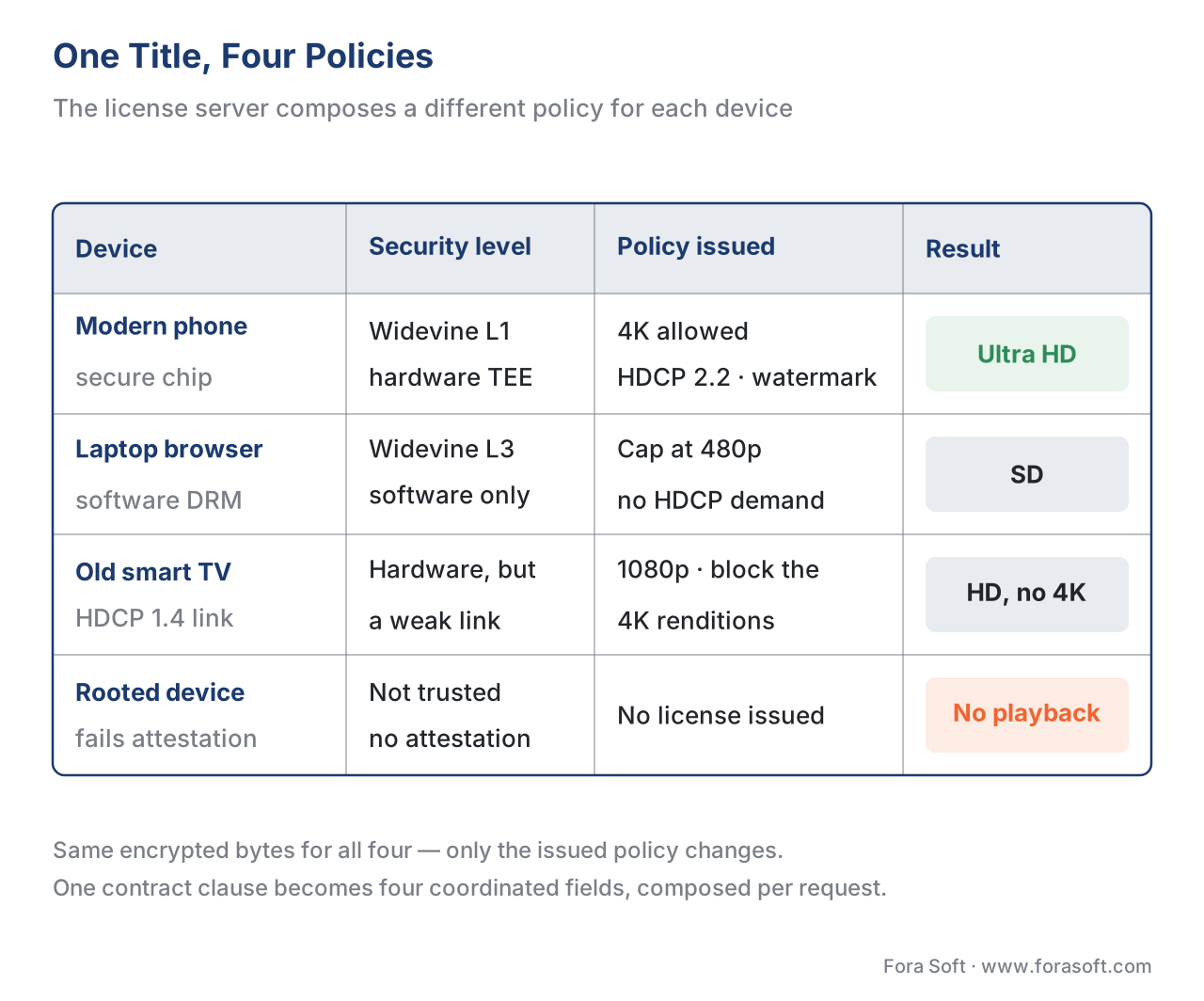 Figure 4. One title, one set of encrypted bytes — but the license server composes a different policy for each device, trading resolution against the device's security level, link protection, and compliance.
One request, one policy: how it composes
Step back and the four levers are not separate switches; they are composed together, per request, by the license server. When a device asks for a key, the server answers three questions and multiplies the answers into one policy:
- What does the content require? From the title's tier in your catalogue and the studio contract — the MovieLabs-style rules.
- What can this device be trusted with? From the license request itself — security level, supported HDCP, attestation.
- What has this user paid for? From your entitlement service — subscription, rental with its two clocks, or purchase.
The intersection is the license. A new-release film, rented, on a secure phone over Wi-Fi gets: a 48-hour playback window, online (temporary) license, 4K allowed, HDCP 2.2 required, watermark on. The same film, same rental, on an old laptop browser gets: the same 48-hour window, but a 480p cap and no HDCP demand because the link cannot carry one. The encrypted bytes never changed. Only the rules did.
This is also why the rights logic must live on your server, never in the player — the same lesson as License Servers and Key Delivery. A policy decided in JavaScript is a policy any viewer can rewrite with developer tools open.
Common mistakes
A short field guide to the failures we see most often when teams design license policy:
- One clock for rentals. Setting only an expiry date and forgetting the playback window — so a customer who starts on day 29 gets one hour, not their promised 48. Always set both the rental window and the playback window.
- Long, non-renewing offline licenses. Issuing a persistent license with a long life "so downloads work" leaves a usable key on disk far longer than the content owner allows. Keep offline durations short and require renewal.
- HDCP maximalism. Requiring HDCP 2.2 on every stream to feel safe, then drowning in support tickets from viewers on older 1080p TVs. Match the link requirement to the content tier.
- Forgetting the trusted clock. Honouring an expiry on a device whose clock can be wound back, so a "rental" never really ends. Require a trusted clock and pair every expiry with a begin date.
- No re-download path for purchases. Treating "buy" as a one-time license, then leaving customers stranded when they change phones. Build re-issue from day one.
- Capping resolution in the player instead of the license. Trusting the app to "only request SD on weak devices" — trivially bypassed. The resolution cap must be a server-issued policy.
can_persist and offline durations, the HDCP version-to-resolution map, and the security-level resolution cap.
Where Fora Soft fits in
The platforms that need policy precision are the ones operating at scale: an OTT/Internet TV service launching a studio catalogue across phones, browsers, smart TVs, and streaming sticks, where one over-strict rule multiplies into thousands of failed playbacks and one over-lax rule fails a security audit. Fora Soft has built video streaming, OTT/Internet TV, and other protected-video systems since 2005 — 625+ projects for 400+ clients across 20+ years — and that experience is in the unglamorous middle link of the chain: turning a content owner's contract into a license-server policy template that passes the studio review and still plays on the long tail of real devices your audience actually owns. We are vendor-neutral about which multi-DRM service issues the licenses; the engineering that matters is the policy design around it.



The handbook
Fora Soft Video Engineering Handbook
We wrote a seven-volume handbook that takes the whole video stack apart, from the pixel to production, across 9,000+ pages — so the person who reads it can design the policy this article scopes and the platform that enforces it. Volume 3 goes deepest into exactly this: multi-DRM and the license server that issues these fields, the player that has to honour them, and the delivery economics behind the resolution tiers you cap. Volume 2 covers the packaging and manifests that carry the HDCP-LEVEL signal to the player, and volume 1 the codecs and renditions your resolution cap is applied to. Written by Nikolay Sapunov, CEO at Fora Soft.
Turning a content contract into a license policy?
Tell us what your contracts demand and which screens you have to serve, and we will come back with the fields that follow — both rental clocks, the offline durations and renewal, the HDCP minimum, and the resolution cap per security level — plus what each rule costs you in failed playbacks and support tickets. 250+ video products shipped since 2005.
See our case studies
Case study
BrainCert
A virtual-classroom LMS at $3M annual revenue and 100K+ customers that ships its own QuantumKey DRM encryption with every plan — protected content whose rights logic sits on the server, next to SOC 2 Type II and ISO/IEC 27001:2022.
Case study
WorldCast Live
Pay-per-view concert tickets for 10,000 simultaneous viewers at 0.4–0.5 s latency and 1.5 Gbit/s — the transactional side of the time lever, where entitlement decides who gets a key for tonight’s show.
Case study
TradeCaster
A $99–$119/month subscription over 46,000+ users with a 7-day free trial — the subscription model this article maps to a short, renewed expiry rather than a licence that outlives the payment.
What to read next
DRM
DRM License Servers and Key Delivery
How the key — and this policy — actually reach the device.
DRM
Widevine vs PlayReady vs FairPlay
The three systems whose fields you just set, compared side by side.
Playback
Offline Download and Playback
The client half of the persistent licence: downloads, storage and expiry.
Anti-piracy
Forensic Watermarking: Tracing the Leak
The layer past the licence, for when a protected stream still gets out.
References
- W3C — Encrypted Media Extensions (EME), Recommendation (2017-09-18). Defines the
persistent-licensesession type ("stored … such that they can be retrieved … even after closing") versustemporary, and the model in which a session "represents the lifetime of a license and its keys." Tier 1 (official standard). https://www.w3.org/TR/encrypted-media/ — accessed 2026-06-17. - IETF — HTTP Live Streaming, RFC 8216 (2017-08). §4.3.4.2 defines the
HDCP-LEVELattribute onEXT-X-STREAM-INF; original valid valuesTYPE-0andNONE; clients without output protection "SHOULD NOT load a Variant Stream … unless its value is NONE." Tier 1 (official standard). https://www.rfc-editor.org/rfc/rfc8216 — accessed 2026-06-17. - IETF — HTTP Live Streaming 2nd Edition, draft-pantos-hls-rfc8216bis. Adds
HDCP-LEVEL=TYPE-1(content must not pass to older HDCP devices) and theALLOWED-CPCcontent-protection-configuration attribute. Tier 1 (standards-track draft from the spec author). https://datatracker.ietf.org/doc/html/draft-pantos-hls-rfc8216bis — accessed 2026-06-17. - ISO/IEC 23001-7:2023 — Common Encryption (CENC), 4th edition. The key is identified by
default_KID; the license carries the key and DRM-specific rights for that KID. Basis for "one encrypted file, many per-device licenses." Tier 1 (official standard). https://www.iso.org/standard/84637.html — accessed 2026-06-17. - Microsoft — License and Policies (PlayReady), Microsoft Learn. First-party source for PlayReady rights (Play; Execute/Read deprecated in 3.0+), the Absolute Expiration / Begin Date / Expiration After First Play policies, the Trusted Clock requirement, the Security Level policy (150/2000/3000), Output Control for Uncompressed Digital Video (100/250/270/300), and "HDCP Type 1 is supported starting with HDCP version 2.1." Tier 3 (first-party DRM vendor). https://learn.microsoft.com/en-us/playready/overview/license-and-policies — accessed 2026-06-17.
- Microsoft — Output Protection Levels (PlayReady), Microsoft Learn. First-party source for the OPL model and allowed values (Compressed Digital Video 400/500; Uncompressed Digital Video 100/250/270/300) and the "Mike's HDMI cable" enforcement example. Tier 3 (first-party DRM vendor). https://learn.microsoft.com/en-us/playready/overview/output-protection-levels — accessed 2026-06-17.
- Apple — FairPlay Streaming Overview / FPS SDK. First-party source for offline rentals' dual durations: a first (storage/rental) key and a second (playback) key obtained at first play that supersedes it; CKC carries expiration for rental and lease. Tier 3 (first-party DRM vendor). https://developer.apple.com/streaming/fps/ — accessed 2026-06-17.
- Google — Widevine DRM license policy (license_protocol.proto / overview). First-party source for the policy fields:
can_play,can_persist,can_renew;license_duration_seconds,rental_duration_seconds,playback_duration_seconds,renewal_recovery_duration_seconds; and theOutputProtection.hdcpenum (HDCP_NONE…HDCP_V2_3,HDCP_NO_DIGITAL_OUTPUT) withcgms_flags. Tier 3 (first-party DRM vendor). https://developers.google.com/widevine/drm/overview — accessed 2026-06-17. - MovieLabs — Specification for Enhanced Content Protection (ECP), v1.x. Industry (studio-consortium) requirement source: hardware root of trust, HDCP 2.2 link protection, secure media pipeline, and forensic watermarking for 4K / high-value / early-window content. The origin of the policy rules platforms enforce. Tier 4 (industry alliance / requirement setter). https://movielabs.com/news/enhanced-content-protection-specifications/ — accessed 2026-06-17.
- Microsoft — Media Services v3 Widevine license template overview, Microsoft Learn. Engineering reference confirming the Widevine policy fields in a real license template (
can_persist,rental_duration_seconds,playback_duration_seconds,renewal_recovery_duration_seconds,always_include_client_id) and offline requirements. Tier 4 (vendor engineering). https://learn.microsoft.com/en-us/azure/media-services/latest/drm-widevine-license-template-concept — accessed 2026-06-17. - Digital Content Protection LLC — HDCP specification (orientation). HDCP is managed by DCP LLC; HDCP 1.4 protects Full HD, 2.2 was designed for 4K UHD with a locality check, 2.3 extends to higher resolutions. Tier 4/6 (orientation on version-to-resolution mapping). https://www.digital-cp.com/ — accessed 2026-06-17.
Per the section's source hierarchy: the session types and persistence model trace to tier-1 W3C EME (ref. 1); the manifest-level output-protection signal to tier-1 IETF RFC 8216 §4.3.4.2 (ref. 2) with the
TYPE-1addition in rfc8216bis (ref. 3); the key/policy-by-KID model to tier-1 ISO/IEC 23001-7 (ref. 4) — four tier-1 primaries. The concrete policy fields are first-party DRM-vendor docs (PlayReady refs. 5–6, FairPlay ref. 7, Widevine ref. 8). The studio requirements that drive the policy are MovieLabs ECP (ref. 9, industry alliance). Where popular guides claim "FairPlay/HLS HDCP-LEVEL TYPE-1 is in RFC 8216" or "L3 is technically limited to SD," the article follows the spec and the vendor docs: TYPE-1 is an rfc8216bis addition, and the SD cap is a license-server policy decision, not a hardware limit — both flagged in text.
