


Why this matters
Downloads are how a streaming service keeps watch time on commutes, flights, and anywhere the network is weak or metered, and they are a headline feature in almost every subscription app, so a product manager scoping a roadmap will be asked for them early. The trap is treating "downloads" as a small front-end task when it is really a content-protection feature: get the license model wrong and a viewer's saved movie either refuses to play in airplane mode or, worse, plays forever after the rental should have ended and breaks a studio deal. This article explains offline download and playback in plain language so you can scope the work, judge a vendor's player SDK, and have an accurate conversation with both your engineers and your content owners. It is the deep companion to the offline section in iOS and Android playback and sits next to the OTT client matrix, which maps every screen you must cover.
Offline is a second playback path, not a setting
Start with the mental model, because it is the thing teams get wrong first. When a viewer streams, the player reaches out across the network for two things, continuously: the small chunks of video, called segments, and — for protected content — a license, the data packet that holds the decryption key and the rules for using it. Both arrive on demand and neither is meant to outlive the session. Offline flips that. The app fetches everything ahead of time, while there is still a connection, and writes it to the device so that later, with the network switched off, the player can read from local storage instead of the internet.
That single difference — pre-fetch and persist, rather than fetch on demand — ripples through the whole stack. You need a download manager that can pull a whole title reliably in the background and survive the app being closed. You need a secure place on the device to keep the encrypted video. And, the part that surprises non-specialists, you need a special kind of license that is allowed to be written to disk and read again with no server in reach. Streaming code does none of these things, which is why offline is built and tested as its own path rather than bolted onto the player.
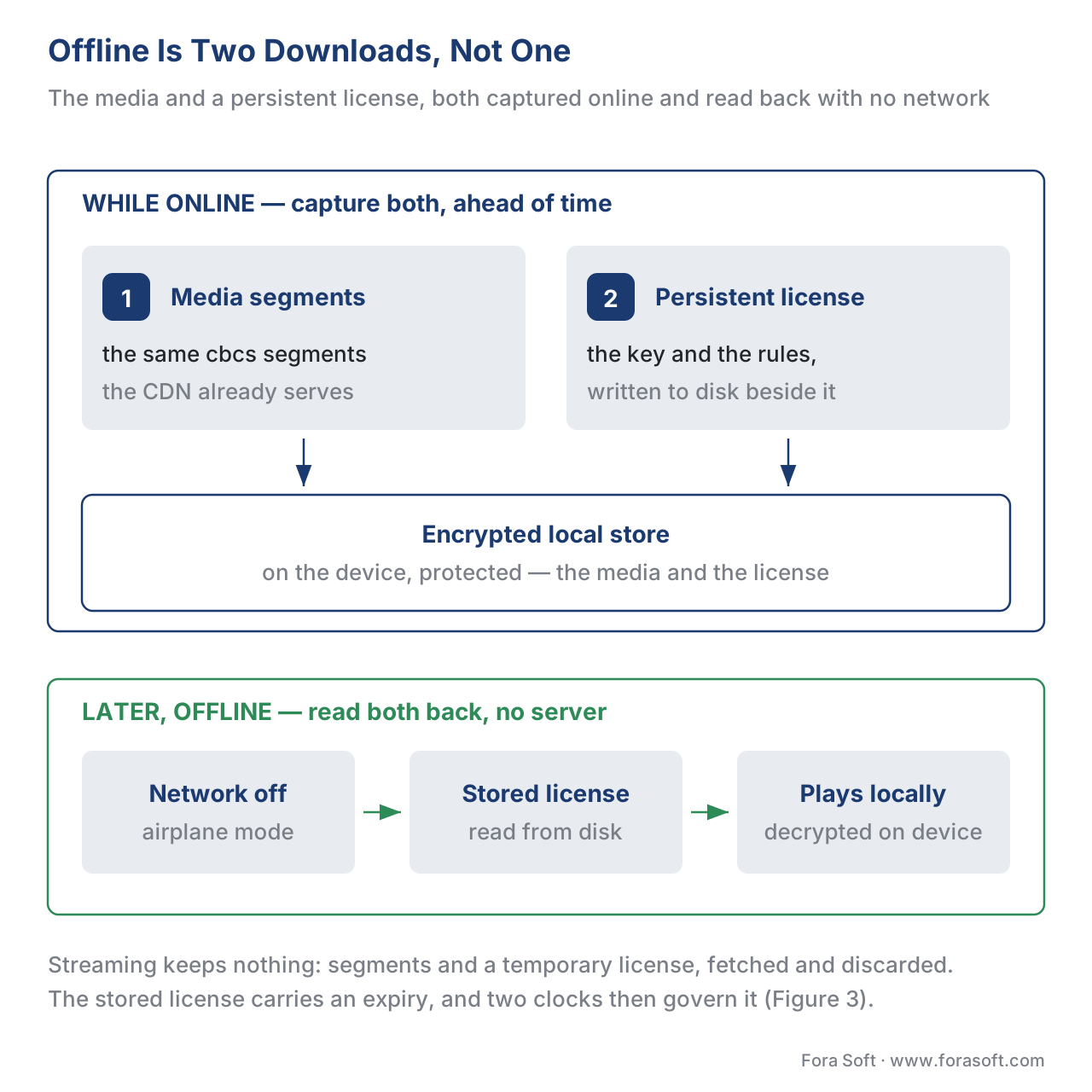 Figure 1. Offline is two downloads, not one: the media and a persistent license, both captured while online and read back later with no server in reach.
Two downloads, never one
The most useful sentence in this article: an offline download is two downloads, not one. The first is the obvious one — the video and audio segments, the same files the CDN already serves for streaming. The second is the license, and it is the one that decides whether anything plays.
When you stream, your player asks your license server — the service that hands out decryption keys after checking the viewer is entitled — for a license each time it starts a protected title, and that license is thrown away when the session ends. For offline, the player must ask for a different kind of license during the download, while the device is online, and store it next to the media. Later, in airplane mode, the player reads that stored license, gets the key, and decrypts the video locally. If you forget the second download, the media is on the device but every frame is a black screen, because the key never came along. How the key exchange itself works is covered in license servers and key delivery; here the point is simply that offline means you capture the license too, and you capture it early.
The persistent license is the whole game
The kind of license that is allowed to live on the device is called a persistent license, and it is a precise technical concept, not a marketing word. The web standard that governs browser playback, the W3C Encrypted Media Extensions specification — usually shortened to EME, a 2017 W3C Recommendation — defines three types of decryption session. A temporary session keeps nothing: the license and keys vanish when the session ends, which is normal streaming. A persistent-license session is the offline one: in the words of the standard, the license "will be persisted," and a record of its destruction must also be persisted when the keys are deleted. A third type, persistent-usage-record, keeps only a log of what was played, for reporting. Offline download is the persistent-license type, and the standard marks support for it as optional — which is the first hint that offline is not available everywhere.
The native systems mirror this exactly under their own names. On Apple devices, Apple's content-protection system FairPlay Streaming returns a content key the server has flagged as either transient or persistent; when it is persistent, the device writes an offline key it can read back later. On Android, Google's Widevine issues an offline license that the player stores as a small identifier. On Windows and many smart TVs, Microsoft's PlayReady keeps a persistent license in non-volatile storage that "lasts for the lifetime of the store or until a time-based restriction is reached." Three vendors, one idea: a license that is permitted, by policy, to outlive the network connection.
Two consequences follow, and both matter for scope. First, you must fetch the persistent license while the device is online — there is no way to obtain it later in airplane mode, so the download flow has to acquire and verify it before it tells the viewer "ready to watch offline." Second, a persistent license is more sensitive than a streaming one, because the key now sits on the device, so content owners demand a higher security bar to issue one — typically hardware-backed protection — which is why offline is often blocked on rooted or jailbroken devices and on software-only playback paths.
The same encrypted file, a different kind of license
Here is the reassuring part for anyone worried that offline doubles their encoding bill: it does not. The video a viewer downloads is the identical file you already stream. Modern streaming encrypts each title once using the cbcs scheme of the umbrella standard Common Encryption (ISO/IEC 23001-7), packaged in the CMAF fragmented-MP4 container (ISO/IEC 23000-19), and that one encrypted package already plays under FairPlay, Widevine, and PlayReady alike. We cover that convergence in multi-DRM: one workflow, every device and the scheme detail in CENC, CTR, and CBCS explained.
Offline reuses all of it. You do not produce an "offline copy" of the catalog. You download the same cbcs segments and pair them with a persistent license instead of a temporary one. Keep the two ideas separate in your head: the media is unchanged; only the license type changes. That distinction is what lets a service add downloads without a second encode of thousands of hours of video.
Per-platform reality: iOS, Android, and the web
Like streaming, offline is built per platform, and the pieces differ. The table below is the coverage map; read down the column you are scoping. The "Native support" column is the one that decides feasibility — offline is comfortable on the two mobile platforms and genuinely hard in a plain browser.
| Capability | iOS / iPadOS | Android | Web browser |
|---|---|---|---|
| Download API | AVAssetDownloadURLSession |
Media3 DownloadManager |
Service Worker + IndexedDB (best-effort) |
| DRM | FairPlay (persistent key) | Widevine (offline license) | EME persistent-license (where supported) |
| Stored license object | Persistent FairPlay key | keySetId from OfflineLicenseHelper |
Persistent MediaKeySession |
| Where media is stored | App's managed asset store | App download cache | IndexedDB (transient) |
| Expiry support | Yes (key carries expiry) | Yes (license carries expiry) | Yes (license carries expiry) |
| Native support | Strong | Strong | Weak / often impractical |
On iOS, you download HLS content with AVAssetDownloadURLSession driving an AVAssetDownloadTask, and for protected titles you also request a persistent FairPlay key during the download and store it; Apple's framework manages the encrypted asset store for you. On Android, the ExoPlayer engine inside Jetpack Media3 uses a DownloadManager (run from a background DownloadService) for the media, and a helper called OfflineLicenseHelper downloads the Widevine offline license, returning a small keySetId you keep and hand back to the player to unlock the file. A minimal sketch of that Android swap — illustrative, not production code:
// 1) While online: pre-fetch the offline Widevine license.
val keySetId = offlineLicenseHelper.downloadLicense(format)  // store this blob

// 2) Later, offline: build the source with the stored key, no license URL.
val drmConfig = MediaItem.DrmConfiguration.Builder(C.WIDEVINE_UUID)
    .setKeySetId(keySetId)          // use the saved key instead of a server URL
    .build()
On the web, offline is the weak corner. The persistent-license session type exists in EME, and players such as Shaka Player can store content and licenses in the browser's local database (IndexedDB). But support is inconsistent across browsers, persistent licenses are not available everywhere, and browser storage is explicitly best-effort — the operating system may reclaim it when the device runs low on space, so a "downloaded" film can simply vanish. For a dependable download feature, a native app, or at least an installed app wrapper, is the realistic answer; the browser path is a bonus, not a foundation. The web DRM machinery sits in the EME browser DRM stack and web playback.
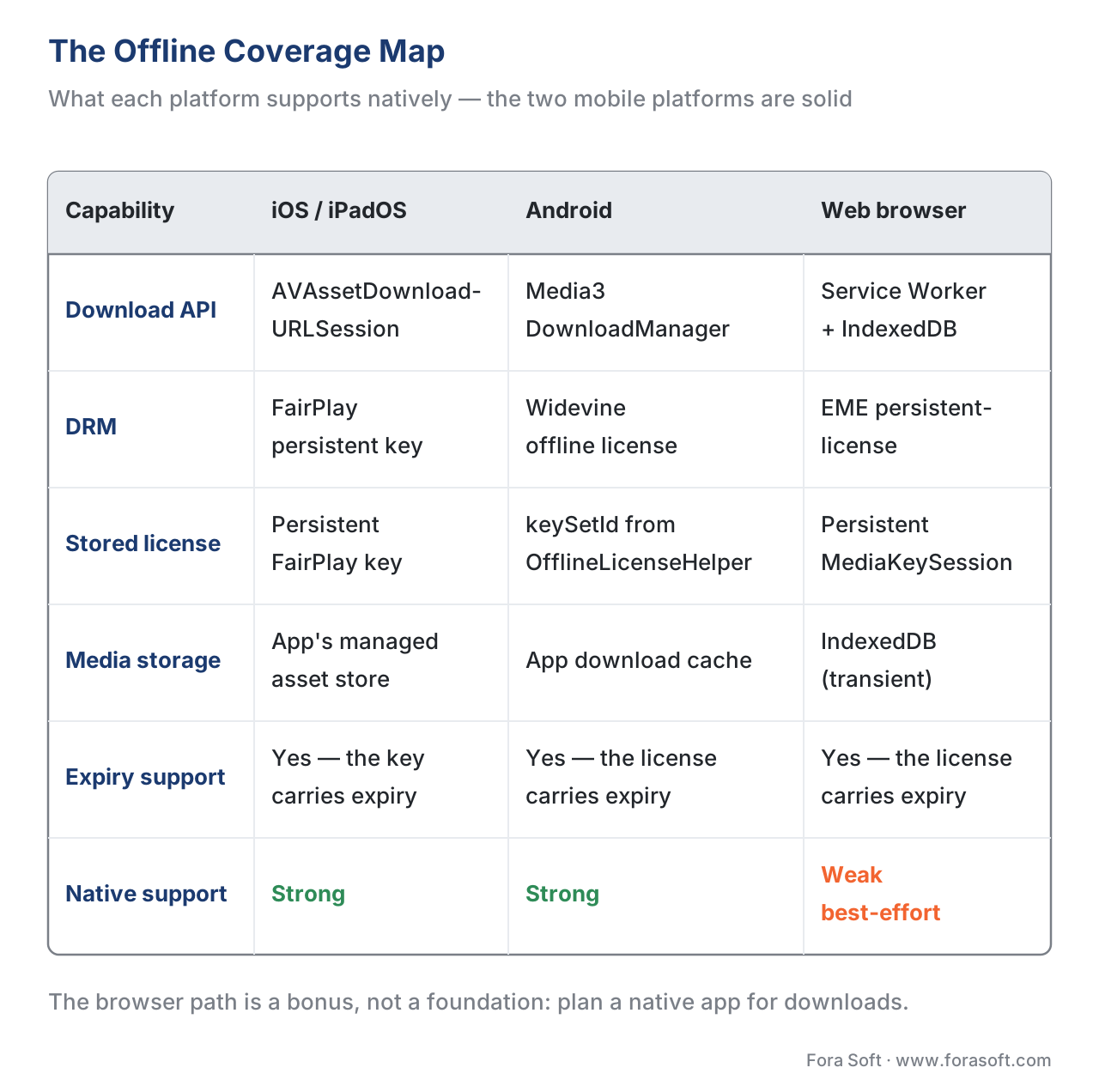 Figure 2. The offline coverage map. Green cells are natively supported; the web column is mostly amber because browser storage is best-effort and persistent licenses are inconsistent.
Two clocks: the storage window and the playback window
This is the part product managers most often get wrong, and it is the most important rule in the article. A downloaded title is governed by two separate clocks, set by the content owner and enforced by the persistent license, and whichever runs out first ends playback.
The first clock is the storage window, sometimes called the rental or storage duration: how long the license is allowed to live on the device after it is issued. A common value is 30 days. Download a film today, do not open it, and the license still expires in 30 days. In a license server this is one number — 30 days is 30 × 24 × 3600 = 2,592,000 seconds — and after it elapses the device deletes the license and the download stops playing.
The second clock is the playback window, or playback duration: a shorter timer that starts the first time the viewer presses play. A common value is 48 hours. The classic rental rule "30 days to start watching, 48 hours once you do" is exactly these two clocks working together — the storage window gives you a month to begin, and pressing play trips the 48-hour window that then governs the rest. PlayReady even supports a "real-time expiration" mode for very short, precisely timed rentals. The two-clock model is set in license policy, which we cover in full in license policy: rentals, offline, and output control.
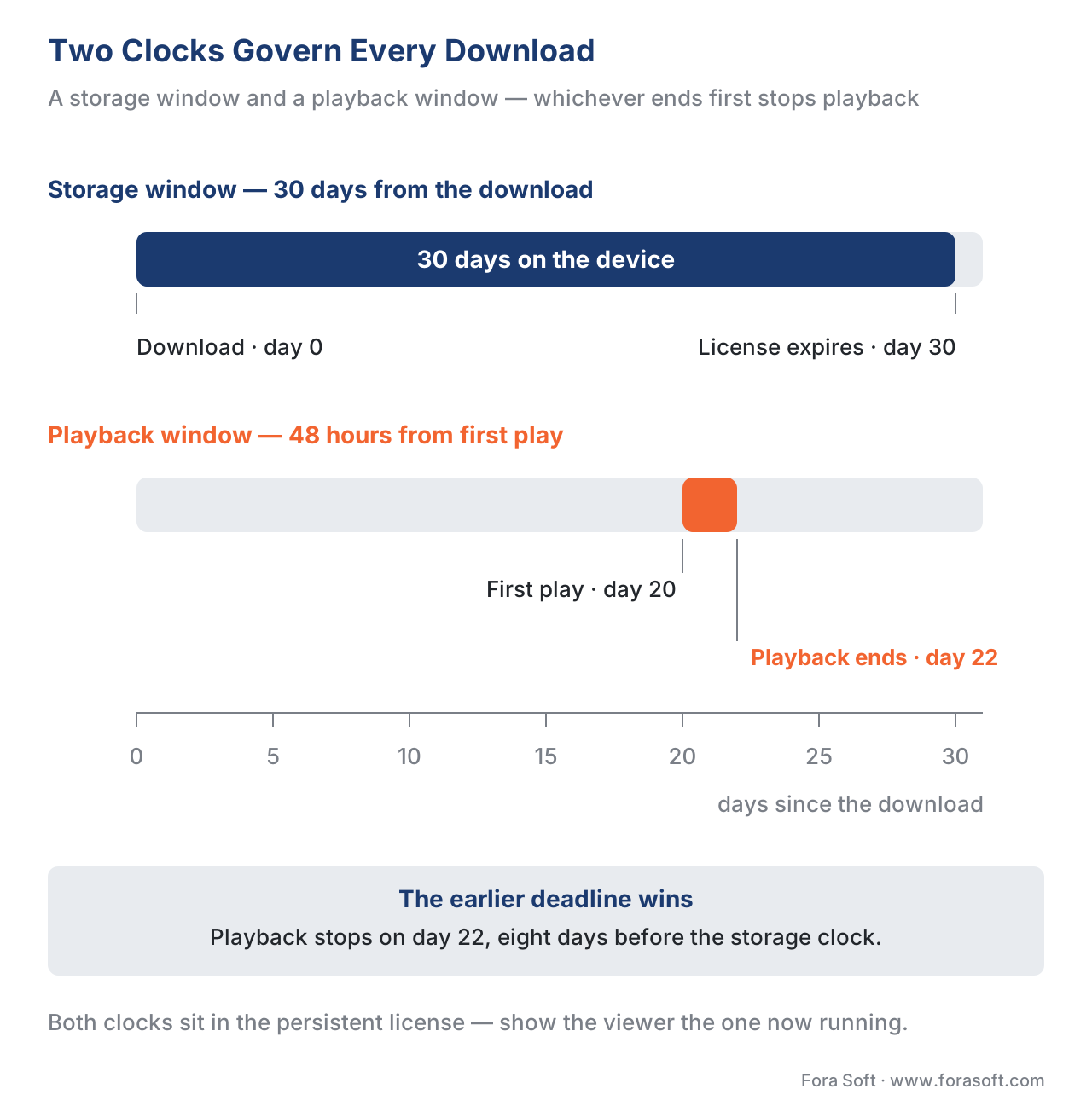 Figure 3. Two clocks govern every download. The storage window counts from the download; the playback window counts from first play; the earlier deadline wins.
Work a quick example out loud. A viewer downloads a film on the 1st with a 30-day storage window and a 48-hour playback window. If they never open it, it expires on the 31st — the storage clock. If they press play on the 20th, the playback clock starts and the film stops working on the 22nd, eight days before the storage window would have ended — because the earlier of the two deadlines always wins. Your app's job is to show the viewer the relevant clock: "Available for 29 more days" before they start, then "Expires in 47 hours" after they press play. Getting that message wrong is the most common offline support ticket.
A subscription download behaves the same way mechanically, just with friendlier numbers: the storage window is often tied to the subscription (the download keeps working as long as the membership is active and the device checks in periodically), and there may be no playback window at all. The mechanism — a persistent license with an expiry — is identical; only the policy values change.
Storage math: what a season costs on a phone
The other number that surprises teams is disk space, and it is worth showing the arithmetic, because it drives a product decision. A 1080p stream at 5 megabits per second uses 5 ÷ 8 = 0.625 megabytes every second. Over an hour that is 0.625 × 3600 ≈ 2,250 megabytes — about 2.25 GB per hour. A 45-minute episode is therefore roughly 1.7 GB at that quality, and a ten-episode season about 17 GB — enough to fill the free space on a budget phone with a single show.
That is why mature download features never silently grab the highest quality. They offer a download-quality choice — "standard" versus "high," for example — and default to the lower one. The savings are large because a lower rung uses a smaller bitrate: many services download in the efficient HEVC codec at around 720p, landing near 250 MB per hour for standard and roughly 500 MB per hour for high, against the 2.25 GB of a full 1080p rung. Offer the viewer that choice and a season drops from 17 GB to 2–4 GB. Many platforms also add smart downloads — automatically fetching the next episode and deleting the watched one — so a binge-watcher's device stays roughly constant rather than filling up. The encoding ladder these rungs come from is the subject of the encoding ladder explained.
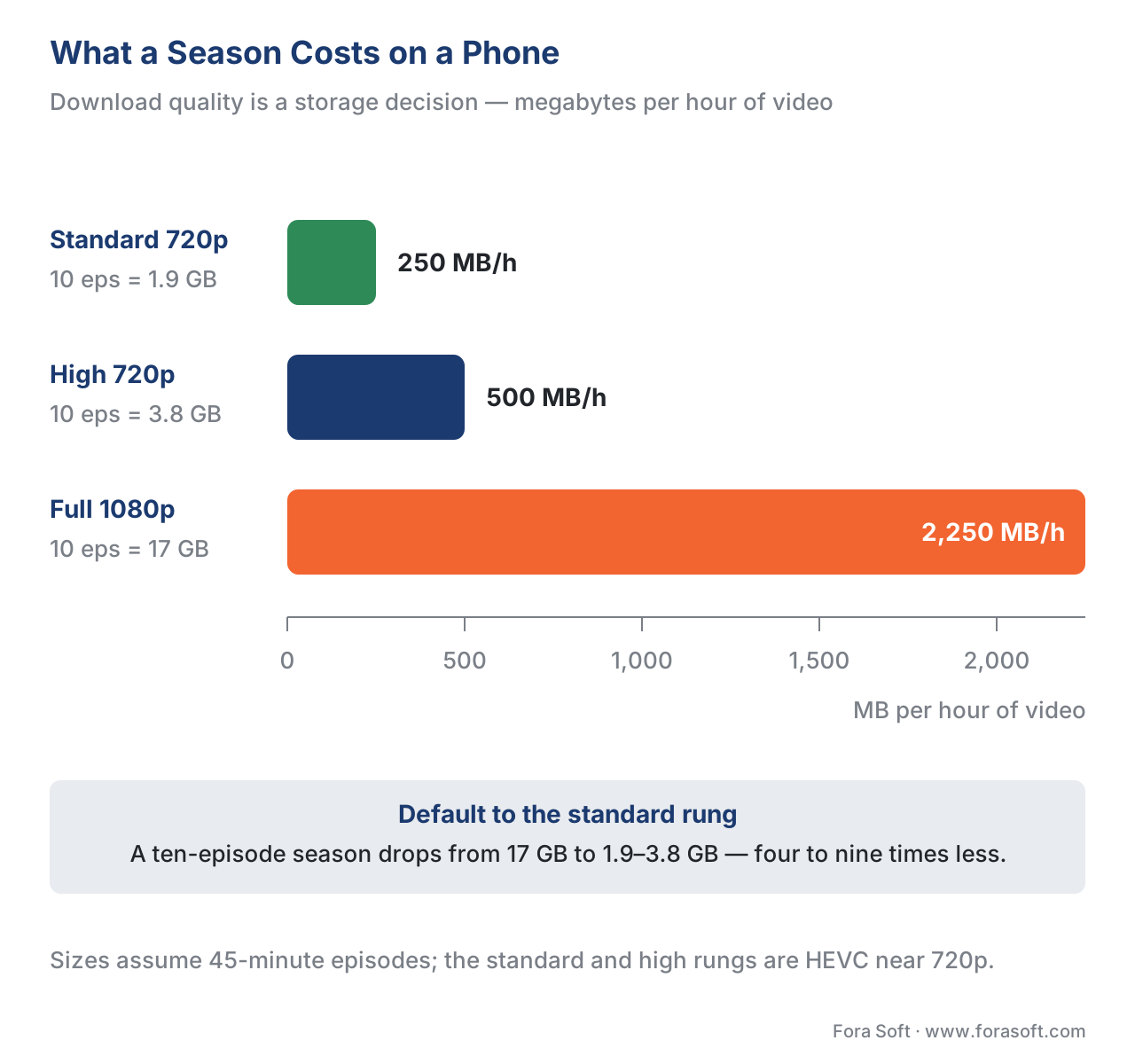 Figure 4. Download quality is a storage decision. Defaulting to a standard rung can cut a season's footprint by roughly five times.
What the content owner allows — offline is a rights decision
The final reframe: much of what your offline feature can do is not your choice at all. Whether a title can be downloaded, how long the storage and playback windows run, how many devices may hold a copy at once, and whether a download survives a lapsed payment are all content-owner rights decisions, expressed in the license your server issues and enforced by the device's DRM. Some studios forbid offline for premium or early-window titles entirely; your catalog can then be a patchwork where some titles show a download button and others do not, and that state has to come from your entitlement system, not a global toggle.
Device count is part of the same picture. Major services cap how many devices may hold downloads at once — commonly two on a standard tier and around six on a premium tier — and how many active downloads a single device may keep, often around 100, with ad-supported tiers limited to a smaller monthly allowance. These are business rules layered on top of the DRM, and they live in your billing and entitlement logic, which we cover in subscription billing and entitlement. The security bar matters too: because a persistent key sits on the device, content owners usually require hardware-backed protection (Widevine's L1 level, or Apple's Secure Enclave) for HD and 4K offline, and block downloads outright on rooted or jailbroken devices where that protection cannot be trusted.
Free download: Offline Playback Readiness ChecklistA one-page pre-launch checklist for a download feature: the persistent-license model, the two clocks, storage and device management, and the content-owner rights rules to confirm before shipping.Common mistakes — the five that break downloads. First, forgetting the second download: the media is saved but no persistent license, so every offline frame is black — always acquire and verify the license during the download, while online. Second, trying to fetch the license in airplane mode — it cannot be done; pre-fetch it. Third, showing the wrong clock, so a viewer who pressed play sees "29 days left" and is shocked when it dies in 48 hours — surface the active window. Fourth, defaulting to full-quality downloads and filling the user's phone — offer a quality choice and default low. Fifth, assuming the browser can do reliable offline — plan a native app for dependable downloads, because browser storage is best-effort and can be reclaimed.
Where Fora Soft fits in
Offline tends to surface every weak point in a streaming build at once, because it must work at the scale of a full catalog, across iOS and Android, under each content owner's rights rules, and with a persistent license that has to be acquired, stored, and expired correctly on the device. Fora Soft has built video streaming, OTT/Internet TV, e-learning, and telemedicine apps since 2005 — 625+ projects for 400+ clients across 20+ years — so the offline patterns here (persistent FairPlay and Widevine licenses, the two-clock rental model, download-quality management, and the entitlement rules that gate it) are part of the day-to-day of our streaming work. We are vendor-neutral: we translate each content owner's offline policy into a download flow that holds up in the field, rather than reselling a single DRM SDK.



The handbook
Fora Soft Video Engineering Handbook
We wrote a seven-volume handbook that works through the whole video stack across 9,000+ pages, and a download feature touches three of its layers at once. Volume 3 carries the part this article leans on hardest - DRM and the license layer, players and CDMs, and the economics of delivery - Volume 2 covers the CMAF packaging and manifests that produce the very segments a device saves, and Volume 1 explains the encode ladder whose rungs decide whether a season costs 1.9 GB or 17 GB on a phone. Read the three and you can specify the license policy, the download manager and the quality choice yourself. Written by Nikolay Sapunov, CEO at Fora Soft.
Are downloads on your roadmap with no license model behind them yet?
Tell us which screens you ship on and what your content owners allow, and we will come back with the persistent-license flow, the two-clock policy and what the download manager costs to build - 250+ video products shipped since 2005.
See our case studies
Case study
Franchise Record Pool
A DJ platform carrying 720,000+ tracks licensed from Sony Music, Universal and Virgin Records, played through React Native apps on iOS and Android - the label, not the product team, decides what a device is allowed to keep.
Case study
Sprii
€365M+ in cumulative sales and 72,000+ live events for 3,000+ brands, delivered through native Swift and Kotlin apps - the two platforms where a dependable download feature can actually live.
Case study
TradeCaster
A live trading platform with 46,000+ users on $99-$119 monthly subscriptions, where the tier a viewer pays for is what decides their device count and their limits - business logic, not DRM.
What to read next
Clients
iOS & Android Video Playback: Players, DRM, Stores
The two platforms where offline works, from the player and the store rules up.
DRM policy
DRM License Policy: Rentals, Offline, Output Control
Where the storage window and the playback window are actually set.
Web DRM
Encrypted Media Extensions & the Browser DRM Stack
Why the persistent-license session is the browser's weak corner.
Entitlement
Subscription Billing and Entitlement: the SVOD Engine
Where device counts and download caps are decided and enforced.
References
- Encrypted Media Extensions. W3C Recommendation, 18 September 2017. Defines the
temporary,persistent-license, andpersistent-usage-recordMediaKeySession types; thepersistent-licensetype is the offline-download session and its support is marked optional. Tier 1 (primary standard). https://www.w3.org/TR/encrypted-media/ - Common Encryption in ISO base media file format files — ISO/IEC 23001-7. ISO/IEC. Defines the
cenc(AES-CTR) andcbcs(AES-CBC) schemes; the samecbcs-encrypted segments are what a device downloads for offline, paired with a persistent rather than temporary license. Tier 1 (primary standard). https://www.iso.org/standard/68042.html - Common Media Application Format (CMAF) — ISO/IEC 23000-19. ISO/IEC. The fragmented-MP4 container for the downloaded segments; one package serves streaming and offline alike. Tier 1 (primary standard). https://www.iso.org/standard/79106.html
- HTTP Live Streaming — IETF RFC 8216. IETF, 2017. The HLS format Apple's
AVAssetDownloadURLSessiondownloads for offline playback on iOS. Tier 1 (primary standard). https://www.rfc-editor.org/rfc/rfc8216 - Persistent and Non-persistent Licenses — Microsoft PlayReady. Microsoft Learn. States that persistent licenses are stored in non-volatile memory for offline playback and last for the lifetime of the store or until a time-based restriction (date/time expiration, expiration after first play, real-time expiration). Tier 3 (first-party). https://learn.microsoft.com/en-us/playready/overview/license-persistence
- Discover how to download and play HLS offline — WWDC20; FairPlay Streaming. Apple.
AVAssetDownloadURLSession/AVAssetDownloadTaskfor HLS download and the persistent FairPlay content key (CKC content-key type) stored for offline playback. Tier 3 (first-party). https://developer.apple.com/videos/play/wwdc2020/10655/ - OfflineLicenseHelper — Android Media3 / ExoPlayer. Google, Android Developers.
downloadLicense()returns akeySetIdfor a Widevine offline license, swapped in viasetKeySetIdfor offline playback. Tier 3 (first-party). https://developer.android.com/reference/androidx/media3/exoplayer/drm/OfflineLicenseHelper - Offline Storage and Playback — Shaka Player. Google / shaka-project. Browser offline via IndexedDB and the EME
persistent-licensesession type; storage is best-effort and content must be treated as transient. Tier 3 (first-party). https://github.com/shaka-project/shaka-player/blob/main/docs/tutorials/offline.md - DRM Offline Licensing — storage duration vs playback duration. DRM service documentation (Gumlet / Insys Cloud). The two-window rental model: storage duration (how long the license persists, e.g., 30 days = 2,592,000 s) and playback duration (max time after first play, e.g., 24–48 h). Tier 5 (vendor). https://docs.gumlet.com/reference/drm-offline-licensing
- Download titles to watch offline; download limits. Netflix Help Center, 2025–2026. Per-device active-download caps (~100), device counts by tier (≈2 standard / ≈6 premium), ad-tier monthly allowances, and expiry windows (7–30 days, or 48 h after first play); standard ≈250 MB/h and high ≈500 MB/h at ~720p HEVC. Tier 6 (industry reference for current numbers). https://help.netflix.com/en/node/54816
Where sources disagreed, the official standard was followed. Popular "offline is just a download toggle" framing was overridden by the W3C EME definition, which shows offline requires a distinct persistent-license session type whose support is optional. Vendor "download anything" marketing was overridden by the per-platform reality that the browser path is best-effort and persistent licenses demand a higher device-security bar.
