


Why this matters
If you run a streaming service delivered over the open internet rather than cable, the website is almost always the first place a new viewer presses play — before they ever install your phone or TV app. The web is also the screen most likely to embarrass you, because "the browser" is really a dozen different browsers with different rules about what they will play and how they decrypt protected content. For a media founder or product manager, the trap is assuming the web is the easy platform because "it's just a <video> tag." It is not: the gap between a web player that plays your protected catalogue everywhere and one that works in Chrome but shows a black screen on an iPhone is weeks of engineering and one specific Apple rule most teams learn the hard way. This article gives you the vocabulary and the mental model to make those calls before they cost you a launch.
The browser is the hardest screen, not the easiest
Start with the thing everyone pictures: the HTML5 <video> element, the tag you drop into a web page to show a video. Point it at a single file — a .mp4 at one fixed quality — and the browser downloads it and plays it. That is progressive download, and it is the original way video worked on the web. For a real service it has the same fatal flaw on the web as everywhere else: it serves one quality to everyone, so the viewer on hotel Wi-Fi and the viewer on fibre get the identical file, and one of them suffers.
Modern streaming fixes this by chopping each title into many short segments — two to six seconds of video each — and encoding the whole title several times at different qualities, a set called the encoding ladder, which we cover in the encoding ladder explained. A small text file, the manifest (an .m3u8 playlist for HLS, an .mpd for DASH), lists every quality and every segment, and the player chooses, second by second, which quality's next segment to download. That continuous choice is adaptive bitrate streaming, almost always shortened to ABR. The concepts behind it — the ABR brain, the buffer, error recovery — are the subject of the companion article, video player engineering: the core concepts; the algorithm mathematics live in our Video Streaming section's adaptive bitrate streaming.
Here is the catch that makes the web special. The <video> tag, by itself, does none of that segment-by-segment switching. It plays one progressive file, or — on Apple's browsers only — one streaming format natively. Everything that turns the bare tag into a real adaptive player has to be added by JavaScript through two W3C browser standards: Media Source Extensions and Encrypted Media Extensions. The rest of this article is those two standards, the open-source engines that ride on top of them, and the browser quirks that decide which path you take.
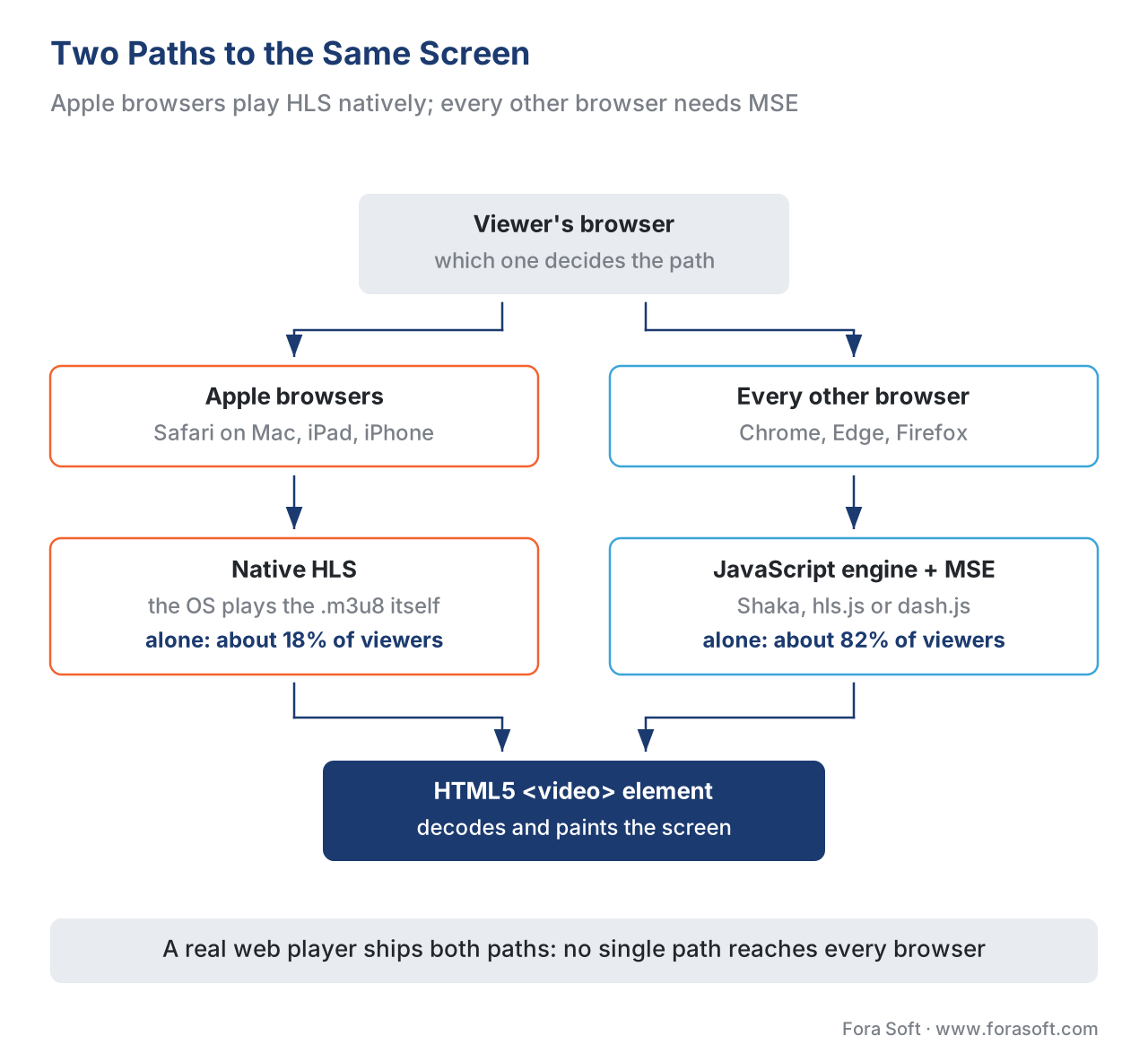 Figure 1. Two paths to the same screen. Apple browsers can play HLS natively in the
 <video> element; everywhere else, a JavaScript engine feeds the element through Media Source Extensions.
Media Source Extensions: how JavaScript feeds the player
To hand video to the <video> element from JavaScript — rather than just pointing it at one file — the player uses a W3C standard called Media Source Extensions (MSE). MSE adds two objects to the page. A MediaSource stands in for the video source and attaches to the element; one or more SourceBuffer objects are the inboxes the player appends downloaded segments into. The element then plays from whatever is in those buffers. The original MSE became a W3C Recommendation on 17 November 2016; the second-edition draft (informally "MSE version 2") is still a W3C Working Draft, last published 4 November 2025, so the API is stable but actively evolving. The spec states its purpose plainly: MSE extends the media element to allow JavaScript to generate media streams, which "facilitates a variety of use cases like adaptive streaming and time shifting live streams."
A minimal sketch shows the shape of it. This is illustrative, not production code:
// Attach a MediaSource to a normal <video> element.
const video = document.querySelector('video');
const mediaSource = new MediaSource();
video.src = URL.createObjectURL(mediaSource);

mediaSource.addEventListener('sourceopen', () => {
  // One SourceBuffer per track; the codec string must match the segments.
  const buffer = mediaSource.addSourceBuffer('video/mp4; codecs="avc1.640028"');

  // The ABR logic decides which segment URL to fetch next.
  fetch(nextSegmentUrl())
    .then((r) => r.arrayBuffer())
    .then((bytes) => buffer.appendBuffer(bytes)); // hand bytes to the player
});
Think of MSE as the loading dock behind the screen: the JavaScript player drives a truck of freshly downloaded segments up to the dock, stacks them in the SourceBuffer, and the <video> element plays from the stack without ever knowing where the bytes came from. Three practical facts about that dock save teams from real bugs.
First, the dock has a finite size. A SourceBuffer holds memory, and appending forever without clearing it eventually throws a QuotaExceededError. A real player therefore evicts already-watched video — the spec defines a "coded frame eviction" step — keeping a window around the current position rather than the whole title. Forgetting this is a classic cause of crashes in long sessions on memory-limited devices.
Second, MSE does not promise that every codec will play. Before the player picks a quality it calls MediaSource.isTypeSupported() to ask the browser whether it can handle that specific format and codec combination; MSE deliberately leaves the actual codec list to each browser. The richer modern check, navigator.mediaCapabilities.decodingInfo() (a W3C Working Draft API), goes further and reports not just whether a format is supported but whether it will play smoothly and power-efficiently — which matters on laptops and phones. The deeper codec story lives in codec strategy for OTT.
Third, MSE has grown two newer abilities worth knowing by name. MSE-in-Workers lets the player run the whole buffering machine on a background thread so a busy main thread does not stutter playback. And ManagedMediaSource is a newer, power-aware variant that lets the browser itself decide when to fetch and when to evict, instead of the page micromanaging it — which is exactly the door that finally let the iPhone into this story.
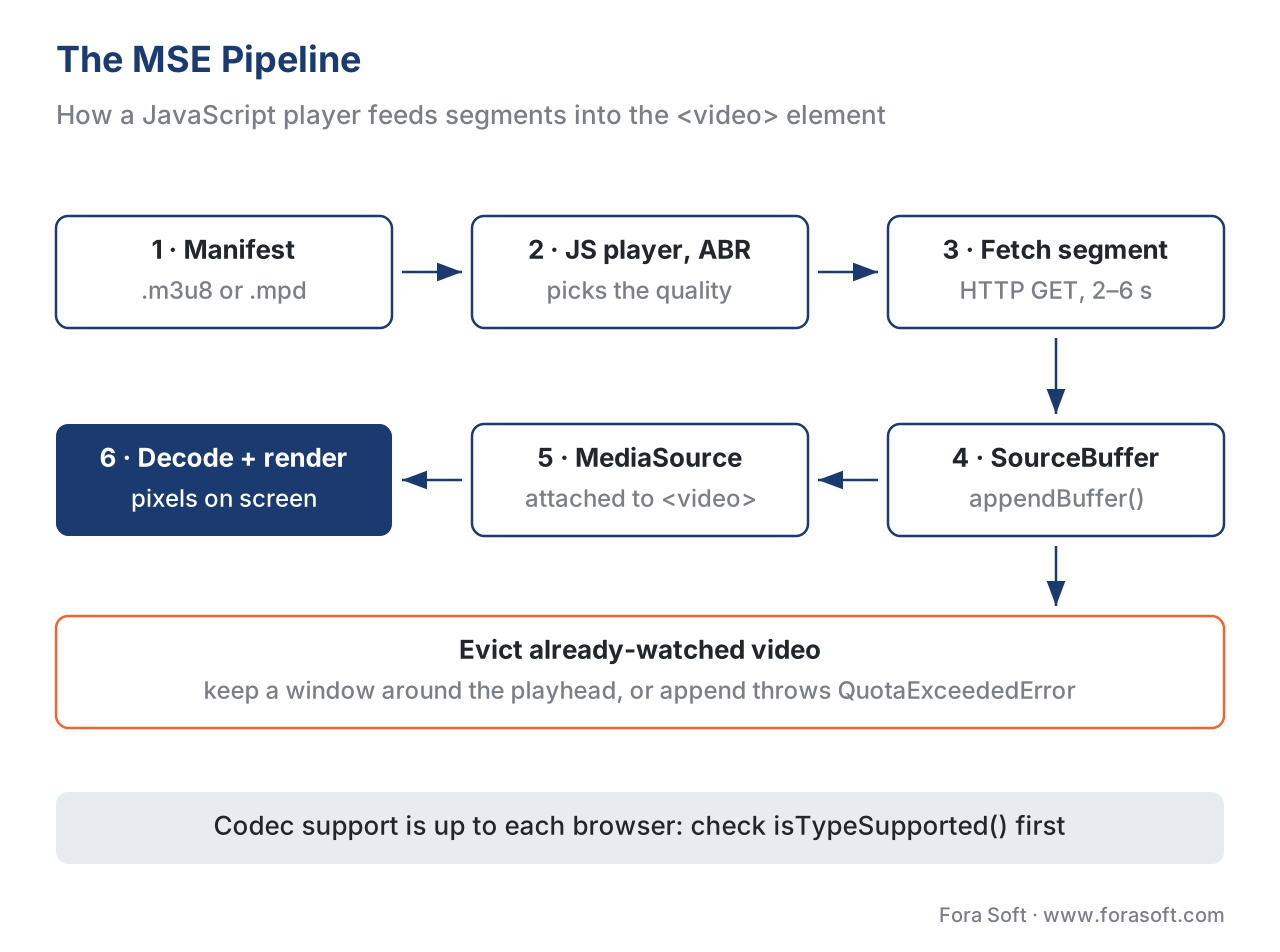 Figure 2. The MSE pipeline. The JavaScript engine fetches and appends segments into a SourceBuffer; the browser decodes and renders from the MediaSource; the player evicts watched video to stay under the memory quota.
The Apple problem: native HLS and the iPhone MSE story
This is the single most consequential fact about web playback, and most articles skip it. Apple's browsers do not behave like the others, and getting this wrong is the most common reason a web player that works perfectly in Chrome shows a black screen on an iPhone.
On Apple platforms, Safari can play HLS natively — you set the <video> element's source to an .m3u8 URL and the operating system's media stack does the adaptive streaming for you, no JavaScript engine required. That is genuinely simpler, and it is why so many services serve HLS to Apple devices and let the platform handle it. The complication is what happens when you do want a JavaScript engine on Apple — for DASH, for custom logic, or for a single unified codebase. For years, the iPhone version of Safari had no Media Source Extensions at all, which meant the MSE-based engines simply could not run there. Apple's answer was ManagedMediaSource, the power-aware variant mentioned above. It first shipped in Safari 17.0 on iPad and Mac in September 2023, and reached the iPhone in Safari 17.1, released 25 October 2023.
The detail that breaks launches sits one level deeper. On the iPhone specifically, ManagedMediaSource only activates when the page also offers an AirPlay <source> alternative, or explicitly disables remote playback. Miss that condition and your carefully built MSE player silently fails to start on exactly the device half your audience is holding. The safe rule for the web in 2026 is: serve native HLS to Apple browsers where you can, and when you must run a JavaScript engine on an iPhone, wire up the AirPlay-source-or-disable-remote-playback condition deliberately and test it on a real device. A modern engine like hls.js already handles the native-HLS hand-off; you still have to test it.
Common mistake: assuming MSE works the same in every browser. Teams build and test their web player in desktop Chrome, see it work, and ship. On an iPhone the MSE path either is not available or refuses to start without the AirPlay/remote-playback condition, and the viewer gets a black rectangle. Always test the Apple path on a real iPhone and a real Safari, decide per-browser whether you are using native HLS or a JavaScript engine, and never assume the desktop result generalises.
Encrypted Media Extensions: DRM in the browser
For a free catalogue, MSE alone is enough. For a premium catalogue, the browser must also decrypt content it is not allowed to hand to the page in the clear — and that is the job of the second standard, Encrypted Media Extensions (EME). EME became a W3C Recommendation on 18 September 2017, the first DRM-related standard the W3C ever published; a second-edition draft is in progress (Working Draft, 26 November 2025). The crucial design point is that EME is not itself a DRM system. It is a thin, standard set of hooks that let a player talk to whatever decryption module the browser ships, while the page only ever shuttles opaque messages between that module and a licence server. The page never sees the keys.
The decryption module is called a Content Decryption Module (CDM), and which one a browser ships is the whole game. Chrome, Chromium-based Edge, and Firefox ship Google's Widevine; Edge on Windows additionally ships Microsoft's PlayReady; Safari ships Apple's FairPlay. The only system EME requires every browser to support is a deliberately insecure baseline called Clear Key, meant for testing, not for protecting a real catalogue. So in practice the browser landscape maps to the same three DRM systems as everywhere else, and you serve whichever the visitor's browser understands — the "encrypt once, licence many" pattern we explain in multi-DRM: one workflow, every device, built on the cbcs scheme of Common Encryption (ISO/IEC 23001-7). How EME drives that exchange inside the browser, step by step, is the subject of Encrypted Media Extensions and the browser DRM stack.
The simplified flow is short. When the player encounters encrypted segments, the element fires an encrypted event. The page calls requestMediaKeySystemAccess() to confirm the browser supports the DRM and codecs it needs, creates a MediaKeys object backed by the CDM, opens a session, and receives a licence-request message. It posts that message to your licence server, gets a licence back, and hands it to the CDM, which can now decrypt. From that point the protected frames flow to the decoder without the page ever touching a key.
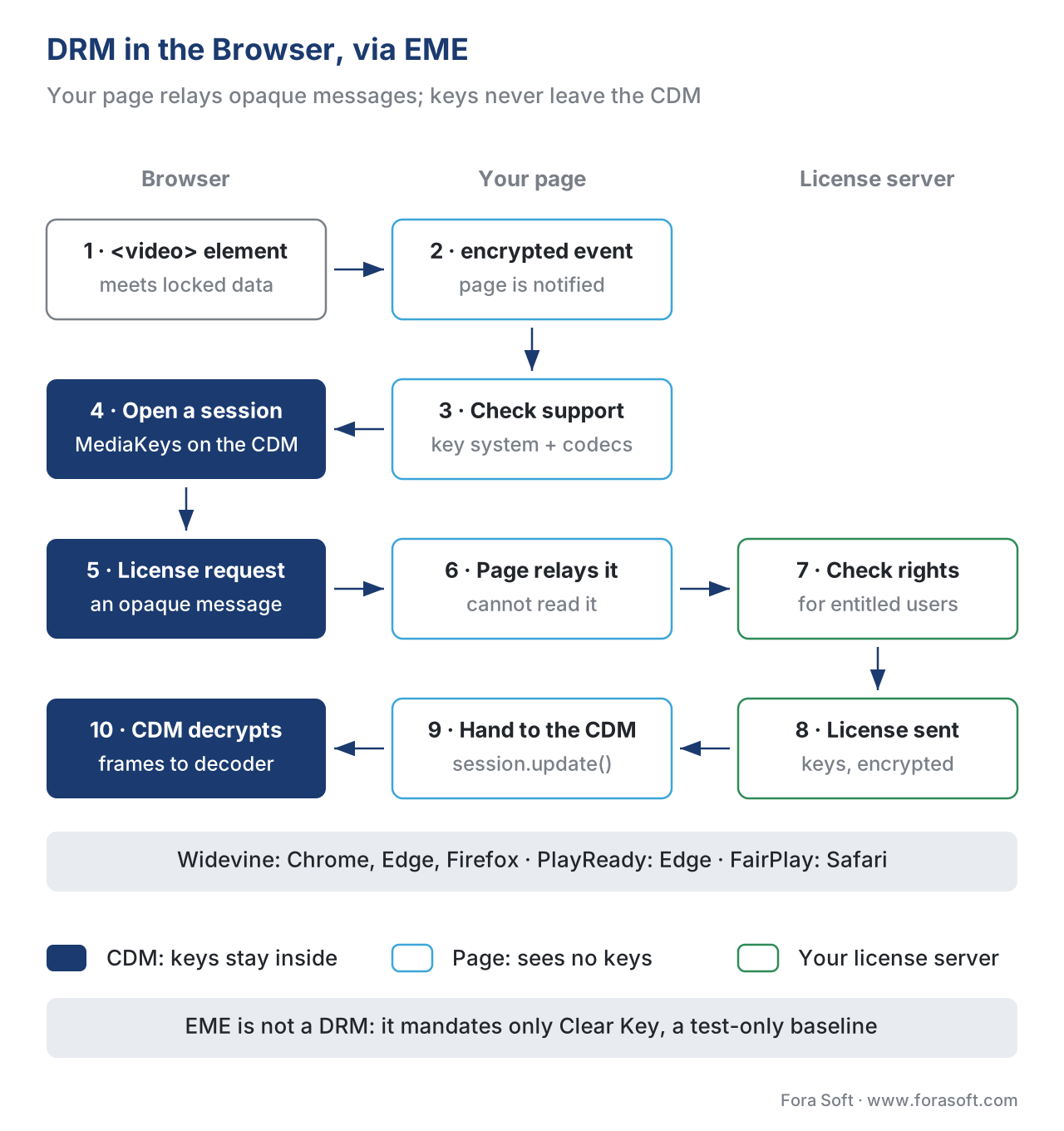 Figure 3. DRM in the browser via EME. The page brokers opaque messages between the browser's Content Decryption Module and your licence server; the keys stay inside the CDM, never visible to JavaScript.
There is a quality consequence founders underestimate, and it has nothing to do with code. Widevine has three security levels — L1, L2, and L3 — depending on how much of the decryption happens inside protected hardware. Most desktop browsers, including desktop Chrome, expose only L3, the software-only level. Because studios and large services tie their highest resolutions to hardware-backed L1, the web on a typical desktop is often capped below HD for premium content — the same title that streams in 4K on a certified TV may be limited to roughly 480p–720p in a desktop browser. This is a content-owner policy, not a bug, but it shapes what you can promise web viewers, and it is a frequent surprise in studio security reviews. We cover the security-level mechanics in the three DRM systems.
The open-source players: Shaka, hls.js, dash.js, and Video.js
Because MSE and EME are just raw browser hooks, almost nobody wires them up by hand. Instead you wrap an open-source player engine that already turns those hooks into a working adaptive player — manifest parsing, ABR, buffering, recovery, and EME plumbing — and you spend your engineering on integration and tuning, not on reinventing the core. Four names cover the overwhelming majority of the web.
Shaka Player (maintained by Google) is the broadest of the four: it plays both DASH and HLS through MSE, drives all three DRMs through EME, supports offline download via the browser's storage, and handles low-latency streaming. hls.js (the video-dev community project) does one thing extremely well — it plays HLS over MSE in browsers that lack native HLS, and it cleanly hands off to native HLS on Safari; it also supports low-latency HLS and EME-based DRM, and it is one of the most widely deployed video libraries on the web. dash.js is the DASH Industry Forum's reference player for MPEG-DASH; it is where new DASH behaviour is proven first, and it ships throughput-based, buffer-based (BOLA), and hybrid (its "dynamic") ABR rules together with EME multi-DRM. Video.js is the odd one out and the most misunderstood: it is primarily a user-interface framework — the skin, the controls, the plugin ecosystem — and the actual streaming is done by its bundled engine, Video.js HTTP Streaming (VHS), which is itself MSE-based. Choosing Video.js means choosing a UI layer, then a streaming engine underneath it.
The table makes the coverage concrete. "Supported" here means the engine handles that case directly, in 2026, per each project's own documentation.
| Capability | Shaka Player | hls.js | dash.js | Video.js (+ VHS) |
|---|---|---|---|---|
Play HLS (.m3u8) |
Yes | Yes (its focus) | No | Yes (via VHS) |
Play DASH (.mpd) |
Yes | No | Yes (its focus) | Yes (via VHS) |
| Multi-DRM via EME | Yes (all three) | Yes | Yes | Via engine/plugin |
| Defers to native HLS on Safari | Optional | Yes | n/a | Yes |
| Offline download | Yes | No (add-on) | Add-on | No (add-on) |
| Low-latency streaming | Yes (LL-HLS/DASH) | Yes (LL-HLS) | Yes (LL-DASH) | Via engine |
| Built-in UI / skin | Basic UI library | No (UI is yours) | Basic reference UI | Yes (its focus) |
| Primarily a… | full engine | HLS engine | DASH reference engine | UI framework |
The practical decision is less about features and more about your formats and your team. If you serve HLS only and want the smallest, most battle-tested option, hls.js is the default. If you serve DASH, you need Shaka or dash.js. If you serve both from one codebase, Shaka covers both. If your priority is a polished, customisable interface and you are comfortable layering an engine underneath, Video.js earns its place. None of these is wrong; the wrong move is writing your own.
A small worked example: how many viewers does each path reach?
Numbers make the architecture decision concrete. Suppose your web audience splits roughly like the global browser market in mid-2026: about 65% Chrome, 18% Safari, 5% Edge, and the remainder Firefox and others. Now ask how much of that audience each playback path reaches.
If you ship only native HLS in the <video> tag, you reach the Apple share that plays HLS natively — roughly the 18% on Safari — and everyone else gets nothing, because Chrome, Edge, and Firefox do not play HLS natively. If you ship only an MSE-based engine such as hls.js or Shaka and forget the iPhone condition, you reach the roughly 82% on non-Apple browsers but risk a black screen on iPhone Safari. The reach math is simple: 18% native-only, or about 82% MSE-only, against the 100% you actually need. The only path that reaches everyone is the combined one — an MSE engine for non-Apple browsers, and either native HLS or a correctly-conditioned ManagedMediaSource on Apple. That is why every serious web player is, underneath, a two-path player. The arithmetic is trivial; the lesson is that no single path is enough, and the engine you pick must cover both.
Where Fora Soft fits in
Fora Soft has built video streaming, OTT and Internet-TV, conferencing, e-learning, telemedicine, and surveillance software since 2005 — more than 625 shipped projects for 400-plus clients. Web playback at scale is exactly the kind of fragmentation problem we are built for: a protected catalogue that must start fast and decrypt correctly across Chrome, Edge, Firefox, and the awkward Apple path, for hundreds of thousands of concurrent viewers, needs the MSE wiring, the EME multi-DRM integration, the native-HLS hand-off, and the iPhone ManagedMediaSource condition all handled correctly — not just working in one desktop browser. We are vendor-neutral: we configure and tune Shaka, hls.js, and dash.js to the job rather than selling one engine, and we lead with the scale and cost requirement before the feature list.



The handbook
Fora Soft Video Engineering Handbook
We wrote a seven-volume handbook, 9,000+ pages, that takes the video stack from a single pixel to production, and someone who works through it can design and build a web player that reaches every browser, protected catalogue included. Start with volume 3: players, ABR, WebRTC and DRM, including how Widevine, PlayReady and FairPlay reach the browser through EME. Volume 2 covers the HLS and DASH manifests and segments your MSE engine fetches, and volume 1 the codecs that isTypeSupported() has to vouch for. Written by Nikolay Sapunov, CEO at Fora Soft.
Does your web player start on an iPhone, and play your protected catalogue in every browser?
Tell us your formats, your DRM and which browsers your viewers use, and we will pick the engine, wire the native-HLS and MSE paths, set up EME for Widevine, PlayReady and FairPlay, and test the Apple path on real devices. 250+ video products shipped since 2005.
See our case studies
Case study
Drundoo
A Bulgarian internet-TV platform with 60 live channels, catch-up and a VOD library — the same catalogue in the browser and on the devices its viewers already own.
Case study
Worldcast Live
HD concerts to 10,000 concurrent viewers at 0.4–0.5 s latency, watched on the web and on iOS — a browser player that had to hold quality on poor connections.
Case study
Vodeo
An iOS movie-rental app for Janson Media with 100K+ users, adaptive 480p to 1080p and AirPlay to the TV — the Apple playback path from the inside.
What to read next
Players
Video Player Engineering: The Core Concepts
The ABR brain, buffer and recovery your MSE engine runs.
DRM
Encrypted Media Extensions & the Browser DRM Stack
The EME exchange from this article, step by step.
DRM
Multi-DRM: One Workflow for Every Device
Encrypt once with cbcs, license Widevine, PlayReady and FairPlay.
Players
Cross-Platform Video Player Strategy for OTT
Where the web player fits among mobile and TV players.
References
- Media Source Extensions™ — W3C Recommendation, 17 November 2016. Defines
MediaSourceandSourceBuffer; states MSE facilitates adaptive streaming and time-shifting in JavaScript. Tier 1. https://www.w3.org/TR/2016/REC-media-source-20161117/ - Media Source Extensions™ (second edition) — W3C Working Draft, 4 November 2025. Adds
ManagedMediaSource/ManagedSourceBuffer,changeType(), coded-frame eviction, MSE-in-Workers,isTypeSupported(). Tier 1. https://www.w3.org/TR/media-source-2/ - Encrypted Media Extensions — W3C Recommendation, 18 September 2017. The browser API to a Content Decryption Module; requires only Clear Key;
requestMediaKeySystemAccess,MediaKeys,MediaKeySession. Tier 1. https://www.w3.org/TR/2017/REC-encrypted-media-20170918/ - Encrypted Media Extensions (second edition) — W3C Working Draft, 26 November 2025. Current canonical draft at the
/TR/encrypted-media/URL. Tier 1. https://www.w3.org/TR/encrypted-media/ - HTML Standard (WHATWG), §4.8 Media elements — defines
readyState,networkState,canPlayType(), and thewaiting/canplay/playingevents for the media element. Tier 1. https://html.spec.whatwg.org/multipage/media.html - Media Capabilities — W3C Working Draft, 9 July 2025.
navigator.mediaCapabilities.decodingInfo()returnssupported,smooth,powerEfficient. Tier 1. https://www.w3.org/TR/media-capabilities/ - HTTP Live Streaming — IETF RFC 8216 — the HLS
.m3u8playlist that Apple browsers play natively and hls.js parses over MSE. Tier 1. https://www.rfc-editor.org/rfc/rfc8216 - Common Encryption (CENC) — ISO/IEC 23001-7 — the
cencandcbcsschemes;cbcsenables encrypt-once / licence-many across all three browser DRMs. Tier 1. https://www.iso.org/standard/68042.html - WebKit — "WebKit Features in Safari 17.1" — Apple/WebKit.
ManagedMediaSourcereaches iPhone in Safari 17.1 (25 Oct 2023); the iPhone AirPlay-source / disable-remote-playback condition. Tier 3. https://webkit.org/blog/14735/webkit-features-in-safari-17-1/ - Shaka Player documentation and releases — Google. DASH + HLS over MSE, multi-DRM via EME, offline, low latency. Tier 3. https://github.com/shaka-project/shaka-player
- hls.js API documentation —
video-dev. HLS over MSE, native-HLS hand-off, LL-HLS, EME DRM. Tier 3. https://github.com/video-dev/hls.js - dash.js (DASH Industry Forum reference player) — throughput, BOLA (buffer-based), and dynamic (hybrid) ABR; EME multi-DRM. Tier 3. https://github.com/Dash-Industry-Forum/dash.js
- Video.js HTTP Streaming (VHS) —
videojs. Video.js is a UI framework; VHS is the bundled MSE-based HLS/DASH engine. Tier 3. https://github.com/videojs/http-streaming
Conflict resolution: where vendor and listicle articles imply the <video> tag is itself an adaptive player, that "MSE v2" is finalised, or that DRM resolution caps are fixed by the spec, this article follows the primary sources — the W3C MSE and EME texts (MSE v2 and EME 2 are still Working Drafts), the WHATWG HTML standard (the media element only plays a single source or native HLS), and the WebKit release notes for the iPhone ManagedMediaSource condition. Widevine security-level resolution caps are content-owner policy, not a W3C-spec rule, and are labelled as such. ABR-algorithm mechanics are deferred to the Video Streaming section per the section's cross-linking rule.
