


Why this matters
If you are a founder, product manager, or first-time streaming CTO, the encoding ladder is the first technical decision that touches every part of your business at once: it sets how good your service looks, how much storage your catalog needs, and — through the bytes it sends to viewers — the single largest line on your monthly bill. Most teams accept whatever default ladder their encoder ships with, never realizing that the default is built for someone else's content and audience. This article gives you the mental model to read, question, and size a ladder: what each rung is made of, why the ladder exists at all, how many rungs you actually need, and how a ladder choice becomes a number in dollars. By the end you will be able to look at any encoding ladder and ask the three questions that matter — is the top rung too high, are there enough low rungs, and is this ladder tuned to my content or just a copy of Apple's example.
What an encoding ladder is
Start with the problem the ladder solves. Your viewers do not all have the same internet connection. One is on home fiber, another on a train with a flickering mobile signal, a third on hotel Wi-Fi shared with two hundred guests. If you served everyone the same high-quality video file, the fiber viewer would be fine and everyone else would stare at a spinning buffer wheel. If you served everyone a low-quality file to be safe, the fiber viewer would get a soft, blocky picture on a 65-inch screen and wonder why they pay you.
The fix is to make several versions of every title and let each viewer's player pick the one their connection can handle right now. That set of versions is the encoding ladder (also called a bitrate ladder), and each individual version is a rendition. A useful picture: an encoding ladder is the set of seat classes on a single flight. Same plane, same destination, different price and comfort — and the player books the best class the network can afford at that moment, downgrading to economy when the signal weakens and upgrading back when it recovers.
Each version sits one step above or below the next, so the set is drawn as a ladder with rungs. The bottom rung is a small, low-quality rendition that almost any connection can pull down without stalling. The top rung is a large, high-quality rendition for fast networks and big screens. In between sit the middle rungs, where most real viewing actually happens. The technique of switching between these rungs as conditions change is called adaptive bitrate streaming (ABR); the player measures the network and the health of its own buffer, then climbs to a higher rung or drops to a lower one. We keep the player's switching logic at arm's length here — the detailed mechanics live in our adaptive bitrate streaming guide in the Video Streaming section. For the ladder, the only thing you need from ABR is this: the ladder is the menu, and ABR is the diner choosing a dish every few seconds.
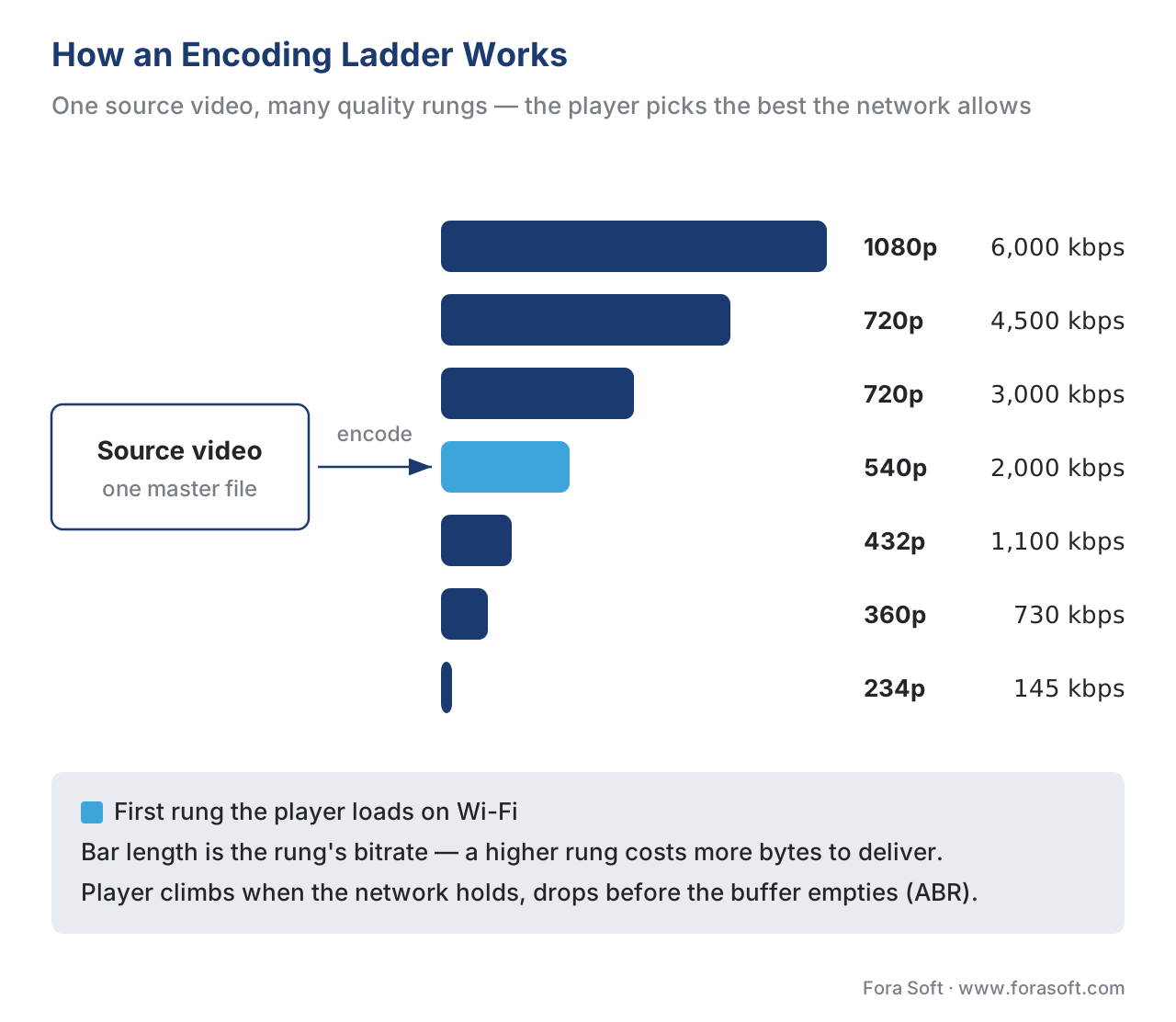 Figure 1. One source, many rungs. The player starts on a safe middle rung, climbs when the network is strong, and drops before the buffer runs dry — the whole point of building a ladder instead of a single file.
What a single rung is made of
A rung is not just "720p." It is a small bundle of decisions, and getting the bundle right is most of the craft. Four properties define every rung.
The first is resolution — the pixel dimensions of the picture, such as 1920×1080 (called 1080p) or 640×360 (360p). More pixels means a sharper image on a big screen, but more pixels also need more data to describe, so resolution and cost rise together.
The second is bitrate — how much data per second the rendition uses, measured in kilobits or megabits per second (kbps or Mbps). Bitrate is the lever that matters most for both quality and cost. A higher bitrate carries more detail and motion cleanly; a bitrate set too low for the resolution produces blocky artifacts and smeared motion. Crucially, bitrate is what you pay to deliver: a content delivery network bills you for bytes sent, so every rung's bitrate is also its price tag.
The third is the codec — the compression method used to shrink the video, such as H.264, HEVC, or AV1. A more efficient codec delivers the same picture at a lower bitrate, which is why codec choice is really a cost-and-reach decision. We treat that decision on its own in codec strategy for OTT, and the underlying codec mechanics live in our Video Encoding section. For the ladder, hold one fact: the same rung costs fewer bytes on a newer codec, but only devices that understand that codec can play it.
The fourth is the frame rate — how many images per second, such as 30 or 60. Frame rate usually stays constant across the ladder (you do not change how smooth the motion is, only how sharp the picture is), though very low rungs sometimes halve it to save data. Alongside these four sit the codec profile and level, a compatibility setting that caps how demanding the stream is allowed to be; Apple's authoring rules, discussed below, require staying at or below High Profile, Level 4.2 so that the stream plays on the broad base of devices.
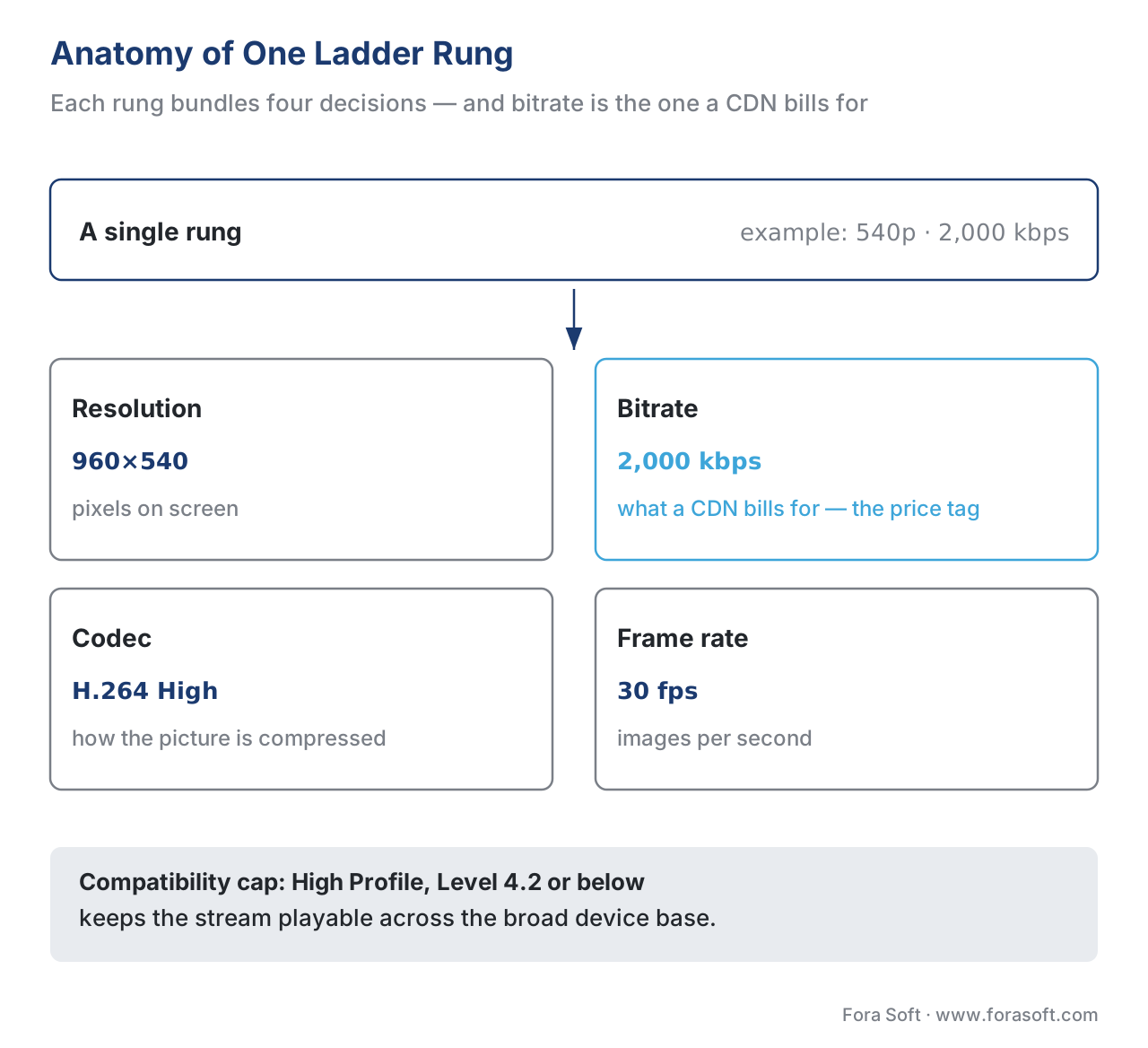 Figure 2. A rung is a bundle of four decisions plus a compatibility cap. Bitrate is highlighted because it is the property that becomes a delivery bill.
How the ladder lives inside the manifest
The ladder is not an abstract idea inside the encoder; it is written down, in plain text, in the file the player reads first. That file is the manifest — a small text document that lists every rung and where to fetch it. The player downloads the manifest, sees the menu of rungs, and starts choosing.
In HLS (HTTP Live Streaming, the Apple-created delivery format defined in IETF RFC 8216), the manifest is a master playlist, and each rung is one EXT-X-STREAM-INF entry. The tag carries the rung's peak bandwidth, average bandwidth, resolution, and codec, then points to that rung's own playlist of video segments. A trimmed three-rung example:
#EXTM3U
#EXT-X-STREAM-INF:BANDWIDTH=6500000,AVERAGE-BANDWIDTH=6000000,RESOLUTION=1920x1080,CODECS="avc1.640028,mp4a.40.2",FRAME-RATE=30.000
v_1080p_6000.m3u8
#EXT-X-STREAM-INF:BANDWIDTH=2200000,AVERAGE-BANDWIDTH=2000000,RESOLUTION=960x540,CODECS="avc1.64001f,mp4a.40.2",FRAME-RATE=30.000
v_540p_2000.m3u8
#EXT-X-STREAM-INF:BANDWIDTH=820000,AVERAGE-BANDWIDTH=730000,RESOLUTION=640x360,CODECS="avc1.64001e,mp4a.40.2",FRAME-RATE=30.000
v_360p_730.m3u8
Each EXT-X-STREAM-INF line is one rung of your ladder; BANDWIDTH is the peak the player must sustain and AVERAGE-BANDWIDTH is the typical rate. The structure is defined in RFC 8216 §4.3.4.2. The other major delivery format, MPEG-DASH (Dynamic Adaptive Streaming over HTTP, ISO/IEC 23009-1), expresses the identical idea with different words: one AdaptationSet holds several Representation elements, each carrying a bandwidth, width, height, and codecs attribute. A Representation in DASH is the same thing as a variant stream in HLS — one rung of the ladder.
Two formats, one ladder. You do not build the ladder twice. Modern platforms encode the renditions once and package them into both HLS and DASH from a single set of segments using CMAF (Common Media Application Format, ISO/IEC 23000-19), the converged fragmented-MP4 format that both protocols can read. The product framing of that "encode once, package for everyone" step is covered in packaging: CMAF, HLS, and DASH from one mezzanine; the takeaway for the ladder is that your rungs are codec-and-bitrate decisions, made once, then served in whatever format a given player needs.
A representative ladder, rung by rung
Numbers make the ladder concrete, so here is a representative seven-rung H.264 ladder for 16:9 video. H.264 is the right codec to illustrate with because it plays on essentially every device made in the last decade — it is the reach baseline every platform ships. The shape below follows Apple's HLS Authoring Specification recommendations and common industry practice; treat the exact bitrates as sensible starting points to tune against your own content, not as immutable law.
| Rung | Resolution | Avg bitrate (H.264) | Where it gets played |
|---|---|---|---|
| 7 — top | 1920×1080 | 6,000 kbps | Big screens, fast Wi-Fi and fiber |
| 6 | 1280×720 | 4,500 kbps | TVs and laptops on good connections |
| 5 | 1280×720 | 3,000 kbps | The busy middle of the ladder |
| 4 | 960×540 | 2,000 kbps | Apple's recommended Wi-Fi start variant |
| 3 | 768×432 | 1,100 kbps | Tablets and phones, average mobile data |
| 2 | 640×360 | 730 kbps | Apple's recommended cellular start variant |
| 1 — floor | 416×234 | 145 kbps | Worst networks, keeps video moving at all |
Table 1. A representative seven-rung H.264 ladder. The numbers come from the Apple-derived industry baseline; the rung count and spacing are the product decisions you actually make.
A few rules from Apple's HLS Authoring Specification shape this table and are worth knowing because they protect playback on real devices. The specification recommends that, for on-demand content, a rung's peak bitrate stay within 200% of its average so a sudden complex scene does not blow the viewer's bandwidth budget. It recommends High Profile, Level 4.2 or below, the compatibility cap that keeps the stream playable across the device base. It recommends six-second segments with a keyframe every two seconds, which sets how quickly the player can switch rungs. And it makes a subtle but important point about which rung plays first: the specification suggests the 2,000 kbps variant as the default first stream on Wi-Fi and the 730 kbps variant on cellular, because the first rung the player loads sets the viewer's all-important first impression before ABR has measured anything.
Now the arithmetic that turns this table into storage. The cost of holding a title is driven by the sum of all rung bitrates, because you store every rendition. Add the column: 6,000 + 4,500 + 3,000 + 2,000 + 1,100 + 730 + 145 = 17,475 kbps, about 17.5 Mbps of aggregate stored bitrate. For a single two-hour film:
aggregate bitrate   = 17,475 kbps ≈ 17.5 Mbit/s
film length         = 2 hr × 3,600 s         = 7,200 s
stored data         = 17.5 Mbit/s × 7,200 s ÷ 8 = 15,750 MB ≈ 15.7 GB
So this ladder stores one two-hour film in roughly 15.7 GB across all seven rungs. Storage is cheap — at about $0.023 per gigabyte-month that film costs well under a dollar a month to hold — so the ladder's storage cost is rarely the thing that hurts. The thing that hurts is delivery, which we turn to next, and which depends not on the sum of the rungs but on which rung each viewer actually pulls.
The product decisions that build a ladder
Here is the heart of the article: an encoding ladder is a set of choices, and copying someone else's choices is how money leaks. Five decisions define your ladder.
The first is the top rung — the highest quality you offer. Set it by what your content and audience justify, not by ego. A premium film service feeding 4K televisions needs a high top rung; a talking-head news service or a children's animation channel does not, because the extra bitrate buys no visible quality on that content and is delivered to every high-end viewer at full price. The top rung is the most expensive rung to deliver, so it deserves the most scrutiny.
The second is the number of rungs. Too few, and the jumps between rungs are large and jarring — the picture visibly lurches when the player switches. Too many, and you pay to encode and store renditions that sit so close together no viewer benefits from the difference. Five to nine rungs covers most catalogs; the right count depends on how wide a range of devices and networks you serve.
The third is the bitrate of each rung and how far apart the rungs sit. Good ladders space rungs so that each step roughly doubles or halves the bitrate of its neighbor, which keeps the quality jumps even and gives ABR clean, well-separated choices. Rungs crammed together waste encodes; rungs spaced too far apart make switching feel like a cliff.
The fourth is the resolution paired with each bitrate. A bitrate that is generous at 540p is starvation at 1080p, so resolution and bitrate move together up the ladder. A common error is holding resolution too high on low rungs — a 1080p rung at 800 kbps looks worse than a 540p rung at the same 800 kbps, because the bits are spread too thin across too many pixels.
The fifth is the codec and rate-control method — whether you encode H.264 for reach, HEVC or AV1 for efficiency, and whether you hold a constant bitrate or let it vary with scene complexity. These ride alongside every rung and are covered in their own articles, but they belong on the decision list because they change every number in the table.
To make these five decisions concrete and repeatable, we have packaged them into a one-page worksheet you can fill in for your own service before you ask an encoder vendor for a single quote.
Why a fixed ladder wastes money
Most platforms apply one fixed ladder — the same rungs at the same bitrates — to every title in the catalog. It is simple, and it is wrong for almost every individual title, because content is not equally hard to compress. A fast, grainy action film really needs 6,000 kbps at 1080p to look clean. A flat cartoon, a slide-based lecture, or a static talking head looks identical at half that bitrate, because there is simply less visual information to carry. A fixed ladder serves both the same way: it overspends on the easy content and, occasionally, underspends on the hardest.
The alternative is per-title encoding — analyzing each title and building a ladder tuned to its complexity, so simple content gets a lower, cheaper ladder and complex content gets the bitrate it actually needs. Netflix introduced the idea publicly in 2015 with a simple assertion: there is no one-size-fits-all ladder, and each title deserves its own. The method tests several encodes and plots quality against bitrate to find the most efficient set of rungs — the points along what engineers call the convex hull, the curve that bounds the best quality available at each bitrate. The plain-language version: stop paying 1080p prices to deliver a cartoon that looks perfect at a third of the bitrate.
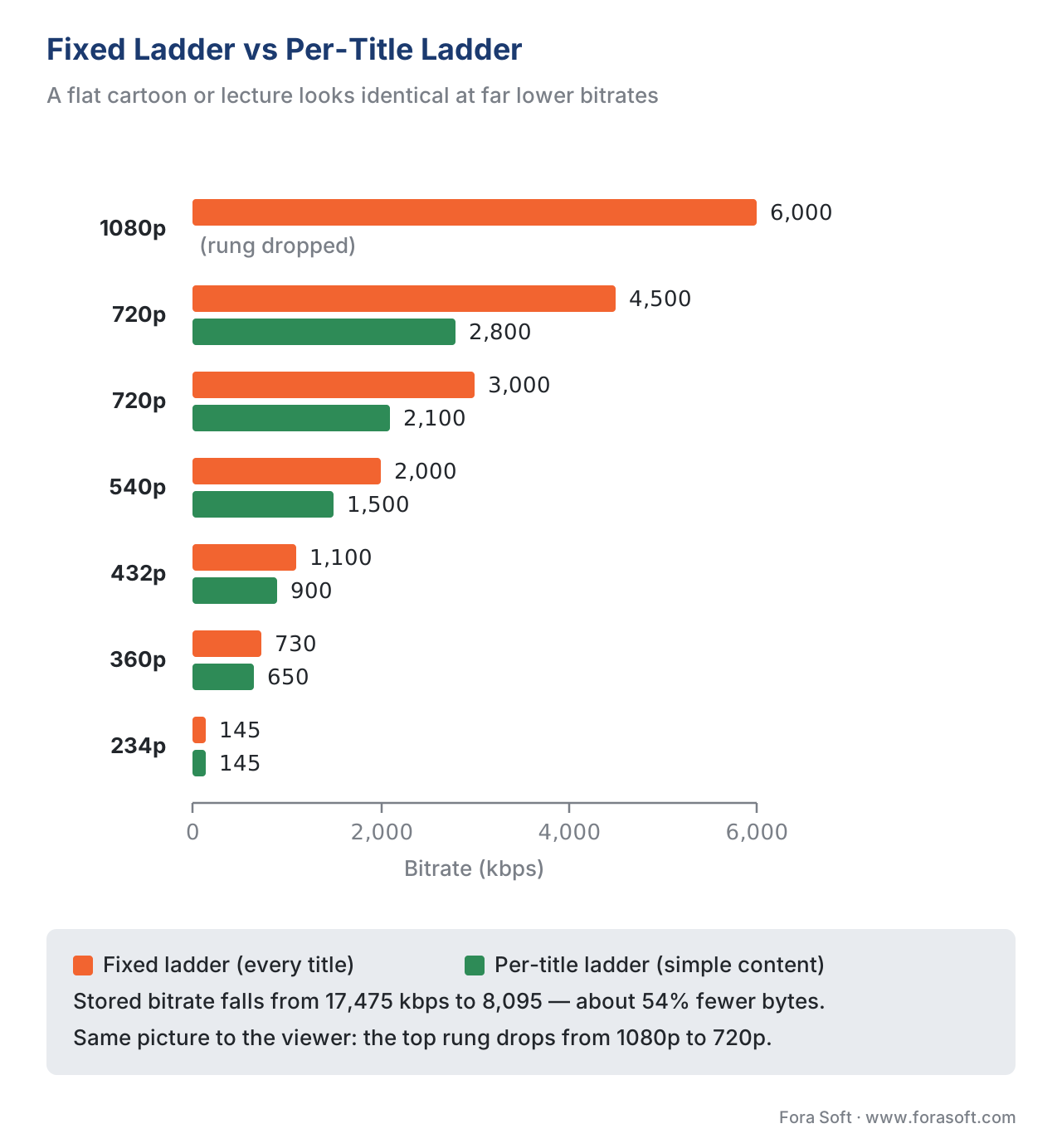 Figure 3. On easy-to-compress content, a per-title ladder lowers the top rung and drops a redundant rung. Same picture to the viewer, fewer bytes to store and deliver.
The savings are real and measured. Bitmovin reports that per-title encoding can cut storage and CDN delivery costs by up to roughly half on a typical catalog by removing renditions a title does not need. AWS Elemental MediaConvert's quality-defined variable bitrate mode (QVBR), a related technique that allocates bits by scene complexity, reports 25–40% smaller files than a fixed constant-bitrate encode for equal quality. Because delivery is the dominant cost of a streaming platform, a percentage cut in delivered bitrate flows almost directly to the bottom line. We quantify the trade-off — the extra compute to analyze each title versus the storage and egress it saves — with worked arithmetic and a savings calculator in per-title and context-aware encoding: the economics.
Renditions per device: not every rung is for everyone
A ladder also has to respect the device on the other end, because a rung the device cannot use is a rung you paid to build for no one. A 4K rung streamed to a phone is wasted twice over: the phone's small screen cannot show the extra detail, and the phone would not request that rung anyway because its decoder and screen are capped lower. Meanwhile a cheap Android phone on a 2G signal really needs that tiny 234p floor rung that a 4K television will never touch.
This is why device classes map to subsets of the ladder rather than the whole thing. The table below sketches how rungs line up against device classes; the "uses this rung?" columns are the coverage view that keeps you from shipping renditions nobody plays.
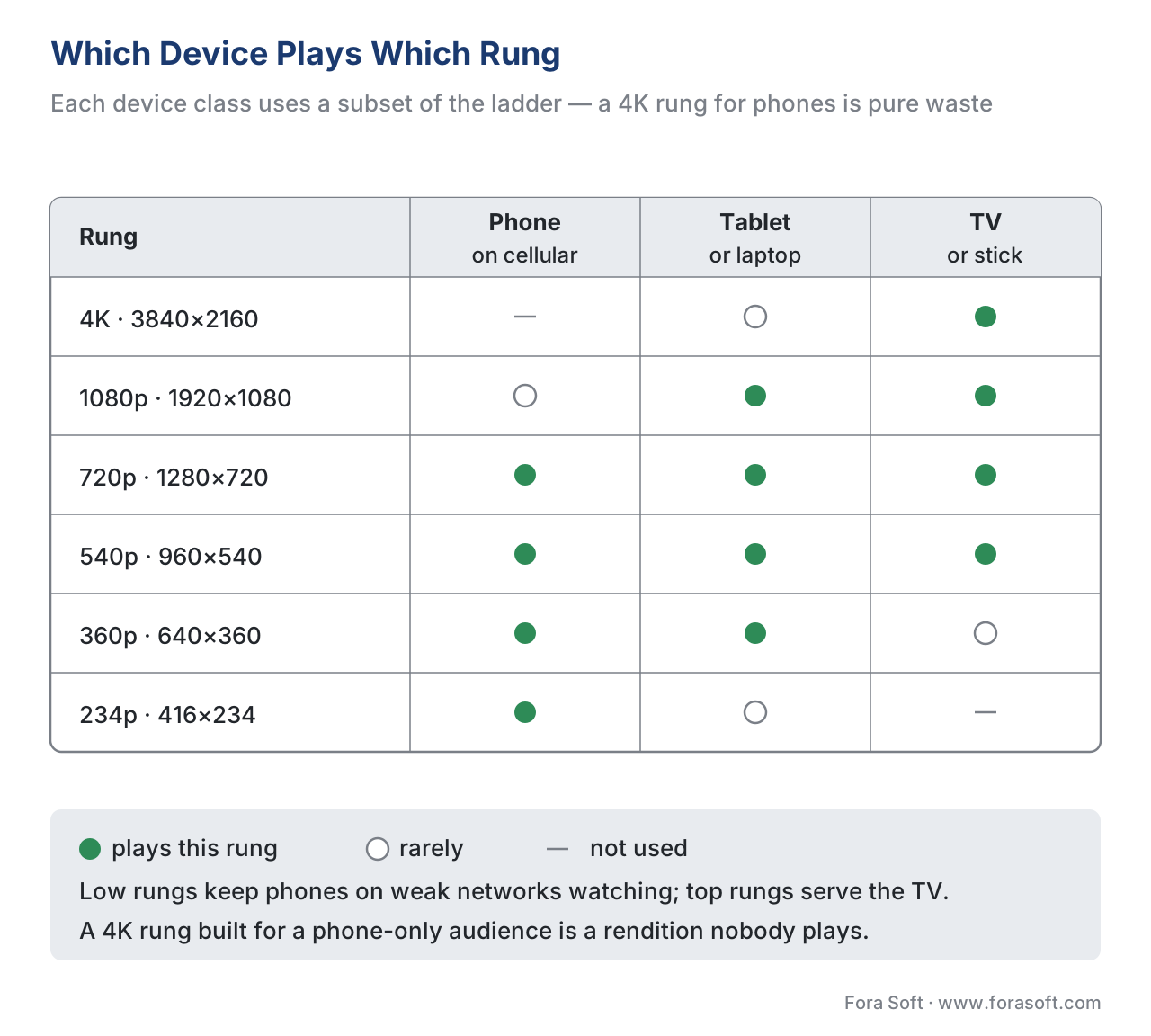 Figure 4. Device classes use subsets of the ladder. Phones live on the low and middle rungs; the living room lives on the high ones. Rungs no device pulls are pure waste.
| Rung (resolution) | Phone (cellular) | Tablet / laptop | Smart TV / streaming stick |
|---|---|---|---|
| 234p (416×234) | Yes — weak signal | Rarely | No |
| 360p (640×360) | Yes | Yes | Rarely |
| 540p (960×540) | Yes | Yes | Yes — startup |
| 720p (1280×720) | On strong Wi-Fi | Yes | Yes |
| 1080p (1920×1080) | Rarely | Yes | Yes — main rung |
| 4K (3840×2160) | No | Rarely | Yes — premium only |
Table 2. Which device class actually uses which rung. The low rungs exist for phones on weak networks; the top rungs exist for the living room. Building 4K for a phone-only audience is pure waste.
The product lesson is to match the ladder to the audience you actually have. A mobile-first service in a market with modest data speeds should invest in well-tuned low and middle rungs and may skip 4K entirely; a premium living-room service should carry the high rungs and can thin out the very lowest. We map device classes to playback decisions across the whole client landscape in the OTT client matrix and dig into the rendition-per-device decision in renditions per device.
From ladder to bill: the arithmetic that matters
Tie the ladder back to money, because that is why the product decision matters. Storage, as shown above, depends on the sum of all rungs and is cheap. Delivery depends on which rung each viewer pulls, and it is the dominant cost. A content delivery network charges for bytes sent to viewers — a recurring fee called egress — and those bytes equal each viewer's watch-time multiplied by the bitrate of the rung they are watching.
Walk one viewer through it. Suppose most viewing lands on the middle rungs, so the average delivered bitrate is about 3 Mbps, and a viewer watches a two-hour film:
delivered bitrate   = 3 Mbit/s (average rung actually played)
watch length        = 2 hr × 3,600 s        = 7,200 s
data delivered      = 3 Mbit/s × 7,200 s ÷ 8 = 2,700 MB = 2.7 GB per full view
At a representative CDN rate of roughly $0.04–$0.08 per gigabyte, that single two-hour view costs about 11 to 22 cents to deliver. Multiply by a real audience and the ladder's influence becomes obvious: if a better-tuned ladder lowers the average delivered bitrate from 3 Mbps to 2.4 Mbps for the same perceived quality, you have cut a fifth off every viewer's delivery cost, every month, forever. That is why the ladder is not a one-time encoding chore — it is a permanent setting on your margin. The full delivery-cost model, including how egress is tiered and discounted, lives in CDN cost engineering and the whole-platform view in the OTT cost model.
A common mistake: shipping the default ladder
The single most common error we see is treating the ladder as a setting to accept rather than a decision to make. A team installs an encoder, keeps its factory ladder, and ships — never noticing that the default was designed for general content and a generic audience, not for their cartoons, their lectures, or their 4K films. Three specific faults follow from it.
The first is a top rung set too high for the content. Encoding a flat animation at 6,000 kbps delivers no visible benefit over 3,000 kbps but doubles the delivery cost for every viewer who reaches that rung. The fix is per-title tuning, or at minimum a content-aware top rung.
The second is too few low rungs. Teams obsess over the top of the ladder and forget the bottom, leaving viewers on weak networks with no rung small enough to play smoothly. They buffer, then they leave. A healthy 145–730 kbps floor is what keeps mobile viewers watching at all.
The third is resolution and bitrate that drift out of step — a 1080p rung starved at 1,500 kbps, which looks worse than a 720p rung at the same bitrate because the bits are spread across too many pixels. Pair each resolution with a bitrate that can actually feed it, and let resolution step down as bitrate steps down.
Free download: Encoding Ladder Design WorksheetOne page to size your own ladder: pick the top rung from content and audience, choose a rung count and spacing, map rungs to device classes, set codec and rate control, and run the storage and egress check before you ask an encoder vendor for a quote.Where Fora Soft fits in
The ladder is where picture quality and delivery cost are decided together, and getting it right at scale — across a catalog of thousands of titles, a dozen device classes, and an audience that grows from a thousand viewers to a million — is an engineering discipline, not a checkbox. Fora Soft has built video streaming, OTT/Internet TV, e-learning, telemedicine, and video surveillance software since 2005, across 625+ shipped projects for 400+ clients, and that work centers on exactly this kind of scale-and-cost engineering: tuning ladders to content, mapping rungs to the device matrix, moving popular titles to more efficient codecs, and wiring per-title encoding into the pipeline so the delivery bill stays under control as the audience grows. When a media company needs a streaming platform whose quality and unit economics both survive a real audience, that ladder-and-delivery engineering is the capability we bring.



The handbook
Fora Soft Video Engineering Handbook
We wrote a seven-volume handbook that takes the whole video stack apart, from the pixel to production, across 9,000+ pages. Volume 1 is where this article keeps going: compression, codecs, rate control, and the quality metrics that tell you whether a rung earns its bitrate. Volume 2 covers the packaging and manifests that turn those renditions into HLS and DASH, and volume 3 covers the ABR logic, CDNs, and delivery economics that decide what the ladder costs you every month. Written by Nikolay Sapunov, CEO at Fora Soft.
Is your ladder tuned to your content, or copied from someone else's?
Send us your current ladder and a month of playback data, and we will show you which rungs nobody plays, what your average delivered bitrate is costing per view, and how far per-title encoding would move it — 250+ video products shipped since 2005.
See our case studies
Case study
Speed.Space
A remote production platform used on Netflix, EA, and HBO shoots, where the crew sets resolution, frame rate, codec, and bitrate per stream and records at 1080p / 8 Mbps — the four rung decisions, made by hand.
Case study
Worldcast Live
A concert platform holding 10,000 simultaneous viewers at 0.4-0.5s latency with quality that steps down on weak connections — the low rungs are what keeps those viewers watching instead of buffering.
Case study
Mindbox
An AI video management system in 50+ deployments that transcodes RTSP camera feeds through FFmpeg into HLS — the same encode-and-package step that turns one source into a ladder a player can switch across.
What to read next
Codecs
Codec Strategy for OTT: H.264, HEVC, AV1, and VVC
The choice that changes every bitrate in the table you just read.
Packaging
CMAF Packaging: Serve HLS and DASH From One Master
How one set of renditions becomes both manifests without encoding twice.
Devices
Renditions per Device: Phone, Tablet, Web, TV
Taking the coverage map further: sizing the ladder to the audience you have.
Delivery cost
CDN Cost Engineering: Egress, Commits, and the 95th Percentile
What a lower average delivered bitrate is worth once it reaches the invoice.
References
- HLS Authoring Specification for Apple Devices — Apple Inc. Recommended encoding ladder, peak-within-200%-of-average rule for VOD, High Profile/Level 4.2 cap, six-second segments with two-second keyframes, and first-variant (2,000 kbps Wi-Fi / 730 kbps cellular) guidance. Tier 3 (first-party standards-author). https://developer.apple.com/documentation/http-live-streaming/hls-authoring-specification-for-apple-devices (accessed 2026-06-16)
- RFC 8216 — HTTP Live Streaming (HLS) — IETF. The master playlist and
EXT-X-STREAM-INFtag (§4.3.4.2) that defines each ladder rung's bandwidth, resolution, and codec. Tier 1 (official standard). https://www.rfc-editor.org/rfc/rfc8216 (accessed 2026-06-16) - ISO/IEC 23009-1 — Dynamic Adaptive Streaming over HTTP (MPEG-DASH) — ISO/IEC. The MPD
AdaptationSet/Representationmodel that expresses the ladder in DASH. Tier 1. https://www.iso.org/standard/83314.html (accessed 2026-06-16) - ISO/IEC 23000-19 — Common Media Application Format (CMAF) — ISO/IEC. One set of fragmented-MP4 segments serving both HLS and DASH from one ladder. Tier 1. https://www.iso.org/standard/85623.html (accessed 2026-06-16)
- Per-Title Encode Optimization — Netflix Technology Blog (2015). The original case that each title deserves its own bitrate ladder; the convex-hull method for choosing rungs. Tier 4 (first-party engineering). https://netflixtechblog.com/per-title-encode-optimization-7e99442b62a2 (accessed 2026-06-16)
- Per-Title Encoding — Bitmovin. Per-title ladders cut storage and CDN egress costs by up to ~50% by removing renditions a title does not need. Tier 4 (vendor engineering). https://bitmovin.com/encoding-service/per-title-encoding/ (accessed 2026-06-16)
- AWS Elemental MediaConvert — QVBR and tiered pricing — Amazon Web Services. Quality-defined variable bitrate reports 25–40% file-size reduction versus CBR at equal quality; per-output-minute transcode pricing. Tier 4. https://aws.amazon.com/blogs/media/optimize-costs-with-tiered-pricing-in-aws-elemental-mediaconvert/ (accessed 2026-06-16)
- How to Build an Encoding Ladder: What You Need to Know — Jan Ozer, Streaming Learning Center. The explicit ladder decisions (codec, top rung, rung count, rate control, resolution per rung, keyframe interval) and a worked FFmpeg HEVC ladder. Tier 6 (educational). https://streaminglearningcenter.com/articles/how-to-build-an-encoding-ladder.html (accessed 2026-06-16)
- Apple Makes Sweeping Changes to HLS Encoding Recommendations — Jan Ozer, Streaming Learning Center. Documents the Apple Devices spec ladder, the 200% constrained-VBR change, High Profile guidance, six-second segments, and first-variant defaults. Tier 6 (educational, quoting the spec). https://streaminglearningcenter.com/articles/apple-makes-sweeping-changes-to-hls-encoding-recommendations.html (accessed 2026-06-16)
Source note (per §4.3.2): the manifest structure of the ladder (HLS variant streams, DASH Representations, CMAF segments) traces to tier-1 standards (refs 2–4). Apple's recommended ladder shape and authoring rules trace to the first-party authoring specification (ref 1), with the educational sources (refs 8–9) used only to corroborate the spec's rules in plain language. Per-title savings figures are vendor-reported (refs 6–7) and labelled as such; no lower-tier source overrode a standard.
