


Why this matters
Every rendition you add multiplies three costs at once — the compute to encode it across the whole catalog, the storage to keep it, and the egress to deliver it — so a ladder that carries rungs your devices never play is money leaving every month for nothing. The reverse error is just as expensive in churn: drop the low rungs and a viewer on a weak connection stares at a spinner instead of a slightly soft picture, and abandons. This article is written for the founder, product manager, or streaming CTO who has to decide how many renditions the catalog ships and which devices get which — not for the engineer tuning the encoder. We treat the codec and ABR internals at arm's length (those live in the Video Encoding and Video Streaming sections) and focus on the product decision: matching the rungs you produce to the devices you actually serve. By the end you can read a ladder plan and ask the one question that controls the bill — does every rung earn its place on the devices that will request it?
What a rendition is, and what "per device" means
Start with the rung. When you prepare a title for streaming, you do not encode it once. You encode it several times at different quality levels, and each of those encoded copies is a rendition — a single version at a fixed resolution (say 1280×720), a fixed bitrate (say 3 Mbps), and a fixed codec (say H.264). Stack those renditions from lowest to highest quality and you have the encoding ladder, the set of options a player climbs up and down as the network speeds up and slows down. If the ladder is new to you, start with the encoding ladder explained; this article assumes it and asks the next question.
That next question is: should every device get the same rungs? The instinct is yes — build one good ladder, hand it to everyone, let each player pick. It is the wrong instinct, and the reason is simple. A rung is only useful to a device that can display it, decode it, and is allowed to receive it. Hand a phone a 4K rung and you have produced and stored bytes the phone will never benefit from. "Per device" means matching the rungs you ship to what each class of device can actually use.
Think of the ladder as the seat classes on a plane. Everyone is on the same flight — the same title — but the cabins differ in price and comfort, and you do not sell a first-class seat to a passenger who will spend the trip in the galley. The art of a rendition strategy is selling each device exactly the cabins it can sit in, and not building cabins no passenger will ever book.
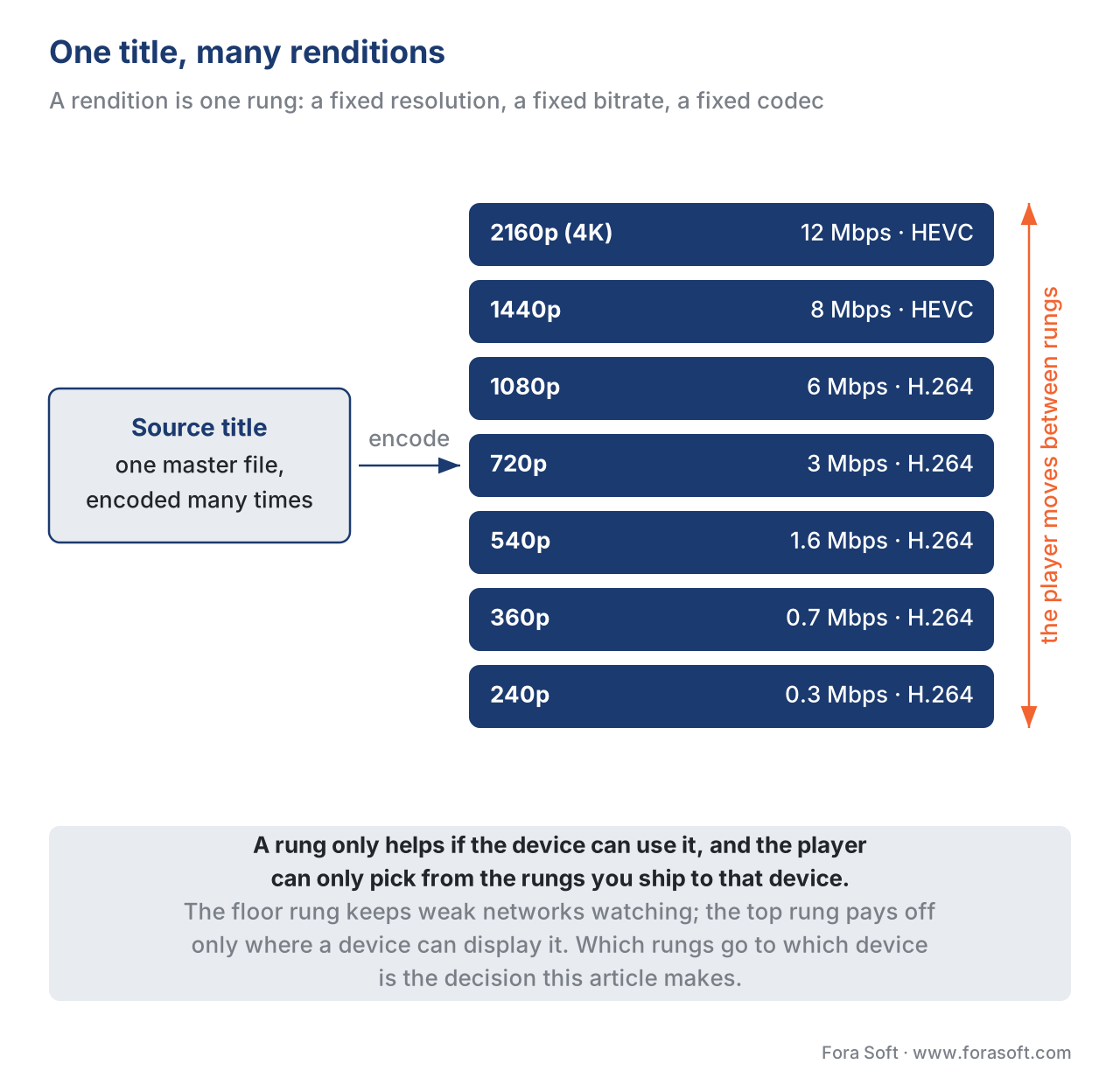 Figure 1. One title becomes many renditions. Each rung is a resolution + bitrate + codec; the player climbs the ladder as the network allows. The question this article answers is which rungs each device should ever see.
The three ceilings that decide a device's top rung
Here is the central idea of the whole article. For any device, the highest rung it should ever receive is set by three independent ceilings, and the rung you ship is the lowest of the three. Miss any one and you either waste bytes or break playback.
The first ceiling is the screen — the number of pixels the panel can physically show. A 6-inch phone display has far fewer pixels than a 65-inch television, and beyond a certain point extra resolution lands on pixels the screen does not have. At normal viewing distance, the eye cannot resolve 4K detail on a phone-sized panel; the 4K rung and the 1080p rung look identical in the hand, but the 4K rung costs more than twice the bytes. The screen ceiling is about wasted spending: anything above it is invisible quality you are paying to deliver.
The second ceiling is the decoder — what the device's chip can actually turn back into pictures. A rendition the decoder cannot handle is not a soft picture; it is a black screen or a hard playback failure. Decoders are limited by codec (an old TV with no AV1 decoder cannot play an AV1 rung), and within a codec by profile and level, an encoded ceiling on resolution, frame rate, and bitrate. Apple's authoring rules, for example, cap HEVC at Main10 profile, Level 5.0, High Tier for its devices; a stream above that level can be rejected. A cheap streaming stick may decode H.264 only up to 1080p and refuse a 4K rung outright. The decoder ceiling is about not shipping a rung the hardware will choke on.
The third ceiling is the license — the maximum resolution the content-protection system will allow that specific device to receive. Premium catalogs are encrypted, and the system that hands out the keys to decrypt them, called digital rights management (DRM), does not treat every device equally. A device that decrypts in secure hardware is trusted with high resolutions; a device that decrypts in software is not, and the license server simply refuses to release the keys for the high rungs. This is a real, enforced ceiling, and it is covered in its own right in why DRM exists and what it protects. We unpack how it caps resolution below.
The rung you serve a device is the minimum of these three. A phone might have a 1080p-class screen (screen ceiling 1080p), an AV1 decoder good to 4K (decoder ceiling 2160p), and software DRM that caps it to standard definition for premium titles (license ceiling 480p). The license ceiling wins: for that title, on that phone, you serve 480p and the higher rungs are pure waste. Change the title to one without DRM and the screen ceiling wins at 1080p. The ceilings are independent, and they move per title and per device.
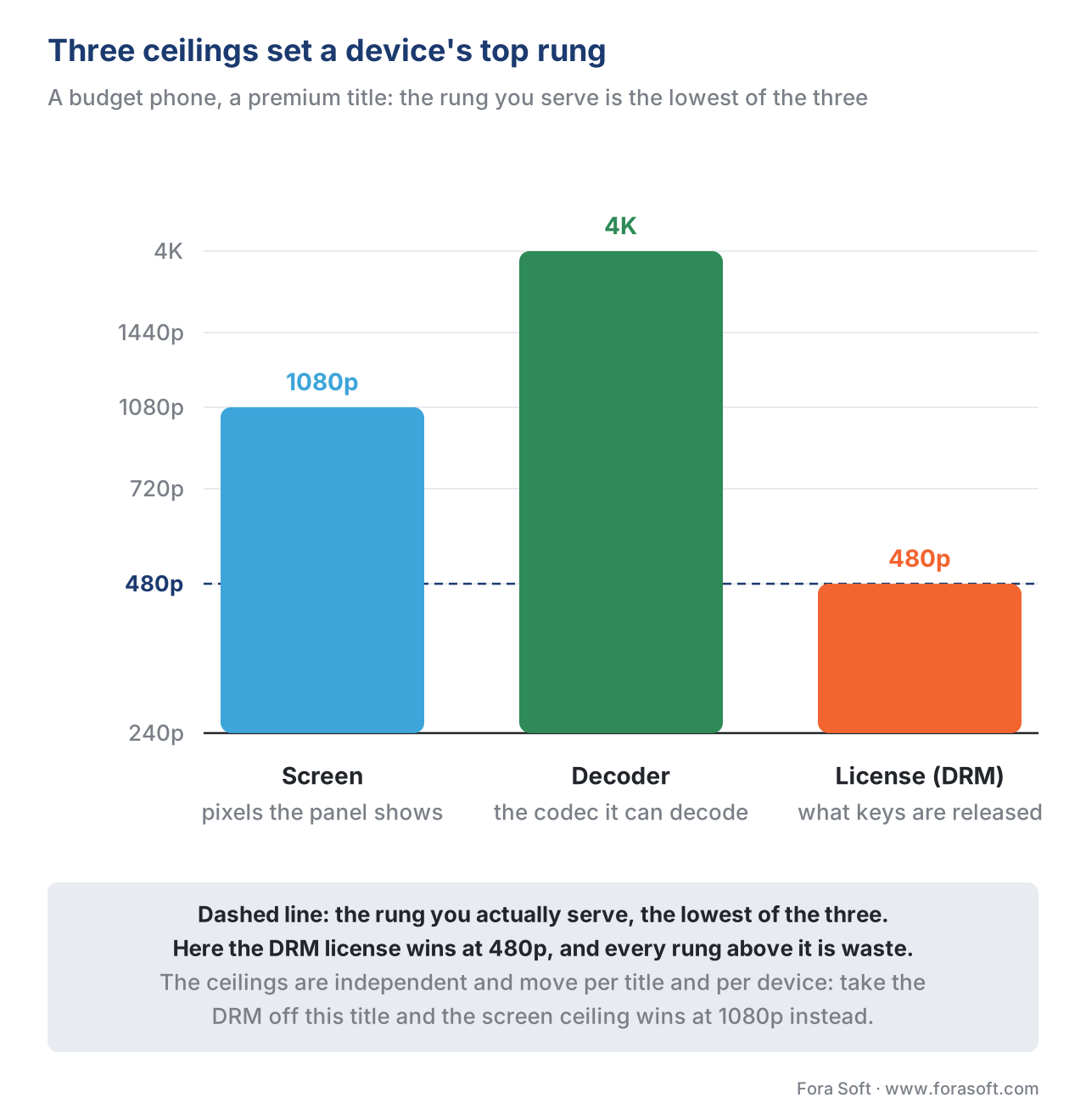 Figure 2. The rung a device should receive is the lowest of three ceilings: the pixels the screen can show, the streams the chip can decode, and the resolution the DRM license will release. Plan to the minimum, not the maximum.
Why a 4K rung is wasted on a phone (the screen ceiling)
The clearest case is the phone. Phone panels sold in 2026 top out, in practical terms, around 1080p of useful detail at the distance people hold them. Manufacturers quote higher pixel counts, but the human eye at arm's length cannot separate 1080p from 4K on a 6-inch screen. So a 4K rendition delivered to a phone spends roughly two to three times the bytes of the 1080p rung to show detail the viewer cannot see.
That waste is invisible on one stream and ruinous at scale. Put numbers on it. A 4K rung in H.264 runs around 16 Mbps; the 1080p rung runs around 6 Mbps. One hour of viewing is the bitrate spread over 3,600 seconds:
4K rung    = 16 Mbit/s × 3,600 s ÷ 8 = 7,200 MB ≈ 7.2 GB / hour
1080p rung =  6 Mbit/s × 3,600 s ÷ 8 = 2,700 MB ≈ 2.7 GB / hour
wasted     = 7.2 GB − 2.7 GB         = 4.5 GB / hour, for zero visible gain
at $0.04 per GB egress = 4.5 × $0.04 = $0.18 / hour, per misrouted stream
Eighteen cents an hour sounds trivial until you multiply by a real audience. A service streaming a million phone-hours a month that lets phones pull the 4K rung burns about $180,000 a month showing detail no phone can display. The fix is not to ship a 4K rung to phones at all — cap the phone subset at 1080p and the waste disappears. The screen ceiling is the cheapest ceiling to respect and the most commonly ignored.
The same logic, gentler, applies up the device classes. Tablets are larger and held farther away, so 1080p is the honest ceiling for most, with the largest "retina"-class tablets justifying a 1440p rung. Web playback depends entirely on the monitor and the window size — a video playing in a small window on a laptop needs far less than the same video full-screen on a 4K monitor. Televisions and modern streaming devices are where the 4K rung finally earns its place, because the panel is large enough and far enough that the extra pixels are visible.
Why a 240p rung still matters (the floor)
If the top of the ladder is set by the best device, the bottom is set by the worst network. It is tempting to drop the lowest, ugliest rungs — nobody wants to watch 240p video. But the lowest rung is not there for people who want it; it is there for people who would otherwise get nothing.
A viewer on a congested train, a weak cell signal, or a budget Android phone in an emerging market does not have the bandwidth for your 1080p rung. Without a low rung to fall back to, their player buffers, stalls, and the session is abandoned. With a 300 kbps rung, they get a watchable, soft picture that holds while the connection recovers. The low rung is the difference between a soft stream and a dead one.
The low rung is also what makes playback start fast. A player begins on a conservative rung and climbs as it measures bandwidth, so the lower your floor, the quicker the first frame appears — and startup time is one of the strongest predictors of whether a viewer stays, a relationship we quantify in quality of experience: startup time and rebuffering.
This is not just good practice; for Apple devices it is a rule. Apple's HLS Authoring Specification requires that any stream delivered over cellular include a variant whose peak bandwidth is 192 kbps or less. Ship a ladder without a sub-192 kbps rung and you are out of spec for cellular delivery — and you have stranded exactly the viewers who needed the floor most. Keep the floor. The rungs at the bottom cost almost nothing to produce and store, and they are your insurance against churn on bad networks.
The decoder and license ceilings, in practice
The screen tells you what is worth sending; the decoder and the license tell you what the device can accept. Both can override the screen, and both break playback silently if you ignore them.
The decoder ceiling is mostly a codec-and-level question, and it changes with the device's age. A 2018 smart TV may decode HEVC but not AV1; a 2015 set-top box may cap H.264 at 1080p; a current flagship phone decodes AV1 in hardware to 4K. The practical rule is to know, per device class, which codecs decode in hardware and to what resolution and frame rate, and never to offer a rung above that. This is the device side of the codec decision covered in codec strategy for OTT; the codec mechanics themselves live in Video Encoding. The manifest, the playlist that lists every rung, declares each rendition's codec and resolution precisely so a player can skip the rungs its decoder cannot handle — in HLS via the CODECS and RESOLUTION attributes of EXT-X-STREAM-INF (RFC 8216), in MPEG-DASH via the codecs, width, and height of each Representation (ISO/IEC 23009-1).
The license ceiling is the one teams forget, and it can be the lowest of the three for premium content. DRM systems rate each device by how securely it can decrypt. Google's Widevine, for instance, defines security levels: L1, where decryption happens entirely inside secure hardware, and L3, where it happens in software. Studios, through their licensing terms, routinely restrict L3 devices to standard definition — commonly 480p, sometimes up to 720p — and reserve HD and 4K for L1. The enforcement is real and server-side: the license server releases a separate key per resolution tier and simply refuses the HD key to an L3 device, so an HD rung requested by a software-DRM browser fails the license request rather than playing. A well-built player detects the device's security level up front and caps its rendition selection accordingly. The takeaway for the ladder: for a DRM-protected catalog, the rungs a device can receive depend on its DRM level, not just its screen — the same Windows laptop might get 4K in a hardware-DRM path and 480p in a software one. The device-to-DRM map this depends on is the subject of the three DRM systems and multi-DRM: one workflow, every device.
Device classes mapped to ladder subsets
Put the three ceilings together per device class and a clear map appears. The table below is the planning view: for each class, the practical screen ceiling, the typical decoder reality in 2026, the usual DRM ceiling for premium content, and the resulting rungs to ship. The "ship these rungs" column is the coverage view — it is what keeps you from encoding renditions a class can never use.
| Device class | Screen ceiling (useful) | Decoder reality (2026) | DRM ceiling (premium) | Ship these rungs |
|---|---|---|---|---|
| Phone | ~1080p (eye limit at hand distance) | H.264 always; HEVC/AV1 HW on recent flagships | L1 HD/UHD on flagships; L3→SD on budget/old | 240p → 1080p |
| Tablet | ~1080p; 1440p on large retina | H.264 always; HEVC/AV1 HW common | L1 HD common; L3→SD on budget | 240p → 1080p (+1440p large) |
| Web (browser) | Window-dependent; 720p–4K | H.264 universal; AV1/HEVC vary by browser; player does not cap by default | Software DRM often L3→SD; HW path varies | 240p → 1080p (cap unless HW DRM + 4K monitor) |
| Smart TV | 1080p–4K (panel-dependent) | HEVC near-universal; AV1 on 2022+ sets | L1 HD/UHD typical | 360p → 2160p |
| Streaming stick / set-top | 1080p–4K (model-dependent) | Varies sharply by model and year | L1 HD/UHD on certified models | 360p → 2160p (1080p cap on older) |
Table 1. Device classes mapped to ladder subsets. Ceilings are practical 2026 planning ranges, not guarantees — verify decoder and DRM-level support against current device-intelligence data, because both move every device generation. The "ship these rungs" column assumes a master ladder spanning roughly 240p to 2160p.
Two rows deserve a flag. The web row is the trap: unlike native mobile players, browser players do not limit themselves to the window size by default, so an uncapped web player can pull your 4K rung into a small laptop window — paying 4K egress for a picture the size of a postcard. And the streaming stick / set-top row is the most fragmented; "set-top box" spans a $20 stick and a premium operator box, so treat it as several sub-classes, not one.
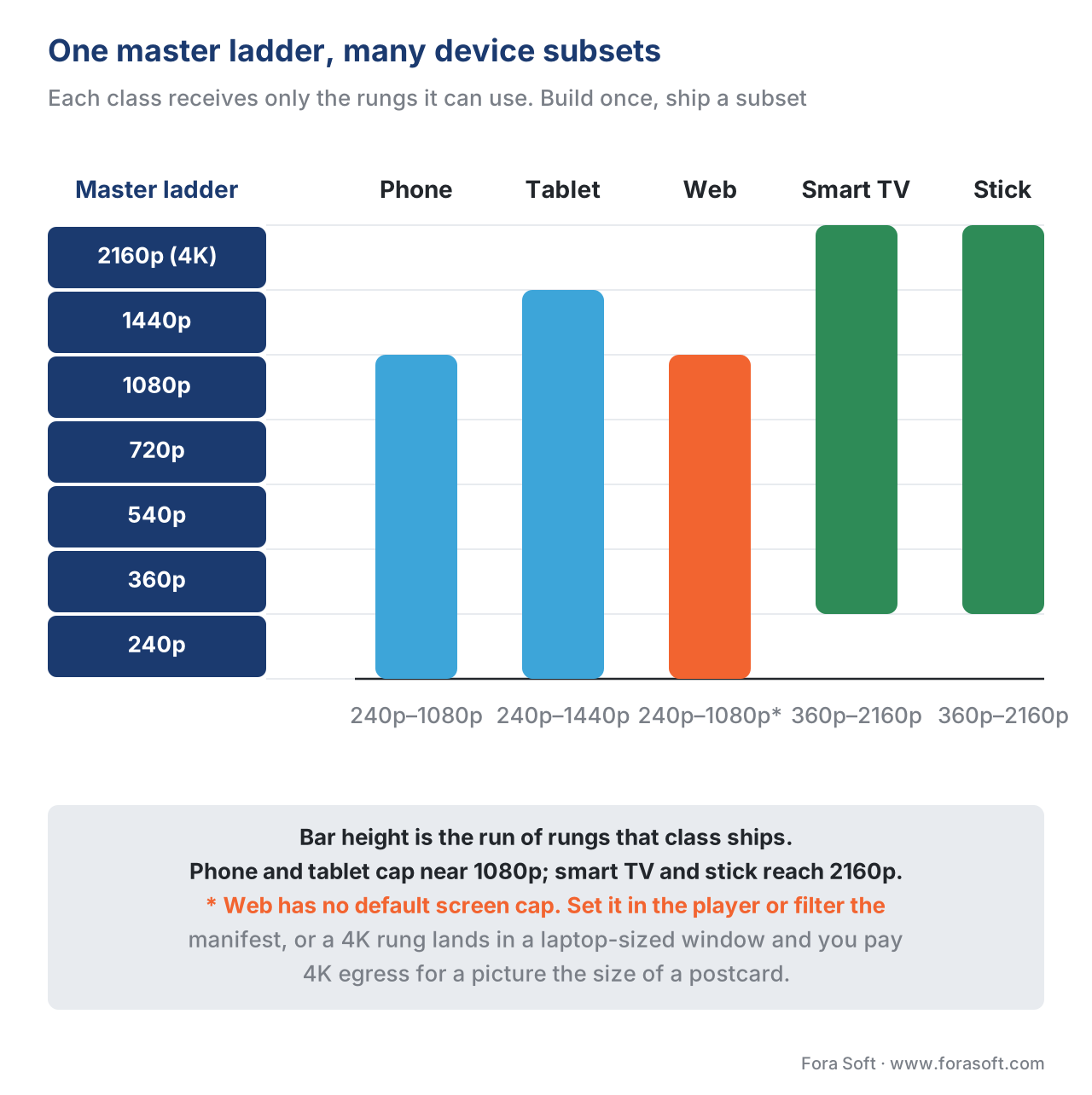 Figure 3. One master ladder, many device subsets. Phones and tablets cap near 1080p; TVs and modern streaming devices reach 2160p; the web is capped unless a 4K monitor and hardware DRM justify the top rungs.
How the subset actually gets served
Knowing each device's subset is half the job; the other half is making sure the device receives only that subset. There are two mechanisms, and most platforms use both.
The first is the player selecting for itself. A good native player knows its own screen and decoder and refuses to climb above them. Android's ExoPlayer (now Media3) restricts video resolution to the display size by default, so a phone player will not pick a rung larger than the screen unless you override it. Apple's AVPlayer behaves similarly on iOS. This is free and automatic on native mobile — but, crucially, it is not automatic on the web. Open-source browser players such as hls.js and Shaka Player default to no resolution cap (Shaka's maxHeight defaults to unlimited; it has added an opt-in "restrict to element size" mode), so on the web you must configure the cap yourself or the player will gladly fetch the 4K rung into a tiny window.
The second is the platform filtering the manifest. Rather than trust every client to behave, the platform can hand each device class a manifest — the menu of available rungs — that already lists only the rungs that class should use. A phone request returns a manifest topping out at 1080p; a TV request returns the full ladder. This is done by manifest manipulation at the packager or CDN edge, keyed off the device the request came from. It guarantees the subset regardless of client behavior, and it is the belt-and-braces approach for a DRM-protected or cost-sensitive catalog. The manifest is also where the resolution and codec of each rung are declared, so even a self-selecting player has the metadata it needs — the RESOLUTION attribute in HLS is optional but recommended exactly so players can choose well (RFC 8216).
In practice: lean on player self-selection for native mobile where it is automatic, always configure the cap explicitly on the web, and use per-device manifest filtering as the guarantee for premium and high-volume catalogs where an uncapped client is a real cost.
A worked example: what an over-broad ladder costs
The cost of getting this wrong is not theoretical. Take a catalog of 10,000 hours and ask what one unnecessary rung costs before a single viewer presses play.
Suppose you add a 4K rung in HEVC, around 12 Mbps, to the whole catalog "to be safe," even though 80% of your audience watches on phones and tablets that cannot use it. The storage alone is:
4K HEVC rung = 12 Mbit/s × 3,600 s ÷ 8 = 5,400 MB ≈ 5.4 GB per hour of content
catalog      = 10,000 hours × 5.4 GB     = 54,000 GB ≈ 54 TB stored, every month
That 54 TB sits in storage whether or not anyone plays it, plus the one-time transcode compute to produce it across 10,000 hours — and on this audience, the rung serves at most the 20% on TVs. For the phone-and-tablet majority it is encoded, stored, and paid for to be served zero times.
Now add the delivery side. If an uncapped web player lets laptop viewers pull that 4K rung into a half-screen window for, say, 200,000 hours a month, against the 1080p rung they actually needed:
4K rung    = 12 Mbit/s × 3,600 ÷ 8 = 5.4 GB/hour
1080p rung =  6 Mbit/s × 3,600 ÷ 8 = 2.7 GB/hour
waste      = (5.4 − 2.7) GB × 200,000 hours = 540,000 GB
at $0.04 per GB = 540,000 × $0.04 = $21,600 / month, for no visible gain
Trim the ladder to device-appropriate subsets and both numbers shrink: you stop storing the 4K rung for content only phones will watch, and you stop delivering it to windows that cannot show it. The savings are not one-time — they recur on every hour of storage and every hour of delivery, which is why a rendition strategy is one of the highest-leverage decisions in the OTT cost model.
A common mistake: one ladder for every device
The most expensive rendition mistake is the one that feels safest: build one generous ladder and serve it to everything. It fails in three directions at once.
Up top, it ships rungs the device cannot use — the 4K rung on phones, the AV1 rung on the TV without an AV1 decoder, the HD rung to a software-DRM browser the license server will refuse. The first wastes money, the second and third break playback. At the bottom, the "one good ladder" instinct often drops the ugly low rungs, stranding viewers on weak networks and putting you out of spec for cellular on Apple devices. And in the middle, it ignores that the web player will not cap itself, so even a sensible ladder leaks 4K egress into laptop windows.
A subtler version is treating "smart TV" or "set-top box" as a single class. A $20 stick and a premium operator box have wildly different decoder and DRM ceilings; one ladder for both either starves the good device or breaks the cheap one. The fix everywhere is the same: one master ladder, then per-device subsets set to the minimum of the screen, decoder, and license ceilings, served by self-selecting players on native mobile and by manifest filtering where you need a guarantee. You add quality where the device can use it and subtract bytes everywhere it cannot — and you check the audience you actually have before deciding which rungs to build, the same discipline behind per-title and context-aware encoding.
Free download: Renditions-per-Device Planning WorksheetOne page for setting the rendition subset of every device class before you commit a transcode pipeline: record the screen, decoder and DRM-license ceiling per class, take the minimum as the top rung, confirm a cellular floor rung at or below 192 kbps for Apple devices, and check the web-player cap that stops a 4K rung landing in a laptop window.Where Fora Soft fits in
Matching renditions to a real, mixed device fleet — phones and budget Androids, tablets, browsers, a dozen smart-TV and streaming-stick models, each with its own screen, decoder, and DRM ceiling — and doing it across a catalog large enough that every wasted rung is a recurring bill, is the kind of engineering Fora Soft has done since 2005, across 625+ shipped projects for 400+ clients in video streaming, OTT/Internet TV, e-learning, telemedicine, and video surveillance. That work is exactly this: designing the master ladder, mapping device classes to rung subsets, wiring per-device manifest filtering at the edge, and capping the web players that will not cap themselves — so the catalog reaches every screen without paying to deliver pixels no screen can show. When a media company needs a streaming platform whose delivery cost scales with its audience instead of outrunning it, that rendition-and-delivery engineering is the capability we bring.



The handbook
Fora Soft Video Engineering Handbook
We wrote a seven-volume handbook, 9,000+ pages, that takes the video stack from a single pixel to production, and someone who works through it can design and build a platform like the one this article plans for. Volume 3 sits closest to this page: ABR, CDNs, players and DRM are where a rung is chosen, capped and paid for, so it covers player self-selection, the license ceiling and the egress arithmetic behind a wasted 4K rendition. Volume 1 explains how each rung is encoded and how to tell when a higher one stops being visible, and volume 2 covers the HLS and DASH manifests that declare the ladder and let you filter it per device. Written by Nikolay Sapunov, CEO at Fora Soft.
How many of the renditions you pay for is anyone actually watching?
Tell us which device classes you serve, what your master ladder looks like today and roughly where the egress bill lands, and we will say which rungs to cut, which floor rung you are missing and where to cap the web player. 250+ video products shipped since 2005.
See our case studies
Case study
Worldcast Live
HD concert streaming at 1.5 Gb/s to 10,000 simultaneous viewers with 0.4–0.5 s latency, and dynamic quality adjustment for weak connections — the floor rung doing its job at a scale where every wasted rung is a recurring bill.
Case study
Speed.Space
A remote production platform used on Netflix, Electronic Arts and HBO shoots that records at 1080p and 8 Mbps and lets creators set resolution, frame rate, codec and bitrate per stream — the encode-side half of deciding which rungs exist at all.
Case study
Mindbox
An RTSP to FFmpeg to HLS video system in 50+ deployments feeding web, iOS and Android clients from one pipeline — the everyday case for one master ladder and a per-class subset rather than one stream for every screen.
What to read next
Encoding
Encoding Ladder Explained: Renditions & Bitrates
The ladder this article slices up: how the rungs are chosen in the first place.
Codecs
Codec Strategy for OTT: H.264, HEVC, AV1 and VVC
The decoder ceiling up close: which chips can play which rung, and when.
DRM
What Is DRM? Why It Exists and What It Protects
The license ceiling that overrules the other two on premium catalogs.
Devices
The OTT Client Matrix: Web, Mobile, Smart TV, Devices
Every screen you have to ship to, and what each one costs to support.
References
- RFC 8216 — HTTP Live Streaming — IETF (2017). §4.3.4.2
EXT-X-STREAM-INF: theRESOLUTIONattribute is OPTIONAL but RECOMMENDED for variants with video and describes the optimal display resolution;CODECS,BANDWIDTH, and the advisoryHDCP-LEVELattribute. The manifest layer where renditions are declared so players can choose. Tier 1 (standard). https://datatracker.ietf.org/doc/html/rfc8216 (accessed 2026-06-16) - HLS Authoring Specification for Apple Devices — Apple Inc. (current 2026). Multivariant playlists delivered over cellular MUST contain a variant with peak
BANDWIDTH≤ 192 kbit/s; measured peak within 10% ofBANDWIDTH; peak SHOULD be ≤ 200% of average; HEVC ≤ Main10 Profile, Level 5.0, High Tier; I-frame playlists MUST be provided; the recommended ladder is an initial target to be tuned. Tier 1 (issuing-body/first-party spec). https://developer.apple.com/documentation/http-live-streaming/hls-authoring-specification-for-apple-devices (accessed 2026-06-16) - ISO/IEC 23009-1 — Dynamic Adaptive Streaming over HTTP (MPEG-DASH) — ISO/IEC. Each
Representationdeclares@width,@height,@bandwidth, and@codecs;AdaptationSetgroups alternatives so a client selects the rung its device can display and decode. Tier 1 (standard). https://www.iso.org/standard/83314.html (accessed 2026-06-16) - W3C Encrypted Media Extensions (EME) — W3C Recommendation (2017).
requestMediaKeySystemAccess()and robustness levels let a player detect a device's DRM security capability before playback — the API behind capping rendition selection to a device's license ceiling. Tier 1 (standard). https://www.w3.org/TR/encrypted-media/ (accessed 2026-06-16) - Track selection — ExoPlayer (AndroidX Media3) — Google (2026).
DefaultTrackSelectorrestricts video resolution to the display size by default;setMaxVideoSize/viewport constraints filter out renditions larger than the screen. The native-mobile self-selection mechanism. Tier 3 (first-party engineering). https://developer.android.com/media/media3/exoplayer/track-selection (accessed 2026-06-16) - Shaka Player configuration —
restrictionsandrestrictToElementSize— Shaka Player project, Google (2026).abr.restrictions.maxHeightdefaults to unlimited; the opt-inrestrictToElementSizecaps rendition selection to the video element — confirming web players do not cap by screen size unless configured. Tier 3 (first-party engineering). https://github.com/shaka-project/shaka-player/pull/4515 (accessed 2026-06-16) - Google Widevine — security levels (L1/L3) and robustness — Google. L1 decrypts in secure hardware (HD/UHD eligible); L3 decrypts in software; studio licensing typically restricts L3 to SD. The license ceiling on rendition selection. Tier 4 (vendor engineering). https://developers.google.com/widevine/drm/overview (accessed 2026-06-16)
- Widevine DRM: SD-only for L3 — Bunny.net Stream documentation (2026). The license server releases a per-resolution key and rejects HD-key requests from L3 devices; players should detect the Widevine level via EME and cap to ~480p. A concrete description of server-side license-ceiling enforcement. Tier 4 (vendor docs). https://docs.bunny.net/docs/stream-google-widevine-drm-sd-only-for-l3 (accessed 2026-06-16)
- Per-Title and context-aware encode optimization — Netflix Technology Blog. Netflix tailors ladders to content and device type, and restricts resolution selection to a finite set for cross-device backward compatibility (1920×1080 down to 320×240), bitrates ~100 kbps–16 Mbps. The reference example of device-aware rendition strategy. Tier 4 (first-party engineering). https://netflixtechblog.com/per-title-encode-optimization-7e99442b62a2 (accessed 2026-06-16)
- Connected TV market — penetration and 4K adoption (2026) — Mordor Intelligence / Grand View Research. 90%+ of US households have a connected-TV device; ~1.2 billion smart-TV households globally; rising 4K share. Orientation for device-reach planning. Tier 5 (institutional/analyst). https://www.mordorintelligence.com/industry-reports/connected-tv-market (accessed 2026-06-16)
Source note (per §4.3.2): the manifest and authoring claims trace to the standards (refs 1–4, tier 1) — RFC 8216 for the HLS attributes, the Apple authoring spec for the cellular 192 kbps rule and HEVC level cap, ISO/IEC 23009-1 for the DASH representation model, and W3C EME for security-level detection. Player self-selection behavior is first-party (refs 5–6); the DRM license ceiling traces to Widevine's own model (ref 7) and a vendor description of server-side enforcement (ref 8). Device-strategy and reach figures are first-party (ref 9, Netflix) and institutional (ref 10). Practical screen/decoder ceilings are presented as 2026 planning ranges, not guarantees; no lower-tier source overrode a standard.
