


Why this matters
If you are a founder, product manager, or first-time streaming CTO, DRM is the topic where the gap between what people assume and what is true costs the most money. Two opposite mistakes are common, and both are expensive. The first is shipping a premium catalog with no real protection, discovering at contract-signing that the studio's license requires hardware-backed DRM, and rebuilding the protection layer under deadline. The second is bolting on the most expensive DRM tier for user-generated clips or internal training videos that never needed it, paying for protection the threat model does not justify. This article gives you the mental model to avoid both: what DRM is, the precise line between what it protects and what it cannot, why "encrypt once, license every device" is the modern pattern, and the decision tree for whether your content needs DRM at all. By the end you can sit across from a content owner or an engineer and know exactly what you are buying, what it stops, and what it does not.
The problem DRM solves: a perfect copy costs nothing
Start with the problem, because DRM only makes sense once the problem is clear.
A physical film reel is hard to steal and harder to copy. A digital file is the opposite. A digital copy is perfect — bit-for-bit identical to the original — and making it costs essentially nothing. One person with one unprotected copy of a film can seed it to the entire internet in an afternoon, and every downstream copy is as good as the studio's master. The economics of the whole business invert: a title that took $100 million to make can be redistributed for free, by anyone, forever, the moment a single clean copy escapes.
That is not a hypothetical. By industry estimates, online video piracy costs rights holders on the order of $75 billion a year as of 2025, a figure projected to approach $125 billion by 2028. A 2025 Parks Associates analysis put combined losses from account sharing and piracy at roughly $12.5 billion for the year, and found that about 27% of US broadband households engage in some form of piracy or account sharing. Those numbers are the reason content owners do not treat protection as optional and do not take a platform's word that it is "secure."
So the job is not to make copying hard in the way a safe makes theft hard. The job is to make sure that the bytes a viewer's device receives are useless to anyone except an authorized player on an authorized device — that even though the file travels across the open internet to millions of devices you do not control, only the right device, checked and trusted, can ever turn those bytes back into a watchable picture. That is what DRM is for.
What DRM is, in plain language
Here is the whole idea in one sentence, then we will unpack it: DRM encrypts the content so it is unwatchable scramble, and then hands out the key to unscramble it only to a device it has authenticated, under rules the content owner defined.
Think of a locked box. The content owner puts the film inside, locks it, and ships the locked box freely — to the CDN, to the edge, to every viewer's device. Anyone can hold the box; almost nobody can open it. To open it, your device has to ask a specific gatekeeper, the license server, for the key. The gatekeeper does not hand the key to whoever asks. It first checks that the request comes from a real, trusted playback component on an actual device, that the viewer is entitled to this title, and that the conditions are met (the rental has not expired, the device is in an allowed region). Only then does it issue a license containing the key — and even that key is delivered in a way that the device's own apps and operating system cannot read.
Three moving parts make this work, and the rest of Block 4 is a deep dive into each:
- Encryption scrambles the media so the file itself is worthless without the key. This is the box.
- The license is the small package the device receives that contains the key plus the rules — what the W3C's browser specification calls "key system-specific state information that includes one or more key(s)." This is the thing the gatekeeper hands over.
- The protected playback component is the trusted piece of software or hardware on the device that receives the key, decrypts the content where nothing else can see it, and refuses to leak either the key or the decrypted frames. In a web browser this is the Content Decryption Module (CDM), which the W3C defines as "the client component that provides the functionality, including decryption, for one or more Key Systems."
The crucial word is trusted. Encryption alone is not DRM — you can encrypt a file and email someone the password, and that is not rights management, it is just a locked file with the key taped to the lid. DRM is the system that decides who gets the key, on what device, under what rules, and keeps the key out of human hands the whole time. We trace exactly how a device proves it is trustworthy and receives a key in license servers and key delivery.
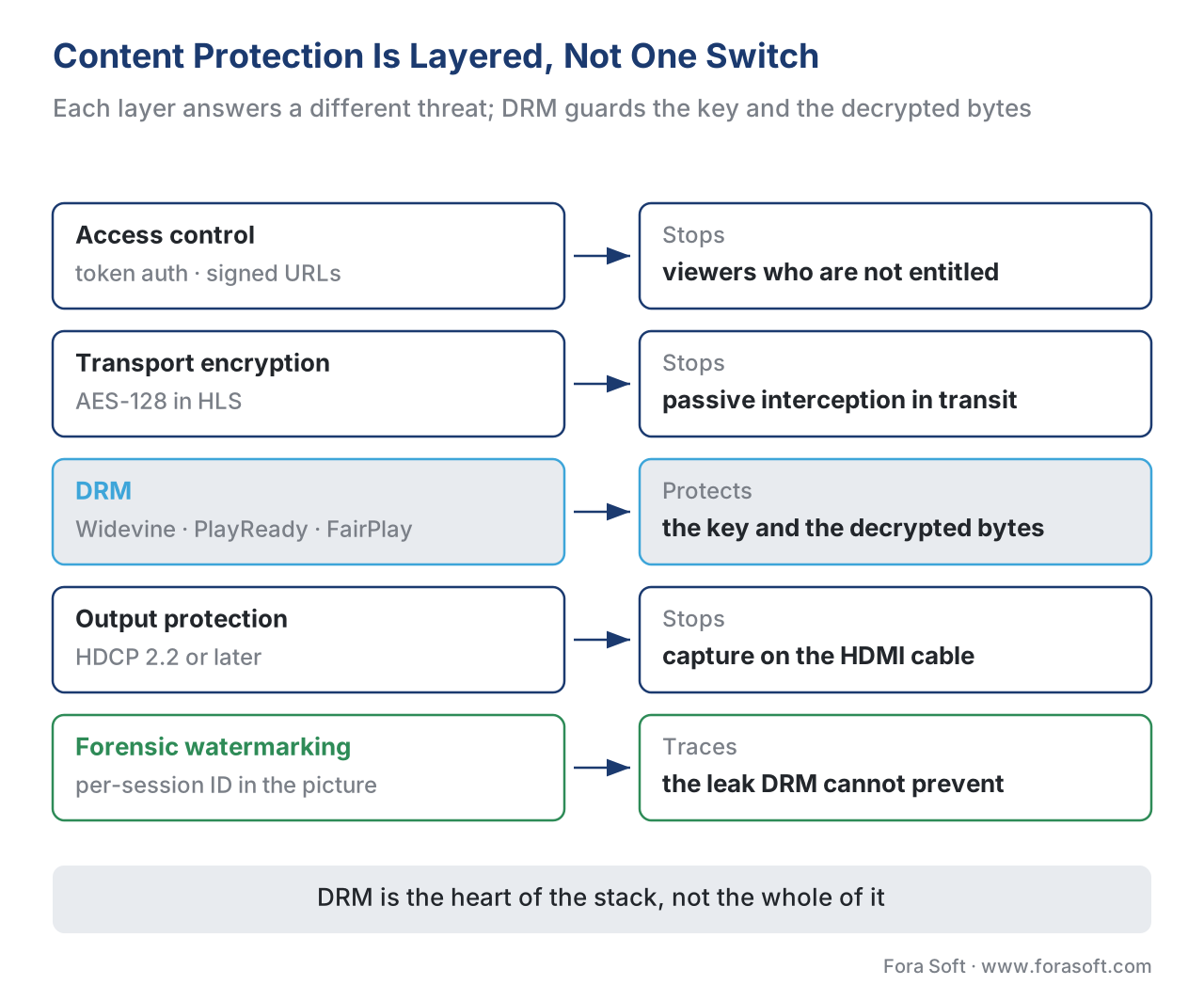 Figure 1. Content protection is layered, not a single switch. Each layer stops a different attacker; DRM is the layer that protects the key and the decrypted bytes. The outer layers gate access; the inner layers protect what gets through.
Protection is layered: where DRM sits
DRM is one layer in a stack, and a common confusion is treating the whole stack as if it were DRM, or treating any one layer as if it were the whole job. Walk up the stack from the outside in, because each layer answers a different question.
The outermost layer is access control — token authentication and signed URLs. Before a device can even fetch the manifest or the segments, it must present a short-lived, signed token proving it is a logged-in, entitled user. This is the bouncer at the door. It does not encrypt the video; it decides who is allowed to ask for it. We cover the token mechanics in the delivery layer, in edge caching, cache keys, and tokenized URLs.
The next layer is transport encryption of the media itself. The simplest form is AES-128 encryption as defined for HTTP Live Streaming in IETF RFC 8216, where each media segment is encrypted and the player is told where to fetch the key through a tag in the manifest. This scrambles the bytes in transit, so a passive eavesdropper sees noise. But — and this is the limitation that decides everything — in plain HLS AES-128 the key is delivered over a URL named in the manifest, with no requirement that the requester prove anything about the device. Anyone who can read the manifest can read the key URL and ask for the key exactly as a real player would. Add strong token authentication on the key request and AES-128 becomes meaningfully harder to defeat; leave the key server open and the "encryption" is a screen door.
The inner layer — the one people mean when they say DRM — is Widevine, PlayReady, or FairPlay. The difference from AES-128 is not the encryption algorithm; it is everything around the key. A DRM system authenticates the device before issuing a key, delivers that key so the device's own operating system and apps cannot read it, decrypts the content inside a protected module, and enforces license rules. The key never sits in a manifest; it never sits in ordinary memory. This is the jump from "the bytes are scrambled" to "the key and the decrypted bytes are protected on a device you do not control."
Below DRM sit two more layers that DRM coordinates but does not itself perform. Output protection — High-bandwidth Digital Content Protection (HDCP) — protects the digital cable from the device to the display, so the decrypted signal cannot be captured by a recorder spliced into the HDMI link; HDCP 2.2 or later is the requirement for 4K. And forensic watermarking embeds an invisible, per-session identifier into the picture itself, so that if a copy does escape, the leak can be traced back to the account or device it came from. Watermarking does not prevent anything; it makes leaks attributable, which is a different and complementary job we cover in forensic watermarking: tracing the leak.
Hold onto the shape of the stack: access control decides who can ask, encryption scrambles the file, DRM protects the key and the decryption, output protection guards the cable, and watermarking traces what still gets out. DRM is the heart of it, but it is not the whole heart, and it is certainly not the whole body.
What DRM actually protects: the key and the decrypted bytes
Now the precise claim, because this is where most explanations go vague and a vague understanding leads to a broken build.
DRM protects exactly two things: the decryption key, and the decrypted video bytes. Everything DRM does is in service of keeping those two things inside a boundary that the rest of the device cannot cross.
Picture a boundary drawn around the trusted playback component on the device. Outside the boundary is everything you do not control: the open internet, the operating system, the browser, other apps, the user. Inside the boundary, three things happen and none of them are visible from outside. The license arrives and the key is extracted. The encrypted content is decrypted using that key. The decrypted frames are handed straight to the display pipeline. At no point does the key appear in ordinary memory where another app could read it, and on the strongest devices the decrypted frames never appear in ordinary memory either — they travel a secure video path from the protected module to the screen, so even a screenshot of protected playback comes back black.
That boundary is enforced differently depending on how much the device can be trusted, and the difference has a name: security levels. On a device with a hardware-backed secure zone — a Trusted Execution Environment (TEE), a separate protected area of the chip — the key handling and decryption happen inside that hardware, where even a compromised operating system cannot reach. Google's Widevine calls this L1; the equivalent exists for PlayReady (SL3000) and FairPlay. On a device without that hardware, or in a desktop browser, the same logic runs in software that is obfuscated and hardened but ultimately lives in normal memory — Widevine L3. The security level is not a detail; it determines what resolution a studio will let you stream, which is why hardware-backed playback (Widevine L1) is typically required for 1080p and 4K from major studios, while software-only (L3) is commonly capped near 480p–720p. The full ladder of levels is its own topic, covered in the three DRM systems: Widevine, PlayReady, FairPlay.
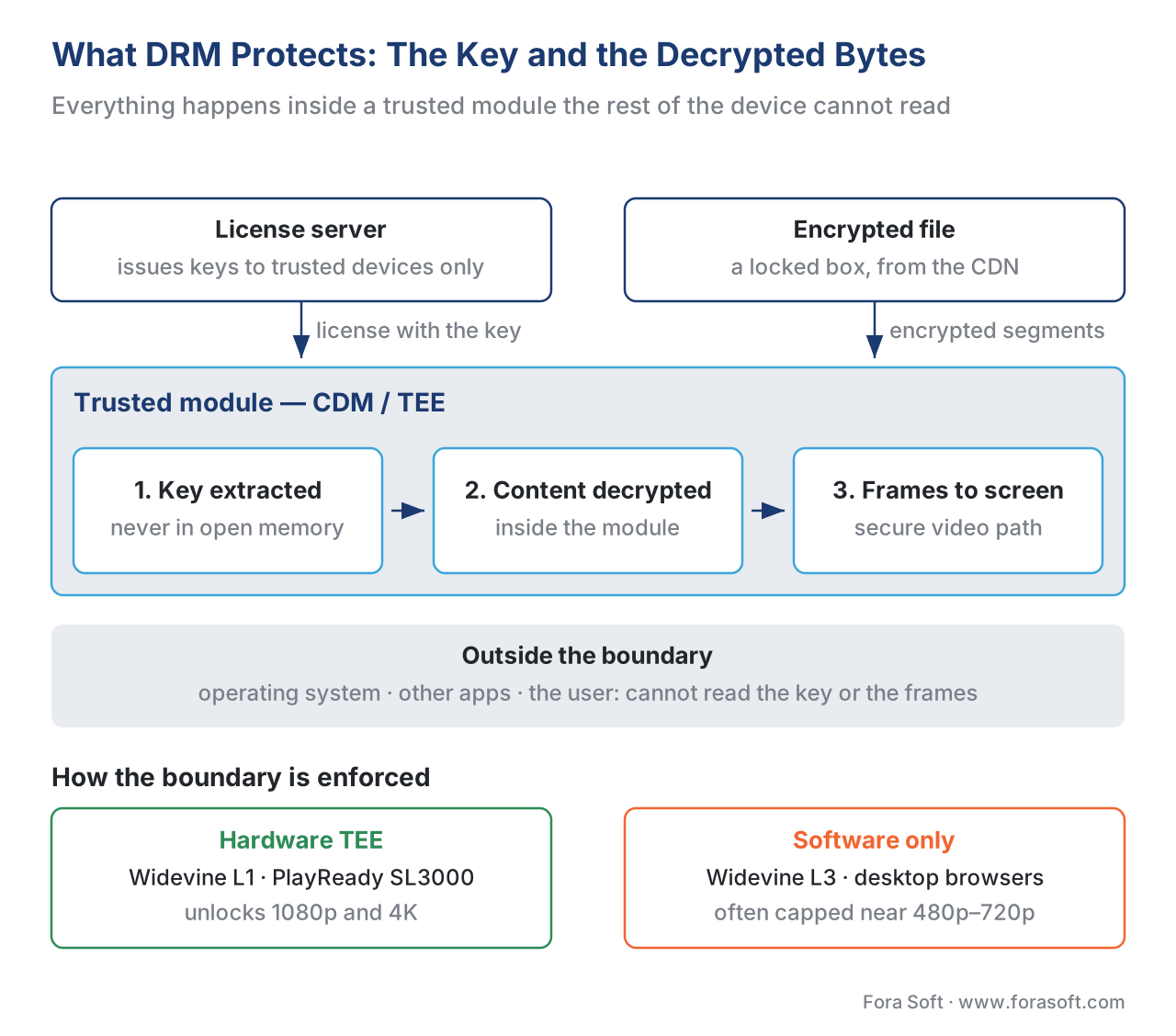 Figure 2. The protection boundary. The key is extracted, the content decrypted, and frames sent to the display entirely inside a trusted module; on hardware-backed devices a secure video path keeps decrypted frames out of ordinary memory. The license server sits outside, issuing keys only after it trusts the device.
What DRM does not protect: the analog hole
Here is the real limit, and stating it plainly is what separates an engineering explanation from marketing.
DRM protects the digital path — the bytes and the key — right up to the moment the picture becomes light and sound that a human can perceive. It cannot protect what happens after that. Point a camera at the screen and record the playing video, and you have a copy that never touched the key, never crossed the protection boundary, and never tripped any DRM check. This is the analog hole: any signal a human can see or hear can be re-recorded from the outside, and no digital protection system can close it, because closing it would mean stopping the content from being watchable, which defeats the purpose.
The analog hole is not a flaw in a particular DRM; it is a property of the universe that every DRM shares. A "camcorder copy" of a film in a cinema is the analog hole at its crudest; a phone filming a laptop is the same thing at home. The decrypted frames inside the secure video path are safe; the photons leaving the panel are not.
This is exactly why serious content protection does not stop at DRM. Because you cannot prevent the camera-at-the-screen copy, you instead make it traceable: forensic watermarking embeds a per-viewer, per-session identifier into the picture so faintly that the human eye cannot see it but a detector can recover it from a leaked copy — even a shaky phone recording — and tell you which account the leak came from. DRM makes the digital copy impossible; watermarking makes the analog copy attributable; together they cover both halves of the threat. Treating DRM as if it stopped screen recording is the single most common misunderstanding in content protection, and it leads teams to skip the watermarking layer that actually addresses the leak DRM cannot.
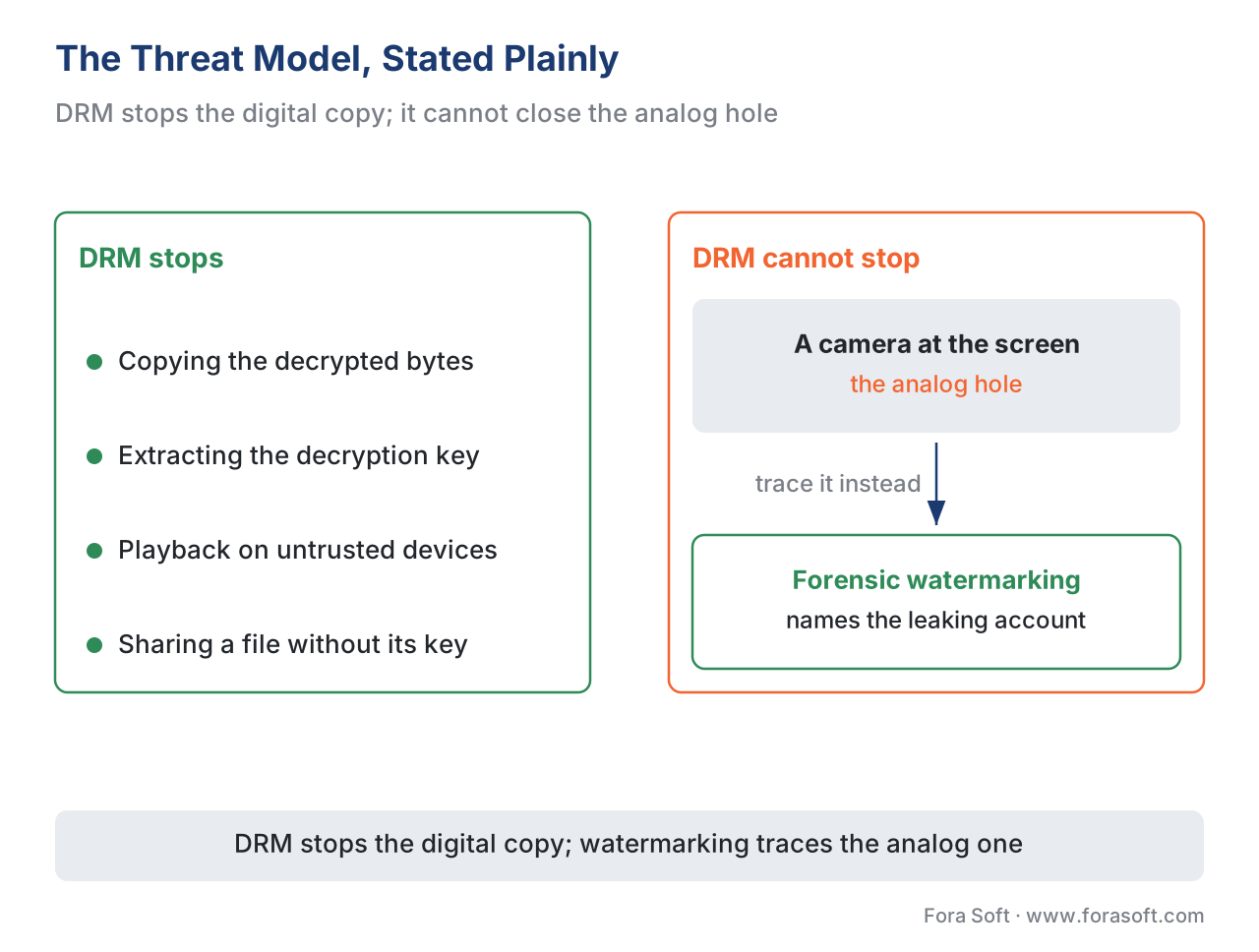 Figure 3. The threat model, stated plainly. DRM stops the digital copy — key extraction, copying decrypted bytes, playback on untrusted devices. It cannot stop a camera pointed at the screen; forensic watermarking traces that leak instead of pretending to prevent it.
Why no single DRM is enough: the device problem
If DRM were one system that ran everywhere, this would be simpler. It is not. The market settled on three incompatible DRM systems, each owned by a platform vendor and each native to that vendor's devices:
- Google Widevine — Android phones and tablets, Chrome, Android TV, Chromecast, and many smart TVs.
- Microsoft PlayReady — Windows, the Edge browser, Xbox, and a large share of smart TVs and set-top boxes.
- Apple FairPlay — Safari, iPhone, iPad, Mac, and Apple TV.
No single one of these covers all devices, and the gaps are not negotiable — Apple devices will not run Widevine, and Android will not run FairPlay. A platform that wants to reach every screen therefore has to satisfy all three. The naive reading of that requirement is "encrypt the catalog three times, once per DRM," which would triple your storage and your encoding bill. The modern reality is the opposite, and it rests on a standard worth knowing by name.
That standard is Common Encryption (CENC), ISO/IEC 23001-7. It defines a way to encrypt the media once in a format that all three DRM systems can decrypt, so you protect a single set of files and then issue Widevine, PlayReady, or FairPlay licenses for those same files depending on which device shows up. The W3C's browser specification states the principle directly: "Supported content is encrypted per container-specific 'common encryption' specifications, enabling use across key systems." Encrypt once; license many. That pattern — one workflow protecting one set of files for every device — is called multi-DRM, and it is the baseline modern architecture, covered in multi-DRM: one workflow, every device.
There is one wrinkle inside Common Encryption that trips up nearly every newcomer, and getting it wrong breaks Apple playback. Common Encryption defines two encryption schemes: cenc, which uses AES in counter mode (AES-CTR), and cbcs, which uses AES in cipher-block-chaining mode with a pattern (AES-CBC). They are not interchangeable. FairPlay supports only cbcs. So an early build that encrypts everything with the older cenc scheme will play on Widevine and PlayReady and fail silently on every Apple device — a failure that is invisible until someone tests on an iPhone. The convergence the whole industry has moved to is "cbcs everywhere": encrypt once with cbcs, package as CMAF, and serve one set of files to all three DRMs. The full scheme breakdown is in CENC, CTR, and CBCS: common encryption explained.
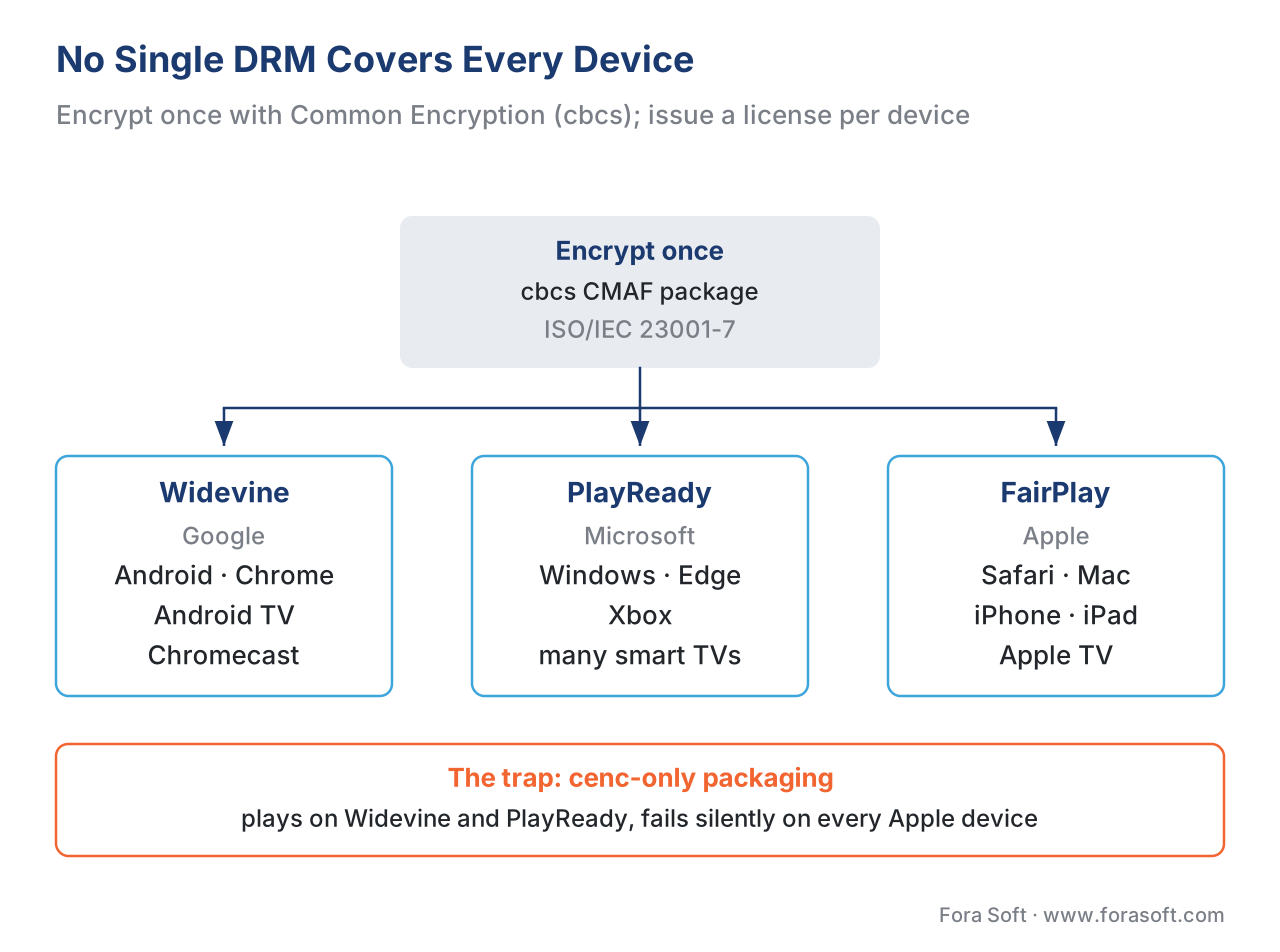 Figure 4. No single DRM covers every device, so a platform satisfies all three. Common Encryption (ISO/IEC 23001-7) lets you encrypt once with the cbcs scheme and issue Widevine, PlayReady, or FairPlay licenses from the same files — encrypt once, license many.
The studio-licensing reality: you usually don't choose DRM
For premium content, here is the fact that reframes the whole topic: most of the time, you do not decide whether to use DRM — the content owner's license agreement decides for you.
When a platform licenses films or series from a major studio, the contract does not say "please protect this." It specifies, in detail, the protection the platform must implement, and those terms are not aspirational — they are the condition of getting the content at all. The common reference these contracts point to is the MovieLabs Specification for Enhanced Content Protection (ECP), written by the technology arm of the major Hollywood studios. First published in 2013 to set a protection target for 4K, HDR, and early-release-window content, and revised since (version 1.1 in 2016 made forensic watermarking mandatory for the highest tiers), the ECP spells out requirements such as a hardware root of trust, hardware-backed decryption, a secure media pipeline, output protection (HDCP 2.2 or later for 4K), breach recovery through revocation and renewal, and forensic watermarking for ultra-high-definition content.
Read that list again with the earlier sections in mind, and it is the same boundary and the same layers we have already described, written as contractual obligations. The practical consequence for a platform is stark: to stream a recent Hollywood title in 4K, you typically need hardware-backed DRM (Widevine L1 / PlayReady SL3000 / FairPlay), HDCP 2.2 on the output, and session-based forensic watermarking — or you do not get to stream that title in 4K at all. The protection tier is a gate on the catalog, not a setting you tune for your own comfort. This is why so much of build planning for a premium OTT service starts with the content deals: the rights determine the DRM, and the DRM determines parts of the architecture. We connect rights to architecture in content licensing and rights for OTT.
Underneath the commercial requirement sits a legal one that gives DRM its teeth. In the United States, Section 1201 of the Digital Millennium Copyright Act (17 U.S.C. § 1201, enacted 1998) makes it unlawful to circumvent a technological measure that controls access to a copyrighted work, and to traffic in tools designed to do so — and notably, that prohibition stands on its own, independent of whether any actual copyright infringement follows. In plain terms: breaking DRM is itself illegal, separate from anything done with the content afterward. That legal backing is part of why DRM is a meaningful deterrent and not merely a speed bump — defeating it is not just against the terms of service, it is against the law in most major markets.
When you actually need DRM — and when you don't
All of the above is about premium, licensed content. A great deal of video is not that, and applying studio-grade DRM to a training library or a user's uploaded clips is paying for a vault to store stationery. The decision is worth making deliberately, because the cost and complexity difference between layers is large.
Work down a simple ladder of value and threat. If the video is public or low-value — marketing clips, public webinars, most user-generated content — you may need no protection beyond ordinary access control, or none at all. If the video is private but not premium — internal training, paid courses, a membership library, telemedicine recordings — then token authentication plus AES-128 encryption with a properly secured key server is frequently enough: it keeps non-subscribers out and casual copying hard, at a fraction of DRM's complexity. The moment the content is premium or licensed — Hollywood films, live sports, high-value originals, anything where one clean leak is expensive or where a content owner's contract demands it — you need full multi-DRM, and if it is 4K or early-window, you need the hardware-backed tier with HDCP and watermarking on top.
The test is not "how do I feel about security." It is two concrete questions: what does the license require (if you are licensing content, the answer is written down and not yours to choose), and what does one leak actually cost you (if the answer is "a competitor gets our $20M original for free," you are in DRM territory; if it is "someone watches our webinar without registering," you are not).
A short cost example makes the trade-off concrete, because teams often imagine DRM is prohibitively expensive and it usually is not. Suppose a subscription service has 100,000 subscribers who each start about 50 playback sessions a month. Each session needs one license request, so:
license requests = 100,000 subscribers × 50 sessions = 5,000,000 per month
A managed multi-DRM service priced at a representative $0.30 per 1,000 license requests (vendor- and volume-dependent, and dated — confirm live) then costs:
monthly DRM cost = 5,000,000 ÷ 1,000 × $0.30 = $1,500 per month
If that catalog earns, say, $1.2 million a month in subscription revenue and is only licensable with DRM in place, the protection layer costs about 0.125% of the revenue it unlocks — $1,500 against $1.2M. Framed that way, the question for premium content is rarely "can we afford DRM." It is "we cannot afford to be without the catalog DRM unlocks." The larger build costs sit in the multi-DRM integration and the player work across devices, not in the per-license fee; we model the whole protection line in the OTT cost model, and the monetization models that lean hardest on DRM in SVOD, AVOD, TVOD, and hybrid.
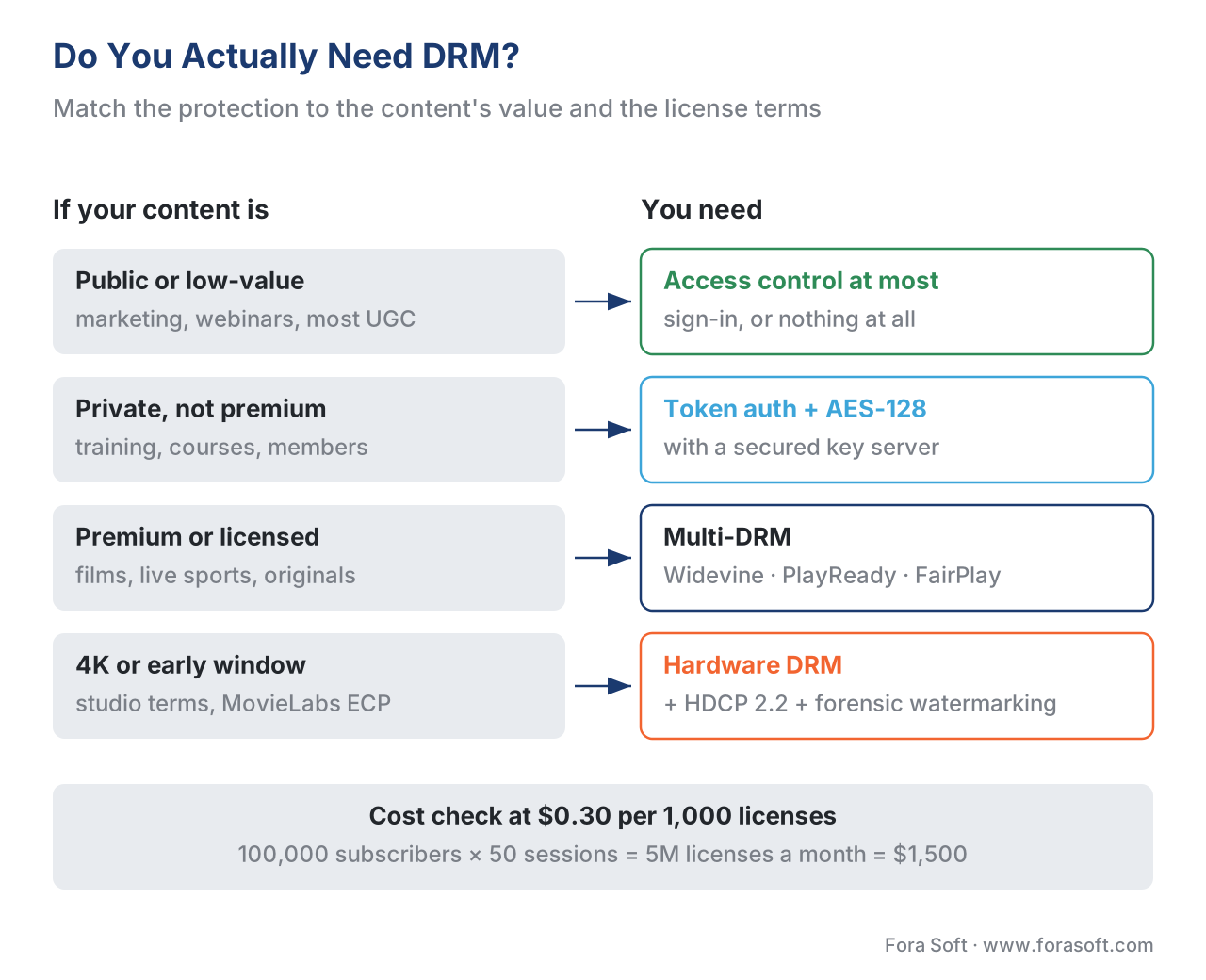 Figure 5. The DRM decision. Public or low-value content needs little more than access control; private-but-not-premium content is often well served by token auth plus AES-128; premium or licensed content needs multi-DRM, and 4K or early-window content needs the hardware-backed tier with HDCP and watermarking.
A common mistake: treating DRM as a single all-or-nothing switch
The most expensive content-protection errors come from thinking about DRM as one binary feature — "secure or not secure" — rather than as a stack of layers each doing a specific job. Four versions of this mistake recur, and all four are avoidable.
The first is encrypting with cenc only and discovering on an iPhone that Apple playback is broken, because FairPlay requires cbcs. The fix is to standardize on cbcs Common Encryption from the start so one package serves all three DRMs. The second is believing DRM stops screen recording, then being shocked when a watermark-free copy made by a phone camera shows up online — DRM cannot close the analog hole, and the answer is forensic watermarking, not a "better" DRM. The third is leaving the AES-128 key server open so that the encryption is real but the key is available to anyone who reads the manifest; AES-128 is only as strong as the token authentication on the key request. The fourth is over-protecting low-value content, spending the integration effort and per-stream cost of hardware DRM on videos whose threat model never justified it, while sometimes under-protecting the one premium title that actually carried contractual obligations.
The thread connecting all four is the same: match the layer to the threat. Access control for who-can-ask, encryption for the file, DRM for the key and the decryption, output protection for the cable, watermarking for the leak you cannot prevent. A platform that can name which layer addresses which threat does not make any of these mistakes.
Free download: Content Protection Decision WorksheetDecide how much protection your catalog needs before you sign a content deal or a DRM contract: name the threat and the cost of one leak, match each layer to its threat (access control, AES-128, DRM, HDCP, watermarking), and make the DRM-vs-token-auth call — on one page.Where Fora Soft fits in
Content protection is where a streaming platform's content deals, its device reach, and its architecture meet, and getting it wrong shows up either as a catalog you cannot license or a leak you cannot trace. Fora Soft has built video streaming, OTT/Internet TV, e-learning, telemedicine, and video surveillance software since 2005, across 625+ shipped projects for 400+ clients, and protected-video work runs through all of it: choosing the right protection tier for the content's actual value, implementing cbcs Common Encryption so one package serves Widevine, PlayReady, and FairPlay, wiring multi-DRM license delivery into players on every screen, and adding forensic watermarking where studio terms require it. When a media company needs a protection layer that satisfies a studio's license without over-engineering the parts that do not need it, that end-to-end content-protection engineering is the capability we bring.



The handbook
Fora Soft Video Engineering Handbook
We wrote a seven-volume handbook, 9,000+ pages, that takes the video stack from a single pixel to production, and someone who works through it can design and build a streaming service that passes a studio’s protection terms. Start with volume 3: DRM, license delivery, the players and CDMs that hold the key, and what protection costs per stream. Volume 2 covers the HLS, DASH and CMAF packaging where cbcs encryption is applied, and volume 1 the encode ladder that gets protected. Written by Nikolay Sapunov, CEO at Fora Soft.
Does your catalog need DRM, or will token auth and AES-128 do?
Tell us what you stream, on which devices, and what your content deals require, and we will map each protection layer to a threat, tell you whether multi-DRM or the hardware tier is needed, and estimate what the license traffic will cost per month. 250+ video products shipped since 2005.
See our case studies
Case study
Vodeo — iOS Movie Rental Platform
A pay-per-rental catalog for 100,000+ users across 24 genres at 480p, 720p and 1080p, cast to the TV over AirPlay and Chromecast — licensed films, where the rental rules and the device decide who gets the key.
Case study
Drundoo
A Bulgarian internet-TV platform with 60 live channels, catch-up and a VOD library — licensed channels on set-top boxes, phones and the web, each with its own protection path.
Case study
Speed.Space
A remote production platform recording at 1080p and 8 Mbps, used on Netflix, Electronic Arts and HBO productions — pre-release material where one leak costs more than the whole protection layer.
What to read next
Licensing
Multi-DRM: One Workflow for Every Device
Encrypt once, license many: the workflow behind figure 4.
Encryption
CENC vs CBCS: Common Encryption for Streaming
Why a cenc-only build breaks every Apple device.
Attribution
Forensic Watermarking: How to Trace a Stream Leak
The layer that covers the analog hole DRM cannot close.
Architecture
The DRM & Content-Protection Reference Architecture
All five layers wired into one protected-video system.
References
- W3C Encrypted Media Extensions (EME) — W3C Recommendation. Defines the Content Decryption Module (CDM) as "the client component that provides the functionality, including decryption, for one or more Key Systems"; defines a license as "key system-specific state information that includes one or more key(s)"; and states that "supported content is encrypted per container-specific 'common encryption' specifications, enabling use across key systems." Tier 1 (official standard). https://www.w3.org/TR/encrypted-media/ (accessed 2026-06-16)
- ISO/IEC 23001-7 — Common Encryption in ISO base media file format files (CENC) — ISO/IEC. The standard that lets one encrypted file be decrypted by multiple DRM systems; defines the
cenc(AES-CTR) andcbcs(AES-CBC pattern) schemes, the foundation of multi-DRM and the reason FairPlay (cbcs-only) and the others can share one package. Tier 1. https://www.iso.org/standard/84637.html (accessed 2026-06-16) - RFC 8216 — HTTP Live Streaming (HLS) — IETF. Defines AES-128 and SAMPLE-AES media-segment encryption and the
EXT-X-KEYtag that tells a player where to fetch the key — the simpler transport-encryption layer beneath DRM, and the source of the "key URL in the manifest" limitation. Tier 1. https://www.rfc-editor.org/rfc/rfc8216 (accessed 2026-06-16) - 17 U.S.C. § 1201 — Circumvention of copyright protection systems (DMCA) — United States Code. Makes circumventing an access-control technological measure, and trafficking in circumvention tools, unlawful — independent of any underlying infringement; the legal backing that makes breaking DRM itself illegal. Tier 1 (statute). https://www.copyright.gov/title17/92chap12.html (accessed 2026-06-16)
- FairPlay Streaming Overview — Apple. First-party documentation of Apple's DRM; FairPlay uses fMP4 sample encryption per ISO/IEC 23001-7 and Apple devices support only the
cbcsscheme, which is whycbcsis the cross-DRM convergence target. Tier 3 (first-party). https://developer.apple.com/streaming/fps/FairPlayStreamingOverview.pdf (accessed 2026-06-16) - MovieLabs Specification for Enhanced Content Protection (ECP) — MovieLabs. The major studios' common protection target referenced by premium-content licenses: hardware root of trust, hardware-backed decryption, secure media pipeline, HDCP output protection, revocation/renewal, and mandatory forensic watermarking for UHD. First published 2013; v1.1 (2016) mandated forensic watermarking for the highest tiers. Tier 5 (industry consortium). https://movielabs.com/solutions-specifications/enhanced-content-protection-ecp/ (accessed 2026-06-16)
- Widevine DRM — Overview and security levels — Google. First-party description of Widevine and the L1/L2/L3 security levels: L1 runs key handling and decryption inside a hardware Trusted Execution Environment with a secure video path; L3 is software-only. The level gates the resolution a studio permits. Tier 3 (first-party). https://developers.google.com/widevine/drm/overview (accessed 2026-06-16)
- HLS Encryption vs DRM: What's the Difference — Gumlet. Vendor-neutral explanation that HLS AES-128 delivers the key via a URL in the manifest with no device authentication, while DRM authenticates the device and holds the key in a hardware-protected module — the basis for the "when is AES-128 enough vs when you need DRM" decision. Tier 4 (vendor engineering). https://www.gumlet.com/learn/hls-encryption-vs-drm/ (accessed 2026-06-16)
- What is HDCP 2.2 content protection — CIE Group. Explains that HDCP 2.2 is the output-protection level required for 4K UHD over digital links (HDCP 2.3 the latest), the cable-protection layer that DRM coordinates but does not itself perform. Tier 4 (vendor engineering). https://cie-group.com/how-to-av/videos-and-blogs/understanding-hdcp-2-2-for-4k-uhd (accessed 2026-06-16)
- Streaming/account-sharing-and-piracy revenue losses (2025) — Parks Associates, reported via Fox Business. Combined account-sharing-and-piracy losses of ~$12.5B for 2025 (+38% year over year); ~27% of US broadband households engage in piracy or account sharing — the scale that motivates content-owner protection requirements. Tier 5 (analyst). https://www.foxbusiness.com/technology/streaming-piracy-password-sharing-lost-revenue-study (accessed 2026-06-16)
- Global online video piracy cost estimates — industry reporting (TheWrap / Park Associates / Omdia syntheses). Online video piracy costing rights holders on the order of $75B/year as of 2025, projected toward $125B by 2028. Tier 5 (analyst). https://www.thewrap.com/piracy-streamers-cost-lost-revenue/ (accessed 2026-06-16)
Source note (per §4.3.2): the protection mechanism — the CDM and license model, the cross-key-system "common encryption" foundation, the two encryption schemes, the transport-encryption layer, and the legal anti-circumvention basis — traces to tier-1 sources (W3C EME, ISO/IEC 23001-7, RFC 8216, 17 U.S.C. § 1201; refs 1–4). The FairPlay-cbcs requirement and the Widevine security levels trace to first-party vendor documentation (refs 5, 7). The studio-licensing requirements are the MovieLabs ECP (ref 6). HDCP-for-4K, the AES-128-vs-DRM distinction, and piracy magnitudes are vendor/analyst sources, labelled in-text and dated (refs 8–11). Where popular articles conflate Common Encryption with a single scheme or claim DRM stops screen recording, this article follows the spec (two schemes; FairPlay needs cbcs) and the threat model (the analog hole is uncloseable; watermarking traces it) and flags the discrepancy.
