


Why this matters
If you are a founder, product manager, or first-time streaming CTO, the browser is where most of your viewers will press play — and the browser is the one screen where DRM is least under your control. You do not write a CDM and you cannot install one; you inherit whatever the browser and operating system provide, and your job is to detect it, request the right protection level, and route the license. Get the browser DRM stack wrong and the failure is specific and visible: Safari users see a black screen because you only encrypted for Widevine, or every Chrome viewer is capped at standard definition because you asked for a security level their software CDM cannot meet. By the end you will be able to explain what EME does (and does not) do, name which DRM lives in which browser and why, read the license-acquisition flow out loud, and scope a multi-DRM web player that plays everywhere. This is the browser-side companion to License Servers and Key Delivery, which covered how the key reaches the device; here we cover the browser machinery that asks for it.
The problem EME was built to solve
Start with the world before EME, because it explains everything about EME's shape. Ten years ago, a browser could not play studio-grade protected video on its own. Protection lived in plugins — Adobe Flash, Microsoft Silverlight — small programs bolted into the browser that did their own decryption. Plugins were a security and maintenance disaster, and browsers killed them. That left a gap: how does a browser play premium content, which contract terms say must be encrypted, without a plugin?
EME is the answer. The format that lets a web page play encrypted audio and video by talking to a content-protection system already on the device, called Encrypted Media Extensions (EME), is a W3C standard that extends the ordinary HTML <video> element. The name is literal: it is an extension to the media element. A browser that supports it can play encrypted media; a browser that does not simply cannot, and that is allowed — EME is optional for HTML compliance.
The key design choice, and the source of every later complication, is this: EME does not decrypt anything itself. The W3C is explicit that the specification "does not define a content protection or Digital Rights Management system. Rather, it defines a common API that may be used to discover, select and interact with such systems." EME is the standard socket; the DRM is the appliance you plug into it. That separation is what the rest of this article unpacks.
What EME is — and what it is not
The cleanest analogy is a universal power adapter. When you travel, you do not rewire each country's electricity; you carry one adapter that fits your plug on one side and the local socket on the other. EME is that adapter for browser DRM. Your player speaks one standard API on its side; on the other side sits whatever DRM the browser happens to provide. Write the player once, and it works against three different protection systems without three different code paths.
To use EME you need four named things, and three of them are not part of EME at all:
- The Key System — the name of the DRM mechanism you want. The W3C defines a Key System as "a generic term for a decryption mechanism and/or content protection provider," identified by a reverse-domain string.
com.widevine.alphais Widevine;com.microsoft.playreadyis PlayReady;com.apple.fpsis FairPlay;org.w3.clearkeyis the test baseline. - The Content Decryption Module (CDM) — the software (or hardware) that actually does the work. The W3C definition: the CDM "is the client component that provides the functionality, including decryption, for one or more Key Systems." The CDM is proprietary, it ships with the browser or the operating system, and you neither write it nor see inside it.
- The license (key) server — the service that hands out the keys, wrapped in a policy. This is the part you (or a multi-DRM vendor) run. Covered in depth in License Servers and Key Delivery.
- The packager — the upstream tool that encrypted the video in the first place, using Common Encryption. See CENC, CTR, and CBCS.
One baseline matters for testing. EME requires every compliant browser to implement one Key System with no real DRM behind it, called Clear Key (org.w3.clearkey): the spec says "only the Clear Key system is required to be implemented as a common baseline." Clear Key lets you encrypt a file and play it back by simply handing over the key in plain text — no license server, no studio approval. It is invaluable for testing your EME plumbing, and useless for protecting real content, because the key is exposed to the page. Never confuse "my Clear Key demo plays" with "my content is protected."
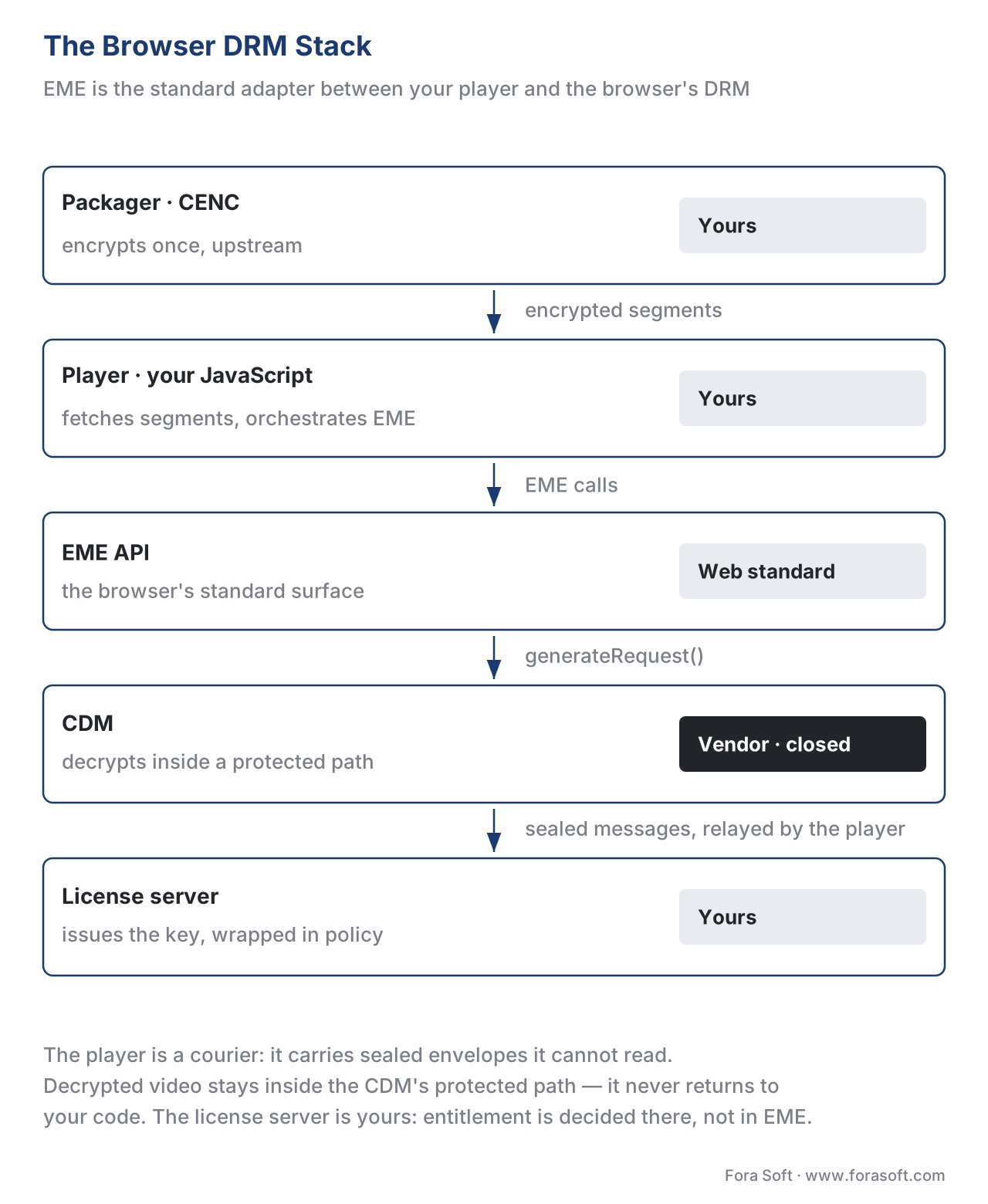 Figure 1. EME is the standard adapter in the middle. Your player and the license-routing code are yours; the CDM is the browser's; the encrypted bytes come from the packager. The decrypted video never returns to your code — it stays inside the CDM's protected path.
The four pieces, and who owns each
It is worth being precise about ownership, because the single most common mental-model error is thinking your player "decrypts" the video. It does not. Walk the stack from the bytes inward.
The packager runs once, upstream, and produces encrypted segments using Common Encryption — the ISO standard (ISO/IEC 23001-7) that lets one encrypted file feed every DRM. The player is your JavaScript: an open-source engine such as Shaka Player, hls.js, or dash.js, or your own. It fetches segments, feeds them to the video element, and orchestrates EME — but it handles only ciphertext and opaque messages, never a usable key. The EME API is the browser's standard surface: the MediaKeys, MediaKeySystemAccess, and MediaKeySession objects your player calls. The CDM is the appliance behind that surface — proprietary, vetted by the browser, doing the decryption (and often the decoding) in a protected area your code cannot reach. The license server is yours, on the network, issuing keys wrapped in policy.
The boundary that matters runs around the CDM. Everything inside it — the keys, the decrypted frames — is invisible to your page and, by design, to the browser's own scriptable layer. Your player is a courier: it carries sealed envelopes between the CDM and the license server without being able to read them. That is the whole security premise, and it is why the CDM has to be proprietary closed code, which we return to under privacy below.
How a license is acquired: the EME handshake, step by step
Here is the sequence the spec defines, in order. It looks like a lot of steps, but each one is small, and the pattern is always the same: the CDM produces a sealed request, your player ferries it to the license server, your player ferries the sealed response back.
- The player tries to play encrypted media. It is feeding segments to the
<video>element (usually via Media Source Extensions, the companion API that supplies the bytes for adaptive streaming — see adaptive bitrate streaming for how that part works). - The browser fires an
encryptedevent. It has read, from the file's header, that the media is protected, and it hands your player the encryption metadata (initData). - The player asks which DRM is available. It calls
navigator.requestMediaKeySystemAccess()with a Key System string and a configuration (codecs, robustness, session type). The spec describes this as the call that "requests access to the specified Key System." It requires a secure context — EME only works over HTTPS. - The player creates a
MediaKeysobject for the available Key System and attaches it to the video element withsetMediaKeys(). This object represents a live CDM instance. - The player opens a session with
createSession(), producing aMediaKeySession— the object that, in the spec's words, provides "a context for message exchange with the CDM" and represents the lifetime of one license and its keys. - The player asks the CDM for a license request with
generateRequest(), passing theinitDatafrom step 2. - The CDM fires a
messageevent — a sealed license request, including proof that this CDM is genuine and trusted. - The player POSTs that message to your license server (a normal
fetch/XHR). The license server checks entitlement, composes the policy, and returns a license. - The player passes the response to the CDM with
update(). The CDM unwraps the key. - The CDM decrypts, the video plays. Decryption (and often decoding) happens inside the CDM's protected path; the clear frames go to the screen, never back to your JavaScript.
The point that trips up newcomers: everything between the CDM and the license server is opaque to the browser and to your application. Your player can see that a message is a license request, but not what is inside it. You are routing sealed envelopes. This is also why authentication is your job, not EME's — you decide who is allowed a license before step 8, using your own login and entitlement service.
// Minimal EME flow (Clear Key shown; real DRM swaps the keySystem + a license-server fetch)
const config = [{
  initDataTypes: ['cenc'],
  videoCapabilities: [{ contentType: 'video/mp4; codecs="avc1.640028"',
                        robustness: 'SW_SECURE_DECODE' }]
}];

video.addEventListener('encrypted', async (e) => {
  const access  = await navigator.requestMediaKeySystemAccess('com.widevine.alpha', config);
  const mediaKeys = await access.createMediaKeys();
  await video.setMediaKeys(mediaKeys);

  const session = mediaKeys.createSession('temporary');
  session.addEventListener('message', async (ev) => {
    const license = await fetch('https://license.example.com/widevine', {
      method: 'POST', body: ev.message            // sealed request -> your license server
    }).then(r => r.arrayBuffer());
    await session.update(license);                 // sealed response -> the CDM
  });
  await session.generateRequest(e.initDataType, e.initData);
});
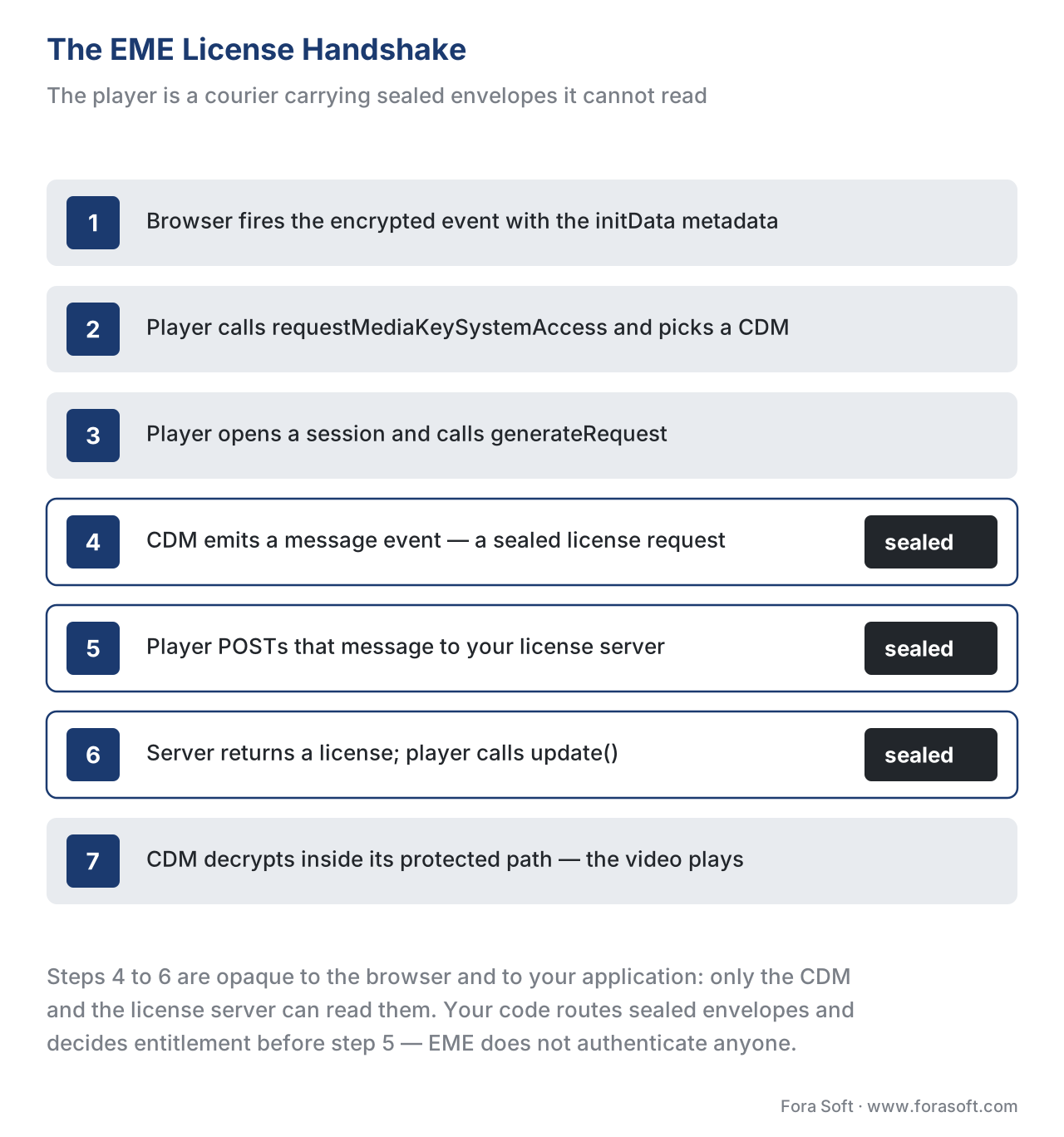 Figure 2. The handshake. The player is a courier carrying sealed envelopes; only the CDM and the license server can read them. Decryption happens inside the CDM, never in your code.
The browser DRM map: which CDM lives where
This is the reality that decides your whole web strategy, and it is the answer to the question people actually search for — what is browser DRM, and which one do I need? Each major browser ships exactly one CDM, tied to its vendor, and they do not overlap.
Chrome and Firefox carry Widevine (Google). Microsoft Edge carries both Widevine and PlayReady (Microsoft), and on Windows it can reach PlayReady's hardware-secure path for 4K. Safari, on macOS and iOS, carries FairPlay (Apple) and nothing else. There is no browser in which you can choose a different DRM, because the CDM is welded to the browser and the operating system.
| Browser | CDM (DRM) | EME Key System string | Typical robustness in-browser | Covers it alone? |
|---|---|---|---|---|
| Chrome (desktop) | Widevine | com.widevine.alpha |
software (L3) by default | No |
| Chrome / Firefox (Android) | Widevine | com.widevine.alpha |
hardware (L1) on many devices | No |
| Firefox (desktop) | Widevine | com.widevine.alpha |
software (L3) | No |
| Edge (Windows) | PlayReady (+ Widevine) | com.microsoft.playready |
hardware (SL3000) path available | No |
| Safari (macOS / iOS) | FairPlay | com.apple.fps |
hardware-backed | No |
Read the last column. No single browser CDM covers the open web. Widevine does not run in Safari; FairPlay does not run in Chrome; PlayReady is the Microsoft path. So the only way to play protected video everywhere is to support all three — which is exactly the multi-DRM pattern: encrypt the segments once with the cbcs scheme of Common Encryption, then issue Widevine, PlayReady, or FairPlay licenses from those same bytes depending on which browser shows up. The full pattern, and the build-vs-buy decision behind it, is Multi-DRM: One Workflow, Every Device; the encryption that makes it possible is CENC, CTR, and CBCS. The browser stack is why multi-DRM is mandatory rather than optional.
Two browser-specific facts save real debugging time. First, Safari requires a server certificate for FairPlay before any license exchange — a one-time setup step Widevine and PlayReady do not need, and a frequent cause of "it works everywhere but Safari." Second, older Safari versions use a legacy, WebKit-prefixed API (WebKitMediaKeys, key system com.apple.fps.1_0) instead of the standard EME interface, so a robust web player keeps a fallback path for them.
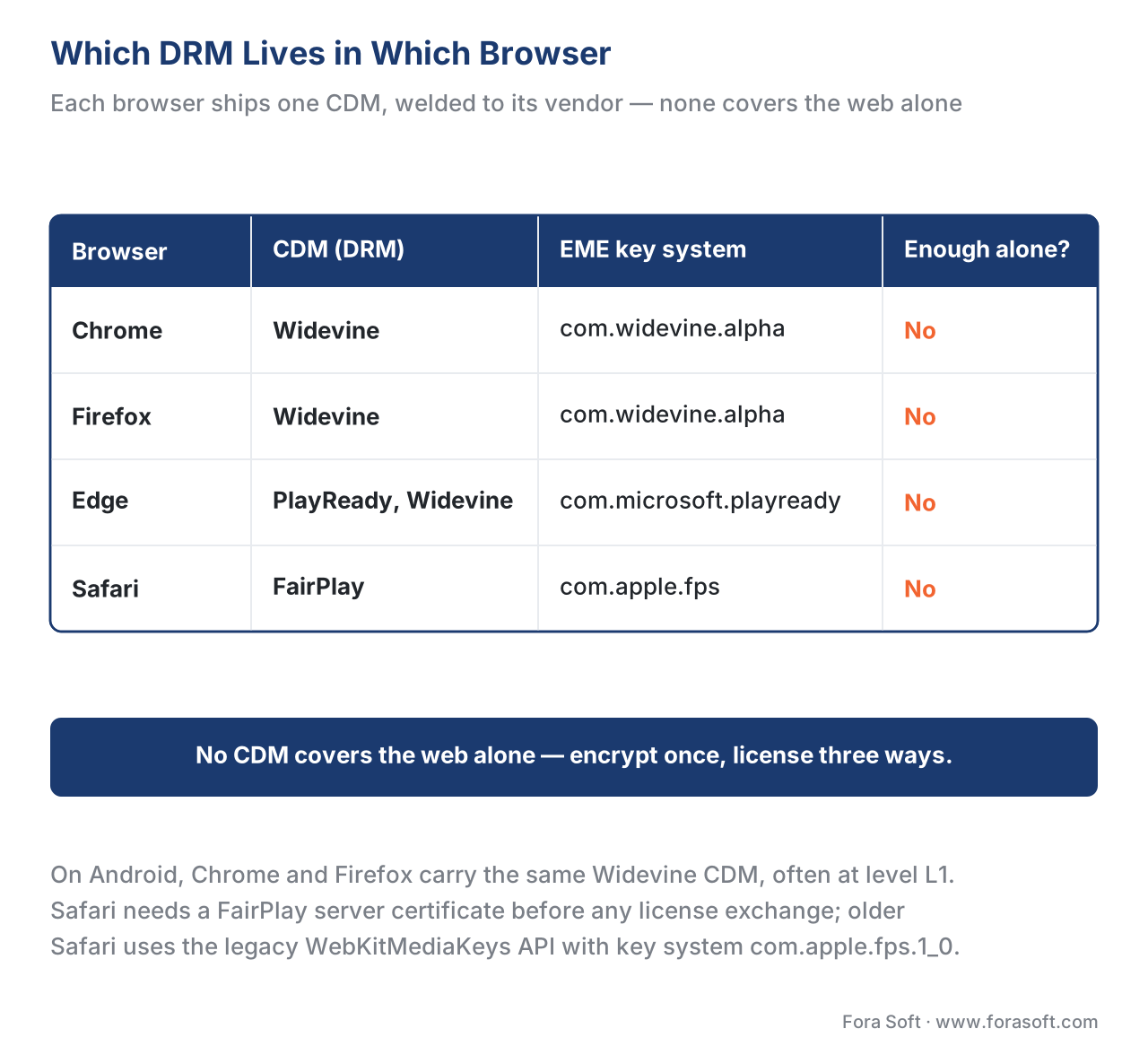 Figure 3. Each browser ships one CDM, welded to its vendor. Because none covers the others, the open web needs all three DRMs — encrypted once, licensed three ways.
Robustness and security levels: how strong is the lock?
EME does not just ask "can you decrypt this?" It lets you ask "can you decrypt this securely enough?" That is the robustness string, and it is how a content owner's "4K only on hardware-protected devices" rule reaches the browser.
When the player calls requestMediaKeySystemAccess(), each capability can carry a robustness value. The spec describes it plainly: "the robustness level associated with the content type. The empty string indicates that any ability to decrypt and decode the content type is acceptable," and it warns that "applications SHOULD specify the robustness level(s) they require to avoid unexpected client incompatibilities." For Widevine, the values run from software up to full hardware: SW_SECURE_CRYPTO, SW_SECURE_DECODE, HW_SECURE_CRYPTO, HW_SECURE_DECODE, and HW_SECURE_ALL. Those map onto the device security levels covered in The Three DRM Systems: software robustness corresponds to Widevine L3, hardware decode to L1.
Here is why it matters, with the arithmetic of a typical studio rule shown out loud. Suppose your contract allows 4K only on hardware-secure clients and caps everything else at 480p. A viewer opens your site in desktop Chrome, whose Widevine CDM is software-only (L3):
contract rule       : 4K  -> requires hardware robustness (HW_SECURE_DECODE / L1)
                       SD  -> software robustness (SW_SECURE_DECODE / L3) is fine
desktop Chrome CDM  : software only (L3)
player requests 4K  : robustness 'HW_SECURE_DECODE'  -> no L1 CDM available -> request FAILS
player requests SD  : robustness 'SW_SECURE_DECODE'  -> matches -> 480p plays
result              : desktop Chrome viewer correctly gets 480p, not a black screen
The lesson is a two-sided trap. Ask for more robustness than the browser can provide and the request fails — a black screen for a paying viewer. Ask for less than your contract requires and you may serve 4K to a software CDM and fail a studio audit. The correct design queries what the browser supports, then requests the highest robustness the content tier actually needs — not a fixed maximum for everything. The resolution cap itself is a license-server policy decision, detailed in License Policy, not a hard limit of EME.
A recent, dated addition is worth a flag. The 2024 update to EME (published by the W3C Media Working Group as a First Public Working Draft on 18 July 2024, on the way to a future "EME 2") adds exactly two minor features over the 2017 Recommendation: encryption-scheme capability detection (ask up front whether the CDM supports cenc or cbcs) and the ability to query the status of a key associated with an HDCP policy (the getStatusForPolicy() method — ask "would 4K over this HDMI link be allowed?" before trying to play). Both reduce guesswork, but as a draft their browser support varies; verify before relying on them.
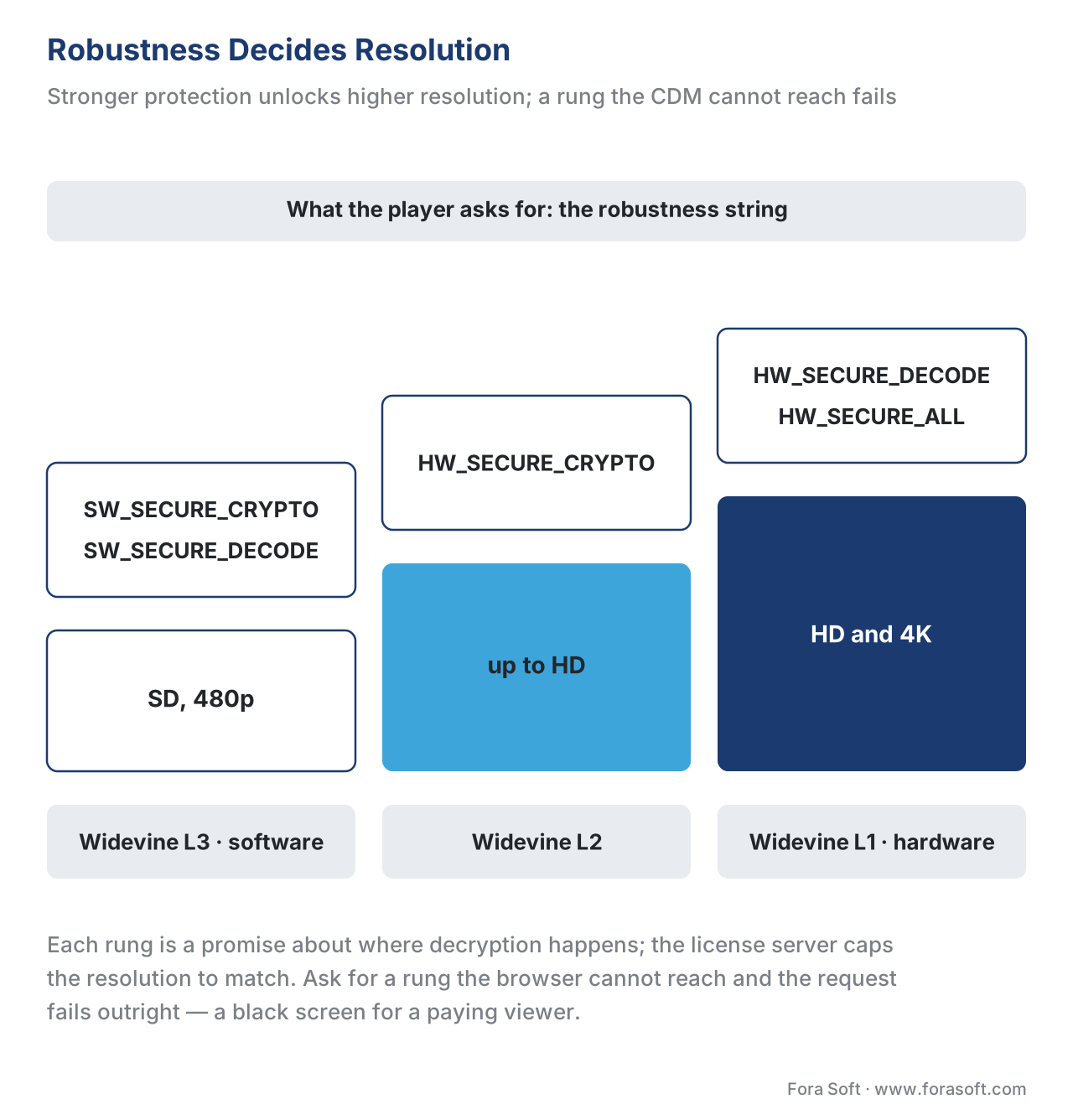 Figure 4. Robustness strings climb from software to full hardware. The higher the rung, the higher the resolution a studio will allow — but ask for a rung the browser cannot reach and playback fails outright.
Privacy, individualization, and why EME was controversial
A browser DRM article that skips the privacy argument is incomplete, because it shaped the standard. EME became a W3C Recommendation in 2017 over public objection from groups including the Electronic Frontier Foundation (EFF) and the Free Software Foundation. Two worries drove it, and both are worth understanding as an engineer.
The first is closed code. A CDM is proprietary, opaque software running inside an open-standard browser, and it cannot be independently audited the way the rest of the web platform can. The second is tracking. To prove a client is genuine, a CDM can use a device-bound identifier, and a unique-per-device value is exactly the kind of thing that can re-identify a user across sites.
The spec answers the second worry directly, and the language is instructive. EME defines a Distinctive Identifier and a Distinctive Permanent Identifier, and constrains them hard: "Distinctive Permanent Identifiers MUST NOT ever be exposed to the application, even in encrypted form," and any distinctive identifier exposed to the page must be "encrypted, unique per origin and profile, and clearable." It also requires consent: when a configuration needs a distinctive identifier, "any permission checks or user interaction, such as a prompt for consent, MUST be performed before resolving the promise." This is why some DRM setups trigger a browser permission prompt, and why identifiers are walled off per site. The controversy did not stop EME — every major browser ships it — but it produced a standard with real privacy constraints baked in, and that history is useful when a privacy or legal stakeholder asks how your web player handles device identifiers.
A worked example: covering the web with one encode
Put the pieces together with the calculation that decides a web launch budget — how many encodes, how many DRMs? The instinct is "three browsers that each need a different DRM, so three encrypted copies." That is the expensive, wrong answer.
browsers to cover  : Chrome + Firefox + Edge + Safari
DRMs required      : Widevine (Chrome, Firefox, Edge) + PlayReady (Edge) + FairPlay (Safari) = 3 DRMs
encrypted copies   : 1   <- cbcs Common Encryption, encrypt ONCE
license servers    : 3 license endpoints (one per DRM), usually one multi-DRM vendor
You encrypt once with the cbcs scheme and issue licenses three ways. One packaging job, three license paths, every browser covered. That "encrypt once, license many" economy is the entire reason Common Encryption and multi-DRM exist, and the browser DRM map above is the proof of why you need all three license paths rather than one.
Common mistakes
A short field guide to the browser-DRM failures we see most:
- Encrypting for one DRM. Shipping Widevine-only and discovering Safari shows a black screen. The browser map is non-negotiable: cover Widevine, PlayReady, and FairPlay.
- Treating EME as DRM. Assuming "we use EME" means "we are protected." EME is the adapter; the CDM and license policy are the protection. A Clear Key demo protects nothing.
- Requesting maximum robustness everywhere. Asking for
HW_SECURE_ALLon a desktop browser whose CDM is software-only — and turning a paying viewer's screen black. Request the robustness the content tier needs, after detecting support. - Forgetting the Safari server certificate. FairPlay needs a certificate step the others do not; skipping it produces "works everywhere but Safari."
- Serving DRM over HTTP. EME requires a secure context; the API simply will not run off HTTPS.
- Putting trust logic in the player. Deciding entitlement in JavaScript, which any viewer can edit. The license server decides who gets a key.
encrypted event through requestMediaKeySystemAccess(), createSession(), generateRequest() and the message event to update() and decryption; the browser-to-CDM-to-key-system map (Chrome and Firefox use Widevine com.widevine.alpha, Edge PlayReady com.microsoft.playready, Safari FairPlay com.apple.fps, with Clear Key for testing only); the robustness ladder from SW_SECURE_* at L3 and SD up to HW_SECURE_DECODE at L1 and 4K; and the Safari server-certificate step that produces “works everywhere but Safari” when you skip it.
Where Fora Soft fits in
The platforms that feel the browser DRM stack hardest are the ones launching a studio catalogue to a broad public audience, where every browser, every operating-system version, and every robustness quirk multiplies into a support queue. Fora Soft has built video streaming, OTT/Internet TV, and other protected-video systems since 2005 — 625+ projects for 400+ clients across 20+ years — and the work that matters here is the unglamorous integration layer: detecting the CDM the browser actually provides, requesting the right Key System and robustness, wiring the EME handshake to a multi-DRM license service, and keeping a fallback for the long tail of older Safari and smart-TV browsers. We are vendor-neutral about which multi-DRM service issues the licenses; the engineering value is in the player and license-routing code that makes one encode play, protected, on every screen.



The handbook
Fora Soft Video Engineering Handbook
We wrote a seven-volume handbook, 9,000+ pages, that works through the whole video stack from the pixel to production — encoding, delivery, audio and AI — so every box in the stack above traces back to a mechanism you can follow all the way down. Volume 3 is the closest to this article: DRM and the license layer, players and the CDM, CDNs, and the economics that decide what you build and what you buy. Volume 2 covers the packaging and transport layer where cbcs encryption is applied to CMAF segments, and volume 1 explains the encode and the ladder those segments carry. Written by Nikolay Sapunov, CEO at Fora Soft.
Does your web player play protected video in every browser?
Send us the browsers and devices you have to cover and the rights you are signing, and we will scope the web player: detect the CDM the browser actually provides, ask for the protection level the content tier needs instead of a fixed maximum, route Widevine, PlayReady and FairPlay licenses from one cbcs encode, keep the legacy WebKitMediaKeys fallback for older Safari, and provision the FairPlay server certificate before it costs you a launch. 250+ video products shipped since 2005.
See our case studies
Case study
Worldcast Live
HD concert streaming at 1.5 Gbit/s with 0.4–0.5 s latency for 10,000 simultaneous viewers — a premiere where every viewer arrives in a different browser, and every browser brings its own CDM.
Case study
Speed.Space — Remote Video Production
A browser-only production platform recording at 1080p and 8 Mbit/s, used on Netflix, Electronic Arts and HBO productions — premium material handled inside the browser, with access decided by role on the server rather than in the page.
Case study
TradeCaster
A subscription streaming platform for 46,000+ traders at $99–119 a month — web only, where who may watch is checked against the subscription server-side and never in the player.
What to read next
Licensing
Multi-DRM: one workflow, every device
Why the browser map forces one encrypted copy and three license paths.
Key delivery
DRM license servers and key delivery
What the sealed envelopes are addressed to, and what the server checks before it answers.
DRM systems
Widevine vs PlayReady vs FairPlay: the three DRM systems
The CDMs behind the key systems, and the L1, L3 and SL3000 levels robustness maps to.
Encryption
CENC, CTR and CBCS: common encryption explained
The encrypt-once scheme that lets one file feed all three browser CDMs.
References
- W3C — Encrypted Media Extensions (EME), Recommendation (2017-09-18). The controlling standard. Defines the common API ("does not define a content protection or Digital Rights Management system. Rather, it defines a common API … to discover, select and interact with such systems"); the Content Decryption Module ("the client component that provides the functionality, including decryption, for one or more Key Systems"); Key System (a reverse-domain string); the requirement that "only the Clear Key system is required to be implemented as a common baseline"; the
robustnessmember;requestMediaKeySystemAccess(); theMediaKeySession("a context for message exchange with the CDM"); and the Distinctive Identifier / Distinctive Permanent Identifier privacy model and consent rule. Tier 1 (official standard). https://www.w3.org/TR/encrypted-media/ — accessed 2026-06-17. - W3C — Encrypted Media Extensions ("EME 2"), First Public Working Draft (2024-07-18). Adds, over the 2017 Recommendation, exactly two minor features: encryption-scheme capability detection and the ability to query the status of a key associated with an HDCP policy (
getStatusForPolicy()). Dated, draft status — verify browser support. Tier 1 (standards-track draft). https://www.w3.org/TR/encrypted-media-2/ — accessed 2026-06-17. - W3C — Media Source Extensions (MSE), Recommendation (2016-11-17). The companion API that supplies media bytes for adaptive streaming; EME plays media provided by an MSE implementation just as it would media from a
srcattribute. Both extendHTMLMediaElement. Tier 1 (official standard). https://www.w3.org/TR/media-source/ — accessed 2026-06-17. - ISO/IEC 23001-7:2023 — Common Encryption (CENC), 4th edition. The standard that lets one encrypted file (
cenc/cbcsscheme) feed multiple CDMs and Key Systems — the basis for "encrypt once, license many" across Widevine, PlayReady, and FairPlay in the browser. Tier 1 (official standard). https://www.iso.org/standard/84637.html — accessed 2026-06-17. - W3C / Web Platform — "Introduction to Encrypted Media Extensions" (web.dev, Chrome team). First-party walkthrough of the EME component model (Key System, CDM, license server, packager) and the step-by-step license-acquisition flow (
encryptedevent →requestMediaKeySystemAccess()→createMediaKeys()→setMediaKeys()→createSession()→generateRequest()→message→update()→ decrypt), and the note that CDM↔license-server messages are opaque to the application. Tier 6 (educational, but authored by browser engineers). https://web.dev/articles/eme-basics — accessed 2026-06-17. - Google — Widevine DRM (overview + robustness strings). First-party source for the Widevine Key System string
com.widevine.alpha, the robustness strings (SW_SECURE_CRYPTO,SW_SECURE_DECODE,HW_SECURE_CRYPTO,HW_SECURE_DECODE,HW_SECURE_ALL) and their mapping to device security levels L3/L2/L1. Tier 3 (first-party DRM vendor). https://developers.google.com/widevine/drm/overview — accessed 2026-06-17. - Microsoft — PlayReady on Microsoft Edge / Chromium and the
com.microsoft.playreadykey systems. First-party source that Edge uses the Windows Media Foundation APIs for PlayReady, supports PlayReady on Windows 10+, and that the hardware-secure SL3000 path is requested via thecom.microsoft.playready.recommendation/.recommendation.3000key systems (now also reachable in Chrome on Windows 11). Tier 3 (first-party DRM vendor). https://learn.microsoft.com/en-us/playready/ — accessed 2026-06-17. - Apple — FairPlay Streaming (Overview + FPS SDK). First-party source for the FairPlay Key System in Safari: the modern EME string
com.apple.fps(legacycom.apple.fps.1_0viaWebKitMediaKeys), and the requirement to provision a server certificate before any license exchange. Tier 3 (first-party DRM vendor). https://developer.apple.com/streaming/fps/ — accessed 2026-06-17. - MDN Web Docs — Encrypted Media Extensions API. Orientation reference for the EME interfaces (
MediaKeys,MediaKeySystemAccess,MediaKeySession), theencryptedandmessageevents, and the secure-context (HTTPS) requirement. Tier 6 (educational). https://developer.mozilla.org/en-US/docs/Web/API/Encrypted_Media_Extensions_API — accessed 2026-06-17. - Electronic Frontier Foundation — objections to EME (2017). Institutional source for the privacy and closed-code criticism that shaped EME's adoption: proprietary CDMs cannot be independently audited, and device-bound identifiers raise tracking concerns — the context for the spec's Distinctive Identifier and consent constraints. Tier 5 (institutional/advocacy). https://www.eff.org/deeplinks/2017/09/open-letter-w3c-director-ceo-team-and-membership — accessed 2026-06-17.
- Bitmovin / castLabs — Widevine security levels and browser robustness in practice. Vendor engineering corroboration for how robustness strings are sent in the EME request and how a request for a higher level than the device supports causes playback to fail. Tier 4 (vendor engineering). https://developer.bitmovin.com/playback/docs/widevine-security-levels-in-web-video-playback — accessed 2026-06-17.
Per the section's source hierarchy: the API model (CDM, Key System, Clear Key baseline, robustness, distinctive-identifier privacy) and the two-feature 2024 update trace to tier-1 W3C EME (refs. 1–2); the MSE relationship to tier-1 W3C MSE (ref. 3); "encrypt once, license many" to tier-1 ISO/IEC 23001-7 (ref. 4) — four tier-1 primaries. The license-flow walkthrough and component model are corroborated by the Chrome team's web.dev guide (ref. 5) and MDN (ref. 9). The per-vendor key-system strings, robustness strings, and browser specifics are first-party DRM-vendor docs (Widevine ref. 6, PlayReady ref. 7, FairPlay ref. 8). The privacy controversy is the EFF (ref. 10). Two popular errors are corrected against the primaries: "EME is a DRM / EME decrypts video" (EME is only the API; the CDM decrypts — ref. 1) and "you need a separate encode per DRM" (one
cbcsCommon Encryption encode feeds all CDMs — ref. 4).
