


Why this matters
Most premium viewing happens on the television, but most discovery and sign-up happens on the phone — so the bridge between the two screens is where a streaming product either feels effortless or feels broken. A founder who treats "cast to TV" as a checkbox usually discovers three expensive surprises: that casting and mirroring are different features with different code, that protected content needs its own license on the receiving device, and that "resume where I left off across my devices" is a backend service nobody scoped. This article explains all three in plain language so you can budget them correctly, talk to your engineers about the right protocols, and avoid the rebuild that comes from confusing casting with mirroring. It builds on the OTT client matrix and the unified player strategy, and it leans on the encode-once package described in packaging: CMAF, HLS, and DASH.
Casting is not mirroring — the distinction that decides the build
Start with the misconception that causes the most wasted work, because everything else follows from getting it right. There are two completely different ways to get video from a phone onto a television, and they share almost no code.
The first way is screen mirroring: the phone renders the picture itself, captures the screen as a stream of pixels, and pushes those pixels to the TV in real time. The TV is a dumb monitor; the phone does all the work. Mirroring is general — it can show anything on the phone — but for video it is the wrong tool. It drains the phone battery because the phone is decoding and re-encoding continuously, the quality is capped by the live capture rather than the original file, any phone call or notification interrupts it, and — the decisive problem — protected content usually refuses to mirror at all, showing a black rectangle where the video should be, because the content-protection rules treat a screen capture as a copy. (We explain the protection model itself in why DRM exists and what it protects.)
The second way is casting, sometimes called "flinging," and it is the one OTT products want. When the viewer taps the cast button, the phone does not send pixels. It sends a short message — a web address for the stream, a web address for the license, and the position to start from — and then steps out of the way. The television fetches the stream directly from the content delivery network (CDN) and plays it with its own player, exactly as if it were a native TV app. The phone is now only a remote control. Think of it like ordering at a restaurant: mirroring is carrying every plate from the kitchen to the table yourself; casting is handing the kitchen the order and letting the staff bring the food while you sit down.
That single architectural choice — the receiver fetches and plays the stream itself — explains every advantage casting has. The phone can lock, dim, take a call, or leave the room and the show keeps playing, because the phone was never in the video path. The picture is full quality, because the TV pulls the same high-bitrate files a TV app would. And protected video works, because the receiver can get its own license — which brings us to the part teams forget.
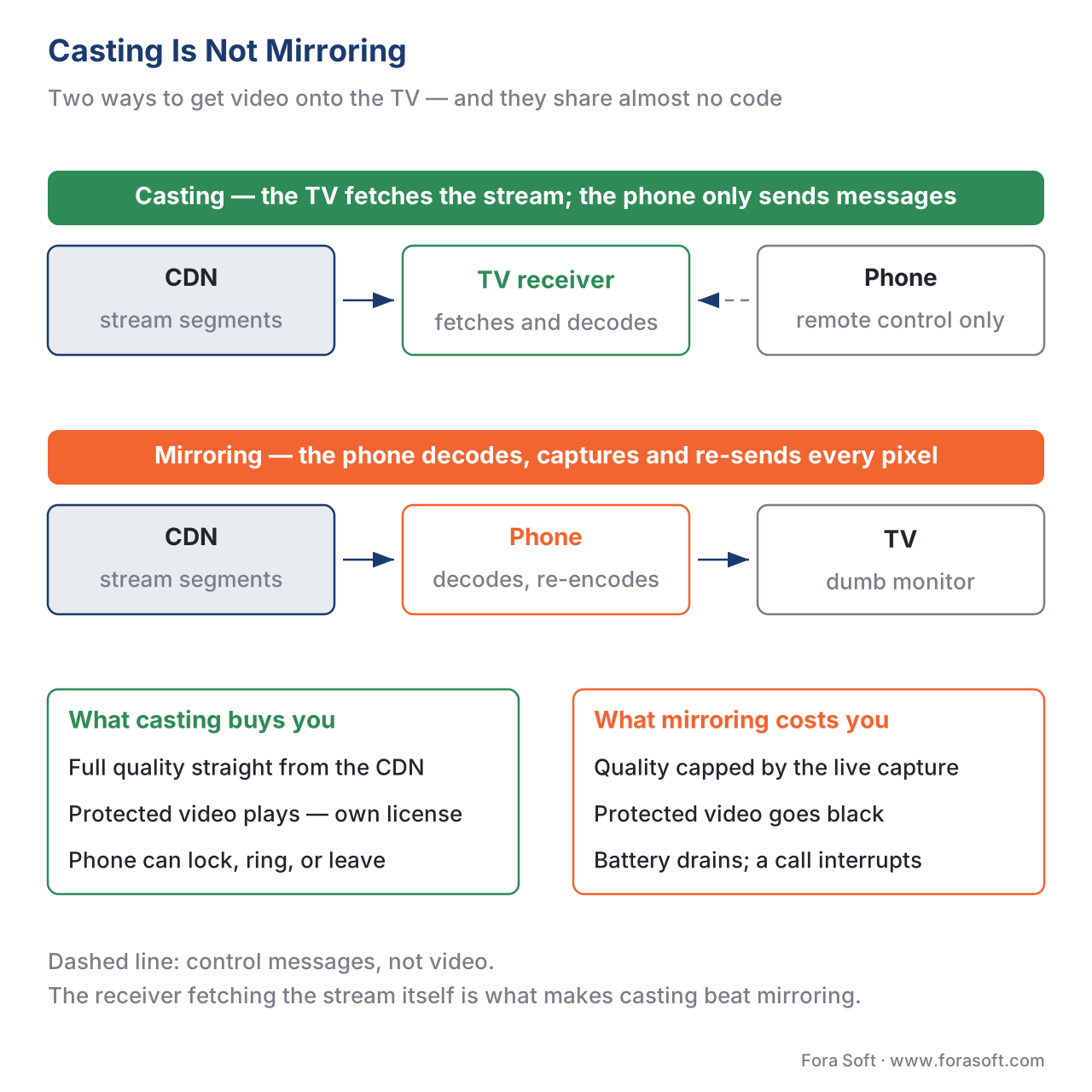 Figure 1. Casting versus mirroring. In casting the receiver pulls the stream and the phone is just a remote; in mirroring the phone is in the video path and protected content is blocked.
The receiver needs its own key
Here is the consequence that surprises almost every first build. Because the casting device fetches and decrypts the stream by itself, it must obtain its own content-protection license — the phone's license does not travel with it. The protected files are encrypted once, under the cbcs scheme of Common Encryption (the ISO/IEC 23001-7 standard), and any compliant device can play them if it can get a key. We cover that "encrypt once, license many" model in multi-DRM: one workflow, every device.
So when a viewer casts a protected film, the receiving device makes its own trip to your license server. On a Google Cast receiver — which, as we will see, is a small web app — that license request goes through the browser's Encrypted Media Extensions (the W3C EME standard) to Widevine or PlayReady. Over Apple AirPlay, the receiver carries the FairPlay license exchange; Apple's documentation is explicit that FairPlay Streaming works wherever you AirPlay, including to an Apple TV and to smart TVs with AirPlay built in. Either way, the practical rule for your platform is the same: your entitlement and license systems must accept a request from the cast device, not only from the original phone. The classic failure is an entitlement check tied to the phone's session or network address; the moment playback hops to the TV, that check fails and the cast shows an error. Design the license path for the receiver from day one — see license servers and key delivery for how that path is built.
The casting ecosystems: you will support more than one
There is no universal cast button, because casting grew up inside competing ecosystems. To reach a mainstream audience you implement two or three of them, and you should know what each one is for.
Google Cast is the most widely used. It began with the Chromecast dongle, and although Google discontinued that hardware in August 2024 (replacing it with the $100 Google TV Streamer), the Cast technology did not go away — it is now built into Google TV devices, into LG webOS sets, and, as of a 2026 rollout, into Samsung televisions old and new. So "Chromecast support" in 2026 mostly means "the TV already speaks Cast," not "the user owns a dongle." Technically, a Cast receiver is a Web Receiver: an HTML5 and JavaScript application that runs on the TV, displays your branding, and plays the media using a built-in player (Google's own or Shaka Player). Your phone or web app is the sender; it starts the receiver by app ID and then exchanges small messages — load, play, pause, seek — with it. To play protected content you build a Custom Web Receiver, because that is the receiver type that supports DRM.
Apple AirPlay covers the Apple ecosystem and the many smart TVs that now ship AirPlay 2. Its great advantage for developers is that if you play video through Apple's standard player, AVPlayer, you get AirPlay almost for free: AVPlayer exposes the device picker and automatically hands video and audio to the chosen AirPlay receiver, which then fetches the HLS stream itself. The subtlety to get right is that AirPlay has both a video mode (the receiver pulls the stream — what you want) and a mirroring mode; for protected content you must enable external video playback so FairPlay can stream over AirPlay instead of falling back to a blocked mirror.
Matter Casting is the newest entrant, published by the Connectivity Standards Alliance (the group behind the Matter smart-home standard). Amazon's Fire TV and Echo Show devices implement it (Matter specification 1.3, moving to 1.4), and apps such as Prime Video and Tubi have adopted it. Its model names the parts cleanly: your phone app is the client, the TV is the player, and your TV app is the content app; the phone discovers players on the network, joins them through a one-time secure pairing, and then sends standard control commands (play, pause, navigate, volume).
DIAL — short for DIscovery And Launch — is the odd one out and worth understanding. Co-developed by Netflix and YouTube, it does not stream anything; it simply lets your phone discover and launch your own native app on the TV. YouTube's "play on TV," which wakes the real YouTube TV app rather than pushing a stream, is the canonical example. DIAL answers "is my TV app here, and can you open it?"; the streaming is then handled by the native app itself.
Underneath all of these, the open web has its own answer — the W3C Remote Playback API, which lets a web page fling a video element to a remote device, together with the W3C Presentation API and the Open Screen Protocol that aims to unify casting across vendors. These standards are why the cast button can appear inside a browser, and they are the long-term convergence path, but in 2026 you still ship the native ecosystems to reach the installed base.
| Ecosystem | Senders | Receivers | DRM on receiver | Phone's role | Open standard? |
|---|---|---|---|---|---|
| Google Cast | Android, iOS, Chrome | Google TV, many smart TVs, displays | Widevine / PlayReady via EME | Remote (after load) | No — Google-run |
| Apple AirPlay 2 | iPhone, iPad, Mac | Apple TV, AirPlay-2 smart TVs | FairPlay over AirPlay | Remote (via AVPlayer) | No — Apple-run |
| Matter Casting | iOS, Android | Fire TV, Echo Show, Matter TVs | App-defined (content app) | Remote (control clusters) | Yes — CSA / Matter |
| DIAL | iOS, Android | DIAL-enabled TVs, sticks | N/A — launches native app | Launches, native app plays | Yes — open spec |
| W3C Remote Playback | Web browsers | Open Screen Protocol devices | Via EME in the page | Remote (media element) | Yes — W3C |
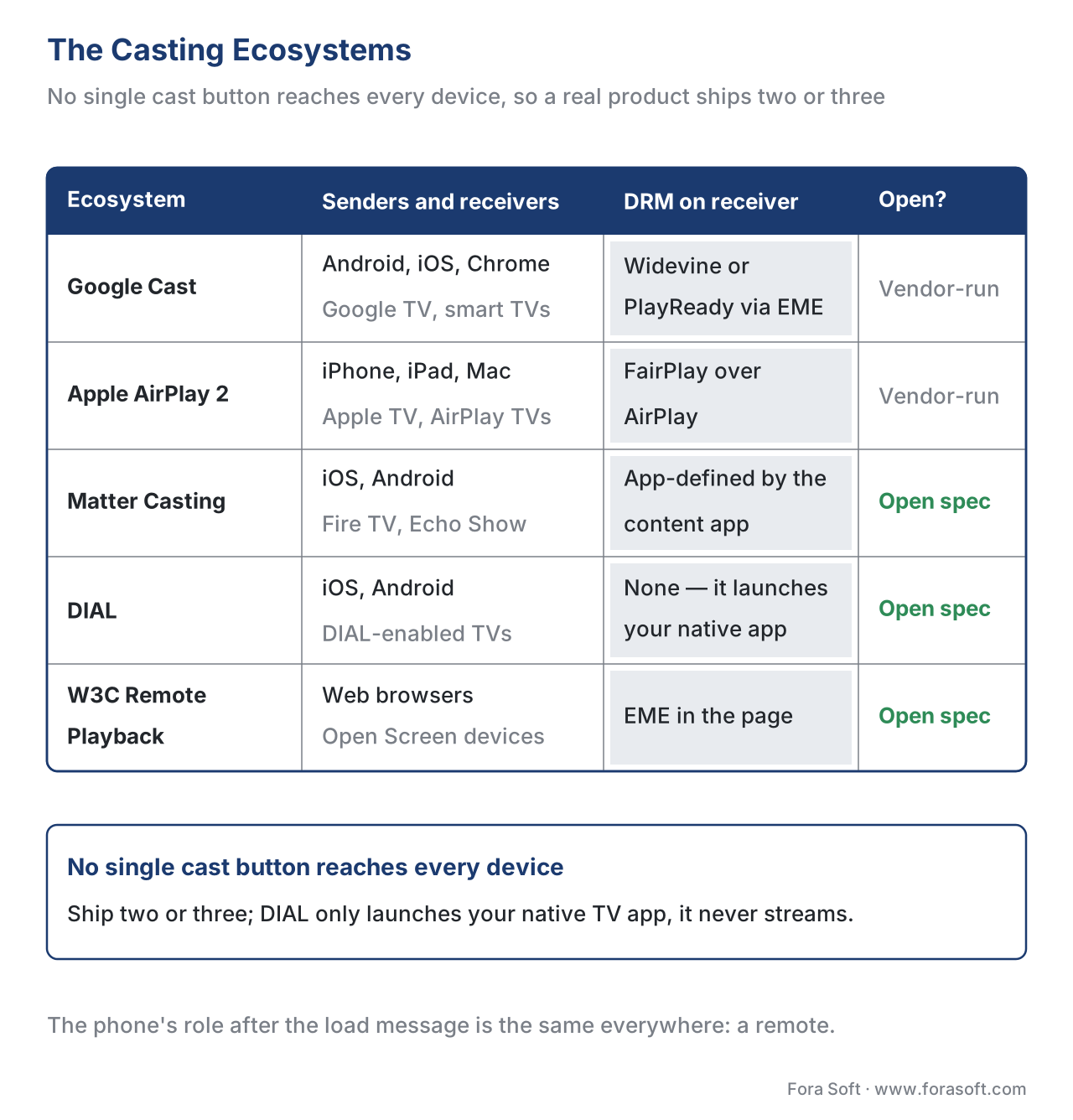 Figure 2. The casting ecosystems. None reaches every device, so a real product implements two or three; DIAL launches a native app rather than streaming.
The handoff, step by step
It helps to watch a single cast from tap to playing picture, because the sequence is the same shape across ecosystems and it shows where your backend has to participate.
First, discovery: the sender finds receivers on the same home network using a local-network lookup (multicast DNS for Cast and Matter, SSDP for DIAL). The viewer sees a list of TVs and picks one. Second, session and load: the sender opens a session and sends the small load message — the stream URL, the license URL, and the start position. (For protected content the receiver will use that license URL next.) Third, fetch and license: the receiver requests the manifest from the CDN, and, for protected video, requests a key from your license server — its own license, as we stressed above. Fourth, playback: the receiver decodes and plays at full quality. Fifth, control: the sender redraws itself as a remote — a scrubber, play/pause, volume, track and subtitle pickers — and every tap is a message to the receiver. Sixth, and easy to forget, position reporting: the receiver (or the sender on its behalf) keeps sending the current position back to your servers, so that continuity works even though the phone is no longer playing.
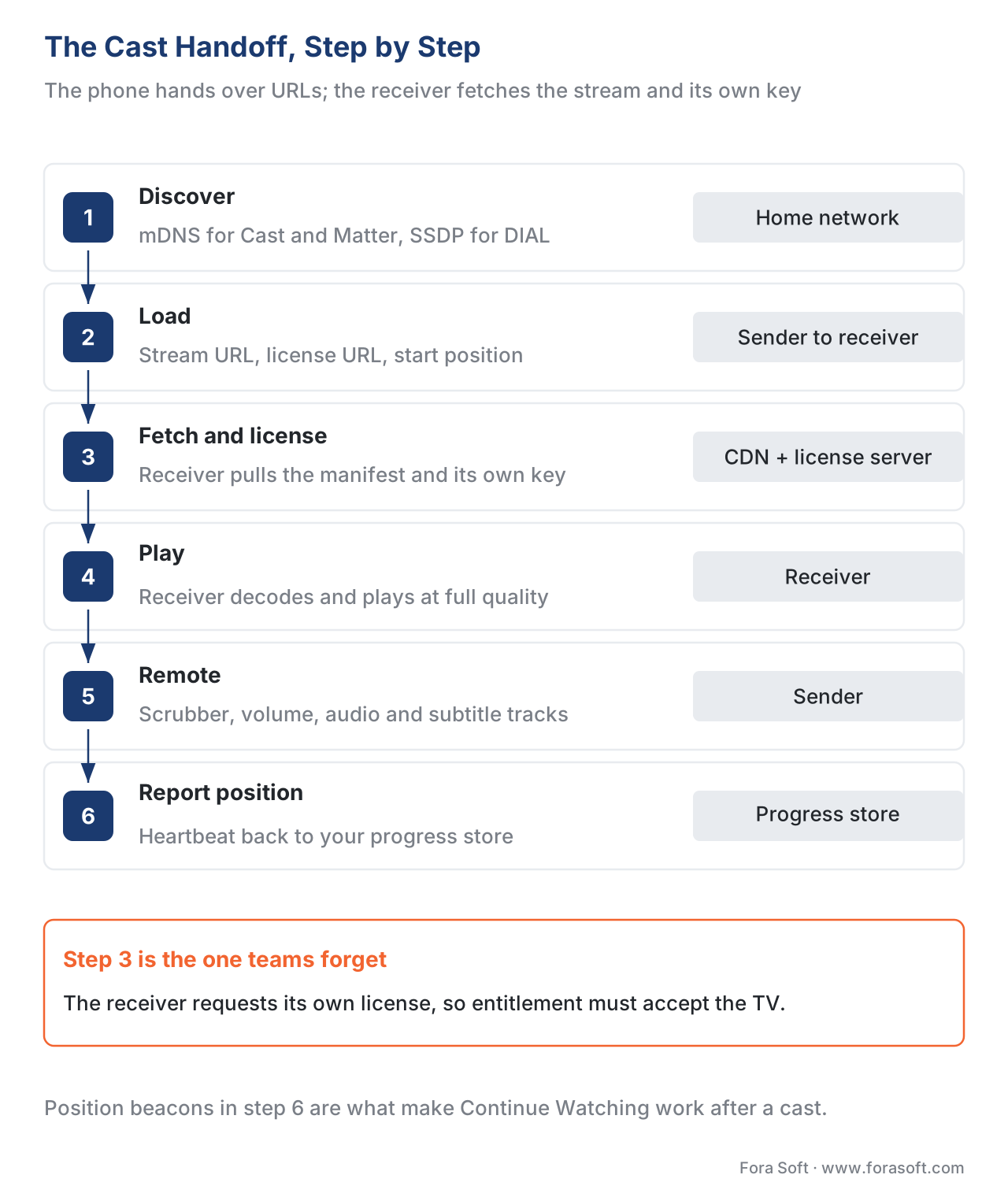 Figure 3. The cast handoff. The phone sends URLs and a start position; the receiver fetches the stream and its own license; the phone becomes a remote; position beacons feed continuity.
A minimal load message — the "playback descriptor" the sender hands the receiver — looks like this, and the startPosition field is what makes the cast resume rather than restart:
{
  "contentUrl": "https://cdn.example.com/title/abc/master.m3u8",
  "drm": {
    "licenseUrl": "https://lic.example.com/widevine",
    "scheme": "cbcs"
  },
  "startPositionSec": 1325,
  "subtitleTrack": "en",
  "analyticsBeacon": "https://qoe.example.com/collect"
}
The second screen: the phone as a richer remote
Once the stream is on the TV, the phone is a second screen — and a good one does more than play and pause. Because the sender and receiver share a small two-way messaging channel, the phone can show the scrubber with thumbnails, switch audio and subtitle tracks, manage a queue of what plays next, adjust volume, and surface "what's this?" cast-and-crew details without covering the picture on the TV. In the Matter model these are literally named control groups — a media playback cluster for play and pause, a keypad input cluster for navigation, an application launcher cluster to open the app — and in Google Cast they are messages handled by the receiver's session manager.
The open-web building block worth knowing here is the W3C Media Session API, which lets a player publish what is playing (title, artwork) and which controls it supports (play, pause, seek-to, next, previous) so that the operating system, lock screen, car display, and external controllers all show consistent, working buttons. The same metadata that lights up the lock screen lights up the cast remote. Done well, the second screen is where a viewer browses the next episode while the current one plays — a genuine product surface, not an afterthought. Instrumenting how well it behaves is the job of player QoE instrumentation.
Continuity: the quiet retention engine
Continuity is the feature with the lowest profile and the highest payback. It is the "Continue Watching" row that lets a viewer stop a film on the train and pick it up on the living-room TV at the exact second they left, on any device, including after a cast. It feels like magic; it is really a small, busy backend service, and it is separate from casting even though casting depends on it.
The mechanism is a resume point: a stored record of how far each viewer has watched each title, keyed by the viewer's profile and the content. While anything plays — on phone, web, TV, or a cast receiver — the player sends a short "I am at second N" message on a heartbeat, typically every 10 to 30 seconds plus on pause, seek, and stop. A progress service writes the latest position; the "Continue Watching" row reads it back and orders titles by most-recently-watched. Two design rules keep it honest. First, the latest update wins when two devices report different positions, so the most recent action is the truth. Second, a completion threshold decides when something counts as finished and drops out of the row — commonly when the viewer passes about 90–95% of the runtime, so the closing credits do not leave a "finished" show sitting in "Continue Watching" forever.
This is also where you should not confuse two different ideas that both get called "continuity." The cross-device resume described here is your server-side feature and works on every platform. Apple's "Continuity"/Handoff is a separate operating-system convenience between a user's own Apple devices; it is nice to support but it is not how Continue Watching works at scale. The retention payoff is direct — easy resume is one of the strongest levers on whether a viewer comes back, which ties straight into churn and retention analytics.
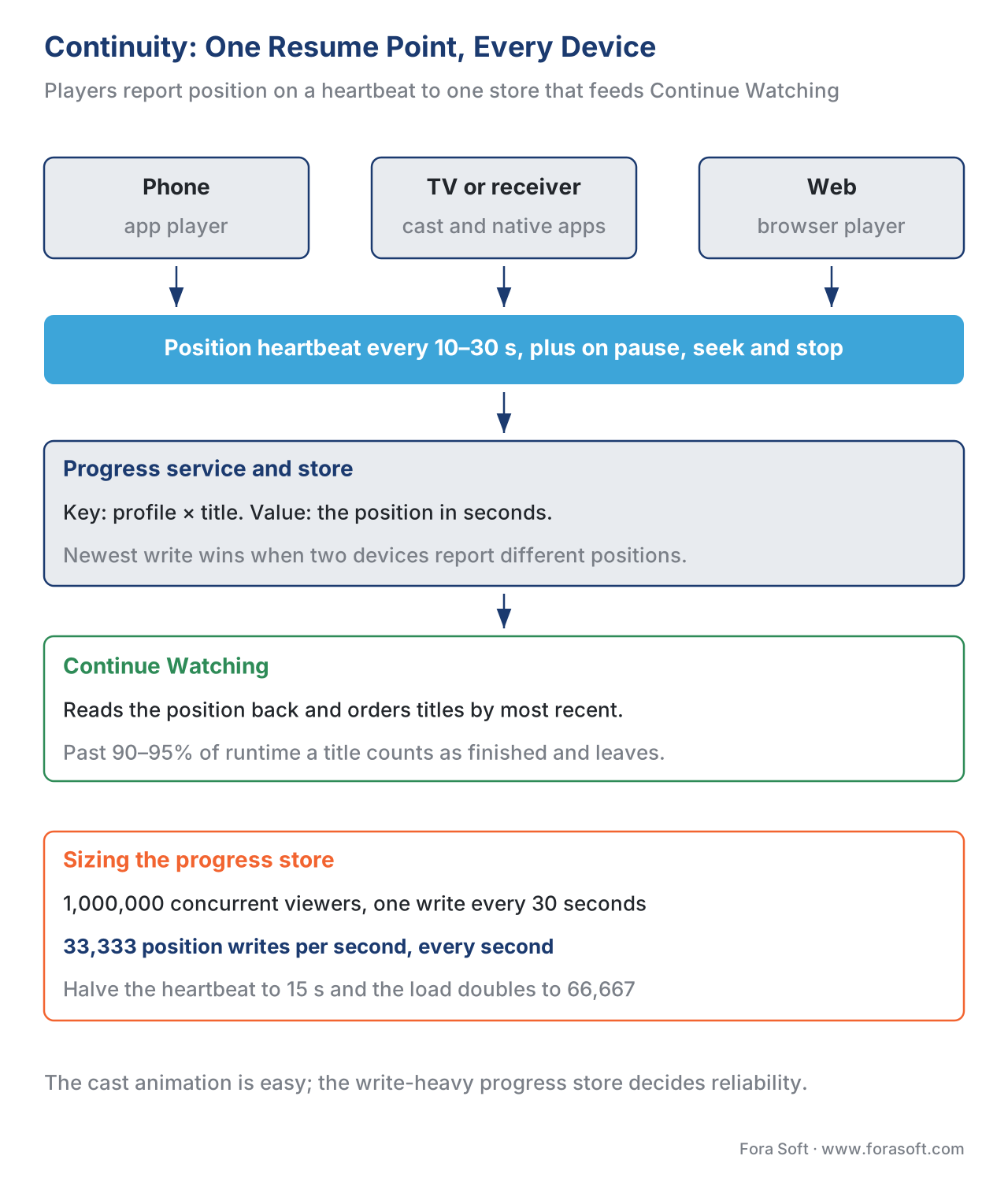 Figure 4. Continuity. Every player reports its position on a heartbeat to one progress store; the Continue Watching row reads it back, newest-write-wins, with a completion threshold to retire finished titles.
Sizing the progress store — show the math
Continuity looks trivial until you multiply it by your audience, so do the arithmetic before you choose a database. Suppose you reach 1,000,000 concurrent viewers and each playing device reports its position every 30 seconds. The steady write rate is the viewers divided by the interval:
writes per second = 1,000,000 viewers ÷ 30 seconds
                  ≈ 33,333 writes per second
That is the baseline. Pauses, seeks, and start/stop events add bursts on top, and a premiere or a finale can double the concurrency in minutes. Thirty-three thousand small writes a second, every second, is a real engineering target: it argues for a fast key-value store keyed by profile-and-title, a write path that can absorb bursts, and a deliberate choice of heartbeat interval — because halving the interval to 15 seconds doubles the load to ~66,667 writes per second for the same audience. This is the scalability-first point of the whole article: the glamorous part is the cast animation, but the part that decides your bill and your reliability is the unglamorous progress store behind Continue Watching.
Free download: Casting & Continuity Implementation ChecklistOne page covering which casting ecosystems to support, the cast-versus-mirror traps, the receiver’s own license path, the second-screen controls worth building, and the resume-point design with the write-rate math behind it.Common mistakes — the five that break the two-screen experience. First, building mirroring when you meant casting: mirroring drains battery, caps quality, and is blocked for protected video — implement real casting where the receiver fetches the stream. Second, forgetting that the receiver needs its own license: an entitlement check bound to the phone's session breaks the moment playback hops to the TV. Third, shipping only one ecosystem: Google Cast, AirPlay, and Matter Casting reach different devices, and DIAL only launches a native app rather than streaming. Fourth, not transferring the resume position on cast, so the TV restarts the film from zero. Fifth, treating Continue Watching as a UI feature rather than a write-heavy backend service, then watching it fall over at the premiere spike.
Where Fora Soft fits in
Casting and continuity are, at bottom, a scale problem dressed up as a convenience: the cast button is easy, but making the receiver get its own license, making the resume point survive 33,000 writes a second, and making three ecosystems behave the same is the work. Fora Soft has built video streaming, OTT/Internet TV, video conferencing, e-learning, and telemedicine applications since 2005 — 625+ projects for 400+ clients across 20+ years — so wiring Google Cast, AirPlay, and Matter Casting into a protected catalogue, and standing up a resume-point service that holds up at concurrency, is the everyday substance of our streaming work across web, mobile, and the living-room matrix. We are vendor-neutral: we match the casting ecosystems to your actual device audience and content-owner rules rather than selling a single SDK.



The handbook
Fora Soft Video Engineering Handbook
We wrote a seven-volume handbook, 9,000+ pages, that works through the whole video stack from the pixel to production — encoding, delivery, audio and AI — so the two-screen product this article scopes stands on ground you can follow all the way down. Volume 3 carries this chapter furthest: players on every screen, DRM and license delivery, and the delivery economics of a receiver that pulls full-bitrate segments on its own account. Volume 2 works through the HLS and DASH packaging that cast receiver fetches, and volume 1 explains the encoding ladder it picks a rung from. Written by Nikolay Sapunov, CEO at Fora Soft.
Will your cast button survive a protected title and a premiere spike?
Send us your player stack, your entitlement rules and your device mix, and we will tell you which casting ecosystems your audience actually needs, what the receiver’s own license path has to accept, and what a resume-point service costs at your concurrency — then build it across web, mobile and the living room. 250+ video products shipped since 2005.
See our case studies
Case study
Smart IPTV for Android Set-Top Boxes
A white-label operator app on Android set-top boxes — live channels, EPG and VOD driven by a standard remote over the Stalker/Ministra API — the receiving end of every cast, where the TV runs the player itself.
Case study
Worldcast Live
HD concert streaming at 1.5 Gbit/s with 0.4–0.5 s latency for 10,000 simultaneous viewers — the concurrency at which a position-heartbeat service stops being a detail and becomes the thing that has to hold.
Case study
TapeReal
A creator video platform on iOS and web with 52,000+ members, paywalled posts and screen-capture protection — one account watching across two screens, with protected content that has to play on both.
What to read next
Clients
The OTT client matrix: web, mobile, smart TV, devices
Which screens you owe an app before you decide which ones you cast to.
Players
Cross-platform video player strategy for OTT
One player contract across web, mobile and TV — senders and receivers included.
DRM
Multi-DRM: one workflow for every device
Encrypt once so the cast receiver can fetch a key of its own.
Analytics
Streaming churn and retention: the SVOD analytics guide
What easy resume is worth, counted in subscribers who came back.
References
- Web Receiver Overview — Google Cast SDK. Google for Developers (updated 2024-09-18). The Cast receiver is an HTML5/JavaScript application running on the TV with a built-in player (Google's or Shaka); the sender starts it by app ID and exchanges load/play/pause/seek messages; a Custom Web Receiver is required for DRM. Tier 3 (first-party vendor). https://developers.google.com/cast/docs/web_receiver
- Overview of Matter Casting — Amazon Fire TV. Amazon Developer (updated 2025-03-04). Defines client (phone), player (TV), and content app (TV app); discovery via DNS-SD, one-time commissioning with a passcode and Device Attestation Certificate, and control clusters (media playback, keypad input, application launcher); implements Matter specification 1.3. Tier 3 (first-party vendor). https://developer.amazon.com/docs/fire-tv/overview-of-matter-casting.html
- DIAL — DIscovery And Launch (Protocol Specification 2.2.1). dial-multiscreen.org (Netflix/YouTube). A second-screen protocol to discover and launch a first-screen app over the home network; it launches the native app rather than streaming media. Tier 4 (industry consortium specification). https://www.dial-multiscreen.org/
- Remote Playback API. W3C Editor's Draft, 30 April 2024. Extends
HTMLMediaElementso a web page can control remote playback of a media element on a remote device (the "fling" model where the device renders the media). Tier 1 (primary standard). https://www.w3.org/TR/remote-playback/ - Media Session API. W3C Editor's Draft, 5 June 2026. Lets a page expose media metadata and action handlers (play, pause, seekto, next, previous) and report position so the OS, lock screen, and external controllers show consistent controls. Tier 1 (primary standard). https://www.w3.org/TR/mediasession/
- Presentation API. W3C. Makes presentation displays (connected TVs, projectors) available to the web and underpins the Open Screen Protocol convergence for casting. Tier 1 (primary standard). https://www.w3.org/TR/presentation-api/
- Encrypted Media Extensions — W3C Recommendation. W3C, 18 September 2017. The browser API through which a Cast Web Receiver requests a Widevine or PlayReady license; key-system availability varies by device. Tier 1 (primary standard). https://www.w3.org/TR/encrypted-media/
- Common Encryption (CENC) — ISO/IEC 23001-7. ISO/IEC. Defines the
cencandcbcsschemes; onecbcs-encrypted package lets any compliant receiver — phone or TV — get its own license, so casting protected content needs no re-encode. Tier 1 (primary standard). https://www.iso.org/standard/68042.html - HTTP Live Streaming — IETF RFC 8216. IETF, 2017. The HLS playlist an AirPlay or Cast receiver fetches directly from the CDN when a viewer casts. Tier 1 (primary standard). https://www.rfc-editor.org/rfc/rfc8216
- Reaching the Big Screen with AirPlay 2 / AVFoundation AirPlay. Apple Developer (WWDC 2019, session 501; AVPlayer documentation). AVPlayer exposes the AirPlay route picker and hands video to the receiver automatically; FairPlay Streaming works wherever you AirPlay, with external video playback enabled for protected content. Tier 3 (first-party vendor). https://developer.apple.com/videos/play/wwdc2019/501/
- Google discontinues Chromecast; introduces Google TV Streamer; Google Cast added to Samsung TVs (2026). Android Authority / SamMobile (2024–2026). Chromecast hardware ended August 2024; the Cast protocol is now built into Google TV, LG webOS, and Samsung TVs — so "Chromecast support" means the TV speaks Cast. Tier 6 (industry reference for current numbers). https://www.sammobile.com/news/samsung-tvs-launched-2026-feature-google-cast/
- Open Screen Protocol — Explainer. W3C Second Screen Community Group. Notes that Google Cast, DIAL, and HbbTV 2.0 were not free to implement by other vendors and did not fully support the web APIs — the motivation for an open casting standard. Tier 4 (standards-body community group). https://www.w3.org/community/webscreens/
Where sources disagreed, the official standard was followed. The popular "casting and mirroring are the same thing" framing was overridden by the vendor and W3C reality that real casting hands the receiver a URL to fetch (Google Cast Web Receiver, AirPlay video mode, W3C Remote Playback), while mirroring puts the phone in the pixel path and is blocked for protected content. The assumption that "the phone's DRM license carries to the TV" was overridden by the EME/FairPlay receiver model, in which the receiving device requests its own key.
