


Why this matters
A codec migration is the single largest infrastructure decision a video product makes after the day it is born. Done well, an H.264-to-AV1 swap typically cuts CDN bills by a third to a half at matched perceptual quality, recovers its encoding cost inside the first year, and then keeps saving money every month for the life of the catalogue. Done badly, it ships an encode no older device can decode, triggers a fallback storm to the H.264 ladder, doubles the storage footprint instead of replacing it, and lands as a line item on the CFO's "explain this number" list. The deciding factor is almost never the technology — AV1 has been a finished open standard since 2018, has hardware decode in every flagship phone, smart TV, and games console shipped since 2022, and powers more than 30 % of Netflix streaming today. The deciding factor is the math, and the math is straightforward once you have the right inputs. This article walks a product manager, founder, marketing lead, or operations person through every input the calculator wants, the formulas underneath, and the three real-world scenarios where the answer flips from "ship it next quarter" to "wait a year".
What the calculator computes, step by step
The widget at the top of this page is built on the same five-step pipeline that every video engineer keeps in their head when they cost-model a codec migration. We walk through it once so you know exactly what each control does and why the answer changes the way it does.
Step one — bitrate savings, the per-byte ratio that powers everything
Every new codec earns its keep by shipping fewer bytes for the same perceived quality. The measure we use for perceived quality is the Video Multimethod Assessment Fusion (VMAF) score, a Netflix-developed metric from zero to one hundred that correlates strongly with how human viewers rate a clip. A score of 95 is the bar most premium streamers target for their top rungs in 2026. To compare two codecs fairly, you fix the VMAF score and read off the bitrate each one needs to hit it.
The headline numbers for the H.264-to-AV1 swap, drawn from peer-reviewed benchmarks and from Netflix's published 2026 measurements:
- AV1 reaches the same VMAF as H.264 at roughly half to one-third the bitrate. Netflix reports its AV1 streaming sessions use one-third less bandwidth than the AVC (H.264) and HEVC sessions they replaced; independent analyses on real catalogues find savings in the 40 to 60 % range.
- AV1 reaches the same VMAF as HEVC (H.265) at roughly 70 to 75 % of the HEVC bitrate, a 25 to 30 % cut.
- The MSU Codec Comparison Group, which benchmarks codec implementations against each other on standard test sets, finds AV1's best encoders (SVT-AV1 at preset 4, libaom at high quality) deliver the lowest bitrate at matched VMAF among open standards, comfortably below HEVC and well below H.264.
The calculator exposes this ratio as a single slider called AV1 bitrate vs H.264 with a default value of 0.55 (a 45 % cut), the conservative middle of the published 2026 range. Move it to 0.40 for the optimistic Netflix-style number and to 0.65 for the conservative average across mixed content.
The saving rule, written as the calculator computes it:
new bitrate = old bitrate × AV1 ratio
bytes saved per hour = old bitrate × (1 − AV1 ratio) × 3600 ÷ 8
For a streaming-grade H.264 ladder that runs at an average 9.8 megabits per second (Mbps) across all rungs combined, the AV1 ladder at the default 0.55 ratio averages 5.4 Mbps. That is 1.98 gigabytes (GB) less per hour of content streamed.
Step two — egress savings, the biggest line on the invoice
Content delivery network (CDN) egress is the per-gigabyte rate you pay every time a viewer downloads a chunk of your video from the edge cache to their device. The two-large-numbers rule of CDN billing in 2026 is that you pay for every viewer hour, every month, at the CDN's first-tier rate, and that the rate sits between roughly $0.02 per GB (Cloudflare R2 with free egress, Fastly bulk) and $0.085 per GB (AWS CloudFront US first tier on-demand). Most mid-sized OTT and e-learning products on AWS pay a blended rate around $0.04 to $0.06 per GB after committed-use discounts; surveillance fleets on a private origin pay zero CDN.
The egress saving formula:
egress saving per month = monthly viewer hours × bytes saved per hour × CDN rate per GBFor a service that ships 1,000,000 viewer hours per month at the default 1.98 GB/hour saving and a blended CDN rate of $0.05 per GB:
1,000,000 hours × 1.98 GB/hour × $0.05/GB = $99,000 per monthThat is roughly $1.2 million per year off the egress invoice for a single mid-sized service. Egress is, in almost every consumer-facing video product, by far the biggest line the migration moves, larger than storage by an order of magnitude or more.
Step three — storage savings, smaller but durable
A codec swap also shrinks the encoded layer — every rendition you keep on object storage waiting to be served. The masters do not change; you keep the same originals on the cold tier. Only the renditions shrink, in exactly the same ratio the bitrate did. For a catalogue with a streaming-grade H.264 ladder that weighs 4.4 GB per hour of content, the AV1 equivalent at a 0.55 ratio weighs 2.4 GB per hour. The saving:
storage saving per month = catalogue hours × (old ladder GB/h − new ladder GB/h) × hot-tier rate per GBFor a 10,000-hour catalogue stored on AWS S3 Standard at $0.023 per GB per month:
10,000 × (4.4 − 2.4) GB × $0.023 = $460 per monthThat is $5,520 per year, real money but two orders of magnitude smaller than the egress line on the same library. Storage saving is the dependable wallpaper to the migration's main exhibit; do not let it dominate the deck.
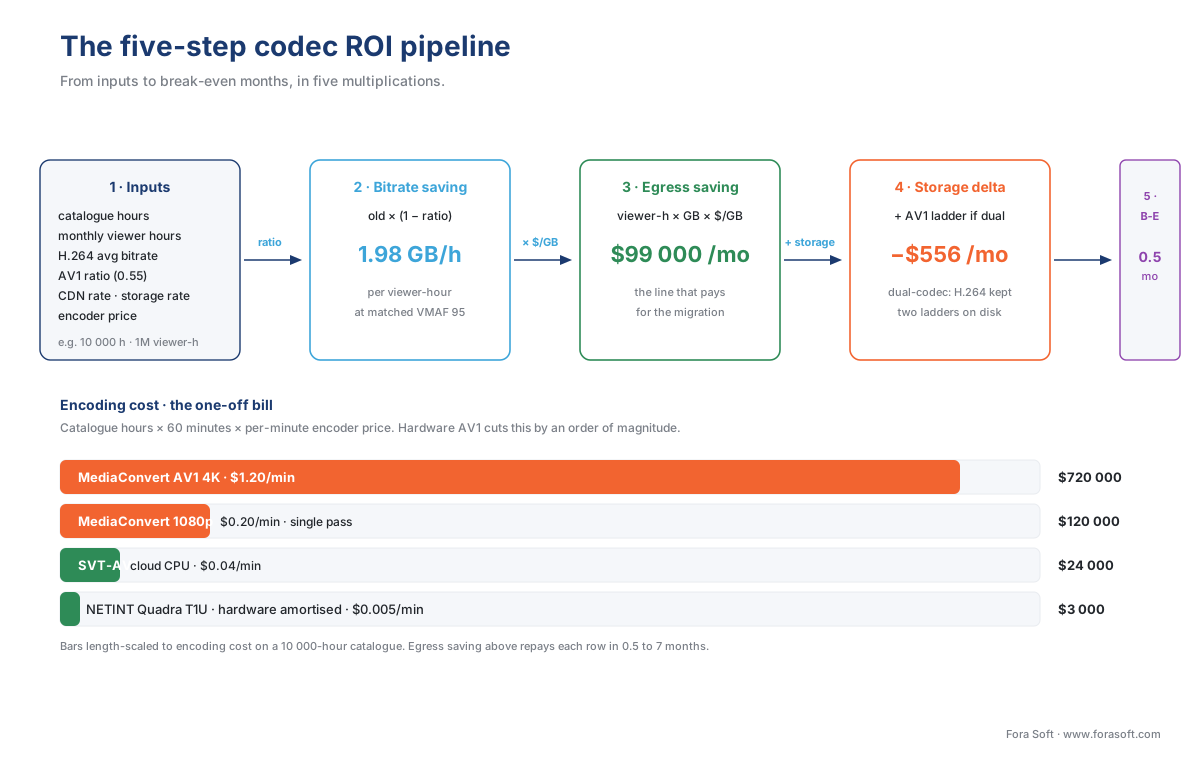
Figure 1. The five-step pipeline behind every codec ROI answer. Each box is a single multiplication. Egress is the line that pays for the migration; storage is the line that pays the maintenance.
Step four — encoding cost, the bill you owe up front
A migration is not free. Re-encoding the whole catalogue in AV1 costs compute — either cloud transcoding minutes you rent or hardware encoders you buy. The 2026 published rates are:
- AWS MediaConvert Professional Tier, AV1, 4K, single-pass HQ: about $1.84 per output minute as of early 2024 pricing, the most expensive cloud option but the simplest to consume.
- AWS MediaConvert Professional Tier, AV1, 1080p, single-pass HQ: around $0.15 to $0.25 per output minute.
- Bitmovin, Coconut, and similar SaaS encoders: typically $0.10 to $0.30 per output minute at AV1, depending on resolution and quality preset.
- Self-hosted SVT-AV1 preset 5 on commodity Intel/AMD CPUs: roughly $0.02 to $0.05 per output minute of compute, before the engineering cost of running the pipeline.
- NETINT Quadra T1U Video Processing Units (VPUs): a $21,000 Supermicro server with ten NETINT Quadra T1U cards outputs up to 320 simultaneous 1080p30 streams in AV1, which puts the marginal cost of a transcoded minute under $0.005 once the box is amortised over its first year of use.
The calculator's encoding cost slider exposes a single per-output-minute price; the default is $0.08, a blended mid-market number for a SaaS encoder at 1080p. For very large catalogues, hardware encoders are the only economically sensible option — at AWS MediaConvert pricing, re-encoding YouTube's daily upload would cost more than the egress saving for several years.
Encoding cost formula:
encoding cost = catalogue hours × 60 minutes × encoding cost per output minuteFor a 10,000-hour catalogue at $0.08 per minute:
10,000 × 60 × $0.08 = $48,000 one-offThat is the bill that lands on the engineering budget the quarter you ship the migration, before any savings come in.
Step five — break-even, the month the migration starts making money
The break-even month is the moment the cumulative savings have paid for the cumulative cost. The formula is the same arithmetic every accountant uses:
break-even months = encoding cost ÷ (monthly egress saving + monthly storage saving)For the 10,000-hour, 1,000,000-viewer-hour-per-month example above:
break-even = $48,000 ÷ ($99,000 + $460) = 0.48 months ≈ 15 daysTwo weeks. That number sounds suspicious until you internalise the basic fact about video infrastructure economics in 2026: the CDN bill is enormous and the encoding bill is small. On a viewer-heavy service, the migration pays for itself almost immediately. On a viewer-light service — a corporate training library viewed once a quarter by a few hundred employees — the same migration takes years to break even and the calculator will tell you so. The point of the widget is not to confirm one answer; it is to find the cases where the answer flips.
A worked example, by hand, then in the calculator
Open the calculator and click the Mid-sized OTT preset. The defaults are 10,000 hours of catalogue content, 1,000,000 viewer hours per month, an H.264 ladder averaging 9.8 Mbps, an AV1 ratio of 0.55, a CDN rate of $0.05 per GB, a storage rate of $0.023 per GB per month, and an encoding cost of $0.08 per minute. You should see:
- AV1 bytes saved per hour: 1.98 GB
- Monthly egress saving: $99,000
- Monthly storage saving: $460
- Total monthly saving: $99,460
- One-off encoding cost: $48,000
- Break-even: 0.5 months
- Three-year net saving: $3.53 million
Now do it on paper. The H.264 ladder ships an average 9.8 Mbps; converted to bytes per hour that is 9.8 × 3600 ÷ 8 = 4,410 megabytes (MB), call it 4.4 GB / hour. The AV1 ladder at the 0.55 ratio ships 5.4 Mbps, which is 2,430 MB or 2.4 GB / hour. Saving per viewer-hour is 1.98 GB.
At a CDN rate of $0.05 per GB and 1,000,000 viewer-hours per month, the monthly egress saving is 1,000,000 × 1.98 × $0.05 = $99,000. At a hot-tier storage rate of $0.023 per GB per month and a 10,000-hour catalogue with the same per-hour saving on the rendition layer, storage saving is 10,000 × 1.98 × $0.023 ÷ month = $455 (the calculator shows $460 because the default ladder is slightly heavier than the bare H.264 streaming-grade preset). Encoding cost is 10,000 × 60 × $0.08 = $48,000. Break-even is $48,000 ÷ $99,460 = 0.48 months, which the widget rounds to half a month.
Three-year cumulative saving is 36 months × $99,460 − $48,000 = $3.53 million. That is the cheque the migration writes for an OTT service operating at this scale, and it is essentially all egress.

Figure 2. Egress dominates storage in every viewer-facing product. The migration is funded by the CDN bill, not by the storage line.
The three scenarios where the answer flips
Most products in 2026 land on a break-even between two weeks and twelve months, so the migration is an easy yes. Three real-world cases push the answer the other way; the calculator is most useful for spotting them before they land in a budget meeting.
Viewer-light archive. A corporate compliance video library or an academic course archive may store 10,000 hours but be watched by only a few thousand viewer-hours per month. At 5,000 viewer-hours per month and the same defaults, monthly egress saving falls to $495, storage saving stays at $460, and the encoding cost takes 50 months to repay. The right answer for an archive is often "do not migrate the back catalogue; encode new uploads in AV1 going forward".
Niche-device service. A surveillance fleet streaming to legacy Android-based NVR appliances may have an effective AV1-capable share of 0 % — the appliance side simply cannot decode AV1, and there is no way to upgrade it short of replacing hardware. The calculator's AV1-capable viewer share slider, set to a low value, multiplies the egress saving by that fraction; at 0 % share the saving is zero and the migration is pure cost. The check matters because the calculator's default is the consumer-internet share of roughly 75 to 80 %, which is wildly wrong for industrial or healthcare contexts.
Per-title-encoded catalogue. If you already ship a per-title or per-shot H.264 ladder — the kind Netflix, YouTube, and increasingly Mux ship by default — your H.264 bitrate is already 20 to 30 % lower than the textbook ladder, so the AV1 saving on top of that is smaller. The calculator handles this through a starting-bitrate field; if you set the H.264 average to 7 Mbps instead of 9.8 Mbps, the AV1 saving drops to 1.4 GB per hour, the monthly egress saving falls to $70,000, and the migration still pays back in under a month for a viewer-heavy service. Per-title encoding does not kill AV1 ROI; it just narrows the gap.
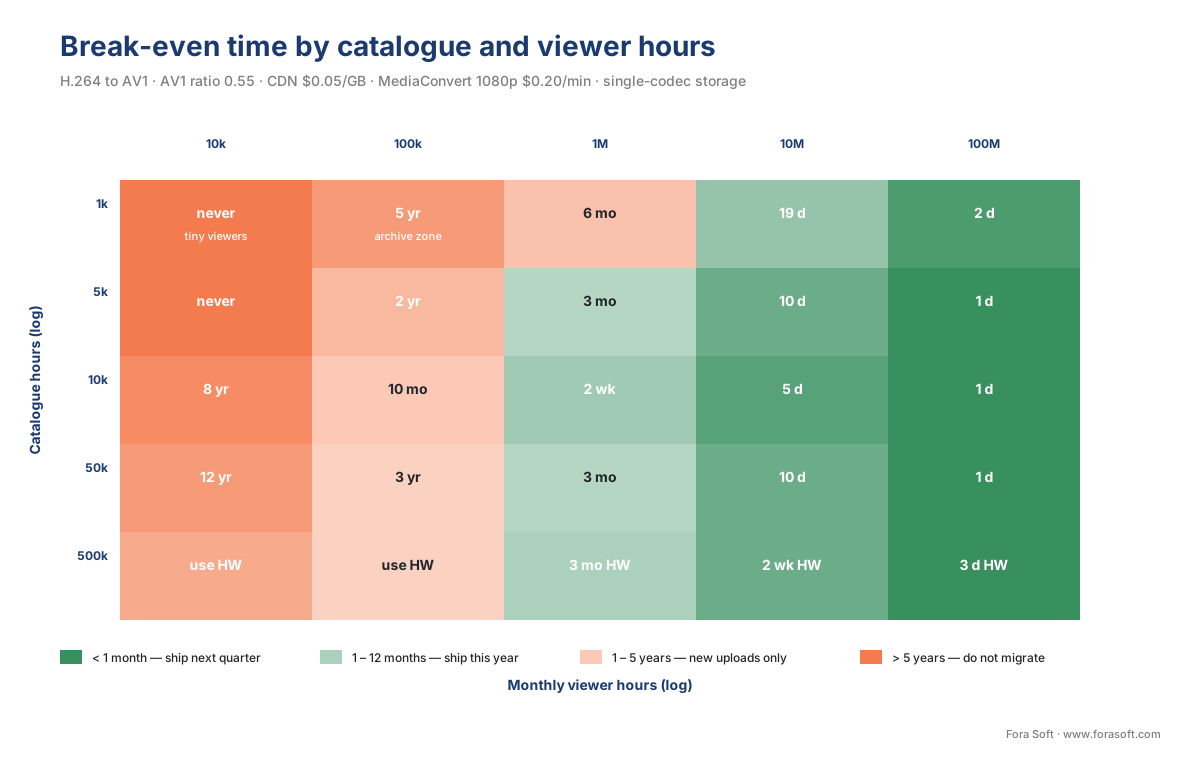
Figure 3. Break-even time as a function of catalogue size and monthly viewer hours. The pale band at the top is "ship next quarter"; the dark band at the bottom is "do not migrate the back catalogue".
AV1 device coverage — the input most product teams get wrong
Bitrate saving is only worth what your viewers' devices can actually decode. AV1 was a finished standard in 2018, with hardware decoders shipping in volume from 2022 onwards. Eight years in, the consumer-internet picture in 2026 looks like this:
- YouTube reports that more than 75 % of playback runs on AV1 in 2026, up from roughly 50 % in 2024.
- Netflix serves about 30 % of streams in AV1 today and is projecting first place among its codecs by late 2027; AV1-HDR10+ now covers 85 % of its HDR catalogue.
- Meta powers more than 70 % of video playback across Facebook, Instagram, and Messenger with AV1.
- 88 % of large-screen consumer devices submitted to Netflix for certification between 2021 and 2025 had AV1 hardware decode.
For a generic global consumer-internet product in 2026, 75 to 85 % is a defensible starting estimate for the AV1-capable viewer share. The calculator's slider defaults to 80 %.
But coverage is not uniform across verticals. The gaps are predictable:
- Television set-top boxes shipped before 2022 — particularly older Roku, Apple TV HD (4th gen), and pre-2020 cable / IPTV boxes — overwhelmingly lack AV1 hardware decode and fall back to software, which is impractical for live 4K.
- Industrial surveillance and Internet-of-Things (IoT) appliances are typically built on chipsets that lock at H.264 or H.265 by hardware. AV1 in this segment is functionally unavailable.
- Enterprise meeting room hardware (Polycom, Cisco Webex appliances) tends to lag consumer devices by 3 to 5 years. Most fleets in 2026 still default to H.264 with HEVC as the fallback.
- Pre-2022 Android phones without an AV1-capable SoC will software-decode at 720p but not at 1080p or above.
The practical rule: ship the AV1 ladder alongside an H.264 fallback ladder, never in place of it, and let the player negotiate. The egress saving on the calculator should be multiplied by the realistic AV1-capable share for your specific viewer mix, not by the consumer-internet headline.
A common mistake — assuming the AV1 ladder replaces the H.264 ladder
A surprising number of product teams enter codec migrations assuming the AV1 ladder will replace the H.264 ladder on day one. It will not. The reality is dual-codec delivery for at least three years, possibly five, while older devices age out. Dual-codec means you keep both ladders on storage at the same time, which doubles the encoded-layer footprint. The dual-codec storage hit is the single most overlooked line in a migration deck.
The calculator's dual-codec storage toggle adds the storage cost of the retained H.264 ladder back into the model. With the toggle on, the storage saving line flips from a positive number to a negative number — you pay more for storage in dual-codec mode than you did with H.264 alone, because you are now storing two ladders instead of one. The egress saving still dominates by orders of magnitude on a viewer-heavy product, so the migration still wins, but the storage line on the deck flips colour. Knowing this in advance keeps the finance team's questions calm. Triple-codec deployments (H.264 + HEVC + AV1) hit storage even harder; the industry consensus by 2026 is dual-codec (H.264 + AV1) captures roughly 95 % of the savings at a far lower storage footprint than the triple-codec approach.
A pitfall — forgetting the multi-pass encoding cost
Cloud transcoding services price per output minute, but the underlying compute cost depends on whether you ask for a single pass or a multi-pass encode. Single-pass is fast and cheap; two-pass typically doubles the cost and improves quality at low bitrates; some quality presets multi-pass three or even four times. AV1 in particular benefits from multi-pass at the high-quality presets needed for premium content. The calculator's default $0.08 per minute assumes a single-pass 1080p encode; bump it to $0.12 to $0.15 for two-pass premium quality, and to $0.25 to $0.40 for 4K with two-pass and the slower SVT-AV1 presets. Pricing the migration with a single-pass number when production demands two-pass is a classic underestimate.
Hardware encoders flip the encoding-cost equation
For very large catalogues, software encoding on cloud CPUs stops being economical. The reason is straightforward: SVT-AV1 at preset 4 is 5 to 10 times slower than x265 medium on the same CPU, and AV1 in cloud services like MediaConvert carries encoding cost multipliers of up to 30 to 50× compared to baseline H.264. Multiply that by a hundred-thousand-hour catalogue and the encoding line outgrows the egress line.
Hardware encoders solve this. The NETINT Quadra T1U Video Processing Unit (VPU) — a PCIe card built around an Application-Specific Integrated Circuit (ASIC) — delivers AV1 encoding at roughly 5 % of the cost of software AV1 on cloud CPUs, with quality slightly below the slowest SVT-AV1 presets but comparable to SVT-AV1 preset 6 to 8. NVIDIA's Ada Lovelace generation GPUs (RTX 40 series and the equivalent data-center cards) include hardware AV1 encoders too; Apple Silicon M3 and later add hardware AV1 decode but, as of 2026, not yet hardware AV1 encode. The hybrid pattern most large operators ship in 2026 is hardware AV1 for live and for VOD bulk, software SVT-AV1 for premium tier titles where the extra quality is worth the time.
For the calculator, hardware encoding shows up as a far lower per-minute price (the calculator caps the slider at $0.001 for the hardware-amortised case) and a far smaller break-even shift even at very large catalogues.
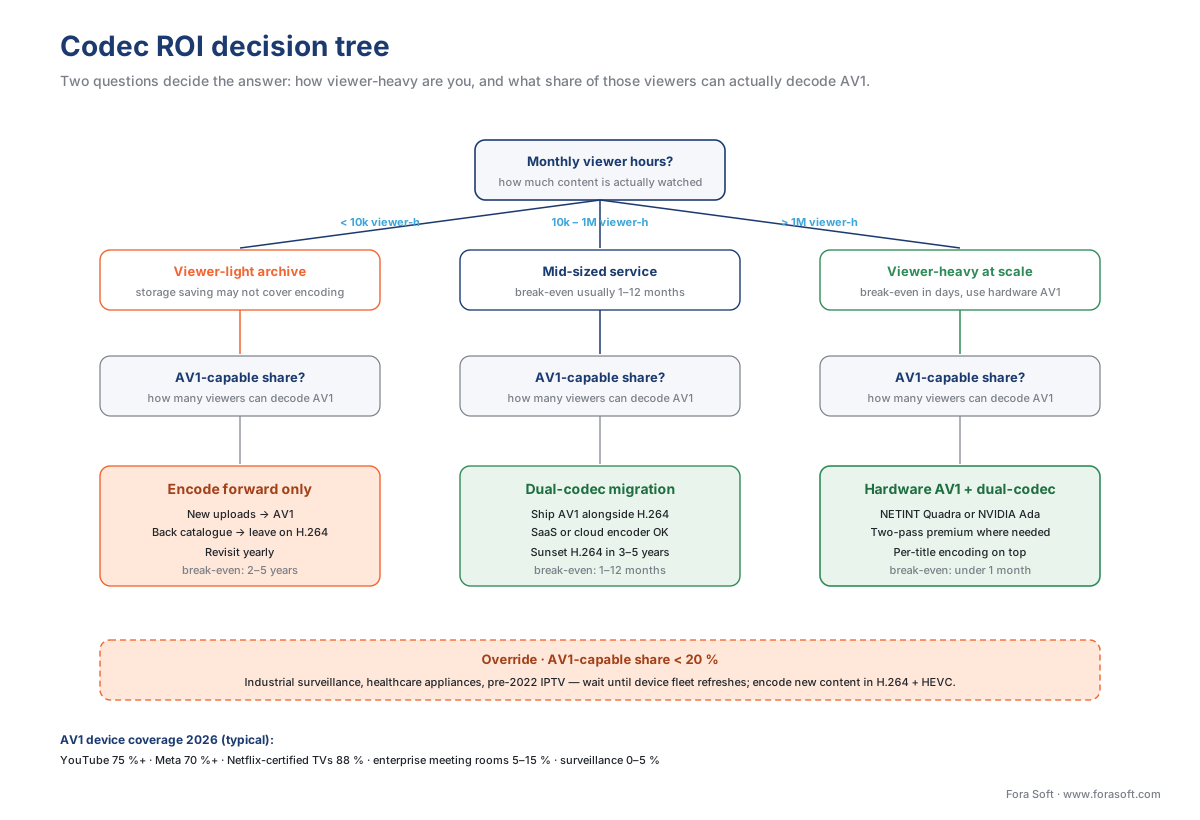
Figure 4. The codec ROI decision tree. The two questions that decide the answer are "how viewer-heavy are you" and "what fraction of those viewers can actually decode AV1".
Frequently asked questions
How much does an H.264 to AV1 migration save?
AV1 reaches the same VMAF as H.264 at roughly half to one-third the bitrate. Netflix reports its AV1 sessions use one-third less bandwidth than the AVC sessions they replaced. For a mid-sized OTT service at one million viewer-hours a month, that is about $99,000 of CDN egress a month.
How long does an AV1 migration take to pay for itself?
Most products in 2026 land on a break-even between two weeks and twelve months. For a 10,000-hour catalogue at one million viewer-hours a month, a $48,000 one-off encoding cost against a $99,460 monthly saving breaks even in about half a month and nets $3.53 million over three years.
When is an AV1 migration not worth it?
Three cases flip the answer. A viewer-light archive at 5,000 viewer-hours a month takes 50 months to repay. A fleet whose devices cannot decode AV1 saves nothing at all. And a catalogue already shipping a per-title H.264 ladder starts 20 to 30 percent lower, so the gap narrows.
What share of viewers can decode AV1 in 2026?
For a generic global consumer-internet product, 75 to 85 percent is a defensible estimate. YouTube reports more than 75 percent of playback runs on AV1, Meta more than 70 percent, and 88 percent of large-screen devices certified by Netflix between 2021 and 2025 have AV1 hardware decode.
Is AV1 encoding more expensive than H.264?
Yes, substantially. SVT-AV1 at preset 4 runs 5 to 10 times slower than x265 medium on the same CPU, and cloud services carry AV1 encoding multipliers of up to 30 to 50 times baseline H.264. Hardware encoders such as the NETINT Quadra T1U cut that to roughly 5 percent of software cloud cost.
Does egress or storage drive codec migration ROI?
Egress, by two orders of magnitude. In the worked example the monthly egress saving is $99,000 against $460 of storage saving. The migration is funded by the CDN bill, not the storage line, which is why viewer-hours matter far more than catalogue hours.
Should I replace my H.264 ladder with AV1?
No. Ship the AV1 ladder alongside an H.264 fallback ladder, never in place of it, and let the player negotiate. Replacing it outright ships an encode older devices cannot decode and triggers a fallback storm. Budget for both ladders in the storage line.
Where Fora Soft fits in
We have been building video products since 2005, across video conferencing, video streaming, OTT and Internet TV, video surveillance, e-learning, telemedicine, and AR/VR. The codec ROI calculator on this page is the model we hand to every new product manager on the team because the same five-step pipeline shows up in every conversation we have with a client. The OTT operator with ten thousand hours and a million viewer-hours a month, the e-learning platform whose students re-watch the same lectures three times each, and the surveillance fleet whose cameras stream to a private NVR on the local network all run the same arithmetic — they just plug in dramatically different numbers and get dramatically different answers. We size codec migrations the same way every time: count the hours, count the viewer-hours, settle the AV1-capable share, pick the encoder, multiply.
What to read next
- AV1 in 2026: state of the codec, hardware, and adoption
- How to choose a codec for your service in 2026: a decision tree
- Video bitrate calculator
- Video storage cost calculator
- Cloud transcoding services compared: AWS Elemental, Bitmovin, Coconut, NETINT
- Hardware acceleration: GPU, VPU, ASIC (NVENC, QuickSync, VideoToolbox, AMF, NETINT)
Talk to us / See our work / Download
- Talk to a video engineer — bring your catalogue hours, monthly viewer hours and CDN bill; we will give you a defensible break-even number in a one-hour scoping call.
- See our case studies — 239 shipped projects across surveillance, OTT, telemedicine, e-learning, conferencing.
- Download the codec ROI cheat sheet — one-page PDF with the five-step formula, the 2026 reference numbers for AV1 vs H.264 vs HEVC, CDN egress rates, encoding cost ranges, and the worked break-even examples for OTT, e-learning, and surveillance.
References
- AOMedia (2025), AV1 bitstream and decoding process specification, version 1.0.0 errata 1. URL: https://aomedia.org/av1/specification/
- Netflix Technology Blog (2025), AV1 now powers 30 % of Netflix streaming. URL: https://netflixtechblog.com/av1-now-powering-30-of-netflix-streaming-02f592242d80
- NVIDIA Developer Blog (2023), Improving video quality and performance with AV1 and NVIDIA Ada Lovelace architecture. URL: https://developer.nvidia.com/blog/improving-video-quality-and-performance-with-av1-and-nvidia-ada-lovelace-architecture/
- NETINT Technologies (2024), The world's first AV1 encoder for the data center: Quadra T1U. URL: https://netint.com/the-worlds-first-av1-encoder-for-the-data-center/
- NETINT Technologies (2025), Choosing an encoder, hardware vs software AV1 cost analysis. URL: https://netint.com/choosing_an_encoder/
- Amazon Web Services (2026), AWS Elemental MediaConvert pricing. URL: https://aws.amazon.com/mediaconvert/pricing/
- Amazon Web Services (2026), Amazon CloudFront pricing. URL: https://aws.amazon.com/cloudfront/pricing/
- ITU-T Recommendation H.265 (2023), High efficiency video coding, International Telecommunication Union. URL: https://www.itu.int/rec/T-REC-H.265
- ITU-T Recommendation H.264 (2021), Advanced video coding for generic audiovisual services, International Telecommunication Union. URL: https://www.itu.int/rec/T-REC-H.264
- Moscow State University Codec Comparison Group (2024), MSU Video Codecs Comparison: AV1 vs HEVC vs VVC at matched VMAF. URL: https://www.compression.ru/video/codec_comparison/
- Mux (2026), Default encoding ladders and bitrate recommendations. URL: https://docs.mux.com/guides/configure-encoding-quality
- AOMedia (2025), AV1 adoption showcase — Google story (YouTube playback share). URL: https://aomedia.org/av1-adoption-showcase/google-story/
- Bitmovin (2024), Per-title encoding savings on storage and CDN. URL: https://bitmovin.com/blog/per-title-encoding-savings/
- SDxCentral (2024), Meta and Google urge phone makers to adopt AV1 video codec to reduce network strain. URL: https://www.sdxcentral.com/news/meta-google-urge-phone-makers-to-adopt-av1-video-codec-to-reduce-network-strain/
- Streaming Media (2026), The state of streaming codecs 2026. URL: https://www.streamingmedia.com/Articles/Editorial/Featured-Articles/The-State-of-Streaming-Codecs-2026-173838.aspx
