


Why this matters
If you are scoping a streaming product, a video-conferencing app, an OTT launch, a surveillance fleet, an e-learning catalogue, or a telemedicine pilot, every business question about video — How much will the CDN cost? Can the customer's office Wi-Fi carry it? How long until we run out of S3 budget? Will the call drop on a 5G train? — reduces, in the end, to a bitrate. Three multiplications give you the raw weight; one multiplier per codec compresses it; one division by eight turns it into bytes per second; one multiplication by duration turns it into a file size. The calculator on this page does all five steps in front of you, shows the arithmetic out loud, and labels the result with the pipes that can or cannot carry it. The point is not to replace an engineer; the point is to give a product manager, founder, marketing lead, or operations person a number that an engineer will not roll their eyes at.
How the calculator works, step by step
The interactive widget at the top of this page is built on the same five-step pipeline that every video engineer keeps in their head. We are going to walk through it once so you know exactly what each control does and why the answer changes the way it does.
Step one — the three multiplications that give you the raw bitrate
A frame is a grid of pixels. The number of pixels in one frame is width × height. Each pixel is described by some number of bits — what we call bits per pixel, or bpp for short. The video plays at some number of frames per second, or fps. Multiply those three numbers and you have the uncompressed bitrate in bits per second.
uncompressed bitrate (bps) = width × height × bpp × fpsTry it for 4K at 60 fps in the colour format Netflix actually delivers — 10-bit YCbCr 4:2:0. A 4K frame is 3840 × 2160 = 8,294,400 pixels. YCbCr 4:2:0 stores brightness at full resolution and the two colour channels at quarter resolution, which works out to 1.5 × bit depth = 15 bits per pixel.
bitrate = 3840 × 2160 × 15 × 60
        = 7,464,960,000 bps
        ≈ 7.46 Gbps
That is seven and a half gigabits per second. Compare to the FCC's 2024 official “high-speed broadband” floor of 100 Mbps down and 20 Mbps up, and you have a 75× gap on the download side and a 375× gap on the upload side. The whole industry of video compression — every codec, every CDN, every paywall — exists to bridge that gap.
The sampling dropdown in the calculator switches between four common pixel formats: RGB 4:4:4 (3 × bit depth), YCbCr 4:4:4 (3 × bit depth), YCbCr 4:2:2 (2 × bit depth), and YCbCr 4:2:0 (1.5 × bit depth). The bit-depth dropdown picks 8, 10, or 12 bits. The “uncompressed bitrate” KPI updates the moment you change any of those values.
Step two — the codec multiplier
Modern codecs do not produce a fixed compression ratio; the ratio depends on the codec, the content, and how hard the encoder is told to work. But at the bitrates the streaming industry actually ships in 2026, the efficiency hierarchy is stable enough that we can write it down as a table of multipliers against H.264 as the baseline.
| Codec | Bitrate at matched VMAF 95 | Source / reasoning |
|---|---|---|
| H.264 / AVC | 1.00 × | Reference baseline (ITU-T H.264 v8, 2021). |
| H.265 / HEVC | 0.50 × | ~50 % reduction at matched quality (Bossen et al., HEVC test model). |
| VP9 | 0.55 × | Slightly worse than HEVC in MSU codec comparison rounds. |
| AV1 | 0.33 × | ~30 % over HEVC at matched VMAF on Netflix and Meta benchmarks (2024–2025). |
| H.266 / VVC | 0.30 × | 50–55 % over H.264 at matched quality (Fraunhofer HHI, 2023). |
These numbers compound with two content-driven multipliers. Motion: a talking head needs ≈ 75 % of the floor; a drama or vlog sits at the floor; a high-motion sport or game needs ≈ 1.5×. Quality target: a bandwidth-saving stream that the player only falls back to on a phone runs at 70 % of the floor; the default streaming-grade rung is the floor itself; a “reference” rung — what a TV uses for the highest VMAF — runs at 1.4×. HDR adds a flat 25 % because the extra dynamic range and the 10-bit pipeline both eat bits.
So the shipped bitrate the calculator displays is:
shipped (Mbps) = H.264_floor × codec × motion × quality × HDRThe H.264 floor itself is content-medium / quality-medium / SDR for the chosen resolution and frame rate, calibrated against published 2026 ladders so that the answer for a 1080p30 medium-motion stream lands at 5 Mbps — the same number Bitmovin, Mux, and AWS Elemental publish as a reasonable default. From there every change you make to the form moves the number in the direction an engineer would expect.
Step three — the divide-by-eight that gives you bytes per second
Bitrates are quoted in bits per second; file sizes are quoted in bytes. A byte is eight bits. To turn a bitrate into a file size, divide by eight and multiply by the duration. The calculator does this for you the moment you change the duration field. A 60-minute 4K60 AV1 SDR stream at the medium-content / medium-quality rung lands at roughly 1.4 GB per hour, which is why a feature-length AV1 4K SDR film fits in under 3 GB and why the BBC iPlayer 4K trials are not, in fact, going to bankrupt anybody.
Step four — the pipe check
A number in isolation is useless. The “shipped bitrate” panel only matters when you compare it to the pipes that have to carry it. The calculator runs that comparison against eight pipes that cover every realistic delivery scenario:
| Pipe | Realistic 2026 speed | Why we picked it |
|---|---|---|
| Zoom 1080p HD call | 3.8 Mbps | Zoom's own published bandwidth floor for HD group video. |
| US median fixed home upload | 20 Mbps | FCC Form 477, 2024 vintage. The hard ceiling for live ingest. |
| Twitch 1080p60 ingest cap | 6 Mbps | Twitch's published partner cap. Streaming above it gets you rejected. |
| Netflix 4K HDR top rung | 16 Mbps | Netflix's published cap before per-title optimisation kicks in. |
| YouTube 4K60 HDR recommend | 85 Mbps | YouTube Help published 2026 upload recommendation. |
| US median fixed home download | 500 Mbps | FCC 2024 median. The ceiling for any single-user delivery. |
| Office 1 Gb ethernet port | 1 000 Mbps | Default Cisco/Ubiquiti switch port speed. |
| 12G-SDI broadcast cable | 12 000 Mbps | SMPTE ST-2082-1, the cable that carries uncompressed 4K. |
Each row turns green when your shipped bitrate fits, red when it does not. If even the uncompressed bitrate fits — for example, an HD signal travelling over a 12G-SDI inside a broadcast truck — the row reads “Yes (even uncompressed)” to flag that no codec is necessary for that hop.
Step five — the codec comparison table
The last panel runs the calculator five times — once for each codec — and shows the shipped bitrate, the file size at one hour, the storage cost for one thousand hours at AWS S3 Standard ($0.023 per GB per month, the published us-east-1 rate), and a “reach” column that tells you how many devices on the open web can actually decode that codec in 2026. The cheapest codec is starred. Reach is the lever most decks forget: AV1 is the cheapest format on paper, but it does not play on an iPhone older than the 15 Pro and it does not play on any browser without WebAssembly fallback before late 2024, so a real product still serves an H.264 rung at the bottom of every ABR ladder.
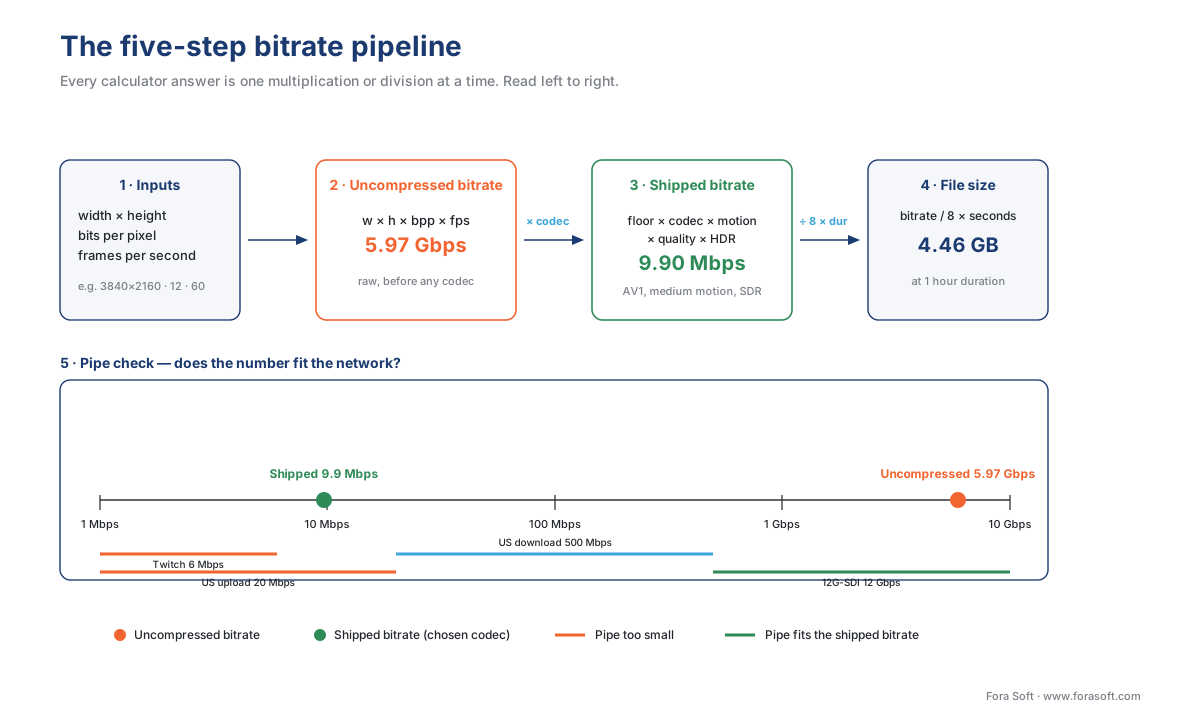
Figure 1. The five-step pipeline behind every calculator answer. Each box is a single multiplication or division — nothing more.
A worked example, by hand, then in the calculator
Open the calculator and click the 4K60 preset. Leave codec on AV1, motion on medium, quality on streaming-grade, HDR off. Duration sixty minutes. You should see:
- Uncompressed bitrate: 7.46 Gbps.
- Shipped bitrate: 9.90 Mbps.
- Compression ratio: 754 : 1.
- File size for the hour: 4.46 GB.
Now do it on paper. Pixels per frame = 3840 × 2160 = 8,294,400. YCbCr 4:2:0 at 8-bit = 1.5 × 8 = 12 bpp. Frame rate = 60. Multiply: 8,294,400 × 12 × 60 = 5,971,968,000 bps ≈ 5.97 Gbps — close to the 7.46 Gbps the calculator shows, with the gap explained by the calculator's default 10-bit 4:2:0 sampling. Set bit depth to 10 and the panel jumps to the calculator number.
For shipped: H.264 floor at 4K60 is 5 × (3840×2160 / 1920×1080)^0.85 × (60/30)^0.85 = 5 × 4^0.85 × 2^0.85 ≈ 5 × 3.25 × 1.80 ≈ 29.3 Mbps. Multiply by AV1's 0.33 factor, the medium-motion multiplier (1.0), the streaming-grade multiplier (1.0), and the SDR multiplier (1.0): 29.3 × 0.33 = 9.66 Mbps. The calculator displays 9.90. Small differences come from rounding inside the H.264 floor.
The file size is 9.90 Mbps × 3600 s / 8 = 4.46 GB. Multiply by 1 000 hours and you have 4.46 TB, which costs 4.46 TB × $23 per TB per month = $102 per month on S3 Standard — the number the codec-comparison table shows next to AV1.
That is the entire pipeline, written out, ending in a real cloud invoice you can put in a deck.
A common mistake — confusing bits and bytes
The single most common bandwidth mistake in the industry is mixing up bits and bytes by a factor of eight. A “100-meg home internet” is almost always 100 megabits per second, not megabytes per second. To convert a download speed in megabits per second into the file size in megabytes you can save per second, divide by eight. A 100 Mbps connection saves 12.5 megabytes per second; a 1 GB file therefore takes about 80 seconds, not 10. The calculator on this page always shows bitrates in bits per second (Mbps, Gbps) and file sizes in bytes (GB, TB) so you cannot accidentally compare them as the same number — but vendor decks routinely cross the streams, so check every claim.
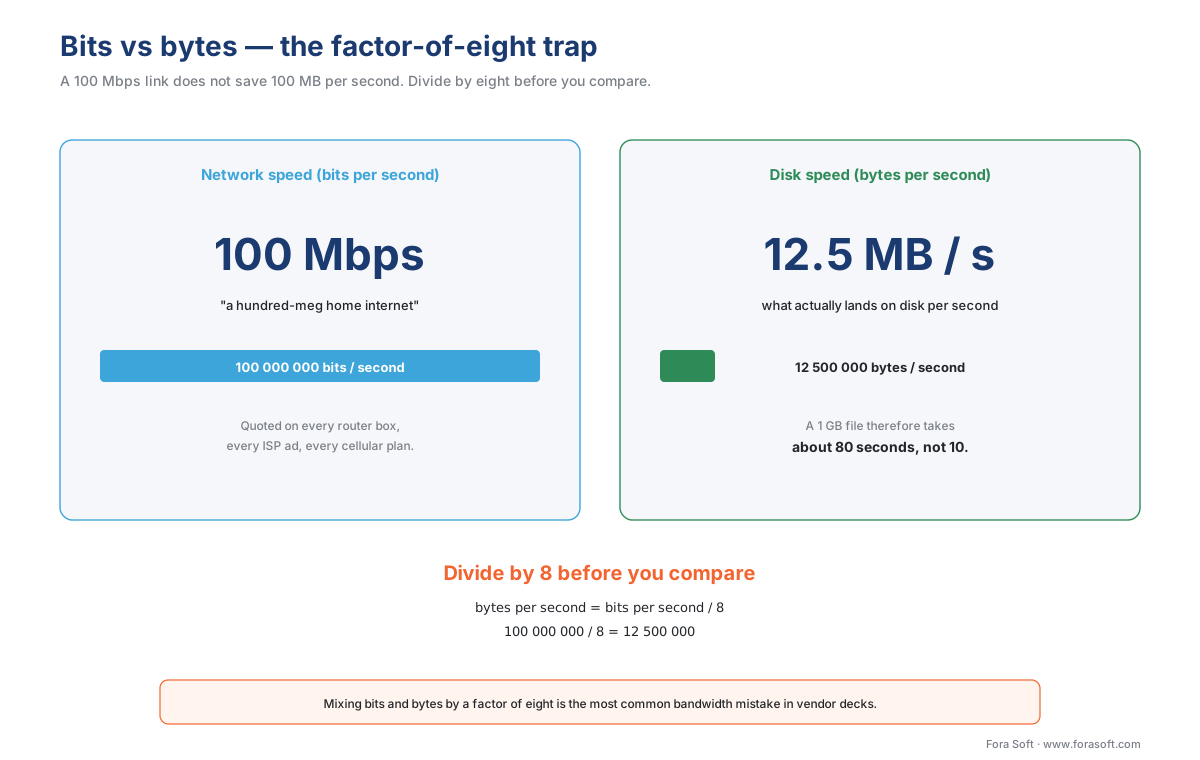
Figure 2. The bits-vs-bytes confusion costs more product launches than any other single arithmetic error. Always divide by eight before you compare to a file size.
Frequently asked questions
How do I calculate video bitrate?
Uncompressed bitrate is width × height × bits per pixel × frames per second. Multiply by the codec's efficiency factor to get the bitrate you actually ship, then divide by eight and multiply by duration to get the file size. Three multiplications, one multiplier, one division.
What is the uncompressed bitrate of 4K60 video?
At 10-bit YCbCr 4:2:0, a 4K60 signal is 3840 × 2160 × 15 × 60 = 7.46 Gbps. That is 75 times the FCC's 100 Mbps broadband floor on the download side and 375 times its 20 Mbps upload floor, which is the gap every video codec exists to bridge.
How much less bandwidth does AV1 use than H.264?
About two-thirds less. At matched VMAF 95 in 2026 the efficiency hierarchy is H.264 at 1.00×, VP9 at roughly 0.55×, H.265 at 0.50×, AV1 at 0.33× and H.266/VVC at 0.30×. AV1 ships roughly a third of H.264's bitrate for the same perceived quality.
How do I convert a bitrate into a file size?
Divide the bitrate by eight to get bytes per second, then multiply by the duration in seconds. A 9.90 Mbps stream running for one hour is 9.90 × 3600 ÷ 8 = 4.46 GB. Multiply by 1,000 hours and you have 4.46 TB, which is about $102 a month on S3 Standard.
What bitrate does a 1080p30 stream need?
About 5 Mbps in H.264 at medium motion and streaming-grade quality — the same default Bitmovin, Mux and AWS Elemental publish. Codec, content motion, quality target and HDR multipliers move the number up or down from that baseline.
What is the difference between megabits and megabytes?
A factor of eight, and it is the most common bandwidth mistake in the industry. A 100 Mbps connection saves 12.5 megabytes per second, so a 1 GB file takes about 80 seconds, not 10. Bitrates are quoted in bits per second; file sizes are quoted in bytes.
Will my network carry this bitrate?
Check the number against the pipe before you propose it. The US median home upload is 20 Mbps, Twitch caps 1080p60 ingest at 6 Mbps, Netflix's 4K HDR top rung is 16 Mbps, an office ethernet port carries 1 Gbps, and a 12G-SDI broadcast cable carries 12 Gbps.
Where Fora Soft fits in
We have been building video products since 2005, across video conferencing, video streaming, OTT, video surveillance, e-learning, telemedicine and AR/VR. The bitrate calculator on this page is the one we hand to every new product manager on the team in their first week, because the same five-step pipeline shows up in every conversation we have with a client — whether it is a surveillance camera fleet that has to ingest 200 streams on a single AWS instance, an e-learning catalogue that has to fit a 12-hour course inside a school's broadband cap, or a telemedicine session that has to be readable over a 3G hospital lift. The numbers in the codec-comparison table are not theoretical; they are the numbers we use when we cost-model an encoding pipeline for a real launch.
What to read next
- Why we compress video: the math of bitrate
- The codec comparison matrix: MPEG-2, H.264, H.265, VP9, AV1, VVC
- How to choose a codec for your service in 2026: a decision tree
- Per-title and per-scene encoding: smart bitrate ladders
- Hardware acceleration: NVENC, QuickSync, VideoToolbox, AMF, NETINT
- Streaming protocols 2026: HLS, DASH, LL-HLS, WebRTC, CMAF
Talk to us / See our work / Download
- Talk to a video engineer — bring your bitrate budget, we will tell you where the savings are.
- See our case studies — 239 shipped projects across surveillance, OTT, telemedicine, e-learning, conferencing.
- Download the bitrate cheat sheet — one-page PDF with the formula, the codec multipliers, and the 2026 pipe table.
References
- ITU-T Recommendation H.264 (v8, 2021), Advanced video coding for generic audiovisual services, International Telecommunication Union — Telecommunication Standardization Sector. URL: https://www.itu.int/rec/T-REC-H.264
- Bossen, F., Bross, B., Sühring, K., Flynn, D. (2013), HEVC complexity and implementation analysis, IEEE Transactions on Circuits and Systems for Video Technology. URL: https://ieeexplore.ieee.org/document/6324411
- AOMedia (2025), AV1 bitstream and decoding process specification, version 1.0.0 errata 1, Alliance for Open Media. URL: https://aomedia.org/av1/specification/
- Fraunhofer HHI (2023), Versatile Video Coding (VVC) — H.266 standard reference, vvenc/vvdec. URL: https://github.com/fraunhoferhhi/vvenc
- Netflix Technology Blog (2020), Optimized shot-based encodes are now generally available. URL: https://netflixtechblog.com/optimized-shot-based-encodes-now-streaming-77eee23ec6c9
- Netflix Technology Blog (2023), All of Netflix's HDR video streaming is now dynamically optimized. URL: https://netflixtechblog.com/all-of-netflixs-hdr-video-streaming-is-now-dynamically-optimized-e9e0cb15f2ba
- YouTube Help (2026 revision), Recommended upload encoding settings. URL: https://support.google.com/youtube/answer/1722171
- YouTube Help (2026 revision), Choose live encoder settings, bitrates, and resolutions. URL: https://support.google.com/youtube/answer/2853702
- Twitch (2026), Broadcasting guidelines and ingest bitrate caps. URL: https://help.twitch.tv/s/article/broadcasting-guidelines
- US Federal Communications Commission (2024), 14th Section 706 Broadband Deployment Report, raising the high-speed broadband definition to 100/20 Mbps. URL: https://www.fcc.gov/document/fcc-finds-broadband-not-being-deployed-timely-basis
- Ookla Speedtest Global Index (December 2025), median fixed and mobile broadband speeds by country. URL: https://www.speedtest.net/global-index
- Amazon Web Services (2026), S3 Pricing, us-east-1 region. URL: https://aws.amazon.com/s3/pricing/
- SMPTE Standard ST 2082-1 (2015), 2160-line and 1080-line source image and ancillary data mapping for 12G-SDI. URL: https://ieeexplore.ieee.org/document/7290925
- Zoom Support (2026), System requirements for Windows, macOS, and Linux, bandwidth recommendations. URL: https://support.zoom.us/hc/en-us/articles/201362023
