


Why this matters
Color artifacts are the impairment your headline quality number is most likely to miss, because the number was probably computed on brightness alone. You can ship a file with a flawless mean VMAF and red lettering that bleeds into a cyan background badly enough to look broken, because the score never measured the color channels where the damage lives. This article is for a video engineer, streaming or encoding lead, or QA engineer who has seen color fringe on saturated edges, watched skin tones go wrong after a transcode, or had text turn mushy on a colored panel, and wants to know exactly what is happening in the color channels, why their objective metric stayed silent, and which measurements actually catch it. Get this right and you stop trusting a luma-only number to certify color it never looked at.
Three different faults wearing one label
"Color artifact" is a bucket that holds at least three distinct problems with three different causes. Naming them apart is the first step to measuring them, because each one shows up — or hides — differently in a metric.
Color bleeding is color spreading past its proper boundary. Picture red text on a cyan panel: the red appears to seep a pixel or two into the cyan, the edge looks soft and fringed, and fine colored detail loses its crispness. It is a local fault, worst exactly where two strongly different colors meet. Its main cause is chroma subsampling, which we unpack below.
Color shift is the whole image's color drifting in one direction — skin tones too pink or too green, a flat overall cast. It is a global fault, and it usually has nothing to do with how many bits you spent. It comes from decoding the color with the wrong conversion matrix, or losing the metadata that says which matrix to use.
Chroma quantization and banding is the color-channel version of the banding you already know from the brightness channel: when the color planes are compressed hard, smooth color gradients break into steps and saturated regions go blotchy. It is the color twin of a luminance artifact, and it is worst in deep, saturated areas.
All three are faults of the color information, not the brightness information — and that single fact is why the standard quality metrics, which mostly measure brightness, are so bad at seeing them.
Chroma subsampling: the saving that causes the bleeding
To understand color bleeding you have to understand the trick almost every video uses to save data. The human eye sees fine detail in brightness far better than in color — roughly three times better (Winkler et al., 2001, in Vision Models and Applications to Image and Video Processing). Video exploits this by splitting each pixel into a brightness part, called luma (written Y′), and two color-difference parts, called chroma (Cb and Cr), and then storing the chroma at lower resolution than the luma. That deliberate reduction is chroma subsampling.
The amount of subsampling is written as a three-number ratio, J:a:b, describing a little region 4 pixels wide and 2 pixels tall (Poynton, "Chroma Subsampling Notation," 2008). The first number is the width reference (always 4); the second is how many color samples sit in the top row; the third is how many change in the bottom row. Three values cover almost everything you will meet:
- 4:4:4 — full color resolution. Every pixel keeps its own color. No subsampling.
- 4:2:2 — color sampled at half the horizontal resolution. Common in professional capture and mezzanine formats.
- 4:2:0 — color sampled at half resolution both horizontally and vertically, so each color sample covers a 2×2 block of four brightness pixels. This is the format of H.264, HEVC, AV1, JPEG, DVD, Blu-ray, and essentially all consumer streaming (ITU-T H.273; Wikipedia, "Chroma subsampling").
Here is the arithmetic that makes the trade concrete. Take one frame of 1920×1080, 8 bits per sample. At 4:4:4 you store three full-resolution planes: 1920 × 1080 × 3 = 6,220,800 bytes, about 6.2 MB. At 4:2:0 the luma plane is unchanged, but each chroma plane is quartered, so you store 1920 × 1080 × (1 + ¼ + ¼) = 1920 × 1080 × 1.5 = 3,110,400 bytes, about 3.1 MB. You have halved the raw data before the codec even runs, and — on most content — almost nobody can see the difference. That is why 4:2:0 won.
The catch is the word "most." On saturated, sharp color edges — red text on cyan, a thin colored line, a logo, UI elements — the eye's color acuity is high enough to notice, and 4:2:0 throws away exactly the color detail those edges need. Because one chroma sample now serves a 2×2 block, the color cannot turn as sharply as the brightness can. The brightness edge stays crisp; the color edge is forced to ramp across two pixels. The two no longer line up, and that mismatch is what you see as color bleeding.
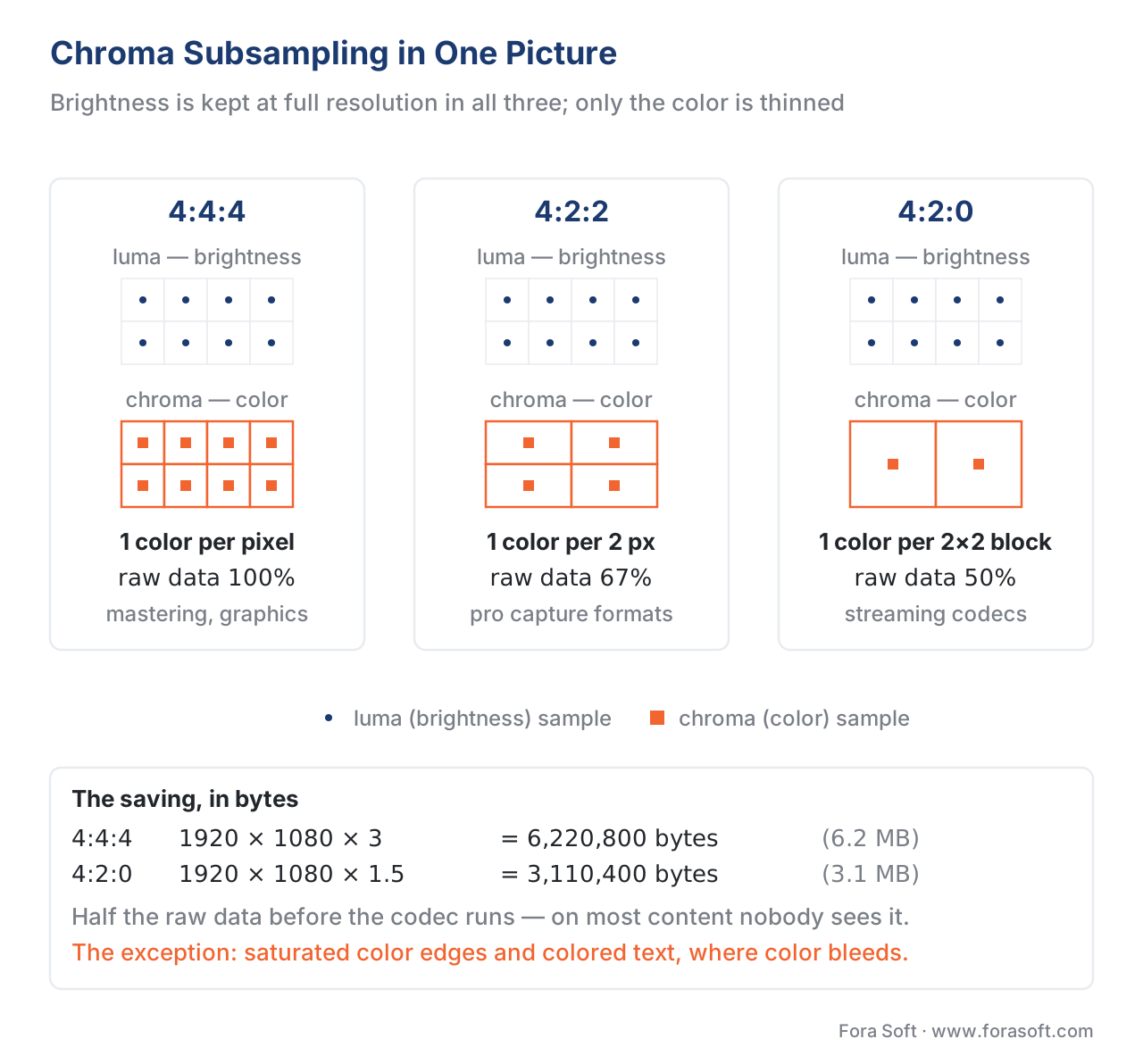 Figure 1. Chroma subsampling in one picture. Luma (brightness) is kept at full resolution in every scheme; chroma (color) is what gets thinned. 4:4:4 keeps one color sample per pixel; 4:2:2 halves the horizontal color resolution; 4:2:0 quarters it, one color sample per 2×2 block. 4:2:0 halves the raw data — and is where saturated color edges start to bleed.
There is a subtler, second-order version worth knowing about, because it surprises people who assume "only the color is affected." In a gamma-encoded signal like Y′CbCr, a chroma error actually leaks into apparent brightness: where a saturated color meets an unsaturated one, subsampling causes a visible loss of luminance right at the border — a dark fringe — not just a color smear (Chan, "Toward Better Chroma Subsampling," SMPTE Motion Imaging Journal, 2008). Rec. 2020 defines a "constant luminance" mode specifically to avoid this, but almost no one uses it. So color bleeding can dim an edge as well as smear it.
Color shift: the wrong recipe, not the wrong bitrate
Color bleeding is about how much color detail you kept. Color shift is about interpreting the color you kept correctly — and it can ruin a file that was compressed perfectly.
When video stores color as luma plus chroma, it needs a recipe to convert back to the red, green, and blue a screen actually emits. That recipe — the set of weights that defines how much each of R, G, B contributes to brightness — is fixed by a standard, and there are three common ones for three eras of video:
- BT.601 for standard definition: brightness = 0.299·R + 0.587·G + 0.114·B.
- BT.709 for HD: brightness = 0.2126·R + 0.7152·G + 0.0722·B.
- BT.2020 for ultra-HD / wide-gamut: brightness = 0.2627·R + 0.6780·G + 0.0593·B.
Those weights differ, so if a file was encoded with the BT.709 recipe but a player decodes it with the BT.601 recipe — because the metadata that says "this is BT.709" was dropped in a transcode, or the player just assumed the wrong one — the colors come out wrong. The classic signature is reds turning too dark and greens too bright, a consistent cast across the whole frame (multiple FFmpeg/OpenCV color-matrix bug reports, 2020–2024). The fix is not more bits; it is correct signaling. The metadata that carries it — color primaries, transfer function, and matrix coefficients — is standardized as code points in ITU-T H.273 (2016), and getting those three tags right end to end is what prevents the shift.
This is a measurement-side article, so the boundary matters: how color spaces, primaries, and transfer functions are defined and chosen at encode time belongs to the Video Encoding section's color-spaces article. Here the point is only that color shift is a real, common color artifact, that it is a metadata fault rather than a bitrate fault, and — crucially for the next section — that a full-reference metric comparing a correctly-tagged reference against a wrongly-decoded copy may or may not catch it, depending on whether the metric even looks at the color channels.
Why your quality metric is blind to color
Here is the measurement heart of the article. The two objective metrics most teams rely on — PSNR and VMAF — are, in their everyday form, luma-only. They score the brightness channel and ignore the color channels almost entirely. Color artifacts live precisely in the channels these metrics skip.
Start with PSNR. The number that compares a compressed frame to the original pixel by pixel, called PSNR (Peak Signal-to-Noise Ratio, measured in decibels), can in principle be computed on any channel. But in practice "the PSNR" of a clip is almost always reported as Y-PSNR — the brightness channel only. Tools compute all three (FFmpeg's psnr filter prints psnr_y, psnr_u, and psnr_v separately), but the chroma numbers are routinely dropped from reports, dashboards, and bitrate-ladder decisions. If you only watch Y-PSNR, a clip whose brightness is intact but whose color has bled or shifted shows no error at all.
Now VMAF, the metric most likely to be trusted here. VMAF (Video Multimethod Assessment Fusion, on a 0–100 scale) is Netflix's fused perceptual metric, and the standard, universally deployed version — call it VMAF v0 — fuses three features (VIF, the detail-loss metric ADM, and a motion feature) that are all computed on the luma channel. Netflix states it plainly in their June 2026 engineering post announcing the next version: "VMAF v0 only extracts luma-based features, so it is unaware of chroma artifacts. In practice, encoding and scaling introduce chroma artifacts via quantization and subsampling" (Netflix Technology Blog, "VMAF v1: Good Is Not Good Enough," 2026). Read that as the metric's author telling you the de-facto industry-standard quality number does not measure color.
This is the same lesson as the temporal blind spot in judder and stutter: a metric cannot score a dimension it never receives. There it was display timing; here it is the color channels. And as always, pooling makes it worse — even a chroma error that does register in a per-component number gets averaged across the frame until a localized bleed on one edge barely moves the mean. It is one more entry in the long list of where objective metrics lie.
Common mistake: certifying color with a luma-only number. The expensive error is to run a clip through "VMAF" or "PSNR," see a high score, and sign off on the color. The standard VMAF model and a Y-PSNR report validated the brightness, not the color. A clip can read mean VMAF 96 and have red text visibly bleeding on every frame. If color fidelity is in scope — saturated graphics, brand colors, skin tones, screen text, HDR wide-gamut content — do not let a luma-only metric speak for it. Report per-component chroma PSNR alongside Y, add a perceptual color-difference metric, and for anything shipping, look at the saturated edges. And never compare two clips at different chroma subsampling (4:2:0 vs 4:2:2) on a luma-only metric as if the number captured the difference; it cannot.
How to actually measure color
If the everyday metrics are blind to color, what sees it? Four honest options, in rough order of rigor.
Per-component chroma PSNR. The cheapest fix is to stop throwing away two-thirds of the numbers you already compute. FFmpeg's psnr filter returns psnr_y, psnr_u, and psnr_v for every frame; report and threshold the U and V values, not just Y. A clip with color bleeding will show a healthy psnr_y and a noticeably lower psnr_u/psnr_v. This will not tell you whether the error is perceptually bad — PSNR correlates weakly with the eye, in color as in brightness — but it will tell you the color channels took damage the Y number hid.
Perceptual color-difference metrics: ΔE-ITP and CIEDE2000. Color science has measures built specifically to predict whether a person will see a color difference. CIEDE2000 (ΔE00, standardized by the CIE; Sharma, Wu, Dalal, 2005) compares two colors in a perceptually-tuned space and returns a single difference value where roughly ΔE = 1.0 is the just-noticeable difference (JND): below ~1 most people cannot see it, 2–3.5 is the usual limit of commercial acceptability. For modern HDR and wide-gamut video, the ITU ratified a successor: ΔE-ITP, defined in ITU-R BT.2124-0 (2019), which compares colors in the ICtCp space designed for HDR/WCG and is scaled so that a value of 1 again equals one JND. These give you a color-error number that actually tracks perception — the thing chroma PSNR does not.
VMAF v1's chroma feature. As of June 2026 the most-used perceptual video metric finally looks at color. VMAF v1, open-sourced by Netflix, adds a chroma feature (a modified SpEED-QA applied to the color channels) precisely to capture the subsampling-and-quantization artifacts v0 could not see (Netflix Technology Blog, 2026; building on Chen et al., "Perceptual video quality prediction emphasizing chroma distortions," IEEE TIP, 2021). This is new, and it matters: a quality gate built on VMAF v0 is color-blind by construction, and moving to v1 is how you close that gap inside a metric you already trust. Name the version — "VMAF" with no version no longer tells the reader whether color was measured.
Subjective testing — the ground truth. Because no objective color metric is perfect, color quality is ultimately settled the way all quality is: by a properly run subjective test, with viewers looking at the saturated edges, the skin tones, and the colored text under controlled conditions. When a color metric and the eye disagree, the eye wins and the metric is the proxy that failed.
| Metric / method | What it measures | Reference needed | Where it lies on color |
|---|---|---|---|
| Y-PSNR | Brightness error per frame (dB) | Full-reference | Blind to color — measures luma only; bleeding and shift in the chroma channels are invisible |
| VMAF v0 | Fused perceptual score (0–100) | Full-reference | Luma-only features; Netflix states it is "unaware of chroma artifacts" |
| Chroma PSNR (U/V) | Color-channel error per frame (dB) | Full-reference | Sees chroma damage, but PSNR tracks the eye weakly and pooling dilutes a local bleed |
| CIEDE2000 (ΔE00) | Perceptual color difference, JND-scaled | Full-reference | Built for color; per-pixel/patch, needs aligned frames; SDR-oriented |
| ΔE-ITP (BT.2124) | Perceptual color difference for HDR/WCG | Full-reference | Designed for HDR/wide gamut in ICtCp; 1 unit = 1 JND |
| VMAF v1 | Fused perceptual score incl. chroma | Full-reference | Adds a chroma feature (modified SpEED-QA); new in 2026 — name the version |
| Subjective test | Human-rated color quality | Either | Ground truth; slower and costlier, but the only true arbiter |
Table 1. Seven ways to treat color artifacts. The everyday metrics (Y-PSNR, VMAF v0) are blind to color because they measure brightness only. Per-component chroma PSNR is the cheap first fix; ΔE-ITP and CIEDE2000 are the perceptual color measures; VMAF v1 finally folds chroma into the fused score; the eye remains the arbiter.
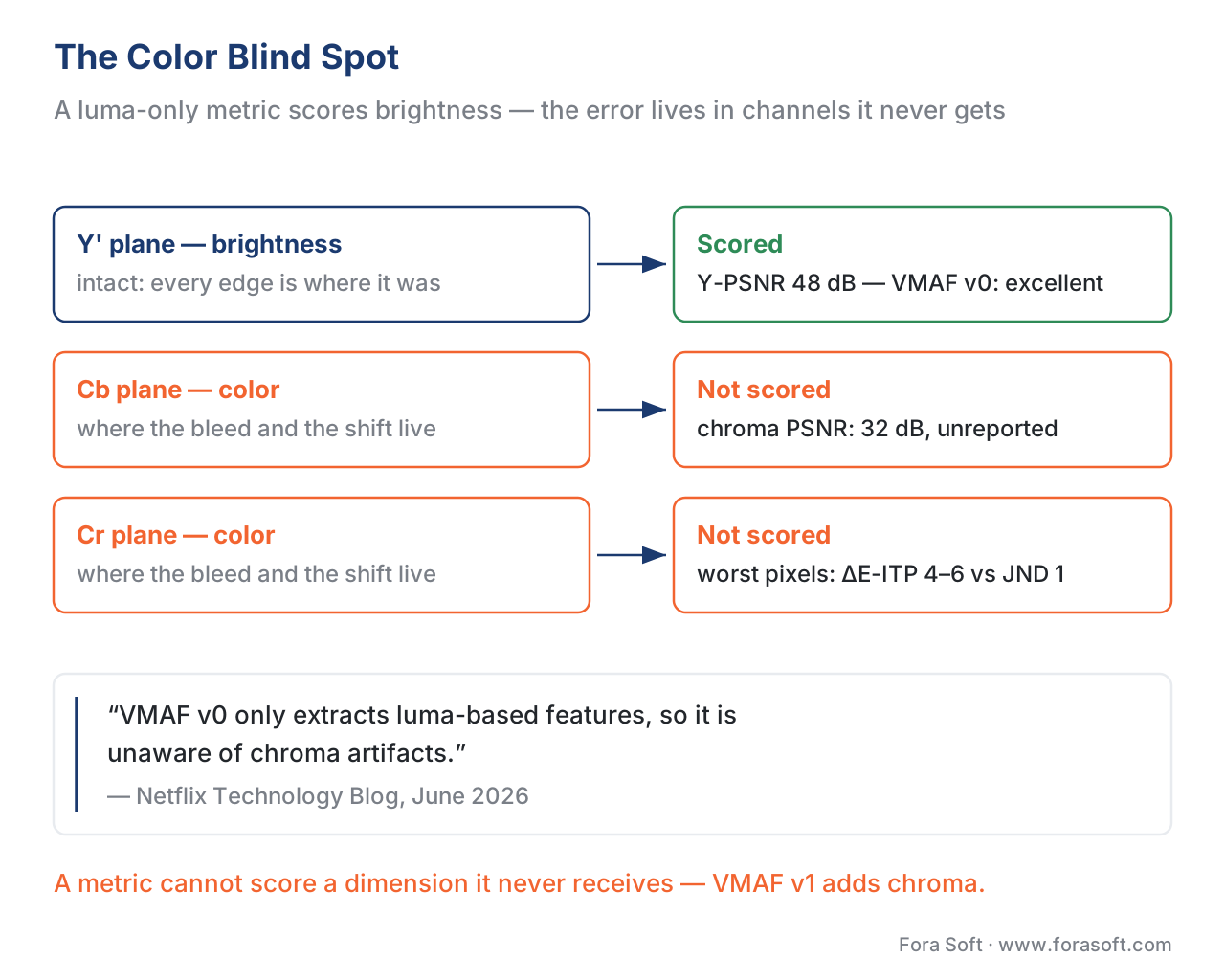 Figure 3. The color blind spot. A luma-only metric scores the brightness channel against the reference. Under chroma subsampling or a color shift the brightness can be correct, so Y-PSNR and VMAF v0 read "excellent" — while the color error lives in the Cb/Cr channels the metric never receives. The fix is to measure the color channels, not infer them from brightness.
A worked example: the number that stays silent
Make the blind spot concrete. Take a test pattern of saturated red text on a cyan background, encode it once at 4:4:4 (full color) and once at 4:2:0 (quarter color), and measure both against the 4:4:4 master.
The brightness channel barely changes — the letters' luminance edges are still where they were — so Y-PSNR comes back high, say 48 dB, a "visually lossless" number most ladders would wave through. But measure the color channels and the story flips: psnr_u and psnr_v drop to, say, 32 dB, because the color edges were forced to ramp across 2×2 blocks. Convert that edge error to a perceptual color difference and the worst pixels along the text edge land at ΔE-ITP ≈ 4–6 — several times the JND of 1, i.e. plainly visible. One file, two verdicts: "excellent" if you read Y only, "visible color bleeding" the moment you look at the color channels. The number did not lie about brightness; it was simply never asked about color.
That gap — high Y-PSNR, low chroma PSNR, supra-threshold ΔE — is the measurement signature of a color artifact, and the reason this article exists. (The numbers above are illustrative of the pattern, not measured from a specific clip; the downloadable detector below reproduces the same relationship on a synthetic frame so you can see it for yourself.)
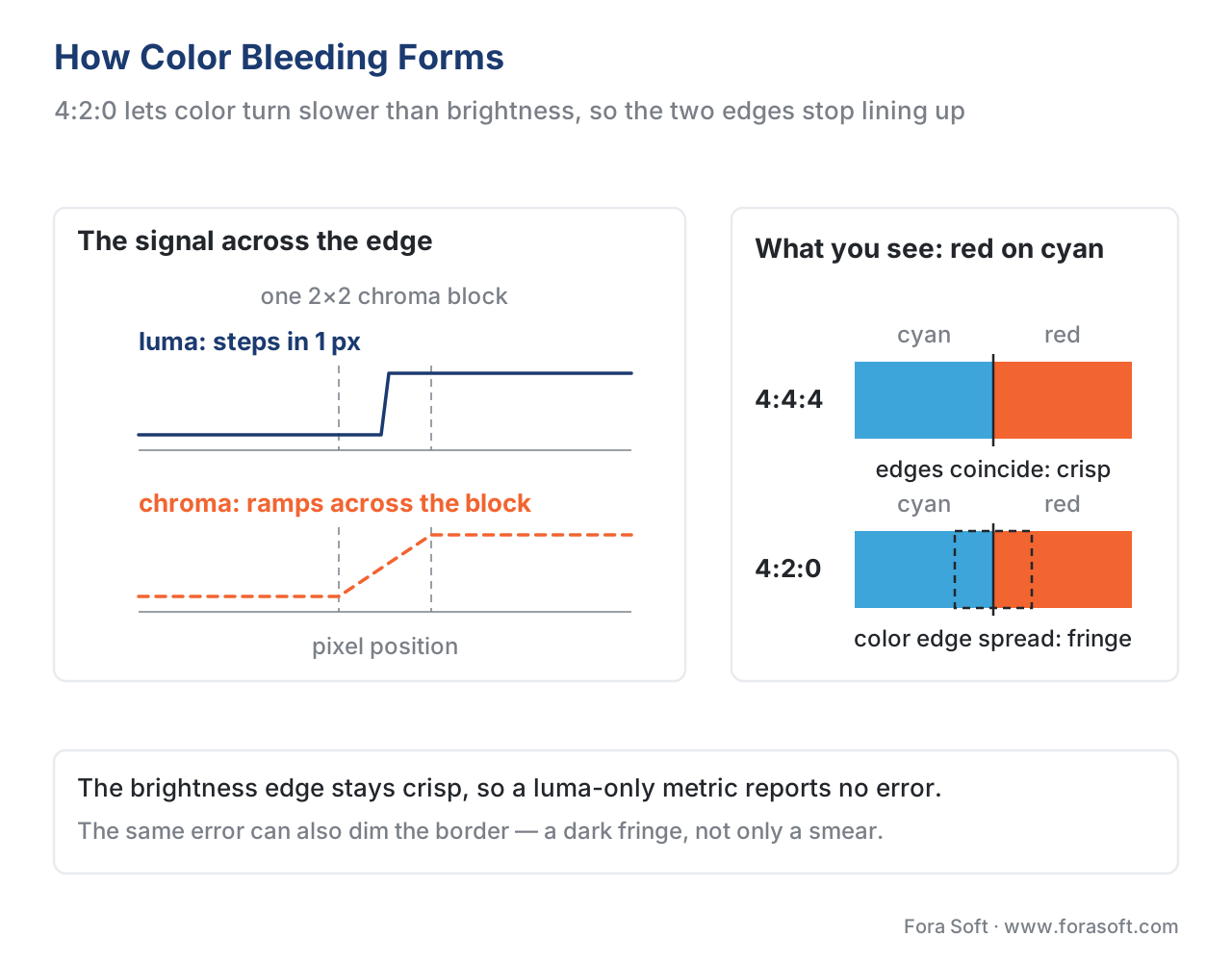 Figure 2. How color bleeding forms. At a sharp red/cyan boundary, 4:2:0 keeps one color sample per 2×2 block, so the color cannot turn as fast as the brightness. The luma edge stays crisp; the chroma edge spreads across the block. Because the two edges no longer coincide, the color appears to bleed past the boundary — and a luma-only metric, watching the crisp brightness edge, sees nothing wrong.
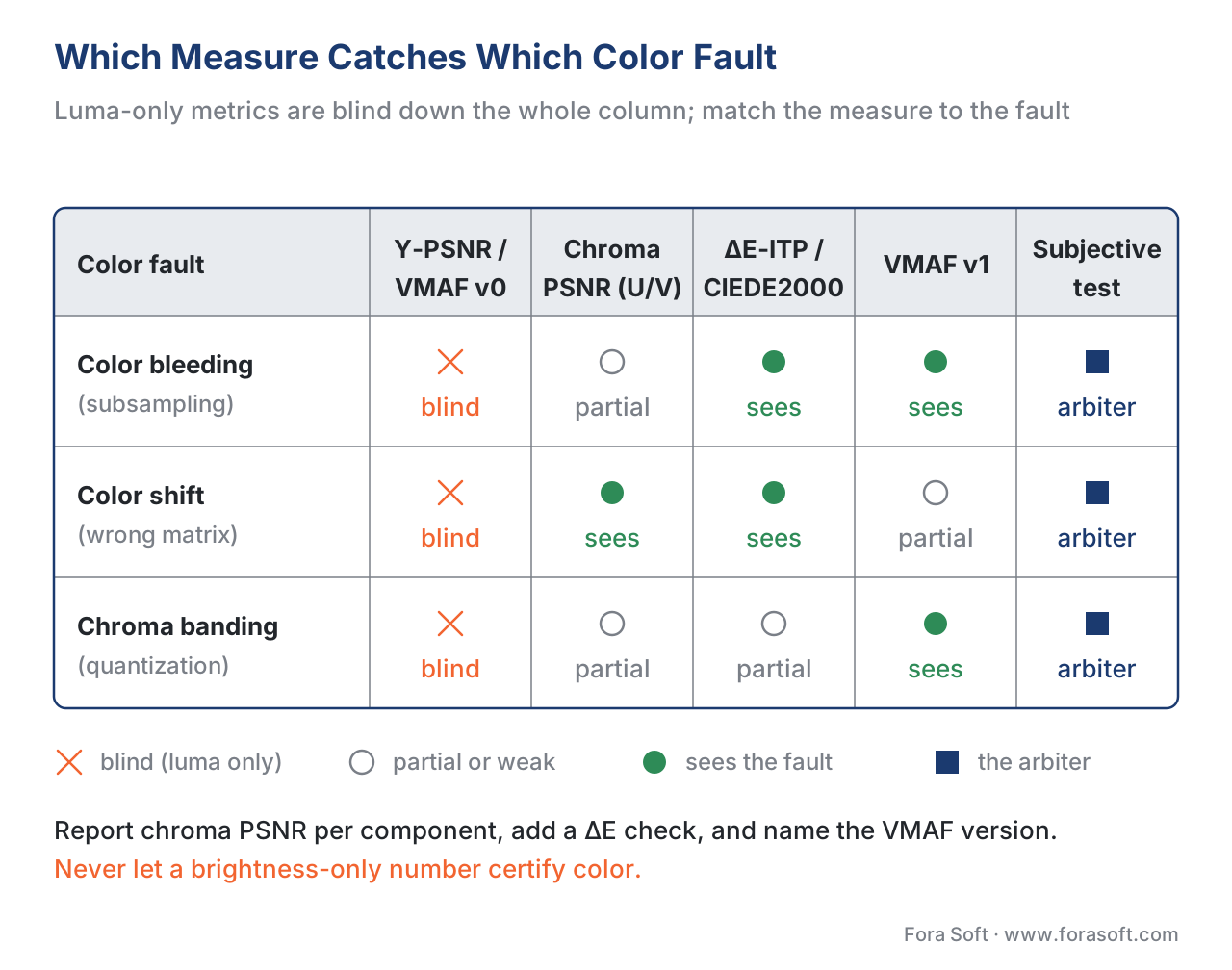 Figure 4. Which measure catches which color fault. Luma-only metrics (Y-PSNR, VMAF v0) are blind down the whole column; per-component chroma PSNR sees the error but not its perceptual weight; ΔE-ITP / CIEDE2000 and VMAF v1 carry color into the score; subjective testing is the arbiter. Match the measure to the fault — and never let a brightness-only number certify color.
Where Fora Soft fits in
Fora Soft has built video software since 2005 — streaming, WebRTC conferencing, e-learning, OTT, telemedicine, and surveillance — and color fidelity matters more in some of those than teams expect. A telemedicine stream where skin tone is diagnostic cannot tolerate a BT.601/709 color shift; an e-learning or screen-share product lives or dies on crisp colored text that 4:2:0 bleeds; an OTT title with saturated brand graphics shows chroma artifacts a luma-only gate waves through. We treat color as its own measurement problem, separate from brightness: a quality gate that reports only Y-PSNR or VMAF v0 is color-blind by construction, so we report per-component chroma PSNR alongside luma, add a perceptual color-difference check (ΔE-ITP for HDR work), and verify color-space signaling end to end so the file is decoded with the recipe it was encoded with. The fixes follow the cause — keep 4:2:2 or 4:4:4 where saturated edges and text demand it, and tag primaries, transfer, and matrix correctly so nothing shifts.



The handbook
Fora Soft Video Engineering Handbook
We wrote a seven-volume handbook, 9,000+ pages, that works through the whole video stack from the pixel to production — compression, delivery, audio, and AI. Volume 1, Video Encoding, is where this article's machinery is taken apart: color spaces and the BT.601 / BT.709 / BT.2020 matrices, chroma subsampling and what quantizing the color planes costs, and how PSNR, SSIM, and VMAF score the result. Volume 3 covers the delivery side, where a transcode drops the color tags and a player guesses the wrong matrix, and volume 6 covers the model side of perceptual metrics. Written by Nikolay Sapunov, CEO at Fora Soft.
Is your quality gate certifying color it never measured?
Send us a clip and the numbers you currently report, and we will measure the color channels next to the brightness ones — per-component chroma PSNR, a ΔE check on the saturated edges, and the color-space tags end to end. 250+ video products shipped since 2005.
See our case studies
Case study
Sprii
Live shopping with €365M+ in cumulative sales and 21M products sold — garments and brand colors bought off a 4:2:0 stream, which is what makes color fidelity a commercial number rather than an aesthetic one.
Case study
Speed.Space
Remote production recording at 1080p and 8 Mbps for Netflix, Electronic Arts, and HBO shoots — footage that goes on to be graded, where the color you kept at capture is the color you still have.
Case study
Mindbox
RTSP to FFmpeg to HLS across 50+ deployments — a transcode chain long enough that color primaries, transfer, and matrix have to be carried deliberately or a shift appears with no bitrate to blame.
What to read next
Artifacts
The Compression Artifact Field Guide
The whole family in one place — blocking, ringing, blur, banding, judder — and how to name what you are looking at before you measure it.
Artifacts
Banding: When Gradients Break Into Steps
The luma twin of chroma banding: why smooth gradients step, and why CAMBI catches what PSNR and VMAF walk past.
Metrics
Where Objective Metrics Lie
The color blind spot is one entry on a longer list — content, motion, and the edge cases where a high score and a bad picture coexist.
Metrics
Beyond VMAF: P.1204, AVQT & Next-Gen Metrics
What comes after a luma-only fused score, including the VMAF v1 chroma feature that finally puts color inside the number.
References
- Recommendation ITU-R BT.2124-0, "Objective metric for the assessment of the potential visibility of colour differences in television," International Telecommunication Union, January 2019. Tier 1 (official standard). Defines ΔE-ITP, a colour-difference metric computed in the ICtCp space for HDR/wide-gamut signals, scaled so a value of 1 corresponds to a just-noticeable colour difference. Basis for the ΔE-ITP description and Table 1. https://www.itu.int/rec/R-REC-BT.2124
- Recommendation ITU-T H.273, "Coding-independent code points for video signal type identification," International Telecommunication Union, 2016 (and later editions). Tier 1 (official standard). Defines the code points for colour primaries, transfer characteristics, and matrix coefficients — the signaling whose loss or mismatch causes color shift. Basis for the color-shift / metadata claims. https://www.itu.int/rec/T-REC-H.273
- Recommendation ITU-R BT.709-6, "Parameter values for the HDTV standards for production and international programme exchange," International Telecommunication Union, 2015. Tier 1 (official standard). Defines the HD luma weights (0.2126, 0.7152, 0.0722). Basis for the BT.709 matrix and the BT.601/709 shift example. https://www.itu.int/rec/R-REC-BT.709
- Recommendation ITU-R BT.2020-2, "Parameter values for ultra-high definition television systems for production and international programme exchange," International Telecommunication Union, 2015. Tier 1 (official standard). Defines the UHD/wide-gamut luma weights (0.2627, 0.6780, 0.0593) and the "constant luminance" Yc′CbcCrc mode that avoids subsampling luminance loss. Basis for the BT.2020 matrix and the constant-luminance note. https://www.itu.int/rec/R-REC-BT.2020
- "VMAF v1: Good Is Not Good Enough," Netflix Technology Blog (C. G. Bampis, Z. Li, K. Swanson, N. Fons Miret, P. Madhusudanarao), 19 June 2026. Tier 1 (metric-author defining work). States that VMAF v0 "only extracts luma-based features, so it is unaware of chroma artifacts," and that VMAF v1 adds a chroma feature (modified SpEED-QA) to capture subsampling/quantization color artifacts. Basis for the luma-only-blindness claim and the VMAF v1 chroma feature. https://netflixtechblog.com/vmaf-v1-good-is-not-good-enough-60d7e4244ea8
- L.-H. Chen, C. G. Bampis, Z. Li, J. Sole, and A. C. Bovik, "Perceptual Video Quality Prediction Emphasizing Chroma Distortions," IEEE Transactions on Image Processing, vol. 30, pp. 1941–1954, 2021. Tier 1 (metric-author / peer-reviewed). Shows that adding chroma-channel features improves video-quality prediction over luma-only VMAF on content with chroma artifacts; the research line behind VMAF v1's chroma feature. Basis for the "color-aware VMAF" claims. https://doi.org/10.1109/TIP.2021.3049984
- G. Sharma, W. Wu, and E. N. Dalal, "The CIEDE2000 Color-Difference Formula: Implementation Notes, Supplementary Test Data, and Mathematical Observations," Color Research & Application, vol. 30, no. 1, pp. 21–30, 2005. Tier 1 (defining implementation reference). The authoritative CIEDE2000 implementation note; basis for the ΔE00 description and the JND ≈ 1.0 interpretation. https://doi.org/10.1002/col.20070
- G. Chan, "Toward Better Chroma Subsampling" (2007 SMPTE Student Paper Award), SMPTE Motion Imaging Journal, vol. 117, no. 4, pp. 39–45, 2008. Tier 5 (peer-reviewed/institutional). Explains the gamma-domain luminance leak (chroma error causing a luminance loss at saturated borders) and out-of-gamut chroma-reconstruction artifacts. Basis for the "bleeding can dim an edge" point. https://doi.org/10.5594/J15100
- FFmpeg, "psnr" filter documentation (ffmpeg-filters), FFmpeg project, accessed 2026-06-24. Tier 3 (first-party tooling). Documents the per-component outputs
psnr_y,psnr_u,psnr_v(andmse_*), confirming chroma PSNR is computed but commonly unreported. Basis for the per-component PSNR recommendation. https://ffmpeg.org/ffmpeg-filters.html#psnr - "Chroma subsampling," Wikipedia, accessed 2026-06-24. Tier 6 (orientation). Summarizes the J:a:b notation, the 4:4:4 / 4:2:2 / 4:2:0 layouts and bandwidth factors, the four 4:2:0 siting variants, and the two main subsampling artifact types; normative notation cited to Poynton's "Chroma Subsampling Notation" (2008). Orientation for the subsampling mechanics. https://en.wikipedia.org/wiki/Chroma_subsampling
