


Why this matters
If you encode or QC video with skies, sunsets, dark scenes, animation, or any slow gradient, banding is the artifact that survives a green quality dashboard and still gets a complaint. It is the headline example of a metric blind spot: a clean VMAF can sit directly on top of obvious contours, so trusting the number over your eyes ships the bug. This article is written for a video engineer, encoding lead, or QA engineer who can see the stripes but wants to know exactly why they form, why the usual metrics miss them, which detector to add, and which of the three standard fixes to reach for. Get this one right and you stop arguing with a dashboard that is confidently wrong.
What banding actually is
Start with the look. Banding is the breakup of a smooth gradient into a series of flat steps — wide stripes of constant tone separated by abrupt, visible edges, like a topographic map's contour lines drawn across what should be a continuous wash. That second name, false contouring, is the precise one: the edges you see are contours that exist in the encoded picture but were never in the scene. A real sky darkens smoothly from horizon to zenith; a banded sky darkens in a handful of discrete jumps.
The key fact, and the reason banding has its own fixes, is where it lives. Banding appears only in smooth, low-texture regions with a gentle gradient — skies, water, walls, lens vignettes, fades, shadows, and the flat color fills of animation and screen content. It cannot appear in busy texture, because there is no smooth ramp there to step. This is the mirror image of where you hunt for it: the flattest, calmest part of the frame is exactly where banding shows, which is also exactly where the eye is most free to lock onto a straight edge.
It helps to picture a painter mixing a wash from dark blue to pale blue across a wall, but allowed to use only six tins of paint. No matter how carefully the painter works, the wall changes color in six flat steps, with a hard line everywhere two tins meet. Banding is those lines. The "tins" are the discrete brightness levels the format and the codec left available, and when there are too few of them, the gradient has to jump.
Where banding comes from: bit depth and quantization
Banding has two causes that usually act together, and separating them tells you which fix applies.
The first cause is bit depth — how many distinct brightness levels the format can store per color channel. Standard 8-bit video has 2⁸ = 256 levels per channel; 10-bit has 2¹⁰ = 1024, four times as many; 12-bit has 2¹² = 4096. A level is the smallest brightness step the format can represent, and it is also the smallest step the eye might catch on a flat field. When a gradient spans only a few levels, the picture has no choice but to draw it as a few flat bands.
The arithmetic is worth doing once, because it points straight at the fix. Suppose a sky ramps gently from code value 90 to code value 110 — only 20 distinct levels — across 400 pixels of height. That is 400 ÷ 20 = 20 pixels of identical brightness before the value is allowed to change, so you see 20-pixel-wide flat bands with a visible step between each. Encode the same gradient in 10-bit and the same brightness range now spans about 80 code values; the bands shrink to roughly 400 ÷ 80 = 5 pixels, and the steps drop below the threshold where the eye picks them out. Four times the levels, one quarter the band width. The cause-side mechanics of bit depth live in the Video Encoding section's bit-depth article; here we stay on recognizing and measuring the result.
The second cause is quantization — the bit-saving step inside every lossy codec, and the same mechanism that produces blocking. The encoder rewrites each block as a sum of wave patterns (the Discrete Cosine Transform) and then divides each wave's strength by a step size and rounds, deleting the small ones. In a smooth region the gradient is carried entirely by faint low-amplitude waves and by the dither-like texture of natural film grain. Quantization rounds exactly those away, collapsing a gently varying patch to a single flat value — and the boundary where one flat patch meets the next is a contour. So even 8-bit content that looked smooth at the source can gain banding in the encode, because the codec threw away the subtle variation that was holding the gradient together. The cause-side detail of how the quantizer step is set belongs to the Video Encoding section's quantization article.
This is why banding and grain are linked. Film grain and sensor noise act as natural dithering: random fluctuation that keeps a gradient from ever settling into hard steps. A denoiser, an aggressive encode, or a low bit depth removes that fluctuation, and the contours snap into view. Hold that thought — it is the logic behind two of the three fixes.
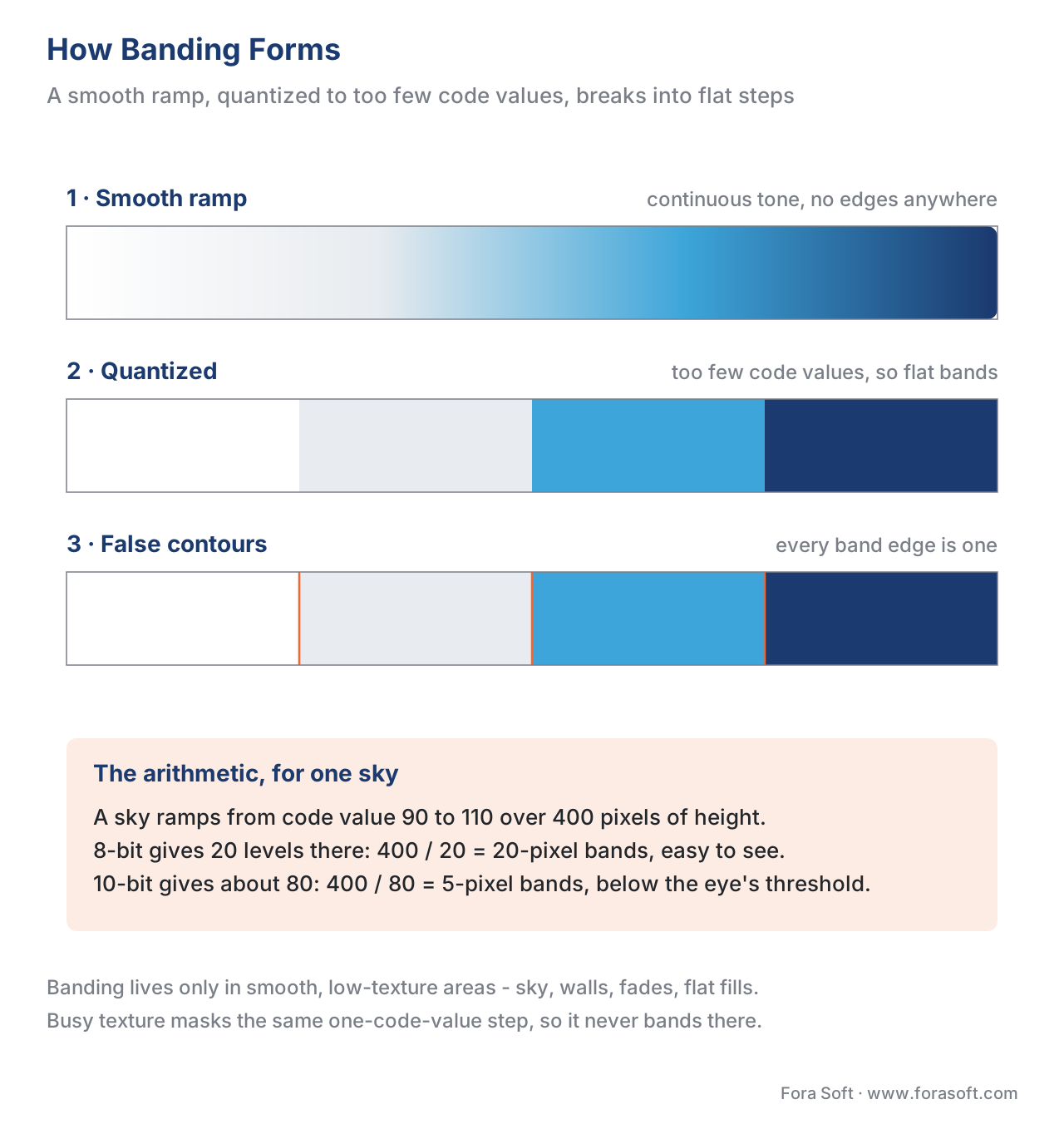 Figure 1. How banding forms. A smooth gradient (left) has too few code values to draw it, so quantization snaps it to flat bands (middle); each step is a false contour (right). More bit depth means more, finer steps — and bands too small to see.
Why the eye sees a step the metric calls tiny
Here is the trap that makes banding the hardest artifact to catch with a number. The pixel error in a band is small — often a single code value — yet the contour is obvious. Those two facts seem to contradict each other, and resolving the contradiction is the whole reason banding needs its own detector.
The eye does not measure absolute brightness; it measures change. At any edge where brightness steps up, human vision exaggerates the step — darkening the dark side and brightening the bright side — an effect named Mach bands after the physicist Ernst Mach, who described it in the 1860s. On a flat field with nothing to distract it, a one-code-value edge running straight across the gradient gets amplified by this mechanism into a line you cannot un-see. The same step buried in texture would be masked completely. Banding is the perfect storm: a low-amplitude edge, perfectly straight, sitting on the one kind of region — smooth and uniform — where the eye is most sensitive to it.
Now do the measurement arithmetic and watch the metric miss it. Take an 8-bit picture, peak value 255, where a banded sky differs from the true smooth gradient by an average of about one code value per pixel. The mean squared error is then about 1, and the Peak Signal-to-Noise Ratio — the raw pixel-error metric, in decibels — is:
PSNR = 10 · log10(255² / MSE)
     = 10 · log10(65025 / 1)
     = 10 · log10(65025)
     = 48.1 dB
A PSNR of 48 dB reads as a near-perfect encode by any rule of thumb. Halve the error to half a code value and it climbs past 51 dB. Yet the bands are plainly visible. The number is not wrong about the pixels — the error really is tiny — it is wrong about the perception, because it has no model of the eye amplifying a straight low-contrast edge. This is the exact opposite of blocking, which the metrics at least detect; banding they barely register at all. The full catalogue of these failures is Where objective metrics lie.
The three fixes: bit depth, dithering, debanding
Because banding has two causes, it has a small family of fixes, and they map cleanly onto the causes.
Higher bit depth attacks the root. Give the gradient more levels and the bands get narrower until they fall below the eye's threshold — the 8 → 10-bit jump quarters the band width, as the arithmetic above showed. The counterintuitive part is that this helps even for ordinary 8-bit SDR content: encoding an 8-bit source in 10-bit runs the codec's internal math at higher precision, so the rounding that creates contours happens on a finer grid. Netflix encodes its SDR AV1 streams in 10-bit for exactly this reason, reporting both reduced banding and slightly smaller files at equal quality. The trade-offs of 8-bit versus 10-bit encoding are covered in the Video Encoding section's bit-depth comparison.
Dithering attacks the perception. It adds a small amount of calibrated random noise to the gradient before quantization, so that instead of a region snapping to one flat value, its pixels scatter between two adjacent values in a ratio that averages to the right brightness. The eye blends the speckle back into a smooth ramp and never sees a hard edge — the same trick that lets a six-tin painter fake a continuous wash by stippling. Dithering trades a visible contour for invisible noise, and the eye vastly prefers the noise.
Debanding filters attack an encode you have already received. A debander detects the flat regions, smooths the contours within them, and re-adds a little grain so the smoothing does not itself look like plastic. In FFmpeg the two practical filters are gradfun, which interpolates across the gradient and dithers (its strength defaults to 1.2, its radius to 16), and deband, which targets more pronounced contours. Both are pre-processing or post-processing tools, not codec settings.
One caveat saves a lot of wasted effort: do not dither or deband just before a lossy encode and expect it to survive. Compression treats the dither as noise and quantizes it right back out, and the bands return. Add grain or dither as close to the final delivered bitstream as possible, or raise the bit depth instead so the gradient never bands in the first place. The detail loss that aggressive debanding can introduce is the subject of Blur and detail loss.
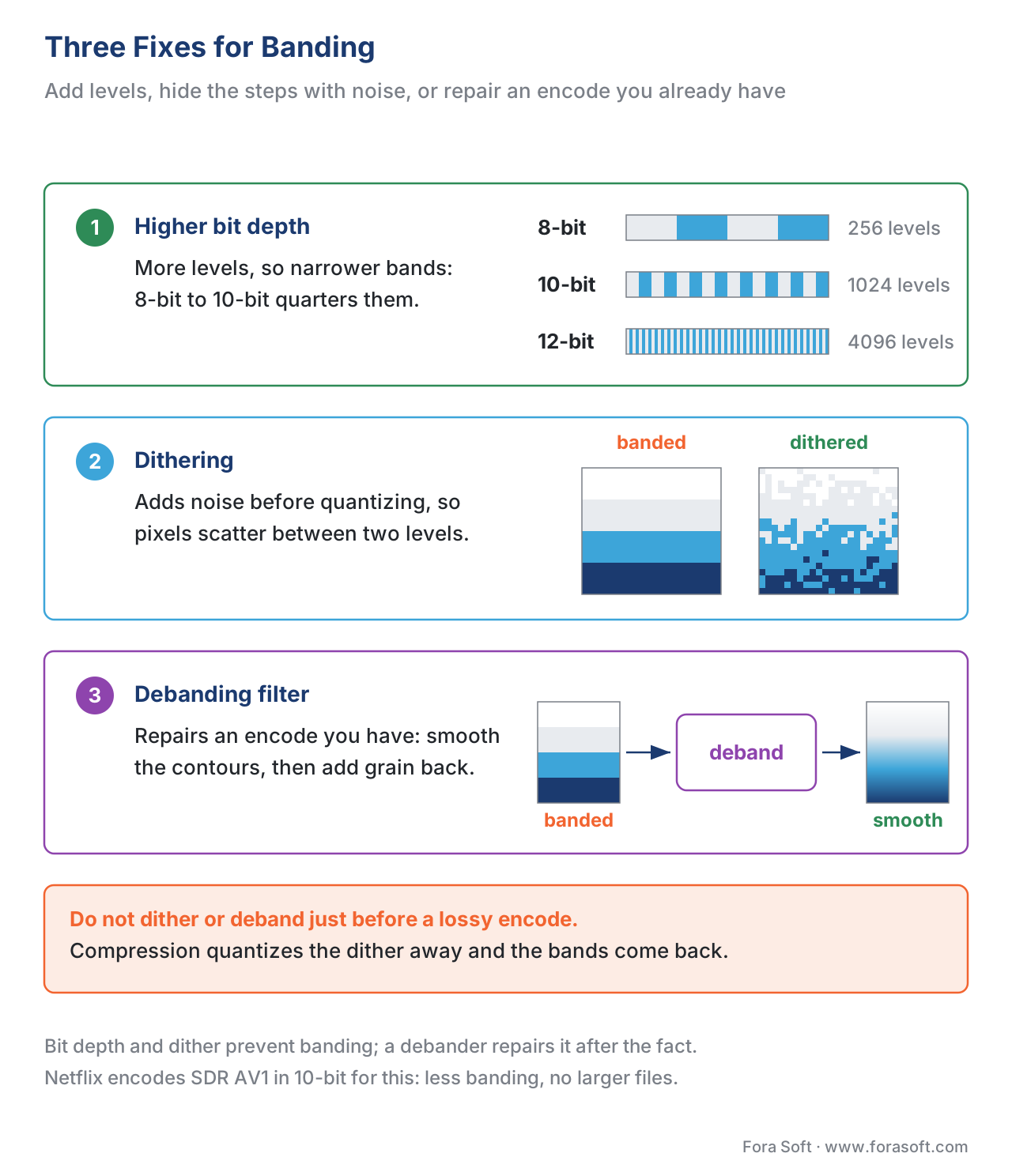 Figure 2. Three fixes. Higher bit depth (8→10→12-bit) gives more levels and finer steps; dithering scatters pixels between levels so the eye blends them smooth; a debanding filter repairs an existing encode. Caution: dither added before a lossy encode is quantized away.
How to measure banding, and which metric to trust
Because the full-reference metrics are nearly blind to banding, measuring it well means reaching for a tool built specifically for it — and, crucially, a no-reference tool. Banding is often born in the encode and judged on live or user-generated content where no pristine original exists, so a detector that needs the reference frame is the wrong shape for the job. Remember, a no-reference metric scores the encoded frame alone.
The current standard is CAMBI — the Contrast-Aware Multiscale Banding Index, published by Tandon, Afonso, Solé, and Krasula at the Picture Coding Symposium in 2021 and open-sourced inside Netflix's VMAF repository. CAMBI is a no-reference detector that works frame by frame and is built on a model of human vision: it uses the Contrast Sensitivity Function — how visible a contrast step is at a given brightness and spatial scale — to weight each candidate contour by how likely a viewer is to actually see it. That contrast-awareness is the whole point; a metric that just counted edges would flag harmless detail, while CAMBI scores the edges the eye will catch.
Reading a CAMBI score is simple. It starts at 0 — no banding detected — and rises with severity; around 5 banding becomes slightly annoying, and the worst observed values reach about 24 (unwatchable). One honest caveat the authors stress: banding visibility depends heavily on the viewing environment — a brighter display and dimmer room make the same contour more visible — so a CAMBI threshold should be tied to how your audience actually watches. CAMBI computes its score at 10-bit precision internally (converting 8-bit input up first), and its default analysis window of 63 pixels corresponds to about one degree of visual angle on a 4K screen at 1.5× picture-height viewing distance.
The other serious tool is the BBAND index (Blind BANding Detector) from Tu, Lin, Wang, Adsumilli, and Bovik at ICASSP 2020. Like CAMBI it is no-reference and vision-inspired, and it adds a useful output: a pixel-wise banding visibility map alongside a frame- and video-level severity score, so you can see where the contours are, not just how bad the frame is overall.
| Metric | What it measures | Reference needed | Where it lies on banding |
|---|---|---|---|
| PSNR | Mean pixel error in dB | Full-reference | Nearly blind: a 1-code-value contour is a tiny MSE, so it can read ~48 dB |
| SSIM | Structural similarity, 0–1 | Full-reference | Largely misses it; flat bands keep high local structural similarity |
| VMAF (legacy) | Fused perceptual score, 0–100 | Full-reference | Documented blind spot — the gap that motivated CAMBI |
| VMAF (v1, +CAMBI) | Fused score with a banding feature | Full-reference | Now reacts to banding because CAMBI is folded in |
| CAMBI | Contrast-aware banding visibility, 0–24 | No-reference | Built for banding; the one to use; tie the threshold to viewing conditions |
| BBAND | Banding visibility map + severity | No-reference | Built for banding; HVS-inspired; gives a per-pixel map |
Table 1. Six ways a metric treats banding. The full-reference metrics under-report or miss it; the dedicated no-reference detectors (CAMBI, BBAND) are what you reach for, and they work on live and UGC where no original exists. Pair the number with a look at the flat regions, where banding shows first.
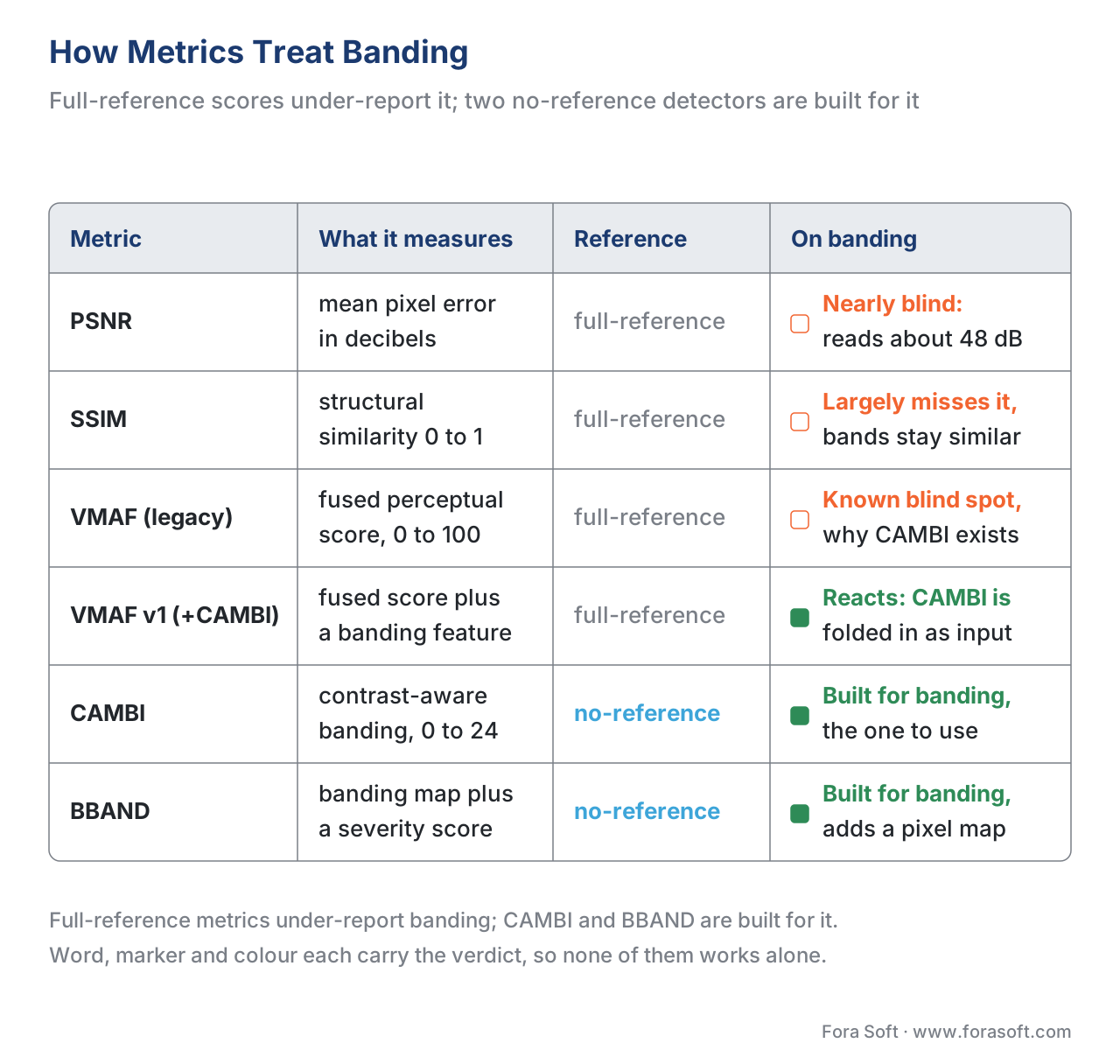 Figure 3. Metric behavior on banding. The full-reference metrics under-weight or miss it (PSNR and SSIM nearly blind); the no-reference detectors built for banding are CAMBI and BBAND. Color and column both carry the verdict, so neither alone does.
A note on VMAF, because it is the score most teams watch. Plain VMAF was largely blind to banding — the gap CAMBI was built to close — and VMAF's newer v1 model folds CAMBI in as a feature, so an up-to-date VMAF does react to contours where the older default did not. The catch is that many pipelines still run the older default model, so "our VMAF is fine" is only reassurance about banding if you know which model produced it. The full VMAF model story is in VMAF explained.
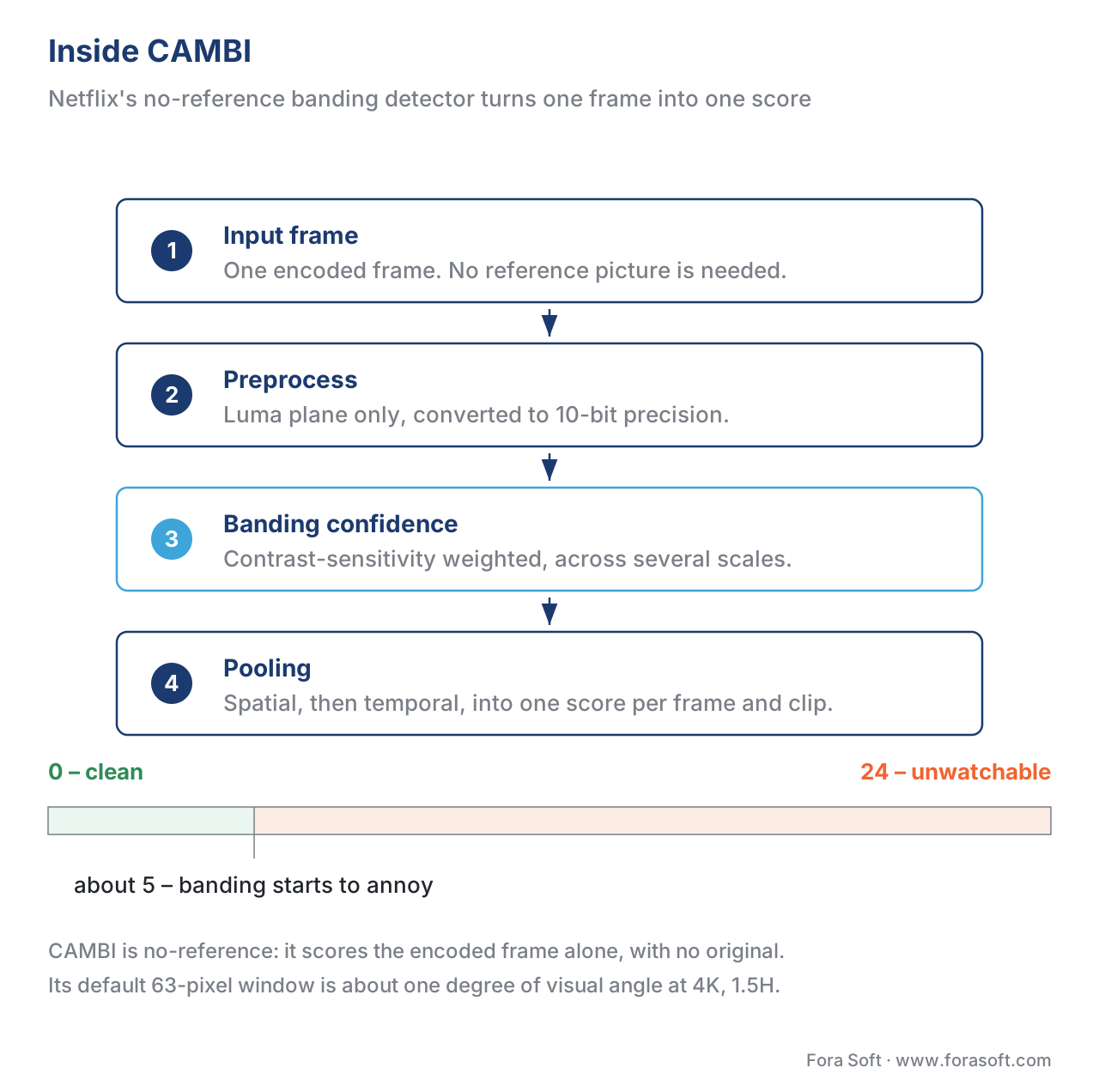 Figure 4. Inside CAMBI. Three stages — preprocessing, contrast-aware banding confidence across multiple scales, then spatio-temporal pooling — turn a frame into one no-reference score, 0 (clean) to ~24 (unwatchable), with ~5 the point banding starts to annoy.
Free download: No-reference banding detectorA dependency-free Python script that finds the smooth, low-texture regions of a single frame and scores the low-amplitude steps inside them — the BBAND and CAMBI idea, simplified, with no reference picture needed.Common mistake: trusting a green dashboard over the sky in frame 200. The single most expensive error in this whole topic is reading "VMAF 95, ship it" off a model that never saw the banding. A clean fused score can sit directly on top of obvious contours in a sunset, a dark interior, or an animated background, because — unless you are on a CAMBI-aware model — banding barely enters the number. When the content has smooth gradients, add a banding detector (CAMBI or BBAND), set a threshold tied to how your viewers watch, and confirm the flat frames by eye. A metric is a proxy with a domain, never a clean bill of health — the broader version of this lesson is Where objective metrics lie.
Where Fora Soft fits in
Fora Soft has shipped video software since 2005 — streaming, WebRTC conferencing, OTT, e-learning, telemedicine, and surveillance — and banding is the artifact most likely to slip past an automated check and reach a viewer, because the dashboard says the encode is clean. We treat it as a measurement problem with a known shape: find the smooth regions, score them with a no-reference banding detector rather than a fused number, and tie the pass/fail threshold to how the audience actually watches — a bright OTT living-room screen is less forgiving than a phone in daylight. The fix then follows the cause: more bit depth for skies and animation, dithering or a debanding pass where re-encoding at 10-bit is not an option. Where it helps a decision, we point to our own benchmark data so you can check the method rather than take our word.



The handbook
Fora Soft Video Engineering Handbook
Seven volumes across the whole video stack, from the pixel to production. Volume 1 is the encoder side of this article — bit depth, the DCT, and the quantizer that rounds away the faint variation holding a gradient together — and volumes 2 and 3 are the delivery side, where a 10-bit ladder and a debanding pass have to reach the player intact. Work through the series and you can design and build a pipeline that does not band. Written by Nikolay Sapunov, CEO at Fora Soft.
Is your dashboard green while the sky is striped?
Send us a few frames that got complaints and the scores your pipeline gave them, and we will tell you whether banding is the cause, which detector to add, and which of the three fixes your content actually needs. 250+ video products shipped since 2005.
See our case studies
Case study
Worldcast Live
Concert streaming at 1.5 Gb/s and 0.4–0.5 s latency for 10,000 simultaneous viewers, where a dark stage washed by one spotlight is the most banding-prone picture there is — and the quality drop for a weak connection is exactly when contours appear.
Case study
Speed.Space
Remote production used on Netflix, EA and HBO shoots, where the crew sets resolution, frame rate, codec and bitrate per shoot and records 1080p at 8 Mb/s locally — the settings that decide whether a studio backdrop arrives smooth or stepped.
Case study
Mindbox
AI video management in 50+ deployments, pulling RTSP from cameras of every vintage through FFmpeg to HLS: night scenes and flat walls band readily, and with no pristine original anywhere in the pipeline a no-reference detector is the only way to measure it.
What to read next
Artifacts
Video Compression Artifacts: The Visual Field Guide
Where banding sits among the other artifacts, and how to tell it from blocking at a glance.
Metric limits
Where Objective Video Quality Metrics Lie (and Why)
The full catalogue of blind spots, of which the 48 dB banded sky is only the clearest.
Metric types
Full-, Reduced-, No-Reference Video Quality Metrics
Why CAMBI and BBAND being no-reference is what lets them work on live and UGC.
VMAF
VMAF Explained: Netflix's Perceptual Video Quality Metric
Which model your pipeline is running, and whether the CAMBI feature is in it.
References
- P. Tandon, M. Afonso, J. Solé, and L. Krasula, "CAMBI: Contrast-aware Multiscale Banding Index," Picture Coding Symposium (PCS), 2021. Tier 1 (metric-author, peer-reviewed). Defines CAMBI, a no-reference banding detector using the Contrast Sensitivity Function to predict banding visibility; basis for the CAMBI sections, Figure 4, and the metric table. https://arxiv.org/abs/2102.00079
- Netflix, CAMBI documentation (
resource/doc/cambi.md), VMAF repository, accessed 2026-06-24. Tier 1/3 (metric-author first-party implementation). Specifies the score range (0 to ~24, ~5 slightly annoying), 10-bit internal computation, the 63-pixel default window (~1° at 4K/1.5H), no-reference operation, and viewing-environment dependence. https://github.com/Netflix/vmaf/blob/master/resource/doc/cambi.md - Z. Tu, J. Lin, Y. Wang, B. Adsumilli, and A. C. Bovik, "BBAND Index: A No-Reference Banding Artifact Predictor," IEEE ICASSP, 2020, pp. 2712–2716. Tier 1 (metric-author, peer-reviewed). Defines the Blind BANding Detector, a no-reference, HVS-inspired predictor producing a pixel-wise banding visibility map and frame/video severity scores; basis for the BBAND row and the shipped detector's design. https://arxiv.org/abs/2002.11891
- P. Tandon, M. Afonso, J. Solé, L. Krasula, "CAMBI, a banding artifact detector," Netflix Technology Blog, 2021. Tier 4 (credible deployer). Motivates CAMBI by VMAF's inability to capture banding, and describes the subjective study on encoding parameters and dithering. https://netflixtechblog.com/cambi-a-banding-artifact-detector-96777ae12fe2
- FFmpeg, gradfun — FFmpeg Filters Documentation, accessed 2026-06-24. Tier 3 (first-party tooling). Documents the
gradfundebanding filter (gradient interpolation plus dithering;strengthdefault 1.2, range 0.51–64;radiusdefault 16, range 8–32) and the warning not to use it before lossy compression. https://ffmpeg.org/ffmpeg-filters.html#gradfun - FFmpeg, deband — FFmpeg Filters Documentation, accessed 2026-06-24. Tier 3 (first-party tooling). Documents the
debandfilter, which detects banded regions and replaces flagged pixels to remove pronounced contours. https://ffmpeg.org/ffmpeg-filters.html#deband - Recommendation ITU-R BT.2100-2, Image parameter values for high dynamic range television for use in production and international programme exchange, ITU-R, 2018. Tier 1 (primary standard). Defines the 10-bit and 12-bit integer representations whose finer quantization steps reduce banding relative to 8-bit. https://www.itu.int/rec/R-REC-BT.2100
- M. Yuen and H. R. Wu, "A survey of hybrid MC/DPCM/DCT video coding distortions," Signal Processing, vol. 70, no. 3, pp. 247–278, 1998. Tier 5 (peer-reviewed, foundational). The classic taxonomy of block-DCT coding artifacts, attributing false contouring to coarse quantization of low-frequency coefficients in smooth regions. https://www.sciencedirect.com/science/article/abs/pii/S0165168498001285
- R. K. Mantiuk et al., "A visual model for predicting chromatic banding artifacts" (Denes, Mantiuk et al.), Electronic Imaging, 2019. Tier 5 (peer-reviewed). A perceptual model of banding visibility grounded in contrast detection, supporting the Mach-band / contrast-sensitivity explanation of why a low-amplitude contour is so visible. https://www.cl.cam.ac.uk/~rkm38/pdfs/denes2019banding_model.pdf
- A. Kapoor, J. Sapra, and Z. Wang (Tu et al. line of work), "Subjective and Objective Quality Assessment of Banding Artifacts on Compressed Videos," arXiv:2508.08700, 2025. Tier 5 (peer-reviewed/institutional). A recent banding-specific subjective dataset and benchmark of detectors, confirming that generic full-reference metrics correlate poorly with perceived banding. https://arxiv.org/html/2508.08700v2
