


Why this matters
If you encode, stream, or QC video, you will eventually stare at a frame that looks wrong and have to answer two questions fast: what am I looking at, and what caused it? Guessing wastes a debugging afternoon and sometimes ships the bug. This guide gives you a named vocabulary for every common artifact, a map from symptom to cause to fix, and — because this is a measurement section — an honest table of which metric actually catches each one. It is written for a video engineer, encoding lead, or QA engineer who can see that "something is off" but wants to name it, measure it, and trace it like a professional. The artifact gallery that follows is the most link-worthy block in this section precisely because a clean, labeled reference like this is rare on the open internet.
What a compression artifact actually is
Start with the word. An artifact is any visible structure in the picture that the camera did not record and the director did not intend — it is an artifact of the process, not of the scene. Lossy video compression works by throwing away information the encoder bets you will not miss: fine detail, subtle color, precise motion. Most of the time the bet pays off and you see nothing. When the encoder is pushed too hard — too few bits, too aggressive a setting, a hard piece of content — the discarded information leaves a visible scar. That scar is the artifact.
It helps to think of compression as packing a suitcase. Fold the clothes carefully and they come out fine; sit on the lid to force it shut and everything comes out creased in predictable places. Compression artifacts are those creases. They are not random noise — each one has a specific mechanism, appears in a specific place, and looks a specific way, which is exactly what makes a field guide possible.
One distinction up front, because it changes how you hunt. Not every artifact comes from the encoder. Some are born earlier, in a noisy or already-compressed source. Some are born later, in delivery — a network drop, an adaptive-bitrate switch, a decoder bug. The encoder gets blamed for all of them because it sits in the middle, but the fix lives wherever the artifact was actually introduced. Tracing that path is the job of the capstone article on tracing an artifact to its cause; recognizing the artifact in the first place is the job of this one.
The four families of artifacts
There is no single official taxonomy of video artifacts, but the research literature has converged on a stable split between spatial artifacts (errors inside a single frame) and temporal artifacts (errors that only appear in motion, across frames). The classic survey by Yuen and Wu in Signal Processing (1998) cataloged the spatial set — blocking, ringing, the mosquito effect, blurring, and color bleeding — and later perceptual studies added the temporal set. For a working engineer, it is more useful to sort by origin, because origin points at the fix. This guide uses four families.
The first family is block-transform artifacts. Nearly every codec — H.264/AVC, HEVC, AV1 — chops each frame into blocks and compresses each block with a Discrete Cosine Transform (DCT), a math step that represents the block as a sum of patterns and then quantizes (rounds off) the patterns to save bits. Round too hard and the block structure shows: blocking, ringing, mosquito noise, and blur all come from this single mechanism.
The second family is tonal-quantization artifacts — chiefly banding, also called contouring. These appear in smooth gradients (a sky, a fade, a studio backdrop) when there are not enough distinct brightness levels to render the gradient smoothly, so it breaks into visible steps.
The third family is color artifacts — color bleeding and the errors that come from chroma subsampling, the standard practice of storing color at lower resolution than brightness. These hurt saturated edges and colored text most.
The fourth family is temporal and delivery artifacts — judder, stutter, flicker, and the delivery-side problems (bitrate switches, freezes, and tiling from packet loss). These only exist in motion or in transit, and — critically — the per-frame metrics cannot see them at all.
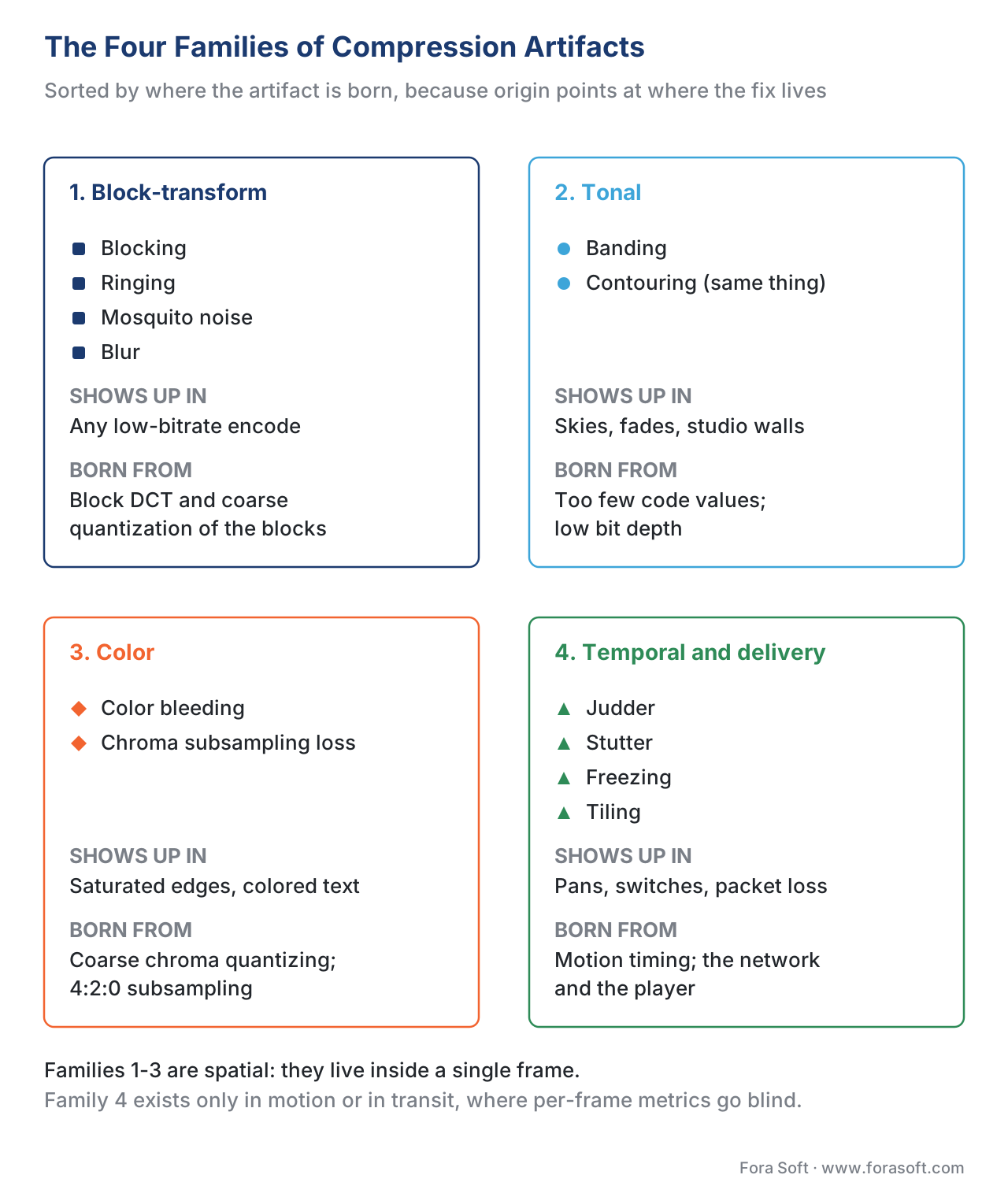 Figure 1. The four families. Sorting by where an artifact is born points straight at where the fix lives.
The block-transform family: blocking, ringing, mosquito noise, blur
These four share one parent — the block-based DCT and its quantizer — so they travel together and worsen together as bitrate drops.
Blocking (often called macroblocking) is the most recognizable artifact of all: the picture breaks into visible squares, as if assembled from coarse tiles. It happens because the codec processes the frame on a grid of blocks, and at low bitrate each block is quantized so coarsely that neighboring blocks no longer line up at their shared edge. The grid is real and countable. Split a 1920×1080 frame into 8×8 transform blocks and you get 240 × 135 = 32,400 blocks — 32,400 little edges where a visible seam can open up. Modern codecs fight blocking with a normative in-loop deblocking filter, defined inside the H.264/AVC and HEVC standards, that smooths block boundaries before the frame is shown and reused; HEVC adds a second stage called Sample Adaptive Offset. When you still see blocking, the encoder has run out of bits to hide it. The full mechanism and the metric behavior live in Blocking and the DCT grid.
Ringing is the rippling or ghosting you see hugging a sharp, high-contrast edge — the outline of text, a building against the sky. It is a textbook case of the Gibbs phenomenon: when the quantizer truncates the high-frequency DCT coefficients that a crisp edge needs, the reconstructed edge overshoots and oscillates, like a struck bell that rings instead of stopping cleanly. Ringing lives in the still frame.
Mosquito noise is ringing that moves. Because the encoder re-quantizes each frame slightly differently, the ringing around an edge shimmers and dances frame to frame — a cloud of busy dots hovering around hard edges, exactly like mosquitoes around a porch light. It is worst on the content that is most common in real products: sharp text, logos, and computer-generated graphics over a flat background. The NIST work on mosquito noise traces it directly to the block-DCT quantization process. Ringing and mosquito noise get their shared deep dive in Ringing and mosquito noise around edges.
Blur is the quiet one: the loss of fine detail and texture when the quantizer discards the high-frequency information that carries it, or when the video was downscaled and never recovered. Grass turns to a green smear, skin loses pores, brick loses mortar. The hard part is that blur is not always an artifact — a shallow depth of field is intentional softness — so the skill is telling a creative choice from a compression failure, which is the subject of Blur and detail loss.
The tonal family: banding
Pull a smooth gradient — a clear evening sky, a slow fade to black, a softly lit studio wall — through a hard enough encode and it stops being smooth. It breaks into visible bands of flat color separated by sharp steps, like a topographic map. This is banding, also called contouring, and it has a precise cause: there are not enough distinct code values to represent the gradient, so many pixels get rounded to the same value and form a flat plateau, then jump to the next plateau.
Here is the arithmetic, because it points straight at the fix. Standard 8-bit video has 2^8 = 256 brightness levels per channel. Suppose a sky ramps gently from code value 90 to code value 110 — only 20 distinct levels — across 400 pixels of height. That is 400 ÷ 20 = 20 pixels of identical brightness before the value is allowed to change, so you see 20-pixel-wide flat bands with a visible step between each. Now encode the same gradient in 10-bit, which has 2^10 = 1024 levels — four times as many. The same brightness range now spans about 80 code values, the bands shrink to roughly 400 ÷ 80 = 5 pixels, and the steps drop below the threshold where the eye picks them out. That is why the standard fixes for banding are higher bit depth (8 → 10-bit), dithering (adding a little calibrated noise to break up the steps), and dedicated debanding filters. The cause-side mechanics of bit depth live in the Video Encoding section's bit-depth article; the measurement side is Banding: when smooth gradients break into steps.
Banding matters far beyond its looks because of what it does to your metrics, which we come to below: it is the artifact the popular scores miss most completely.
The color family: bleeding and chroma subsampling
Color gets compressed harder than brightness, on purpose, because the eye is far more sensitive to luminance (how bright) than to chrominance (what color). Codecs exploit this with chroma subsampling — most commonly the 4:2:0 scheme, which stores a full-resolution brightness image but only a quarter-resolution color image. Usually invisible. But on a saturated, high-contrast color edge — red text on a gray background, a bright logo — the low-resolution color can smear past the sharp brightness edge it is supposed to sit inside. That smear is color bleeding: the color leaks outside its lines.
Yuen and Wu pinned the mechanism to the quantizer zeroing out the higher-frequency color coefficients, leaving only a coarse, low-frequency version of the color that cannot keep up with a sharp edge. Saturated reds and the colored text on screen-content and presentations are where it shows. The recognition-and-measurement treatment is Color artifacts: bleeding, shift, and chroma subsampling; the encoding-side mechanics of color spaces and subsampling belong to Video Encoding's color article.
The temporal and delivery family: judder, stutter, freezes, tiling
The last family only exists in motion, and it is the family the standard metrics are structurally unable to see.
Judder is uneven motion — a slow camera pan that should glide but instead lurches in a repeating hitch. The classic cause is frame-rate conversion: showing 24-frames-per-second film on a 60-Hz display forces a 3:2 pulldown (also called telecine), which displays one film frame for three refreshes and the next for two. That 3-2-3-2 cadence is uneven, and on a steady pan the eye reads the unevenness as a stutter. Stutter proper is different — it comes from frames that arrive late or get dropped, so motion that should be continuous jumps. Both are temporal; neither changes any single frame's appearance.
The delivery-side artifacts round out the family: an adaptive-bitrate switch that drops to a lower quality mid-stream and snaps the picture softer for a few seconds; a freeze where the picture stops while the player rebuffers; and tiling or corruption where lost network packets leave smeared blocks or a half-updated frame. The encoder caused none of these — the network and the player did — which is why they get their own article, Streaming-specific artifacts, and connect forward to the streaming-experience block. Judder and stutter themselves are covered in Judder, stutter, and frame-rate artifacts.
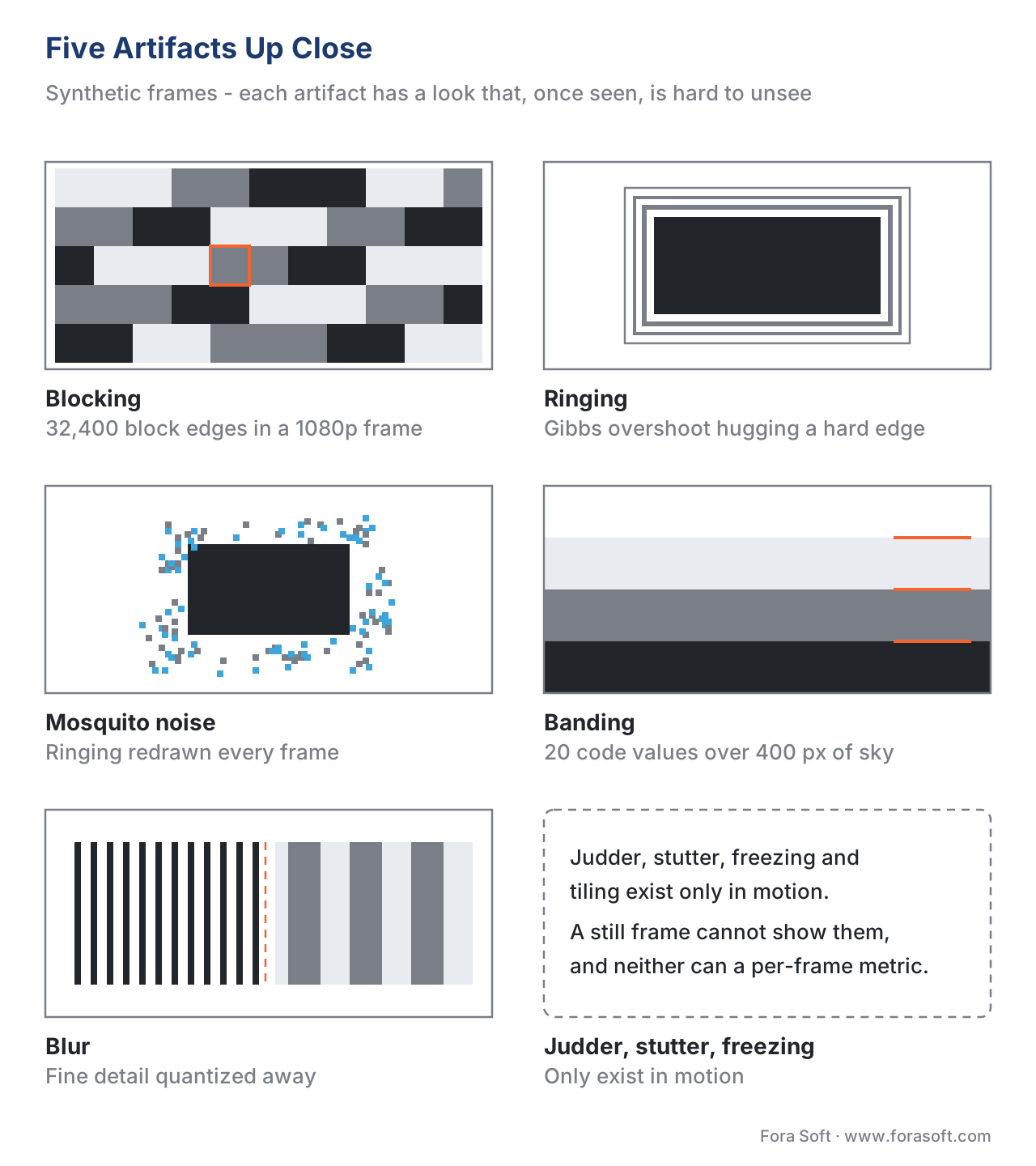 Figure 2. Five artifacts up close (synthetic frames). Each has a signature look that, once seen, is hard to unsee.
Which metric catches which artifact — and which it cannot
This is the part a marketing page will never tell you, and it is the whole reason a measurement section owns the artifact gallery. A quality metric is only useful for an artifact it can actually detect. The three popular full-reference metrics — PSNR (Peak Signal-to-Noise Ratio, raw pixel error in decibels), SSIM (Structural Similarity, a 0–1 structural match), and VMAF (Video Multimethod Assessment Fusion, Netflix's 0–100 perception-trained score) — each have hard blind spots.
Blocking and blur sit squarely in what these metrics measure, so they catch them reasonably well. Ringing and color bleeding are caught weakly — the error is small in pixel terms but visible to the eye. Banding is the worst case: Netflix's own documentation states plainly that PSNR, SSIM, and VMAF are not designed to detect banding, which is exactly why Netflix built a separate detector, CAMBI (the Contrast-Aware Multiscale Banding Index), and later folded it into VMAF. And the entire temporal family — judder, stutter, flicker — is invisible to all three, for a structural reason: PSNR, SSIM, and VMAF are computed frame by frame and then averaged, so an artifact that lives in the timing between frames never enters the calculation.
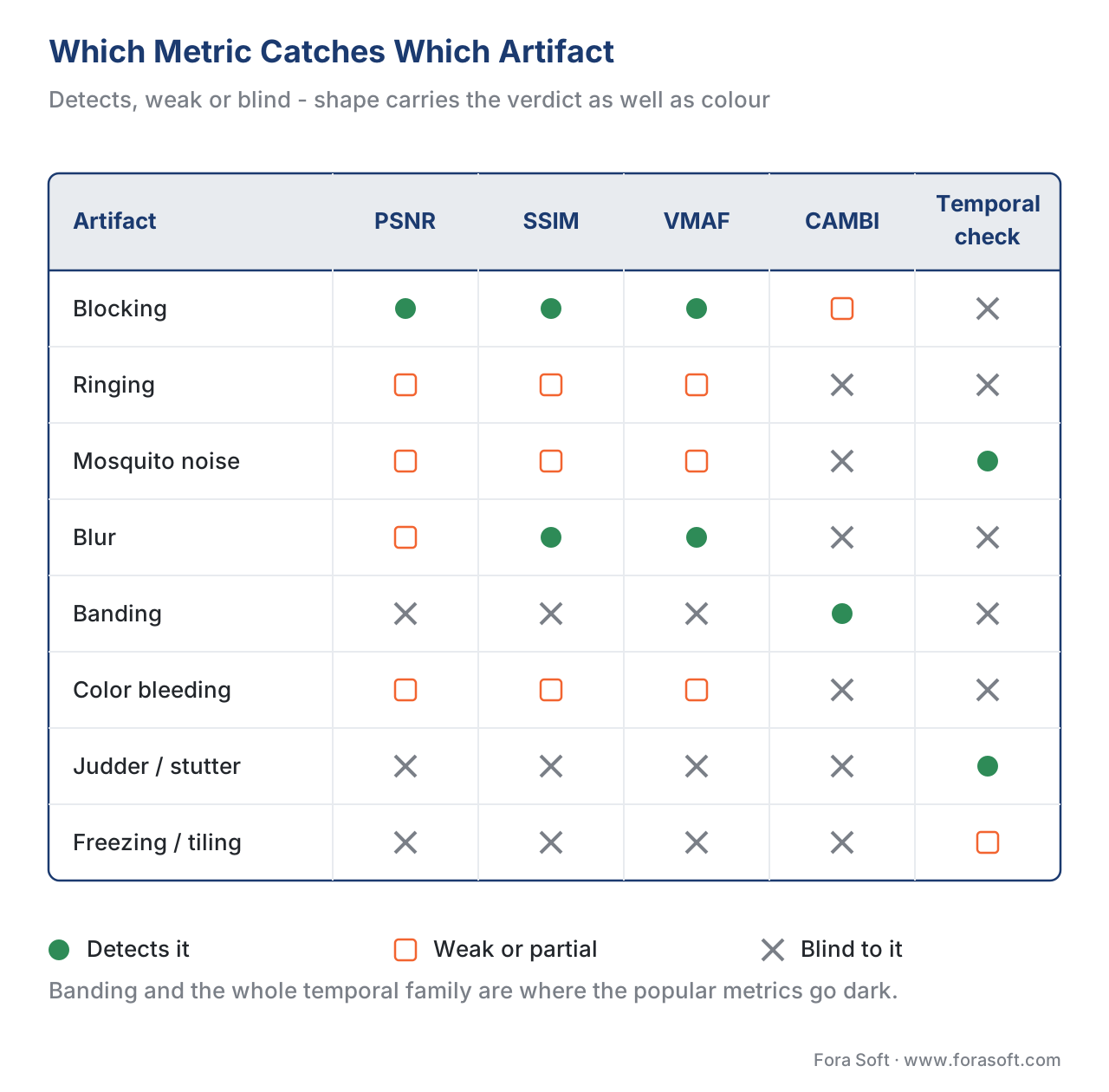 Figure 3. Which metric catches which artifact. Banding and the whole temporal family are where the popular metrics go dark — both color and glyph encode the verdict so neither alone carries it.
| Artifact | Looks like | Born from | Metric that catches it / blind spot |
|---|---|---|---|
| Blocking | Visible square tiles | Coarse DCT quantization on the block grid | PSNR / SSIM / VMAF detect it well |
| Ringing | Ripples hugging sharp edges | Truncated high-frequency coefficients (Gibbs) | Weakly caught; small in pixels, visible to the eye |
| Mosquito noise | Shimmering dots around edges, moving | Frame-to-frame variation of ringing | Per-frame metrics miss the motion; needs temporal check |
| Blur | Lost texture and fine detail | Quantizing away high frequencies; downscaling | SSIM / VMAF detect it; hard to tell from intentional softness |
| Banding | Stripes across a smooth gradient | Too few code values; low bit depth | Blind spot — PSNR/SSIM/VMAF miss it; use CAMBI |
| Color bleeding | Color leaking past its edge | Coarse chroma quantization; 4:2:0 subsampling | Weak — luma-focused metrics under-weight chroma |
| Judder / stutter | Lurching or jumping motion | 3:2 pulldown; dropped or late frames | Blind spot — per-frame metrics cannot see timing |
| Freezing / tiling | Frozen or smeared picture | Rebuffering; lost network packets | Out of scope for picture metrics; needs QoE telemetry |
Table 1. The field guide in one table: every common artifact, its signature, its cause, and the honest truth about which metric does or does not catch it. Pair every metric with the blind spot for the content in front of you.
Common mistake: trusting a green dashboard over your own eyes. The single most expensive error in this whole topic is concluding "VMAF is 95, so the picture is clean." VMAF 95 can sit on top of obvious banding in the sky, color bleeding on the logo, and judder on every pan — because none of those enter the score. When the content is prone to a blind-spot artifact (smooth gradients, saturated text, slow pans), add the right detector — CAMBI for banding, a temporal check for judder — and confirm the hard frames by eye. A metric is a proxy with a domain, never a clean bill of health. The full catalog of these failures is Where objective metrics lie.
The decision aid: you see X, the cause is likely Y, the fix is Z
When an artifact shows up, work the symptom backward. The flow below is the fast version; the tracing article is the thorough one.
If you see visible squares, you are looking at blocking — the cause is too low a bitrate or too aggressive a quantizer, and the fix is more bits, a better encoder preset, or stronger deblocking. If you see stripes in a smooth sky or fade, that is banding — the cause is insufficient bit depth or quantization of a flat region, and the fix is 10-bit encoding, dithering, or a debanding filter. If you see halos or shimmer around text and edges, that is ringing or mosquito noise — the cause is high-frequency truncation, and the fix is more bits, a lighter sharpening pre-filter, or a denoise pass before encode. If you see mush where texture should be, that is blur — confirm it is not intentional, then raise bitrate or check the scaling chain. If you see color smearing past an edge, that is color bleeding — the cause is chroma quantization or subsampling, and the fix is a higher-quality chroma setting or 4:2:2 for critical work. If motion lurches on a pan, suspect judder from a frame-rate mismatch; if it jumps or freezes, suspect dropped frames or rebuffering on the delivery side, not the encoder at all.
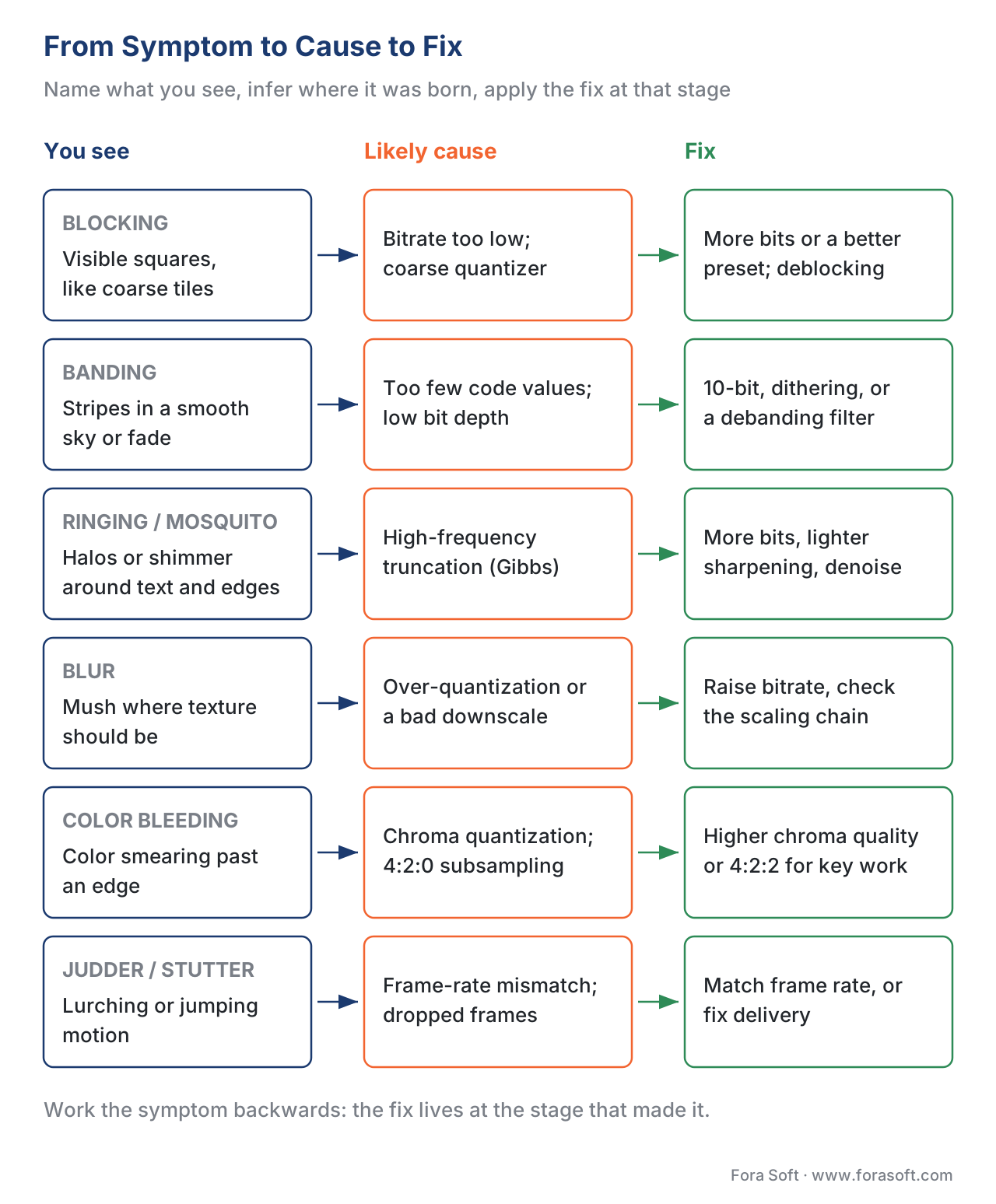 Figure 4. From symptom to cause to fix. Read left to right: name what you see, infer where it was born, apply the fix at that stage.
Where Fora Soft fits in
Fora Soft has built video software since 2005 — streaming, WebRTC conferencing, OTT, e-learning, telemedicine, and surveillance — and every one of those products ships frames that have to survive an encoder and a network. Recognizing an artifact and tracing it to the stage that caused it is daily work for us: a banding complaint on a telemedicine feed is a bit-depth and pre-processing question, while a tiling complaint on a live stream is a packet-loss question, and the two get fixed in completely different places. We treat the artifact gallery as a diagnostic tool, paired with the right detector for each blind spot, because a metric dashboard alone will quietly pass several of the artifacts in this guide. Where it helps a decision, we point to our own benchmark data so you can check the method rather than take our word.



The handbook
Fora Soft Video Engineering Handbook
We wrote a seven-volume handbook that takes the whole video stack apart across 9,000+ pages - encoding, delivery, audio and AI. Volume 1 goes through the block transform, the quantizer and the in-loop filters that make every spatial artifact on this page, and the metrics that score them; volume 3 covers the delivery side where switching, freezing and tiling are born; volume 6 covers the models that now catch what a per-frame metric cannot. Written by Nikolay Sapunov, CEO at Fora Soft.
Looking at a frame that is wrong and not sure what you are looking at?
Send us the clip and where in the chain it came from, and we will name the artifact, point at the stage that made it, and say which detector belongs on it. 250+ video products shipped since 2005.
See our case studies
Case study
Speed.Space
Remote production recording at 1080p and 8 Mbps for Netflix, Electronic Arts and HBO shoots - graded material where a client spots blocking and lost texture long before a dashboard does.
Case study
Sprii
A live shopping platform with 21 million products sold across 72,000+ live events, where saturated product colour and on-screen text are exactly the content that color bleeding and ringing attack first.
Case study
Mindbox
An AI video management system on RTSP, FFmpeg and HLS across 50+ deployments - the stack where freezing and tiling come from the network and the player, and no encoder setting will fix them.
What to read next
Diagnosis
Tracing a Video Artifact to Its Cause in the Pipeline
The thorough version of the decision aid above: from the symptom back to the stage that made it.
Artifacts
Video Banding: Why Gradients Break Into Steps
The blind spot of the table above, and how CAMBI measures what PSNR, SSIM and VMAF miss.
Metrics
Where Objective Video Quality Metrics Lie (and Why)
The full catalog of the failure behind a green dashboard sitting on top of a visible artifact.
Temporal
What Is Judder? Stutter and Frame-Rate Artifacts
The family no still frame shows, and no per-frame metric scores - 3:2 pulldown and dropped frames.
References
- M. Yuen and H. R. Wu, "A survey of hybrid MC/DPCM/DCT video coding distortions," Signal Processing, vol. 70, no. 3, pp. 247–278, 1998. Tier 5 (peer-reviewed, foundational). The classic taxonomy of block-DCT coding artifacts — blocking, ringing, the mosquito effect, blurring, and color bleeding — with the mechanism for each. https://www.sciencedirect.com/science/article/abs/pii/S0165168498001285
- ITU-T Recommendation H.264 (V14, 08/2021), Advanced video coding for generic audiovisual services. International Telecommunication Union. Tier 1. Defines block-based transform coding and the normative in-loop deblocking filter that mitigates blocking. https://www.itu.int/rec/T-REC-H.264
- ITU-T Recommendation H.265 (V9, 09/2023), High efficiency video coding. International Telecommunication Union. Tier 1. Defines the HEVC 8×8 deblocking grid and Sample Adaptive Offset (SAO) in-loop filtering. https://www.itu.int/rec/T-REC-H.265
- Netflix, CAMBI (resource/doc/cambi.md), Netflix/vmaf GitHub repository, accessed 2026-06-24. Tier 1 (metric-author). States that PSNR, SSIM, and VMAF are not designed to identify banding; defines CAMBI as a no-reference banding detector (0–24 scale, ~5 the annoyance threshold). https://github.com/Netflix/vmaf/blob/master/resource/doc/cambi.md
- P. Tandon, M. Afonso, J. Sole, L. Krasula, et al., "CAMBI: Contrast-aware Multiscale Banding Index," Picture Coding Symposium / arXiv:2102.00079, 2021. Tier 5 (peer-reviewed). Banding arises from quantization of smooth regions; the detector models contrast sensitivity and handles 8- and 10-bit content and dithering. https://arxiv.org/pdf/2102.00079
- C. G. Bampis, Z. Li, K. Swanson, et al., "VMAF v1: Good Is Not Good Enough," Netflix Technology Blog, 2026. Tier 1 (metric-author). Confirms VMAF v0's blind spots — banding (CAMBI added in v1), chroma, and the motion/frame-rate limits — and that grain and high frame rate remain open. https://netflixtechblog.com/vmaf-v1-good-is-not-good-enough-60d7e4244ea8
- Netflix, VMAF Frequently Asked Questions (resource/doc/faq.md), Netflix/vmaf GitHub repository, accessed 2026-06-24. Tier 1 (metric-author). VMAF is a per-frame proxy aggregated by arithmetic mean by default; basis for the rule that per-frame metrics cannot see temporal artifacts. https://github.com/Netflix/vmaf/blob/master/resource/doc/faq.md
- F. Yuan (NIST/ITS), "Mosquito noise in MPEG-compressed video: test patterns and metrics," SPIE, 2000. Tier 5 (peer-reviewed/institutional). Traces mosquito noise to the block-based DCT quantization process and characterizes its appearance around edges. https://tsapps.nist.gov/publication/get_pdf.cfm?pub_id=28452
- A. Unterweger, "Compression Artifacts in Modern Video Coding and State-of-the-Art Means of Compensation," in Multimedia Networking and Coding, IGI Global, 2013. Tier 5 (peer-reviewed). Survey of artifacts in modern (H.264/HEVC-era) codecs and the in-loop tools that compensate for them. https://www.wavelab.at/papers/Unterweger13a.pdf
- L. Krasula, et al. / Netflix, "CAMBI, a banding artifact detector," Netflix Technology Blog, 2021. Tier 4 (deployer engineering). Practical account of why banding evades standard metrics and how dithering and bit depth change its visibility. https://netflixtechblog.com/cambi-a-banding-artifact-detector-96777ae12fe2
- ITU-T Recommendation P.910 (10/2023), Subjective video quality assessment methods for multimedia applications. International Telecommunication Union. Tier 1. The standard procedure for assessing impairments (including artifacts) with human viewers — the ground truth a metric is validated against. https://www.itu.int/rec/T-REC-P.910
