


Why this matters
A vague bug report — "it looks blocky," "the sky has stripes," "it stutters" — costs a team days when it is debugged by trial and error, because the same-looking defect can be born at the camera, the transcoder, the network, or the television. The person who can name the artifact and point to the stage that produced it fixes it in one change instead of five. This article is for the streaming or encoding engineer, the QA lead, or the support engineer who is staring at a degraded frame and needs a repeatable procedure rather than a hunch. It assumes you can already recognize the common artifacts from the rest of this gallery; here you learn to trace any of them back to the source, pre-processor, encoder, packager, network, decoder, or display that caused it — and to confirm the verdict with the right measurement.
The payoff at the end of the gallery
Every other article in this block teaches you to recognize one artifact: blocking, banding, ringing and mosquito noise, blur, judder, color bleeding, and the streaming-specific tears and freezes. Recognition is half the job. The other half — the half that actually fixes the stream — is figuring out where in the pipeline the damage happened, because the fix lives at the cause, not at the symptom. Sharpen a frame that is soft because the source was soft and you waste a week; the encoder was never the problem.
The hard part is that one symptom has many possible birthplaces. A soft picture can be a soft camera, an over-aggressive denoise pre-filter, a starved encoder, or a television's own processing. Blockiness can be the encoder running out of bitrate or a packet that never arrived. This article gives you a procedure that narrows those possibilities quickly and provably, instead of swapping settings until something changes.
Think of it as the inverse of where quality is actually lost in a pipeline. That article is the map — every hop and the loss it can introduce, read forward. This one is the walk-back: you start from a defect you can see and trace it upstream until you find the hop that made it.
The pipeline you are walking back through
Before the tests, hold the chain in your head, because every trace ends by naming one of its links. A frame travels through seven stages on its way to a viewer, and each can damage it in a characteristic way.
Capture (the camera or screen grab) can bake in sensor noise, lens softness, or the wrong color setup before compression touches anything. Pre-processing (scaling, denoising, color conversion, frame-rate conversion) can soften detail, crush a gradient into steps, or introduce judder by changing the frame rate. Encoding is where most named compression artifacts are born — blocking, ringing, banding, blur, mosquito noise — because the encoder throws away data to hit a bitrate. Packaging (muxing into segments, building the bitrate ladder) rarely changes pixels but can misalign or mislabel renditions. Delivery (the network) adds the artifacts the encoder did not: stalls and quality switches on reliable transport, tiling and corruption on unreliable transport. Decoding can show concealment smears when it is fed a damaged bitstream, or color errors when it misreads the signal. Display (the player and the screen) adds scaling moiré, tearing, judder from frame-rate mismatch, and the television's own "enhancement" processing.
 Figure 1. The chain every trace walks back through. Capture → pre-process → encode → package → deliver → decode → display, each stage tagged with the artifact it characteristically emits. Recognition reads this forward; diagnosis reads it backward — from the defect on the screen to the first stage that could have caused it.
The goal of the three tests below is to collapse this seven-way question into one answer as fast as possible.
Test 1 — Pause the video: is it spatial or temporal?
The single most useful move costs nothing: pause on the bad frame. It splits the entire artifact world in two, and the split maps cleanly onto where the defect was born.
A spatial artifact is one you can see in a single frozen frame — blocking, banding, ringing, blur, basis-pattern texture, color bleeding. These come from how an individual frame was compressed: a block-based transform followed by quantization that discards detail within each block (Zeng, Zhao, Rehman, and Wang, "Characterizing Perceptual Artifacts in Compressed Video Streams," HVEI/SPIE, 2014). If the defect is plainly visible with the video paused, you are looking at a frame-level problem, and your search narrows to the stages that touch a single frame's pixels: capture, pre-processing, encoding, and the decoder or display that renders it.
A temporal artifact is one that disappears when you pause and only exists in motion — mosquito noise shimmering around a moving edge, flicker pulsing between frames, judder or stutter in a pan, floating or "ghosting" where a textured region drifts against the background, or an outright freeze. The 2014 Waterloo taxonomy draws exactly this line: spatial artifacts "can be better identified when the video is paused," while temporal artifacts "can only be seen during video playback." If the defect vanishes on pause, stop looking at single-frame compression and start looking at things that act across frames: frame-rate conversion, motion-compensated prediction, dropped or repeated frames, and the network.
There is a second, related pause trick borrowed from field support. Pause and look at whether the defect holds still in the same screen position. A defect frozen in place when playback stops is baked into the decoded content — it is in the file or the stream. A defect that only appears during fast motion, or that shifts and tears as you scrub, is usually being added live by the player or the display, not stored in the video. One keystroke, and you have already halved the pipeline.
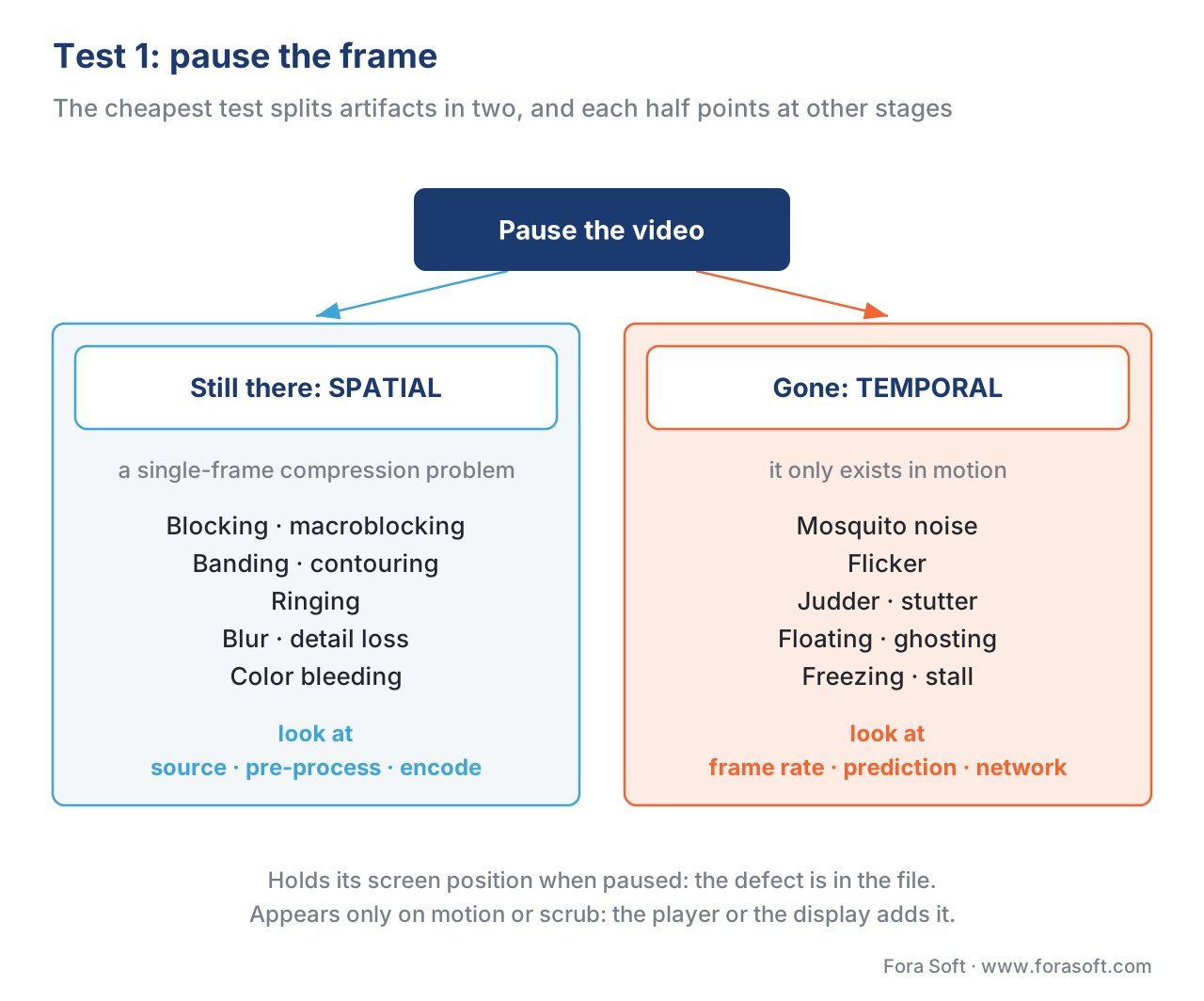 Figure 2. The first test, and the cheapest. Pause the frame: if the defect is still there, it is spatial — a single-frame compression problem (blocking, banding, ringing, blur, color bleeding). If it vanishes, it is temporal — it lives in motion (mosquito noise, flicker, judder, floating, freezing). The two halves point at different pipeline stages.
Test 2 — Ask where the defect lives: grid, content, or screen?
Once you know spatial or temporal, ask what the artifact is attached to. Three answers, three different culprits.
Locked to a fixed square grid. If the defect lines up with a regular lattice of blocks that stays put while the picture moves behind it, it is blocking (macroblocking), and it is the encoder's transform grid showing through because quantization zeroed the detail inside each block. The grid is the signature: it does not move with the content because it belongs to the codec, not the scene. That points squarely at the encoder — too low a bitrate for the resolution, or a botched rate-control setting. The cause-side mechanics live in Video Encoding's treatment of block-based prediction and quantization, where quality is lost; your job here is just to read the grid and name the stage.
Attached to content and edges. If the defect follows objects — halos rippling out from a sharp edge (ringing), a shimmer that flies around moving boundaries like insects (mosquito noise), or stripes that appear in a smooth gradient (banding) — it lives in the content, which means it was created when that content was quantized. Ringing and mosquito noise are the quantization of strong edges; banding is the quantization of smooth gradients past the point your bit depth can represent. These are still encoder-stage artifacts, but they often trace one hop further back, to a pre-processing or source bit-depth decision (an 8-bit pipeline bands skies that a 10-bit pipeline would not), which is why banding cross-links to Video Encoding's bit-depth article.
Stuck to the screen. If the defect is anchored to the display rather than the picture — a tear across a fixed horizontal line during motion, a moiré shimmer that changes as you resize the window, judder that appears only on one television — it is being added at the display or player stage: a frame-rate mismatch, a scaler, or the set's own motion processing. Nothing upstream is wrong; the file is fine and the same file plays clean elsewhere. This is the cheapest cause to confirm: play the identical file on a second device.
This "what is it attached to" question is powerful because the three answers are mutually exclusive in practice. A block grid belongs to the codec, a halo belongs to the content, and a tear belongs to the screen — and each names a different stage to inspect.
Test 3 — Bisect the pipeline: tap it and compare
The first two tests narrow the suspect list. The third proves it. It is the same move a programmer uses to find a bug in a long function: cut the problem in half, check which half it is in, repeat. For a video pipeline, the "cuts" are taps — points where you can capture the actual frames and look.
You usually have at least five taps: the source (or the mezzanine master), the encoder output (the encoded file before delivery), the packaged segments (what the CDN serves), the decoded playout (what the player actually rendered, captured at the client), and the display (a photo of the screen). The rule is simple: find the first tap, walking downstream from the source, where the artifact appears. The stage between the last clean tap and the first dirty tap is your culprit.
Concretely, decode a frame from each tap to the same resolution and the same frame index, then compare adjacent taps. If the source already shows the defect, no encoder setting will save you — fix the source. If the source is clean but the encoder output shows it, the encoder or its settings own the bug. If the encoded file is clean but the decoded playout at the client is torn, the damage happened in delivery or the decoder. Each comparison removes half the remaining pipeline.
The arithmetic is why this is fast. With roughly seven stages and a clean/dirty answer at each tap, a binary search localizes the stage in about ⌈log₂7⌉ = 3 comparisons, not seven. You do not inspect every hop; you halve the chain three times.
Two disciplines keep the comparison honest. First, compare apples to apples: the same frame, decoded to the same resolution, against the same reference. A metric or an eyeball comparison across different resolutions or different frames will invent differences that are not artifacts — the cardinal rule from reading a quality-metric report. Second, when you have no clean reference at a tap — a live feed, user-generated content, a captured playout with no master — you cannot run a full-reference metric like PSNR or VMAF, which need the pristine original (full-, reduced-, and no-reference). There you fall back to a no-reference check that looks for the defect's own signature (a block grid, a frozen-frame run) directly in the impaired frames. The companion tool below and the FFmpeg recipes in measuring quality with FFmpeg and libvmaf do exactly this.
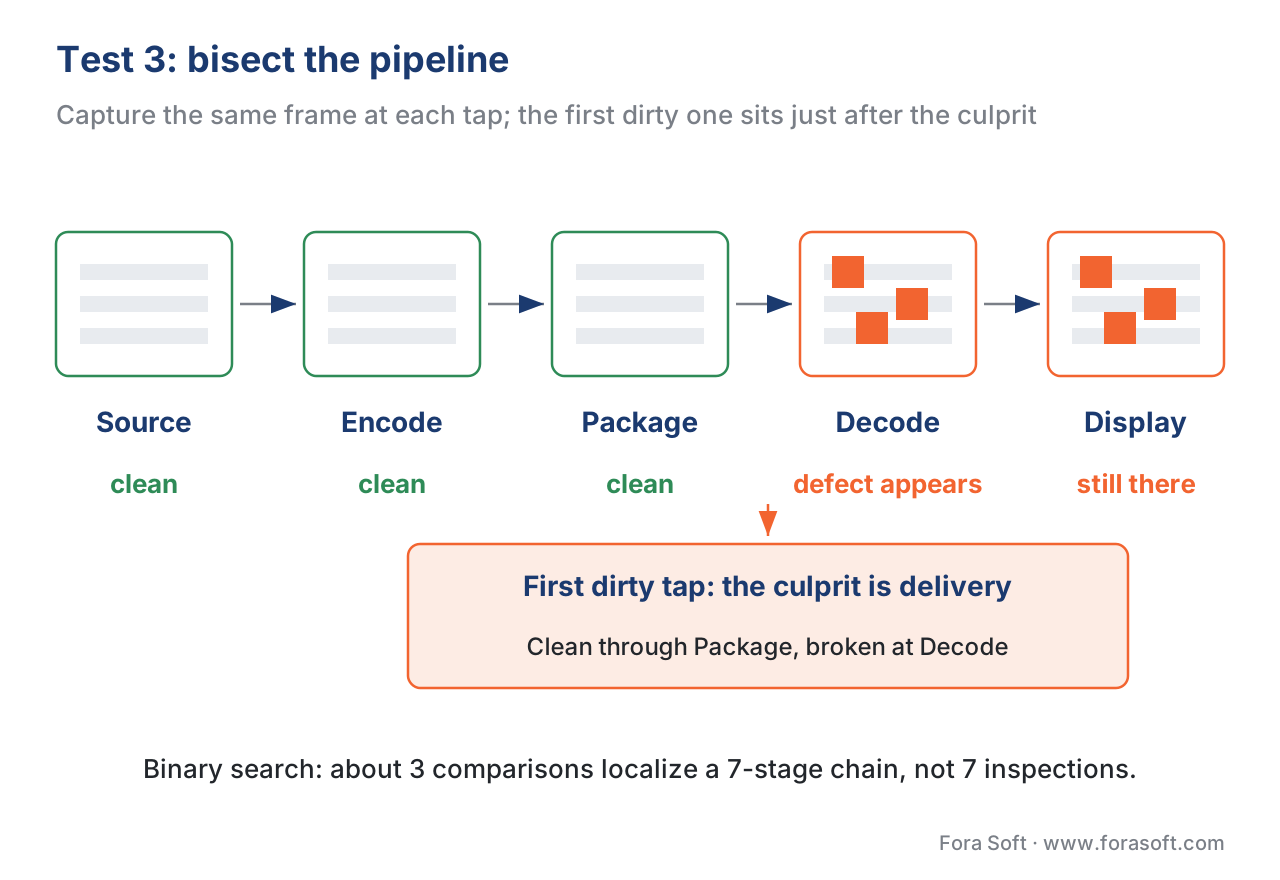 Figure 3. Binary-search the pipeline. Capture the same frame at each tap — source, encoder output, packaged segment, decoded playout, display — and compare adjacent taps. The first tap (walking downstream) where the artifact appears sits just after the stage that caused it. About three comparisons localize a seven-stage chain.
The lookup table: artifact → stage → cause → fix → metric
The three tests usually land you on one stage. This table is the reference that turns that stage into a named cause, a fix, and the measurement that confirms it. Read it as the destination of every trace in this article. The metric columns are deliberately honest — most picture metrics are blind to several of these, and the table says where.
| Artifact | Pause test | Lives on | Most likely stage & cause | Fix at the cause | What a metric sees · where it lies |
|---|---|---|---|---|---|
| Blocking / macroblocking | Spatial | Block grid | Encoder: bitrate too low / weak rate control | Raise bitrate, fix rate control, check deblocking | PSNR & VMAF catch it well; the grid is exactly what they measure |
| Banding / contouring | Spatial | Content gradients | Source/encoder: 8-bit depth + quantization | 10-bit encode, dithering, debanding, higher bitrate | PSNR can read >40 dB and VMAF >80 while it bands — blind; use CAMBI |
| Ringing / mosquito noise | Ringing spatial; mosquito temporal | Sharp edges | Encoder: quantization of high-frequency edges | More bitrate, better edge-preserving settings | SSIM/VMAF partly catch ringing; mosquito (temporal) slips per-frame pooling |
| Blur / detail loss | Spatial | Whole frame / regions | Pre-process or encoder: over-denoise, downscale, heavy quantization | Lighten denoise, raise bitrate, encode native resolution | VMAF & SSIM track blur well — but cannot tell artifact blur from intended softness |
| Judder / stutter | Temporal | Motion | Pre-process or display: frame-rate conversion, dropped frames | Match frame rates, fix 3:2 pulldown, fix delivery | Per-frame PSNR/SSIM/VMAF are blind — a repeated frame scores perfect |
| Color bleeding / shift | Spatial | Saturated edges | Source/encoder: 4:2:0 chroma subsampling + chroma quantization | 4:2:2/4:4:4 where it matters, check color conversion | Luma-only PSNR & VMAF v0 are blind to chroma; VMAF v1 (2026) adds it |
| Tiling / corruption | Spatial (in a moving stream) | Decoded playout | Delivery: unconcealed packet loss on UDP/RTP | FEC/retransmit/keyframe request; fix the network path | Not in the encoded file — full-reference metrics never see it; use no-reference on the decode |
| Freezing / stall | Temporal | Time, not pixels | Delivery: buffer underrun on TCP/QUIC | Bigger buffer, better ABR, fix bandwidth | No wrong pixels — picture metrics blind; measure with P.1203 / player QoE |
| Quality switching | Temporal | Sequence of renditions | Delivery: ABR moving between ladder rungs | Tune ABR, smooth the ladder | Each rendition scores fine alone — blind; needs session model (P.1203) |
Table 1. The artifact-to-cause lookup. The three tests point at a stage; this table names the cause, the fix, and — crucially — which metric would have caught the defect and which would have waved it through. The "where it lies" column is the reason you cannot trace by metric score alone.
The metric cross-check: which measurement would have caught it
A trace is not finished until you know whether your dashboards should have warned you — because the answer tells you which monitoring to add so the next instance is caught automatically. This is where the diagnostic flow meets where objective metrics lie, and the pattern is consistent: the picture metrics are excellent at the artifacts that live in the pixels they compare, and blind to the ones that do not.
Banding is the canonical trap. A compressed sky can carry obvious stripes while Peak Signal-to-Noise Ratio (PSNR, the pixel-error metric) reads above 40 dB and Video Multimethod Assessment Fusion (VMAF, Netflix's perceptual metric) reads above 80 — scores that say "great" about a frame the eye calls broken. That is why Netflix built CAMBI, the Contrast-Aware Multiscale Banding Index, as a dedicated no-reference banding detector that runs frame by frame, because the general-purpose metrics miss the artifact entirely (Netflix VMAF documentation, CAMBI, 2024). If your trace ends at banding, the lesson is to add a banding detector, not to trust the VMAF you already had.
Temporal artifacts are the second blind spot. VMAF computes a score per frame and pools the per-frame scores into one number, and its only temporal feature is a coarse motion measure tied to content rather than to distortion. So judder, stutter, and flicker — which are defined entirely by the relationship between frames — barely move the number. A frozen frame held one beat too long is, frame for frame, a perfect copy of a correct frame, so a per-frame metric scores it 100. Catch these with frame-timing checks, not with a picture score.
Color is the third, and it is the one the industry is actively closing. Standard VMAF v0 extracts only luma-based features, so it is "unaware of chroma artifacts" like color bleeding from 4:2:0 subsampling. In June 2026 Netflix released VMAF v1, which adds a chroma feature (a SpEED-QA variant applied to the color channels) specifically to close that gap, alongside reduced complexity and gains on banding and phone-viewing datasets (Netflix Technology Blog, "VMAF v1: Good Is Not Good Enough," June 2026). If your trace lands on a chroma artifact and your monitoring used luma-only VMAF, that is exactly why it slipped through — and the fix on the measurement side now exists.
The general rule, worth memorizing: a full-reference picture metric measures the encode of the luma of single frames. Anything outside that box — color, motion, delivery, the display — it cannot see, and your trace must end by adding the measurement that can.
A worked trace, end to end: the sky that banded
Make the procedure concrete with one report. A viewer says: "There are ugly stripes in the sky during the sunset shot." Walk the three tests.
Test 1 — pause. Freeze on the sunset. The stripes are still there, sharp and stationary. Spatial artifact: this is a single-frame compression problem, not motion. The suspect list drops to source, pre-processing, encoder, decoder, display.
Test 2 — what is it attached to. The stripes are not on a square block grid — they are broad bands that follow the smooth color gradient of the sky, parallel to the gradient's contours. That signature is banding (contouring): the quantization of a smooth ramp into visible steps. It points at the encoder, and one hop back, at bit depth.
Test 3 — bisect. Tap the source: decode the mezzanine master frame and inspect the sky — smooth, no steps (it is a 10-bit master). Tap the encoder output: decode the delivered rendition's frame — the bands are there. The defect appears for the first time at the encoder. Culprit stage: encoding, and specifically an 8-bit encode of a gradient the 10-bit source represented cleanly.
The arithmetic makes the cause undeniable. An 8-bit luma channel has 2⁸ = 256 levels. Spread a sunset gradient that spans, say, luma 100 to 120 across 1920 pixels of width, and you have only 21 distinct codes to cover the ramp — one step roughly every 1920 ÷ 21 ≈ 91 pixels, a band wide enough to see across the room. Encode the same ramp in 10-bit (2¹⁰ = 1024 levels) and you get four times the resolution: a step every ~23 pixels, below the threshold where the eye stitches it into a smooth gradient.
Confirm with the right metric. Run the metrics on that frame and the trap is on display: VMAF (default model, mean-pooled) reads ~92 and PSNR ~41 dB — both say "excellent" — while CAMBI reads around 7, well past the ~5 where banding becomes annoying (Netflix CAMBI documentation, 2024). The picture metrics you already had were blind; the banding detector was not.
Fix at the cause. Encode the sequence in 10-bit, add dithering or a debanding filter in pre-processing, and where the ladder forces 8-bit, raise the bitrate on the affected rungs. The fix is one decision at the encoder, found in three tests — not a week of swapping sharpeners that were never going to help, because the sharpness was never the problem.
Common mistake: tracing by metric score instead of by stage. The expensive error is to read a high VMAF and conclude the pipeline is healthy, or to "fix" a symptom at the wrong stage — sharpening a source-soft shot, raising the bitrate on a stream that is tiling because of packet loss, or blaming the encoder for judder the television's motion processing added. A metric score is a measurement of one stage's pixels, not a diagnosis of the chain. Pause first, locate the defect, bisect to the stage, and only then act — and treat any artifact your metric scored "fine" (banding, judder, color, freezing) as a reason to add the measurement that can see it, not as the all-clear.
How to run the trace as a checklist
For a defect in hand, the procedure compresses to five ordered steps. The companion tool automates the reasoning; the steps are the same by hand.
First, pause and decide spatial or temporal — and whether the defect holds its screen position. Second, locate what the artifact is attached to — block grid, content and edges, or the screen. Third, bisect: capture the same frame at the source, the encode, and the decoded playout, and find the first tap where it appears. Fourth, read the lookup table for that stage to get the likely cause and the fix. Fifth, confirm with the metric that can actually see this artifact — a banding detector for banding, a frame-timing check for judder, a session model for stalls — not the general picture score that may be blind to it. Fix at the cause, then re-run the same trace to prove the defect is gone.
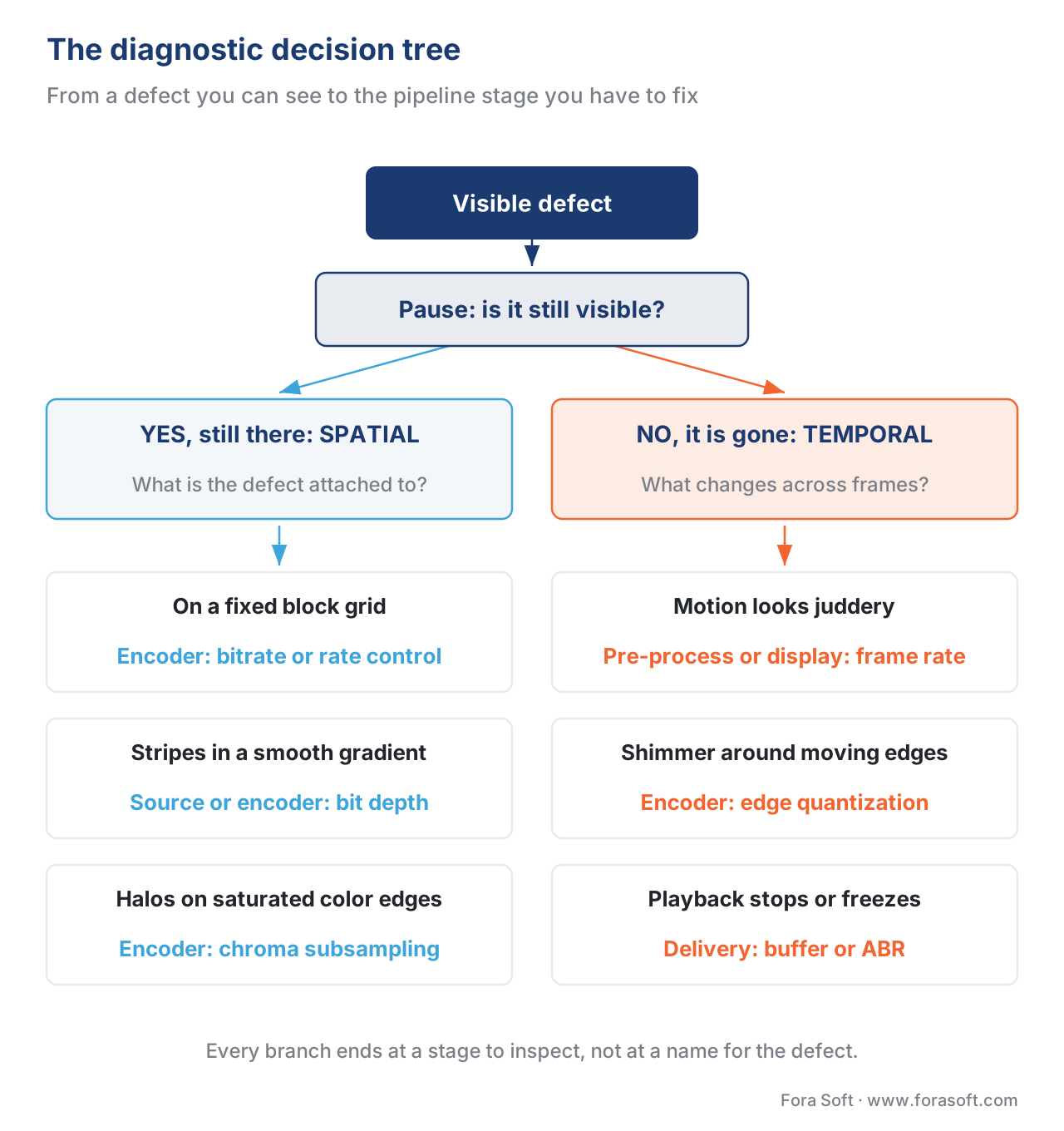 Figure 4. The whole flow on one page. From a visible defect: pause it (spatial or temporal), then ask what it is attached to, and each branch ends at the stage to fix — a block grid points at the encoder, a gradient at bit depth, a stalled playout at delivery. Use it as the checklist's map.
Where Fora Soft fits in
Fora Soft has built and operated video pipelines since 2005 — streaming and OTT, WebRTC conferencing, e-learning, telemedicine, and video surveillance — and tracing artifacts back to their stage is daily work in all of them, not a theory. A conferencing or telemedicine call on UDP/RTP fails differently from an OTT title on HLS, so we instrument each pipeline at the taps that matter — source, encode, and the client's decoded playout — and pick the measurement that fits the artifact instead of trusting one number to certify the whole chain. We treat "the video looks bad" as a question with a provable answer: pause, locate, bisect, confirm. Where the answer is an encoder or delivery decision, the fix lives one step upstream, in the streaming and pipeline work we do; where it is a benchmark question, our own measurement methodology keeps the comparisons apples-to-apples so the verdict holds.



The handbook
Fora Soft Video Engineering Handbook
A trace ends by naming one of the seven stages in Figure 1, and then you have to fix it — so we wrote a seven-volume handbook that works through the whole video stack, from the pixel to production, across more than 9,000 pages. Volume 1 covers the stage that produces most of the artifacts in the lookup table: what quantization throws away, and why blocking, ringing and banding look the way they do. Volume 2 takes the trace into transport, ingest and segmenting, and Volume 3 into ABR, CDNs and players, where the stalls, switches and tiling of the delivery rows are decided. Written by Nikolay Sapunov, CEO at Fora Soft.
When a viewer says the video looks bad, can your team name the stage that did it?
Send us the clip and the shape of your pipeline, and we will come back with the taps worth instrumenting, the stage each of your recurring defects points at, and the check that confirms it. 250+ video products shipped since 2005.
See our case studies
Case study
Mindbox
An intelligent VMS in 50+ deployments where every camera runs RTSP into FFmpeg and out as HLS — a chain with a tap at each hop, which is exactly what makes the bisection in Figure 3 possible instead of guesswork.
Case study
Worldcast Live
Concert streaming at 0.4–0.5 s latency and 1.5 Gb/s for 10,000 simultaneous viewers, with quality stepped down automatically on a poor connection — the delivery rows of the table, where stalls and switches are the artifact.
Case study
Speed.Space
Remote production at 1080p and 8 Mb/s for Netflix, Electronic Arts and HBO shoots, recorded locally so the network never touches the file — delivery removed from the suspect list by design, which leaves capture and encode.
What to read next
Artifacts
Video Compression Artifacts: The Visual Field Guide
Name the defect before you trace it — what each artifact in Figure 2 actually looks like on screen.
Pipeline
Where Video Quality Is Lost in a Pipeline
The same seven stages read forward: how much quality each one costs, and where the budget goes.
Encoder
Macroblocking and the DCT Grid: Cause, Filter, Metric
The left branch of Figure 4 in full: why the grid belongs to the codec, and what to change when you see it.
Banding
Video Banding: Why Gradients Break Into Steps
The worked trace on this page ends in a banded sky — here is what makes the steps appear and what removes them.
References
- K. Zeng, T. Zhao, A. Rehman, and Z. Wang, "Characterizing Perceptual Artifacts in Compressed Video Streams," Human Vision and Electronic Imaging XIX (SPIE/IS&T), 2014. Tier 5 (peer-reviewed). The taxonomy of spatial vs temporal compression artifacts and their causes, and the controlling observation that spatial artifacts are best identified when the video is paused while temporal artifacts appear only during playback. Basis for Test 1 (the pause test), the spatial/temporal split, and the per-artifact cause descriptions. https://eceweb.uwaterloo.ca/~z70wang/publications/HVEI14.pdf
- Z. Wang, A. C. Bovik, H. R. Sheikh, and E. P. Simoncelli, "Image Quality Assessment: From Error Visibility to Structural Similarity," IEEE Transactions on Image Processing, vol. 13, no. 4, 2004. Tier 1 (metric-author defining paper). Defines SSIM and the structural-similarity framing used in the metric cross-check. Basis for the SSIM rows in Table 1 and the "what a metric measures" discipline. https://www.cns.nyu.edu/pub/eero/wang03-reprint.pdf
- T. Wiegand, G. J. Sullivan, G. Bjøntegaard, and A. Luthra, "Overview of the H.264/AVC Video Coding Standard," IEEE Transactions on Circuits and Systems for Video Technology, vol. 13, no. 7, 2003 (ITU-T Rec. H.264). Tier 1 (official standard / standard authors). The deblocking filter is a normative in-loop stage on both the encode and decode paths; block-transform + quantization is the source of blocking. Basis for the encoder-stage cause of blocking and the deblocking note. https://ip.hhi.de/imagecom_G1/assets/pdfs/csvt_overview_0305.pdf
- G. J. Sullivan, J.-R. Ohm, W.-J. Han, and T. Wiegand, "Overview of the High Efficiency Video Coding (HEVC) Standard," IEEE Transactions on Circuits and Systems for Video Technology, vol. 22, no. 12, 2012 (ITU-T Rec. H.265). Tier 1 (official standard / standard authors). HEVC adds a sample-adaptive-offset (SAO) in-loop stage after deblocking; same block-transform origin of spatial artifacts. Basis for the in-loop-filter and encoder-stage framing. https://ieeexplore.ieee.org/document/6316136
- Netflix, "CAMBI — Contrast Aware Multiscale Banding Index," VMAF project documentation (Netflix/vmaf repository), 2024. Tier 1 (metric-author implementation/documentation). CAMBI is a no-reference, frame-by-frame banding detector built because general metrics miss banding; a CAMBI score around 5 is where banding becomes annoying, and banding visibility depends on the display and ambient light. Basis for the banding metric-blindness claim and the worked-example CAMBI value. https://github.com/Netflix/vmaf/blob/master/resource/doc/cambi.md
- C. G. Bampis, Z. Li, K. Swanson, et al., "VMAF v1: Good Is Not Good Enough," Netflix Technology Blog, June 2026. Tier 4 (vendor engineering blog, credible deployer). VMAF v0 extracts only luma features and is unaware of chroma artifacts; VMAF v1 adds a chroma feature (SpEED-QA on the color channels), removes VIF, and improves on banding, chroma, and phone-viewing datasets. Basis for the color blind-spot and its 2026 fix. https://medium.com/netflix-techblog/vmaf-v1-good-is-not-good-enough-60d7e4244ea8
- Recommendation ITU-T P.1203, "Parametric bitstream-based quality assessment of progressive download and adaptive audiovisual streaming services over reliable transport," International Telecommunication Union, 2017. Tier 1 (official standard). A session-level QoE model that integrates stalling, quality switching, and initial loading delay from bitstream/metadata without a pristine reference. Basis for the delivery-stage measurement rows (freezing, switching) in Table 1. https://www.itu.int/rec/T-REC-P.1203
- Á. Huszák and S. Imre, "Analysing GOP Structure and Packet Loss Effects on Error Propagation in MPEG-4 Video Streams," International Symposium on Communications, Control and Signal Processing (ISCCSP), 2010. Tier 5 (peer-reviewed). A packet loss in a reference frame propagates through the group of pictures via prediction until the next keyframe; I-frame loss damages the whole GOP. Basis for the tiling-propagation cause in Table 1. http://www.hit.bme.hu/~huszak/publ/Analysing%20GOP%20Structure%20and%20Packet%20Loss%20Effects%20on%20Error%20Propagation%20in%20MPEG-4%20Video%20Streams.pdf
- S. S. Krishnan and R. K. Sitaraman, "Video Stream Quality Impacts Viewer Behavior: Inferring Causality Using Quasi-Experimental Designs," ACM Internet Measurement Conference (IMC), 2012. Tier 5 (peer-reviewed). Establishes the business stake of delivery artifacts — a rebuffering delay equal to 1% of duration costs ~5% of play time. Basis for the "why the delivery-stage rows matter" framing. https://people.cs.umass.edu/~ramesh/Site/HOME_files/imc208-krishnan.pdf
- FFmpeg Project, "Filters Documentation — psnr, ssim, libvmaf, tblend, select," 2026. Tier 3 (first-party tooling). The reference-comparison and frame-extraction filters used to tap the pipeline and compare adjacent stages, including no-reference inspection when a clean reference is unavailable. Basis for the bisection recipes and the companion tool's framing. https://ffmpeg.org/ffmpeg-filters.html
