


Why this matters
When a stream looks bad, the encoder gets the blame, because encoding is the stage everyone can name. But the loss often happened before the encoder ever ran — in a sloppy resize or a noisy capture — or after it finished, in a network that stalled or a TV that upscaled a low rung to fill its panel. If you are choosing a codec, setting a bitrate ladder, debugging a "why does this look soft?" ticket, or deciding which metric to trust, you need a mental model of where quality leaks and whether each leak is recoverable. This article gives you that map so the deep dives on PSNR, VMAF, artifacts, and streaming QoE each land in the right place.
The pipeline in one picture
Every delivered video walks the same path, even when some stages are invisible to you. A camera captures light into pixels. Software pre-processes those pixels — resizing, denoising, converting color. An encoder compresses the result into a small bitstream. A packager transcodes that into the several renditions of an adaptive ladder. A network delivers the chosen rendition. A device decodes it back into pixels. A screen displays them. The viewer's eye is the final judge.
Each stage exists for a reason, and most of them trade away some quality to buy something else: a smaller file, a lower bitrate, a stream that survives a weak connection. The job of measurement is not to pretend the trades do not happen — they must — but to know where each one happens, how much it costs, and whether you spent it on purpose.
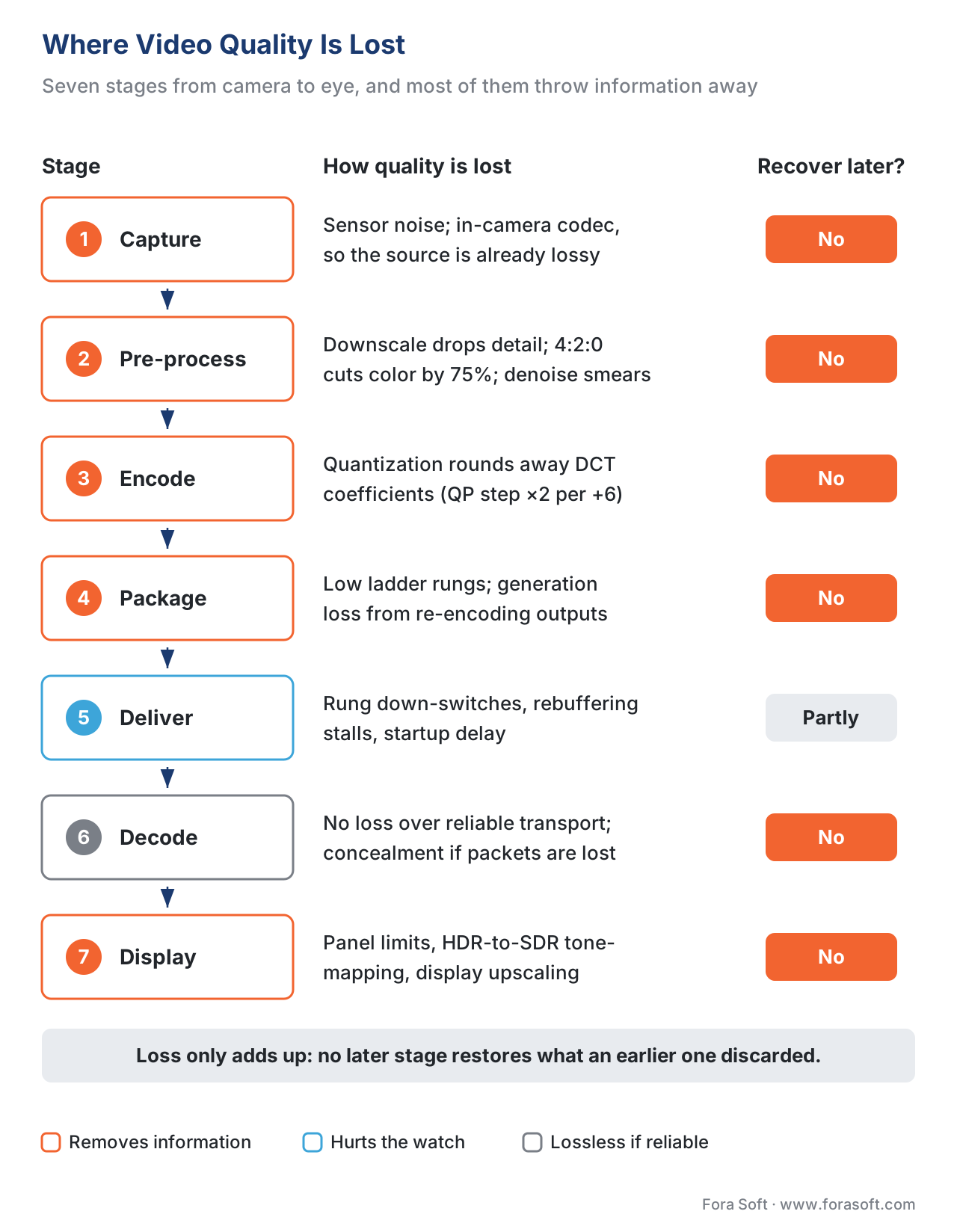 Figure 1. The quality-loss map. Stages tinted orange remove information; once removed, no downstream stage can truly restore it.
Hold one rule above all the detail below: quality lost at any stage cannot be recovered by a later stage. A downstream step can hide a flaw, or invent plausible new detail, but it cannot reach back and recover the information an earlier step discarded. That is why the question "where was it lost?" matters more than "how do I sharpen it at the end?"
Stage 1 — Capture: the source is rarely pristine
The first surprise for many teams is that the "original" is already imperfect. Unless you are working with a studio master, the camera did not hand you a lossless recording. A phone or a webcam compresses video as it records, encoding the sensor output to a much lower bitrate before it ever touches your disk. So the file you treat as the reference is itself a compressed, lossy artifact.
Two mechanisms cost quality here. The first is sensor noise: in low light or on a cheap sensor, the image arrives grainy, and that grain is random detail the camera cannot tell apart from real texture. The second is the capture codec: the in-camera encoder has already quantized away information to hit its bitrate. Noise makes the next stages worse too — random grain is expensive to compress and starves the real picture of bits, so a noisy capture quietly lowers the quality ceiling for everything downstream.
This matters for measurement because the most common metrics — PSNR, SSIM, VMAF — are full-reference: they score the encode against "the original." If the original is a noisy phone capture, the metric measures fidelity to a flawed source, not to reality. For live video, video calls, and user-generated clips there is no pristine master at all, which is the whole reason no-reference measurement exists.
Stage 2 — Pre-processing: resizing and color, where quiet damage happens
Before encoding, video is almost always reshaped. This is the stage that does the most uncredited damage, because it looks like neutral housekeeping.
Scaling (resolution change) is the big one. Downscaling — say 4K to 1080p — must throw away pixels, and most of a picture's visual detail lives in its high spatial frequencies, exactly the part a downscale filter removes to avoid aliasing. The arithmetic is blunt: a 1920×1080 frame holds 1920 × 1080 = 2,073,600 pixels, while a 640×360 frame holds 640 × 360 = 230,400. That is 230,400 ÷ 2,073,600 ≈ 0.111, so the 360p rendition keeps about one ninth of the pixels and discards roughly 89% of them. Upscaling is the mirror problem: stretching 360p back to 1080p invents pixels by interpolation but cannot recover the detail that was dropped, so it looks soft. The choice of filter matters — FFmpeg's swscale offers bicubic, lanczos, and others, trading sharpness against ringing — but no filter recovers what downscaling removed.
Chroma subsampling is the loss almost nobody notices they are choosing. Because the eye sees brightness detail far more sharply than color detail, video keeps full-resolution brightness (luma) and stores color (chroma) at lower resolution. The common 4:2:0 scheme halves chroma resolution both horizontally and vertically. Count the samples: in full 4:4:4, four pixels carry 4 luma + 4 Cb + 4 Cr = 12 samples; in 4:2:0 they carry 4 luma + 1 Cb + 1 Cr = 6 samples. Chroma drops from 8 samples to 2 — a 75% cut in color information — and total data halves from 12 to 6. On faces and landscapes you will not see it; on saturated red text or sharp color edges it shows up as color bleeding. The cause-side mechanics of color live in the Video Encoding section; here the point is that the choice is a quality decision made before the encoder runs.
Two more pre-processing steps cost quality on purpose. Denoising deliberately removes detail — the grain from Stage 1 — because clean input compresses far better; tuned well it is a net win, tuned badly it smears real texture. Frame-rate conversion drops or blends frames (60 to 30 fps halves the temporal samples), which can introduce judder covered in the artifact gallery.
Stage 3 — Encode: the famous stage, and what it really discards
Now the stage everyone knows. A video encoder shrinks the file by exploiting redundancy — repetition within a frame (spatial) and between frames (temporal) — but the part that actually loses quality is one specific step: quantization.
Here is the mechanism in plain terms. The encoder transforms each block of pixels into frequency coefficients using a discrete cosine transform (DCT), then divides those coefficients by a step size and rounds them. Rounding is where information disappears, and it is irreversible — you cannot un-round a number. The coarseness of that rounding is set by the quantization parameter (QP). In H.264 and HEVC, QP runs from 0 to 51 for 8-bit video, and the step size doubles for every increase of 6 in QP, so QP 28 quantizes twice as coarsely as QP 22. Higher QP means a smaller file and more loss; lower QP means a bigger file and less loss. Everything an encoder does to "improve quality at a bitrate" is, underneath, a smarter way to spend bits so that the unavoidable rounding falls where the eye will notice it least.
This rounding is the origin of the classic compression artifacts: blocking (the DCT grid becoming visible when coefficients are crushed), ringing around sharp edges, and banding in smooth gradients. Each gets its own article in the artifact gallery; the link to remember is that they are symptoms of quantization, not random glitches. How the codec decides where to spend bits belongs to the Video Encoding section — this section measures the result.
Common mistake: blaming the encoder for upstream loss. When a 1080p stream looks soft, the reflex is to raise the bitrate or switch codecs. But if the softness came from a bad downscale, a noisy capture, or 4:2:0 color bleeding, more encoder bits cannot bring back detail that was already gone before the encoder ran. Always ask "was this lost upstream?" before you tune the codec.
Stage 4 — Package: the bitrate ladder and generation loss
Streaming does not ship one file. It ships an adaptive bitrate ladder — the same content re-encoded into several resolution-and-bitrate rungs (for example 1080p at 5 Mbps down to 360p at 0.6 Mbps) so the player can switch rungs as the network changes. How that ladder is built is covered in per-title and per-shot encoding; the quality consequence is what matters here.
Two losses appear at this stage. First, the lower rungs are low quality by design — a 360p rung at 0.6 Mbps is the worst picture in the set, and it is exactly what gets served to viewers on weak connections, who then judge your whole service by it. Second is generation loss: every time video is decoded and re-encoded with a lossy codec, the new pass quantizes away more information on top of what the last pass already removed. Transcoding from an already-compressed intermediate — rather than from the highest-quality master — stacks loss on loss. One clean transcode at a sensible bitrate is invisible; chaining three or four is not. The rule is to always re-encode from the best available source, never from a previous output.
Stage 5 — Deliver: where the picture metric goes blind
Up to here, every loss has been spatial — fewer pixels, coarser color, crushed coefficients — and a full-reference picture metric run on the encoded file can see all of it. Delivery is different. It degrades the experience in ways the picture file never records, which is why it is the stage that fools teams who measure only PSNR or VMAF.
Two delivery losses dominate. When bandwidth drops, adaptive streaming switches to a lower rung, so the viewer suddenly gets the soft 360p picture instead of the crisp 1080p — a real quality drop that happened in the network, not the encoder. When the buffer empties faster than it fills, playback stalls: the dreaded spinner, a rebuffering event, frozen time. A frozen frame has perfect "picture quality" and a terrible experience. There is also startup delay — the time to the first frame — before the viewer sees anything at all.
These are Quality of Experience (QoE) losses, and they are invisible to a metric that scores pixels against a reference. This is the heart of the QoE vs QoS distinction: the network can deliver every byte correctly (good Quality of Service) and still produce a miserable watch if it delivers them late. The standards body recognized this directly. ITU-T Recommendation P.1203 (10/2017) models the quality of an adaptive-streaming session by combining three degradations into one Mean Opinion Score: lossy compression, spatial or temporal downscaling, and stalling from rebuffering, including the initial loading delay. A standard that has to add up compression and stalls to predict experience is official confirmation that delivery loses quality the encoder never touched.
The numbers back the weight of these losses. Streaming-analytics firm Conviva has reported that viewers start abandoning a stream once startup exceeds about two seconds, with abandonment accelerating sharply past five seconds, and research on QoE has repeatedly tied rebuffering to viewer abandonment more strongly than to any picture-quality difference. We measure these with dedicated streaming metrics — rebuffering ratio, startup time, bitrate-switching rate — covered in Block 6. Because live and user-generated streams have no master to compare against, judging their delivered picture needs no-reference metrics.
 Figure 2. Delivery losses over a playback timeline. A full-reference picture metric sees the down-switch's softer pixels but is blind to the stall and the startup delay.
Stage 6 — Decode: usually honest, sometimes not
Decoding is the one stage that, in normal streaming, adds essentially no new loss. A compliant decoder is deterministic: given the bitstream the encoder produced, it reconstructs exactly the samples the encoder committed to. The quality was already decided upstream; the decoder just faithfully replays it. So for video-on-demand and adaptive streaming over reliable transport (HTTP/TCP), you can treat decode as quality-neutral.
The exception is unreliable transport. In real-time protocols used for video calls and some live feeds, packets can be lost in transit. When that happens, the decoder cannot reconstruct the missing data and falls back to error concealment — guessing the lost region from neighboring pixels or the previous frame. That guess produces smearing, freezing, or flashes of corruption. This is a delivery loss that surfaces at the decoder, and it is why streaming-specific artifacts look different from compression artifacts.
Stage 7 — Display: the last mile to the eye
The final stage is the screen, and it can quietly cap everything the pipeline worked to preserve. A panel has a fixed resolution, peak brightness, color gamut, and bit depth. If a display cannot reproduce the brightness range or the colors that were encoded — for instance showing high-dynamic-range content on a standard panel — it must tone-map the signal down, compressing highlights and shifting color, which loses detail the bitstream actually carried. Many displays also upscale: a TV showing the 360p rung stretches it to fill a 4K panel, adding its own interpolation softness on top of the rung's own low resolution.
Then there is the viewer's environment. The same file looks different on a phone in bright sun than on a calibrated monitor in a dim room. This is not a flaw in the file — it is why subjective tests fix the display, the distance, and the lighting so that ratings mean something, as specified in ITU-R Recommendation BT.500-15 and ITU-T Recommendation P.910 (2023). Perceived quality is the product of the signal and the conditions it is viewed in.
The whole chain at a glance
Read this table as the map for the entire section. Each row is a stage, the loss it causes, whether you can undo it later (almost never), and how you would even detect it.
| Stage | How quality is lost | Recoverable later? | How you catch it |
|---|---|---|---|
| Capture | Sensor noise; in-camera compression | No | No-reference metrics; source inspection |
| Pre-process | Downscaling drops detail; 4:2:0 cuts color; denoise smears | No | Compare to source; full-reference metric |
| Encode | Quantization rounds away coefficients (blocking, banding, ringing) | No | PSNR, SSIM, VMAF vs the source |
| Package | Low ladder rungs; generation loss from re-encodes | No | Per-rung metric; compare to master |
| Deliver | Rung down-switch; rebuffering stalls; startup delay | Partly (re-request) | QoE metrics: rebuffer ratio, startup time |
| Decode | None if reliable; error concealment if packets lost | No | No-reference; packet-loss monitoring |
| Display | Panel limits; HDR-to-SDR tone-mapping; display upscaling | No | Device testing; viewing-condition control |
Table 1. The quality-loss map. The "recoverable" column is the punchline: with the narrow exception of re-requesting delivered data, every loss is permanent, so quality is won or lost by preventing leaks, not by repairing them.
The pattern is hard to miss: loss accumulates, and it almost never reverses. A 4K master that is downscaled, encoded at a high QP, dropped to a low ladder rung, and shown on a phone has passed through five separate subtractions, each compounding the last. Plotting "quality remaining" across the chain produces a staircase that only steps down.
 Figure 3. Loss is one-directional. Each stage can only hold quality flat or step it down — never back up — so the earliest leak sets the ceiling for everything after it.
What AI upscaling does and does not change
A fair objection: do AI upscalers and super-resolution models break the "you cannot recover lost quality" rule? Not quite, and the distinction is the same fidelity-versus-perception split from the opening article. A learned model can produce a frame that looks sharper and more pleasing than the degraded input by inventing plausible detail — high perceptual quality. But the invented detail is a confident guess, not the information the pipeline discarded, so fidelity to the true original stays low. That is genuinely useful for viewing and genuinely misleading for measurement, and it lives in the AI for Video Engineering section. The rule holds: the original detail is gone; the model painted over the gap.
Free download: Video Pipeline Quality-Loss AuditA one-page worksheet to walk your pipeline stage by stage, from capture to display, and mark where quality leaks, whether the loss can be recovered, and which metric or check catches it.Where Fora Soft fits in
Fora Soft has built video products since 2005 — streaming, WebRTC conferencing, OTT, e-learning, telemedicine, and surveillance — and in every one the quality complaint that lands on the desk almost never names the real stage. We treat "the video looks bad" as a pipeline question, not an encoder question: we check whether the loss came from capture, a pre-processing downscale, the encode, the ladder, the network, or the display, because each one calls for a different fix and only one of them is the codec. The discipline is to measure at more than one stage — full-reference picture metrics where there is a master, QoE metrics across delivery — so the conversation moves from "it looks bad" to "it lost six VMAF points at the downscale and stalled twice on 4G," which is a problem you can actually fix.



The handbook
Fora Soft Video Engineering Handbook
We wrote a seven-volume handbook that follows the whole video stack, from the pixel to production, so an engineer who works through it can design and build a pipeline and point to the stage where quality leaks. Volume 1 covers the first half of this map: capture, scaling, 4:2:0 chroma, quantization and the metrics that score it. Volume 2 takes the stream through transport, ingest and packaging into HLS and DASH, and Volume 3 carries it through ABR, CDNs and players, where down-switches and stalls happen. Written by Nikolay Sapunov, CEO at Fora Soft.
Which stage of your pipeline is losing the quality?
Send us a clip that looks wrong and a sketch of how it gets from camera to screen. We will measure it at more than one stage — full-reference metrics where a master exists, QoE metrics across delivery — and tell you whether the loss sits in capture, a downscale, the encode, the ladder, the network or the display, and what fixes it. 250+ video products shipped since 2005.
See our case studies
Case study
Mindbox
An AI video management system with 50+ deployments: RTSP cameras into FFmpeg into HLS — a full chain where noisy capture, transcoding and delivery each take their share of the picture.
Case study
Speed.Space
A remote production platform used on Netflix, EA and HBO shoots. It records locally at 1080p and 8 Mbps, so network loss never reaches the master.
Case study
WorldCast Live
HD concert streaming at 0.4–0.5 s latency to 10,000 viewers — the delivery stage, where a stall or a down-switch costs more than any encoder setting.
What to read next
Foundations
QoE vs QoS in Video Streaming, Explained
Why a network can deliver every byte correctly and still ruin the watch.
Foundations
Full-, Reduced-, No-Reference Video Quality Metrics
Which metric setup fits each stage, and what to do when there is no master.
Artifacts
Tracing a Video Artifact to Its Cause in the Pipeline
Work back from the symptom on screen to the stage that caused it.
Artifacts
Video Compression Artifacts: The Visual Field Guide
Blocking, ringing, banding and blur: what quantization leaves behind.
References
- Recommendation ITU-T P.1203 (10/2017), Parametric bitstream-based quality assessment of progressive download and adaptive audiovisual streaming services over reliable transport. International Telecommunication Union. Tier 1. Models session QoE by combining lossy compression, spatial/temporal downscaling, and stalling (including initial loading) into one MOS. https://www.itu.int/rec/T-REC-P.1203
- Recommendation ITU-T P.910 (10/2023), Subjective video quality assessment methods for multimedia applications. International Telecommunication Union. Tier 1. Viewing conditions, rating scales, and test methods — the controlled display/environment for valid quality judgement. https://www.itu.int/rec/T-REC-P.910-202310-I/en
- Recommendation ITU-R BT.500-15, Methodologies for the subjective assessment of the quality of television images. International Telecommunication Union. Tier 1. Display, viewing distance, and lighting conditions for subjective assessment. https://www.itu.int/rec/R-REC-BT.500
- Recommendation ITU-T P.1204 series (2020), Video quality assessment of streaming services over reliable transport for resolutions up to 4K. International Telecommunication Union. Tier 1. Bitstream, pixel, and hybrid models used with P.1203 for adaptive streaming. https://www.itu.int/rec/T-REC-P.1204
- Recommendation ITU-T H.265 (V9, 09/2023), High efficiency video coding. International Telecommunication Union. Tier 1. Defines the transform, quantization (QP 0–51 for 8-bit, step doubling every +6), and in-loop filters — the encoder's loss mechanism. https://www.itu.int/rec/T-REC-H.265
- FFmpeg Project, ffmpeg-scaler Documentation (libswscale: bicubic, lanczos, and other rescaling algorithms). Tier 3 (first-party tooling). The scalers that trade sharpness against ringing/aliasing during resize. https://ffmpeg.org/ffmpeg-scaler.html
- M. Abou-Zeid et al., "Analysis of video quality losses in the homogenous HEVC video transcoding," arXiv:1702.07548, 2017. Tier 5 (peer-reviewed/institutional). Confirms quantization as the irreversible loss step and how transcoding compounds it. https://arxiv.org/pdf/1702.07548
- T. Nam, C. Kim, et al., "QoE Matters More Than QoS: Why People Stop Watching Cat Videos," IEEE INFOCOM, 2016 (Columbia University). Tier 5. Rebuffering and startup delay drive abandonment more than picture-quality differences. https://www.cs.columbia.edu/~hgs/papers/Nam1604_QoE.pdf
- Conviva, OTT 101: Metrics that Matter / Streaming Performance Index. Tier 4 (deployer engineering analytics). Startup-time abandonment thresholds and the QoE KPIs (startup time, rebuffering ratio, video start failures). https://www.conviva.com/ott-101-top-5-metrics-that-matter-for-tech-ops/
- RTINGS.com, Chroma Subsampling: 4:4:4 vs 4:2:2 vs 4:2:0. Tier 6 (educational). Orientation on the visible effect of 4:2:0 on color edges and text. https://www.rtings.com/tv/learn/chroma-subsampling
